Beyond	Human	Capacity:	Using	Analytics	
to	Scale	Your	Everyday	Information	
Migration	and	Interface	Activities	
Steve	Clark	
Raytheon	Company
Introduction	
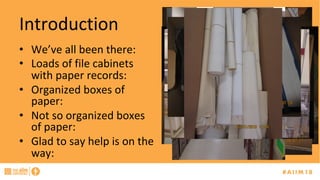
•  We’ve	all	been	there:	
•  Loads	of	file	cabinets	
with	paper	records:	
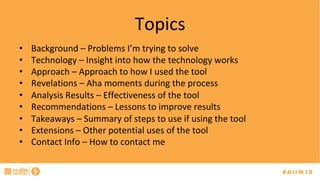
•  Organized	boxes	of	
paper:	
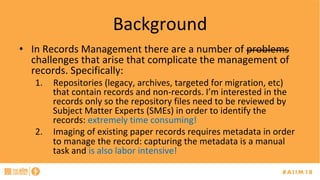
•  Not	so	organized	boxes	
of	paper:	
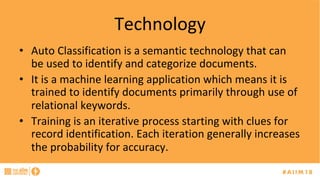
•  Glad	to	say	help	is	on	the	
way:
Topics	
•  Background	–	Problems	I’m	trying	to	solve	
•  Technology	–	Insight	into	how	the	technology	works	
•  Approach	–	Approach	to	how	I	used	the	tool		
•  Revelations	–	Aha	moments	during	the	process	
•  Analysis	Results	–	Effectiveness	of	the	tool	
•  Recommendations	–	Lessons	to	improve	results	
•  Takeaways	–	Summary	of	steps	to	use	if	using	the	tool	
•  Extensions	–	Other	potential	uses	of	the	tool	
•  Contact	Info	–	How	to	contact	me
Background	
•  In	Records	Management	there	are	a	number	of	problems	
challenges	that	arise	that	complicate	the	management	of	
records.	Specifically:	
1.  Repositories	(legacy,	archives,	targeted	for	migration,	etc)	
that	contain	records	and	non-records.	I’m	interested	in	the	
records	only	so	the	repository	files	need	to	be	reviewed	by	
Subject	Matter	Experts	(SMEs)	in	order	to	identify	the	
records:	extremely	time	consuming!	
2.  Imaging	of	existing	paper	records	requires	metadata	in	order	
to	manage	the	record:	capturing	the	metadata	is	a	manual	
task	and	is	also	labor	intensive!
Technology	
•  Auto	Classification	is	a	semantic	technology	that	can	
be	used	to	identify	and	categorize	documents.		
•  It	is	a	machine	learning	application	which	means	it	is	
trained	to	identify	documents	primarily	through	use	of	
relational	keywords.	
•  Training	is	an	iterative	process	starting	with	clues	for	
record	identification.	Each	iteration	generally	increases	
the	probability	for	accuracy.
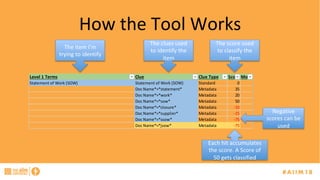
How	the	Tool	Works	
Level	1	Terms Clue Clue	Type Score Mod
Statement	of	Work	(SOW) Statement	of	Work	(SOW) Standard 0
Doc	Name*=*statement* Metadata 35
Doc	Name*=*work* Metadata 20
Doc	Name*=*sow* Metadata 50
Doc	Name*=*closure* Metadata -10
Doc	Name*=*supplier* Metadata -15
Doc	Name*=*ssow* Metadata -75
Doc	Name*=*jsow* Metadata -75
The	clues	used	
to	identify	the	
item	
The	score	used	
to	classify	the	
item	
Each	hit	accumulates	
the	score.	A	Score	of	
50	gets	classified	
Negative	
scores	can	be	
used	
The	item	I’m	
trying	to	identify
Approach	
•  The	approach	was	to	utilize	the	auto	classification	technology	(tool)	to	determine	the	feasibility	of	
identifying	records	within	a	specific	Engineering	document	repository.	
•  Training	of	the	tool	is	an	important	aspect	of	applying	the	technology.	It	is	typically	a	one	time	
(non-recurring)	effort	that	will	need	tweaking	on	occasion.	The	training	consists	of	the	following:	
–  Identify	the	potential	set	of	records	that	are	likely	in	the	repository.	This	establishes	targets	for	the	training.	
In	our	case	we	established	a	Record	Work	Product	List	(RWPL)	which	identifies	records	within	the	company.		
–  Since	our	target	set	was	Engineering	we	focused	on	the	identification	of	70	Engineering	type	records.	
–  Training	consists	of	the	identification	of	key	words,	phrases,	and	relationships	and	associating	weighting	of	
these	items	in	order	to	classify	the	document.		
–  Establish	goals	for	what	is	good	enough:	probability	to	identify	records	and	probability	for	non-records.	My	
targets	were	85%	for	records	and	95%	for	non-records.	
–  Select	the	training	set.	The	training	set	should	be	a	representative	set	of	what	is	expected	in	the	repository	
and	consist	of	enough	items	to	establish	the	targets	for	all	items.	
–  Perform	the	training	until	targets	are	realized	on	the	training	set.
Realizations	(			)	
•  The	repository	I	started	on	for	this	application	had	almost	a	million	documents	(855,000).	
•  My	first	realization	was	that	the	documents	were	all	in	a	proprietary	repository	and	the	tool	was	not	able	to	
directly	access	items	in	this	repository	without	developing	a	connector.	So,	analyzing	documents	in	the	repository	
needed	customization	and	I	hadn’t	time	nor	budget	to	develop	a	connector.	
•  To	get	around	this	issue	I	had	a	report	generated	(in	Excel)	from	the	repository	that	provided	me	with	three	pieces	
of	information:	Document	Number,	Document	Title	and	Document	Family	(set	of	88	types).	I	was	curious	to	see	if	I	
could	use	the	tool	to	identify	Records	based	on	this	limited	information.		
•  From	this	report	I	established	a	training	set	of	50,000	line	items.	I	used	a	large	set	due	to	the	limited	information	
provided.		Note:	If	using	entire	documents	(vs	titles)	much	less	of	a	training	set	can	be	used.			
•  Training	took	me	7	passes:	
–  Set	an	initial	set	of	“clues”	for	a	set	of	items.	After	each	run	the	results	were	analyzed	to	determine	how	many	items	were	
classified	and	the	overall	accuracy	of	the	classification	
–  The	item	“non-record”	was	added	after	the	realization	that	identification	of	non-records	assists	in	the	identification	of	records	
–  The	goal	of	the	first	4	passes	was	basically	to	increase	the	number	of	types	of	Records	identified	with	some	emphasis	on	
accuracy		
–  The	next	three	passes	focused	on	overall	accuracy	of	the	clues.	Accuracy	is	actually	more	time	consuming	as	it	is	a	manual	
process:	every	item	needs	to	be	assessed	
–  Another	realization	was	that	many	of	the	items	were	not	classifiable:	Not	enough	information	was	contained	in	the	data	set	to	
render	a	classification	(e.g.,	sometimes	the	document	number	was	just	repeated	in	the	document	title	field)
Training	Results	
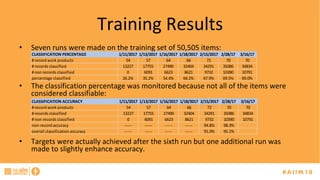
•  Seven	runs	were	made	on	the	training	set	of	50,505	items:	
•  The	classification	percentage	was	monitored	because	not	all	of	the	items	were	
considered	classifiable:	
•  Targets	were	actually	achieved	after	the	sixth	run	but	one	additional	run	was	
made	to	slightly	enhance	accuracy.	
CLASSIFICATION	PERCENTAGE 1/11/2017 1/13/2017 1/16/2017 1/18/2017 2/15/2017 2/28/17 3/16/17
#	record	work	products 54 57 64 66 72 70 70
#	records	classified 13227 17755 27490 32404 34291 35086 34834
#	non	records	classified 0 6091 6623 8621 9732 10390 10791
percentage	classified 26.2% 35.2% 54.4% 64.2% 67.9% 69.5% 69.0%
CLASSIFICATION	ACCURACY 1/11/2017 1/13/2017 1/16/2017 1/18/2017 2/15/2017 2/28/17 3/16/17
#	record	work	products 54 57 64 66 72 70 70
#	records	classified 13227 17755 27490 32404 34291 35086 34834
#	non	records	classified 0 6091 6623 8621 9732 10390 10791
non-record	accuracy ----- ----- ----- ----- 94.8% 98.3%
overall	classification	accuracy ----- ----- ----- ----- 91.0% 95.1%
Auto	Classification	Percentage	
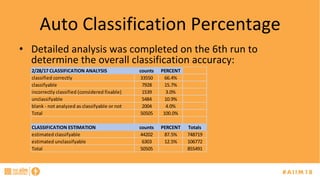
•  Detailed	analysis	was	completed	on	the	6th	run	to	
determine	the	overall	classification	accuracy:		
2/28/17	CLASSIFICATION	ANALYSIS counts PERCENT
classified	correctly 33550 66.4%
classifyable 7928 15.7%
incorrectly	classified	(considered	fixable) 1539 3.0%
unclassifyable 5484 10.9%
blank	-	not	analyzed	as	classifyable	or	not 2004 4.0%
Total 50505 100.0%
CLASSIFICATION	ESTIMATION counts PERCENT Totals
estimated	classifyable 44202 87.5% 748719
estimated	unclassifyable 6303 12.5% 106772
Total 50505 855491
Auto	Classification	Results	
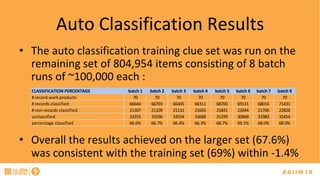
•  The	auto	classification	training	clue	set	was	run	on	the	
remaining	set	of	804,954	items	consisting	of	8	batch	
runs	of	~100,000	each	:		
•  Overall	the	results	achieved	on	the	larger	set	(67.6%)	
was	consistent	with	the	training	set	(69%)	within	-1.4%	
CLASSIFICATION	PERCENTAGE batch	1 batch	2 batch	3 batch	4 batch	5 batch	6 batch	7 batch	8
#	record	work	products 70 70 70 70 70 70 70 70
#	records	classified 66644 66703 66445 66311 68700 69131 68016 71431
#	non	records	classified 21307 21109 21131 21065 21841 22044 21706 22828
unclassified 33355 33296 33554 33688 31299 30868 31983 32454
percentage	classified 66.6% 66.7% 66.4% 66.3% 68.7% 69.1% 68.0% 68.0%
Recommendations	
•  If	you	choose	to	use	document	titles	for	classification	purposes:	
–  Refrain	from	using	just	numbers	or	cryptic	abbreviations	(use	
standard)	
–  Standardize	or	eliminate	certain	shorthand	type	notations	(e.g.,	appr	
or	appv	for	approved)			
–  Be	more	rigorous	when	selecting	the	document	type	(inaccuracies	
here	cause	classification	errors)	
–  Ensure	spelling	is	correct		
–  If	document	numbering	could	be	standardized	this	would	also	assist	
the	accuracy	(e.g.,	notices	of	revision	were	sometimes	prefixed	with	
NORxxxx)
Takeaways	
•  Identify	the	potential	set	of	records	that	are	likely	in	the	repository.	
Modulate	the	set	of	records	such	that	you	can	achieve	the	desired	
targets.		
–  Use	retention	policy	as	a	guide.	
•  Establish	goals	for	what	is	good	enough:	probability	to	identify	
records	and	probability	for	non-records.		
•  Select	the	training	set.	The	training	set	should	be	a	representative	
set	of	what	is	expected	in	the	repository	and	consist	of	enough	
items	to	establish	the	targets	for	all	items.	
•  Ensure	that	the	documents	are	searchable	especially	if	in	*.PDF	
format.
Extensions	
•  The	auto-classification	technology	can	be	used	to	
extract	metadata	from	documents:	
–  Especially	forms	that	have	designated	information	
partitioning;	
–  Documents	that	follow	standard	headers,	paragraphs		or	
that	follow	certain	section	titles	and	topics.	
•  We	also	did	some	work	where	the	tool	can	be	used	to	
screen	for	personally	identifiable	information	(pii)	on	
documents.
Extensions	
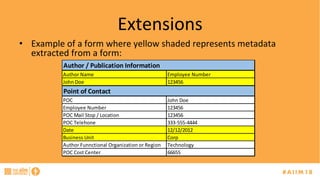
•  Example	of	a	form	where	yellow	shaded	represents	metadata	
extracted	from	a	form:	
Author	Name Employee	Number
John	Doe 123456
POC John	Doe
Employee	Number 123456
POC	Mail	Stop	/	Location 123456
POC	Telehone 333-555-4444
Date 12/12/2012
Business	Unit Corp
Author	Funnctional	Organization	or	Region Technology
POC	Cost	Center 66655
Author	/	Publication	Information
Point	of	Contact
Extension	Results	
•  Record	metadata	was	extracted	from	these	forms	into	a	
spreadsheet	and	used	the	spreadsheet	to	bulk	upload	the	
items	into	the	record	repository	complete	with	metadata.	
–  Alternatively	this	would	have	been	a	fully	manual	process.	
•  We	noted	that	in	some	cases	a	field	we	needed	was	left	
blank	which	led	us	to	have	the	form	change	the	field	to	a	
required	field.	
•  Another	repository	had	5000+	documents	all	of	which	had	
a	form	as	part	of	the	document	set.
Contact	Info	
Steve	Clark	
Raytheon	Company	
Company	Record	Manager	
781-522-5151	(o)	
339-227-7678	(c)	
Steven_f_clark@raytheon.com

[AIIM18] Beyond Human Capacity: Using analytics to scale your everyday information migration and interface activities - Steven Clark