



How consistent
is your color in printing?
G7 for Grand Format Printers
X-Rite Color Management for
Grand Format Printers
Sponsor
• X-Rite is the global leader in color
science and technology
• Pantone is part of the family
• Mature product line for printing and
graphic arts markets
Today's Speaker – Dan Reid
o Founded in 1998 to help business
realize the benefits of color management
o Consulting and product sales for some of
the largest and smallest print providers
o Early adopter of G7 calibration technique
for non-litho applications. Certified by IDEAlliance in 2006
First Webinar
o PDF Slides – http://slidesha.re/17vHP5W
o Recorded Webinar – http://bit.ly/1coYVIi
• This is webinar is also being recorded
o We will send links to the slides and recording
Part 1 — Printer Calibration
• Quick Poll
• G7 Myths & Background
• Ways to Achieve G7 Compliance
• G7 Tools to Achieve Compliance
• Tips
• QA
Agenda
(1st Poll Question)
• Have you implemented G7 calibration
method at your business?
• If you have not
implemented G7, why not?
(2nd Poll Question)
• RGB files by their nature are neutral
• Files from RGB to CMYK are typically a US
Web Coated (SWOP) v2 or GRACoL (2006)
separations
• Though US Web Coated in not based on G7
using GRACoL as a source ICC profile in your
RIP usually works
Invariably source files
are either RGB or CMYK
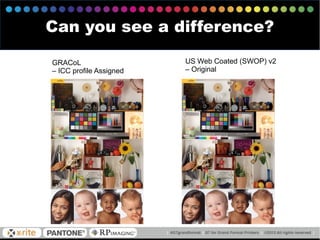
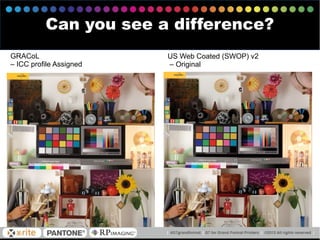
Can you see a difference?
GRACoL
– ICC profile Assigned
US Web Coated (SWOP) v2
– Original
GRACoL
– ICC profile Assigned
US Web Coated (SWOP) v2
– Original
Can you see a difference?
• Equal values of RGB = neutrality
• Common agreed gray balance triplet for CMYK
for mid-tone is 50/40/40/0
o GRACoL 2006 and Web Coated SWOP 2006 are based on G7
calibration process.
Neutrals in RGB and CMYK
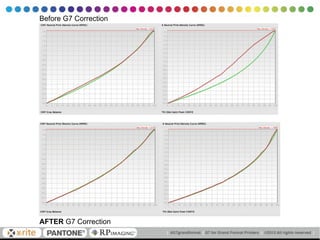
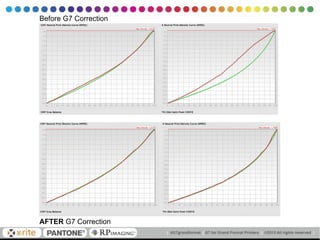
AFTER G7 Correction
Before G7 Correction
• Just getting prints neutral won't alone achieve
a visual match
• Using a method to consistently achieve a
visual contrast relative to the substrate color
is missing key
So neutrality is well defined,
what about visual contrast?
• Formally introduced in 2006 by IDEAlliance
• Origins and original calculations were based
on lithographic printing
• Slowly introduced and tested in other printing
processes
• Most Grand Format RIPs supports G7
calibration method either directly or
indirectly by color reference
Brief History of G7 Method
Common Myths about G7
• G7 does not replace color management
• If you are using a printing process other
than commercial (litho) printing then G7
calibration provides little benefit
• Color ICC profiles can achieve the same
results
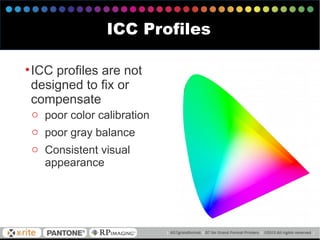
•ICC profiles are not
designed to fix or
compensate
o poor color calibration
o poor gray balance
o Consistent visual
appearance
ICC Profiles
• Targeting G7 via color management may not be
sufficient meet required tolerance metrics
• Output (Printer) ICC profile typically does not have enough
samples to be accurate enough
• Output (Printer) ICC profile does not have enough
resolution for accuracy
o Table resolution needs to be higher resulting in larger sized ICC
profiles (MB). Not a huge deal, but not all RIP profiling
solutions allow adjustable table resolution
• May necessitate manual ICC Profile tuning to achieve
a match within tolerance
• Possible but requires some trial and error
• Tedious | time consuming
G7 via Color Reference
Of course no one would consider building ICC
profiles without first optimizing color balance
There could be a color bias the ICC profile will
faithfully record
ICC profile will not automatically re-distribute
color tones to achieve smooth gradients
Poor Color Calibration
• If your ICC profiling chart prints with a color cast
then the ICC profiling software will record that
bias
• ICC Profiling Black Generation options define
how to black is used to create neutrals
(GCR/UCR)
o Invariably there are not enough samples available to provide
sufficient accuracy on first attempt from the ICC profiling chart
o Improvements are possible by iterating correction by re-printing
profiling charts with corrections applied, measure, and evaluating if
further improvement is needed
Poor Gray Balance — Color Cast
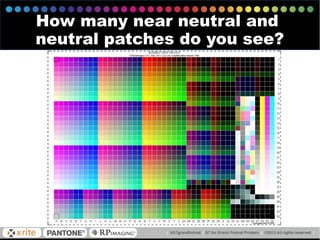
How many near neutral and
neutral patches do you see?
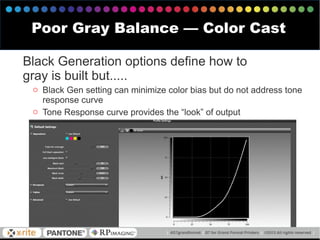
Black Generation options define how to
gray is built but.....
o Black Gen setting can minimize color bias but do not address tone
response curve
o Tone Response curve provides the “look” of output
Poor Gray Balance — Color Cast
• Most Grand Format Printing RIPs do not offer
iterative color tuning
o Too many medias, not enough time
o Not practical – there is typically some variance in
printing that is higher than color tolerance targeted
o Traditional color match using ICC profiles in a RIP
may be sufficient to pass within tolerance
• No mechanism to compensate other than re-linearization which
may not be sufficient since the goal is not meeting a gray
balance tolerance
• May require more frequent profiling of printing device if re-
linearization does bring the printer back in line within tolerance
G7 via Color Reference
•Output color gamut is frequently smaller than
the source color gamut of SWOP or GRACoL
o Using standard ICC profiles sometimes can result in
severe compression
o Accuracy in color compression is not always
sufficient
• Directly related to how many samples are taken
• Some color / neutrals need additional sampling to improve
accuracy
Grand Format Printing ain’t
GRACoL or SWOP
G7 Grayscale
o Basic requirement for G7 Qualification
G7 Targeted
o Used for printing presses – not Grand Format
o Color Gamut similar to ISO 12647-2 / GRACoL / TR-
15
G7 ColorSpace
o G7 Grayscale required but many proofing RIPs use
color management instead to G7 correction curves
achieve G7 compliance
o Color Match verified against G7 reference typically
GRACoL or SWOP3
G7 Compliance Levels
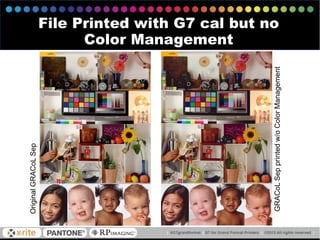
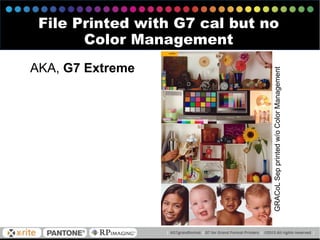
G7 Extreme
o No color management (no reference print
conditions) but G7 Grayscale applied
o Defines setup where color gamut is larger that
source (ie GRACoL) and not compressed to meet a
reference like G7 ColorSpace
o Usually not “accurate” color but pleasing
G7 Compliance Levels
OriginalGRACoLSep
GRACoLSepprintedw/oColorManagement
File Printed with G7 cal but no
Color Management
GRACoLSepprintedw/oColorManagement
File Printed with G7 cal but no
Color Management
AKA, G7 Extreme
Original GRACoL Sep
Original GRACoL Sep
• Better and more consistent match across
printing technologies
• Improved visual color appearance across
different substrates
• Alignment with source ICC profiles based upon
G7 method (GRACoL & SWOP)
• Improved recalibration process that aligns with
a visual system using only 300 patches
o Improves the shelf life of ICC profile
if based upon G7
Benefits of G7 for Your Business
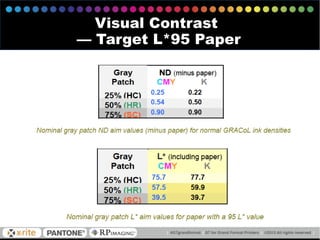
• This defines how contrasty a image appears to
the eye.
o Some materials inherently have a lower visual
contrast
o Especially problematic in non-litho applications
o Media and printing technology have direct impact on
how an image contrast appears to the eye
Visual Contrast
Visual Contrast
— Target L*95 Paper
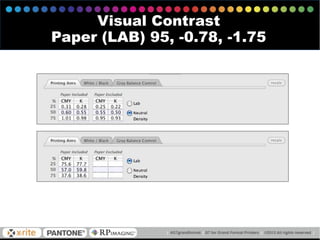
Visual Contrast
Paper (LAB) 95, -0.78, -1.75
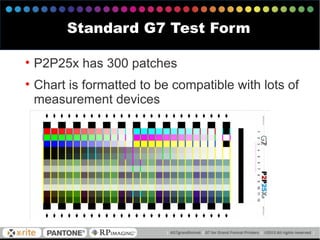
• P2P25x has 300 patches
• Chart is formatted to be compatible with lots of
measurement devices
Standard G7 Test Form
• Chromix Curve3
• Tucanna PrintControlPro
• Alwan PrintStandardizerX
Tools for Generating G7
Correction Curves
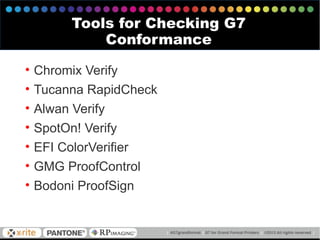
• Chromix Verify
• Tucanna RapidCheck
• Alwan Verify
• SpotOn! Verify
• EFI ColorVerifier
• GMG ProofControl
• Bodoni ProofSign
Tools for Checking G7
Conformance
AFTER G7 Correction
Before G7 Correction
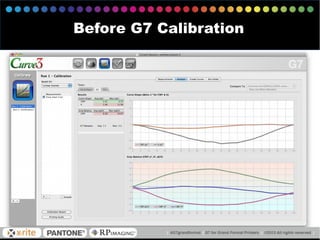
Before G7 Calibration
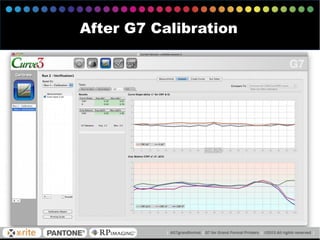
After G7 Calibration
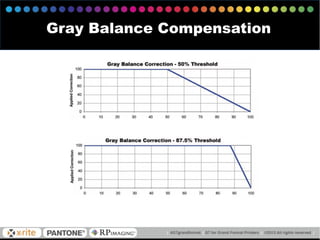
Gray Balance Compensation
• Relative (native) Black Aim Point instead of
targeting absolute reference of (0a*0b*)
o Legacy G7 method black aim point is for absolute black
reference
o Though curves may be smoother you may fail G7
qualification by not being able to hold gray balance in
SC
• Normalize High Densities
o Designed to smooth out drastic curve corrections in the
shadows
o Again this may make it difficult to pass G7 Qual in
shadow areas
G7 for the Advanced
• Use ICC profile charts to smooth data
o Apply smoothed data to P2P25x
G7 for the Advanced
• Do not resize the P2P25x image
o Special designed in a dithered pattern for accuracy
• Print at least two P2P25x on each test form
o Rotate one of the charts 180°
o Average data!! Either externally or in the G7 tool
o You should have at least two data files to average, more the
better!
• Consider a program to collect measurements
over time
o Improves correction curves by statistically more data
o Proactive instead of Reactive (uh, what happened?)
Tips for Success
(Poll Question)
• What is the most troublesome way
customers communicate color?
Device Link ICC Profiles
Best way to handle color conversion
o No trip through LAB
o “Baked” color conversion
o Fastest since all calculations are done, not only the fly as in a
traditional in RIP color conversion
o Best method for scaling source to destination
Several Device Link generation products are
available
o They offer features on how to handle scaling
o Purity of colors
o Black generation preservation
X-Rite i1Profiler v1.5
o Adds Device Link Functionality
• Improvement in color gradients not banding as in a traditional LAB conversion
• Maintains purity of source black generation to be mapped to the destination
instead of converting to 4/C black in LAB conversion
Device Link ICC Profiles
Last — Third Webinar
• Talk more about device link color matching
• Delve deep in how to communicate color
intentions throughout production
o How to handle customer supplied --
• Proofs from a third-party vendor
• Print samples
• Named colors – PMS
• Brand color matching
• Communicating Color for Grand Format
o Input | Reference color spaces
o RGB files
o New and old school PMS color
Upcoming Webinars
September
25
2013
Questions and Answers
Discuss this topic further:
#G7grandformat
Type your questions into the side bar on right.
How consistent
is your color in printing?
G7 for Grand Format Printers
X-Rite Color Management for
Grand Format Printers

Webinar -- G7 for Grand Format Printers

  • 1.
    How consistent is yourcolor in printing? G7 for Grand Format Printers X-Rite Color Management for Grand Format Printers
  • 2.
    Sponsor • X-Rite isthe global leader in color science and technology • Pantone is part of the family • Mature product line for printing and graphic arts markets
  • 3.
    Today's Speaker –Dan Reid o Founded in 1998 to help business realize the benefits of color management o Consulting and product sales for some of the largest and smallest print providers o Early adopter of G7 calibration technique for non-litho applications. Certified by IDEAlliance in 2006
  • 4.
    First Webinar o PDFSlides – http://slidesha.re/17vHP5W o Recorded Webinar – http://bit.ly/1coYVIi • This is webinar is also being recorded o We will send links to the slides and recording Part 1 — Printer Calibration
  • 5.
    • Quick Poll •G7 Myths & Background • Ways to Achieve G7 Compliance • G7 Tools to Achieve Compliance • Tips • QA Agenda
  • 6.
    (1st Poll Question) •Have you implemented G7 calibration method at your business?
  • 7.
    • If youhave not implemented G7, why not? (2nd Poll Question)
  • 8.
    • RGB filesby their nature are neutral • Files from RGB to CMYK are typically a US Web Coated (SWOP) v2 or GRACoL (2006) separations • Though US Web Coated in not based on G7 using GRACoL as a source ICC profile in your RIP usually works Invariably source files are either RGB or CMYK
  • 9.
    Can you seea difference? GRACoL – ICC profile Assigned US Web Coated (SWOP) v2 – Original
  • 10.
    GRACoL – ICC profileAssigned US Web Coated (SWOP) v2 – Original Can you see a difference?
  • 11.
    • Equal valuesof RGB = neutrality • Common agreed gray balance triplet for CMYK for mid-tone is 50/40/40/0 o GRACoL 2006 and Web Coated SWOP 2006 are based on G7 calibration process. Neutrals in RGB and CMYK
  • 12.
  • 13.
    • Just gettingprints neutral won't alone achieve a visual match • Using a method to consistently achieve a visual contrast relative to the substrate color is missing key So neutrality is well defined, what about visual contrast?
  • 14.
    • Formally introducedin 2006 by IDEAlliance • Origins and original calculations were based on lithographic printing • Slowly introduced and tested in other printing processes • Most Grand Format RIPs supports G7 calibration method either directly or indirectly by color reference Brief History of G7 Method
  • 15.
    Common Myths aboutG7 • G7 does not replace color management • If you are using a printing process other than commercial (litho) printing then G7 calibration provides little benefit • Color ICC profiles can achieve the same results
  • 16.
    •ICC profiles arenot designed to fix or compensate o poor color calibration o poor gray balance o Consistent visual appearance ICC Profiles
  • 17.
    • Targeting G7via color management may not be sufficient meet required tolerance metrics • Output (Printer) ICC profile typically does not have enough samples to be accurate enough • Output (Printer) ICC profile does not have enough resolution for accuracy o Table resolution needs to be higher resulting in larger sized ICC profiles (MB). Not a huge deal, but not all RIP profiling solutions allow adjustable table resolution • May necessitate manual ICC Profile tuning to achieve a match within tolerance • Possible but requires some trial and error • Tedious | time consuming G7 via Color Reference
  • 18.
    Of course noone would consider building ICC profiles without first optimizing color balance There could be a color bias the ICC profile will faithfully record ICC profile will not automatically re-distribute color tones to achieve smooth gradients Poor Color Calibration
  • 19.
    • If yourICC profiling chart prints with a color cast then the ICC profiling software will record that bias • ICC Profiling Black Generation options define how to black is used to create neutrals (GCR/UCR) o Invariably there are not enough samples available to provide sufficient accuracy on first attempt from the ICC profiling chart o Improvements are possible by iterating correction by re-printing profiling charts with corrections applied, measure, and evaluating if further improvement is needed Poor Gray Balance — Color Cast
  • 20.
    How many nearneutral and neutral patches do you see?
  • 21.
    Black Generation optionsdefine how to gray is built but..... o Black Gen setting can minimize color bias but do not address tone response curve o Tone Response curve provides the “look” of output Poor Gray Balance — Color Cast
  • 22.
    • Most GrandFormat Printing RIPs do not offer iterative color tuning o Too many medias, not enough time o Not practical – there is typically some variance in printing that is higher than color tolerance targeted o Traditional color match using ICC profiles in a RIP may be sufficient to pass within tolerance • No mechanism to compensate other than re-linearization which may not be sufficient since the goal is not meeting a gray balance tolerance • May require more frequent profiling of printing device if re- linearization does bring the printer back in line within tolerance G7 via Color Reference
  • 23.
    •Output color gamutis frequently smaller than the source color gamut of SWOP or GRACoL o Using standard ICC profiles sometimes can result in severe compression o Accuracy in color compression is not always sufficient • Directly related to how many samples are taken • Some color / neutrals need additional sampling to improve accuracy Grand Format Printing ain’t GRACoL or SWOP
  • 24.
    G7 Grayscale o Basicrequirement for G7 Qualification G7 Targeted o Used for printing presses – not Grand Format o Color Gamut similar to ISO 12647-2 / GRACoL / TR- 15 G7 ColorSpace o G7 Grayscale required but many proofing RIPs use color management instead to G7 correction curves achieve G7 compliance o Color Match verified against G7 reference typically GRACoL or SWOP3 G7 Compliance Levels
  • 25.
    G7 Extreme o Nocolor management (no reference print conditions) but G7 Grayscale applied o Defines setup where color gamut is larger that source (ie GRACoL) and not compressed to meet a reference like G7 ColorSpace o Usually not “accurate” color but pleasing G7 Compliance Levels
  • 26.
  • 27.
    GRACoLSepprintedw/oColorManagement File Printed withG7 cal but no Color Management AKA, G7 Extreme
  • 28.
  • 29.
    • Better andmore consistent match across printing technologies • Improved visual color appearance across different substrates • Alignment with source ICC profiles based upon G7 method (GRACoL & SWOP) • Improved recalibration process that aligns with a visual system using only 300 patches o Improves the shelf life of ICC profile if based upon G7 Benefits of G7 for Your Business
  • 30.
    • This defineshow contrasty a image appears to the eye. o Some materials inherently have a lower visual contrast o Especially problematic in non-litho applications o Media and printing technology have direct impact on how an image contrast appears to the eye Visual Contrast
  • 31.
  • 32.
  • 33.
    • P2P25x has300 patches • Chart is formatted to be compatible with lots of measurement devices Standard G7 Test Form
  • 34.
    • Chromix Curve3 •Tucanna PrintControlPro • Alwan PrintStandardizerX Tools for Generating G7 Correction Curves
  • 35.
    • Chromix Verify •Tucanna RapidCheck • Alwan Verify • SpotOn! Verify • EFI ColorVerifier • GMG ProofControl • Bodoni ProofSign Tools for Checking G7 Conformance
  • 36.
  • 37.
  • 38.
  • 39.
  • 40.
    • Relative (native)Black Aim Point instead of targeting absolute reference of (0a*0b*) o Legacy G7 method black aim point is for absolute black reference o Though curves may be smoother you may fail G7 qualification by not being able to hold gray balance in SC • Normalize High Densities o Designed to smooth out drastic curve corrections in the shadows o Again this may make it difficult to pass G7 Qual in shadow areas G7 for the Advanced
  • 41.
    • Use ICCprofile charts to smooth data o Apply smoothed data to P2P25x G7 for the Advanced
  • 42.
    • Do notresize the P2P25x image o Special designed in a dithered pattern for accuracy • Print at least two P2P25x on each test form o Rotate one of the charts 180° o Average data!! Either externally or in the G7 tool o You should have at least two data files to average, more the better! • Consider a program to collect measurements over time o Improves correction curves by statistically more data o Proactive instead of Reactive (uh, what happened?) Tips for Success
  • 43.
    (Poll Question) • Whatis the most troublesome way customers communicate color?
  • 44.
    Device Link ICCProfiles Best way to handle color conversion o No trip through LAB o “Baked” color conversion o Fastest since all calculations are done, not only the fly as in a traditional in RIP color conversion o Best method for scaling source to destination Several Device Link generation products are available o They offer features on how to handle scaling o Purity of colors o Black generation preservation
  • 45.
    X-Rite i1Profiler v1.5 oAdds Device Link Functionality • Improvement in color gradients not banding as in a traditional LAB conversion • Maintains purity of source black generation to be mapped to the destination instead of converting to 4/C black in LAB conversion Device Link ICC Profiles
  • 46.
    Last — ThirdWebinar • Talk more about device link color matching • Delve deep in how to communicate color intentions throughout production o How to handle customer supplied -- • Proofs from a third-party vendor • Print samples • Named colors – PMS • Brand color matching
  • 47.
    • Communicating Colorfor Grand Format o Input | Reference color spaces o RGB files o New and old school PMS color Upcoming Webinars September 25 2013
  • 48.
    Questions and Answers Discussthis topic further: #G7grandformat Type your questions into the side bar on right.
  • 49.
    How consistent is yourcolor in printing? G7 for Grand Format Printers X-Rite Color Management for Grand Format Printers