

1
NAPIM – October 1, 2015
Extended Gamut Guide
2
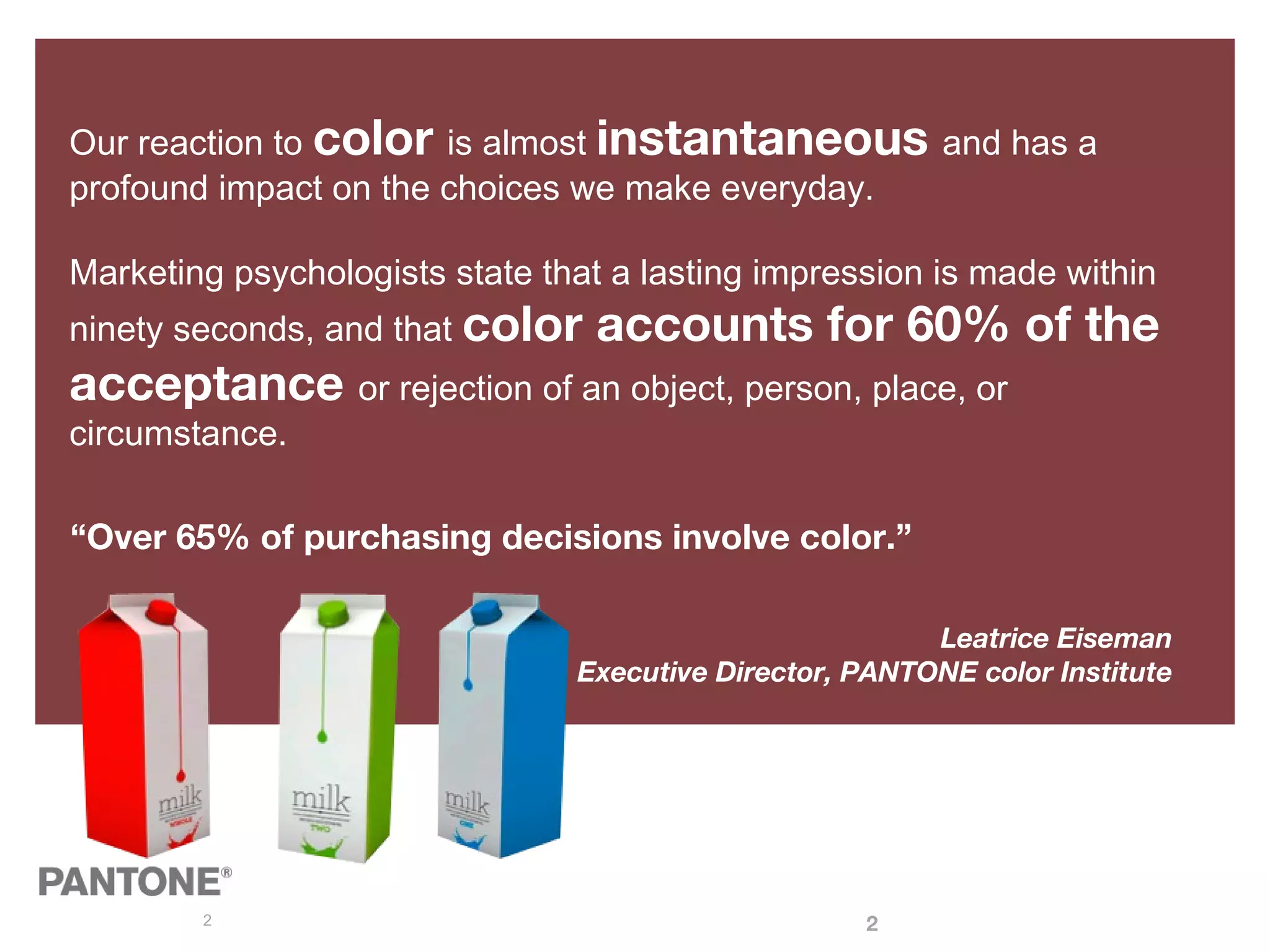
Our reaction to color is almost instantaneous and has a
profound impact on the choices we make everyday.
Marketing psychologists state that a lasting impression is made within
ninety seconds, and that color accounts for 60% of the
acceptance or rejection of an object, person, place, or
circumstance.
“Over 65% of purchasing decisions involve color.”
Leatrice Eiseman
Executive Director, PANTONE color Institute
2
3
Expand your
expectations!
This is why we, as the company known
for setting the industry standard for
color communication for over 50 years,
have created a new guide for
facilitating the closure of the acceptable
spot vs. process color printing gap.
• Brand helps drive our decisions
• Time to market
• Achievable color in production
• Accelerate this process of Extended
Gamut
• 1st
Visual Guide in World to communicate
with
4
Introducing the EXTENDED GAMUT Guide
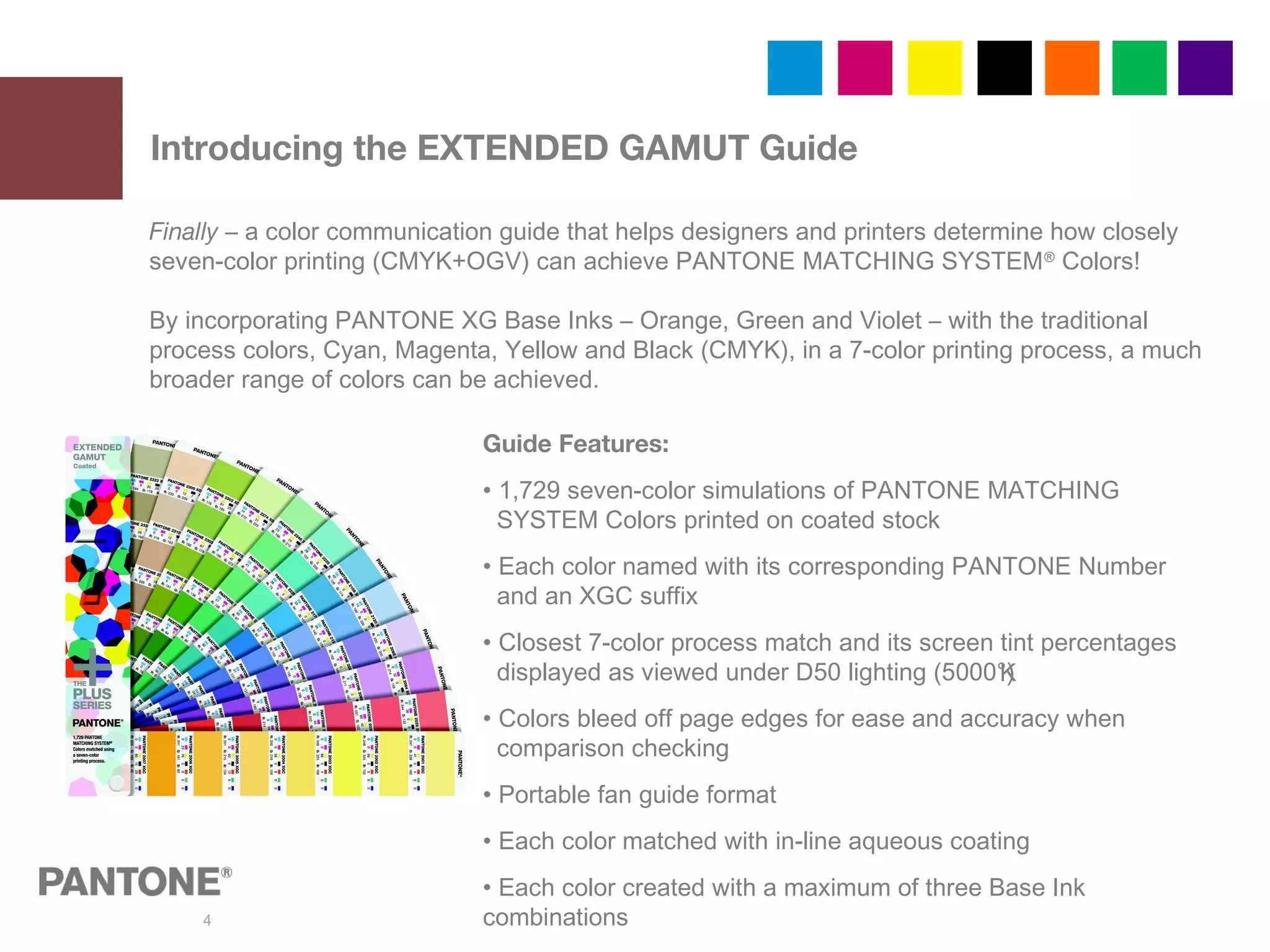
Finally – a color communication guide that helps designers and printers determine how closely
seven-color printing (CMYK+OGV) can achieve PANTONE MATCHING SYSTEM®
Colors!
By incorporating PANTONE XG Base Inks – Orange, Green and Violet – with the traditional
process colors, Cyan, Magenta, Yellow and Black (CMYK), in a 7-color printing process, a much
broader range of colors can be achieved.
Guide Features:
• 1,729 seven-color simulations of PANTONE MATCHING
SYSTEM Colors printed on coated stock
• Each color named with its corresponding PANTONE Number
and an XGC suffix
• Closest 7-color process match and its screen tint percentages
displayed as viewed under D50 lighting (5000°)
• Colors bleed off page edges for ease and accuracy when
comparison checking
• Portable fan guide format
• Each color matched with in-line aqueous coating
• Each color created with a maximum of three Base Ink
combinations
K
5
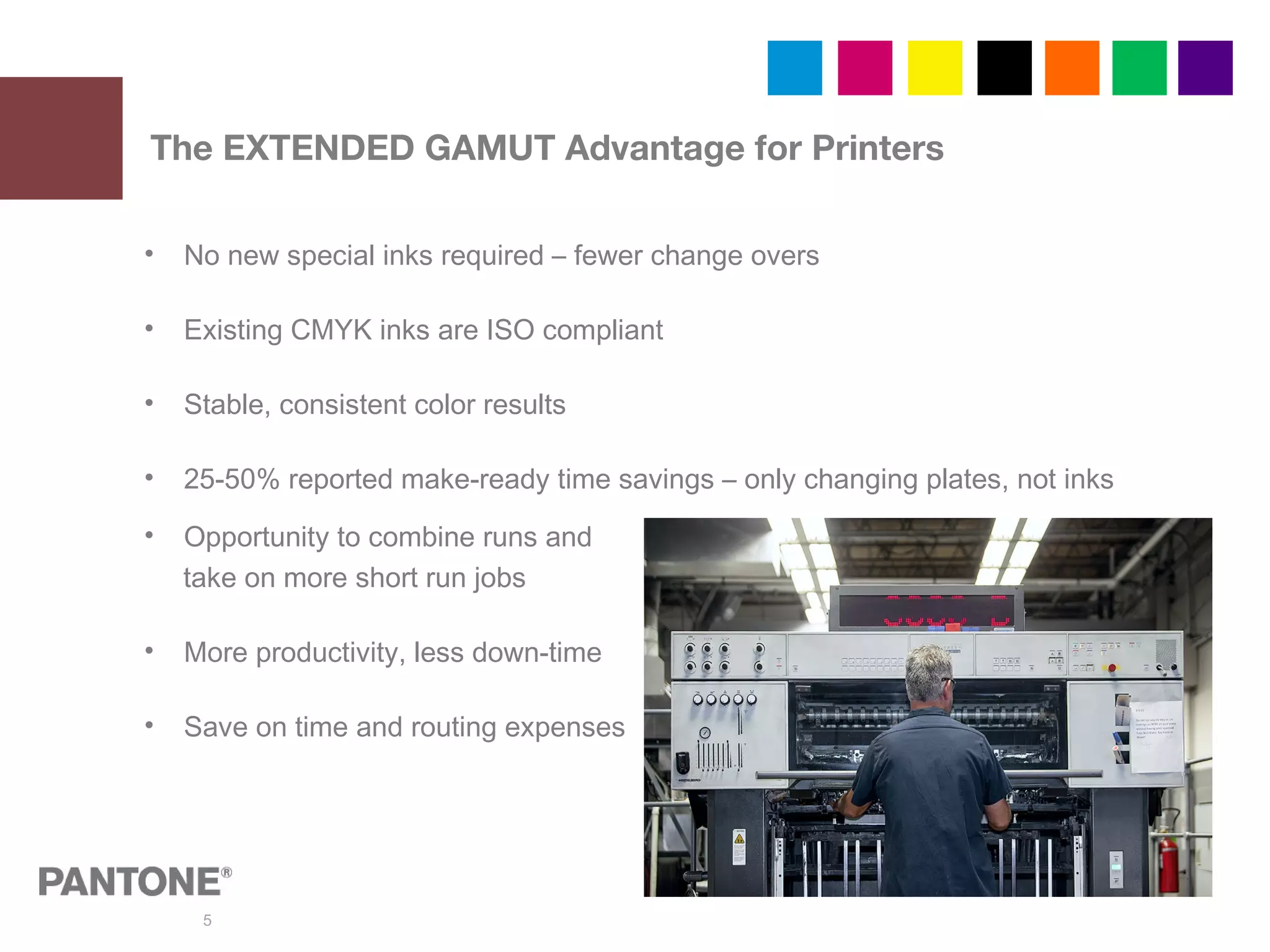
• No new special inks required – fewer change overs
• Existing CMYK inks are ISO compliant
• Stable, consistent color results
• 25-50% reported make-ready time savings – only changing plates, not inks
• Opportunity to combine runs and
take on more short run jobs
• More productivity, less down-time
• Save on time and routing expenses
The EXTENDED GAMUT Advantage for Printers
6
The PANTONE EXTENDED GAMUT Guide is best used as a visual reference to determine
when it may be possible to more accurately reproduce a solid PANTONE Color using
CMYK + PANTONE XG Orange, Green and Violet (OGV) Inks.
1) Select the desired PANTONE MATCHING SYSTEM Color from a current PLUS SERIES
FORMULA GUIDE.
2) Using the same page number in the EXTENDED GAMUT Guide, locate the corresponding
PANTONE Color and compare both guides side-by-side.
3) If the PANTONE Extended Gamut color is not a visually acceptable match, the color should
remain specified as a solid.
4) When the PANTONE Extended Gamut color appears adequate, specify the XGC color in the
artwork so your printing partner will automatically understand your color expectations.
Note: The guide shows achievable results. If your workflow varies from ours, adjustments
may be required to optimize the color result.
Using the Guide
7
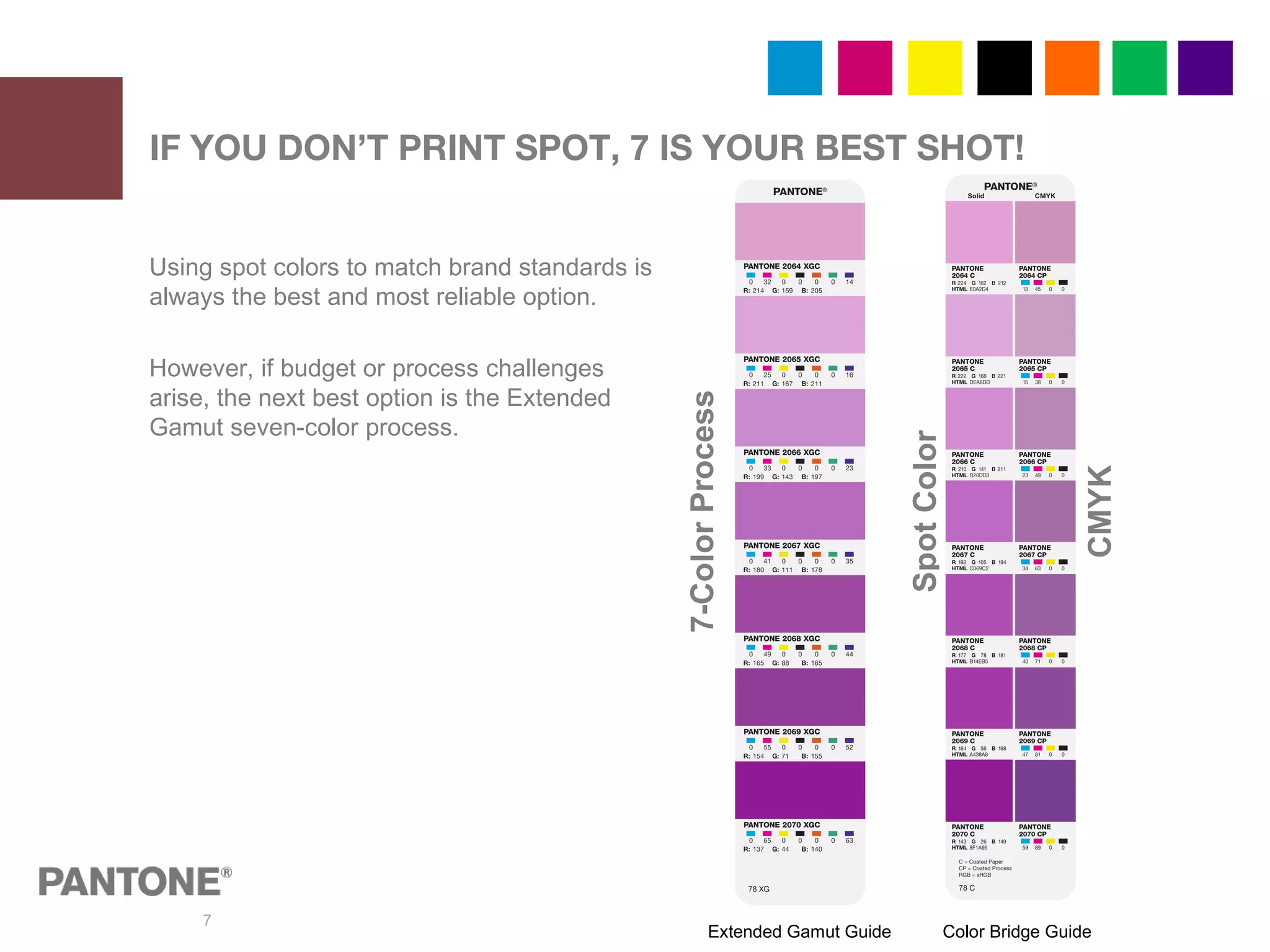
Using spot colors to match brand standards is
always the best and most reliable option.
However, if budget or process challenges
arise, the next best option is the Extended
Gamut seven-color process.
IF YOU DON’T PRINT SPOT, 7 IS YOUR BEST SHOT!
Extended Gamut Guide Color Bridge Guide
7-ColorProcess
SpotColor
CMYK
8
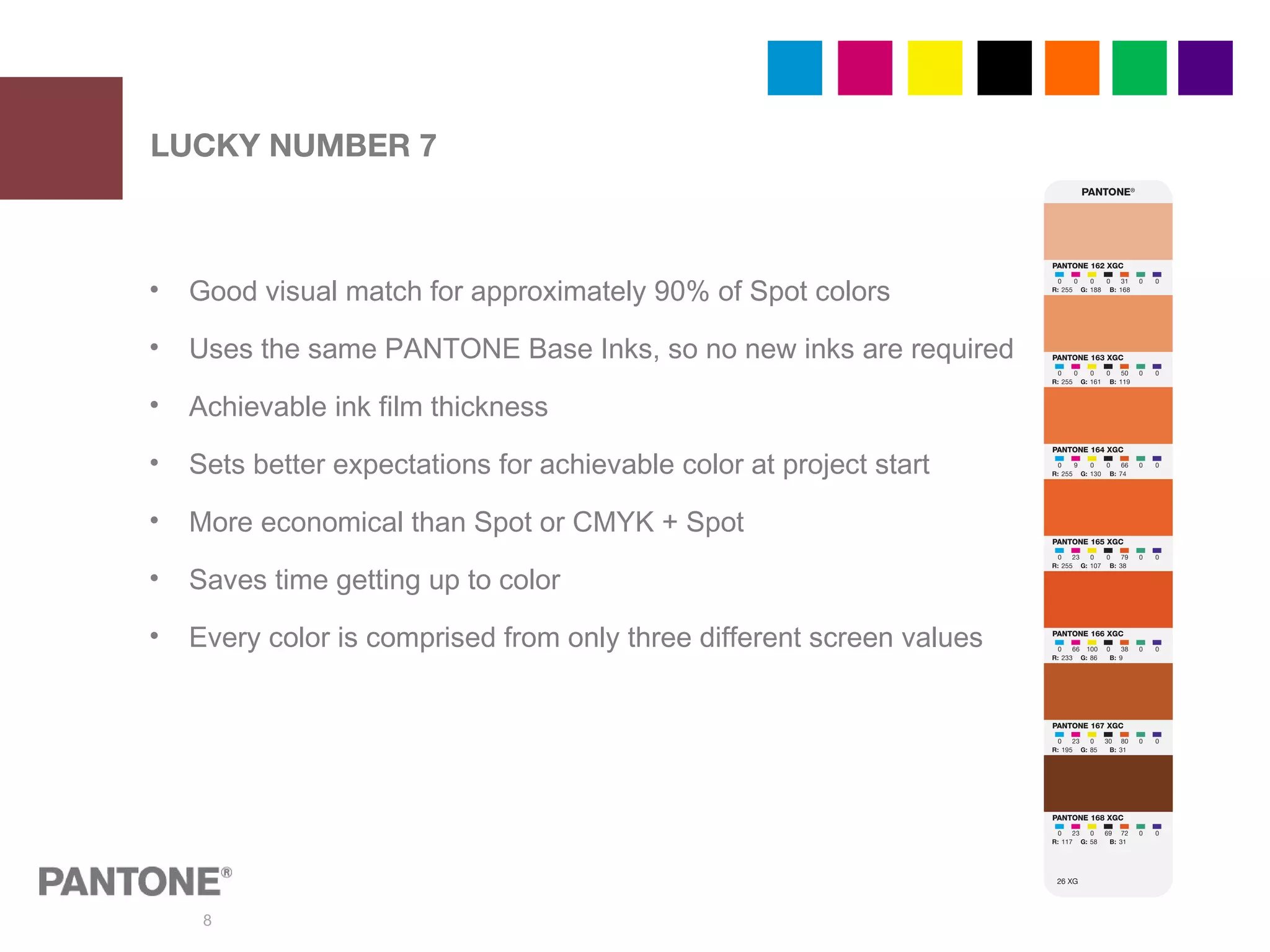
• Good visual match for approximately 90% of Spot colors
• Uses the same PANTONE Base Inks, so no new inks are required
• Achievable ink film thickness
• Sets better expectations for achievable color at project start
• More economical than Spot or CMYK + Spot
• Saves time getting up to color
• Every color is comprised from only three different screen values
LUCKY NUMBER 7
9
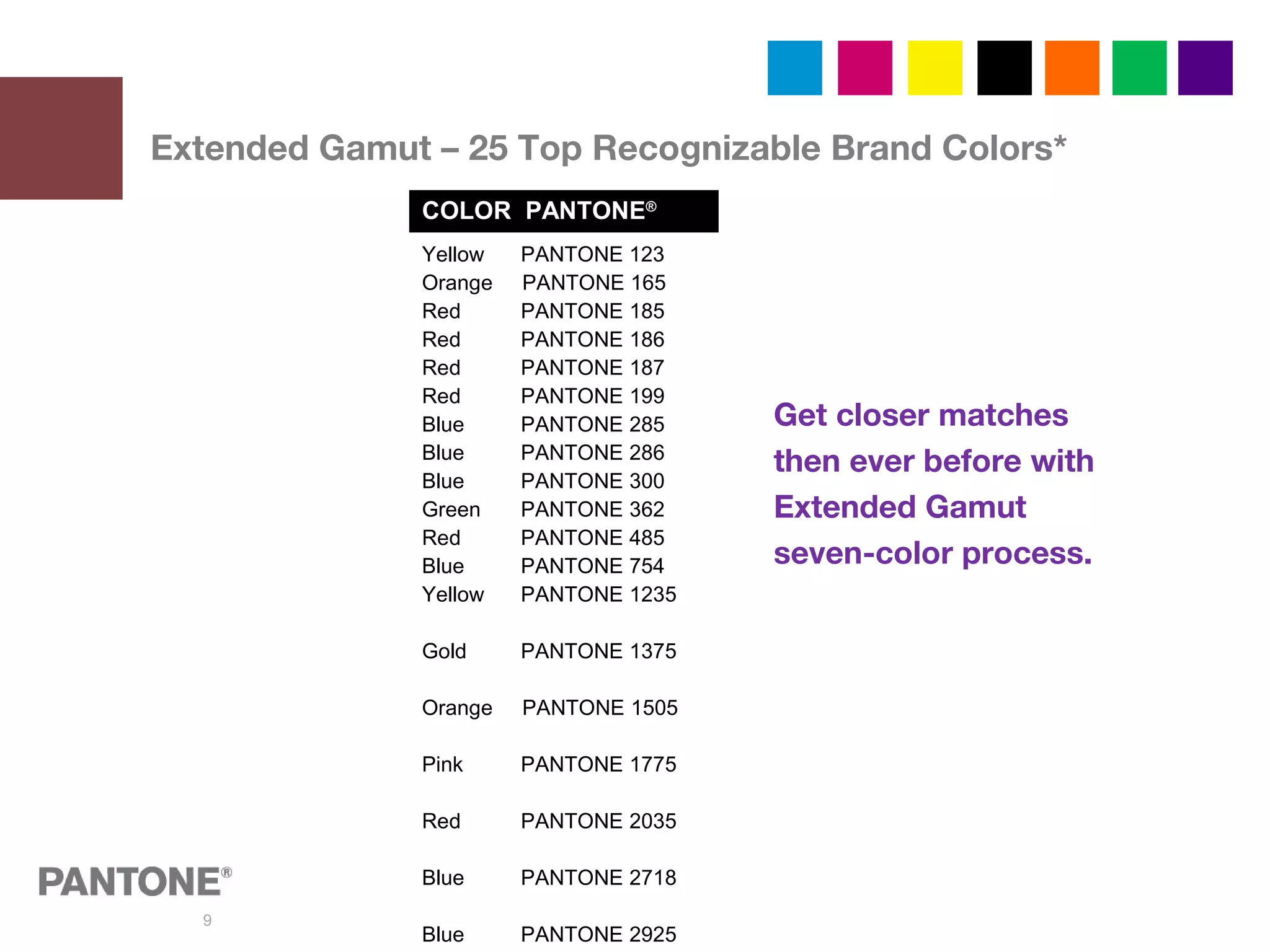
Extended Gamut – 25 Top Recognizable Brand Colors*
Get closer matches
then ever before with
Extended Gamut
seven-color process.
COLOR PANTONE®
Yellow PANTONE 123
Orange PANTONE 165
Red PANTONE 185
Red PANTONE 186
Red PANTONE 187
Red PANTONE 199
Blue PANTONE 285
Blue PANTONE 286
Blue PANTONE 300
Green PANTONE 362
Red PANTONE 485
Blue PANTONE 754
Yellow PANTONE 1235
Gold PANTONE 1375
Orange PANTONE 1505
Pink PANTONE 1775
Red PANTONE 2035
Blue PANTONE 2718
Blue PANTONE 2925
10
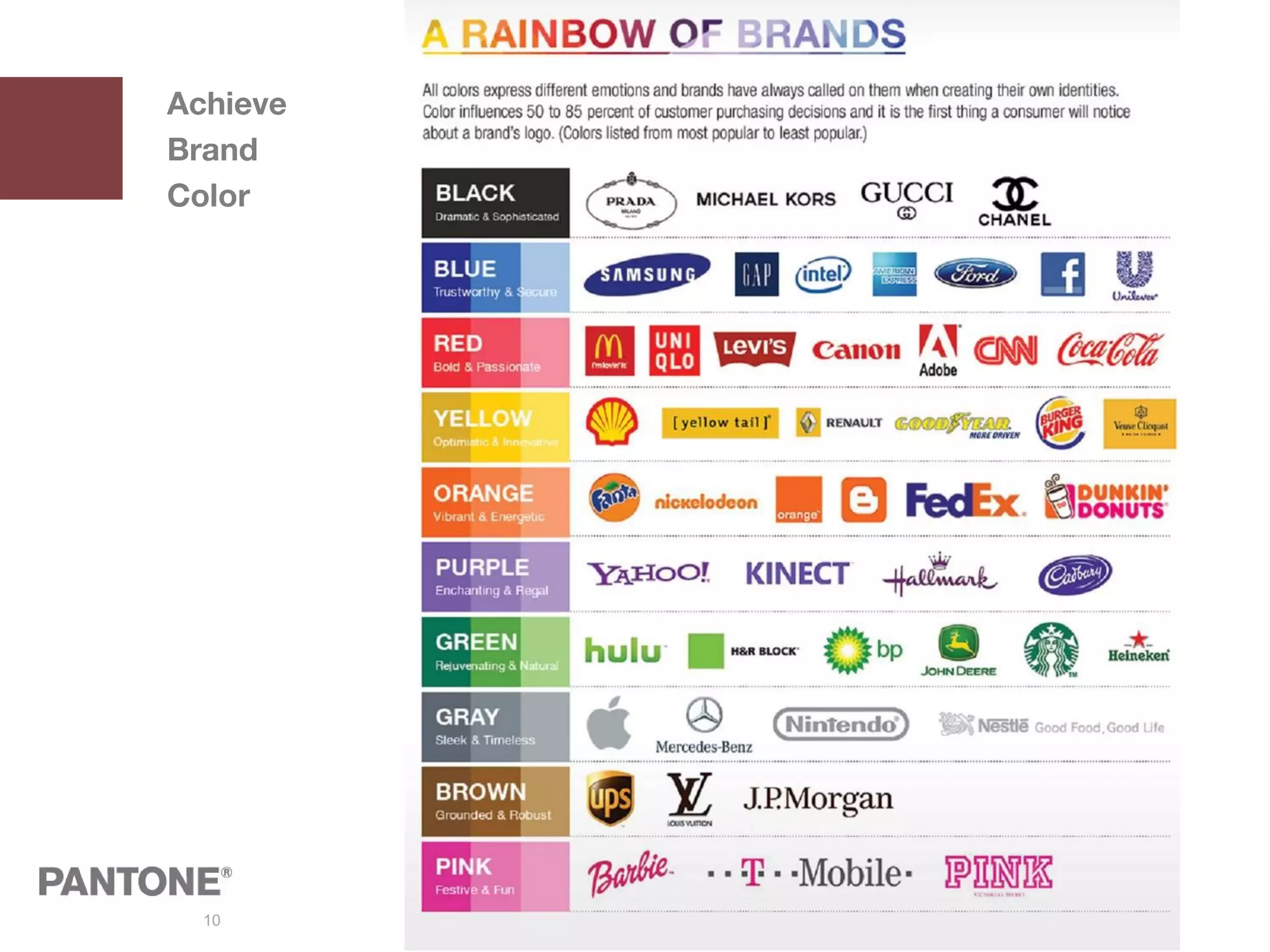
Achieve
Brand
Color
11
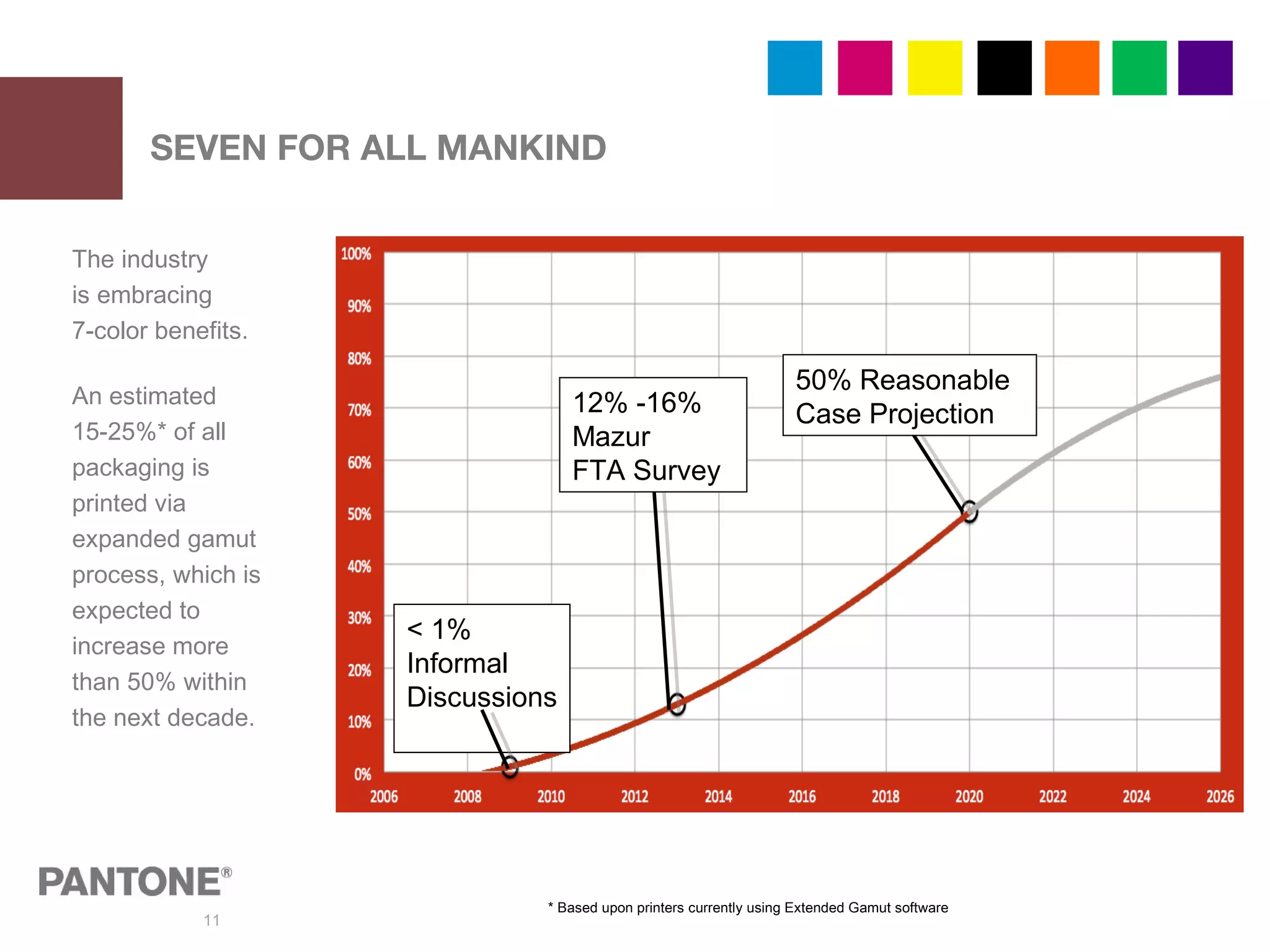
SEVEN FOR ALL MANKIND
The industry
is embracing
7-color benefits.
An estimated
15-25%* of all
packaging is
printed via
expanded gamut
process, which is
expected to
increase more
than 50% within
the next decade.
< 1%
Informal
Discussions
12% -16%
Mazur
FTA Survey
50% Reasonable
Case Projection
* Based upon printers currently using Extended Gamut software
12
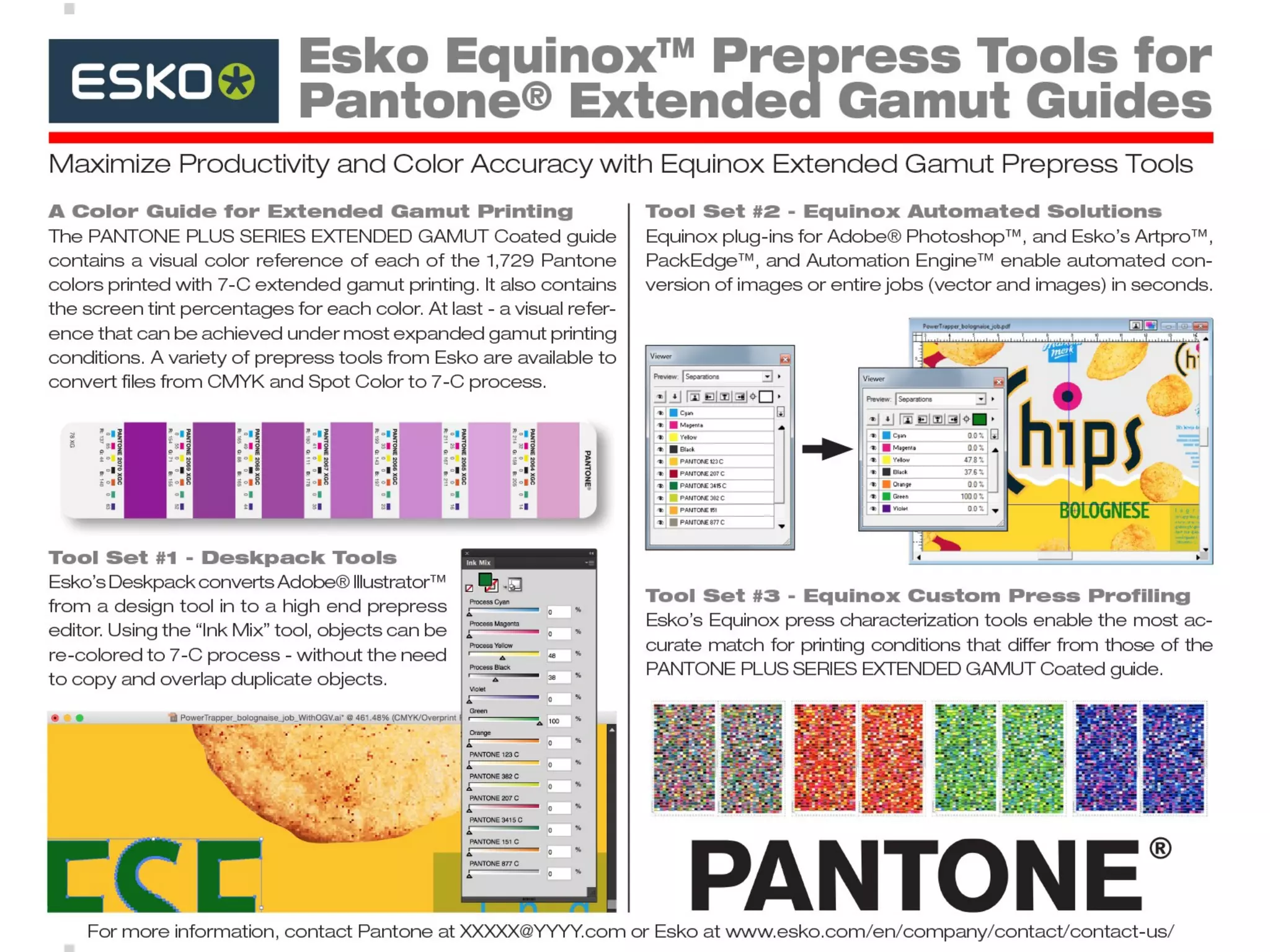
The values for our EXTENDED GAMUT Guide
and seven-color process are derived by Esko
Equinox™
color gamut technology.
Equinox is Esko’s patented system for expanded
gamut printing with 5, 6 or 7 colors. By mixing
colors on-press instead of the ink room, extreme
economic benefits are realized. By enabling the
conversion of spot colors as well as images,
Equinox also improves shelf appeal. For more
information, visit esko.com/equinox.
IMPACTING SUCCESS
13
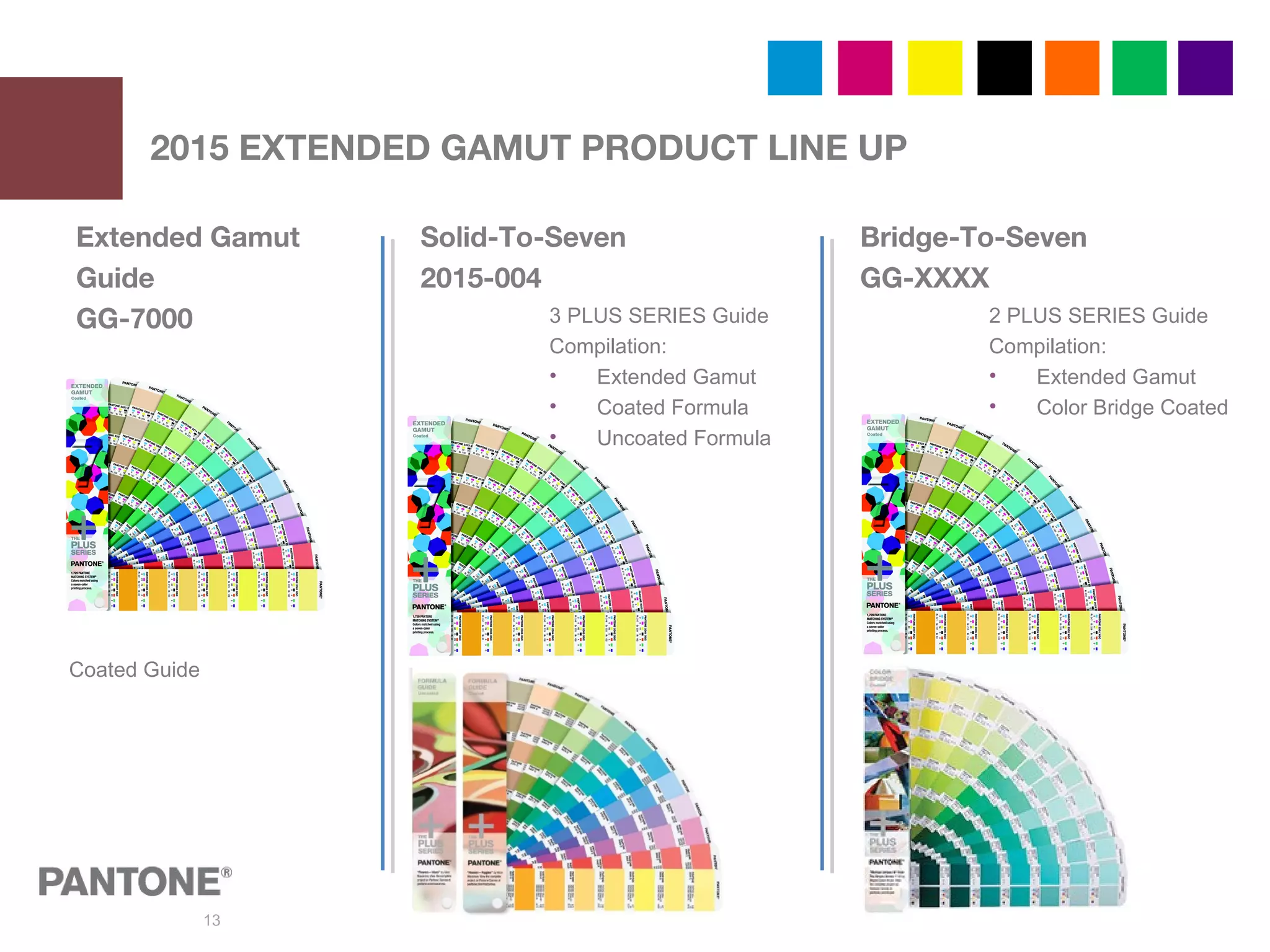
2015 EXTENDED GAMUT PRODUCT LINE UP
Extended Gamut
Guide
GG-7000
Solid-To-Seven
2015-004
Coated Guide
3 PLUS SERIES Guide
Compilation:
• Extended Gamut
• Coated Formula
• Uncoated Formula
Bridge-To-Seven
GG-XXXX
2 PLUS SERIES Guide
Compilation:
• Extended Gamut
• Color Bridge Coated
14
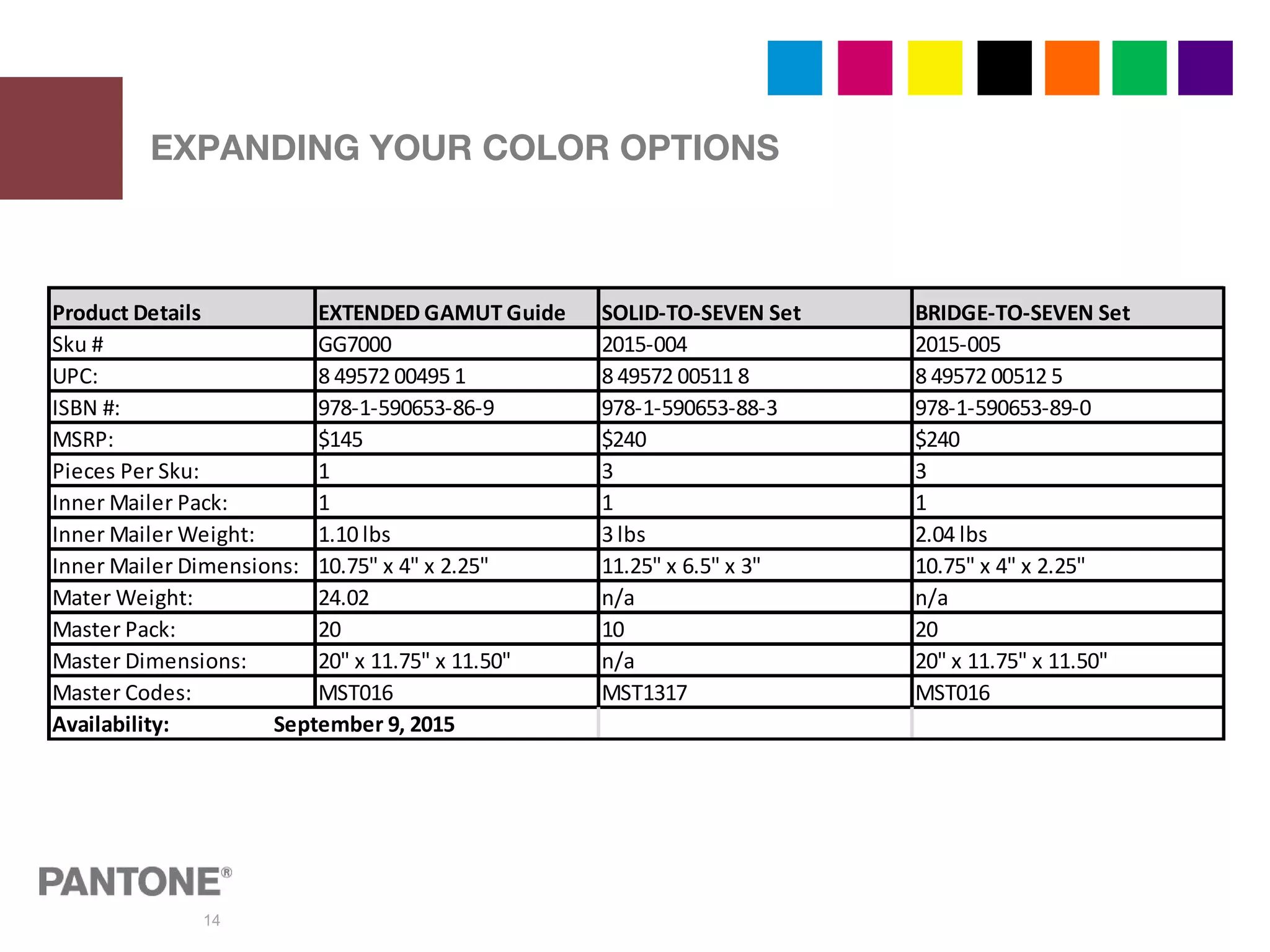
EXPANDING YOUR COLOR OPTIONS
Product Details EXTENDED GAMUT Guide SOLID-TO-SEVEN Set BRIDGE-TO-SEVEN Set
Sku # GG7000 2015-004 2015-005
UPC: 8 49572 00495 1 8 49572 00511 8 8 49572 00512 5
ISBN #: 978-1-590653-86-9 978-1-590653-88-3 978-1-590653-89-0
MSRP: $145 $240 $240
Pieces Per Sku: 1 3 3
Inner Mailer Pack: 1 1 1
Inner Mailer Weight: 1.10 lbs 3 lbs 2.04 lbs
Inner Mailer Dimensions: 10.75" x 4" x 2.25" 11.25" x 6.5" x 3" 10.75" x 4" x 2.25"
Mater Weight: 24.02 n/a n/a
Master Pack: 20 10 20
Master Dimensions: 20" x 11.75" x 11.50" n/a 20" x 11.75" x 11.50"
Master Codes: MST016 MST1317 MST016
Availability: September 9, 2015
15
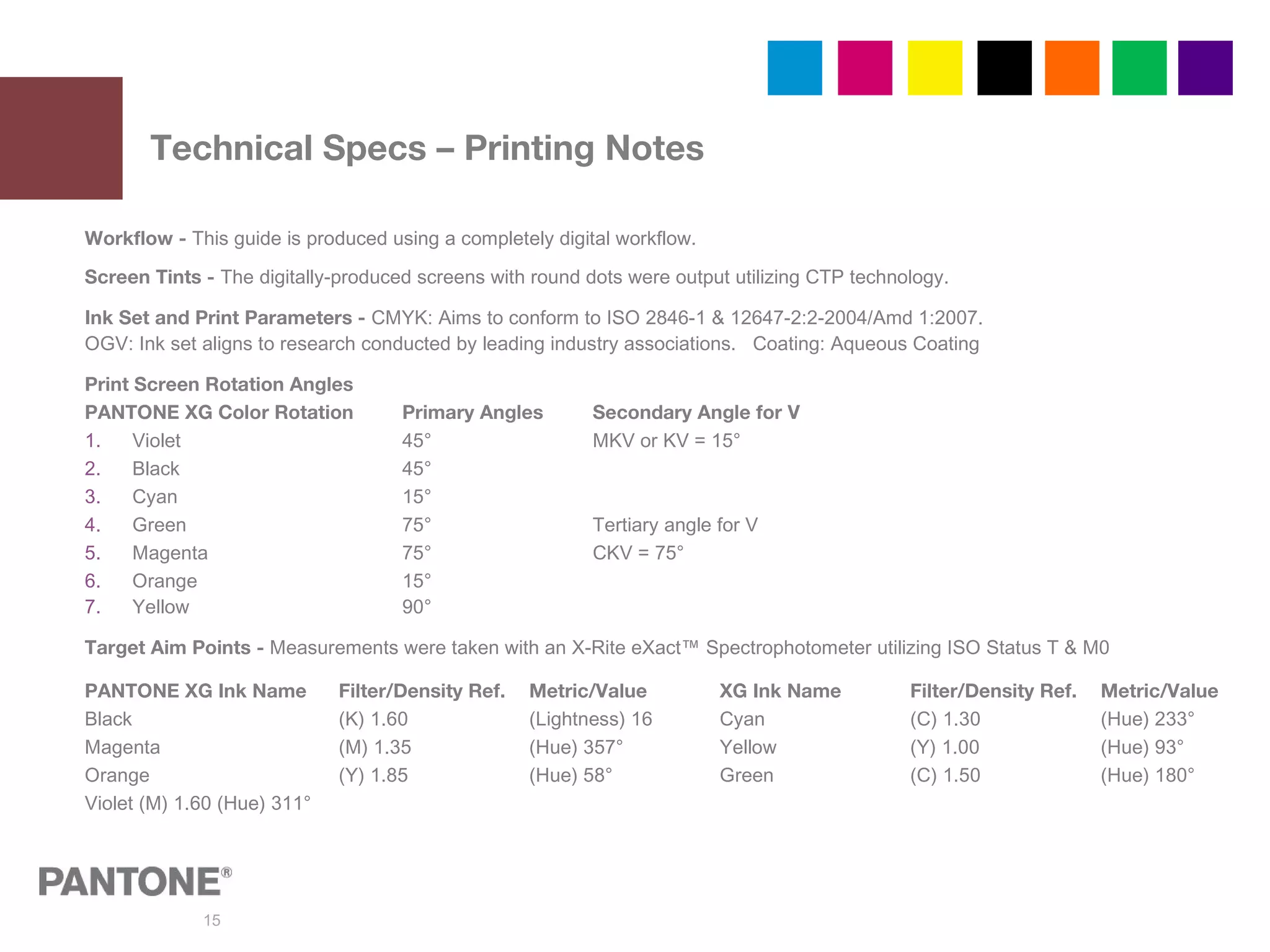
Technical Specs – Printing Notes
Workflow - This guide is produced using a completely digital workflow.
Screen Tints - The digitally-produced screens with round dots were output utilizing CTP technology.
Ink Set and Print Parameters - CMYK: Aims to conform to ISO 2846-1 & 12647-2:2-2004/Amd 1:2007.
OGV: Ink set aligns to research conducted by leading industry associations. Coating: Aqueous Coating
Print Screen Rotation Angles
PANTONE XG Color Rotation Primary Angles Secondary Angle for V
1. Violet 45° MKV or KV = 15°
2. Black 45°
3. Cyan 15°
4. Green 75° Tertiary angle for V
5. Magenta 75° CKV = 75°
6. Orange 15°
7. Yellow 90°
Target Aim Points - Measurements were taken with an X-Rite eXact™ Spectrophotometer utilizing ISO Status T & M0
PANTONE XG Ink Name Filter/Density Ref. Metric/Value XG Ink Name Filter/Density Ref. Metric/Value
Black (K) 1.60 (Lightness) 16 Cyan (C) 1.30 (Hue) 233°
Magenta (M) 1.35 (Hue) 357° Yellow (Y) 1.00 (Hue) 93°
Orange (Y) 1.85 (Hue) 58° Green (C) 1.50 (Hue) 180°
Violet (M) 1.60 (Hue) 311°
16
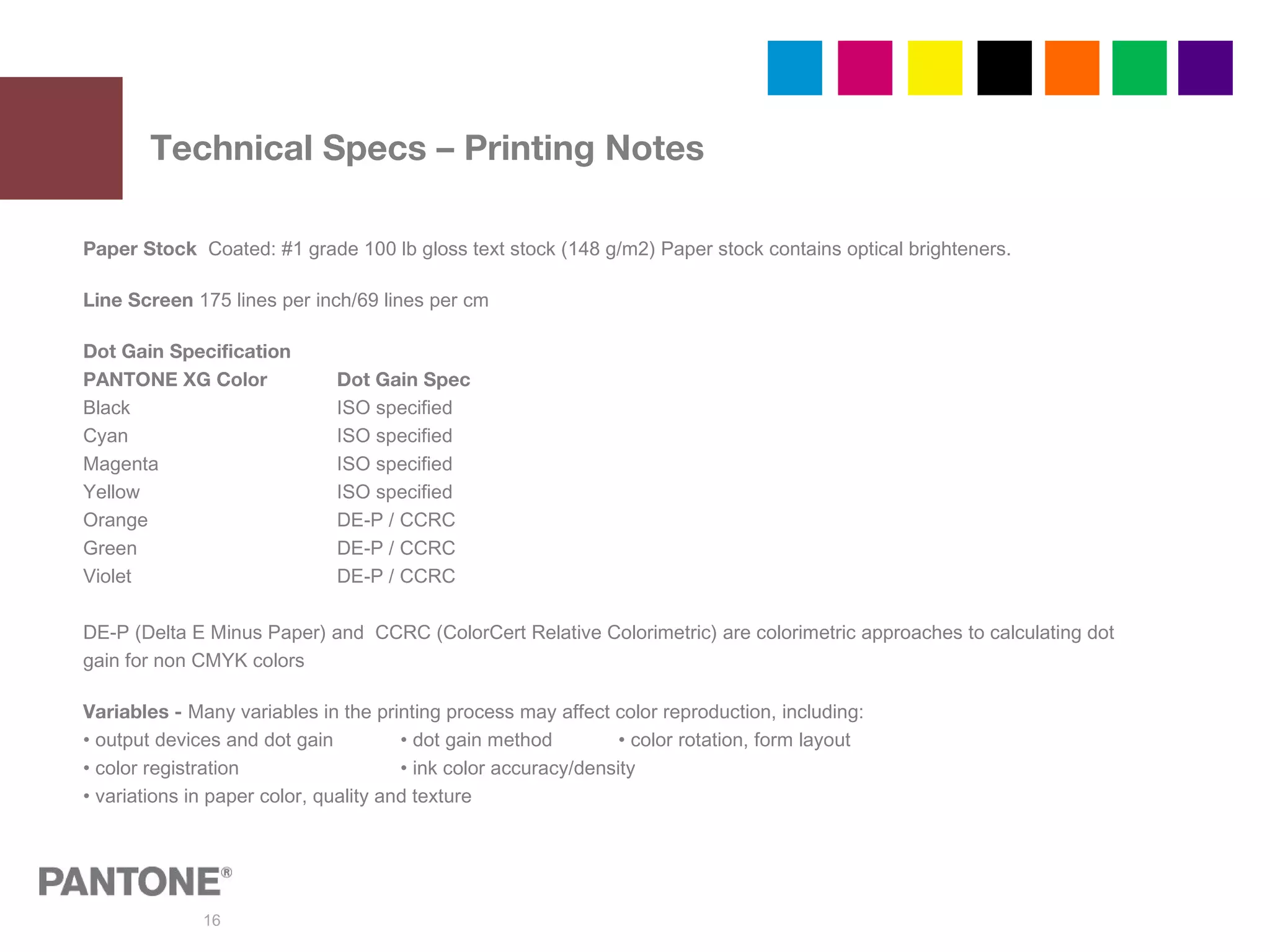
Technical Specs – Printing Notes
Paper Stock Coated: #1 grade 100 lb gloss text stock (148 g/m2) Paper stock contains optical brighteners.
Line Screen 175 lines per inch/69 lines per cm
Dot Gain Specification
PANTONE XG Color Dot Gain Spec
Black ISO specified
Cyan ISO specified
Magenta ISO specified
Yellow ISO specified
Orange DE-P / CCRC
Green DE-P / CCRC
Violet DE-P / CCRC
DE-P (Delta E Minus Paper) and CCRC (ColorCert Relative Colorimetric) are colorimetric approaches to calculating dot
gain for non CMYK colors
Variables - Many variables in the printing process may affect color reproduction, including:
• output devices and dot gain • dot gain method • color rotation, form layout
• color registration • ink color accuracy/density
• variations in paper color, quality and texture
17
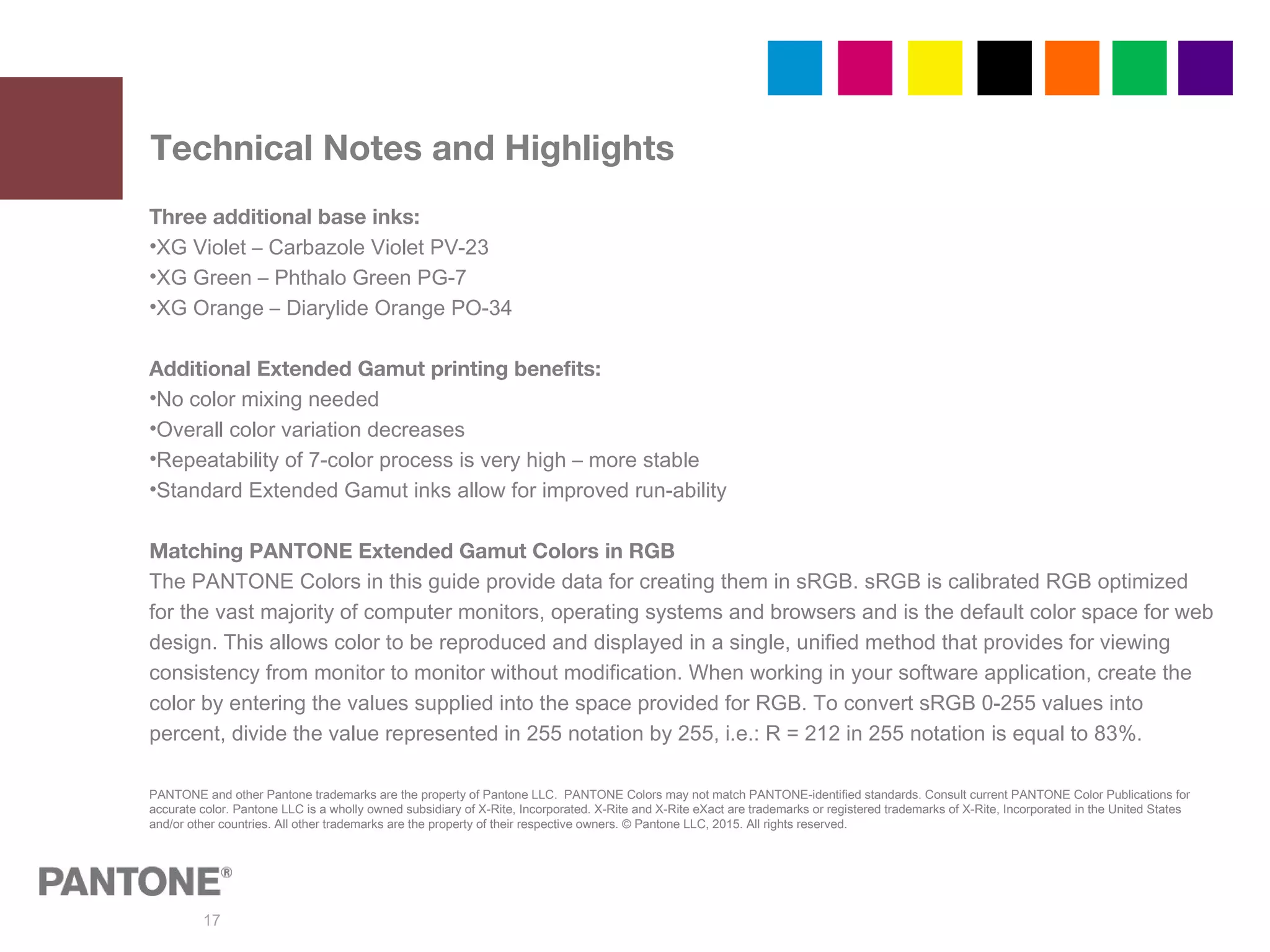
Technical Notes and Highlights
Three additional base inks:
•XG Violet – Carbazole Violet PV-23
•XG Green – Phthalo Green PG-7
•XG Orange – Diarylide Orange PO-34
Additional Extended Gamut printing benefits:
•No color mixing needed
•Overall color variation decreases
•Repeatability of 7-color process is very high – more stable
•Standard Extended Gamut inks allow for improved run-ability
Matching PANTONE Extended Gamut Colors in RGB
The PANTONE Colors in this guide provide data for creating them in sRGB. sRGB is calibrated RGB optimized
for the vast majority of computer monitors, operating systems and browsers and is the default color space for web
design. This allows color to be reproduced and displayed in a single, unified method that provides for viewing
consistency from monitor to monitor without modification. When working in your software application, create the
color by entering the values supplied into the space provided for RGB. To convert sRGB 0-255 values into
percent, divide the value represented in 255 notation by 255, i.e.: R = 212 in 255 notation is equal to 83%.
PANTONE and other Pantone trademarks are the property of Pantone LLC. PANTONE Colors may not match PANTONE-identified standards. Consult current PANTONE Color Publications for
accurate color. Pantone LLC is a wholly owned subsidiary of X-Rite, Incorporated. X-Rite and X-Rite eXact are trademarks or registered trademarks of X-Rite, Incorporated in the United States
and/or other countries. All other trademarks are the property of their respective owners. © Pantone LLC, 2015. All rights reserved.
18
19
20
X-RITE PRODUCT QUESTIONS
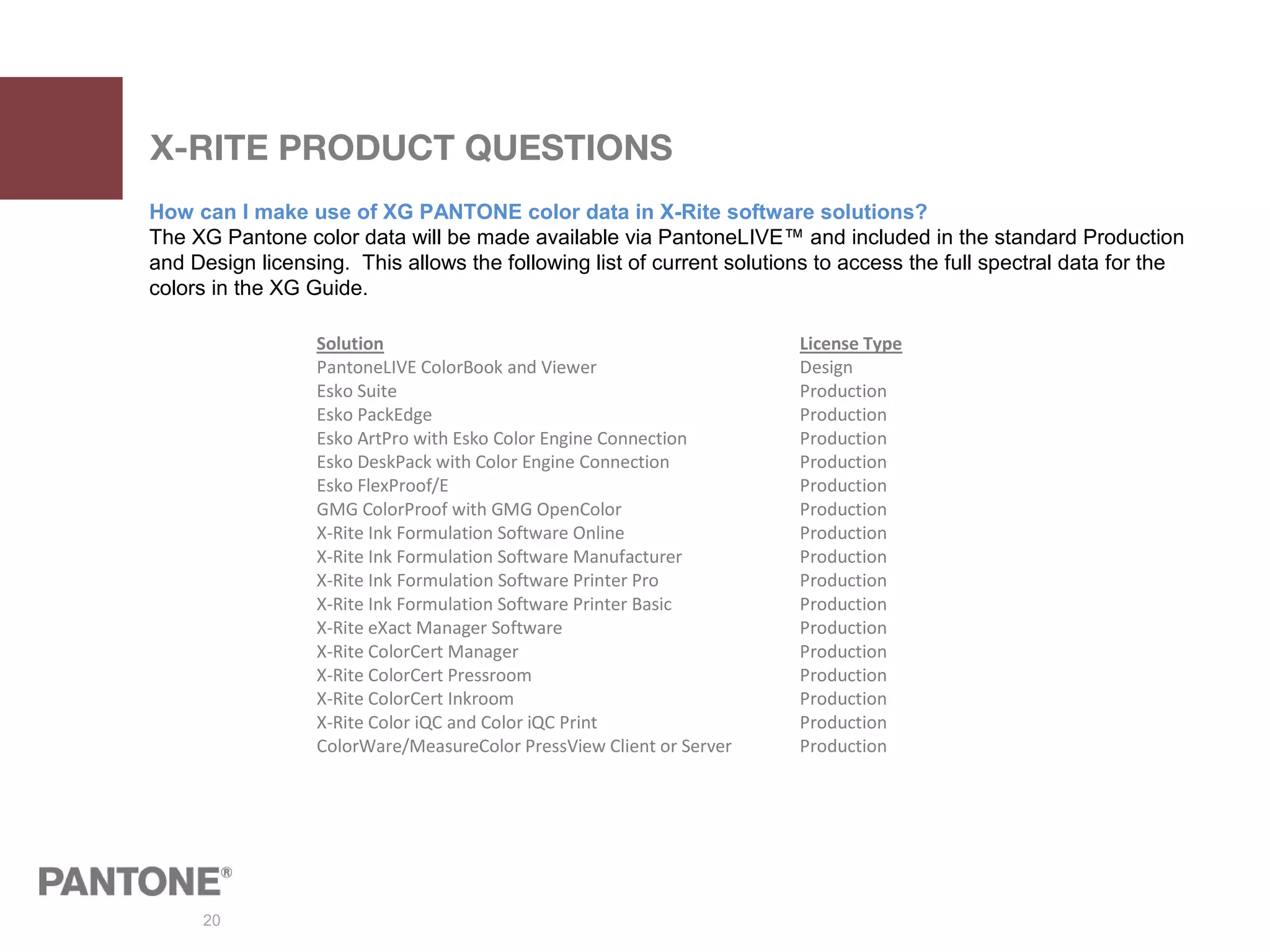
How can I make use of XG PANTONE color data in X-Rite software solutions?
The XG Pantone color data will be made available via PantoneLIVE™ and included in the standard Production
and Design licensing. This allows the following list of current solutions to access the full spectral data for the
colors in the XG Guide.
Solution License Type
PantoneLIVE ColorBook and Viewer Design
Esko Suite Production
Esko PackEdge Production
Esko ArtPro with Esko Color Engine Connection Production
Esko DeskPack with Color Engine Connection Production
Esko FlexProof/E Production
GMG ColorProof with GMG OpenColor Production
X-Rite Ink Formulation Software Online Production
X-Rite Ink Formulation Software Manufacturer Production
X-Rite Ink Formulation Software Printer Pro Production
X-Rite Ink Formulation Software Printer Basic Production
X-Rite eXact Manager Software Production
X-Rite ColorCert Manager Production
X-Rite ColorCert Pressroom Production
X-Rite ColorCert Inkroom Production
X-Rite Color iQC and Color iQC Print Production
ColorWare/MeasureColor PressView Client or Server Production
21
X-RITE PRODUCT QUESTIONS
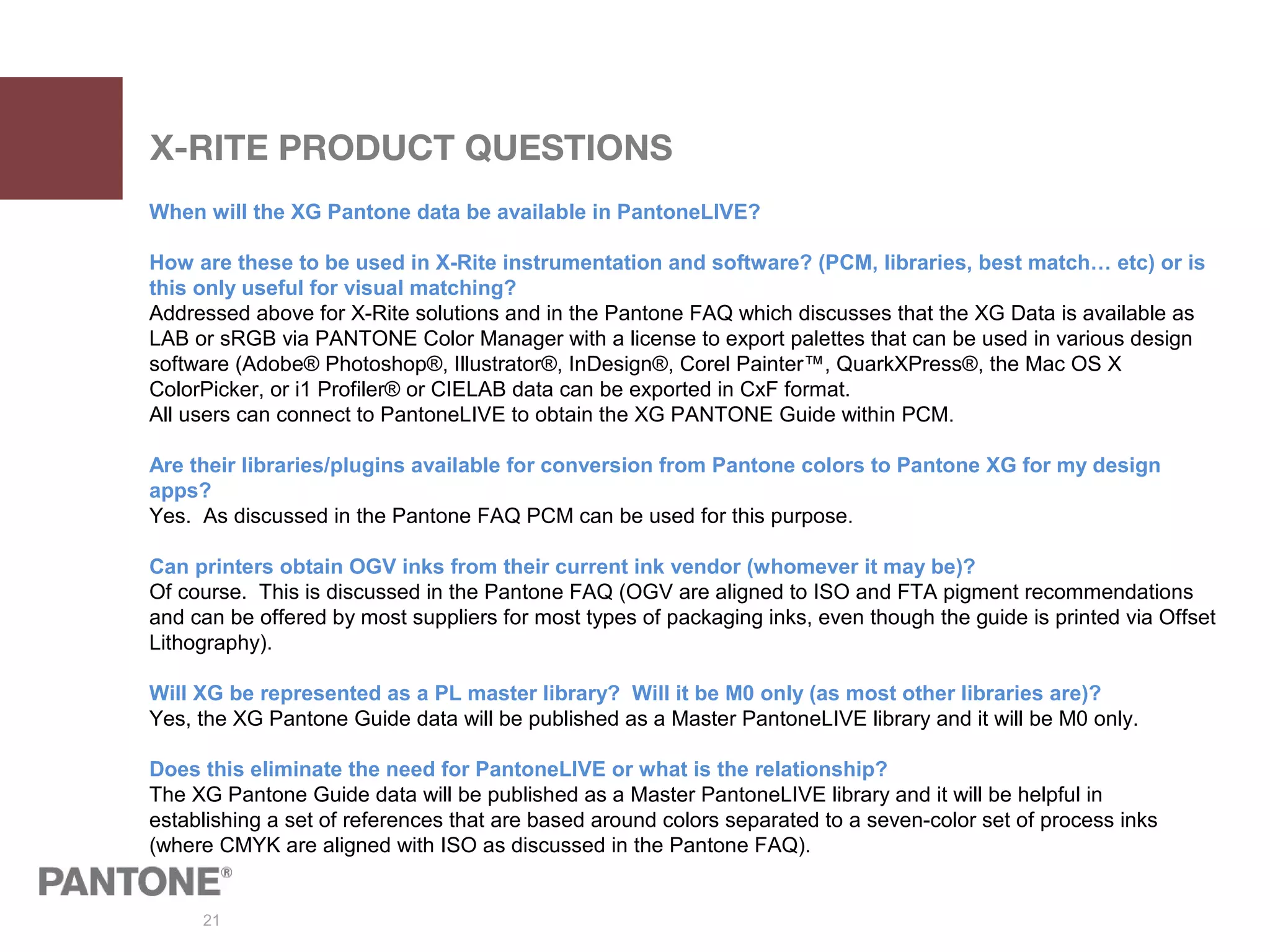
When will the XG Pantone data be available in PantoneLIVE?
How are these to be used in X-Rite instrumentation and software? (PCM, libraries, best match… etc) or is
this only useful for visual matching?
Addressed above for X-Rite solutions and in the Pantone FAQ which discusses that the XG Data is available as
LAB or sRGB via PANTONE Color Manager with a license to export palettes that can be used in various design
software (Adobe® Photoshop®, Illustrator®, InDesign®, Corel Painter™, QuarkXPress®, the Mac OS X
ColorPicker, or i1 Profiler® or CIELAB data can be exported in CxF format.
All users can connect to PantoneLIVE to obtain the XG PANTONE Guide within PCM.
Are their libraries/plugins available for conversion from Pantone colors to Pantone XG for my design
apps?
Yes. As discussed in the Pantone FAQ PCM can be used for this purpose.
Can printers obtain OGV inks from their current ink vendor (whomever it may be)?
Of course. This is discussed in the Pantone FAQ (OGV are aligned to ISO and FTA pigment recommendations
and can be offered by most suppliers for most types of packaging inks, even though the guide is printed via Offset
Lithography).
Will XG be represented as a PL master library? Will it be M0 only (as most other libraries are)?
Yes, the XG Pantone Guide data will be published as a Master PantoneLIVE library and it will be M0 only.
Does this eliminate the need for PantoneLIVE or what is the relationship?
The XG Pantone Guide data will be published as a Master PantoneLIVE library and it will be helpful in
establishing a set of references that are based around colors separated to a seven-color set of process inks
(where CMYK are aligned with ISO as discussed in the Pantone FAQ).
22
X-RITE PRODUCT QUESTIONS
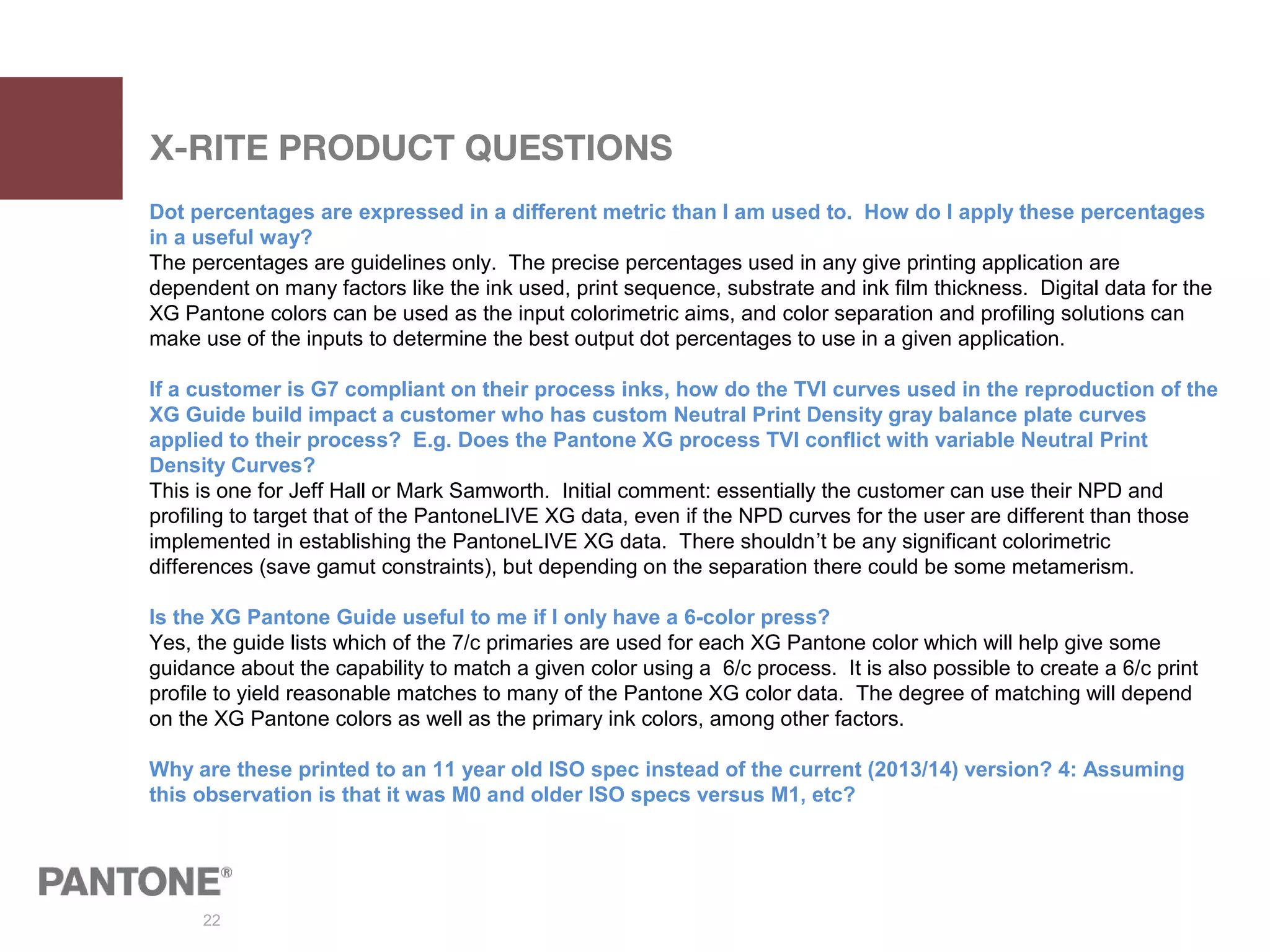
Dot percentages are expressed in a different metric than I am used to. How do I apply these percentages
in a useful way?
The percentages are guidelines only. The precise percentages used in any give printing application are
dependent on many factors like the ink used, print sequence, substrate and ink film thickness. Digital data for the
XG Pantone colors can be used as the input colorimetric aims, and color separation and profiling solutions can
make use of the inputs to determine the best output dot percentages to use in a given application.
If a customer is G7 compliant on their process inks, how do the TVI curves used in the reproduction of the
XG Guide build impact a customer who has custom Neutral Print Density gray balance plate curves
applied to their process? E.g. Does the Pantone XG process TVI conflict with variable Neutral Print
Density Curves?
This is one for Jeff Hall or Mark Samworth. Initial comment: essentially the customer can use their NPD and
profiling to target that of the PantoneLIVE XG data, even if the NPD curves for the user are different than those
implemented in establishing the PantoneLIVE XG data. There shouldn’t be any significant colorimetric
differences (save gamut constraints), but depending on the separation there could be some metamerism.
Is the XG Pantone Guide useful to me if I only have a 6-color press?
Yes, the guide lists which of the 7/c primaries are used for each XG Pantone color which will help give some
guidance about the capability to match a given color using a 6/c process. It is also possible to create a 6/c print
profile to yield reasonable matches to many of the Pantone XG color data. The degree of matching will depend
on the XG Pantone colors as well as the primary ink colors, among other factors.
Why are these printed to an 11 year old ISO spec instead of the current (2013/14) version? 4: Assuming
this observation is that it was M0 and older ISO specs versus M1, etc?

2015 NAPIM Fall Tech Conference: Extended Gamut Guide Presentation

  • 1.
    1 NAPIM – October1, 2015 Extended Gamut Guide
  • 2.
    2 Our reaction tocolor is almost instantaneous and has a profound impact on the choices we make everyday. Marketing psychologists state that a lasting impression is made within ninety seconds, and that color accounts for 60% of the acceptance or rejection of an object, person, place, or circumstance. “Over 65% of purchasing decisions involve color.” Leatrice Eiseman Executive Director, PANTONE color Institute 2
  • 3.
    3 Expand your expectations! This iswhy we, as the company known for setting the industry standard for color communication for over 50 years, have created a new guide for facilitating the closure of the acceptable spot vs. process color printing gap. • Brand helps drive our decisions • Time to market • Achievable color in production • Accelerate this process of Extended Gamut • 1st Visual Guide in World to communicate with
  • 4.
    4 Introducing the EXTENDEDGAMUT Guide Finally – a color communication guide that helps designers and printers determine how closely seven-color printing (CMYK+OGV) can achieve PANTONE MATCHING SYSTEM® Colors! By incorporating PANTONE XG Base Inks – Orange, Green and Violet – with the traditional process colors, Cyan, Magenta, Yellow and Black (CMYK), in a 7-color printing process, a much broader range of colors can be achieved. Guide Features: • 1,729 seven-color simulations of PANTONE MATCHING SYSTEM Colors printed on coated stock • Each color named with its corresponding PANTONE Number and an XGC suffix • Closest 7-color process match and its screen tint percentages displayed as viewed under D50 lighting (5000°) • Colors bleed off page edges for ease and accuracy when comparison checking • Portable fan guide format • Each color matched with in-line aqueous coating • Each color created with a maximum of three Base Ink combinations K
  • 5.
    5 • No newspecial inks required – fewer change overs • Existing CMYK inks are ISO compliant • Stable, consistent color results • 25-50% reported make-ready time savings – only changing plates, not inks • Opportunity to combine runs and take on more short run jobs • More productivity, less down-time • Save on time and routing expenses The EXTENDED GAMUT Advantage for Printers
  • 6.
    6 The PANTONE EXTENDEDGAMUT Guide is best used as a visual reference to determine when it may be possible to more accurately reproduce a solid PANTONE Color using CMYK + PANTONE XG Orange, Green and Violet (OGV) Inks. 1) Select the desired PANTONE MATCHING SYSTEM Color from a current PLUS SERIES FORMULA GUIDE. 2) Using the same page number in the EXTENDED GAMUT Guide, locate the corresponding PANTONE Color and compare both guides side-by-side. 3) If the PANTONE Extended Gamut color is not a visually acceptable match, the color should remain specified as a solid. 4) When the PANTONE Extended Gamut color appears adequate, specify the XGC color in the artwork so your printing partner will automatically understand your color expectations. Note: The guide shows achievable results. If your workflow varies from ours, adjustments may be required to optimize the color result. Using the Guide
  • 7.
    7 Using spot colorsto match brand standards is always the best and most reliable option. However, if budget or process challenges arise, the next best option is the Extended Gamut seven-color process. IF YOU DON’T PRINT SPOT, 7 IS YOUR BEST SHOT! Extended Gamut Guide Color Bridge Guide 7-ColorProcess SpotColor CMYK
  • 8.
    8 • Good visualmatch for approximately 90% of Spot colors • Uses the same PANTONE Base Inks, so no new inks are required • Achievable ink film thickness • Sets better expectations for achievable color at project start • More economical than Spot or CMYK + Spot • Saves time getting up to color • Every color is comprised from only three different screen values LUCKY NUMBER 7
  • 9.
    9 Extended Gamut –25 Top Recognizable Brand Colors* Get closer matches then ever before with Extended Gamut seven-color process. COLOR PANTONE® Yellow PANTONE 123 Orange PANTONE 165 Red PANTONE 185 Red PANTONE 186 Red PANTONE 187 Red PANTONE 199 Blue PANTONE 285 Blue PANTONE 286 Blue PANTONE 300 Green PANTONE 362 Red PANTONE 485 Blue PANTONE 754 Yellow PANTONE 1235 Gold PANTONE 1375 Orange PANTONE 1505 Pink PANTONE 1775 Red PANTONE 2035 Blue PANTONE 2718 Blue PANTONE 2925
  • 10.
  • 11.
    11 SEVEN FOR ALLMANKIND The industry is embracing 7-color benefits. An estimated 15-25%* of all packaging is printed via expanded gamut process, which is expected to increase more than 50% within the next decade. < 1% Informal Discussions 12% -16% Mazur FTA Survey 50% Reasonable Case Projection * Based upon printers currently using Extended Gamut software
  • 12.
    12 The values forour EXTENDED GAMUT Guide and seven-color process are derived by Esko Equinox™ color gamut technology. Equinox is Esko’s patented system for expanded gamut printing with 5, 6 or 7 colors. By mixing colors on-press instead of the ink room, extreme economic benefits are realized. By enabling the conversion of spot colors as well as images, Equinox also improves shelf appeal. For more information, visit esko.com/equinox. IMPACTING SUCCESS
  • 13.
    13 2015 EXTENDED GAMUTPRODUCT LINE UP Extended Gamut Guide GG-7000 Solid-To-Seven 2015-004 Coated Guide 3 PLUS SERIES Guide Compilation: • Extended Gamut • Coated Formula • Uncoated Formula Bridge-To-Seven GG-XXXX 2 PLUS SERIES Guide Compilation: • Extended Gamut • Color Bridge Coated
  • 14.
    14 EXPANDING YOUR COLOROPTIONS Product Details EXTENDED GAMUT Guide SOLID-TO-SEVEN Set BRIDGE-TO-SEVEN Set Sku # GG7000 2015-004 2015-005 UPC: 8 49572 00495 1 8 49572 00511 8 8 49572 00512 5 ISBN #: 978-1-590653-86-9 978-1-590653-88-3 978-1-590653-89-0 MSRP: $145 $240 $240 Pieces Per Sku: 1 3 3 Inner Mailer Pack: 1 1 1 Inner Mailer Weight: 1.10 lbs 3 lbs 2.04 lbs Inner Mailer Dimensions: 10.75" x 4" x 2.25" 11.25" x 6.5" x 3" 10.75" x 4" x 2.25" Mater Weight: 24.02 n/a n/a Master Pack: 20 10 20 Master Dimensions: 20" x 11.75" x 11.50" n/a 20" x 11.75" x 11.50" Master Codes: MST016 MST1317 MST016 Availability: September 9, 2015
  • 15.
    15 Technical Specs –Printing Notes Workflow - This guide is produced using a completely digital workflow. Screen Tints - The digitally-produced screens with round dots were output utilizing CTP technology. Ink Set and Print Parameters - CMYK: Aims to conform to ISO 2846-1 & 12647-2:2-2004/Amd 1:2007. OGV: Ink set aligns to research conducted by leading industry associations. Coating: Aqueous Coating Print Screen Rotation Angles PANTONE XG Color Rotation Primary Angles Secondary Angle for V 1. Violet 45° MKV or KV = 15° 2. Black 45° 3. Cyan 15° 4. Green 75° Tertiary angle for V 5. Magenta 75° CKV = 75° 6. Orange 15° 7. Yellow 90° Target Aim Points - Measurements were taken with an X-Rite eXact™ Spectrophotometer utilizing ISO Status T & M0 PANTONE XG Ink Name Filter/Density Ref. Metric/Value XG Ink Name Filter/Density Ref. Metric/Value Black (K) 1.60 (Lightness) 16 Cyan (C) 1.30 (Hue) 233° Magenta (M) 1.35 (Hue) 357° Yellow (Y) 1.00 (Hue) 93° Orange (Y) 1.85 (Hue) 58° Green (C) 1.50 (Hue) 180° Violet (M) 1.60 (Hue) 311°
  • 16.
    16 Technical Specs –Printing Notes Paper Stock Coated: #1 grade 100 lb gloss text stock (148 g/m2) Paper stock contains optical brighteners. Line Screen 175 lines per inch/69 lines per cm Dot Gain Specification PANTONE XG Color Dot Gain Spec Black ISO specified Cyan ISO specified Magenta ISO specified Yellow ISO specified Orange DE-P / CCRC Green DE-P / CCRC Violet DE-P / CCRC DE-P (Delta E Minus Paper) and CCRC (ColorCert Relative Colorimetric) are colorimetric approaches to calculating dot gain for non CMYK colors Variables - Many variables in the printing process may affect color reproduction, including: • output devices and dot gain • dot gain method • color rotation, form layout • color registration • ink color accuracy/density • variations in paper color, quality and texture
  • 17.
    17 Technical Notes andHighlights Three additional base inks: •XG Violet – Carbazole Violet PV-23 •XG Green – Phthalo Green PG-7 •XG Orange – Diarylide Orange PO-34 Additional Extended Gamut printing benefits: •No color mixing needed •Overall color variation decreases •Repeatability of 7-color process is very high – more stable •Standard Extended Gamut inks allow for improved run-ability Matching PANTONE Extended Gamut Colors in RGB The PANTONE Colors in this guide provide data for creating them in sRGB. sRGB is calibrated RGB optimized for the vast majority of computer monitors, operating systems and browsers and is the default color space for web design. This allows color to be reproduced and displayed in a single, unified method that provides for viewing consistency from monitor to monitor without modification. When working in your software application, create the color by entering the values supplied into the space provided for RGB. To convert sRGB 0-255 values into percent, divide the value represented in 255 notation by 255, i.e.: R = 212 in 255 notation is equal to 83%. PANTONE and other Pantone trademarks are the property of Pantone LLC. PANTONE Colors may not match PANTONE-identified standards. Consult current PANTONE Color Publications for accurate color. Pantone LLC is a wholly owned subsidiary of X-Rite, Incorporated. X-Rite and X-Rite eXact are trademarks or registered trademarks of X-Rite, Incorporated in the United States and/or other countries. All other trademarks are the property of their respective owners. © Pantone LLC, 2015. All rights reserved.
  • 18.
  • 19.
  • 20.
    20 X-RITE PRODUCT QUESTIONS Howcan I make use of XG PANTONE color data in X-Rite software solutions? The XG Pantone color data will be made available via PantoneLIVE™ and included in the standard Production and Design licensing. This allows the following list of current solutions to access the full spectral data for the colors in the XG Guide. Solution License Type PantoneLIVE ColorBook and Viewer Design Esko Suite Production Esko PackEdge Production Esko ArtPro with Esko Color Engine Connection Production Esko DeskPack with Color Engine Connection Production Esko FlexProof/E Production GMG ColorProof with GMG OpenColor Production X-Rite Ink Formulation Software Online Production X-Rite Ink Formulation Software Manufacturer Production X-Rite Ink Formulation Software Printer Pro Production X-Rite Ink Formulation Software Printer Basic Production X-Rite eXact Manager Software Production X-Rite ColorCert Manager Production X-Rite ColorCert Pressroom Production X-Rite ColorCert Inkroom Production X-Rite Color iQC and Color iQC Print Production ColorWare/MeasureColor PressView Client or Server Production
  • 21.
    21 X-RITE PRODUCT QUESTIONS Whenwill the XG Pantone data be available in PantoneLIVE? How are these to be used in X-Rite instrumentation and software? (PCM, libraries, best match… etc) or is this only useful for visual matching? Addressed above for X-Rite solutions and in the Pantone FAQ which discusses that the XG Data is available as LAB or sRGB via PANTONE Color Manager with a license to export palettes that can be used in various design software (Adobe® Photoshop®, Illustrator®, InDesign®, Corel Painter™, QuarkXPress®, the Mac OS X ColorPicker, or i1 Profiler® or CIELAB data can be exported in CxF format. All users can connect to PantoneLIVE to obtain the XG PANTONE Guide within PCM. Are their libraries/plugins available for conversion from Pantone colors to Pantone XG for my design apps? Yes. As discussed in the Pantone FAQ PCM can be used for this purpose. Can printers obtain OGV inks from their current ink vendor (whomever it may be)? Of course. This is discussed in the Pantone FAQ (OGV are aligned to ISO and FTA pigment recommendations and can be offered by most suppliers for most types of packaging inks, even though the guide is printed via Offset Lithography). Will XG be represented as a PL master library? Will it be M0 only (as most other libraries are)? Yes, the XG Pantone Guide data will be published as a Master PantoneLIVE library and it will be M0 only. Does this eliminate the need for PantoneLIVE or what is the relationship? The XG Pantone Guide data will be published as a Master PantoneLIVE library and it will be helpful in establishing a set of references that are based around colors separated to a seven-color set of process inks (where CMYK are aligned with ISO as discussed in the Pantone FAQ).
  • 22.
    22 X-RITE PRODUCT QUESTIONS Dotpercentages are expressed in a different metric than I am used to. How do I apply these percentages in a useful way? The percentages are guidelines only. The precise percentages used in any give printing application are dependent on many factors like the ink used, print sequence, substrate and ink film thickness. Digital data for the XG Pantone colors can be used as the input colorimetric aims, and color separation and profiling solutions can make use of the inputs to determine the best output dot percentages to use in a given application. If a customer is G7 compliant on their process inks, how do the TVI curves used in the reproduction of the XG Guide build impact a customer who has custom Neutral Print Density gray balance plate curves applied to their process? E.g. Does the Pantone XG process TVI conflict with variable Neutral Print Density Curves? This is one for Jeff Hall or Mark Samworth. Initial comment: essentially the customer can use their NPD and profiling to target that of the PantoneLIVE XG data, even if the NPD curves for the user are different than those implemented in establishing the PantoneLIVE XG data. There shouldn’t be any significant colorimetric differences (save gamut constraints), but depending on the separation there could be some metamerism. Is the XG Pantone Guide useful to me if I only have a 6-color press? Yes, the guide lists which of the 7/c primaries are used for each XG Pantone color which will help give some guidance about the capability to match a given color using a 6/c process. It is also possible to create a 6/c print profile to yield reasonable matches to many of the Pantone XG color data. The degree of matching will depend on the XG Pantone colors as well as the primary ink colors, among other factors. Why are these printed to an 11 year old ISO spec instead of the current (2013/14) version? 4: Assuming this observation is that it was M0 and older ISO specs versus M1, etc?