Introduction Of GRAPHIC DESIGN
Youssef Farag
Dentistry college
Al-Azhar University
yousseffarag5@gmail.com
A lot of people think that design is just know
how to use design software ( Photoshop …..etc. )
Or
how to draw like an artist.
But design isn’t.
WHAT IS DESIGN
SO
DESIGN IS
• Away to Communicate an Idea or Concept by
using DESIGN Processes, Elements and Principles .
• Idea or Concept must be Solve A Problem .
• To Solve A Problem, A Project must be created .
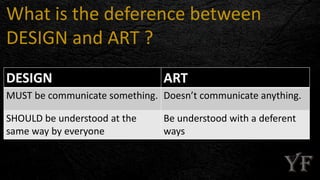
What is the deference between
DESIGN and ART ?
DESIGN ART
MUST be communicate something. Doesn’t communicate anything.
SHOULD be understood at the
same way by everyone
Be understood with a deferent
ways
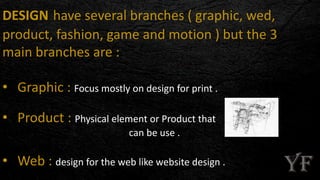
DESIGN have several branches ( graphic, wed,
product, fashion, game and motion ) but the 3
main branches are :
• Graphic : Focus mostly on design for print .
• Product : Physical element or Product that
can be use .
• Web : design for the web like website design .
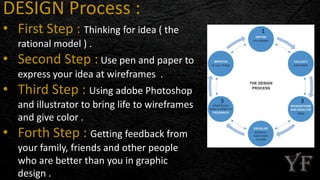
DESIGN Process :
• First Step : Thinking for idea ( the
rational model ) .
• Second Step : Use pen and paper to
express your idea at wireframes .
• Third Step : Using adobe Photoshop
and illustrator to bring life to wireframes
and give color .
• Forth Step : Getting feedback from
your family, friends and other people
who are better than you in graphic
design .
1
35
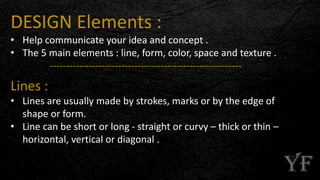
DESIGN Elements :
• Help communicate your idea and concept .
• The 5 main elements : line, form, color, space and texture .
-----------------------------------------------------------
Lines :
• Lines are usually made by strokes, marks or by the edge of
shape or form.
• Line can be short or long - straight or curvy – thick or thin –
horizontal, vertical or diagonal .
Form :
• Form is a combination of several lines in different direction .
• Form can be circles, squares, rectangles, triangles, ovals,
diamonds....
• A black of text also qualify as form .
----------------------------------------------------------------
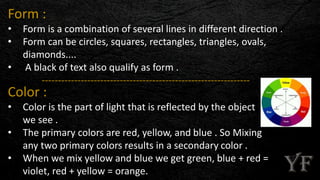
Color :
• Color is the part of light that is reflected by the object
we see .
• The primary colors are red, yellow, and blue . So Mixing
any two primary colors results in a secondary color .
• When we mix yellow and blue we get green, blue + red =
violet, red + yellow = orange.
Texture :
• Texture is the background like the background of this ppt .
------------------------------------------------------------------------
Space :
• Helping focus on what matters .
• Like the white space on Google's home page .
DESIGN Principles :
• Principles applied to the elements are what make or break design .
• There are 4 main principles called C-R-A-P ( contrast - repetition -
alignment - proximity ) .
---------------------------------------------------------------
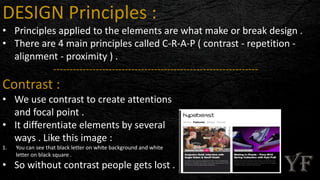
Contrast :
• We use contrast to create attentions
and focal point .
• It differentiate elements by several
ways . Like this image :
1. You can see that black letter on white background and white
letter on black square .
• So without contrast people gets lost .
Repetition :
• it means repeating elements to make interest and unify the
elements .
---------------------------------------------------------------
Alignment :
• Elements should have visual connection
with other elements on the page to
organize the page .
• nothing should be placed on the screen
arbitrarily .
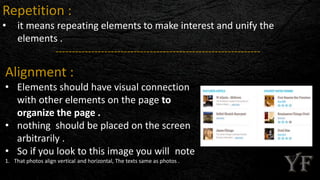
• So if you look to this image you will note
1. That photos align vertical and horizontal, The texts same as photos .
Proximity :
• It mean create links between elements .
• Help organize information and reduce clutter .
---------------------------------------------------------------------
This is a brief about ( introduction of graphic design ), these are some books take minutely about this subject :
• The Elements of Graphic Design (Second Edition) - WHITE, Alex [paperback]
• How to Be a Graphic Designer without Losing Your Soul (New Expanded Edition) - SHAUGHNESSY, Adrian [paperback / digital]
• The Non-Designer's Design Book (3rd Edition) - WILLIAMS, Robin [paperback / digital]
• Robin Williams Design Workshop (2nd Edition) - WILLIAMS, Robin [paperback / digital]
• Graphic Design: The New Basics - LUPTON, Ellen [paperback / hardcover]
• Basics Design 01: Format - AMBROSE, Gavin [paperback]
• Basics Design 02: Layout - AMBROSE, Gavin [paperback]
• Basics Design 03: Typography - AMBROSE, Gavin [paperback]
• Basics Design 04: Image - AMBROSE, Gavin [paperback]
• Basics Design 05: Colour - AMBROSE, Gavin [paperback]
• Basics Design 06: Print and Finish - AMBROSE, Gavin [paperback]
• Basics Design 07: Grids - AMBROSE, Gavin [paperback]
• Basics Design 08: Design Thinking - AMBROSE, Gavin [paperback]
• The Fundamentals of Graphic Design - HARRIS, Paul [paperback]
goodbye and see you in another ppt .
Youssef Farag
https://eg.linkedin.com/in/yousseffarag5
yousseffarag5@gmail.com
01065078204

introduction of graphic design

  • 1.
    Introduction Of GRAPHICDESIGN Youssef Farag Dentistry college Al-Azhar University yousseffarag5@gmail.com
  • 2.
    A lot ofpeople think that design is just know how to use design software ( Photoshop …..etc. ) Or how to draw like an artist. But design isn’t.
  • 3.
  • 4.
    DESIGN IS • Awayto Communicate an Idea or Concept by using DESIGN Processes, Elements and Principles . • Idea or Concept must be Solve A Problem . • To Solve A Problem, A Project must be created .
  • 5.
    What is thedeference between DESIGN and ART ? DESIGN ART MUST be communicate something. Doesn’t communicate anything. SHOULD be understood at the same way by everyone Be understood with a deferent ways
  • 6.
    DESIGN have severalbranches ( graphic, wed, product, fashion, game and motion ) but the 3 main branches are : • Graphic : Focus mostly on design for print . • Product : Physical element or Product that can be use . • Web : design for the web like website design .
  • 7.
    DESIGN Process : •First Step : Thinking for idea ( the rational model ) . • Second Step : Use pen and paper to express your idea at wireframes . • Third Step : Using adobe Photoshop and illustrator to bring life to wireframes and give color . • Forth Step : Getting feedback from your family, friends and other people who are better than you in graphic design . 1 35
  • 8.
    DESIGN Elements : •Help communicate your idea and concept . • The 5 main elements : line, form, color, space and texture . ----------------------------------------------------------- Lines : • Lines are usually made by strokes, marks or by the edge of shape or form. • Line can be short or long - straight or curvy – thick or thin – horizontal, vertical or diagonal .
  • 9.
    Form : • Formis a combination of several lines in different direction . • Form can be circles, squares, rectangles, triangles, ovals, diamonds.... • A black of text also qualify as form . ---------------------------------------------------------------- Color : • Color is the part of light that is reflected by the object we see . • The primary colors are red, yellow, and blue . So Mixing any two primary colors results in a secondary color . • When we mix yellow and blue we get green, blue + red = violet, red + yellow = orange.
  • 10.
    Texture : • Textureis the background like the background of this ppt . ------------------------------------------------------------------------ Space : • Helping focus on what matters . • Like the white space on Google's home page .
  • 11.
    DESIGN Principles : •Principles applied to the elements are what make or break design . • There are 4 main principles called C-R-A-P ( contrast - repetition - alignment - proximity ) . --------------------------------------------------------------- Contrast : • We use contrast to create attentions and focal point . • It differentiate elements by several ways . Like this image : 1. You can see that black letter on white background and white letter on black square . • So without contrast people gets lost .
  • 12.
    Repetition : • itmeans repeating elements to make interest and unify the elements . --------------------------------------------------------------- Alignment : • Elements should have visual connection with other elements on the page to organize the page . • nothing should be placed on the screen arbitrarily . • So if you look to this image you will note 1. That photos align vertical and horizontal, The texts same as photos .
  • 13.
    Proximity : • Itmean create links between elements . • Help organize information and reduce clutter . --------------------------------------------------------------------- This is a brief about ( introduction of graphic design ), these are some books take minutely about this subject : • The Elements of Graphic Design (Second Edition) - WHITE, Alex [paperback] • How to Be a Graphic Designer without Losing Your Soul (New Expanded Edition) - SHAUGHNESSY, Adrian [paperback / digital] • The Non-Designer's Design Book (3rd Edition) - WILLIAMS, Robin [paperback / digital] • Robin Williams Design Workshop (2nd Edition) - WILLIAMS, Robin [paperback / digital] • Graphic Design: The New Basics - LUPTON, Ellen [paperback / hardcover] • Basics Design 01: Format - AMBROSE, Gavin [paperback] • Basics Design 02: Layout - AMBROSE, Gavin [paperback] • Basics Design 03: Typography - AMBROSE, Gavin [paperback] • Basics Design 04: Image - AMBROSE, Gavin [paperback] • Basics Design 05: Colour - AMBROSE, Gavin [paperback] • Basics Design 06: Print and Finish - AMBROSE, Gavin [paperback] • Basics Design 07: Grids - AMBROSE, Gavin [paperback] • Basics Design 08: Design Thinking - AMBROSE, Gavin [paperback] • The Fundamentals of Graphic Design - HARRIS, Paul [paperback]
  • 14.
    goodbye and seeyou in another ppt . Youssef Farag https://eg.linkedin.com/in/yousseffarag5 yousseffarag5@gmail.com 01065078204