A Developer’s Quickstart Guide to
Open Source Process Automation using Camunda
Robert Emsbach - Head of Consulting APAC
2
Housekeeping
• The webinar is being recorded
• The recording and slides will be made
available after the webinar
• Please submit questions via the
GoToWebinar control panel
3
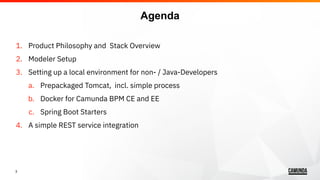
1. Product Philosophy and Stack Overview
2. Modeler Setup
3. Setting up a local environment for non- / Java-Developers
a. Prepackaged Tomcat, incl. simple process
b. Docker for Camunda BPM CE and EE
c. Spring Boot Starters
4. A simple REST service integration
Agenda
4
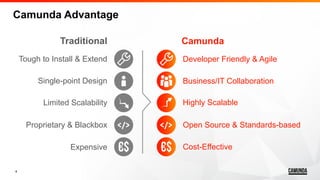
Developer Friendly & Agile
Business/IT Collaboration
Highly Scalable
Open Source & Standards-based
Cost-Effective
Camunda
Camunda Advantage
Traditional
Tough to Install & Extend
Single-point Design
Limited Scalability
Proprietary & Blackbox
Expensive
5
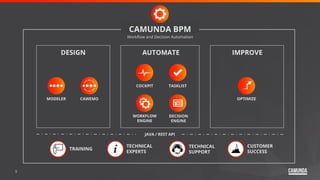
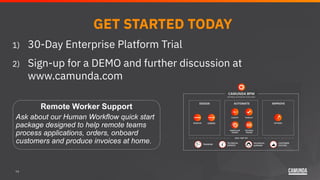
AUTOMATEDESIGN
Workflow and Decision Automation
COCKPIT TASKLIST
WORKFLOW
ENGINE
DECISION
ENGINE
OPTIMIZEMODELER CAWEMO
IMPROVE
TECHNICAL
SUPPORT
JAVA / REST API
TECHNICAL
EXPERTS
CUSTOMER
SUCCESS
TRAINING
CAMUNDA BPM
6
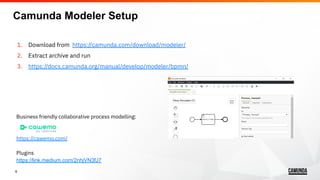
1. Download from https://camunda.com/download/modeler/
2. Extract archive and run
3. https://docs.camunda.org/manual/develop/modeler/bpmn/
Business friendly collaborative process modelling:
https://cawemo.com/
Plugins
https://link.medium.com/2nhjVN3fJ7
Camunda Modeler Setup
7
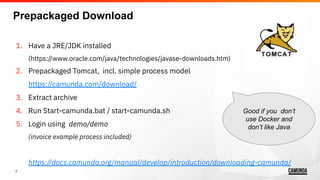
1. Have a JRE/JDK installed
(https://www.oracle.com/java/technologies/javase-downloads.htm)
2. Prepackaged Tomcat, incl. simple process model
https://camunda.com/download/
3. Extract archive
4. Run Start-camunda.bat / start-camunda.sh
5. Login using demo/demo
(invoice example process included)
https://docs.camunda.org/manual/develop/introduction/downloading-camunda/
Prepackaged Download
Good if you don’t
use Docker and
don’t like Java
8
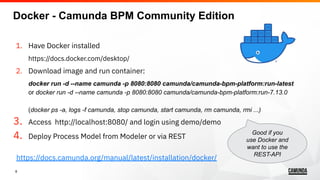
1. Have Docker installed
https://docs.docker.com/desktop/
2. Download image and run container:
docker run -d --name camunda -p 8080:8080 camunda/camunda-bpm-platform:run-latest
or docker run -d --name camunda -p 8080:8080 camunda/camunda-bpm-platform:run-7.13.0
(docker ps -a, logs -f camunda, stop camunda, start camunda, rm camunda, rmi ...)
3. Access http://localhost:8080/ and login using demo/demo
4. Deploy Process Model from Modeler or via REST
https://docs.camunda.org/manual/latest/installation/docker/
Good if you
use Docker and
want to use the
REST-API
Docker - Camunda BPM Community Edition
9
1. Trial License https://camunda.com/download/enterprise/
2. Download image and run container:
docker login registry.camunda.cloud
docker run -d --name camunda-ee -p8080:8080
registry.camunda.cloud/cambpm-ee/camunda-bpm-platform-ee:7.13.0
Differences CE vs EE :
https://camunda.com/enterprise/ and https://camunda.com/products/cockpit/#/features
Docker - Camunda BPM Enterprise Edition
10
1. Have Java and Maven installed
2. Camunda Spring boot Initializer
https://start.camunda.com
3. IDE or mvn spring-boot:run
4. Access http://localhost:8080/
5. Login using demo/demo
6. Deploy Process Model from classpath
(or Modeler or via REST)
Spring Boot
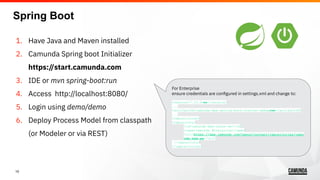
For Enterprise
ensure credentials are configured in settings.xml and change to:
<version>7.13.0-ee</version>
...
<artifactId>camunda-bpm-spring-boot-starter-webapp-ee</artifactId>
...
<repositories>
<repository>
<id>camunda-bpm-nexus-ee</id>
<name>Camunda Enterprise</name>
<url>https://app.camunda.com/nexus/content/repositories/camu
nda-bpm-ee</url>
</repository>
</repositories>
11
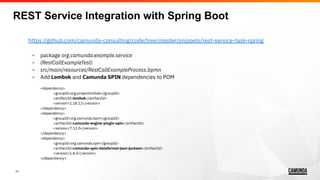
https://github.com/camunda-consulting/code/tree/master/snippets/rest-service-task-spring
• package org.camunda.example.service
• (RestCallExampleTest)
• src/main/resources/RestCallExampleProcess.bpmn
• Add Lombok and Camunda SPIN dependencies to POM
<dependency>
<groupId>org.projectlombok</groupId>
<artifactId>lombok</artifactId>
<version>1.18.12</version>
</dependency>
<dependency>
<groupId>org.camunda.bpm</groupId>
<artifactId>camunda-engine-plugin-spin</artifactId>
<version>7.13.0</version>
</dependency>
<dependency>
<groupId>org.camunda.spin</groupId>
<artifactId>camunda-spin-dataformat-json-jackson</artifactId>
<version>1.8.0</version>
</dependency>
REST Service Integration with Spring Boot
12
a. Connectors - not recommended
https://docs.camunda.org/manual/latest/user-guide/process-engine/connectors
https://github.com/rob2universe/camunda-http-connector-example
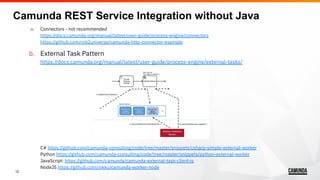
b. External Task Pattern
https://docs.camunda.org/manual/latest/user-guide/process-engine/external-tasks/
C# https://github.com/camunda-consulting/code/tree/master/snippets/csharp-simple-external-worker
Python https://github.com/camunda-consulting/code/tree/master/snippets/python-external-worker
JavaScript: https://github.com/camunda/camunda-external-task-client-js
NodeJS https://github.com/nikku/camunda-worker-node
Camunda REST Service Integration without Java
13
• Documentation: https://docs.camunda.org/manual/latest/
• https://docs.camunda.org/manual/develop/reference/
• https://docs.camunda.org/manual/latest/reference/rest/openapi/
• Nial’s getting started videos: https://camunda.com/learn/videos/
• Blog: https://blog.camunda.com/
• Community Forum: https://forum.camunda.org/
• GitHub: https://github.com/camunda-consulting/
• Twitter: https://twitter.com/camunda
• LinkedIn: https://www.linkedin.com/company/camunda/
Where to go from here?
14
GET STARTED TODAY
1) 30-Day Enterprise Platform Trial
2) Sign-up for a DEMO and further discussion at
www.camunda.com
Remote Worker Support
Ask about our Human Workflow quick start
package designed to help remote teams
process applications, orders, onboard
customers and produce invoices at home.

Webinar - A Developer's Quick Start Guide to Open Source Process Automation Using Camunda

  • 1.
    A Developer’s QuickstartGuide to Open Source Process Automation using Camunda Robert Emsbach - Head of Consulting APAC
  • 2.
    2 Housekeeping • The webinaris being recorded • The recording and slides will be made available after the webinar • Please submit questions via the GoToWebinar control panel
  • 3.
    3 1. Product Philosophyand Stack Overview 2. Modeler Setup 3. Setting up a local environment for non- / Java-Developers a. Prepackaged Tomcat, incl. simple process b. Docker for Camunda BPM CE and EE c. Spring Boot Starters 4. A simple REST service integration Agenda
  • 4.
    4 Developer Friendly &Agile Business/IT Collaboration Highly Scalable Open Source & Standards-based Cost-Effective Camunda Camunda Advantage Traditional Tough to Install & Extend Single-point Design Limited Scalability Proprietary & Blackbox Expensive
  • 5.
    5 AUTOMATEDESIGN Workflow and DecisionAutomation COCKPIT TASKLIST WORKFLOW ENGINE DECISION ENGINE OPTIMIZEMODELER CAWEMO IMPROVE TECHNICAL SUPPORT JAVA / REST API TECHNICAL EXPERTS CUSTOMER SUCCESS TRAINING CAMUNDA BPM
  • 6.
    6 1. Download fromhttps://camunda.com/download/modeler/ 2. Extract archive and run 3. https://docs.camunda.org/manual/develop/modeler/bpmn/ Business friendly collaborative process modelling: https://cawemo.com/ Plugins https://link.medium.com/2nhjVN3fJ7 Camunda Modeler Setup
  • 7.
    7 1. Have aJRE/JDK installed (https://www.oracle.com/java/technologies/javase-downloads.htm) 2. Prepackaged Tomcat, incl. simple process model https://camunda.com/download/ 3. Extract archive 4. Run Start-camunda.bat / start-camunda.sh 5. Login using demo/demo (invoice example process included) https://docs.camunda.org/manual/develop/introduction/downloading-camunda/ Prepackaged Download Good if you don’t use Docker and don’t like Java
  • 8.
    8 1. Have Dockerinstalled https://docs.docker.com/desktop/ 2. Download image and run container: docker run -d --name camunda -p 8080:8080 camunda/camunda-bpm-platform:run-latest or docker run -d --name camunda -p 8080:8080 camunda/camunda-bpm-platform:run-7.13.0 (docker ps -a, logs -f camunda, stop camunda, start camunda, rm camunda, rmi ...) 3. Access http://localhost:8080/ and login using demo/demo 4. Deploy Process Model from Modeler or via REST https://docs.camunda.org/manual/latest/installation/docker/ Good if you use Docker and want to use the REST-API Docker - Camunda BPM Community Edition
  • 9.
    9 1. Trial Licensehttps://camunda.com/download/enterprise/ 2. Download image and run container: docker login registry.camunda.cloud docker run -d --name camunda-ee -p8080:8080 registry.camunda.cloud/cambpm-ee/camunda-bpm-platform-ee:7.13.0 Differences CE vs EE : https://camunda.com/enterprise/ and https://camunda.com/products/cockpit/#/features Docker - Camunda BPM Enterprise Edition
  • 10.
    10 1. Have Javaand Maven installed 2. Camunda Spring boot Initializer https://start.camunda.com 3. IDE or mvn spring-boot:run 4. Access http://localhost:8080/ 5. Login using demo/demo 6. Deploy Process Model from classpath (or Modeler or via REST) Spring Boot For Enterprise ensure credentials are configured in settings.xml and change to: <version>7.13.0-ee</version> ... <artifactId>camunda-bpm-spring-boot-starter-webapp-ee</artifactId> ... <repositories> <repository> <id>camunda-bpm-nexus-ee</id> <name>Camunda Enterprise</name> <url>https://app.camunda.com/nexus/content/repositories/camu nda-bpm-ee</url> </repository> </repositories>
  • 11.
    11 https://github.com/camunda-consulting/code/tree/master/snippets/rest-service-task-spring • package org.camunda.example.service •(RestCallExampleTest) • src/main/resources/RestCallExampleProcess.bpmn • Add Lombok and Camunda SPIN dependencies to POM <dependency> <groupId>org.projectlombok</groupId> <artifactId>lombok</artifactId> <version>1.18.12</version> </dependency> <dependency> <groupId>org.camunda.bpm</groupId> <artifactId>camunda-engine-plugin-spin</artifactId> <version>7.13.0</version> </dependency> <dependency> <groupId>org.camunda.spin</groupId> <artifactId>camunda-spin-dataformat-json-jackson</artifactId> <version>1.8.0</version> </dependency> REST Service Integration with Spring Boot
  • 12.
    12 a. Connectors -not recommended https://docs.camunda.org/manual/latest/user-guide/process-engine/connectors https://github.com/rob2universe/camunda-http-connector-example b. External Task Pattern https://docs.camunda.org/manual/latest/user-guide/process-engine/external-tasks/ C# https://github.com/camunda-consulting/code/tree/master/snippets/csharp-simple-external-worker Python https://github.com/camunda-consulting/code/tree/master/snippets/python-external-worker JavaScript: https://github.com/camunda/camunda-external-task-client-js NodeJS https://github.com/nikku/camunda-worker-node Camunda REST Service Integration without Java
  • 13.
    13 • Documentation: https://docs.camunda.org/manual/latest/ •https://docs.camunda.org/manual/develop/reference/ • https://docs.camunda.org/manual/latest/reference/rest/openapi/ • Nial’s getting started videos: https://camunda.com/learn/videos/ • Blog: https://blog.camunda.com/ • Community Forum: https://forum.camunda.org/ • GitHub: https://github.com/camunda-consulting/ • Twitter: https://twitter.com/camunda • LinkedIn: https://www.linkedin.com/company/camunda/ Where to go from here?
  • 14.
    14 GET STARTED TODAY 1)30-Day Enterprise Platform Trial 2) Sign-up for a DEMO and further discussion at www.camunda.com Remote Worker Support Ask about our Human Workflow quick start package designed to help remote teams process applications, orders, onboard customers and produce invoices at home.