& Basic Shaders
Computer Graphics
WebGPU Shader Language
WGSL
What’s this
WGSL?
It’s the WebGPU Shader Language
(or WGSL)
Web
Shader
Language
GPU
What’s WGSL Like??
● JavaScript/Rust/C-style syntax
● Executes on GPU
● Even more type safety (no casting)
WGSL Challenges
● No recursion
● No dynamic memory allocation
● No pointers/objects
● No libraries
● No console I/O (must debug using tricks – like colors!)
WGSL Code (Minimal Working Example)
struct VSOut {
@builtin(position) Position: vec4<f32>,
@location(0) color : vec3<f32>,
};
@vertex
fn main(@location(0) inPos : vec3<f32>,
@location(1) inColor: vec3<f32>) -> VSOut
{
var vsOut: VSOut;
vsOut.Position = vec4<f32>(inPos, 1.0);
vsOut.color = inColor;
return vsOut;
}
@fragment
fn main(@location(0) inColor: vec3<f32>) -> @location(0)
vec4<f32>
{
return vec4<f32>(inColor, 1.0);
}
Vertex Shader Fragment Shader
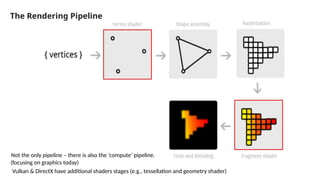
The Rendering Pipeline
Not the only pipeline – there is also the ‘compute’ pipeline.
Vulkan & DirectX have additional shaders stages (e.g., tessellation and geometry shader)
(focusing on graphics today)
Rendering Pipeline
Vertex Shader: Runs automatically once per vertex. Must output the
final vertex position to builtin output position, a 4D vector in
homogenous coordinates. It can also output “varying” parameters
which are sent to the fragment shader and interpolated
Fragment Shader: Runs automatically once per pixel (aka fragment).
Runs after the vertex shader, and must output the final pixel color to
builtin output, a 4D vector holding (red, green, blue, alpha), all of which
are between 0.0 and 1.0
Note: Opacity does not work by default – but requires some extra flags/setup
WGSL Type Specifiers
attribute: Variables that are sent over via buffers to the vertex shader.
One per vertex.
e.g. To send over positions, colors, and normals at each vertex
uniform: A variable which is constant across all shaders.
e.g. to store info about light positions and objects in scene
varying: A variable that is shared between the vertex shader and
fragment shader. Its value is interpolated via barycentric coordinates in
the fragment shader
storage buffers: Constant data across the shaders (can be modified
in the compute shader).
e.g. can be used for large datasets (geometry/animations)
WGSL Built IN Vector Types
var yxz_comp:vec3f = otherVec.yxz;
let myvec4:vec4f = vec4f(yxzComp, 1.0);
var urvec3: vec4f = vec3f(1.0, 0.0, 0.0);
var projMag:f32 = dot(yxzComp, urvec3);
var yxz_comp:vec3<f32> = otherVec.yxz;
let myvec4:vec4<f32> = vec4<f32> (yxzComp, 1.0);
var urvec3: vec4<f32> = vec3<f32> (1.0, 0.0, 0.0);
var projMag:f32 = dot(yxzComp, urvec3);
Shorthand Version
Longer Explicit Version
const, let and var
const only global level
let – is like a ‘const’ at function level
var – is a mutable variable
Basic (Hello) Triangle Quad Example
1. trianglequad.vert
(vertex shader)
● Position of vertex is always set on
builtin position
● Positions are xyz in homogenous
coordinates, so a vec4f is needed
struct VSOut {
@builtin(position) Position: vec4<f32>,
@location(0) uvs : vec2<f32>
};
@vertex
fn main(@builtin(vertex_index) VertexIndex : u32) -> VSOut
{
var s = 1.0;
var pos = array<vec2<f32>, 4>( vec2<f32>( -s, s ),
vec2<f32>( -s, -s ),
vec2<f32>( s, s ),
vec2<f32>( s, -s ));
var vsOut: VSOut;
vsOut.Position = vec4<f32>(pos[ VertexIndex ], 0.0, 1.0); // -1.0 to 1.0
vsOut.uvs = pos[ VertexIndex ] * 0.5 + 0.5; // 0->1
return vsOut;
}
Basic (Hello) Triangle Quad Example
1. trianglequad.frag
(fragment shader)
● Color is shared between vertex and
fragment shaders
● Colors are in RGBA format, so a vec4 is
needed
@fragment
fn main(@location(0) uvs : vec2<f32>) -> @location(0)
vec4<f32>
{
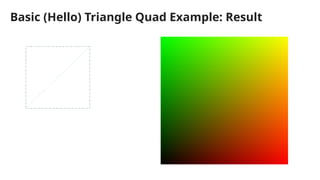
return vec4(uvs, 0.0, 1.0);
}
Basic (Hello) Triangle Quad Example: Result
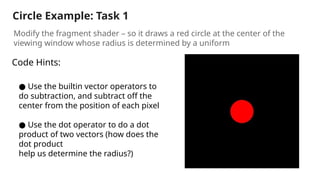
Circle Example: Task 1
Modify the fragment shader – so it draws a red circle at the center of the
viewing window whose radius is determined by a uniform
● Use the builtin vector operators to
do subtraction, and subtract off the
center from the position of each pixel
● Use the dot operator to do a dot
product of two vectors (how does the
dot product
help us determine the radius?)
Code Hints:
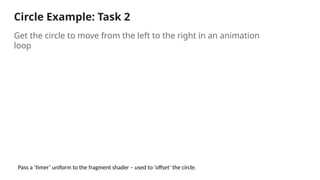
Circle Example: Task 2
Get the circle to move from the left to the right in an animation
loop
Pass a ‘timer’ uniform to the fragment shader – used to ‘offset’ the circle.
Circle Example: Task 3
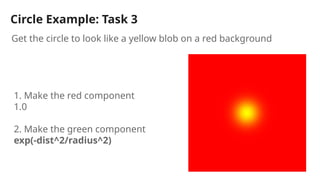
Get the circle to look like a yellow blob on a red background
1. Make the red component
1.0
2. Make the green component
exp(-dist^2/radius^2)
Resources & Links
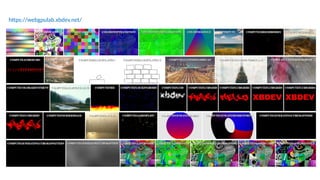
https://webgpulab.xbdev.net/
Hundreds of Online Editable Demos Tutorials Articles/News/Projects
https://xbdev.net/
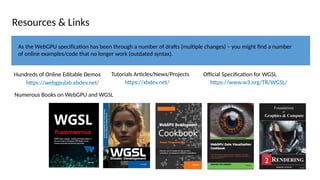
As the WebGPU specification has been through a number of drafts (multiple changes) – you might find a number
of online examples/code that no longer work (outdated syntax).
Numerous Books on WebGPU and WGSL
Official Specification for WGSL
https://www.w3.org/TR/WGSL/
https://webgpulab.xbdev.net/

webgpu shader language (wgsl) and shaders - computer graphics

  • 1.
    & Basic Shaders ComputerGraphics WebGPU Shader Language WGSL
  • 2.
  • 3.
    It’s the WebGPUShader Language (or WGSL) Web Shader Language GPU
  • 4.
    What’s WGSL Like?? ●JavaScript/Rust/C-style syntax ● Executes on GPU ● Even more type safety (no casting) WGSL Challenges ● No recursion ● No dynamic memory allocation ● No pointers/objects ● No libraries ● No console I/O (must debug using tricks – like colors!)
  • 5.
    WGSL Code (MinimalWorking Example) struct VSOut { @builtin(position) Position: vec4<f32>, @location(0) color : vec3<f32>, }; @vertex fn main(@location(0) inPos : vec3<f32>, @location(1) inColor: vec3<f32>) -> VSOut { var vsOut: VSOut; vsOut.Position = vec4<f32>(inPos, 1.0); vsOut.color = inColor; return vsOut; } @fragment fn main(@location(0) inColor: vec3<f32>) -> @location(0) vec4<f32> { return vec4<f32>(inColor, 1.0); } Vertex Shader Fragment Shader
  • 6.
    The Rendering Pipeline Notthe only pipeline – there is also the ‘compute’ pipeline. Vulkan & DirectX have additional shaders stages (e.g., tessellation and geometry shader) (focusing on graphics today)
  • 7.
    Rendering Pipeline Vertex Shader:Runs automatically once per vertex. Must output the final vertex position to builtin output position, a 4D vector in homogenous coordinates. It can also output “varying” parameters which are sent to the fragment shader and interpolated Fragment Shader: Runs automatically once per pixel (aka fragment). Runs after the vertex shader, and must output the final pixel color to builtin output, a 4D vector holding (red, green, blue, alpha), all of which are between 0.0 and 1.0 Note: Opacity does not work by default – but requires some extra flags/setup
  • 8.
    WGSL Type Specifiers attribute:Variables that are sent over via buffers to the vertex shader. One per vertex. e.g. To send over positions, colors, and normals at each vertex uniform: A variable which is constant across all shaders. e.g. to store info about light positions and objects in scene varying: A variable that is shared between the vertex shader and fragment shader. Its value is interpolated via barycentric coordinates in the fragment shader storage buffers: Constant data across the shaders (can be modified in the compute shader). e.g. can be used for large datasets (geometry/animations)
  • 9.
    WGSL Built INVector Types var yxz_comp:vec3f = otherVec.yxz; let myvec4:vec4f = vec4f(yxzComp, 1.0); var urvec3: vec4f = vec3f(1.0, 0.0, 0.0); var projMag:f32 = dot(yxzComp, urvec3); var yxz_comp:vec3<f32> = otherVec.yxz; let myvec4:vec4<f32> = vec4<f32> (yxzComp, 1.0); var urvec3: vec4<f32> = vec3<f32> (1.0, 0.0, 0.0); var projMag:f32 = dot(yxzComp, urvec3); Shorthand Version Longer Explicit Version const, let and var const only global level let – is like a ‘const’ at function level var – is a mutable variable
  • 10.
    Basic (Hello) TriangleQuad Example 1. trianglequad.vert (vertex shader) ● Position of vertex is always set on builtin position ● Positions are xyz in homogenous coordinates, so a vec4f is needed struct VSOut { @builtin(position) Position: vec4<f32>, @location(0) uvs : vec2<f32> }; @vertex fn main(@builtin(vertex_index) VertexIndex : u32) -> VSOut { var s = 1.0; var pos = array<vec2<f32>, 4>( vec2<f32>( -s, s ), vec2<f32>( -s, -s ), vec2<f32>( s, s ), vec2<f32>( s, -s )); var vsOut: VSOut; vsOut.Position = vec4<f32>(pos[ VertexIndex ], 0.0, 1.0); // -1.0 to 1.0 vsOut.uvs = pos[ VertexIndex ] * 0.5 + 0.5; // 0->1 return vsOut; }
  • 11.
    Basic (Hello) TriangleQuad Example 1. trianglequad.frag (fragment shader) ● Color is shared between vertex and fragment shaders ● Colors are in RGBA format, so a vec4 is needed @fragment fn main(@location(0) uvs : vec2<f32>) -> @location(0) vec4<f32> { return vec4(uvs, 0.0, 1.0); }
  • 12.
    Basic (Hello) TriangleQuad Example: Result
  • 13.
    Circle Example: Task1 Modify the fragment shader – so it draws a red circle at the center of the viewing window whose radius is determined by a uniform ● Use the builtin vector operators to do subtraction, and subtract off the center from the position of each pixel ● Use the dot operator to do a dot product of two vectors (how does the dot product help us determine the radius?) Code Hints:
  • 14.
    Circle Example: Task2 Get the circle to move from the left to the right in an animation loop Pass a ‘timer’ uniform to the fragment shader – used to ‘offset’ the circle.
  • 15.
    Circle Example: Task3 Get the circle to look like a yellow blob on a red background 1. Make the red component 1.0 2. Make the green component exp(-dist^2/radius^2)
  • 16.
    Resources & Links https://webgpulab.xbdev.net/ Hundredsof Online Editable Demos Tutorials Articles/News/Projects https://xbdev.net/ As the WebGPU specification has been through a number of drafts (multiple changes) – you might find a number of online examples/code that no longer work (outdated syntax). Numerous Books on WebGPU and WGSL Official Specification for WGSL https://www.w3.org/TR/WGSL/
  • 17.