1
UAF TUTORIAL: BIOMETRICS
FOR NATIVE APPS
REVISED JANUARY 17TH 2018
All Rights Reserved | FIDO Alliance | Copyright 2017
All Rights Reserved | FIDO Alliance | Copyright 20172
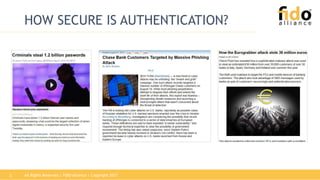
HOW SECURE IS AUTHENTICATION?
All Rights Reserved | FIDO Alliance | Copyright 20173
CLOUD AUTHENTICATION
DeviceSomething Authentication
Risk Analytics
Internet
All Rights Reserved | FIDO Alliance | Copyright 20174
PASSWORD ISSUES
DeviceSomething Authentication
Internet
Password could be stolen
from the server
1Password might be entered
into untrusted App / Web-
site (“phishing”)
2
Too many passwords to
remember
(>re-use / cart Abandonment)
3
Inconvenient to type
password on phone
4
All Rights Reserved | FIDO Alliance | Copyright 20175
OTP ISSUES
DeviceSomething Authentication
Internet
OTP vulnerable to real-
time MITM and MITB
attacks
1
SMS security questionable,
especially when Device is
the phone
2
OTP HW tokens are
expensive and people don’t
want another device
3
Inconvenient to type
OTP into phone
4
All Rights Reserved | FIDO Alliance | Copyright 20176
CLASSIFYING THREATS
Attacks not focused on the client system, e.g. steal data from servers for
impersonation, phishing pwds, or MITM attacks
Remotely attacking
lots of user devices
steal data for
impersonation
Remotely attacking
lots of user devices
misuse them for
impersonation
Remotely attacking
lots of user devices
misuse authenticated
sessions
Physically attacking user devices
steal data for impersonation
Physically attacking user devices
misuse them for impersonation
1
2 3 4
5 6
Physical attacks
possible on lost or
stolen devices
(3% in the US in 2013)
Scalable attacks
All Rights Reserved | FIDO Alliance | Copyright 20177
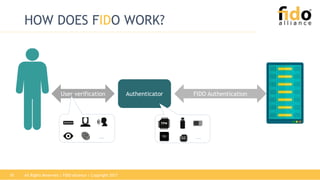
HOW DOES FIDO WORK?
All Rights Reserved | FIDO Alliance | Copyright 20178
HOW DOES FIDO WORK?
Device
Authenticator
User verification FIDO Authentication
All Rights Reserved | FIDO Alliance | Copyright 20179
HOW DOES FIDO WORK?
AuthenticatorUser verification FIDO Authentication
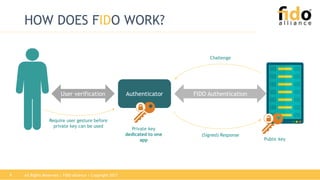
Require user gesture before
private key can be used
Challenge
(Signed) Response
Private key
dedicated to one
app Public key
All Rights Reserved | FIDO Alliance | Copyright 201710
HOW DOES FIDO WORK?
AuthenticatorUser verification FIDO Authentication
… …SE
All Rights Reserved | FIDO Alliance | Copyright 201711
HOW DOES FIDO WORK?
AuthenticatorUser verification FIDO Authentication
Same Authenticator
as registered before?
Same User as
enrolled before?
Can recognize the user (i.e.
user verification), but doesn’t
know its identity attributes.
All Rights Reserved | FIDO Alliance | Copyright 201712
HOW DOES FIDO WORK?
AuthenticatorUser verification FIDO Authentication
Same Authenticator
as registered before?
Same User as
enrolled before?
Can recognize the user (i.e.
user verification), but doesn’t
know its identity attributes.
Identity binding to be
done outside FIDO: This
this “John Doe with
customer ID X”.
All Rights Reserved | FIDO Alliance | Copyright 201713
HOW DOES FIDO WORK?
AuthenticatorUser verification FIDO Authentication
… …SE
How is the key protected
(TPM, SE, TEE, …)?
Which user verification
method is used?
All Rights Reserved | FIDO Alliance | Copyright 201714
ATTESTATION + METADATA
Private
attestation key
Signed Attestation Object
Metadata
Understand Authenticator
security characteristic by
looking into Metadata from
mds.fidoalliance.org
FIDO Registration
Verify using trust anchor
included in Metadata
All Rights Reserved | FIDO Alliance | Copyright 201715
FIDO AUTHENTICATOR CONCEPT
FIDO Authenticator
User
Verification /
Presence
Attestation Key
Authentication Key(s)
Injected at
manufacturing,
doesn’t change
Generated at
runtime (on
Registration)
Optional
Components
Transaction
Confirmation
Display
All Rights Reserved | FIDO Alliance | Copyright 201716
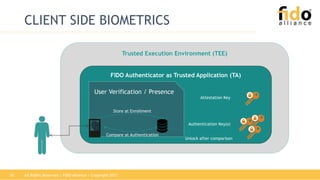
CLIENT SIDE BIOMETRICS
Trusted Execution Environment (TEE)
FIDO Authenticator as Trusted Application (TA)
User Verification / Presence
Attestation Key
Authentication Key(s)
Store at Enrollment
Compare at Authentication
Unlock after comparison
All Rights Reserved | FIDO Alliance | Copyright 201717
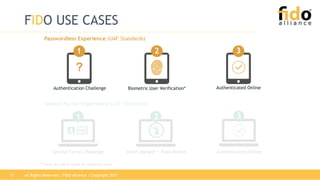
FIDO USE CASES
Passwordless Experience (UAF Standards)
Authenticated Online
3
Biometric User Verification*
21
?
Authentication Challenge Authenticated Online
3
Second Factor Challenge Insert Dongle* / Press Button
Second Factor Experience (U2F Standards)
*There are other types of authenticators
21
Relying Party
username, challenge, policy
appID, username, hash(fcp), [exts]
verify user
generate:
key kpub
key kpriv
keyID
fcp,ac,kpub,fcpHash,keyID,keyAlg,cntr,AAID[,exts],
signature(tbs)
fcp,ac,tbs, s
store:
key kpub
keyID
s
PlatformAuthenticator
select Authenticator according to policy;
determine facetID, check appID, get tlsData;
fcp := {challenge, facetID, appID, tlsData}
FIDO UAF REGISTRATION
tbs
ac: attestation certificate chain
Authenticator Platform Relying Party
appID, [keyID], hash(fcp)
select Authenticator according to policy;
determine facetID, check appID, get tlsData;
fcp := {challenge, facetID, appID, tlsData}
AAID,keyID,fcp,cntr,exts,
signature(AAID,keyID,fcpHash,cntr,exts)
AAID, keyID, fcp, cntr,exts, s
lookup kpub
from DB
check:
exts +
signature
using
key kpub
s
challenge, policy
FIDO UAF AUTHENTICATION
verify user
find
key kpriv
cntr++;
process exts
All Rights Reserved | FIDO Alliance | Copyright 201720
FIDO UAF AUTHENTICATION:
TYPICAL IMPLEMENTATION
All Rights Reserved | FIDO Alliance | Copyright 201721
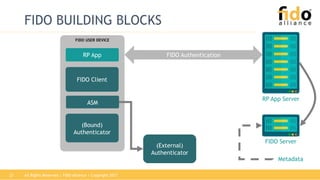
FIDO BUILDING BLOCKS
(External)
Authenticator
FIDO USER DEVICE
FIDO Client
(Bound)
Authenticator
ASM
RP App FIDO Authentication
RP App Server
FIDO Server
Metadata
All Rights Reserved | FIDO Alliance | Copyright 201722
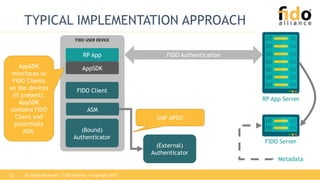
TYPICAL IMPLEMENTATION APPROACH
FIDO Authentication
RP App Server
FIDO Server
Metadata
(External)
Authenticator
FIDO USER DEVICE
FIDO Client
(Bound)
Authenticator
ASM
RP App
AppSDKAppSDK
interfaces to
FIDO Clients
on the devices
(if present).
AppSDK
contains FIDO
Client and
potentially
ASM.
UAF APDU
All Rights Reserved | FIDO Alliance | Copyright 201723
FIDO AUTHENTICATION:
SECURITY & CONVENIENCE
All Rights Reserved | FIDO Alliance | Copyright 201724
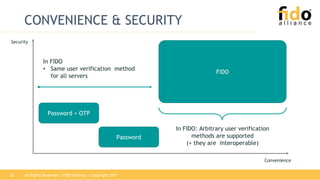
CONVENIENCE & SECURITY
Security
Convenience
Password + OTP
Password
All Rights Reserved | FIDO Alliance | Copyright 201725
CONVENIENCE & SECURITY
Security
Convenience
Password + OTP
Password
FIDO
In FIDO
• Same user verification method
for all servers
In FIDO: Arbitrary user verification
methods are supported
(+ they are interoperable)
All Rights Reserved | FIDO Alliance | Copyright 201726
CONVENIENCE & SECURITY
Security
Convenience
Password + OTP
Password
FIDO
In FIDO: Scalable security
depending on Authenticator
implementation
In FIDO:
• Only public keys on server
• Not phishable
All Rights Reserved | FIDO Alliance | Copyright 201727
CONCLUSION
• Different authentication use-cases lead to different
authentication requirements
• FIDO separates user verification from authentication and
hence supports all user verification methods
• FIDO supports scalable convenience & security
• User verification data is known to Authenticator only
• FIDO complements federation

UAF Tutorial: Passwordless, Biometric Authentication for Native Apps

  • 1.
    1 UAF TUTORIAL: BIOMETRICS FORNATIVE APPS REVISED JANUARY 17TH 2018 All Rights Reserved | FIDO Alliance | Copyright 2017
  • 2.
    All Rights Reserved| FIDO Alliance | Copyright 20172 HOW SECURE IS AUTHENTICATION?
  • 3.
    All Rights Reserved| FIDO Alliance | Copyright 20173 CLOUD AUTHENTICATION DeviceSomething Authentication Risk Analytics Internet
  • 4.
    All Rights Reserved| FIDO Alliance | Copyright 20174 PASSWORD ISSUES DeviceSomething Authentication Internet Password could be stolen from the server 1Password might be entered into untrusted App / Web- site (“phishing”) 2 Too many passwords to remember (>re-use / cart Abandonment) 3 Inconvenient to type password on phone 4
  • 5.
    All Rights Reserved| FIDO Alliance | Copyright 20175 OTP ISSUES DeviceSomething Authentication Internet OTP vulnerable to real- time MITM and MITB attacks 1 SMS security questionable, especially when Device is the phone 2 OTP HW tokens are expensive and people don’t want another device 3 Inconvenient to type OTP into phone 4
  • 6.
    All Rights Reserved| FIDO Alliance | Copyright 20176 CLASSIFYING THREATS Attacks not focused on the client system, e.g. steal data from servers for impersonation, phishing pwds, or MITM attacks Remotely attacking lots of user devices steal data for impersonation Remotely attacking lots of user devices misuse them for impersonation Remotely attacking lots of user devices misuse authenticated sessions Physically attacking user devices steal data for impersonation Physically attacking user devices misuse them for impersonation 1 2 3 4 5 6 Physical attacks possible on lost or stolen devices (3% in the US in 2013) Scalable attacks
  • 7.
    All Rights Reserved| FIDO Alliance | Copyright 20177 HOW DOES FIDO WORK?
  • 8.
    All Rights Reserved| FIDO Alliance | Copyright 20178 HOW DOES FIDO WORK? Device Authenticator User verification FIDO Authentication
  • 9.
    All Rights Reserved| FIDO Alliance | Copyright 20179 HOW DOES FIDO WORK? AuthenticatorUser verification FIDO Authentication Require user gesture before private key can be used Challenge (Signed) Response Private key dedicated to one app Public key
  • 10.
    All Rights Reserved| FIDO Alliance | Copyright 201710 HOW DOES FIDO WORK? AuthenticatorUser verification FIDO Authentication … …SE
  • 11.
    All Rights Reserved| FIDO Alliance | Copyright 201711 HOW DOES FIDO WORK? AuthenticatorUser verification FIDO Authentication Same Authenticator as registered before? Same User as enrolled before? Can recognize the user (i.e. user verification), but doesn’t know its identity attributes.
  • 12.
    All Rights Reserved| FIDO Alliance | Copyright 201712 HOW DOES FIDO WORK? AuthenticatorUser verification FIDO Authentication Same Authenticator as registered before? Same User as enrolled before? Can recognize the user (i.e. user verification), but doesn’t know its identity attributes. Identity binding to be done outside FIDO: This this “John Doe with customer ID X”.
  • 13.
    All Rights Reserved| FIDO Alliance | Copyright 201713 HOW DOES FIDO WORK? AuthenticatorUser verification FIDO Authentication … …SE How is the key protected (TPM, SE, TEE, …)? Which user verification method is used?
  • 14.
    All Rights Reserved| FIDO Alliance | Copyright 201714 ATTESTATION + METADATA Private attestation key Signed Attestation Object Metadata Understand Authenticator security characteristic by looking into Metadata from mds.fidoalliance.org FIDO Registration Verify using trust anchor included in Metadata
  • 15.
    All Rights Reserved| FIDO Alliance | Copyright 201715 FIDO AUTHENTICATOR CONCEPT FIDO Authenticator User Verification / Presence Attestation Key Authentication Key(s) Injected at manufacturing, doesn’t change Generated at runtime (on Registration) Optional Components Transaction Confirmation Display
  • 16.
    All Rights Reserved| FIDO Alliance | Copyright 201716 CLIENT SIDE BIOMETRICS Trusted Execution Environment (TEE) FIDO Authenticator as Trusted Application (TA) User Verification / Presence Attestation Key Authentication Key(s) Store at Enrollment Compare at Authentication Unlock after comparison
  • 17.
    All Rights Reserved| FIDO Alliance | Copyright 201717 FIDO USE CASES Passwordless Experience (UAF Standards) Authenticated Online 3 Biometric User Verification* 21 ? Authentication Challenge Authenticated Online 3 Second Factor Challenge Insert Dongle* / Press Button Second Factor Experience (U2F Standards) *There are other types of authenticators 21
  • 18.
    Relying Party username, challenge,policy appID, username, hash(fcp), [exts] verify user generate: key kpub key kpriv keyID fcp,ac,kpub,fcpHash,keyID,keyAlg,cntr,AAID[,exts], signature(tbs) fcp,ac,tbs, s store: key kpub keyID s PlatformAuthenticator select Authenticator according to policy; determine facetID, check appID, get tlsData; fcp := {challenge, facetID, appID, tlsData} FIDO UAF REGISTRATION tbs ac: attestation certificate chain
  • 19.
    Authenticator Platform RelyingParty appID, [keyID], hash(fcp) select Authenticator according to policy; determine facetID, check appID, get tlsData; fcp := {challenge, facetID, appID, tlsData} AAID,keyID,fcp,cntr,exts, signature(AAID,keyID,fcpHash,cntr,exts) AAID, keyID, fcp, cntr,exts, s lookup kpub from DB check: exts + signature using key kpub s challenge, policy FIDO UAF AUTHENTICATION verify user find key kpriv cntr++; process exts
  • 20.
    All Rights Reserved| FIDO Alliance | Copyright 201720 FIDO UAF AUTHENTICATION: TYPICAL IMPLEMENTATION
  • 21.
    All Rights Reserved| FIDO Alliance | Copyright 201721 FIDO BUILDING BLOCKS (External) Authenticator FIDO USER DEVICE FIDO Client (Bound) Authenticator ASM RP App FIDO Authentication RP App Server FIDO Server Metadata
  • 22.
    All Rights Reserved| FIDO Alliance | Copyright 201722 TYPICAL IMPLEMENTATION APPROACH FIDO Authentication RP App Server FIDO Server Metadata (External) Authenticator FIDO USER DEVICE FIDO Client (Bound) Authenticator ASM RP App AppSDKAppSDK interfaces to FIDO Clients on the devices (if present). AppSDK contains FIDO Client and potentially ASM. UAF APDU
  • 23.
    All Rights Reserved| FIDO Alliance | Copyright 201723 FIDO AUTHENTICATION: SECURITY & CONVENIENCE
  • 24.
    All Rights Reserved| FIDO Alliance | Copyright 201724 CONVENIENCE & SECURITY Security Convenience Password + OTP Password
  • 25.
    All Rights Reserved| FIDO Alliance | Copyright 201725 CONVENIENCE & SECURITY Security Convenience Password + OTP Password FIDO In FIDO • Same user verification method for all servers In FIDO: Arbitrary user verification methods are supported (+ they are interoperable)
  • 26.
    All Rights Reserved| FIDO Alliance | Copyright 201726 CONVENIENCE & SECURITY Security Convenience Password + OTP Password FIDO In FIDO: Scalable security depending on Authenticator implementation In FIDO: • Only public keys on server • Not phishable
  • 27.
    All Rights Reserved| FIDO Alliance | Copyright 201727 CONCLUSION • Different authentication use-cases lead to different authentication requirements • FIDO separates user verification from authentication and hence supports all user verification methods • FIDO supports scalable convenience & security • User verification data is known to Authenticator only • FIDO complements federation

Editor's Notes

  • #3 We have seen several attacks on existing authentication methods in the past: Server side attack were used to steal 1.2bn passwords from various servers. 2. Phishing attacks were launched to make users reveal their passwords to the attackers. 3. Orchestrated malware attacks were launched on PCs and smartphone in order to steal money. See EuroGrabber or the MITM attack on CITI bank in 2006 (http://www.banktech.com/phishers-beat-citiandrsquos-two-factor-authentication-/d/d-id/1290948) So existing authentication schemes seem to be broken at this time. In order to understand how we can improve authentication, let’s have a closer look into it…
  • #4 How does authentication work today? Since we are not born with WIFI interfaces in our heads, we cannot directly authenticate ourselves to a cloud server. We need some kind of proxy device. For example, we type our password into a computer running some application. If we believe this is the right application, we are willing to enter our password into it. The server takes some explicit authentication signal like the password as input and adds additional back-end computed signals, e.g. geolocation derived from the IP address, packet round-trip times etc. The risk engine computes a resulting risk score using all input signals. Note that the strength of a password signal depends on the characteristics of the “proxy-device” or App. If the password is entered into a malicious application, then a Phisher or man-in-the-middle might now be able to mis-use it.
  • #5 The predominant Authentication method today is username+password. But it has several issues. Passwords are symmetric bearer tokens. This means that anyone who knows the password can send it to the cloud server and gets authenticated. It also means that the server needs to know either the password directly or something which is derived from the password (e.g. the hash). And even if you cannot directly reverse this hash function, you can hash millions of passwords until the hash is identical to the one found on the server. Rainbow tables are an efficient method to do that. Note that the most passwords are not as strong as they could be. By knowing the 1000 most popular passwords you could break 90% of the accounts. By knowing the 10000 most popular passwords you could break 98,5% of the accounts. But passwords might also be entered into the wrong application. This phishing application could then send the password to the attacker and let the attacker misuse it or it could itself misuse it for performing malicious transactions. For security reasons, passwords shouldn‘t be re-used on other web sites. But how could I remember different passwords for all my accounts. I counted my accounts a while ago and ended up with well above 500. There is no way for me to remember them all. And passwords are inconvenient to type on mobile phones using the touch keyboards.
  • #6 The predominant Authentication method today is username+password. But it has several issues. Passwords are symmetric bearer tokens. This means that anyone who knows the password can send it to the cloud server and gets authenticated. It also means that the server needs to know either the password directly or something which is derived from the password (e.g. the hash). And even if you cannot directly reverse this hash function, you can hash millions of passwords until the hash is identical to the one found on the server. Rainbow tables are an efficient method to do that. Note that the most passwords are not as strong as they could be. By knowing the 1000 most popular passwords you could break 90% of the accounts. By knowing the 10000 most popular passwords you could break 98,5% of the accounts. But passwords might also be entered into the wrong application. This phishing application could then send the password to the attacker and let the attacker misuse it or it could itself misuse it for performing malicious transactions. For security reasons, passwords shouldn‘t be re-used on other web sites. But how could I remember different passwords for all my accounts. I counted my accounts a while ago and ended up with well above 500. There is no way for me to remember them all. And passwords are inconvenient to type on mobile phones using the touch keyboards.
  • #7 These are the attack classes we see being most important for authentication: Remotely attacking servers and stealing passwords. Remember the 1.1 billion stolen passwords. This attack is really bad as users cannot protect against it – the relying parties would have to do it. But users can make it even worse: if they share passwords across multiple relying parties, the least secure relying party could be hacked affecting all others. Once threat class 1 wouldn’t work any longer, the attackers would focus on other attacks. For example trying to steal data from the device in order to impersonate the user. Or Misuse data on the user device in order to impersonate the user. Or Remotely attacking lots of user devices (e.g. using stagefreight attack, see http://www.techworm.net/2015/07/stagefright-attack-it-takes-only-a-single-text-message-to-hack-an-android-smartphone.html) in order to misuse strongly authenticated session. This is known as the man-in-the-browser (MITB) attack. It is interesting to see that smartcards alone do not protect against the misuse of credentials as the smartcard cannot know whether a PIN was entered by the user or injected by some malware which phished the PIN from the user before. All these attacks are “scalable”, that means whether 1000 or 1m targets are attacked doesn’t have an impact on the attack costs. Once we have protected against such scalable attacks, we should focus on protection against the physical attacks, i.e. attacks where physical access to the device is required. Physical attacks are not scalable as stealing (active) smartphones has significant costs per target. In the US, there are 156m people owning smartphones in 2013 (see http://www.comscore.com/Insights/Press-Releases/2014/2/comScore-Reports-December-2013-US-Smartphone-Subscriber-Market-Share). Thereof 3.1m smartphones (2%) have been stolen in 2013 and another 1.4m smartphones (0.9%) were lost in 2013 (see http://www.consumerreports.org/cro/news/2014/04/smart-phone-thefts-rose-to-3-1-million-last-year/index.htm#).
  • #9 In FIDO we acknowledge the fact that we need a local or “proxy”-device in order to authenticate to a cloud server. We call this proxy device “Authenticator”. We call the “something” (see before) user verification and we have a standardize authentication protocol between the client side and the server. So we split the authentication into user verification and a standardized authenticator to server protocol.
  • #10 We use private keys generated and maintained by the authenticator to sign server generated challenges. The server uses the public key from the registered authenticator to verify the signature. Each private key is dedicated to a single relying party. So we only store public keys on the server-no user private keys. So hacking the server is less attractive to hackers.
  • #11 With this concept of the Authenticator, we get two dimensions of scalability. Scalability in terms of Authenticator implementation. We can leverage TPMs, embedded Secure Elements, SIM Cards and Trusted Execution Environments (TEE in short) to implement the Authenticator. And Scalability in terms of user verification methods. The Authenticator can support passcodes to verify the user or face recognition, or speaker recognition, Iris, fingerprint and even method not invented yet. We also can combine various user verification methods, e.g. fingerprint with an alternative PIN. And this is done in most existing implementations.
  • #12 The Authenticator verifies whether it is being used by the same user as enrolled initially. And the Authenticator proofs to the server whether it is the same Authenticator as registered before. The Authenticator doesn’t know whether the user is John Doe or Donald Duck. It just verifies whether it is still the user who enrolled.
  • #13 Since the RP wants to know WHO the user is that uses the Authenticator, we need an identity binding step. This step is not standardized in FIDO. Each RP can continue following its established know your customer (KYC) procedure. So in FIDO we separated the Authentication aspect from the Identity aspect. Authentication is a global problem which needs a global solution. Identity is inherently regional as different countries have different regulations on privacy and identity verification procedures for different verticals. For example, the know-you-customer-rules for European banks are different than the ones for Nigerian banks. And people Europe have different privacy expectations than Nigerian people. FIDO provides a global solution for Authentication that can be combined with any method of Identity binding that is acceptable in each region.
  • #14 FIDO provides great flexibility for Authenticator implementation. The specific implementation determines the resulting security level of the Authentication. So the FIDO Server needs to know such implementation details: The FIDO Server needs to know whether the Authenticator is implemented in a trusted execution environment or in normal software running in the rich operating system. It typically wants to know whether the user was verified using a 4 character passcode or using fingerprint verification. In FIDO we call this method Attestation.
  • #16 In FIDO, the Authenticator is a concept. The Authenticator owns the Authentication keys and typically owns one attestation key injected at manufacturing time. The Authenticator can optionally support a user presence check (e.g. button) or a user verification method. Additionally the Authenticator can implement a Transaction Confirmation Display. There are various ways to implement an authenticator. Typical Authenticators are (a) embedded into a smartphone or (b) separate hardware tokens
  • #18 The principles we just explained apply to all FIDO protocol families. In FIDO we support two major set of use-cases: Using the Authenticator for „passwordless experience“ and Using the Authenticator as a second factor. Let‘s look into how these use-cases are addressed in FIDO. We start with the generic cryptographic scheme
  • #25 Traditionally there always was a tradeoff between convenience and security. If you could get it either more secure or more convenient – but not both at the same time. Passwords are not very secure and their convenience is – let‘s say – improvable. Requiring one-time-passwords in addition to the password doesn‘t make it more convenient. So we can increase the security slightly if we give-up even more convenience.
  • #26 FIDO fundamentally changes this model. Since the user verification method (e.g. the finger swipe, or the PIN in case of PIN based authenticators) is the SAME for all relying parties it is more convenient just by using FIDO (worst case: only a single PIN to remember instead of hundred passwords). Additionally FIDO supports scalability in terms of convenience depending on the user verification method implemented by the authenticator. Just touching a fingerprint sensor is much more convenient than typing anything on touch keyboards.
  • #27 Similarly for the security. Just by using FIDO, you get protection against the server-side password stealing attacks (remember only public keys are stored on the server). Additionally phishing attacks don‘t work as there are no bearer tokens known by the user anymore. So the user cannot enter something into a phishing site which would allow impersonation (remember: only the legitimate authenticator knows the private key related to the public key which was registered at the server. So knowing a PIN wouldn‘t be sufficient for the attacker. Access to the authenticator would be required in addition).