Charles M. Huffman Ru Story Huffman Georgia Southwestern State University
“ a second generation of the World Wide Web that is focused on the ability for people to collaborate and share information online”  http://www.webopedia.com/TERM/W/Web_2_point_0.html “… especially the movement away from static webpages to dynamic and shareable content and social networking”  en.wiktionary.org/wiki/Web_2.0
“ Web 2.0 does not refer to any specific change in the technology of the Internet, but rather the behavior of how people use the Internet”  www.twinity.com /en/glossary
Information Revolution
 
Progressive Do things that cannot be done any other way Create new content (or borrow), collaborate, communicate “Cool” factor Reflects current generation’s media use
User Centric  Rich content Customize Control Scope Group/Individual Threat? Mostly Free, So Cost Effective
Web 2.0 Tools      Following is a list of no-cost Web 2.0 sites that are available for teachers to evaluate. Many of these tools are on the open Internet, so look at them carefully before using with your students!  Shedding Light on Web 2.0:  Diigo  List ..presentation support site with links to information and Web 2.0 tools. Links to over 100 tools for teachers and learners   Aggregator:  Pageflakes ...a Web-based aggregator that allows you to create a page for you and a page for students, and includes "flakes" to add in, such as a calculator   Blog :  Blogger ...one of the best online blog-creation sites; easy to use, privacy features now built-in, and it works well  
Blog : Class  Blogmeister ...a blog site set up specifically for educators and students with many privacy controls built-in           Collaboration:  EtherPad ...an easy-to-use, no password needed, synchronous shared notepad with all revisions stored        Database:  Zoho  Creator ...an online database application that can be used for surveys, inventories, data collection, and much more        Podcast :  Gabcast ...easy-to-use podcast creation and hosting site; even use your cellphone to record the podcast           Presentation:  VoiceThread ...online presentation site that allows you to attach audio and video and users to leave audio and video comments
  Social Networking:  del.icio.us ...save your bookmarks online, share with viewers, and search, via tags, others' links           Social Networking:  Flickr ...a social networking site for photographs; a great source of material for students to access           Social Networking:  Ning.com ...a site which allows you to create your own social network; consider using a private social network with your students        Synchronous Collaborative Environment: Adobe Connect Now  …online conferencing system with file sharing, a whiteboard, audio, video, and much more        Synchronous Collaborative Environment:  WiZiQ ...a "virtual classroom application that is fully equipped with 2-way audio, text chat, whiteboard, PowerPoint and PDF document sharing capabilities"  
Example Dove Evolution
 
Time Screening/Filtering Skill Instability of network Level of involvement Equipment  Sense of Loss of Control?
Technology out of context Reliability of content Distraction Administrative Resistance Good source of information Just not necessarily knowledge Threat
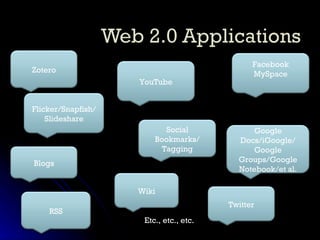
Etc., etc., etc. Zotero Blogs Social Bookmarks/ Tagging Wiki Flicker/Snapfish/ Slideshare YouTube Facebook MySpace Twitter RSS Google Docs/iGoogle/ Google Groups/Google Notebook/et al.
Scriblink
 
 
Dr. Charles M. Huffman Associate Professor of Psychology [email_address] Ru Story Huffman Assistant Professor Reference Librarian [email_address]

Web2 0 Symposium

  • 1.
    Charles M. HuffmanRu Story Huffman Georgia Southwestern State University
  • 2.
    “ a secondgeneration of the World Wide Web that is focused on the ability for people to collaborate and share information online” http://www.webopedia.com/TERM/W/Web_2_point_0.html “… especially the movement away from static webpages to dynamic and shareable content and social networking” en.wiktionary.org/wiki/Web_2.0
  • 3.
    “ Web 2.0does not refer to any specific change in the technology of the Internet, but rather the behavior of how people use the Internet” www.twinity.com /en/glossary
  • 4.
  • 5.
  • 6.
    Progressive Do thingsthat cannot be done any other way Create new content (or borrow), collaborate, communicate “Cool” factor Reflects current generation’s media use
  • 7.
    User Centric Rich content Customize Control Scope Group/Individual Threat? Mostly Free, So Cost Effective
  • 8.
    Web 2.0 Tools    Following is a list of no-cost Web 2.0 sites that are available for teachers to evaluate. Many of these tools are on the open Internet, so look at them carefully before using with your students! Shedding Light on Web 2.0: Diigo List ..presentation support site with links to information and Web 2.0 tools. Links to over 100 tools for teachers and learners   Aggregator: Pageflakes ...a Web-based aggregator that allows you to create a page for you and a page for students, and includes "flakes" to add in, such as a calculator   Blog : Blogger ...one of the best online blog-creation sites; easy to use, privacy features now built-in, and it works well  
  • 9.
    Blog : Class Blogmeister ...a blog site set up specifically for educators and students with many privacy controls built-in         Collaboration: EtherPad ...an easy-to-use, no password needed, synchronous shared notepad with all revisions stored      Database: Zoho Creator ...an online database application that can be used for surveys, inventories, data collection, and much more      Podcast : Gabcast ...easy-to-use podcast creation and hosting site; even use your cellphone to record the podcast         Presentation: VoiceThread ...online presentation site that allows you to attach audio and video and users to leave audio and video comments
  • 10.
      Social Networking: del.icio.us ...save your bookmarks online, share with viewers, and search, via tags, others' links         Social Networking: Flickr ...a social networking site for photographs; a great source of material for students to access         Social Networking: Ning.com ...a site which allows you to create your own social network; consider using a private social network with your students      Synchronous Collaborative Environment: Adobe Connect Now …online conferencing system with file sharing, a whiteboard, audio, video, and much more      Synchronous Collaborative Environment: WiZiQ ...a "virtual classroom application that is fully equipped with 2-way audio, text chat, whiteboard, PowerPoint and PDF document sharing capabilities"  
  • 11.
  • 12.
  • 13.
    Time Screening/Filtering SkillInstability of network Level of involvement Equipment Sense of Loss of Control?
  • 14.
    Technology out ofcontext Reliability of content Distraction Administrative Resistance Good source of information Just not necessarily knowledge Threat
  • 15.
    Etc., etc., etc.Zotero Blogs Social Bookmarks/ Tagging Wiki Flicker/Snapfish/ Slideshare YouTube Facebook MySpace Twitter RSS Google Docs/iGoogle/ Google Groups/Google Notebook/et al.
  • 16.
  • 17.
  • 18.
  • 19.
    Dr. Charles M.Huffman Associate Professor of Psychology [email_address] Ru Story Huffman Assistant Professor Reference Librarian [email_address]

Editor's Notes

  • #16 PHOTOS YOUTUBE: Videos for demonstration, COMO BLOGS Collaborative class activity to post relevant information RSS Keep up w/ current events in political science class WIKI Collaborative nature of learning SOCIAL BOOKMARKS/TAGGING The abilty to save research ZOTERO Firefox tool FACEBOOK Friend your LIBRARY! GOOGLE DOCS/et al. Amazing Possibilities TWITTER Class Announcements