EBSCO’s Curriculum Builder
Curriculum Builder (CB) enables instructors to manage and build reading lists for their courses using
Discover GALILEO powered by EBSCO Discovery Service within Brightspace by D2L.
Here is how it works:
 Faculty can search GALILEO’s full-text content including academic journals, magazines,
eBooks, videos, and reports from Brightspace using a Discover GALILEO search box
 Click “Add to Reading List” and selections are saved
 Annotate reading list items or add items from external sites
With Curriculum Builder, students will be able to view course readings without any additional password
prompts, since they are already authenticated through Brightspace.
To use CB in the course, do the following:
 Go to the course Content
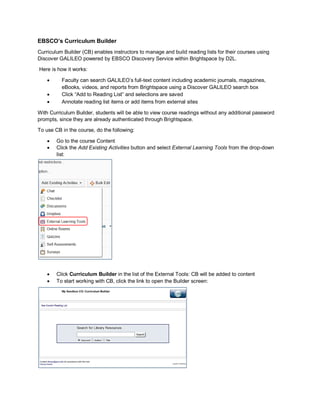
 Click the Add Existing Activities button and select External Learning Tools from the drop-down
list:
 Click Curriculum Builder in the list of the External Tools: CB will be added to content
 To start working with CB, click the link to open the Builder screen:

Curriculum Builder Instructions GSW

  • 1.
    EBSCO’s Curriculum Builder CurriculumBuilder (CB) enables instructors to manage and build reading lists for their courses using Discover GALILEO powered by EBSCO Discovery Service within Brightspace by D2L. Here is how it works:  Faculty can search GALILEO’s full-text content including academic journals, magazines, eBooks, videos, and reports from Brightspace using a Discover GALILEO search box  Click “Add to Reading List” and selections are saved  Annotate reading list items or add items from external sites With Curriculum Builder, students will be able to view course readings without any additional password prompts, since they are already authenticated through Brightspace. To use CB in the course, do the following:  Go to the course Content  Click the Add Existing Activities button and select External Learning Tools from the drop-down list:  Click Curriculum Builder in the list of the External Tools: CB will be added to content  To start working with CB, click the link to open the Builder screen: