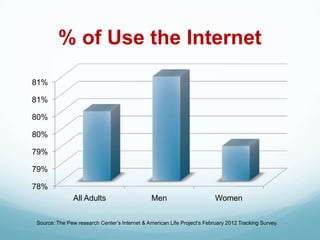
% of Use the Internet
81%

81%

80%

80%

79%

79%

78%
               All Adults                      Men                       Women

Source: The Pew research Center’s Internet & American Life Project’s February 2012 Tracking Survey.
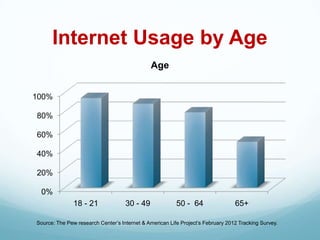
Internet Usage by Age
                                              Age


100%

80%

60%

40%

20%

 0%
               18 - 21              30 - 49              50 - 64                 65+

Source: The Pew research Center’s Internet & American Life Project’s February 2012 Tracking Survey.
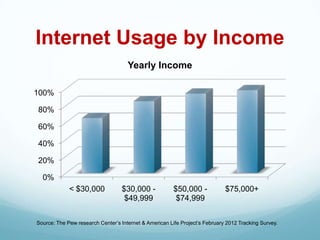
Internet Usage by Income
                                     Yearly Income

100%

80%

60%

40%

20%

  0%
             < $30,000             $30,000 -            $50,000 -            $75,000+
                                    $49,999              $74,999


Source: The Pew research Center’s Internet & American Life Project’s February 2012 Tracking Survey.
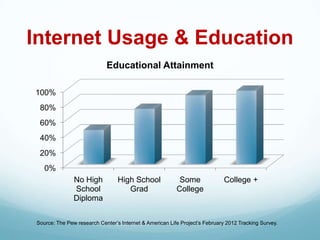
Internet Usage & Education
                            Educational Attainment

100%
 80%
 60%
 40%
 20%
   0%
               No High           High School              Some              College +
               School               Grad                 College
               Diploma

Source: The Pew research Center’s Internet & American Life Project’s February 2012 Tracking Survey.
We don’t
read pages.

 We scan
  them.
We don’t
make optimal
  choices

We satisfice
We don’t
figure out how
  things work

 We muddle
  through
Conventions are
  our friends
Web Site Conventions
 They are useful. Conventions only become
 conventions if they work
 Designers are reluctant to use
 conventions, they like to reinvent the
 wheel
 Innovate when you KNOW you have a
 better idea, but use conventions when you
 don’t
Web Site Convention
        Examples
 Navigation appearing along the top or
 running down the left side of the page
 Logo located in the upper left corner
 Hyperlinks are underlined
Keep the
 noise
 down
  to a
dull roar
What Defines
   A Good
Small Business
  Web Site?
A Good Web Site Has:
 A tagline that clearly identifies what you do
 Consistent design and navigation on all pages
 Clear hierarchy of information
 Footer links at the bottom of every page
 Keywords that identify your business
 Easy-to-find contact information
 A means to gather user data
Things to Avoid
 Splash or Intro Pages
 Slow loading pages
 Large blocks of text on the main site pages
 White text on color background
 Too much Flash and Music
 Incomplete pages
Information Architecture
 Create Usable Navigation System
   Easy to learn
   Consistent throughout the site
   Minimum number of clicks to destination

 What is the mission or purpose of the site
 Who are the intended audiences
 Determine the organizational structure
   Hierarchy of information
   Narrow and deep or broad and shallow

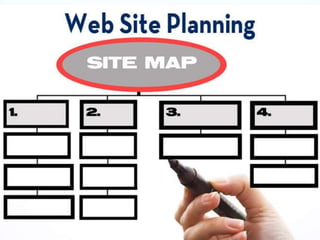
 Create a site map or blueprint of the site
3 Important Concepts
 Require Your Attention
 What the audience wants from you
 What you want to say
 How you arrange the content to best
 meet your audience’s needs
Break up pages into
clearly defined areas
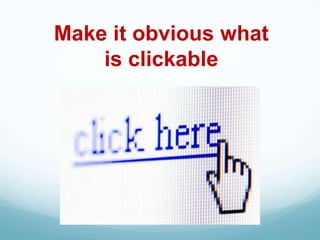
Make it obvious what
    is clickable
Important Considerations
 A clear, concise mission, vision, and
 values statement.
 Include photographs to add visual
 meaning to the site.
 All photos should be captioned to
 increase comprehension & SEO.
Important Considerations
 FAQ’s- improves users understanding of
  the information presented and reduces
  demand on your staff.
 Site Map—Helps users navigate and
  search your site.
 Page Footers offer the user a set of links
  to other pages in addition to essential
  data about the site.
Site Marketing
 Your Web site should be an integral part
 of all marketing campaigns and
 corporate communications
 programs, and the URL for the site
 should appear on every piece of
 correspondence and marketing
 collateral.
Site Navigation
 Gives us something to hold on to
 It tells us what’s inside
 It instructs us how to use the site
 Consistent Navigation allows users to
  adapt easily and predict with confidence
  the location of information
Omit Needless Words
 Reduces noise level of the page
 Makes useful content more prominent
 Makes pages shorter, reduces
 scrolling
Kill the Happy Talk
 Happy talk is like small talk, visitors to
  your site are not interested.
 Contains no useful information
Chunk It
 Few Web users spend time reading long
  passages of text on-screen
 Chunking can help organize and present
  information in a uniform format
 Concise chunks of information are better
  suited to the computer screen. Long pages
  tend to disorient readers and require users
  to scroll long distances
Kneel Before Google
 Your content should be ―Search Engine
  Friendly‖
 Content should contain keywords that best
  describe your products and/or services
 Use hyperlinks within your content to link to
  other pages on your site
Stock Photography
 Google Images is NOT a source of photos
  for your web site
 Royalty Free: Pay fee for variety of usage
 Rights Managed: Pay fee for very
  specific, one-time usage.
 ShutterStock, Getty Images, FotoSearch
  offer affordable plans for Royalty Free Stock
  Images.
Design is Devine
 The design of your site should offer relief to
  the eye by striking a balance between text
  and graphic elements.
Success Criteria
 Top of Mind Awareness within Marketplace
 Content is relevant, informative, and addresses the
   needs of the visitor
 Information is easy to find and read
 Increase unique visitor traffic to site
 Reduce demand on staff when handling inquiries
 Capture user data for future marketing
 Connectedness–link to other Web properties
 More product inquiries—MORE BUSINESS!
Design Your Own Site
 WordPress and Joomla are two CMS
  products that use templates so you can
  build your own Web Site and manage the
  content.
 CMS allows you to add/edit and delete
  pages from your site
Benefits of DIY Web Sites
 Saves you money
 Template driven, plug-ins available to add
  functionality
 Provides content management system
  (CMS) that archives content and allows
  you to easily upload new content to the
  site.
 Manage site content via a Web browser
Benefits of Hiring a Pro
 Saves you time, allows you to focus on
  core capabilities
 A professional will know how to structure
  the site to make it visitor friendly and
  design the site to make the most of web
  technology
 Customized approach to meet your specific
  needs
 Employ SEO strategies
Browsers Usage- May 2012


                           Internet Explorer
                           FireFox
                           Chrome
                           Opera
SmartPhones
  By 2014 more Internet
Users will access the Web
 from their Smart Phone
than a Desktop Computer
SmartPhones
 81% browse the Internet, 77% search, 68%
  use an app, and 48% watch videos on their
  SmartPhone
 91 Million consumers in the U.S. use mobile
  searches on a monthly
 9 out of 10 SmartPhone searches results in an
  action (purchasing, visiting a business)
 33% of mobile users are looking to access
  local content relevant to their GPS positioned
  location
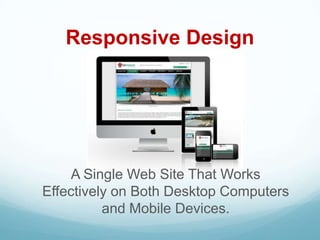
Responsive Design


     A Single Web Site That Works
Effectively on Both Desktop Computers
          and Mobile Devices.
Social Media
 Drives traffic to your web site
 Improves SEO with keyword rich content
 Gain better understanding of clients’
  perceptions of your business
 Increased awareness of your business
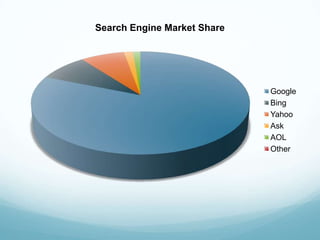
Search Engine Market Share


                             Google
                             Bing
                             Yahoo
                             Ask
                             AOL
                             Other
Organic (Natural SEO)
 Natural listings of web site URLs on search
  engines

 People click more on organically optimized web
  sites

 Organic SEO builds greater trust it yields more
  accurate results than paid search
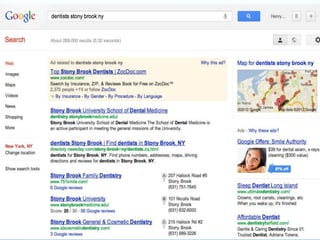
Search Engine Optimization
  Insert key marketing phrases at the beginning of
   pages

  Careful selection and naming of keywords in Tags
   and Headings

  Inbound links give search engines another way to
   find and index your site.

  Inclusion of relevant copy in your site that is
   frequently updated
Web Site Evaluation
 Effectively measuring site performance will
  enable you to accurately gauge ROI, and
  will aid in future decisions and strategy for
  evolving the site.
 Tracking visits is vitally important for a
  deeper analysis of your Web site.
Web Site Evaluation
 Number of unique visits
 Average duration of a visit
 Top referring web sites
 Top entry and exit pages
 Top referring URL’s
 Average number of users per day
 Most active day of the week
 A free service offered by Google that
  generates detailed statistics about the
  visitors to your web site
 Shows you how people found your
  site, how they explored it, and how you can
  enhance their visitor experience
QR Codes
 Link to a Web page, text message or
  phone number
 Practical Uses
     Back of business card
     Marketing Materials
     Product Packaging
     Link to Coupons, YouTube Videos
     Google Places
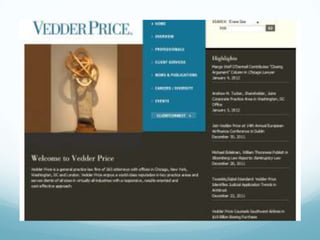
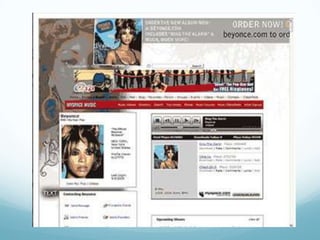
Really Bad
Web Sites
Web Sites for Small Businesses

Web Sites for Small Businesses

  • 3.
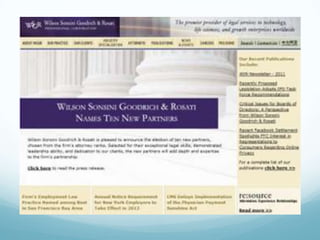
    % of Usethe Internet 81% 81% 80% 80% 79% 79% 78% All Adults Men Women Source: The Pew research Center’s Internet & American Life Project’s February 2012 Tracking Survey.
  • 4.
    Internet Usage byAge Age 100% 80% 60% 40% 20% 0% 18 - 21 30 - 49 50 - 64 65+ Source: The Pew research Center’s Internet & American Life Project’s February 2012 Tracking Survey.
  • 5.
    Internet Usage byIncome Yearly Income 100% 80% 60% 40% 20% 0% < $30,000 $30,000 - $50,000 - $75,000+ $49,999 $74,999 Source: The Pew research Center’s Internet & American Life Project’s February 2012 Tracking Survey.
  • 6.
    Internet Usage &Education Educational Attainment 100% 80% 60% 40% 20% 0% No High High School Some College + School Grad College Diploma Source: The Pew research Center’s Internet & American Life Project’s February 2012 Tracking Survey.
  • 8.
  • 9.
    We don’t make optimal choices We satisfice
  • 10.
    We don’t figure outhow things work We muddle through
  • 11.
    Conventions are our friends
  • 12.
    Web Site Conventions They are useful. Conventions only become conventions if they work  Designers are reluctant to use conventions, they like to reinvent the wheel  Innovate when you KNOW you have a better idea, but use conventions when you don’t
  • 13.
    Web Site Convention Examples  Navigation appearing along the top or running down the left side of the page  Logo located in the upper left corner  Hyperlinks are underlined
  • 14.
    Keep the noise down to a dull roar
  • 15.
    What Defines A Good Small Business Web Site?
  • 16.
    A Good WebSite Has:  A tagline that clearly identifies what you do  Consistent design and navigation on all pages  Clear hierarchy of information  Footer links at the bottom of every page  Keywords that identify your business  Easy-to-find contact information  A means to gather user data
  • 17.
    Things to Avoid Splash or Intro Pages  Slow loading pages  Large blocks of text on the main site pages  White text on color background  Too much Flash and Music  Incomplete pages
  • 19.
    Information Architecture  CreateUsable Navigation System  Easy to learn  Consistent throughout the site  Minimum number of clicks to destination  What is the mission or purpose of the site  Who are the intended audiences  Determine the organizational structure  Hierarchy of information  Narrow and deep or broad and shallow  Create a site map or blueprint of the site
  • 20.
    3 Important Concepts Require Your Attention  What the audience wants from you  What you want to say  How you arrange the content to best meet your audience’s needs
  • 21.
    Break up pagesinto clearly defined areas
  • 22.
    Make it obviouswhat is clickable
  • 23.
    Important Considerations  Aclear, concise mission, vision, and values statement.  Include photographs to add visual meaning to the site.  All photos should be captioned to increase comprehension & SEO.
  • 24.
    Important Considerations  FAQ’s-improves users understanding of the information presented and reduces demand on your staff.  Site Map—Helps users navigate and search your site.  Page Footers offer the user a set of links to other pages in addition to essential data about the site.
  • 25.
    Site Marketing  YourWeb site should be an integral part of all marketing campaigns and corporate communications programs, and the URL for the site should appear on every piece of correspondence and marketing collateral.
  • 27.
    Site Navigation  Givesus something to hold on to  It tells us what’s inside  It instructs us how to use the site  Consistent Navigation allows users to adapt easily and predict with confidence the location of information
  • 29.
    Omit Needless Words Reduces noise level of the page  Makes useful content more prominent  Makes pages shorter, reduces scrolling
  • 30.
    Kill the HappyTalk  Happy talk is like small talk, visitors to your site are not interested.  Contains no useful information
  • 31.
    Chunk It  FewWeb users spend time reading long passages of text on-screen  Chunking can help organize and present information in a uniform format  Concise chunks of information are better suited to the computer screen. Long pages tend to disorient readers and require users to scroll long distances
  • 32.
    Kneel Before Google Your content should be ―Search Engine Friendly‖  Content should contain keywords that best describe your products and/or services  Use hyperlinks within your content to link to other pages on your site
  • 33.
    Stock Photography  GoogleImages is NOT a source of photos for your web site  Royalty Free: Pay fee for variety of usage  Rights Managed: Pay fee for very specific, one-time usage.  ShutterStock, Getty Images, FotoSearch offer affordable plans for Royalty Free Stock Images.
  • 36.
    Design is Devine The design of your site should offer relief to the eye by striking a balance between text and graphic elements.
  • 37.
    Success Criteria  Topof Mind Awareness within Marketplace  Content is relevant, informative, and addresses the needs of the visitor  Information is easy to find and read  Increase unique visitor traffic to site  Reduce demand on staff when handling inquiries  Capture user data for future marketing  Connectedness–link to other Web properties  More product inquiries—MORE BUSINESS!
  • 39.
    Design Your OwnSite  WordPress and Joomla are two CMS products that use templates so you can build your own Web Site and manage the content.  CMS allows you to add/edit and delete pages from your site
  • 40.
    Benefits of DIYWeb Sites  Saves you money  Template driven, plug-ins available to add functionality  Provides content management system (CMS) that archives content and allows you to easily upload new content to the site.  Manage site content via a Web browser
  • 41.
    Benefits of Hiringa Pro  Saves you time, allows you to focus on core capabilities  A professional will know how to structure the site to make it visitor friendly and design the site to make the most of web technology  Customized approach to meet your specific needs  Employ SEO strategies
  • 43.
    Browsers Usage- May2012 Internet Explorer FireFox Chrome Opera
  • 45.
    SmartPhones By2014 more Internet Users will access the Web from their Smart Phone than a Desktop Computer
  • 46.
    SmartPhones  81% browsethe Internet, 77% search, 68% use an app, and 48% watch videos on their SmartPhone  91 Million consumers in the U.S. use mobile searches on a monthly  9 out of 10 SmartPhone searches results in an action (purchasing, visiting a business)  33% of mobile users are looking to access local content relevant to their GPS positioned location
  • 47.
    Responsive Design A Single Web Site That Works Effectively on Both Desktop Computers and Mobile Devices.
  • 49.
    Social Media  Drivestraffic to your web site  Improves SEO with keyword rich content  Gain better understanding of clients’ perceptions of your business  Increased awareness of your business
  • 51.
    Search Engine MarketShare Google Bing Yahoo Ask AOL Other
  • 53.
    Organic (Natural SEO) Natural listings of web site URLs on search engines  People click more on organically optimized web sites  Organic SEO builds greater trust it yields more accurate results than paid search
  • 54.
    Search Engine Optimization  Insert key marketing phrases at the beginning of pages  Careful selection and naming of keywords in Tags and Headings  Inbound links give search engines another way to find and index your site.  Inclusion of relevant copy in your site that is frequently updated
  • 57.
    Web Site Evaluation Effectively measuring site performance will enable you to accurately gauge ROI, and will aid in future decisions and strategy for evolving the site.  Tracking visits is vitally important for a deeper analysis of your Web site.
  • 58.
    Web Site Evaluation Number of unique visits  Average duration of a visit  Top referring web sites  Top entry and exit pages  Top referring URL’s  Average number of users per day  Most active day of the week
  • 59.
     A freeservice offered by Google that generates detailed statistics about the visitors to your web site  Shows you how people found your site, how they explored it, and how you can enhance their visitor experience
  • 61.
    QR Codes  Linkto a Web page, text message or phone number  Practical Uses  Back of business card  Marketing Materials  Product Packaging  Link to Coupons, YouTube Videos  Google Places
  • 62.

Editor's Notes

  • #4 All Adults 80%, Men 81%, Women 79%
  • #5 18-29 - 94%, 30-49 – 88%, 50-64 – 79%, 65+ - 48%
  • #6 &lt;$30k – 65%, $30 – $49.9k – 85%, $50 - $74.9k – 94%, $75k+ - 98%
  • #7 No Diploma – 45%, High School Grad – 73%, Some College 91%, College + - 97%
  • #9 Studies show that most people read less than 30% of the content on a page.
  • #10 Web users choose the first reasonable option
  • #11 Few people take the time to read everything. There’s no penalty for guessing wrong. Weighing options may not improve our chance. Guessing is fun.
  • #12 Without being taught, we all learn to read newspapers, not the words, the conventions: Large type is usually the headline, text underneath a photo is a caption.
  • #13 Web design conventions are a set of rules that help visitors “feel at home” on your site even if it’s the first time they visit it. Most websites adhere to these rules and yours should to.
  • #15 There are two kinds of noise: Busy-ness, everything on the page is clamoring for attention.Background noise. Your web pages are like being at a cocktail party, no one source of noise is loud enough to be heard
  • #19 Make sure that you invest the time to properly plan the information architecture of your site
  • #22 The home page is reserved for high-priority tasks and should divide your audience and send them to their particular area of interest.
  • #23 We are always looking for the next thing to click. Don’t force users to think about something that should be obvious
  • #34 Discuss situation client experienced using photos lifted off the web.
  • #36 One of the most common mistakes that businesses make is focusing too much on the Form or Style and less time on the Function or Substance of their web site.
  • #41 With CMS, you can add calendars, online forms and blogs
  • #43 Your web site will render differently depending on the Browser you use. Internet Explorer is the most difficult browser to design for. The differnet versions of IE behave differently.
  • #44 Internet Explorer 18.1%, Fire Fox 35.2%, Chrome 39.3%, Safari 4.3%, Opera 2.2%.
  • #46 By 2014 more Internet Users will access the Web from their SmartPhone than a Desktop Computer
  • #47 By 2014 more Internet Users will access the Web from their SmartPhone than a Desktop Computer
  • #49 PEO Paid Earned Owned.
  • #52 Google 81.14%, Bing 8.52%, Yahoo 7.52%, Ask 1.55%, AOL 1.27%, Other less than 1%
  • #53 SEO is a technique which helps search engines find and rank your site higher than the millions of other sites in response to a search query. SEO thus helps you get traffic from search engines.