COS 423 Theory of Algorithms • Kevin Wayne • Spring 2007
Web Programming
Internet and world wide web
• HTML
 Short for HyperText Markup Language, the authoring languageused
to create documents on the World Wide Web.
 First developed by Tim Berners-Lee in 1990, HTML is short
for HyperText Markup Language. HTML is used to create electronic
documents (called pages) that are displayed on the World Wide Web.
Each page contains a series of connections to other pages
called hyperlinks. Every web page you see on the Internet is written
using one version of HTML code or another.
2
Tag
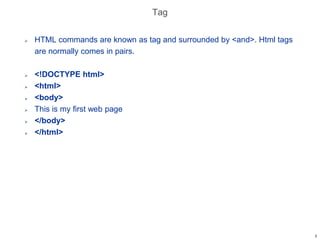
 HTML commands are known as tag and surrounded by <and>. Html tags
are normally comes in pairs.
 <!DOCTYPE html>
 <html>
 <body>
 This is my first web page
 </body>
 </html>
3
Elements and Attributes
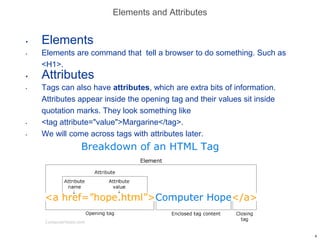
• Elements
• Elements are command that tell a browser to do something. Such as
<H1>.
• Attributes
• Tags can also have attributes, which are extra bits of information.
Attributes appear inside the opening tag and their values sit inside
quotation marks. They look something like
• <tag attribute="value">Margarine</tag>.
• We will come across tags with attributes later.
4
Benefits of HTML
• Simplicity
• Platform independent
• Easy navigation
• Easier to read and understand
5
Web page creation using HTML
• Text editor : use to write html command using any text editor such as
notepad or WordPad.
• Web browser: it is used to test the webpage.
6
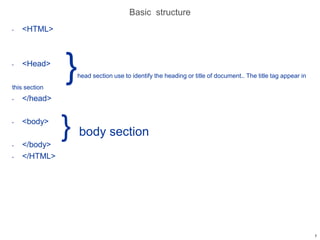
Basic structure
• <HTML>
• <Head>
}head section use to identify the heading or title of document.. The title tag appear in
this section
• </head>
• <body>
} body section
• </body>
• </HTML>
7
A simple program
• <HTML>
• <Head> use to heading or title of program
• <Title> use to indicate title of a program
• my first program
• </Title>
• </head>
• <body> body of program
• Hello
• </body>
• </HTML>
Save program with name.html
8
Body tag attributes
• BGCOLOR specifies the background color of the web page. E.g. <body
BGCOLOR= “red“ TEXT =“yellow">
• BACKGROUND specifies the background picture of web page. E.g.
<body BACKGROUND= “MY.png“ TEXT =“yellow">
• TEXT specify text color.
9
HEADINGS
• Is a very important body tag and use to display headings.
• Align is used to specifies the alignment of heading. The possible values
are center, left and right.
• <H1 ALIGN= “center“ > first heading </H1>
Sample code
• <HTML>
• <body>
• <H1 ALIGN= “center“ > first heading </H1>
• <H2> first heading </H2>
• </body>
• </HTML>
10
Paragraph : a body tag
• <p ALIGN= “center“ > first paragraph </p>
• Sample code
11
Line break
• Use to decide where the txt will be break using <BR> tag. A <BR> tag
has no closing tag.
• sample code
• <HTML>
• <body>
• Use to decide where the txt will be break <BR> use to move control to
the next line <BR> it is used to end a line without inserting a paragraph
<BR> and it has no closing tag.
• </body>
• </HTML>
12
Horizontal line
• Use to separate different area of web page. It is used to display a
horizontal line in the page using <HR> tag and this tag has no closing
tag.
• ALIGN: is used to specify the alignment such as center, left, right. Line
appear in center by default.
• SIZE: specify the size of line.
• WIDTH: specify the width of line.
• NOSHADE: turn off shading of line.
• COLOR: specify the color of line
• E.g.
• <HR WIDTH=40 align=“center” size=4>
13
Text Formatting
• Bold : <B> bold </B>
• Italic : <I> ITALIC </I>
• Underline : <U> </U>
• Superscript: <SUP> </SUP>
• E.g. N <SUP> 2 </SUP>
• Subscript <SUB> </SUB>
• E.g. N<SUB>2</SUB>
14
FONT
• Is used to specify the characteristic of font such as typeface, size color etc.
the possible vales of face are “ARIAL”, “ARIAL BLACK”, “COURIER ”, and
“MS Sans Serif”.
• Big and Small tag
• Use to change the size of text.
• e,.g.
• <BIG>HELLO</BIG>
• <SMALL>HELLO</SMALL>
• DIV Tag
• Is used to define section in html document. It is used to group large section
of HTML elements together and format them with cascading style sheet.
• ALIGN :possible values are center, left, right. And default value is left.
• STYLE: used to include inline cascading style sheet.
• E.g. <DIV STYLE=“background-color:blue;text-align:right”>
• <p>helloworld</p>
• </DIV>
15
Marquee
• Is used to scroll text or image in different direction. The text placed
inside the marquee tag scrolls horizontally across the screen or the web
page.
• Attributes:
• behavior: indicate how the content will scroll. The possible values are
scroll, slide and alternate.
• BGCOLOR
• DIRECTION
16
Cont….
• Height: Indicate height of marquee.
• HSPACE: use to set the horizontal space to the left and right of the
marque and its value is given in pixels.
• Loop : use to specify the number of times the marquee will scroll and its
default value is INFINITE.
• SCROLLDELAY and SCROLLAMOUNt : it is used together with
SCROLLAMOUNT to set the speed of scrolling. Marquee display the
content and then delay for some period of time specified in
SCROLLDELAY. Its value is given in milliseconds and its default value
is 85.
• WIDTH
• VSPACE : use to set the vertical space at the top and bottom of the
marquee and it is given in pixels.
• <MARQUEE BEHAVIOR=SLIDE HEIGHT=25 WIDTH=300
BGCOLOR=RED HSPACE=15 VSPACE=25 DIRECTION=UP>
17
18

Web fundamental concept and tags

  • 1.
    COS 423 Theoryof Algorithms • Kevin Wayne • Spring 2007 Web Programming
  • 2.
    Internet and worldwide web • HTML  Short for HyperText Markup Language, the authoring languageused to create documents on the World Wide Web.  First developed by Tim Berners-Lee in 1990, HTML is short for HyperText Markup Language. HTML is used to create electronic documents (called pages) that are displayed on the World Wide Web. Each page contains a series of connections to other pages called hyperlinks. Every web page you see on the Internet is written using one version of HTML code or another. 2
  • 3.
    Tag  HTML commandsare known as tag and surrounded by <and>. Html tags are normally comes in pairs.  <!DOCTYPE html>  <html>  <body>  This is my first web page  </body>  </html> 3
  • 4.
    Elements and Attributes •Elements • Elements are command that tell a browser to do something. Such as <H1>. • Attributes • Tags can also have attributes, which are extra bits of information. Attributes appear inside the opening tag and their values sit inside quotation marks. They look something like • <tag attribute="value">Margarine</tag>. • We will come across tags with attributes later. 4
  • 5.
    Benefits of HTML •Simplicity • Platform independent • Easy navigation • Easier to read and understand 5
  • 6.
    Web page creationusing HTML • Text editor : use to write html command using any text editor such as notepad or WordPad. • Web browser: it is used to test the webpage. 6
  • 7.
    Basic structure • <HTML> •<Head> }head section use to identify the heading or title of document.. The title tag appear in this section • </head> • <body> } body section • </body> • </HTML> 7
  • 8.
    A simple program •<HTML> • <Head> use to heading or title of program • <Title> use to indicate title of a program • my first program • </Title> • </head> • <body> body of program • Hello • </body> • </HTML> Save program with name.html 8
  • 9.
    Body tag attributes •BGCOLOR specifies the background color of the web page. E.g. <body BGCOLOR= “red“ TEXT =“yellow"> • BACKGROUND specifies the background picture of web page. E.g. <body BACKGROUND= “MY.png“ TEXT =“yellow"> • TEXT specify text color. 9
  • 10.
    HEADINGS • Is avery important body tag and use to display headings. • Align is used to specifies the alignment of heading. The possible values are center, left and right. • <H1 ALIGN= “center“ > first heading </H1> Sample code • <HTML> • <body> • <H1 ALIGN= “center“ > first heading </H1> • <H2> first heading </H2> • </body> • </HTML> 10
  • 11.
    Paragraph : abody tag • <p ALIGN= “center“ > first paragraph </p> • Sample code 11
  • 12.
    Line break • Useto decide where the txt will be break using <BR> tag. A <BR> tag has no closing tag. • sample code • <HTML> • <body> • Use to decide where the txt will be break <BR> use to move control to the next line <BR> it is used to end a line without inserting a paragraph <BR> and it has no closing tag. • </body> • </HTML> 12
  • 13.
    Horizontal line • Useto separate different area of web page. It is used to display a horizontal line in the page using <HR> tag and this tag has no closing tag. • ALIGN: is used to specify the alignment such as center, left, right. Line appear in center by default. • SIZE: specify the size of line. • WIDTH: specify the width of line. • NOSHADE: turn off shading of line. • COLOR: specify the color of line • E.g. • <HR WIDTH=40 align=“center” size=4> 13
  • 14.
    Text Formatting • Bold: <B> bold </B> • Italic : <I> ITALIC </I> • Underline : <U> </U> • Superscript: <SUP> </SUP> • E.g. N <SUP> 2 </SUP> • Subscript <SUB> </SUB> • E.g. N<SUB>2</SUB> 14
  • 15.
    FONT • Is usedto specify the characteristic of font such as typeface, size color etc. the possible vales of face are “ARIAL”, “ARIAL BLACK”, “COURIER ”, and “MS Sans Serif”. • Big and Small tag • Use to change the size of text. • e,.g. • <BIG>HELLO</BIG> • <SMALL>HELLO</SMALL> • DIV Tag • Is used to define section in html document. It is used to group large section of HTML elements together and format them with cascading style sheet. • ALIGN :possible values are center, left, right. And default value is left. • STYLE: used to include inline cascading style sheet. • E.g. <DIV STYLE=“background-color:blue;text-align:right”> • <p>helloworld</p> • </DIV> 15
  • 16.
    Marquee • Is usedto scroll text or image in different direction. The text placed inside the marquee tag scrolls horizontally across the screen or the web page. • Attributes: • behavior: indicate how the content will scroll. The possible values are scroll, slide and alternate. • BGCOLOR • DIRECTION 16
  • 17.
    Cont…. • Height: Indicateheight of marquee. • HSPACE: use to set the horizontal space to the left and right of the marque and its value is given in pixels. • Loop : use to specify the number of times the marquee will scroll and its default value is INFINITE. • SCROLLDELAY and SCROLLAMOUNt : it is used together with SCROLLAMOUNT to set the speed of scrolling. Marquee display the content and then delay for some period of time specified in SCROLLDELAY. Its value is given in milliseconds and its default value is 85. • WIDTH • VSPACE : use to set the vertical space at the top and bottom of the marquee and it is given in pixels. • <MARQUEE BEHAVIOR=SLIDE HEIGHT=25 WIDTH=300 BGCOLOR=RED HSPACE=15 VSPACE=25 DIRECTION=UP> 17
  • 18.