WEB DEPLOY
Larry Nung
AGENDA
Introduction
Installation
Setting
Export package through IIS Manager
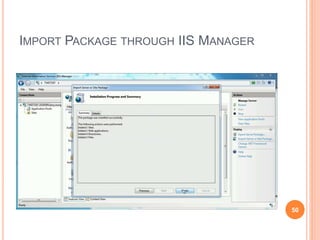
Import Package through IIS Manager
Automatic Backups
Use Visual Studio to publish with Web Deploy
Use MsBuild to publish with Web Deploy
Use Visual Studio to generate Web Deploy package
Use MsBuild to generate Web Deploy package
Reference
Q & A 2
INTRODUCTION
3
INTRODUCTION
 An extensible client-server tool for syncing content
and configuration to IIS
 Simplifies deployment of Web applications and Web
sites to IIS servers
4
FEATURE
 Seamless integration with IIS Manager (IIS7 and above),
Visual Studio (2010 and above)for creating packages
and deploying them onto a machine, both locally and
remotely.
 Integration with WebMatrix for deploying and
downloading web applications.
 Seamless integration with the Web Platform Installer to
install community web applications simply and easily.
 Web application packaging:
 Ability to package a Web application or an entire site,
including the associated databases.
 Ability to package ACLs, COM, GAC and registry settings.
 Supports both live servers and zipped packages as a source
or destination. 5
FEATURE
 Web application deployment:
 Administrative privileges are not required in order to deploy Web
applications.
 Ability to add powerful parameters to change text in files when they are
deployed (such as prompting to replace a connection string when
deploying from QA to staging environments).
 Integration with the IIS Web Management Service (WMSVC) for remote
deployment by non-administrators.
 Server administrators have granular control over the operations that can
be performed and can delegate tasks to non-administrators.
 Web server migration and synchronization:
 Ability to synchronize or migrate the entire Web server, a Web site or
application.
 Synchronizes only the data that has changed.
 Ability to detect missing dependencies during synchronization.
 Automatically gathers content, IIS configuration, SSL certificates and
ASP.NET configuration when you sync a Web site.
6
FEATURE
 Automatic backup of Web Sites before making any
changes.
 Administrator can configure Web Deploy such that it
creates and store backup of websites on the server.
 End users can directly restore their websites without
admins involvement.
 In addition to the IIS Manager, Visual Studio 10,
Web Matrix tasks can be performed using the
command-line, PowerShell Cmdlets or public APIs.
7
HOW DOES IT WORK?
8
HOW DOES IT WORK?
9
PROVIDERS
 Providers process specific source or destination
data for Web Deploy
10
PROVIDERS
 Web Deploy appHostConfig Provider
 Web Deploy appHostSchema Provider
 Web Deploy appPoolConfig Provider
 Web Deploy appPoolEnable32Bit Provider
 Web Deploy appPoolNetFx Provider
 Web Deploy appPoolPipeline Provider
 Web Deploy archiveDir Provider
 Web Deploy auto Provider
 Web Deploy cert Provider
11
PROVIDERS
 Web Deploy comObject32 Provider
 Web Deploy comObject64 Provider
 Web Deploy contentPath Provider
 Web Deploy createApp Provider
 Web Deploy dbFullSql Provider
 Web Deploy dbMySql Provider
 Web Deploy dbSqlite Provider
 Web Deploy dirPath Provider
 Web Deploy fcgiExtConfig Provider
 Web Deploy filePath Provider
 Web Deploy gacAssembly Provider
 Web Deploy gacInstall Provider 12
PROVIDERS
 Web Deploy iisApp Provider
 Web Deploy machineConfig32 Provider
 Web Deploy machineConfig64 Provider
 Web Deploy manifest Provider
 Web Deploy metaKey Provider
 Web Deploy package Provider
 Web Deploy recycleApp Provider
 Web Deploy regKey Provider
 Web Deploy regValue Provider
 Web Deploy rootWebConfig32 Provider
 Web Deploy rootWebConfig64 Provider
 Web Deploy runCommand Provider 13
PROVIDERS
 Web Deploy setAcl Provider
 Web Deploy urlScanConfig Provider
 Web Deploy webApp Provider
 Web Deploy webServer Provider
 Web Deploy webServer60 Provider
14
OPERATIONS
 dump
 Returns information about a specified source object
 sync
 Synchronizes data between a source and a destination
 delete
 Deletes the objects specified by the destination
argument
 GetDependencies
 Returns dependencies on features that Web Deploy
cannot synchronize and that you may want to install
separately on the destination
15
OPERATIONS
 GetSystemInfo
 Returns system information
16
RULES
 AboFilter
 AnonymousUser
 ApplicationExistsRule
 AppPoolIdentity
 AppRootNormalize
 BlockHarmfulDeleteOperations
 BlockUnsupportedDeleteOperations
 ClassicAppPoolProtectRule
 CreateApplicationRule
 CrossPlatformRule 17
RULES
 DependencyCheckAppPoolExists
 DependencyCheckFailOnError
 DependencyCheckFailOnWarning
 DependencyCheckInUse
 DoNotDeleteRule
 EnvironmentVariableNormalize
 IgnoreFileLastWriteTime
 IISConfigFrom64To32
 MetakeyToIIS6
 Parameterization 18
RULES
 SchemaSection
 SkipInvalidSource
 SkipNewerFilesRule
 SkipUNC
 SyncGeneral
 SyncXP
 UrlScanSkipIncompat
 WarnForEncryptedDataRule
 XpIsapis
19
INSTALLATION
20
INSTALLATION
21
INSTALLATION
22
INSTALLATION
INSTALLATION
INSTALLATION
INSTALLATION
26
SETTING
27
IIS MANAGER PERMISSION
28
IIS MANAGER PERMISSION
29
IIS MANAGER PERMISSION
30
IIS MANAGER PERMISSION
31
MANAGEMENT SERVICE
32
MANAGEMENT SERVICE
33
EXPORT PACKAGE THROUGH IIS
MANAGER
34
EXPORT PACKAGE THROUGH IIS MANAGER
35
EXPORT PACKAGE THROUGH IIS MANAGER
36
EXPORT PACKAGE THROUGH IIS MANAGER
37
EXPORT PACKAGE
38
EXPORT PACKAGE
39
EXPORT PACKAGE THROUGH IIS MANAGER
40
EXPORT PACKAGE THROUGH IIS MANAGER
41
IMPORT PACKAGE THROUGH IIS
MANAGER
42
IMPORT PACKAGE THROUGH IIS MANAGER
43
IMPORT PACKAGE THROUGH IIS MANAGER
44
IMPORT PACKAGE THROUGH IIS MANAGER
45
IMPORT PACKAGE THROUGH IIS MANAGER
46
IMPORT PACKAGE THROUGH IIS MANAGER
47
IMPORT PACKAGE THROUGH IIS MANAGER
48
IMPORT PACKAGE THROUGH IIS MANAGER
49
IMPORT PACKAGE THROUGH IIS MANAGER
50
IMPORT PACKAGE THROUGH IIS MANAGER
51
AUTOMATIC BACKUPS
52
AUTOMATIC BACKUPS
53
AUTOMATIC BACKUPS
54
AUTOMATIC BACKUPS
55
AUTOMATIC BACKUPS
56
USE VISUAL STUDIO TO PUBLISH
WITH WEB DEPLOY
57
USE VISUAL STUDIO TO PUBLISH WITH WEB
DEPLOY
58
USE VISUAL STUDIO TO PUBLISH WITH WEB
DEPLOY
59
USE VISUAL STUDIO TO PUBLISH WITH WEB
DEPLOY
60
USE VISUAL STUDIO TO PUBLISH WITH WEB
DEPLOY
61
USE VISUAL STUDIO TO PUBLISH WITH WEB
DEPLOY
62
USE VISUAL STUDIO TO PUBLISH WITH WEB
DEPLOY
63
USE VISUAL STUDIO TO PUBLISH WITH WEB
DEPLOY
64
USE VISUAL STUDIO TO PUBLISH WITH WEB
DEPLOY
65
USE MSBUILD TO PUBLISH WITH
WEB DEPLOY
66
USE MSBUILD TO PUBLISH WITH WEB
DEPLOY
 msbuild <ProjectFile|SolutionFile>
/p:Configuration=<Configuration>;Platform="<Platform>";Depl
oyOnBuild=true;PublishProfile=<PublishProfile>;UserName=<
UserName>;Password=<Password>;AllowUntrustedCertificat
e=True
67
USE MSBUILD TO PUBLISH WITH WEB
DEPLOY
 msbuild <ProjectFile|SolutionFile>
/p:Configuration=<Configuration>;Platform="<Platform>";Depl
oyOnBuild=true;PublishProfile=<PublishProfile>;UserName=<
UserName>;Password=<Password>;AllowUntrustedCertificat
e=True; EnableMSDeployAppOffline=true
68
USE VISUAL STUDIO TO GENERATE
WEB DEPLOY PACKAGE
69
USE VISUAL STUDIO TO GENERATE WEB
DEPLOY PACKAGE
70
USE VISUAL STUDIO TO GENERATE WEB
DEPLOY PACKAGE
71
USE VISUAL STUDIO TO GENERATE WEB
DEPLOY PACKAGE
72
USE VISUAL STUDIO TO GENERATE WEB
DEPLOY PACKAGE
73
USE VISUAL STUDIO TO GENERATE WEB
DEPLOY PACKAGE
74
USE VISUAL STUDIO TO PUBLISH WITH WEB
DEPLOY
75
USE VISUAL STUDIO TO PUBLISH WITH WEB
DEPLOY
76
USE VISUAL STUDIO TO PUBLISH WITH WEB
DEPLOY
77
USE MSBUILD TO GENERATE WEB
DEPLOY PACKAGE
78
USE MSBUILD TO GENERATE WEB DEPLOY
PACKAGE
 msbuild <ProjectFile|SolutionFile>
/p:Configuration=<Configuration>;Platform="<Platfo
rm>";PackageLocation="<PackageLocation>"
/t:package
79
REFERENCE
80
REFERENCE
 Web Deploy 3.5 : The Official Microsoft IIS Site
 https://www.iis.net/downloads/microsoft/web-deploy
 The Will Will Web | 介紹好用工具:Web
Deployment Tool 1.0 ( 附心得筆記 )
 http://blog.miniasp.com/post/2009/11/23/Useful-tool-
Web-Deployment-Tool.aspx
 天空的垃圾場: ASP.NET MVC - 使用Web Deploy佈
署MVC應用程式到IIS
 http://blog.sanc.idv.tw/2014/08/aspnet-web-
deploymvciis.html
81
REFERENCE
 CI Server 22 - 使用Web Deployment Tool部署網站 -
iT 邦幫忙::一起幫忙解決難題,拯救 IT 人的一天
 http://ithelp.ithome.com.tw/articles/10108511
 Using Web Deploy : The Official Microsoft IIS Site
 https://www.iis.net/learn/publish/using-web-deploy
 Web Deployment Tool
 https://technet.microsoft.com/en-
us/library/dd568996(v=ws.10).aspx
82
REFERENCE
 ScottGu's Blog - Automating Deployment with
Microsoft Web Deploy
 https://weblogs.asp.net/scottgu/automating-deployment-
with-microsoft-web-deploy
 Web Deploy - Import Package | Level Up
 https://larrynung.github.io/2015/07/10/web-deploy-
import-package/
 Web Deploy - Export package | Level Up
 https://larrynung.github.io/2015/07/08/web-deploy-
export-package/ 83
REFERENCE
 Web Deploy - Synchronize IIS | Level Up
 http://larrynung.github.io/2015/07/10/web-deploy-
synchronize-iis/
 Web Deploy - Automatic Backups | Level Up
 http://larrynung.github.io/2015/03/07/web-deploy-
automatic-backups/
84
Q&A
85
QUESTION & ANSWER
86

Web deploy

  • 1.
  • 2.
    AGENDA Introduction Installation Setting Export package throughIIS Manager Import Package through IIS Manager Automatic Backups Use Visual Studio to publish with Web Deploy Use MsBuild to publish with Web Deploy Use Visual Studio to generate Web Deploy package Use MsBuild to generate Web Deploy package Reference Q & A 2
  • 3.
  • 4.
    INTRODUCTION  An extensibleclient-server tool for syncing content and configuration to IIS  Simplifies deployment of Web applications and Web sites to IIS servers 4
  • 5.
    FEATURE  Seamless integrationwith IIS Manager (IIS7 and above), Visual Studio (2010 and above)for creating packages and deploying them onto a machine, both locally and remotely.  Integration with WebMatrix for deploying and downloading web applications.  Seamless integration with the Web Platform Installer to install community web applications simply and easily.  Web application packaging:  Ability to package a Web application or an entire site, including the associated databases.  Ability to package ACLs, COM, GAC and registry settings.  Supports both live servers and zipped packages as a source or destination. 5
  • 6.
    FEATURE  Web applicationdeployment:  Administrative privileges are not required in order to deploy Web applications.  Ability to add powerful parameters to change text in files when they are deployed (such as prompting to replace a connection string when deploying from QA to staging environments).  Integration with the IIS Web Management Service (WMSVC) for remote deployment by non-administrators.  Server administrators have granular control over the operations that can be performed and can delegate tasks to non-administrators.  Web server migration and synchronization:  Ability to synchronize or migrate the entire Web server, a Web site or application.  Synchronizes only the data that has changed.  Ability to detect missing dependencies during synchronization.  Automatically gathers content, IIS configuration, SSL certificates and ASP.NET configuration when you sync a Web site. 6
  • 7.
    FEATURE  Automatic backupof Web Sites before making any changes.  Administrator can configure Web Deploy such that it creates and store backup of websites on the server.  End users can directly restore their websites without admins involvement.  In addition to the IIS Manager, Visual Studio 10, Web Matrix tasks can be performed using the command-line, PowerShell Cmdlets or public APIs. 7
  • 8.
    HOW DOES ITWORK? 8
  • 9.
    HOW DOES ITWORK? 9
  • 10.
    PROVIDERS  Providers processspecific source or destination data for Web Deploy 10
  • 11.
    PROVIDERS  Web DeployappHostConfig Provider  Web Deploy appHostSchema Provider  Web Deploy appPoolConfig Provider  Web Deploy appPoolEnable32Bit Provider  Web Deploy appPoolNetFx Provider  Web Deploy appPoolPipeline Provider  Web Deploy archiveDir Provider  Web Deploy auto Provider  Web Deploy cert Provider 11
  • 12.
    PROVIDERS  Web DeploycomObject32 Provider  Web Deploy comObject64 Provider  Web Deploy contentPath Provider  Web Deploy createApp Provider  Web Deploy dbFullSql Provider  Web Deploy dbMySql Provider  Web Deploy dbSqlite Provider  Web Deploy dirPath Provider  Web Deploy fcgiExtConfig Provider  Web Deploy filePath Provider  Web Deploy gacAssembly Provider  Web Deploy gacInstall Provider 12
  • 13.
    PROVIDERS  Web DeployiisApp Provider  Web Deploy machineConfig32 Provider  Web Deploy machineConfig64 Provider  Web Deploy manifest Provider  Web Deploy metaKey Provider  Web Deploy package Provider  Web Deploy recycleApp Provider  Web Deploy regKey Provider  Web Deploy regValue Provider  Web Deploy rootWebConfig32 Provider  Web Deploy rootWebConfig64 Provider  Web Deploy runCommand Provider 13
  • 14.
    PROVIDERS  Web DeploysetAcl Provider  Web Deploy urlScanConfig Provider  Web Deploy webApp Provider  Web Deploy webServer Provider  Web Deploy webServer60 Provider 14
  • 15.
    OPERATIONS  dump  Returnsinformation about a specified source object  sync  Synchronizes data between a source and a destination  delete  Deletes the objects specified by the destination argument  GetDependencies  Returns dependencies on features that Web Deploy cannot synchronize and that you may want to install separately on the destination 15
  • 16.
  • 17.
    RULES  AboFilter  AnonymousUser ApplicationExistsRule  AppPoolIdentity  AppRootNormalize  BlockHarmfulDeleteOperations  BlockUnsupportedDeleteOperations  ClassicAppPoolProtectRule  CreateApplicationRule  CrossPlatformRule 17
  • 18.
    RULES  DependencyCheckAppPoolExists  DependencyCheckFailOnError DependencyCheckFailOnWarning  DependencyCheckInUse  DoNotDeleteRule  EnvironmentVariableNormalize  IgnoreFileLastWriteTime  IISConfigFrom64To32  MetakeyToIIS6  Parameterization 18
  • 19.
    RULES  SchemaSection  SkipInvalidSource SkipNewerFilesRule  SkipUNC  SyncGeneral  SyncXP  UrlScanSkipIncompat  WarnForEncryptedDataRule  XpIsapis 19
  • 20.
  • 21.
  • 22.
  • 23.
  • 24.
  • 25.
  • 26.
  • 27.
  • 28.
  • 29.
  • 30.
  • 31.
  • 32.
  • 33.
  • 34.
    EXPORT PACKAGE THROUGHIIS MANAGER 34
  • 35.
    EXPORT PACKAGE THROUGHIIS MANAGER 35
  • 36.
    EXPORT PACKAGE THROUGHIIS MANAGER 36
  • 37.
    EXPORT PACKAGE THROUGHIIS MANAGER 37
  • 38.
  • 39.
  • 40.
    EXPORT PACKAGE THROUGHIIS MANAGER 40
  • 41.
    EXPORT PACKAGE THROUGHIIS MANAGER 41
  • 42.
    IMPORT PACKAGE THROUGHIIS MANAGER 42
  • 43.
    IMPORT PACKAGE THROUGHIIS MANAGER 43
  • 44.
    IMPORT PACKAGE THROUGHIIS MANAGER 44
  • 45.
    IMPORT PACKAGE THROUGHIIS MANAGER 45
  • 46.
    IMPORT PACKAGE THROUGHIIS MANAGER 46
  • 47.
    IMPORT PACKAGE THROUGHIIS MANAGER 47
  • 48.
    IMPORT PACKAGE THROUGHIIS MANAGER 48
  • 49.
    IMPORT PACKAGE THROUGHIIS MANAGER 49
  • 50.
    IMPORT PACKAGE THROUGHIIS MANAGER 50
  • 51.
    IMPORT PACKAGE THROUGHIIS MANAGER 51
  • 52.
  • 53.
  • 54.
  • 55.
  • 56.
  • 57.
    USE VISUAL STUDIOTO PUBLISH WITH WEB DEPLOY 57
  • 58.
    USE VISUAL STUDIOTO PUBLISH WITH WEB DEPLOY 58
  • 59.
    USE VISUAL STUDIOTO PUBLISH WITH WEB DEPLOY 59
  • 60.
    USE VISUAL STUDIOTO PUBLISH WITH WEB DEPLOY 60
  • 61.
    USE VISUAL STUDIOTO PUBLISH WITH WEB DEPLOY 61
  • 62.
    USE VISUAL STUDIOTO PUBLISH WITH WEB DEPLOY 62
  • 63.
    USE VISUAL STUDIOTO PUBLISH WITH WEB DEPLOY 63
  • 64.
    USE VISUAL STUDIOTO PUBLISH WITH WEB DEPLOY 64
  • 65.
    USE VISUAL STUDIOTO PUBLISH WITH WEB DEPLOY 65
  • 66.
    USE MSBUILD TOPUBLISH WITH WEB DEPLOY 66
  • 67.
    USE MSBUILD TOPUBLISH WITH WEB DEPLOY  msbuild <ProjectFile|SolutionFile> /p:Configuration=<Configuration>;Platform="<Platform>";Depl oyOnBuild=true;PublishProfile=<PublishProfile>;UserName=< UserName>;Password=<Password>;AllowUntrustedCertificat e=True 67
  • 68.
    USE MSBUILD TOPUBLISH WITH WEB DEPLOY  msbuild <ProjectFile|SolutionFile> /p:Configuration=<Configuration>;Platform="<Platform>";Depl oyOnBuild=true;PublishProfile=<PublishProfile>;UserName=< UserName>;Password=<Password>;AllowUntrustedCertificat e=True; EnableMSDeployAppOffline=true 68
  • 69.
    USE VISUAL STUDIOTO GENERATE WEB DEPLOY PACKAGE 69
  • 70.
    USE VISUAL STUDIOTO GENERATE WEB DEPLOY PACKAGE 70
  • 71.
    USE VISUAL STUDIOTO GENERATE WEB DEPLOY PACKAGE 71
  • 72.
    USE VISUAL STUDIOTO GENERATE WEB DEPLOY PACKAGE 72
  • 73.
    USE VISUAL STUDIOTO GENERATE WEB DEPLOY PACKAGE 73
  • 74.
    USE VISUAL STUDIOTO GENERATE WEB DEPLOY PACKAGE 74
  • 75.
    USE VISUAL STUDIOTO PUBLISH WITH WEB DEPLOY 75
  • 76.
    USE VISUAL STUDIOTO PUBLISH WITH WEB DEPLOY 76
  • 77.
    USE VISUAL STUDIOTO PUBLISH WITH WEB DEPLOY 77
  • 78.
    USE MSBUILD TOGENERATE WEB DEPLOY PACKAGE 78
  • 79.
    USE MSBUILD TOGENERATE WEB DEPLOY PACKAGE  msbuild <ProjectFile|SolutionFile> /p:Configuration=<Configuration>;Platform="<Platfo rm>";PackageLocation="<PackageLocation>" /t:package 79
  • 80.
  • 81.
    REFERENCE  Web Deploy3.5 : The Official Microsoft IIS Site  https://www.iis.net/downloads/microsoft/web-deploy  The Will Will Web | 介紹好用工具:Web Deployment Tool 1.0 ( 附心得筆記 )  http://blog.miniasp.com/post/2009/11/23/Useful-tool- Web-Deployment-Tool.aspx  天空的垃圾場: ASP.NET MVC - 使用Web Deploy佈 署MVC應用程式到IIS  http://blog.sanc.idv.tw/2014/08/aspnet-web- deploymvciis.html 81
  • 82.
    REFERENCE  CI Server22 - 使用Web Deployment Tool部署網站 - iT 邦幫忙::一起幫忙解決難題,拯救 IT 人的一天  http://ithelp.ithome.com.tw/articles/10108511  Using Web Deploy : The Official Microsoft IIS Site  https://www.iis.net/learn/publish/using-web-deploy  Web Deployment Tool  https://technet.microsoft.com/en- us/library/dd568996(v=ws.10).aspx 82
  • 83.
    REFERENCE  ScottGu's Blog- Automating Deployment with Microsoft Web Deploy  https://weblogs.asp.net/scottgu/automating-deployment- with-microsoft-web-deploy  Web Deploy - Import Package | Level Up  https://larrynung.github.io/2015/07/10/web-deploy- import-package/  Web Deploy - Export package | Level Up  https://larrynung.github.io/2015/07/08/web-deploy- export-package/ 83
  • 84.
    REFERENCE  Web Deploy- Synchronize IIS | Level Up  http://larrynung.github.io/2015/07/10/web-deploy- synchronize-iis/  Web Deploy - Automatic Backups | Level Up  http://larrynung.github.io/2015/03/07/web-deploy- automatic-backups/ 84
  • 85.
  • 86.