…for the future Web
Content

PART I – Introdution to HTML5
PART II – New Features
PART III - References
Part I - Introduction to HTML5
•   Introduction to HTML5
•   Rules for HTML5
•   Upgrading to HTML5
•   HTML5 – Overview to new features
•   Browser Support for HTML5
•   New Elements in HTML5
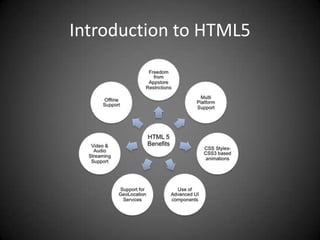
Introduction to HTML5
Rules for HTML5
• New features should be based on HTML, CSS, DOM,
  and JavaScript
• Reduce the need for external plugins (like Flash)
• More markup to replace scripting
• HTML5 should be device independent
• The development process should be visible to the
  public
Upgrading to HTML5
• Just <!DOCTYPE html>
HTML5 – Overview to new features
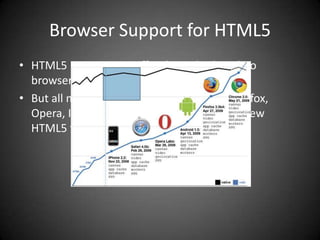
Browser Support for HTML5
• HTML5 is not yet an official standard, and no
  browsers have full HTML5 support.
• But all major browsers (Safari, Chrome, Firefox,
  Opera, Internet Explorer) continue to add new
  HTML5 features to their latest versions.
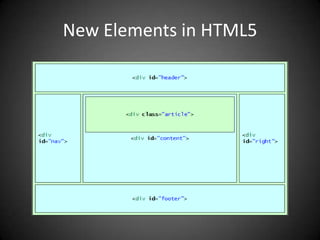
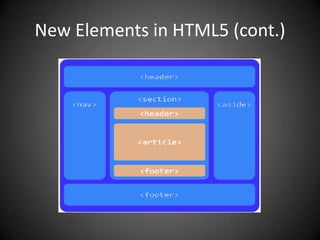
New Elements in HTML5
New Elements in HTML5 (cont.)
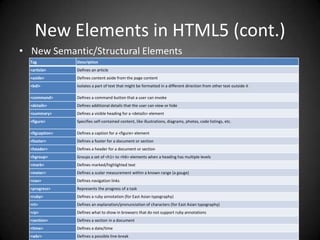
• New Semantic/Structural Elements
  Tag            Description
  <article>      Defines an article
  <aside>        Defines content aside from the page content
  <bdi>          Isolates a part of text that might be formatted in a different direction from other text outside it

  <command>      Defines a command button that a user can invoke
  <details>      Defines additional details that the user can view or hide
  <summary>      Defines a visible heading for a <details> element
  <figure>       Specifies self-contained content, like illustrations, diagrams, photos, code listings, etc.

  <figcaption>   Defines a caption for a <figure> element
  <footer>       Defines a footer for a document or section
  <header>       Defines a header for a document or section
  <hgroup>       Groups a set of <h1> to <h6> elements when a heading has multiple levels
  <mark>         Defines marked/highlighted text
  <meter>        Defines a scalar measurement within a known range (a gauge)
  <nav>          Defines navigation links
  <progress>     Represents the progress of a task
  <ruby>         Defines a ruby annotation (for East Asian typography)
  <rt>           Defines an explanation/pronunciation of characters (for East Asian typography)
  <rp>           Defines what to show in browsers that do not support ruby annotations
  <section>      Defines a section in a document
  <time>         Defines a date/time
  <wbr>          Defines a possible line-break
New Elements in HTML5 (cont.)
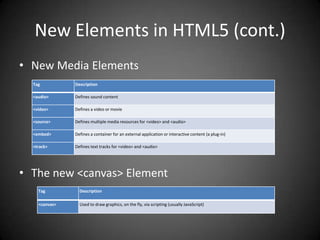
• New Media Elements
  Tag          Description

  <audio>      Defines sound content

  <video>      Defines a video or movie

  <source>     Defines multiple media resources for <video> and <audio>

  <embed>      Defines a container for an external application or interactive content (a plug-in)

  <track>      Defines text tracks for <video> and <audio>


• The new <canvas> Element
    Tag          Description

    <canvas>     Used to draw graphics, on the fly, via scripting (usually JavaScript)
New Elements in HTML5 (cont.)
• New Form Elements

  Tag          Description

  <datalist>   Specifies a list of pre-defined options for input controls

  <keygen>     Defines a key-pair generator field (for forms)

  <output>     Defines the result of a calculation
Removed Elements
•   The following HTML 4.01 elements are removed from HTML5:
•   <acronym>
•   <applet>
•   <basefont>
•   <big>
•   <center>
•   <dir>
•   <font>
•   <frame>
•   <frameset>
•   <noframes>
•   <strike>
•   <tt>
PART II – New Features
•   Video/Audio on the Web
•   HTML5 Drag and Drop
•   HTML5 Canvas
•   HTML5 Inline SVG
•   HTML5 Geolocation
•   HTML5 Web Storage
•   HTML5 Application Cache
•   HTML5 Web Workers
•   HTML Server-Sent Events
•   HTML5 Form Elements
Video/Audio on the Web
• <video>
• <audio>
Video on the Web
• Browsers support:
• HTML5 video demo
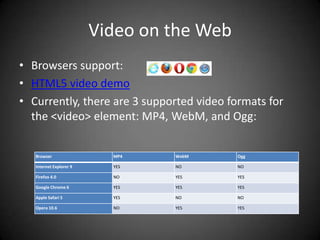
• Currently, there are 3 supported video formats for
  the <video> element: MP4, WebM, and Ogg:


   Browser                 MP4    WebM      Ogg

   Internet Explorer 9     YES    NO        NO

   Firefox 4.0             NO     YES       YES

   Google Chrome 6         YES    YES       YES

   Apple Safari 5          YES    NO        NO

   Opera 10.6              NO     YES       YES
HTML5 <video> - Methods, Properties, and
                Events
 Methods       Properties    Events

 play()        currentSrc    play

 pause()       currentTime   pause

 load()        videoWidth    progress

 canPlayType   videoHeight   error

               duration      timeupdate

               ended         ended

               error         abort

               paused        empty

               muted         emptied

               seeking       waiting

               volume        loadedmetadata

               height

               width
Audio on the Web
• Browsers support:
• HTML5 audio
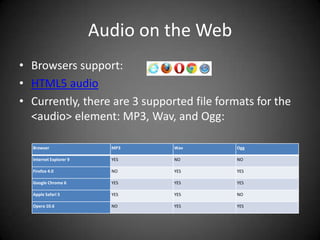
• Currently, there are 3 supported file formats for the
  <audio> element: MP3, Wav, and Ogg:

  Browser                 MP3    Wav        Ogg

  Internet Explorer 9     YES    NO         NO

  Firefox 4.0             NO     YES        YES

  Google Chrome 6         YES    YES        YES

  Apple Safari 5          YES    YES        NO

  Opera 10.6              NO     YES        YES
HTML5 Drag and Drop


• Browsers support:
• Note: Drag and drop does not work in Safari 5.1.2.
• Drag and Drop Demo
• Desktop drag in, drag out (only available in Chrome)
HTML5 Canvas


• Browsers support:
HTML5 Canvas
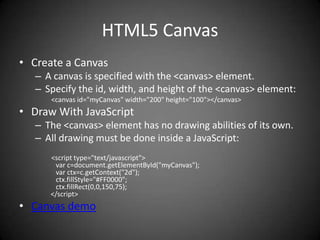
• Create a Canvas
   – A canvas is specified with the <canvas> element.
   – Specify the id, width, and height of the <canvas> element:
      <canvas id="myCanvas" width="200" height="100"></canvas>
• Draw With JavaScript
   – The <canvas> element has no drawing abilities of its own.
   – All drawing must be done inside a JavaScript:
      <script type="text/javascript">
       var c=document.getElementById("myCanvas");
       var ctx=c.getContext("2d");
       ctx.fillStyle="#FF0000";
       ctx.fillRect(0,0,150,75);
      </script>
• Canvas demo
HTML5 Inline SVG
• SVG stands for Scalable Vector Graphics.
• SVG is used to define vector-based graphics for the
  Web.
• SVG defines the graphics in XML format.
• SVG graphics do NOT lose any quality if they are
  zoomed or resized.
• Every element and every attribute in SVG files can be
  animated
• Browsers support:
• SVG Demo
HTML5 Geolocation


• Browsers Support:
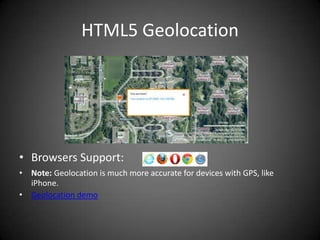
• Note: Geolocation is much more accurate for devices with GPS, like
  iPhone.
• Geolocation demo
HTML5 Web Storage


• Browsers support:
• Note: Internet Explorer 7 and earlier versions, do not support web
   storage.
localStorage

• Example
  localStorage.lastname="Smith";
  document.getElementById("result").innerHTML="Last name: "+localStorage.lastname;

• Local storage demo
sessionStorage

• Example
  sessionStorage.lastname="Smith";
  document.getElementById("result").innerHTML="Last name:
       "+sessionStorage.lastname;

• SessionStorage Demo
HTML5 Application Cache

    – Offline browsing
    – Speed
    – Reduced server load


• Browser Support:
• App cache demo
• Note: Browsers may have different size limits for cached data (some
  browsers have a 5MB limit per site).
Application cache (cont.)
• To enable application cache, include the manifest
  attribute in the document's <html> tag:
     CACHE MANIFEST
     # 2012-02-21 v1.0.0
     /theme.css
     /logo.gif
     /main.js

     NETWORK:
     login.asp

     FALLBACK:
     /html5/ /offline.html
HTML5 Web Workers


• Browsers support:
Web worker (cont.)
• Check Web Worker Support
   if(typeof(Worker)!=="undefined"){
     // Yes! Web worker support!
     } else {
     // Sorry! No Web Worker support..
     }

• Create a Web Worker File
   var i=0;
   function timedCount() {
      i=i+1;
      postMessage(i);
      setTimeout("timedCount()",500);
   }
   timedCount();

• Create a Web Worker Object
   w=new Worker("demo_workers.js");
   w.onmessage=function(event){
   document.getElementById("result").innerHTML=event.data;
   };
• Terminate a Web Worker
   w.terminate();
• Web worker demo
HTML5 Server-Sent Events
• A server-sent event is when a web page
  automatically gets updates from a server.
• This was also possible before, but the web page
  would have to ask if any updates were available.
• Browsers Support:
Server-Sent Events (cont.)
• Receive Server-Sent Event Notifications
          var source=new EventSource("demo_sse.php");
          source.onmessage=function(event){
          document.getElementById("result").innerHTML+=event.data + "<br />";
           };
• Check Server-Sent Events Support
          if(typeof(EventSource)!=="undefined"){
           // Yes! Server-sent events support!
          }else{
          // Sorry! No server-sent events support..
           }
• Server-Side Code
          <?php
          header('Content-Type: text/event-stream');
          header('Cache-Control: no-cache');
          $time = date('r');
          echo "data: The server time is: {$time}nn";
          flush();
          ?>
Note: Output data Always start with "data: “
     Set the "Content-Type" header to "text/event-stream“
• SSE Demo
HTML5 Form Elements
•   <input type="color" name="favcolor" />


•   <input type="date" name="bday" />
HTML5 Form Elements
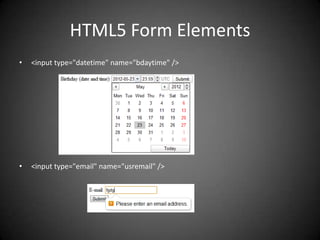
•   <input type="datetime" name="bdaytime" />


•   <input type="email" name="usremail" />
HTML5 Form Elements
•   <input type="month" name="bdaymonth" />


•   <input type="text" x-webkit-speech />


•   <input type="number" name="quantity" min="1" max="5" />
HTML5 Form Elements
•   <input type="range" name="points" min="1" max="10" />


•   <input type="search" name="googlesearch" />


•   <input type="time" name="usr_time" />


•   <meter value="2" min="0" max="10">2 out of 10</meter>
    <meter value="0.6">60%</meter>
HTML5 Form Elements
•   <progress value="22" max="100"></progress>

•   <input type="url" name="homepage" />


•   <input type="week" name="year_week" />
PART III - References
•   http://slides.html5rocks.com
•   http://w3schools.com/html5
•   http://html5demos.com/
•   http://diveintohtml5.info

Html 5

  • 1.
  • 2.
    Content PART I –Introdution to HTML5 PART II – New Features PART III - References
  • 3.
    Part I -Introduction to HTML5 • Introduction to HTML5 • Rules for HTML5 • Upgrading to HTML5 • HTML5 – Overview to new features • Browser Support for HTML5 • New Elements in HTML5
  • 4.
  • 5.
    Rules for HTML5 •New features should be based on HTML, CSS, DOM, and JavaScript • Reduce the need for external plugins (like Flash) • More markup to replace scripting • HTML5 should be device independent • The development process should be visible to the public
  • 6.
    Upgrading to HTML5 •Just <!DOCTYPE html>
  • 7.
    HTML5 – Overviewto new features
  • 8.
    Browser Support forHTML5 • HTML5 is not yet an official standard, and no browsers have full HTML5 support. • But all major browsers (Safari, Chrome, Firefox, Opera, Internet Explorer) continue to add new HTML5 features to their latest versions.
  • 9.
  • 10.
  • 11.
    New Elements inHTML5 (cont.)
  • 12.
    New Elements inHTML5 (cont.) • New Semantic/Structural Elements Tag Description <article> Defines an article <aside> Defines content aside from the page content <bdi> Isolates a part of text that might be formatted in a different direction from other text outside it <command> Defines a command button that a user can invoke <details> Defines additional details that the user can view or hide <summary> Defines a visible heading for a <details> element <figure> Specifies self-contained content, like illustrations, diagrams, photos, code listings, etc. <figcaption> Defines a caption for a <figure> element <footer> Defines a footer for a document or section <header> Defines a header for a document or section <hgroup> Groups a set of <h1> to <h6> elements when a heading has multiple levels <mark> Defines marked/highlighted text <meter> Defines a scalar measurement within a known range (a gauge) <nav> Defines navigation links <progress> Represents the progress of a task <ruby> Defines a ruby annotation (for East Asian typography) <rt> Defines an explanation/pronunciation of characters (for East Asian typography) <rp> Defines what to show in browsers that do not support ruby annotations <section> Defines a section in a document <time> Defines a date/time <wbr> Defines a possible line-break
  • 13.
    New Elements inHTML5 (cont.) • New Media Elements Tag Description <audio> Defines sound content <video> Defines a video or movie <source> Defines multiple media resources for <video> and <audio> <embed> Defines a container for an external application or interactive content (a plug-in) <track> Defines text tracks for <video> and <audio> • The new <canvas> Element Tag Description <canvas> Used to draw graphics, on the fly, via scripting (usually JavaScript)
  • 14.
    New Elements inHTML5 (cont.) • New Form Elements Tag Description <datalist> Specifies a list of pre-defined options for input controls <keygen> Defines a key-pair generator field (for forms) <output> Defines the result of a calculation
  • 15.
    Removed Elements • The following HTML 4.01 elements are removed from HTML5: • <acronym> • <applet> • <basefont> • <big> • <center> • <dir> • <font> • <frame> • <frameset> • <noframes> • <strike> • <tt>
  • 16.
    PART II –New Features • Video/Audio on the Web • HTML5 Drag and Drop • HTML5 Canvas • HTML5 Inline SVG • HTML5 Geolocation • HTML5 Web Storage • HTML5 Application Cache • HTML5 Web Workers • HTML Server-Sent Events • HTML5 Form Elements
  • 17.
    Video/Audio on theWeb • <video> • <audio>
  • 18.
    Video on theWeb • Browsers support: • HTML5 video demo • Currently, there are 3 supported video formats for the <video> element: MP4, WebM, and Ogg: Browser MP4 WebM Ogg Internet Explorer 9 YES NO NO Firefox 4.0 NO YES YES Google Chrome 6 YES YES YES Apple Safari 5 YES NO NO Opera 10.6 NO YES YES
  • 19.
    HTML5 <video> -Methods, Properties, and Events Methods Properties Events play() currentSrc play pause() currentTime pause load() videoWidth progress canPlayType videoHeight error duration timeupdate ended ended error abort paused empty muted emptied seeking waiting volume loadedmetadata height width
  • 20.
    Audio on theWeb • Browsers support: • HTML5 audio • Currently, there are 3 supported file formats for the <audio> element: MP3, Wav, and Ogg: Browser MP3 Wav Ogg Internet Explorer 9 YES NO NO Firefox 4.0 NO YES YES Google Chrome 6 YES YES YES Apple Safari 5 YES YES NO Opera 10.6 NO YES YES
  • 21.
    HTML5 Drag andDrop • Browsers support: • Note: Drag and drop does not work in Safari 5.1.2. • Drag and Drop Demo • Desktop drag in, drag out (only available in Chrome)
  • 22.
  • 23.
    HTML5 Canvas • Createa Canvas – A canvas is specified with the <canvas> element. – Specify the id, width, and height of the <canvas> element: <canvas id="myCanvas" width="200" height="100"></canvas> • Draw With JavaScript – The <canvas> element has no drawing abilities of its own. – All drawing must be done inside a JavaScript: <script type="text/javascript"> var c=document.getElementById("myCanvas"); var ctx=c.getContext("2d"); ctx.fillStyle="#FF0000"; ctx.fillRect(0,0,150,75); </script> • Canvas demo
  • 24.
    HTML5 Inline SVG •SVG stands for Scalable Vector Graphics. • SVG is used to define vector-based graphics for the Web. • SVG defines the graphics in XML format. • SVG graphics do NOT lose any quality if they are zoomed or resized. • Every element and every attribute in SVG files can be animated • Browsers support: • SVG Demo
  • 25.
    HTML5 Geolocation • BrowsersSupport: • Note: Geolocation is much more accurate for devices with GPS, like iPhone. • Geolocation demo
  • 26.
    HTML5 Web Storage •Browsers support: • Note: Internet Explorer 7 and earlier versions, do not support web storage.
  • 27.
    localStorage • Example localStorage.lastname="Smith"; document.getElementById("result").innerHTML="Last name: "+localStorage.lastname; • Local storage demo
  • 28.
    sessionStorage • Example sessionStorage.lastname="Smith"; document.getElementById("result").innerHTML="Last name: "+sessionStorage.lastname; • SessionStorage Demo
  • 29.
    HTML5 Application Cache – Offline browsing – Speed – Reduced server load • Browser Support: • App cache demo • Note: Browsers may have different size limits for cached data (some browsers have a 5MB limit per site).
  • 30.
    Application cache (cont.) •To enable application cache, include the manifest attribute in the document's <html> tag: CACHE MANIFEST # 2012-02-21 v1.0.0 /theme.css /logo.gif /main.js NETWORK: login.asp FALLBACK: /html5/ /offline.html
  • 31.
    HTML5 Web Workers •Browsers support:
  • 32.
    Web worker (cont.) •Check Web Worker Support if(typeof(Worker)!=="undefined"){ // Yes! Web worker support! } else { // Sorry! No Web Worker support.. } • Create a Web Worker File var i=0; function timedCount() { i=i+1; postMessage(i); setTimeout("timedCount()",500); } timedCount(); • Create a Web Worker Object w=new Worker("demo_workers.js"); w.onmessage=function(event){ document.getElementById("result").innerHTML=event.data; }; • Terminate a Web Worker w.terminate(); • Web worker demo
  • 33.
    HTML5 Server-Sent Events •A server-sent event is when a web page automatically gets updates from a server. • This was also possible before, but the web page would have to ask if any updates were available. • Browsers Support:
  • 34.
    Server-Sent Events (cont.) •Receive Server-Sent Event Notifications var source=new EventSource("demo_sse.php"); source.onmessage=function(event){ document.getElementById("result").innerHTML+=event.data + "<br />"; }; • Check Server-Sent Events Support if(typeof(EventSource)!=="undefined"){ // Yes! Server-sent events support! }else{ // Sorry! No server-sent events support.. } • Server-Side Code <?php header('Content-Type: text/event-stream'); header('Cache-Control: no-cache'); $time = date('r'); echo "data: The server time is: {$time}nn"; flush(); ?> Note: Output data Always start with "data: “ Set the "Content-Type" header to "text/event-stream“ • SSE Demo
  • 35.
    HTML5 Form Elements • <input type="color" name="favcolor" /> • <input type="date" name="bday" />
  • 36.
    HTML5 Form Elements • <input type="datetime" name="bdaytime" /> • <input type="email" name="usremail" />
  • 37.
    HTML5 Form Elements • <input type="month" name="bdaymonth" /> • <input type="text" x-webkit-speech /> • <input type="number" name="quantity" min="1" max="5" />
  • 38.
    HTML5 Form Elements • <input type="range" name="points" min="1" max="10" /> • <input type="search" name="googlesearch" /> • <input type="time" name="usr_time" /> • <meter value="2" min="0" max="10">2 out of 10</meter> <meter value="0.6">60%</meter>
  • 39.
    HTML5 Form Elements • <progress value="22" max="100"></progress> • <input type="url" name="homepage" /> • <input type="week" name="year_week" />
  • 40.
    PART III -References • http://slides.html5rocks.com • http://w3schools.com/html5 • http://html5demos.com/ • http://diveintohtml5.info

Editor's Notes

  • #5 HTML5 will be the new standard for HTML.The previous version of HTML, HTML 4.01, came in 1999. The web has changed a lot since then.HTML5 is still a work in progress. However, the major browsers support many of the new HTML5 elements and APIs.
  • #7 “Upgrading” to HTML5 can be as simple as changing your doctype. In HTML5, there is only one doctype: &lt;!DOCTYPE html&gt;Upgrading to the HTML5 doctype won’t break your existing markup, because obsolete elements previously defined in HTML 4 will still render in HTML5. But it will allow you to use — and validate — new semantic elements like &lt;article&gt;, &lt;section&gt;, &lt;header&gt;, and &lt;footer&gt;
  • #8 The &lt;canvas&gt; element for 2D drawingThe &lt;video&gt; and &lt;audio&gt; elements for media playbackSupport for local storageNew content-specific elements, like &lt;article&gt;, &lt;footer&gt;, &lt;header&gt;, &lt;nav&gt;, &lt;section&gt;New form controls, like calendar, date, time, email, url, search
  • #18 Until now, there has not been a standard for showing a video/audio on a web page.Today, most videos are shown through a plug-in (like flash). However, different browsers may have different plug-ins.HTML5 defines tow new elements which specifie a standard way to embed a video/audio on a web page: &lt;video&gt; and &lt;audio&gt; elements.
  • #22 In traditional HTML standards, drag and drop function must be implemented manually.In HTML5, drag and drop is part of the standard, and any element can be draggable.
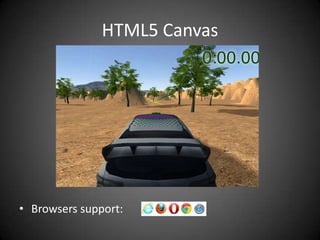
  • #23 The HTML5 &lt;canvas&gt; element is used to draw graphics, on the fly, via scripting (usually JavaScript).The &lt;canvas&gt; element is only a container for graphics, you must use a script to actually draw the graphics.A canvas is a drawable region defined in HTML code with height and width attributes.Canvas has several methods for drawing paths, boxes, circles, characters, and adding images.
  • #26 The HTML5 Geolocation API is used to get the geographical position of a user.Since this can compromise user privacy, the position is not available unless the user approves it.
  • #27 With HTML5, web pages can store data locally within the user&apos;s browser.localStorage - stores data with no expiration datesessionStorage - stores data for one sessionif(typeof(Storage)!==&quot;undefined&quot;)  // Yes! localStorage and sessionStorage support!  // Some code.....  } else  {  // Sorry! No web storage support..  }
  • #28 The localStorage object stores the data with no expiration date.The data will not be deleted when the browser is closed.
  • #29 The sessionStorage object is equal to the localStorage object, except that it stores the data for only one session.The data is deleted when the user closes the browser window.
  • #30 HTML5 introduces application cache, which means that a web application is cached, and accessible without an internet connection, by creating a cache manifest file.
  • #32 When executing scripts in an HTML page, the page becomes unresponsive until the script is finished.A web worker is a JavaScript that runs in the background, independently of other scripts, without affecting the performance of the page.
  • #34 A server-sent event is when a web page automatically gets updates from a server.This was also possible before, but the web page would have to ask if any updates were available. Examples: Facebook/Twitter updates, stock price updates, news feeds, sport results, etc.