Web 2.0 Tools

      2011 Symposium
        May 20th 2011
         Mary Asquith
      St Richards Kilsyth
My PLN
(Personal Learning Network)
• Personal Learning Network for Victorian
  Schools project.
• 12 weeks online project
• Collaboration of The State Library of
  Victoria and School Library Association
  of Victoria
• http://plnteach.global2.vic.edu.au/the-
  program/
What is Web 2.0?
• Web 2.0 is the term given to describe a
  second generation of the World Wide
  Web that is focused on the ability for
  people to collaborate and share
  information online.
• http://www.webopedia.com/TERM/W/W
  eb_2_point_0.html
Examples of Web 2.0
•   Social networking sites - Facebook
•   Blogs
•   Wikis - Wikipedia
•   Video sharing sites - YouTube
•   Hosted services – Google Docs
•   Web applications - Wordle
Blogs (Web Logs)
• A blog is a type of website or part of a
  website. Blogs are usually maintained
  by an individual with regular entries of
  commentary, descriptions of events, or
  other material such as graphics or
  video. Entries are commonly displayed
  in reverse-chronological order.
• http://en.wikipedia.org/wiki/Blog
Facebook
• Facebook is a social networking service and
  website launched in February 2004.
• More than 600 million active users as of
  January 2011.
• Users may create a personal profile, add other
  users as friends, exchange messages, update
  their profiles.
• Users may join common interest user groups,
  organized by workplace, school or college etc.
• How many of you have a Facebook account?
Examples of Blogs
 • http://marya.global2.vic.edu.au/
My PLN blog using Global2
 • http://cevn.cecv.catholic.edu.au/iconblog.aspx
CEVN ICON Blog
 • http://global2.vic.edu.au/
Global2 Blog
 • http://2kmand2kj.global2.vic.edu.au/
2KM and 2KJ Leopold Primary School Class Blog
Wikis
• A wiki is a type of website that allows visitors
  themselves to easily add, remove and
  otherwise edit and change some available
  content, sometimes without the need for
  registration.
  Wikipedia
• Ward Cunningham created the first wiki in 1995. The
  name "Wiki" was inspired by the Hawaiian word wiki
  or wiki-wiki, which means "quick".
• Wikipedia is probably the most well known example
  of a public wiki.
• Many wikis are private, restricted to registered users.
Wikis in myclasses
• Example of Wiki in myclasses
• http://home.srkilsyth.catholic.edu.au/my
  wiki/Wiki.Page,101112878308541
• Rainforests are Cool!
• Problems
Wordle
• Wordle is a toy for generating “word
  clouds” from text that you provide. The
  clouds give greater prominence to
  words that appear more frequently.
• You can tweak your clouds with
  different fonts, layouts, and color
  schemes.
• You can print out images you create, or
  save them to the Wordle gallery to
  share with your friends.
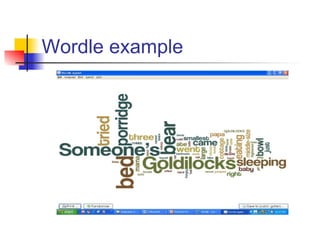
Wordle example
51 Interesting Ways* to use
Wordle in the Classroom 1
• http://www.ideastoinspire.co.uk/wordle.htm
• Wordle a collection of words that represent
  parts of speech. Change the colors to white
  words on a black background in Wordle. Ask
  students to color nouns one color, verbs a
  different color, etc.
• Ask students to predict what the main ideas of
  a reading will be.
• Find out what ideas are most important in a
  famous speech. E.g. Martin Luther King Jnr’s
  speech Ï Have a Dream
51 Interesting Ways* to use
Wordle in the Classroom 2
• Wordle text from the newspaper (online)
  looking at bias.
• Use a non-fiction reading and ask students to
  use the Wordle to generate a title or headline
  before they see the real article.
• Compare two different accounts / essays on
  the same theme / event - let them compare
  the Wordles generated by each.
• Generate Wordles for two different reading -
  let students see if they can match the Wordle
  to it's corresponding reading.
51 Interesting Ways* to use
Wordle in the Classroom 3
• Two Wordle tips:
• 1. Once you have created a Wordle
  right click a term to remove it from the
  results. Wordle will re-compute w/o it.
• 2. Use ~ to connect two (or more) word
  into one term Ex: literacy~strategy
Tagxedo 1
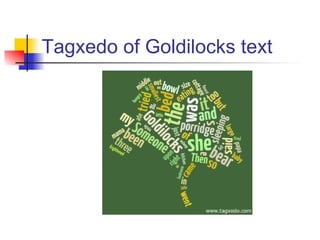
• Tagxedo turns words -- famous
  speeches, news articles, slogans and
  themes -- into a visually stunning tag
  cloud, words individually sized
  appropriately to highlight the
  frequencies of occurrence within the
  body of text.
• http://www.tagxedo.com/
Tagxedo 2
• Make tag clouds and respin, and respin to your
  liking.
• Save the tag cloud as images for printing and
  sharing.
• Look at all variants of the clouds in a gallery and pick
  the one you want for further tweaking or saving.
• Choose from many different fonts.
• Use local fonts (e.g. downloaded from Font Squirrel,
  DaFont, FontSpace, or your own hand-drawn fonts).
• Switch between different colors and themes.
• Constrain the cloud to selected shapes (heart, star,
  cloud, oval, etc).
Tagxedo of Goldilocks text
Wallwisher 1
• Wallwisher is a Web 2.0 free online tool where
  anyone can build a “wall”. Discussing a new
  idea? Taking notes? Giving feedback? Voicing
  opinion? Wishing a happy birthday?
• Your students can then go onto the internet
  and stick post-it notes electronically onto your
  wall. The notes can include linked pictures,
  You Tube videos, PowerPoints, PDF
  documents, Excel Spreadsheets, or web page
  links.
• http://www.wallwisher.com/
Wallwisher 2
• http://seanbanville.com/2010/06/26/wallwisher-105-
  classroom-ideas/
• Can be used to elicit things students might not
  want to express in front of the class. They can
  post anonymously.
• Brainstorming writing topics.
• Five Things each Please Students contribute
  five things each to a brainstorming session.
  This means quieter students contribute
  equally.
Wallwisher 3
• Students could post images instead of words
  as part of the brainstorming session.
• Put the starter in the title of the Wall; students
  have to finish them by posting stickies.
• Wallwisher is a great way of polling opinions.
• Students post stickies of their favourite sites.
• Create a special wall for books.
• http://www.wallwisher.com/wall/2010bookweek
State Library of Victoria
 • http://www.slv.vic.gov.au
State Library of Victoria
 • Join the library, use your card and read
   newspapers online
 • http://www.slv.vic.gov.au/ergo/
Ergo: A research and study website for students
that puts Victorian history at students' fingertips
 • Study and Research guides
Boolify
• http://www.boolify.org/
• To begin your search, move a green keyword
  piece to the board. Refine your search by
  adding pieces, such as and, not, or, or a URL
  to limit your results.
Google Docs
•     http://www.google.com/google-d-s/tour1.html Google
    Docs Tour Open a Google Account (Gmail)
    https://docs.google.com/present/edit?
    id=0AQUP703c_xQrZGZzN25qZzhfMXZiZDVuYmhw&hl=en&
    pli=1&authkey=CO6Zp-IG My Web 2.0 PowerPoint posted
    on Google Docs
References
 • http://en.wikipedia.org/wiki/Web_2.0
Wikipedia: a web 2.0 tool itself
 • http://www.webopedia.com/TERM/W/Web_2_point_0
   .html
Webopedia.com: a free online dictionary for words,
phrases and abbreviations that are related to computer
and Internet technology.
 • http://en.wikipedia.org/wiki/Blog
Wikipedia: entry on Blog
 • http://cooltoolsforschools.wikispaces.com/
Web 2.0 Cool Tools for Schools
References 2
 • http://www.larkin.net.au/020_web20_links.html
Web 2.0 in teaching & learning ~ links and resources for
teachers
 • http://school.discoveryeducation.com/schrockguide/e
   dtools.html
Kathy Schrock's Guide for Educators - Teaching Tools
 • http://www.onlinedegree.net/100-essential-2-0-tools-
   for-teachers/
Online Degree – 100Essential Web 2.0 Tool for
Educators
 • http://web2010.discoveryeducation.com/web20tools.
   cfm
Discovery Education Web 2.0 Tools
References 3
 • http://sigilt.iste.wikispaces.net/Favorite+Web+2.0+To
   ols
Sigilt - Favorite Web 2.0 Tools 25 Jan 2010 ...
Language Arts students write and embed Web 2.0
tools.
 • http://www.det.wa.edu.au/education/cmis/eval/curricu
   lum/ict/
WA Education Blogs and Wikis in Education
 • http://www.edna.edu.au/edna/go/schooled/school_th
   eme_pages/pid/542
Edna theme page on blogs and wikis
 • http://dotsub.com/view/77366331-a04d-48f0-8cab-
   cb5e278c4033
References 4
 • http://www.ascilite.org.au/conferences/perth04/procs/
   augar.html
Explanation of Wikis
 • http://boolify.org/
Boolify Simple Search tool using Boolean logic
 • http://www.wordle.net/
Wordle
 • http://www.ideastoinspire.co.uk/wordle.htm
51 Interesting Ways* to use Wordle in the Classroom
 • http://web20guru.wikispaces.com/Web+2.0+Resourc
   es
Web 2.0 Guru (Web 2.0 everything)
References 5
• http://www.wallwisher.com/
Wallwisher website
• http://teacherchallenge.edublogs.org/2011/03/22/free
   -tools-challenge-1-wallwisher-words-that-stick/
Wallwisher demo
• http://seanbanville.com/2010/06/26/wallwisher-105-
   classroom-ideas/
Wallwisher - 105 Classroom Ideas
• http://www.slv.vic.gov.au/ergo/
State Library of Victoria
References 6
 • http://2kmand2kj.global2.vic.edu.au/
2KM and 2KJ Leopold Primary School Class Blog
 • http://primarytech.global2.vic.edu.au/2011/02/06/5steps-to-
    starting-a-class-blog/
5 Steps to starting a class blog Kathleen Morris (McGeady)
 • http://www.google.com/google-d-s/tour1.html
Google Docs tour
 • https://sas.elluminate.com/p.jnlp?
    sid=2007026&psid=2010-05-25.2308.D.D7D4C0FD46AE724CE
    C153475C9816C.vcr
Elluminate session on Cybersafety
 • http://creativecommons.org/
Creative Commons Share, Remix, Reuse — Legally

Mary Asquith St. Richard’s Kilsyth

Web 2.0 Tools Symposium 20 05 11

  • 1.
    Web 2.0 Tools 2011 Symposium May 20th 2011 Mary Asquith St Richards Kilsyth
  • 2.
    My PLN (Personal LearningNetwork) • Personal Learning Network for Victorian Schools project. • 12 weeks online project • Collaboration of The State Library of Victoria and School Library Association of Victoria • http://plnteach.global2.vic.edu.au/the- program/
  • 3.
    What is Web2.0? • Web 2.0 is the term given to describe a second generation of the World Wide Web that is focused on the ability for people to collaborate and share information online. • http://www.webopedia.com/TERM/W/W eb_2_point_0.html
  • 4.
    Examples of Web2.0 • Social networking sites - Facebook • Blogs • Wikis - Wikipedia • Video sharing sites - YouTube • Hosted services – Google Docs • Web applications - Wordle
  • 5.
    Blogs (Web Logs) •A blog is a type of website or part of a website. Blogs are usually maintained by an individual with regular entries of commentary, descriptions of events, or other material such as graphics or video. Entries are commonly displayed in reverse-chronological order. • http://en.wikipedia.org/wiki/Blog
  • 6.
    Facebook • Facebook isa social networking service and website launched in February 2004. • More than 600 million active users as of January 2011. • Users may create a personal profile, add other users as friends, exchange messages, update their profiles. • Users may join common interest user groups, organized by workplace, school or college etc. • How many of you have a Facebook account?
  • 7.
    Examples of Blogs • http://marya.global2.vic.edu.au/ My PLN blog using Global2 • http://cevn.cecv.catholic.edu.au/iconblog.aspx CEVN ICON Blog • http://global2.vic.edu.au/ Global2 Blog • http://2kmand2kj.global2.vic.edu.au/ 2KM and 2KJ Leopold Primary School Class Blog
  • 8.
    Wikis • A wikiis a type of website that allows visitors themselves to easily add, remove and otherwise edit and change some available content, sometimes without the need for registration. Wikipedia • Ward Cunningham created the first wiki in 1995. The name "Wiki" was inspired by the Hawaiian word wiki or wiki-wiki, which means "quick". • Wikipedia is probably the most well known example of a public wiki. • Many wikis are private, restricted to registered users.
  • 9.
    Wikis in myclasses •Example of Wiki in myclasses • http://home.srkilsyth.catholic.edu.au/my wiki/Wiki.Page,101112878308541 • Rainforests are Cool! • Problems
  • 10.
    Wordle • Wordle isa toy for generating “word clouds” from text that you provide. The clouds give greater prominence to words that appear more frequently. • You can tweak your clouds with different fonts, layouts, and color schemes. • You can print out images you create, or save them to the Wordle gallery to share with your friends.
  • 11.
  • 12.
    51 Interesting Ways*to use Wordle in the Classroom 1 • http://www.ideastoinspire.co.uk/wordle.htm • Wordle a collection of words that represent parts of speech. Change the colors to white words on a black background in Wordle. Ask students to color nouns one color, verbs a different color, etc. • Ask students to predict what the main ideas of a reading will be. • Find out what ideas are most important in a famous speech. E.g. Martin Luther King Jnr’s speech Ï Have a Dream
  • 13.
    51 Interesting Ways*to use Wordle in the Classroom 2 • Wordle text from the newspaper (online) looking at bias. • Use a non-fiction reading and ask students to use the Wordle to generate a title or headline before they see the real article. • Compare two different accounts / essays on the same theme / event - let them compare the Wordles generated by each. • Generate Wordles for two different reading - let students see if they can match the Wordle to it's corresponding reading.
  • 14.
    51 Interesting Ways*to use Wordle in the Classroom 3 • Two Wordle tips: • 1. Once you have created a Wordle right click a term to remove it from the results. Wordle will re-compute w/o it. • 2. Use ~ to connect two (or more) word into one term Ex: literacy~strategy
  • 15.
    Tagxedo 1 • Tagxedoturns words -- famous speeches, news articles, slogans and themes -- into a visually stunning tag cloud, words individually sized appropriately to highlight the frequencies of occurrence within the body of text. • http://www.tagxedo.com/
  • 16.
    Tagxedo 2 • Maketag clouds and respin, and respin to your liking. • Save the tag cloud as images for printing and sharing. • Look at all variants of the clouds in a gallery and pick the one you want for further tweaking or saving. • Choose from many different fonts. • Use local fonts (e.g. downloaded from Font Squirrel, DaFont, FontSpace, or your own hand-drawn fonts). • Switch between different colors and themes. • Constrain the cloud to selected shapes (heart, star, cloud, oval, etc).
  • 17.
  • 18.
    Wallwisher 1 • Wallwisheris a Web 2.0 free online tool where anyone can build a “wall”. Discussing a new idea? Taking notes? Giving feedback? Voicing opinion? Wishing a happy birthday? • Your students can then go onto the internet and stick post-it notes electronically onto your wall. The notes can include linked pictures, You Tube videos, PowerPoints, PDF documents, Excel Spreadsheets, or web page links. • http://www.wallwisher.com/
  • 19.
    Wallwisher 2 • http://seanbanville.com/2010/06/26/wallwisher-105- classroom-ideas/ • Can be used to elicit things students might not want to express in front of the class. They can post anonymously. • Brainstorming writing topics. • Five Things each Please Students contribute five things each to a brainstorming session. This means quieter students contribute equally.
  • 20.
    Wallwisher 3 • Studentscould post images instead of words as part of the brainstorming session. • Put the starter in the title of the Wall; students have to finish them by posting stickies. • Wallwisher is a great way of polling opinions. • Students post stickies of their favourite sites. • Create a special wall for books. • http://www.wallwisher.com/wall/2010bookweek
  • 21.
    State Library ofVictoria • http://www.slv.vic.gov.au State Library of Victoria • Join the library, use your card and read newspapers online • http://www.slv.vic.gov.au/ergo/ Ergo: A research and study website for students that puts Victorian history at students' fingertips • Study and Research guides
  • 22.
    Boolify • http://www.boolify.org/ • Tobegin your search, move a green keyword piece to the board. Refine your search by adding pieces, such as and, not, or, or a URL to limit your results.
  • 23.
    Google Docs • http://www.google.com/google-d-s/tour1.html Google Docs Tour Open a Google Account (Gmail) https://docs.google.com/present/edit? id=0AQUP703c_xQrZGZzN25qZzhfMXZiZDVuYmhw&hl=en& pli=1&authkey=CO6Zp-IG My Web 2.0 PowerPoint posted on Google Docs
  • 24.
    References • http://en.wikipedia.org/wiki/Web_2.0 Wikipedia:a web 2.0 tool itself • http://www.webopedia.com/TERM/W/Web_2_point_0 .html Webopedia.com: a free online dictionary for words, phrases and abbreviations that are related to computer and Internet technology. • http://en.wikipedia.org/wiki/Blog Wikipedia: entry on Blog • http://cooltoolsforschools.wikispaces.com/ Web 2.0 Cool Tools for Schools
  • 25.
    References 2 •http://www.larkin.net.au/020_web20_links.html Web 2.0 in teaching & learning ~ links and resources for teachers • http://school.discoveryeducation.com/schrockguide/e dtools.html Kathy Schrock's Guide for Educators - Teaching Tools • http://www.onlinedegree.net/100-essential-2-0-tools- for-teachers/ Online Degree – 100Essential Web 2.0 Tool for Educators • http://web2010.discoveryeducation.com/web20tools. cfm Discovery Education Web 2.0 Tools
  • 26.
    References 3 •http://sigilt.iste.wikispaces.net/Favorite+Web+2.0+To ols Sigilt - Favorite Web 2.0 Tools 25 Jan 2010 ... Language Arts students write and embed Web 2.0 tools. • http://www.det.wa.edu.au/education/cmis/eval/curricu lum/ict/ WA Education Blogs and Wikis in Education • http://www.edna.edu.au/edna/go/schooled/school_th eme_pages/pid/542 Edna theme page on blogs and wikis • http://dotsub.com/view/77366331-a04d-48f0-8cab- cb5e278c4033
  • 27.
    References 4 •http://www.ascilite.org.au/conferences/perth04/procs/ augar.html Explanation of Wikis • http://boolify.org/ Boolify Simple Search tool using Boolean logic • http://www.wordle.net/ Wordle • http://www.ideastoinspire.co.uk/wordle.htm 51 Interesting Ways* to use Wordle in the Classroom • http://web20guru.wikispaces.com/Web+2.0+Resourc es Web 2.0 Guru (Web 2.0 everything)
  • 28.
    References 5 • http://www.wallwisher.com/ Wallwisherwebsite • http://teacherchallenge.edublogs.org/2011/03/22/free -tools-challenge-1-wallwisher-words-that-stick/ Wallwisher demo • http://seanbanville.com/2010/06/26/wallwisher-105- classroom-ideas/ Wallwisher - 105 Classroom Ideas • http://www.slv.vic.gov.au/ergo/ State Library of Victoria
  • 29.
    References 6 •http://2kmand2kj.global2.vic.edu.au/ 2KM and 2KJ Leopold Primary School Class Blog • http://primarytech.global2.vic.edu.au/2011/02/06/5steps-to- starting-a-class-blog/ 5 Steps to starting a class blog Kathleen Morris (McGeady) • http://www.google.com/google-d-s/tour1.html Google Docs tour • https://sas.elluminate.com/p.jnlp? sid=2007026&psid=2010-05-25.2308.D.D7D4C0FD46AE724CE C153475C9816C.vcr Elluminate session on Cybersafety • http://creativecommons.org/ Creative Commons Share, Remix, Reuse — Legally Mary Asquith St. Richard’s Kilsyth

Editor's Notes

  • #3 St Richard’s Kilsyth Teacher Librarian Collect resources for school topics, create myclasses pages and weblinks Developed an interest in using ICT as part of locating resources for Library lessons.
  • #4 W.W.W originally just looking up information and email.
  • #7 Do you have a public or private account?
  • #10 Slide 67 Emma A Last one. First Slide 3 mine. Slide 28 Sam. Slide 44 Kevin.
  • #11 Choose Create to make a Wordle. Copy and paste text. Choose font, colour, layout. Open in window. Use Shift + Print Screen (copy) and paste in a new Word Document. Use I Have a Dream – Martin Luther King Jr. as example.
  • #12 What is the name of this story?
  • #15 ~ symbol is a swung dash.
  • #16 Visit Gallery for ideas of shapes. Does need Silverlight download. (Microsoft)
  • #18 Tree shape outline
  • #23 Tropical fish (492,000) and coral reefs (25,000) and Australia (13,500) not sharks (11,100).