CSLA,  Sacramento.  November 2008. http:// robdarrow.wikispaces.com /   Library 2.0:  What is it and  how can I use it? . Pt. 2 Rob Darrow Clovis Unified  Online Visitors http://robdarrow.wikispaces.com
Web 2.0 Poll Results Blog, RSS Feed Reader, Library Thing, Wiki, Podcast, Ning, De.lic.ious, YouTube or TeacherTube, MySpace or Facebook, Second Life, Flickr.
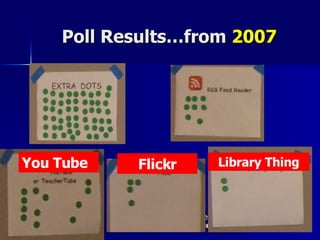
Poll Results…from  2007 You Tube Flickr Library Thing
How you can use 2.0 tools Personal Learning Network  (personally and professionally) Promoting  library services Guiding  student (and teacher) learning ***See handouts***
Everett Rogers.  Diffusion of Innovations (1963) “ One cannot seek knowledge about an innovation until he or she knows it exists .”
Dan Pink.  A Whole New Mind “ c hange  is inevitable, and when it happens, the wisest response is not to wail or whine but to suck it up and deal with it .”
The challenge.. BC Cartoon…define “learn” and define “library”
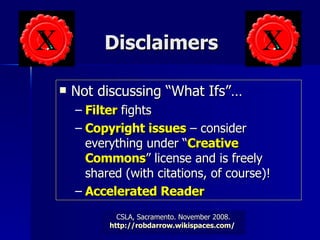
Disclaimers Not discussing “What Ifs”… Filter  fights Copyright issues  – consider everything under “ Creative Commons ” license and is freely shared (with citations, of course)! Accelerated Reader
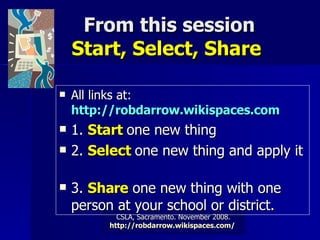
From this session Start, Select, Share  All links at:  http://robdarrow.wikispaces.com   1.  Start  one new thing  2.  Select  one new thing and apply it  3.  Share  one new thing with one person at your school or district.
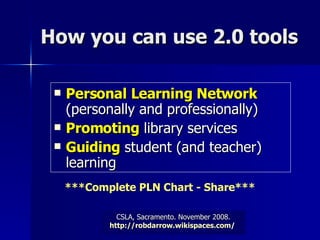
How you can use 2.0 tools Personal Learning Network  (personally and professionally) Promoting  library services Guiding  student (and teacher) learning ***Complete PLN Chart - Share***
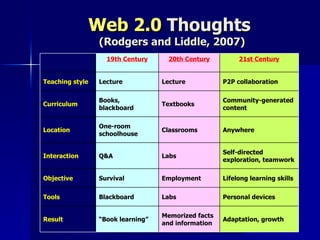
Web 2.0  Thoughts  (Rodgers and Liddle, 2007) Adaptation, growth Memorized facts and information “ Book learning” Result Personal devices Labs Blackboard Tools Lifelong learning skills Employment Survival Objective Self-directed exploration, teamwork Labs Q&A Interaction Anywhere Classrooms One-room schoolhouse Location Community-generated content Textbooks Books, blackboard Curriculum P2P collaboration Lecture Lecture Teaching style 21st Century 20th Century 19th Century  
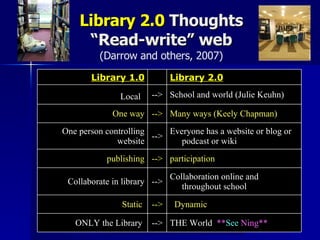
Library 2.0  Thoughts “Read-write” web (Darrow and others, 2007) THE World  ** See  Ning ** --> ONLY the Library   Dynamic --> Static  Collaboration online and throughout school --> Collaborate in library participation --> publishing Everyone has a website or blog or podcast or wiki --> One person controlling website Many ways (Keely Chapman) --> One way School and world (Julie Keuhn) --> Local   Library 2.0   Library 1.0
 
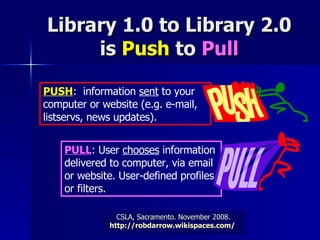
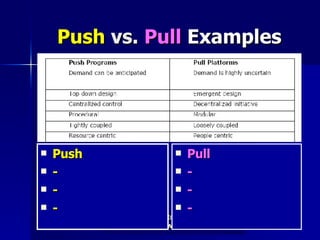
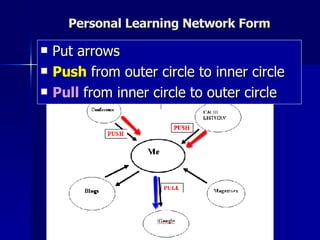
Library 1.0 to Library 2.0 is  Push  to  Pull PUSH :  information  sent  to your computer or website (e.g. e-mail, listservs, news updates). PULL : User  chooses  information delivered to computer, via email or website. User-defined profiles or filters.
 
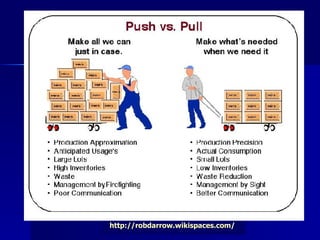
Push  vs.  Pull  Examples Push - - - Pull - - -
Personal Learning Network Form Put arrows Push  from outer circle to inner circle Pull  from inner circle to outer circle
Why is this important? To plan for the future To position ourselves ( library staff ) for the future To meet the needs of our students who are living in a digital, changing world And…look  at what others are saying:
Gordon Bell and Jim Gray in John Seely Brown (2000),  The Social Life of Information “ By  2047 …   all information  about physical objects, including humans, buildings, processes and organizations,  will be online .  This is both desirable and inevitable.”
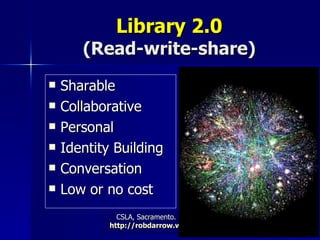
Library 2.0 (Read-write-share) Sharable Collaborative Personal  Identity Building Conversation Low or no cost
Why shift to   Library 2.0? 21 st  Century Learners What do students want? Write 5 ideas YouTube:  Vision of K-12 Students http://www.youtube.com/watch?v=_A-ZVCjfWf8
Library 2.0  –  not  unlike library 1.0 Connecting  people to information  Connecting  people to other people  Connecting  people to best practices Sharing  these stories
Standards 2.0 From AASL  From ISTE Remember Web 2.0 words:  Sharable ,  Collaborative ,  Personal ,  Identity Building ,  Conversation
AASL Standards describe  how learners use  skills, resources, and tools to: 1.  inquire , think critically, and gain knowledge; 2.  draw  conclusions, make informed decisions, apply knowledge to new situations, and  create new knowledge ; 3. share knowledge and  participate ethically  and productively as members of our democratic society; 4. pursue  personal  and aesthetic  growth . http://www.ala.org/ala/mgrps/divs/aasl/aaslproftools/learningstandards/standards.cfm
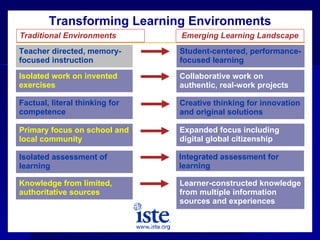
Teacher directed, memory-focused instruction Student-centered, performance-focused learning Isolated work on invented exercises Collaborative work on authentic, real-work projects Factual, literal thinking for competence Creative thinking for innovation and original solutions Primary focus on school and local community Expanded focus including digital global citizenship Isolated assessment of  learning Integrated assessment for learning Transforming Learning Environments Traditional Environments Emerging Learning Landscape Knowledge from limited, authoritative sources Learner-constructed knowledge from multiple information sources and experiences
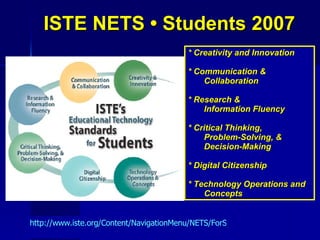
ISTE NETS • Students 2007 * Creativity and Innovation * Communication & Collaboration * Research &  Information Fluency * Critical Thinking,  Problem-Solving, & Decision-Making * Digital Citizenship * Technology Operations and Concepts http://www.iste.org/Content/NavigationMenu/NETS/ForStudents/NETS_for_Students.htm
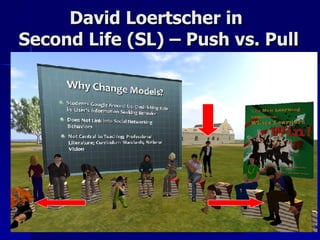
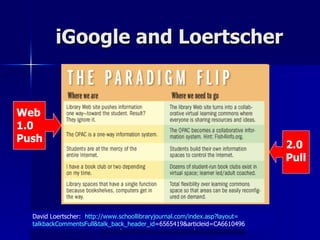
David Loertscher in  Second Life (SL) – Push vs. Pull
iGoogle and Loertscher David Loertscher:  http:// www.schoollibraryjournal.com/index.asp?layout = talkbackCommentsFull&talk_back_header_id =6565419&articleid=CA6610496   Web 1.0 Push 2.0 Pull
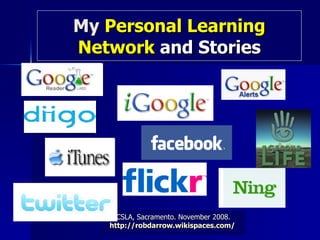
My  Personal Learning Network  and Stories
Library 2.0 Organized http://schoollibrarylearning2.blogspot.com
 
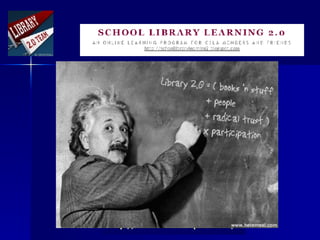
School Library Learning 2.0 First time:  Summer 2007.  Over 100 participants.  Repeated Winter and Summer 2008 Anyone can join or sponsor Become a “peer cheer” Fresno Pacific Units Official again in spring 2009
Join School Library Learning 2.0!  Personally Set it up for  your library or school staff Use as part of a  library or technology course Structure  for other professional development
Other Library 2.0 Links Library/School/Web 2.0 Tools Organized by : Joyce Valenza (Library 2.0 tools)   http:// newtoolsworkshop.wikispaces.com /   Annette Lamb (School Library Media Specialist 2.0)  -  http://eduscapes.com/sessions/slms2/   Wiki -  http://school20.wikispaces.com/   Library 2.0 PowerPoint Presentations -  http://www.slideshare.net/group/library20
Anne Bryant, Executive Director, National School Boards Association " It is important to keep in mind that  just blocking access  to social web sites at school is not the end of the story. Most of the misuse of these sites takes place  at home , but still  affects the classroom .  We have to teach our students about the safe and proper use of social web sites ." -  Dec. 2006
How you can use 2.0 tools Personal Learning Network  (personally and professionally) Promoting  library services Guiding  student (and teacher) learning
Take Action Chart: Start, Select, Share  All links at:  http://robdarrow.wikispaces.com   1.  Start  one new thing  2.  Select  one new thing and apply it  3.  Share  one new thing with one person back at your school or district.
Thanks for being here! See you in SL! All links at:  http://robdarrow.wikispaces.com [email_address]

Csla Library 2.0 Nov2008v2web

  • 1.
    CSLA, Sacramento. November 2008. http:// robdarrow.wikispaces.com / Library 2.0: What is it and how can I use it? . Pt. 2 Rob Darrow Clovis Unified Online Visitors http://robdarrow.wikispaces.com
  • 2.
    Web 2.0 PollResults Blog, RSS Feed Reader, Library Thing, Wiki, Podcast, Ning, De.lic.ious, YouTube or TeacherTube, MySpace or Facebook, Second Life, Flickr.
  • 3.
    Poll Results…from 2007 You Tube Flickr Library Thing
  • 4.
    How you canuse 2.0 tools Personal Learning Network (personally and professionally) Promoting library services Guiding student (and teacher) learning ***See handouts***
  • 5.
    Everett Rogers. Diffusion of Innovations (1963) “ One cannot seek knowledge about an innovation until he or she knows it exists .”
  • 6.
    Dan Pink. A Whole New Mind “ c hange is inevitable, and when it happens, the wisest response is not to wail or whine but to suck it up and deal with it .”
  • 7.
    The challenge.. BCCartoon…define “learn” and define “library”
  • 8.
    Disclaimers Not discussing“What Ifs”… Filter fights Copyright issues – consider everything under “ Creative Commons ” license and is freely shared (with citations, of course)! Accelerated Reader
  • 9.
    From this sessionStart, Select, Share All links at: http://robdarrow.wikispaces.com 1. Start one new thing 2. Select one new thing and apply it 3. Share one new thing with one person at your school or district.
  • 10.
    How you canuse 2.0 tools Personal Learning Network (personally and professionally) Promoting library services Guiding student (and teacher) learning ***Complete PLN Chart - Share***
  • 11.
    Web 2.0 Thoughts (Rodgers and Liddle, 2007) Adaptation, growth Memorized facts and information “ Book learning” Result Personal devices Labs Blackboard Tools Lifelong learning skills Employment Survival Objective Self-directed exploration, teamwork Labs Q&A Interaction Anywhere Classrooms One-room schoolhouse Location Community-generated content Textbooks Books, blackboard Curriculum P2P collaboration Lecture Lecture Teaching style 21st Century 20th Century 19th Century  
  • 12.
    Library 2.0 Thoughts “Read-write” web (Darrow and others, 2007) THE World ** See Ning ** --> ONLY the Library Dynamic --> Static Collaboration online and throughout school --> Collaborate in library participation --> publishing Everyone has a website or blog or podcast or wiki --> One person controlling website Many ways (Keely Chapman) --> One way School and world (Julie Keuhn) --> Local Library 2.0   Library 1.0
  • 13.
  • 14.
    Library 1.0 toLibrary 2.0 is Push to Pull PUSH : information sent to your computer or website (e.g. e-mail, listservs, news updates). PULL : User chooses information delivered to computer, via email or website. User-defined profiles or filters.
  • 15.
  • 16.
    Push vs. Pull Examples Push - - - Pull - - -
  • 17.
    Personal Learning NetworkForm Put arrows Push from outer circle to inner circle Pull from inner circle to outer circle
  • 18.
    Why is thisimportant? To plan for the future To position ourselves ( library staff ) for the future To meet the needs of our students who are living in a digital, changing world And…look at what others are saying:
  • 19.
    Gordon Bell andJim Gray in John Seely Brown (2000), The Social Life of Information “ By 2047 … all information about physical objects, including humans, buildings, processes and organizations, will be online . This is both desirable and inevitable.”
  • 20.
    Library 2.0 (Read-write-share)Sharable Collaborative Personal Identity Building Conversation Low or no cost
  • 21.
    Why shift to Library 2.0? 21 st Century Learners What do students want? Write 5 ideas YouTube: Vision of K-12 Students http://www.youtube.com/watch?v=_A-ZVCjfWf8
  • 22.
    Library 2.0 – not unlike library 1.0 Connecting people to information Connecting people to other people Connecting people to best practices Sharing these stories
  • 23.
    Standards 2.0 FromAASL From ISTE Remember Web 2.0 words: Sharable , Collaborative , Personal , Identity Building , Conversation
  • 24.
    AASL Standards describe how learners use skills, resources, and tools to: 1. inquire , think critically, and gain knowledge; 2. draw conclusions, make informed decisions, apply knowledge to new situations, and create new knowledge ; 3. share knowledge and participate ethically and productively as members of our democratic society; 4. pursue personal and aesthetic growth . http://www.ala.org/ala/mgrps/divs/aasl/aaslproftools/learningstandards/standards.cfm
  • 25.
    Teacher directed, memory-focusedinstruction Student-centered, performance-focused learning Isolated work on invented exercises Collaborative work on authentic, real-work projects Factual, literal thinking for competence Creative thinking for innovation and original solutions Primary focus on school and local community Expanded focus including digital global citizenship Isolated assessment of learning Integrated assessment for learning Transforming Learning Environments Traditional Environments Emerging Learning Landscape Knowledge from limited, authoritative sources Learner-constructed knowledge from multiple information sources and experiences
  • 26.
    ISTE NETS •Students 2007 * Creativity and Innovation * Communication & Collaboration * Research & Information Fluency * Critical Thinking, Problem-Solving, & Decision-Making * Digital Citizenship * Technology Operations and Concepts http://www.iste.org/Content/NavigationMenu/NETS/ForStudents/NETS_for_Students.htm
  • 27.
    David Loertscher in Second Life (SL) – Push vs. Pull
  • 28.
    iGoogle and LoertscherDavid Loertscher: http:// www.schoollibraryjournal.com/index.asp?layout = talkbackCommentsFull&talk_back_header_id =6565419&articleid=CA6610496 Web 1.0 Push 2.0 Pull
  • 29.
    My PersonalLearning Network and Stories
  • 30.
    Library 2.0 Organizedhttp://schoollibrarylearning2.blogspot.com
  • 31.
  • 32.
    School Library Learning2.0 First time: Summer 2007. Over 100 participants. Repeated Winter and Summer 2008 Anyone can join or sponsor Become a “peer cheer” Fresno Pacific Units Official again in spring 2009
  • 33.
    Join School LibraryLearning 2.0! Personally Set it up for your library or school staff Use as part of a library or technology course Structure for other professional development
  • 34.
    Other Library 2.0Links Library/School/Web 2.0 Tools Organized by : Joyce Valenza (Library 2.0 tools) http:// newtoolsworkshop.wikispaces.com / Annette Lamb (School Library Media Specialist 2.0) - http://eduscapes.com/sessions/slms2/ Wiki - http://school20.wikispaces.com/ Library 2.0 PowerPoint Presentations - http://www.slideshare.net/group/library20
  • 35.
    Anne Bryant, ExecutiveDirector, National School Boards Association " It is important to keep in mind that just blocking access to social web sites at school is not the end of the story. Most of the misuse of these sites takes place at home , but still affects the classroom . We have to teach our students about the safe and proper use of social web sites ." - Dec. 2006
  • 36.
    How you canuse 2.0 tools Personal Learning Network (personally and professionally) Promoting library services Guiding student (and teacher) learning
  • 37.
    Take Action Chart:Start, Select, Share All links at: http://robdarrow.wikispaces.com 1. Start one new thing 2. Select one new thing and apply it 3. Share one new thing with one person back at your school or district.
  • 38.
    Thanks for beinghere! See you in SL! All links at: http://robdarrow.wikispaces.com [email_address]