Presenters  Kevin O’Shea Teaching and Learning Technologies Instructional Development Center
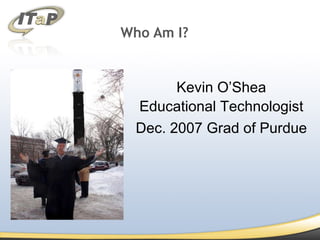
Who Am I? Kevin O’Shea Educational Technologist Dec. 2007 Grad of Purdue
What is the toolkit? What are students using? What are our peers using it for? How can we use it? Overview
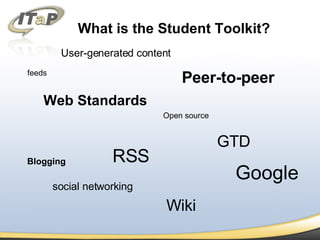
What is the Student Toolkit? feeds Web Standards Blogging RSS Peer-to-peer Wiki GTD User-generated content social networking Google Open source
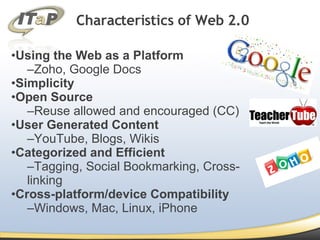
Using the Web as a Platform Zoho, Google Docs Simplicity Open Source Reuse allowed and encouraged (CC) User Generated Content YouTube, Blogs, Wikis Categorized and Efficient Tagging, Social Bookmarking, Cross-linking  Cross-platform/device Compatibility Windows, Mac, Linux, iPhone Characteristics of Web 2.0
Why Does It Matter? According to the Pew Internet & American Life Project (Lenhardt & Madden 2007) more than 60% of teens have created online media content, and more than 75% of those teens have shared the content they have produced.  This in turn has fueled the online revolution of participation and collaboration.
Blogging + RSS Powerful communication and publishing tools Wikis Online writing space allowing user to add and modify its pages. Web Applications Office Suites, News Aggregators, etc… Social Networks What are they using?
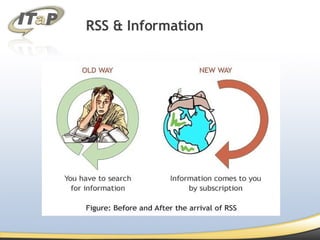
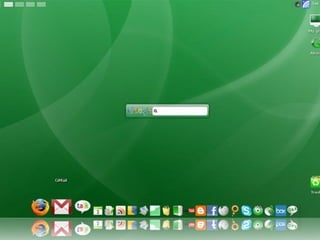
RSS & Information
Online Applications Movement away from Desktop application reliance. Platform independent. Mobile device compatibility. Open source. Online collaboration
Netvibes http://www.netvibes.com iGoogle http://www.google.com/ig Bloglines http://www.bloglines.com Pageflakes http://www.pageflakes.com MyYahoo http://my.yahoo.com How are they keeping track of it all?
Office Applications Zoho Google Docs Office Live Presentation Applications TeacherTube SlideShare Task Management (GTD) Remember the Milk What Applications Are They Using?
 
Technology Mash ups Google Lit Trips Using Google Earth, students discover where in the world the greatest road trip stories of all time took place. Jott.com Jott converts your voice into emails, text messages, reminders, lists and appointments.  Supports Gcal, LJ, Twitter, Tumblr, Blogger, Remember the Milk, & WordPress.
Communication Microblogs Twitter  – The Classic 140 character MB Brightkite  – Location aware MB Jaiku  – Mashup of Location, RSS, MB Tumblr  – Quick Pictures, Video, Quotes, etc… Pownce  – MB plus file linking/sharing
Communication Online Chat Meebo  – AIM, ICQ, Yahoo, Google Talk Google Talk  – Web based through Gmail + VOIP Facebook  Chat  – Web based chat through FB Skype  – VOIP + Chat and File sharing
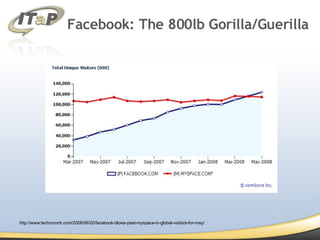
Facebook: The 800lb Gorilla/Guerilla  http://www.techcrunch.com/2008/06/20/facebook-blows-past-myspace-in-global-visitors-for-may/
Facebook: The 800lb Gorilla/Guerilla  Wikimono Blog It Zoho Online Office Notecentric Share Homework Scribd Twitter http://www.didactalab.de/wp-main/?p=66
Questions? [email_address] http://fit.itap.purdue.edu

Web 2.0 toolkit pt 3

  • 1.
    Presenters KevinO’Shea Teaching and Learning Technologies Instructional Development Center
  • 2.
    Who Am I?Kevin O’Shea Educational Technologist Dec. 2007 Grad of Purdue
  • 3.
    What is thetoolkit? What are students using? What are our peers using it for? How can we use it? Overview
  • 4.
    What is theStudent Toolkit? feeds Web Standards Blogging RSS Peer-to-peer Wiki GTD User-generated content social networking Google Open source
  • 5.
    Using the Webas a Platform Zoho, Google Docs Simplicity Open Source Reuse allowed and encouraged (CC) User Generated Content YouTube, Blogs, Wikis Categorized and Efficient Tagging, Social Bookmarking, Cross-linking Cross-platform/device Compatibility Windows, Mac, Linux, iPhone Characteristics of Web 2.0
  • 6.
    Why Does ItMatter? According to the Pew Internet & American Life Project (Lenhardt & Madden 2007) more than 60% of teens have created online media content, and more than 75% of those teens have shared the content they have produced. This in turn has fueled the online revolution of participation and collaboration.
  • 7.
    Blogging + RSSPowerful communication and publishing tools Wikis Online writing space allowing user to add and modify its pages. Web Applications Office Suites, News Aggregators, etc… Social Networks What are they using?
  • 8.
  • 9.
    Online Applications Movementaway from Desktop application reliance. Platform independent. Mobile device compatibility. Open source. Online collaboration
  • 10.
    Netvibes http://www.netvibes.com iGooglehttp://www.google.com/ig Bloglines http://www.bloglines.com Pageflakes http://www.pageflakes.com MyYahoo http://my.yahoo.com How are they keeping track of it all?
  • 11.
    Office Applications ZohoGoogle Docs Office Live Presentation Applications TeacherTube SlideShare Task Management (GTD) Remember the Milk What Applications Are They Using?
  • 12.
  • 13.
    Technology Mash upsGoogle Lit Trips Using Google Earth, students discover where in the world the greatest road trip stories of all time took place. Jott.com Jott converts your voice into emails, text messages, reminders, lists and appointments. Supports Gcal, LJ, Twitter, Tumblr, Blogger, Remember the Milk, & WordPress.
  • 14.
    Communication Microblogs Twitter – The Classic 140 character MB Brightkite – Location aware MB Jaiku – Mashup of Location, RSS, MB Tumblr – Quick Pictures, Video, Quotes, etc… Pownce – MB plus file linking/sharing
  • 15.
    Communication Online ChatMeebo – AIM, ICQ, Yahoo, Google Talk Google Talk – Web based through Gmail + VOIP Facebook Chat – Web based chat through FB Skype – VOIP + Chat and File sharing
  • 16.
    Facebook: The 800lbGorilla/Guerilla http://www.techcrunch.com/2008/06/20/facebook-blows-past-myspace-in-global-visitors-for-may/
  • 17.
    Facebook: The 800lbGorilla/Guerilla Wikimono Blog It Zoho Online Office Notecentric Share Homework Scribd Twitter http://www.didactalab.de/wp-main/?p=66
  • 18.