EDUCATIONAL TECHNOLOGY:  FREE WEB-BASED TOOLS TO MAKE YOUR LIFE EASIER! Heidi Dusek Youth & Family Coordinator,  Outagamie County UW-Extension
Resources for this presentation This presentation is available at:   An outline of tools referenced is available at: http://bit.ly/heidi-edtech Research is sited on most slides, however much of my information comes from the  PEW Research Center: Internet & Technology  http://pewresearch.org/topics/internetandtechnology/ Definitions came from:  www.techterms.com
Strengths in using technology? Engage audience- youth, others Time savings Cost savings Popular means for staying connected to others
Weaknesses in using technology? Privacy concerns Lack of understanding (staff/audience) Cost Policies restricting access Less human interaction
Opportunities technology can provide? New programming format Reach newer/diverse audiences Source of knowledge Could save staff time and resources constantly evolving- becoming more user friendly
Threats in using technology? Keeping up with the changes Inappropriate use Safety Virtual replacing “real life”
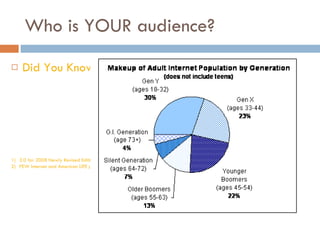
Who is YOUR audience? Did You Know?   3.0 for 2008 Newly Revised Edition Created by Karl Fisch, and modified by Scott McLeod; Globalization & The Information Age PEW Internet and American LIFE project, Generations online in 2009
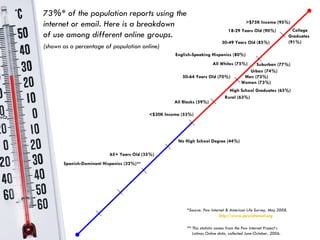
All Whites (75%)   All Blacks (59%)   English-Speaking Hispanics (80%)   73%* of the population reports using the internet or email. Here is a breakdown  of use among different online groups. (shown as a percentage of population online) 18-29 Years Old (90%) 30-49 Years Old (85%) 50-64 Years Old (70%) 65+ Years Old (35%) No High School Degree (44%) College  Graduates  (91%) <$30K Income (53%) >$75K Income (95%) Men (73%) Women (73%) *Source: Pew Internet & American Life Survey, May 2008.   http://www.pewinternet.org ** This statistic comes from the Pew Internet Project’s    Latinos Online data, collected June-October, 2006. High School Graduates (63%) Urban (74%) Rural (63%) Suburban (77%) Spanish-Dominant Hispanics (32%)**
What is most relevant to teens? (Ages 12-17) :  PEW Research: Internet & Tech 97% play computer, web, portable, or console games (Guitar Hero most frequently played),  78% play games online 71% are cell phone owners (of them 38% send text messages daily 64% have created content on the internet (35% blog, 54% post photos) 65% use social networking sites 32% have been a target of cyber bullying
Risks and Considerations Who is your audience? Is it appropriate? Privacy (settings/expected behavior) Copyright & Fair Use Terms of Service Agreement - liability, who owns the content Accountability - how do people find your content Life of the Data (permission to post) Stability of site/Security
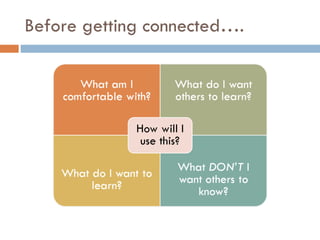
Before getting connected….
Web 2.0 tools Interactive Open-Source Collaborative Interact with other applications (widgets) Integrated, often using RSS  Real Simple Syndication
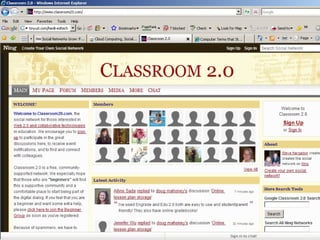
Social Networking Means for individual profiles Connect globally Virtual communities Examples: Facebook, MySpace, Linked In, Ning
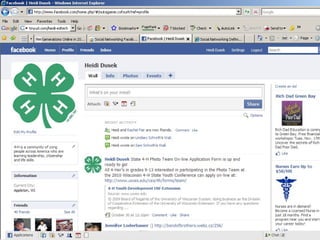
Ways to Use Social Networking Extend your network- find connections with others -staff (network, program development, communication) Marketing program/products -new audiences (marketing, awareness, fundraising) -fan pages -group pages -event announcements Communicate with other groups - Public or private
 
 
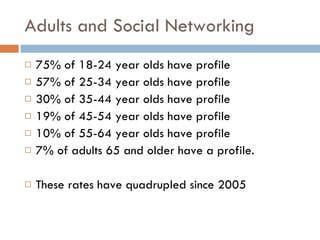
Adults and Social Networking 75% of 18-24 year olds have profile 57% of 25-34 year olds have profile 30% of 35-44 year olds have profile 19% of 45-54 year olds have profile 10% of 55-64 year olds have profile 7% of adults 65 and older have a profile. These rates have quadrupled since 2005
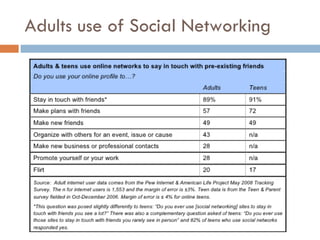
Adults use of Social Networking
Real-Simple-Syndication.  By having an RSS feed/aggregator, websites that you subscribe to will update in your RSS, rather than you having to go to different website for current content. It’s like having an INBOX for the web. RSS in Plain English -video Examples: Google Reader, Bloglines, Pageflakes RSS
Social Bookmarking Similar to a real-life bookmark A marker for a Web site. (In Internet Explorer, they're called &quot;Favorites“). Accessible from anywhere on the web Allow “tags” to sort your bookmarks Examples:  Delicious ,  Filamentality ,  Diigo , Edmondo
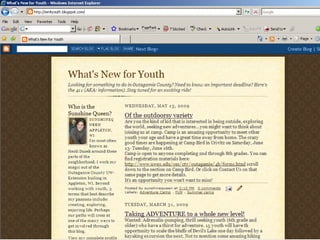
Blog and Micro-blogs Short for &quot;Web Log&quot;  journal entries posted on a Web page-given a personalized URL address. Allows ANYONE to be an author Examples: Wordpress, Blogger, Twitter
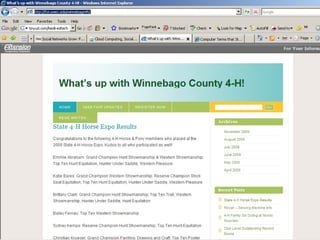
How are youth workers using blogs? Newsletter updates Recognition Marketing Events Programming Fundraising
 
 
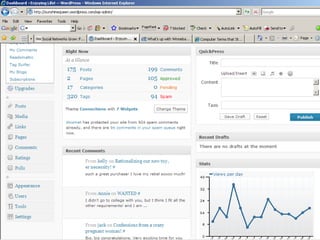
Managing a blog Establish content- long or short Updates (at least 2x per month) Make others aware of your blog (clients, partners) Track Statistics Can embed multimedia into blog Can embed blog into other networks (Facebook) comments-interactive
 
What is  Twitter ? Micro-blogging platform 140 character limit Integrates into other web 2.0 Allows web and mobile updates Tweet: Twitter posting
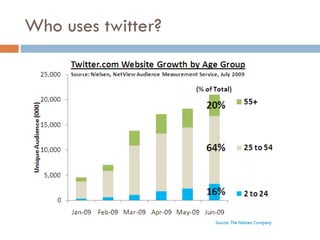
Who uses twitter?
Twitter, Tweets, Tweeps Twitter uses Breaking news Marketing Grassroots organizing Thought ticklers Ask questions Integrate with Facebook status
Tools for Twitter TwitPic: add photos to your tweet http://twitpic.com   Twubble: find Tweeps (twitter users) http://www.crazybob.org/twubble/   TwitterAnalyzer http://twitteranalyzer.com/   TwitterFan Wiki http://twitter.pbworks.com/Apps
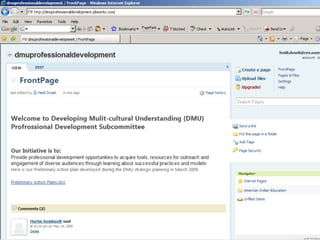
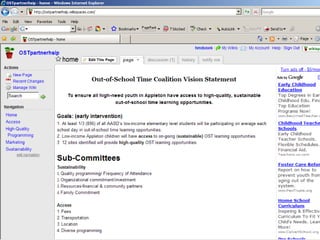
Collaboration Tools Wikis: a Web site that allows users to add and update content. (public or private) PBWorks, Wikispaces, Wet-Paint Collaborative editing and file sharing Google Docs Writeboard Drop.io Calendar/scheduling Doodle
 
 
Multimedia Tools Images, video, audio TONS of open source software for editing and sharing PLEASE remember to get permission to post.  You are required by law to obtain release forms and maintain them for the life of the media.
How are youth workers using multimedia? Teaching/programming tools Recognition Marketing - picture is worth a thousand words Programs Recruitment Evaluation Demonstrate impacts of programming Measuring participant experience
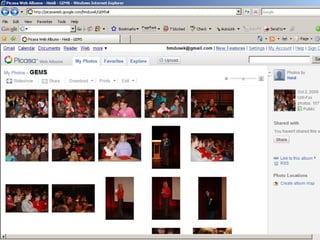
Photo editing and Sharing GIMP/Pixlr- open source for high end photo editing (similar to Photoshop-but free) Flickr- create groups for organization to share photos ( classroom display example ) Picassa –requires download.  Integrated with Google.  Also includes Collage and presentation tools Cooliris -fast, cinematic way to view pictures in 3-D Foto Flexer -easy-to-use photo editing that integrates with the major online photo-sharing sites
 
Audio- podcasts Gabcast  - Create a podcast using your phone!  Kid-Cast  - A podcast hosting site for kids.  podOmatic  - Create, find, and share podcasts at this site!
Video Editing and Sharing Teacher tube- video sharing site for teachers.  Bypasses most filters typically blocked by youtube. Youtube- free web-based platform to publish videos.  Can easily embed into other Web 2.0
Presentation tools Animoto  - Upload images to this site, select your music and it applies all the transitions and creates a customized a video. Easy-to-use, and very high quality!  Jing  - create short (<5 minutes) screen capture videos with audio support. Free download and server space to store and share the videos you have created.  SlideRocket  - With SlideRocket you quickly make stunning presentations, manage a library of slides and assets, share them securely with colleagues, and measure how they're used  Slideshare  - upload PowerPoint presentations to share publicly or privately. LIke YouTube, but for presentations.
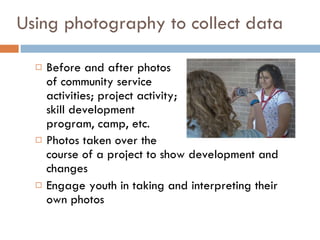
Using photography to collect data Before and after photos  of community service  activities; project activity;  skill development  program, camp, etc. Photos taken over the  course of a project to show development and changes Engage youth in taking and interpreting their own photos
Photography Example .  You want to know what the camp experience means to youth.  You randomly select a group of campers who are asked to take photos during camp.  The photographers then gather in small groups to discuss their photos, why they took the photo, what it means to them, etc.  Comments and remarks are recorded.  This can be done online by using  Flickr ,  Picasa  (requires google user name/free download)
INTEGRATING TECHNOLOGY INTO  PLANNING & EVALUATION
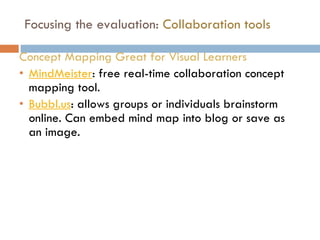
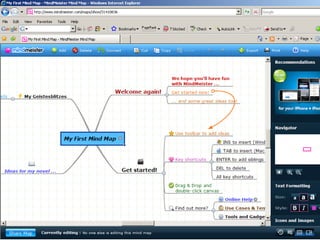
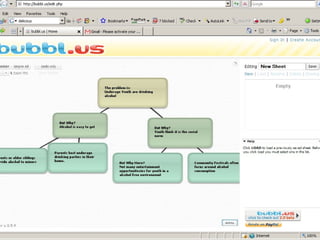
Focusing the evaluation:  Collaboration tools Concept Mapping Great for Visual Learners MindMeister : free real-time collaboration concept mapping tool.  Bubbl.us : allows groups or individuals brainstorm online. Can embed mind map into blog or save as an image.
 
 
Data Collection Online tools to assist with the various forms of data collection
Journals/Logs When using journaling to collect evaluation data, be clear about what you want to know and give them a list of questions to address. Space might be designated for days events; feelings about the events; reflection on what was learned; what actions they will take. group journal where all members write and share their experiences and thoughts in a combined effort.
Online tools to track responses Micro blogging-  Twitter , status updates on  Facebook  (or other social networking site) If you have a Blog- create a post and ask participants to post comments (Blog sites include:  Wordpress ,  Blogger ) Text messaging- both twitter and status updates can be done via texting, otherwise a separate platform for participants to text in their thoughts
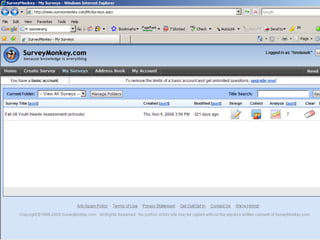
Designing a Questionaire Don’t forget about technology Zoomerang online tool which allows one to design a survey, share the link to intended audience, collect responses and analyze data.  UW-Extension has subscription, work with State program area to initiate the process. Surveymonkey - online tool which allows one to design a survey, share the link to intended audience, collect responses and analyze data.  Free, has some limitations
 
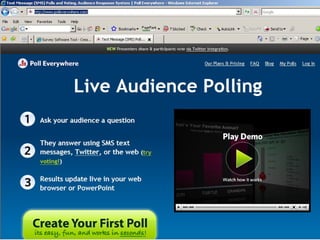
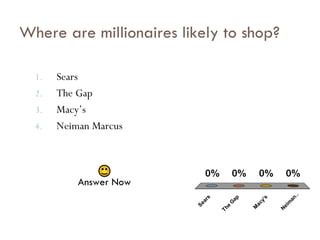
Interactive tools/Audience feedback Poll Everywhere  Ask your audience a question, they answer with a SMS text message.  Results update live in your web browser or PowerPoint…just like American Idol or Who Wants to be a Millionaire.  Free version available Clickers/Turning point Software: Similar concept as poll everywhere.  Requires software and clickers.  Some districts do have a set available for check out.
 
Sears The Gap Macy’s Neiman Marcus Where are millionaires likely to shop? Answer Now
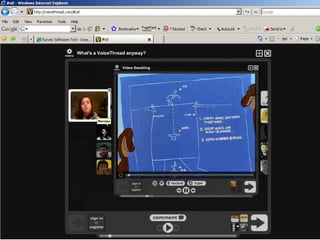
Group work:  Focus Groups, interviews Challenge: how to record and review data Voicethread : group conversations are collected and shared in one place from anywhere in the world. It’s a  collaborative, multimedia slide show that holds images, documents, and videos.  Allows people to navigate pages and leave comments 5 different ways- using voice (with a mic or telephone), text, audio file, or video (via a webcam). Users can also doodle (creative expression).  All can be exported to mp3 player or DVD.
 
Data Analysis & Interpretation These tools can be helpful to assist with putting data into a user friendly format. Gliffy  Free web-based diagram software Zoho-Creator : Create databases that your team members can access over the web. Create your own forms/tables or import data from standard formats (.xls .csv .mdb) and get your database application online within minutes, really! Mnemograph (now timeglider) : An online application that creates great-looking timelines.  Free version can import links, RSS, images and more. Helpful for tracking Long-term outcomes/impacts
Overwhelmed? Just know these applications exist to help you If they sound exciting, try to incorporate just 1-2 into your programming. Take a deep breathe- this is not a reporting requirement!

Educational Technology YWC

  • 1.
    EDUCATIONAL TECHNOLOGY: FREE WEB-BASED TOOLS TO MAKE YOUR LIFE EASIER! Heidi Dusek Youth & Family Coordinator, Outagamie County UW-Extension
  • 2.
    Resources for thispresentation This presentation is available at: An outline of tools referenced is available at: http://bit.ly/heidi-edtech Research is sited on most slides, however much of my information comes from the PEW Research Center: Internet & Technology http://pewresearch.org/topics/internetandtechnology/ Definitions came from: www.techterms.com
  • 3.
    Strengths in usingtechnology? Engage audience- youth, others Time savings Cost savings Popular means for staying connected to others
  • 4.
    Weaknesses in usingtechnology? Privacy concerns Lack of understanding (staff/audience) Cost Policies restricting access Less human interaction
  • 5.
    Opportunities technology canprovide? New programming format Reach newer/diverse audiences Source of knowledge Could save staff time and resources constantly evolving- becoming more user friendly
  • 6.
    Threats in usingtechnology? Keeping up with the changes Inappropriate use Safety Virtual replacing “real life”
  • 7.
    Who is YOURaudience? Did You Know? 3.0 for 2008 Newly Revised Edition Created by Karl Fisch, and modified by Scott McLeod; Globalization & The Information Age PEW Internet and American LIFE project, Generations online in 2009
  • 8.
    All Whites (75%) All Blacks (59%) English-Speaking Hispanics (80%) 73%* of the population reports using the internet or email. Here is a breakdown of use among different online groups. (shown as a percentage of population online) 18-29 Years Old (90%) 30-49 Years Old (85%) 50-64 Years Old (70%) 65+ Years Old (35%) No High School Degree (44%) College Graduates (91%) <$30K Income (53%) >$75K Income (95%) Men (73%) Women (73%) *Source: Pew Internet & American Life Survey, May 2008. http://www.pewinternet.org ** This statistic comes from the Pew Internet Project’s Latinos Online data, collected June-October, 2006. High School Graduates (63%) Urban (74%) Rural (63%) Suburban (77%) Spanish-Dominant Hispanics (32%)**
  • 9.
    What is mostrelevant to teens? (Ages 12-17) : PEW Research: Internet & Tech 97% play computer, web, portable, or console games (Guitar Hero most frequently played), 78% play games online 71% are cell phone owners (of them 38% send text messages daily 64% have created content on the internet (35% blog, 54% post photos) 65% use social networking sites 32% have been a target of cyber bullying
  • 10.
    Risks and ConsiderationsWho is your audience? Is it appropriate? Privacy (settings/expected behavior) Copyright & Fair Use Terms of Service Agreement - liability, who owns the content Accountability - how do people find your content Life of the Data (permission to post) Stability of site/Security
  • 11.
  • 12.
    Web 2.0 toolsInteractive Open-Source Collaborative Interact with other applications (widgets) Integrated, often using RSS Real Simple Syndication
  • 13.
    Social Networking Meansfor individual profiles Connect globally Virtual communities Examples: Facebook, MySpace, Linked In, Ning
  • 14.
    Ways to UseSocial Networking Extend your network- find connections with others -staff (network, program development, communication) Marketing program/products -new audiences (marketing, awareness, fundraising) -fan pages -group pages -event announcements Communicate with other groups - Public or private
  • 15.
  • 16.
  • 17.
    Adults and SocialNetworking 75% of 18-24 year olds have profile 57% of 25-34 year olds have profile 30% of 35-44 year olds have profile 19% of 45-54 year olds have profile 10% of 55-64 year olds have profile 7% of adults 65 and older have a profile. These rates have quadrupled since 2005
  • 18.
    Adults use ofSocial Networking
  • 19.
    Real-Simple-Syndication. Byhaving an RSS feed/aggregator, websites that you subscribe to will update in your RSS, rather than you having to go to different website for current content. It’s like having an INBOX for the web. RSS in Plain English -video Examples: Google Reader, Bloglines, Pageflakes RSS
  • 20.
    Social Bookmarking Similarto a real-life bookmark A marker for a Web site. (In Internet Explorer, they're called &quot;Favorites“). Accessible from anywhere on the web Allow “tags” to sort your bookmarks Examples: Delicious , Filamentality , Diigo , Edmondo
  • 21.
    Blog and Micro-blogsShort for &quot;Web Log&quot; journal entries posted on a Web page-given a personalized URL address. Allows ANYONE to be an author Examples: Wordpress, Blogger, Twitter
  • 22.
    How are youthworkers using blogs? Newsletter updates Recognition Marketing Events Programming Fundraising
  • 23.
  • 24.
  • 25.
    Managing a blogEstablish content- long or short Updates (at least 2x per month) Make others aware of your blog (clients, partners) Track Statistics Can embed multimedia into blog Can embed blog into other networks (Facebook) comments-interactive
  • 26.
  • 27.
    What is Twitter ? Micro-blogging platform 140 character limit Integrates into other web 2.0 Allows web and mobile updates Tweet: Twitter posting
  • 28.
  • 29.
    Twitter, Tweets, TweepsTwitter uses Breaking news Marketing Grassroots organizing Thought ticklers Ask questions Integrate with Facebook status
  • 30.
    Tools for TwitterTwitPic: add photos to your tweet http://twitpic.com Twubble: find Tweeps (twitter users) http://www.crazybob.org/twubble/ TwitterAnalyzer http://twitteranalyzer.com/ TwitterFan Wiki http://twitter.pbworks.com/Apps
  • 31.
    Collaboration Tools Wikis:a Web site that allows users to add and update content. (public or private) PBWorks, Wikispaces, Wet-Paint Collaborative editing and file sharing Google Docs Writeboard Drop.io Calendar/scheduling Doodle
  • 32.
  • 33.
  • 34.
    Multimedia Tools Images,video, audio TONS of open source software for editing and sharing PLEASE remember to get permission to post. You are required by law to obtain release forms and maintain them for the life of the media.
  • 35.
    How are youthworkers using multimedia? Teaching/programming tools Recognition Marketing - picture is worth a thousand words Programs Recruitment Evaluation Demonstrate impacts of programming Measuring participant experience
  • 36.
    Photo editing andSharing GIMP/Pixlr- open source for high end photo editing (similar to Photoshop-but free) Flickr- create groups for organization to share photos ( classroom display example ) Picassa –requires download. Integrated with Google. Also includes Collage and presentation tools Cooliris -fast, cinematic way to view pictures in 3-D Foto Flexer -easy-to-use photo editing that integrates with the major online photo-sharing sites
  • 37.
  • 38.
    Audio- podcasts Gabcast - Create a podcast using your phone! Kid-Cast - A podcast hosting site for kids. podOmatic - Create, find, and share podcasts at this site!
  • 39.
    Video Editing andSharing Teacher tube- video sharing site for teachers. Bypasses most filters typically blocked by youtube. Youtube- free web-based platform to publish videos. Can easily embed into other Web 2.0
  • 40.
    Presentation tools Animoto - Upload images to this site, select your music and it applies all the transitions and creates a customized a video. Easy-to-use, and very high quality! Jing - create short (<5 minutes) screen capture videos with audio support. Free download and server space to store and share the videos you have created. SlideRocket - With SlideRocket you quickly make stunning presentations, manage a library of slides and assets, share them securely with colleagues, and measure how they're used Slideshare - upload PowerPoint presentations to share publicly or privately. LIke YouTube, but for presentations.
  • 41.
    Using photography tocollect data Before and after photos of community service activities; project activity; skill development program, camp, etc. Photos taken over the course of a project to show development and changes Engage youth in taking and interpreting their own photos
  • 42.
    Photography Example . You want to know what the camp experience means to youth. You randomly select a group of campers who are asked to take photos during camp. The photographers then gather in small groups to discuss their photos, why they took the photo, what it means to them, etc. Comments and remarks are recorded. This can be done online by using Flickr , Picasa (requires google user name/free download)
  • 43.
    INTEGRATING TECHNOLOGY INTO PLANNING & EVALUATION
  • 44.
    Focusing the evaluation: Collaboration tools Concept Mapping Great for Visual Learners MindMeister : free real-time collaboration concept mapping tool. Bubbl.us : allows groups or individuals brainstorm online. Can embed mind map into blog or save as an image.
  • 45.
  • 46.
  • 47.
    Data Collection Onlinetools to assist with the various forms of data collection
  • 48.
    Journals/Logs When usingjournaling to collect evaluation data, be clear about what you want to know and give them a list of questions to address. Space might be designated for days events; feelings about the events; reflection on what was learned; what actions they will take. group journal where all members write and share their experiences and thoughts in a combined effort.
  • 49.
    Online tools totrack responses Micro blogging- Twitter , status updates on Facebook (or other social networking site) If you have a Blog- create a post and ask participants to post comments (Blog sites include: Wordpress , Blogger ) Text messaging- both twitter and status updates can be done via texting, otherwise a separate platform for participants to text in their thoughts
  • 50.
    Designing a QuestionaireDon’t forget about technology Zoomerang online tool which allows one to design a survey, share the link to intended audience, collect responses and analyze data. UW-Extension has subscription, work with State program area to initiate the process. Surveymonkey - online tool which allows one to design a survey, share the link to intended audience, collect responses and analyze data. Free, has some limitations
  • 51.
  • 52.
    Interactive tools/Audience feedbackPoll Everywhere Ask your audience a question, they answer with a SMS text message. Results update live in your web browser or PowerPoint…just like American Idol or Who Wants to be a Millionaire. Free version available Clickers/Turning point Software: Similar concept as poll everywhere. Requires software and clickers. Some districts do have a set available for check out.
  • 53.
  • 54.
    Sears The GapMacy’s Neiman Marcus Where are millionaires likely to shop? Answer Now
  • 55.
    Group work: Focus Groups, interviews Challenge: how to record and review data Voicethread : group conversations are collected and shared in one place from anywhere in the world. It’s a collaborative, multimedia slide show that holds images, documents, and videos. Allows people to navigate pages and leave comments 5 different ways- using voice (with a mic or telephone), text, audio file, or video (via a webcam). Users can also doodle (creative expression). All can be exported to mp3 player or DVD.
  • 56.
  • 57.
    Data Analysis &Interpretation These tools can be helpful to assist with putting data into a user friendly format. Gliffy Free web-based diagram software Zoho-Creator : Create databases that your team members can access over the web. Create your own forms/tables or import data from standard formats (.xls .csv .mdb) and get your database application online within minutes, really! Mnemograph (now timeglider) : An online application that creates great-looking timelines. Free version can import links, RSS, images and more. Helpful for tracking Long-term outcomes/impacts
  • 58.
    Overwhelmed? Just knowthese applications exist to help you If they sound exciting, try to incorporate just 1-2 into your programming. Take a deep breathe- this is not a reporting requirement!

Editor's Notes

  • #8 Sources: 1) 3.0 for 2008 Newly Revised Edition Created by Karl Fisch, and modified by Scott McLeod; Globalization &amp; The Information Age