EDUCATIONAL TECHNOLOGY:  FREE WEB-BASED TOOLS TO MAKE YOUR LIFE EASIER! Heidi Dusek Youth & Family Coordinator,  Outagamie County UW-Extension
Resources for this presentation This presentation is available at:   http://www.slideshare.net/hmdusek An outline of tools referenced is available at: http://bit.ly/heidi-edtech Research is sited on most slides, however much of my information comes from the  PEW Research Center: Internet & Technology  http://pewresearch.org/topics/internetandtechnology/ Definitions came from:  www.techterms.com
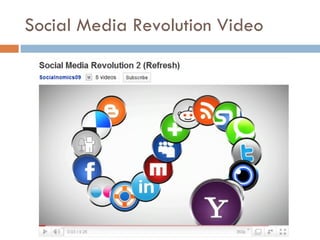
Social Media Revolution Video
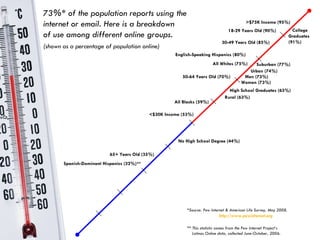
All Whites (75%)   All Blacks (59%)   English-Speaking Hispanics (80%)   73%* of the population reports using the internet or email. Here is a breakdown  of use among different online groups. (shown as a percentage of population online) 18-29 Years Old (90%) 30-49 Years Old (85%) 50-64 Years Old (70%) 65+ Years Old (35%) No High School Degree (44%) College  Graduates  (91%) <$30K Income (53%) >$75K Income (95%) Men (73%) Women (73%) *Source: Pew Internet & American Life Survey, May 2008.   http://www.pewinternet.org ** This statistic comes from the Pew Internet Project’s    Latinos Online data, collected June-October, 2006. High School Graduates (63%) Urban (74%) Rural (63%) Suburban (77%) Spanish-Dominant Hispanics (32%)**
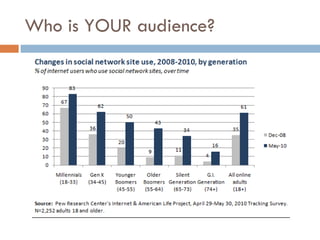
Who is YOUR audience?
What is most relevant to teens? (Ages 12-17) :  PEW Research: Internet & Tech 97% play computer, web, portable, or console games (Guitar Hero most frequently played),  78% play games online 71% are cell phone owners (of them 38% send text messages daily 64% have created content on the internet (35% blog, 54% post photos) 65% use social networking sites 32% have been a target of cyber bullying
Risks and Considerations Who is your audience? Is it appropriate? Privacy (settings/expected behavior) -  Video on setting parent controls in Youtube Copyright & Fair Use Terms of Service Agreement - liability, who owns the content Accountability - how do people find your content Life of the Data (permission to post) Stability of site/Security
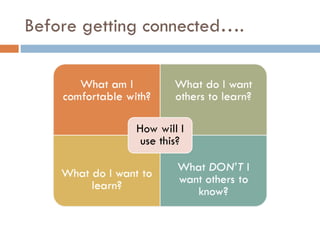
Before getting connected….
Social Networking A term to describe how people are connecting with others around the world, using the internet. Example: Facebook, MySpace, LinkedIn
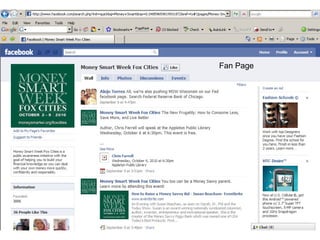
Ways to Use Social Networking Extend your network- find connections with others -staff (network, program development, communication) Marketing program/products -new audiences (marketing, awareness, fundraising) -fan pages ( video tutorial ) -group pages -event announcements Communicate with other groups - Public or private
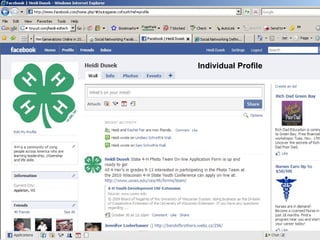
Individual Profile
Fan Page
Whose using Social Networking? 73% of 12-17 years old have profile 86% of 18-29 year olds have profile 61% of 30-49 year olds have profile 47% of 50-64 year olds have profile 26% of adults 65 and older have a profile. These rates have quadrupled since 2005
Impact on Volunteer organizations Internet users are more likely than others to be active in volunteer organizations (Adults) 82% social network users are even more likely to be active in groups.  56% of non-internet users. What does this mean?
Real-Simple-Syndication.  By having an RSS feed/aggregator, websites that you subscribe to will update in your RSS, rather than you having to go to different website for current content. It’s like having an INBOX for the web. RSS in Plain English -video Examples: Google Reader, Bloglines, Pageflakes RSS
Social Bookmarking Similar to a real-life bookmark A marker for a Web site. (In Internet Explorer, they're called &quot;Favorites“). Accessible from anywhere on the web Allow “tags” to sort your bookmarks Examples:  Delicious ,  Filamentality ,  Diigo , Edmondo
Blog and Micro-blogs Short for &quot;Web Log&quot;  journal entries posted on a Web page-given a personalized URL address. Allows ANYONE to be an author Interactive- Comments Examples: Wordpress, Blogger, Twitter
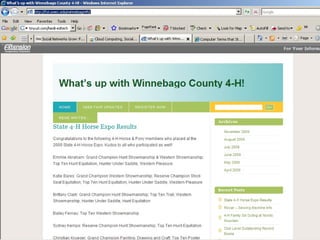
How are organizations using blogs? Newsletter updates Recognition Marketing Events Programming Fundraising
 
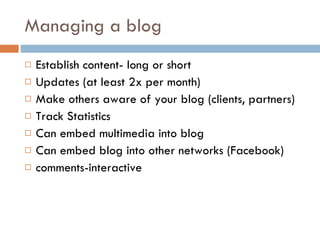
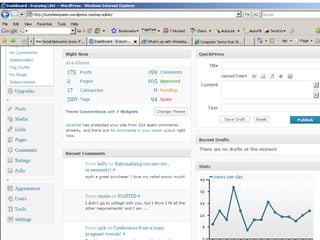
Managing a blog Establish content- long or short Updates (at least 2x per month) Make others aware of your blog (clients, partners) Track Statistics Can embed multimedia into blog Can embed blog into other networks (Facebook) comments-interactive
 
What is  Twitter ? Micro-blogging platform 140 character limit Integrates into other web 2.0 Allows web and mobile updates Tweet: Twitter posting
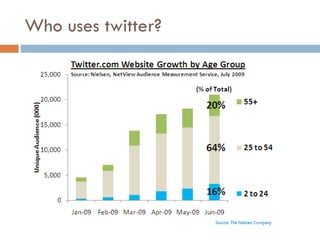
Who uses twitter?
Twitter, Tweets, Tweeps Twitter uses Breaking news Marketing Grassroots organizing Thought ticklers Ask questions Integrate with Facebook status
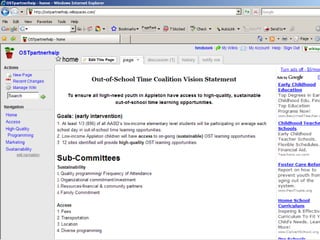
Collaboration Tools Wikis: a Web site that allows users to add and update content. (public or private) PBWorks, Wikispaces, Wet-Paint Collaborative editing and file sharing Google Docs Writeboard Drop.io Calendar/scheduling Doodle
 
 
Multimedia Tools Images, video, audio TONS of open source software for editing and sharing PLEASE remember to get permission to post.  You are required by law to obtain release forms and maintain them for the life of the media.
How are organizations using multimedia? Teaching/programming tools Recognition Marketing - picture is worth a thousand words Programs Recruitment Evaluation Demonstrate impacts of programming Measuring participant experience
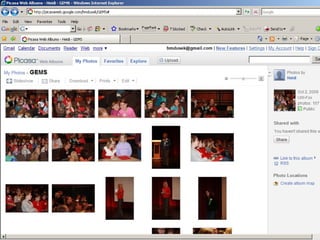
Photo editing and Sharing GIMP/Pixlr- open source for high end photo editing (similar to Photoshop-but free) Flickr- create groups for organization to share photos ( classroom display example ) Picassa –requires download.  Integrated with Google.  Also includes Collage and presentation tools Cooliris -fast, cinematic way to view pictures in 3-D Foto Flexer -easy-to-use photo editing that integrates with the major online photo-sharing sites
 
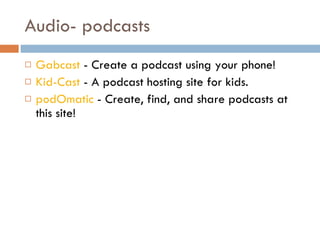
Audio- podcasts Gabcast  - Create a podcast using your phone!  Kid-Cast  - A podcast hosting site for kids.  podOmatic  - Create, find, and share podcasts at this site!
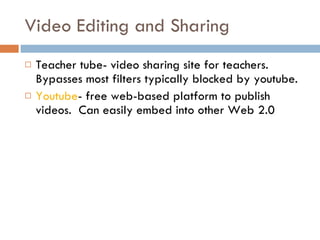
Video Editing and Sharing Teacher tube- video sharing site for teachers.  Bypasses most filters typically blocked by youtube. Youtube - free web-based platform to publish videos.  Can easily embed into other Web 2.0
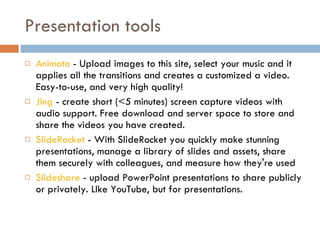
Presentation tools Animoto  - Upload images to this site, select your music and it applies all the transitions and creates a customized a video. Easy-to-use, and very high quality!  Jing  - create short (<5 minutes) screen capture videos with audio support. Free download and server space to store and share the videos you have created.  SlideRocket  - With SlideRocket you quickly make stunning presentations, manage a library of slides and assets, share them securely with colleagues, and measure how they're used  Slideshare  - upload PowerPoint presentations to share publicly or privately. LIke YouTube, but for presentations.
Overwhelmed? Just know these applications exist to help you If they sound exciting, try 1-2.

Technology lal

  • 1.
    EDUCATIONAL TECHNOLOGY: FREE WEB-BASED TOOLS TO MAKE YOUR LIFE EASIER! Heidi Dusek Youth & Family Coordinator, Outagamie County UW-Extension
  • 2.
    Resources for thispresentation This presentation is available at: http://www.slideshare.net/hmdusek An outline of tools referenced is available at: http://bit.ly/heidi-edtech Research is sited on most slides, however much of my information comes from the PEW Research Center: Internet & Technology http://pewresearch.org/topics/internetandtechnology/ Definitions came from: www.techterms.com
  • 3.
  • 4.
    All Whites (75%) All Blacks (59%) English-Speaking Hispanics (80%) 73%* of the population reports using the internet or email. Here is a breakdown of use among different online groups. (shown as a percentage of population online) 18-29 Years Old (90%) 30-49 Years Old (85%) 50-64 Years Old (70%) 65+ Years Old (35%) No High School Degree (44%) College Graduates (91%) <$30K Income (53%) >$75K Income (95%) Men (73%) Women (73%) *Source: Pew Internet & American Life Survey, May 2008. http://www.pewinternet.org ** This statistic comes from the Pew Internet Project’s Latinos Online data, collected June-October, 2006. High School Graduates (63%) Urban (74%) Rural (63%) Suburban (77%) Spanish-Dominant Hispanics (32%)**
  • 5.
    Who is YOURaudience?
  • 6.
    What is mostrelevant to teens? (Ages 12-17) : PEW Research: Internet & Tech 97% play computer, web, portable, or console games (Guitar Hero most frequently played), 78% play games online 71% are cell phone owners (of them 38% send text messages daily 64% have created content on the internet (35% blog, 54% post photos) 65% use social networking sites 32% have been a target of cyber bullying
  • 7.
    Risks and ConsiderationsWho is your audience? Is it appropriate? Privacy (settings/expected behavior) - Video on setting parent controls in Youtube Copyright & Fair Use Terms of Service Agreement - liability, who owns the content Accountability - how do people find your content Life of the Data (permission to post) Stability of site/Security
  • 8.
  • 9.
    Social Networking Aterm to describe how people are connecting with others around the world, using the internet. Example: Facebook, MySpace, LinkedIn
  • 10.
    Ways to UseSocial Networking Extend your network- find connections with others -staff (network, program development, communication) Marketing program/products -new audiences (marketing, awareness, fundraising) -fan pages ( video tutorial ) -group pages -event announcements Communicate with other groups - Public or private
  • 11.
  • 12.
  • 13.
    Whose using SocialNetworking? 73% of 12-17 years old have profile 86% of 18-29 year olds have profile 61% of 30-49 year olds have profile 47% of 50-64 year olds have profile 26% of adults 65 and older have a profile. These rates have quadrupled since 2005
  • 14.
    Impact on Volunteerorganizations Internet users are more likely than others to be active in volunteer organizations (Adults) 82% social network users are even more likely to be active in groups. 56% of non-internet users. What does this mean?
  • 15.
    Real-Simple-Syndication. Byhaving an RSS feed/aggregator, websites that you subscribe to will update in your RSS, rather than you having to go to different website for current content. It’s like having an INBOX for the web. RSS in Plain English -video Examples: Google Reader, Bloglines, Pageflakes RSS
  • 16.
    Social Bookmarking Similarto a real-life bookmark A marker for a Web site. (In Internet Explorer, they're called &quot;Favorites“). Accessible from anywhere on the web Allow “tags” to sort your bookmarks Examples: Delicious , Filamentality , Diigo , Edmondo
  • 17.
    Blog and Micro-blogsShort for &quot;Web Log&quot; journal entries posted on a Web page-given a personalized URL address. Allows ANYONE to be an author Interactive- Comments Examples: Wordpress, Blogger, Twitter
  • 18.
    How are organizationsusing blogs? Newsletter updates Recognition Marketing Events Programming Fundraising
  • 19.
  • 20.
    Managing a blogEstablish content- long or short Updates (at least 2x per month) Make others aware of your blog (clients, partners) Track Statistics Can embed multimedia into blog Can embed blog into other networks (Facebook) comments-interactive
  • 21.
  • 22.
    What is Twitter ? Micro-blogging platform 140 character limit Integrates into other web 2.0 Allows web and mobile updates Tweet: Twitter posting
  • 23.
  • 24.
    Twitter, Tweets, TweepsTwitter uses Breaking news Marketing Grassroots organizing Thought ticklers Ask questions Integrate with Facebook status
  • 25.
    Collaboration Tools Wikis:a Web site that allows users to add and update content. (public or private) PBWorks, Wikispaces, Wet-Paint Collaborative editing and file sharing Google Docs Writeboard Drop.io Calendar/scheduling Doodle
  • 26.
  • 27.
  • 28.
    Multimedia Tools Images,video, audio TONS of open source software for editing and sharing PLEASE remember to get permission to post. You are required by law to obtain release forms and maintain them for the life of the media.
  • 29.
    How are organizationsusing multimedia? Teaching/programming tools Recognition Marketing - picture is worth a thousand words Programs Recruitment Evaluation Demonstrate impacts of programming Measuring participant experience
  • 30.
    Photo editing andSharing GIMP/Pixlr- open source for high end photo editing (similar to Photoshop-but free) Flickr- create groups for organization to share photos ( classroom display example ) Picassa –requires download. Integrated with Google. Also includes Collage and presentation tools Cooliris -fast, cinematic way to view pictures in 3-D Foto Flexer -easy-to-use photo editing that integrates with the major online photo-sharing sites
  • 31.
  • 32.
    Audio- podcasts Gabcast - Create a podcast using your phone! Kid-Cast - A podcast hosting site for kids. podOmatic - Create, find, and share podcasts at this site!
  • 33.
    Video Editing andSharing Teacher tube- video sharing site for teachers. Bypasses most filters typically blocked by youtube. Youtube - free web-based platform to publish videos. Can easily embed into other Web 2.0
  • 34.
    Presentation tools Animoto - Upload images to this site, select your music and it applies all the transitions and creates a customized a video. Easy-to-use, and very high quality! Jing - create short (<5 minutes) screen capture videos with audio support. Free download and server space to store and share the videos you have created. SlideRocket - With SlideRocket you quickly make stunning presentations, manage a library of slides and assets, share them securely with colleagues, and measure how they're used Slideshare - upload PowerPoint presentations to share publicly or privately. LIke YouTube, but for presentations.
  • 35.
    Overwhelmed? Just knowthese applications exist to help you If they sound exciting, try 1-2.

Editor's Notes

  • #4 Source: Social Media Revolution 2, Inspired by Karl Fisch, and modified by Scott McLeod Did You Know video, “Right Here, Right Now” Music by Fat boy Slim 1999; Edits by Evan Kutska
  • #5 PEW recognized that English speaking Hispanics and transient populations are more likely to have cell phones than any other technology. Many of them are web-enable to allow them to use the internet to stay connected to resources and other people. 79% of Wisconsin residents have access to the internet, similarly 78% in NE Wisconsin. In comparison to other technologies 94% have a home phone (NE Region &amp; WI), 70% (NE Region) &amp; 68% (WI) have cell phones. Source: Hill E., (December 2010) Wisconsin Consumer Broadband Study retrieved from http://www.link.wisconsin.gov/lwi/docs/Consumer%20Market%20Research.pdf
  • #6 Source: Zickuhr K., (2010 December 16) Generations Online 2010 . PEW Internet and American LIFE project retrieved from: http://pewinternet.org/Reports/2010/Generations-2010.aspx
  • #14 Source: Purcell, K. &amp; Lenhart, A. (2010 September 29). Trends in Teen Communication: Opportunities and Challenges for Public Health Campaigns. PEW Research Center. Retrieved from http://www.pewinternet.org/Presentations/2010/Sep/ONDCP.aspx
  • #15 68% of all Americans (internet users and non-users alike) said the internet has had a major impact on the ability of groups to communicate with members. 60% a major impact on the ability of groups to connect with other groups. 59% a major impact on the ability of groups to organize activities. 52% a major impact on the ability of groups to raise money. 51% a major impact on the ability of groups to recruit new members. 49% a major impact on the ability of groups to impact local communities. 35% a major impact on the ability of groups to find people to take leadership roles. Personally 53% keep up with news and information about their groups 33% to find groups that match their interests 28% create their own groups 24% a major impact on their ability to volunteer their time to groups 24% a major impact on their ability to contribute money to groups Source: Purcell K., Rainien L., &amp; Smith A. (2011 January 18) Social Side of the Internet. Pew Internet &amp; American Life Project retrieved from http://pewresearch.org/pubs/1861/impact-internet-social-media-facebook-twitter-group-activities-participation
  • #19 Blogs : 2009 data shows a decline in blogging among teens and young adults (28% 2006 to 14% 2009) meanwhile adults 30 and over increased (7% 2006 to 11% 2009) Much of the drop in blogging among younger internet users may be attributable to changes in social network use by teens and young adults. Facebook (most popular social netwrok) does not provide a tool for blogging within the network. Twitter: teens ages 12-17 do not use Twitter in large numbers – just 8% of online teens 12-17 say they ever use Twitter , a percentage similar to the number who use virtual worlds. This puts Twitter far down the list of popular online activities for teens. Source: Lenhart A, Purcell K., Smith A., &amp; Zickur K. (2010 February 3) Social Media and Young Adults . Pew Internet &amp; American Life Project retrieved from http://pewinternet.org/Reports/2010/Social-Media-and-Young-Adults.aspx