Dr K C Gouda, Scientist
CSIR -4PI, Wind Tunnel Road
Belur Campus, Bangalore-37.
Dr Shakti Banerjee
Professor and Head of Dept,
School of Statistics,
Devi Ahilya Viswavidyalaya,
Taksashila Parisar, Khandwa Road,
Indore:452001
School of Future Studies & Planning,
DAVV, Indore (M.P.)
Introduction
• The main aim of the project work entitled
“DEVELOPMENT OF VISUALIZATION SOFTWARE
FOR WEATHER AND CLIMATE DATA ANALYSIS” is
to analyze the input file and determine if the data
values fall within a certain range and to generate
a new file of the same format using the threshold
value specified by the user.
• In our project we have read the netCDF files with
a utility called ‘ncdump’ and generated a new file.
Organisation Profile
In the late 1980's, the Council of Scientific and Industrial Research (CSIR) recognized the growing
significance of Mathematical Modelling and Computer Simulation, as it became evident that
modelling approaches were critical for illuminating the structure and evolution of complex systems
that were invading the areas of scientific analysis and technological design.
Computing Facilities at C-MMACS
It has one of the most sophisticated and advanced computing environments in India and certainly
the best in CSIR. The highest performance computing and networking resources in C-MMACS
includes:
• SGI Altix 3700 BX2 Compute Servers
• SGI Origin 3900 Compute Server
• SGI Altix 350 Compute Servers
• SGI Origin 200 Compute Server
• High Availability IBM Storage Server
• SGI Octane 2 Workstation
• SGI Indigo2 Extreme Workstations
• SGI O2 Workstations
• SGI Indy Workstations
• HP Xeon Linux Servers
• HP/Compaq D330 Linux Workstations
• IBM Net vista A30 Linux/Windows Desktops
• IBM PC 300GL Linux/Windows Desktops
• C-MMACS Local Area Network
Research Activities
• C-MMACS Environment Modelling Program
• Monsoon simulation
• Tropical Modelling
• Hydrological Modelling
• Neural Network forecasting
• Ocean Atmosphere coupling
• Ocean Modelling
• Atmospheric modelling
• Lithosphere Modelling
• Dynamical System Modelling
• Industrial Computational Mechanics
Areas of Specialization
• Aerospace Propulsion
• Computational Aerodynamics
• Wind Tunnel Testing
• Flight mechanics and control
• Structural mechanics
• Parallel Computing
Organisation Profile
Climate and Weather
Weather
Weather only describe the short-term condition
of the variable in the given region.
Climate
Climate is a measure of the average pattern of
variation in temperature, humidity, atmospheric
pressure, wind, precipitation, atmospheric
particle count and other meteorological variables
in a given region over long period of time.
Description of Related Study
Latitude and Longitude
Latitude is the angular distance, in degrees, minutes and seconds of
a point north and south of the Equator.
Longitude is the angular distance, in degrees, minutes and seconds
of a point east or west of the Prime (Greenwich) Meridian
Resolution
Resolution is represented in the of number of grid points. Increase
in resolution means increasing the number of grid points.
Grid
Grid is a pattern of horizontal and vertical lines on a chart or map,
such as those representing latitude and longitude, usually crossing
each other to form squares/rectangles which help determining
absolute location.
Description of Related Study
Meteorological Weather and climate Data
Meteorology is the interdisciplinary scientific study of the atmosphere
that focuses on weather process and forecasting.
Meteorological phenomena are observable weather events which
illuminate and are explained by the science of meteorology.
Those events are bound by the variables that exist in Earth’s atmosphere.
They are temperature, air pressure, water vapour and the gradients and
interactions of each variable and how they change in time.
Atmosphere and oceanographic data may be archived in several different
computer forms: character format, native format, packed binary or in one
of several “standard” scientific data formats. Users of datasets must be
aware of how the data are stored.
Architecture independent standard formats commonly used for
atmosphere and oceanographic datasets include:
• NetCDF (network Common Data Format)
• GrADS
Scope of the System
The proposed system aims to analyse data in
different formats and to perform quality control if
the data is not within certain standard ranges. The
software is capable of analysing NetCDF, GRIB, ASCII
data formats. The GUI is incorporated to perform
these operations in a user friendly way.
Objective of the Proposed System
• Extracting the data values of the given parameters
from the data file.
• Scanning the data and determining the maximum and
minimum values in a domain.
• Development of algorithm for Climate data analysis
• Multi-format and Multi-source climate data analysis.
• Development of data display system for User
• Data Mining
• Spatial Interpolation modeling
• Spatial Statistical Analysis.
System Module
My software work as a System and this
software system is divided into two part as
follows :
• Perform Statistical Operation on Mined data.
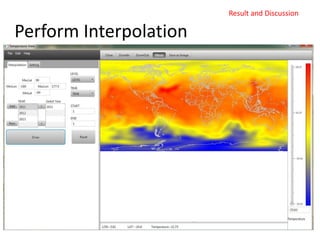
• Perform Interpolation and generate spatial
image Based on mined data.
Data Flow Diagram
User
Weather & Climate Data
Display System
Fill Essential Data
Display Spatial
Maps & Chart
Shapefile(.shp)
Draw Region
Boundary
NetCDF Data
(.nc)
Analysis
the Data
Save
Spatial Image
(.jpeg)
Figure : 0th Level DFD
User
Spatial Analysis
Interpolated
Spatial Map
Fill Essential
Information
Fill Essential
Information
NetCDF Data
(.nc)
Compare the Data
Perform
Interpolation
Shapefile(.shp)
Make
Boundary
Statistical Information
& Chart
Interpolated
Map
Figure : 1st Level DFD
Platforms, Languages and Tools
Hardware Configuration
• Processor Intel Pentium Dual Core and Above
• Memory: 512 MB RAM and Above
• Clock Speed: 1.72 GHz and Above
• Hard Disk Capacity: 80GB
Software Configuration
• Operating System: Ubuntu, Fedora Linux, Windows, Mac
• Language: Java
• Complier: Java Compiler (Java Virtual Machine)
• Other tools and utilities: JavaFX, Visual Paradism, many .jar files
Platforms, Languages
• JAVA
The Java platform is the name for a bundle of related programs from Sun that
allow for developing and running programs written in the Java programming
language. The platform is not specific to any one processor or operating system,
but rather an execution engine (called a virtual machine) and a compiler with a set
of libraries that are implemented for various hardware and operating systems so
that Java programs can run identically on all of them.
Java Card: A technology that allows small Java-based applications (applets) to be
run securely on smart card and similar small-memory devices.
Java ME(Micro Edition): Specifies several different sets of libraries (known as
profiles) for devices with limited storage, display, and power capacities. Often used
to develop applications for mobile devices, PDAs, TV set-of-box, and printers.
Java SE (Standard Edition): For general-purpose use on desktop PCs, servers and
similar devices.
Java EE (Enterprise Edition): Java SE plus various APIs useful for multi-tier client-
server, enterprise application.
Platforms, Languages and Tools
Platforms, Languages
JAVA compiler
When you program for the Java platform, you write source code in
.java files and then compile them. The compiler checks your code
against the language's syntax rules, then writes out bytecodes in .class
files. Bytecodes are standard instructions targeted to run on a Java
virtual machine (JVM). In adding this level of abstraction, the Java
compiler differs from other language compilers, which write out
instructions suitable for the CPU chipset the program will run on.
JVM
At run time, the JVM reads and interprets .class files and executes the
program's instructions on the native hardware platform for which the
JVM was written. The JVM interprets the bytecodes just as a CPU
would interpret assembly-language instructions. The difference is that
the JVM is a piece of software written specifically for a particular
platform. The JVM is the heart of the Java language's "write-once,
run-anywhere" principle.
Platforms, Languages and Tools
Tools
JavaFX Applications
Written as a Java API,
JavaFX application
code can reference
APIs from any Java
library.
The look and feel of
JavaFX applications can
be customized.
Graphic designers can
easily customize the
appearance and style
of the application
through the CSS.
Platforms, Languages and Tools
Eclipse
Platforms, Languages and Tools
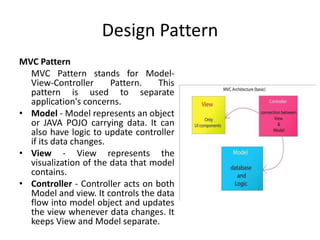
Design Pattern
MVC Pattern
MVC Pattern stands for Model-
View-Controller Pattern. This
pattern is used to separate
application's concerns.
• Model - Model represents an object
or JAVA POJO carrying data. It can
also have logic to update controller
if its data changes.
• View - View represents the
visualization of the data that model
contains.
• Controller - Controller acts on both
Model and view. It controls the data
flow into model object and updates
the view whenever data changes. It
keeps View and Model separate.
Design Pattern
Data File Format
.shp(shapefile):
• The Esri shapefile, or simply a shapefile, is a
popular geospatial vector data format for
geographic information system software. It is
developed and regulated by Esri as a (mostly)
open specification for data interoperability
among Esri and other GIS software products.
Shapefiles spatially describe vector features:
points, lines, and polygons, representing, for
example, water wells, rivers, and lakes. Each item
usually has attributes that describe it, such as
name or temperature.
• While the term "shapefile" is quite common, a
"shapefile" is actually a set of several files. Three
individual files are mandatory to store the core
data that comprise a shapefile:
• I used shapefilereader.jar. By using this jar we can
read any shapefile.
Data File Format
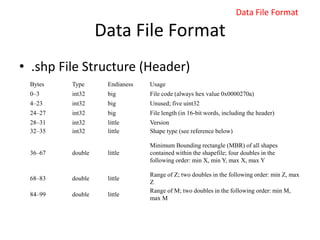
• .shp File Structure (Header)
Bytes Type Endianess Usage
0–3 int32 big File code (always hex value 0x0000270a)
4–23 int32 big Unused; five uint32
24–27 int32 big File length (in 16-bit words, including the header)
28–31 int32 little Version
32–35 int32 little Shape type (see reference below)
36–67 double little
Minimum Bounding rectangle (MBR) of all shapes
contained within the shapefile; four doubles in the
following order: min X, min Y, max X, max Y
68–83 double little
Range of Z; two doubles in the following order: min Z, max
Z
84–99 double little
Range of M; two doubles in the following order: min M,
max M
Data File Format
Data File Format
• .shp file structure
Value Shape type Fields
0 Null shape None
1 Point X, Y
3 Polyline MBR, Number of parts, Number of points, Parts, Points
5 Polygon MBR, Number of parts, Number of points, Parts, Points
8 MultiPoint MBR, Number of points, Points
11 PointZ X, Y, Z, M
13 PolylineZ
Mandatory: MBR, Number of parts, Number of points, Parts, Points, Z range, Z array
Optional: M range, M array
15 PolygonZ
Mandatory: MBR, Number of parts, Number of points, Parts, Points, Z range, Z array
Optional: M range, M array
18 MultiPointZ
Mandatory: MBR, Number of points, Points, Z range, Z array
Optional: M range, M array
21 PointM X, Y, M
23 PolylineM
Mandatory: MBR, Number of parts, Number of points, Parts, Points
Optional: M range, M array
25 PolygonM
Mandatory: MBR, Number of parts, Number of points, Parts, Points
Optional: M range, M array
28 MultiPointM
Mandatory: MBR, Number of points, Points
Optional Fields: M range, M array
31 MultiPatch
Mandatory: MBR, Number of parts, Number of points, Parts, Part types, Points, Z
range, Z array
Optional: M range, M array
Data File Format
Data File Format
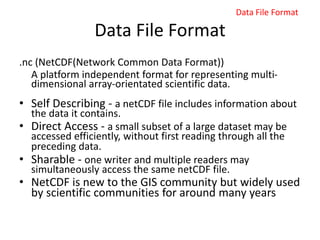
.nc (NetCDF(Network Common Data Format))
A platform independent format for representing multi-
dimensional array-orientated scientific data.
• Self Describing - a netCDF file includes information about
the data it contains.
• Direct Access - a small subset of a large dataset may be
accessed efficiently, without first reading through all the
preceding data.
• Sharable - one writer and multiple readers may
simultaneously access the same netCDF file.
• NetCDF is new to the GIS community but widely used
by scientific communities for around many years
Data File Format
Data File Format
• Multidimentional Data Representation :
XY
TZ
XY
T
Data File Format
Data File Format
• Digital Value processed from a satellite data
141 241 341
131 231 331
121 221 321
111 211 311
441
431
421
411
142 242 342
132 232 332
122 222 322
112 212 312
442
432
422
412
143 243 343
133 233 333
123 223 323
113 213 313
443
433
423
413
Y
X
Time
141 241 341
131 231 331
121 221 321
111 211 311
441
431
421
411
142 242 342
132 232 332
122 222 322
112 212 312
442
432
422
412
143 243 343
133 233 333
123 223 323
113 213 313
443
433
423
413
Y
X
Time
Altitude
Data File Format
System Design
Goals of Implementation
• Extracting the data values of the given parameters from the
data file.
• Scanning the data and perform statistical operation.
• Development of algorithm for Climate data analysis
• Develop Linear Matrix Interpolation Technique.
• Read and Plot shapefile(.shp) ESRI file formate.
• NetCDF-format and Multi-source climate data analysis.
• Analysis and visualisation of satellite data to study climate
structure
• Give the better visualization to GUI it gives give more
accurate result within time.
Functional Requirement
Input Requirements
To collect the data which may be in netCDF(.nc) and shapefiles(.shp)
• To obtain the threshold value from the user.
• Save the extracted data values in the text format and Image formate.
Processing Requirements
To read the information from the input file.
• To calculate and store statistical result and perform charting in easy way.
• Read the shapefile and plot shapefile into GUI for gives country
boundaries.
• To generate the pictorial representation of the output.
Output Requirements
• The user can generate an image from the data values.
26
System Design
Use Case Diagram:
System Design
Sequence Diagram for Statistic Analysis
System Design
Sequence Diagram for generate Interpolated Image
System Design
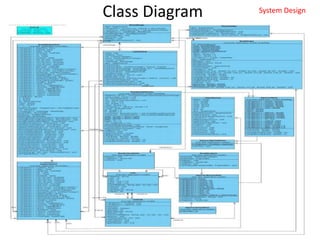
Package Diagram
System Design
Class Diagram System Design
Result and Discussion
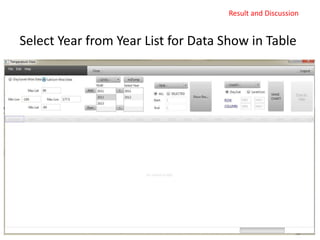
Starting Screen :
Select Year from Year List for Data Show in Table
Result and Discussion
ncDump
Information of NetCDF files
Result and Discussion
Mining the Data from NetCDF File
Result and Discussion
Prepare Charts Based on Data
Result and Discussion
Draw Shapefile in Panel
Result and Discussion
How To make Shapes in Image File
• I relate geo-cordinate system with screen pixel system.
• In geo-cordinate system have 180(-90 to 90) Latitude and 360 (-180
to 179)Longitude and I take panel its width=730 and Height=628.
Ratio(x) = 730/360 = 2.028
Ratio(y) = 628/180 = 3.49
• Choose minimum ratio, if I choose max ratio than some shapes of
shapefile will not show in panel.
• So if my co-ordinate is (-180, -90) = Panel Pixel(0, 0)
• (int((-180 + 180 ) * 2.028)) = 0 and (int((-90 + 90) * 2.028) )= 0 is
minimum lat and lon point(0, 0).
• If my co-ordinate is (40, -20) = (int((40 + 180) * 2.028)) = 446
(int((-20 + 90) * 2.028)) = 141 so pixel co-ordinate is (446, 141).
Result and Discussion
Perform Interpolation
Result and Discussion
Interpolation Method
• 4-Point Matrix Interpolation :
Result and Discussion
Interpolation Method
Calculate Estimated
Temperature
Result and Discussion
Interpolation Algorithm
• Calculate pixel respect to geo-cordinate.
• Set into as a Matrix.
Result and Discussion
Zoom Specific Area
Result and Discussion
Advantage
• The big advantage is that Scientist use a software GrADS(Grid Analysis
and Display Design). GrADS has a scripting language. But my software
gives GUI effects. Easy to analysis NetCDF data and perform Systems
operation. No need to go write console level scripting or generate a Batch
file.
• The software is totally platform independent.
• The whole package is easily installable in any type Operating System
and its supportive JAR(Java Application Runtime).
• We can perform statistics result easily.
• It’s create high resolution picture when I perform interpolation.
• It can be widely used by scientist and users from various sectors like
agriculture, health etc to adopt the climate information for the crop,
disease analysis and Cyclone Detection.
• It can also be used to train young researchers of various fields regarding
multi-source and multi-format weather and climate data analysis and
weather informatics etc.
Result and Discussion
Conclusion
The project “DEVELOPMENT OF VISULIZATION SOFTWARE
FOR WEATHER AND CLIMATE ANALYSIS” aims to analyze
data in different formats and to perform quality control if
the data is not within certain standard ranges. The software
is capable of analyzing NetCDF data format.
Almost all the objectives of the project are fulfilled.
• 1. Displaying the header information of the input file.
• 2. Extracting the data values of the given variable in the
input file.
• 3. Scanning the data.
• 4. Generating a new interpolated image file respect of
extracted NetCDF data.
Conclusion & Future Enhancement
Future Enhancement
Some enhancements can be made in future as follows:
• An enhancement can be done so that the user can
choose in which format he/she wants the output file.
• An improvement can be made so that other data
formats, such as HDF, Binary etc., can also be given as
input files.
• More and more data can be studied to understand the
climate change and its impact at the regional scales.
• A GUI can be developed for the easy understanding of
the weather and climate informatics.
Conclusion & Future Enhancement
Thanks

Weather and Climate Visualization software

  • 1.
    Dr K CGouda, Scientist CSIR -4PI, Wind Tunnel Road Belur Campus, Bangalore-37. Dr Shakti Banerjee Professor and Head of Dept, School of Statistics, Devi Ahilya Viswavidyalaya, Taksashila Parisar, Khandwa Road, Indore:452001 School of Future Studies & Planning, DAVV, Indore (M.P.)
  • 2.
    Introduction • The mainaim of the project work entitled “DEVELOPMENT OF VISUALIZATION SOFTWARE FOR WEATHER AND CLIMATE DATA ANALYSIS” is to analyze the input file and determine if the data values fall within a certain range and to generate a new file of the same format using the threshold value specified by the user. • In our project we have read the netCDF files with a utility called ‘ncdump’ and generated a new file.
  • 3.
    Organisation Profile In thelate 1980's, the Council of Scientific and Industrial Research (CSIR) recognized the growing significance of Mathematical Modelling and Computer Simulation, as it became evident that modelling approaches were critical for illuminating the structure and evolution of complex systems that were invading the areas of scientific analysis and technological design. Computing Facilities at C-MMACS It has one of the most sophisticated and advanced computing environments in India and certainly the best in CSIR. The highest performance computing and networking resources in C-MMACS includes: • SGI Altix 3700 BX2 Compute Servers • SGI Origin 3900 Compute Server • SGI Altix 350 Compute Servers • SGI Origin 200 Compute Server • High Availability IBM Storage Server • SGI Octane 2 Workstation • SGI Indigo2 Extreme Workstations • SGI O2 Workstations • SGI Indy Workstations • HP Xeon Linux Servers • HP/Compaq D330 Linux Workstations • IBM Net vista A30 Linux/Windows Desktops • IBM PC 300GL Linux/Windows Desktops • C-MMACS Local Area Network
  • 4.
    Research Activities • C-MMACSEnvironment Modelling Program • Monsoon simulation • Tropical Modelling • Hydrological Modelling • Neural Network forecasting • Ocean Atmosphere coupling • Ocean Modelling • Atmospheric modelling • Lithosphere Modelling • Dynamical System Modelling • Industrial Computational Mechanics Areas of Specialization • Aerospace Propulsion • Computational Aerodynamics • Wind Tunnel Testing • Flight mechanics and control • Structural mechanics • Parallel Computing Organisation Profile
  • 5.
    Climate and Weather Weather Weatheronly describe the short-term condition of the variable in the given region. Climate Climate is a measure of the average pattern of variation in temperature, humidity, atmospheric pressure, wind, precipitation, atmospheric particle count and other meteorological variables in a given region over long period of time.
  • 6.
    Description of RelatedStudy Latitude and Longitude Latitude is the angular distance, in degrees, minutes and seconds of a point north and south of the Equator. Longitude is the angular distance, in degrees, minutes and seconds of a point east or west of the Prime (Greenwich) Meridian Resolution Resolution is represented in the of number of grid points. Increase in resolution means increasing the number of grid points. Grid Grid is a pattern of horizontal and vertical lines on a chart or map, such as those representing latitude and longitude, usually crossing each other to form squares/rectangles which help determining absolute location.
  • 7.
    Description of RelatedStudy Meteorological Weather and climate Data Meteorology is the interdisciplinary scientific study of the atmosphere that focuses on weather process and forecasting. Meteorological phenomena are observable weather events which illuminate and are explained by the science of meteorology. Those events are bound by the variables that exist in Earth’s atmosphere. They are temperature, air pressure, water vapour and the gradients and interactions of each variable and how they change in time. Atmosphere and oceanographic data may be archived in several different computer forms: character format, native format, packed binary or in one of several “standard” scientific data formats. Users of datasets must be aware of how the data are stored. Architecture independent standard formats commonly used for atmosphere and oceanographic datasets include: • NetCDF (network Common Data Format) • GrADS
  • 8.
    Scope of theSystem The proposed system aims to analyse data in different formats and to perform quality control if the data is not within certain standard ranges. The software is capable of analysing NetCDF, GRIB, ASCII data formats. The GUI is incorporated to perform these operations in a user friendly way.
  • 9.
    Objective of theProposed System • Extracting the data values of the given parameters from the data file. • Scanning the data and determining the maximum and minimum values in a domain. • Development of algorithm for Climate data analysis • Multi-format and Multi-source climate data analysis. • Development of data display system for User • Data Mining • Spatial Interpolation modeling • Spatial Statistical Analysis.
  • 10.
    System Module My softwarework as a System and this software system is divided into two part as follows : • Perform Statistical Operation on Mined data. • Perform Interpolation and generate spatial image Based on mined data.
  • 11.
    Data Flow Diagram User Weather& Climate Data Display System Fill Essential Data Display Spatial Maps & Chart Shapefile(.shp) Draw Region Boundary NetCDF Data (.nc) Analysis the Data Save Spatial Image (.jpeg) Figure : 0th Level DFD User Spatial Analysis Interpolated Spatial Map Fill Essential Information Fill Essential Information NetCDF Data (.nc) Compare the Data Perform Interpolation Shapefile(.shp) Make Boundary Statistical Information & Chart Interpolated Map Figure : 1st Level DFD
  • 12.
    Platforms, Languages andTools Hardware Configuration • Processor Intel Pentium Dual Core and Above • Memory: 512 MB RAM and Above • Clock Speed: 1.72 GHz and Above • Hard Disk Capacity: 80GB Software Configuration • Operating System: Ubuntu, Fedora Linux, Windows, Mac • Language: Java • Complier: Java Compiler (Java Virtual Machine) • Other tools and utilities: JavaFX, Visual Paradism, many .jar files
  • 13.
    Platforms, Languages • JAVA TheJava platform is the name for a bundle of related programs from Sun that allow for developing and running programs written in the Java programming language. The platform is not specific to any one processor or operating system, but rather an execution engine (called a virtual machine) and a compiler with a set of libraries that are implemented for various hardware and operating systems so that Java programs can run identically on all of them. Java Card: A technology that allows small Java-based applications (applets) to be run securely on smart card and similar small-memory devices. Java ME(Micro Edition): Specifies several different sets of libraries (known as profiles) for devices with limited storage, display, and power capacities. Often used to develop applications for mobile devices, PDAs, TV set-of-box, and printers. Java SE (Standard Edition): For general-purpose use on desktop PCs, servers and similar devices. Java EE (Enterprise Edition): Java SE plus various APIs useful for multi-tier client- server, enterprise application. Platforms, Languages and Tools
  • 14.
    Platforms, Languages JAVA compiler Whenyou program for the Java platform, you write source code in .java files and then compile them. The compiler checks your code against the language's syntax rules, then writes out bytecodes in .class files. Bytecodes are standard instructions targeted to run on a Java virtual machine (JVM). In adding this level of abstraction, the Java compiler differs from other language compilers, which write out instructions suitable for the CPU chipset the program will run on. JVM At run time, the JVM reads and interprets .class files and executes the program's instructions on the native hardware platform for which the JVM was written. The JVM interprets the bytecodes just as a CPU would interpret assembly-language instructions. The difference is that the JVM is a piece of software written specifically for a particular platform. The JVM is the heart of the Java language's "write-once, run-anywhere" principle. Platforms, Languages and Tools
  • 15.
    Tools JavaFX Applications Written asa Java API, JavaFX application code can reference APIs from any Java library. The look and feel of JavaFX applications can be customized. Graphic designers can easily customize the appearance and style of the application through the CSS. Platforms, Languages and Tools
  • 16.
  • 17.
    Design Pattern MVC Pattern MVCPattern stands for Model- View-Controller Pattern. This pattern is used to separate application's concerns. • Model - Model represents an object or JAVA POJO carrying data. It can also have logic to update controller if its data changes. • View - View represents the visualization of the data that model contains. • Controller - Controller acts on both Model and view. It controls the data flow into model object and updates the view whenever data changes. It keeps View and Model separate.
  • 18.
  • 19.
    Data File Format .shp(shapefile): •The Esri shapefile, or simply a shapefile, is a popular geospatial vector data format for geographic information system software. It is developed and regulated by Esri as a (mostly) open specification for data interoperability among Esri and other GIS software products. Shapefiles spatially describe vector features: points, lines, and polygons, representing, for example, water wells, rivers, and lakes. Each item usually has attributes that describe it, such as name or temperature. • While the term "shapefile" is quite common, a "shapefile" is actually a set of several files. Three individual files are mandatory to store the core data that comprise a shapefile: • I used shapefilereader.jar. By using this jar we can read any shapefile.
  • 20.
    Data File Format •.shp File Structure (Header) Bytes Type Endianess Usage 0–3 int32 big File code (always hex value 0x0000270a) 4–23 int32 big Unused; five uint32 24–27 int32 big File length (in 16-bit words, including the header) 28–31 int32 little Version 32–35 int32 little Shape type (see reference below) 36–67 double little Minimum Bounding rectangle (MBR) of all shapes contained within the shapefile; four doubles in the following order: min X, min Y, max X, max Y 68–83 double little Range of Z; two doubles in the following order: min Z, max Z 84–99 double little Range of M; two doubles in the following order: min M, max M Data File Format
  • 21.
    Data File Format •.shp file structure Value Shape type Fields 0 Null shape None 1 Point X, Y 3 Polyline MBR, Number of parts, Number of points, Parts, Points 5 Polygon MBR, Number of parts, Number of points, Parts, Points 8 MultiPoint MBR, Number of points, Points 11 PointZ X, Y, Z, M 13 PolylineZ Mandatory: MBR, Number of parts, Number of points, Parts, Points, Z range, Z array Optional: M range, M array 15 PolygonZ Mandatory: MBR, Number of parts, Number of points, Parts, Points, Z range, Z array Optional: M range, M array 18 MultiPointZ Mandatory: MBR, Number of points, Points, Z range, Z array Optional: M range, M array 21 PointM X, Y, M 23 PolylineM Mandatory: MBR, Number of parts, Number of points, Parts, Points Optional: M range, M array 25 PolygonM Mandatory: MBR, Number of parts, Number of points, Parts, Points Optional: M range, M array 28 MultiPointM Mandatory: MBR, Number of points, Points Optional Fields: M range, M array 31 MultiPatch Mandatory: MBR, Number of parts, Number of points, Parts, Part types, Points, Z range, Z array Optional: M range, M array Data File Format
  • 22.
    Data File Format .nc(NetCDF(Network Common Data Format)) A platform independent format for representing multi- dimensional array-orientated scientific data. • Self Describing - a netCDF file includes information about the data it contains. • Direct Access - a small subset of a large dataset may be accessed efficiently, without first reading through all the preceding data. • Sharable - one writer and multiple readers may simultaneously access the same netCDF file. • NetCDF is new to the GIS community but widely used by scientific communities for around many years Data File Format
  • 23.
    Data File Format •Multidimentional Data Representation : XY TZ XY T Data File Format
  • 24.
    Data File Format •Digital Value processed from a satellite data 141 241 341 131 231 331 121 221 321 111 211 311 441 431 421 411 142 242 342 132 232 332 122 222 322 112 212 312 442 432 422 412 143 243 343 133 233 333 123 223 323 113 213 313 443 433 423 413 Y X Time 141 241 341 131 231 331 121 221 321 111 211 311 441 431 421 411 142 242 342 132 232 332 122 222 322 112 212 312 442 432 422 412 143 243 343 133 233 333 123 223 323 113 213 313 443 433 423 413 Y X Time Altitude Data File Format
  • 25.
    System Design Goals ofImplementation • Extracting the data values of the given parameters from the data file. • Scanning the data and perform statistical operation. • Development of algorithm for Climate data analysis • Develop Linear Matrix Interpolation Technique. • Read and Plot shapefile(.shp) ESRI file formate. • NetCDF-format and Multi-source climate data analysis. • Analysis and visualisation of satellite data to study climate structure • Give the better visualization to GUI it gives give more accurate result within time.
  • 26.
    Functional Requirement Input Requirements Tocollect the data which may be in netCDF(.nc) and shapefiles(.shp) • To obtain the threshold value from the user. • Save the extracted data values in the text format and Image formate. Processing Requirements To read the information from the input file. • To calculate and store statistical result and perform charting in easy way. • Read the shapefile and plot shapefile into GUI for gives country boundaries. • To generate the pictorial representation of the output. Output Requirements • The user can generate an image from the data values. 26 System Design
  • 27.
  • 28.
    Sequence Diagram forStatistic Analysis System Design
  • 29.
    Sequence Diagram forgenerate Interpolated Image System Design
  • 30.
  • 31.
  • 32.
  • 33.
    Select Year fromYear List for Data Show in Table Result and Discussion
  • 34.
    ncDump Information of NetCDFfiles Result and Discussion
  • 35.
    Mining the Datafrom NetCDF File Result and Discussion
  • 36.
    Prepare Charts Basedon Data Result and Discussion
  • 37.
    Draw Shapefile inPanel Result and Discussion
  • 38.
    How To makeShapes in Image File • I relate geo-cordinate system with screen pixel system. • In geo-cordinate system have 180(-90 to 90) Latitude and 360 (-180 to 179)Longitude and I take panel its width=730 and Height=628. Ratio(x) = 730/360 = 2.028 Ratio(y) = 628/180 = 3.49 • Choose minimum ratio, if I choose max ratio than some shapes of shapefile will not show in panel. • So if my co-ordinate is (-180, -90) = Panel Pixel(0, 0) • (int((-180 + 180 ) * 2.028)) = 0 and (int((-90 + 90) * 2.028) )= 0 is minimum lat and lon point(0, 0). • If my co-ordinate is (40, -20) = (int((40 + 180) * 2.028)) = 446 (int((-20 + 90) * 2.028)) = 141 so pixel co-ordinate is (446, 141). Result and Discussion
  • 39.
  • 40.
    Interpolation Method • 4-PointMatrix Interpolation : Result and Discussion
  • 41.
  • 42.
    Interpolation Algorithm • Calculatepixel respect to geo-cordinate. • Set into as a Matrix. Result and Discussion
  • 43.
  • 44.
    Advantage • The bigadvantage is that Scientist use a software GrADS(Grid Analysis and Display Design). GrADS has a scripting language. But my software gives GUI effects. Easy to analysis NetCDF data and perform Systems operation. No need to go write console level scripting or generate a Batch file. • The software is totally platform independent. • The whole package is easily installable in any type Operating System and its supportive JAR(Java Application Runtime). • We can perform statistics result easily. • It’s create high resolution picture when I perform interpolation. • It can be widely used by scientist and users from various sectors like agriculture, health etc to adopt the climate information for the crop, disease analysis and Cyclone Detection. • It can also be used to train young researchers of various fields regarding multi-source and multi-format weather and climate data analysis and weather informatics etc. Result and Discussion
  • 45.
    Conclusion The project “DEVELOPMENTOF VISULIZATION SOFTWARE FOR WEATHER AND CLIMATE ANALYSIS” aims to analyze data in different formats and to perform quality control if the data is not within certain standard ranges. The software is capable of analyzing NetCDF data format. Almost all the objectives of the project are fulfilled. • 1. Displaying the header information of the input file. • 2. Extracting the data values of the given variable in the input file. • 3. Scanning the data. • 4. Generating a new interpolated image file respect of extracted NetCDF data. Conclusion & Future Enhancement
  • 46.
    Future Enhancement Some enhancementscan be made in future as follows: • An enhancement can be done so that the user can choose in which format he/she wants the output file. • An improvement can be made so that other data formats, such as HDF, Binary etc., can also be given as input files. • More and more data can be studied to understand the climate change and its impact at the regional scales. • A GUI can be developed for the easy understanding of the weather and climate informatics. Conclusion & Future Enhancement
  • 47.