
Deep Dive into vSphere Log Management with
vCenter Log Insight
Steve Flanders, VMware
Chengdu Huang, VMware
VCM4445
#VCM4445
2
Agenda
 Introduction
 Query Building Deep Dive
 Performance Deep Dive
 Mini Deep Dives
 Wrap Up
3
Introduction
4
Presenters
 Steve Flanders
• Senior Solutions Architect, VMware
• VCAP-DCA
• @smflanders
• sflanders.net
 Chengdu Huang
• Chief Architect of Log Insight, VMware
• PhD, University of Illinois at Urbana-Champaign
• @chengduh
5
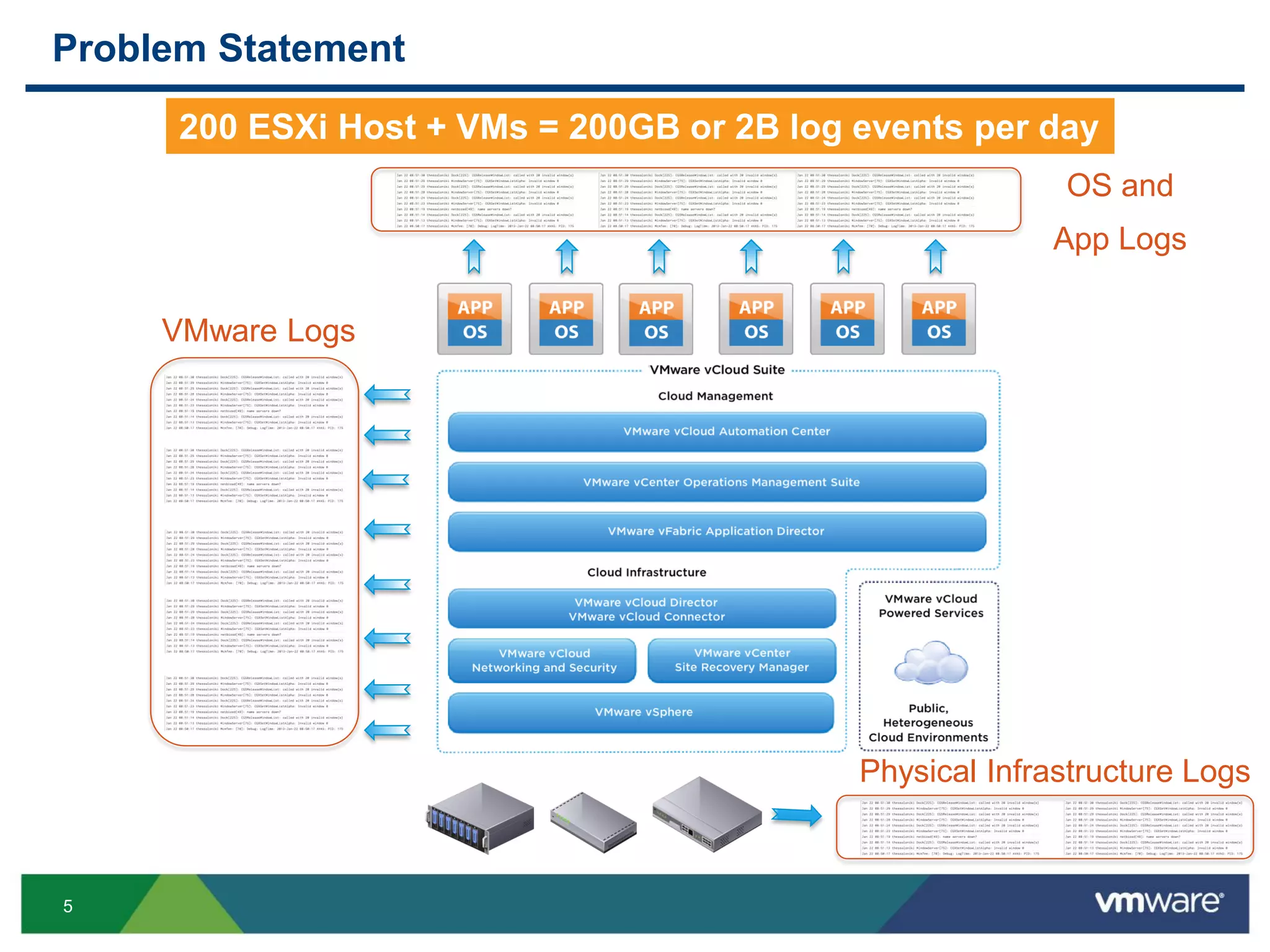
Problem Statement
VMware Logs
OS and
App Logs
200 ESXi Host + VMs = 200GB or 2B log events per day
Physical Infrastructure Logs
6
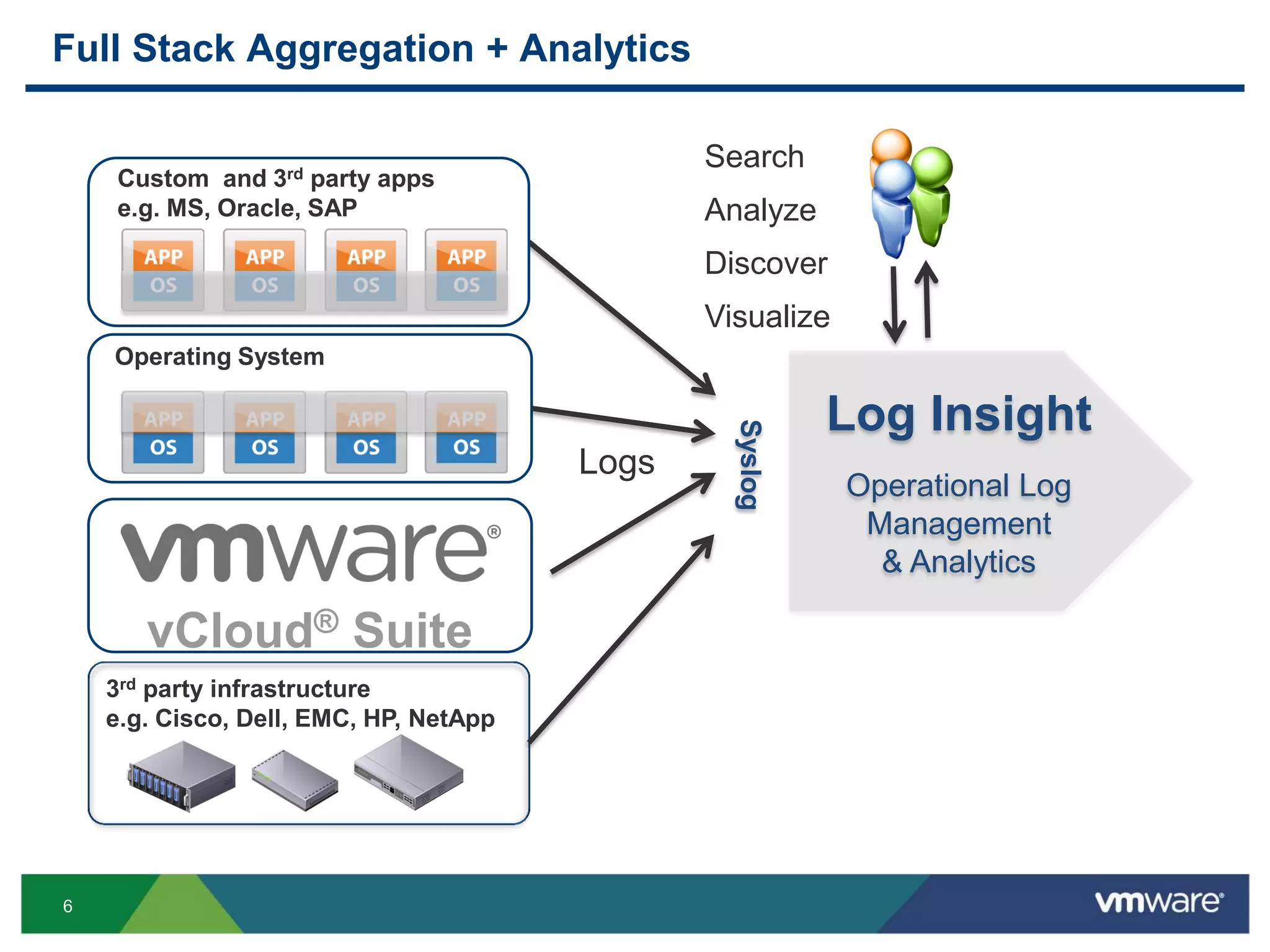
Full Stack Aggregation + Analytics
3rd party infrastructure
e.g. Cisco, Dell, EMC, HP, NetApp
Operating System
Search
Analyze
Discover
Visualize
Logs
Custom and 3rd party apps
e.g. MS, Oracle, SAP
Syslog
Log Insight
Operational Log
Management
& Analytics
vCloud® Suite
7
Query Building Deep Dive
8
Objectives
 Understand what comprises a query
 Learn how to query using matches and regular expressions
 Learn best practices for query construction
9
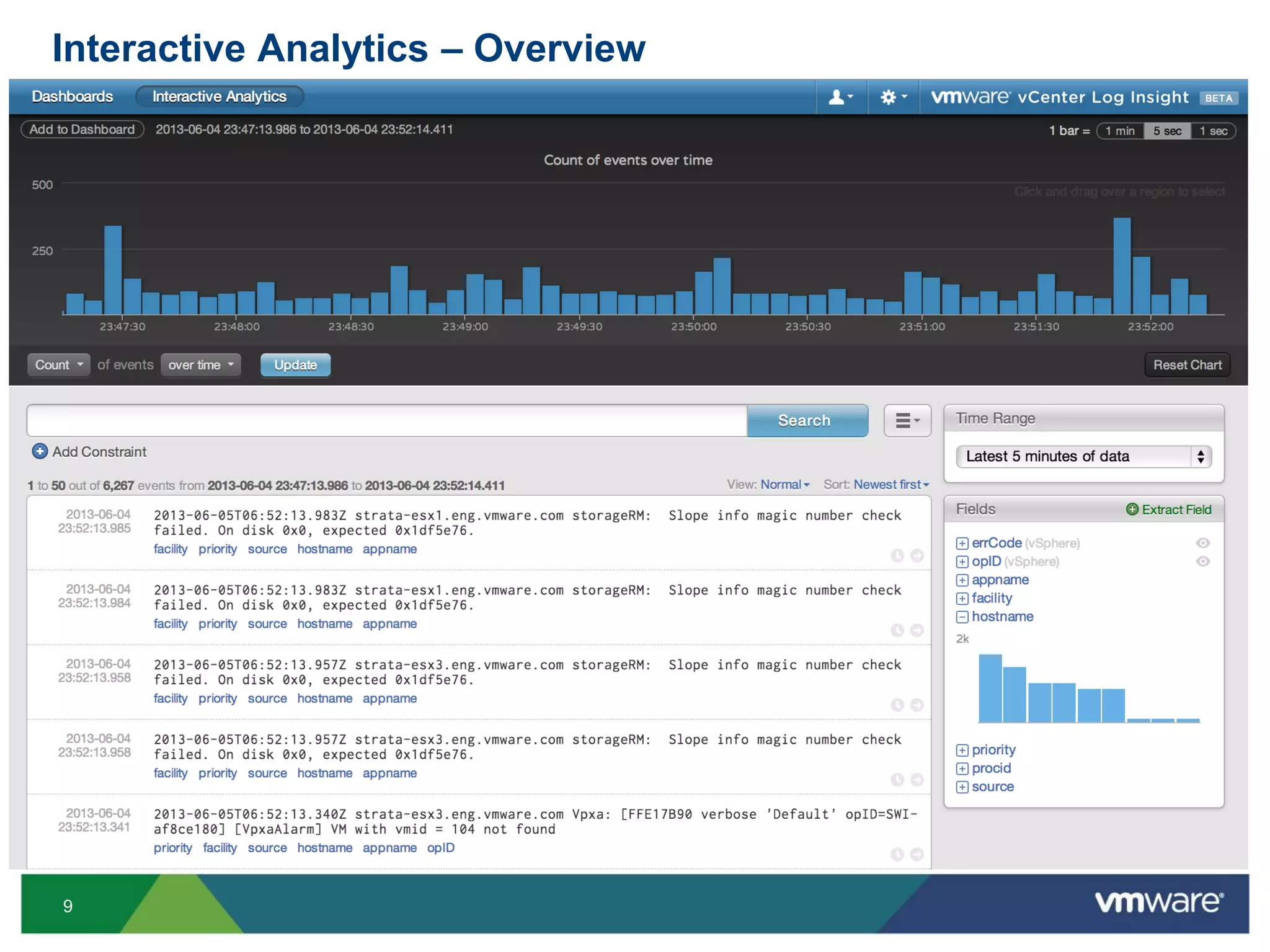
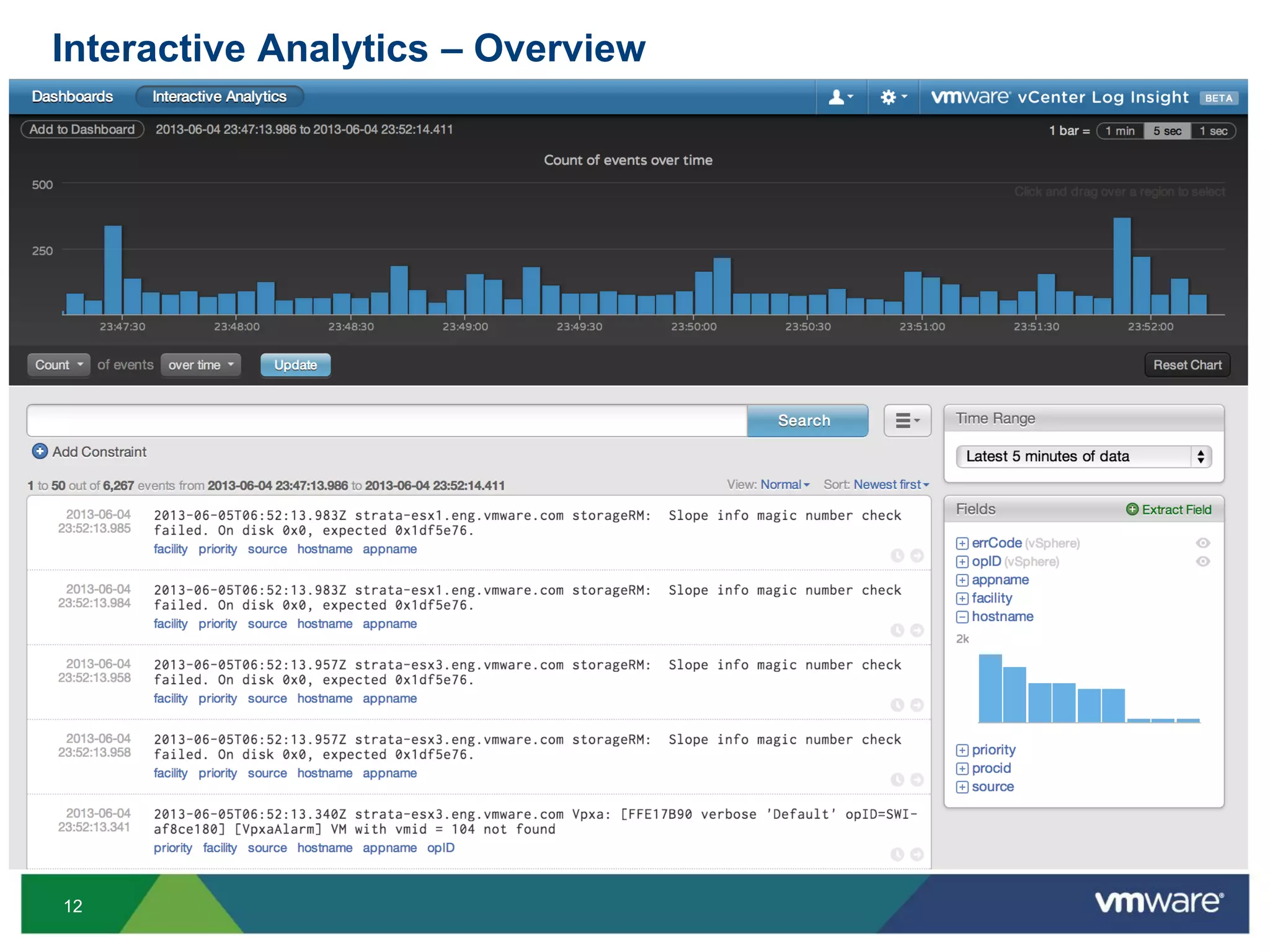
Interactive Analytics – Overview
10
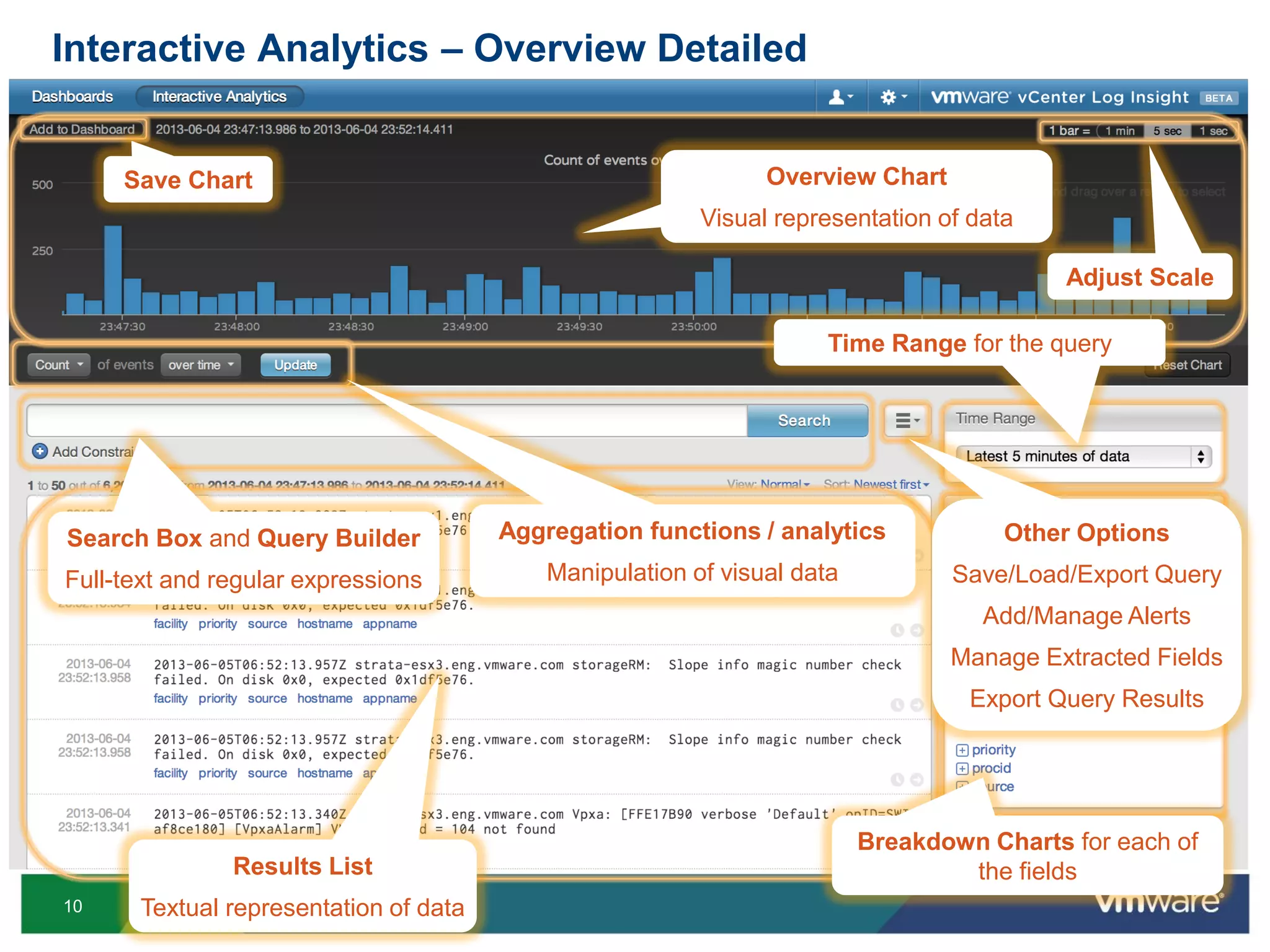
Aggregation functions / analytics
Manipulation of visual data
Results List
Textual representation of data
Search Box and Query Builder
Full-text and regular expressions
Overview Chart
Visual representation of data
Adjust Scale
Time Range for the query
Breakdown Charts for each of
the fields
Save Chart
Interactive Analytics – Overview Detailed
Other Options
Save/Load/Export Query
Add/Manage Alerts
Manage Extracted Fields
Export Query Results
12
Interactive Analytics – Overview
13
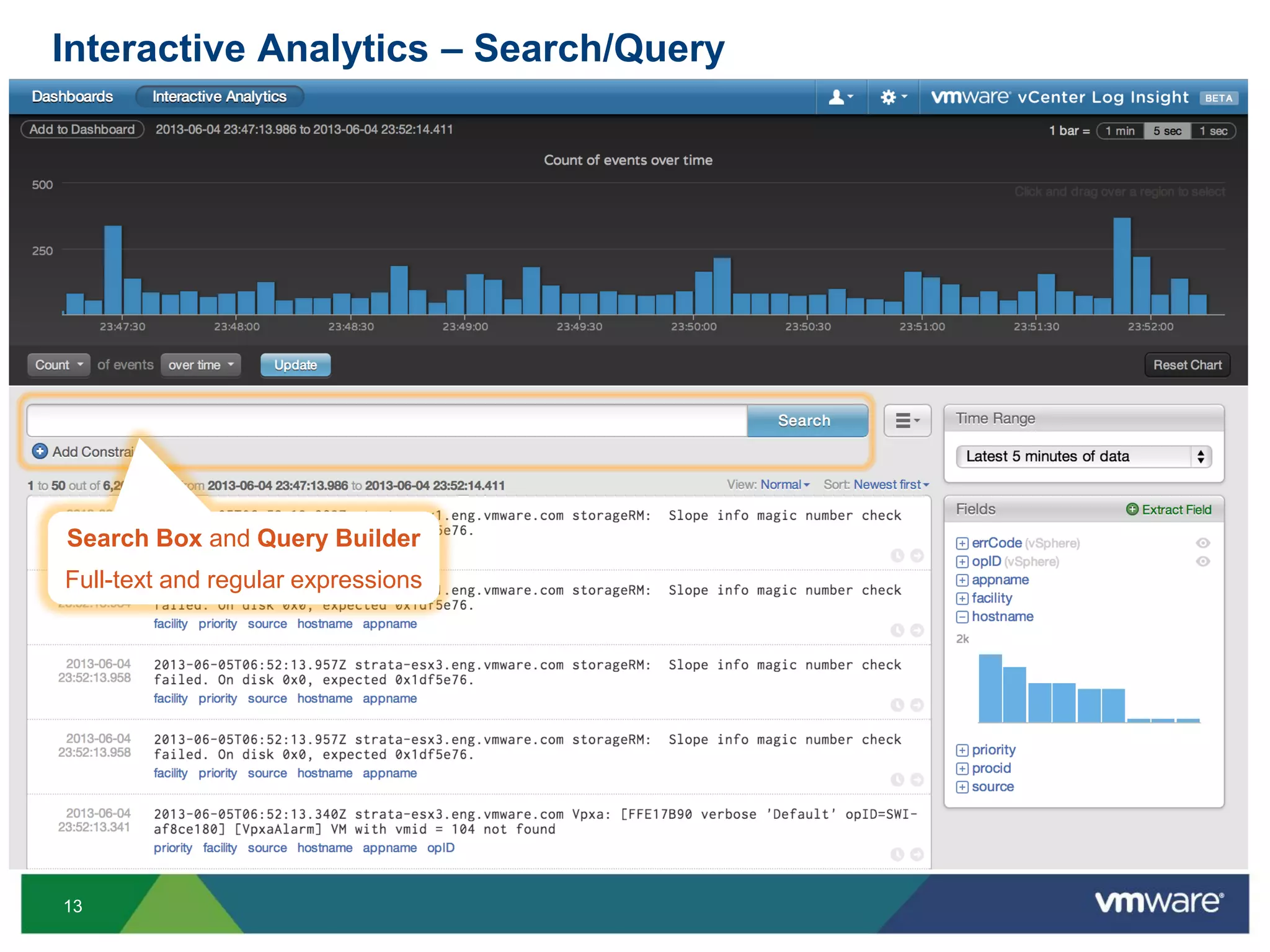
Search Box and Query Builder
Full-text and regular expressions
Interactive Analytics – Search/Query
14
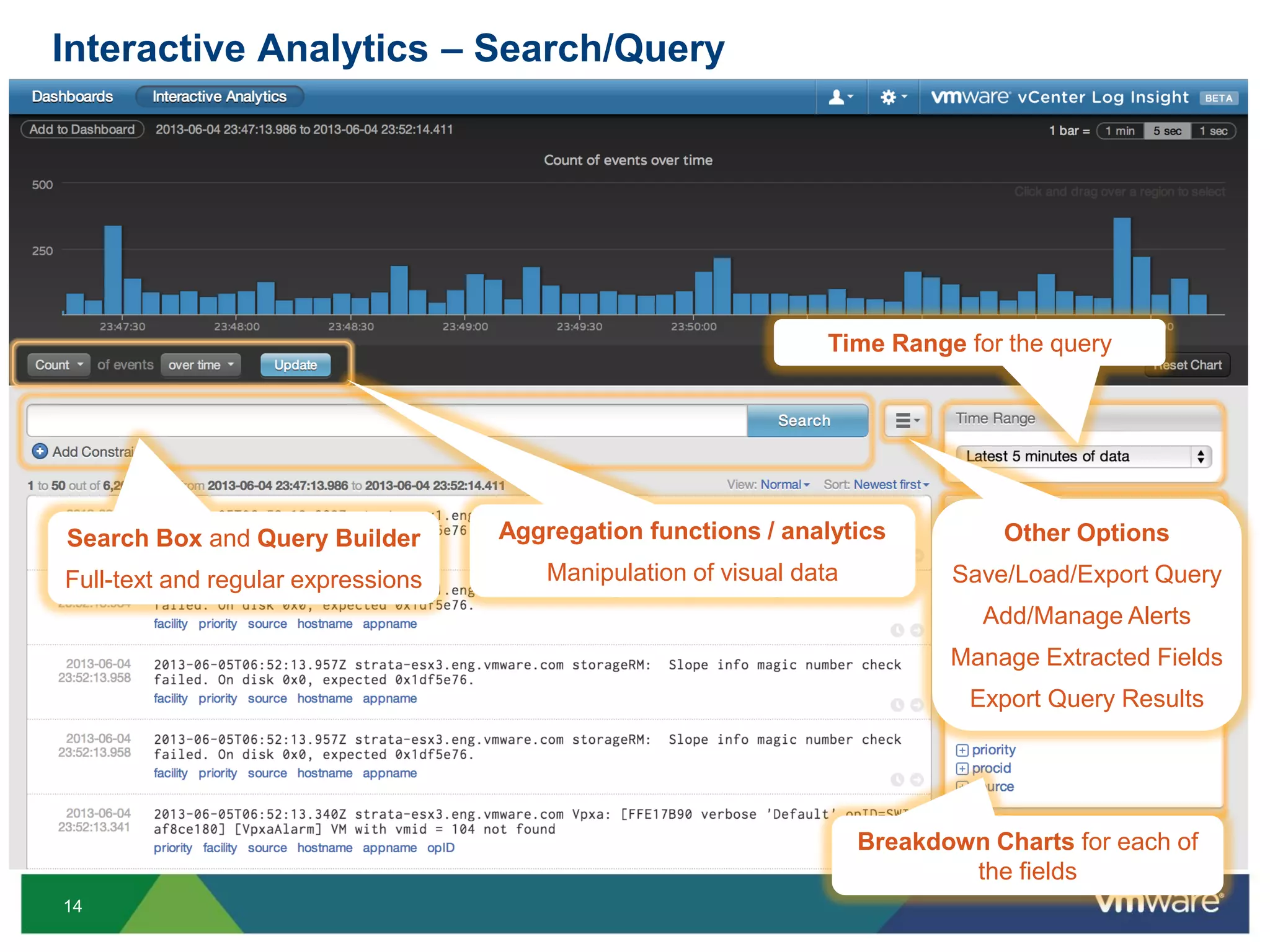
Search Box and Query Builder
Full-text and regular expressions
Time Range for the query
Breakdown Charts for each of
the fields
Other Options
Save/Load/Export Query
Add/Manage Alerts
Manage Extracted Fields
Export Query Results
Interactive Analytics – Search/Query
Aggregation functions / analytics
Manipulation of visual data
15
Demo!
16
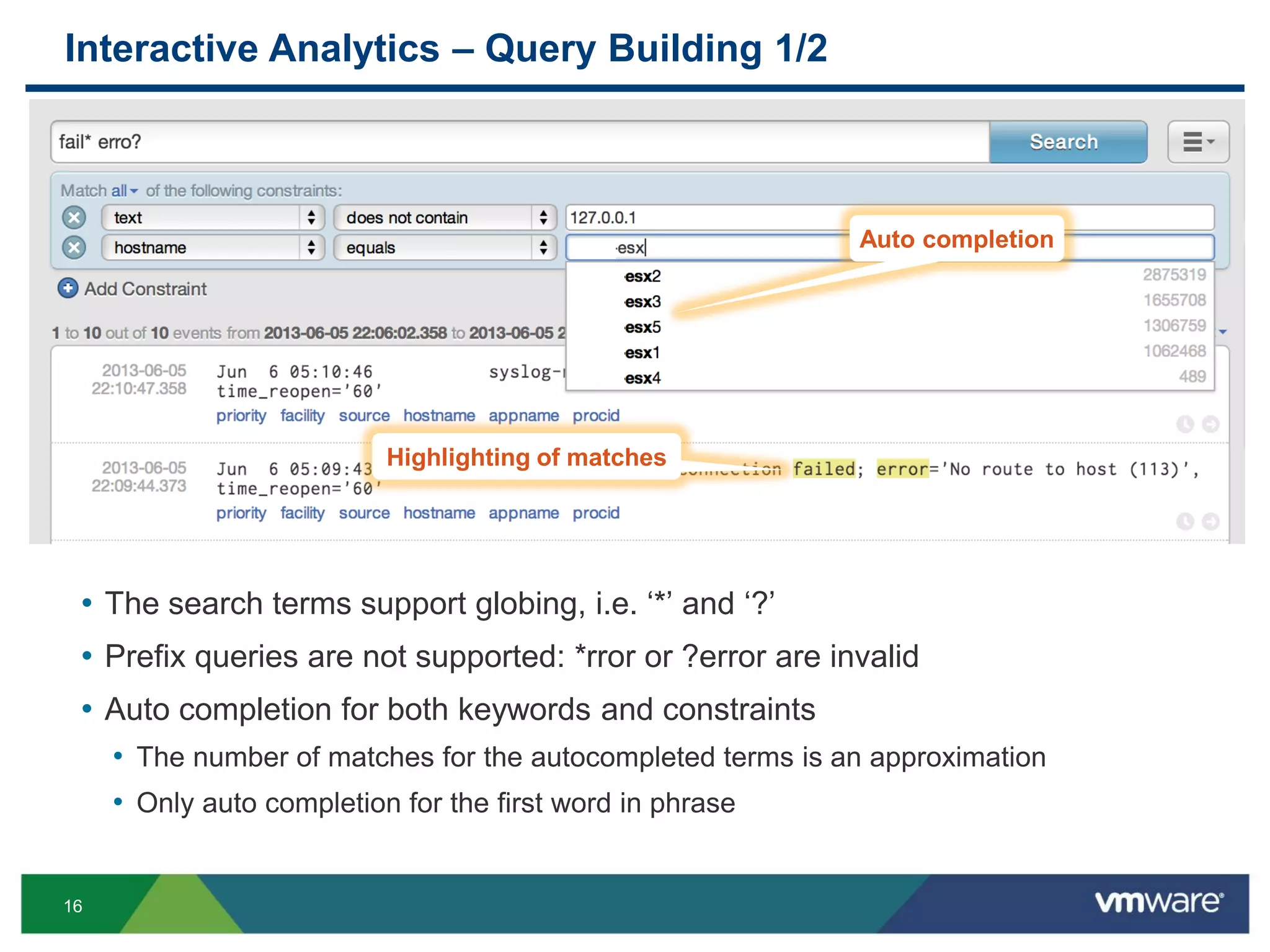
Interactive Analytics – Query Building 1/2
• The search terms support globing, i.e. ‘*’ and ‘?’
• Prefix queries are not supported: *rror or ?error are invalid
• Auto completion for both keywords and constraints
• The number of matches for the autocompleted terms is an approximation
• Only auto completion for the first word in phrase
• The incoming messages are
Auto completion
Highlighting of matches
17
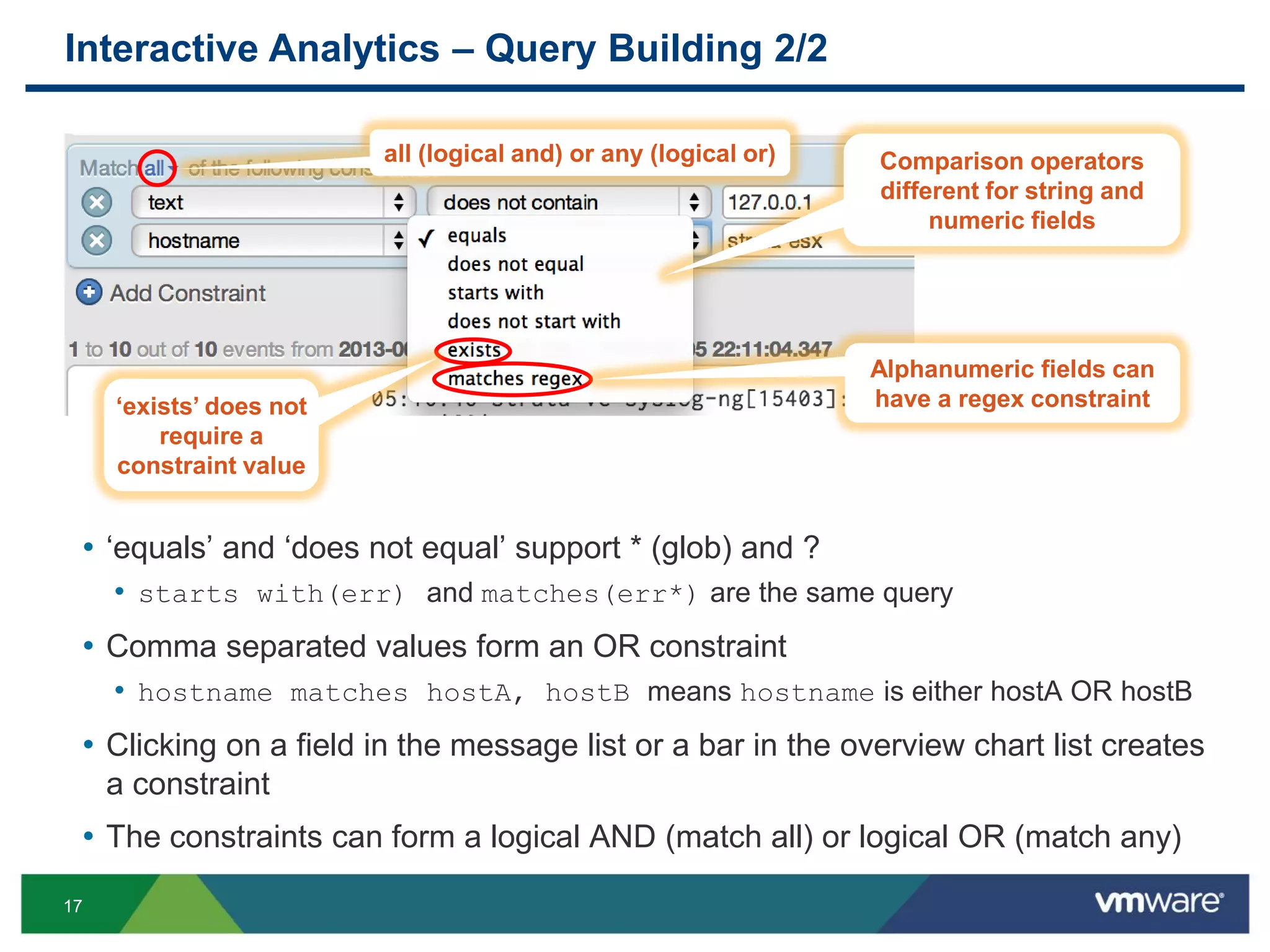
Interactive Analytics – Query Building 2/2
• ‘equals’ and ‘does not equal’ support * (glob) and ?
• starts with(err) and matches(err*) are the same query
• Comma separated values form an OR constraint
• hostname matches hostA, hostB means hostname is either hostA OR hostB
• Clicking on a field in the message list or a bar in the overview chart list creates
a constraint
• The constraints can form a logical AND (match all) or logical OR (match any)
all (logical and) or any (logical or) Comparison operators
different for string and
numeric fields
Alphanumeric fields can
have a regex constraint‘exists’ does not
require a
constraint value
18
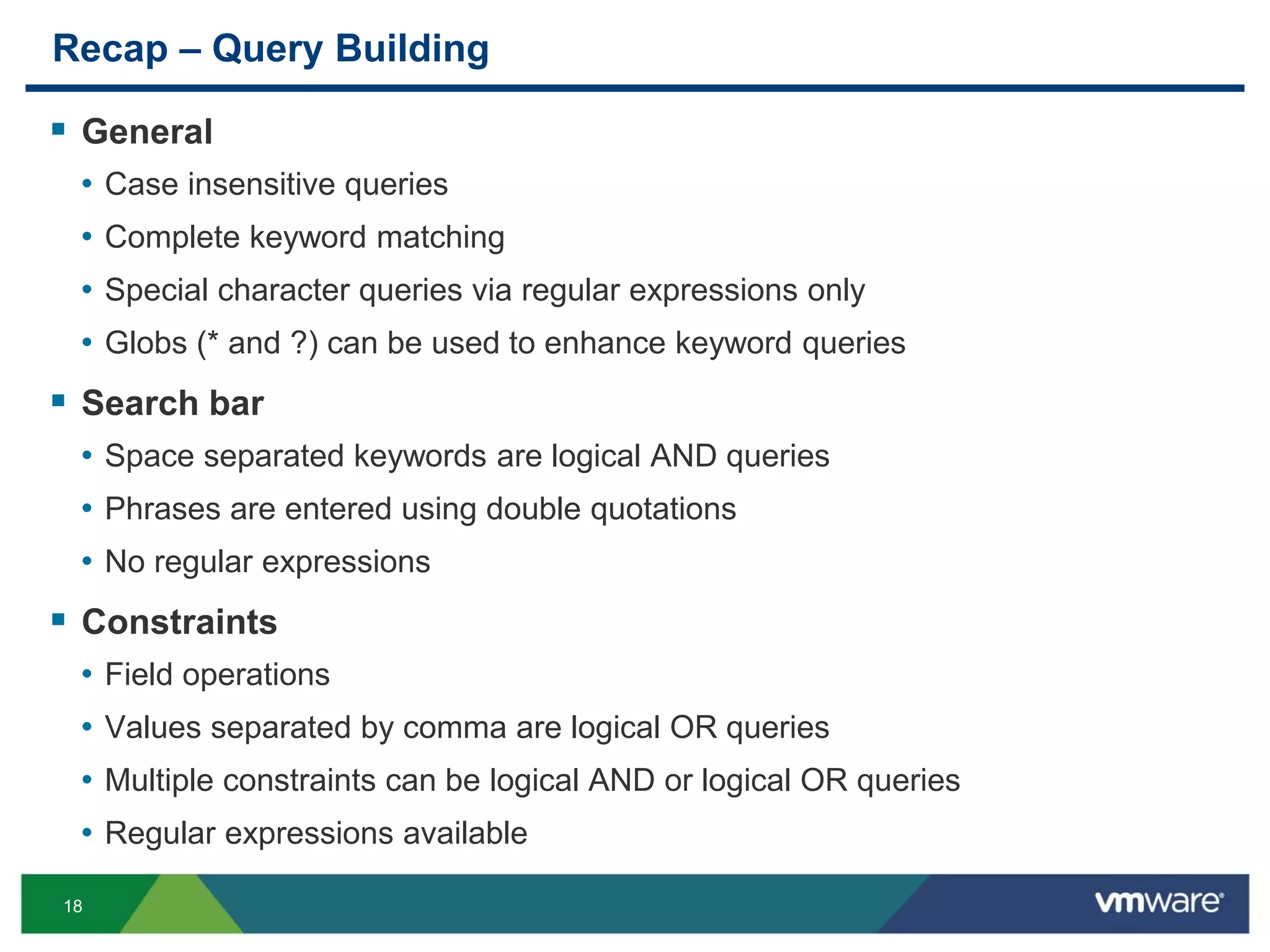
Recap – Query Building
 General
• Case insensitive queries
• Complete keyword matching
• Special character queries via regular expressions only
• Globs (* and ?) can be used to enhance keyword queries
 Search bar
• Space separated keywords are logical AND queries
• Phrases are entered using double quotations
• No regular expressions
 Constraints
• Field operations
• Values separated by comma are logical OR queries
• Multiple constraints can be logical AND or logical OR queries
• Regular expressions available
19
Performance Deep Dive
20
Objectives
 Understand the system architecture
 Understand the considerations for ingestion versus queries
 Apprehend common performance problems
• “I have X hosts sending logs to Log Insight, and it can’t keep up”
• “I ran this query and it took a long time to finish”
• “My dashboard is really slow to load”
21
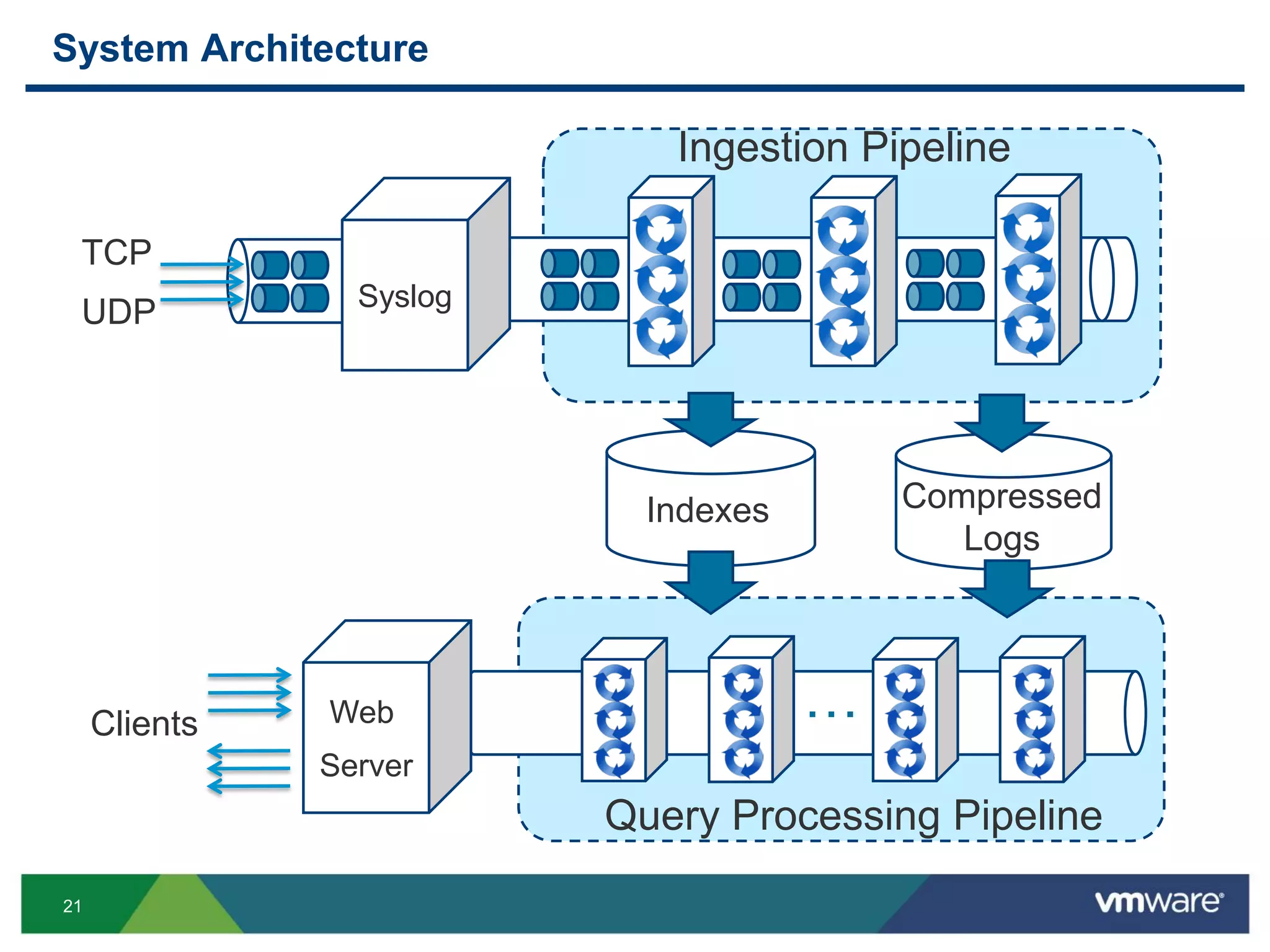
System Architecture
z Syslog
Indexes Compressed
Logs
Ingestion Pipeline
…
Query Processing Pipeline
Web
Server
TCP
UDP
Clients
22
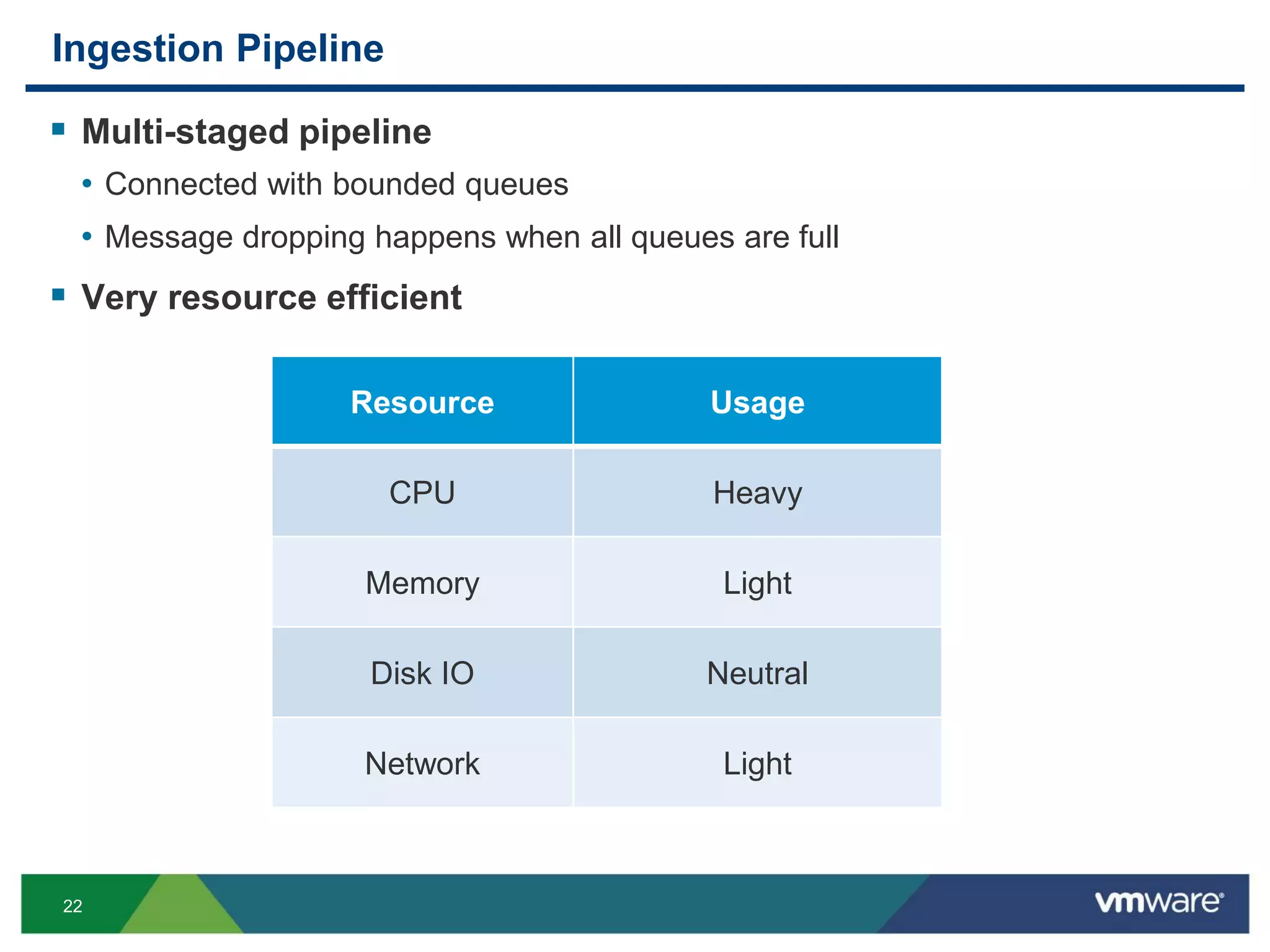
Ingestion Pipeline
 Multi-staged pipeline
• Connected with bounded queues
• Message dropping happens when all queues are full
 Very resource efficient
Resource Usage
CPU Heavy
Memory Light
Disk IO Neutral
Network Light
23
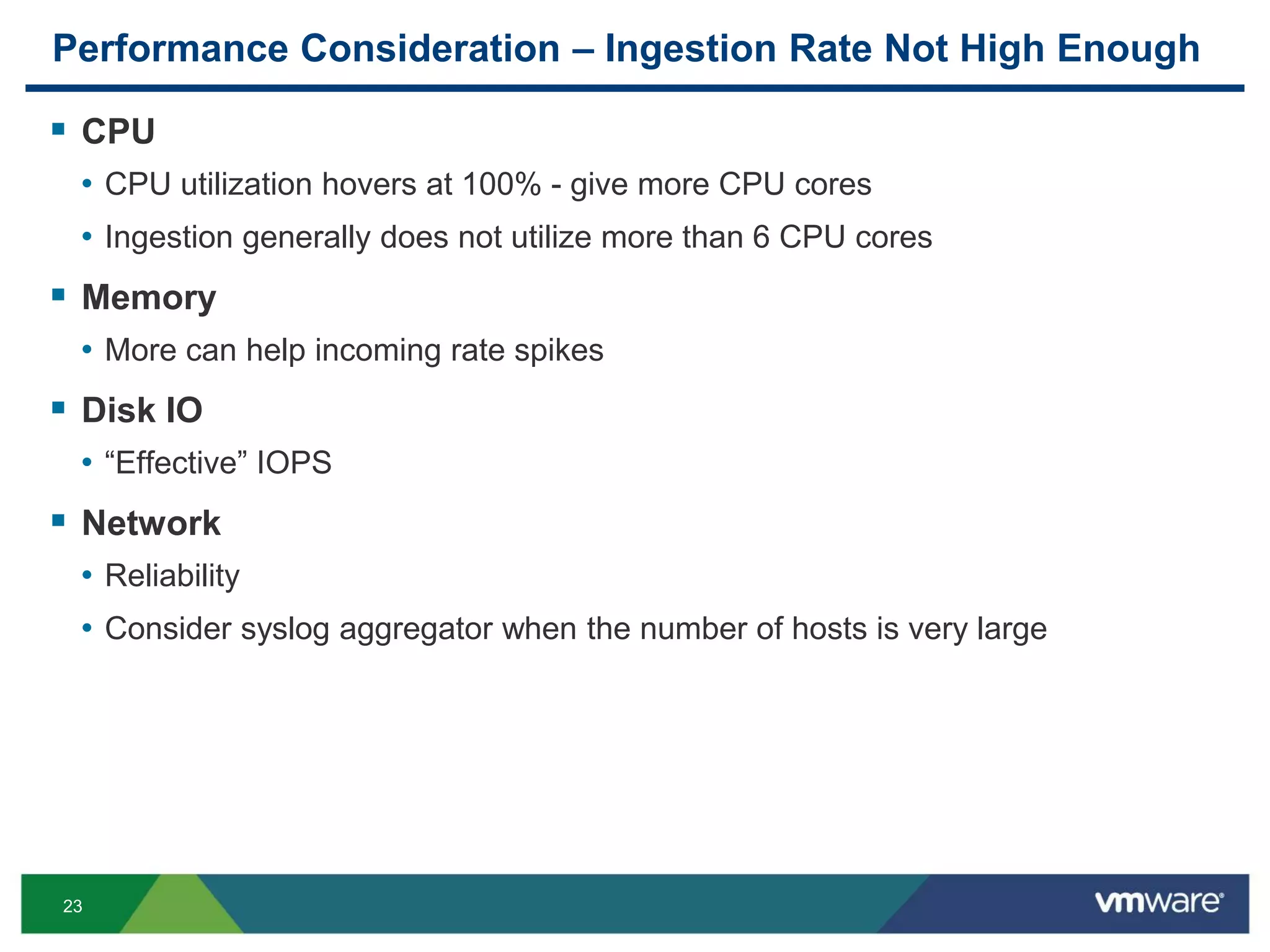
Performance Consideration – Ingestion Rate Not High Enough
 CPU
• CPU utilization hovers at 100% - give more CPU cores
• Ingestion generally does not utilize more than 6 CPU cores
 Memory
• More can help incoming rate spikes
 Disk IO
• “Effective” IOPS
 Network
• Reliability
• Consider syslog aggregator when the number of hosts is very large
24
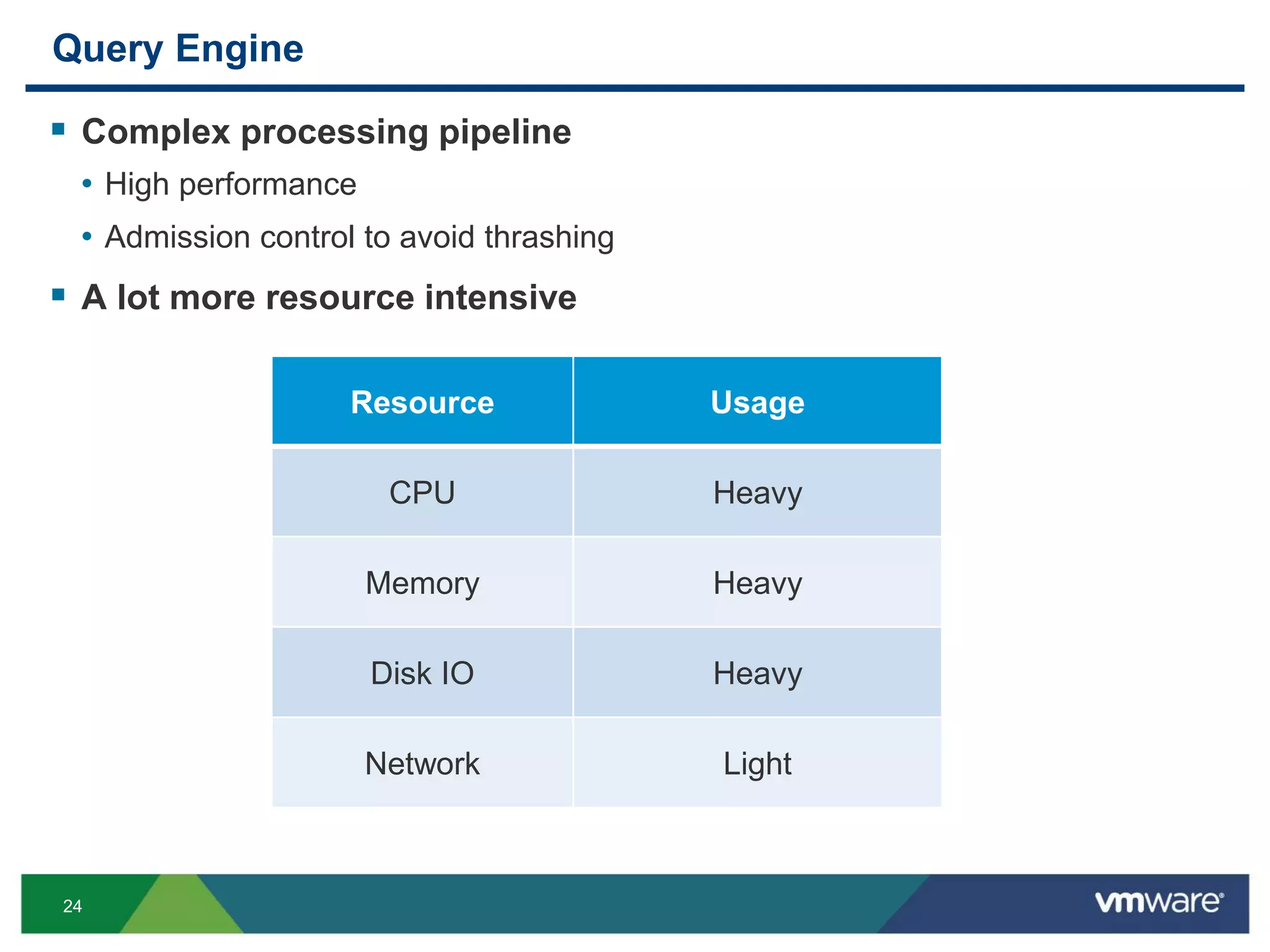
Query Engine
 Complex processing pipeline
• High performance
• Admission control to avoid thrashing
 A lot more resource intensive
Resource Usage
CPU Heavy
Memory Heavy
Disk IO Heavy
Network Light
25
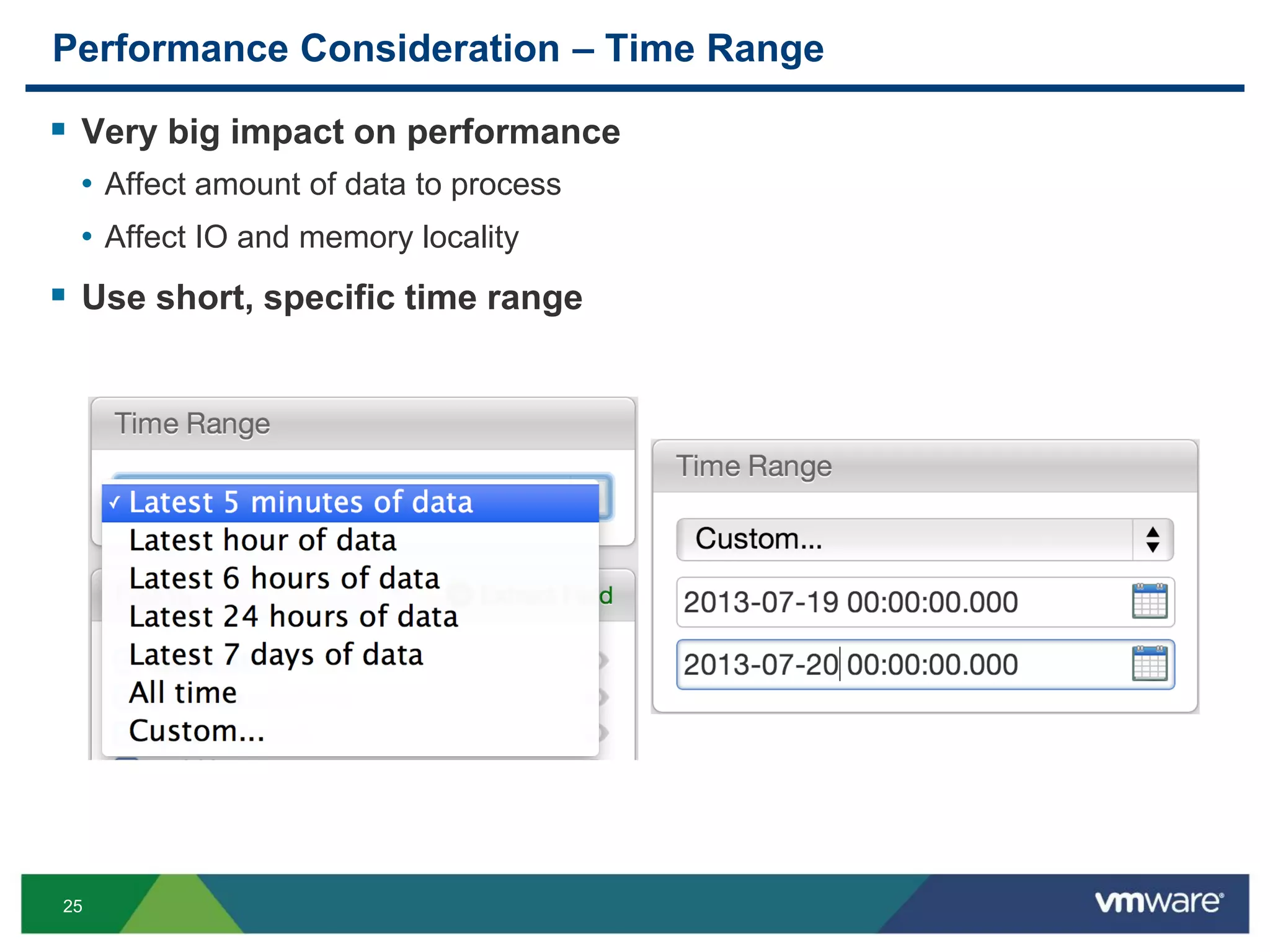
Performance Consideration – Time Range
 Very big impact on performance
• Affect amount of data to process
• Affect IO and memory locality
 Use short, specific time range
26
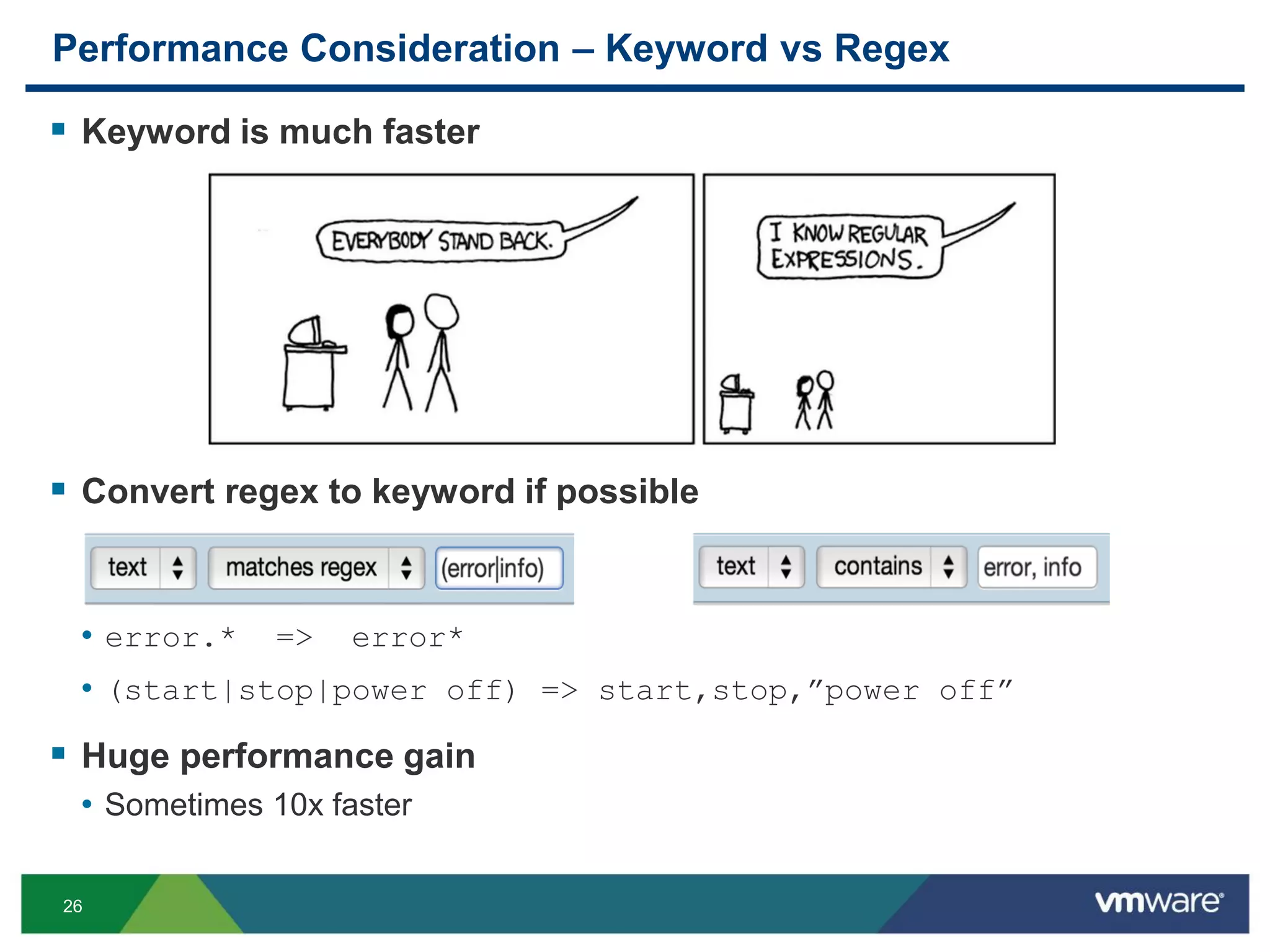
Performance Consideration – Keyword vs Regex
 Keyword is much faster
 Convert regex to keyword if possible
• error.* => error*
• (start|stop|power off) => start,stop,”power off”
 Huge performance gain
• Sometimes 10x faster
27
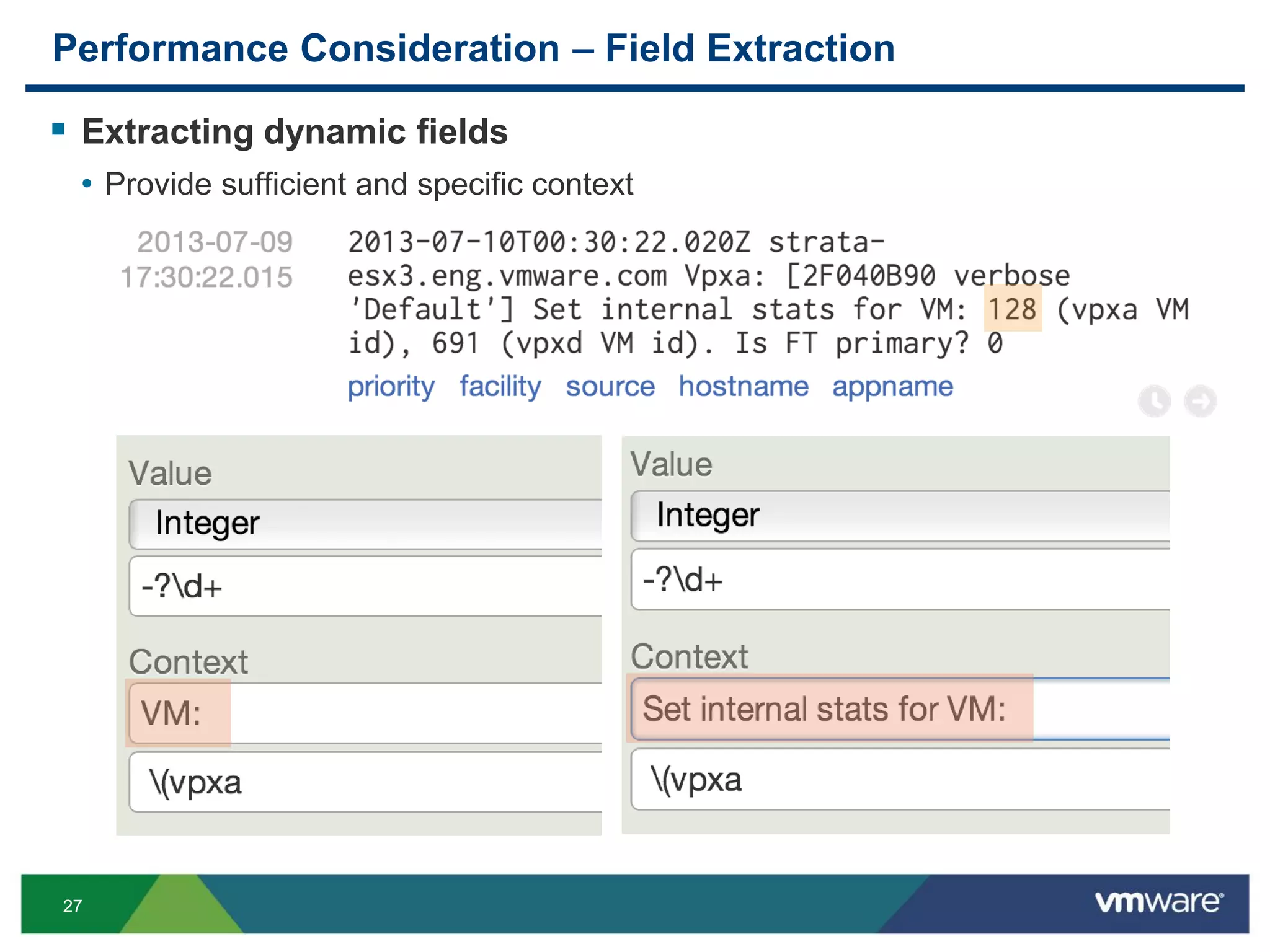
Performance Consideration – Field Extraction
 Extracting dynamic fields
• Provide sufficient and specific context
28
Performance Consideration – Run-away Queries
 Monitor run-away queries
• Count all messages in the past 3 years that match ((((((0?[1-9])|([1-2][0-
9])|(3[0-1]))-
(([jJ][aA][nN])|([mM][aA][rR])|([mM][aA][yY])|([jJ][uU][lL])|([aA][uU][gG])|([oO][cC
][tT])|([dD][eE][cC])))|(((0?[1-9])|([1-2][0-9])|(30))-
(([aA][pP][rR])|([jJ][uU][nN])|([sS][eE][pP])|([nN][oO][vV])))|(((0?[1-9])|(1[0-
9])|(2[0-8]))-([fF][eE][bB])))-
(20(([13579][01345789])|([2468][1235679]))))|(((((0?[1-9])|([1-2][0-9])|(3[0-1]))-
(([jJ][aA][nN])|([mM][aA][rR])|([mM][aA][yY])|([jJ][uU][lL])|([aA][uU][gG])|([oO][cC
][tT])|([dD][eE][cC])))|(((0?[1-9])|([1-2][0-9])|(30))-
(([aA][pP][rR])|([jJ][uU][nN])|([sS][eE][pP])|([nN][oO][vV])))|(((0?[1-9])|(1[0-
9])|(2[0-9]))-([fF][eE][bB])))-(20(([13579][26])|([2468][048])))))
29
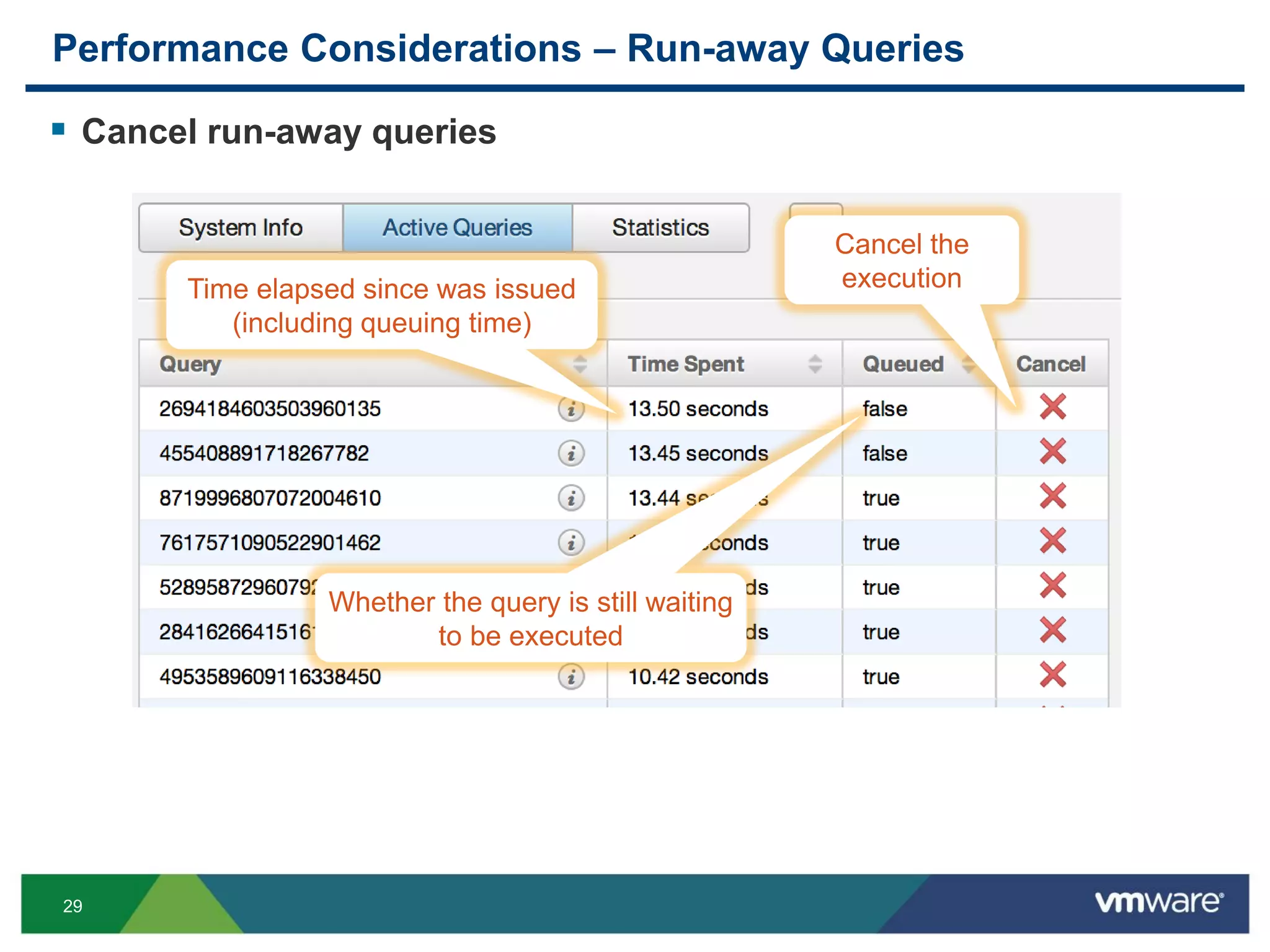
Performance Considerations – Run-away Queries
 Cancel run-away queries
Time elapsed since was issued
(including queuing time)
Whether the query is still waiting
to be executed
Cancel the
execution
30
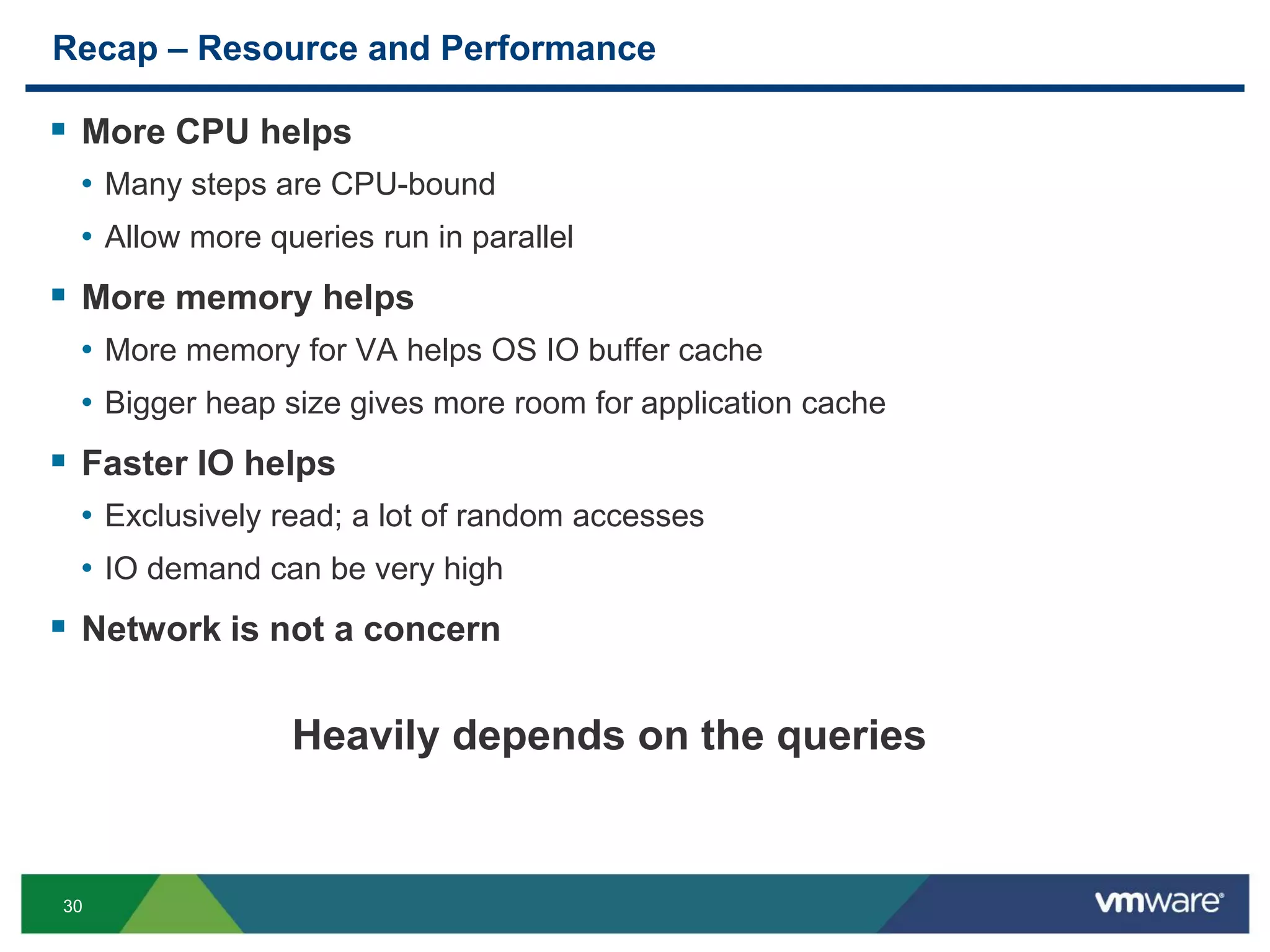
Recap – Resource and Performance
 More CPU helps
• Many steps are CPU-bound
• Allow more queries run in parallel
 More memory helps
• More memory for VA helps OS IO buffer cache
• Bigger heap size gives more room for application cache
 Faster IO helps
• Exclusively read; a lot of random accesses
• IO demand can be very high
 Network is not a concern
Heavily depends on the queries
31
Mini Deep Dives
32
Retention and Archiving
33
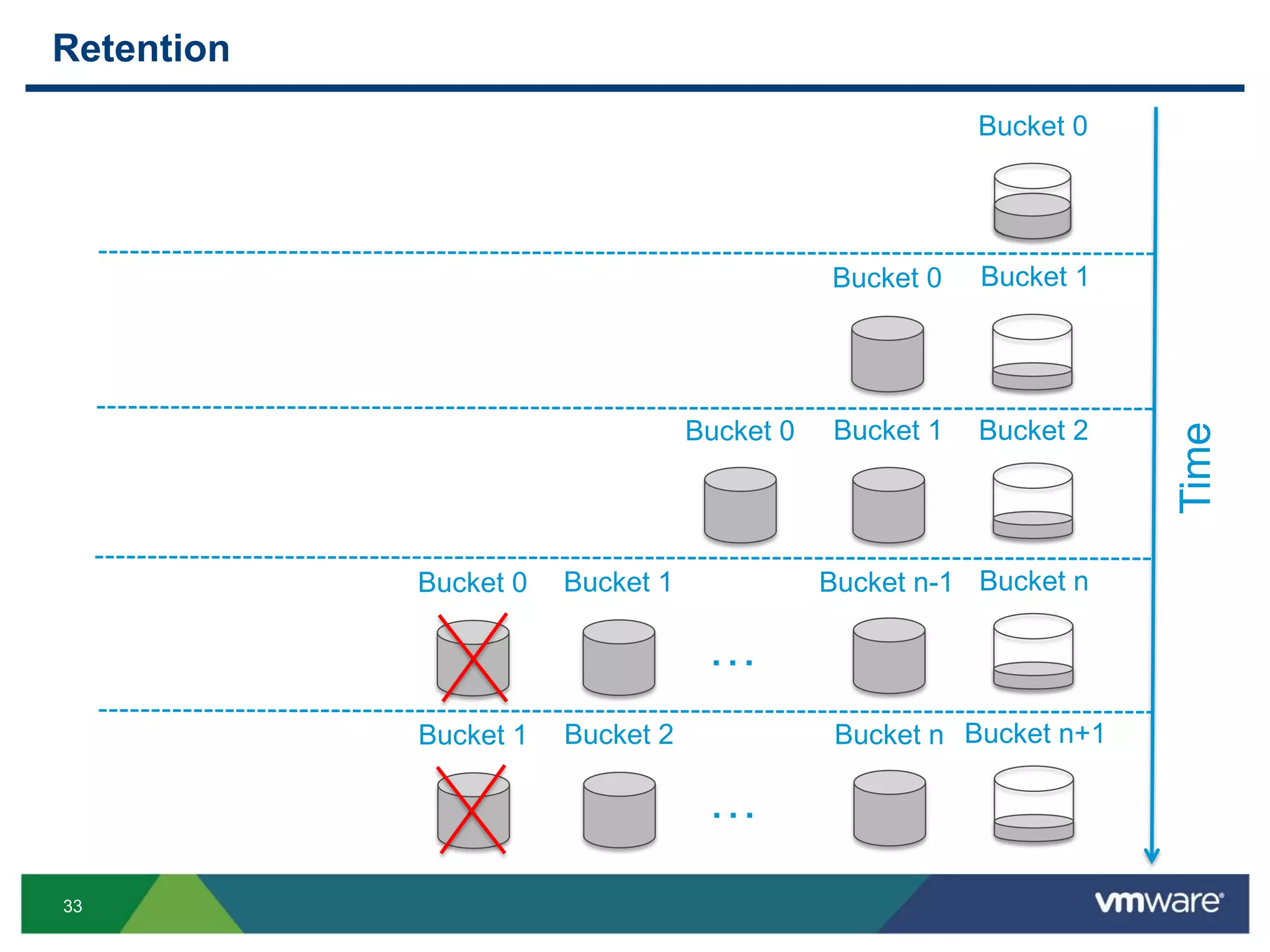
Retention
Bucket 0
Time
Bucket 1
Bucket 2
Bucket 0
Bucket 0 Bucket 1
…
Bucket nBucket 1 Bucket n-1Bucket 0
…
Bucket n+1Bucket 2 Bucket nBucket 1
34
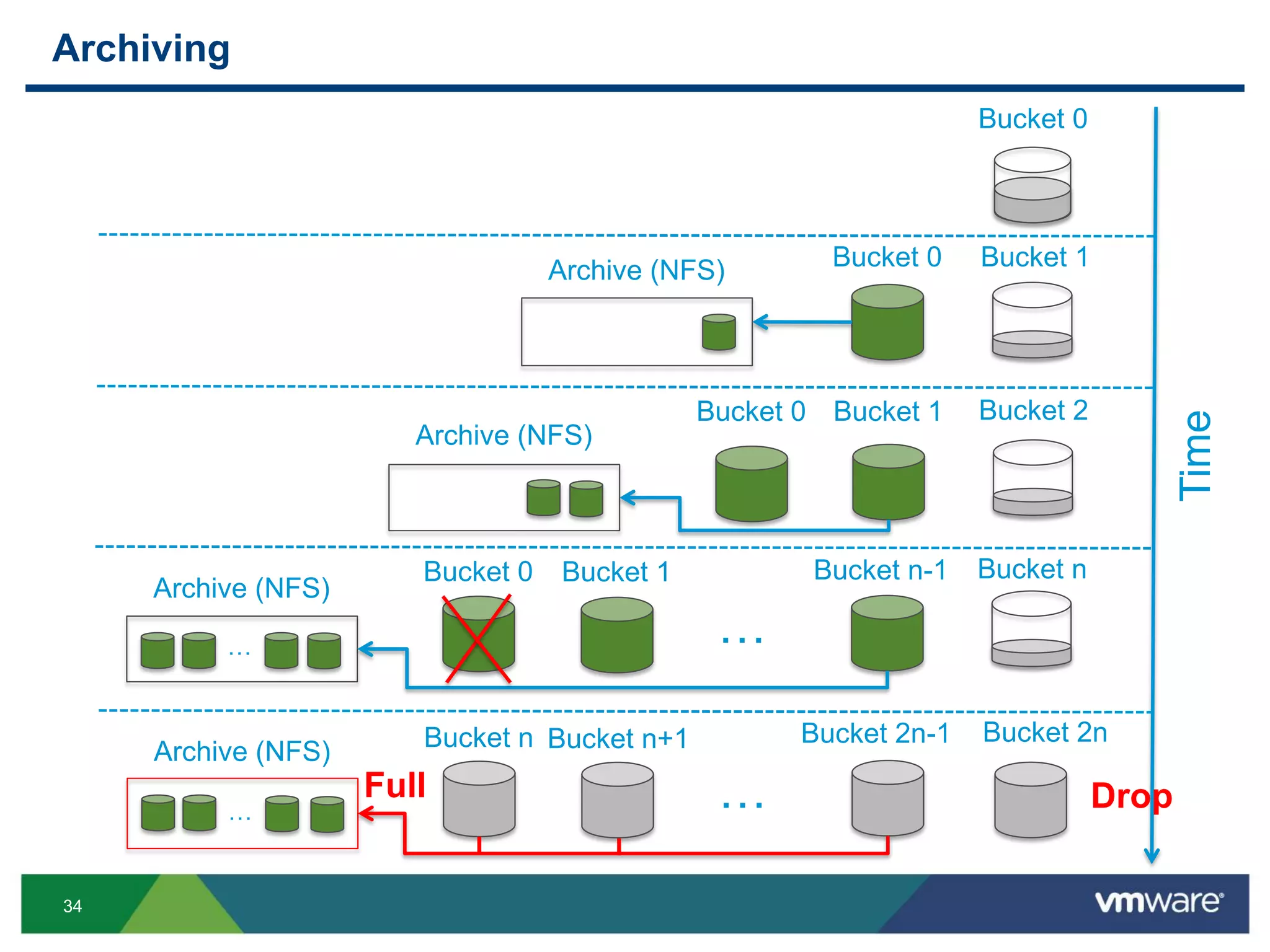
Archiving
Bucket 0
Time
Bucket 1
Bucket 2
Bucket 0
Bucket 0 Bucket 1
Archive (NFS)
Archive (NFS)
…
Bucket nBucket 1 Bucket n-1
Archive (NFS)
Bucket 0
…
…
Bucket 2nBucket n+1 Bucket 2n-1
Archive (NFS) Bucket n
… DropFull
35
Ingestion
36
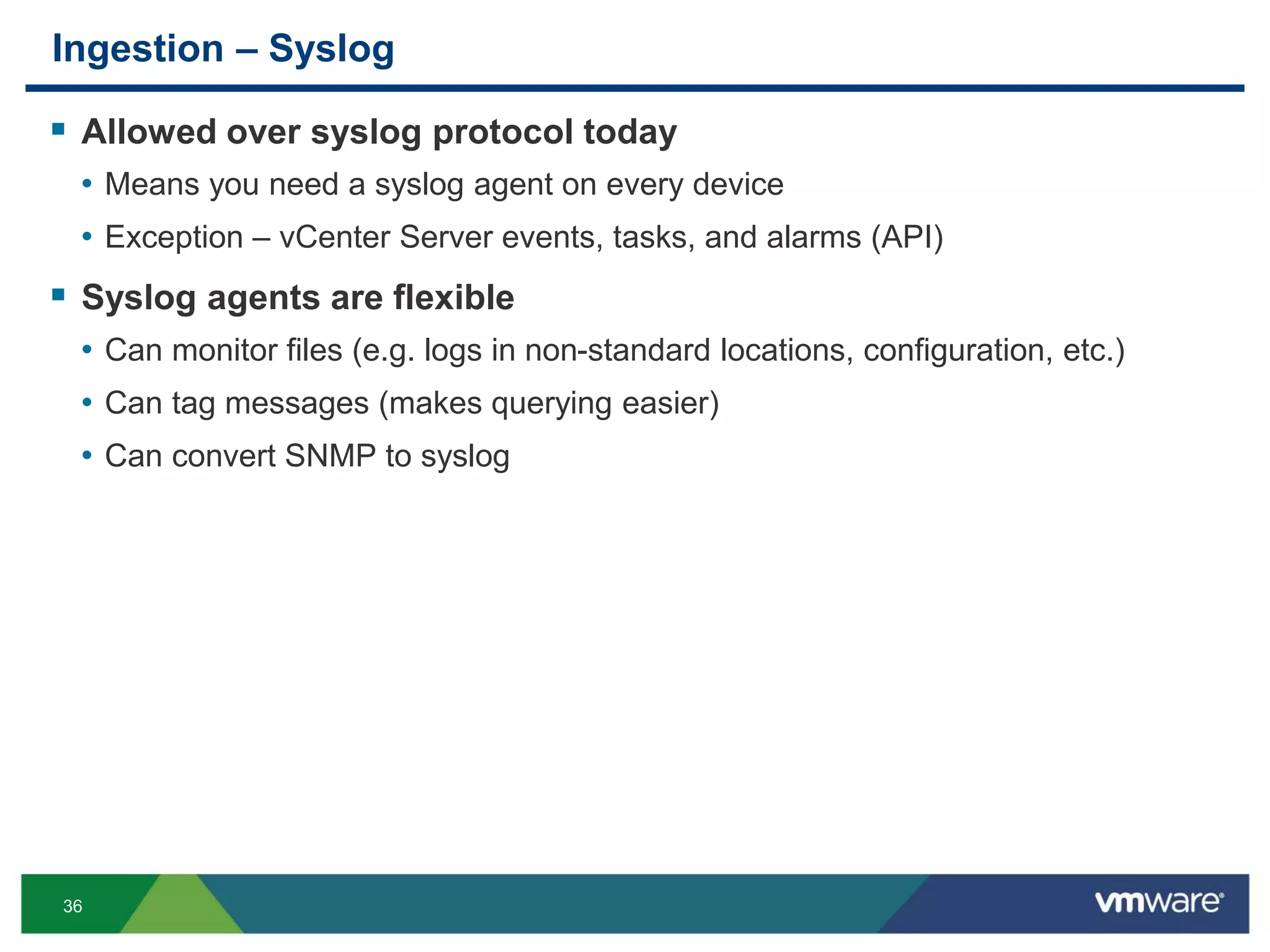
Ingestion – Syslog
 Allowed over syslog protocol today
• Means you need a syslog agent on every device
• Exception – vCenter Server events, tasks, and alarms (API)
 Syslog agents are flexible
• Can monitor files (e.g. logs in non-standard locations, configuration, etc.)
• Can tag messages (makes querying easier)
• Can convert SNMP to syslog
38
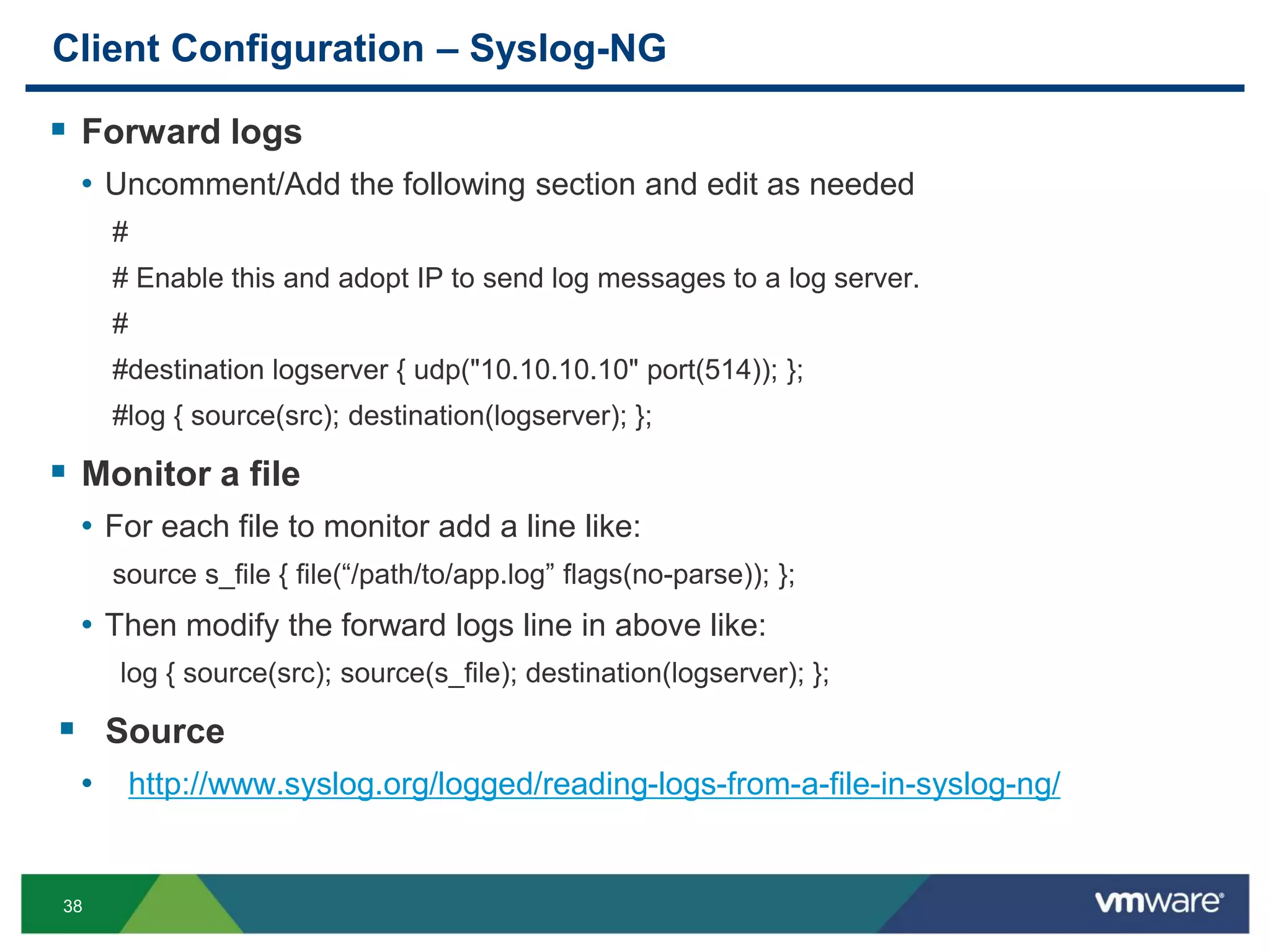
Client Configuration – Syslog-NG
 Forward logs
• Uncomment/Add the following section and edit as needed
#
# Enable this and adopt IP to send log messages to a log server.
#
#destination logserver { udp("10.10.10.10" port(514)); };
#log { source(src); destination(logserver); };
 Monitor a file
• For each file to monitor add a line like:
source s_file { file(“/path/to/app.log” flags(no-parse)); };
• Then modify the forward logs line in above like:
log { source(src); source(s_file); destination(logserver); };
 Source
• http://www.syslog.org/logged/reading-logs-from-a-file-in-syslog-ng/
39
Client Configuration – Syslog-NG (Cont.)
 Tag logs
• Using tags
source s_file { file(“/path/to/app.log” flags(no-parse) log_prefix(“APP: “); };
source s_file { file(“/path/to/app.log” flags(no-parse) program_override(“APP: “); };
• Using templates
destination my_file {
file("/path/to/app.log" template("$ISODATE $FULLHOST $TAG $MESSAGE"));
};
 SNMP to syslog
• If running syslog-ng v3 or newer and have snmptrapd configured
filter f_snmptrapd { program(“snmptrapd”); };
rewrite r_snmptrapd { subst(“^([^ ]+) (.*)$ “, “${2}”); set(“${1}” value(“HOST”)); };
 Source
• http://bazsi.blogs.balabit.com/2008/11/syslog-ng-3-0-and-snmp-traps/
40
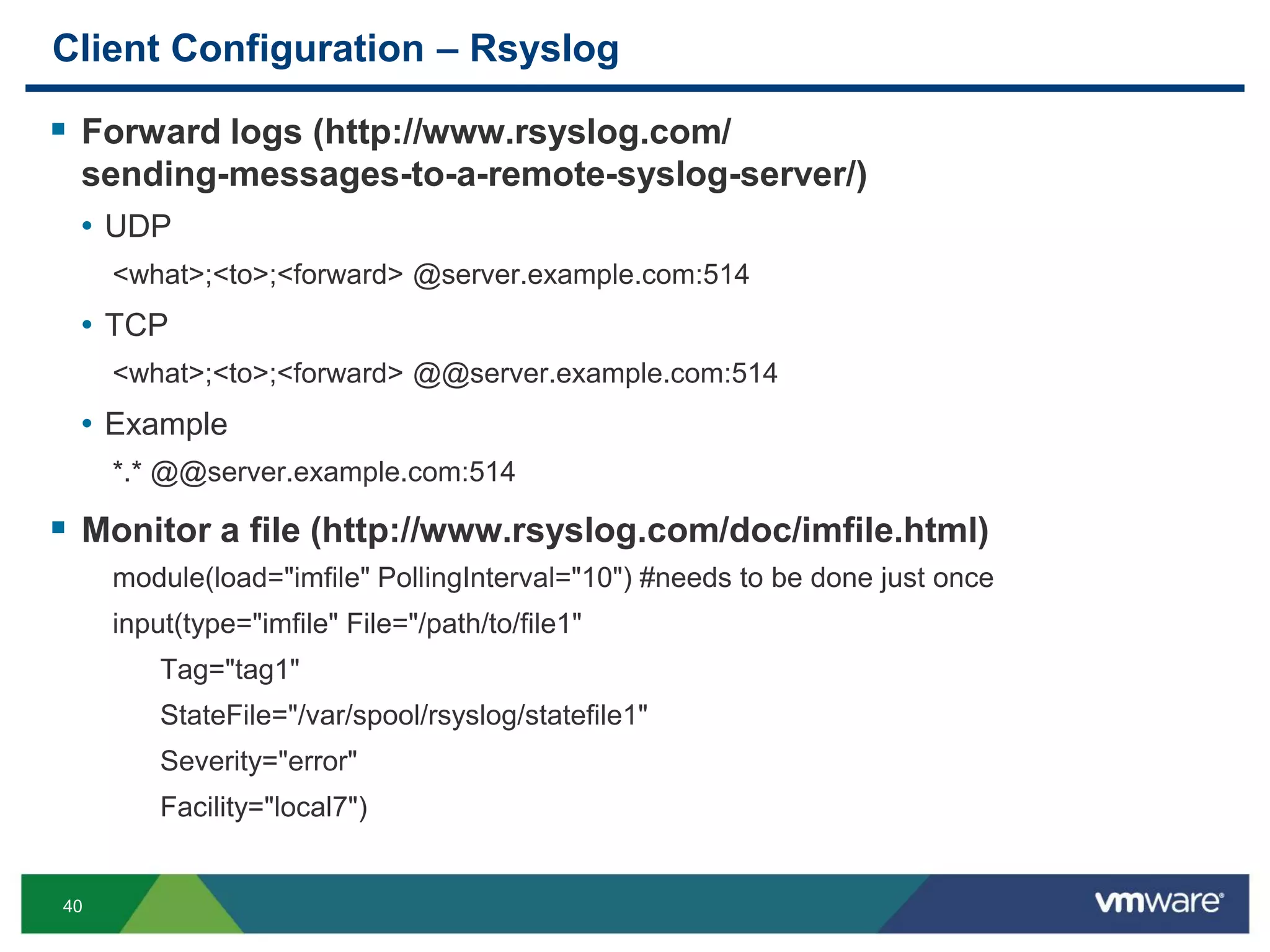
Client Configuration – Rsyslog
 Forward logs (http://www.rsyslog.com/
sending-messages-to-a-remote-syslog-server/)
• UDP
<what>;<to>;<forward> @server.example.com:514
• TCP
<what>;<to>;<forward> @@server.example.com:514
• Example
*.* @@server.example.com:514
 Monitor a file (http://www.rsyslog.com/doc/imfile.html)
module(load="imfile" PollingInterval="10") #needs to be done just once
input(type="imfile" File="/path/to/file1"
Tag="tag1"
StateFile="/var/spool/rsyslog/statefile1"
Severity="error"
Facility="local7")
41
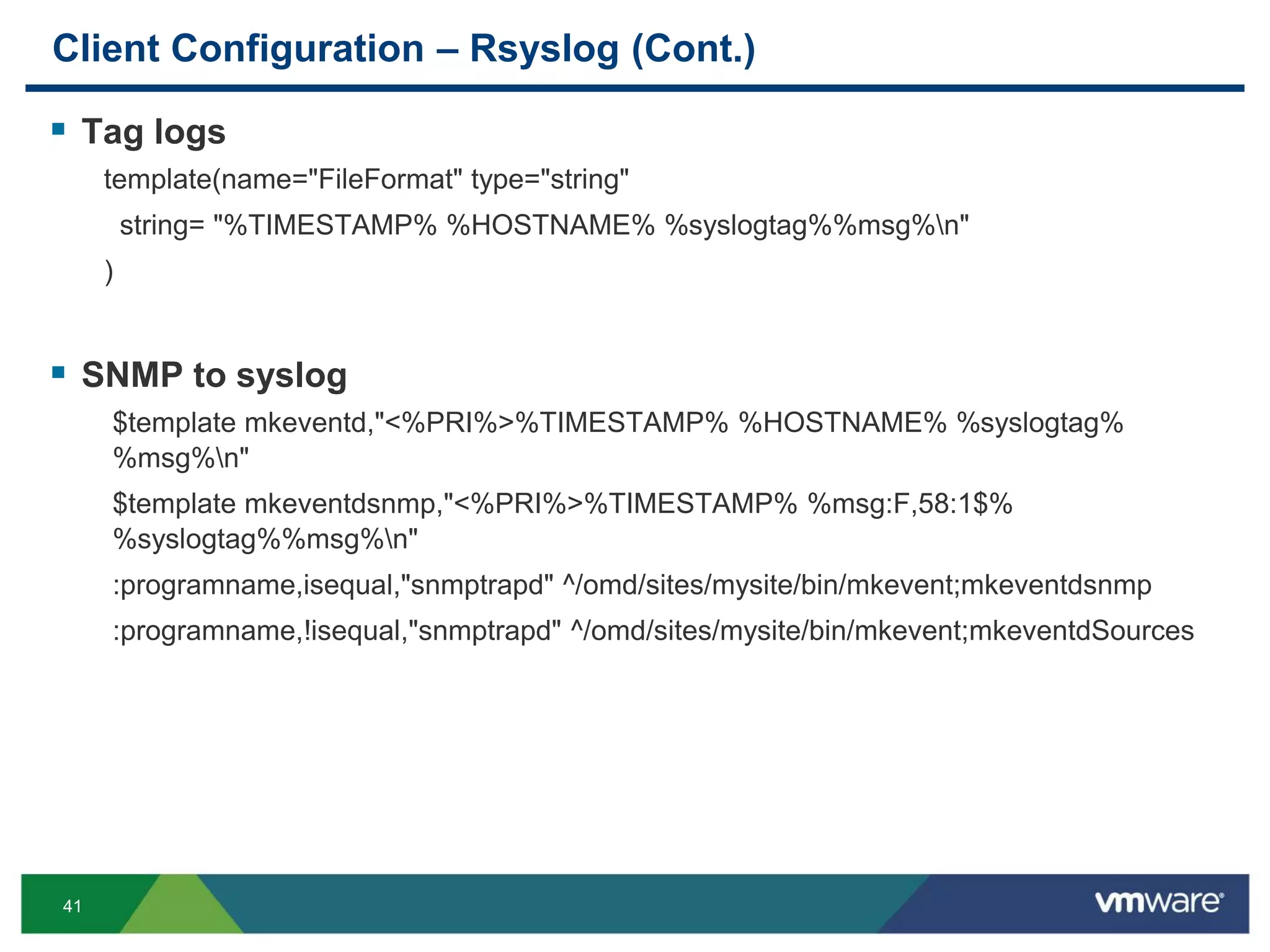
Client Configuration – Rsyslog (Cont.)
 Tag logs
template(name="FileFormat" type="string"
string= "%TIMESTAMP% %HOSTNAME% %syslogtag%%msg%n"
)
 SNMP to syslog
$template mkeventd,"<%PRI%>%TIMESTAMP% %HOSTNAME% %syslogtag%
%msg%n"
$template mkeventdsnmp,"<%PRI%>%TIMESTAMP% %msg:F,58:1$%
%syslogtag%%msg%n"
:programname,isequal,"snmptrapd" ^/omd/sites/mysite/bin/mkevent;mkeventdsnmp
:programname,!isequal,"snmptrapd" ^/omd/sites/mysite/bin/mkevent;mkeventdSources
42
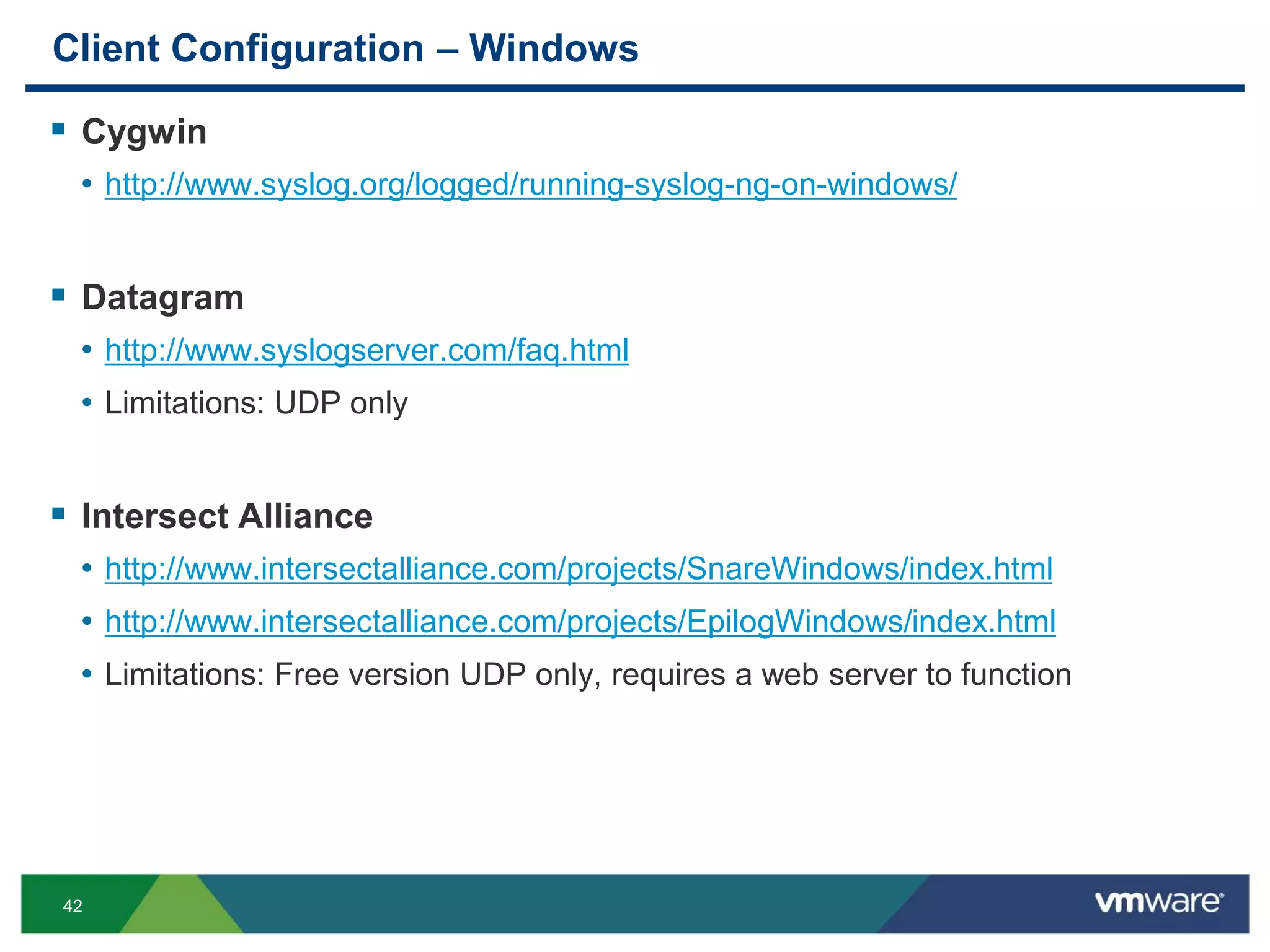
Client Configuration – Windows
 Cygwin
• http://www.syslog.org/logged/running-syslog-ng-on-windows/
 Datagram
• http://www.syslogserver.com/faq.html
• Limitations: UDP only
 Intersect Alliance
• http://www.intersectalliance.com/projects/SnareWindows/index.html
• http://www.intersectalliance.com/projects/EpilogWindows/index.html
• Limitations: Free version UDP only, requires a web server to function
43
Alerts
44
Alerts – Types
 Query-based alerts
• Email
• vCenter Operations Manager
 System alerts
• Dropped messages
• Failed to archive
• About to retire, or delete, old data
45
Alerts – Enable/Disable
 Query-based alerts
• Content Pack alerts – always disabled
• Custom alerts – always user-specific
• If neither email nor vCenter Operations Manager is selected then disabled
• Otherwise, enabled
• NOTE: If previously enabled and then disabled, settings are preserved
 System alerts
• Cannot be individually disabled
• Cannot be modified
 Disable ALL alerts
• Administration > General > Suspend All Alerts
• Applies to query-based alerts and system alerts
• Avoid if possible!
46
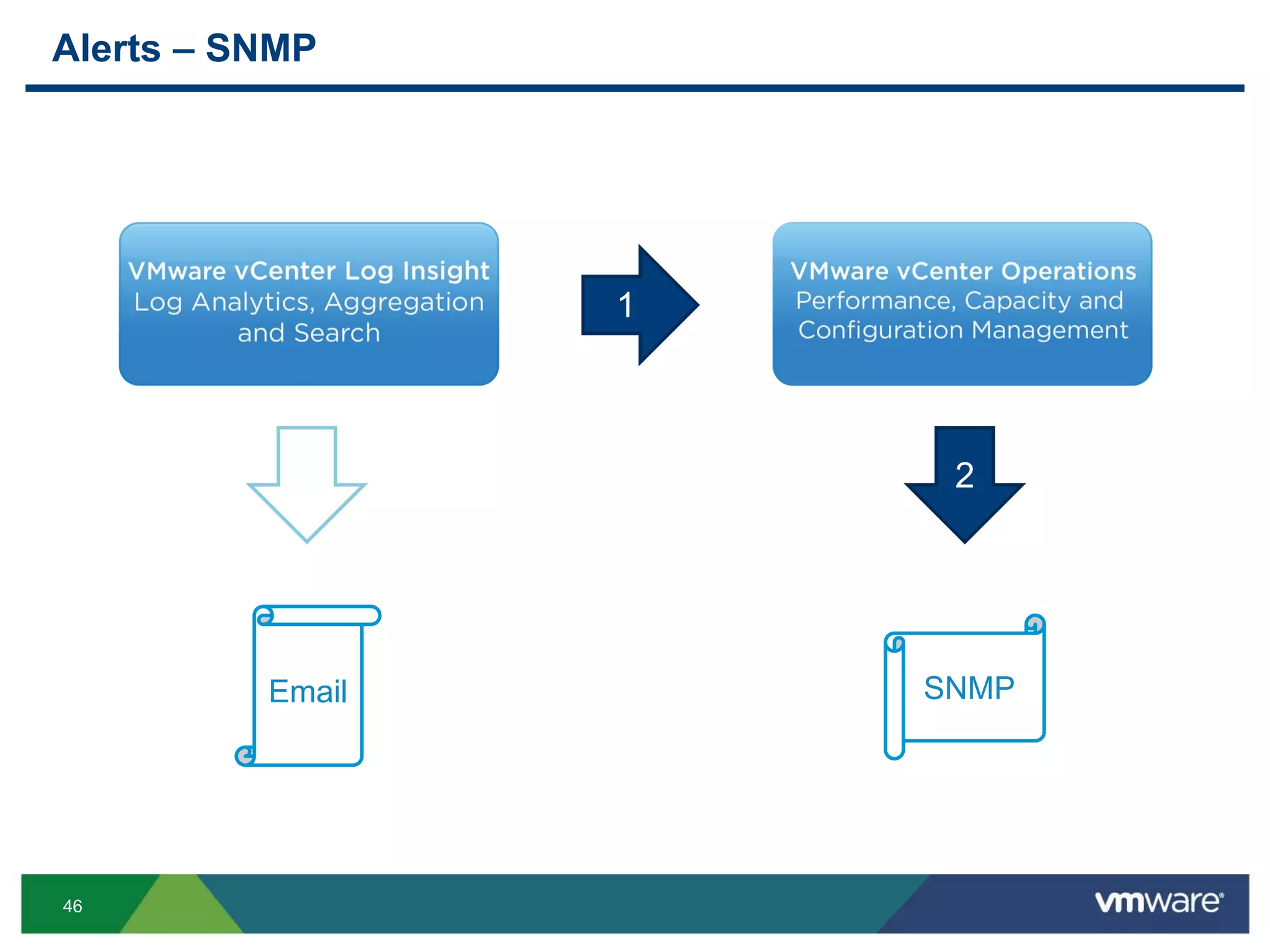
Alerts – SNMP
Email SNMP
1
2
47
Time
48
Interactive Analytics – Timestamp
• The displayed timezone is that of the browser
• The Time Range follows the browser time
• If the current time is 9pm PDT but the browser time is 8pm PDT, “Latest 5 minutes of
data” means [7:55pm PDT, 8pm PDT]
• The incoming messages are
timestamped at arrival with the
time of the Log Insight VA
 It can cause a small discrepancy
between the timestamp in the timestamp
and timestamp that Log Insight uses
49
Wrapping Up
50
Summary
 Size properly – ingestion and queries set resource requirements
• CPU is a common bottleneck for ingestion and queries
• Memory can help, but typically not as much as other resources
• IOPS is a common bottleneck especially for queries
• Network should not be the bottleneck, but connectivity can impact ingestion
 Queries – be as specific as possible
• Limit the time range
• Provide as much textual context as possible
• Use globs when needed
• Avoid regular expressions whenever possible
 Management – other considerations
• Monitor NFS archive – a full archive can lead to dropped events
• Disable all alerts – also disables system alerts
51
Log Insight Resources
 General Log Insight Resources
• Product
http://www.vmware.com/products/datacenter-virtualization/vcenter-log-insight
• Communities
http://communities.vmware.com/community/vmtn/vcenter/vcenter-log-insight
• Marketplace (content packs)
http://loginsight.vmware.com/
• Twitter
@VMLogInsight (follow and get 5 free licenses!)
 VMworld Log Insight Resources
• General Session: VCM4528 – Tips and Tricks with vCenter Log Insight
• General Session: VCM5034 – Troubleshooting at Cox Communications
• Group Discussion: VCM1005-GD – Log Insight with Steve Flanders
• Solutions Exchange: VMware booth – Log Analytics
• Hands-on Labs: HOL-SDC-1301 – VMware vCenter Log Insight
THANK YOU
Deep Dive into vSphere Log Management with
vCenter Log Insight
Steve Flanders, VMware
Chengdu Huang, VMware
VCM4445
#VCM4445

VMworld 2013: Deep Dive into vSphere Log Management with vCenter Log Insight

  • 1.
    Deep Dive intovSphere Log Management with vCenter Log Insight Steve Flanders, VMware Chengdu Huang, VMware VCM4445 #VCM4445
  • 2.
    2 Agenda  Introduction  QueryBuilding Deep Dive  Performance Deep Dive  Mini Deep Dives  Wrap Up
  • 3.
  • 4.
    4 Presenters  Steve Flanders •Senior Solutions Architect, VMware • VCAP-DCA • @smflanders • sflanders.net  Chengdu Huang • Chief Architect of Log Insight, VMware • PhD, University of Illinois at Urbana-Champaign • @chengduh
  • 5.
    5 Problem Statement VMware Logs OSand App Logs 200 ESXi Host + VMs = 200GB or 2B log events per day Physical Infrastructure Logs
  • 6.
    6 Full Stack Aggregation+ Analytics 3rd party infrastructure e.g. Cisco, Dell, EMC, HP, NetApp Operating System Search Analyze Discover Visualize Logs Custom and 3rd party apps e.g. MS, Oracle, SAP Syslog Log Insight Operational Log Management & Analytics vCloud® Suite
  • 7.
  • 8.
    8 Objectives  Understand whatcomprises a query  Learn how to query using matches and regular expressions  Learn best practices for query construction
  • 9.
  • 10.
    10 Aggregation functions /analytics Manipulation of visual data Results List Textual representation of data Search Box and Query Builder Full-text and regular expressions Overview Chart Visual representation of data Adjust Scale Time Range for the query Breakdown Charts for each of the fields Save Chart Interactive Analytics – Overview Detailed Other Options Save/Load/Export Query Add/Manage Alerts Manage Extracted Fields Export Query Results
  • 12.
  • 13.
    13 Search Box andQuery Builder Full-text and regular expressions Interactive Analytics – Search/Query
  • 14.
    14 Search Box andQuery Builder Full-text and regular expressions Time Range for the query Breakdown Charts for each of the fields Other Options Save/Load/Export Query Add/Manage Alerts Manage Extracted Fields Export Query Results Interactive Analytics – Search/Query Aggregation functions / analytics Manipulation of visual data
  • 15.
  • 16.
    16 Interactive Analytics –Query Building 1/2 • The search terms support globing, i.e. ‘*’ and ‘?’ • Prefix queries are not supported: *rror or ?error are invalid • Auto completion for both keywords and constraints • The number of matches for the autocompleted terms is an approximation • Only auto completion for the first word in phrase • The incoming messages are Auto completion Highlighting of matches
  • 17.
    17 Interactive Analytics –Query Building 2/2 • ‘equals’ and ‘does not equal’ support * (glob) and ? • starts with(err) and matches(err*) are the same query • Comma separated values form an OR constraint • hostname matches hostA, hostB means hostname is either hostA OR hostB • Clicking on a field in the message list or a bar in the overview chart list creates a constraint • The constraints can form a logical AND (match all) or logical OR (match any) all (logical and) or any (logical or) Comparison operators different for string and numeric fields Alphanumeric fields can have a regex constraint‘exists’ does not require a constraint value
  • 18.
    18 Recap – QueryBuilding  General • Case insensitive queries • Complete keyword matching • Special character queries via regular expressions only • Globs (* and ?) can be used to enhance keyword queries  Search bar • Space separated keywords are logical AND queries • Phrases are entered using double quotations • No regular expressions  Constraints • Field operations • Values separated by comma are logical OR queries • Multiple constraints can be logical AND or logical OR queries • Regular expressions available
  • 19.
  • 20.
    20 Objectives  Understand thesystem architecture  Understand the considerations for ingestion versus queries  Apprehend common performance problems • “I have X hosts sending logs to Log Insight, and it can’t keep up” • “I ran this query and it took a long time to finish” • “My dashboard is really slow to load”
  • 21.
    21 System Architecture z Syslog IndexesCompressed Logs Ingestion Pipeline … Query Processing Pipeline Web Server TCP UDP Clients
  • 22.
    22 Ingestion Pipeline  Multi-stagedpipeline • Connected with bounded queues • Message dropping happens when all queues are full  Very resource efficient Resource Usage CPU Heavy Memory Light Disk IO Neutral Network Light
  • 23.
    23 Performance Consideration –Ingestion Rate Not High Enough  CPU • CPU utilization hovers at 100% - give more CPU cores • Ingestion generally does not utilize more than 6 CPU cores  Memory • More can help incoming rate spikes  Disk IO • “Effective” IOPS  Network • Reliability • Consider syslog aggregator when the number of hosts is very large
  • 24.
    24 Query Engine  Complexprocessing pipeline • High performance • Admission control to avoid thrashing  A lot more resource intensive Resource Usage CPU Heavy Memory Heavy Disk IO Heavy Network Light
  • 25.
    25 Performance Consideration –Time Range  Very big impact on performance • Affect amount of data to process • Affect IO and memory locality  Use short, specific time range
  • 26.
    26 Performance Consideration –Keyword vs Regex  Keyword is much faster  Convert regex to keyword if possible • error.* => error* • (start|stop|power off) => start,stop,”power off”  Huge performance gain • Sometimes 10x faster
  • 27.
    27 Performance Consideration –Field Extraction  Extracting dynamic fields • Provide sufficient and specific context
  • 28.
    28 Performance Consideration –Run-away Queries  Monitor run-away queries • Count all messages in the past 3 years that match ((((((0?[1-9])|([1-2][0- 9])|(3[0-1]))- (([jJ][aA][nN])|([mM][aA][rR])|([mM][aA][yY])|([jJ][uU][lL])|([aA][uU][gG])|([oO][cC ][tT])|([dD][eE][cC])))|(((0?[1-9])|([1-2][0-9])|(30))- (([aA][pP][rR])|([jJ][uU][nN])|([sS][eE][pP])|([nN][oO][vV])))|(((0?[1-9])|(1[0- 9])|(2[0-8]))-([fF][eE][bB])))- (20(([13579][01345789])|([2468][1235679]))))|(((((0?[1-9])|([1-2][0-9])|(3[0-1]))- (([jJ][aA][nN])|([mM][aA][rR])|([mM][aA][yY])|([jJ][uU][lL])|([aA][uU][gG])|([oO][cC ][tT])|([dD][eE][cC])))|(((0?[1-9])|([1-2][0-9])|(30))- (([aA][pP][rR])|([jJ][uU][nN])|([sS][eE][pP])|([nN][oO][vV])))|(((0?[1-9])|(1[0- 9])|(2[0-9]))-([fF][eE][bB])))-(20(([13579][26])|([2468][048])))))
  • 29.
    29 Performance Considerations –Run-away Queries  Cancel run-away queries Time elapsed since was issued (including queuing time) Whether the query is still waiting to be executed Cancel the execution
  • 30.
    30 Recap – Resourceand Performance  More CPU helps • Many steps are CPU-bound • Allow more queries run in parallel  More memory helps • More memory for VA helps OS IO buffer cache • Bigger heap size gives more room for application cache  Faster IO helps • Exclusively read; a lot of random accesses • IO demand can be very high  Network is not a concern Heavily depends on the queries
  • 31.
  • 32.
  • 33.
    33 Retention Bucket 0 Time Bucket 1 Bucket2 Bucket 0 Bucket 0 Bucket 1 … Bucket nBucket 1 Bucket n-1Bucket 0 … Bucket n+1Bucket 2 Bucket nBucket 1
  • 34.
    34 Archiving Bucket 0 Time Bucket 1 Bucket2 Bucket 0 Bucket 0 Bucket 1 Archive (NFS) Archive (NFS) … Bucket nBucket 1 Bucket n-1 Archive (NFS) Bucket 0 … … Bucket 2nBucket n+1 Bucket 2n-1 Archive (NFS) Bucket n … DropFull
  • 35.
  • 36.
    36 Ingestion – Syslog Allowed over syslog protocol today • Means you need a syslog agent on every device • Exception – vCenter Server events, tasks, and alarms (API)  Syslog agents are flexible • Can monitor files (e.g. logs in non-standard locations, configuration, etc.) • Can tag messages (makes querying easier) • Can convert SNMP to syslog
  • 38.
    38 Client Configuration –Syslog-NG  Forward logs • Uncomment/Add the following section and edit as needed # # Enable this and adopt IP to send log messages to a log server. # #destination logserver { udp("10.10.10.10" port(514)); }; #log { source(src); destination(logserver); };  Monitor a file • For each file to monitor add a line like: source s_file { file(“/path/to/app.log” flags(no-parse)); }; • Then modify the forward logs line in above like: log { source(src); source(s_file); destination(logserver); };  Source • http://www.syslog.org/logged/reading-logs-from-a-file-in-syslog-ng/
  • 39.
    39 Client Configuration –Syslog-NG (Cont.)  Tag logs • Using tags source s_file { file(“/path/to/app.log” flags(no-parse) log_prefix(“APP: “); }; source s_file { file(“/path/to/app.log” flags(no-parse) program_override(“APP: “); }; • Using templates destination my_file { file("/path/to/app.log" template("$ISODATE $FULLHOST $TAG $MESSAGE")); };  SNMP to syslog • If running syslog-ng v3 or newer and have snmptrapd configured filter f_snmptrapd { program(“snmptrapd”); }; rewrite r_snmptrapd { subst(“^([^ ]+) (.*)$ “, “${2}”); set(“${1}” value(“HOST”)); };  Source • http://bazsi.blogs.balabit.com/2008/11/syslog-ng-3-0-and-snmp-traps/
  • 40.
    40 Client Configuration –Rsyslog  Forward logs (http://www.rsyslog.com/ sending-messages-to-a-remote-syslog-server/) • UDP <what>;<to>;<forward> @server.example.com:514 • TCP <what>;<to>;<forward> @@server.example.com:514 • Example *.* @@server.example.com:514  Monitor a file (http://www.rsyslog.com/doc/imfile.html) module(load="imfile" PollingInterval="10") #needs to be done just once input(type="imfile" File="/path/to/file1" Tag="tag1" StateFile="/var/spool/rsyslog/statefile1" Severity="error" Facility="local7")
  • 41.
    41 Client Configuration –Rsyslog (Cont.)  Tag logs template(name="FileFormat" type="string" string= "%TIMESTAMP% %HOSTNAME% %syslogtag%%msg%n" )  SNMP to syslog $template mkeventd,"<%PRI%>%TIMESTAMP% %HOSTNAME% %syslogtag% %msg%n" $template mkeventdsnmp,"<%PRI%>%TIMESTAMP% %msg:F,58:1$% %syslogtag%%msg%n" :programname,isequal,"snmptrapd" ^/omd/sites/mysite/bin/mkevent;mkeventdsnmp :programname,!isequal,"snmptrapd" ^/omd/sites/mysite/bin/mkevent;mkeventdSources
  • 42.
    42 Client Configuration –Windows  Cygwin • http://www.syslog.org/logged/running-syslog-ng-on-windows/  Datagram • http://www.syslogserver.com/faq.html • Limitations: UDP only  Intersect Alliance • http://www.intersectalliance.com/projects/SnareWindows/index.html • http://www.intersectalliance.com/projects/EpilogWindows/index.html • Limitations: Free version UDP only, requires a web server to function
  • 43.
  • 44.
    44 Alerts – Types Query-based alerts • Email • vCenter Operations Manager  System alerts • Dropped messages • Failed to archive • About to retire, or delete, old data
  • 45.
    45 Alerts – Enable/Disable Query-based alerts • Content Pack alerts – always disabled • Custom alerts – always user-specific • If neither email nor vCenter Operations Manager is selected then disabled • Otherwise, enabled • NOTE: If previously enabled and then disabled, settings are preserved  System alerts • Cannot be individually disabled • Cannot be modified  Disable ALL alerts • Administration > General > Suspend All Alerts • Applies to query-based alerts and system alerts • Avoid if possible!
  • 46.
  • 47.
  • 48.
    48 Interactive Analytics –Timestamp • The displayed timezone is that of the browser • The Time Range follows the browser time • If the current time is 9pm PDT but the browser time is 8pm PDT, “Latest 5 minutes of data” means [7:55pm PDT, 8pm PDT] • The incoming messages are timestamped at arrival with the time of the Log Insight VA  It can cause a small discrepancy between the timestamp in the timestamp and timestamp that Log Insight uses
  • 49.
  • 50.
    50 Summary  Size properly– ingestion and queries set resource requirements • CPU is a common bottleneck for ingestion and queries • Memory can help, but typically not as much as other resources • IOPS is a common bottleneck especially for queries • Network should not be the bottleneck, but connectivity can impact ingestion  Queries – be as specific as possible • Limit the time range • Provide as much textual context as possible • Use globs when needed • Avoid regular expressions whenever possible  Management – other considerations • Monitor NFS archive – a full archive can lead to dropped events • Disable all alerts – also disables system alerts
  • 51.
    51 Log Insight Resources General Log Insight Resources • Product http://www.vmware.com/products/datacenter-virtualization/vcenter-log-insight • Communities http://communities.vmware.com/community/vmtn/vcenter/vcenter-log-insight • Marketplace (content packs) http://loginsight.vmware.com/ • Twitter @VMLogInsight (follow and get 5 free licenses!)  VMworld Log Insight Resources • General Session: VCM4528 – Tips and Tricks with vCenter Log Insight • General Session: VCM5034 – Troubleshooting at Cox Communications • Group Discussion: VCM1005-GD – Log Insight with Steve Flanders • Solutions Exchange: VMware booth – Log Analytics • Hands-on Labs: HOL-SDC-1301 – VMware vCenter Log Insight
  • 52.
  • 54.
    Deep Dive intovSphere Log Management with vCenter Log Insight Steve Flanders, VMware Chengdu Huang, VMware VCM4445 #VCM4445