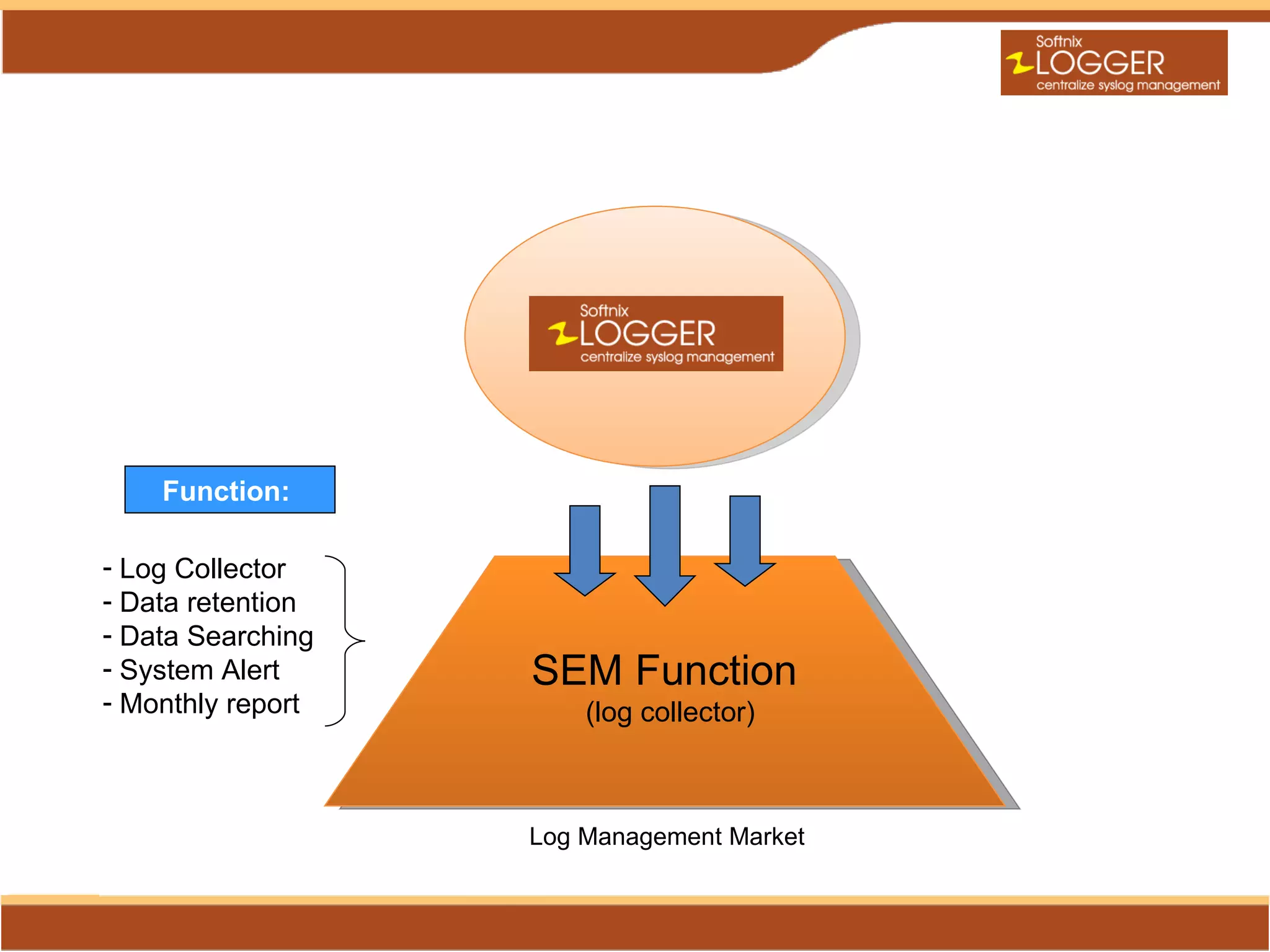
Function:

- Log Collector
- Data retention
- Data Searching
- System Alert     SEM Function
- Monthly report       (log collector)


                   Log Management Market
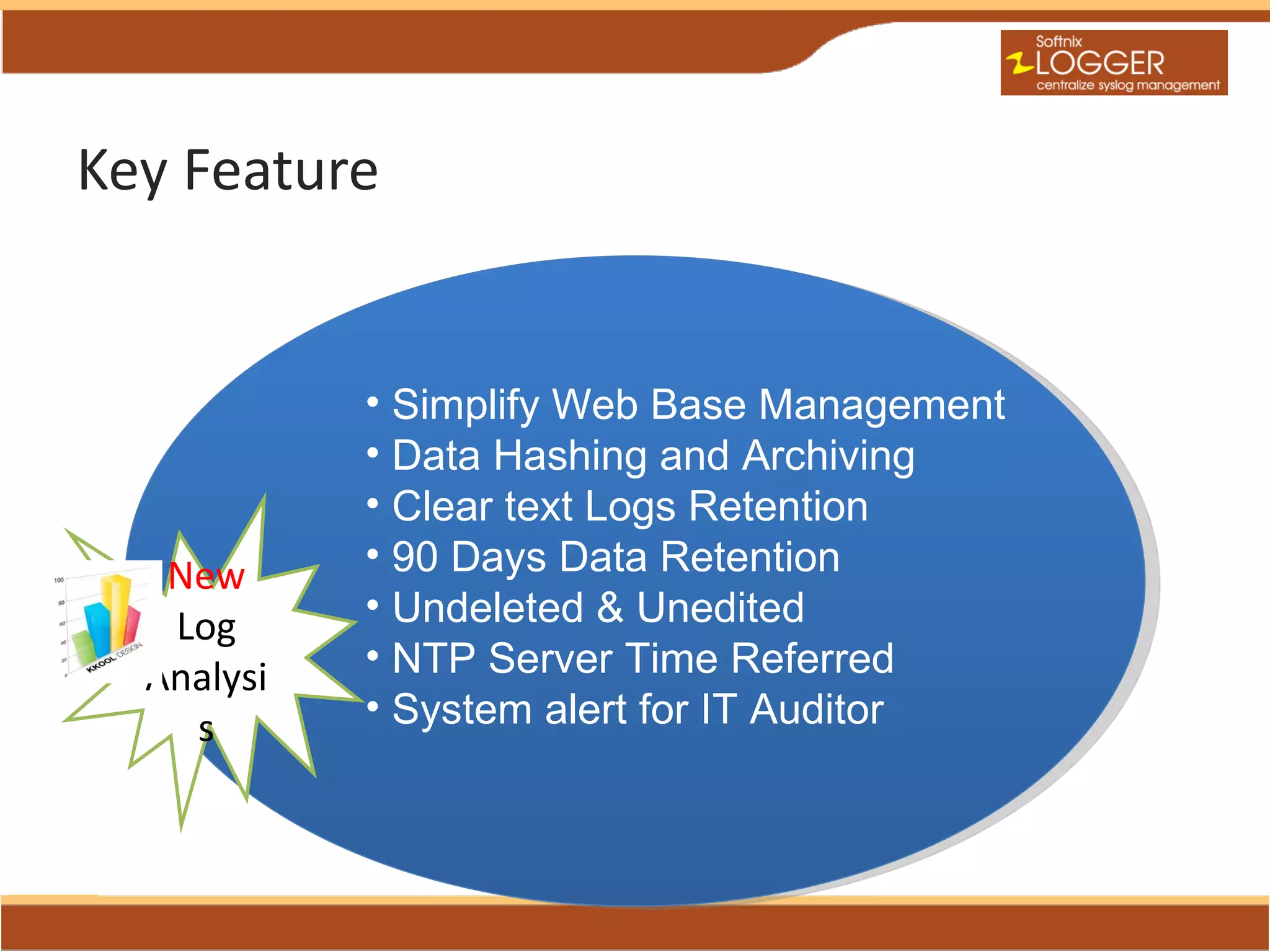
Key Feature


            • Simplify Web Base Management
            • Data Hashing and Archiving
            • Clear text Logs Retention
   New      • 90 Days Data Retention
   Log      • Undeleted & Unedited
  Analysi   • NTP Server Time Referred
    s       • System alert for IT Auditor
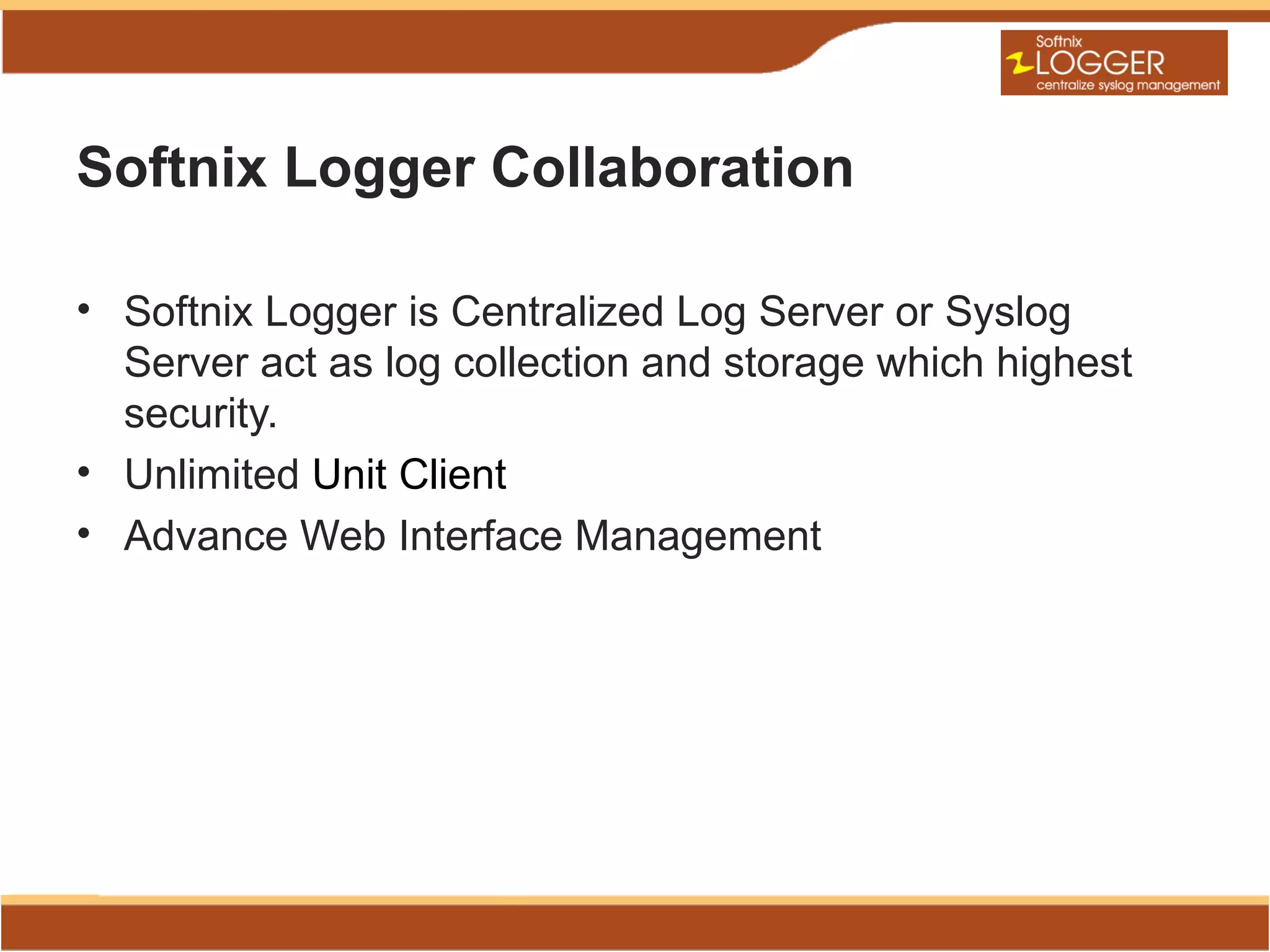
Softnix Logger Collaboration

• Softnix Logger is Centralized Log Server or Syslog
  Server act as log collection and storage which highest
  security.
• Unlimited Unit Client
• Advance Web Interface Management
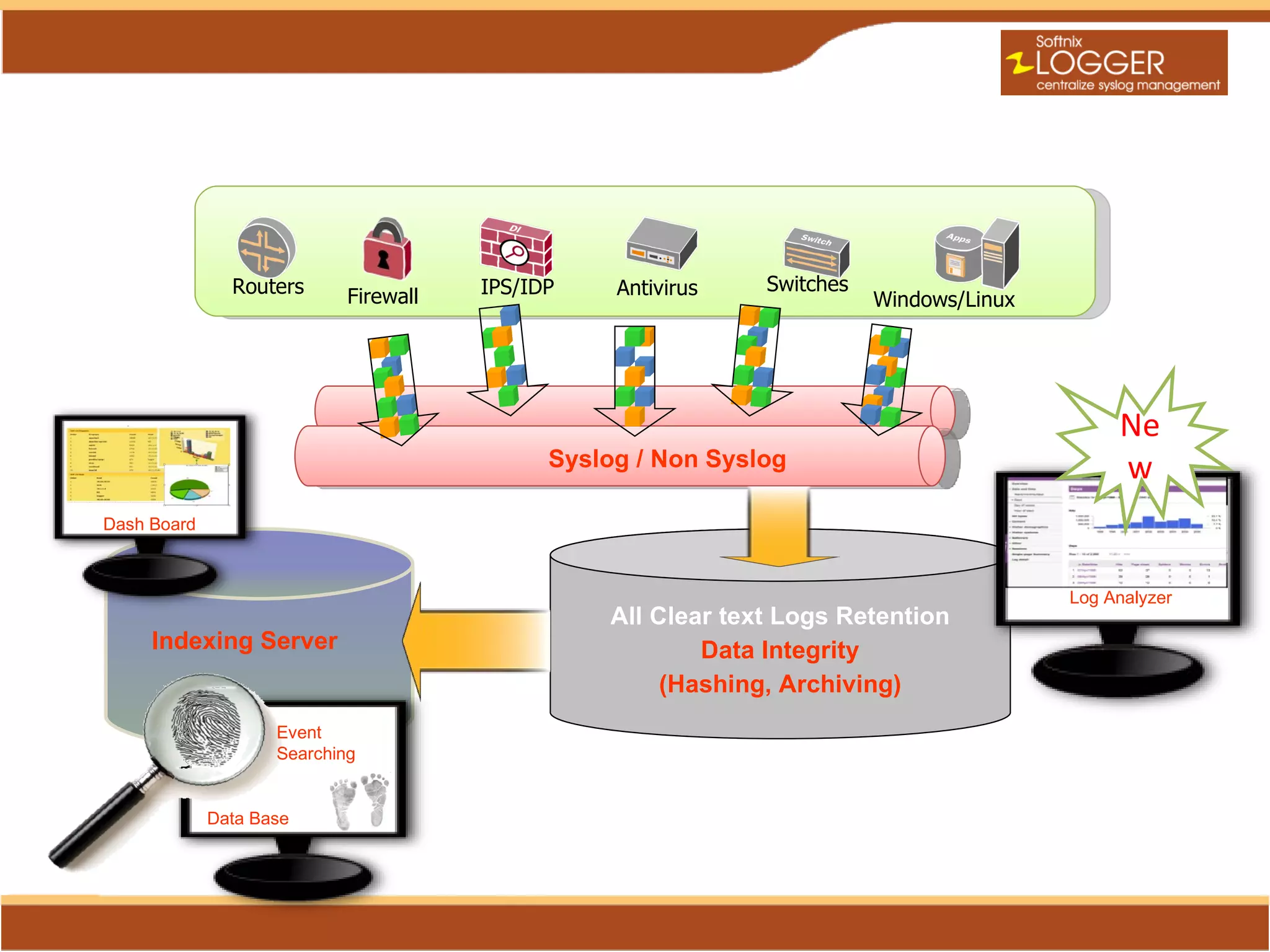
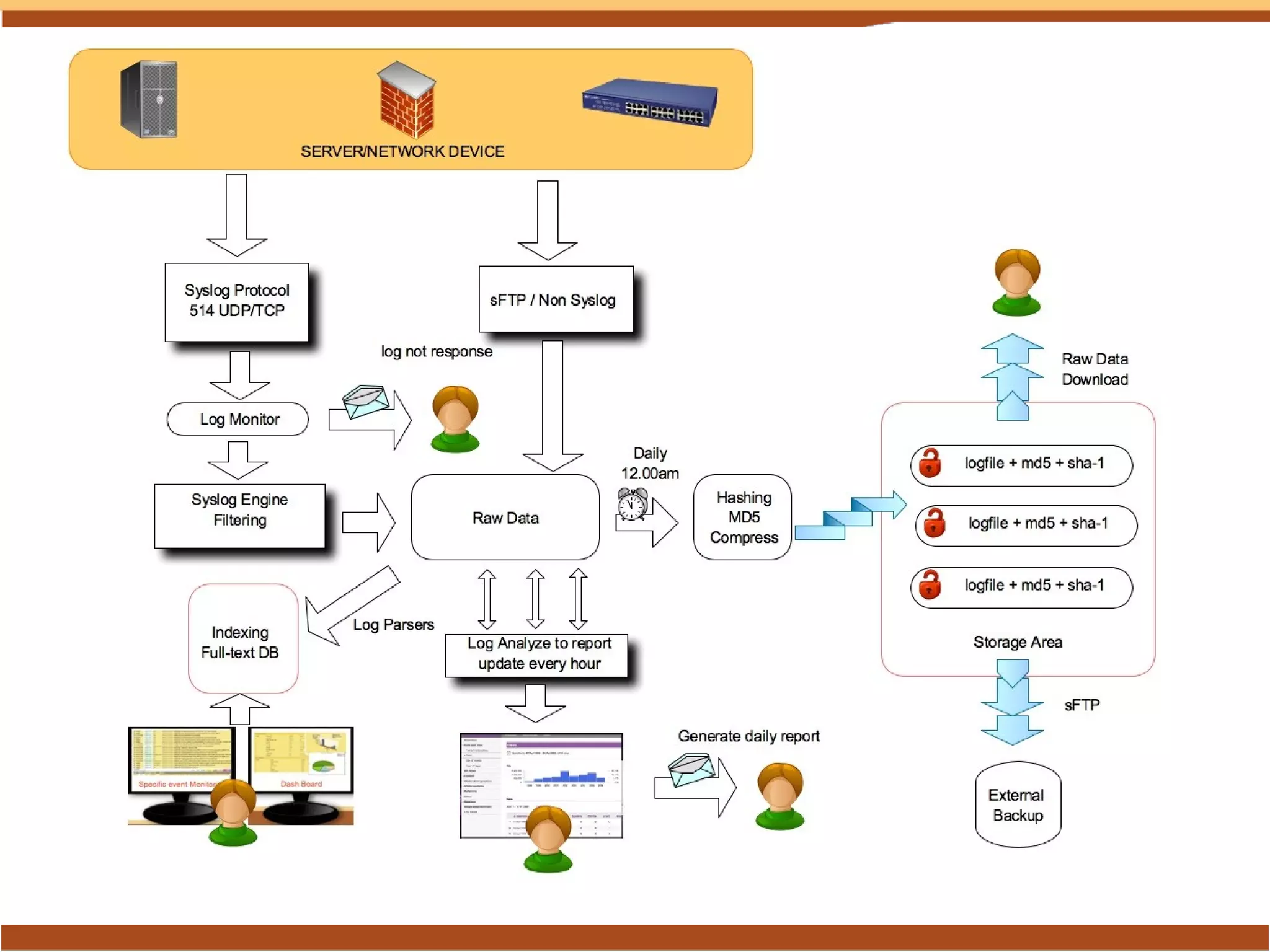
Routers                 IPS/IDP    Antivirus   Switches
                                    Firewall                                     Windows/Linux


                                                                                                      Ne
                                                     Syslog / Non Syslog                              w
Dash Board


                                                                                                 Log Analyzer
                                                         All Clear text Logs Retention
                 Indexing Server                                 Data Integrity
                                                              (Hashing, Archiving)
                            Event
                            Searching
  Web (HTTP/S)


                     Data Base
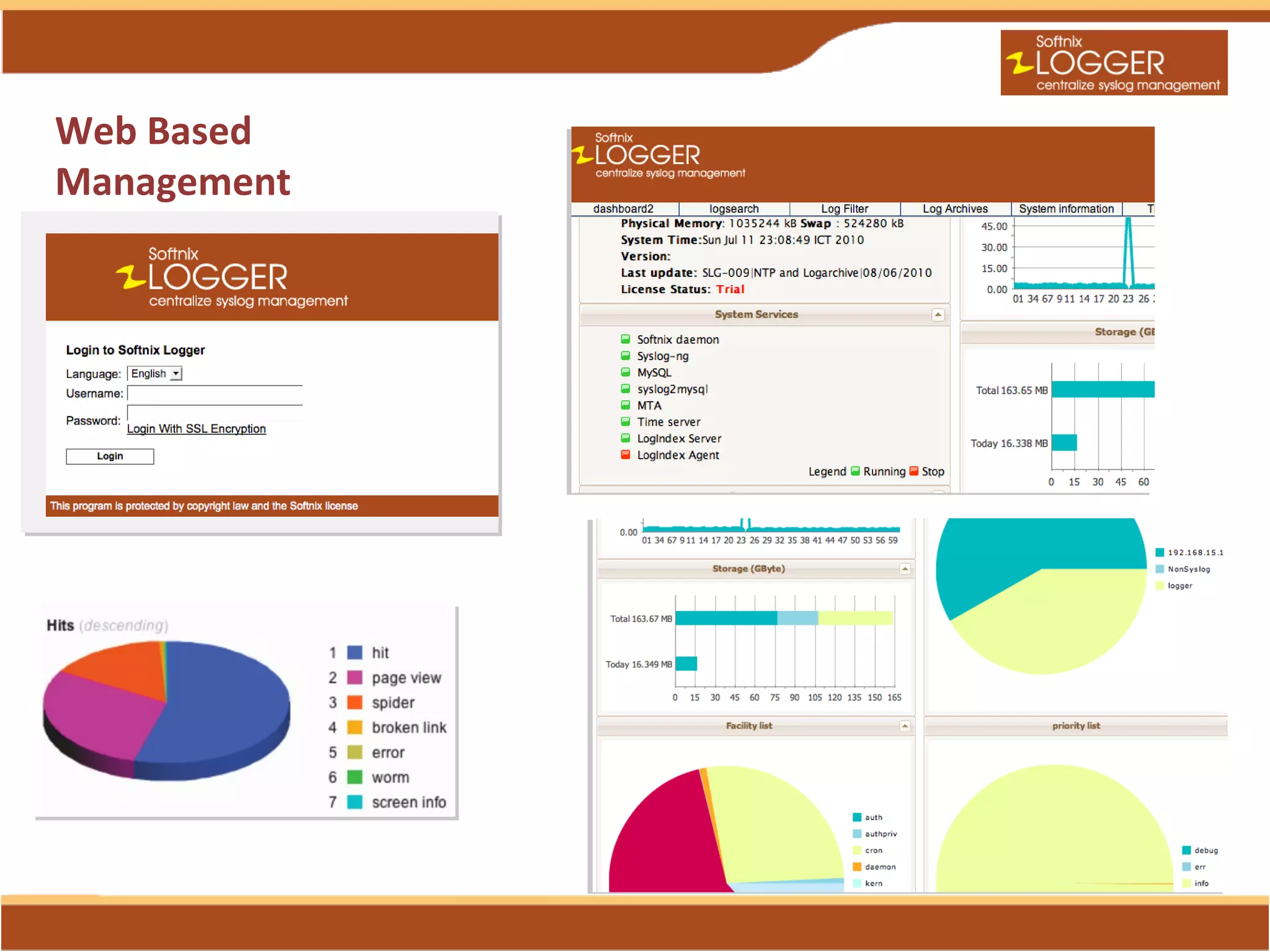
Web Based
Management
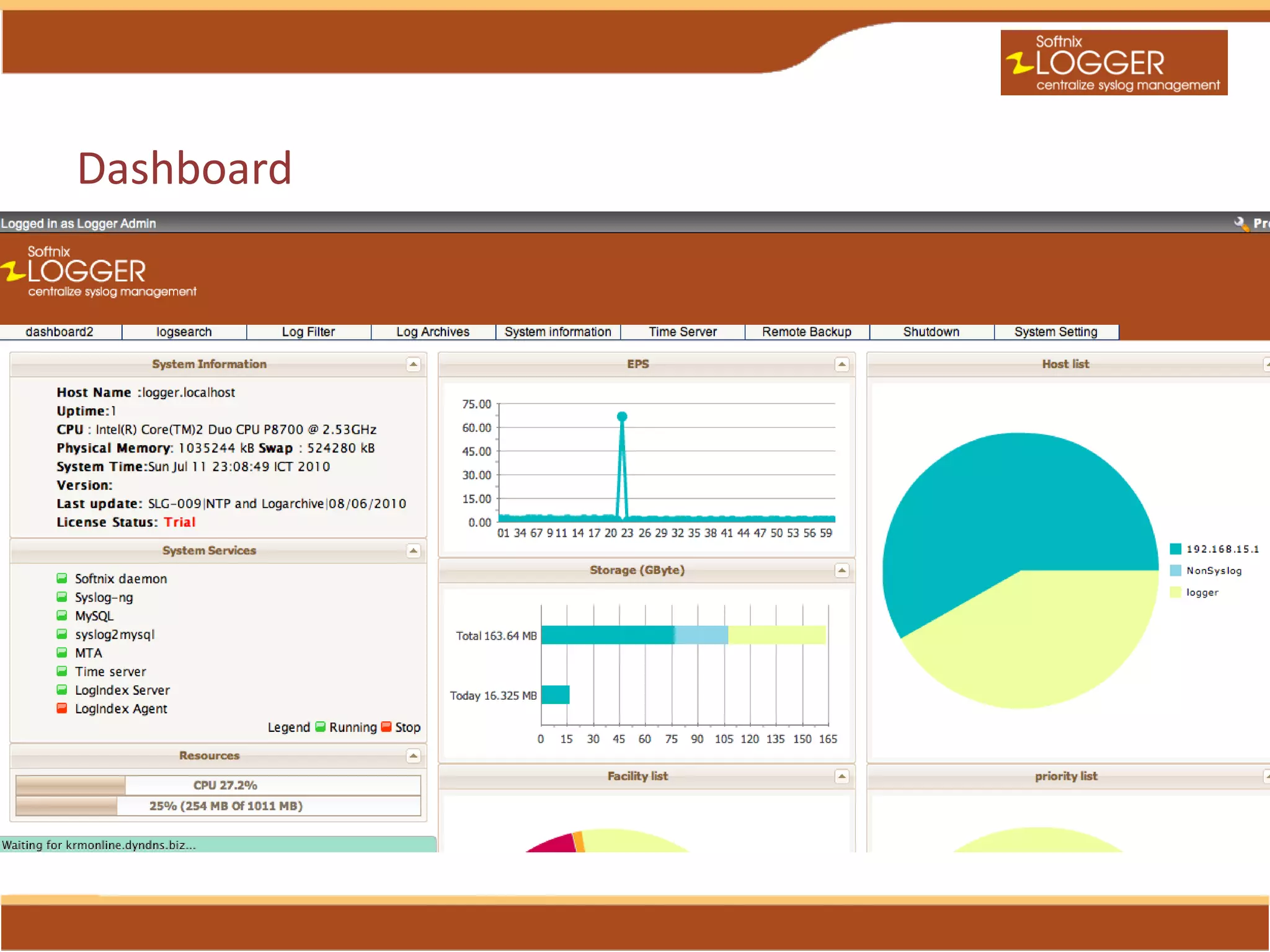
Dashboard
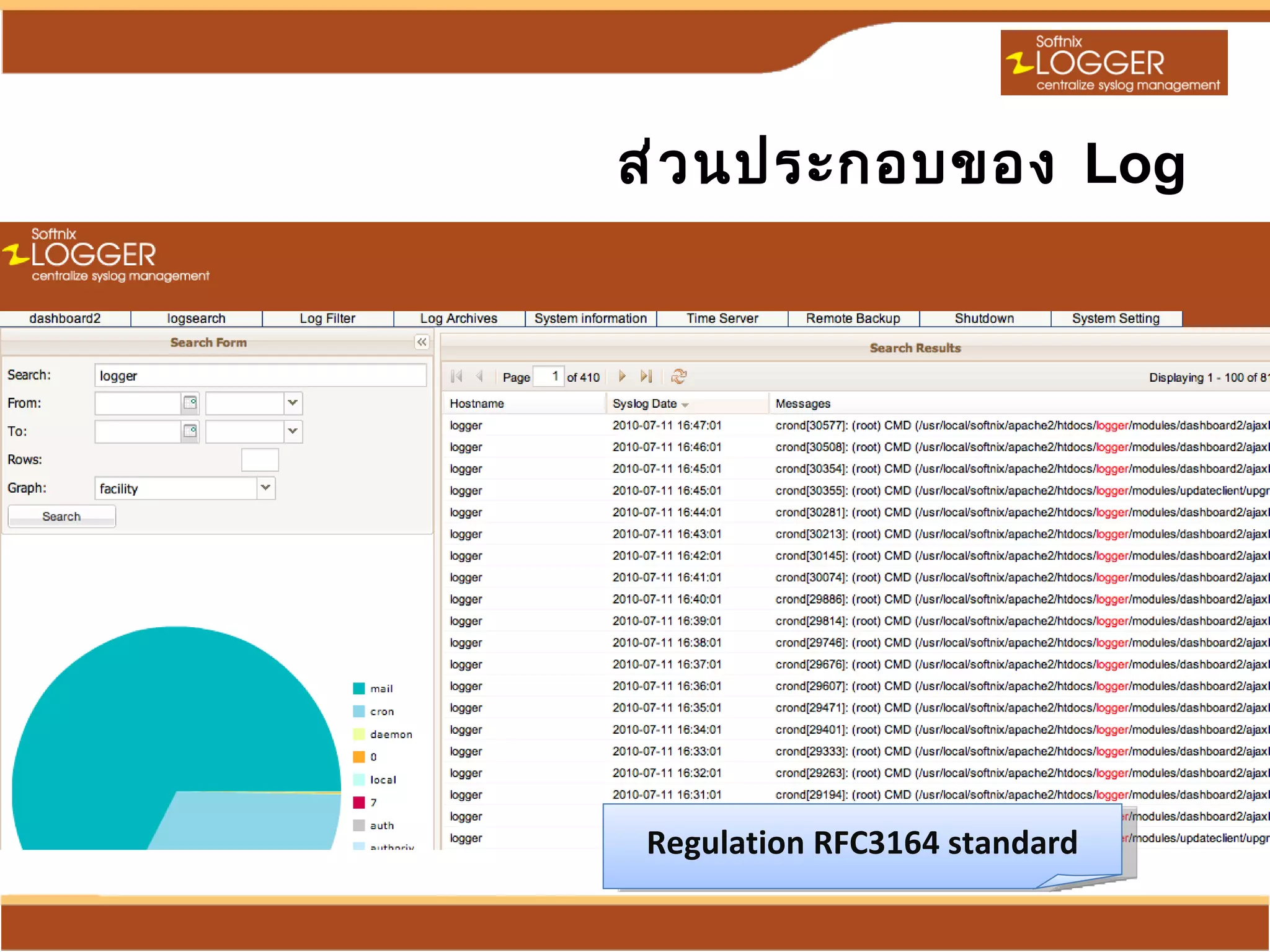
Regulation RFC3164 standard
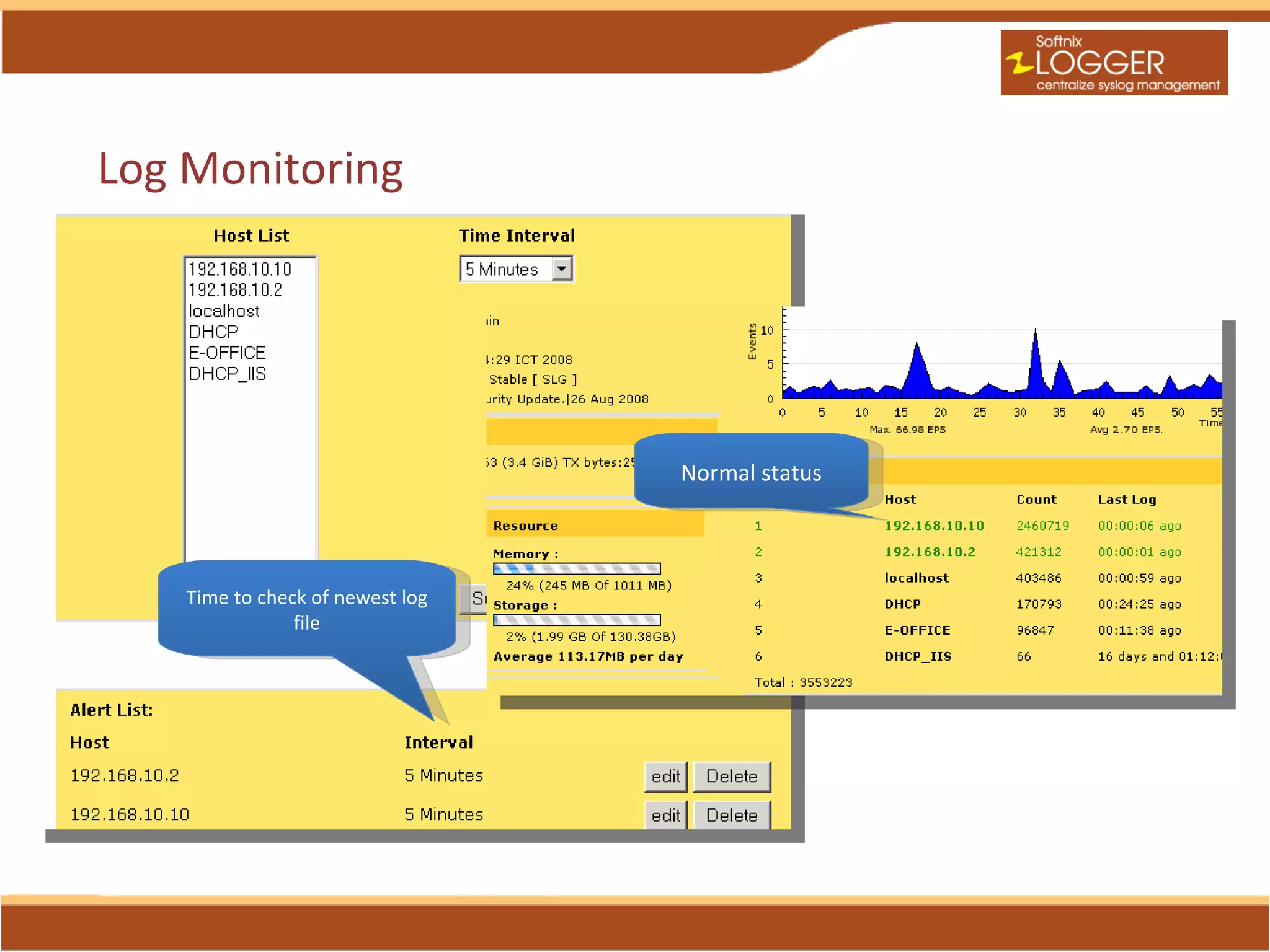
Log Monitoring


                                  Normal status


    Time to check of newest log
                file
Indexing Technology
• High-performance, full-featured text search
  engine library
• Fast , Reliable, Scalable, Query load
• Example search “host:web* AND id:[0 TO 10]”
• Support Replication and Distribution
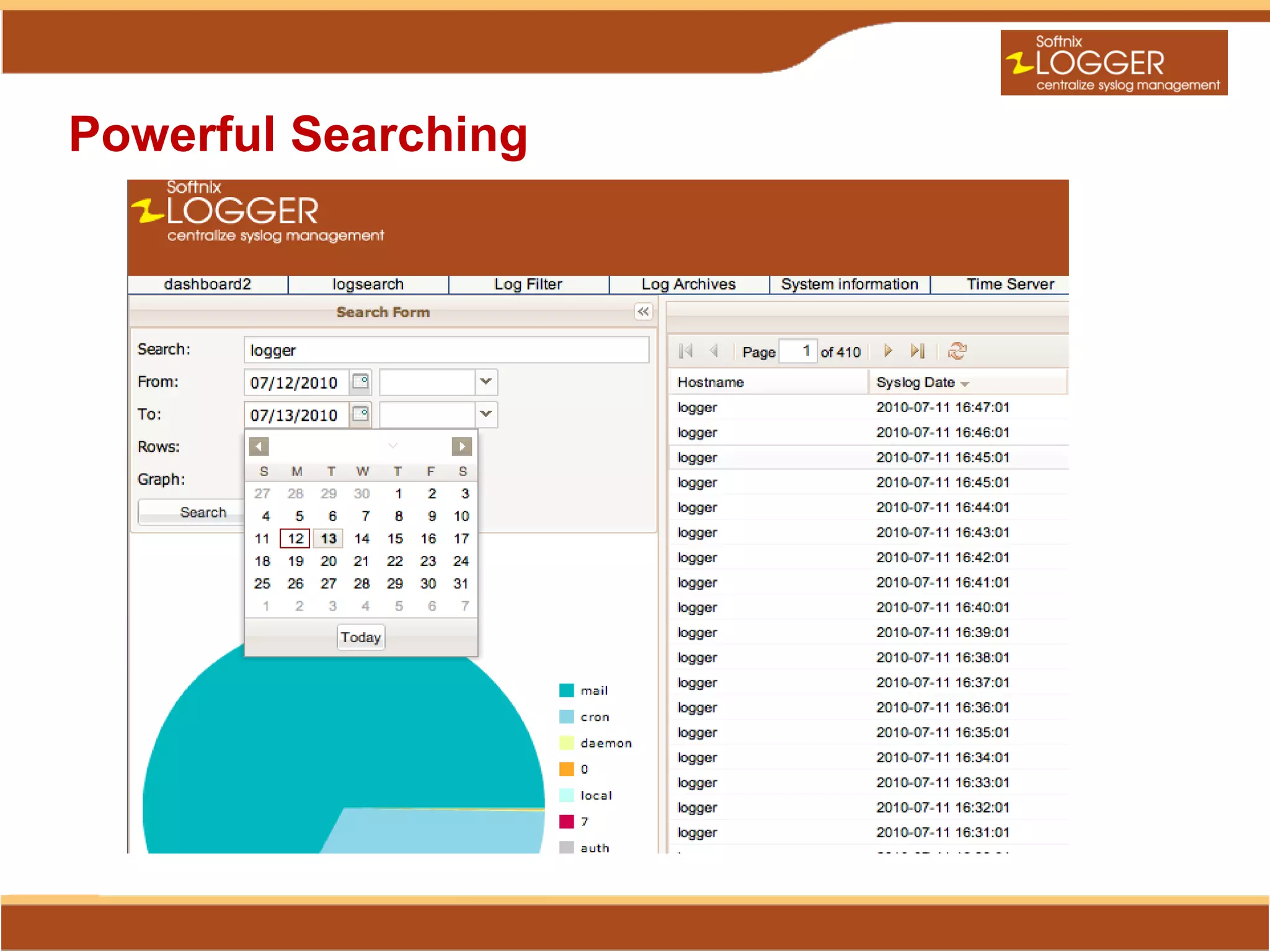
Powerful Searching
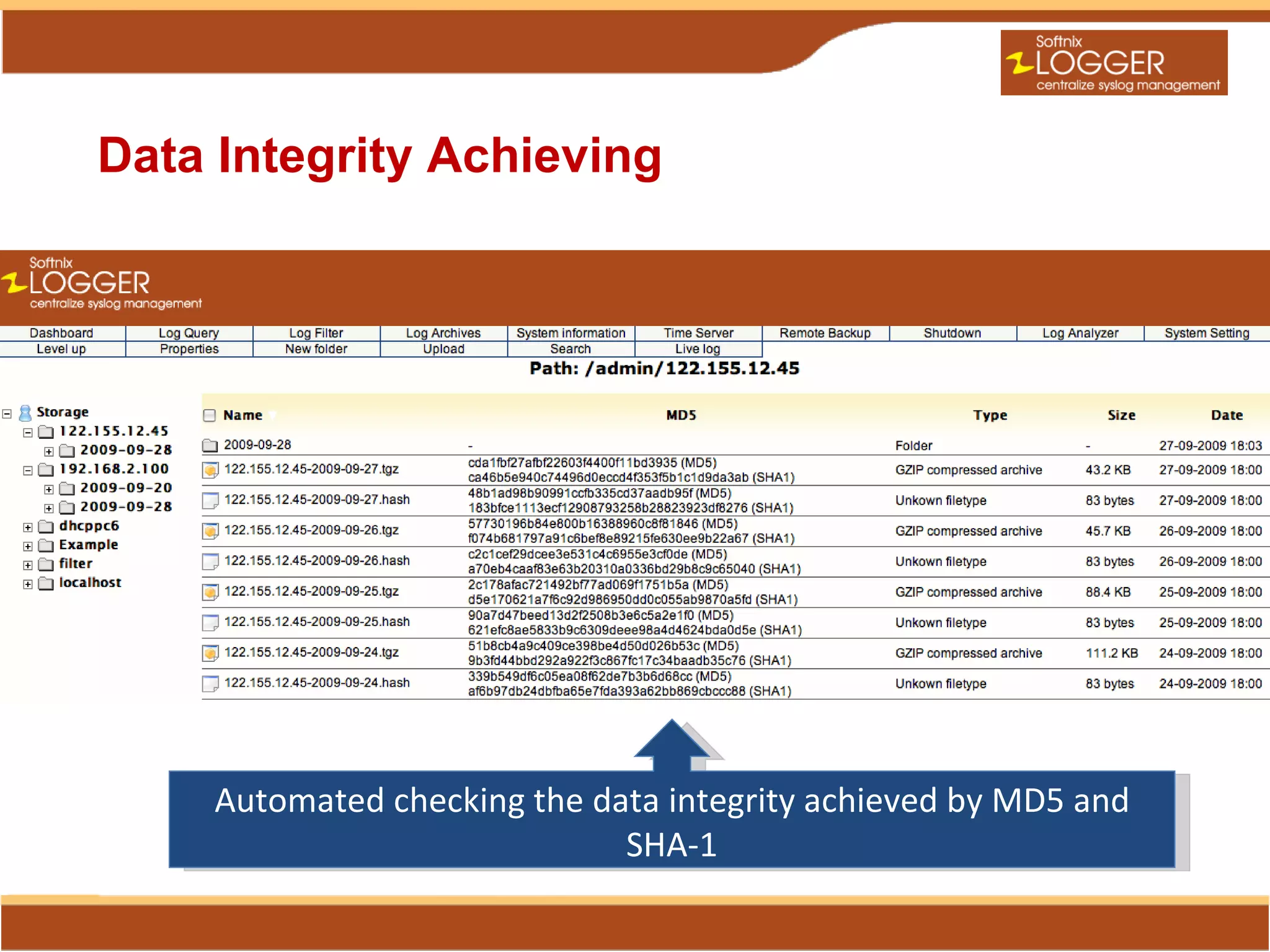
Data Integrity Achieving


    Automated checking the data integrity achieved by MD5 and
                             SHA-1
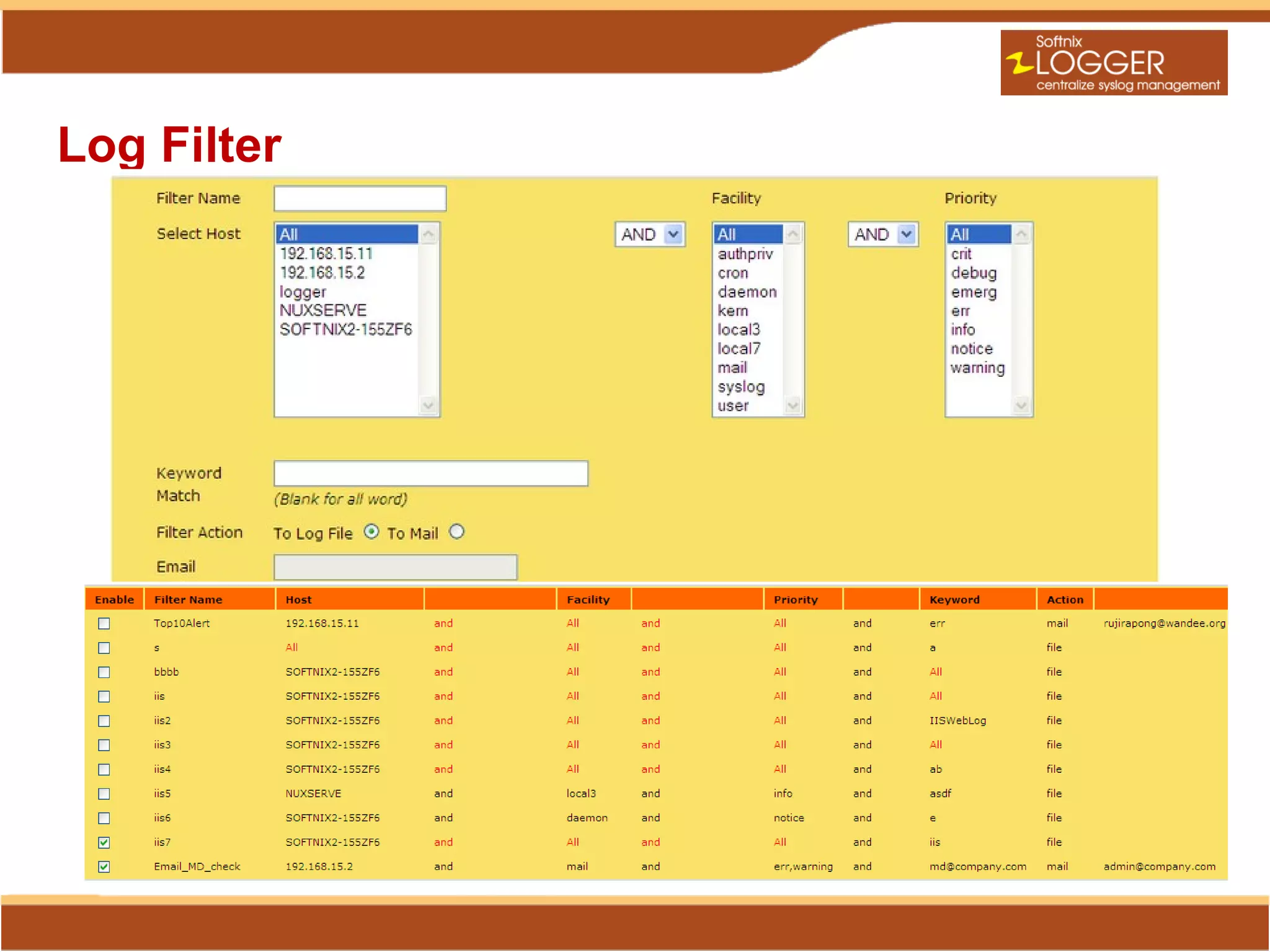
Log Filter
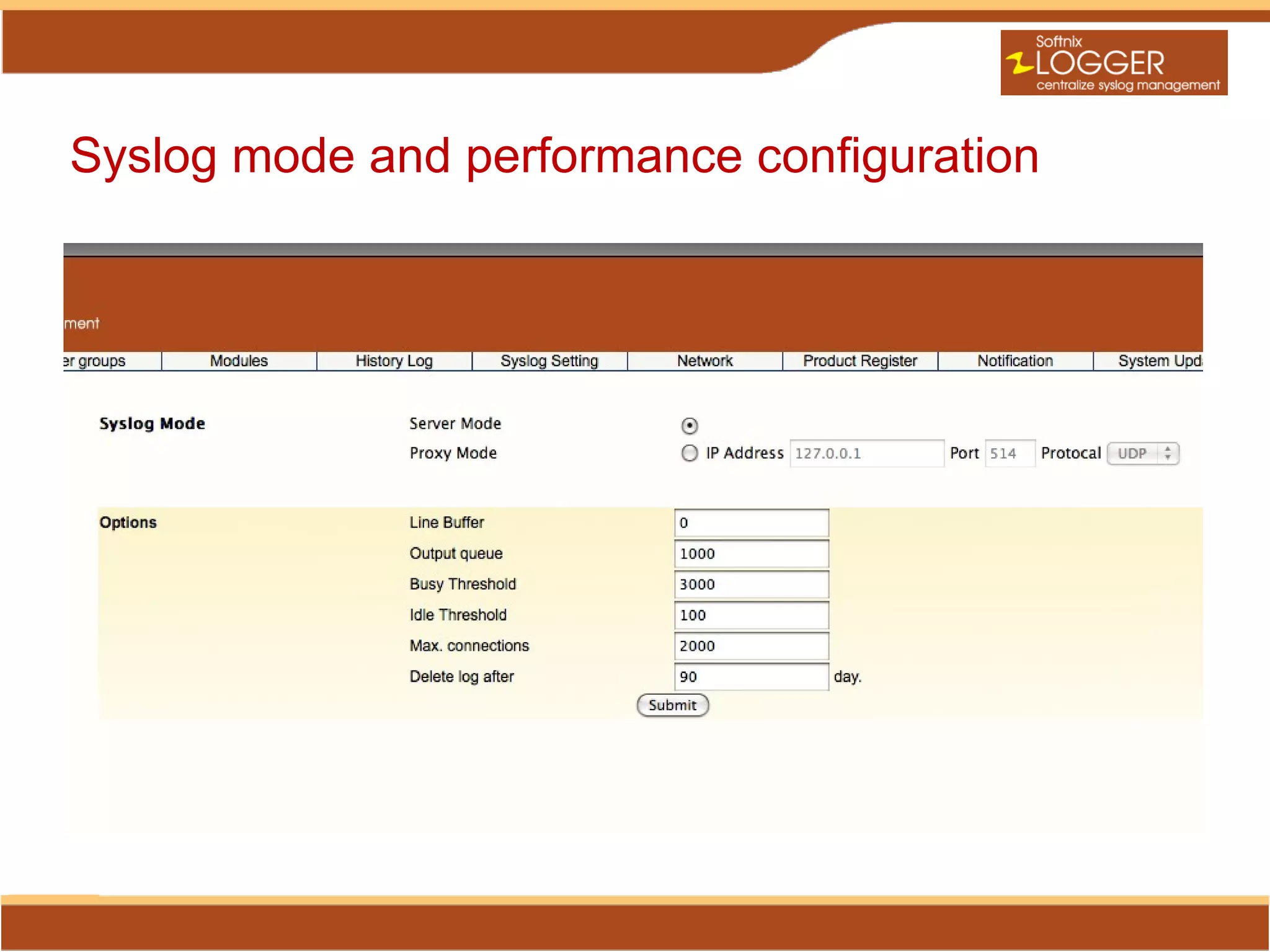
Syslog mode and performance configuration
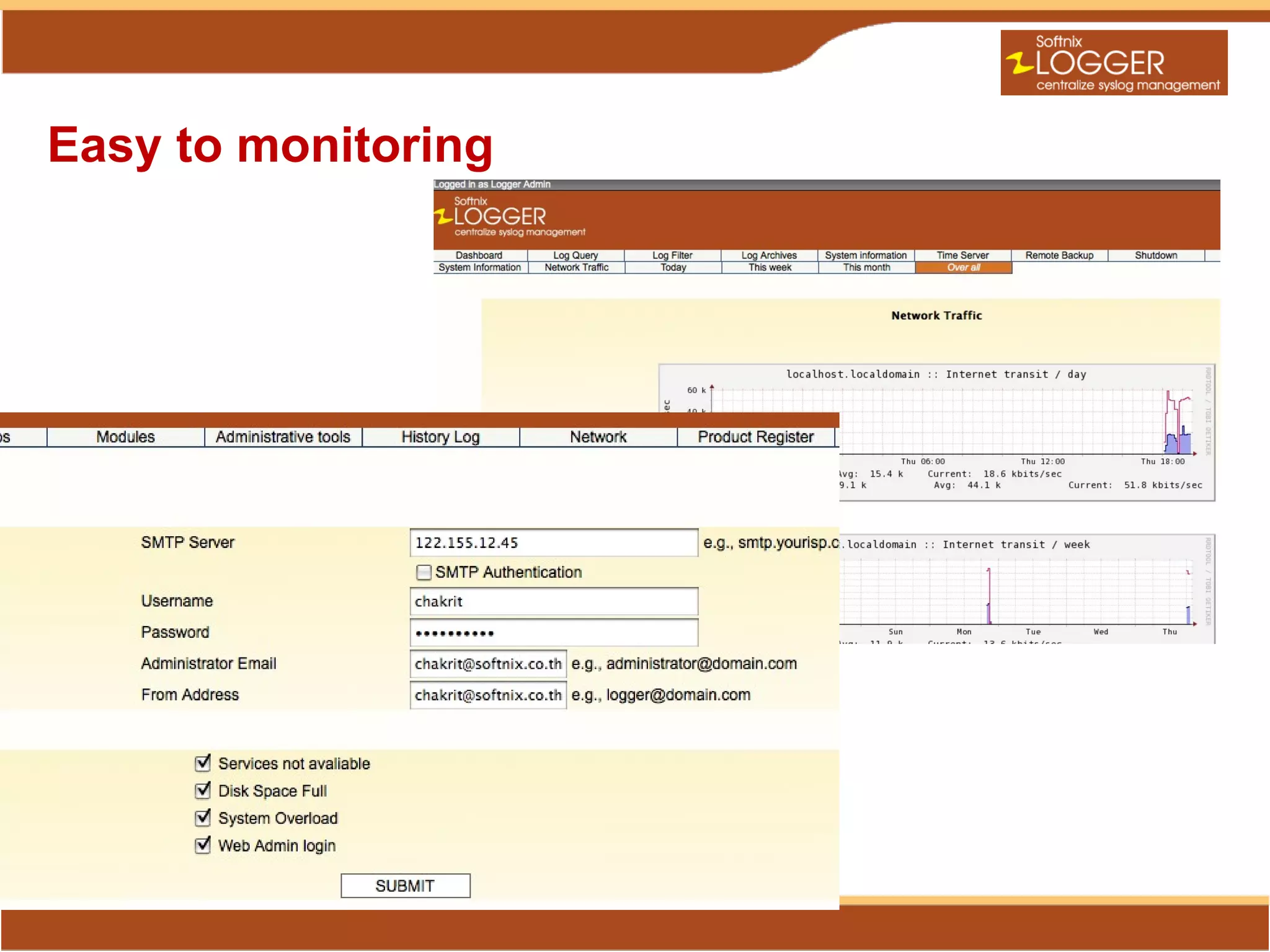
Easy to monitoring
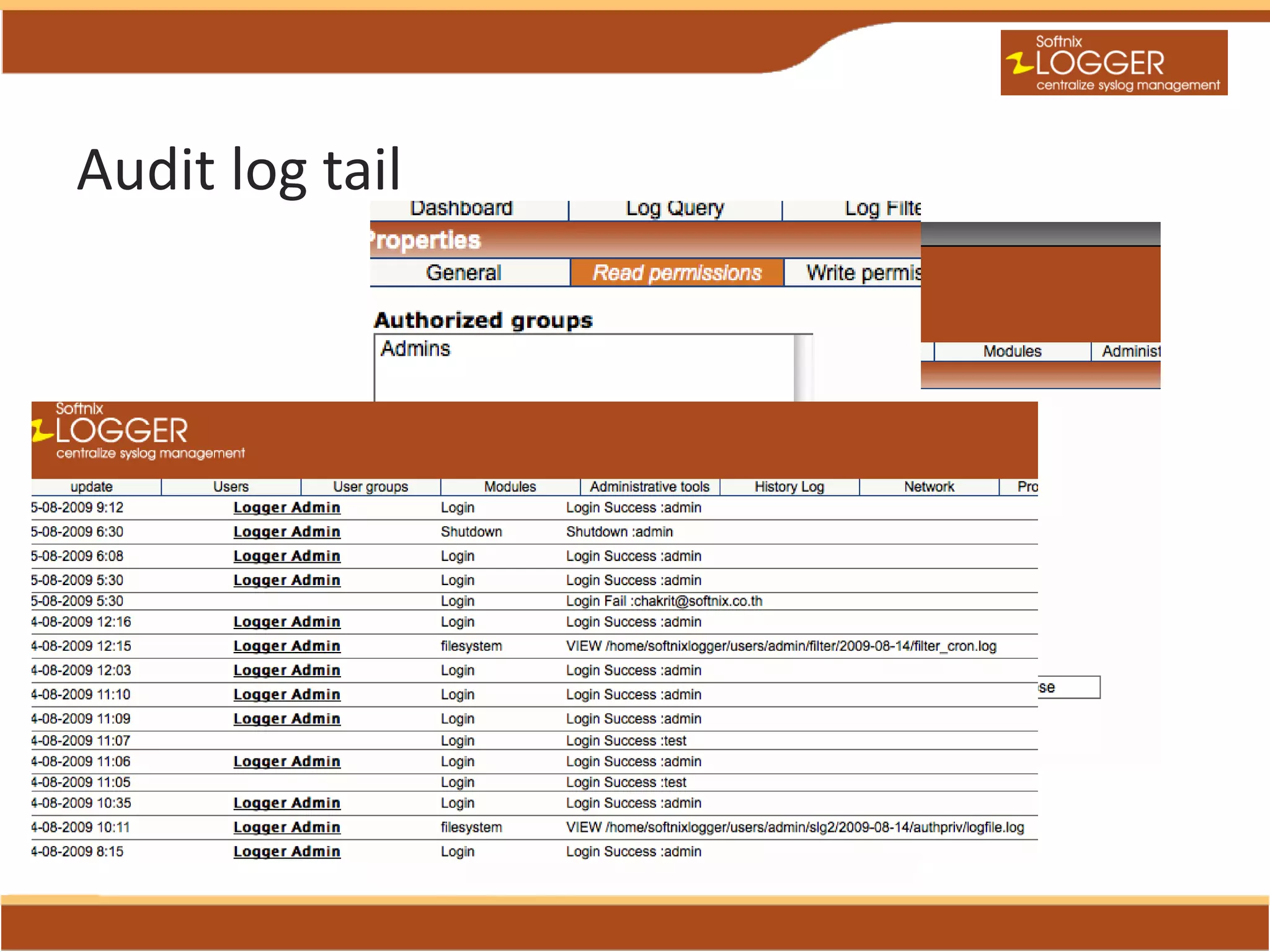
Audit log tail
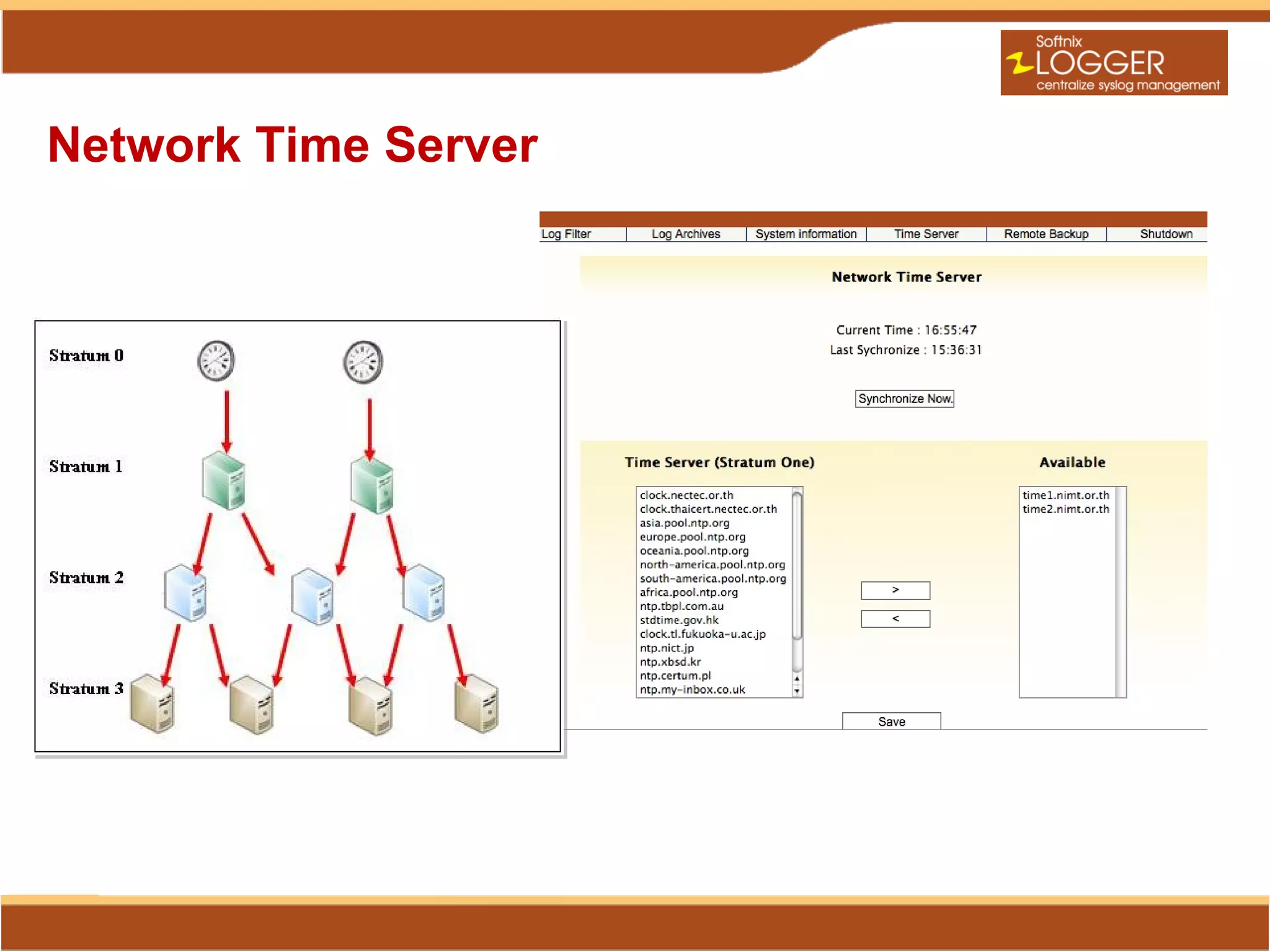
Network Time Server
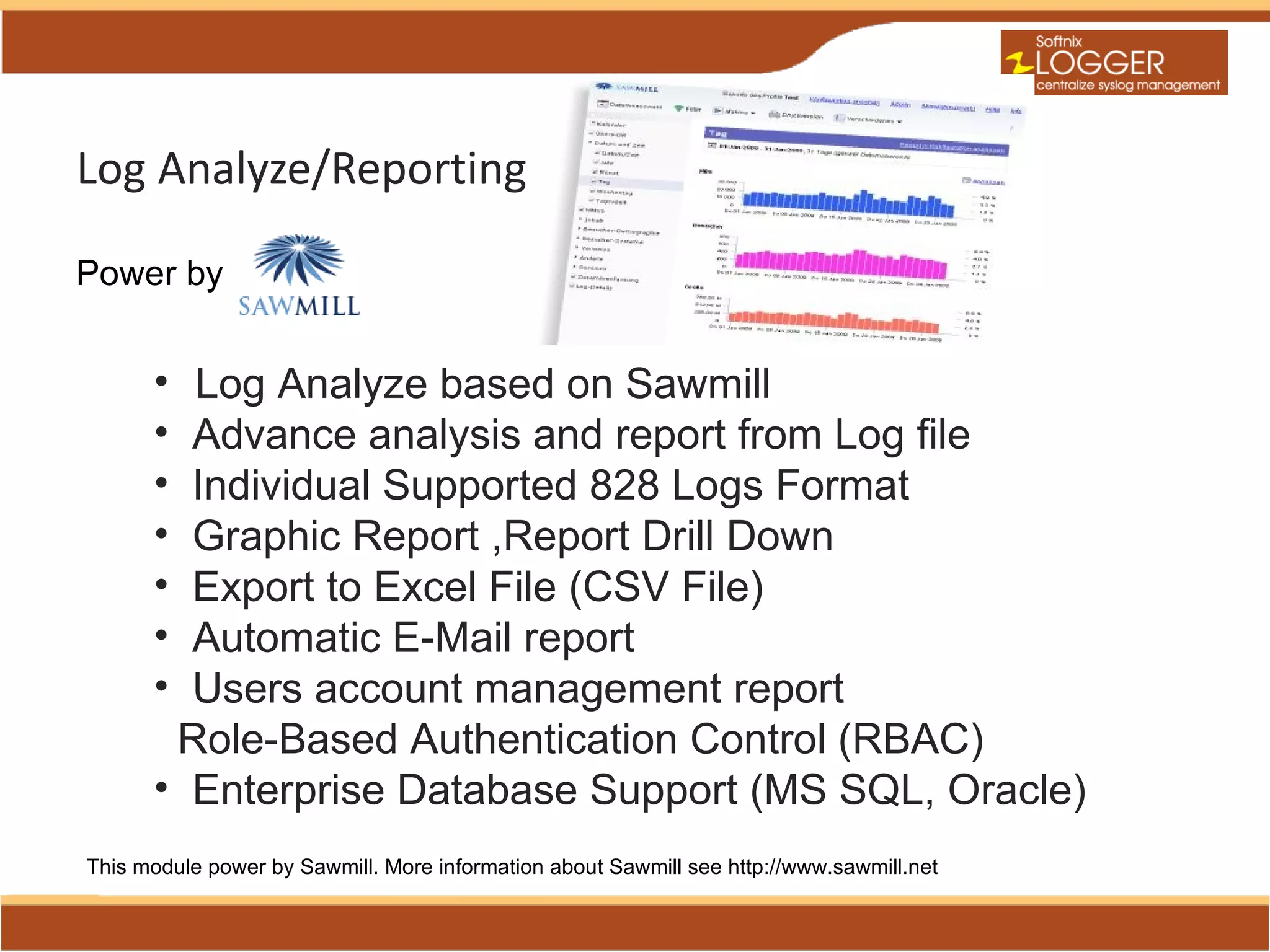
Log Analyze/Reporting

Power by


      • Log Analyze based on Sawmill
      • Advance analysis and report from Log file
      • Individual Supported 828 Logs Format
      • Graphic Report ,Report Drill Down
      • Export to Excel File (CSV File)
      • Automatic E-Mail report
      • Users account management report
       Role-Based Authentication Control (RBAC)
      • Enterprise Database Support (MS SQL, Oracle)
This module power by Sawmill. More information about Sawmill see http://www.sawmill.net
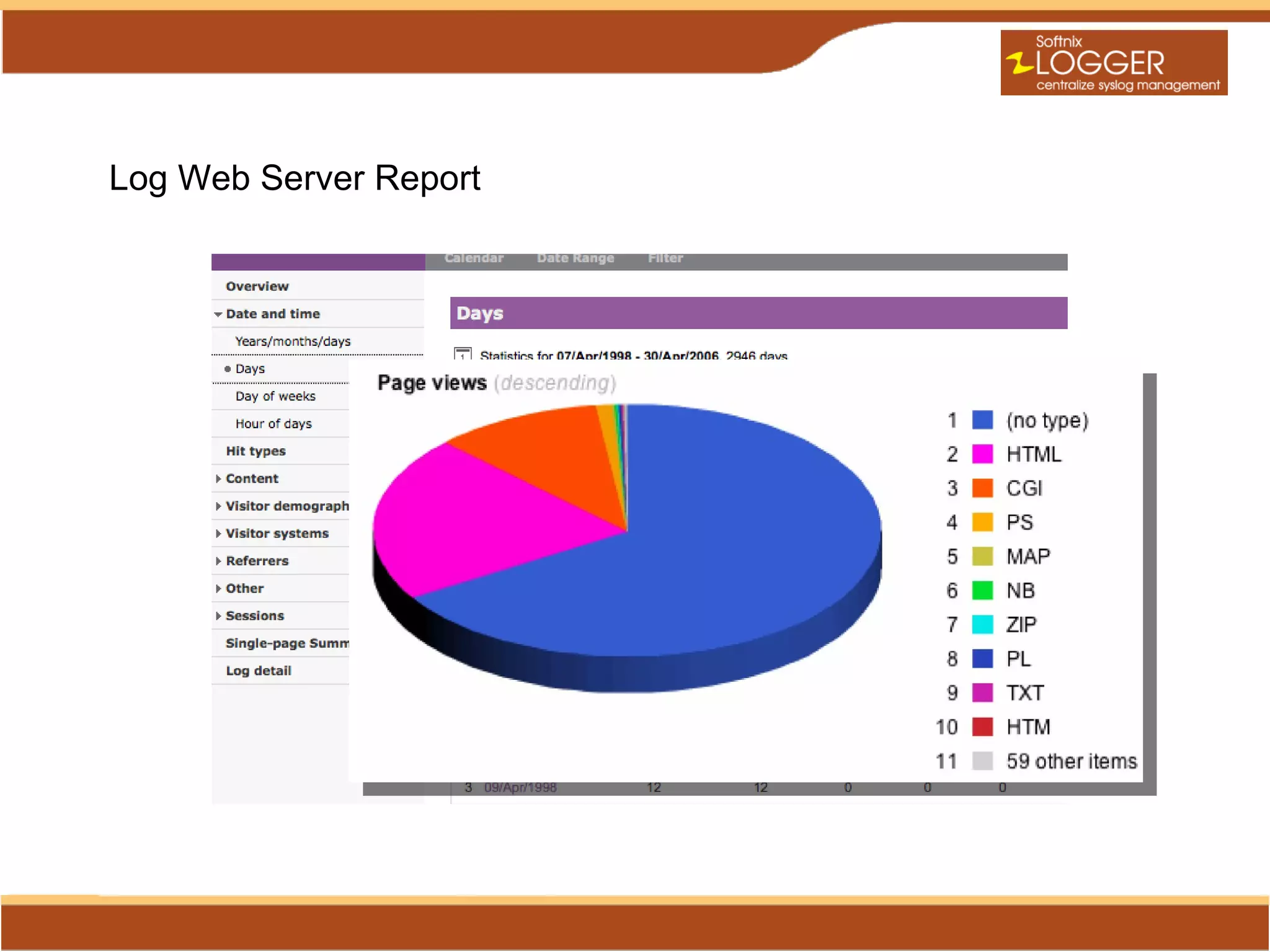
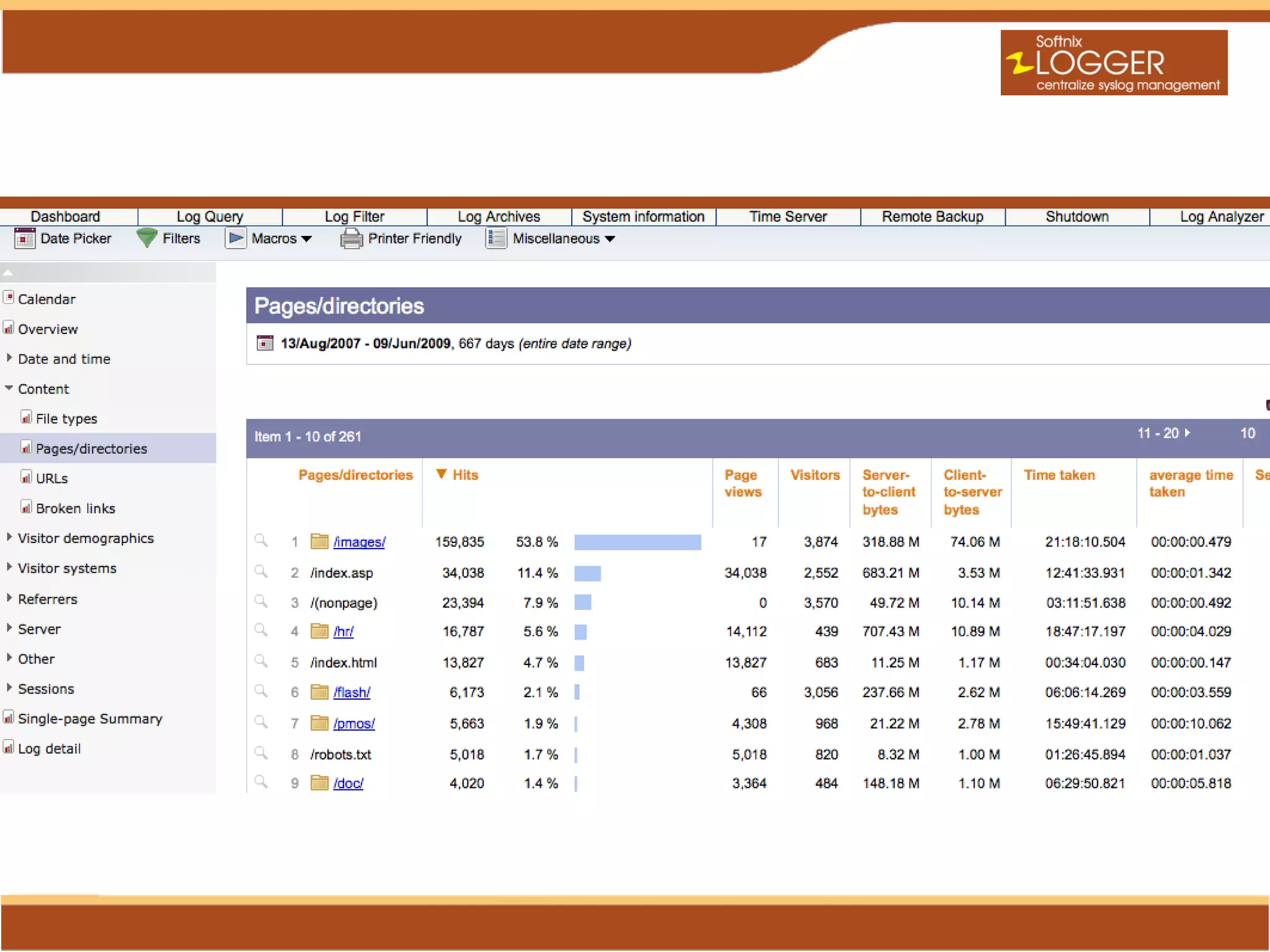
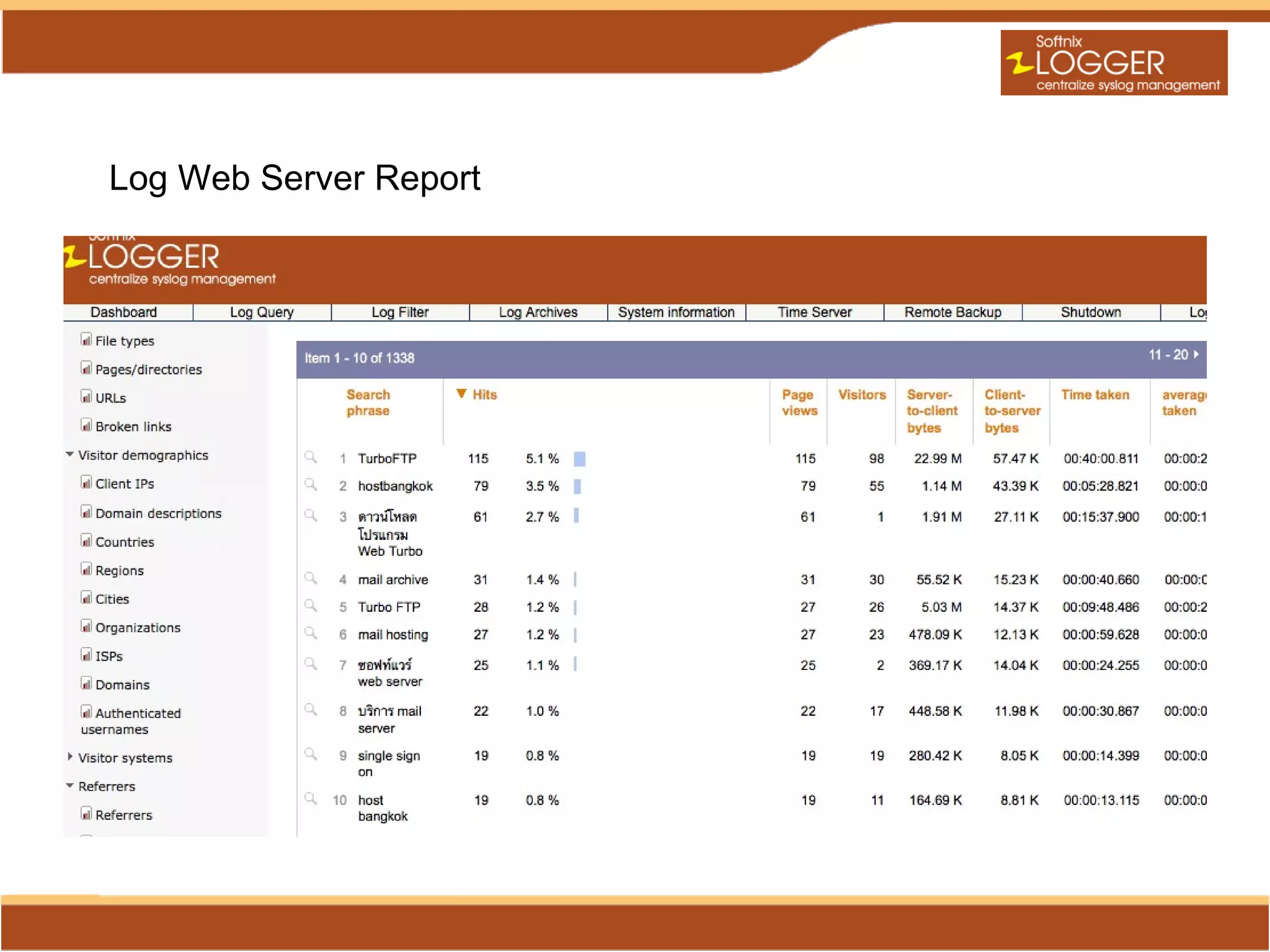
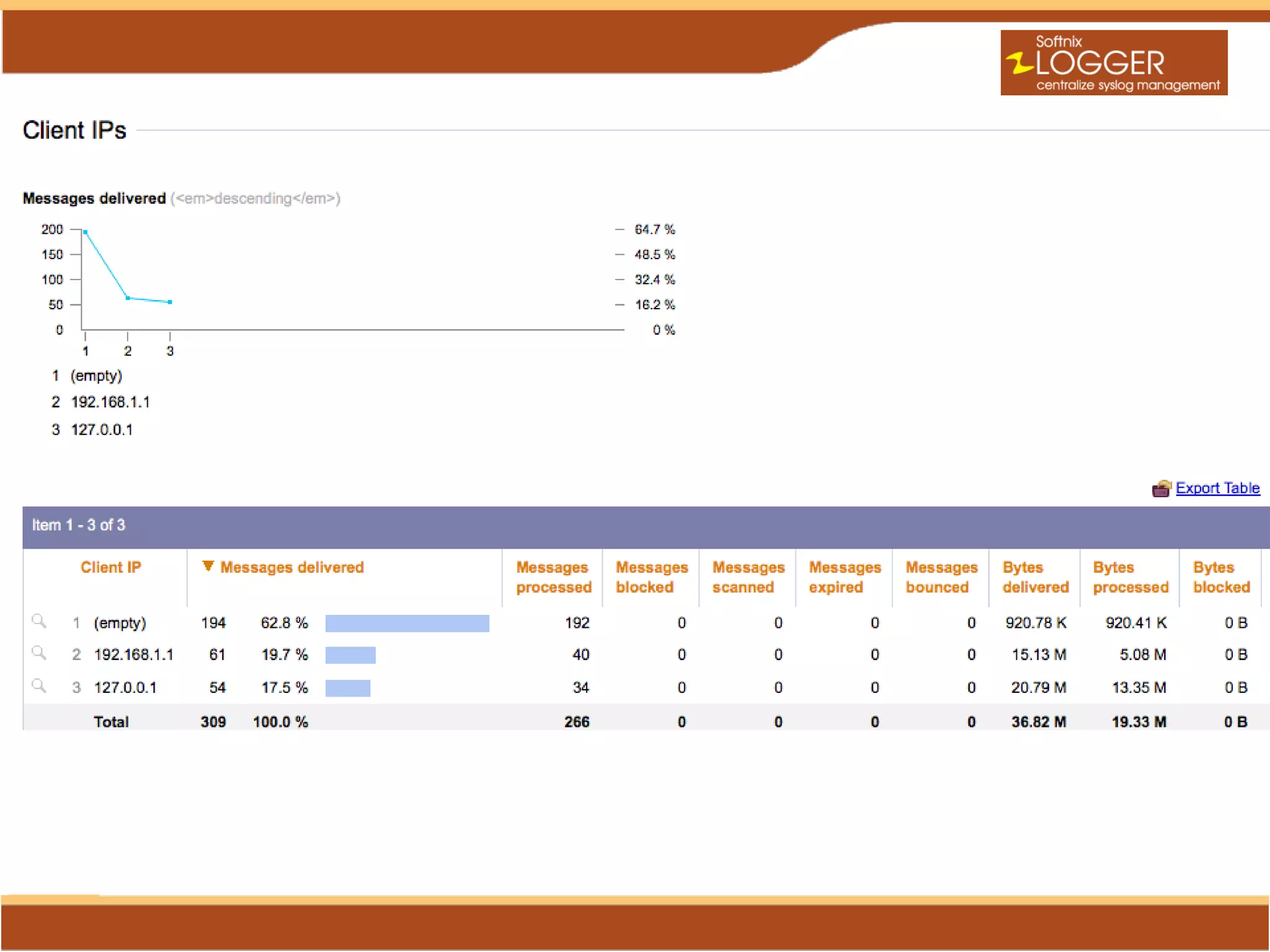
Log Web Server Report
Proxy Log Report
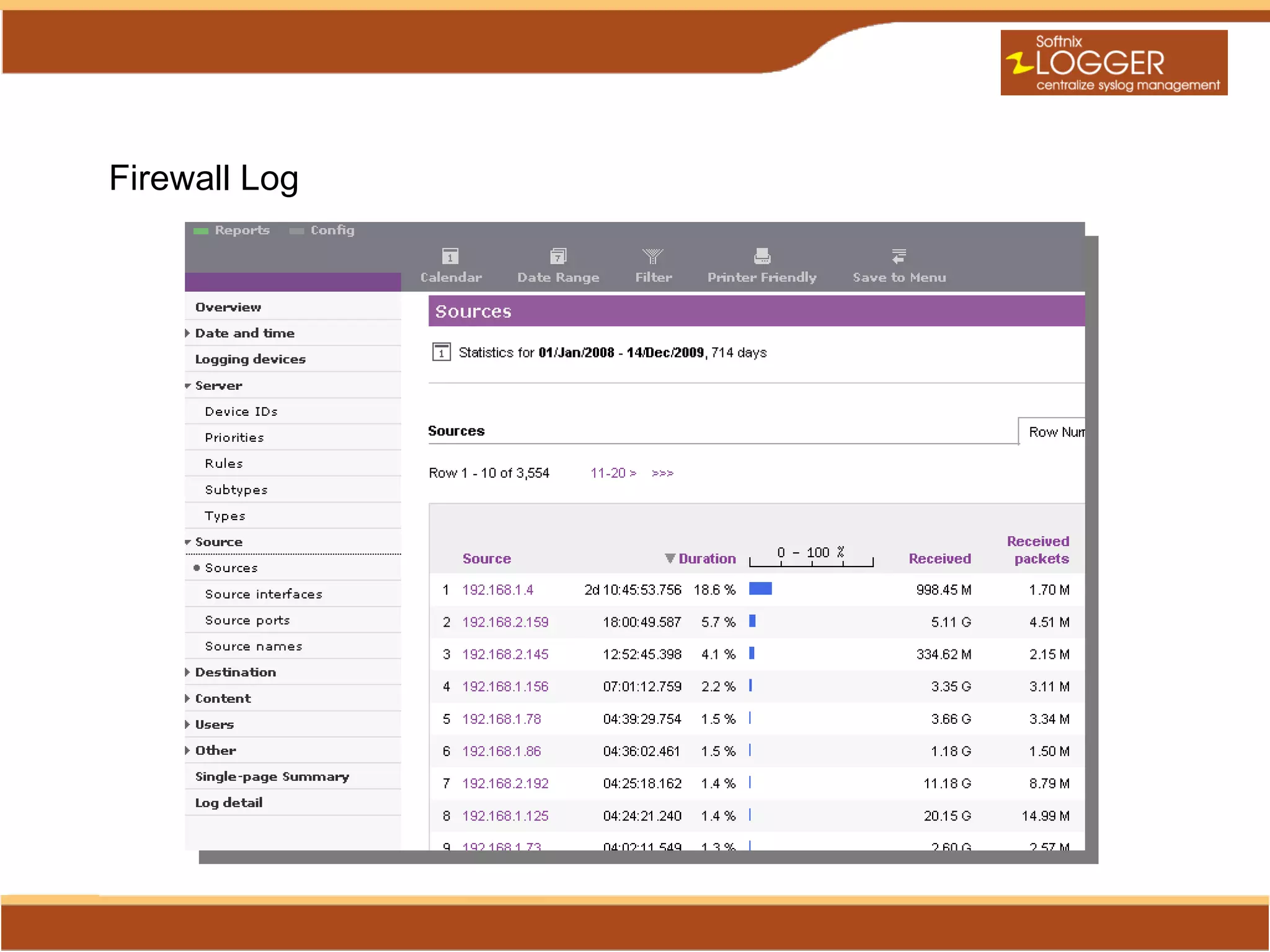
Firewall Log
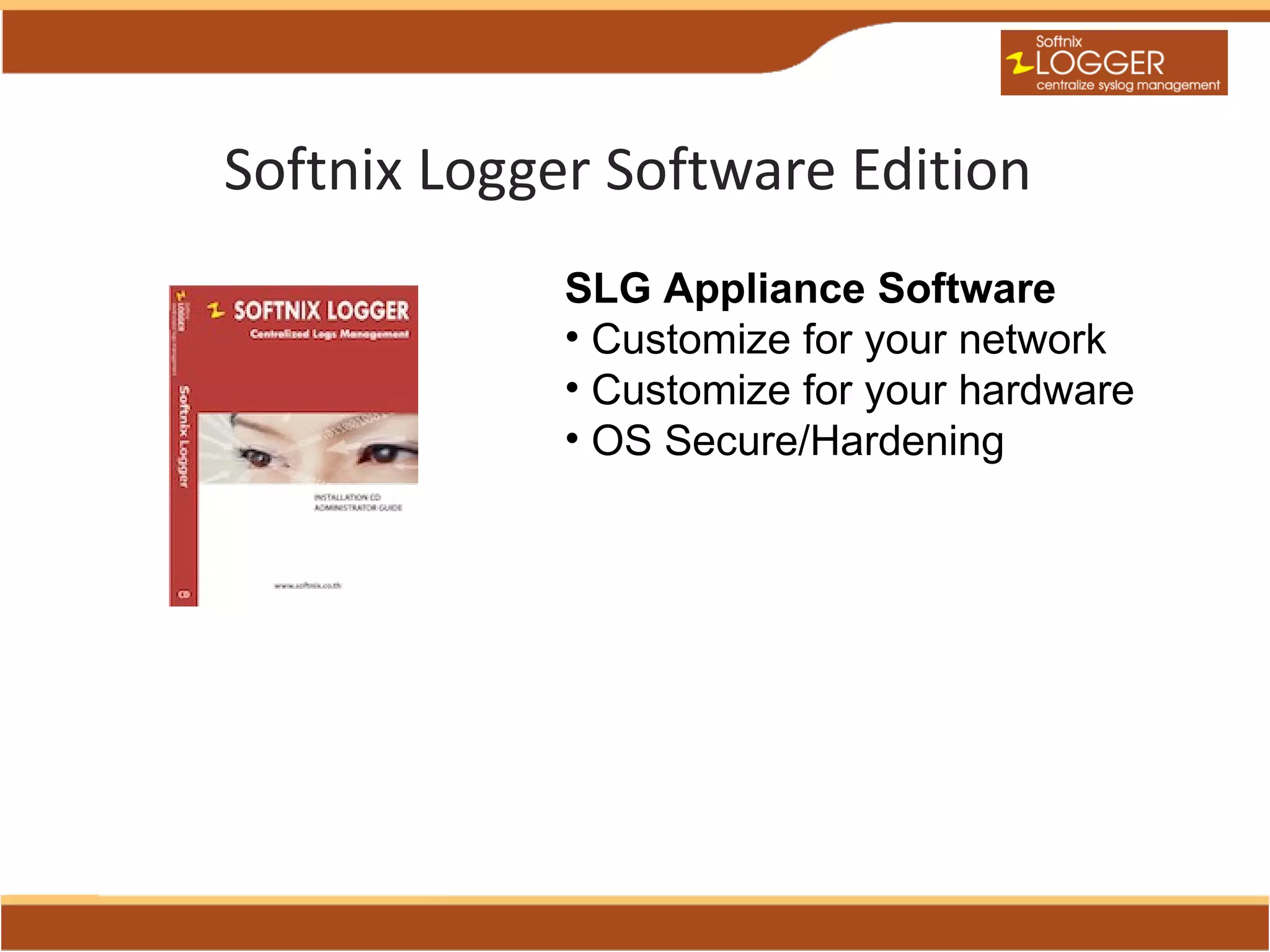
Softnix Logger Software Edition
             SLG Appliance Software
             • Customize for your network
             • Customize for your hardware
             • OS Secure/Hardening
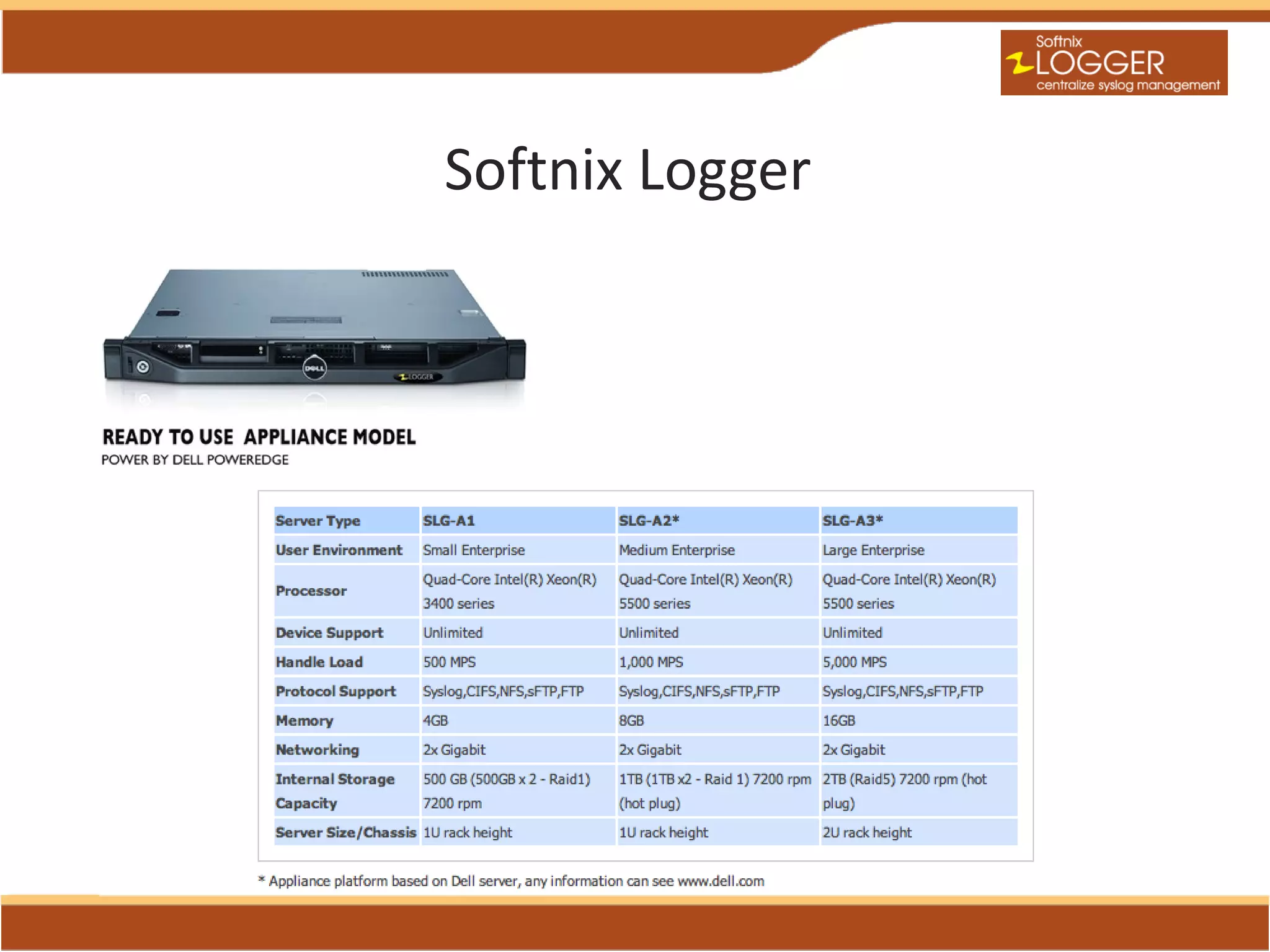
Softnix Logger
Softnix Logger
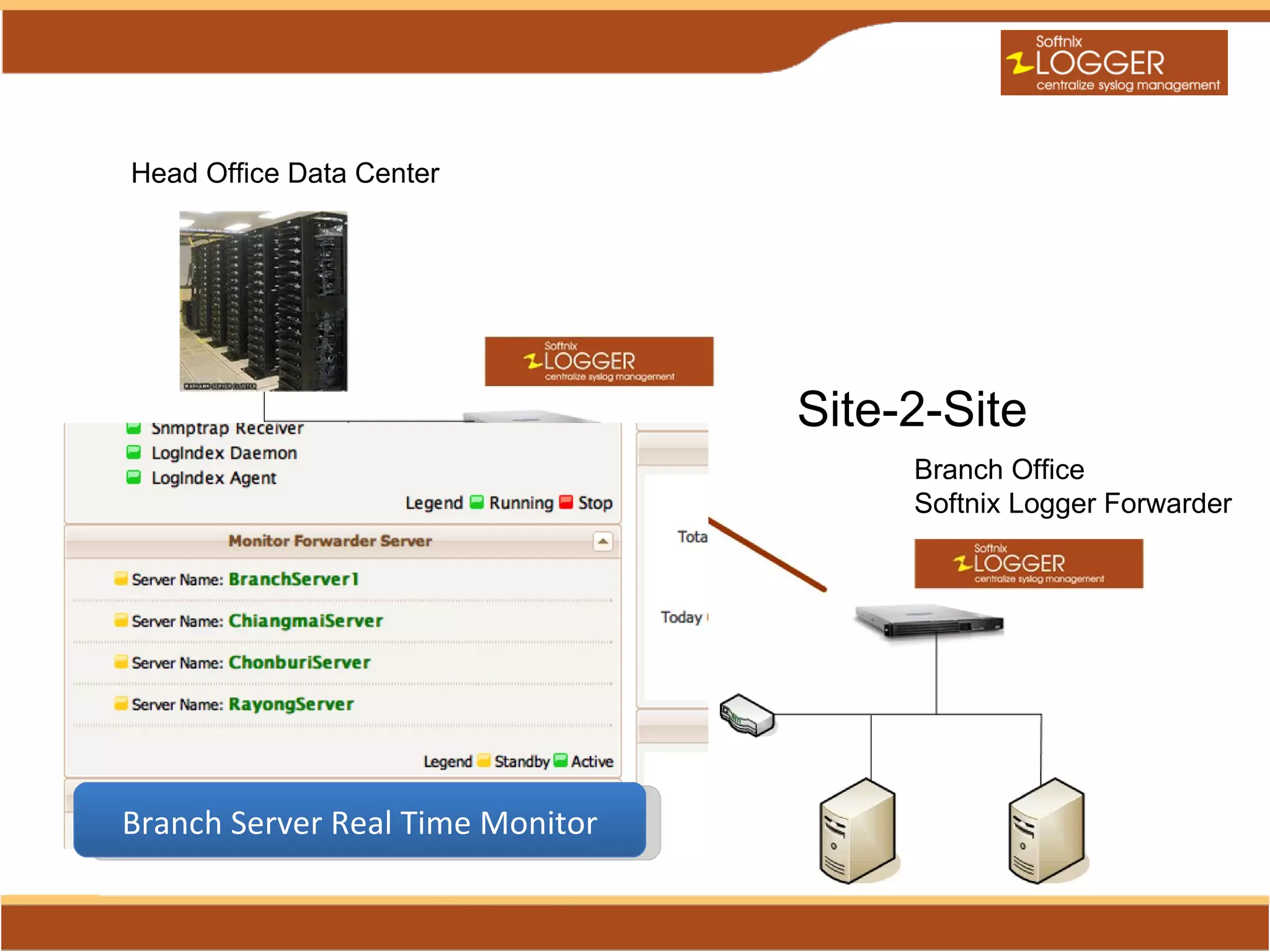
Deployment Solution
Head Office Data Center


                                  Site-2-Site
                                       Branch Office
                                       Softnix Logger Forwarder


Branch Server Real Time Monitor
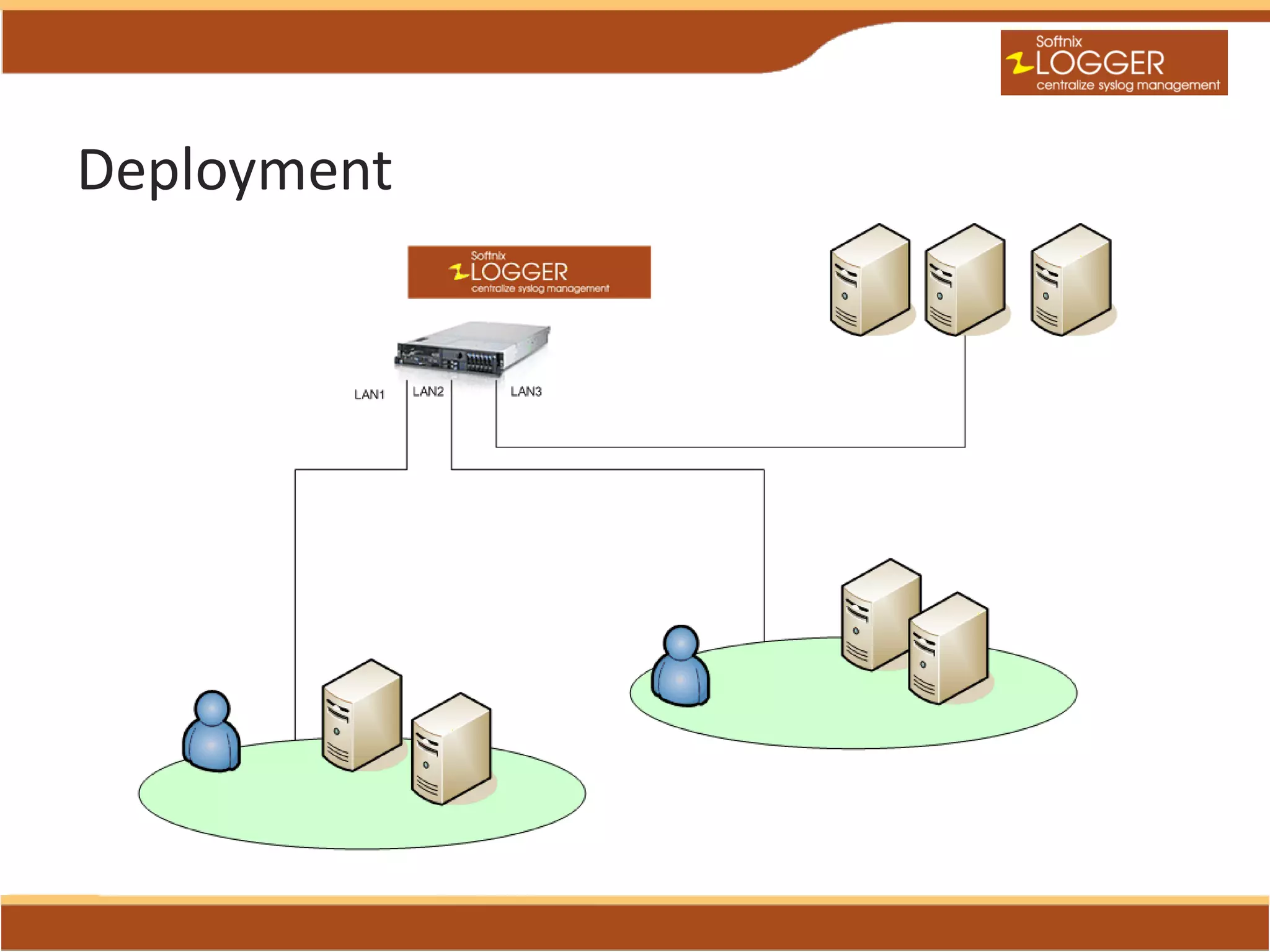
Deployment
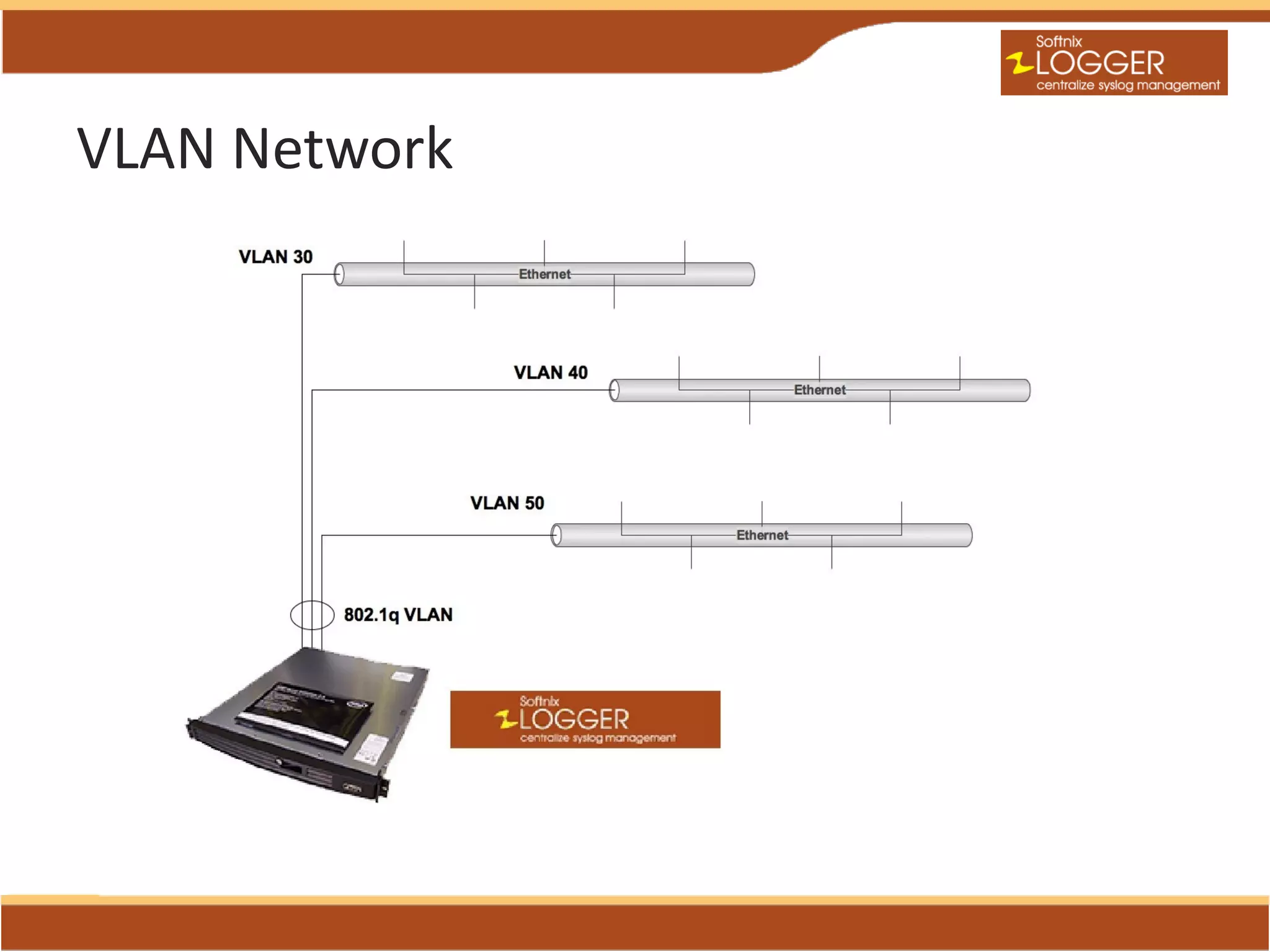
VLAN Network
Licensing
Softnix Logger Base License
• Unlimited Device Client
• License based on data volume

Log Analyze License (Optional)
• Licensing based on Profiles
• Lite Edition (Max. 5 Profiles)
• Professional Edition (Max. Unlimited Profiles)
• Enterprise Edition (Max. Unlimited Profiles)
     Database SQL Supported
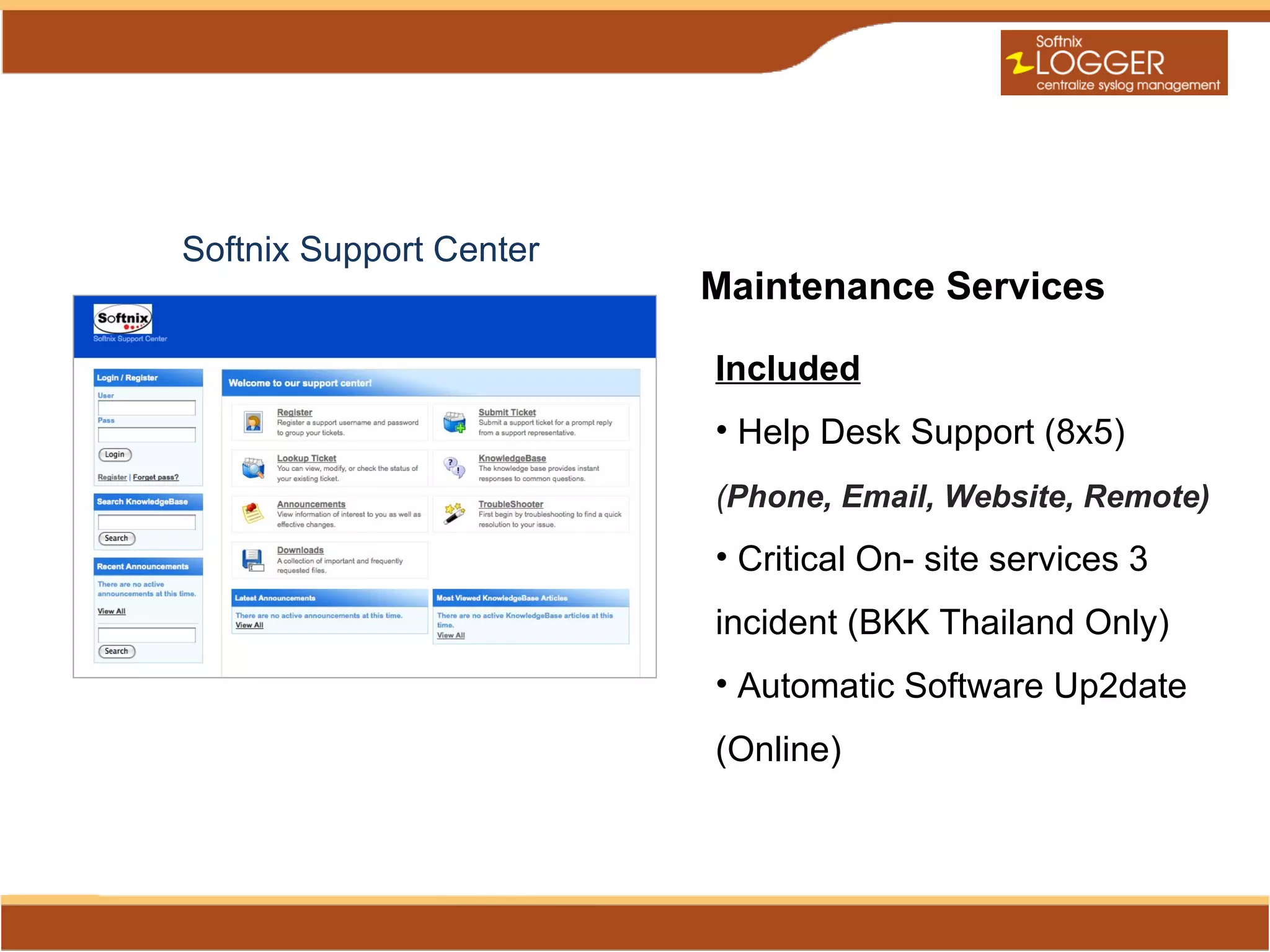
Softnix Support Center
                         Maintenance Services

                         Included
                         • Help Desk Support (8x5)
                         (Phone, Email, Website, Remote)
                         • Critical On- site services 3
                         incident (BKK Thailand Only)
                         • Automatic Software Up2date
                         (Online)
Summary of Softnix Logger
•   Simplified administration
•   Simplified Log Collection
•   Best Choice for TCO
•   CIA (Confidentially, Integrity, Availability)
•   Increase system security

Softnix Logger Centralized Log Management

  • 2.
    Function: - Log Collector -Data retention - Data Searching - System Alert SEM Function - Monthly report (log collector) Log Management Market
  • 3.
    Key Feature • Simplify Web Base Management • Data Hashing and Archiving • Clear text Logs Retention New • 90 Days Data Retention Log • Undeleted & Unedited Analysi • NTP Server Time Referred s • System alert for IT Auditor
  • 4.
    Softnix Logger Collaboration •Softnix Logger is Centralized Log Server or Syslog Server act as log collection and storage which highest security. • Unlimited Unit Client • Advance Web Interface Management
  • 5.
    Routers IPS/IDP Antivirus Switches Firewall Windows/Linux Ne Syslog / Non Syslog w Dash Board Log Analyzer All Clear text Logs Retention Indexing Server Data Integrity (Hashing, Archiving) Event Searching Web (HTTP/S) Data Base
  • 7.
  • 8.
  • 9.
  • 10.
    Log Monitoring Normal status Time to check of newest log file
  • 11.
    Indexing Technology • High-performance,full-featured text search engine library • Fast , Reliable, Scalable, Query load • Example search “host:web* AND id:[0 TO 10]” • Support Replication and Distribution
  • 12.
  • 13.
    Data Integrity Achieving Automated checking the data integrity achieved by MD5 and SHA-1
  • 14.
  • 15.
    Syslog mode andperformance configuration
  • 16.
  • 17.
  • 18.
  • 19.
    Log Analyze/Reporting Power by • Log Analyze based on Sawmill • Advance analysis and report from Log file • Individual Supported 828 Logs Format • Graphic Report ,Report Drill Down • Export to Excel File (CSV File) • Automatic E-Mail report • Users account management report Role-Based Authentication Control (RBAC) • Enterprise Database Support (MS SQL, Oracle) This module power by Sawmill. More information about Sawmill see http://www.sawmill.net
  • 20.
  • 22.
  • 23.
  • 25.
  • 26.
    Softnix Logger SoftwareEdition SLG Appliance Software • Customize for your network • Customize for your hardware • OS Secure/Hardening
  • 27.
  • 28.
  • 29.
    Head Office DataCenter Site-2-Site Branch Office Softnix Logger Forwarder Branch Server Real Time Monitor
  • 30.
  • 31.
  • 32.
    Licensing Softnix Logger BaseLicense • Unlimited Device Client • License based on data volume Log Analyze License (Optional) • Licensing based on Profiles • Lite Edition (Max. 5 Profiles) • Professional Edition (Max. Unlimited Profiles) • Enterprise Edition (Max. Unlimited Profiles)  Database SQL Supported
  • 33.
    Softnix Support Center Maintenance Services Included • Help Desk Support (8x5) (Phone, Email, Website, Remote) • Critical On- site services 3 incident (BKK Thailand Only) • Automatic Software Up2date (Online)
  • 34.
    Summary of SoftnixLogger • Simplified administration • Simplified Log Collection • Best Choice for TCO • CIA (Confidentially, Integrity, Availability) • Increase system security

Editor's Notes

  • #3 Softnix Logger จะอยู่ใน SEM Function มุ่งเน้นหน้าที่จัดการและจัดเก็บ Log ตามพรบ . กำหนดเป็นหลัก
  • #4 ความสามารถหลักโดยสรุปของ Softnix Logger ระบบ Web Base Management สามารถจัดการระบบผ่าน Web Browser จึงทำให้การบริหารจัดการของผู้ดูแลระบบทำได้ง่าย ระบบทีการทำ Data Hashing และ Archiving ซึ่งก็คือ กระบวนการสร้างรหัสความคงสภาพ โดยรหัสนี้จะเป็นตัวบ่งบอกว่า Log File นั้นถูกต้อง โดยหากมีการนำ Log นี้ออกไปและไปแก้ไขลบหลักฐาน รหัสนี้จะเปลี่ยน ทำให้ไม่ตรงกับรหัสที่บันทึกไว้ที่ Server จะทำให้หลักฐานนั้นหมดความน่าเชื่อถือไปเลย ส่วนการ Archiving คือการรวบรวมและบีบอัด Log file เพื่อให้ประหยัดพื้นที่ในการจัดเก็บ ระบบนั้นจะจัดเก็บ Clear text log หรือที่เรียกว่า Raw Data เป็นหลัก จะไม่มีการเปลี่ยนแปลงใดๆ แก้ไขใดๆ โดยจะยึดตามระบบต้นทาง ระบบจะจัดเก็บ Log 90 วันเป็นขั้นต่ำ ไม่สามารถปรับให้จัดเก็บต่ำกว่านี้ได้ เนื่องจากกฏหมายบังคับให้จัดเก็บ 90 วันเป็นขั้นต่ำ ไม่สามารถลบหรือแก้ไข Log ได้ ระบบมี Time Server เพื่อใช้ในการปรับเวลาให้ตรงกัน ระบบสามารถตั้งค่า Alert ทางอีเมล์สำหรับเหตุการณ์ที่ Match กับ Kayword ที่กำหนดไว้ หรือตรงกับประเภทของเหตุการณ์ที่กำหนดไว้ โดยตั้งเงือขไขในการตรวจจับเพื่อให้ Alert เมื่อตรวจจับเจอได้ ในฟังก์ชั่นนี้จะเหมาะอย่างยิ่งกับ IT Audit เพื่อให้ตรวจสอบ เฝ้าเหตุการณ์ที่เกิดขึ้นได้ ระบบ Log Analyzer คือความสามารถเพิ่มเติม เป็น Option ให้เลือก โดยไม่มีมาใน License หลัก โดยหากต้องการสามารถสั่งซื้อเพิ่มได้ โดยความสามารถนี้ จะทำรายงานโดยเฉพาะ โดยมันจะทำรายงานจาก Log โดยมันจะรู้ว่า Log นั้นเป็น Log ของอะไร เช่น IIS, Apache, Cisco PIX, Juniper เป้นต้น โดยมันจะรู้จักชนิดของ Log มากกว่า 800 ชนิด ซึ่งครอบคุมอุปกรณ์ที่เป็นที่นิยมใช้งานทั่วโลก
  • #6 การทำงานของ Softnix Logger เมื่อ Log ส่งเข้ามา Softnix Logger โดยทั่งผ่านวิธีการส่ง Syslog หรือช่องทางอื่นๆ เช่น FTP,sFTP,CIFS,NFS,Manual Upload มันจะถูกส่งเข้ามาจัดเก็บยังส่วนจัดเก็บ Raw Log โดยส่วนนี้ทุกๆวันระบบจะทำการ Hashing เพื่อสร้างรหัสความคงสภาพ (Integrity) และบีบอัด โดยบีบอัดได้มากกว่า 10 เท่า ส่วนเวลาเดียวกัน (Real Time) อีกส่วนคือ Indexing Server จะเป็นอีก Process ที่ทำงานอิสระ ส่วนนี้จะเข้าไปทำ Index จาก Raw log เพื่อให้สามารถ Search ย้อนหลังได้ตามที่เราต้องการ ซึ่งส่วนนี้จะทำให้เราสามารถ Search ข้อมูลจาก Log ได้อย่างรวดเร็วมาก โดยมีความเร็วมากกว่าการใช้ Database ประเภท RDBMS เป็นอย่างมาก
  • #7 อธิบายเพิ่มเติมในภาพนี้ได้ว่า Log ที่ถูกส่งเข้ามาในรูปแบบ Syslog จะมีส่วน Log Monitor จะทำการ Monitor Traffic ของ Log หากไม่มี Log จากระบบต้นทางนั้นๆส่งเข้ามา มันจะ Alert แจ้งไปยังผู้ดูแลระบบทันที เพื่อให้ทราบว่าไม่มี Log จากต้นทางส่งเข้ามา ซึ่งอาจจะเป็นได้ว่า Server ต้นทางนั้นล่ม หรือมีการปิดวิธีการส่ง Log เข้ามา วิธีการ Monitor Traffic Log นี้ถือได้ว่ามีประโยชน์อย่างยิ่ง ผู้ดูแลระบบจะมั่นใจได้ว่า มี Log ส่งเข้ามจัดเก็บอย่างสม่ำเสมอ ไม่มีปัญหาไม่มี Log หากต้องการ Log ขึ้นมา
  • #8 ตัวอย่างระบบ Web Management ของ Softnix Logger ซึ่งทุกอย่าง สามารถจัดการได้ผ่านหน้า Web Admin โดยทำงานผ่าน HTTPS
  • #9 หน้า Dashboard จะเป้นหน้าแรกที่เมื่อ Log in เข้าระบบจะพบ โดยหน้านี้จะรายงานผลทุกอย่างที่จำเป็น เช่น ปริมาณเหตุการณ์ Log , ขนาดของพื้นที่ใน Storage ที่ใช้งานไป Services ต่างๆของระบบที่ทำงานอยู่ รวมไปถึงค่า System Resource อื่นๆด้วย
  • #10 Softnix Logger สามารถค้นหาเหตุการณ์จาก Log file ได้ ในแบบ Full text search คือค้นหาได้ทุกอย่างใน Log โดยสามารถกำหนดเงือนไขในการค้นหาได้อย่างละเอียด เช่น ระบุ Host ที่ต้องการค้นหา ระบุช่วงวัน เวลา ระบุ Keyword ที่ต้องการค้นหา โดยเฉพาะ keyword สามารถกำหนดเงือนไขย่อยได้ เช่น AND , OR , NOT, TO ซึ่งจะคล้ายกับการ Search ใน google และที่สำคัญระบบการค้นหานี้จะมีความเร็วมาก ซึ่งเป็นความสามารถหลักอีกจุดของ Softnix Logger ที่ได้เปรียบสินค้าอื่นๆ ที่มีจุดอ่อนในการ Search กับข้อมูลขนาดใหญ่ๆ ซึ่งจะช้า อย่างมาก จนทำให้ไม่สามารถใช้งานในส่วนนี้ได้อย่างมีประสิทธิภาพ
  • #11 ระบบนี้ใช้ในการตรวจสอบการส่ง Log จากอุปกรณ์ network หรือ Server หรือการทำงานของ Agent เพื่อแก้ไขปัญหาที่ว่า Log ไม่ถูกส่งมาตามเวลาที่กำหนด ระบบนี้จะทำการเช็คล่าสุดเสมอว่า มี log ที่ส่งเข้ามาเก็บหรือเปล่า หากไม่มีการส่งมาภายในเวลาที่กำหนด ระบบจะทำการแจ้งผ่านไปทางเมล์ ให้ผู้ดูแลระบบเรียบทำการแก้ไขปัญหาทันที
  • #12 Softnix Logger ใช้เทคโนโลยีการ Index ข้อมูล Log โดยการสร้างความสัมพันธ์ของคำ เทคโนโลยีนี้ทำให้ Softnix Logger มีความสามารถที่ได้เปรียบเหนือคู่แข่ง ระบบ Index ของ Softnix Logger เมื่อนำไปใช้งานในระบบใหญ่ๆที่มีปริมาณข้อมูลมหาศาล สามารถทำงานแบบ Replicatation และ Distribution ได้ โดยมีหลายๆตัวทำงานแบ่งกัน เพื่อให้ระบบทำงานได้เร็วมากยิ่งขึ้น การออกแบบวิธีการ Indexing ระบบขนาดใหญ่ สามารถปรึกษาทาง Softnix ได้
  • #13 ตัวอย่างการระบุเงือนไขเวลาในการค้นหา โดยสามารถระบุเงือนไขเวลาได้ในหลักวินาทีได้เลย
  • #14 Raw Log ของไฟล์จะมีการสร้างรหัสความคงสภาพกำกับด้วย โดย Softnix Logger ใช้วิธีการสร้างรหัสความคงสภาพ 2 วิธีคือ MD5 และ SHA Version 1 โดยเฉพาะ SHA-1 นั้นถือได้ว่าเป็นวิธีการที่น่าเชื่อถือสูงสุดในตอนนี้ รหัสความคงสภาพนี้จะใช้ยินยันความถูกต้องของไฟล์ Log ว่าตรงกับตัวต้นฉบับหรือไม่ หากจะต้องนำ Log นั้นออกไปพิสูจน์ความน่าเชื่อถือ
  • #15 Softnix Logger สามารถทำการ Monitor เหตุการณ์เพื่อ Alert แจ้งทางอีเมล์หรือแยกเป็น File Raw Log เฉพาะเหตุการณ์ที่สัมพันธ์นี้เท่านั้น หลักการณ์ทำงานในส่วนนี้เช่น ให้ตรวจสอบ Log จาก Host ที่เลือกในช่อง Select Host โดยระบุเงือนไขเพิ่มเติมได้แบบ และ / หรือ ได้ว่าถ้าเป็นเหตุการณ์แบบ Facility ใด และ / หรือ Priority ใด และ / หรือ Keyword ใด ให้ - To Log file คือแยกเป็นไฟล์เฉพาะขึ้นมา แยกมาจากไฟล์หลัก โดยเราสามารถดาวน์โหลด Log เฉพาะเหตุการณ์นี้ออกมาดูได้ - To Mail ให้ระบุอีเมลืที่ต้องการจะส่งให้ หากระบบตรวจพบตามเงือนไขนี้
  • #16 Softnix Logger สามารถทำงานได้ 2 Mode คือ Server Mode และ Proxy Mode โดย Server Mode จะทำหน้าที่เป็น Centralized Log Server จัดเก็บ Log ตามจุดประสงค์หลัก Proxy Mode จะทำหน้าที่รับ Log จากระบบต้นทางแล้วส่งต่อไป Server Mode โดยที่ตัวมันเองก็เก็บด้วย เหมาะสำหรับการติดตั้งยังสำนักงานสาขา เพื่อส่ง Log ต่อมาจัดเก็บที่สำนักงานใหญ่ นอกจากนี้ระบบยังสามารถปรับแต่งประสิทธิภาพให้เหมาะสมกับสภาพ Network และปริมาณการใช้งานได้ด้วย
  • #17 นอกจากนี้ Softnix Logger ยังมีกราฟฟิกที่แสดงปริมาณ Traffic ของ Log ที่ส่งเข้ามา ซึ่งดูง่าย คล้ายมีใน Network Monitor Software ทั่วไป และยังมีส่วนกำหนดค่าการ Alert โดยระบุอีเมล์ของผู้ที่จะรับ Alert เหตุการณ์ต่างๆ ซึ่งสามารถระบุว่าจะให้ Alert เหตุการณ์อะไรบ้าง เช่น พื้นที่ใกล้เต็ม ระบบ Softnix Logger มีปัญหาต่างๆ เป็นต้น
  • #18 Softnix Logger สามารถกำหนดชั้นความลับของข้อมูลได้ 2 วิธี วิธีที่ 1 คือการกำหนดสิทธิ์ในระดับ Function คือการกำหนดว่า Admin User อื่นๆที่เรากำหนดขึ้น ให้สามารถเห็นเมนูอะไรบ้างใน Softnix Logger ซึ่งเราสามารถกำหนดสิทธิ์ในการมอบหมายหน้าที่เฉพาะอย่างใดอย่างหนึ่งให้แก Admin คนอื่นๆได้ วิธีที่ 2 การกำหนดสิทธิ์ระดับ Log File โดยสามารถระบุได้ว่าจะให้เจอ Log File จาก Host อะไรได้บ้าง เช่น Admin ที่มีหน้าที่จัดการ Firewall ก็ควรจะสามารถตรวจสอบ Log ของ Firewall ได้อย่างเดียว ไม่ควรจะตรวจสอบหรือค้นหา Log ของ Server อื่นๆที่ตัวเองไม่เกี่ยวข้องได้ การกำหนดชั้นความลับแบบต่างๆนี้ Softnix Logger จะบันทึกเป็น Log ไว้ด้วย ว่าใครเข้ามาดูอะไร แก้ไขเปลี่ยนแปลง Config อะไรบ้างของระบบ
  • #19 Softnix Logger ทำหน้าที่เป็น Time Server ได้ด้วย ประโยชน์ของ Time Server คือ เป็นต้วที่ใช้อ้างอิงเวลาให้กับ Server อื่นๆ เพื่อให้เวลาจาก Server ต่างๆที่มาอ้างอิงนี้เวลาตรงกันทั้งหมด เป็นประโยชน์ต่อการวิเคราะห์เหตุการณ์จาก Log ที่เกี่ยวข้องกับเวลา โดยประกาศกระทรวงฯได้กำหนดหลักเกณฑ์ในส่วนนี้ไว้ด้วยว่า ผู้ดูแลระบบควรมีการตั้งค่าเวลาใน Server หรืออุปกรณ์ Network ต่างๆให้มีเวลาตรงกัน โดยการไป Synchronize Time จาก Time Server อันเดียวกันทั้งหมด โดย Time Server นั้นต้องมีเวลาที่ตรงกับ Time Server ที่มีคุณสมบัติเป็น Stratum 0 ซึ่งเวลาที่ Stratum 0 Server กับ Time Server ที่เราอ้างอิง จะต้องผิดพลาดไม่เกิน 10 มิลลิวินาที Softnix Logger สามารถทำหน้าที่เป็น Time Server ได้ โดยระบบถูกกำหนดให้ Sync Time กับ Time Server ของมาตรวิทยา ซึ่งเป็นหน่วยงานหลักของประเทศไทยที่กำหนดเรื่องมาตรฐานเวลาในประเทศไทย โดย Time Server ของมาตรวิทยามีคุณสมบัติเป็น Stratum 1 Server softnix Logger ยังสามารถรายงานสถานะของเวลาได้ว่ามีเวลาที่ผิดพลาดกับ Stratum 0 นั้นกี่มิลลิวินาที ทำให้มั่นใจได้ว่าเวลาที่ Softnix Logger นั้นถูกต้องเพียงใด
  • #20 ระบบวิเคราะห์ Log File พร้อมทั้งรายงานผล รองรับ Log File หลากหลายรูปแบบ มีระบบวิเคราะห์ Format ของ Log File อัตโนมัติ ทำให้ระบบรู้ว่าเป็น Log ประเภทอะไร รายงานผลถูกต้อง
  • #21 ตัวอย่างรายงานผลของ Web Server Log เช่น IIS,Apache ซึ่งจะทราบถึงจำนวน Page View, Hits Count
  • #23 ตัวอย่างของการรายงานผลของ Web Server Log ทำให้ทราบว่า ผู้เข้าเว็บไซต์ ใช้ Keyword อะไรบ้างใน Google เพื่อเข้าเว็บไซต์
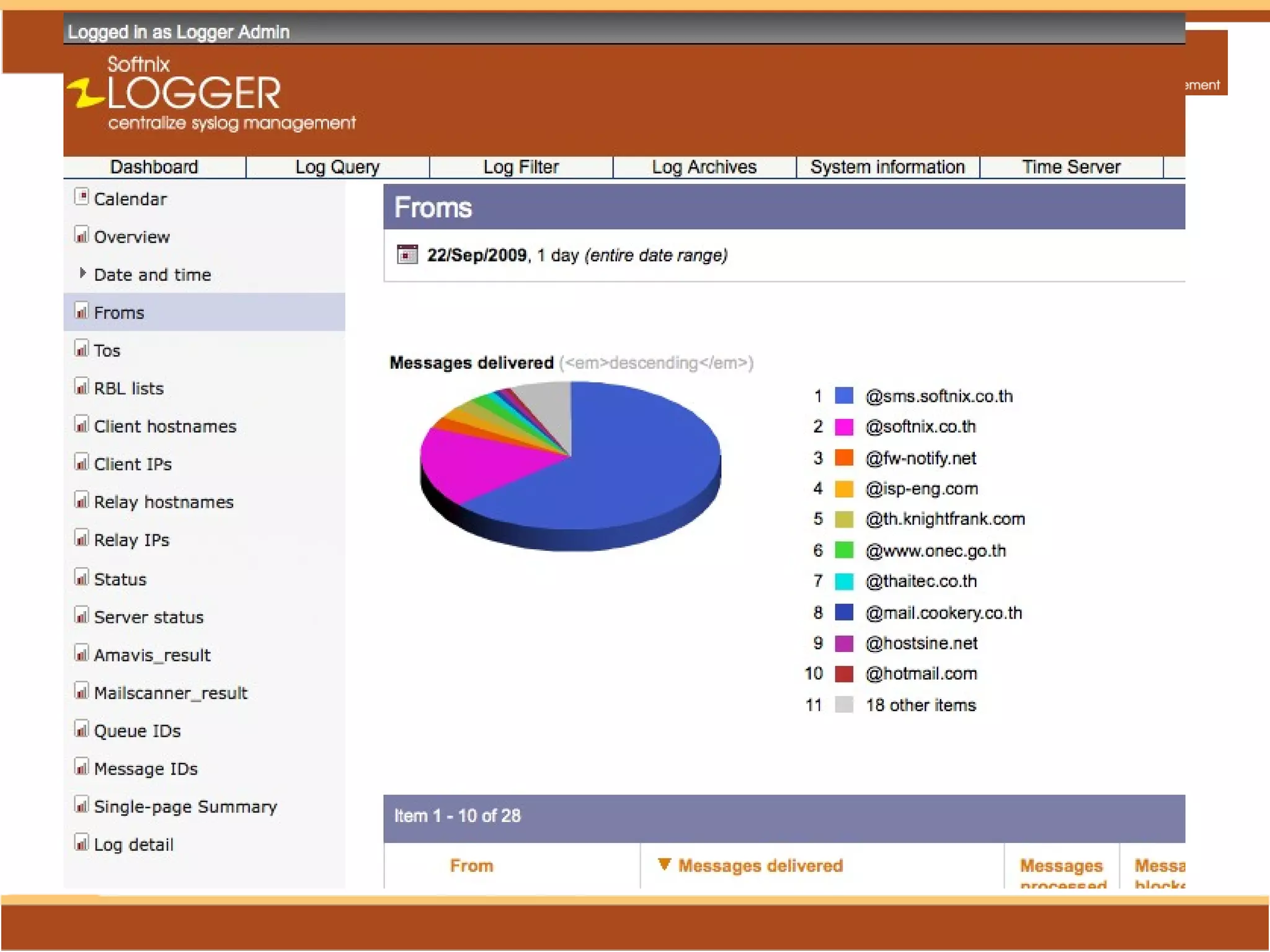
  • #24 ทราบถึง IP อะไรเข้าเว็บมากที่สุด
  • #30 จากระบบส่วนกลางสามารถ Monitor การทำงานของ Softnix Logger Forwarder Server ของสาขาได้แบบ Real Time