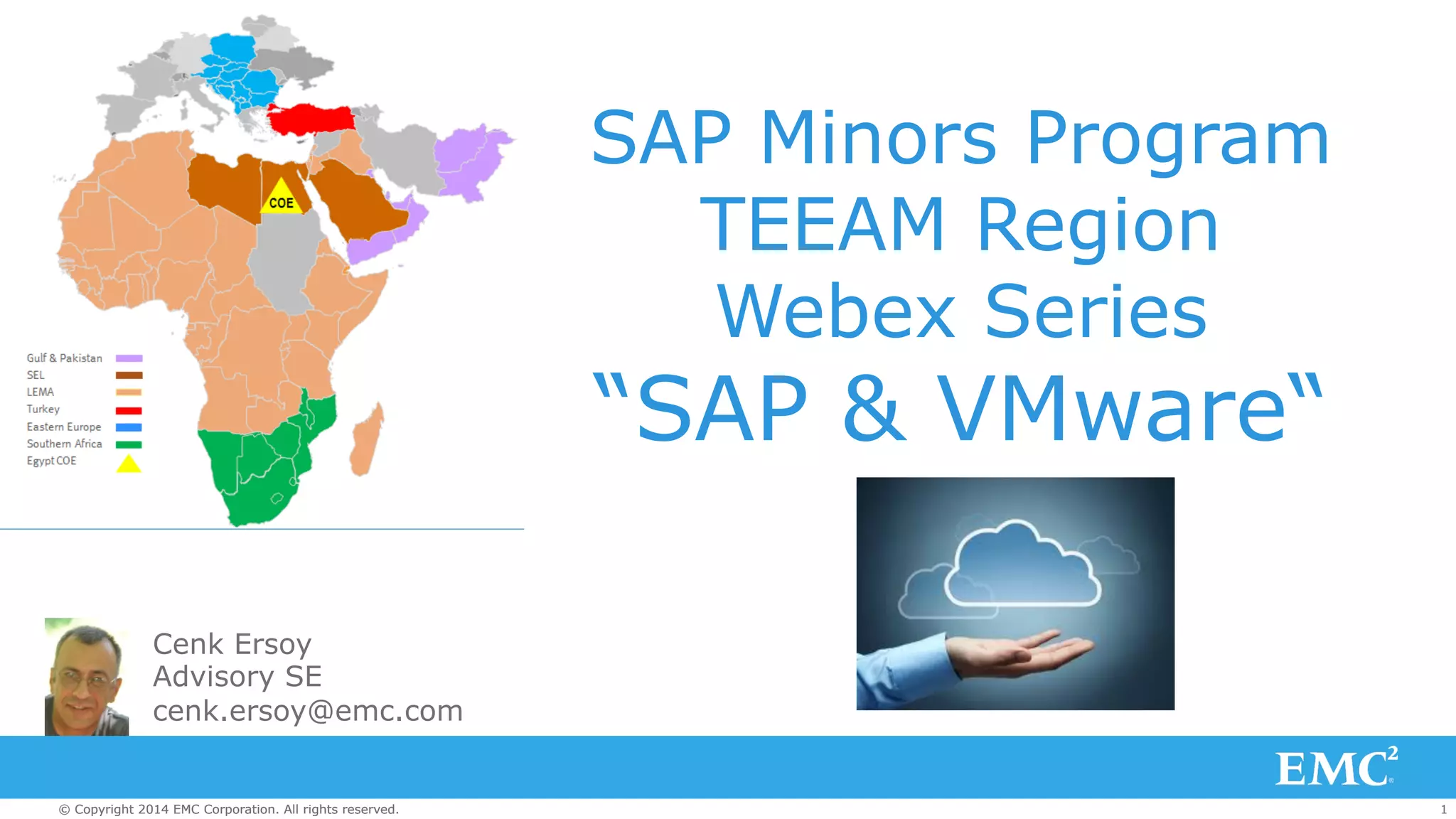
SAP Minors Program 
TEEAM Region 
Webex Series 
“SAP & VMware“ 
Cenk Ersoy 
Advisory SE 
cenk.ersoy@emc.com 
© Copyright 2014 EMC Corporation. All rights reserved. 1
SAP Minors Program 
SAP Minors Community Page: 
https://community.emc.com/community/connect/ 
presales/presalesminorsprogram/presales-minors-sap 
SAP Minors Training Path and Training Modules 
are available here: 
https://community.emc.com/docs/DOC-31637 
Previous sessions of this Webex series for TEEAM 
region 
https://community.emc.com/docs/DOC-33298 
© Copyright 2014 EMC Corporation. All rights reserved. 2
Agenda 
• Benefits of Virtualization 
• Virtualization Options 
• SAP Support for VMware 
• SAP Performance on VMware 
• Recommendations for virtualizing traditional SAP applications 
• SAP HANA and VMware 
• Recommendations for virtualizing SAP HANA 
• Key Findings (Summary) 
• Resources 
© Copyright 2014 EMC Corporation. All rights reserved. 3
Benefits of Virtualizing SAP 
• Increased business agility (deploy faster) 
• Better resource utilization (consolidation) 
• Improved SLA (using DRS) 
• Reduced risk (vMotion, SRM etc) 
© Copyright 2014 EMC Corporation. All rights reserved. 4
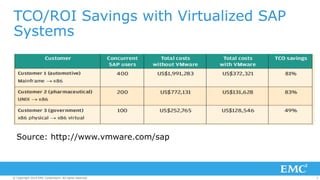
TCO/ROI Savings with Virtualized SAP 
Systems 
Source: http://www.vmware.com/sap 
© Copyright 2014 EMC Corporation. All rights reserved. 5
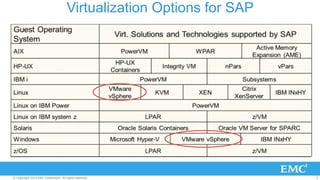
Virtualization Options for SAP 
© Copyright 2014 EMC Corporation. All rights reserved. 6
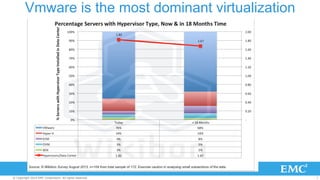
Vmware is the most dominant virtualization 
© Copyright 2014 EMC Corporation. All rights reserved. 7
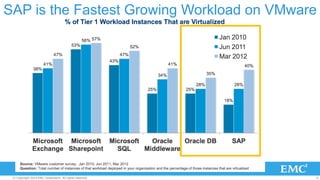
SAP is the Fastest Growing Workload on VMware 
© Copyright 2014 EMC Corporation. All rights reserved. 8
SAP on VMware 
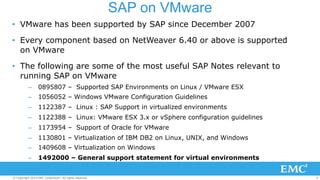
• VMware has been supported by SAP since December 2007 
• Every component based on NetWeaver 6.40 or above is supported 
on VMware 
• The following are some of the most useful SAP Notes relevant to 
running SAP on VMware 
– 0895807 – Supported SAP Environments on Linux / VMware ESX 
– 1056052 – Windows VMware Configuration Guidelines 
– 1122387 – Linux : SAP Support in virtualized environments 
– 1122388 – Linux: VMware ESX 3.x or vSphere configuration guidelines 
– 1173954 – Support of Oracle for VMware 
– 1130801 – Virtualization of IBM DB2 on Linux, UNIX, and Windows 
– 1409608 – Virtualization on Windows 
– 1492000 – General support statement for virtual environments 
© Copyright 2014 EMC Corporation. All rights reserved. 9
VMware & Oracle 
• There is further information on support for Oracle products 
on VMware on the VMware web site: 
– http://www.vmware.com/solutions/partners/alliances/oracle-vmware-support. 
html 
– http://www.vmware.com/support/policies/oracle-support.html 
© Copyright 2014 EMC Corporation. All rights reserved. 10
Oracle Support Statement on use of VMware 
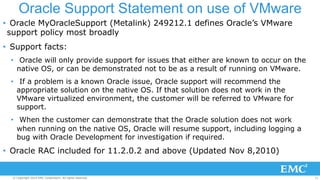
• Oracle MyOracleSupport (Metalink) 249212.1 defines Oracle’s VMware 
support policy most broadly 
• Support facts: 
• Oracle will only provide support for issues that either are known to occur on the 
native OS, or can be demonstrated not to be as a result of running on VMware. 
• If a problem is a known Oracle issue, Oracle support will recommend the 
appropriate solution on the native OS. If that solution does not work in the 
VMware virtualized environment, the customer will be referred to VMware for 
support. 
• When the customer can demonstrate that the Oracle solution does not work 
when running on the native OS, Oracle will resume support, including logging a 
bug with Oracle Development for investigation if required. 
• Oracle RAC included for 11.2.0.2 and above (Updated Nov 8,2010) 
© Copyright 2014 EMC Corporation. All rights reserved. 11
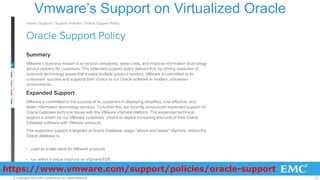
Vmware’s Support on Virtualized Oracle 
https://www.vmware.com/support/policies/oracle-support 
© Copyright 2014 EMC Corporation. All rights reserved. 12
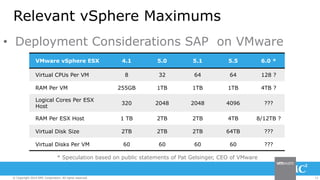
Relevant vSphere Maximums 
• Deployment Considerations SAP on VMware 
VMware vSphere ESX 4.1 5.0 5.1 5.5 6.0 * 
Virtual CPUs Per VM 8 32 64 64 128 ? 
RAM Per VM 255GB 1TB 1TB 1TB 4TB ? 
Logical Cores Per ESX 
Host 320 2048 2048 4096 ??? 
RAM Per ESX Host 1 TB 2TB 2TB 4TB 8/12TB ? 
Virtual Disk Size 2TB 2TB 2TB 64TB ??? 
Virtual Disks Per VM 60 60 60 60 ??? 
* Speculation based on public statements of Pat Gelsinger, CEO of VMware 
© Copyright 2014 EMC Corporation. All rights reserved. 13
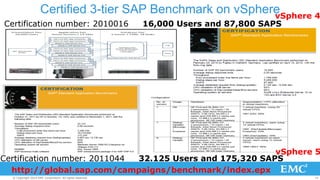
Certified 3-tier SAP Benchmark on vSphere 
vSphere 4 
Certification number: 2010016 16,000 Users and 87,800 SAPS 
vSphere 5 
Certification number: 2011044 32.125 Users and 175,320 SAPS 
http://global.sap.com/campaigns/benchmark/index.epx 
© Copyright 2014 EMC Corporation. All rights reserved. 14
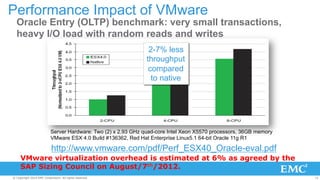
Performance Impact of VMware 
Oracle Entry (OLTP) benchmark: very small transactions, 
heavy I/O load with random reads and writes 
2-7% less 
throughput 
compared 
to native 
Server Hardware: Two (2) x 2.93 GHz quad-core Intel Xeon X5570 processors, 36GB memory 
VMware ESX 4.0 Build #136362, Red Hat Enterprise Linux5.1 64-bit Oracle 11g R1 
http://www.vmware.com/pdf/Perf_ESX40_Oracle-eval.pdf 
VMware virtualization overhead is estimated at 6% as agreed by the 
SAP Sizing Council on August/7th/2012. 
© Copyright 2014 EMC Corporation. All rights reserved. 15
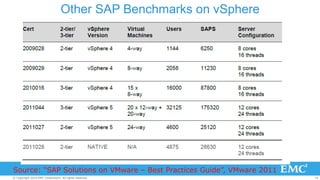
Other SAP Benchmarks on vSphere 
Source: “SAP Solutions on VMware – Best Practices Guide”, VMware 2011 
© Copyright 2014 EMC Corporation. All rights reserved. 16
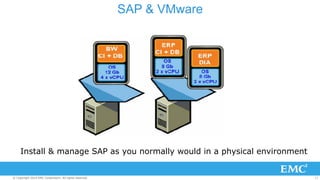
SAP & VMware 
Install & manage SAP as you normally would in a physical environment 
© Copyright 2014 EMC Corporation. All rights reserved. 17
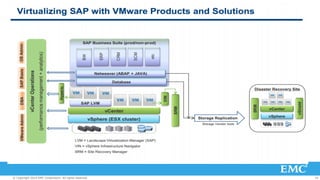
© Copyright 2014 EMC Corporation. All rights reserved. 18
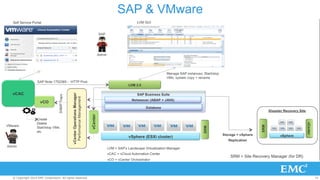
SAP & VMware 
© Copyright 2014 EMC Corporation. All rights reserved. 19
SAP & VMware 
• Deploy virtualization in stages (DEV and QA first). 
• Sizing for VM is identical to sizing for physical. vSphere server sizing 
is most critical. You must have enough resources (CPU, RAM, disk IO 
and HBAs) while considering vMotion and HA !!! 
• It is recommended that the SAP systems have their own dedicated 
virtual server and not share with other non SAP Applications. 
• CPU over commitment is allowed but not recommended 
• Memory over commitment is NOT allowed 
• See VMware website for “virtualization best practices” whitepaper 
© Copyright 2014 EMC Corporation. All rights reserved. 20
SAP & VMware 
• VM wide and vSphere server wide settings are very critical for performance 
(multipathing, virtual switches, SCSI adaptors, NUMA, disk layout etc). Follow 
best practice guideline documents from VMware and SAP) 
• http://scn.sap.com/docs/DOC-27384 for SAP on VMWare 
• http://scn.sap.com/docs/DOC-42091 VM Based cloning using LVM 
• For performance monitoring, ESX/ESXi performance counters are available in 
SAP transaction OS07N (see SAP Note 1409604 for Windows and Note 
1102124 for Linux). 
• See “SAP Solutions on VMware – Best Practices Guide” from Vmware for VM 
sizing 
• SAP only supports Windows 64-bit as guest operating system in a virtualized 
environment for AMD and Intel processors. 
© Copyright 2014 EMC Corporation. All rights reserved. 21
SAP & VMware 
• Some SAP batch processes are intensive workloads. Examples of such jobs 
include: MRP runs; Demand Forecasting/Planning Run in SCM. These app 
servers can be configured in multiple virtual machines that scale out 
horizontally. 
• VMware virtualization overhead is estimated at 6% as agreed by the SAP 
Sizing Council on August/7th/2012. 
• Hyper-threading increases SAPS performance usually by about 30%. 
© Copyright 2014 EMC Corporation. All rights reserved. 22
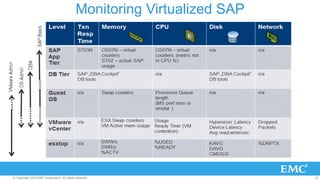
Monitoring Virtualized SAP 
© Copyright 2014 EMC Corporation. All rights reserved. 23
SAP HANA & VMware 
© Copyright 2014 EMC Corporation. All rights reserved. 24
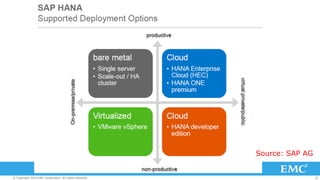
Source: SAP AG 
© Copyright 2014 EMC Corporation. All rights reserved. 25
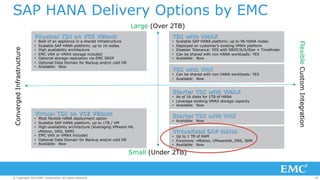
SAP HANA Delivery Options by EMC 
Large (Over 2TB) 
Virtual TDI on VCE VBlock 
• Most flexible HANA deployment option 
• Scalable SAP HANA platform; up to 1TB / VM 
• High-availability architecture (leveraging VMware HA, 
vMotion, DRS, SRM) 
• EMC VNX or VMAX included 
• Optional Data Domain for Backup and/or cold DR 
• Available: Now 
TDI with VMAX 
• Scalable SAP HANA platform; up to 96 HANA nodes 
• Deployed on customer’s existing VMAX platform 
• Disaster Tolerance: YES with SRDF/A/S/Star + Timefinder 
• Can be shared with non HANA workloads: YES 
• Available: Now 
TDI with VNX 
• Can be shared with non HANA workloads: YES 
• Available: Now 
Starter TDI with VMAX 
• As of 16 disks for 1TB of HANA 
• Leverage existing VMAX storage capacity 
• Available: Now 
Starter TDI with VNX 
• Available: Now 
Virtualized SAP HANA 
• Up to 1 TB of RAM 
• Functions: vMotion, VMwareHA, DRS, SRM 
• Available: Now 
Small (Under 2TB) 
Converged Infrastructure 
Flexible Custom Integration 
Physical TDI on VCE VBlock 
• Best of an appliance in a shared infrastructure 
• Scalable SAP HANA platform; up to 16 nodes 
• High availability architecture 
• EMC VNX or VMAX storage included 
• Optional storage replication via EMC SRDF 
• Optional Data Domain for Backup and/or cold DR 
• Available: Now 
© Copyright 2014 EMC Corporation. All rights reserved. 26
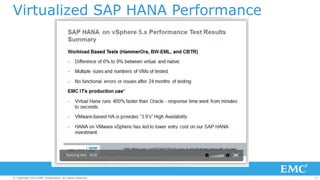
Virtualized SAP HANA Performance 
© Copyright 2014 EMC Corporation. All rights reserved. 27
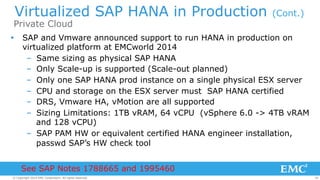
Virtualized SAP HANA in Production (Cont.) 
Private Cloud 
Ÿ SAP and Vmware announced support to run HANA in production on 
virtualized platform at EMCworld 2014 
– Same sizing as physical SAP HANA 
– Only Scale-up is supported (Scale-out planned) 
– Only one SAP HANA prod instance on a single physical ESX server 
– CPU and storage on the ESX server must SAP HANA certified 
– DRS, Vmware HA, vMotion are all supported 
– Sizing Limitations: 1TB vRAM, 64 vCPU (vSphere 6.0 -> 4TB vRAM 
and 128 vCPU) 
– SAP PAM HW or equivalent certified HANA engineer installation, 
passwd SAP’s HW check tool 
See SAP Notes 1788665 and 1995460 
© Copyright 2014 EMC Corporation. All rights reserved. 28
Virtualized SAP HANA in Production 
Hosted by VMware vCloud Hybrid Services 
Ÿ Announced by VMware & SAP as part of the launch of the 
vCHS (vCloud Hybrid Services) in May 2013 
Ÿ Designed specifically to compete against Amazon HANA 
Cloud offering, so it’s limited to 64GB in Production 
Ÿ All restrictions on vMotion & DRS have been removed, so 
HANA virtual machines can be moved one data center to 
another 
Ÿ Available only as a Cloud Services offering from VMware 
© Copyright 2014 EMC Corporation. All rights reserved. 29
Key Findings - Summary 
Ÿ VMware virtualization does not introduce any changes to 
the installation and technical configuration of SAP software 
Ÿ Size your vSphere cluster carefully (think failover of VMs, 
set affinity rules, watch for resources after failover) 
Ÿ No memory over commitment 
Ÿ Check for most up-to-date best practices and tuning 
parameters 
Ÿ Understand the limitations for virtualizing SAP HANA (vCPU 
limit, scale-up vs scale-out support) 
© Copyright 2014 EMC Corporation. All rights reserved. 30
Resources 
Ÿ http://scn.sap.com/docs/DOC-27384 (SAP on VMware) 
Ÿ http://www.saphana.com/docs/DOC-4192 (SAP HANA on 
Vmware) 
Ÿ SAP Notes ( http://service.sap.com/notes ) 
Ÿ http://blogs.vmware.com/apps/sap 
Ÿ http://www.vmware.com/files/pdf/solutions/sap/SAP-Solutions-on- 
VMware-Best-Practices-Guide.pdf 
Ÿ http://www.vmware.com/files/pdf/partners/sap/ 
SAP_TCOROI_Customers_Final.pdf (ROI and TCO benefits for 
virtualizing SAP) 
© Copyright 2014 EMC Corporation. All rights reserved. 31
Resources 
Ÿ http://www.vmware.com/files/pdf/ 
SAP_HANA_on_vmware_vSphere_best_practices_guide.pdf 
Ÿ http://scn.sap.com/community/hana-in-memory/blog/ 
2014/05/27/sap-hana-virtualization-deployment-scenarios 
© Copyright 2014 EMC Corporation. All rights reserved. 32
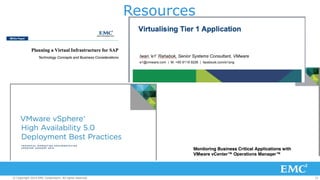
Resources 
© Copyright 2014 EMC Corporation. All rights reserved. 33
THANK YOU 
© Copyright 2014 EMC Corporation. All rights reserved. 34

SAP and VMware (Virtualizing SAP)

  • 1.
    SAP Minors Program TEEAM Region Webex Series “SAP & VMware“ Cenk Ersoy Advisory SE cenk.ersoy@emc.com © Copyright 2014 EMC Corporation. All rights reserved. 1
  • 2.
    SAP Minors Program SAP Minors Community Page: https://community.emc.com/community/connect/ presales/presalesminorsprogram/presales-minors-sap SAP Minors Training Path and Training Modules are available here: https://community.emc.com/docs/DOC-31637 Previous sessions of this Webex series for TEEAM region https://community.emc.com/docs/DOC-33298 © Copyright 2014 EMC Corporation. All rights reserved. 2
  • 3.
    Agenda • Benefitsof Virtualization • Virtualization Options • SAP Support for VMware • SAP Performance on VMware • Recommendations for virtualizing traditional SAP applications • SAP HANA and VMware • Recommendations for virtualizing SAP HANA • Key Findings (Summary) • Resources © Copyright 2014 EMC Corporation. All rights reserved. 3
  • 4.
    Benefits of VirtualizingSAP • Increased business agility (deploy faster) • Better resource utilization (consolidation) • Improved SLA (using DRS) • Reduced risk (vMotion, SRM etc) © Copyright 2014 EMC Corporation. All rights reserved. 4
  • 5.
    TCO/ROI Savings withVirtualized SAP Systems Source: http://www.vmware.com/sap © Copyright 2014 EMC Corporation. All rights reserved. 5
  • 6.
    Virtualization Options forSAP © Copyright 2014 EMC Corporation. All rights reserved. 6
  • 7.
    Vmware is themost dominant virtualization © Copyright 2014 EMC Corporation. All rights reserved. 7
  • 8.
    SAP is theFastest Growing Workload on VMware © Copyright 2014 EMC Corporation. All rights reserved. 8
  • 9.
    SAP on VMware • VMware has been supported by SAP since December 2007 • Every component based on NetWeaver 6.40 or above is supported on VMware • The following are some of the most useful SAP Notes relevant to running SAP on VMware – 0895807 – Supported SAP Environments on Linux / VMware ESX – 1056052 – Windows VMware Configuration Guidelines – 1122387 – Linux : SAP Support in virtualized environments – 1122388 – Linux: VMware ESX 3.x or vSphere configuration guidelines – 1173954 – Support of Oracle for VMware – 1130801 – Virtualization of IBM DB2 on Linux, UNIX, and Windows – 1409608 – Virtualization on Windows – 1492000 – General support statement for virtual environments © Copyright 2014 EMC Corporation. All rights reserved. 9
  • 10.
    VMware & Oracle • There is further information on support for Oracle products on VMware on the VMware web site: – http://www.vmware.com/solutions/partners/alliances/oracle-vmware-support. html – http://www.vmware.com/support/policies/oracle-support.html © Copyright 2014 EMC Corporation. All rights reserved. 10
  • 11.
    Oracle Support Statementon use of VMware • Oracle MyOracleSupport (Metalink) 249212.1 defines Oracle’s VMware support policy most broadly • Support facts: • Oracle will only provide support for issues that either are known to occur on the native OS, or can be demonstrated not to be as a result of running on VMware. • If a problem is a known Oracle issue, Oracle support will recommend the appropriate solution on the native OS. If that solution does not work in the VMware virtualized environment, the customer will be referred to VMware for support. • When the customer can demonstrate that the Oracle solution does not work when running on the native OS, Oracle will resume support, including logging a bug with Oracle Development for investigation if required. • Oracle RAC included for 11.2.0.2 and above (Updated Nov 8,2010) © Copyright 2014 EMC Corporation. All rights reserved. 11
  • 12.
    Vmware’s Support onVirtualized Oracle https://www.vmware.com/support/policies/oracle-support © Copyright 2014 EMC Corporation. All rights reserved. 12
  • 13.
    Relevant vSphere Maximums • Deployment Considerations SAP on VMware VMware vSphere ESX 4.1 5.0 5.1 5.5 6.0 * Virtual CPUs Per VM 8 32 64 64 128 ? RAM Per VM 255GB 1TB 1TB 1TB 4TB ? Logical Cores Per ESX Host 320 2048 2048 4096 ??? RAM Per ESX Host 1 TB 2TB 2TB 4TB 8/12TB ? Virtual Disk Size 2TB 2TB 2TB 64TB ??? Virtual Disks Per VM 60 60 60 60 ??? * Speculation based on public statements of Pat Gelsinger, CEO of VMware © Copyright 2014 EMC Corporation. All rights reserved. 13
  • 14.
    Certified 3-tier SAPBenchmark on vSphere vSphere 4 Certification number: 2010016 16,000 Users and 87,800 SAPS vSphere 5 Certification number: 2011044 32.125 Users and 175,320 SAPS http://global.sap.com/campaigns/benchmark/index.epx © Copyright 2014 EMC Corporation. All rights reserved. 14
  • 15.
    Performance Impact ofVMware Oracle Entry (OLTP) benchmark: very small transactions, heavy I/O load with random reads and writes 2-7% less throughput compared to native Server Hardware: Two (2) x 2.93 GHz quad-core Intel Xeon X5570 processors, 36GB memory VMware ESX 4.0 Build #136362, Red Hat Enterprise Linux5.1 64-bit Oracle 11g R1 http://www.vmware.com/pdf/Perf_ESX40_Oracle-eval.pdf VMware virtualization overhead is estimated at 6% as agreed by the SAP Sizing Council on August/7th/2012. © Copyright 2014 EMC Corporation. All rights reserved. 15
  • 16.
    Other SAP Benchmarkson vSphere Source: “SAP Solutions on VMware – Best Practices Guide”, VMware 2011 © Copyright 2014 EMC Corporation. All rights reserved. 16
  • 17.
    SAP & VMware Install & manage SAP as you normally would in a physical environment © Copyright 2014 EMC Corporation. All rights reserved. 17
  • 18.
    © Copyright 2014EMC Corporation. All rights reserved. 18
  • 19.
    SAP & VMware © Copyright 2014 EMC Corporation. All rights reserved. 19
  • 20.
    SAP & VMware • Deploy virtualization in stages (DEV and QA first). • Sizing for VM is identical to sizing for physical. vSphere server sizing is most critical. You must have enough resources (CPU, RAM, disk IO and HBAs) while considering vMotion and HA !!! • It is recommended that the SAP systems have their own dedicated virtual server and not share with other non SAP Applications. • CPU over commitment is allowed but not recommended • Memory over commitment is NOT allowed • See VMware website for “virtualization best practices” whitepaper © Copyright 2014 EMC Corporation. All rights reserved. 20
  • 21.
    SAP & VMware • VM wide and vSphere server wide settings are very critical for performance (multipathing, virtual switches, SCSI adaptors, NUMA, disk layout etc). Follow best practice guideline documents from VMware and SAP) • http://scn.sap.com/docs/DOC-27384 for SAP on VMWare • http://scn.sap.com/docs/DOC-42091 VM Based cloning using LVM • For performance monitoring, ESX/ESXi performance counters are available in SAP transaction OS07N (see SAP Note 1409604 for Windows and Note 1102124 for Linux). • See “SAP Solutions on VMware – Best Practices Guide” from Vmware for VM sizing • SAP only supports Windows 64-bit as guest operating system in a virtualized environment for AMD and Intel processors. © Copyright 2014 EMC Corporation. All rights reserved. 21
  • 22.
    SAP & VMware • Some SAP batch processes are intensive workloads. Examples of such jobs include: MRP runs; Demand Forecasting/Planning Run in SCM. These app servers can be configured in multiple virtual machines that scale out horizontally. • VMware virtualization overhead is estimated at 6% as agreed by the SAP Sizing Council on August/7th/2012. • Hyper-threading increases SAPS performance usually by about 30%. © Copyright 2014 EMC Corporation. All rights reserved. 22
  • 23.
    Monitoring Virtualized SAP © Copyright 2014 EMC Corporation. All rights reserved. 23
  • 24.
    SAP HANA &VMware © Copyright 2014 EMC Corporation. All rights reserved. 24
  • 25.
    Source: SAP AG © Copyright 2014 EMC Corporation. All rights reserved. 25
  • 26.
    SAP HANA DeliveryOptions by EMC Large (Over 2TB) Virtual TDI on VCE VBlock • Most flexible HANA deployment option • Scalable SAP HANA platform; up to 1TB / VM • High-availability architecture (leveraging VMware HA, vMotion, DRS, SRM) • EMC VNX or VMAX included • Optional Data Domain for Backup and/or cold DR • Available: Now TDI with VMAX • Scalable SAP HANA platform; up to 96 HANA nodes • Deployed on customer’s existing VMAX platform • Disaster Tolerance: YES with SRDF/A/S/Star + Timefinder • Can be shared with non HANA workloads: YES • Available: Now TDI with VNX • Can be shared with non HANA workloads: YES • Available: Now Starter TDI with VMAX • As of 16 disks for 1TB of HANA • Leverage existing VMAX storage capacity • Available: Now Starter TDI with VNX • Available: Now Virtualized SAP HANA • Up to 1 TB of RAM • Functions: vMotion, VMwareHA, DRS, SRM • Available: Now Small (Under 2TB) Converged Infrastructure Flexible Custom Integration Physical TDI on VCE VBlock • Best of an appliance in a shared infrastructure • Scalable SAP HANA platform; up to 16 nodes • High availability architecture • EMC VNX or VMAX storage included • Optional storage replication via EMC SRDF • Optional Data Domain for Backup and/or cold DR • Available: Now © Copyright 2014 EMC Corporation. All rights reserved. 26
  • 27.
    Virtualized SAP HANAPerformance © Copyright 2014 EMC Corporation. All rights reserved. 27
  • 28.
    Virtualized SAP HANAin Production (Cont.) Private Cloud Ÿ SAP and Vmware announced support to run HANA in production on virtualized platform at EMCworld 2014 – Same sizing as physical SAP HANA – Only Scale-up is supported (Scale-out planned) – Only one SAP HANA prod instance on a single physical ESX server – CPU and storage on the ESX server must SAP HANA certified – DRS, Vmware HA, vMotion are all supported – Sizing Limitations: 1TB vRAM, 64 vCPU (vSphere 6.0 -> 4TB vRAM and 128 vCPU) – SAP PAM HW or equivalent certified HANA engineer installation, passwd SAP’s HW check tool See SAP Notes 1788665 and 1995460 © Copyright 2014 EMC Corporation. All rights reserved. 28
  • 29.
    Virtualized SAP HANAin Production Hosted by VMware vCloud Hybrid Services Ÿ Announced by VMware & SAP as part of the launch of the vCHS (vCloud Hybrid Services) in May 2013 Ÿ Designed specifically to compete against Amazon HANA Cloud offering, so it’s limited to 64GB in Production Ÿ All restrictions on vMotion & DRS have been removed, so HANA virtual machines can be moved one data center to another Ÿ Available only as a Cloud Services offering from VMware © Copyright 2014 EMC Corporation. All rights reserved. 29
  • 30.
    Key Findings -Summary Ÿ VMware virtualization does not introduce any changes to the installation and technical configuration of SAP software Ÿ Size your vSphere cluster carefully (think failover of VMs, set affinity rules, watch for resources after failover) Ÿ No memory over commitment Ÿ Check for most up-to-date best practices and tuning parameters Ÿ Understand the limitations for virtualizing SAP HANA (vCPU limit, scale-up vs scale-out support) © Copyright 2014 EMC Corporation. All rights reserved. 30
  • 31.
    Resources Ÿ http://scn.sap.com/docs/DOC-27384(SAP on VMware) Ÿ http://www.saphana.com/docs/DOC-4192 (SAP HANA on Vmware) Ÿ SAP Notes ( http://service.sap.com/notes ) Ÿ http://blogs.vmware.com/apps/sap Ÿ http://www.vmware.com/files/pdf/solutions/sap/SAP-Solutions-on- VMware-Best-Practices-Guide.pdf Ÿ http://www.vmware.com/files/pdf/partners/sap/ SAP_TCOROI_Customers_Final.pdf (ROI and TCO benefits for virtualizing SAP) © Copyright 2014 EMC Corporation. All rights reserved. 31
  • 32.
    Resources Ÿ http://www.vmware.com/files/pdf/ SAP_HANA_on_vmware_vSphere_best_practices_guide.pdf Ÿ http://scn.sap.com/community/hana-in-memory/blog/ 2014/05/27/sap-hana-virtualization-deployment-scenarios © Copyright 2014 EMC Corporation. All rights reserved. 32
  • 33.
    Resources © Copyright2014 EMC Corporation. All rights reserved. 33
  • 34.
    THANK YOU ©Copyright 2014 EMC Corporation. All rights reserved. 34