Michelle Lax
and Michael Barker
Vulcan Materials Company’s
Spend Analytics Journey
About Vulcan Materials
• Vulcan Materials Company is the nation’s
largest producer of construction
aggregates—primarily crushed stone, sand
and gravel—and a major producer of
aggregates-based construction materials
including asphalt and ready-mixed
concrete. Our coast-to-coast footprint and
strategic distribution network align with and
serve the nation’s growth centers. We are
headquartered in Birmingham, Alabama.
Vulcan Materials Organization
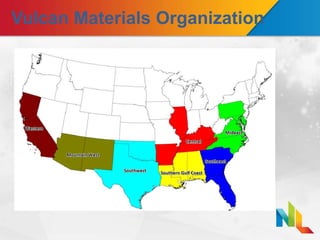
• We are organized into 7 Divisions and 1
Corporate Office.
• Approximately 400 aggregate, asphalt and
ready mix plants report up through the 7
Divisions across the country.
Vulcan Materials Organization
Contents
• Why Spend Analytics?
• Why Now?
• Why Spend Radar?
• Our Implementation
• Specialty Applications
• Early Victories
• Questions
Why Spend Analytics?
• Classification of Spend Currently
Inaccurate
– Enable our Analysts to Analyze – Prior to
Spend Radar, our analysts spent the majority of
their time cleansing, reconciling, validating and
consolidating data
• Internal Challenges with Reporting
– Many Requisitioners, Buyers and Approvers
resulted in Inconsistent Data
– Level 3 PCard Data wasn’t feasible
– Multiple Vendor records in Oracle
Why Spend Analytics? Continued
• Consolidation of our Spend
– Multiple Sources Consolidated to One View
• PCard
• T&E Cards
• Legacy Systems
• Oracle ERP – Purchase Orders and Invoices
• Capability of Answering Supplier Questions
Quickly
– Total spend by supplier
– Total spend by category
– Total spend by geography
– Supplier potential if an agreement were made
Why Now?
• Difficult Economy
– Cost Cutting was a major driver
– Intel needed to renegotiate contracts
– Need to identify additional spend categories
to manage
• Multiple Organizational Structure
Changes
– Divisions > Regions
– Regions > Divisions
– VP – General Manager Changes
Why Now? Continued
• Optimal Time for Selling to Management
– Engagement with consultant
• Demonstrated value of data and graphical
information
• Easier for management to digest
• More forward looking actionable intelligence
rather than historical information
– Management saw the value - wanted more
of this style of information and presentation
Why Now? Continued
• Departmental Vision Aligned with the
Need for Spend Analytics
– Departmental Efficiency
– Knowledge of our own data gives us an
advantage in negotiations
– Credibility in the field
– Wanted 80 / 20 Data Analysis vs Data
Cleansing
– Wanted Vendor Normalization capability
Why Spend Radar?
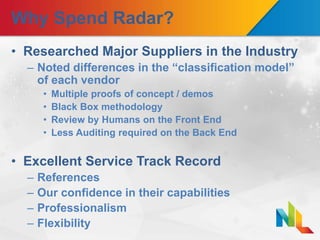
• Researched Major Suppliers in the Industry
– Noted differences in the “classification model”
of each vendor
• Multiple proofs of concept / demos
• Black Box methodology
• Review by Humans on the Front End
• Less Auditing required on the Back End
• Excellent Service Track Record
– References
– Our confidence in their capabilities
– Professionalism
– Flexibility
Our Implementation
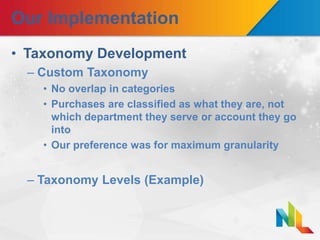
• Taxonomy Development
– Custom Taxonomy
• No overlap in categories
• Purchases are classified as what they are, not
which department they serve or account they go
into
• Our preference was for maximum granularity
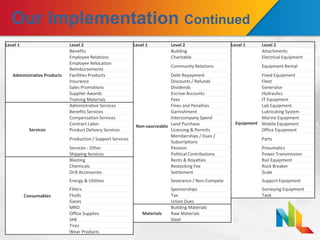
– Taxonomy Levels (Example)
Our Implementation Continued
Level 1 Level 2 Level 1 Level 2 Level 1 Level 2
Administrative Products
Benefits
Non-sourceable
Building
Equipment
Attachments
Employee Relations Charitable Electrical Equipment
Employee Relocation
Reimbursements
Community Relations Equipment Rental
Facilities Products Debt Repayment Fixed Equipment
Insurance Discounts / Refunds Fleet
Sales Promotions Dividends Generator
Supplier Awards Escrow Accounts Hydraulics
Training Materials Fees IT Equipment
Services
Administrative Services Fines and Penalties Lab Equipment
Benefits Services Garnishment Lubricating System
Compensation Services Intercompany Spend Marine Equipment
Contract Labor Land Purchase Mobile Equipment
Product Delivery Services Licensing & Permits Office Equipment
Production / Support Services
Memberships / Dues /
Subscriptions
Parts
Services - Other Pension Pneumatics
Shipping Services Political Contributions Power Transmission
Consumables
Blasting Rents & Royalties Rail Equipment
Chemicals Restocking Fee Rock Breaker
Drill Accessories Settlement Scale
Energy & Utilities Severance / Non-Compete Support Equipment
Filters Sponsorships Surveying Equipment
Fluids Tax Tank
Gases Union Dues
MRO
Materials
Building Materials
Office Supplies Raw Materials
SHE Steel
Tires
Wear Products
Our Implementation Continued
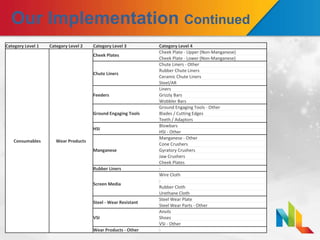
Category Level 1 Category Level 2 Category Level 3 Category Level 4
Consumables Wear Products
Cheek Plates
Cheek Plate - Upper (Non-Manganese)
Cheek Plate - Lower (Non-Manganese)
Chute Liners
Chute Liners - Other
Rubber Chute Liners
Ceramic Chute Liners
Steel/AR
Feeders
Liners
Grizzly Bars
Wobbler Bars
Ground Engaging Tools
Ground Engaging Tools - Other
Blades / Cutting Edges
Teeth / Adaptors
HSI
Blowbars
HSI - Other
Manganese
Manganese - Other
Cone Crushers
Gyratory Crushers
Jaw Crushers
Cheek Plates
Rubber Liners -
Screen Media
Wire Cloth
-
Rubber Cloth
Urethane Cloth
Steel - Wear Resistant
Steel Wear Plate
Steel Wear Parts - Other
VSI
Anvils
Shoes
VSI - Other
Wear Products - Other -
Our Implementation Continued
• Consulted with a Network of Vulcan
Subject Matter Experts in the Field
– Determine what is important to be classified
– Determine what can be classified
– Determine what changes we can make to
aid in classification in the future
Our Implementation Continued
• Working with SciQuest
– Effective Project Management - Deliverables
and timeline were clearly defined and
delivered upon
– Good Product Knowledge - Initial
Classification was highly accurate
– Resource Availability
• The SciQuest team was available to answer our
questions whenever we needed them
• Specialized reporting requests were
implemented as needed
Our Implementation Continued
• Data Preparation
– Level 3 Procurement Card Data Enrichment
• Bank provides a file
• Many vendors provide poor data
• Match good data to the corresponding purchase
– Summarization of Standardized Purchases -
Haulers
– Integration of Additional Data Fields
• Expense Reports
– Expense Justification
– Employee Name as Supplier
Our Implementation Continued
• Consolidated Our Data Uploads to 3
Files
– Haulers
– PCard
– Other Transactions
• Classification
– Initial Classification to 95% - 5 weeks
– Additional Classification to 98% (as of
January 2015) by Vulcan personnel
Our Implementation Continued
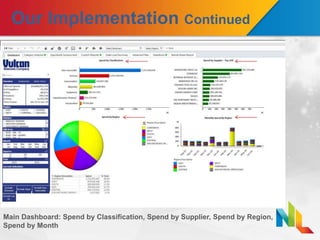
Main Dashboard: Spend by Classification, Spend by Supplier, Spend by Region,
Spend by Month
Our Implementation Continued
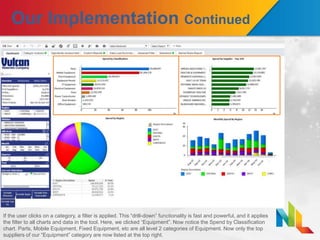
If the user clicks on a category, a filter is applied. This “drill-down” functionality is fast and powerful, and it applies
the filter to all charts and data in the tool. Here, we clicked “Equipment”. Now notice the Spend by Classification
chart. Parts, Mobile Equipment, Fixed Equipment, etc are all level 2 categories of Equipment. Now only the top
suppliers of our “Equipment” category are now listed at the top right.
Our Implementation Continued
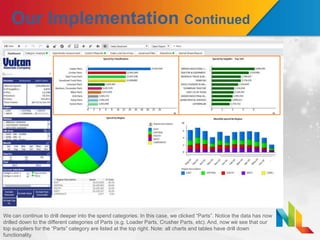
We can continue to drill deeper into the spend categories. In this case, we clicked “Parts”. Notice the data has now
drilled down to the different categories of Parts (e.g. Loader Parts, Crusher Parts, etc). And, now we see that our
top suppliers for the “Parts” category are listed at the top right. Note: all charts and tables have drill down
functionality.
Specialty Applications
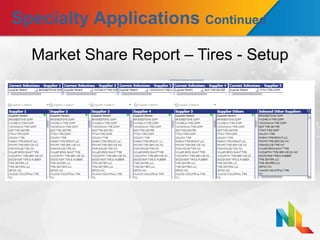
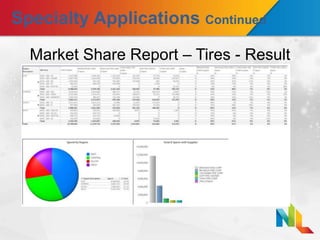
• Compliance Reporting
– Market Share Reports – for contract compliance
and rebate documentation
• Custom Market Share Report Dashboard
• Classification Greater Than 95%
• More detailed and accurate reports (Level 3
Enrichment)
• Custom Lookup Tables
– Reporting Parent
– Manufacturer Parent
– PT/MRO Primary
Specialty Applications Continued
• Assume Responsibility for Data Manager
– Create Our Own Classification Rules - Allows
us to get classification % as high as we need
• Effort vs Results
• Cross Functional Uses Outside of
Procurement
– Financial Analysis
– Tax
– Audit
– Operations
Specialty Applications Continued
Market Share Report – Tires - Setup
Specialty Applications Continued
Market Share Report – Tires - Result
Specialty Applications Continued
• Managing Organizational Change
– Multiple Organizational Changes in Past
Months / Years
– Lookup Tables
• Data Contains Organizational coding for point in
time of transaction
• Use lookup tables to map spend to current
organizational structure
Specialty Applications Continued
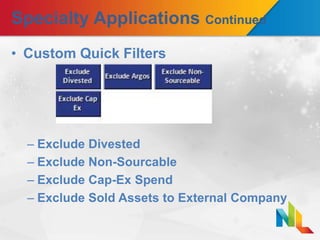
• Custom Quick Filters
– Exclude Divested
– Exclude Non-Sourcable
– Exclude Cap-Ex Spend
– Exclude Sold Assets to External Company
Early Victories
• Capturing misclassified data - Electric
Motors Spend
• Travel & Entertainment Spend Detail –
Hotel or Restaurant Chain
• Discovering major suppliers that were
obscured
– Consolidated Electrical Distributors
– Big Box Retailers (Home Depot, Lowes, etc)
• Enhances Identification of New Sourcing
Opportunities –
– Vocational Truck Upfitters
– Outside Services
Questions?
VMC- NextLevel for Breakout Sessions - Final (1)

VMC- NextLevel for Breakout Sessions - Final (1)

  • 2.
    Michelle Lax and MichaelBarker Vulcan Materials Company’s Spend Analytics Journey
  • 3.
    About Vulcan Materials •Vulcan Materials Company is the nation’s largest producer of construction aggregates—primarily crushed stone, sand and gravel—and a major producer of aggregates-based construction materials including asphalt and ready-mixed concrete. Our coast-to-coast footprint and strategic distribution network align with and serve the nation’s growth centers. We are headquartered in Birmingham, Alabama.
  • 4.
    Vulcan Materials Organization •We are organized into 7 Divisions and 1 Corporate Office. • Approximately 400 aggregate, asphalt and ready mix plants report up through the 7 Divisions across the country.
  • 5.
  • 6.
    Contents • Why SpendAnalytics? • Why Now? • Why Spend Radar? • Our Implementation • Specialty Applications • Early Victories • Questions
  • 7.
    Why Spend Analytics? •Classification of Spend Currently Inaccurate – Enable our Analysts to Analyze – Prior to Spend Radar, our analysts spent the majority of their time cleansing, reconciling, validating and consolidating data • Internal Challenges with Reporting – Many Requisitioners, Buyers and Approvers resulted in Inconsistent Data – Level 3 PCard Data wasn’t feasible – Multiple Vendor records in Oracle
  • 8.
    Why Spend Analytics?Continued • Consolidation of our Spend – Multiple Sources Consolidated to One View • PCard • T&E Cards • Legacy Systems • Oracle ERP – Purchase Orders and Invoices • Capability of Answering Supplier Questions Quickly – Total spend by supplier – Total spend by category – Total spend by geography – Supplier potential if an agreement were made
  • 9.
    Why Now? • DifficultEconomy – Cost Cutting was a major driver – Intel needed to renegotiate contracts – Need to identify additional spend categories to manage • Multiple Organizational Structure Changes – Divisions > Regions – Regions > Divisions – VP – General Manager Changes
  • 10.
    Why Now? Continued •Optimal Time for Selling to Management – Engagement with consultant • Demonstrated value of data and graphical information • Easier for management to digest • More forward looking actionable intelligence rather than historical information – Management saw the value - wanted more of this style of information and presentation
  • 11.
    Why Now? Continued •Departmental Vision Aligned with the Need for Spend Analytics – Departmental Efficiency – Knowledge of our own data gives us an advantage in negotiations – Credibility in the field – Wanted 80 / 20 Data Analysis vs Data Cleansing – Wanted Vendor Normalization capability
  • 12.
    Why Spend Radar? •Researched Major Suppliers in the Industry – Noted differences in the “classification model” of each vendor • Multiple proofs of concept / demos • Black Box methodology • Review by Humans on the Front End • Less Auditing required on the Back End • Excellent Service Track Record – References – Our confidence in their capabilities – Professionalism – Flexibility
  • 13.
    Our Implementation • TaxonomyDevelopment – Custom Taxonomy • No overlap in categories • Purchases are classified as what they are, not which department they serve or account they go into • Our preference was for maximum granularity – Taxonomy Levels (Example)
  • 14.
    Our Implementation Continued Level1 Level 2 Level 1 Level 2 Level 1 Level 2 Administrative Products Benefits Non-sourceable Building Equipment Attachments Employee Relations Charitable Electrical Equipment Employee Relocation Reimbursements Community Relations Equipment Rental Facilities Products Debt Repayment Fixed Equipment Insurance Discounts / Refunds Fleet Sales Promotions Dividends Generator Supplier Awards Escrow Accounts Hydraulics Training Materials Fees IT Equipment Services Administrative Services Fines and Penalties Lab Equipment Benefits Services Garnishment Lubricating System Compensation Services Intercompany Spend Marine Equipment Contract Labor Land Purchase Mobile Equipment Product Delivery Services Licensing & Permits Office Equipment Production / Support Services Memberships / Dues / Subscriptions Parts Services - Other Pension Pneumatics Shipping Services Political Contributions Power Transmission Consumables Blasting Rents & Royalties Rail Equipment Chemicals Restocking Fee Rock Breaker Drill Accessories Settlement Scale Energy & Utilities Severance / Non-Compete Support Equipment Filters Sponsorships Surveying Equipment Fluids Tax Tank Gases Union Dues MRO Materials Building Materials Office Supplies Raw Materials SHE Steel Tires Wear Products
  • 15.
    Our Implementation Continued CategoryLevel 1 Category Level 2 Category Level 3 Category Level 4 Consumables Wear Products Cheek Plates Cheek Plate - Upper (Non-Manganese) Cheek Plate - Lower (Non-Manganese) Chute Liners Chute Liners - Other Rubber Chute Liners Ceramic Chute Liners Steel/AR Feeders Liners Grizzly Bars Wobbler Bars Ground Engaging Tools Ground Engaging Tools - Other Blades / Cutting Edges Teeth / Adaptors HSI Blowbars HSI - Other Manganese Manganese - Other Cone Crushers Gyratory Crushers Jaw Crushers Cheek Plates Rubber Liners - Screen Media Wire Cloth - Rubber Cloth Urethane Cloth Steel - Wear Resistant Steel Wear Plate Steel Wear Parts - Other VSI Anvils Shoes VSI - Other Wear Products - Other -
  • 16.
    Our Implementation Continued •Consulted with a Network of Vulcan Subject Matter Experts in the Field – Determine what is important to be classified – Determine what can be classified – Determine what changes we can make to aid in classification in the future
  • 17.
    Our Implementation Continued •Working with SciQuest – Effective Project Management - Deliverables and timeline were clearly defined and delivered upon – Good Product Knowledge - Initial Classification was highly accurate – Resource Availability • The SciQuest team was available to answer our questions whenever we needed them • Specialized reporting requests were implemented as needed
  • 18.
    Our Implementation Continued •Data Preparation – Level 3 Procurement Card Data Enrichment • Bank provides a file • Many vendors provide poor data • Match good data to the corresponding purchase – Summarization of Standardized Purchases - Haulers – Integration of Additional Data Fields • Expense Reports – Expense Justification – Employee Name as Supplier
  • 19.
    Our Implementation Continued •Consolidated Our Data Uploads to 3 Files – Haulers – PCard – Other Transactions • Classification – Initial Classification to 95% - 5 weeks – Additional Classification to 98% (as of January 2015) by Vulcan personnel
  • 20.
    Our Implementation Continued MainDashboard: Spend by Classification, Spend by Supplier, Spend by Region, Spend by Month
  • 21.
    Our Implementation Continued Ifthe user clicks on a category, a filter is applied. This “drill-down” functionality is fast and powerful, and it applies the filter to all charts and data in the tool. Here, we clicked “Equipment”. Now notice the Spend by Classification chart. Parts, Mobile Equipment, Fixed Equipment, etc are all level 2 categories of Equipment. Now only the top suppliers of our “Equipment” category are now listed at the top right.
  • 22.
    Our Implementation Continued Wecan continue to drill deeper into the spend categories. In this case, we clicked “Parts”. Notice the data has now drilled down to the different categories of Parts (e.g. Loader Parts, Crusher Parts, etc). And, now we see that our top suppliers for the “Parts” category are listed at the top right. Note: all charts and tables have drill down functionality.
  • 23.
    Specialty Applications • ComplianceReporting – Market Share Reports – for contract compliance and rebate documentation • Custom Market Share Report Dashboard • Classification Greater Than 95% • More detailed and accurate reports (Level 3 Enrichment) • Custom Lookup Tables – Reporting Parent – Manufacturer Parent – PT/MRO Primary
  • 24.
    Specialty Applications Continued •Assume Responsibility for Data Manager – Create Our Own Classification Rules - Allows us to get classification % as high as we need • Effort vs Results • Cross Functional Uses Outside of Procurement – Financial Analysis – Tax – Audit – Operations
  • 25.
    Specialty Applications Continued MarketShare Report – Tires - Setup
  • 26.
    Specialty Applications Continued MarketShare Report – Tires - Result
  • 27.
    Specialty Applications Continued •Managing Organizational Change – Multiple Organizational Changes in Past Months / Years – Lookup Tables • Data Contains Organizational coding for point in time of transaction • Use lookup tables to map spend to current organizational structure
  • 28.
    Specialty Applications Continued •Custom Quick Filters – Exclude Divested – Exclude Non-Sourcable – Exclude Cap-Ex Spend – Exclude Sold Assets to External Company
  • 29.
    Early Victories • Capturingmisclassified data - Electric Motors Spend • Travel & Entertainment Spend Detail – Hotel or Restaurant Chain • Discovering major suppliers that were obscured – Consolidated Electrical Distributors – Big Box Retailers (Home Depot, Lowes, etc) • Enhances Identification of New Sourcing Opportunities – – Vocational Truck Upfitters – Outside Services
  • 30.