©2008 LANexpert SA www.lanexpert.ch Slide 1
Virtualization on IBM
Blade Center (N°14)
Michael GOMEZ
Senior Storage Business Development Manager
September 2nd, 2008
Erik BUSSINK
Senior Virtualization & Security Consultant
©2008 LANexpert SA www.lanexpert.ch Slide 2
AGENDA
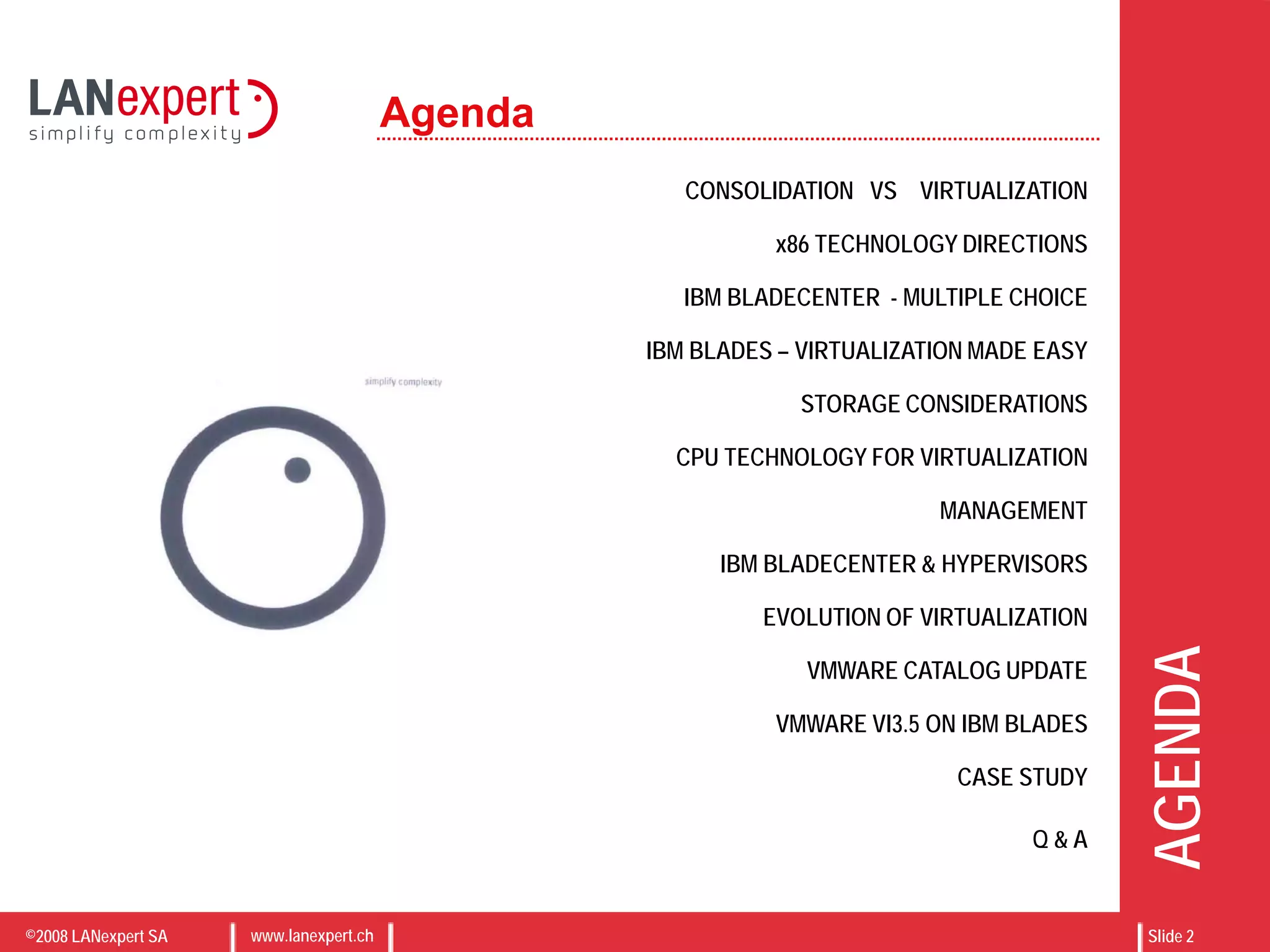
CONSOLIDATION VS VIRTUALIZATION
x86 TECHNOLOGY DIRECTIONS
IBM BLADECENTER - MULTIPLE CHOICE
IBM BLADES – VIRTUALIZATION MADE EASY
STORAGE CONSIDERATIONS
CPU TECHNOLOGY FOR VIRTUALIZATION
MANAGEMENT
IBM BLADECENTER & HYPERVISORS
EVOLUTION OF VIRTUALIZATION
VMWARE CATALOG UPDATE
VMWARE VI3.5 ON IBM BLADES
CASE STUDY
Q & A
Agenda
©2008 LANexpert SA www.lanexpert.ch Slide 3
WHAT IS CONSOLIDATION ?
“[Consolidation is] an approach to the
efficient usage of server resources in
order to reduce the total number of
servers, increase datacenter density,
optimize connectivity, reduce energy and
TCO”
IBM BladeCenters are the most efficient
way to server consolidation
 Higher density and server count per U
 Integrated network backplane
 Green technology at best TCO
 Reduce Server Count
 Increase Datacenter
density
 Optimize connectivity
 Reduce TCO
 Green savings
©2008 LANexpert SA www.lanexpert.ch Slide 4
WHAT IS VIRTUALIZATION ?
“[Virtualization is] a technique for hiding
the physical characteristics of computing
resources from the way in which other
systems, applications, or end users
interact with those resources”
In other words: Simplify Complexity
For computing, virtualization can be grouped in
two types:
• Resource virtualization (Storage, Network, etc.)
• Platform virtualization (Hypervisor)
 Virtualization started
in 1960s by IBM…
 Virtual Memory
 VLAN, trunk, VPN
 RAID, volume
manager
 Storage virtualization
 Emulation
 Native virtualization
 Paravirtualization
 Application
virtualization
©2008 LANexpert SA www.lanexpert.ch Slide 5
CONSOLIDATION ? VIRTUALIZATION ?
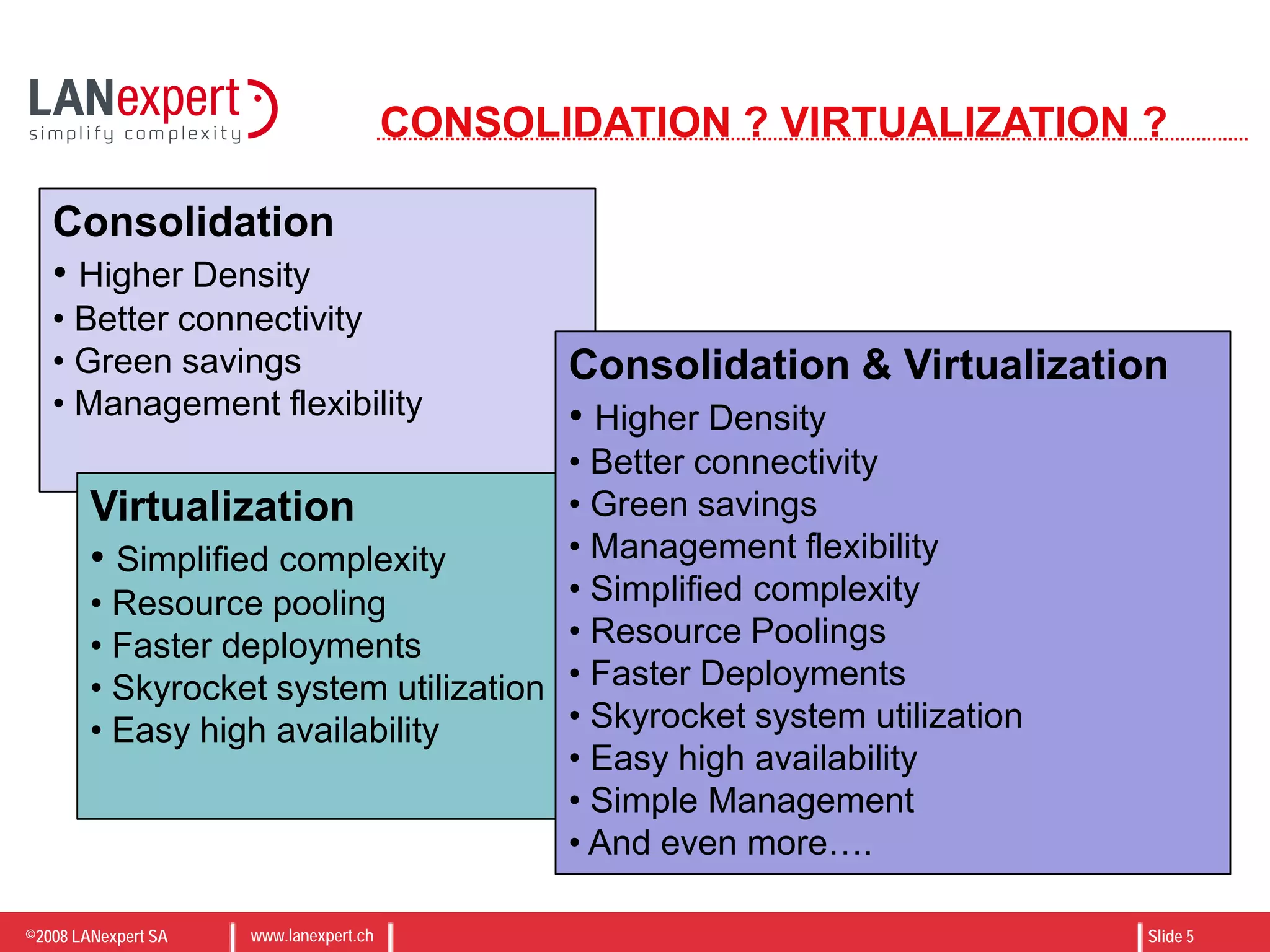
Consolidation
• Higher Density
• Better connectivity
• Green savings
• Management flexibility
Virtualization
• Simplified complexity
• Resource pooling
• Faster deployments
• Skyrocket system utilization
• Easy high availability
Consolidation & Virtualization
• Higher Density
• Better connectivity
• Green savings
• Management flexibility
• Simplified complexity
• Resource Poolings
• Faster Deployments
• Skyrocket system utilization
• Easy high availability
• Simple Management
• And even more….
©2008 LANexpert SA www.lanexpert.ch Slide 6
x86 Technology Directions
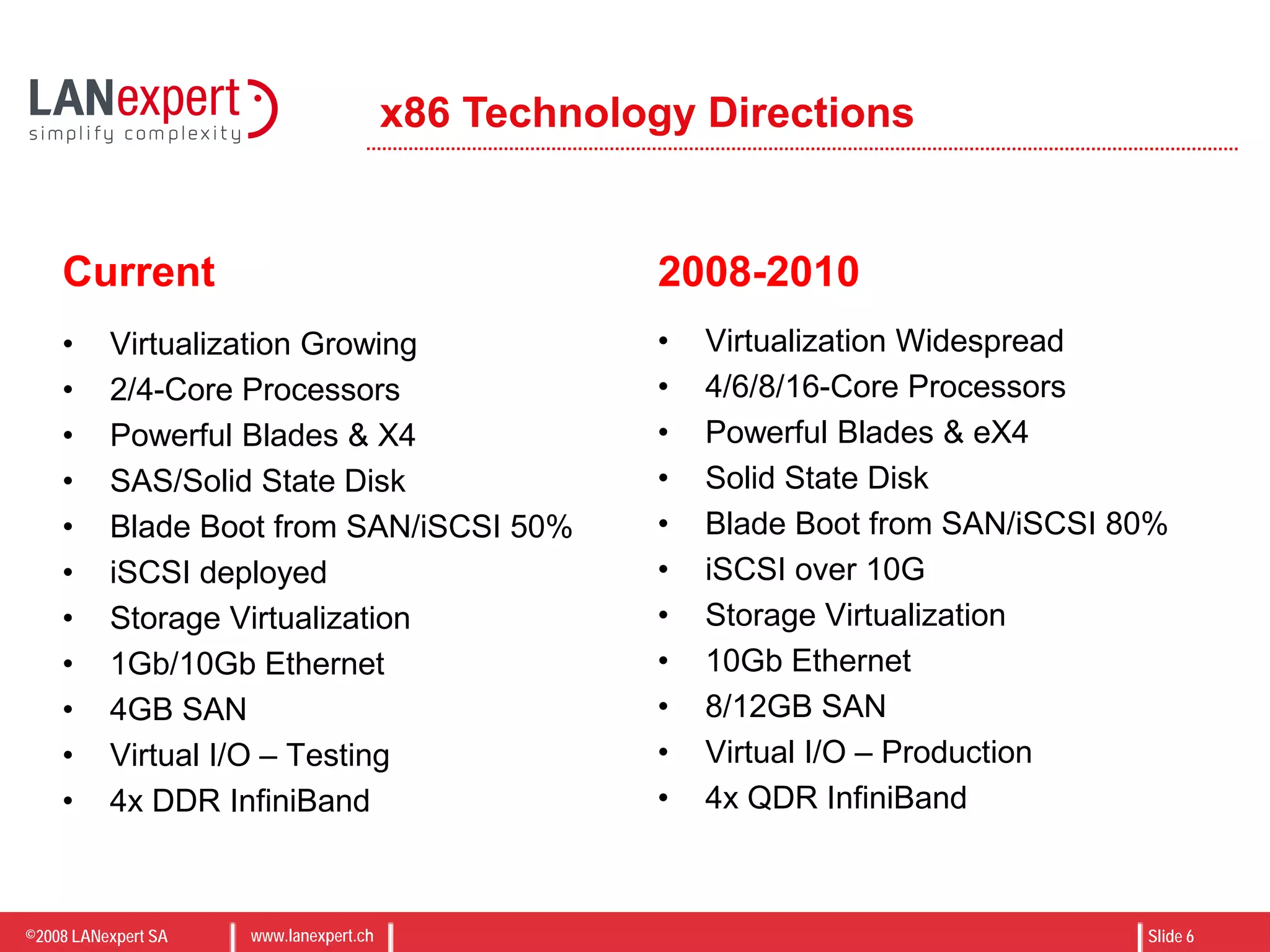
Current
• Virtualization Growing
• 2/4-Core Processors
• Powerful Blades & X4
• SAS/Solid State Disk
• Blade Boot from SAN/iSCSI 50%
• iSCSI deployed
• Storage Virtualization
• 1Gb/10Gb Ethernet
• 4GB SAN
• Virtual I/O – Testing
• 4x DDR InfiniBand
2008-2010
• Virtualization Widespread
• 4/6/8/16-Core Processors
• Powerful Blades & eX4
• Solid State Disk
• Blade Boot from SAN/iSCSI 80%
• iSCSI over 10G
• Storage Virtualization
• 10Gb Ethernet
• 8/12GB SAN
• Virtual I/O – Production
• 4x QDR InfiniBand
©2008 LANexpert SA www.lanexpert.ch Slide 7
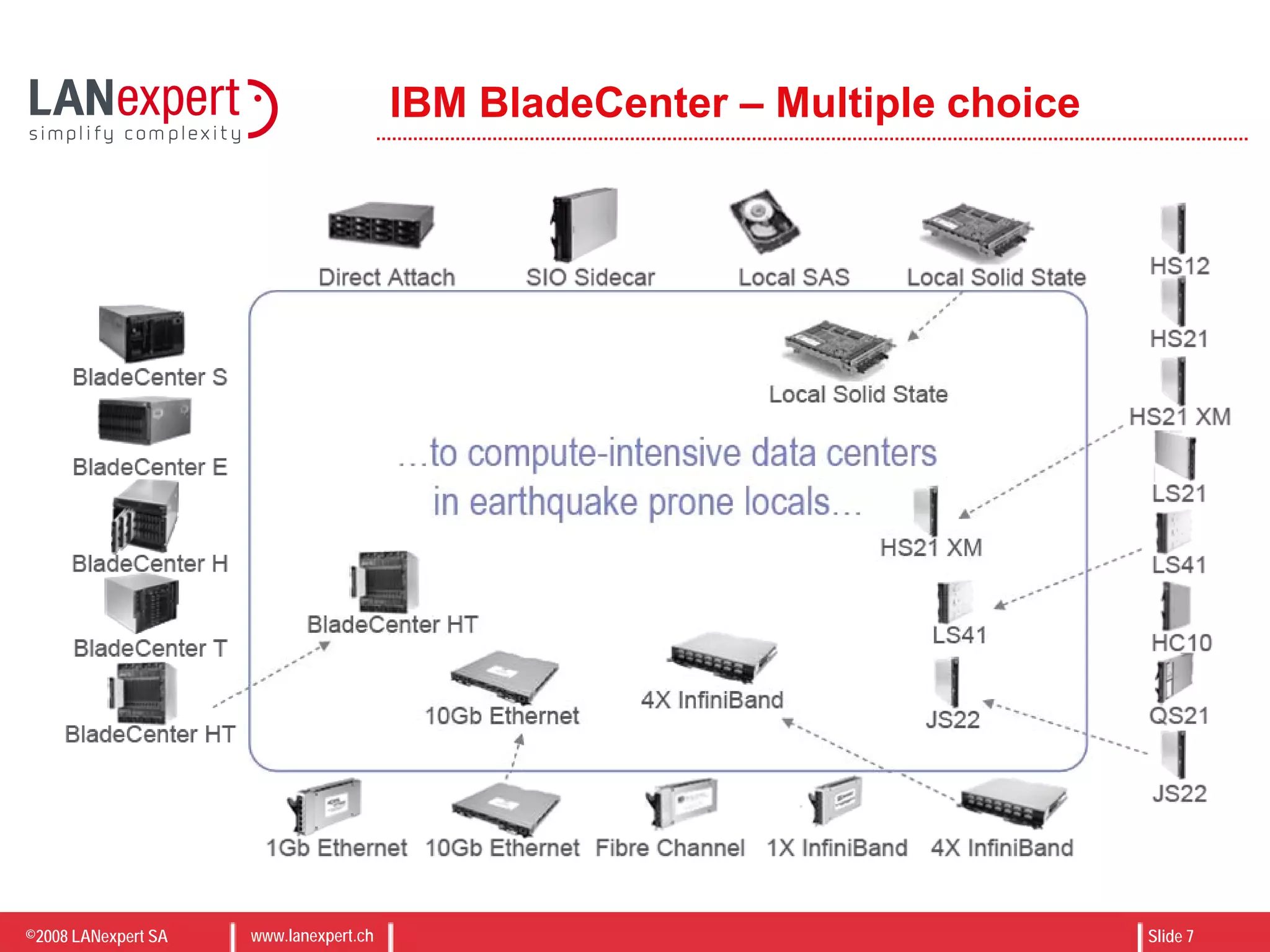
IBM BladeCenter – Multiple choice
©2008 LANexpert SA www.lanexpert.ch Slide 8
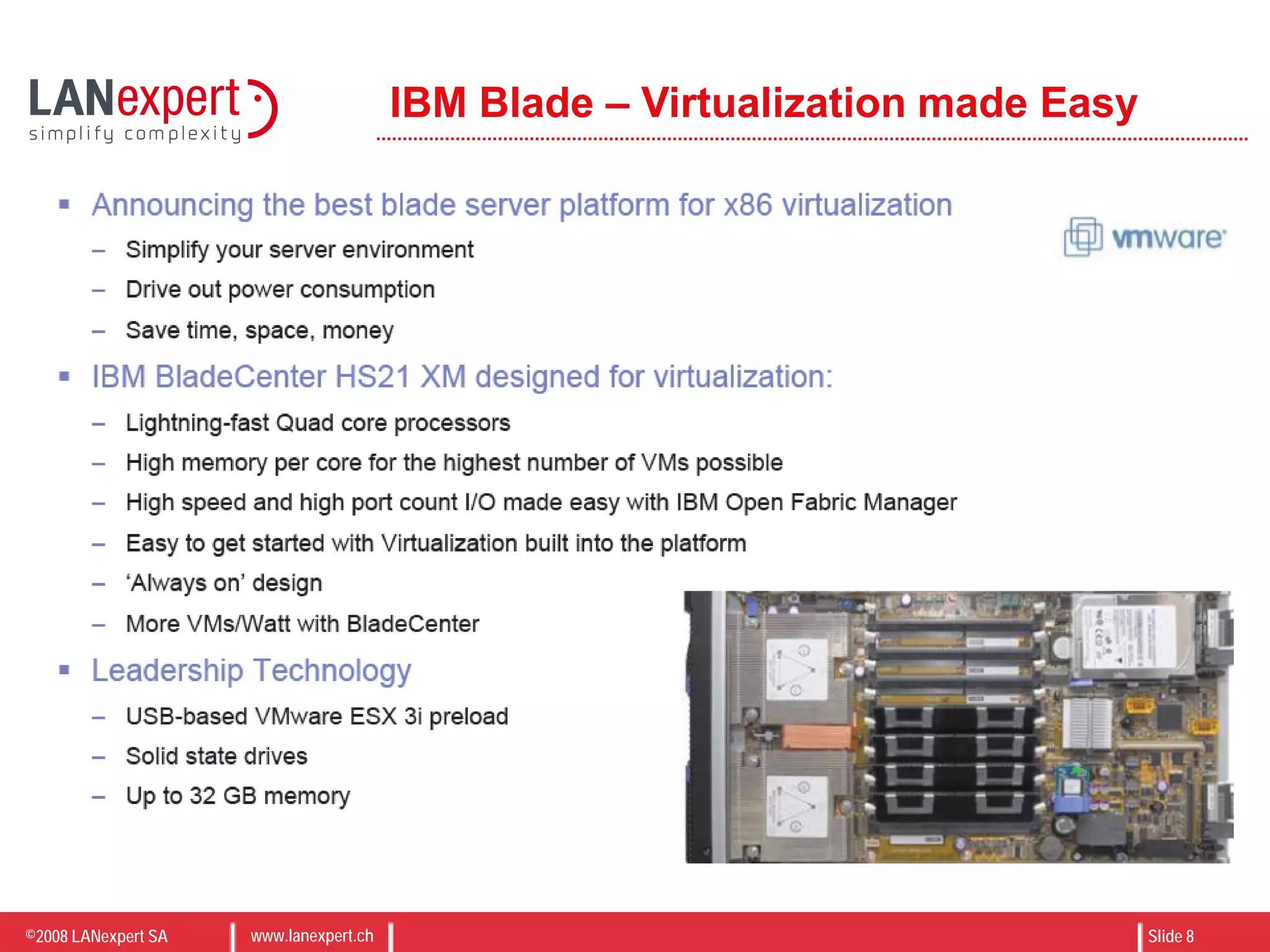
IBM Blade – Virtualization made Easy
©2008 LANexpert SA www.lanexpert.ch Slide 9
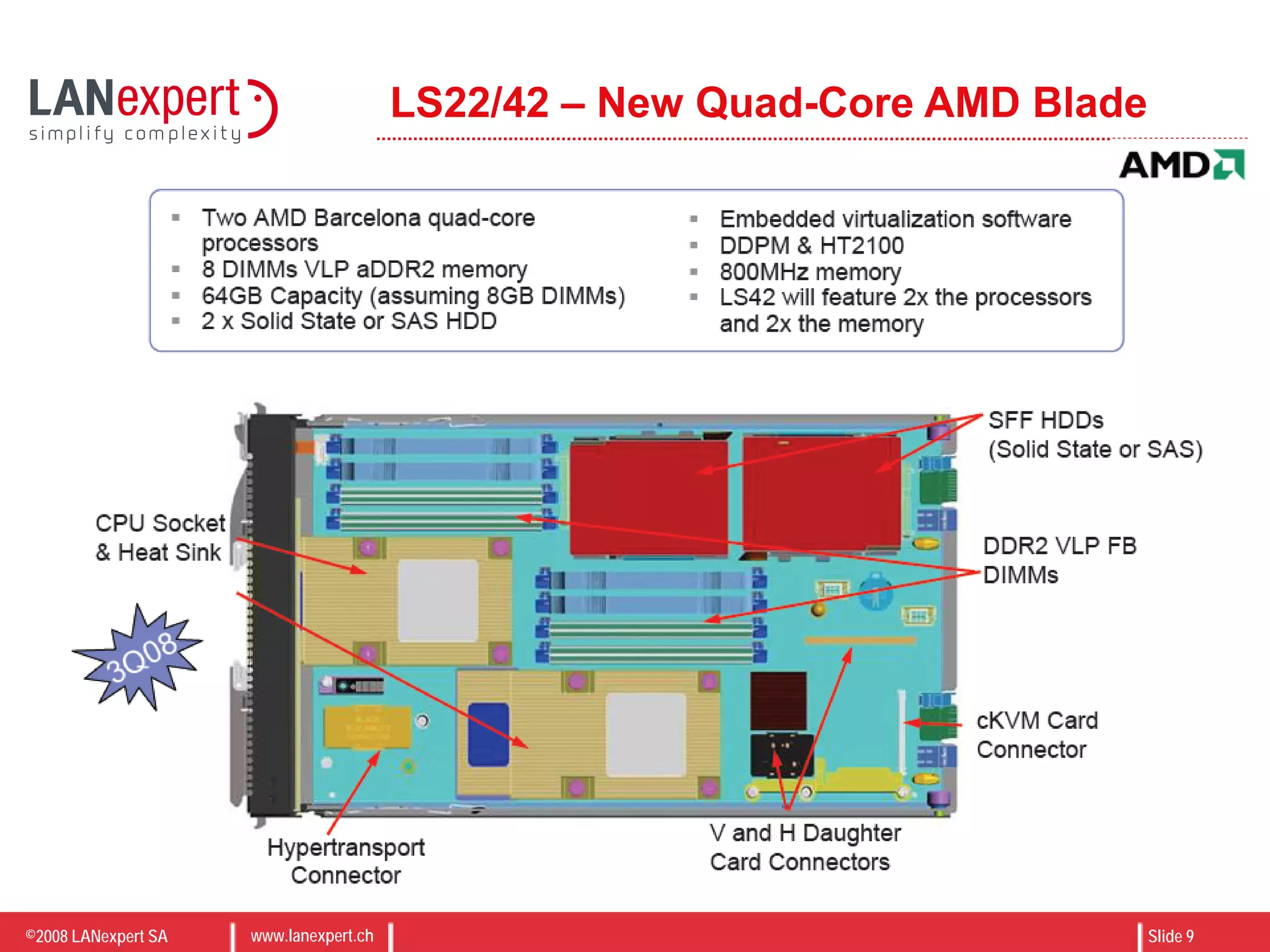
LS22/42 – New Quad-Core AMD Blade
©2008 LANexpert SA www.lanexpert.ch Slide 10
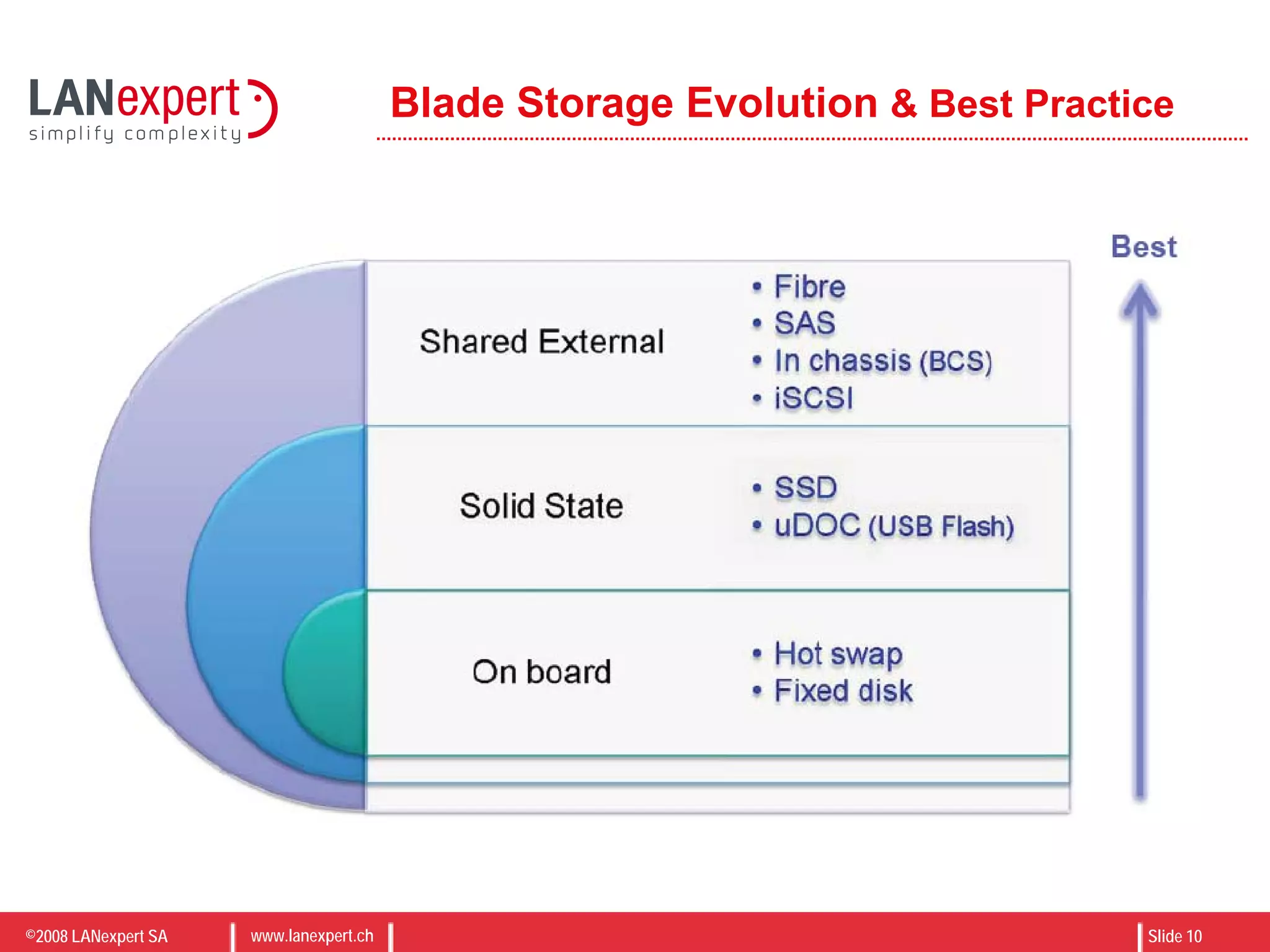
Blade Storage Evolution & Best Practice
©2008 LANexpert SA www.lanexpert.ch Slide 11
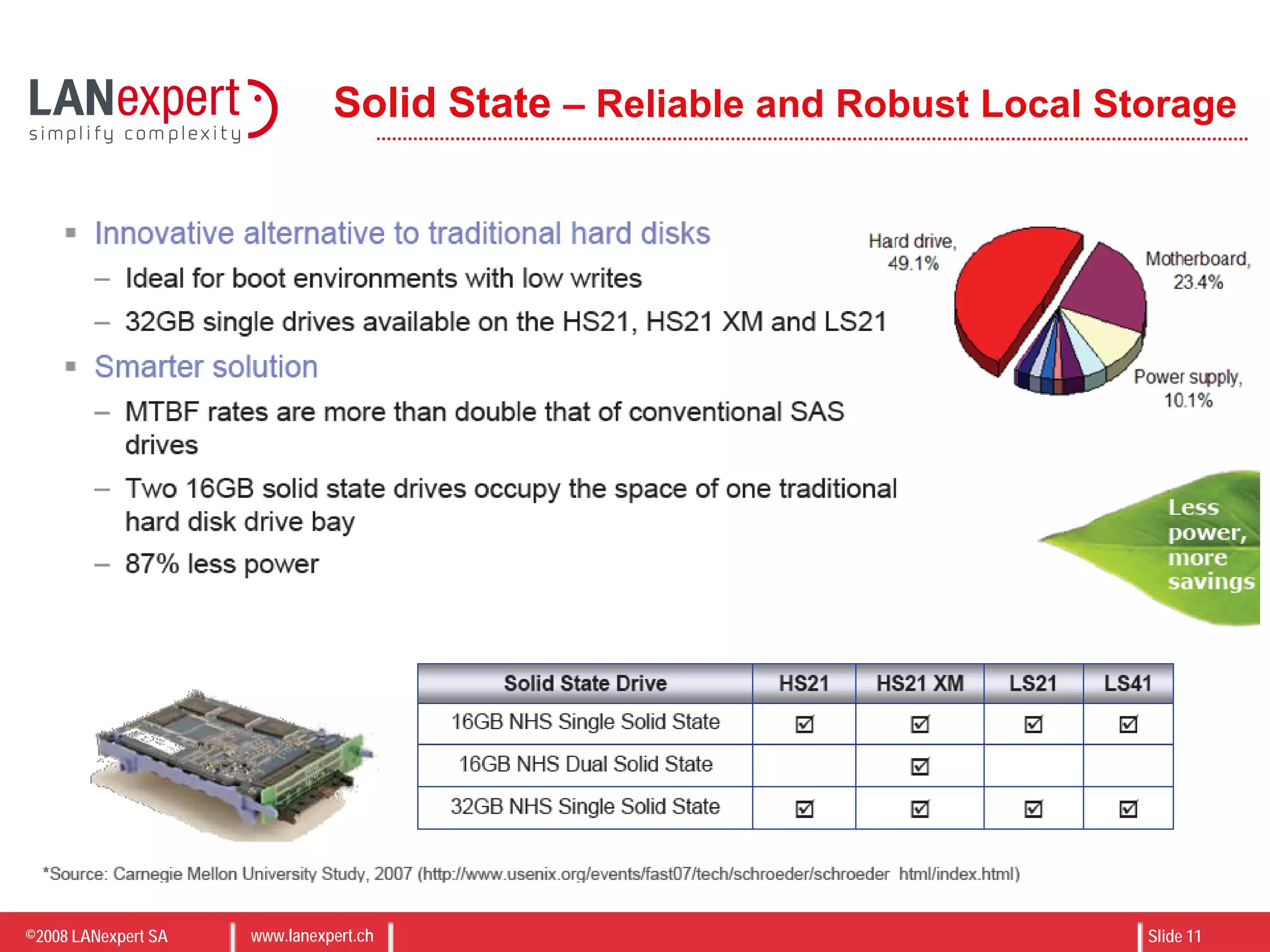
Solid State – Reliable and Robust Local Storage
©2008 LANexpert SA www.lanexpert.ch Slide 12
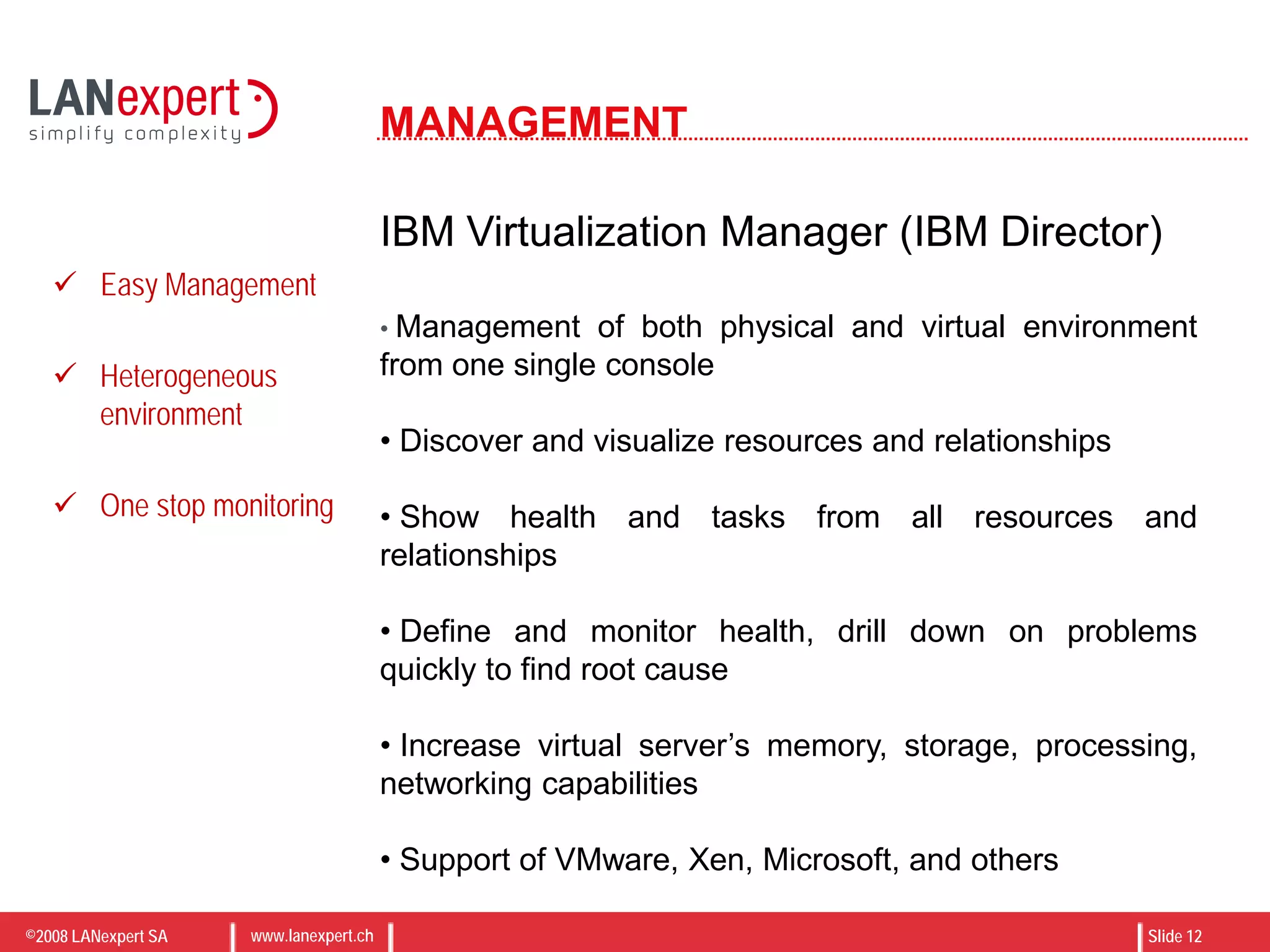
MANAGEMENT
IBM Virtualization Manager (IBM Director)
• Management of both physical and virtual environment
from one single console
• Discover and visualize resources and relationships
• Show health and tasks from all resources and
relationships
• Define and monitor health, drill down on problems
quickly to find root cause
• Increase virtual server’s memory, storage, processing,
networking capabilities
• Support of VMware, Xen, Microsoft, and others
 Easy Management
 Heterogeneous
environment
 One stop monitoring
©2008 LANexpert SA www.lanexpert.ch Slide 13
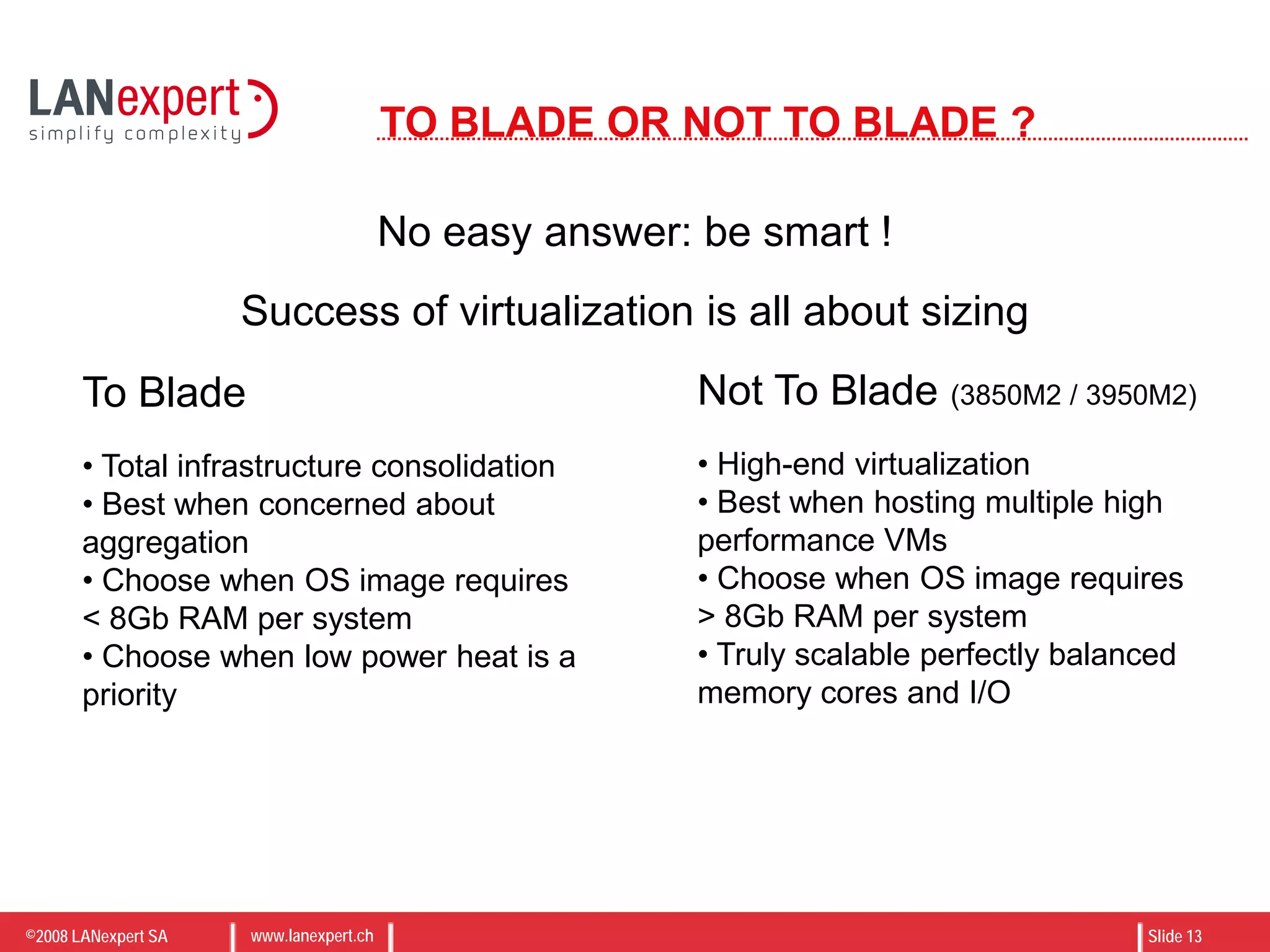
TO BLADE OR NOT TO BLADE ?
No easy answer: be smart !
To Blade
• Total infrastructure consolidation
• Best when concerned about
aggregation
• Choose when OS image requires
< 8Gb RAM per system
• Choose when low power heat is a
priority
Not To Blade (3850M2 / 3950M2)
• High-end virtualization
• Best when hosting multiple high
performance VMs
• Choose when OS image requires
> 8Gb RAM per system
• Truly scalable perfectly balanced
memory cores and I/O
Success of virtualization is all about sizing
©2008 LANexpert SA www.lanexpert.ch Slide 14
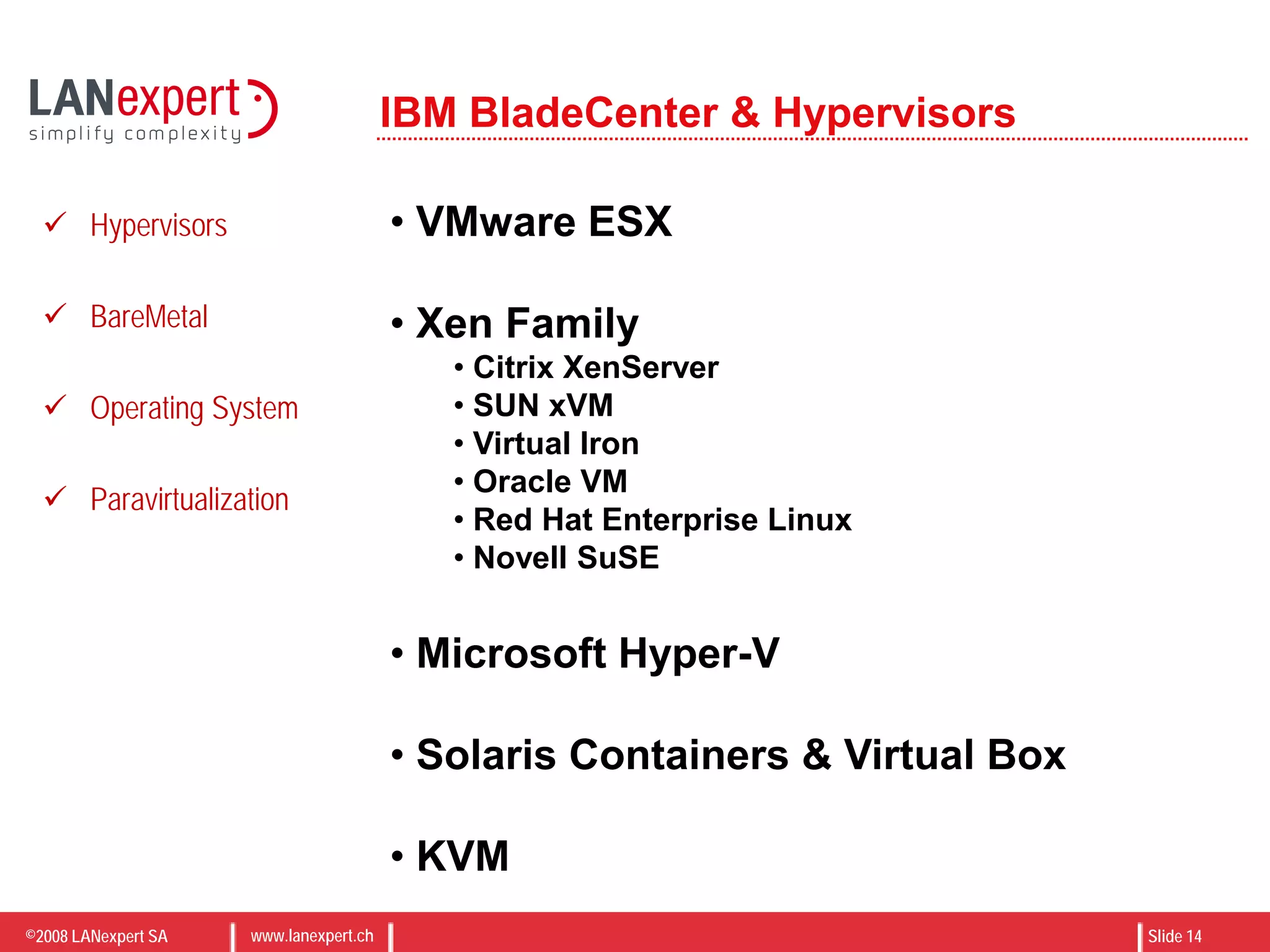
IBM BladeCenter & Hypervisors
• VMware ESX
• Xen Family
• Citrix XenServer
• SUN xVM
• Virtual Iron
• Oracle VM
• Red Hat Enterprise Linux
• Novell SuSE
• Microsoft Hyper-V
• Solaris Containers & Virtual Box
• KVM
 Hypervisors
 BareMetal
 Operating System
 Paravirtualization
©2008 LANexpert SA www.lanexpert.ch Slide 15
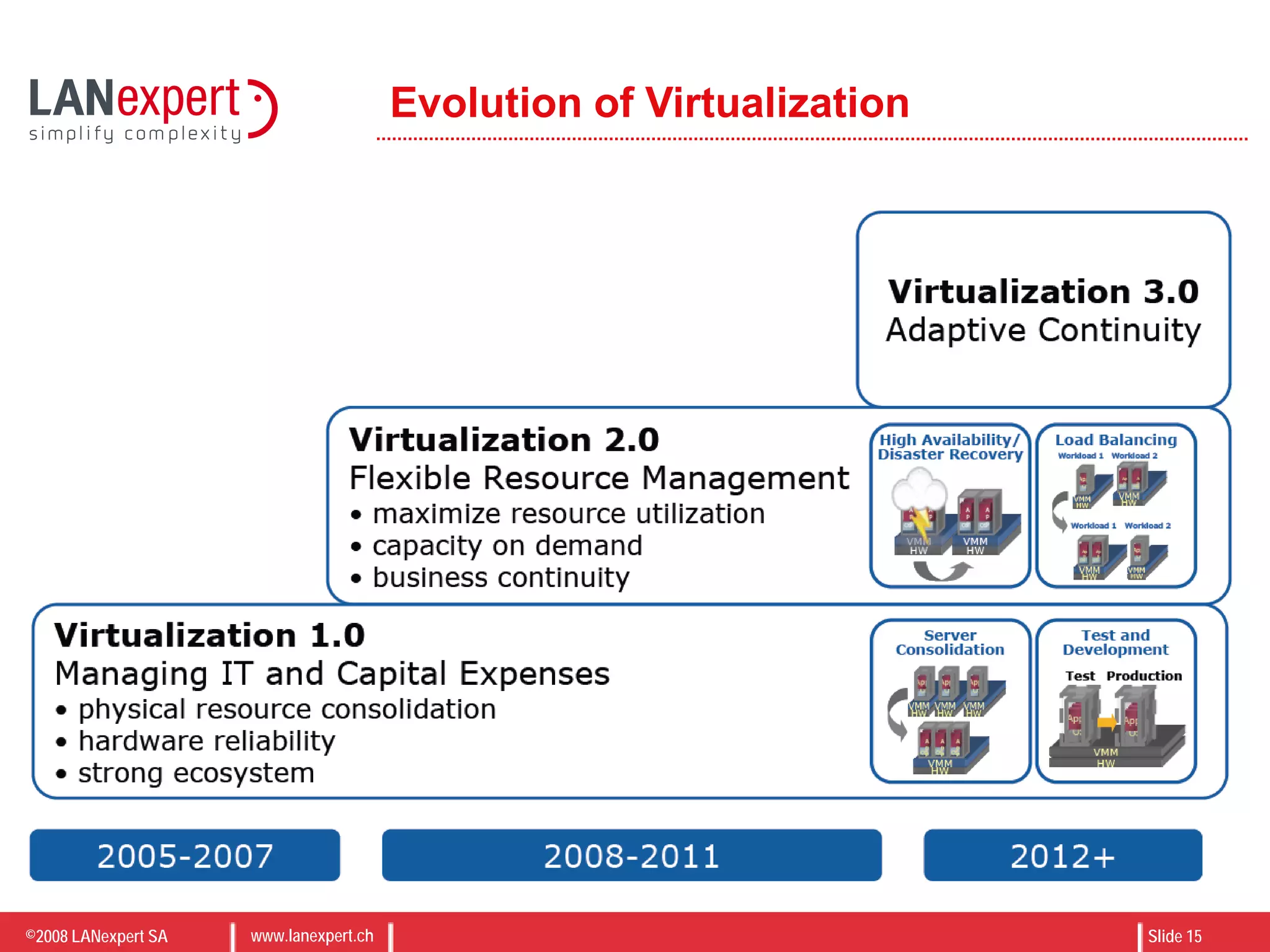
Evolution of Virtualization
©2008 LANexpert SA www.lanexpert.ch Slide 16
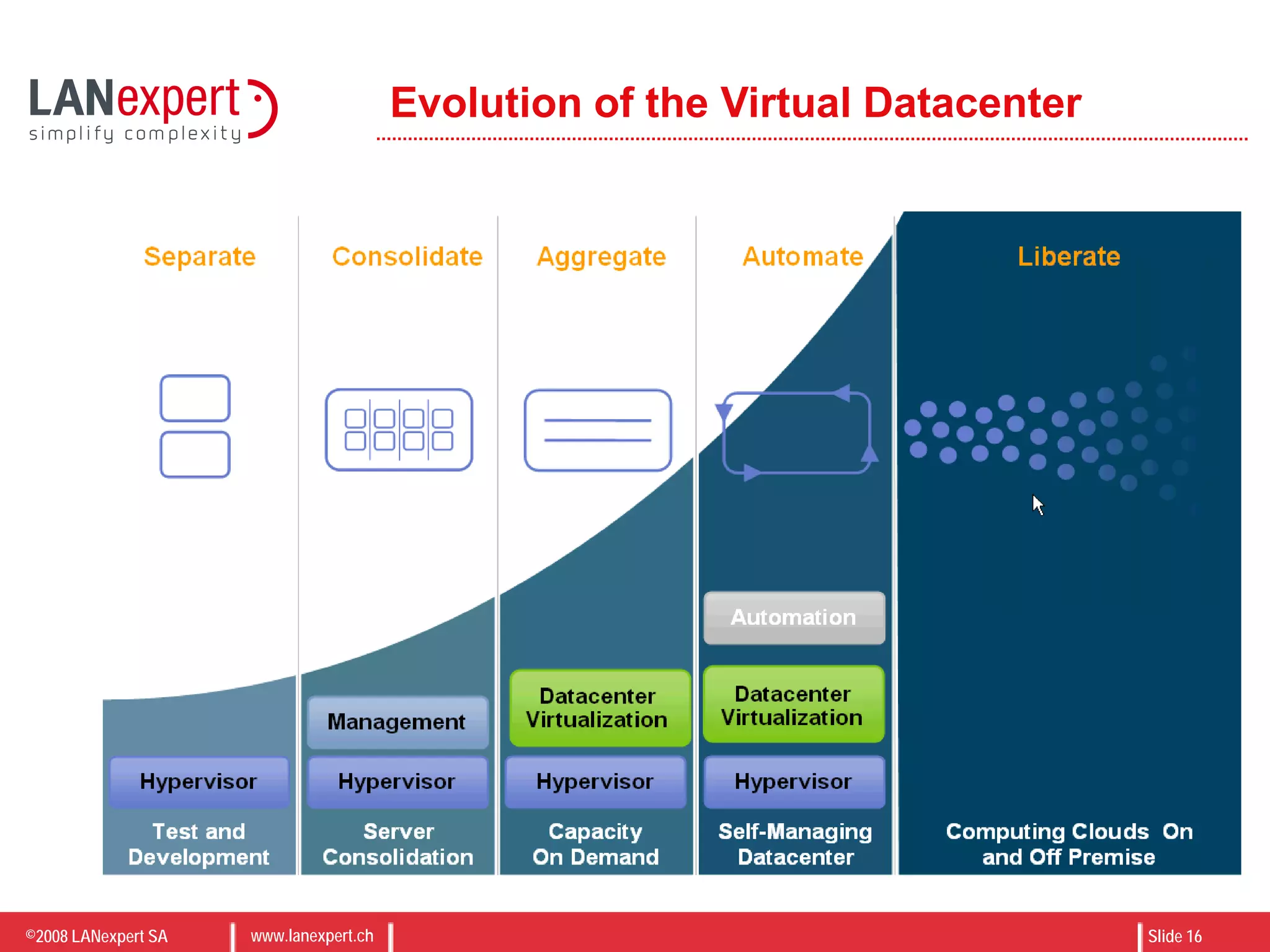
Evolution of the Virtual Datacenter
©2008 LANexpert SA www.lanexpert.ch Slide 17
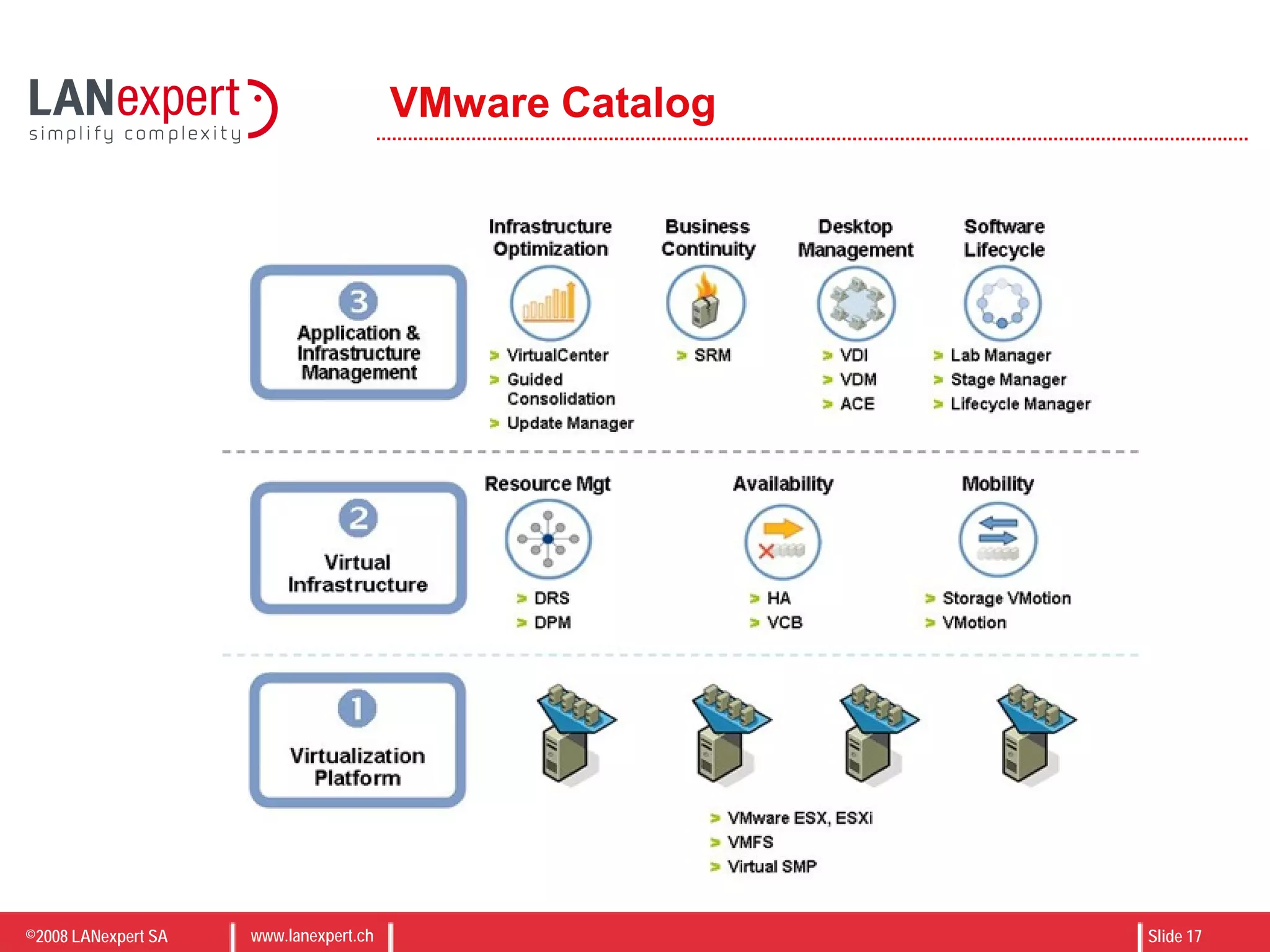
VMware Catalog
©2008 LANexpert SA www.lanexpert.ch Slide 18
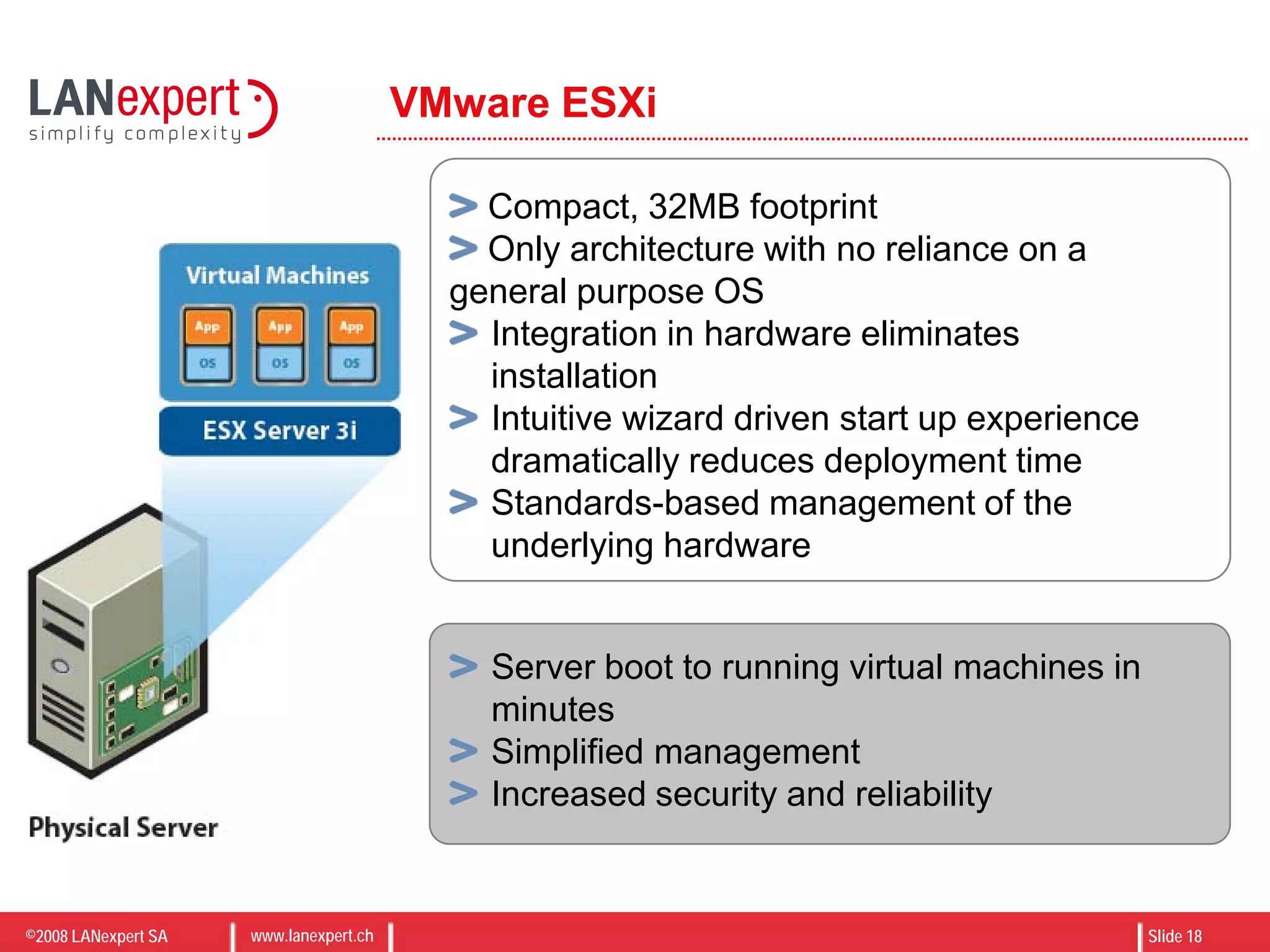
VMware ESXi
Server boot to running virtual machines in
minutes
Simplified management
Increased security and reliability
Compact, 32MB footprint
Only architecture with no reliance on a
general purpose OS
Integration in hardware eliminates
installation
Intuitive wizard driven start up experience
dramatically reduces deployment time
Standards-based management of the
underlying hardware
©2008 LANexpert SA www.lanexpert.ch Slide 19
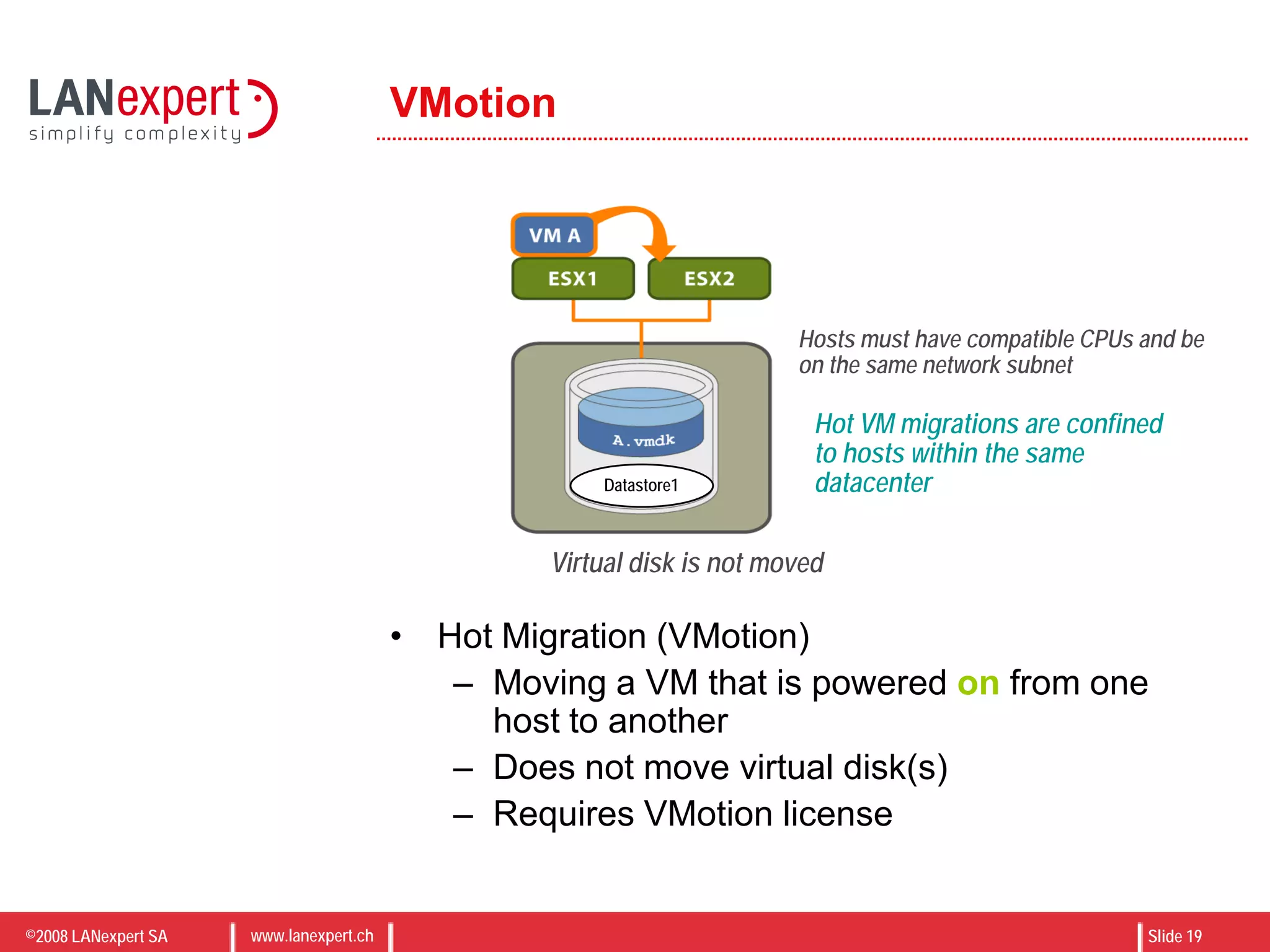
VMotion
• Hot Migration (VMotion)
– Moving a VM that is powered on from one
host to another
– Does not move virtual disk(s)
– Requires VMotion license
Datastore1
Virtual disk is not moved
Hosts must have compatible CPUs and be
on the same network subnet
Hot VM migrations are confined
to hosts within the same
datacenter
©2008 LANexpert SA www.lanexpert.ch Slide 20
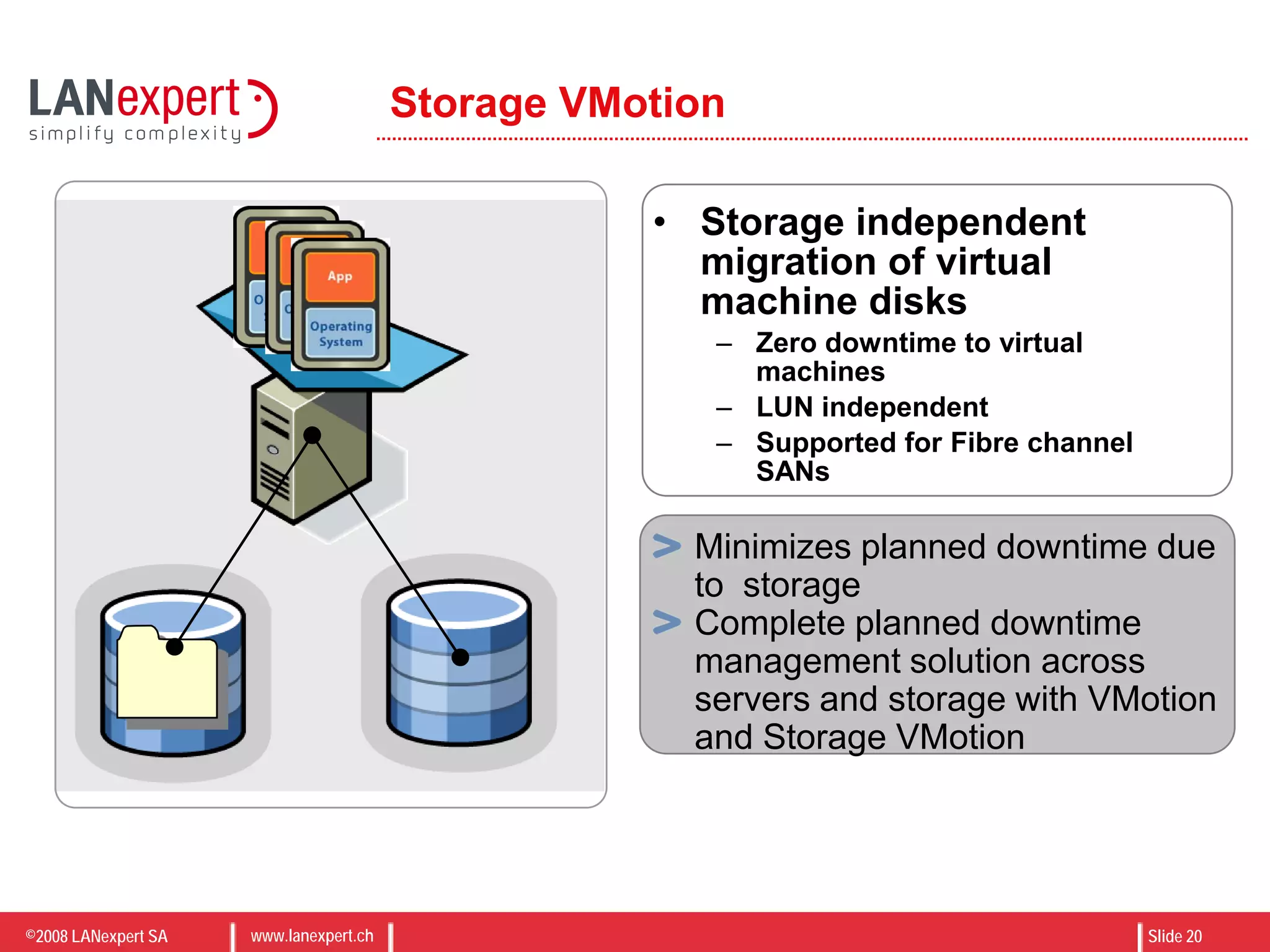
Storage VMotion
• Storage independent
migration of virtual
machine disks
– Zero downtime to virtual
machines
– LUN independent
– Supported for Fibre channel
SANs
Minimizes planned downtime due
to storage
Complete planned downtime
management solution across
servers and storage with VMotion
and Storage VMotion
©2008 LANexpert SA www.lanexpert.ch Slide 21
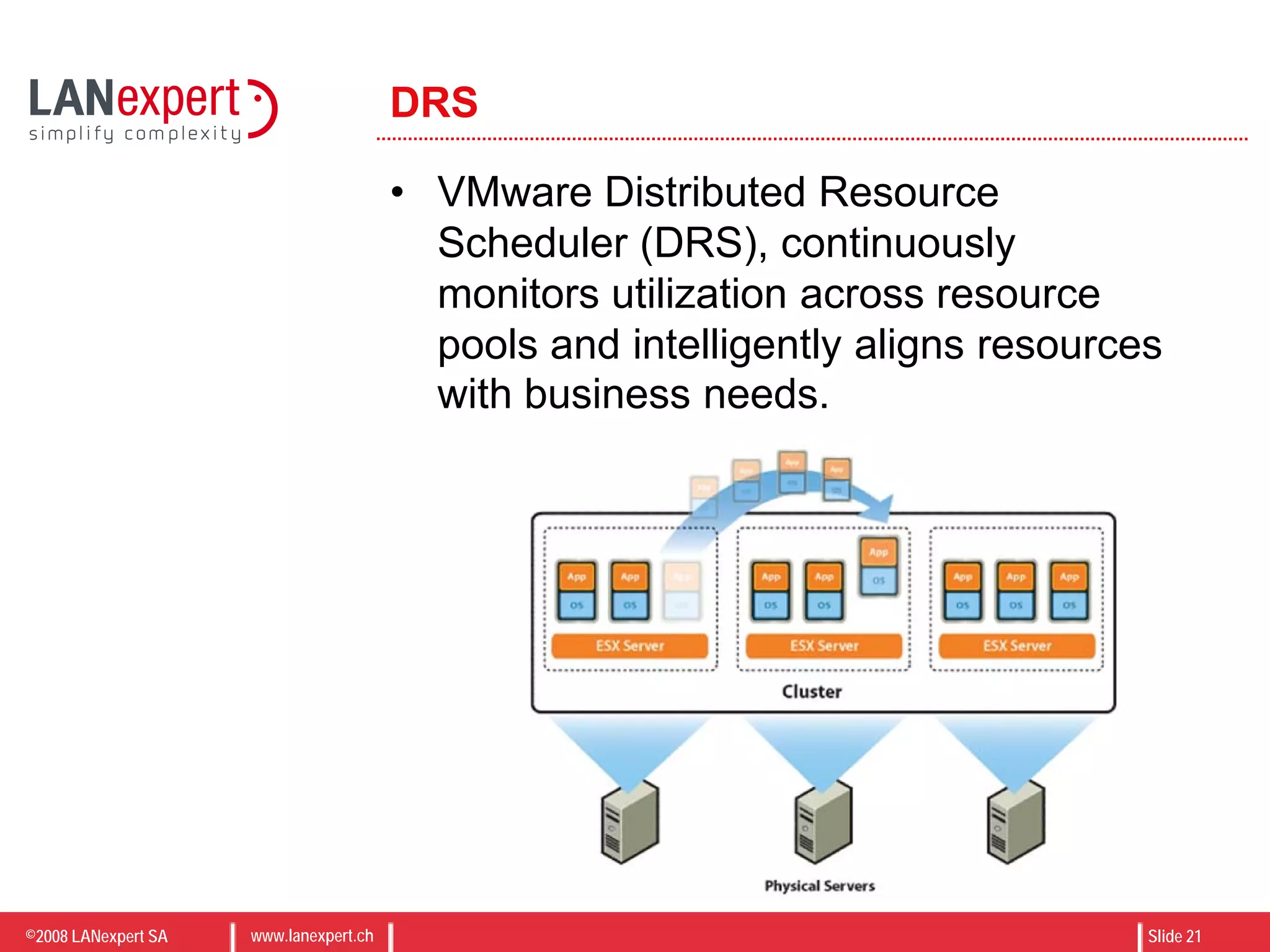
DRS
• VMware Distributed Resource
Scheduler (DRS), continuously
monitors utilization across resource
pools and intelligently aligns resources
with business needs.
©2008 LANexpert SA www.lanexpert.ch Slide 22
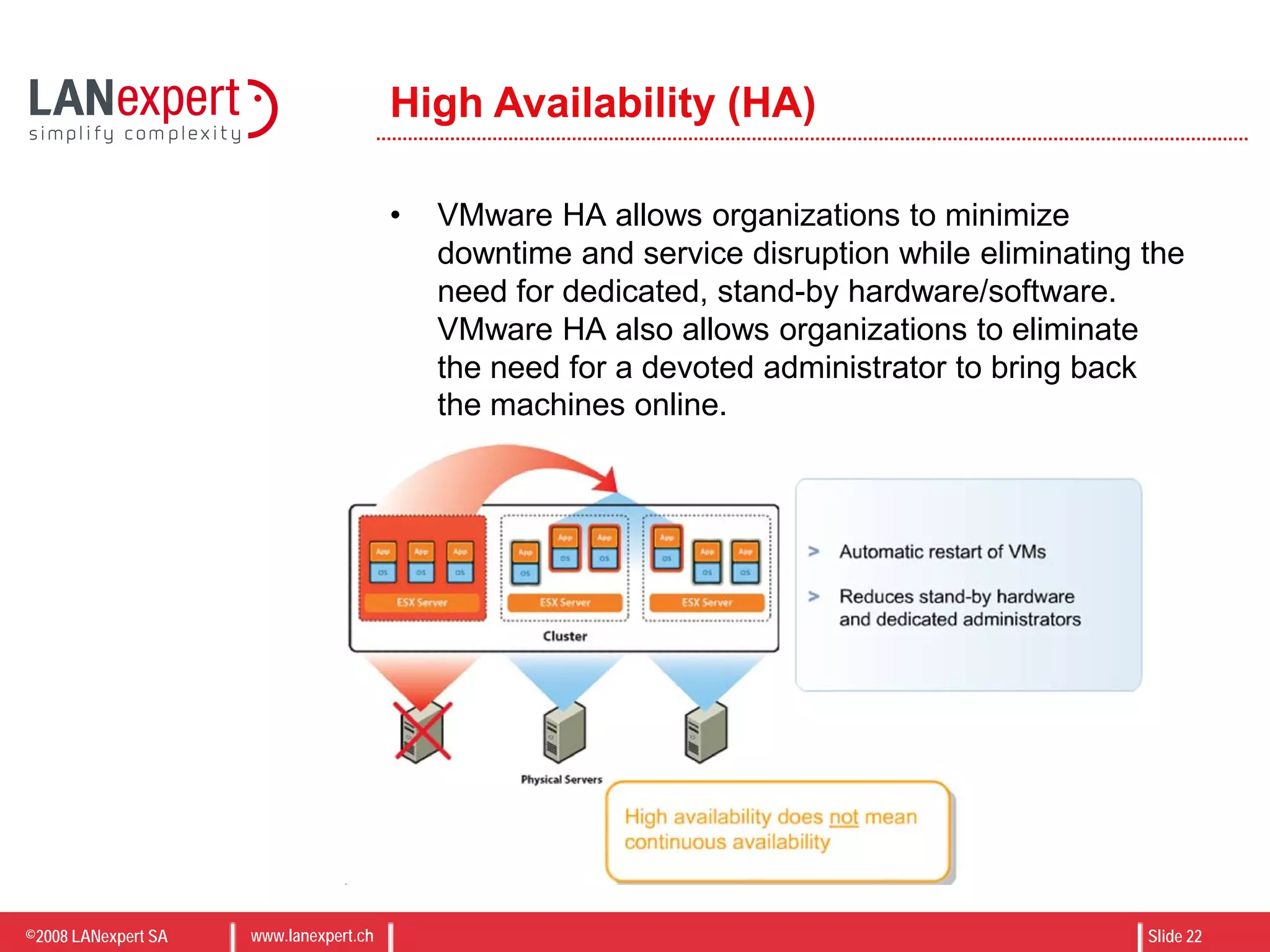
High Availability (HA)
• VMware HA allows organizations to minimize
downtime and service disruption while eliminating the
need for dedicated, stand-by hardware/software.
VMware HA also allows organizations to eliminate
the need for a devoted administrator to bring back
the machines online.
©2008 LANexpert SA www.lanexpert.ch Slide 23
VMware Update Manager
• Automates patch
management for ESX Server
hosts and select Microsoft
and RHEL virtual machines
• Scans and remedies online as well as
offline virtual machines* and online
ESX Server hosts
• Snapshots virtual machines prior to
patching and allows rollback to
snapshot
Update
Manager
Eliminates manual tracking of patch
levels of ESX Server hosts and
virtual machines
Automates enforcement of patch
standards
Reduces risk through snapshots and
offline virtual machine patching
OFFLINE
©2008 LANexpert SA www.lanexpert.ch Slide 24
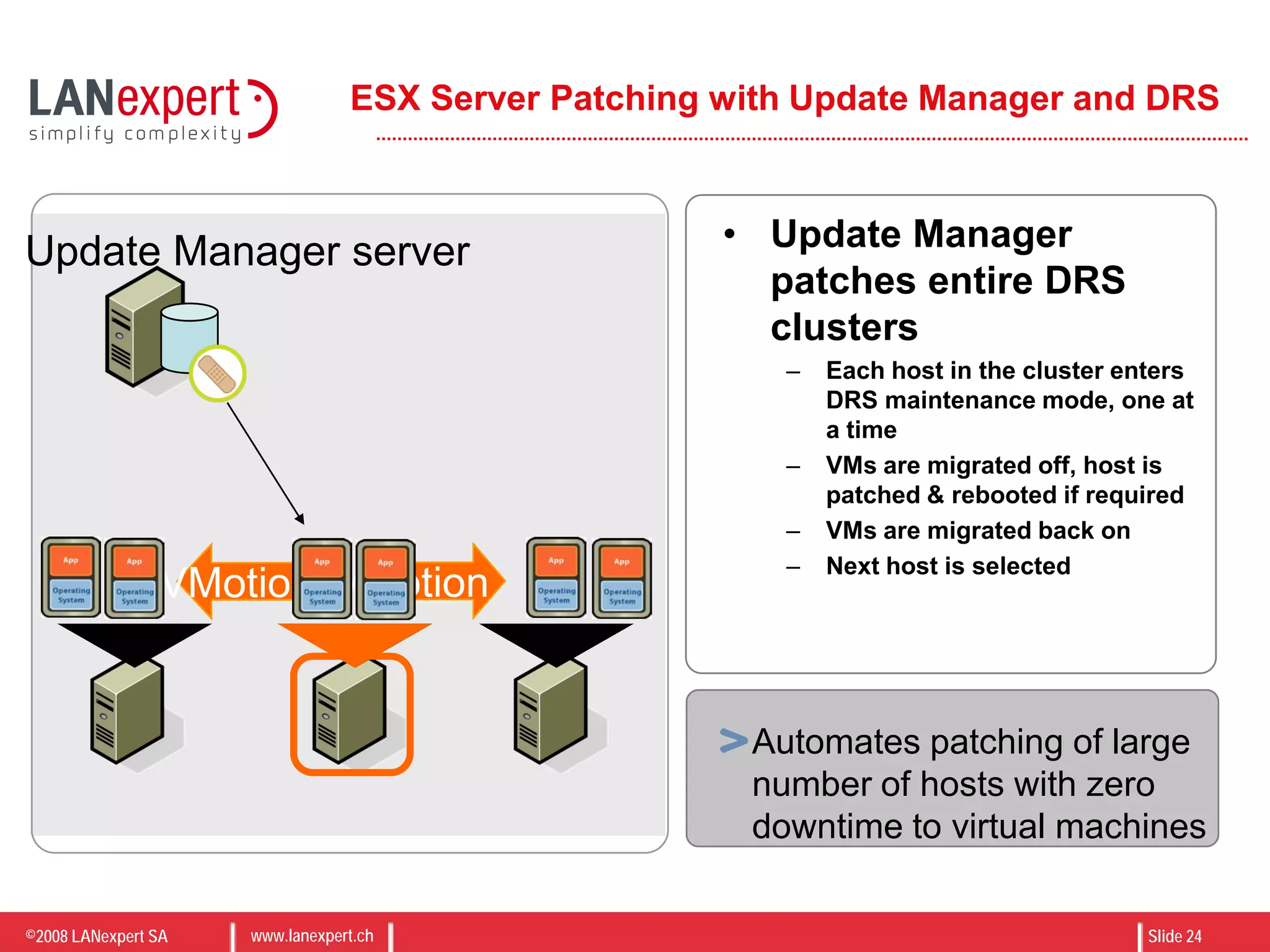
ESX Server Patching with Update Manager and DRS
• Update Manager
patches entire DRS
clusters
– Each host in the cluster enters
DRS maintenance mode, one at
a time
– VMs are migrated off, host is
patched & rebooted if required
– VMs are migrated back on
– Next host is selected
VMotionVMotion
Update Manager server
Automates patching of large
number of hosts with zero
downtime to virtual machines
©2008 LANexpert SA www.lanexpert.ch Slide 25
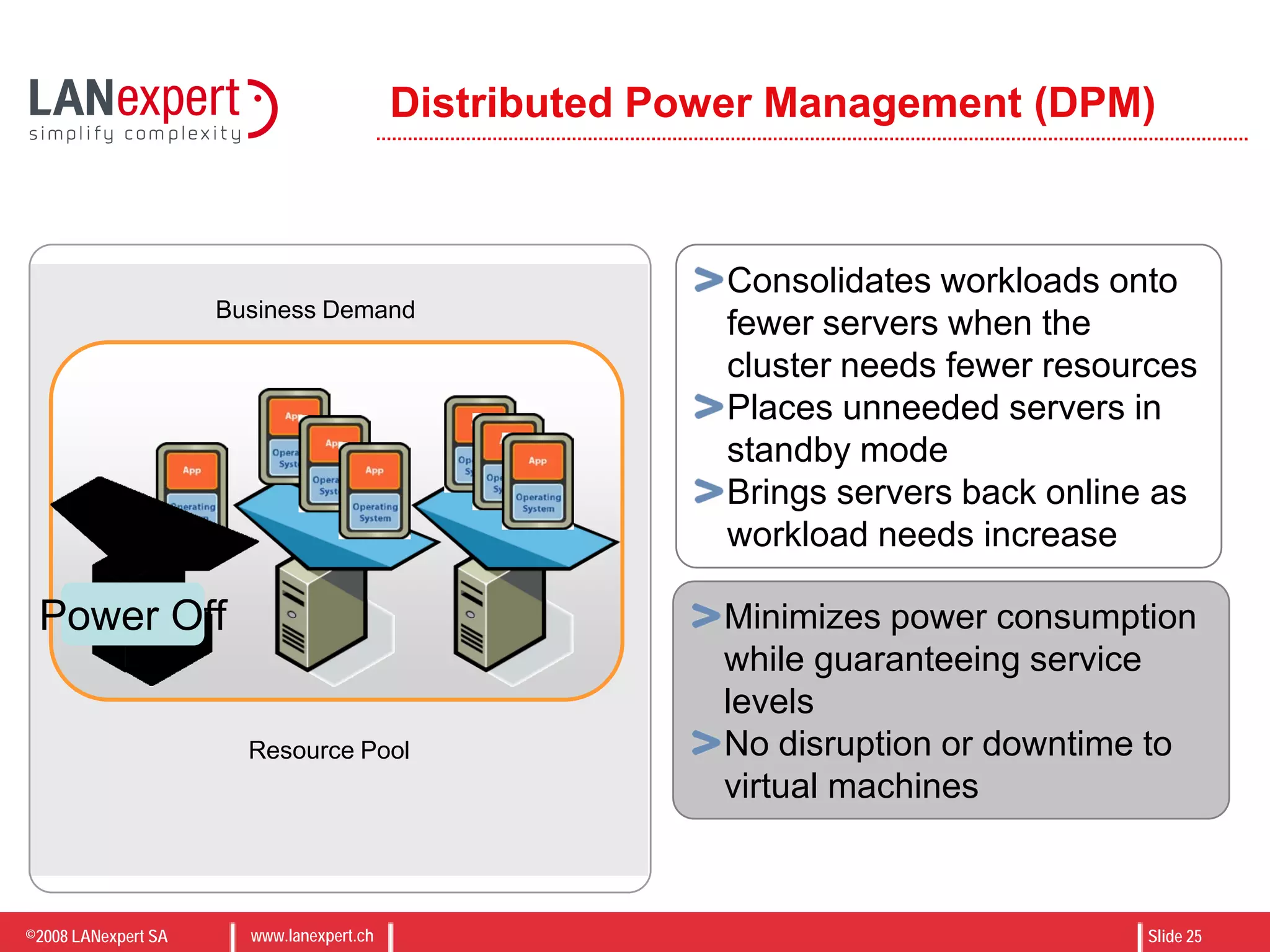
Distributed Power Management (DPM)
Resource Pool
Business Demand
Power Off
Consolidates workloads onto
fewer servers when the
cluster needs fewer resources
Places unneeded servers in
standby mode
Brings servers back online as
workload needs increase
Minimizes power consumption
while guaranteeing service
levels
No disruption or downtime to
virtual machines
©2008 LANexpert SA www.lanexpert.ch Slide 26
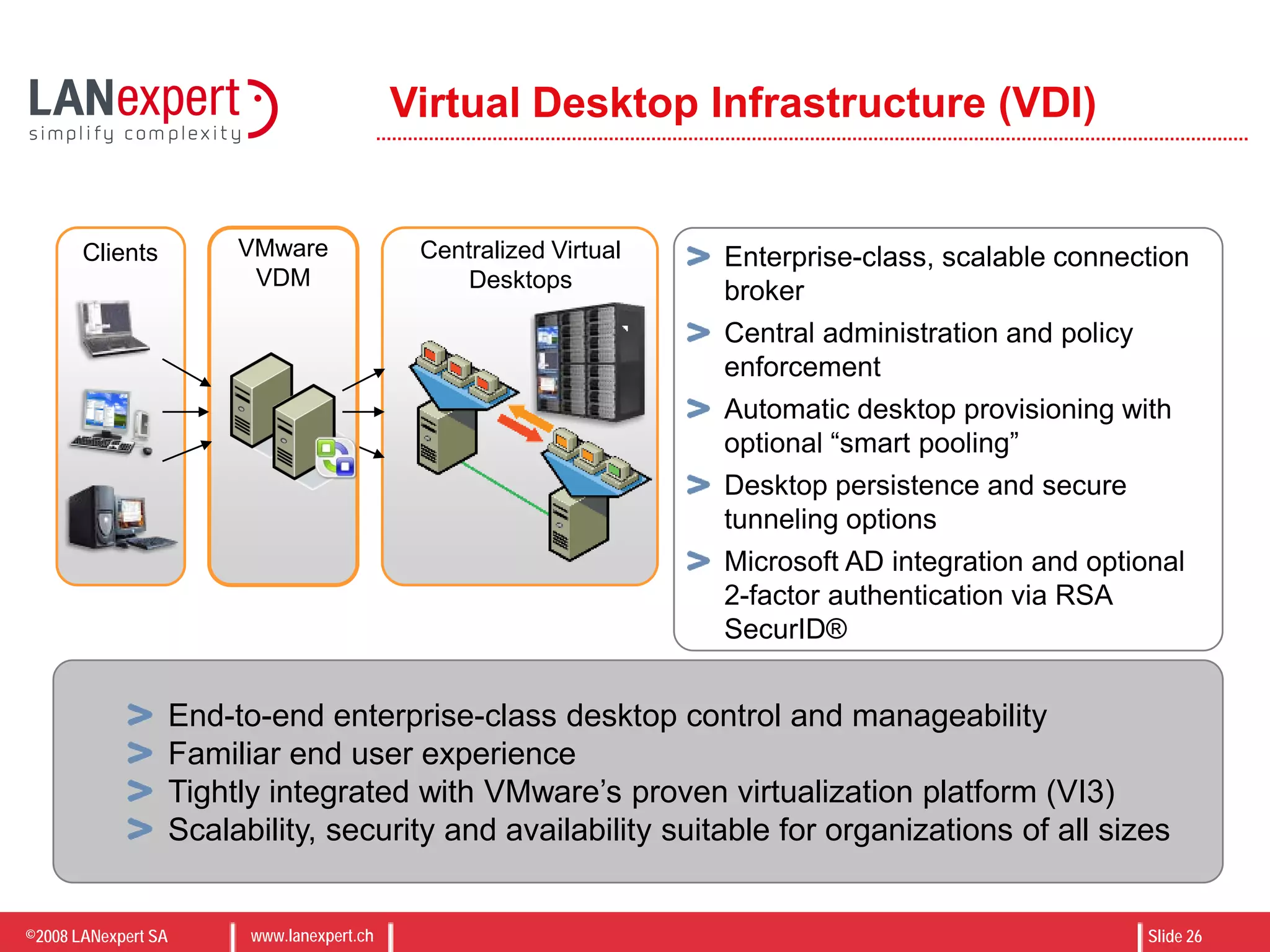
Virtual Desktop Infrastructure (VDI)
Enterprise-class, scalable connection
broker
Central administration and policy
enforcement
Automatic desktop provisioning with
optional “smart pooling”
Desktop persistence and secure
tunneling options
Microsoft AD integration and optional
2-factor authentication via RSA
SecurID®
End-to-end enterprise-class desktop control and manageability
Familiar end user experience
Tightly integrated with VMware’s proven virtualization platform (VI3)
Scalability, security and availability suitable for organizations of all sizes
Centralized Virtual
Desktops
VMware
VDM
Clients
©2008 LANexpert SA www.lanexpert.ch Slide 27
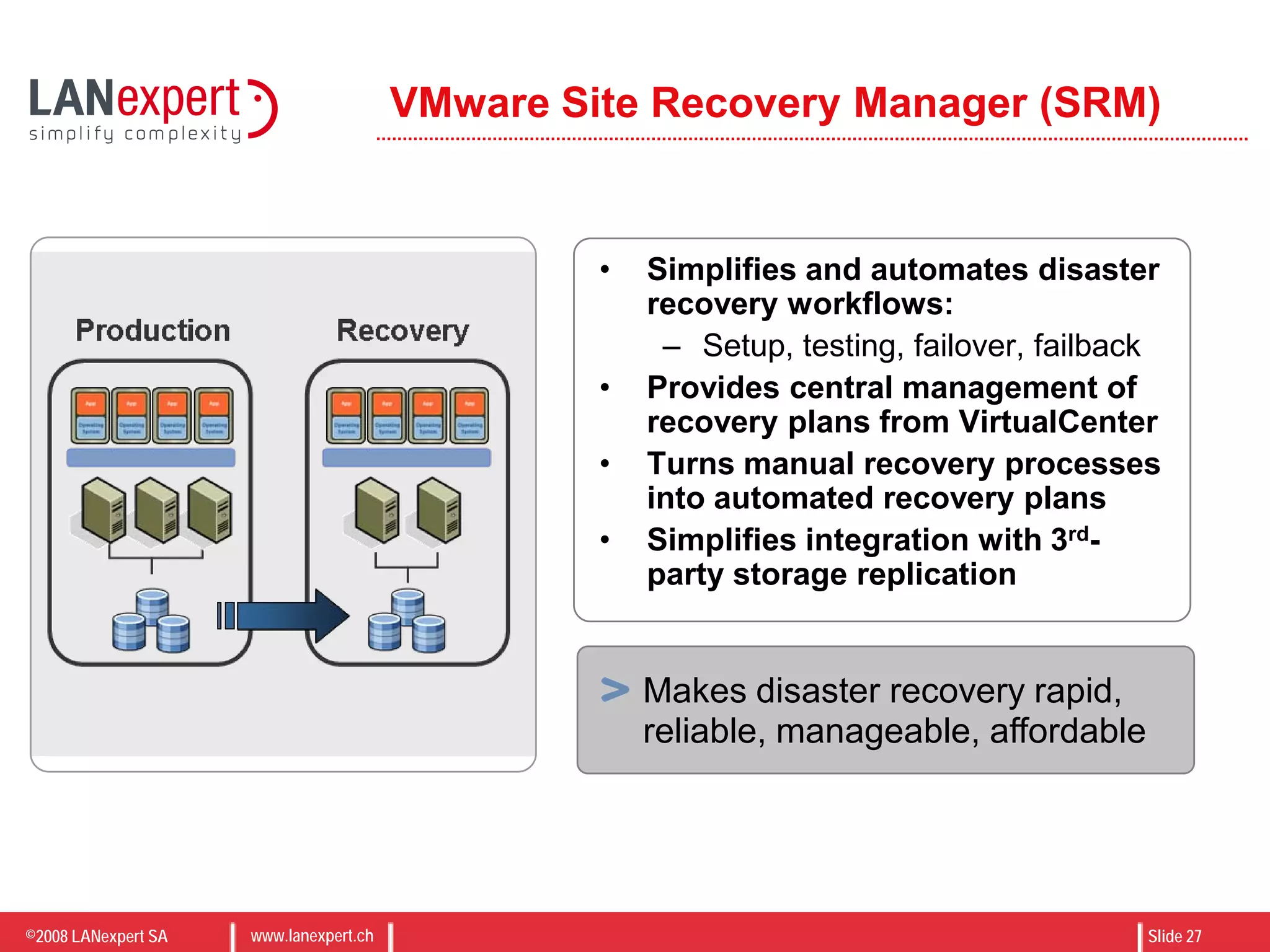
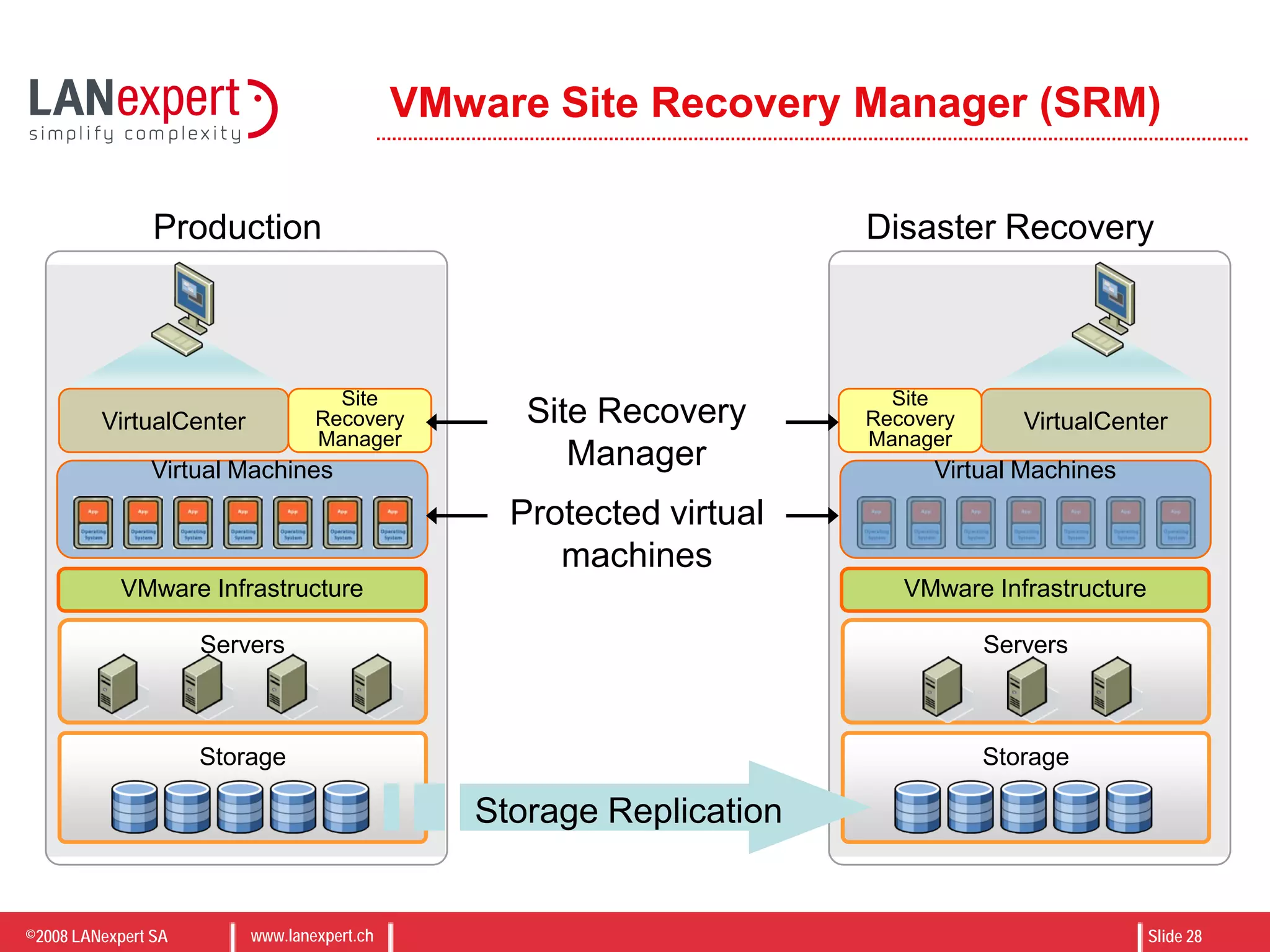
VMware Site Recovery Manager (SRM)
• Simplifies and automates disaster
recovery workflows:
– Setup, testing, failover, failback
• Provides central management of
recovery plans from VirtualCenter
• Turns manual recovery processes
into automated recovery plans
• Simplifies integration with 3rd-
party storage replication
Makes disaster recovery rapid,
reliable, manageable, affordable
©2008 LANexpert SA www.lanexpert.ch Slide 28
VMware Site Recovery Manager (SRM)
Storage
Servers
VMware Infrastructure
Virtual Machines
VirtualCenter
Site
Recovery
Manager
Storage
Servers
VMware Infrastructure
VirtualCenter
Site
Recovery
Manager
Storage Replication
Site Recovery
Manager
Protected virtual
machines
Virtual Machines
Production Disaster Recovery
©2008 LANexpert SA www.lanexpert.ch Slide 29
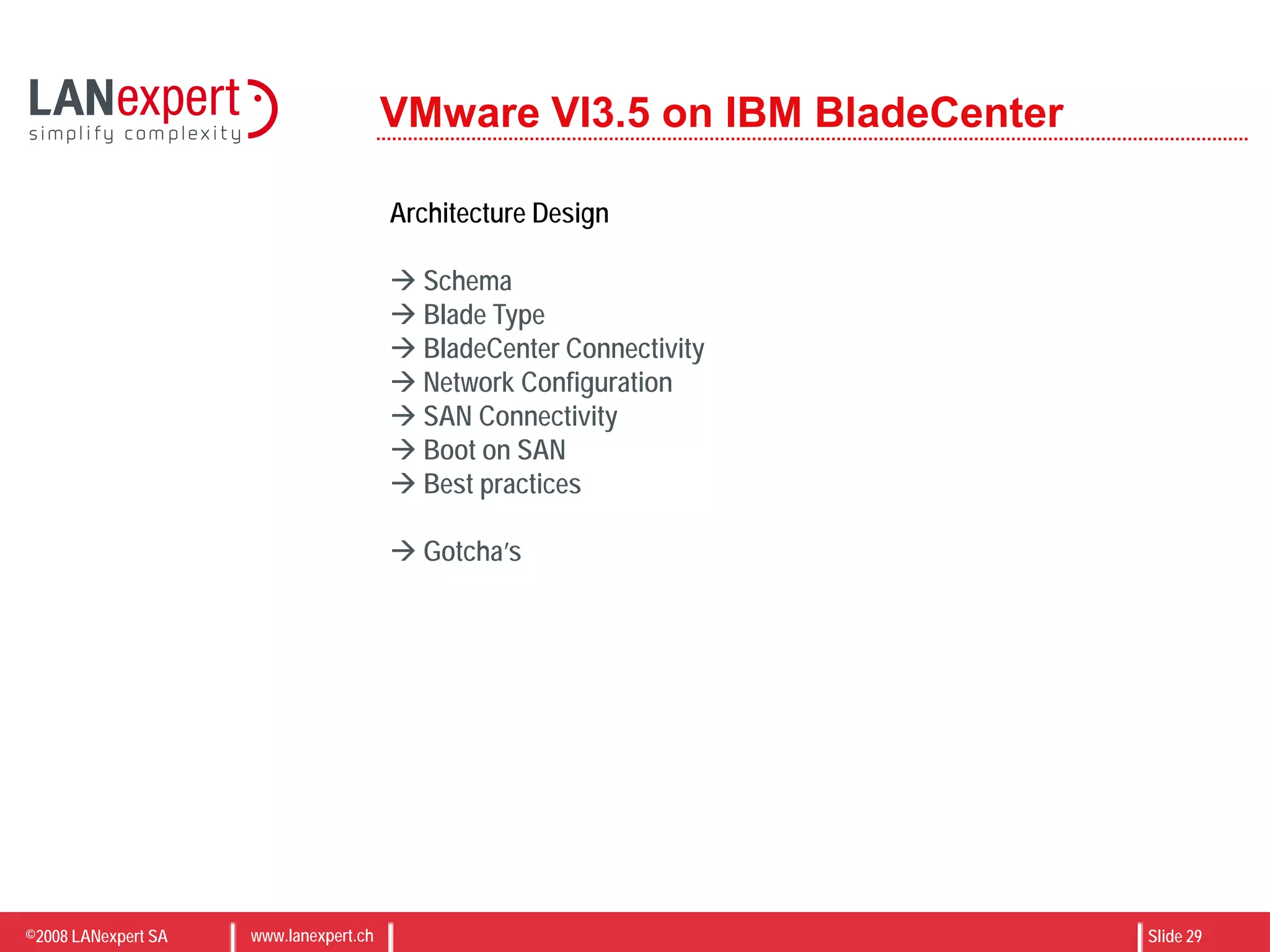
VMware VI3.5 on IBM BladeCenter
Architecture Design
 Schema
 Blade Type
 BladeCenter Connectivity
 Network Configuration
 SAN Connectivity
 Boot on SAN
 Best practices
 Gotcha’s
©2008 LANexpert SA www.lanexpert.ch Slide 30
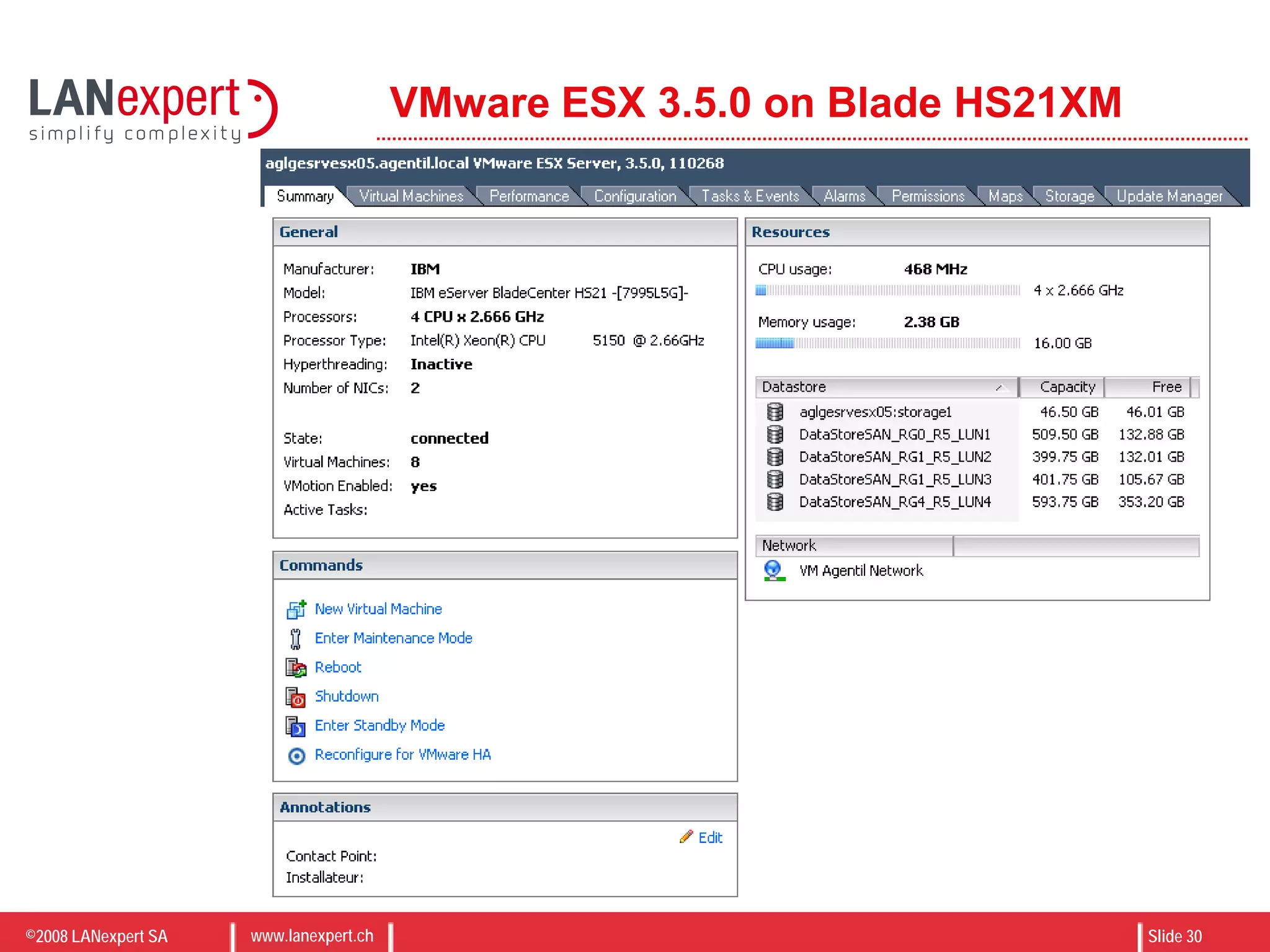
VMware ESX 3.5.0 on Blade HS21XM
©2008 LANexpert SA www.lanexpert.ch Slide 31
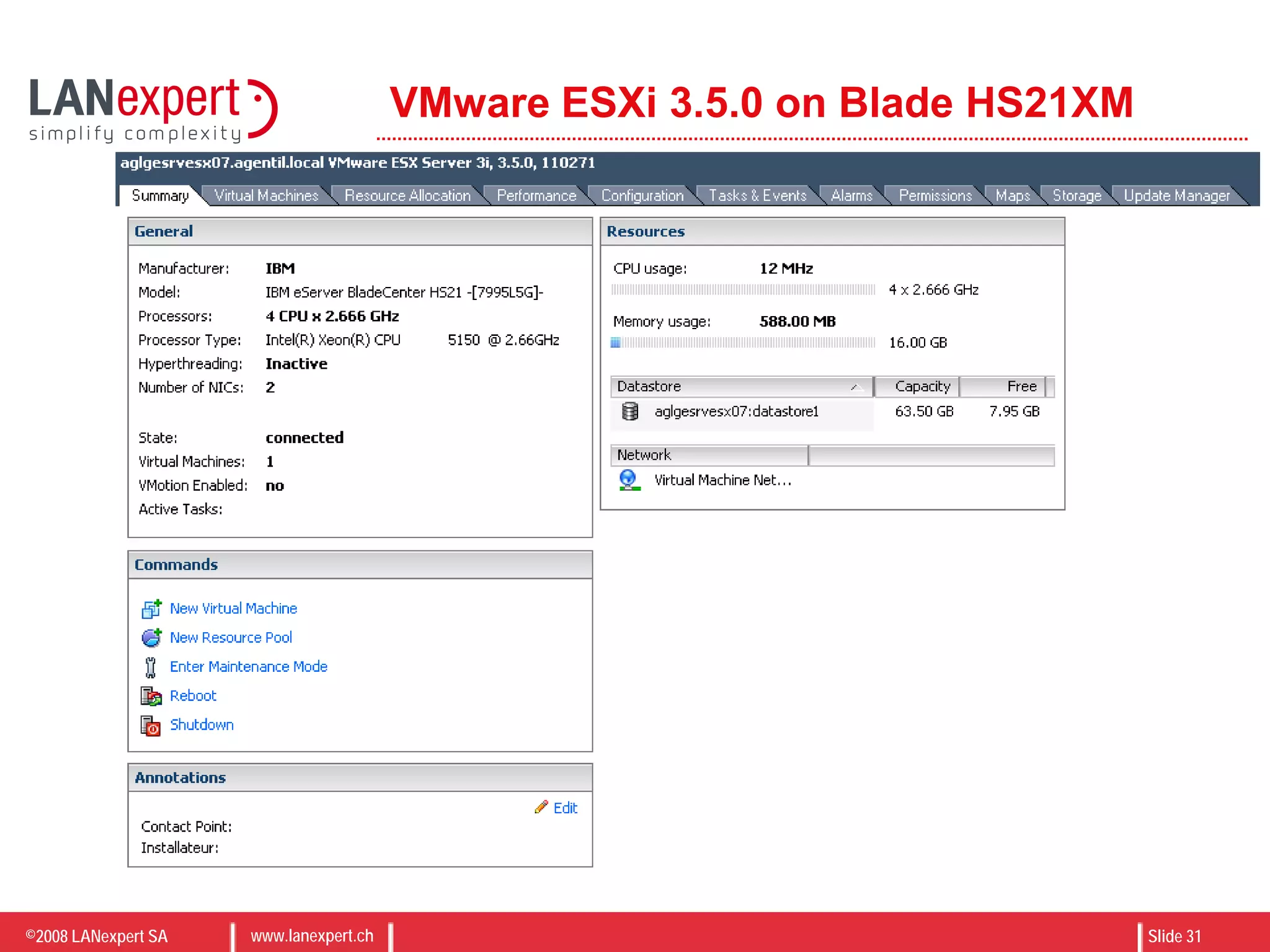
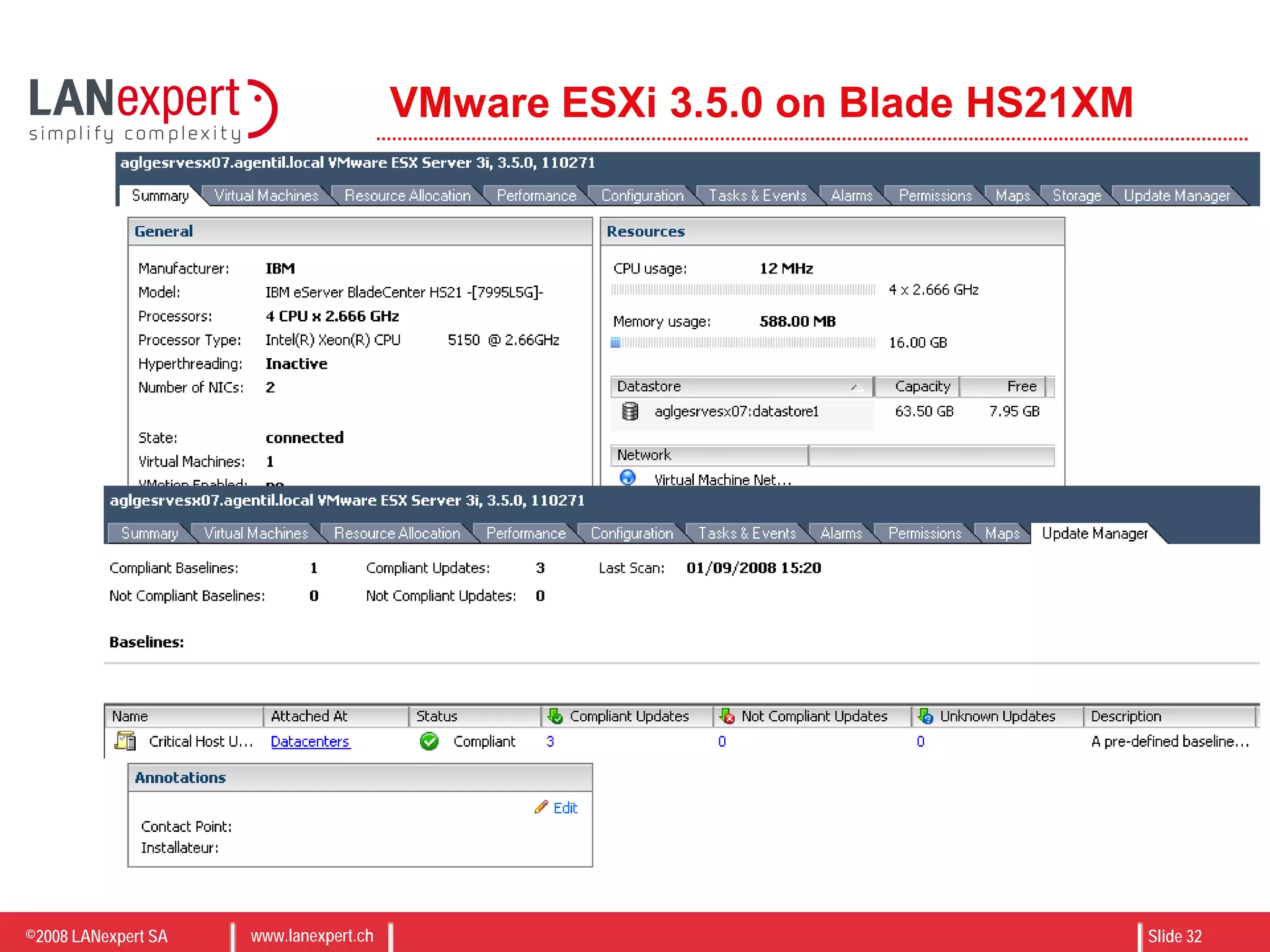
VMware ESXi 3.5.0 on Blade HS21XM
©2008 LANexpert SA www.lanexpert.ch Slide 32
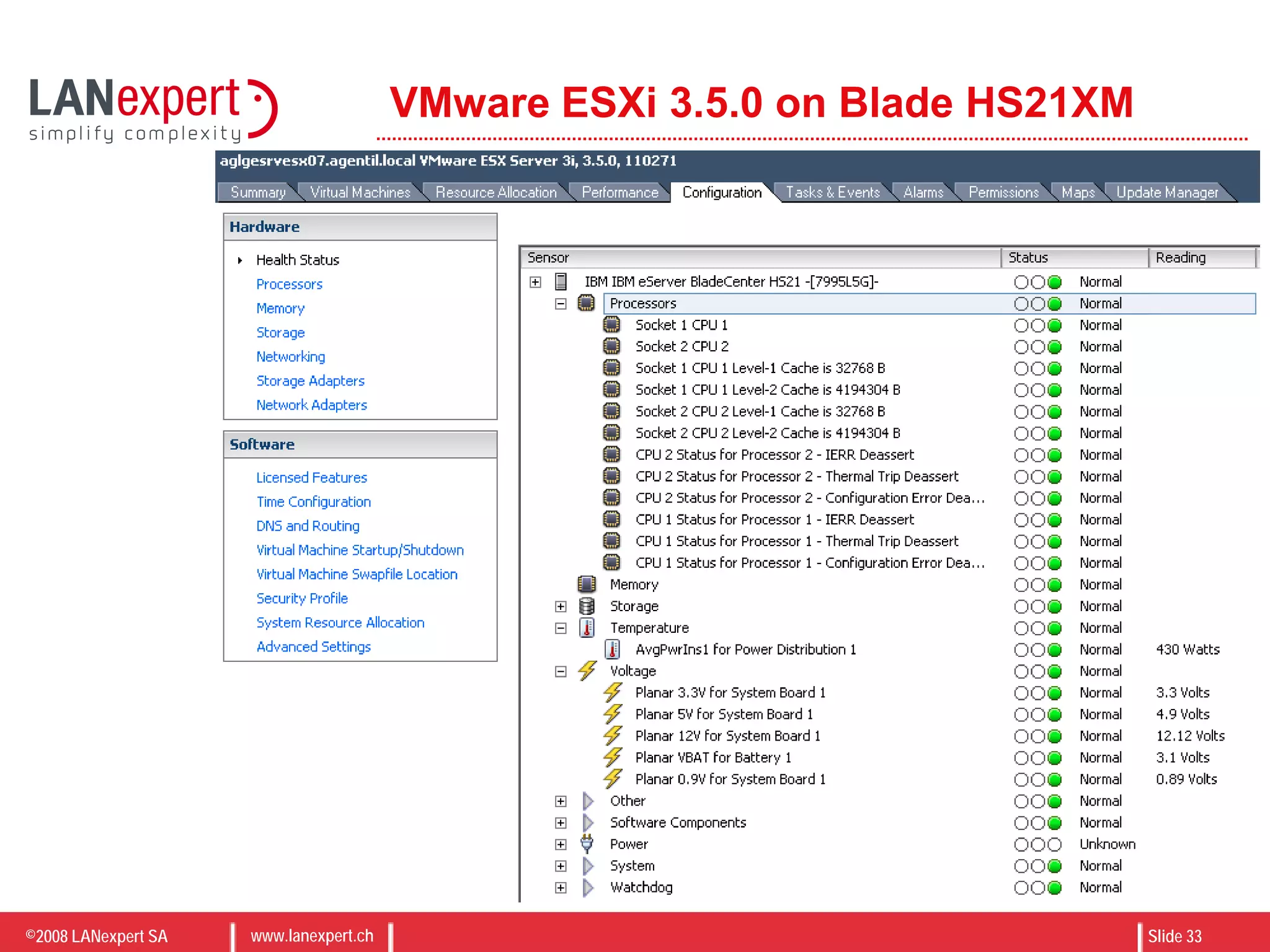
VMware ESXi 3.5.0 on Blade HS21XM
©2008 LANexpert SA www.lanexpert.ch Slide 33
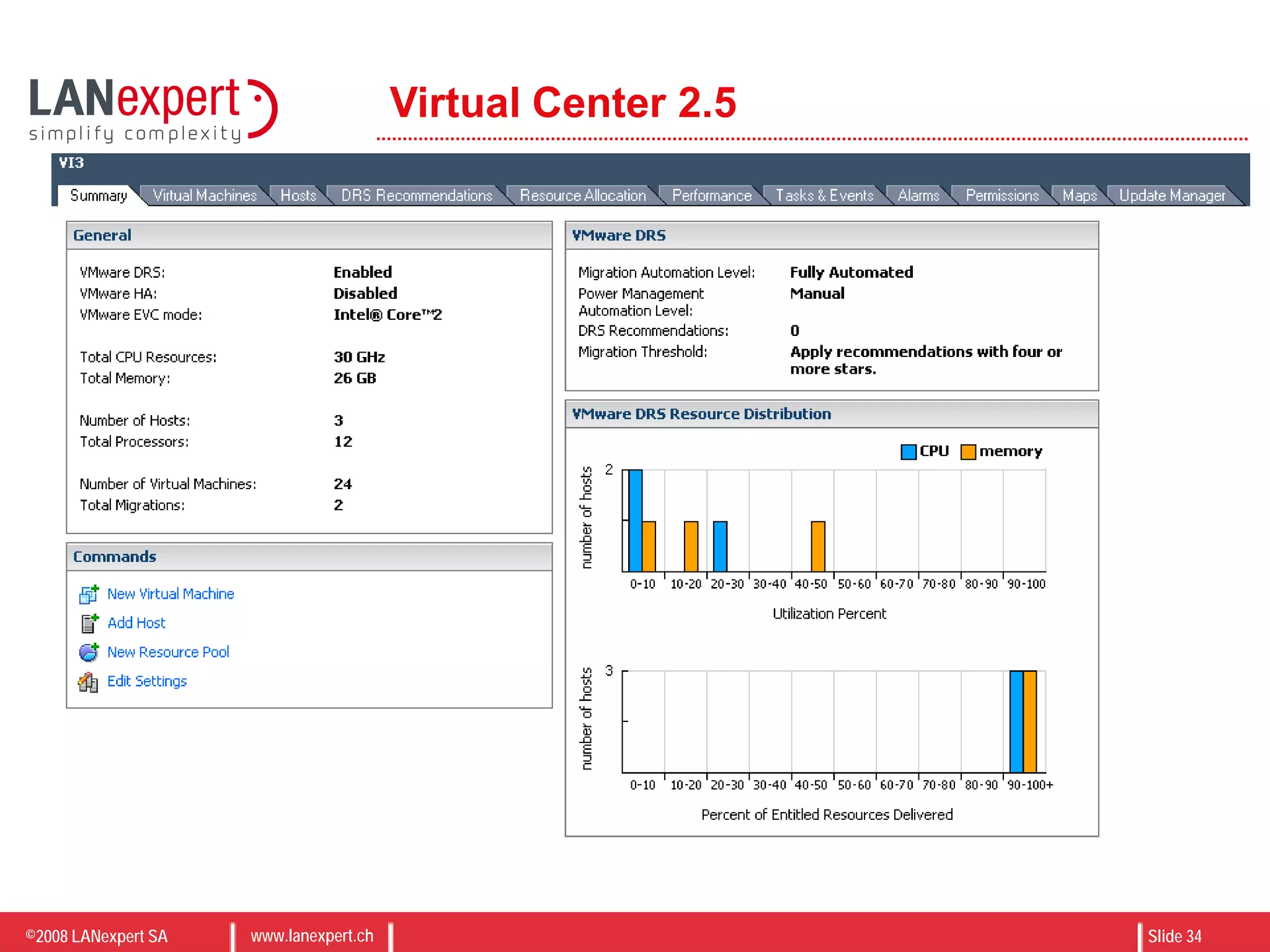
VMware ESXi 3.5.0 on Blade HS21XM
©2008 LANexpert SA www.lanexpert.ch Slide 34
Virtual Center 2.5
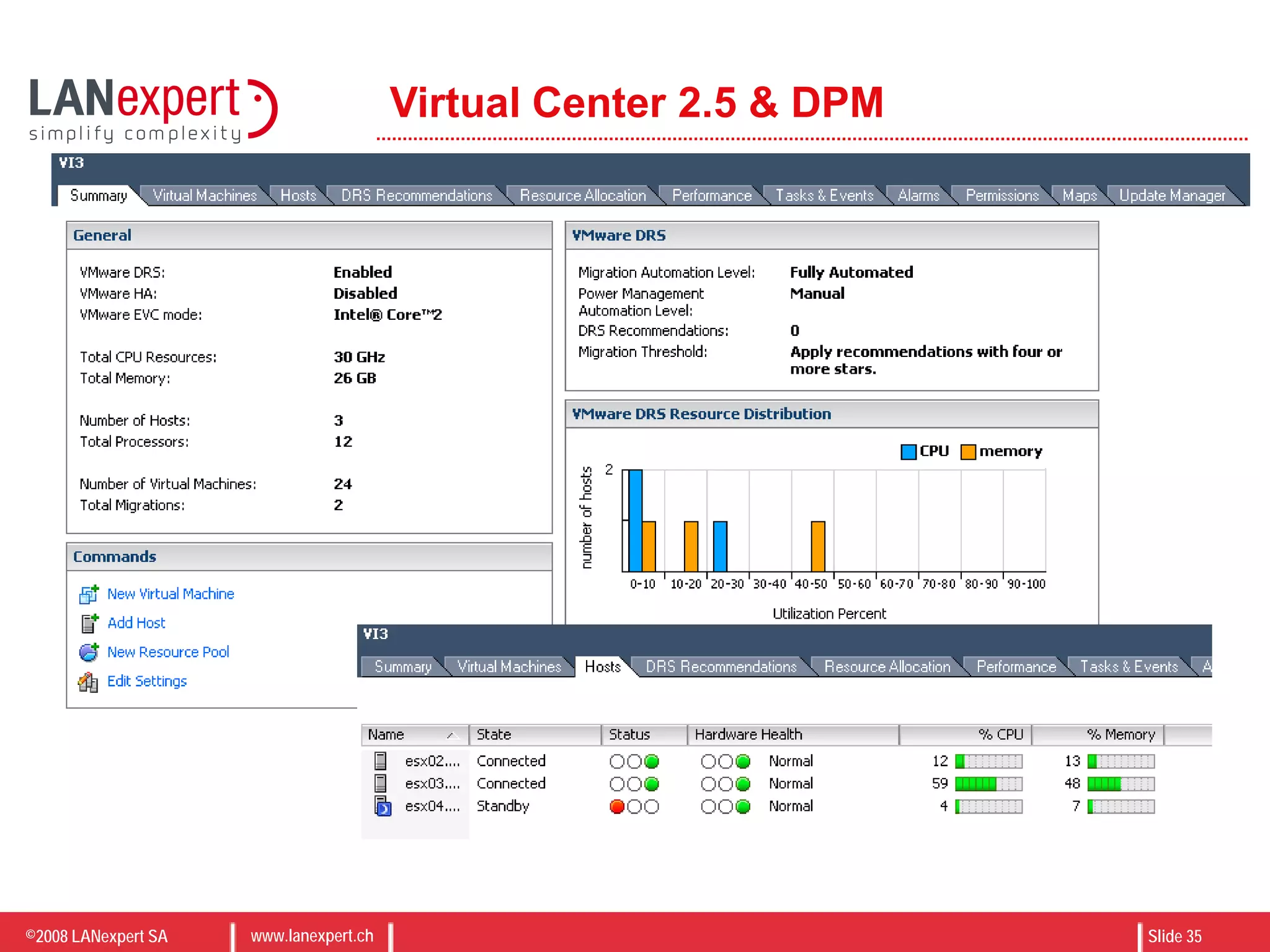
©2008 LANexpert SA www.lanexpert.ch Slide 35
Virtual Center 2.5 & DPM
©2008 LANexpert SA www.lanexpert.ch Slide 36
Case Study – Large scale VI 3.5 Deployment
• Two Datacenter configuration
• Support for Redundant Core Network
• VM High-Availability
• Leverage existing SAN Storage
• Boot from SAN for VMware ESX servers
• Support for DMZ Network
©2008 LANexpert SA www.lanexpert.ch Slide 37
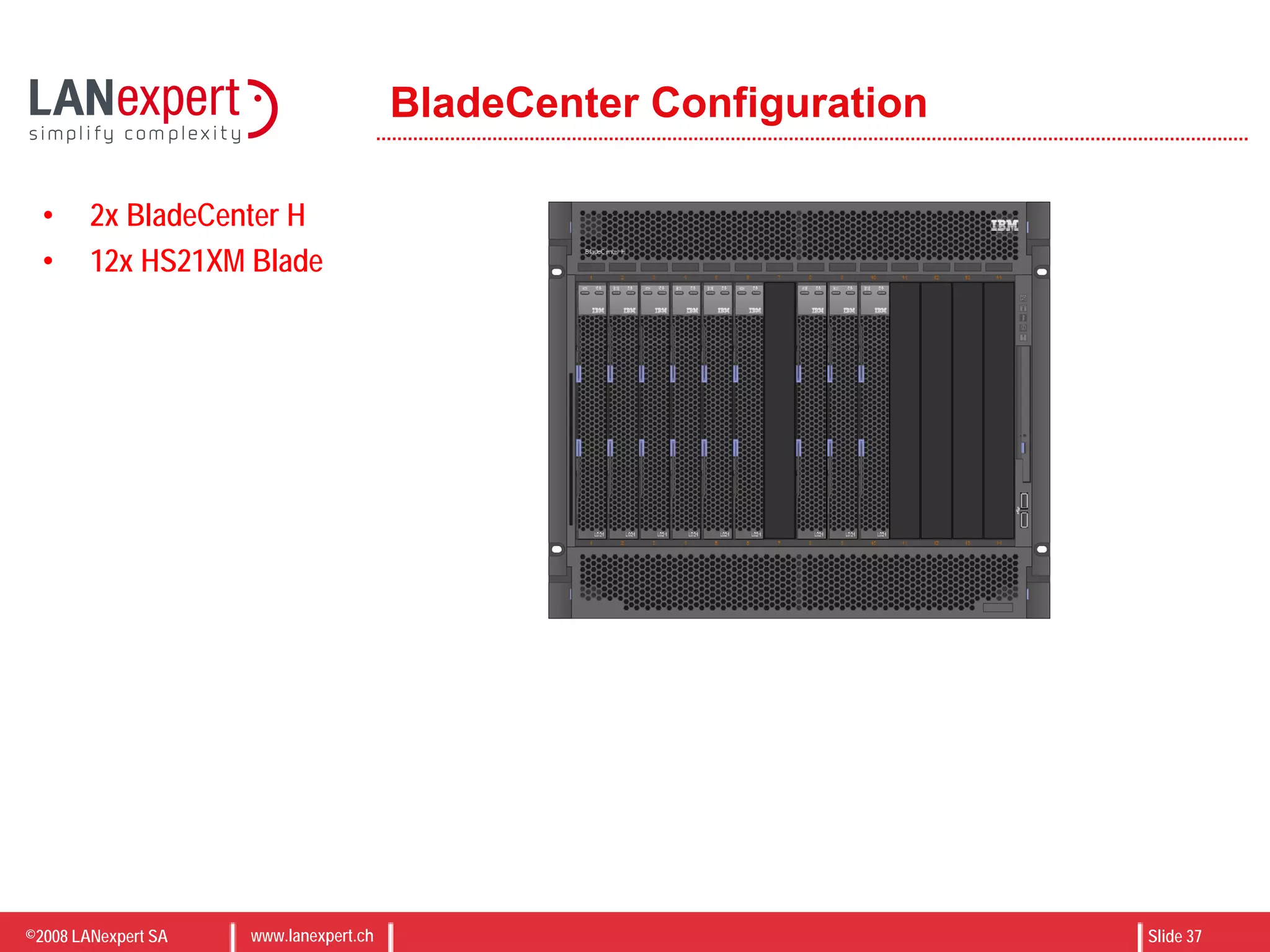
BladeCenter Configuration
• 2x BladeCenter H
• 12x HS21XM Blade
©2008 LANexpert SA www.lanexpert.ch Slide 38
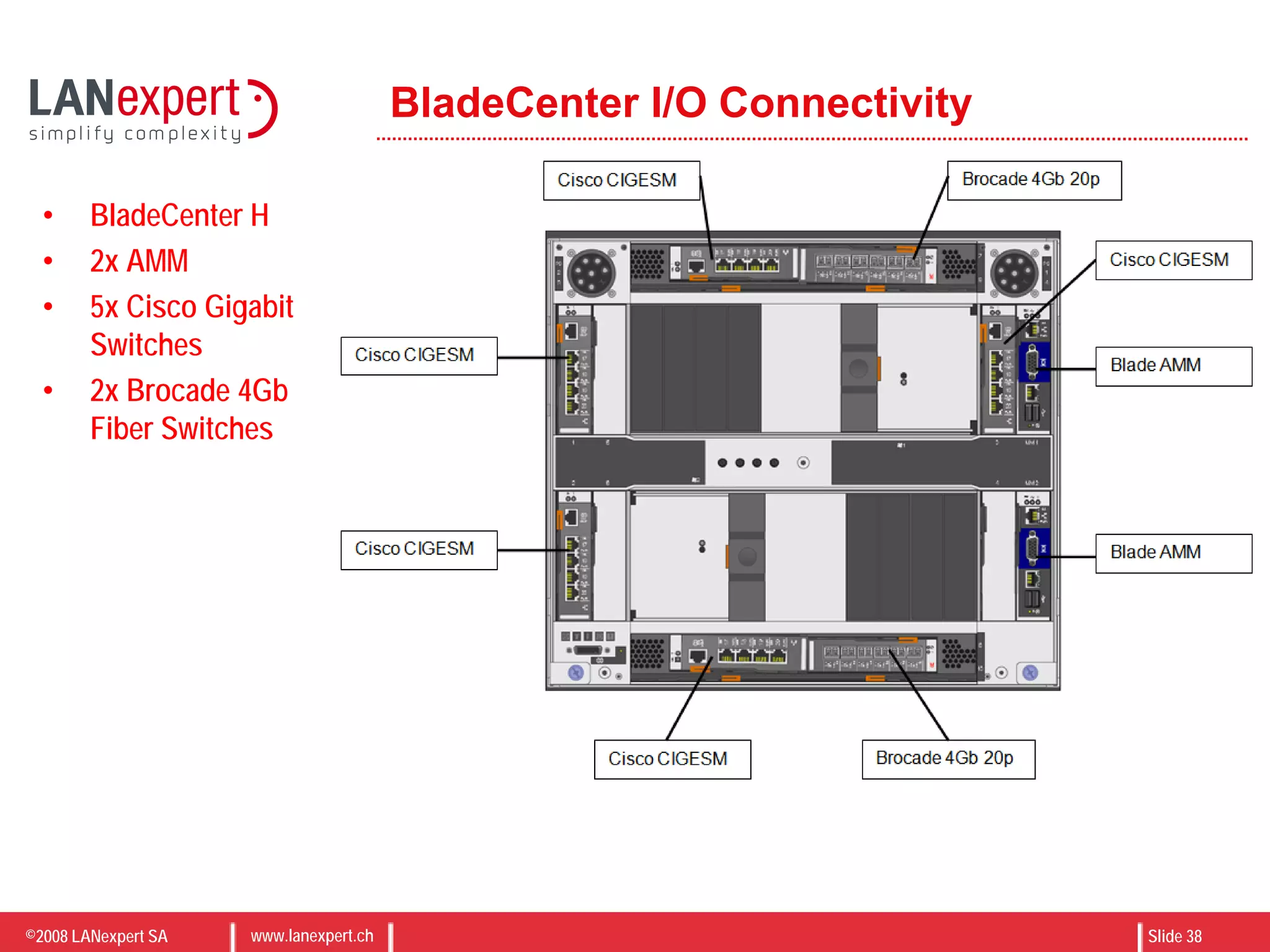
BladeCenter I/O Connectivity
• BladeCenter H
• 2x AMM
• 5x Cisco Gigabit
Switches
• 2x Brocade 4Gb
Fiber Switches
©2008 LANexpert SA www.lanexpert.ch Slide 39
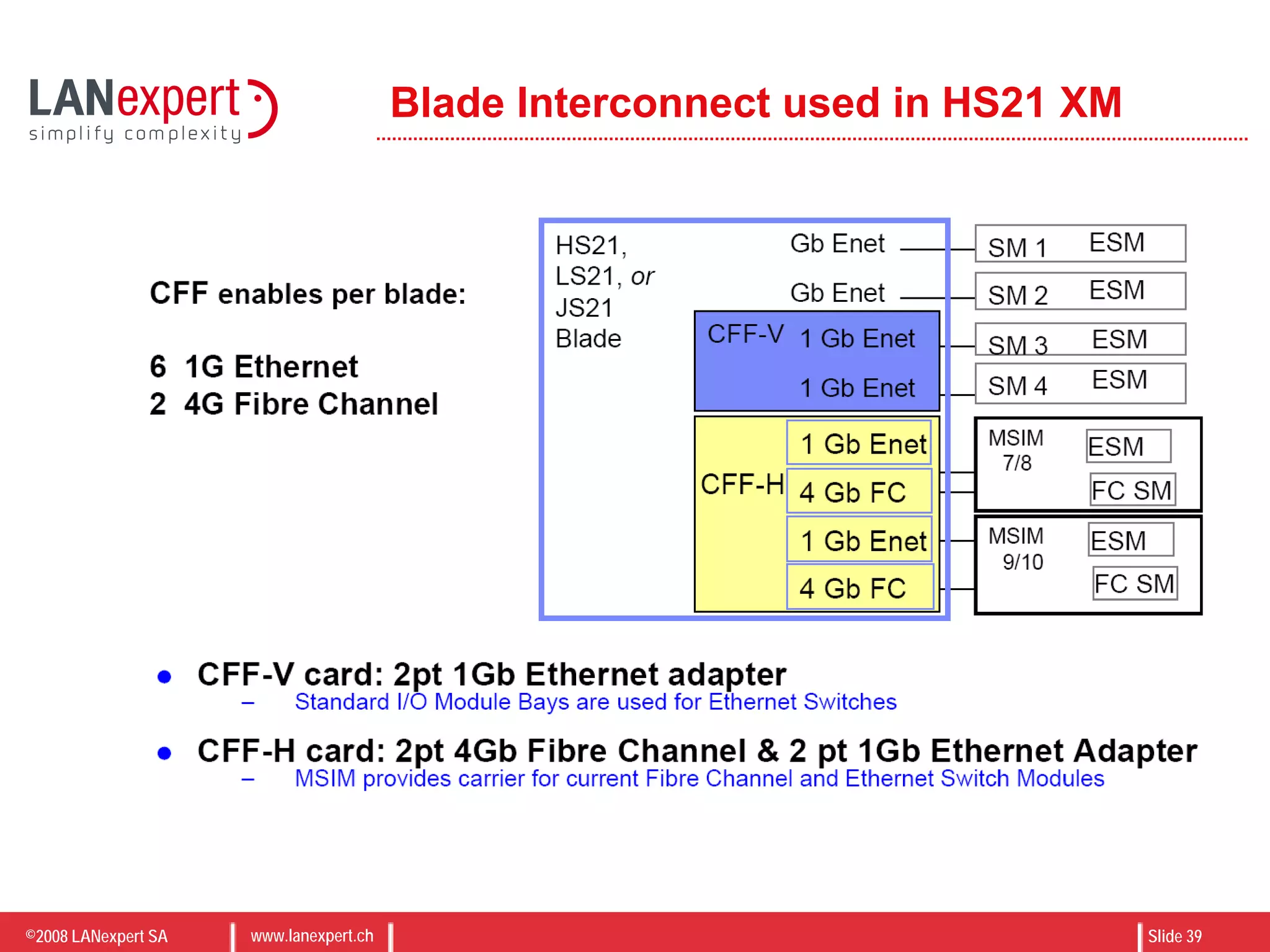
Blade Interconnect used in HS21 XM
©2008 LANexpert SA www.lanexpert.ch Slide 40
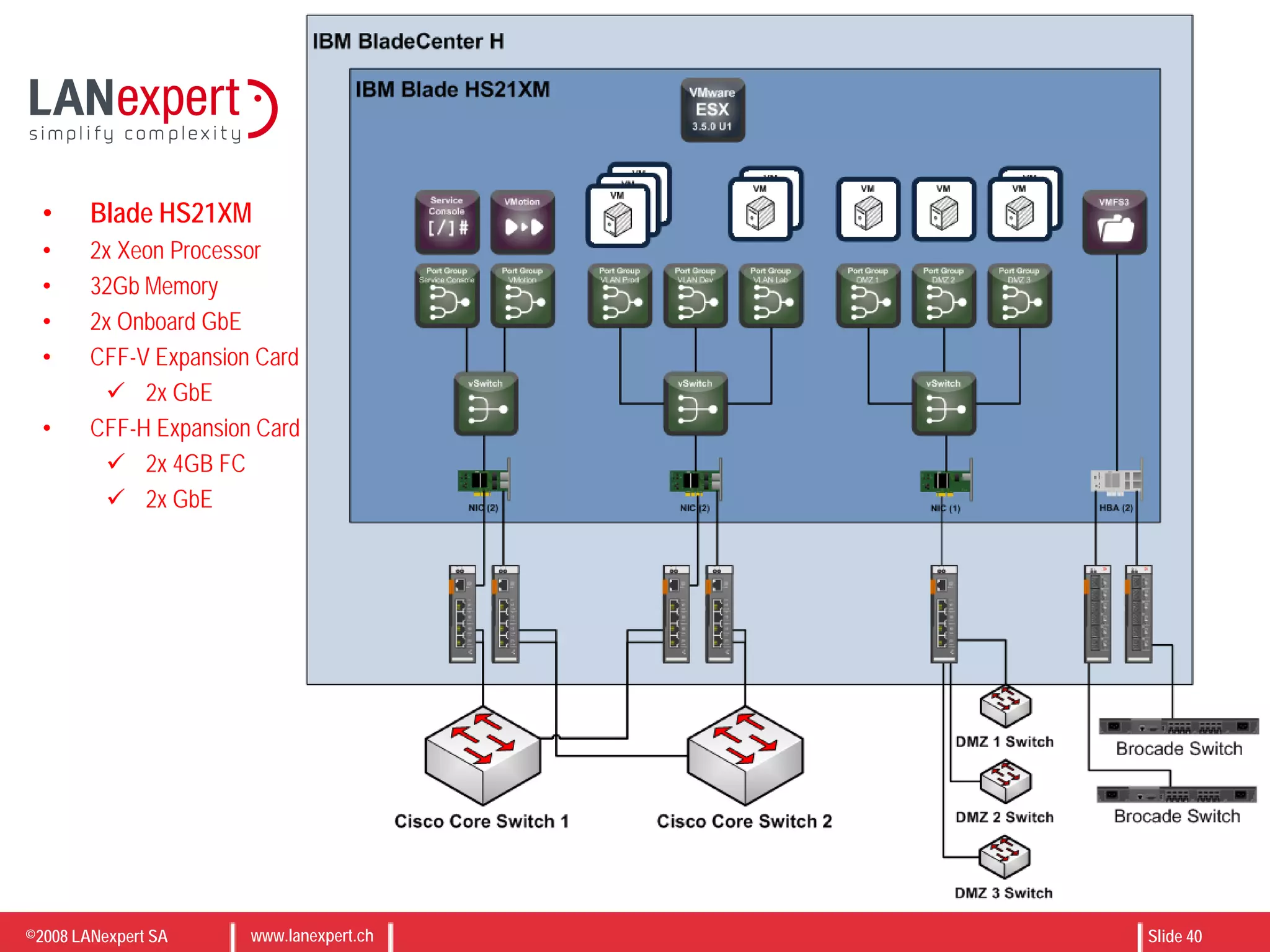
• Blade HS21XM
• 2x Xeon Processor
• 32Gb Memory
• 2x Onboard GbE
• CFF-V Expansion Card
 2x GbE
• CFF-H Expansion Card
 2x 4GB FC
 2x GbE
©2008 LANexpert SA www.lanexpert.ch Slide 41
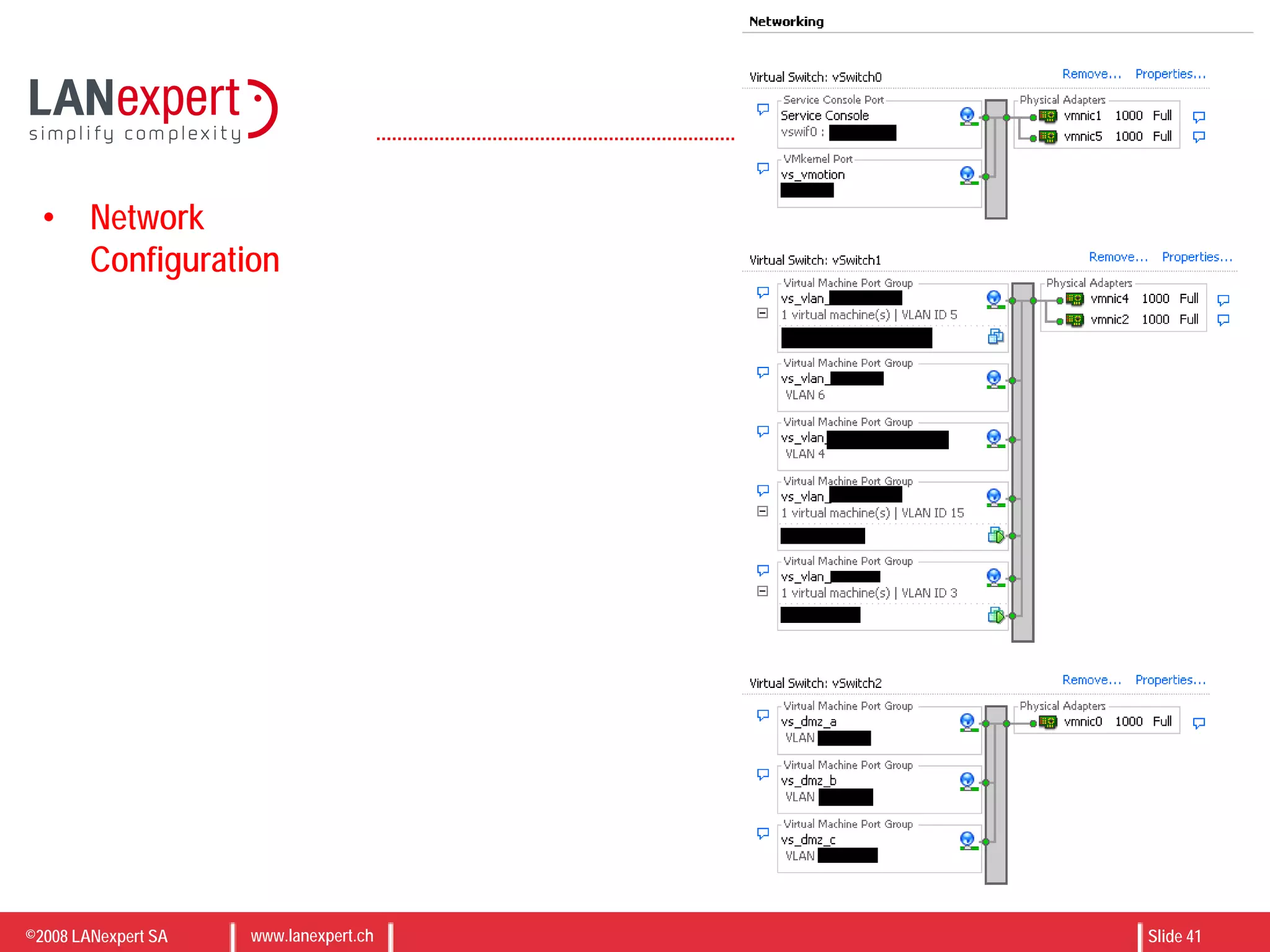
• Network
Configuration
©2008 LANexpert SA www.lanexpert.ch Slide 42
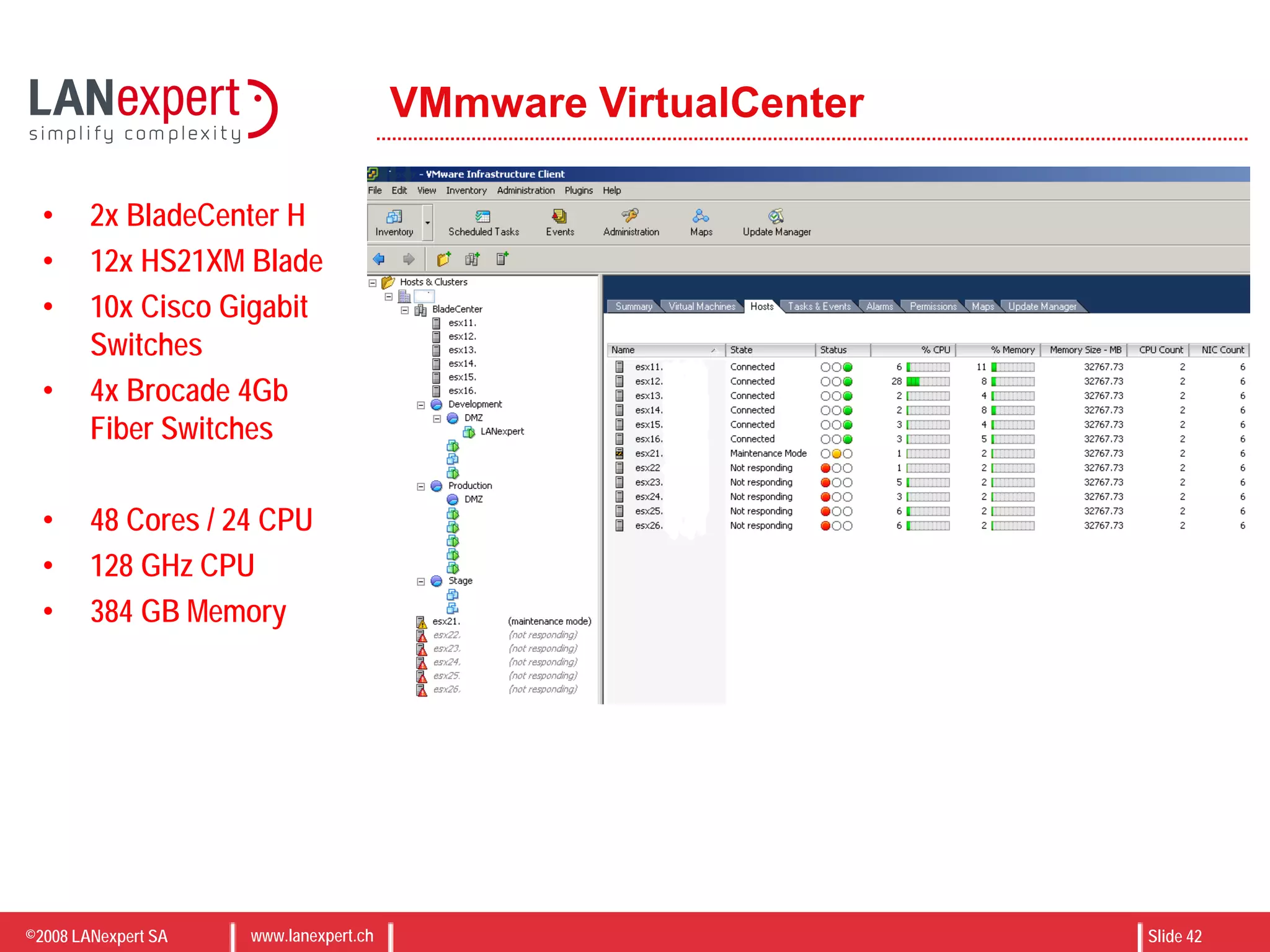
VMmware VirtualCenter
• 2x BladeCenter H
• 12x HS21XM Blade
• 10x Cisco Gigabit
Switches
• 4x Brocade 4Gb
Fiber Switches
• 48 Cores / 24 CPU
• 128 GHz CPU
• 384 GB Memory
©2008 LANexpert SA www.lanexpert.ch Slide 43
VMware VI 3.5 on IBM BladeCenter
Network considerations
 Réseau de management
 Gestion de la DMZ
 Intégration au LAN
 Connectique SAN (FC, IP)
©2008 LANexpert SA www.lanexpert.ch Slide 44
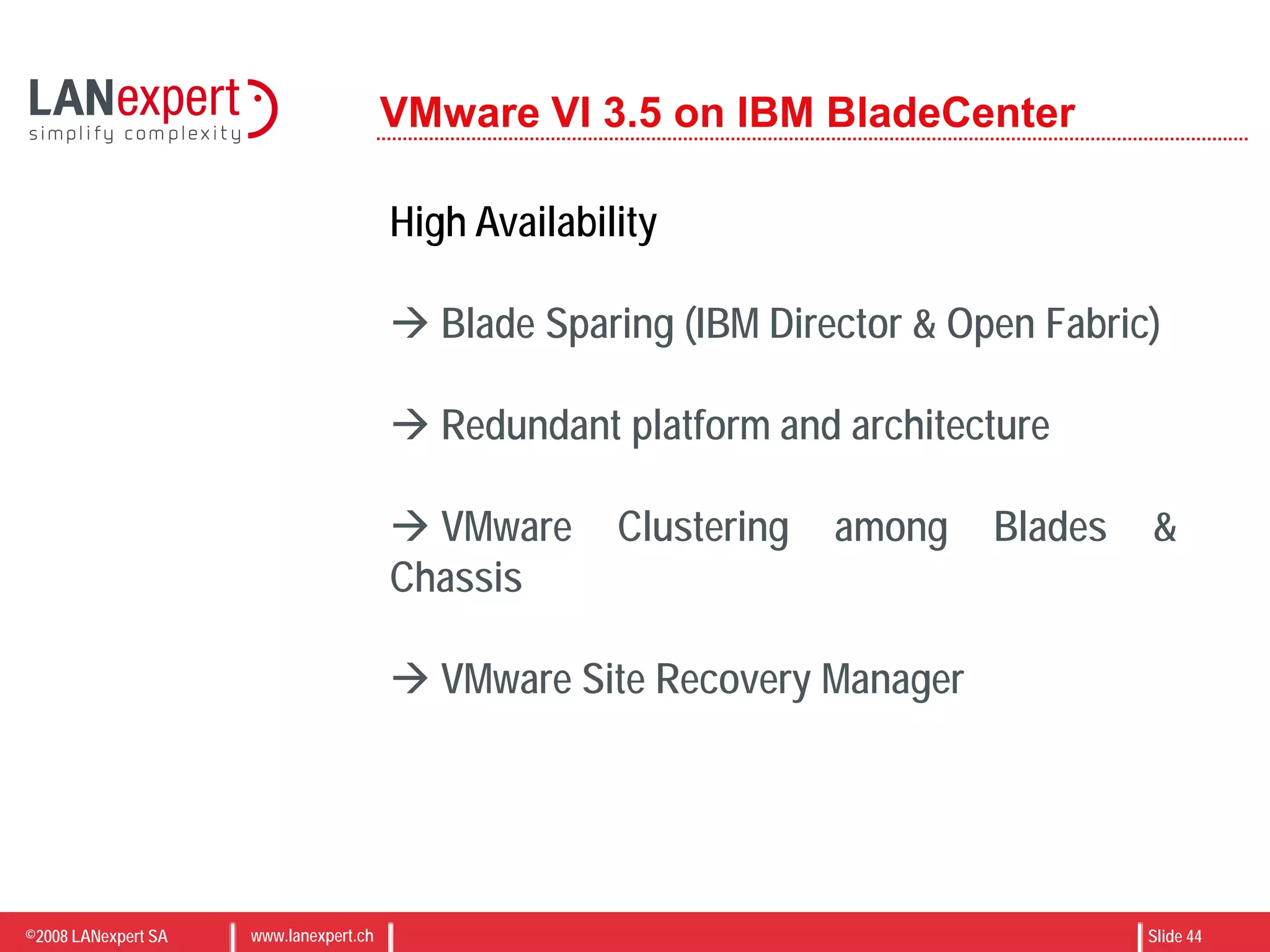
VMware VI 3.5 on IBM BladeCenter
High Availability
 Blade Sparing (IBM Director & Open Fabric)
 Redundant platform and architecture
 VMware Clustering among Blades &
Chassis
 VMware Site Recovery Manager
©2008 LANexpert SA www.lanexpert.ch Slide 45
Q & A
©2008 LANexpert SA www.lanexpert.ch Slide 46
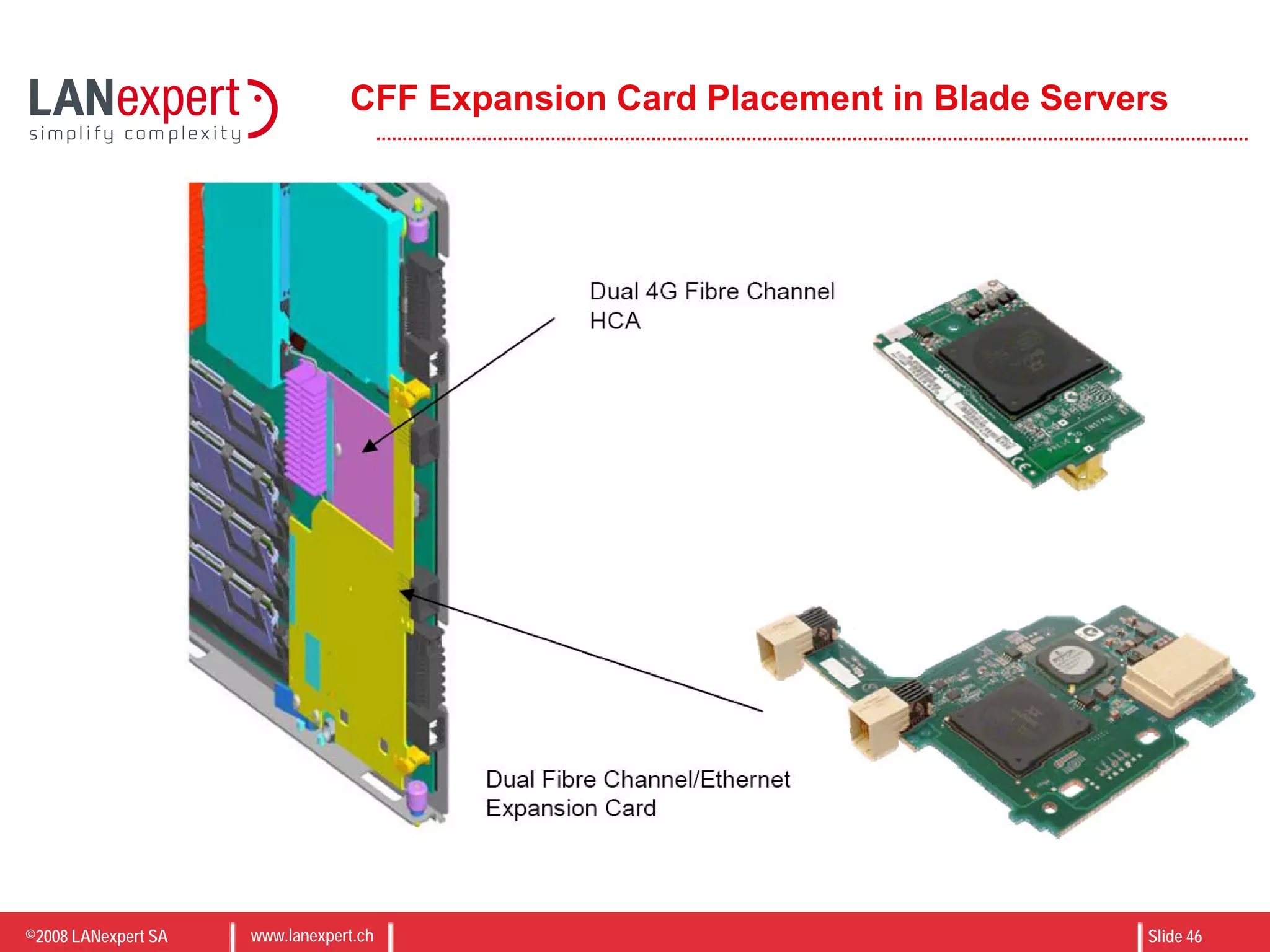
CFF Expansion Card Placement in Blade Servers
©2008 LANexpert SA www.lanexpert.ch Slide 47
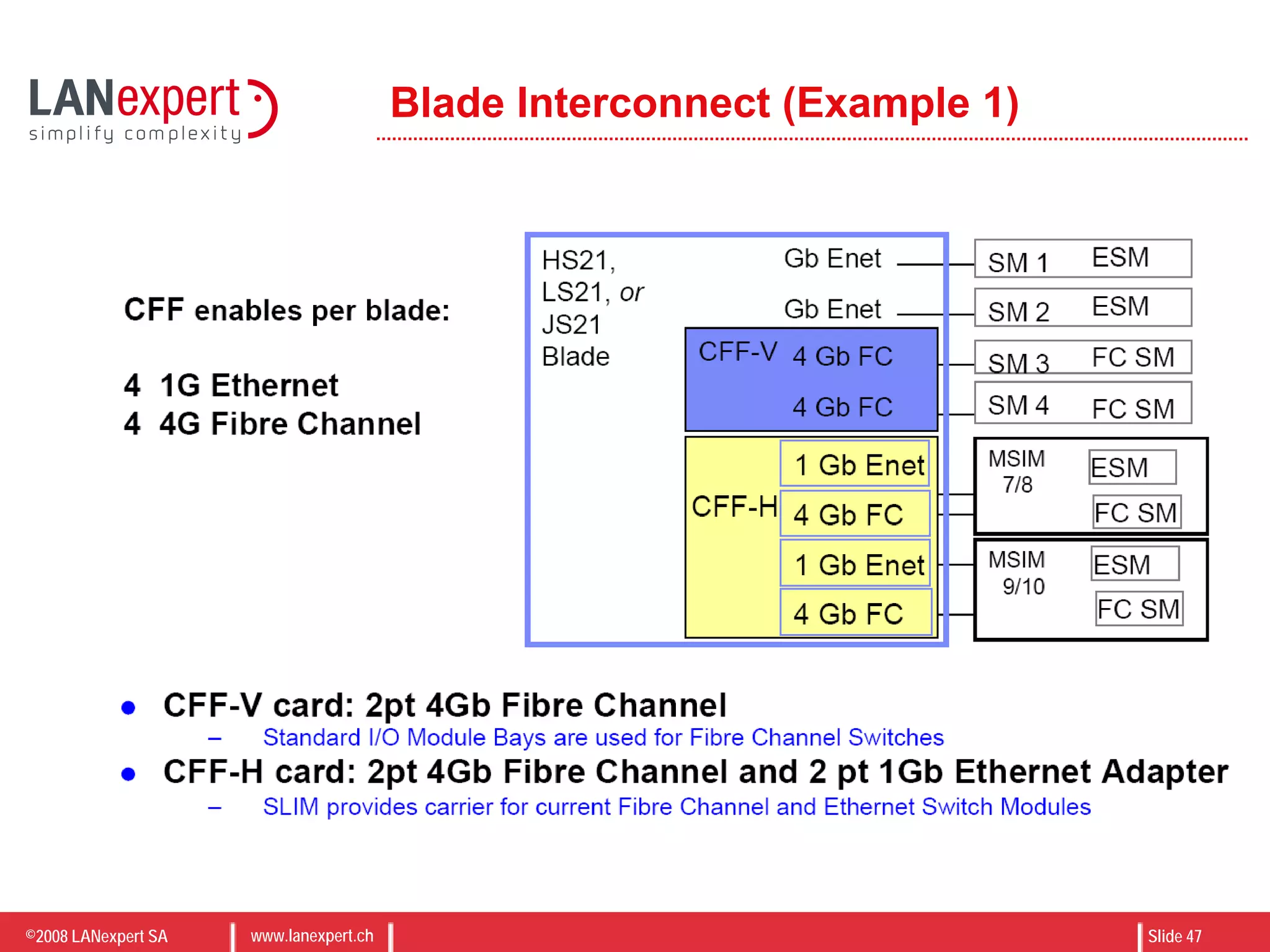
Blade Interconnect (Example 1)
©2008 LANexpert SA www.lanexpert.ch Slide 48
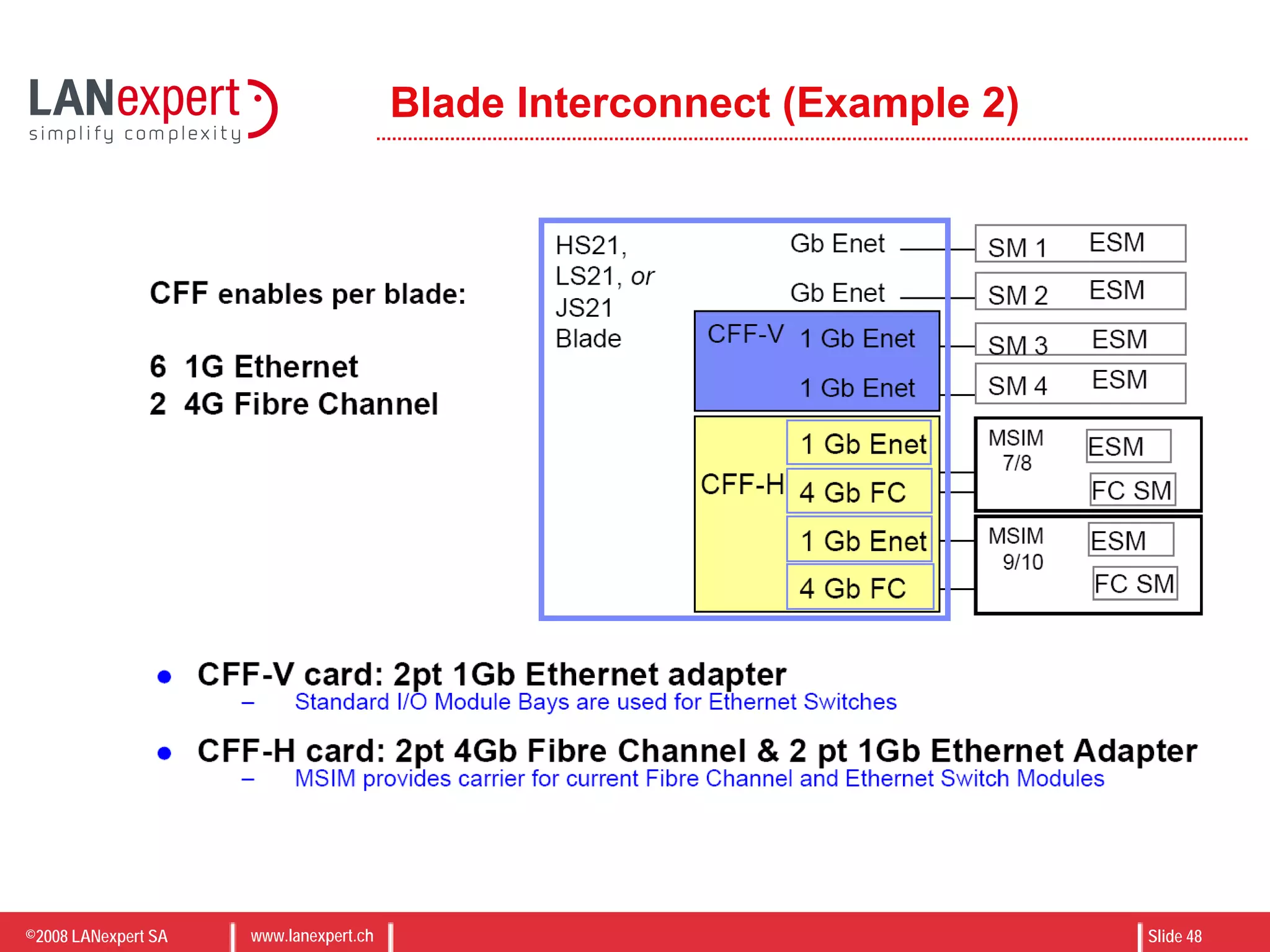
Blade Interconnect (Example 2)
©2008 LANexpert SA www.lanexpert.ch Slide 49
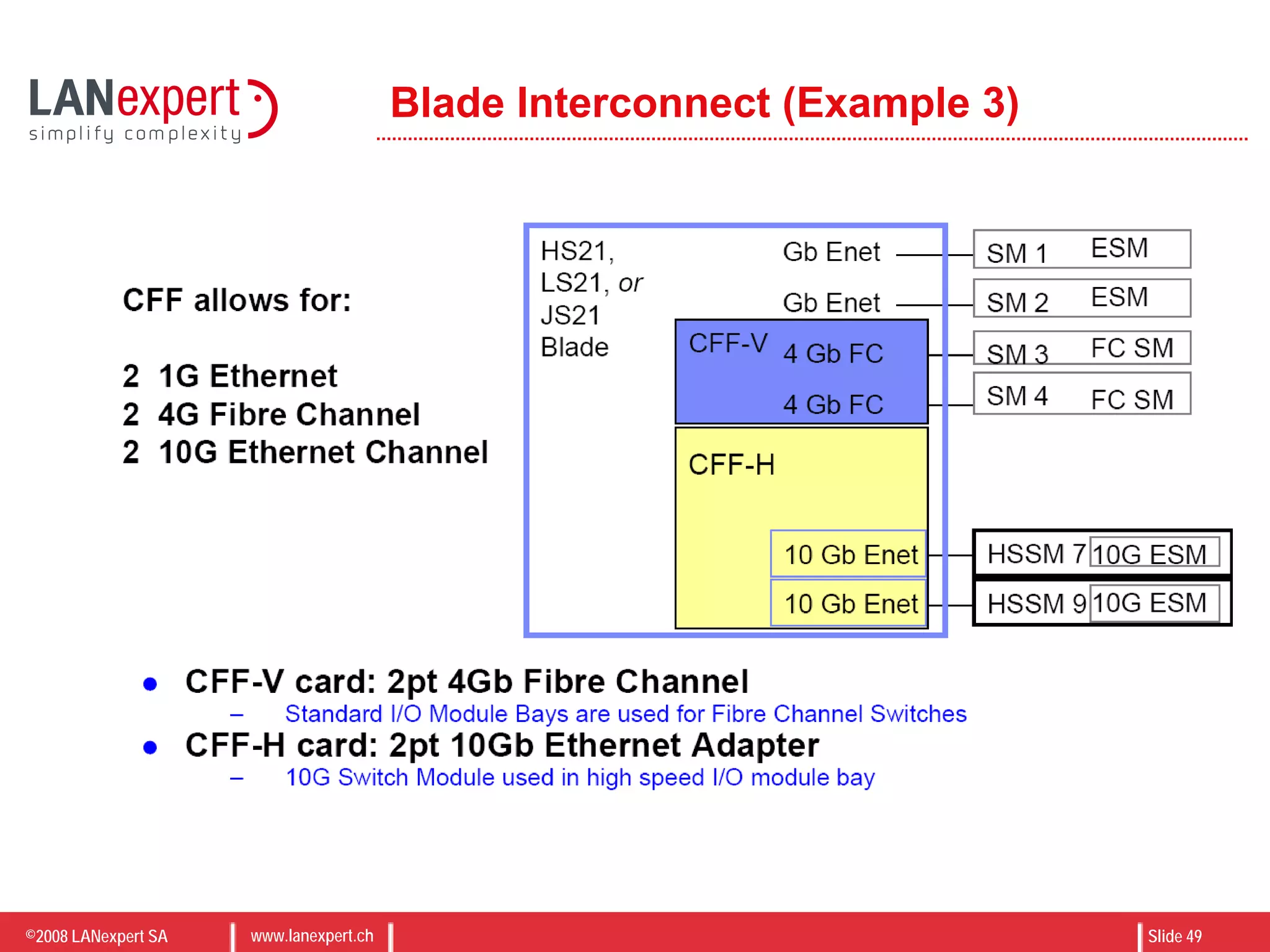
Blade Interconnect (Example 3)
©2008 LANexpert SA www.lanexpert.ch Slide 50
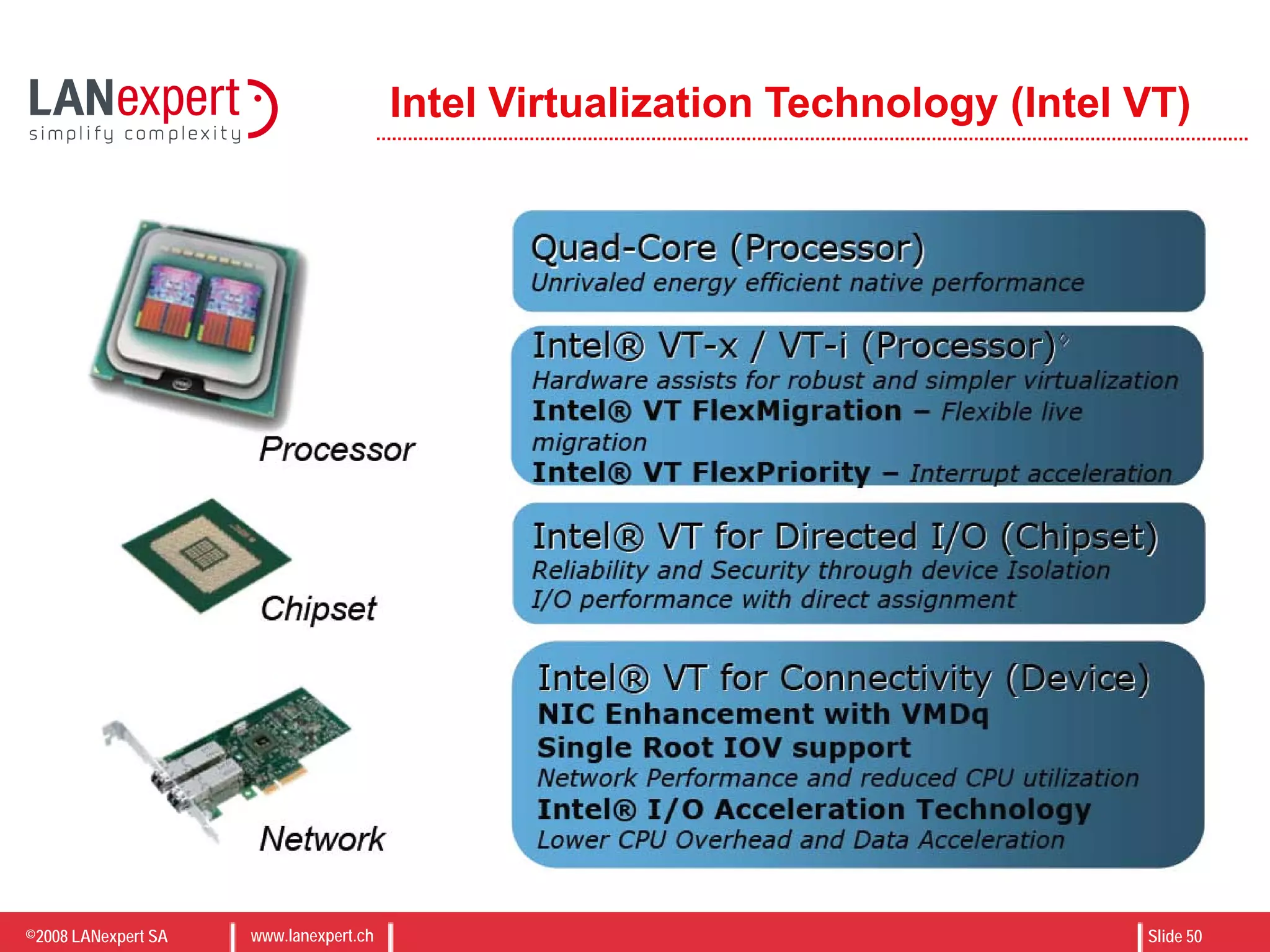
Intel Virtualization Technology (Intel VT)
©2008 LANexpert SA www.lanexpert.ch Slide 51
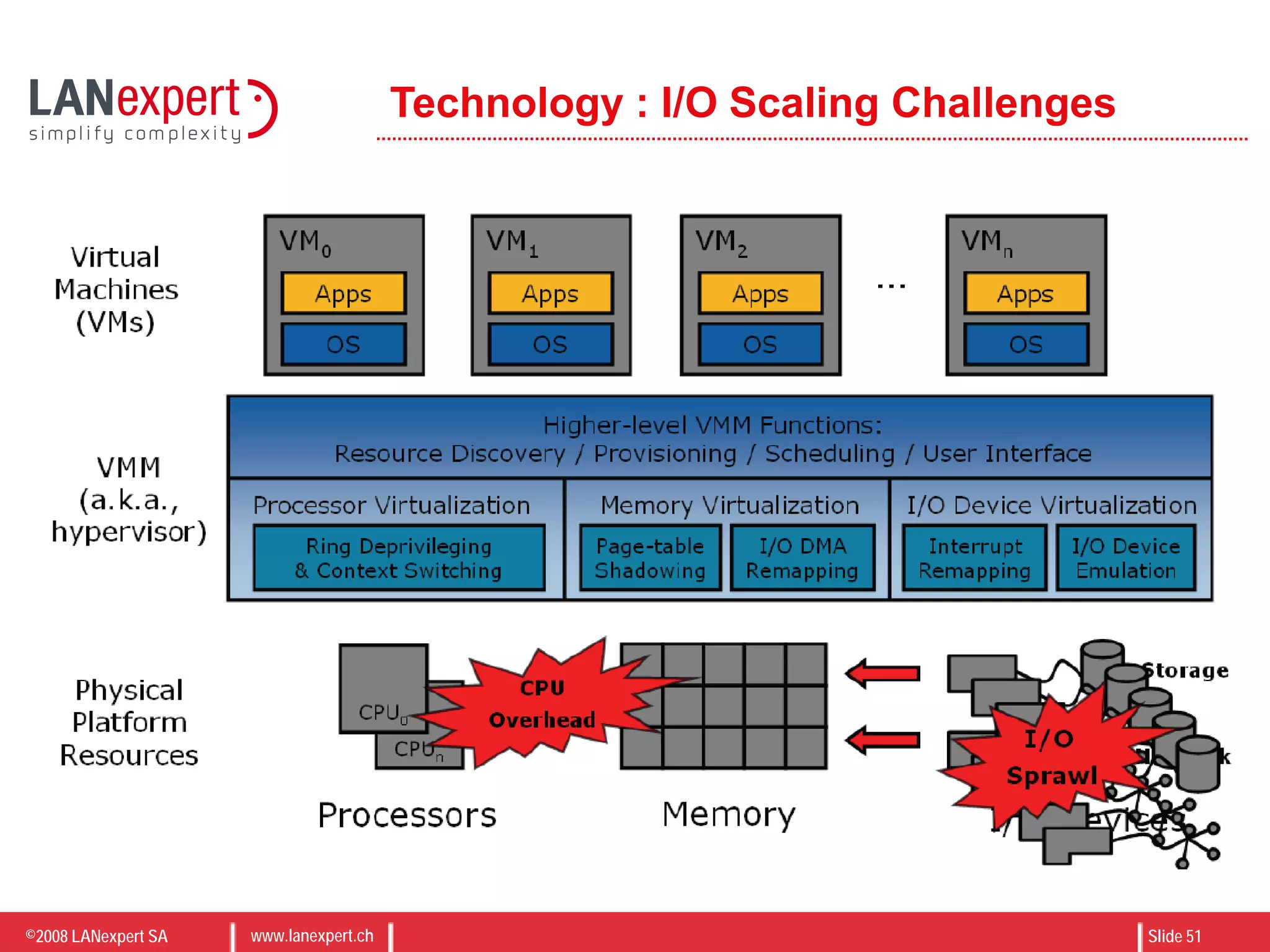
Technology : I/O Scaling Challenges
©2008 LANexpert SA www.lanexpert.ch Slide 52
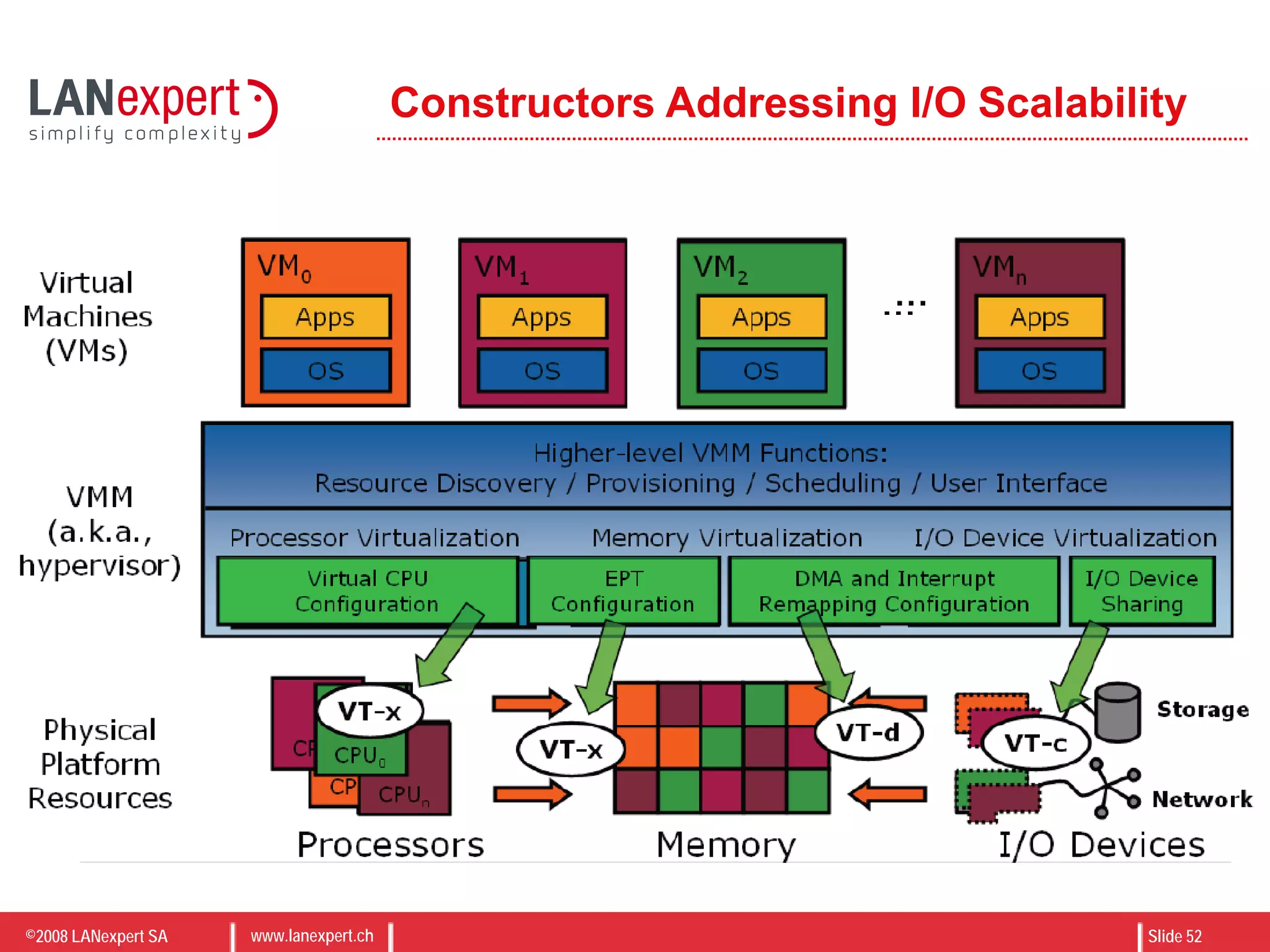
Constructors Addressing I/O Scalability

Virtualization on IBM Blade Center

  • 1.
    ©2008 LANexpert SAwww.lanexpert.ch Slide 1 Virtualization on IBM Blade Center (N°14) Michael GOMEZ Senior Storage Business Development Manager September 2nd, 2008 Erik BUSSINK Senior Virtualization & Security Consultant
  • 2.
    ©2008 LANexpert SAwww.lanexpert.ch Slide 2 AGENDA CONSOLIDATION VS VIRTUALIZATION x86 TECHNOLOGY DIRECTIONS IBM BLADECENTER - MULTIPLE CHOICE IBM BLADES – VIRTUALIZATION MADE EASY STORAGE CONSIDERATIONS CPU TECHNOLOGY FOR VIRTUALIZATION MANAGEMENT IBM BLADECENTER & HYPERVISORS EVOLUTION OF VIRTUALIZATION VMWARE CATALOG UPDATE VMWARE VI3.5 ON IBM BLADES CASE STUDY Q & A Agenda
  • 3.
    ©2008 LANexpert SAwww.lanexpert.ch Slide 3 WHAT IS CONSOLIDATION ? “[Consolidation is] an approach to the efficient usage of server resources in order to reduce the total number of servers, increase datacenter density, optimize connectivity, reduce energy and TCO” IBM BladeCenters are the most efficient way to server consolidation  Higher density and server count per U  Integrated network backplane  Green technology at best TCO  Reduce Server Count  Increase Datacenter density  Optimize connectivity  Reduce TCO  Green savings
  • 4.
    ©2008 LANexpert SAwww.lanexpert.ch Slide 4 WHAT IS VIRTUALIZATION ? “[Virtualization is] a technique for hiding the physical characteristics of computing resources from the way in which other systems, applications, or end users interact with those resources” In other words: Simplify Complexity For computing, virtualization can be grouped in two types: • Resource virtualization (Storage, Network, etc.) • Platform virtualization (Hypervisor)  Virtualization started in 1960s by IBM…  Virtual Memory  VLAN, trunk, VPN  RAID, volume manager  Storage virtualization  Emulation  Native virtualization  Paravirtualization  Application virtualization
  • 5.
    ©2008 LANexpert SAwww.lanexpert.ch Slide 5 CONSOLIDATION ? VIRTUALIZATION ? Consolidation • Higher Density • Better connectivity • Green savings • Management flexibility Virtualization • Simplified complexity • Resource pooling • Faster deployments • Skyrocket system utilization • Easy high availability Consolidation & Virtualization • Higher Density • Better connectivity • Green savings • Management flexibility • Simplified complexity • Resource Poolings • Faster Deployments • Skyrocket system utilization • Easy high availability • Simple Management • And even more….
  • 6.
    ©2008 LANexpert SAwww.lanexpert.ch Slide 6 x86 Technology Directions Current • Virtualization Growing • 2/4-Core Processors • Powerful Blades & X4 • SAS/Solid State Disk • Blade Boot from SAN/iSCSI 50% • iSCSI deployed • Storage Virtualization • 1Gb/10Gb Ethernet • 4GB SAN • Virtual I/O – Testing • 4x DDR InfiniBand 2008-2010 • Virtualization Widespread • 4/6/8/16-Core Processors • Powerful Blades & eX4 • Solid State Disk • Blade Boot from SAN/iSCSI 80% • iSCSI over 10G • Storage Virtualization • 10Gb Ethernet • 8/12GB SAN • Virtual I/O – Production • 4x QDR InfiniBand
  • 7.
    ©2008 LANexpert SAwww.lanexpert.ch Slide 7 IBM BladeCenter – Multiple choice
  • 8.
    ©2008 LANexpert SAwww.lanexpert.ch Slide 8 IBM Blade – Virtualization made Easy
  • 9.
    ©2008 LANexpert SAwww.lanexpert.ch Slide 9 LS22/42 – New Quad-Core AMD Blade
  • 10.
    ©2008 LANexpert SAwww.lanexpert.ch Slide 10 Blade Storage Evolution & Best Practice
  • 11.
    ©2008 LANexpert SAwww.lanexpert.ch Slide 11 Solid State – Reliable and Robust Local Storage
  • 12.
    ©2008 LANexpert SAwww.lanexpert.ch Slide 12 MANAGEMENT IBM Virtualization Manager (IBM Director) • Management of both physical and virtual environment from one single console • Discover and visualize resources and relationships • Show health and tasks from all resources and relationships • Define and monitor health, drill down on problems quickly to find root cause • Increase virtual server’s memory, storage, processing, networking capabilities • Support of VMware, Xen, Microsoft, and others  Easy Management  Heterogeneous environment  One stop monitoring
  • 13.
    ©2008 LANexpert SAwww.lanexpert.ch Slide 13 TO BLADE OR NOT TO BLADE ? No easy answer: be smart ! To Blade • Total infrastructure consolidation • Best when concerned about aggregation • Choose when OS image requires < 8Gb RAM per system • Choose when low power heat is a priority Not To Blade (3850M2 / 3950M2) • High-end virtualization • Best when hosting multiple high performance VMs • Choose when OS image requires > 8Gb RAM per system • Truly scalable perfectly balanced memory cores and I/O Success of virtualization is all about sizing
  • 14.
    ©2008 LANexpert SAwww.lanexpert.ch Slide 14 IBM BladeCenter & Hypervisors • VMware ESX • Xen Family • Citrix XenServer • SUN xVM • Virtual Iron • Oracle VM • Red Hat Enterprise Linux • Novell SuSE • Microsoft Hyper-V • Solaris Containers & Virtual Box • KVM  Hypervisors  BareMetal  Operating System  Paravirtualization
  • 15.
    ©2008 LANexpert SAwww.lanexpert.ch Slide 15 Evolution of Virtualization
  • 16.
    ©2008 LANexpert SAwww.lanexpert.ch Slide 16 Evolution of the Virtual Datacenter
  • 17.
    ©2008 LANexpert SAwww.lanexpert.ch Slide 17 VMware Catalog
  • 18.
    ©2008 LANexpert SAwww.lanexpert.ch Slide 18 VMware ESXi Server boot to running virtual machines in minutes Simplified management Increased security and reliability Compact, 32MB footprint Only architecture with no reliance on a general purpose OS Integration in hardware eliminates installation Intuitive wizard driven start up experience dramatically reduces deployment time Standards-based management of the underlying hardware
  • 19.
    ©2008 LANexpert SAwww.lanexpert.ch Slide 19 VMotion • Hot Migration (VMotion) – Moving a VM that is powered on from one host to another – Does not move virtual disk(s) – Requires VMotion license Datastore1 Virtual disk is not moved Hosts must have compatible CPUs and be on the same network subnet Hot VM migrations are confined to hosts within the same datacenter
  • 20.
    ©2008 LANexpert SAwww.lanexpert.ch Slide 20 Storage VMotion • Storage independent migration of virtual machine disks – Zero downtime to virtual machines – LUN independent – Supported for Fibre channel SANs Minimizes planned downtime due to storage Complete planned downtime management solution across servers and storage with VMotion and Storage VMotion
  • 21.
    ©2008 LANexpert SAwww.lanexpert.ch Slide 21 DRS • VMware Distributed Resource Scheduler (DRS), continuously monitors utilization across resource pools and intelligently aligns resources with business needs.
  • 22.
    ©2008 LANexpert SAwww.lanexpert.ch Slide 22 High Availability (HA) • VMware HA allows organizations to minimize downtime and service disruption while eliminating the need for dedicated, stand-by hardware/software. VMware HA also allows organizations to eliminate the need for a devoted administrator to bring back the machines online.
  • 23.
    ©2008 LANexpert SAwww.lanexpert.ch Slide 23 VMware Update Manager • Automates patch management for ESX Server hosts and select Microsoft and RHEL virtual machines • Scans and remedies online as well as offline virtual machines* and online ESX Server hosts • Snapshots virtual machines prior to patching and allows rollback to snapshot Update Manager Eliminates manual tracking of patch levels of ESX Server hosts and virtual machines Automates enforcement of patch standards Reduces risk through snapshots and offline virtual machine patching OFFLINE
  • 24.
    ©2008 LANexpert SAwww.lanexpert.ch Slide 24 ESX Server Patching with Update Manager and DRS • Update Manager patches entire DRS clusters – Each host in the cluster enters DRS maintenance mode, one at a time – VMs are migrated off, host is patched & rebooted if required – VMs are migrated back on – Next host is selected VMotionVMotion Update Manager server Automates patching of large number of hosts with zero downtime to virtual machines
  • 25.
    ©2008 LANexpert SAwww.lanexpert.ch Slide 25 Distributed Power Management (DPM) Resource Pool Business Demand Power Off Consolidates workloads onto fewer servers when the cluster needs fewer resources Places unneeded servers in standby mode Brings servers back online as workload needs increase Minimizes power consumption while guaranteeing service levels No disruption or downtime to virtual machines
  • 26.
    ©2008 LANexpert SAwww.lanexpert.ch Slide 26 Virtual Desktop Infrastructure (VDI) Enterprise-class, scalable connection broker Central administration and policy enforcement Automatic desktop provisioning with optional “smart pooling” Desktop persistence and secure tunneling options Microsoft AD integration and optional 2-factor authentication via RSA SecurID® End-to-end enterprise-class desktop control and manageability Familiar end user experience Tightly integrated with VMware’s proven virtualization platform (VI3) Scalability, security and availability suitable for organizations of all sizes Centralized Virtual Desktops VMware VDM Clients
  • 27.
    ©2008 LANexpert SAwww.lanexpert.ch Slide 27 VMware Site Recovery Manager (SRM) • Simplifies and automates disaster recovery workflows: – Setup, testing, failover, failback • Provides central management of recovery plans from VirtualCenter • Turns manual recovery processes into automated recovery plans • Simplifies integration with 3rd- party storage replication Makes disaster recovery rapid, reliable, manageable, affordable
  • 28.
    ©2008 LANexpert SAwww.lanexpert.ch Slide 28 VMware Site Recovery Manager (SRM) Storage Servers VMware Infrastructure Virtual Machines VirtualCenter Site Recovery Manager Storage Servers VMware Infrastructure VirtualCenter Site Recovery Manager Storage Replication Site Recovery Manager Protected virtual machines Virtual Machines Production Disaster Recovery
  • 29.
    ©2008 LANexpert SAwww.lanexpert.ch Slide 29 VMware VI3.5 on IBM BladeCenter Architecture Design  Schema  Blade Type  BladeCenter Connectivity  Network Configuration  SAN Connectivity  Boot on SAN  Best practices  Gotcha’s
  • 30.
    ©2008 LANexpert SAwww.lanexpert.ch Slide 30 VMware ESX 3.5.0 on Blade HS21XM
  • 31.
    ©2008 LANexpert SAwww.lanexpert.ch Slide 31 VMware ESXi 3.5.0 on Blade HS21XM
  • 32.
    ©2008 LANexpert SAwww.lanexpert.ch Slide 32 VMware ESXi 3.5.0 on Blade HS21XM
  • 33.
    ©2008 LANexpert SAwww.lanexpert.ch Slide 33 VMware ESXi 3.5.0 on Blade HS21XM
  • 34.
    ©2008 LANexpert SAwww.lanexpert.ch Slide 34 Virtual Center 2.5
  • 35.
    ©2008 LANexpert SAwww.lanexpert.ch Slide 35 Virtual Center 2.5 & DPM
  • 36.
    ©2008 LANexpert SAwww.lanexpert.ch Slide 36 Case Study – Large scale VI 3.5 Deployment • Two Datacenter configuration • Support for Redundant Core Network • VM High-Availability • Leverage existing SAN Storage • Boot from SAN for VMware ESX servers • Support for DMZ Network
  • 37.
    ©2008 LANexpert SAwww.lanexpert.ch Slide 37 BladeCenter Configuration • 2x BladeCenter H • 12x HS21XM Blade
  • 38.
    ©2008 LANexpert SAwww.lanexpert.ch Slide 38 BladeCenter I/O Connectivity • BladeCenter H • 2x AMM • 5x Cisco Gigabit Switches • 2x Brocade 4Gb Fiber Switches
  • 39.
    ©2008 LANexpert SAwww.lanexpert.ch Slide 39 Blade Interconnect used in HS21 XM
  • 40.
    ©2008 LANexpert SAwww.lanexpert.ch Slide 40 • Blade HS21XM • 2x Xeon Processor • 32Gb Memory • 2x Onboard GbE • CFF-V Expansion Card  2x GbE • CFF-H Expansion Card  2x 4GB FC  2x GbE
  • 41.
    ©2008 LANexpert SAwww.lanexpert.ch Slide 41 • Network Configuration
  • 42.
    ©2008 LANexpert SAwww.lanexpert.ch Slide 42 VMmware VirtualCenter • 2x BladeCenter H • 12x HS21XM Blade • 10x Cisco Gigabit Switches • 4x Brocade 4Gb Fiber Switches • 48 Cores / 24 CPU • 128 GHz CPU • 384 GB Memory
  • 43.
    ©2008 LANexpert SAwww.lanexpert.ch Slide 43 VMware VI 3.5 on IBM BladeCenter Network considerations  Réseau de management  Gestion de la DMZ  Intégration au LAN  Connectique SAN (FC, IP)
  • 44.
    ©2008 LANexpert SAwww.lanexpert.ch Slide 44 VMware VI 3.5 on IBM BladeCenter High Availability  Blade Sparing (IBM Director & Open Fabric)  Redundant platform and architecture  VMware Clustering among Blades & Chassis  VMware Site Recovery Manager
  • 45.
    ©2008 LANexpert SAwww.lanexpert.ch Slide 45 Q & A
  • 46.
    ©2008 LANexpert SAwww.lanexpert.ch Slide 46 CFF Expansion Card Placement in Blade Servers
  • 47.
    ©2008 LANexpert SAwww.lanexpert.ch Slide 47 Blade Interconnect (Example 1)
  • 48.
    ©2008 LANexpert SAwww.lanexpert.ch Slide 48 Blade Interconnect (Example 2)
  • 49.
    ©2008 LANexpert SAwww.lanexpert.ch Slide 49 Blade Interconnect (Example 3)
  • 50.
    ©2008 LANexpert SAwww.lanexpert.ch Slide 50 Intel Virtualization Technology (Intel VT)
  • 51.
    ©2008 LANexpert SAwww.lanexpert.ch Slide 51 Technology : I/O Scaling Challenges
  • 52.
    ©2008 LANexpert SAwww.lanexpert.ch Slide 52 Constructors Addressing I/O Scalability