AERO
TOUCH
Guided By:
Nilesh Vispute
Group No. 17
Presented by :-
• Vinit Chivilkar
• Gaurav Narwade
• Sneha Patekar
INTRODUCTION
Aero Touch
About The
Project
Aero Touch is a technology associated with touchless or
gesture-based interaction systems. It allows users to control
devices or applications without physically touching them,
often using hand gestures or movements detected by
sensors.
Aero Touch
How does it work …
About The
Project
Aero Touch works by employing advanced sensors, such as
infrared or depth cameras, to detect hand gestures in real
time. When a user moves their hand, the sensors capture the
motion data. This data is then processed using algorithms
that identify specific gestures, like swipes or waves. Once a
gesture is recognized, the system translates it into commands
to control the device or application.
Environment
 C++ for performance-critical applications.
 Python for prototyping and utilizing machine
learning libraries.
 OpenCV for computer vision tasks.
Problem Statement
Plans
Traditional mice can cause accessibility challenges for users
with disabilities and fatigue from prolonged use. The
Aero Touch project aims to provide a hands-free solution
using computer vision to track gestures, offering a more
ergonomic and accessible alternative for interacting with
computers.
Problem
Statement
Accessibility
Issues
Usability
Literature Review
The Aero Touch technology has gained traction due to
advancements in computer vision and machine learning, enabling
hands-free cursor control through gesture recognition. Utilizing
webcams, these systems detect hand movements using image
processing techniques like skin detection and contour recognition.
Recent studies highlight the role of machine learning algorithms in
enhancing accuracy and adaptability to user inputs. The Aero
Touch significantly improves accessibility for individuals with
physical disabilities, reducing the risk of repetitive strain injuries
associated with traditional mice. Additionally, it promotes hygiene
in public and medical environments by facilitating touch-free
interaction.
Literature
Review
Advantages
The Aero Touch technology offers several significant advantages that
enhance user experience and accessibility. It provides an inclusive
interface for individuals with physical disabilities, allowing for hands-
free operation. This technology also reduces strain and fatigue typically
associated with traditional mouse use, promoting a healthier interaction
model. Additionally, the Aero Touch minimizes the risk of germ
transmission in public or medical environments through its touch-free
interaction capabilities. Its flexibility in supporting various gestures
enables users to customize their interaction methods based on personal
preferences and comfort levels. Finally, by utilizing natural hand
movements, the Aero Touch enhances the overall user experience,
making computer navigation more intuitive and engaging. Advantages of
Aero Touch
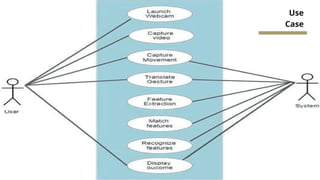
Use
Case
Swim Lane
Future Scope
Future developments may lead
to the creation of more
advanced user interfaces that
integrate Aero Touch
technology with other input
methods, such as voice
commands or eye-tracking,
providing users with multiple
ways to interact with their
devices..
Advanced User
Interfaces
Wearable
Technology
Integration with
Smart
Environments
There is potential for Aero
Touch technology to be
incorporated into wearable
devices, such as smart glasses
or wristbands, enabling hands-
free control without needing a
webcam. This could expand
usage scenarios, particularly in
environments where
traditional computing devices
are impractical.
Future Aero Touch applications
could extend into smart home
technologies, enabling
gesture-based controls for
various devices within a smart
environment. This could
enhance user convenience and
make home automation more
intuitivei
Future
Scope
Conclusion
Conclusion
In summary, Aero Touch technology significantly enhances human-
computer interaction by improving accessibility, ergonomics, and
hygiene. Its diverse applications in sectors like healthcare, education,
and gaming demonstrate its versatility. With future advancements in
gesture recognition and AR/VR integration, Aero Touch will become
increasingly intuitive and user-friendly, paving the way for a more
inclusive digital landscape. The ongoing innovation in this field promises
to redefine how users interact with technology.
THANK YOU!
Group No. 17

Virtual Mouse aero touch using python and open cv.pptx

  • 1.
    AERO TOUCH Guided By: Nilesh Vispute GroupNo. 17 Presented by :- • Vinit Chivilkar • Gaurav Narwade • Sneha Patekar
  • 2.
    INTRODUCTION Aero Touch About The Project AeroTouch is a technology associated with touchless or gesture-based interaction systems. It allows users to control devices or applications without physically touching them, often using hand gestures or movements detected by sensors.
  • 3.
    Aero Touch How doesit work … About The Project Aero Touch works by employing advanced sensors, such as infrared or depth cameras, to detect hand gestures in real time. When a user moves their hand, the sensors capture the motion data. This data is then processed using algorithms that identify specific gestures, like swipes or waves. Once a gesture is recognized, the system translates it into commands to control the device or application.
  • 4.
    Environment  C++ forperformance-critical applications.  Python for prototyping and utilizing machine learning libraries.  OpenCV for computer vision tasks.
  • 5.
    Problem Statement Plans Traditional micecan cause accessibility challenges for users with disabilities and fatigue from prolonged use. The Aero Touch project aims to provide a hands-free solution using computer vision to track gestures, offering a more ergonomic and accessible alternative for interacting with computers. Problem Statement Accessibility Issues Usability
  • 6.
    Literature Review The AeroTouch technology has gained traction due to advancements in computer vision and machine learning, enabling hands-free cursor control through gesture recognition. Utilizing webcams, these systems detect hand movements using image processing techniques like skin detection and contour recognition. Recent studies highlight the role of machine learning algorithms in enhancing accuracy and adaptability to user inputs. The Aero Touch significantly improves accessibility for individuals with physical disabilities, reducing the risk of repetitive strain injuries associated with traditional mice. Additionally, it promotes hygiene in public and medical environments by facilitating touch-free interaction. Literature Review
  • 7.
    Advantages The Aero Touchtechnology offers several significant advantages that enhance user experience and accessibility. It provides an inclusive interface for individuals with physical disabilities, allowing for hands- free operation. This technology also reduces strain and fatigue typically associated with traditional mouse use, promoting a healthier interaction model. Additionally, the Aero Touch minimizes the risk of germ transmission in public or medical environments through its touch-free interaction capabilities. Its flexibility in supporting various gestures enables users to customize their interaction methods based on personal preferences and comfort levels. Finally, by utilizing natural hand movements, the Aero Touch enhances the overall user experience, making computer navigation more intuitive and engaging. Advantages of Aero Touch
  • 8.
  • 9.
  • 10.
    Future Scope Future developmentsmay lead to the creation of more advanced user interfaces that integrate Aero Touch technology with other input methods, such as voice commands or eye-tracking, providing users with multiple ways to interact with their devices.. Advanced User Interfaces Wearable Technology Integration with Smart Environments There is potential for Aero Touch technology to be incorporated into wearable devices, such as smart glasses or wristbands, enabling hands- free control without needing a webcam. This could expand usage scenarios, particularly in environments where traditional computing devices are impractical. Future Aero Touch applications could extend into smart home technologies, enabling gesture-based controls for various devices within a smart environment. This could enhance user convenience and make home automation more intuitivei Future Scope
  • 11.
    Conclusion Conclusion In summary, AeroTouch technology significantly enhances human- computer interaction by improving accessibility, ergonomics, and hygiene. Its diverse applications in sectors like healthcare, education, and gaming demonstrate its versatility. With future advancements in gesture recognition and AR/VR integration, Aero Touch will become increasingly intuitive and user-friendly, paving the way for a more inclusive digital landscape. The ongoing innovation in this field promises to redefine how users interact with technology.
  • 12.