Unit - II
Hypervisors
Agenda
• Describing a hypervisor
• Understanding the role of a hypervisor
• Comparing today’s hypervisors
• Describing a Hypervisor
– The hypervisor is a layer of software that resides below the
virtual machines and above the hardware which provides
an environment for programs that are identical to original
machine with minor decreases in execution speed
together with complete control over resource allocation.
– The hypervisor manages the interactions between each
virtual machine and the hardware that the guests all share.
• Initially, virtual machine monitors were used for the development
and debugging of operating systems because they provided a
sandbox for programmers to test rapidly and repeatedly, without
using all of the resources of the hardware.
• Added the ability to run multiple environments concurrently,
carving the hardware resources into virtual servers that could
each run its own operating system.
What are the design conditions that
the hypervisor should satisfy?
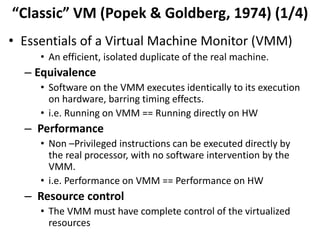
“Classic” VM (Popek & Goldberg, 1974) (1/4)
• Essentials of a Virtual Machine Monitor (VMM)
• An efficient, isolated duplicate of the real machine.
– Equivalence
• Software on the VMM executes identically to its execution
on hardware, barring timing effects.
• i.e. Running on VMM == Running directly on HW
– Performance
• Non –Privileged instructions can be executed directly by
the real processor, with no software intervention by the
VMM.
• i.e. Performance on VMM == Performance on HW
– Resource control
• The VMM must have complete control of the virtualized
resources
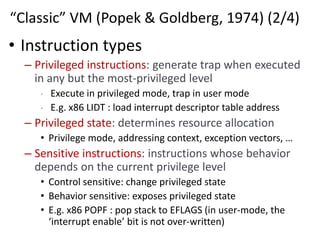
“Classic” VM (Popek & Goldberg, 1974) (2/4)
• Instruction types
– Privileged instructions: generate trap when executed
in any but the most-privileged level
• Execute in privileged mode, trap in user mode
• E.g. x86 LIDT : load interrupt descriptor table address
– Privileged state: determines resource allocation
• Privilege mode, addressing context, exception vectors, …
– Sensitive instructions: instructions whose behavior
depends on the current privilege level
• Control sensitive: change privileged state
• Behavior sensitive: exposes privileged state
• E.g. x86 POPF : pop stack to EFLAGS (in user-mode, the
‘interrupt enable’ bit is not over-written)
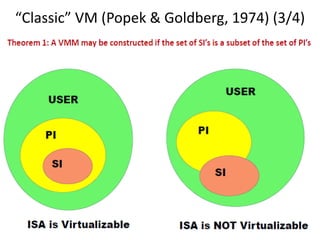
“Classic” VM (Popek & Goldberg, 1974) (3/4)
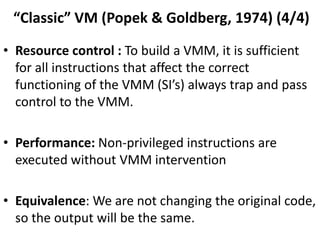
“Classic” VM (Popek & Goldberg, 1974) (4/4)
• Resource control : To build a VMM, it is sufficient
for all instructions that affect the correct
functioning of the VMM (SI’s) always trap and pass
control to the VMM.
• Performance: Non-privileged instructions are
executed without VMM intervention
• Equivalence: We are not changing the original code,
so the output will be the same.
Virtualization Theorem
• Subset theorem :
– For any conventional third-generation computer, a VMM may
be constructed if the set of sensitive instructions for that
computer is a subset of the set of privileged instructions.
• Recursive Emulation :
– A conventional third-generation computer is recursively
virtualizable if
• It is virtualizable
• VMM without any timing dependencies can be constructed for it.
• Under this theorem, x86 architecture cannot be
virtualized directly. Other techniques are needed.
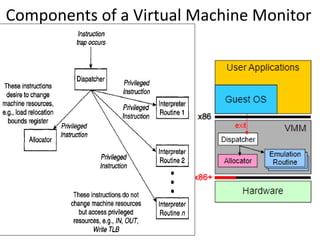
Components of a Virtual Machine Monitor
• Dispatcher
– Invoked by the interrupt handler when the hardware traps
• Any instructions in a guest OS that attempt to change resource
assignments or whose behavior is affected by the assignment of resources
will trap to the VMM dispatcher.
– Top-level control module of the VMM, which decides the next
module to be invoked
• Allocator
– Invoked by the dispatcher whenever there is a need to change
machine resources associated with some virtual machine
– Trapping instructions that attempt to change resource
assignments are then directed by the dispatcher to the allocator.
• How to allocate memory resources in a non-conflicting manner.
• Interpreter
– Contains several Interpreter routines
• one per privileged instruction,
• emulate the effects of the instructions when operating on virtual
resources. After an interpreter routine finishes, control is passed back to
the guest
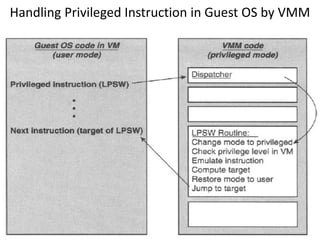
Handling Privileged Instruction in Guest OS by VMM
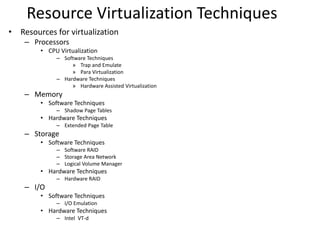
Resource Virtualization Techniques
• Resources for virtualization
– Processors
• CPU Virtualization
– Software Techniques
» Trap and Emulate
» Para Virtualization
– Hardware Techniques
» Hardware Assisted Virtualization
– Memory
• Software Techniques
– Shadow Page Tables
• Hardware Techniques
– Extended Page Table
– Storage
• Software Techniques
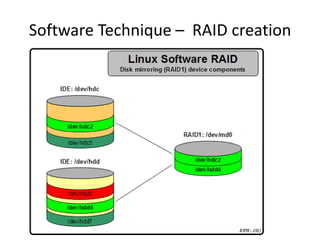
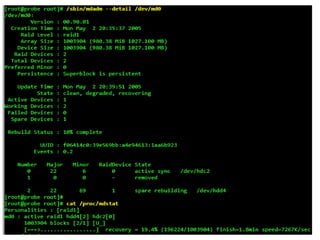
– Software RAID
– Storage Area Network
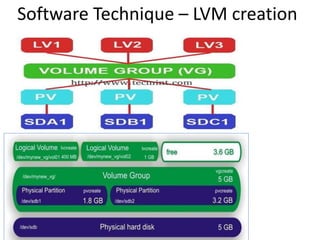
– Logical Volume Manager
• Hardware Techniques
– Hardware RAID
– I/O
• Software Techniques
– I/O Emulation
• Hardware Techniques
– Intel VT-d
CPU Virtualization Software
Techniques
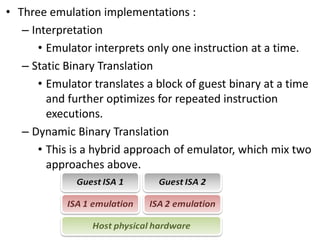
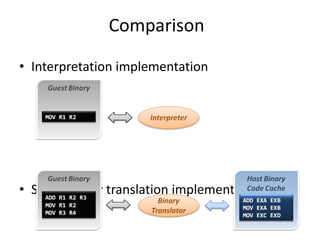
• Three emulation implementations :
– Interpretation
• Emulator interprets only one instruction at a time.
– Static Binary Translation
• Emulator translates a block of guest binary at a time
and further optimizes for repeated instruction
executions.
– Dynamic Binary Translation
• This is a hybrid approach of emulator, which mix two
approaches above.
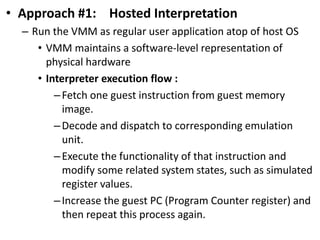
• Approach #1: Hosted Interpretation
– Run the VMM as regular user application atop of host OS
• VMM maintains a software-level representation of
physical hardware
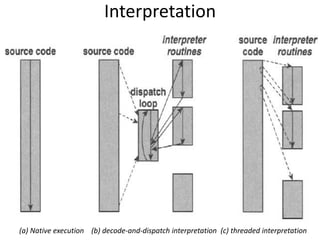
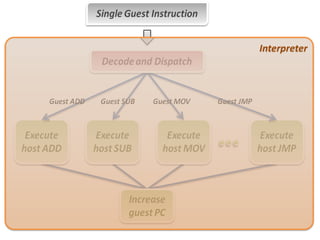
• Interpreter execution flow :
–Fetch one guest instruction from guest memory
image.
–Decode and dispatch to corresponding emulation
unit.
–Execute the functionality of that instruction and
modify some related system states, such as simulated
register values.
–Increase the guest PC (Program Counter register) and
then repeat this process again.
(a) Native execution (b) decode-and-dispatch interpretation (c) threaded interpretation
Interpretation
Interpreter
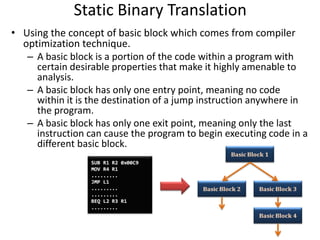
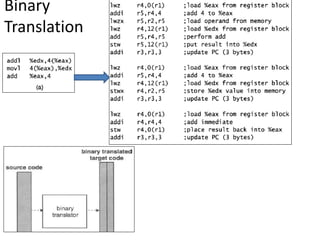
Static Binary Translation
• Using the concept of basic block which comes from compiler
optimization technique.
– A basic block is a portion of the code within a program with
certain desirable properties that make it highly amenable to
analysis.
– A basic block has only one entry point, meaning no code
within it is the destination of a jump instruction anywhere in
the program.
– A basic block has only one exit point, meaning only the last
instruction can cause the program to begin executing code in a
different basic block.
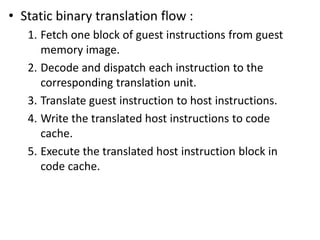
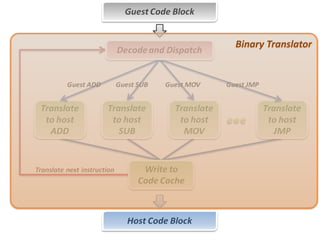
• Static binary translation flow :
1. Fetch one block of guest instructions from guest
memory image.
2. Decode and dispatch each instruction to the
corresponding translation unit.
3. Translate guest instruction to host instructions.
4. Write the translated host instructions to code
cache.
5. Execute the translated host instruction block in
code cache.
Binary
Translation
Binary Translator
Comparison
• Interpretation implementation
• Static binary translation implementation
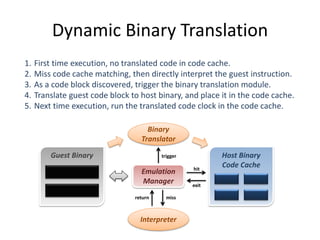
Dynamic Binary Translation
Guest Binary
Emulation
Manager
Binary
Translator
Interpreter
Host Binary
Code Cachehit
exit
missreturn
trigger
1. First time execution, no translated code in code cache.
2. Miss code cache matching, then directly interpret the guest instruction.
3. As a code block discovered, trigger the binary translation module.
4. Translate guest code block to host binary, and place it in the code cache.
5. Next time execution, run the translated code clock in the code cache.
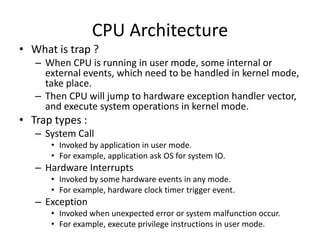
CPU Architecture
• What is trap ?
– When CPU is running in user mode, some internal or
external events, which need to be handled in kernel mode,
take place.
– Then CPU will jump to hardware exception handler vector,
and execute system operations in kernel mode.
• Trap types :
– System Call
• Invoked by application in user mode.
• For example, application ask OS for system IO.
– Hardware Interrupts
• Invoked by some hardware events in any mode.
• For example, hardware clock timer trigger event.
– Exception
• Invoked when unexpected error or system malfunction occur.
• For example, execute privilege instructions in user mode.
Approach #2: Direct Execution with Trap
and Emulation
• This approach requires that a processor be “virtualizable”
– Privileged instructions cause a trap when executed in Rings 1—3
– Sensitive instructions access low-level machine state that should
be managed by an OS or VMM
• Ex: Instructions that modify segment/page table registers
• Ex: IO instructions
– Virtualizable processor: all sensitive instructions are privileged
• If a processor is virtualizable, a VMM can interpose on any sensitive
instruction that the VM tries to execute
• VMM can control how the VM interacts with the “outside world” (i.e.,
physical hardware)
• VMM can fool the guest OS into thinking that guest OS runs at the
highest privilege level (e.g., if guest OS invokes sensitive instruction to
check the current privilege level)
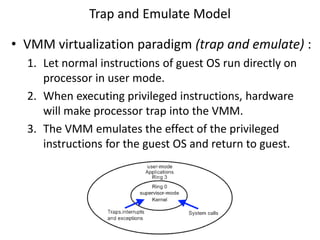
Trap and Emulate Model
• VMM virtualization paradigm (trap and emulate) :
1. Let normal instructions of guest OS run directly on
processor in user mode.
2. When executing privileged instructions, hardware
will make processor trap into the VMM.
3. The VMM emulates the effect of the privileged
instructions for the guest OS and return to guest.
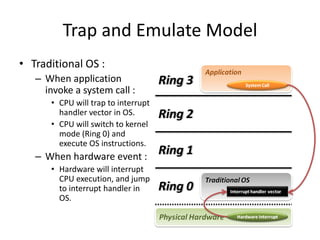
Trap and Emulate Model
• Traditional OS :
– When application
invoke a system call :
• CPU will trap to interrupt
handler vector in OS.
• CPU will switch to kernel
mode (Ring 0) and
execute OS instructions.
– When hardware event :
• Hardware will interrupt
CPU execution, and jump
to interrupt handler in
OS.
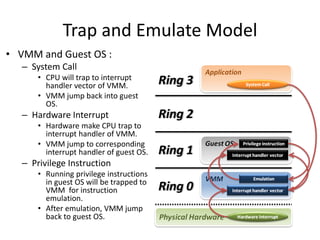
Trap and Emulate Model
• VMM and Guest OS :
– System Call
• CPU will trap to interrupt
handler vector of VMM.
• VMM jump back into guest
OS.
– Hardware Interrupt
• Hardware make CPU trap to
interrupt handler of VMM.
• VMM jump to corresponding
interrupt handler of guest OS.
– Privilege Instruction
• Running privilege instructions
in guest OS will be trapped to
VMM for instruction
emulation.
• After emulation, VMM jump
back to guest OS.
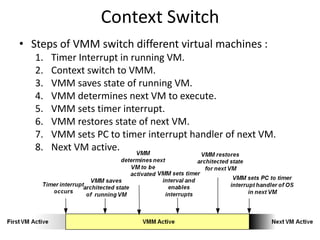
Context Switch
• Steps of VMM switch different virtual machines :
1. Timer Interrupt in running VM.
2. Context switch to VMM.
3. VMM saves state of running VM.
4. VMM determines next VM to execute.
5. VMM sets timer interrupt.
6. VMM restores state of next VM.
7. VMM sets PC to timer interrupt handler of next VM.
8. Next VM active.
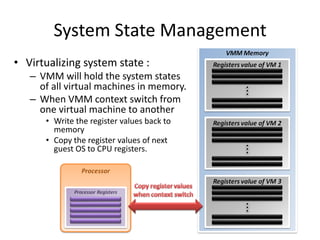
System State Management
• Virtualizing system state :
– VMM will hold the system states
of all virtual machines in memory.
– When VMM context switch from
one virtual machine to another
• Write the register values back to
memory
• Copy the register values of next
guest OS to CPU registers.
32
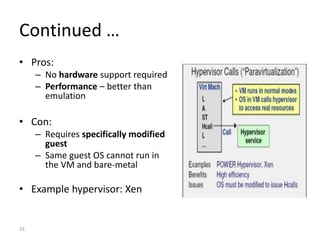
Paravirtualization!
• Does not run unmodified guest OSes
• Requires guest OS to “know” it is running on
top of a hypervisor
• E.g., instead of doing cli to turn off interrupts,
guest OS should do
hypercall(DISABLE_INTERRUPTS)
33
Continued …
• Pros:
– No hardware support required
– Performance – better than
emulation
• Con:
– Requires specifically modified
guest
– Same guest OS cannot run in
the VM and bare-metal
• Example hypervisor: Xen
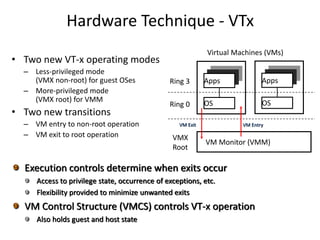
Hardware Technique - VTx
• Two new VT-x operating modes
– Less-privileged mode
(VMX non-root) for guest OSes
– More-privileged mode
(VMX root) for VMM
• Two new transitions
– VM entry to non-root operation
– VM exit to root operation
Ring 3
Ring 0
VMX
Root
Virtual Machines (VMs)
Apps
OS
VM Monitor (VMM)
Apps
OS
VM Exit VM Entry
Execution controls determine when exits occur
Access to privilege state, occurrence of exceptions, etc.
Flexibility provided to minimize unwanted exits
VM Control Structure (VMCS) controls VT-x operation
Also holds guest and host state
CPU Hardware Virtualization
Techniques
Intel VT-x
• In order to straighten those problems out, Intel
introduces one more operation mode of x86
architecture.
– VMX Root Operation (Root Mode)
• All instruction behaviors in this mode are no different to
traditional ones.
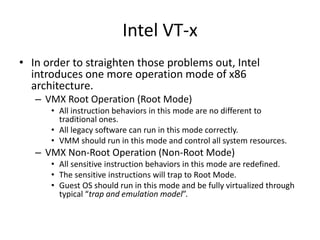
• All legacy software can run in this mode correctly.
• VMM should run in this mode and control all system resources.
– VMX Non-Root Operation (Non-Root Mode)
• All sensitive instruction behaviors in this mode are redefined.
• The sensitive instructions will trap to Root Mode.
• Guest OS should run in this mode and be fully virtualized through
typical “trap and emulation model”.
Intel VT-x
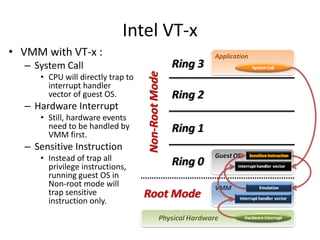
• VMM with VT-x :
– System Call
• CPU will directly trap to
interrupt handler
vector of guest OS.
– Hardware Interrupt
• Still, hardware events
need to be handled by
VMM first.
– Sensitive Instruction
• Instead of trap all
privilege instructions,
running guest OS in
Non-root mode will
trap sensitive
instruction only.
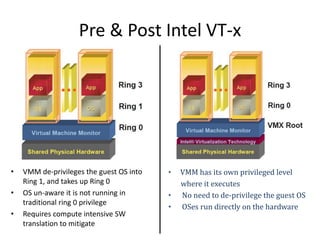
Pre & Post Intel VT-x
• VMM de-privileges the guest OS into
Ring 1, and takes up Ring 0
• OS un-aware it is not running in
traditional ring 0 privilege
• Requires compute intensive SW
translation to mitigate
• VMM has its own privileged level
where it executes
• No need to de-privilege the guest OS
• OSes run directly on the hardware
Context Switch
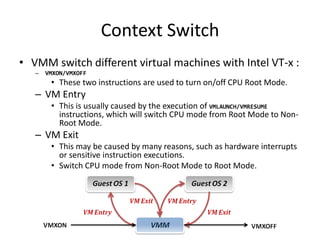
• VMM switch different virtual machines with Intel VT-x :
– VMXON/VMXOFF
• These two instructions are used to turn on/off CPU Root Mode.
– VM Entry
• This is usually caused by the execution of VMLAUNCH/VMRESUME
instructions, which will switch CPU mode from Root Mode to Non-
Root Mode.
– VM Exit
• This may be caused by many reasons, such as hardware interrupts
or sensitive instruction executions.
• Switch CPU mode from Non-Root Mode to Root Mode.
System State Management
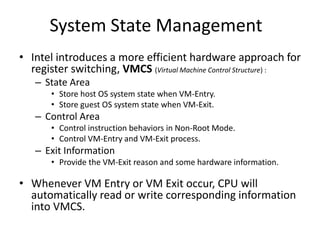
• Intel introduces a more efficient hardware approach for
register switching, VMCS (Virtual Machine Control Structure) :
– State Area
• Store host OS system state when VM-Entry.
• Store guest OS system state when VM-Exit.
– Control Area
• Control instruction behaviors in Non-Root Mode.
• Control VM-Entry and VM-Exit process.
– Exit Information
• Provide the VM-Exit reason and some hardware information.
• Whenever VM Entry or VM Exit occur, CPU will
automatically read or write corresponding information
into VMCS.
System State Management
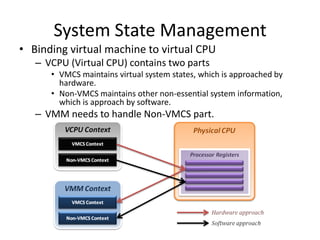
• Binding virtual machine to virtual CPU
– VCPU (Virtual CPU) contains two parts
• VMCS maintains virtual system states, which is approached by
hardware.
• Non-VMCS maintains other non-essential system information,
which is approach by software.
– VMM needs to handle Non-VMCS part.
Memory Virtualization
X86 Memory Access
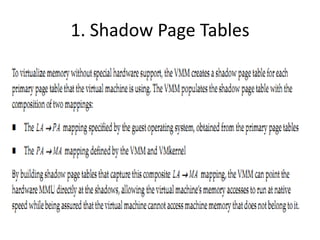
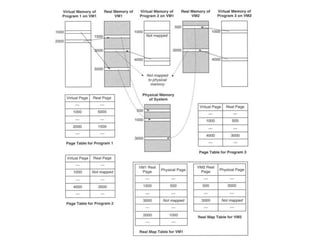
1. Shadow Page Tables
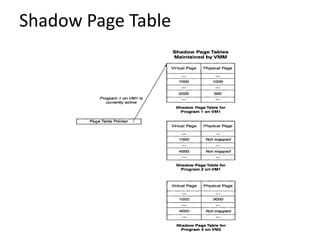
Shadow Page Table
Hardware Solution
• Difficulties of shadow page table technique :
– Shadow page table implementation is extremely complex.
– Page fault mechanism and synchronization issues are
critical.
– Host memory space overhead is considerable.
• But why we need this technique to virtualize MMU ?
– MMU do not first implemented for virtualization.
– MMU is knowing nothing about two level page address
translation.
• Now, let us consider hardware solution.
Extended Page Table
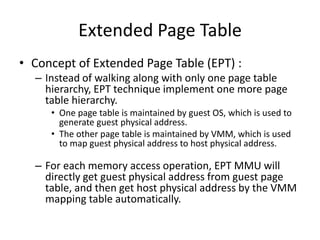
• Concept of Extended Page Table (EPT) :
– Instead of walking along with only one page table
hierarchy, EPT technique implement one more page
table hierarchy.
• One page table is maintained by guest OS, which is used to
generate guest physical address.
• The other page table is maintained by VMM, which is used
to map guest physical address to host physical address.
– For each memory access operation, EPT MMU will
directly get guest physical address from guest page
table, and then get host physical address by the VMM
mapping table automatically.
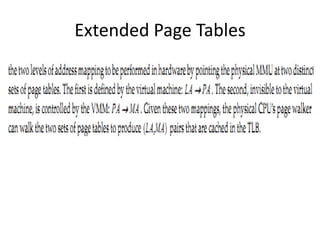
Extended Page Tables
Continued …
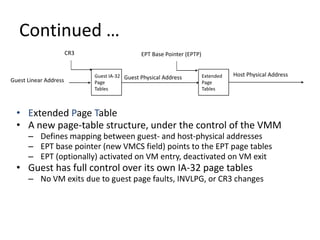
• Extended Page Table
• A new page-table structure, under the control of the VMM
– Defines mapping between guest- and host-physical addresses
– EPT base pointer (new VMCS field) points to the EPT page tables
– EPT (optionally) activated on VM entry, deactivated on VM exit
• Guest has full control over its own IA-32 page tables
– No VM exits due to guest page faults, INVLPG, or CR3 changes
Guest IA-32
Page
Tables
Guest Linear Address Guest Physical Address Extended
Page
Tables
Host Physical Address
EPT Base Pointer (EPTP)CR3
Guest Linear Address
EPT
Tables
CR3
EPT
Tables
+
EPT Tables
+
Page Table
Page
Directory
Host Physical Address
Guest
Physical
Page Base
Address
+
Guest Physical
Address
Continued …
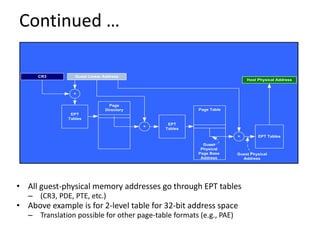
• All guest-physical memory addresses go through EPT tables
– (CR3, PDE, PTE, etc.)
• Above example is for 2-level table for 32-bit address space
– Translation possible for other page-table formats (e.g., PAE)
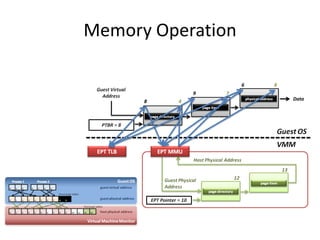
Memory Operation
8
9
6
4
7
8
Data
Hardware Solution
• Difficulties of shadow page table technique :
– Shadow page table implementation is extremely complex.
– Page fault mechanism and synchronization issues are
critical.
– Host memory space overhead is considerable.
• But why we need this technique to virtualize MMU ?
– MMU do not first implemented for virtualization.
– MMU is knowing nothing about two level page address
translation.
• Now, let us consider hardware solution.
Extended Page Table
• Concept of Extended Page Table (EPT) :
– Instead of walking along with only one page table
hierarchy, EPT technique implement one more page
table hierarchy.
• One page table is maintained by guest OS, which is used to
generate guest physical address.
• The other page table is maintained by VMM, which is used
to map guest physical address to host physical address.
– For each memory access operation, EPT MMU will
directly get guest physical address from guest page
table, and then get host physical address by the VMM
mapping table automatically.
Storage Virtualization
Software Technique – LVM creation
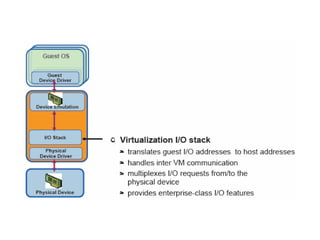
Software Technique – RAID creation
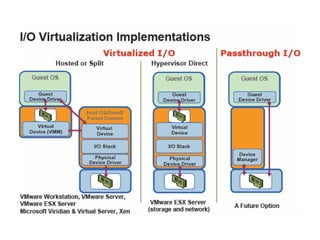
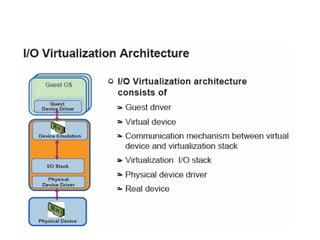
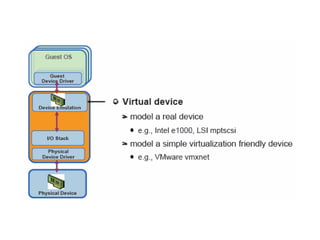
I/O Virtualization
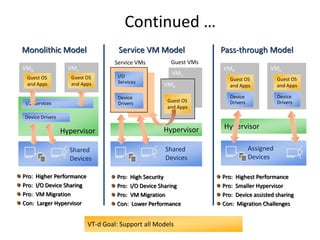
Continued …
Pro: Higher Performance
Pro: I/O Device Sharing
Pro: VM Migration
Con: Larger Hypervisor
Hypervisor
Shared
Devices
I/O Services
Device Drivers
VM0
Guest OS
and Apps
VMn
Guest OS
and Apps
Monolithic Model
Pro: Highest Performance
Pro: Smaller Hypervisor
Pro: Device assisted sharing
Con: Migration Challenges
Assigned
Devices
Hypervisor
VM0
Guest OS
and Apps
Device
Drivers
VMn
Guest OS
and Apps
Device
Drivers
Pass-through Model
VT-d Goal: Support all Models
Pro: High Security
Pro: I/O Device Sharing
Pro: VM Migration
Con: Lower Performance
Shared
Devices
I/O
Services
Hypervisor
Device
Drivers
Service VMs
VMn
VM0
Guest OS
and Apps
Guest VMs
Service VM Model
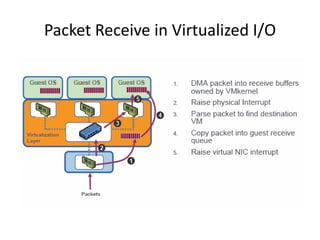
Packet Receive in Virtualized I/O
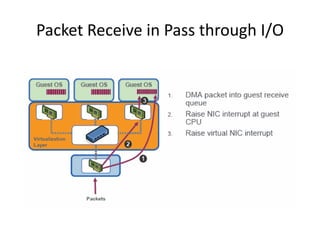
Packet Receive in Pass through I/O
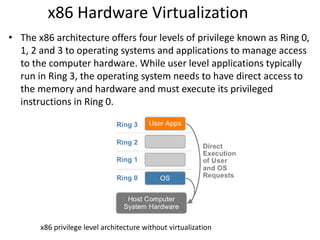
x86 Hardware Virtualization
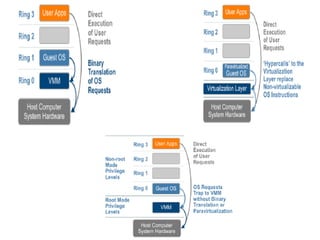
• The x86 architecture offers four levels of privilege known as Ring 0,
1, 2 and 3 to operating systems and applications to manage access
to the computer hardware. While user level applications typically
run in Ring 3, the operating system needs to have direct access to
the memory and hardware and must execute its privileged
instructions in Ring 0.
x86 privilege level architecture without virtualization
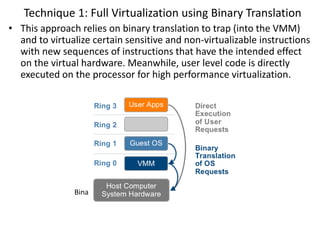
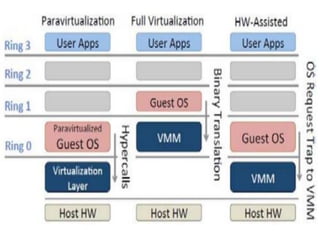
Technique 1: Full Virtualization using Binary Translation
• This approach relies on binary translation to trap (into the VMM)
and to virtualize certain sensitive and non-virtualizable instructions
with new sequences of instructions that have the intended effect
on the virtual hardware. Meanwhile, user level code is directly
executed on the processor for high performance virtualization.
Binary translation approach to x86 virtualization
Full Virtualization using Binary Translation
• This combination of binary translation and direct execution
provides Full Virtualization as the guest OS is completely decoupled
from the underlying hardware by the virtualization layer.
• The guest OS is not aware it is being virtualized and requires no
modification.
• The hypervisor translates all operating system instructions at run-
time on the fly and caches the results for future use, while user level
instructions run unmodified at native speed.
• VMware’s virtualization products such as VMWare ESXi and
Microsoft Virtual Server are examples of full virtualization.
Full Virtualization using Binary Translation
• The performance of full virtualization may not be ideal because it
involves binary translation at run-time which is time consuming and can
incur a large performance overhead.
• The full virtualization of I/O – intensive applications can be a challenge.
• Binary translation employs a code cache to store translated hot
instructions to improve performance, but it increases the cost of memory
usage.
• The performance of full virtualization on the x86 architecture is typically
80% to 97% that of the host machine.
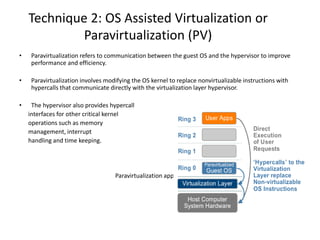
Technique 2: OS Assisted Virtualization or
Paravirtualization (PV)
• Paravirtualization refers to communication between the guest OS and the hypervisor to improve
performance and efficiency.
• Paravirtualization involves modifying the OS kernel to replace nonvirtualizable instructions with
hypercalls that communicate directly with the virtualization layer hypervisor.
• The hypervisor also provides hypercall
interfaces for other critical kernel
operations such as memory
management, interrupt
handling and time keeping.
Paravirtualization approach to x86 Virtualization
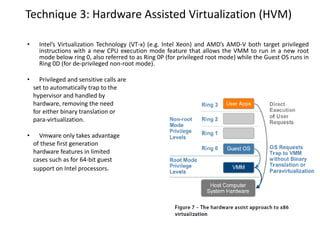
Technique 3: Hardware Assisted Virtualization (HVM)
• Intel’s Virtualization Technology (VT-x) (e.g. Intel Xeon) and AMD’s AMD-V both target privileged
instructions with a new CPU execution mode feature that allows the VMM to run in a new root
mode below ring 0, also referred to as Ring 0P (for privileged root mode) while the Guest OS runs in
Ring 0D (for de-privileged non-root mode).
• Privileged and sensitive calls are
set to automatically trap to the
hypervisor and handled by
hardware, removing the need
for either binary translation or
para-virtualization.
• Vmware only takes advantage
of these first generation
hardware features in limited
cases such as for 64-bit guest
support on Intel processors.
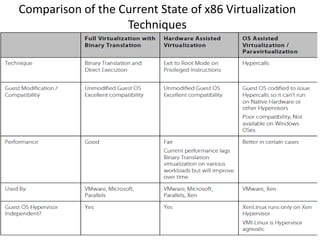
Comparison of the Current State of x86 Virtualization
Techniques
Full Virtualization vs. Paravirtualization
• Paravirtualization is different from full virtualization, where the unmodified OS
does not know it is virtualized and sensitive OS calls are trapped using binary
translation at run time. In paravirtualization, these instructions are handled at
compile time when the non-virtualizable OS instructions are replaced with
hypercalls.
• The advantage of paravirtualization is lower virtualization overhead, but the
performance advantage of paravirtualization over full virtualization can vary
greatly depending on the workload. Most user space workloads gain very little,
and near native performance is not achieved for all workloads.
• As paravirtualization cannot support unmodified operating systems (e.g. Windows
2000/XP), its compatibility and portability is poor.
Different Types of Hypervisors
Hyper - V
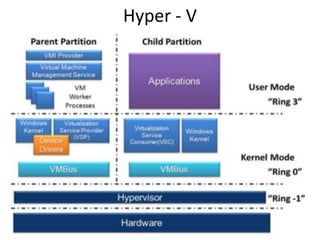
• Hyper-V
• Requires a processor with hardware-assisted virtualization
functionality,
• enabling a much more compact virtualization codebase and
• associated performance improvements
– Parent partition
• A hypervisor instance has to have at least one parent partition
• running a supported version of Windows Server host operating
system which provides management features and the drivers for
the hardware
• Virtualization Service Provider (VSP), which connects to the
VMBus and handles device access requests from child partitions
• creates the child partitions which host the guest Oss
– Hyper-V can host two categories of operating systems in the child
partitions: Enlightened (paravirtual) and Non-Enlightened
– Child Partitions
• do not have direct access to hardware resources
– enlightened partition has a virtual view of the resources. Any request to
the virtual devices is given to Virtualization Service Client (VSC), which
redirect the request to VSPs via the VMBus - a logical channel which
enables inter-partition communication - to the devices in the parent
partition managing the requests
VMWare ESXi
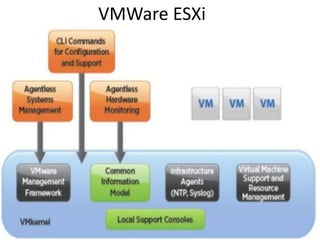
• VMWare ESXi
– VMware vSphere is a software suite that has many software
components such as vCenter, ESXi, and vSphere client
– VMware ESXi
• Type 1 (bare-metal) hypervisor
• All the virtual machines or Guest OS are installed on ESXi server
• vSphere client or vCenter
– Used to install, manage and access those virtual servers which sit above of
ESXi server
– VMware ESX
• Linux-derived Service Console
• Used to provide an interactive environment through which users
could interact with the hypervisor
• included services found in traditional operating systems, such as a
firewall, Simple Network Management Protocol (SNMP) agents, and a
web server
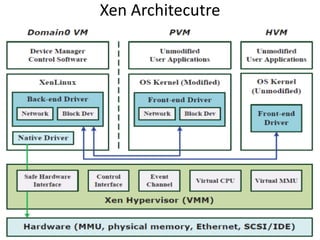
Xen Architecutre
• Xen
– Xen Virtualization involves
• Xen Hypervisor,
• Domain 0 Guest (referred as Dom0),
• Domain U Guest (referred as DomU)
– which can be either Para-virtualized (PV) or Fully-Virtualized
(FV)/Hardware-Assisted (HWAssisted) Guest
– Xen hypervisor
• is a software layer that runs directly on the hardware below
any operating systems.
• Responsible for CPU scheduling and memory partitioning of
the various VMs running on the hardware device
• lightweight because it can delegate management of guest
domains (DomU) to the privileged domain (Dom0)
• When Xen starts up, the Xen hypervisor takes first control of
the system, and then loads the first guest OS, which is Dom0
• Dom0
– a modified Linux kernel, is a unique virtual machine running on
the Xen hypervisor that has special rights to access physical I/O
resources as well as interact with the other virtual machines
(DomU guests)
• DomU
– guests have no direct access to physical hardware on the
machine as a Dom0 guest does and is often referred to as
unprivileged
• DomU Para Virtualization guests are modified operating systems such as
Linux, Solaris, FreeBSD, and other UNIX operating systems.
• DomU Full Virtualization guests run standard Windows or any other
unchanged operating system
• Xen Credit CPU scheduler
– CREDIT scheduler, each VM is assigned a parameter called the
weight; the CPU resources (or credit) are distributed to the
virtual CPUs (vCPUs) of the VMs in proportion to their weight
fairly. VCPUs are scheduled in a round-robin fashion
• By default run for 30ms
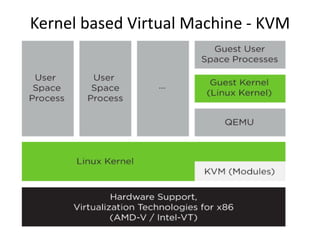
Kernel based Virtual Machine - KVM
• This full virtualization solution consists of two
main components:
– A set of kernel modules (kvm.ko, kvm-intel.ko,
and kvm-amd.ko) that provides the core
virtualization infrastructure and processor-specific
drivers.
– A user space program (qemu-system-ARCH) that
provides emulation for virtual devices and control
mechanisms to manage VM Guests (virtual
machines).
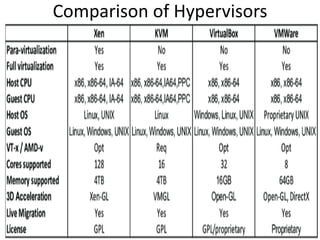
Comparison of Hypervisors
• Virtualization and cloud computing
– Plays an important role in cloud computing.
– Primarily used to offer configurable computing
environments and storage.
– H/w virtualization enabling solution in IaaS
– Programming language virtualization in PaaS.
– Virtualization provides :-
• Consolidating
• Isolation
• Controlled environments

Hypervisors

  • 1.
  • 2.
    Agenda • Describing ahypervisor • Understanding the role of a hypervisor • Comparing today’s hypervisors
  • 3.
    • Describing aHypervisor – The hypervisor is a layer of software that resides below the virtual machines and above the hardware which provides an environment for programs that are identical to original machine with minor decreases in execution speed together with complete control over resource allocation. – The hypervisor manages the interactions between each virtual machine and the hardware that the guests all share. • Initially, virtual machine monitors were used for the development and debugging of operating systems because they provided a sandbox for programmers to test rapidly and repeatedly, without using all of the resources of the hardware. • Added the ability to run multiple environments concurrently, carving the hardware resources into virtual servers that could each run its own operating system.
  • 4.
    What are thedesign conditions that the hypervisor should satisfy?
  • 5.
    “Classic” VM (Popek& Goldberg, 1974) (1/4) • Essentials of a Virtual Machine Monitor (VMM) • An efficient, isolated duplicate of the real machine. – Equivalence • Software on the VMM executes identically to its execution on hardware, barring timing effects. • i.e. Running on VMM == Running directly on HW – Performance • Non –Privileged instructions can be executed directly by the real processor, with no software intervention by the VMM. • i.e. Performance on VMM == Performance on HW – Resource control • The VMM must have complete control of the virtualized resources
  • 6.
    “Classic” VM (Popek& Goldberg, 1974) (2/4) • Instruction types – Privileged instructions: generate trap when executed in any but the most-privileged level • Execute in privileged mode, trap in user mode • E.g. x86 LIDT : load interrupt descriptor table address – Privileged state: determines resource allocation • Privilege mode, addressing context, exception vectors, … – Sensitive instructions: instructions whose behavior depends on the current privilege level • Control sensitive: change privileged state • Behavior sensitive: exposes privileged state • E.g. x86 POPF : pop stack to EFLAGS (in user-mode, the ‘interrupt enable’ bit is not over-written)
  • 7.
    “Classic” VM (Popek& Goldberg, 1974) (3/4)
  • 8.
    “Classic” VM (Popek& Goldberg, 1974) (4/4) • Resource control : To build a VMM, it is sufficient for all instructions that affect the correct functioning of the VMM (SI’s) always trap and pass control to the VMM. • Performance: Non-privileged instructions are executed without VMM intervention • Equivalence: We are not changing the original code, so the output will be the same.
  • 9.
    Virtualization Theorem • Subsettheorem : – For any conventional third-generation computer, a VMM may be constructed if the set of sensitive instructions for that computer is a subset of the set of privileged instructions. • Recursive Emulation : – A conventional third-generation computer is recursively virtualizable if • It is virtualizable • VMM without any timing dependencies can be constructed for it. • Under this theorem, x86 architecture cannot be virtualized directly. Other techniques are needed.
  • 10.
    Components of aVirtual Machine Monitor
  • 11.
    • Dispatcher – Invokedby the interrupt handler when the hardware traps • Any instructions in a guest OS that attempt to change resource assignments or whose behavior is affected by the assignment of resources will trap to the VMM dispatcher. – Top-level control module of the VMM, which decides the next module to be invoked • Allocator – Invoked by the dispatcher whenever there is a need to change machine resources associated with some virtual machine – Trapping instructions that attempt to change resource assignments are then directed by the dispatcher to the allocator. • How to allocate memory resources in a non-conflicting manner. • Interpreter – Contains several Interpreter routines • one per privileged instruction, • emulate the effects of the instructions when operating on virtual resources. After an interpreter routine finishes, control is passed back to the guest
  • 12.
  • 13.
    Resource Virtualization Techniques •Resources for virtualization – Processors • CPU Virtualization – Software Techniques » Trap and Emulate » Para Virtualization – Hardware Techniques » Hardware Assisted Virtualization – Memory • Software Techniques – Shadow Page Tables • Hardware Techniques – Extended Page Table – Storage • Software Techniques – Software RAID – Storage Area Network – Logical Volume Manager • Hardware Techniques – Hardware RAID – I/O • Software Techniques – I/O Emulation • Hardware Techniques – Intel VT-d
  • 14.
  • 15.
    • Three emulationimplementations : – Interpretation • Emulator interprets only one instruction at a time. – Static Binary Translation • Emulator translates a block of guest binary at a time and further optimizes for repeated instruction executions. – Dynamic Binary Translation • This is a hybrid approach of emulator, which mix two approaches above.
  • 16.
    • Approach #1:Hosted Interpretation – Run the VMM as regular user application atop of host OS • VMM maintains a software-level representation of physical hardware • Interpreter execution flow : –Fetch one guest instruction from guest memory image. –Decode and dispatch to corresponding emulation unit. –Execute the functionality of that instruction and modify some related system states, such as simulated register values. –Increase the guest PC (Program Counter register) and then repeat this process again.
  • 17.
    (a) Native execution(b) decode-and-dispatch interpretation (c) threaded interpretation Interpretation
  • 18.
  • 19.
    Static Binary Translation •Using the concept of basic block which comes from compiler optimization technique. – A basic block is a portion of the code within a program with certain desirable properties that make it highly amenable to analysis. – A basic block has only one entry point, meaning no code within it is the destination of a jump instruction anywhere in the program. – A basic block has only one exit point, meaning only the last instruction can cause the program to begin executing code in a different basic block.
  • 20.
    • Static binarytranslation flow : 1. Fetch one block of guest instructions from guest memory image. 2. Decode and dispatch each instruction to the corresponding translation unit. 3. Translate guest instruction to host instructions. 4. Write the translated host instructions to code cache. 5. Execute the translated host instruction block in code cache.
  • 21.
  • 22.
  • 23.
    Comparison • Interpretation implementation •Static binary translation implementation
  • 24.
    Dynamic Binary Translation GuestBinary Emulation Manager Binary Translator Interpreter Host Binary Code Cachehit exit missreturn trigger 1. First time execution, no translated code in code cache. 2. Miss code cache matching, then directly interpret the guest instruction. 3. As a code block discovered, trigger the binary translation module. 4. Translate guest code block to host binary, and place it in the code cache. 5. Next time execution, run the translated code clock in the code cache.
  • 25.
    CPU Architecture • Whatis trap ? – When CPU is running in user mode, some internal or external events, which need to be handled in kernel mode, take place. – Then CPU will jump to hardware exception handler vector, and execute system operations in kernel mode. • Trap types : – System Call • Invoked by application in user mode. • For example, application ask OS for system IO. – Hardware Interrupts • Invoked by some hardware events in any mode. • For example, hardware clock timer trigger event. – Exception • Invoked when unexpected error or system malfunction occur. • For example, execute privilege instructions in user mode.
  • 26.
    Approach #2: DirectExecution with Trap and Emulation • This approach requires that a processor be “virtualizable” – Privileged instructions cause a trap when executed in Rings 1—3 – Sensitive instructions access low-level machine state that should be managed by an OS or VMM • Ex: Instructions that modify segment/page table registers • Ex: IO instructions – Virtualizable processor: all sensitive instructions are privileged • If a processor is virtualizable, a VMM can interpose on any sensitive instruction that the VM tries to execute • VMM can control how the VM interacts with the “outside world” (i.e., physical hardware) • VMM can fool the guest OS into thinking that guest OS runs at the highest privilege level (e.g., if guest OS invokes sensitive instruction to check the current privilege level)
  • 27.
    Trap and EmulateModel • VMM virtualization paradigm (trap and emulate) : 1. Let normal instructions of guest OS run directly on processor in user mode. 2. When executing privileged instructions, hardware will make processor trap into the VMM. 3. The VMM emulates the effect of the privileged instructions for the guest OS and return to guest.
  • 28.
    Trap and EmulateModel • Traditional OS : – When application invoke a system call : • CPU will trap to interrupt handler vector in OS. • CPU will switch to kernel mode (Ring 0) and execute OS instructions. – When hardware event : • Hardware will interrupt CPU execution, and jump to interrupt handler in OS.
  • 29.
    Trap and EmulateModel • VMM and Guest OS : – System Call • CPU will trap to interrupt handler vector of VMM. • VMM jump back into guest OS. – Hardware Interrupt • Hardware make CPU trap to interrupt handler of VMM. • VMM jump to corresponding interrupt handler of guest OS. – Privilege Instruction • Running privilege instructions in guest OS will be trapped to VMM for instruction emulation. • After emulation, VMM jump back to guest OS.
  • 30.
    Context Switch • Stepsof VMM switch different virtual machines : 1. Timer Interrupt in running VM. 2. Context switch to VMM. 3. VMM saves state of running VM. 4. VMM determines next VM to execute. 5. VMM sets timer interrupt. 6. VMM restores state of next VM. 7. VMM sets PC to timer interrupt handler of next VM. 8. Next VM active.
  • 31.
    System State Management •Virtualizing system state : – VMM will hold the system states of all virtual machines in memory. – When VMM context switch from one virtual machine to another • Write the register values back to memory • Copy the register values of next guest OS to CPU registers.
  • 32.
    32 Paravirtualization! • Does notrun unmodified guest OSes • Requires guest OS to “know” it is running on top of a hypervisor • E.g., instead of doing cli to turn off interrupts, guest OS should do hypercall(DISABLE_INTERRUPTS)
  • 33.
    33 Continued … • Pros: –No hardware support required – Performance – better than emulation • Con: – Requires specifically modified guest – Same guest OS cannot run in the VM and bare-metal • Example hypervisor: Xen
  • 34.
    Hardware Technique -VTx • Two new VT-x operating modes – Less-privileged mode (VMX non-root) for guest OSes – More-privileged mode (VMX root) for VMM • Two new transitions – VM entry to non-root operation – VM exit to root operation Ring 3 Ring 0 VMX Root Virtual Machines (VMs) Apps OS VM Monitor (VMM) Apps OS VM Exit VM Entry Execution controls determine when exits occur Access to privilege state, occurrence of exceptions, etc. Flexibility provided to minimize unwanted exits VM Control Structure (VMCS) controls VT-x operation Also holds guest and host state
  • 35.
  • 36.
    Intel VT-x • Inorder to straighten those problems out, Intel introduces one more operation mode of x86 architecture. – VMX Root Operation (Root Mode) • All instruction behaviors in this mode are no different to traditional ones. • All legacy software can run in this mode correctly. • VMM should run in this mode and control all system resources. – VMX Non-Root Operation (Non-Root Mode) • All sensitive instruction behaviors in this mode are redefined. • The sensitive instructions will trap to Root Mode. • Guest OS should run in this mode and be fully virtualized through typical “trap and emulation model”.
  • 37.
    Intel VT-x • VMMwith VT-x : – System Call • CPU will directly trap to interrupt handler vector of guest OS. – Hardware Interrupt • Still, hardware events need to be handled by VMM first. – Sensitive Instruction • Instead of trap all privilege instructions, running guest OS in Non-root mode will trap sensitive instruction only.
  • 38.
    Pre & PostIntel VT-x • VMM de-privileges the guest OS into Ring 1, and takes up Ring 0 • OS un-aware it is not running in traditional ring 0 privilege • Requires compute intensive SW translation to mitigate • VMM has its own privileged level where it executes • No need to de-privilege the guest OS • OSes run directly on the hardware
  • 39.
    Context Switch • VMMswitch different virtual machines with Intel VT-x : – VMXON/VMXOFF • These two instructions are used to turn on/off CPU Root Mode. – VM Entry • This is usually caused by the execution of VMLAUNCH/VMRESUME instructions, which will switch CPU mode from Root Mode to Non- Root Mode. – VM Exit • This may be caused by many reasons, such as hardware interrupts or sensitive instruction executions. • Switch CPU mode from Non-Root Mode to Root Mode.
  • 40.
    System State Management •Intel introduces a more efficient hardware approach for register switching, VMCS (Virtual Machine Control Structure) : – State Area • Store host OS system state when VM-Entry. • Store guest OS system state when VM-Exit. – Control Area • Control instruction behaviors in Non-Root Mode. • Control VM-Entry and VM-Exit process. – Exit Information • Provide the VM-Exit reason and some hardware information. • Whenever VM Entry or VM Exit occur, CPU will automatically read or write corresponding information into VMCS.
  • 41.
    System State Management •Binding virtual machine to virtual CPU – VCPU (Virtual CPU) contains two parts • VMCS maintains virtual system states, which is approached by hardware. • Non-VMCS maintains other non-essential system information, which is approach by software. – VMM needs to handle Non-VMCS part.
  • 43.
  • 44.
  • 45.
  • 47.
  • 48.
    Hardware Solution • Difficultiesof shadow page table technique : – Shadow page table implementation is extremely complex. – Page fault mechanism and synchronization issues are critical. – Host memory space overhead is considerable. • But why we need this technique to virtualize MMU ? – MMU do not first implemented for virtualization. – MMU is knowing nothing about two level page address translation. • Now, let us consider hardware solution.
  • 49.
    Extended Page Table •Concept of Extended Page Table (EPT) : – Instead of walking along with only one page table hierarchy, EPT technique implement one more page table hierarchy. • One page table is maintained by guest OS, which is used to generate guest physical address. • The other page table is maintained by VMM, which is used to map guest physical address to host physical address. – For each memory access operation, EPT MMU will directly get guest physical address from guest page table, and then get host physical address by the VMM mapping table automatically.
  • 50.
  • 51.
    Continued … • ExtendedPage Table • A new page-table structure, under the control of the VMM – Defines mapping between guest- and host-physical addresses – EPT base pointer (new VMCS field) points to the EPT page tables – EPT (optionally) activated on VM entry, deactivated on VM exit • Guest has full control over its own IA-32 page tables – No VM exits due to guest page faults, INVLPG, or CR3 changes Guest IA-32 Page Tables Guest Linear Address Guest Physical Address Extended Page Tables Host Physical Address EPT Base Pointer (EPTP)CR3
  • 52.
    Guest Linear Address EPT Tables CR3 EPT Tables + EPTTables + Page Table Page Directory Host Physical Address Guest Physical Page Base Address + Guest Physical Address Continued … • All guest-physical memory addresses go through EPT tables – (CR3, PDE, PTE, etc.) • Above example is for 2-level table for 32-bit address space – Translation possible for other page-table formats (e.g., PAE)
  • 53.
  • 54.
    Hardware Solution • Difficultiesof shadow page table technique : – Shadow page table implementation is extremely complex. – Page fault mechanism and synchronization issues are critical. – Host memory space overhead is considerable. • But why we need this technique to virtualize MMU ? – MMU do not first implemented for virtualization. – MMU is knowing nothing about two level page address translation. • Now, let us consider hardware solution.
  • 55.
    Extended Page Table •Concept of Extended Page Table (EPT) : – Instead of walking along with only one page table hierarchy, EPT technique implement one more page table hierarchy. • One page table is maintained by guest OS, which is used to generate guest physical address. • The other page table is maintained by VMM, which is used to map guest physical address to host physical address. – For each memory access operation, EPT MMU will directly get guest physical address from guest page table, and then get host physical address by the VMM mapping table automatically.
  • 56.
  • 57.
  • 58.
  • 60.
  • 61.
    Continued … Pro: HigherPerformance Pro: I/O Device Sharing Pro: VM Migration Con: Larger Hypervisor Hypervisor Shared Devices I/O Services Device Drivers VM0 Guest OS and Apps VMn Guest OS and Apps Monolithic Model Pro: Highest Performance Pro: Smaller Hypervisor Pro: Device assisted sharing Con: Migration Challenges Assigned Devices Hypervisor VM0 Guest OS and Apps Device Drivers VMn Guest OS and Apps Device Drivers Pass-through Model VT-d Goal: Support all Models Pro: High Security Pro: I/O Device Sharing Pro: VM Migration Con: Lower Performance Shared Devices I/O Services Hypervisor Device Drivers Service VMs VMn VM0 Guest OS and Apps Guest VMs Service VM Model
  • 66.
    Packet Receive inVirtualized I/O
  • 67.
    Packet Receive inPass through I/O
  • 68.
    x86 Hardware Virtualization •The x86 architecture offers four levels of privilege known as Ring 0, 1, 2 and 3 to operating systems and applications to manage access to the computer hardware. While user level applications typically run in Ring 3, the operating system needs to have direct access to the memory and hardware and must execute its privileged instructions in Ring 0. x86 privilege level architecture without virtualization
  • 69.
    Technique 1: FullVirtualization using Binary Translation • This approach relies on binary translation to trap (into the VMM) and to virtualize certain sensitive and non-virtualizable instructions with new sequences of instructions that have the intended effect on the virtual hardware. Meanwhile, user level code is directly executed on the processor for high performance virtualization. Binary translation approach to x86 virtualization
  • 70.
    Full Virtualization usingBinary Translation • This combination of binary translation and direct execution provides Full Virtualization as the guest OS is completely decoupled from the underlying hardware by the virtualization layer. • The guest OS is not aware it is being virtualized and requires no modification. • The hypervisor translates all operating system instructions at run- time on the fly and caches the results for future use, while user level instructions run unmodified at native speed. • VMware’s virtualization products such as VMWare ESXi and Microsoft Virtual Server are examples of full virtualization.
  • 71.
    Full Virtualization usingBinary Translation • The performance of full virtualization may not be ideal because it involves binary translation at run-time which is time consuming and can incur a large performance overhead. • The full virtualization of I/O – intensive applications can be a challenge. • Binary translation employs a code cache to store translated hot instructions to improve performance, but it increases the cost of memory usage. • The performance of full virtualization on the x86 architecture is typically 80% to 97% that of the host machine.
  • 72.
    Technique 2: OSAssisted Virtualization or Paravirtualization (PV) • Paravirtualization refers to communication between the guest OS and the hypervisor to improve performance and efficiency. • Paravirtualization involves modifying the OS kernel to replace nonvirtualizable instructions with hypercalls that communicate directly with the virtualization layer hypervisor. • The hypervisor also provides hypercall interfaces for other critical kernel operations such as memory management, interrupt handling and time keeping. Paravirtualization approach to x86 Virtualization
  • 73.
    Technique 3: HardwareAssisted Virtualization (HVM) • Intel’s Virtualization Technology (VT-x) (e.g. Intel Xeon) and AMD’s AMD-V both target privileged instructions with a new CPU execution mode feature that allows the VMM to run in a new root mode below ring 0, also referred to as Ring 0P (for privileged root mode) while the Guest OS runs in Ring 0D (for de-privileged non-root mode). • Privileged and sensitive calls are set to automatically trap to the hypervisor and handled by hardware, removing the need for either binary translation or para-virtualization. • Vmware only takes advantage of these first generation hardware features in limited cases such as for 64-bit guest support on Intel processors.
  • 75.
    Comparison of theCurrent State of x86 Virtualization Techniques
  • 76.
    Full Virtualization vs.Paravirtualization • Paravirtualization is different from full virtualization, where the unmodified OS does not know it is virtualized and sensitive OS calls are trapped using binary translation at run time. In paravirtualization, these instructions are handled at compile time when the non-virtualizable OS instructions are replaced with hypercalls. • The advantage of paravirtualization is lower virtualization overhead, but the performance advantage of paravirtualization over full virtualization can vary greatly depending on the workload. Most user space workloads gain very little, and near native performance is not achieved for all workloads. • As paravirtualization cannot support unmodified operating systems (e.g. Windows 2000/XP), its compatibility and portability is poor.
  • 77.
    Different Types ofHypervisors
  • 78.
  • 79.
    • Hyper-V • Requiresa processor with hardware-assisted virtualization functionality, • enabling a much more compact virtualization codebase and • associated performance improvements – Parent partition • A hypervisor instance has to have at least one parent partition • running a supported version of Windows Server host operating system which provides management features and the drivers for the hardware • Virtualization Service Provider (VSP), which connects to the VMBus and handles device access requests from child partitions • creates the child partitions which host the guest Oss – Hyper-V can host two categories of operating systems in the child partitions: Enlightened (paravirtual) and Non-Enlightened – Child Partitions • do not have direct access to hardware resources – enlightened partition has a virtual view of the resources. Any request to the virtual devices is given to Virtualization Service Client (VSC), which redirect the request to VSPs via the VMBus - a logical channel which enables inter-partition communication - to the devices in the parent partition managing the requests
  • 80.
  • 81.
    • VMWare ESXi –VMware vSphere is a software suite that has many software components such as vCenter, ESXi, and vSphere client – VMware ESXi • Type 1 (bare-metal) hypervisor • All the virtual machines or Guest OS are installed on ESXi server • vSphere client or vCenter – Used to install, manage and access those virtual servers which sit above of ESXi server – VMware ESX • Linux-derived Service Console • Used to provide an interactive environment through which users could interact with the hypervisor • included services found in traditional operating systems, such as a firewall, Simple Network Management Protocol (SNMP) agents, and a web server
  • 82.
  • 83.
    • Xen – XenVirtualization involves • Xen Hypervisor, • Domain 0 Guest (referred as Dom0), • Domain U Guest (referred as DomU) – which can be either Para-virtualized (PV) or Fully-Virtualized (FV)/Hardware-Assisted (HWAssisted) Guest – Xen hypervisor • is a software layer that runs directly on the hardware below any operating systems. • Responsible for CPU scheduling and memory partitioning of the various VMs running on the hardware device • lightweight because it can delegate management of guest domains (DomU) to the privileged domain (Dom0) • When Xen starts up, the Xen hypervisor takes first control of the system, and then loads the first guest OS, which is Dom0
  • 84.
    • Dom0 – amodified Linux kernel, is a unique virtual machine running on the Xen hypervisor that has special rights to access physical I/O resources as well as interact with the other virtual machines (DomU guests) • DomU – guests have no direct access to physical hardware on the machine as a Dom0 guest does and is often referred to as unprivileged • DomU Para Virtualization guests are modified operating systems such as Linux, Solaris, FreeBSD, and other UNIX operating systems. • DomU Full Virtualization guests run standard Windows or any other unchanged operating system • Xen Credit CPU scheduler – CREDIT scheduler, each VM is assigned a parameter called the weight; the CPU resources (or credit) are distributed to the virtual CPUs (vCPUs) of the VMs in proportion to their weight fairly. VCPUs are scheduled in a round-robin fashion • By default run for 30ms
  • 85.
    Kernel based VirtualMachine - KVM
  • 86.
    • This fullvirtualization solution consists of two main components: – A set of kernel modules (kvm.ko, kvm-intel.ko, and kvm-amd.ko) that provides the core virtualization infrastructure and processor-specific drivers. – A user space program (qemu-system-ARCH) that provides emulation for virtual devices and control mechanisms to manage VM Guests (virtual machines).
  • 87.
  • 88.
    • Virtualization andcloud computing – Plays an important role in cloud computing. – Primarily used to offer configurable computing environments and storage. – H/w virtualization enabling solution in IaaS – Programming language virtualization in PaaS. – Virtualization provides :- • Consolidating • Isolation • Controlled environments