OpenStack VDI and DaaS
with Leostream and the
Teradici Pervasive Computing Platform
Dana Tee
Leostream
Marketing
Karen Gondoly
Leostream
COO
Srikanth Gopalaswami
Teradici
Senior Product Manager
Q. Are you recording
this?
A. Yes, we’ll email it to you.
Use the
panel to ask
questions.
We’ll send
out a
recording
tomorrow.
Introduction to Leostream
OpenStack VDI/DaaS – At a Glance
Picking the Ultimate Virtual Workspace Solution
Architecting your Complete Solution
Demonstration
Q&A
Agenda
About
Leostream
Premier Connection Broker
management platform for
hosted desktops for over
10 years.
Large organizations with complicated
use cases require additional
management capability and control
settings provided by Leostream.
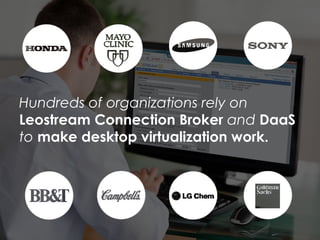
Hundreds of organizations rely on
Leostream Connection Broker and DaaS
to make desktop virtualization work.
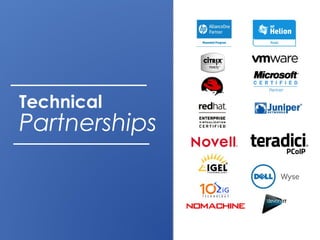
Technical
Partnerships
Leostream
Teradici
Seamless, highly scalable solution for
virtual desktop users who require
enhanced remote graphics capabilities.
What’s
OpenStack?
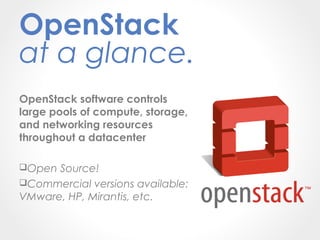
OpenStack software controls
large pools of compute, storage,
and networking resources
throughout a datacenter
Open Source!
Commercial versions available:
VMware, HP, Mirantis, etc.
OpenStack
at a glance.
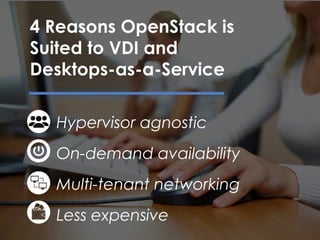
Hypervisor agnostic
On-demand availability
Multi-tenant networking
Less expensive
4 Reasons OpenStack is
Suited to VDI and
Desktops-as-a-Service
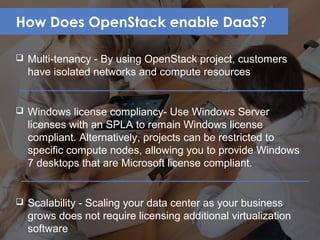
How Does OpenStack enable DaaS?
 Multi-tenancy - By using OpenStack project, customers
have isolated networks and compute resources
 Windows license compliancy- Use Windows Server
licenses with an SPLA to remain Windows license
compliant. Alternatively, projects can be restricted to
specific compute nodes, allowing you to provide Windows
7 desktops that are Microsoft license compliant.
 Scalability - Scaling your data center as your business
grows does not require licensing additional virtualization
software
Check the
handouts section for
the blueprint
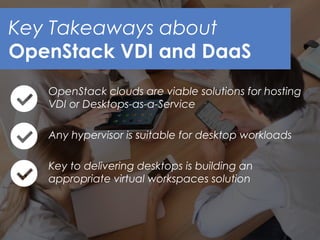
OpenStack clouds are viable solutions for hosting
VDI or Desktops-as-a-Service
Any hypervisor is suitable for desktop workloads
Key to delivering desktops is building an
appropriate virtual workspaces solution
Key Takeaways about
OpenStack VDI and DaaS
Key to delivering desktops
is choosing the right virtual
workspaces solution
including the connection
broker
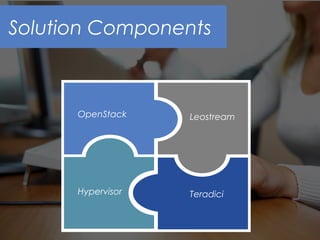
Solution Components
OpenStack
Hypervisor
Leostream
Teradici
Picking the Right
Workspaces
Solution
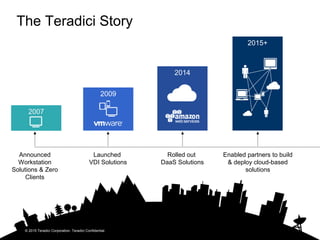
The Teradici Story
Announced
Workstation
Solutions & Zero
Clients
2014
2009
2015+
Launched
VDI Solutions
Rolled out
DaaS Solutions
© 2015 Teradici Corporation. Teradici Confidential.
Enabled partners to build
& deploy cloud-based
solutions
20
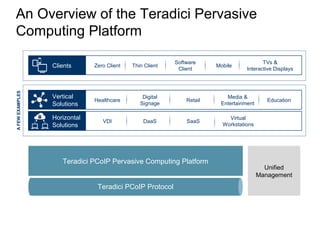
An Overview of the Teradici Pervasive
Computing Platform
Teradici PCoIP Pervasive Computing Platform
Unified
Management
Teradici PCoIP Protocol
AFEWEXAMPLES
Clients Zero Client Thin Client
Software
Client
Mobile
TVs &
Interactive Displays
Vertical
Solutions
Horizontal
Solutions
Healthcare
VDI DaaS
Digital
Signage
Virtual
Workstations
EducationRetail
Media &
Entertainment
SaaS
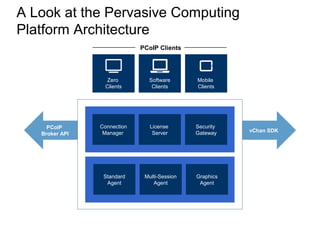
A Look at the Pervasive Computing
Platform Architecture
Security
Gateway
Connection
Manager
License
Server
Mobile
Clients
Zero
Clients
Software
Clients
PCoIP Clients
PCoIP
Broker API
vChan SDK
Graphics
Agent
Standard
Agent
Multi-Session
Agent
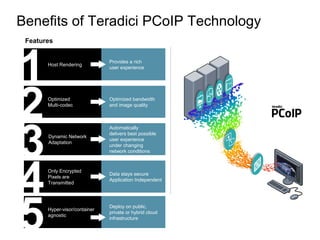
Benefits of Teradici PCoIP Technology
22
Provides a rich
user experience
Host Rendering
1 Optimized bandwidth
and image quality
Optimized
Multi-codec
2 Automatically
delivers best possible
user experience
under changing
network conditions
Dynamic Network
Adaptation
3 Data stays secure
Application Independent
Only Encrypted
Pixels are
Transmitted
4
Features Benefits
Deploy on public,
private or hybrid cloud
infrastructure
Hyper-visor/container
agnostic
5
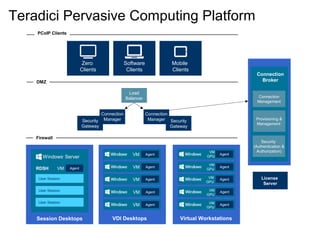
Teradici Pervasive Computing Platform
License
Server
Load
Balancer
Security
Gateway
Security
Gateway
Connection
Manager
Connection
Manager
Firewall
User Session
RDSH
User Session
User Session
Session Desktops
AgentVM
VDI Desktops
AgentVM
Windows®
Server
AgentVM
AgentVM
AgentVM
AgentVM
Virtual Workstations
Agent
VM
GPU
Agent
VM
GPU
AgentVM
GPU
AgentVM
GPU
AgentVM
GPU
Mobile
Clients
Zero
Clients
Software
Clients
DMZ
PCoIP Clients
Connection
Management
Provisioning &
Management
Security
(Authentication &
Authorization)
Connection
Broker
24
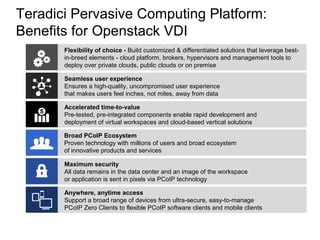
Teradici Pervasive Computing Platform:
Benefits for Openstack VDI
Flexibility of choice - Build customized & differentiated solutions that leverage best-
in-breed elements - cloud platform, brokers, hypervisors and management tools to
deploy over private clouds, public clouds or on premise
Seamless user experience
Ensures a high-quality, uncompromised user experience
that makes users feel inches, not miles, away from data
Accelerated time-to-value
Pre-tested, pre-integrated components enable rapid development and
deployment of virtual workspaces and cloud-based vertical solutions
Broad PCoIP Ecosystem
Proven technology with millions of users and broad ecosystem
of innovative products and services
Maximum security
All data remains in the data center and an image of the workspace
or application is sent in pixels via PCoIP technology
Anywhere, anytime access
Support a broad range of devices from ultra-secure, easy-to-manage
PCoIP Zero Clients to flexible PCoIP software clients and mobile clients
Leveraging a
Connection Broker
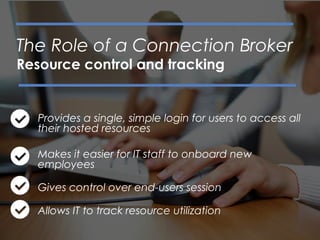
Provides a single, simple login for users to access all
their hosted resources
Makes it easier for IT staff to onboard new
employees
Gives control over end-users session
Allows IT to track resource utilization
The Role of a Connection Broker
Resource control and tracking
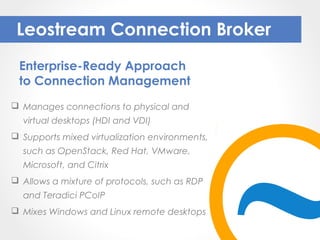
 Manages connections to physical and
virtual desktops (HDI and VDI)
 Supports mixed virtualization environments,
such as OpenStack, Red Hat, VMware,
Microsoft, and Citrix
 Allows a mixture of protocols, such as RDP
and Teradici PCoIP
 Mixes Windows and Linux remote desktops
Leostream Connection Broker
Enterprise-Ready Approach
to Connection Management
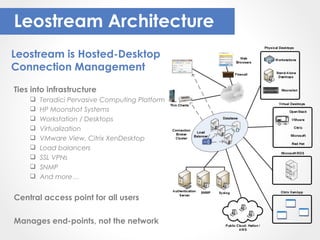
Leostream Architecture
Ties into infrastructure
 Teradici Pervasive Computing Platform
 HP Moonshot Systems
 Workstation / Desktops
 Virtualization
 VMware View, Citrix XenDesktop
 Load balancers
 SSL VPNs
 SNMP
 And more…
Central access point for all users
Manages end-points, not the network
Leostream is Hosted-Desktop
Connection Management
Architecting the Ultimate
Workspaces Solution
with Leostream and Teradici
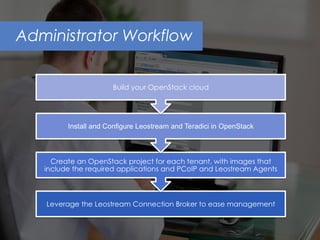
Administrator Workflow
OpenStack Instance
Leostream Agent
PCoIP Agent
PCoIP Client
Mobile
Soft Client
Zero Client
Teradici
License Server
Teradici Appliance
Leostream
Connection Broker
PCoIP Connection
Manager
PCoIP Security
Gateway
Public
network
access
Private networkOpenStack Compute API
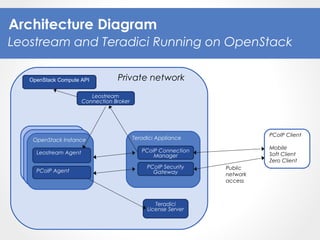
Architecture Diagram
Leostream and Teradici Running on OpenStack
What Can You Do With
Leostream/Openstack
Integration?
Leostream leverages the OpenStack APIs to:
1
Manage the inventory
of instances (desktops)
in OpenStack
2
Provision new
instances from
existing images
3
Assign public IP
addresses to new
instances
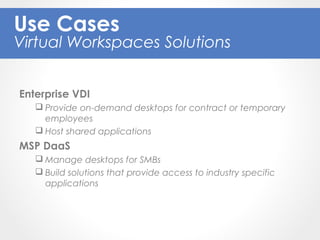
Enterprise VDI
 Provide on-demand desktops for contract or temporary
employees
 Host shared applications
MSP DaaS
 Manage desktops for SMBs
 Build solutions that provide access to industry specific
applications
Use Cases
Virtual Workspaces Solutions
Demonstration
Conclusion
With the right choice of display protocol and
connection broker, OpenStack VDI and DaaS is
suitable for any organization
Teradici Pervasive Computing Platform enables
OpenStack VDI for any user and use case
Leostream Connection Broker provides the
management features needed to enable
OpenStack VDI/DaaS
Get Started
with a Free
30 Day Trial
Free Leostream trial at:
leostream.com
Learn more about Teradici:
teradici.com/leostream
Question
Time

OpenStack VDI and DaaS with Leostream and the Teradici Pervasive Cloud Computing Platform

  • 1.
    OpenStack VDI andDaaS with Leostream and the Teradici Pervasive Computing Platform
  • 2.
    Dana Tee Leostream Marketing Karen Gondoly Leostream COO SrikanthGopalaswami Teradici Senior Product Manager
  • 3.
    Q. Are yourecording this? A. Yes, we’ll email it to you. Use the panel to ask questions. We’ll send out a recording tomorrow.
  • 4.
    Introduction to Leostream OpenStackVDI/DaaS – At a Glance Picking the Ultimate Virtual Workspace Solution Architecting your Complete Solution Demonstration Q&A Agenda
  • 5.
  • 6.
    Premier Connection Broker managementplatform for hosted desktops for over 10 years. Large organizations with complicated use cases require additional management capability and control settings provided by Leostream.
  • 7.
    Hundreds of organizationsrely on Leostream Connection Broker and DaaS to make desktop virtualization work.
  • 8.
  • 9.
    Leostream Teradici Seamless, highly scalablesolution for virtual desktop users who require enhanced remote graphics capabilities.
  • 10.
  • 11.
    OpenStack software controls largepools of compute, storage, and networking resources throughout a datacenter Open Source! Commercial versions available: VMware, HP, Mirantis, etc. OpenStack at a glance.
  • 12.
    Hypervisor agnostic On-demand availability Multi-tenantnetworking Less expensive 4 Reasons OpenStack is Suited to VDI and Desktops-as-a-Service
  • 13.
    How Does OpenStackenable DaaS?  Multi-tenancy - By using OpenStack project, customers have isolated networks and compute resources  Windows license compliancy- Use Windows Server licenses with an SPLA to remain Windows license compliant. Alternatively, projects can be restricted to specific compute nodes, allowing you to provide Windows 7 desktops that are Microsoft license compliant.  Scalability - Scaling your data center as your business grows does not require licensing additional virtualization software
  • 14.
    Check the handouts sectionfor the blueprint
  • 15.
    OpenStack clouds areviable solutions for hosting VDI or Desktops-as-a-Service Any hypervisor is suitable for desktop workloads Key to delivering desktops is building an appropriate virtual workspaces solution Key Takeaways about OpenStack VDI and DaaS
  • 16.
    Key to deliveringdesktops is choosing the right virtual workspaces solution including the connection broker
  • 17.
  • 18.
  • 19.
    The Teradici Story Announced Workstation Solutions& Zero Clients 2014 2009 2015+ Launched VDI Solutions Rolled out DaaS Solutions © 2015 Teradici Corporation. Teradici Confidential. Enabled partners to build & deploy cloud-based solutions
  • 20.
    20 An Overview ofthe Teradici Pervasive Computing Platform Teradici PCoIP Pervasive Computing Platform Unified Management Teradici PCoIP Protocol AFEWEXAMPLES Clients Zero Client Thin Client Software Client Mobile TVs & Interactive Displays Vertical Solutions Horizontal Solutions Healthcare VDI DaaS Digital Signage Virtual Workstations EducationRetail Media & Entertainment SaaS
  • 21.
    A Look atthe Pervasive Computing Platform Architecture Security Gateway Connection Manager License Server Mobile Clients Zero Clients Software Clients PCoIP Clients PCoIP Broker API vChan SDK Graphics Agent Standard Agent Multi-Session Agent
  • 22.
    Benefits of TeradiciPCoIP Technology 22 Provides a rich user experience Host Rendering 1 Optimized bandwidth and image quality Optimized Multi-codec 2 Automatically delivers best possible user experience under changing network conditions Dynamic Network Adaptation 3 Data stays secure Application Independent Only Encrypted Pixels are Transmitted 4 Features Benefits Deploy on public, private or hybrid cloud infrastructure Hyper-visor/container agnostic 5
  • 23.
    Teradici Pervasive ComputingPlatform License Server Load Balancer Security Gateway Security Gateway Connection Manager Connection Manager Firewall User Session RDSH User Session User Session Session Desktops AgentVM VDI Desktops AgentVM Windows® Server AgentVM AgentVM AgentVM AgentVM Virtual Workstations Agent VM GPU Agent VM GPU AgentVM GPU AgentVM GPU AgentVM GPU Mobile Clients Zero Clients Software Clients DMZ PCoIP Clients Connection Management Provisioning & Management Security (Authentication & Authorization) Connection Broker
  • 24.
    24 Teradici Pervasive ComputingPlatform: Benefits for Openstack VDI Flexibility of choice - Build customized & differentiated solutions that leverage best- in-breed elements - cloud platform, brokers, hypervisors and management tools to deploy over private clouds, public clouds or on premise Seamless user experience Ensures a high-quality, uncompromised user experience that makes users feel inches, not miles, away from data Accelerated time-to-value Pre-tested, pre-integrated components enable rapid development and deployment of virtual workspaces and cloud-based vertical solutions Broad PCoIP Ecosystem Proven technology with millions of users and broad ecosystem of innovative products and services Maximum security All data remains in the data center and an image of the workspace or application is sent in pixels via PCoIP technology Anywhere, anytime access Support a broad range of devices from ultra-secure, easy-to-manage PCoIP Zero Clients to flexible PCoIP software clients and mobile clients
  • 25.
  • 26.
    Provides a single,simple login for users to access all their hosted resources Makes it easier for IT staff to onboard new employees Gives control over end-users session Allows IT to track resource utilization The Role of a Connection Broker Resource control and tracking
  • 27.
     Manages connectionsto physical and virtual desktops (HDI and VDI)  Supports mixed virtualization environments, such as OpenStack, Red Hat, VMware, Microsoft, and Citrix  Allows a mixture of protocols, such as RDP and Teradici PCoIP  Mixes Windows and Linux remote desktops Leostream Connection Broker Enterprise-Ready Approach to Connection Management
  • 28.
    Leostream Architecture Ties intoinfrastructure  Teradici Pervasive Computing Platform  HP Moonshot Systems  Workstation / Desktops  Virtualization  VMware View, Citrix XenDesktop  Load balancers  SSL VPNs  SNMP  And more… Central access point for all users Manages end-points, not the network Leostream is Hosted-Desktop Connection Management
  • 29.
    Architecting the Ultimate WorkspacesSolution with Leostream and Teradici
  • 30.
  • 31.
    OpenStack Instance Leostream Agent PCoIPAgent PCoIP Client Mobile Soft Client Zero Client Teradici License Server Teradici Appliance Leostream Connection Broker PCoIP Connection Manager PCoIP Security Gateway Public network access Private networkOpenStack Compute API Architecture Diagram Leostream and Teradici Running on OpenStack
  • 32.
    What Can YouDo With Leostream/Openstack Integration? Leostream leverages the OpenStack APIs to: 1 Manage the inventory of instances (desktops) in OpenStack 2 Provision new instances from existing images 3 Assign public IP addresses to new instances
  • 33.
    Enterprise VDI  Provideon-demand desktops for contract or temporary employees  Host shared applications MSP DaaS  Manage desktops for SMBs  Build solutions that provide access to industry specific applications Use Cases Virtual Workspaces Solutions
  • 34.
  • 35.
    Conclusion With the rightchoice of display protocol and connection broker, OpenStack VDI and DaaS is suitable for any organization Teradici Pervasive Computing Platform enables OpenStack VDI for any user and use case Leostream Connection Broker provides the management features needed to enable OpenStack VDI/DaaS
  • 36.
    Get Started with aFree 30 Day Trial Free Leostream trial at: leostream.com Learn more about Teradici: teradici.com/leostream
  • 37.

Editor's Notes

  • #2 Dana: Hello everyone, welcome to today’s webinar. Where here to talk about how you can turn OpenStack into a VDI powerhouse. So without further ado, let’s jump right in.
  • #3 Dana: My name is Dana Tee and I head up Marketing for Leostream. I’m joined by several desktop virtualization pros. First I want to introduce Karen Gondoly, Leostream’s COO. Next on the roster is Srikanth Gopalaswami, who is the senior Product Manager at Teradici. We are all coming at you live today and we are also recording this session. I’ll be sending out a recap email at some point tomorrow that sums up all the highlights from today so that you can rewatch this broadcast to your hearts content.
  • #4 Dana: The second bit of house keeping that I want to mention is we’re hoping to keep this presentation as interactive as possible. You’ll notice on your screen that there’s a panel with a questions box. Please feel free to contact us through that box. We also have a few handouts loaded up in that panel and I’ll be sure to call those out as they become relevant.
  • #5 Dana: We are going to be covering a lot of ground today. First I’ll give you a quick introduction to Leostream. Next we’ll transition into OpenStack, and talk about what makes OpenStack a solid platform for hosted desktops. We’ll run through the tools you’ll need to supplement your OpenStack environment in order to virtualize your desktops. Namely, we’ll discuss how you can combine Teradici and Leostream to create a complete solution. Lastly, we’ll close out with a demo, so that you can see how it all comes together. And then, of course, we’ll open up the floor to questions. So, as a reminder, make sure to use that questions box.
  • #6 Dana: First, who is Leostream
  • #7 Dana: For those of you who don’t know us, Leostream is a software vendor that specializes in connection management platforms for hosted desktop solutions. Over 10 years ago, we launched our flagship product the Leostream Connection Broker and, since then, we have been helping large organizations around the world turn VDI into a reality. All that to say, when it comes to managing hosted desktop connections, we know what we’re talking about!
  • #8 Dana: Here you see just a few of our customers. Because our focus is on solving the tough problems, our customers have always been the big names in the major verticals such as Finance, Oil & Gas, Semi-conductor design, and Healthcare. Our connection broker is used to manage VDI deployments with upwards of 10,000 users, with typical deployments in the thousands. The point is, when it comes to large deployments, we can handle it!
  • #9 Dana: Quickly, even if you are new to Leostream, rest assured that the other major technical players in the industry are not. We have strong partnerships with many of the other companies in the VDI space, from thin client vendors, to workstation and virtualization vendors, to display protocols and SSL VPN providers.
  • #10 Dana: In terms of our partnership with Teradici, it actually began awhile ago, with the initial release of their PCoIP Remote Workstation cards. For years now, we’ve managed enterprise deployments of PCoIP zero clients connecting to workstations that include the Remote Workstation Access card. The strong partnership we’ve developed over the years has allowed for us to remain lock-step with Teradici development. We were the first Connection broker to support their Workstation Access Software, and their new Pervasive Computing Platform. When you combine Leostream and Teradici, you get a seamless, highly scalable solution for virtual desktop users and it’s ideal for those end- users who require enhanced remote graphics capabilities. So that’s a bit about how we work together.
  • #11 Dana: Moving on to chat about OpenStack. Karen, I think it would be helpful if you could walk us through some of the basics so that we’re all on the page. Starting with, what is OpenStack?
  • #12 Karen: So, quickly, OpenStack software is cloud control software, meaning it controls pools of compute, storage and networking throughout your datacenter. Basically, it turns your data center into a cloud. But, what exactly does “turning it into a cloud” mean? I think of it in terms of two things: utilization and orchestration. When you transform your data center into a cloud, you can maximize the utilization of your compute, storage, and networking resources, and provide on-demand access to applications, including desktops. Now, as I’m sure you’re all well aware, OpenStack is open source, which fosters flexibility by not locking you into a particular stack (similar to the flexibility we provide here at Leostream.) OpenStack is nearly hypervisor agnostic, with support for a variety of hypervisors, and even for HP Moonshot Systems hardware. Because it’s open source, OpenStack has a large community of developers contributing to the code base, which gives it a peer-reviewed structure that increases reliability. With the code open to anyone, security flaws are typically uncovered and addressed faster, and feature implementation and deployments are faster, as well. But, what if you’re uncomfortable with open source software? Well, OpenStack has a number of enterprise contributors, several of which provide a branded version of OpenStack. So, you can have open source and a commercial SLA. Lastly, let me just mention that the OpenStack software provides an extensive API. Those APIs are going to become important later in our discussion.
  • #13 Dana: Thanks Karen, that was a helpful overview and brings me to my next question. So we get that OpenStack is suitable for controlling large pools of compute, storage, and networking, but what specifically makes it a good platform for hosted desktops? Karen: First, I already mentioned that OpenStack is hypervisor agnostic. KVM is noted in the OpenStack documentation as being the mostly highly tested and supported hypervisor for OpenStack, with commercial hypervisors from the likes of VMware, Citrix, and Microsoft coming in second. But, when it comes to the features you need to successfully manage VDI or DaaS, the feature sets provided by any of the hypervisors are really adequate. The key when choosing your hypervisor is just to think about what you may already have in-house vs. what may come with the OpenStack distribution you decide to use. Second, I mentioned that turning a data center into a cloud allows end users to request on-demand access to new hosted resources. Simply spin up a base instance in OpenStack using your operating system of choice, install the applications that your end users need, and then create an image from that instance. Now, when on-boarding new employees, you just spin up a pre-configured desktop from one of your images. By creating an image for each use case (and each customer), new users can be off and running in minutes. OpenStack even handles the networking for those on-demand instances. If you plan to provide DaaS in OpenStack, you want different customer’s desktops to act as if they’re actually located in different data centers. Thankfully, you can use OpenStack projects and networks to do just that. Only instances within a given internal network, or those on subnets connected through interfaces, can access other instances in that network. Finally, let’s talk about money. Classical VDI has been stymied because of the cost and complexity surrounding building that solution. Implementing OpenStack may not solve the complexity issue, but it sure can address some of the cost. Because it’s open source, you avoid the commercial licensing fees associated with other VDI stacks or DaaS solutions. And, because cloud management software helps you maximize your data center usage, you may be able to scale down on hardware requirements. Now, I haven’t run the numbers, and I’d be curious to learn if anyone has. So, please, keep us posted as you start defining your data center and looking at your costs
  • #14 Dana: Okay Karen, I know we have a number of Managed Service Providers on the line who are interested in specifically how OpenStack lends itself to desktops as a service. Can you highlight what they need to know? Karen: First, what is the distinction between DaaS and VDI? When I talk about VDI, I mean an IT department who is providing virtual desktop to their company’s employees. This is all done in a private datacenter, so you could consider it a private cloud. When I’m talking about DaaS, now you’re looking at a Managed Service Provider who is deliver desktops to their customers. Multiple customers, with different needs. To the customer, the MSPs data center looks like a public cloud and, in fact, could truly be a public cloud alike AWS. So, if you plan to deliver DaaS from OpenStack, what are some additional things you need to think about? Well, almost the first thing we hear from an MSP who wants to sell Desktops-as-a-service is, “Is your solution multi-tenant”? If you plan to manage desktops for independent organizations, you need to keep those desktops isolated. Part of that isolation is the networking we talked about in the last slide. But there’s another key aspect to multi-tenancy: managing and tracking customer’s resources. To support multi-tenant management in OpenStack, leverage OpenStack Projects. If you separate your instances and images by projects, you can easily track resource consumption for individual customers. Projects also allow you to set quotas, so you can ensure that particular customers don’t overstep their allocate resource usage, or negatively impact other customers. Next, let’s talk about Microsoft license compliance. That typically means using a Windows Server OS as a desktop, and that’s usually OK, particularly if you have a SPLA. You can configure a Server OS to look like a Windows client OS, and most applications install with no issues. Because it’s a desktop, though, you want to do a one-to-one mapping of user to instance. But, keep in mind that you may not be restricted to a Server OS. If you carefully manage what compute node you provision different customers desktops to, or if you use an innovated solution like HP Moonshot Systems, you can offer Windows 7 desktops, too. Finally, let’s talk about scalability. There are numerous articles and guidelines for scaling OpenStack deployments. So, just know that, yes, OpenStack supports scale. For me the key is this, because it is open source, you can add capacity to your OpenStack environment without having to procure additional virtualization licenses.
  • #15 Dana: Earlier this month Karen and I published a blueprint for building OpenStack VDI and DaaS. It covers all the building blocks and basics for cloud hosted desktops. Although we’re not able to get into all the details during this webinar, we do cover them in that ebook. You should be able to pull that eBook down from the handouts panel right now so that you can read through it later.
  • #16 Dana: For now, there’s three key points to keep in mind. Yes, you can and should use OpenStack as a platform for VDI and DaaS. When you start architecting your cloud, feel free to pick whichever hypervisor you’d like. OpenStack doesn’t care, and neither do we. The third point is that ultimately, the success of your VDI or DaaS deployment depends on choosing the right virtual workspaces solution.
  • #17 Dana: I want to narrow in on that last key point as it’s really important. So just to reiterate, you’ll need to supplement your OpenStack environment with a virtual workspaces solution including a connection broker.
  • #18 Dana: To set the stage visually, you can think of all these pieces as a puzzle coming together. So far we’ve talked a bit about OpenStack as well as your options for hypervisors. Now we’ll outline how Teradici and Leostream fit into the mix.
  • #19 At this point, I want to bring Shree into the conversation. If you’re just joining, Shree is the Senior Product Manager at Teradici and he’s going to shed some light on Teradici as a virtual workspaces solution. Shree talk to us about Teradici and I know you’ve had a busy summer with some product launches so tell us about that.
  • #24 Host: Teradici PCoIP Standard Host Agent Middle: Teradici PCoIP Connection Manager Teradici PCoIP Security Gateway Client: Teradici PCoIP Software Clients for Windows and Mac OX Teradici PCoIP Basic Mobile Client for iOS and Android (tablets) APIs and SDKs: Teradici PCoIP Broker Protocol Specification RDWA Adaptor (optional) For Microsoft brokered environments License Server
  • #25 Frame the Problem: Security, Complexity and Poor UX Security: Moving data, applications and content around the cloud makes them easier to hack Complexity: Computing in the cloud involves a complex array of enabling technologies that don’t always work together well User Experience: All this interferes with a safe, simple and seamlessly high-quality user experience Frame the Solution: It’s All About the User Experience Safe: The most secure experience possible, because the data never leaves the vault Simple: Built on pre-tested, pre-integrated building blocks that work together no matter what cloud configuration you’re using Seamless: Seamlessly high-quality user experience makes it feels like you’re inches, not miles, away from the data, even in the most demanding of application environments Powered by Teradici: All backed by the original pioneers of PCoIP, who are solely committed to the success of our partner ecosystem Accelerated time-to-value: Pre-tested, pre-integrated components enable providers to build virtual workspaces and vertical solutions quickly and easily – without the complexity and cost of complete monolithic end-to-end solutions. ll Maximum security: With embedded PCoIP technology that transmits encrypted pixels only, not data — your customer’s intellectual property is protected at all times. Ll Flexibility of choice: Integrate PCoIP technology with best-in-breed elements. Solution providers have the freedom to build and leverage the cloud platform, brokers, hypervisors, and backend management solutions of their choice. The platform enables VDI-based desktops, session-based desktops and vertical solutions to be efficiently deployed over a variety of architectures including private clouds, public clouds, and on premise. Ll Seamless user experience: The platform ensures a high-quality, uncompromised user experience that makes users feel inches, not miles, away from data. Ll Anywhere, anytime access: The platform supports a broad range of end-point devices to meet a wide variety of end-user needs, including BYOD scenarios, from ultra-secure, easy-to-manage PCoIP Zero Clients to flexible PCoIP software clients and mobile clients. Ll Purpose-built use: Providers can deliver customized solutions based on the demands of their customers by leveraging open APIs and SDKs to build truly unique and innovative cloud-delivered service offerings.
  • #26 Dana: Thanks for that overview, Shree. As you mentioned a connection broker is an important part of the puzzle and Karen can tell us why.
  • #27 Karen: Before we talk about Leostream, in particular, let’s talk about connection brokers in general. A connection broker contains the logic that maps users to desktops, and manages that user’s remote session. An enterprise-worthy connection broker must be able to provide access to all of the different types of resources your users need, from a single login portal. The broker also needs to allow IT to seamlessly on-board new employees, or MSP to sign on new customers. To do that, a scalable connection broker uses rules and policies to assign users to the correct computing resources, automatically, even if the user has never logged in before. The last two points here pertain to maximizing resources usage in your data center. It all comes down to two things: control and tracking. When building your VDI or DaaS solution, look for a connection broker that gives you control over the end-users session, from the time they log into their desktop, to when they go idle or disconnect. You want to make sure you can always track who is using what, and when, so you can take appropriate actions on the users session in order to maximize your datacenter’s potential. Imagine a user who always forgets to log out of their shared desktop. You want a connection broker that not only notifies you that this is happening, but gives you the ability to log the user out and make that compute available for someone else.
  • #28 Karen: Thankfully, Leostream plays all those roles, and more. So, let me give you the Leostream elevator pitch. The Leostream Connection Broker is an enterprise-ready approach to hosted desktop connection management. We allow you to define rules that determine which desktops to connect a user to, based on who that user is and where they are located. Sounds simple, right? But, the key is this, using Leostream, you build the virtual workspaces solution that works best for you, including mixing virtual and physical desktops, using a variety of virtualization platforms, providing Windows and Linux remote desktops, and even changing the user’s display protocols based on their client type. Our goal is to allow you to manage connections to all of your hosted resources from a single pane-of-glass, one that integrates with what you have now, while future-proofing your environment. New technologies are constantly coming to market, we are talking about OpenStack in this webinar, after all, and we want you to be able to leverage the best technology for every use case.
  • #29 Karen: To show how Leostream manages everything, let’s look at a busy diagram of your data center. If you look at where Leostream fits in, well it’s that blue bubble in the center. The Connection Broker sits in the middle of your environment and inventories all your hosted resources (those are the pieces you see on the right side of the diagram), and offers those resources to users who log in using a wide range of client devices (shown on the top-left) The key to this slide is the final point. Leostream manages the end points, not the network. We hold the logic that allows a user to log in from anywhere and get connected to any thing, but we’re not in the data path of that connection. That architecture is what makes it easy for us to support new platforms and protocols as they come along. It’s also what gives us our ability to scale.
  • #30 Dana: Now that we have some background about Teradici and Leostream, the next question is how do you bring everything together for the ultimate workspaces solution?
  • #31 Karen: Here you go, how to build a virtual workspaces solution in OpenStack in four easy steps! First, determine the architecture for your OpenStack cloud. This is, by far, the hardest step. If you are not an OpenStack expert, remember that there are a number of people who are, and who can help you define your data center. Sorry, I am not one of them. With that done, install and configure your virtual workspace solution inside OpenStack, namely Teradici and Leostream. Now, you’re ready to roll! As you onboard customers, create an OpenStack project for that customer, and define their network! Then, work with your customer to enumerate as many use cases or user groups as possible, and build a master desktop and image that can be used to provision desktops for those users. Make sure those images include the PCoIP and Leostream Agents!Finally, configure Leostream connection broker to manage the day-to-day, including spinning up and terminating instances in OpenStack, and connecting users to their assigned desktop. Oh, and about the desktop connections, don’t forget to deploy your PCoIP clients as part of this final step!
  • #32 Karen: So, what does this actually look like inside OpenStack. First, let’s look at the Leostream Connection Broker. The Connection Broker ships as a virtual appliance. For KVM based OpenStack environments, we provide a qcow2 file that you can use to create an image in OpenStack, and you then use that image to create as many Connection Broker appliances as you need to satisfy the scale of your environment. To keep this diagram somewhat simpler, I’m not going to cover architecting Leostream at scale, right now, but I’m happy to follow up with anyone who wants more information. Next, you need the Teradici platform, which consists of two applications. The first contains the PCoIP Connection Manager and Security Gateway. The second is the License Server. The PCoIP Connection Manager accepts logins from PCoIP client devices (including mobile devices, zero clients, and soft clients). The PCM also communicates with Leostream to determine which desktops to offer to the user. When establishing the PCoIP Connection, the Security Gateway then proxies the connection of the PCoIP zero clients, which is outside of the OpenStack network, to the OpenStack desktops. Each of those desktops needs a PCoIP Agent and a Leostream Agent. It’s probably obvious what each of those agents is for! The PCoIP Agent establishes the PCoIP connection (after obtaining a valid license from the License Server) and the Leostream Agent relays information about the user’s session to the Connection Broker. The last part of this diagram is the connection between the Leostream Connection Broker and the OpenStack API. Let’s look at what that does in more detail.
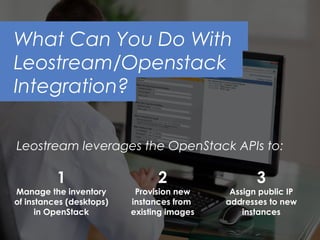
  • #33 Karen: Using the OpenStack API, Leostream basically becomes a management layer for your OpenStack cloud. Using the API, we inventory existing images and instances, provision new instances in bulk, assign correct IP addresses to new instances, power control instances, and even delete the instance when the user is done. When you add that provisioning and management capabilities to the connection management policies that are also included in Leostream, you have a powerful tool for managing your virtual workspaces solution.
  • #34 Karen: So, why may you want to build a virtual workspaces solution using Teradici and Leostream? Well, first let’s consider an enterprise use case. Because of the on-demand nature of OpenStack, a virtual workspaces solution built on top of it is ideal if you have contract or temporary workers. You can spin up and terminate instances in OpenStack to match your staffing needs. Another good enterprise use case is shared applications. By hosting application in the data center, you can allow users to share applications. If we flip over to desktops-as-a-service, MSPs can use an OpenStack-based virtual workspaces solution to provide desktops for SMBs. By using Teradici and Leostream, MSPs can support remote customer logins using the Security Gateway. Even if the MSP doesn’t want to get into the business of delivering full desktops, they can use the OpenStack virtual workspaces solution to provide access to hosted applications.
  • #35 Thanks Karen. Now, the moment we’ve all been waiting for. Let’s pull back the curtain for a behind the scenes look at how it works.
  • #36 Dana: Thanks Karen, that was great. That just about covers it! I see we have a bunch of questions in the queue. Before we jump into those, I want to leave everyone with a few parting thoughts, just to wrap it all up. What are the key takeaways… With the right choice of display protocol and connection broker, OpenStack VDI and DaaS is suitable for any organization Teradici Pervasive Computing Platform enables OpenStack VDI for any user and use case Leostream Connection Broker provides the management features needed to enable OpenStack VDI/DaaS
  • #37 Dana: If you want to test drive leostream and teradici, I invite you to request a free trial. You can get started with that at the webpages you see up on this slide. Once you have the free trial information we are always happy to help you get up and running. Okay, questions.
  • #38 Dana: Alright, first question…