Operating Systems, Computing
Network & Presentation of
Information
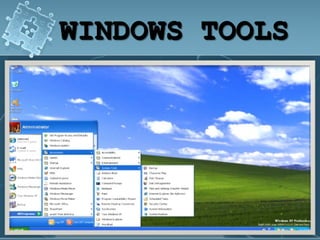
WINDOWS TOOLS
System Information
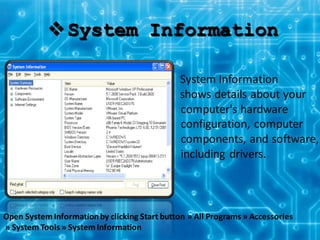
System Information
shows details about your
computer's hardware
configuration, computer
components, and software,
including drivers.
Open SystemInformationby clicking Start button » All Programs » Accessories
» SystemTools » SystemInformation
 Security Center
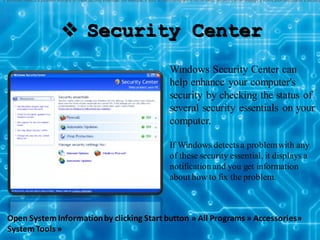
Windows Security Center can
help enhance your computer's
security by checking the status of
several security essentials on your
computer.
If Windows detectsa problemwith any
of these security essential, it displays a
notification and you get information
about how to fix the problem.
If Windows detects a problem with any of these security essentials (for example, if your antivirus program is out of date), Security Center displays a notification and places a Security
Open System Informationby clicking Start button » All Programs » Accessories»
SystemTools »
System Restore
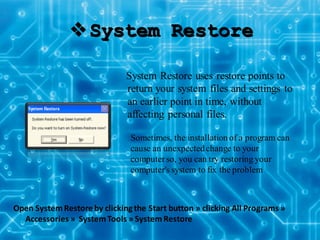
System Restore uses restore points to
return your system files and settings to
an earlier point in time, without
affecting personal files.
Open SystemRestore by clicking the Start button » clicking All Programs »
Accessories » SystemTools » SystemRestore
Sometimes, the installation of a program can
cause an unexpectedchange to your
computerso, you can try restoring your
computer's system to fix the problem
Character Map
Start » Programs » Accessories » SystemTools »
Character Map.
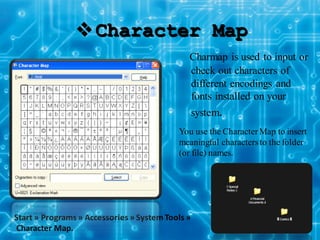
Charmap is used to input or
check out characters of
different encodings and
fonts installed on your
system.
You use the CharacterMap to insert
meaningful charactersto the folder
(or file) names.
Disk Defragmenter
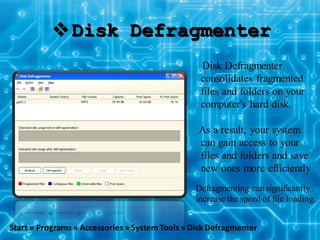
Disk Defragmenter
consolidates fragmented
files and folders on your
computer's hard disk.
As a result, your system
can gain access to your
files and folders and save
new ones more efficiently
Start » Programs » Accessories » SystemTools » Disk Defragmenter
Defragmenting can significantly
increase the speed of file loading.
COMPUTER NETWORK:
Components of network
hardware
All networks are made up of basic hardware building blocks to
interconnect network nodes, such as Network Interface Cards
(NICs), Repeaters, Hubs, cables and Routers.
Network Card
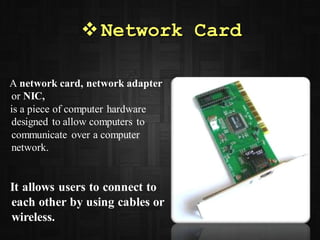
A network card, network adapter
or NIC,
is a piece of computer hardware
designed to allow computers to
communicate over a computer
network.
It allows users to connect to
each other by using cables or
wireless.
Cables & connectors
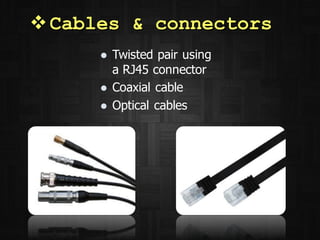
 Twisted pair using
a RJ45 connector
 Coaxial cable
 Optical cables
Repeaters and Hubs
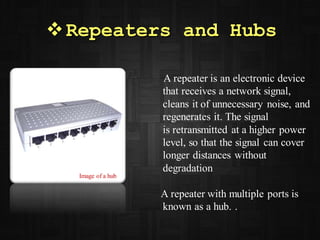
A repeater is an electronic device
that receives a network signal,
cleans it of unnecessary noise, and
regenerates it. The signal
is retransmitted at a higher power
level, so that the signal can cover
longer distances without
degradation
A repeater with multiple ports is
known as a hub. .
Image of a hub
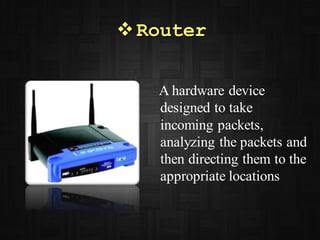
Router
A hardware device
designed to take
incoming packets,
analyzing the packets and
then directing them to the
appropriate locations
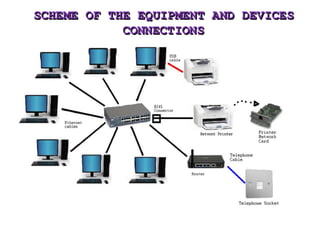
SCHEME OF THE EQUIPMENT AND DEVICES
CONNECTIONS
Network software
settings and protocols
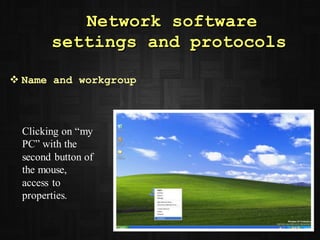
 Name and workgroup
Clicking on “my
PC” with the
second button of
the mouse,
access to
properties.
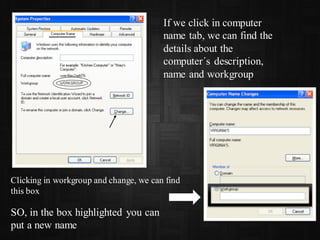
If we click in computer
name tab, we can find the
details about the
computer´s description,
name and workgroup
Clicking in workgroup and change, we can find
this box
SO, in the box highlighted you can
put a new name
 IP address and other information
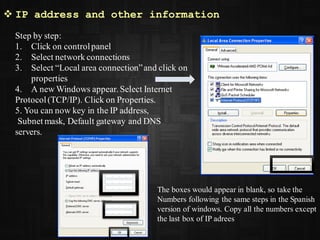
Step by step:
1. Click on controlpanel
2. Select network connections
3. Select “Local area connection”and click on
properties
4. A new Windows appear. Select Internet
Protocol(TCP/IP). Click on Properties.
5. You can now key in the IP address,
Subnet mask, Default gateway and DNS
servers.
The boxes would appear in blank, so take the
Numbers following the same steps in the Spanish
version of windows. Copy all the numbers except
the last box of IP adrees
MSDOS COMMANDS
 Ping
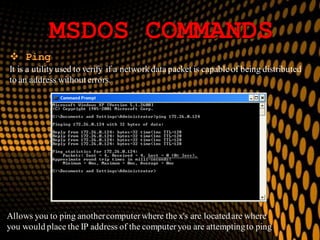
It is a utility used to verify if a network data packet is capable of being distributed
to an address without errors.
Allows you to ping anothercomputerwhere the x's are locatedare where
you would place the IP address of the computeryou are attemptingto ping
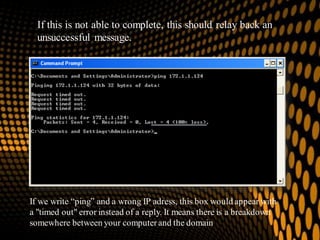
If this is not able to complete, this should relay back an
unsuccessful message.
If we write “ping” and a wrong IP adress, this box would appear with
a "timed out" error instead of a reply. It means there is a breakdown
somewhere between your computerand the domain
 Ipconfig
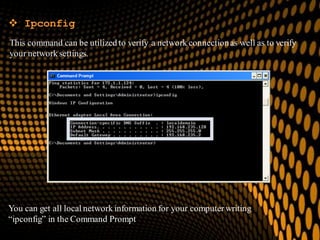
This command can be utilized to verify a network connectionas well as to verify
your network settings.
You can get all local network information for your computerwriting
“ipconfig” in the Command Prompt
When I start my computer up I always find a blue
star and a message from Microsoft "Windows
Genuine Advantage" to buy the WindowsOriginal as
long as mine, like many users’, is not, or at least I do
not remember having bought. Let me know how I
can delete the notice and how I can prevent myself
from getting it again.
SECURITY PROBLEMS
Problem 1:
Answer:
Windows GenuineAdvantage notifications occur when your computerhasn't passed
the validation test.
The validation test can be failed because you installed a pirated non-genuinecopy of
XP, or because you have changed your XP productkey to a software-generated key,
or sometimes it just happensfor no reason at all.
If you are being constantlynagged by Microsoft to validate your Windows license,
you have the option of purchasing a genuine copy of Windows XP or resolving the
problemlater. However, there is actuallya way of disabling the message by editing
your registry.
So, if you want to remove thoseannoying notifications, you can follow one of these
5 methods that you can find in this website:
http://www.wikihow.com/Remove-Windows-Genuine-Advantage-Notifications
 PROBLEM 2:
The antivirus detects an infection (Internet
worm) win32/boberog.AQ in working
memory. It seems my antivirus detects it
but cannot solve the problem.
Answer
Win32.Boberog.AQ is one of the Windows illegal malicious programs which may
occupy system resources and slow down computers.
You can find more information about this kind of worn in this website:
http://www.virusradar.com/Win32_Boberog.AQ/description
This worm can open your email address book and despatch one cloneeach to each
of the addresses listed…Here you have more information about how worns spread:
http://www.emsisoft.com/en/kb/articles/tec050629/
Well, now to remove it, you can do it manually or instantlyfollowing the steps given
in this website:
http://www.spydig.com/spyware-info/Win32-Boberog-AQ.html
But if you feel incapable to do that… I´ll recommend you to visit an expert in
computersso this problema won´t appearin the future any more.

Virginiatools

  • 1.
    Operating Systems, Computing Network& Presentation of Information
  • 2.
  • 3.
    System Information System Information showsdetails about your computer's hardware configuration, computer components, and software, including drivers. Open SystemInformationby clicking Start button » All Programs » Accessories » SystemTools » SystemInformation
  • 4.
     Security Center WindowsSecurity Center can help enhance your computer's security by checking the status of several security essentials on your computer. If Windows detectsa problemwith any of these security essential, it displays a notification and you get information about how to fix the problem. If Windows detects a problem with any of these security essentials (for example, if your antivirus program is out of date), Security Center displays a notification and places a Security Open System Informationby clicking Start button » All Programs » Accessories» SystemTools »
  • 5.
    System Restore System Restoreuses restore points to return your system files and settings to an earlier point in time, without affecting personal files. Open SystemRestore by clicking the Start button » clicking All Programs » Accessories » SystemTools » SystemRestore Sometimes, the installation of a program can cause an unexpectedchange to your computerso, you can try restoring your computer's system to fix the problem
  • 6.
    Character Map Start »Programs » Accessories » SystemTools » Character Map. Charmap is used to input or check out characters of different encodings and fonts installed on your system. You use the CharacterMap to insert meaningful charactersto the folder (or file) names.
  • 7.
    Disk Defragmenter Disk Defragmenter consolidatesfragmented files and folders on your computer's hard disk. As a result, your system can gain access to your files and folders and save new ones more efficiently Start » Programs » Accessories » SystemTools » Disk Defragmenter Defragmenting can significantly increase the speed of file loading.
  • 8.
    COMPUTER NETWORK: Components ofnetwork hardware All networks are made up of basic hardware building blocks to interconnect network nodes, such as Network Interface Cards (NICs), Repeaters, Hubs, cables and Routers.
  • 9.
    Network Card A networkcard, network adapter or NIC, is a piece of computer hardware designed to allow computers to communicate over a computer network. It allows users to connect to each other by using cables or wireless.
  • 10.
    Cables & connectors Twisted pair using a RJ45 connector  Coaxial cable  Optical cables
  • 11.
    Repeaters and Hubs Arepeater is an electronic device that receives a network signal, cleans it of unnecessary noise, and regenerates it. The signal is retransmitted at a higher power level, so that the signal can cover longer distances without degradation A repeater with multiple ports is known as a hub. . Image of a hub
  • 12.
    Router A hardware device designedto take incoming packets, analyzing the packets and then directing them to the appropriate locations
  • 13.
    SCHEME OF THEEQUIPMENT AND DEVICES CONNECTIONS
  • 14.
    Network software settings andprotocols  Name and workgroup Clicking on “my PC” with the second button of the mouse, access to properties.
  • 15.
    If we clickin computer name tab, we can find the details about the computer´s description, name and workgroup Clicking in workgroup and change, we can find this box SO, in the box highlighted you can put a new name
  • 16.
     IP addressand other information Step by step: 1. Click on controlpanel 2. Select network connections 3. Select “Local area connection”and click on properties 4. A new Windows appear. Select Internet Protocol(TCP/IP). Click on Properties. 5. You can now key in the IP address, Subnet mask, Default gateway and DNS servers. The boxes would appear in blank, so take the Numbers following the same steps in the Spanish version of windows. Copy all the numbers except the last box of IP adrees
  • 17.
    MSDOS COMMANDS  Ping Itis a utility used to verify if a network data packet is capable of being distributed to an address without errors. Allows you to ping anothercomputerwhere the x's are locatedare where you would place the IP address of the computeryou are attemptingto ping
  • 18.
    If this isnot able to complete, this should relay back an unsuccessful message. If we write “ping” and a wrong IP adress, this box would appear with a "timed out" error instead of a reply. It means there is a breakdown somewhere between your computerand the domain
  • 19.
     Ipconfig This commandcan be utilized to verify a network connectionas well as to verify your network settings. You can get all local network information for your computerwriting “ipconfig” in the Command Prompt
  • 20.
    When I startmy computer up I always find a blue star and a message from Microsoft "Windows Genuine Advantage" to buy the WindowsOriginal as long as mine, like many users’, is not, or at least I do not remember having bought. Let me know how I can delete the notice and how I can prevent myself from getting it again. SECURITY PROBLEMS Problem 1:
  • 21.
    Answer: Windows GenuineAdvantage notificationsoccur when your computerhasn't passed the validation test. The validation test can be failed because you installed a pirated non-genuinecopy of XP, or because you have changed your XP productkey to a software-generated key, or sometimes it just happensfor no reason at all. If you are being constantlynagged by Microsoft to validate your Windows license, you have the option of purchasing a genuine copy of Windows XP or resolving the problemlater. However, there is actuallya way of disabling the message by editing your registry. So, if you want to remove thoseannoying notifications, you can follow one of these 5 methods that you can find in this website: http://www.wikihow.com/Remove-Windows-Genuine-Advantage-Notifications
  • 22.
     PROBLEM 2: Theantivirus detects an infection (Internet worm) win32/boberog.AQ in working memory. It seems my antivirus detects it but cannot solve the problem.
  • 23.
    Answer Win32.Boberog.AQ is oneof the Windows illegal malicious programs which may occupy system resources and slow down computers. You can find more information about this kind of worn in this website: http://www.virusradar.com/Win32_Boberog.AQ/description This worm can open your email address book and despatch one cloneeach to each of the addresses listed…Here you have more information about how worns spread: http://www.emsisoft.com/en/kb/articles/tec050629/ Well, now to remove it, you can do it manually or instantlyfollowing the steps given in this website: http://www.spydig.com/spyware-info/Win32-Boberog-AQ.html But if you feel incapable to do that… I´ll recommend you to visit an expert in computersso this problema won´t appearin the future any more.