How to get to System Tools ?
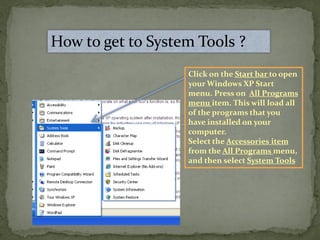
Click on the Start bar to open
your Windows XP Start
menu. Press on All Programs
menu item. This will load all
of the programs that you
have installed on your
computer.
Select the Accessories item
from the All Programs menu,
and then select System Tools
System Information
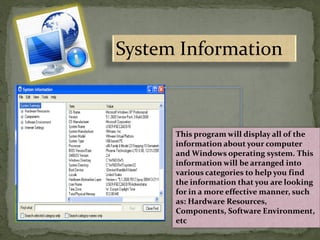
This program will display all of the
information about your computer
and Windows operating system. This
information will be arranged into
various categories to help you find
the information that you are looking
for in a more effective manner, such
as: Hardware Resources,
Components, Software Environment,
etc
Character map
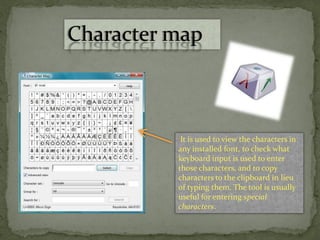
It is used to view the characters in
any installed font, to check what
keyboard input is used to enter
those characters, and to copy
characters to the clipboard in lieu
of typing them. The tool is usually
useful for entering special
characters.
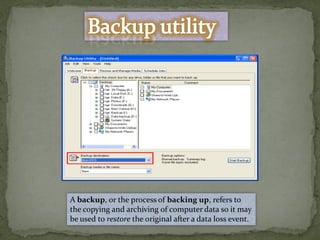
A backup, or the process of backing up, refers to
the copying and archiving of computer data so it may
be used to restore the original after a data loss event.
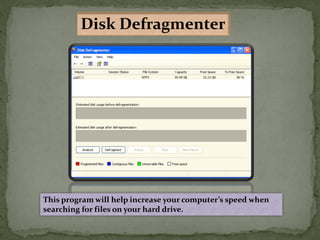
This program will help increase your computer’s speed when
searching for files on your hard drive.
Disk Defragmenter
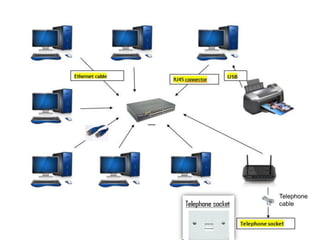
 Network card (only if you use a network printer): is a piece of
computer hardware designed to allow computers to
communicate over a computer network. It allows users to
connect to each other either by using cables or wireless.
 Hubs: A hub contains multiple ports. When a packet arrives
at one port, it is copied to all the ports of the hub. When the
packets are copied, the destination address in the frame does
not change to a broadcast address.
 Bridges: a device that connects multiple network segments
along the data link layer . It works on OSI layer 2.
 Router: a specialized network device that determines the
next network point to which it can forward a data packet
towards the ultimate destination of the packet. Unlike a
gateway, it cannot interface different protocols. It works on
OSI layer 3.
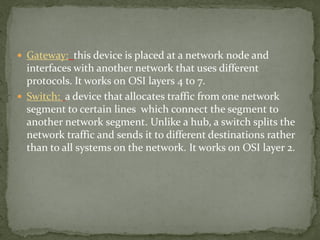
 Gateway: this device is placed at a network node and
interfaces with another network that uses different
protocols. It works on OSI layers 4 to 7.
 Switch: a device that allocates traffic from one network
segment to certain lines which connect the segment to
another network segment. Unlike a hub, a switch splits the
network traffic and sends it to different destinations rather
than to all systems on the network. It works on OSI layer 2.
Telephone
cable
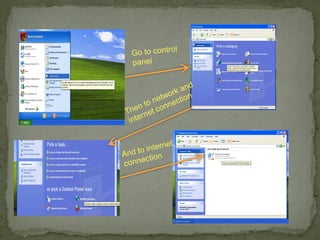
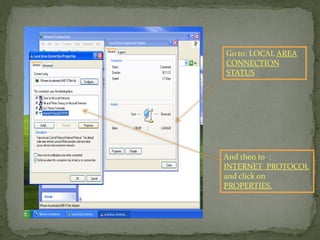
Go to: LOCAL AREA
CONNECTION
STATUS
And then to :
INTERNET PROTOCOL
and click on
PROPERTIES.
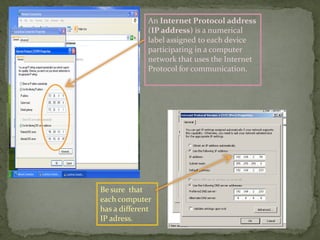
An Internet Protocol address
(IP address) is a numerical
label assigned to each device
participating in a computer
network that uses the Internet
Protocol for communication.
Be sure that
each computer
has a different
IP adress.
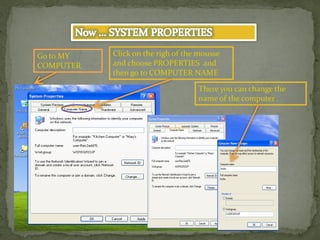
Click on the righ of the mousse
and choose PROPERTIES and
then go to COMPUTER NAME
There you can change the
name of the computer .
Go to MY
COMPUTER
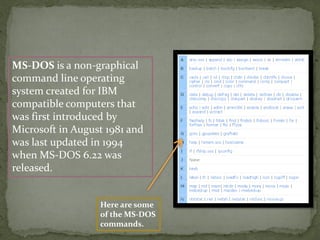
MS-DOS is a non-graphical
command line operating
system created for IBM
compatible computers that
was first introduced by
Microsoft in August 1981 and
was last updated in 1994
when MS-DOS 6.22 was
released.
Here are some
of the MS-DOS
commands.
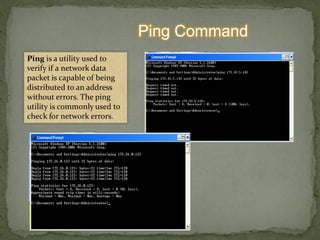
Ping Command
Ping is a utility used to
verify if a network data
packet is capable of being
distributed to an address
without errors. The ping
utility is commonly used to
check for network errors.
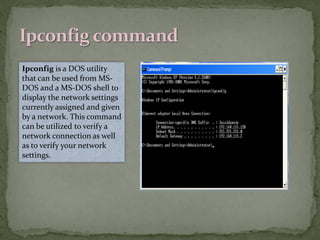
Ipconfig is a DOS utility
that can be used from MS-
DOS and a MS-DOS shell to
display the network settings
currently assigned and given
by a network. This command
can be utilized to verify a
network connection as well
as to verify your network
settings.
Description:
Win32/Boberog.AQ is a
worm that spreads via IM
networks. The worm
contains a backdoor. It can
be controlled remotely.
SOLUTION
Get off these programs
- malwarebytes
- MSNCleaner
And follow these steps below:
reboot your PC in Safe Mode by pressing F8
before you start windows and choose the option Safe
Mode or Safe Mode
msn-runs cleaner and if you find something you give
delete
run malwarebytes (updated before restarting in
safe mode)
-choose full analysis if possible with USBs, memory,
cell phones, etc. connected
when done if found threats select them all and give
away what selected
-restart in normal mode
make a new analysis with malwarebytes (optional)
Andra Elena Grumeza

Presentation operation system

  • 2.
    How to getto System Tools ? Click on the Start bar to open your Windows XP Start menu. Press on All Programs menu item. This will load all of the programs that you have installed on your computer. Select the Accessories item from the All Programs menu, and then select System Tools
  • 3.
    System Information This programwill display all of the information about your computer and Windows operating system. This information will be arranged into various categories to help you find the information that you are looking for in a more effective manner, such as: Hardware Resources, Components, Software Environment, etc
  • 4.
    Character map It isused to view the characters in any installed font, to check what keyboard input is used to enter those characters, and to copy characters to the clipboard in lieu of typing them. The tool is usually useful for entering special characters.
  • 5.
    A backup, orthe process of backing up, refers to the copying and archiving of computer data so it may be used to restore the original after a data loss event.
  • 7.
    This program willhelp increase your computer’s speed when searching for files on your hard drive. Disk Defragmenter
  • 9.
     Network card(only if you use a network printer): is a piece of computer hardware designed to allow computers to communicate over a computer network. It allows users to connect to each other either by using cables or wireless.  Hubs: A hub contains multiple ports. When a packet arrives at one port, it is copied to all the ports of the hub. When the packets are copied, the destination address in the frame does not change to a broadcast address.  Bridges: a device that connects multiple network segments along the data link layer . It works on OSI layer 2.  Router: a specialized network device that determines the next network point to which it can forward a data packet towards the ultimate destination of the packet. Unlike a gateway, it cannot interface different protocols. It works on OSI layer 3.
  • 10.
     Gateway: thisdevice is placed at a network node and interfaces with another network that uses different protocols. It works on OSI layers 4 to 7.  Switch: a device that allocates traffic from one network segment to certain lines which connect the segment to another network segment. Unlike a hub, a switch splits the network traffic and sends it to different destinations rather than to all systems on the network. It works on OSI layer 2.
  • 11.
  • 14.
    Go to: LOCALAREA CONNECTION STATUS And then to : INTERNET PROTOCOL and click on PROPERTIES.
  • 15.
    An Internet Protocoladdress (IP address) is a numerical label assigned to each device participating in a computer network that uses the Internet Protocol for communication. Be sure that each computer has a different IP adress.
  • 16.
    Click on therigh of the mousse and choose PROPERTIES and then go to COMPUTER NAME There you can change the name of the computer . Go to MY COMPUTER
  • 18.
    MS-DOS is anon-graphical command line operating system created for IBM compatible computers that was first introduced by Microsoft in August 1981 and was last updated in 1994 when MS-DOS 6.22 was released. Here are some of the MS-DOS commands.
  • 19.
    Ping Command Ping isa utility used to verify if a network data packet is capable of being distributed to an address without errors. The ping utility is commonly used to check for network errors.
  • 20.
    Ipconfig is aDOS utility that can be used from MS- DOS and a MS-DOS shell to display the network settings currently assigned and given by a network. This command can be utilized to verify a network connection as well as to verify your network settings.
  • 23.
    Description: Win32/Boberog.AQ is a wormthat spreads via IM networks. The worm contains a backdoor. It can be controlled remotely. SOLUTION Get off these programs - malwarebytes - MSNCleaner And follow these steps below: reboot your PC in Safe Mode by pressing F8 before you start windows and choose the option Safe Mode or Safe Mode msn-runs cleaner and if you find something you give delete run malwarebytes (updated before restarting in safe mode) -choose full analysis if possible with USBs, memory, cell phones, etc. connected when done if found threats select them all and give away what selected -restart in normal mode make a new analysis with malwarebytes (optional)
  • 24.