Video Conferencing  and Streaming  for Distance Learning
Welcome! Video Conferencing and Video Streaming What are the applications? What are some of the benefits, impact on learning? What equipment will I typically need? What will it cost me? Bonus: other considerations… Presentation Background
Applications deployed by schools around the US All focused on use of video in the classroom Video conferencing and streaming K-8, HS, Higher Education examples This is a “best practices” presentation Solutions are eligible for federal funding (E-Rate)  Presentation Background
Video Conferencing What is Video Conferencing? Two-way video communication A way to bridge distance A way to be in multiple places at once A way to bring students to new adventures A way to interact with your students and peers A way to reduce travel A way to promote going green A way to reduce costs Let’s look at some applications…..
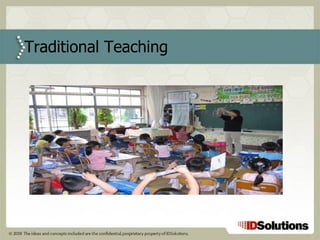
Traditional Teaching
Traditional Teaching Teacher for each physical location Teachers teach same students each day  Students interact with same classmates each day  Guest speakers must physically travel to location Class creativity limited to in-house supplies Teacher expertise limited to a single location
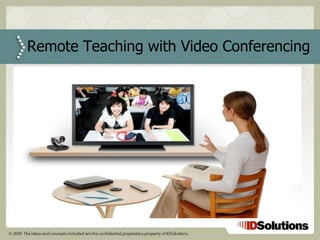
Remote Teaching with Video Conferencing
Increases reach of expert teachers Connects geographically distant classrooms Reduces or eliminates unnecessary travel Guest speakers from anywhere in the world Change in routine – variety! Saves $$ Reference: Arkansas DOE, Mike Lar Benefits
Field Trips
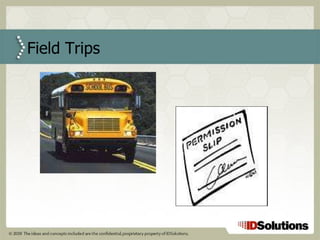
Traditional Field Trips Schools rely on physical transportation to move students to areas of interest A great deal of advance planning is required; chaperones, permission slips, liability insurance Costs are expensive for transportation thus limiting location choices Not very “Go Green” friendly
Virtual Field Trips
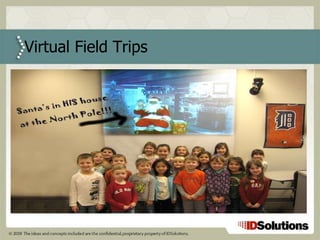
Benefits Distance is no longer a factor Broaden cultural exposure  Visit new places of interest Museums, parks, theaters, aquariums Reduction in travel costs A greater number of events can be planned  Reduction in liability   Reference: Becky Brownfield and IDSolutions
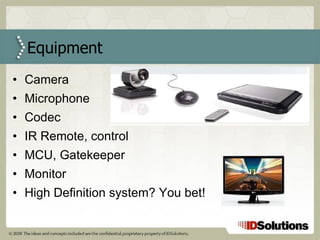
Camera Microphone Codec IR Remote, control  MCU, Gatekeeper Monitor High Definition system? You bet! Equipment
Entry level - $7,500 to $10,000 Mid level - $10,000 to $25,000 High level - $25,000 to $50,000 Custom - $50,000 to ???? Costs
Data sharing (ie: your laptop or PC) Multipoint conferences Camera – tracking, single or dual system Wireless or fixed microphone(s) Projector or monitor Fixed or portable (cart) system Ceiling or monitor based speakers Other Considerations?
Cisco/Tandberg Logitech/Lifesize Polycom Radvision Vidyo Manufacturers
Video Streaming What is Video Streaming? One-way  video communication A way to bridge distance A way to be in multiple places at once A way to bring students to new adventures A way to  broadcast messages  to your students and peers A way to reduce travel A way to promote going green A way to reduce costs Let’s look at some applications…..
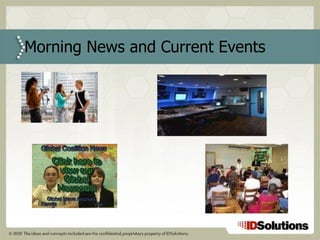
Morning News and Current Events
Today’s News and Current Events Teachers discuss current news events News based on network TV or Internet Some use TVs in the classroom for live events Students engagement …questionable
Student Newscasts (Webcasts) Students take turns delivering the news to their fellow students via a webcast Better engagement through participation Newscast delivered throughout school to classrooms and other schools Teachers can expand on certain news topics and students are more likely to engage in conversations Reference: Ridgefield Schools, Josh Smith
School Announcements
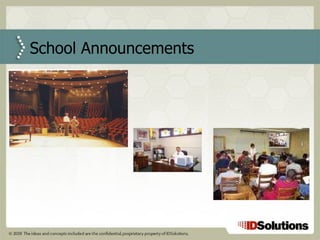
Traditional School Announcements  Teachers waste time rounding up all the students Everyone waits in auditorium for announcement Principal delivers announcement Time wasted getting everyone back to classroom
School Announcements (Webcasts) Principal can deliver the announcement from their office through live webcast  Students and teachers watch the announcement from the classroom using a PC and projector No time wasted on moving students around Frequency of announcements increase Communication accuracy improves Reference: Glastonbury Schools, Bryan Czapla
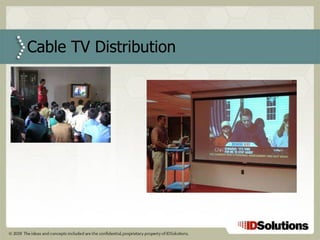
Cable TV Distribution
Traditional TV in the Classroom TV in the classroom connected to a separate coax network Separate coax infrastructure to purchase and maintain Recording required a VCR (and usually help) Web access, PC applications and TV access over separate networks
TV over IP in the Classroom A PC connected to a projector provides the TV Teachers can use computer to seamlessly integrate live cable TV events into their classroom curriculum TV channels can be recorded with a single mouse click (ie: Tivo)  Teachers can re-use recorded segments of the TV programs at a later time on-demand to help develop their own custom curriculum Reference: Ridgefield Schools, Josh Smith
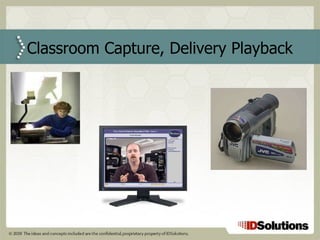
Classroom Capture, Delivery Playback
Classroom Capture, Delivery Playback Audio, Video and Media can be captured The captured material can be posted to an on-demand server for future playback Students can view the material on-demand Great for repetition and retention Study tool before a test  Tool for students who do not like to raise their hands in class or need additional review time Reference: Arkansas DOE, Mike Lar
VCR Tapes, Video On Demand
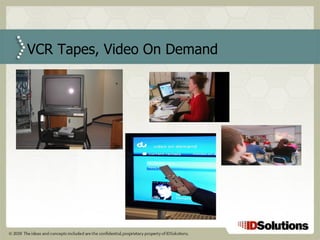
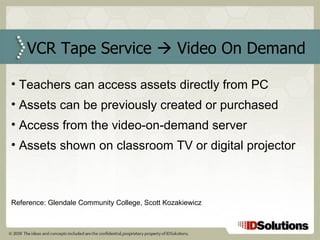
VCR Tape Service    Video On Demand Teachers can access assets directly from PC Assets can be previously created or purchased Access from the video-on-demand server Assets shown on classroom TV or digital projector Reference: Glendale Community College, Scott Kozakiewicz
Streaming – Webcasting
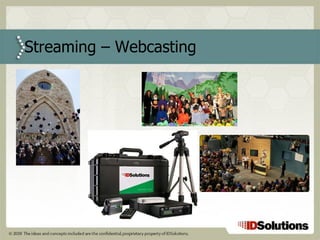
Logistics lead to restrictions on who can attend special events (graduations, sports, etc.)  Weather can impact outdoor events Events can be webcast live to overflow rooms and via Internet to those who could not attend Events can also be recorded and stored Events can be turned into DVDs for parents or past alumni for use in fund raising efforts Reference: Ridgefield Schools, Josh Smith and Meade County Schools, Jerry Pile Streaming – Webcasting
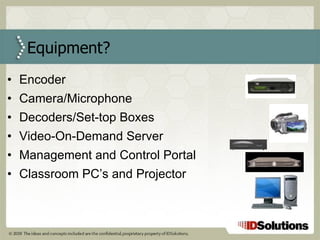
Encoder Camera/Microphone Decoders/Set-top Boxes Video-On-Demand Server Management and Control Portal Classroom PC’s and Projector Equipment?
Entry level - $5,000 Mid level - $10,000 to $25,000 High level - $25,000 to $50,000 Custom - $50,000 and up Costs?
Platform – MAC or PC Media Formats Recording Playback (video on demand) User Access (Permissions) Reporting Metadata Assignment Other Considerations?
VBrick Accordent Video Furnace/Haivision VSI/Infovalue Viewcast Manufacturers?
Teachers Record classroom sessions for absent/remote students Improve the accuracy of communication; repetition and retention Access on-demand content anytime from your PC to a projector Host a virtual field trip to museums, parks, remote locations Increase reach by live streaming to other schools, classrooms Develop assignments that connect to video assets Media Specialists Convert assets to digital format and deliver on-demand Reduce administration for VCR tape checkout Improve response times for asset availability Ensure compliance with Teach and Copyright Acts  Streaming Video: Helping Faculty
Pat Cassella VP of Marketing and East Coast Sales [email_address] 203-479-3506 Office 203-980-6928 Cell ID Solutions + Contact Information National Video Solution Integrator We integrate video solutions for Distance Learning Multiple Video Conferencing and Streaming Partners

Video Conferencing and Streaming for Distance Learning

  • 1.
    Video Conferencing and Streaming for Distance Learning
  • 2.
    Welcome! Video Conferencingand Video Streaming What are the applications? What are some of the benefits, impact on learning? What equipment will I typically need? What will it cost me? Bonus: other considerations… Presentation Background
  • 3.
    Applications deployed byschools around the US All focused on use of video in the classroom Video conferencing and streaming K-8, HS, Higher Education examples This is a “best practices” presentation Solutions are eligible for federal funding (E-Rate) Presentation Background
  • 4.
    Video Conferencing Whatis Video Conferencing? Two-way video communication A way to bridge distance A way to be in multiple places at once A way to bring students to new adventures A way to interact with your students and peers A way to reduce travel A way to promote going green A way to reduce costs Let’s look at some applications…..
  • 5.
  • 6.
    Traditional Teaching Teacherfor each physical location Teachers teach same students each day Students interact with same classmates each day Guest speakers must physically travel to location Class creativity limited to in-house supplies Teacher expertise limited to a single location
  • 7.
    Remote Teaching withVideo Conferencing
  • 8.
    Increases reach ofexpert teachers Connects geographically distant classrooms Reduces or eliminates unnecessary travel Guest speakers from anywhere in the world Change in routine – variety! Saves $$ Reference: Arkansas DOE, Mike Lar Benefits
  • 9.
  • 10.
    Traditional Field TripsSchools rely on physical transportation to move students to areas of interest A great deal of advance planning is required; chaperones, permission slips, liability insurance Costs are expensive for transportation thus limiting location choices Not very “Go Green” friendly
  • 11.
  • 12.
    Benefits Distance isno longer a factor Broaden cultural exposure Visit new places of interest Museums, parks, theaters, aquariums Reduction in travel costs A greater number of events can be planned Reduction in liability Reference: Becky Brownfield and IDSolutions
  • 13.
    Camera Microphone CodecIR Remote, control MCU, Gatekeeper Monitor High Definition system? You bet! Equipment
  • 14.
    Entry level -$7,500 to $10,000 Mid level - $10,000 to $25,000 High level - $25,000 to $50,000 Custom - $50,000 to ???? Costs
  • 15.
    Data sharing (ie:your laptop or PC) Multipoint conferences Camera – tracking, single or dual system Wireless or fixed microphone(s) Projector or monitor Fixed or portable (cart) system Ceiling or monitor based speakers Other Considerations?
  • 16.
    Cisco/Tandberg Logitech/Lifesize PolycomRadvision Vidyo Manufacturers
  • 17.
    Video Streaming Whatis Video Streaming? One-way video communication A way to bridge distance A way to be in multiple places at once A way to bring students to new adventures A way to broadcast messages to your students and peers A way to reduce travel A way to promote going green A way to reduce costs Let’s look at some applications…..
  • 18.
    Morning News andCurrent Events
  • 19.
    Today’s News andCurrent Events Teachers discuss current news events News based on network TV or Internet Some use TVs in the classroom for live events Students engagement …questionable
  • 20.
    Student Newscasts (Webcasts)Students take turns delivering the news to their fellow students via a webcast Better engagement through participation Newscast delivered throughout school to classrooms and other schools Teachers can expand on certain news topics and students are more likely to engage in conversations Reference: Ridgefield Schools, Josh Smith
  • 21.
  • 22.
    Traditional School Announcements Teachers waste time rounding up all the students Everyone waits in auditorium for announcement Principal delivers announcement Time wasted getting everyone back to classroom
  • 23.
    School Announcements (Webcasts)Principal can deliver the announcement from their office through live webcast Students and teachers watch the announcement from the classroom using a PC and projector No time wasted on moving students around Frequency of announcements increase Communication accuracy improves Reference: Glastonbury Schools, Bryan Czapla
  • 24.
  • 25.
    Traditional TV inthe Classroom TV in the classroom connected to a separate coax network Separate coax infrastructure to purchase and maintain Recording required a VCR (and usually help) Web access, PC applications and TV access over separate networks
  • 26.
    TV over IPin the Classroom A PC connected to a projector provides the TV Teachers can use computer to seamlessly integrate live cable TV events into their classroom curriculum TV channels can be recorded with a single mouse click (ie: Tivo) Teachers can re-use recorded segments of the TV programs at a later time on-demand to help develop their own custom curriculum Reference: Ridgefield Schools, Josh Smith
  • 27.
  • 28.
    Classroom Capture, DeliveryPlayback Audio, Video and Media can be captured The captured material can be posted to an on-demand server for future playback Students can view the material on-demand Great for repetition and retention Study tool before a test Tool for students who do not like to raise their hands in class or need additional review time Reference: Arkansas DOE, Mike Lar
  • 29.
  • 30.
    VCR Tape Service  Video On Demand Teachers can access assets directly from PC Assets can be previously created or purchased Access from the video-on-demand server Assets shown on classroom TV or digital projector Reference: Glendale Community College, Scott Kozakiewicz
  • 31.
  • 32.
    Logistics lead torestrictions on who can attend special events (graduations, sports, etc.) Weather can impact outdoor events Events can be webcast live to overflow rooms and via Internet to those who could not attend Events can also be recorded and stored Events can be turned into DVDs for parents or past alumni for use in fund raising efforts Reference: Ridgefield Schools, Josh Smith and Meade County Schools, Jerry Pile Streaming – Webcasting
  • 33.
    Encoder Camera/Microphone Decoders/Set-topBoxes Video-On-Demand Server Management and Control Portal Classroom PC’s and Projector Equipment?
  • 34.
    Entry level -$5,000 Mid level - $10,000 to $25,000 High level - $25,000 to $50,000 Custom - $50,000 and up Costs?
  • 35.
    Platform – MACor PC Media Formats Recording Playback (video on demand) User Access (Permissions) Reporting Metadata Assignment Other Considerations?
  • 36.
    VBrick Accordent VideoFurnace/Haivision VSI/Infovalue Viewcast Manufacturers?
  • 37.
    Teachers Record classroomsessions for absent/remote students Improve the accuracy of communication; repetition and retention Access on-demand content anytime from your PC to a projector Host a virtual field trip to museums, parks, remote locations Increase reach by live streaming to other schools, classrooms Develop assignments that connect to video assets Media Specialists Convert assets to digital format and deliver on-demand Reduce administration for VCR tape checkout Improve response times for asset availability Ensure compliance with Teach and Copyright Acts Streaming Video: Helping Faculty
  • 38.
    Pat Cassella VPof Marketing and East Coast Sales [email_address] 203-479-3506 Office 203-980-6928 Cell ID Solutions + Contact Information National Video Solution Integrator We integrate video solutions for Distance Learning Multiple Video Conferencing and Streaming Partners