Marco Obinu
Sponsors
Marco Obinu
Advisory Engineer
SoftJam S.p.A.
@OmegaMadLab
marco.obinu@omegamadlab.com
http://www.omegamadlab.com
https://github.com/OmegaMadLab
https://www.linkedin.com/in/marco-obinu-omegamadlab/
https://www.youtube.com/channel/UCpkBeQSscC1iBvpNP4VNTKQ
• Geek to the bone 
• Microsoft Azure MVP
Speaker Bio
Once upon a time, a nerdy
team was very good at
administrating their old-
fashioned on-premises
databases…
… suddenly, the Business came
and said: We need to
move to to
the Cloud!
After a little
while of discouragement…
… dbas started studying…
… and quickly discovered that
Azure is the
right choice
for SQL Server
workloads!
Why Azure?
Everything built-in!
Business continuity
High availability
Automated backups
Long term backup
retention
Geo-replication
Scale
Advanced security
Automatic tuning
Built-in monitoring
Built-in intelligence
https://www.aka.ms/gigaom_benchmark
Ok, Azure is the
right choice.
But how can we move our
workloads?
Ok, Azure is the
right choice.
But how can we move our
workloads?
Ok, Azure is the
right choice.
But how can we move our
workloads?
Ok, Azure is the
right choice.
But how can we move our
workloads?
Define your strategy
Choose the right pattern
What’s Lift & Shift?
Rehost– L&S
No changes
Quick & dirty
TCO reduction 😐
Replatform
Few changes
Minimal effort
TCO reduction 🙂
Refactor
Rethink your app
Requires time
TCO reduction 🙂
Define your migration path
Migration path
Pre-migration Migration Post-Migration
https://aka.ms/datamigration
Migration path
Pre-migration Migration Post-Migration
https://aka.ms/datamigration
Pre-migration phase
Where everything begins
• Architectural design
• Schema remediation
plan
• Hardware
• CPU, RAM, DISK
• Software
• SQL Version, other components
Define
requirements
• Compliance requirements
• Network
• Dependencies
Environment
integration
• Feauture compatibility
• Deprecated syntax
Assess
schema
Pre-migration phase
Know your enemy
…or at least your Azure landing zone!
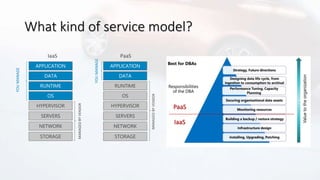
What kind of service model?
IaaS
MANAGEDBYVENDOR
APPLICATION
HYPERVISOR
OS
RUNTIME
DATA
STORAGE
NETWORK
YOUMANAGE
SERVERS
MANAGEDBYVENDOR
APPLICATION
HYPERVISOR
OS
RUNTIME
DATA
STORAGE
NETWORK
PaaS
YOUMANAGE
SERVERS
IaaS
PaaS
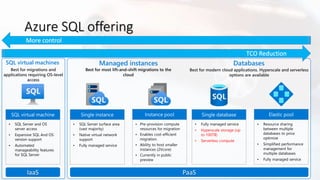
Azure SQL offering
Databases
• Fully managed service • Resource sharing
between multiple
databases to price
optimize
• Simplified performance
management for
multiple databases
• Fully managed service
PaaS
SQL virtual machines
• SQL Server and OS
server access
• Expansive SQL And OS
version support
• Automated
manageability features
for SQL Server
IaaS
Azure SQL Virtual MachinesBest for
• The contract on my hardware is
expiring
• I have instances of SQL Server
2008 and 2008 R2
• I want to migrate to the cloud as
fast as possible
• I use third party software that
needs OS-level access
• I want to extend our on-
premises apps to Azure
• I need an unlimited number of
DBs
• I need ultra performance
• I want to build a modern multi-
tenant SaaS app
• I want to use a database with
dedicated resources and
predictable performance
• I want to independently scale
compute and storage in my
database
• I want to have unlimited
databases storage when I need
it
• I want to build a mission critical
application with highest uptime
• I want to integrate Azure
services into my applications
Azure SQL DatabaseBest for
Azure SQL offering
Databases
• Fully managed service • Resource sharing
between multiple
databases to price
optimize
• Simplified performance
management for
multiple databases
• Fully managed service
PaaS
SQL virtual machines
• SQL Server and OS
server access
• Expansive SQL And OS
version support
• Automated
manageability features
for SQL Server
IaaS
Azure SQL offering
Databases
• Fully managed service
• Hyperscale storage (up
to 100TB)
• Serverless compute
• Resource sharing
between multiple
databases to price
optimize
• Simplified performance
management for
multiple databases
• Fully managed service
PaaS
SQL virtual machines
• SQL Server and OS
server access
• Expansive SQL And OS
version support
• Automated
manageability features
for SQL Server
IaaS
Managed instances
• SQL Server surface area
(vast majority)
• Native virtual network
support
• Fully managed service
• Pre-provision compute
resources for migration
• Enables cost-efficient
migration.
• Ability to host smaller
instances (2Vcore)
• Currently in public
preview
Do you need any of these?
…then, choose a
Managed Instance!
• I want to migrate to Azure but
don’t need OS access
• I want to reduce overhead and
stress of maintain high
availability.
• I need instance-scoped features
like SQL Server Agent,
Transactional Replication, and
Database Mail
Azure SQL managed instanceBest for
Myth-busting Azure SQL VMs
I want a VM because it’s easy to size
Choosing a VM can be a challenging task
Family, series and size of the VM also affects:
• Access to Premium Storage
• Computing power
• Disk throughput & number of data disks
• Cache and Temporary disk size & throughput
• Network bandwidth & Accelerated Network
DS12v2 – 4 core 28 GB
ACU 210-250
Cached tp. 16000/128 (144)
Uncached tp. 12800/192
NIC/Mbps 4/3000
DS13v2 – 8 core 56 GB
ACU 210-250
Cached tp. 32000/256 (288)
Uncached tp. 25600/384
NIC/Mbps 8/6000
Esv3 – 8 core 64 GB
ACU 160-180
Cached tp. 16000/128 (200)
Uncached tp. 12800/192
NIC/Mbps 4/4000
Azure Storage
(remote storage)
Virtualization host
OsDisk DataDisk DataDisk
VM
VM NIC vSwitch Host NIC
BlobCache (local storage)
TempDisk
RAM cache
SSD cache
More info on this topic:
https://youtu.be/7o80CJUtnh4
Pre-packaged, bundled unit that represents the
database power
Designed for predictable performance, but somewhat inflexible and
limited in options
DTU sizing offers simplicity of choice
Storage
Compute
Storage
Compute
vCore model
Independent scalability
DTU model
Simple, preconfigured
This model allows you to independently choose compute and storage
resources. It also allows you to use Azure Hybrid Benefit for SQL Server to
gain cost savings.
Best for customers who value flexibility, control and transparency
PaaS: choosing the right purchasing model
PaaS: vCore model
• Simplicity
• We remain committed to the DTU-
based model and the simplicity it
offers customers who want a pre-
configured solution
• Flexibility:
• The vCore-based model reflects our
commitment to customer choice
and to simplify the hybrid benefit
for customers migrating from on-
premises
• Customers pay for:
• Service tier + number of vCores
• Type and amount of data storage
• Number of IO
• Backup storage (RA-GRS)
Service tier General purpose Business critical Hyperscale
Best for
Most budget-oriented
workloads
Critical business applications
with high IO requirements.
VLDB OLTP and HTAP workloads
with highly scalable storage and
read-scale requirements
Deployment
option
Single /
Elastic Pools
Managed
Instance
Single /
Elastic Pools
Managed
Instance
Single
Compute tiers
Gen4: 1 to 24 vCore
Gen5: 2 to 80 vCore
Gen4: 4 to 24 vCore
Gen5: 4 to 80 vCore
Gen4: 1 to 24 vCore
Gen5: 2 to 80 vCore
Gen4: 4 to 24 vCore
Gen5: 4 to 80 vCore
Gen4: 1 to 24 vCore
Gen5: 2 to 80 vCore
Storage
Premium remote Local SSD Local SSD Cache
5GB – 4TB per
instance
32GB – 8TB per
instance
5GB – 4TB per
instance
32GB – 8TB per
instance
Scale from 5GB to 100TB of storage
in 1GB increments
In-Memory Not supported Supported Not supported
Read-write IO <5-10ms for all data access <3ms for all data access
<0.5ms for hot data access
~2ms otherwise
Availability 2 replicas
3 replicas, 1 read-scale replica,
zone-redundant HA
Primary read/write replica + up to 4
read replicas
Backups
RA-GRS, 7-35 days (7 days by
default)
RA-GRS, 7-35 days (7 days by
default)
LRS, ZRS, RA-GRS, 7-35 days (7 days
by default)
• Scalable new tiered storage architecture
• Architected for cloud
• Fully compatible with Azure SQL
Database
• Scale compute and storage separately
• Scale up in constant time.
• Support for 100TB+ Infinite Log
• Supports 4 Read replicas
• Restore in constant time
• No impact of backups on compute
• No impact of checkpoints on compute
• Accelerated database recovery
Hyperscale Architecture
Compute
Page
Servers
Remote
Data
Storage
P S S S
Log
Service
128GB128GB
1
32
128GB128GB
1
32
128GB128GB
1
32
128GB128GB
1
32
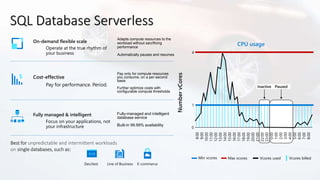
SQL Database Serverless
On-demand flexible scale
Operate at the true rhythm of
your business
Fully managed & intelligent
Focus on your applications, not
your infrastructure
Cost-effective
Pay for performance. Period.
Adapts compute resources to the
workload without sacrificing
performance
Automatically pauses and resumes
Fully-managed and intelligent
database service
Built-in 99.99% availability
Pay only for compute resources
you consume, on a per-second
basis
Further optimize costs with
configurable compute thresholds
Best for unpredictable and intermittent workloads
on single databases, such as:
Dev/test E-commerceLine of Business
Min vcores
CPU usage
Inactive Paused
Max vcores Vcores used Vcores billed
Myth-busting Azure SQL VMs
A single VM is enough!
HA is provided by the Hypervisor
SQL VM BCDR: roles and responsibilities
• Microsoft
• High availability at data center lever 
• Customer
• Everything 
Microsoft
Customer
VM and SLAs
STANDARD PREMIUM
SQL Server HADR solutions for Azure IaaS
SQL Server HA solutions for Azure IaaS
Load
balancer
Clustered IP
Local
storage
AG Replica
Local
storage
Load
balancer
Clustered IP
Storage
replica
Local
storage
Local
storage
S2D
Load
balancer
Clustered IP
Azure Premium File Share
Load
balancer
Clustered IP
Shared disk
Availability
Groups
SQL FCI
S2D
SQL FCI
PFS
SQL FCI
Shared Disk
Preview
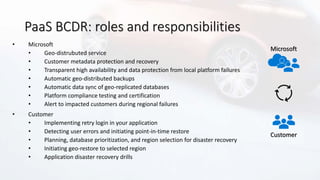
PaaS BCDR: roles and responsibilities
• Microsoft
• Geo-distrubuted service
• Customer metadata protection and recovery
• Transparent high availability and data protection from local platform failures
• Automatic geo-distributed backups
• Automatic data sync of geo-replicated databases
• Platform compliance testing and certification
• Alert to impacted customers during regional failures
• Customer
• Implementing retry login in your application
• Detecting user errors and initiating point-in-time restore
• Planning, database prioritization, and region selection for disaster recovery
• Initiating geo-restore to selected region
• Application disaster recovery drills
Microsoft
Customer
PaaS: General Purpose Architecture
Redundant node
Active compute node
Azure storage account
Scaled node
Separation of compute and storage
• Stateless compute VM
• TempDB on local SSD
• Data and log on remote Premium Storage
Property Value
vCores 1-80
Memory 5.1 GB/core
IO latency 5-10ms
IOPS Up to 40K
Load Up to22MB/s
• All databases on local SSD (NVMe)
• Failed node is replaced with the spare
PaaS: Business Critical Architecture
Secondary endpoint
(read-only)
Primary endpoint
(read-write)
Always On AG
Super-fast SSD
Secondary replicaPrimary replica
Secondary replicaSecondary replicaSpare node
Secondary replica
Property Value
vCores 1-80
Memory 5.1/7 GB/core
IO latency < 3 ms
IOPS Up to 110K
Load 48 MB/s
In-memory OLTP 3GB-130GB
Myth-busting Azure SQL VMs
PaaS is accessed via a public endpoint.
A VM is more secure!
Azure SQL Networking
On-prem datacenter
Vnet 10.0.0.0/16
Subnet 10.0.2.0/24
Vnet 192.168.0.0/16
Subnet 10.0.1.0/24
Subnet 10.0.2.0/24
Peering
Vnet integration
Service
Endpoint
Subnet 10.0.4.0/24
Private Link
Private IP
Subnet 10.0.5.0/24
Subnet 10.0.3.0/24
PaaS: Enterprise-class Security Controls
Advanced Threat Detection
Azure SQL DatabaseApps
Audit
Log
Threat Detection
(1) Turn on Threat Detection
(3) Real-time actionable alerts
(2) Possible threat to
access / breach data
Myth-busting Azure SQL VMs
I want a VM to reuse my own licenses!
And PaaS is so expensive…
Licensing models and cost-saving options
– pay attention to passive nodes!
 AHB works also for Windows license
 SQL 2019 licensing benefits
 Require Software Assurance
 License for DR node is «included»
 Developer Edition
Azure Hybrid Benefit for SQL Server (PaaS)
License trade-in values
General purpose or
Hyperscale vCore
4x General purpose or
Hyperscale vCores
Business critical
vCore
SQL Server cores
with SA license
vCores on Azure
SQL Database
SQL Server
Enterprise Edition
SQL Server
Standard Edition
 Take an inventory of on-premises licenses
to determine potential for conversion
 Convert on-premises cores to vCores to
maximize value of investments
A simple comparison with the public calculator
Service type Region Description Estimated monthly cost
Virtual Machines West Europe
2 D8s v3 (8 vCPU(s), 32 GB RAM) x 730 Hours; Windows – (OS Only);
Pay as you go; 2 managed OS disks – P10
€1.080,64
Storage Accounts West Europe Managed Disks, Premium SSD, P20 Disk Type 4 Disks, Pay as you go €271.68
Azure SQL Database West Europe
Managed Instance, vCore Purchase Model, General Purpose Tier,
Single Instance, Provisioned, Gen 5, 1 8 vCore instance(s) x 730
Hours, 1,024 GB Storage, 0 GB Backup Storage
€939,10
VM vs Managed Instance
Service type Region Description Estimated monthly cost
Virtual Machines West Europe
2 D8s v3 (8 vCPU(s), 32 GB RAM) x 730 Hours; Windows – SQL
Server; Pay as you go; 2 managed OS disks – P10
€2.065,61
Storage Accounts West Europe Managed Disks, Premium SSD, P20 Disk Type 4 Disks, Pay as you go €271.68
Azure SQL Database West Europe
Managed Instance, vCore Purchase Model, General Purpose Tier,
Single Instance, Provisioned, Gen 5, 1 8 vCore instance(s) x 730 Hours,
1,024 GB Storage, 0 GB Backup Storage
€1.431,42
With
Azure Hybrid Benefit
Pay-as-you-go
https://azure.microsoft.com/it-it/pricing/calculator/
Did we miss something??
Myth-busting Azure SQL VMs
I really need a VM, sob 😥
I’ll miss all that managed features…
Azure SQL Database
Everything built-in!
Business continuity
High availability
Automated backups
Long term backup retention
Geo-replication
Scale
Advanced security
Automatic tuning
Built-in monitoring
Built-in intelligence
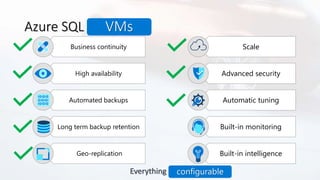
Azure SQL Database
Everything built-in!
Business continuity
High availability
Automated backups
Long term backup retention
Geo-replication
Scale
Advanced security
Automatic tuning
Built-in monitoring
Built-in intelligence
configurable
VMs
SQL IaaS VM Resource Provider
Azure VMs are now discoverable
on the new Azure SQL blade
in Azure Marketplace
Self-installed VMs registered with
RP now can access automation
features in
Azure Marketplace images
Self-installed VMs with RP
can be easily converted
to PAYG images
Self-installed VMs with RP
automatically indicate usage
of Azure Hybrid Benefit
Learn more aka.ms/sqlvm_rp and aka.ms/sqlvm_rp_documentation
Pre-migration phase
The tools
Pre-migration tools
• Database Migration Assistant
• PAL and performance counter
• Diagnostic queries
• MAP Toolkit
• Azure Monitor – Service Map solution
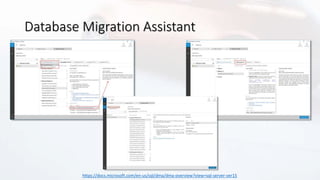
Database Migration Assistant
https://docs.microsoft.com/en-us/sql/dma/dma-overview?view=sql-server-ver15
Pre-migration tools
• Database Migration Assistant
• PAL and performance counter
• Diagnostic queries
• MAP Toolkit
• Azure Monitor – Service Map solution
Azure Monitor - Service Map solution
https://docs.microsoft.com/en-us/azure/azure-monitor/insights/service-map
Azure Monitor - Service Map solution
https://docs.microsoft.com/en-us/azure/azure-monitor/insights/service-map
Migration phase
Migration
BACPAC
Backup/Restore Export to BACPAC Azure DMS
https://dbatools.io
For everything else, there’s 😍
More info on this topic:
https://vimeo.com/321092681
Azure Database Migration Service
• Azure deployment
• Standard tier  offline migrations
• Premium tier  online migrations
• Hybrid deployment (preview)
Post-migration phase
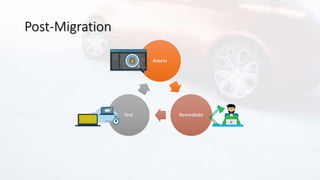
Post-Migration
Assess
RemediateTest
Post-Migration – Tools
• A/B Testing
• Database Experimentation Assistant (DEA)
• Workload Tools by @SpaghettiDBA
Record
workload
Replay on
source and
establish a
baseline
Replay on
destination
Compare
results
https://docs.microsoft.com/en-us/sql/dea/database-experimentation-assistant-overview?view=sql-server-ver15
https://github.com/spaghettidba/WorkloadTools
Post-Migration – Tools
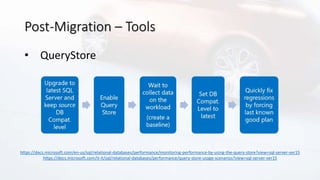
• QueryStore
https://docs.microsoft.com/en-us/sql/relational-databases/performance/monitoring-performance-by-using-the-query-store?view=sql-server-ver15
https://docs.microsoft.com/it-it/sql/relational-databases/performance/query-store-usage-scenarios?view=sql-server-ver15
Post-Migration – Tools
• Monitoring
• Azure Monitor (Azure SQL Analytics and VM Insights)
https://docs.microsoft.com/en-us/azure/azure-monitor/insights/azure-sql
https://docs.microsoft.com/en-us/azure/azure-monitor/insights/vminsights-overview
Useful links
• Azure SQL IaaS playground
• https://github.com/OmegaMadLab/SqlIaasVmPlayground
• SQL-optimized-VM ARM template
• https://github.com/OmegaMadLab/OptimizedSqlVm-v2
• Database migration guide
• https://aka.ms/datamigration
• DBATools PowerShell module
• https://dbatools.io
• SQL Server free workshops
• https://microsoft.github.io/sqlworkshops/
Let’s keep
in touch!
@OmegaMadLab
marco.obinu@omegamadlab.com
http://www.omegamadlab.com
https://github.com/OmegaMadLab
https://www.linkedin.com/in/marco-obinu-omegamadlab/
https://www.youtube.com/channel/UCpkBeQSscC1iBvpNP4VNTKQ

Sql Start! 2020 - SQL Server Lift & Shift su Azure

  • 1.
  • 2.
  • 3.
    Marco Obinu Advisory Engineer SoftJamS.p.A. @OmegaMadLab marco.obinu@omegamadlab.com http://www.omegamadlab.com https://github.com/OmegaMadLab https://www.linkedin.com/in/marco-obinu-omegamadlab/ https://www.youtube.com/channel/UCpkBeQSscC1iBvpNP4VNTKQ • Geek to the bone  • Microsoft Azure MVP Speaker Bio
  • 4.
    Once upon atime, a nerdy team was very good at administrating their old- fashioned on-premises databases…
  • 5.
    … suddenly, theBusiness came and said: We need to move to to the Cloud!
  • 6.
    After a little whileof discouragement…
  • 7.
    … dbas startedstudying…
  • 8.
    … and quicklydiscovered that Azure is the right choice for SQL Server workloads!
  • 9.
    Why Azure? Everything built-in! Businesscontinuity High availability Automated backups Long term backup retention Geo-replication Scale Advanced security Automatic tuning Built-in monitoring Built-in intelligence https://www.aka.ms/gigaom_benchmark
  • 10.
    Ok, Azure isthe right choice. But how can we move our workloads?
  • 11.
    Ok, Azure isthe right choice. But how can we move our workloads?
  • 12.
    Ok, Azure isthe right choice. But how can we move our workloads?
  • 13.
    Ok, Azure isthe right choice. But how can we move our workloads?
  • 14.
    Define your strategy Choosethe right pattern
  • 15.
    What’s Lift &Shift? Rehost– L&S No changes Quick & dirty TCO reduction 😐 Replatform Few changes Minimal effort TCO reduction 🙂 Refactor Rethink your app Requires time TCO reduction 🙂
  • 16.
  • 17.
    Migration path Pre-migration MigrationPost-Migration https://aka.ms/datamigration
  • 18.
    Migration path Pre-migration MigrationPost-Migration https://aka.ms/datamigration
  • 19.
  • 20.
    • Architectural design •Schema remediation plan • Hardware • CPU, RAM, DISK • Software • SQL Version, other components Define requirements • Compliance requirements • Network • Dependencies Environment integration • Feauture compatibility • Deprecated syntax Assess schema Pre-migration phase
  • 21.
    Know your enemy …orat least your Azure landing zone!
  • 22.
    What kind ofservice model? IaaS MANAGEDBYVENDOR APPLICATION HYPERVISOR OS RUNTIME DATA STORAGE NETWORK YOUMANAGE SERVERS MANAGEDBYVENDOR APPLICATION HYPERVISOR OS RUNTIME DATA STORAGE NETWORK PaaS YOUMANAGE SERVERS IaaS PaaS
  • 23.
    Azure SQL offering Databases •Fully managed service • Resource sharing between multiple databases to price optimize • Simplified performance management for multiple databases • Fully managed service PaaS SQL virtual machines • SQL Server and OS server access • Expansive SQL And OS version support • Automated manageability features for SQL Server IaaS
  • 24.
    Azure SQL VirtualMachinesBest for • The contract on my hardware is expiring • I have instances of SQL Server 2008 and 2008 R2 • I want to migrate to the cloud as fast as possible • I use third party software that needs OS-level access • I want to extend our on- premises apps to Azure • I need an unlimited number of DBs • I need ultra performance
  • 25.
    • I wantto build a modern multi- tenant SaaS app • I want to use a database with dedicated resources and predictable performance • I want to independently scale compute and storage in my database • I want to have unlimited databases storage when I need it • I want to build a mission critical application with highest uptime • I want to integrate Azure services into my applications Azure SQL DatabaseBest for
  • 26.
    Azure SQL offering Databases •Fully managed service • Resource sharing between multiple databases to price optimize • Simplified performance management for multiple databases • Fully managed service PaaS SQL virtual machines • SQL Server and OS server access • Expansive SQL And OS version support • Automated manageability features for SQL Server IaaS
  • 27.
    Azure SQL offering Databases •Fully managed service • Hyperscale storage (up to 100TB) • Serverless compute • Resource sharing between multiple databases to price optimize • Simplified performance management for multiple databases • Fully managed service PaaS SQL virtual machines • SQL Server and OS server access • Expansive SQL And OS version support • Automated manageability features for SQL Server IaaS Managed instances • SQL Server surface area (vast majority) • Native virtual network support • Fully managed service • Pre-provision compute resources for migration • Enables cost-efficient migration. • Ability to host smaller instances (2Vcore) • Currently in public preview
  • 28.
    Do you needany of these? …then, choose a Managed Instance!
  • 29.
    • I wantto migrate to Azure but don’t need OS access • I want to reduce overhead and stress of maintain high availability. • I need instance-scoped features like SQL Server Agent, Transactional Replication, and Database Mail Azure SQL managed instanceBest for
  • 30.
    Myth-busting Azure SQLVMs I want a VM because it’s easy to size
  • 31.
    Choosing a VMcan be a challenging task Family, series and size of the VM also affects: • Access to Premium Storage • Computing power • Disk throughput & number of data disks • Cache and Temporary disk size & throughput • Network bandwidth & Accelerated Network DS12v2 – 4 core 28 GB ACU 210-250 Cached tp. 16000/128 (144) Uncached tp. 12800/192 NIC/Mbps 4/3000 DS13v2 – 8 core 56 GB ACU 210-250 Cached tp. 32000/256 (288) Uncached tp. 25600/384 NIC/Mbps 8/6000 Esv3 – 8 core 64 GB ACU 160-180 Cached tp. 16000/128 (200) Uncached tp. 12800/192 NIC/Mbps 4/4000 Azure Storage (remote storage) Virtualization host OsDisk DataDisk DataDisk VM VM NIC vSwitch Host NIC BlobCache (local storage) TempDisk RAM cache SSD cache More info on this topic: https://youtu.be/7o80CJUtnh4
  • 32.
    Pre-packaged, bundled unitthat represents the database power Designed for predictable performance, but somewhat inflexible and limited in options DTU sizing offers simplicity of choice Storage Compute Storage Compute vCore model Independent scalability DTU model Simple, preconfigured This model allows you to independently choose compute and storage resources. It also allows you to use Azure Hybrid Benefit for SQL Server to gain cost savings. Best for customers who value flexibility, control and transparency PaaS: choosing the right purchasing model
  • 33.
    PaaS: vCore model •Simplicity • We remain committed to the DTU- based model and the simplicity it offers customers who want a pre- configured solution • Flexibility: • The vCore-based model reflects our commitment to customer choice and to simplify the hybrid benefit for customers migrating from on- premises • Customers pay for: • Service tier + number of vCores • Type and amount of data storage • Number of IO • Backup storage (RA-GRS) Service tier General purpose Business critical Hyperscale Best for Most budget-oriented workloads Critical business applications with high IO requirements. VLDB OLTP and HTAP workloads with highly scalable storage and read-scale requirements Deployment option Single / Elastic Pools Managed Instance Single / Elastic Pools Managed Instance Single Compute tiers Gen4: 1 to 24 vCore Gen5: 2 to 80 vCore Gen4: 4 to 24 vCore Gen5: 4 to 80 vCore Gen4: 1 to 24 vCore Gen5: 2 to 80 vCore Gen4: 4 to 24 vCore Gen5: 4 to 80 vCore Gen4: 1 to 24 vCore Gen5: 2 to 80 vCore Storage Premium remote Local SSD Local SSD Cache 5GB – 4TB per instance 32GB – 8TB per instance 5GB – 4TB per instance 32GB – 8TB per instance Scale from 5GB to 100TB of storage in 1GB increments In-Memory Not supported Supported Not supported Read-write IO <5-10ms for all data access <3ms for all data access <0.5ms for hot data access ~2ms otherwise Availability 2 replicas 3 replicas, 1 read-scale replica, zone-redundant HA Primary read/write replica + up to 4 read replicas Backups RA-GRS, 7-35 days (7 days by default) RA-GRS, 7-35 days (7 days by default) LRS, ZRS, RA-GRS, 7-35 days (7 days by default)
  • 34.
    • Scalable newtiered storage architecture • Architected for cloud • Fully compatible with Azure SQL Database • Scale compute and storage separately • Scale up in constant time. • Support for 100TB+ Infinite Log • Supports 4 Read replicas • Restore in constant time • No impact of backups on compute • No impact of checkpoints on compute • Accelerated database recovery Hyperscale Architecture Compute Page Servers Remote Data Storage P S S S Log Service 128GB128GB 1 32 128GB128GB 1 32 128GB128GB 1 32 128GB128GB 1 32
  • 35.
    SQL Database Serverless On-demandflexible scale Operate at the true rhythm of your business Fully managed & intelligent Focus on your applications, not your infrastructure Cost-effective Pay for performance. Period. Adapts compute resources to the workload without sacrificing performance Automatically pauses and resumes Fully-managed and intelligent database service Built-in 99.99% availability Pay only for compute resources you consume, on a per-second basis Further optimize costs with configurable compute thresholds Best for unpredictable and intermittent workloads on single databases, such as: Dev/test E-commerceLine of Business Min vcores CPU usage Inactive Paused Max vcores Vcores used Vcores billed
  • 36.
    Myth-busting Azure SQLVMs A single VM is enough! HA is provided by the Hypervisor
  • 37.
    SQL VM BCDR:roles and responsibilities • Microsoft • High availability at data center lever  • Customer • Everything  Microsoft Customer
  • 38.
  • 39.
    SQL Server HADRsolutions for Azure IaaS
  • 40.
    SQL Server HAsolutions for Azure IaaS Load balancer Clustered IP Local storage AG Replica Local storage Load balancer Clustered IP Storage replica Local storage Local storage S2D Load balancer Clustered IP Azure Premium File Share Load balancer Clustered IP Shared disk Availability Groups SQL FCI S2D SQL FCI PFS SQL FCI Shared Disk Preview
  • 41.
    PaaS BCDR: rolesand responsibilities • Microsoft • Geo-distrubuted service • Customer metadata protection and recovery • Transparent high availability and data protection from local platform failures • Automatic geo-distributed backups • Automatic data sync of geo-replicated databases • Platform compliance testing and certification • Alert to impacted customers during regional failures • Customer • Implementing retry login in your application • Detecting user errors and initiating point-in-time restore • Planning, database prioritization, and region selection for disaster recovery • Initiating geo-restore to selected region • Application disaster recovery drills Microsoft Customer
  • 42.
    PaaS: General PurposeArchitecture Redundant node Active compute node Azure storage account Scaled node Separation of compute and storage • Stateless compute VM • TempDB on local SSD • Data and log on remote Premium Storage Property Value vCores 1-80 Memory 5.1 GB/core IO latency 5-10ms IOPS Up to 40K Load Up to22MB/s
  • 43.
    • All databaseson local SSD (NVMe) • Failed node is replaced with the spare PaaS: Business Critical Architecture Secondary endpoint (read-only) Primary endpoint (read-write) Always On AG Super-fast SSD Secondary replicaPrimary replica Secondary replicaSecondary replicaSpare node Secondary replica Property Value vCores 1-80 Memory 5.1/7 GB/core IO latency < 3 ms IOPS Up to 110K Load 48 MB/s In-memory OLTP 3GB-130GB
  • 44.
    Myth-busting Azure SQLVMs PaaS is accessed via a public endpoint. A VM is more secure!
  • 45.
    Azure SQL Networking On-premdatacenter Vnet 10.0.0.0/16 Subnet 10.0.2.0/24 Vnet 192.168.0.0/16 Subnet 10.0.1.0/24 Subnet 10.0.2.0/24 Peering Vnet integration Service Endpoint Subnet 10.0.4.0/24 Private Link Private IP Subnet 10.0.5.0/24 Subnet 10.0.3.0/24
  • 46.
  • 47.
    Advanced Threat Detection AzureSQL DatabaseApps Audit Log Threat Detection (1) Turn on Threat Detection (3) Real-time actionable alerts (2) Possible threat to access / breach data
  • 48.
    Myth-busting Azure SQLVMs I want a VM to reuse my own licenses! And PaaS is so expensive…
  • 49.
    Licensing models andcost-saving options – pay attention to passive nodes!  AHB works also for Windows license  SQL 2019 licensing benefits  Require Software Assurance  License for DR node is «included»  Developer Edition
  • 50.
    Azure Hybrid Benefitfor SQL Server (PaaS) License trade-in values General purpose or Hyperscale vCore 4x General purpose or Hyperscale vCores Business critical vCore SQL Server cores with SA license vCores on Azure SQL Database SQL Server Enterprise Edition SQL Server Standard Edition  Take an inventory of on-premises licenses to determine potential for conversion  Convert on-premises cores to vCores to maximize value of investments
  • 51.
    A simple comparisonwith the public calculator Service type Region Description Estimated monthly cost Virtual Machines West Europe 2 D8s v3 (8 vCPU(s), 32 GB RAM) x 730 Hours; Windows – (OS Only); Pay as you go; 2 managed OS disks – P10 €1.080,64 Storage Accounts West Europe Managed Disks, Premium SSD, P20 Disk Type 4 Disks, Pay as you go €271.68 Azure SQL Database West Europe Managed Instance, vCore Purchase Model, General Purpose Tier, Single Instance, Provisioned, Gen 5, 1 8 vCore instance(s) x 730 Hours, 1,024 GB Storage, 0 GB Backup Storage €939,10 VM vs Managed Instance Service type Region Description Estimated monthly cost Virtual Machines West Europe 2 D8s v3 (8 vCPU(s), 32 GB RAM) x 730 Hours; Windows – SQL Server; Pay as you go; 2 managed OS disks – P10 €2.065,61 Storage Accounts West Europe Managed Disks, Premium SSD, P20 Disk Type 4 Disks, Pay as you go €271.68 Azure SQL Database West Europe Managed Instance, vCore Purchase Model, General Purpose Tier, Single Instance, Provisioned, Gen 5, 1 8 vCore instance(s) x 730 Hours, 1,024 GB Storage, 0 GB Backup Storage €1.431,42 With Azure Hybrid Benefit Pay-as-you-go https://azure.microsoft.com/it-it/pricing/calculator/
  • 52.
    Did we misssomething??
  • 53.
    Myth-busting Azure SQLVMs I really need a VM, sob 😥 I’ll miss all that managed features…
  • 54.
    Azure SQL Database Everythingbuilt-in! Business continuity High availability Automated backups Long term backup retention Geo-replication Scale Advanced security Automatic tuning Built-in monitoring Built-in intelligence
  • 55.
    Azure SQL Database Everythingbuilt-in! Business continuity High availability Automated backups Long term backup retention Geo-replication Scale Advanced security Automatic tuning Built-in monitoring Built-in intelligence configurable VMs
  • 56.
    SQL IaaS VMResource Provider Azure VMs are now discoverable on the new Azure SQL blade in Azure Marketplace Self-installed VMs registered with RP now can access automation features in Azure Marketplace images Self-installed VMs with RP can be easily converted to PAYG images Self-installed VMs with RP automatically indicate usage of Azure Hybrid Benefit Learn more aka.ms/sqlvm_rp and aka.ms/sqlvm_rp_documentation
  • 57.
  • 58.
    Pre-migration tools • DatabaseMigration Assistant • PAL and performance counter • Diagnostic queries • MAP Toolkit • Azure Monitor – Service Map solution
  • 59.
  • 60.
    Pre-migration tools • DatabaseMigration Assistant • PAL and performance counter • Diagnostic queries • MAP Toolkit • Azure Monitor – Service Map solution
  • 61.
    Azure Monitor -Service Map solution https://docs.microsoft.com/en-us/azure/azure-monitor/insights/service-map
  • 62.
    Azure Monitor -Service Map solution https://docs.microsoft.com/en-us/azure/azure-monitor/insights/service-map
  • 63.
  • 64.
    Migration BACPAC Backup/Restore Export toBACPAC Azure DMS https://dbatools.io For everything else, there’s 😍
  • 65.
    More info onthis topic: https://vimeo.com/321092681 Azure Database Migration Service • Azure deployment • Standard tier  offline migrations • Premium tier  online migrations • Hybrid deployment (preview)
  • 66.
  • 67.
  • 68.
    Post-Migration – Tools •A/B Testing • Database Experimentation Assistant (DEA) • Workload Tools by @SpaghettiDBA Record workload Replay on source and establish a baseline Replay on destination Compare results https://docs.microsoft.com/en-us/sql/dea/database-experimentation-assistant-overview?view=sql-server-ver15 https://github.com/spaghettidba/WorkloadTools
  • 69.
    Post-Migration – Tools •QueryStore https://docs.microsoft.com/en-us/sql/relational-databases/performance/monitoring-performance-by-using-the-query-store?view=sql-server-ver15 https://docs.microsoft.com/it-it/sql/relational-databases/performance/query-store-usage-scenarios?view=sql-server-ver15
  • 70.
    Post-Migration – Tools •Monitoring • Azure Monitor (Azure SQL Analytics and VM Insights) https://docs.microsoft.com/en-us/azure/azure-monitor/insights/azure-sql https://docs.microsoft.com/en-us/azure/azure-monitor/insights/vminsights-overview
  • 71.
    Useful links • AzureSQL IaaS playground • https://github.com/OmegaMadLab/SqlIaasVmPlayground • SQL-optimized-VM ARM template • https://github.com/OmegaMadLab/OptimizedSqlVm-v2 • Database migration guide • https://aka.ms/datamigration • DBATools PowerShell module • https://dbatools.io • SQL Server free workshops • https://microsoft.github.io/sqlworkshops/
  • 72.

Editor's Notes

  • #16 😐
  • #25 2 min Does your application require custom VM or SQL config? DB engine version choice, feature compatibility with SQL box, app portability, access to VM/OS * ESU worth 75% of license every year for the next three years after EOS; ** Applicable to Azure Marketplace images, customers using customer SQL Server 2008/R2 custom images can download the ESU for free and manually apply. VMs: Allscripts https://customers.microsoft.com/en-us/story/allscripts-partner-professional-services-azure Move 600 VMs to Azure within a few weeks. Some time later moving some to MI Rehost SQL Server 2008 and 2008 R2 in Azure Virtual Machines to get three years of Extended Security Updates at no additional charge and upgrade to a newer version when ready 435 percent overall return on an Azure IaaS investment over five years (for a composite organization based on the interviewed customers) (Forrester Consulting) https://azure.microsoft.com/en-us/overview/azure-vs-aws/cost-savings/#sql-server-iaas
  • #26 2 min Does your application require custom VM or SQL config? DB engine version choice, feature compatibility with SQL box, app portability, access to VM/OS * ESU worth 75% of license every year for the next three years after EOS; ** Applicable to Azure Marketplace images, customers using customer SQL Server 2008/R2 custom images can download the ESU for free and manually apply. VMs: Allscripts https://customers.microsoft.com/en-us/story/allscripts-partner-professional-services-azure Move 600 VMs to Azure within a few weeks. Some time later moving some to MI Rehost SQL Server 2008 and 2008 R2 in Azure Virtual Machines to get three years of Extended Security Updates at no additional charge and upgrade to a newer version when ready 435 percent overall return on an Azure IaaS investment over five years (for a composite organization based on the interviewed customers) (Forrester Consulting) https://azure.microsoft.com/en-us/overview/azure-vs-aws/cost-savings/#sql-server-iaas
  • #30 2 min Does your application require custom VM or SQL config? DB engine version choice, feature compatibility with SQL box, app portability, access to VM/OS * ESU worth 75% of license every year for the next three years after EOS; ** Applicable to Azure Marketplace images, customers using customer SQL Server 2008/R2 custom images can download the ESU for free and manually apply. VMs: Allscripts https://customers.microsoft.com/en-us/story/allscripts-partner-professional-services-azure Move 600 VMs to Azure within a few weeks. Some time later moving some to MI Rehost SQL Server 2008 and 2008 R2 in Azure Virtual Machines to get three years of Extended Security Updates at no additional charge and upgrade to a newer version when ready 435 percent overall return on an Azure IaaS investment over five years (for a composite organization based on the interviewed customers) (Forrester Consulting) https://azure.microsoft.com/en-us/overview/azure-vs-aws/cost-savings/#sql-server-iaas
  • #33 Overview: Azure SQL Database enables you to easily purchase fully managed PaaS database engine that fits your performance and cost needs. Depending on the deployment model of Azure SQL Database, you can select the purchasing model that fits your needs: Talking Points: Azure SQL Database give you flexible purchasing models to have simple preconfigured compute & storage or independent control over compute & storage. vCore model. This model allows you to independently choose compute and storage resources. It also allows you to use Azure Hybrid Benefit for SQL Server to gain cost savings. Best for customers who value flexibility; control and transparency Customers can select compute and storage independently Allows customers to right-size their compute requirements in the cloud vCore sizing offers flexibility of choice Database Transaction Unit (DTU) model. Bundled measure of compute, storage and IO resources. Best for customers who want simple, pre-configured resource options Reference https://docs.microsoft.com/en-us/azure/sql-database/sql-database-service-tiers
  • #36 Azure SQL Database serverless is our answer to cost-effectively resourcing these types of unpredictable and intermittent workloads. It is a dynamically scaling, on-demand version of Azure SQL Database that eliminates the complexity of resourcing and managing unpredictable workloads. Simply create a serverless database and connect your application, with no upfront resource configuration required. Serverless SQL databases automatically pause, resume and scale compute based upon your app’s requirements, making them particularly cost effective for variable or unpredictable workloads – or when you’re simply unsure of your requirements. With resources available on-demand, serverless SQL databases optimize costs with pay per-second billing that aligns with the app’s performance, so you only pay for the compute resources you use . Built upon the SQL Server architecture, serverless SQL databases are fully-managed, always up to date and highly available with a 99.99% uptime guarantee. Combined with built-in intelligence to optimize database performance and security, serverless SQL Databases help you be more productive so you can focus more on what you do best, building great apps faster and more cost effectively.