Webinar:
Make Your Storage Work For You
VAAI and ODX offload up to 30% of disk
operations to the SAN
2
About Aidan Finn
• @joe_elway
• Hyper-V MVP
• Technical Sales Lead with MicroWarehouse (http://www.mwh.ie)
• Irish technology distributor
• Learning, evangelizing & teaching Microsoft infrastructure to Microsoft
partners
• Background in Windows Server & desktop management, virtualisation, Azure
IaaS, and IT infrastructure
• Blogging & writing:
• http://www.aidanfinn.com
• http://www.petri.com/author/aidan-finn
• Published author/contributor of several books
PRESENTATION
3
About Max Kolomyeytsev
• StarWind Virtual SAN Product Manager
• 8+ years of QA and technical support
@ StarWind
• 10+ of professional IT experience
• Host of the StarWind Webinar series
PRESENTATION
ODX and the Microsoft Cloud
5
Desires
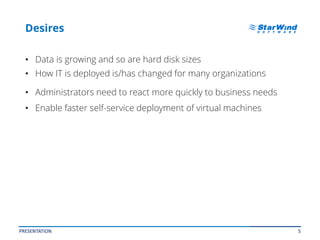
• Data is growing and so are hard disk sizes
• How IT is deployed is/has changed for many organizations
• Administrators need to react more quickly to business needs
• Enable faster self-service deployment of virtual machines
PRESENTATION
6
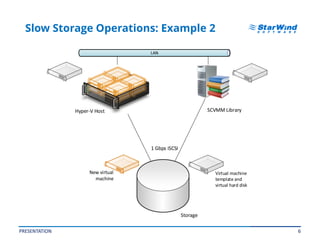
Slow Storage Operations: Example 2
PRESENTATION
1 Gbps iSCSI
Hyper-V Host
Storage
SCVMM Library
Virtual machine
template and
virtual hard disk
New virtual
machine
7
Offloaded Data Transfer (ODX)
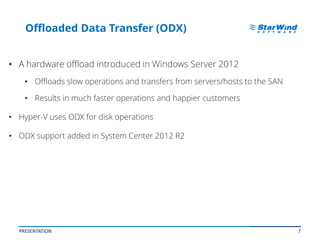
• A hardware offload introduced in Windows Server 2012
• Offloads slow operations and transfers from servers/hosts to the SAN
• Results in much faster operations and happier customers
• Hyper-V uses ODX for disk operations
• ODX support added in System Center 2012 R2
PRESENTATION
8
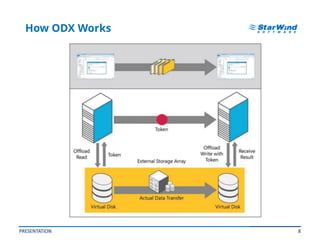
How ODX Works
PRESENTATION
9
Benefits of ODX for Hyper-V
• Much faster disk operations, such as:
• Creating fixed-size virtual hard disks
• Extending fixed-size virtual hard disks
• Live Storage Migration
• Merging checkpoints (formerly AKA Hyper-V snapshots)
• Clouds
• Creating virtual machines from a library
• Faster self-service provisioning of services
PRESENTATION
10
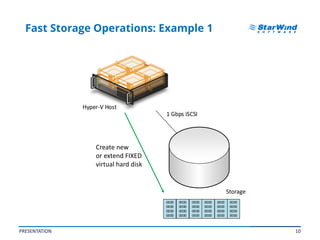
Fast Storage Operations: Example 1
PRESENTATION
1 Gbps iSCSI
Hyper-V Host
Storage
0000
0000
0000
0000
0000
0000
0000
0000
0000
0000
0000
0000
0000
0000
0000
0000
0000
0000
0000
0000
0000
0000
0000
0000
Create new
or extend FIXED
virtual hard disk
11
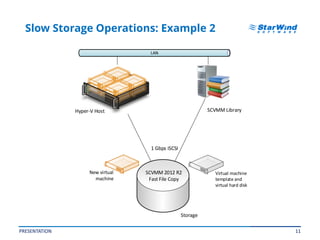
Slow Storage Operations: Example 2
PRESENTATION
1 Gbps iSCSI
Hyper-V Host
Storage
SCVMM Library
Virtual machine
template and
virtual hard disk
New virtual
machine
SCVMM 2012 R2
Fast File Copy
12
ODX Hardware Requirements
• A SAN that supports ODX:
• iSCSI
• Fibre channel
• Fibre channel over Ethernet (FCoE)
• SAS
• Always good practice to upgrade firmware and drivers throughout
the entire storage stack
• Check with SAN vendor
• From HBAs to disks
PRESENTATION
13
ODX Software Requirements
• Windows Server 2012, Windows 8, or later
• System Center 2012 R2 (for Fast File Copy VM deployment)
• Opted-in filter drivers (anti-virus, encryption, etc)
• The affected volumes:
• Unencrypted basic (not dynamic) partition
• NTFS
• Disable Data Deduplication and BitLocker on the volumes
• No Storage Spaces
• Files:
• 256 KB or larger
• Preferably not highly fragmented
PRESENTATION
14
Interesting Designs
• Virtual machine Guest OS can support ODX:
• Guest OS iSCSI initiator is connected to LUN on ODX-capable SAN
• Virtual machine is connected to LUN on ODX-capable SAN via virtual
fibre channel
• Hyper-V can use ODX over SMB 3.0
• File server or SOFS is connected to ODX capable SAN
• Inter-SAN data transfers
• Copy data between LUNs in different SANs using ODX
• Requires storage controller support for inter-SAN ODX transfers
PRESENTATION
15
Caution!
• Not all SANs offer the same level of support for ODX
• ODX might be “supported” but unstable
• Disable ODX:
Set-ItemProperty
hklm:systemcurrentcontrolsetcontrolfilesystem -Name
"FilterSupportedFeaturesMode" -Value 1
• Some models of SAN offer great performance gains from ODX
• Some barely show any benefit at all
PRESENTATION
16
Just 2 VMware servers to enable
Fault Tolerance on the entire system.
Really.
US Headquarters EMEA and APAC
1-617-449-7717
1-617-507-5845
+44-0-2071936727, +44-0-2071936350
+330-977197857 (French)
1-866-790-2646
Customer Support Portal:
Support Forum:
Sales:
General Information:
http://www.starwindsoftware.com/support
http://www.starwindsoftware.com/forums
sales@starwindsoftware.com
info@starwindsoftware.com
Contacts
PRESENTATION

Make your storage work for you: VAAI and ODX offload up to 30% of disk operations to the SAN

  • 1.
    Webinar: Make Your StorageWork For You VAAI and ODX offload up to 30% of disk operations to the SAN
  • 2.
    2 About Aidan Finn •@joe_elway • Hyper-V MVP • Technical Sales Lead with MicroWarehouse (http://www.mwh.ie) • Irish technology distributor • Learning, evangelizing & teaching Microsoft infrastructure to Microsoft partners • Background in Windows Server & desktop management, virtualisation, Azure IaaS, and IT infrastructure • Blogging & writing: • http://www.aidanfinn.com • http://www.petri.com/author/aidan-finn • Published author/contributor of several books PRESENTATION
  • 3.
    3 About Max Kolomyeytsev •StarWind Virtual SAN Product Manager • 8+ years of QA and technical support @ StarWind • 10+ of professional IT experience • Host of the StarWind Webinar series PRESENTATION
  • 4.
    ODX and theMicrosoft Cloud
  • 5.
    5 Desires • Data isgrowing and so are hard disk sizes • How IT is deployed is/has changed for many organizations • Administrators need to react more quickly to business needs • Enable faster self-service deployment of virtual machines PRESENTATION
  • 6.
    6 Slow Storage Operations:Example 2 PRESENTATION 1 Gbps iSCSI Hyper-V Host Storage SCVMM Library Virtual machine template and virtual hard disk New virtual machine
  • 7.
    7 Offloaded Data Transfer(ODX) • A hardware offload introduced in Windows Server 2012 • Offloads slow operations and transfers from servers/hosts to the SAN • Results in much faster operations and happier customers • Hyper-V uses ODX for disk operations • ODX support added in System Center 2012 R2 PRESENTATION
  • 8.
  • 9.
    9 Benefits of ODXfor Hyper-V • Much faster disk operations, such as: • Creating fixed-size virtual hard disks • Extending fixed-size virtual hard disks • Live Storage Migration • Merging checkpoints (formerly AKA Hyper-V snapshots) • Clouds • Creating virtual machines from a library • Faster self-service provisioning of services PRESENTATION
  • 10.
    10 Fast Storage Operations:Example 1 PRESENTATION 1 Gbps iSCSI Hyper-V Host Storage 0000 0000 0000 0000 0000 0000 0000 0000 0000 0000 0000 0000 0000 0000 0000 0000 0000 0000 0000 0000 0000 0000 0000 0000 Create new or extend FIXED virtual hard disk
  • 11.
    11 Slow Storage Operations:Example 2 PRESENTATION 1 Gbps iSCSI Hyper-V Host Storage SCVMM Library Virtual machine template and virtual hard disk New virtual machine SCVMM 2012 R2 Fast File Copy
  • 12.
    12 ODX Hardware Requirements •A SAN that supports ODX: • iSCSI • Fibre channel • Fibre channel over Ethernet (FCoE) • SAS • Always good practice to upgrade firmware and drivers throughout the entire storage stack • Check with SAN vendor • From HBAs to disks PRESENTATION
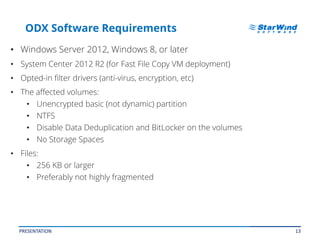
  • 13.
    13 ODX Software Requirements •Windows Server 2012, Windows 8, or later • System Center 2012 R2 (for Fast File Copy VM deployment) • Opted-in filter drivers (anti-virus, encryption, etc) • The affected volumes: • Unencrypted basic (not dynamic) partition • NTFS • Disable Data Deduplication and BitLocker on the volumes • No Storage Spaces • Files: • 256 KB or larger • Preferably not highly fragmented PRESENTATION
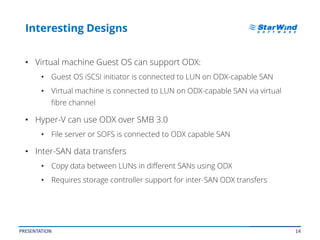
  • 14.
    14 Interesting Designs • Virtualmachine Guest OS can support ODX: • Guest OS iSCSI initiator is connected to LUN on ODX-capable SAN • Virtual machine is connected to LUN on ODX-capable SAN via virtual fibre channel • Hyper-V can use ODX over SMB 3.0 • File server or SOFS is connected to ODX capable SAN • Inter-SAN data transfers • Copy data between LUNs in different SANs using ODX • Requires storage controller support for inter-SAN ODX transfers PRESENTATION
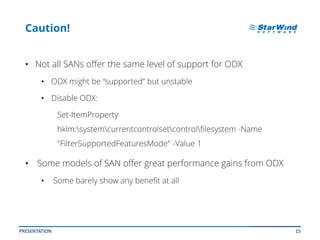
  • 15.
    15 Caution! • Not allSANs offer the same level of support for ODX • ODX might be “supported” but unstable • Disable ODX: Set-ItemProperty hklm:systemcurrentcontrolsetcontrolfilesystem -Name "FilterSupportedFeaturesMode" -Value 1 • Some models of SAN offer great performance gains from ODX • Some barely show any benefit at all PRESENTATION
  • 16.
    16 Just 2 VMwareservers to enable Fault Tolerance on the entire system. Really. US Headquarters EMEA and APAC 1-617-449-7717 1-617-507-5845 +44-0-2071936727, +44-0-2071936350 +330-977197857 (French) 1-866-790-2646 Customer Support Portal: Support Forum: Sales: General Information: http://www.starwindsoftware.com/support http://www.starwindsoftware.com/forums sales@starwindsoftware.com info@starwindsoftware.com Contacts PRESENTATION