K8s Resource Allocation
Victor Morales
Agenda
• Lifecycle of a Pod
• Request and Limits
• Quality of Service Classes
• Best Effort
• Burstable
• Guaranteed
• Demo – Virtlet VM with Burstable QoS class
• Demo – Virtlet VM with Guaranteed QoS class
• CPU Management Policies
Lifecycle of a Pod
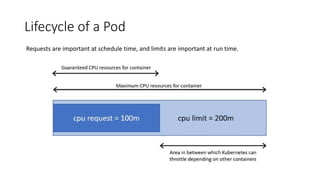
Requests are important at schedule time, and limits are important at run time.
Requests and Limits
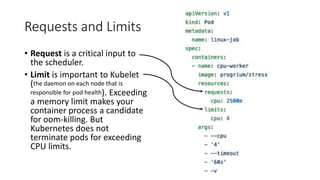
• Request is a critical input to
the scheduler.
• Limit is important to Kubelet
(the daemon on each node that is
responsible for pod health). Exceeding
a memory limit makes your
container process a candidate
for oom-killing. But
Kubernetes does not
terminate pods for exceeding
CPU limits.
Quality of Service Classes
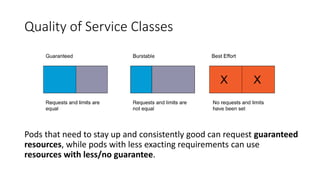
Pods that need to stay up and consistently good can request guaranteed
resources, while pods with less exacting requirements can use
resources with less/no guarantee.
Best Effort
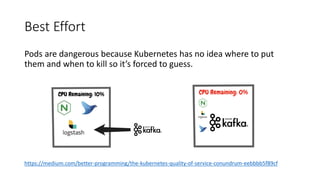
Pods are dangerous because Kubernetes has no idea where to put
them and when to kill so it’s forced to guess.
https://medium.com/better-programming/the-kubernetes-quality-of-service-conundrum-eebbbb5f89cf
Burstable
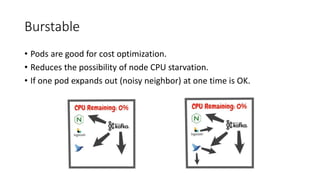
• Pods are good for cost optimization.
• Reduces the possibility of node CPU starvation.
• If one pod expands out (noisy neighbor) at one time is OK.
Guarantee
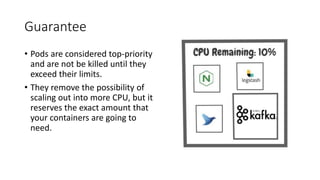
• Pods are considered top-priority
and are not be killed until they
exceed their limits.
• They remove the possibility of
scaling out into more CPU, but it
reserves the exact amount that
your containers are going to
need.
Demo
https://github.com/electrocucaracha/k8s-SuspendResume-demo
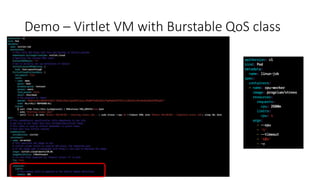
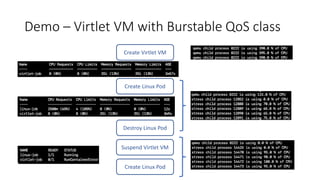
Demo – Virtlet VM with Burstable QoS class
Create Virtlet VM
Create Linux Pod
Destroy Linux Pod
Suspend Virtlet VM
Create Linux Pod
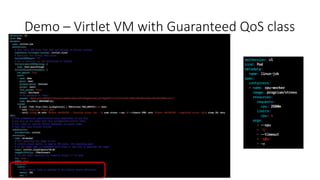
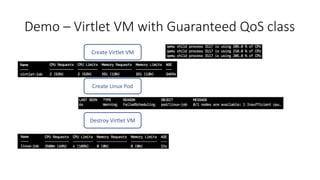
Demo – Virtlet VM with Guaranteed QoS class
Create Virtlet VM
Create Linux Pod
Destroy Virtlet VM
Resources
Requests and Limits
• https://www.noqcks.io/notes/2018/02/03/understanding-kubernetes-resources/
• https://mcrthr.com/kubernetes-cpu-limits
• https://medium.com/@betz.mark/understanding-resource-limits-in-kubernetes-memory-
6b41e9a955f9
• https://medium.com/@betz.mark/understanding-resource-limits-in-kubernetes-cpu-time-
9eff74d3161b
Quality of Service
• https://medium.com/better-programming/the-kubernetes-quality-of-service-conundrum-
eebbbb5f89cf
• https://www.weave.works/blog/kubernetes-pod-resource-limitations-and-quality-of-service
• https://medium.com/google-cloud/quality-of-service-class-qos-in-kubernetes-bb76a89eb2c6
• https://kubernetes.io/docs/tasks/configure-pod-container/quality-service-pod/
Backup
CPU Management Policies & CriticalPodAdmissionHandler
CPU Management Policies
Enables better placement of sensitive workloads in the Kubelet by
allocating exclusive CPUs to certain pod containers.
• none: Provides no affinity beyond what the OS scheduler does
automatically (CFS quota). Default
• static: Allocates exclusive CPUs to pod containers in the Guaranteed
QoS class with integer CPUs requests.
https://kubernetes.io/docs/tasks/administer-cluster/cpu-management-policies/
https://kubernetes.io/blog/2018/07/24/feature-highlight-cpu-manager/
CriticalPodAdmissionHandler
IsCriticalPod returns true if the pod bears the critical pod annotation key or if pod's priority
is greater than or equal to SystemCriticalPriority. Both the default scheduler and the
kubelet use this function to make admission and scheduling decisions.
CriticalPodAdmissionHandler is an AdmissionFailureHandler that handles admission failure
for Critical Pods. If the ONLY admission failures are due to insufficient resources, then
CriticalPodAdmissionHandler evicts pods so that the critical pod can be admitted. For
evictions, the CriticalPodAdmissionHandler evicts a set of pods that frees up the required
resource requests. The set of pods is designed to minimize impact, and is prioritized
according to the ordering:
minimal impact for guaranteed pods > minimal impact for burstable pods > minimal impact
for besteffort pods.
minimal impact is defined as follows: fewest pods evicted > fewest total requests of pods.
finding the fewest total requests of pods is considered besteffort.

Kubernetes Resources Allocation

  • 1.
  • 2.
    Agenda • Lifecycle ofa Pod • Request and Limits • Quality of Service Classes • Best Effort • Burstable • Guaranteed • Demo – Virtlet VM with Burstable QoS class • Demo – Virtlet VM with Guaranteed QoS class • CPU Management Policies
  • 3.
    Lifecycle of aPod Requests are important at schedule time, and limits are important at run time.
  • 4.
    Requests and Limits •Request is a critical input to the scheduler. • Limit is important to Kubelet (the daemon on each node that is responsible for pod health). Exceeding a memory limit makes your container process a candidate for oom-killing. But Kubernetes does not terminate pods for exceeding CPU limits.
  • 5.
    Quality of ServiceClasses Pods that need to stay up and consistently good can request guaranteed resources, while pods with less exacting requirements can use resources with less/no guarantee.
  • 6.
    Best Effort Pods aredangerous because Kubernetes has no idea where to put them and when to kill so it’s forced to guess. https://medium.com/better-programming/the-kubernetes-quality-of-service-conundrum-eebbbb5f89cf
  • 7.
    Burstable • Pods aregood for cost optimization. • Reduces the possibility of node CPU starvation. • If one pod expands out (noisy neighbor) at one time is OK.
  • 8.
    Guarantee • Pods areconsidered top-priority and are not be killed until they exceed their limits. • They remove the possibility of scaling out into more CPU, but it reserves the exact amount that your containers are going to need.
  • 9.
  • 10.
    Demo – VirtletVM with Burstable QoS class
  • 11.
    Demo – VirtletVM with Burstable QoS class Create Virtlet VM Create Linux Pod Destroy Linux Pod Suspend Virtlet VM Create Linux Pod
  • 12.
    Demo – VirtletVM with Guaranteed QoS class
  • 13.
    Demo – VirtletVM with Guaranteed QoS class Create Virtlet VM Create Linux Pod Destroy Virtlet VM
  • 14.
    Resources Requests and Limits •https://www.noqcks.io/notes/2018/02/03/understanding-kubernetes-resources/ • https://mcrthr.com/kubernetes-cpu-limits • https://medium.com/@betz.mark/understanding-resource-limits-in-kubernetes-memory- 6b41e9a955f9 • https://medium.com/@betz.mark/understanding-resource-limits-in-kubernetes-cpu-time- 9eff74d3161b Quality of Service • https://medium.com/better-programming/the-kubernetes-quality-of-service-conundrum- eebbbb5f89cf • https://www.weave.works/blog/kubernetes-pod-resource-limitations-and-quality-of-service • https://medium.com/google-cloud/quality-of-service-class-qos-in-kubernetes-bb76a89eb2c6 • https://kubernetes.io/docs/tasks/configure-pod-container/quality-service-pod/
  • 15.
    Backup CPU Management Policies& CriticalPodAdmissionHandler
  • 16.
    CPU Management Policies Enablesbetter placement of sensitive workloads in the Kubelet by allocating exclusive CPUs to certain pod containers. • none: Provides no affinity beyond what the OS scheduler does automatically (CFS quota). Default • static: Allocates exclusive CPUs to pod containers in the Guaranteed QoS class with integer CPUs requests. https://kubernetes.io/docs/tasks/administer-cluster/cpu-management-policies/ https://kubernetes.io/blog/2018/07/24/feature-highlight-cpu-manager/
  • 17.
    CriticalPodAdmissionHandler IsCriticalPod returns trueif the pod bears the critical pod annotation key or if pod's priority is greater than or equal to SystemCriticalPriority. Both the default scheduler and the kubelet use this function to make admission and scheduling decisions. CriticalPodAdmissionHandler is an AdmissionFailureHandler that handles admission failure for Critical Pods. If the ONLY admission failures are due to insufficient resources, then CriticalPodAdmissionHandler evicts pods so that the critical pod can be admitted. For evictions, the CriticalPodAdmissionHandler evicts a set of pods that frees up the required resource requests. The set of pods is designed to minimize impact, and is prioritized according to the ordering: minimal impact for guaranteed pods > minimal impact for burstable pods > minimal impact for besteffort pods. minimal impact is defined as follows: fewest pods evicted > fewest total requests of pods. finding the fewest total requests of pods is considered besteffort.

Editor's Notes

  • #4 At a very high level, the scheduler controller maintains a queue of pods to be deployed for the cluster and then for each workload in the queue looks for a node with enough available compute resources to fulfill the `request` for that pod and assigns the pod to that node. Limits are ignored during scheduling. Once a pod is scheduled to a node, the Kubelet on that node picks up the change, and installs and starts the pod. In Kubernetes versions < 1.8 pod priority is ignored by the scheduler, in 1.11 the above story is modified so that pods are scheduled in priority order. In 1.8-1.10 this feature was in alpha and had to be explicitly enabled in the Kubernetes config.
  • #5 What happens if you don’t set these properties on your container, or set them to inaccurate values? As with memory, if you set a limit but don’t set a request kubernetes will default the request to the limit. This can be fine if you have very good knowledge of how much cpu time your workload requires. How about setting a request with no limit? In this case kubernetes is able to accurately schedule your pod, and the kernel will make sure it gets at least the number of shares asked for, but your process will not be prevented from using more than the amount of cpu requested, which will be stolen from other process’s cpu shares when available. Setting neither a request nor a limit is the worst-case scenario: the scheduler has no idea what the container needs, and the process’s use of cpu shares is unbounded, which may affect the node adversely. And that’s a good segue into the last thing I want to talk about: ensuring default limits in a namespace.
  • #12 RunContainerError https://github.com/kubernetes/kubernetes/blob/v1.15.3/pkg/kubelet/container/sync_result.go#L38
  • #17 When CPU manager is enabled with the “static” policy, it manages a shared pool of CPUs. Initially this shared pool contains all the CPUs in the compute node. When a container with integer CPU request in a Guaranteed pod is created by the Kubelet, CPUs for that container are removed from the shared pool and assigned exclusively for the lifetime of the container. Other containers are migrated off these exclusively allocated CPUs. All non-exclusive-CPU containers (Burstable, BestEffort and Guaranteed with non-integer CPU) run on the CPUs remaining in the shared pool. When a container with exclusive CPUs terminates, its CPUs are added back to the shared CPU pool.
  • #18 http://www.programmersought.com/article/32681342263/ https://github.com/kubernetes/kubernetes/blob/v1.15.3/pkg/kubelet/types/pod_update.go#L145-L160 https://github.com/kubernetes/kubernetes/blob/v1.15.3/pkg/kubelet/preemption/preemption.go#L61-L88