



1
designed by 
Dominik Pacholczyk 
2
INDEX 
3 
1....INTRODUCTION 
2....OVERVIEW 
How They All Relate 
Guiding Principles 
Objective Processes In a Subjective Environment 
3....PRODUCT DEFINITION 
Why Product Definition Matters 
The Kickoff Meeting 
Lean & Business Model Canvas 
Concept Maps & Mockups 
Defining Your Vision 
4....RESEARCH 
Why Research Matters 
Market Segmentation Report 
Survey Results 
Heuristic Evaluations 
User Research Report 
Analytics Reports 
Research, Test, Validate 
5....ANALYSIS 
Why Analysis is Important 
Personas 
User Stories & Job Stories 
Defining Your Vision 
User Task Matrix 
User Content Matrix
Prioritized Requirements Spreadsheet 
Know Thy User 
4 
6....DESIGN 
Iterated Sketching & Wireframing 
Detailed Mockups 
Prototypes 
Design Specifications 
Define, Design and Refine 
7....IMPLEMENTATION 
Build It 
Eat Your Own Dogfood 
Feed Your Dogfood to Others 
Use What Works and Scrap the Rest 
8....LIVE PRODUCT 
Create a Product Launch Plan 
Create content to empower customers and sales teams 
Pack a punch with your product launch 
9....MEASURE & ITERATE 
Design a customer feedback loop 
Focus on the right metrics for the right insights 
The product circle of life never ends 
10. ABOUT UXPIN
CHAPTER ONE 
Introduction 
A quick note from the authors 
5
UX Design Documentation is easily misunderstood as paperwork for the sake of 
deliverables. Whether you choose a Lean UX process with light documentation or a 
more detailed approach, you need to make sure that the documentation moves the 
design forward instead of just being a paper trail. 
Documentation is much more than a pile of papers for occasional browsing. It is 
product narration, a formalized vision, and a compass for when things become 
unpredictable. Smart documentation brings people together and gives form to 
ideas. Documentation should inspire, not dictate. 
In this book, we’ll share a wide breadth of expert commentary, theories, practices, 
and real-life examples of successful documentation. To name a few, we’ve included 
advice from product and design experts like Jeff Gothelf, Josh Porter, Brandon 
Schauer, Ian McAllister, Kristofer Layons, Ash Maurya, Marty Cagan, Neil Patel, 
Ryan Hoover, Jason Fried, Andrew Chen, and more. We’ll discuss basic concepts 
like how all documentation can be planned for each of the 7 phases of product 
design. For more experienced readers, we’ve included how to incorporate group 
activities into kickoff, how to create realistic personas and detailed experience maps, 
and even how to use case studies and videos to launch products. Our hope is that it 
helps you see documentation in a new strategic light. 
When you think about it, design documentation helps keep today’s successful 
companies on track with new designs and product releases. We’ll look at how highly 
successful companies like Apple, MailChimp, Hubspot, Salesforce, AirBnB, 
Mozilla, ZURB, Google, Amazon, AppSumo, and Atlassian, among others, used 
different documentation tactics that all suited their own unique needs. We’ve also 
included our own preferences and processes, and outlined how UXPin helps build 
documentation into the design. 
6
We’d love your thoughts on what we’ve written. And feel free to include anyone else 
in the discussion by sharing this e-book. 
7 
For the love of structure, 
Chris Bank 
(co-written by Jerry Cao) 
Chris Bank is the growth lead @UXPin. He also 
led growth @Lettuce (acquired by Intuit),@MyFit 
(acquired by Naviance), and his own startup 
@Epostmarks (USPS strategic partner), and launched 
@Kaggle in the B2B tech vertical. In his downtime, 
he rock climbs, motorcycles, designs apps, travels, 
and reads. Visit my website and Follow me on Twitter. 
Jerry Cao is a content strategist at UXPin where he gets 
to put his overly active imagination to paper every 
day. In a past life, he developed content strategies for 
clients at Brafton and worked in traditional advertising 
at DDB San Francisco. In his spare time he enjoys 
playing electric guitar, watching foreign horror films, and 
expanding his knowledge of random facts. 
Follow me on Twitter.
CHAPTER TWO 
An Overview of UX Design 
Process & Documentation 
A Summary Of The Documents & Deliverables At Every Product Design Stage 
8
Documentation is instrumental for concepting, designing, creating and measuring 
the performance of products. But it shouldn’t be done just for the sake of 
maintenance. After all, there’s nothing about a thick stack of paperwork which 
resembles the experience of your real product. 
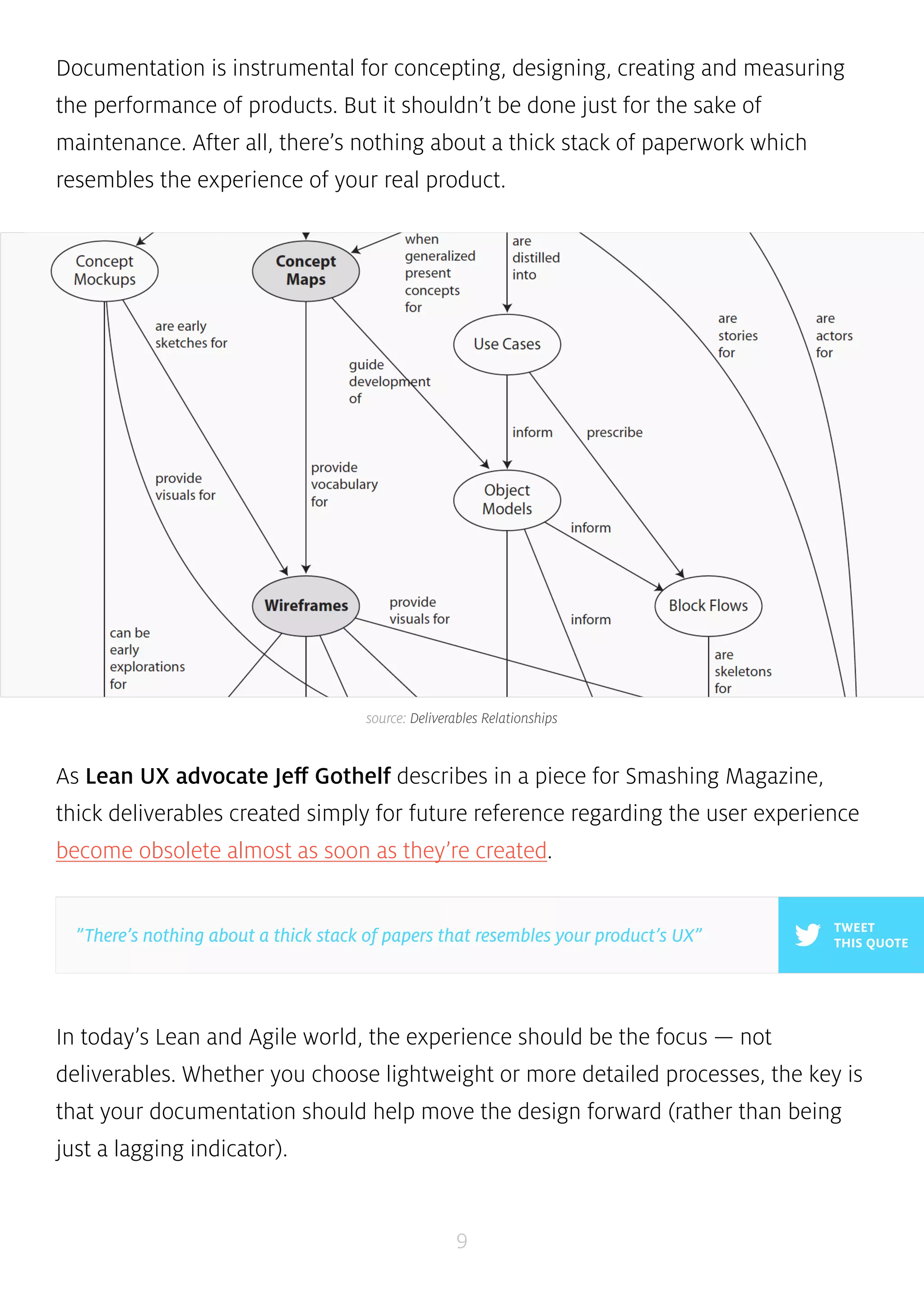
source: Deliverables Relationships 
As Lean UX advocate Jeff Gothelf describes in a piece for Smashing Magazine, 
thick deliverables created simply for future reference regarding the user experience 
become obsolete almost as soon as they’re created. 
In today’s Lean and Agile world, the experience should be the focus — not 
deliverables. Whether you choose lightweight or more detailed processes, the key is 
that your documentation should help move the design forward (rather than being 
just a lagging indicator). 
9 
TWEET 
”There’s nothing about a thick stack of papers that resembles your product’s UX” THIS QUOTE
The following is an overview of product design and development documentation, 
individual elements, and the respective phases to which they belong. Product 
development and documentation can vary depending on the company (for 
example, Spotify, as discussed in our Guide to Minimum Viable Products) but many 
of the deliverables below are common within most organizations in some form. 
We’ve chosen the methods that we think work best, so feel free to pick only what 
works. 
10 
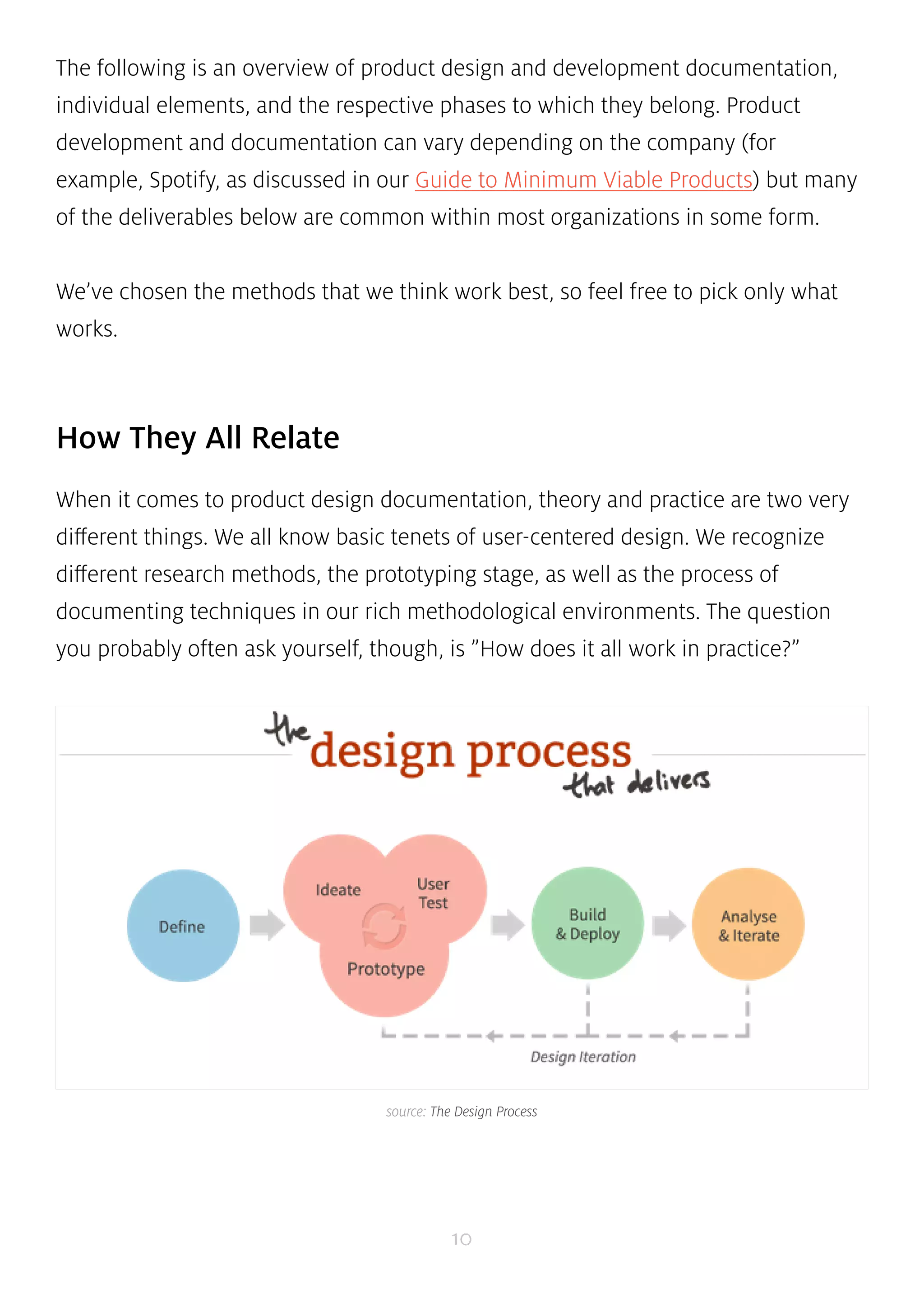
How They All Relate 
When it comes to product design documentation, theory and practice are two very 
different things. We all know basic tenets of user-centered design. We recognize 
different research methods, the prototyping stage, as well as the process of 
documenting techniques in our rich methodological environments. The question 
you probably often ask yourself, though, is ”How does it all work in practice?” 
source: The Design Process
Simply put, it’s all about making documentation complementary rather than 
supplementary to the design process. Before we go into detail, it might help to take 
a quick birds eye view of documentation during product design and development. 
Below, we’ve given a practical explanation of how every step of design 
documentation ties together: 
1. During the initial phase of product definition, you’re brainstorming the 
product and how to execute on the project at the highest level with all 
necessary stakeholders. This might result in project kickoff plan, a lean canvas, 
and a bunch of really early concept maps and mockups of what you’re looking 
to build. 
2. Moving into research, your team refines assumptions and fills in the blanks. 
This stage varies based on complexity of the product, timing, resources, level 
of existing knowledge, and many other factors. In general, however, it’s good 
to build out competitive and market analyses and conduct customer surveys. If 
you have an existing product, reviewing analytics, heuristics, content, product 
context, and user tests are also quite helpful. 
3. In analysis, the product marketing data collected so far provides the 
foundation for personas, experience maps, and requirements documents such 
as prioritized feature spreadsheets and user-task matrices. At this point, the 
product definition, product priorities, and product plan has been defined and 
are ready for more formal design deliverables. Sketches and diagrams are also 
likely constantly being generated throughout this time. 
4. From this output, scenarios, concept maps, and mockups may be created, 
leading into the design phase. Common documentation includes sketches, 
11 
TWEET 
”Documentation should complement, not supplement, the design process.” THIS QUOTE
wireframes, prototypes, task-flow diagrams, and design specifications. For 
example, competitive analysis and personas created during research and 
analysis feed into the mockups, concept maps, and scenarios. In turn, these 
pieces influence intermediate and advanced deliverables such as wireframes, 
storyboards, and detailed mockups. Some companies treat the Research, 
Analysis, and Design phase as one large process, as you can see in this 
overview graphic. 
5. During implementation, code and design assets are assembled to create a 
product that follows the product design specifications. 
6. Upon launch of the live product, feedback data such as support tickets, bug 
reports, and other analytics continue to drive product refinement through 
subsequent iterations, and upgrades. With the offering in production mode, 
data should be continually generated and monitored in the form of analytics 
and reports to ensure continued success. 
7. Continual, data-driven product improvement is achieved through measuring 
and iterating the offering in production, using performance dashboards and 
analytics. 
12
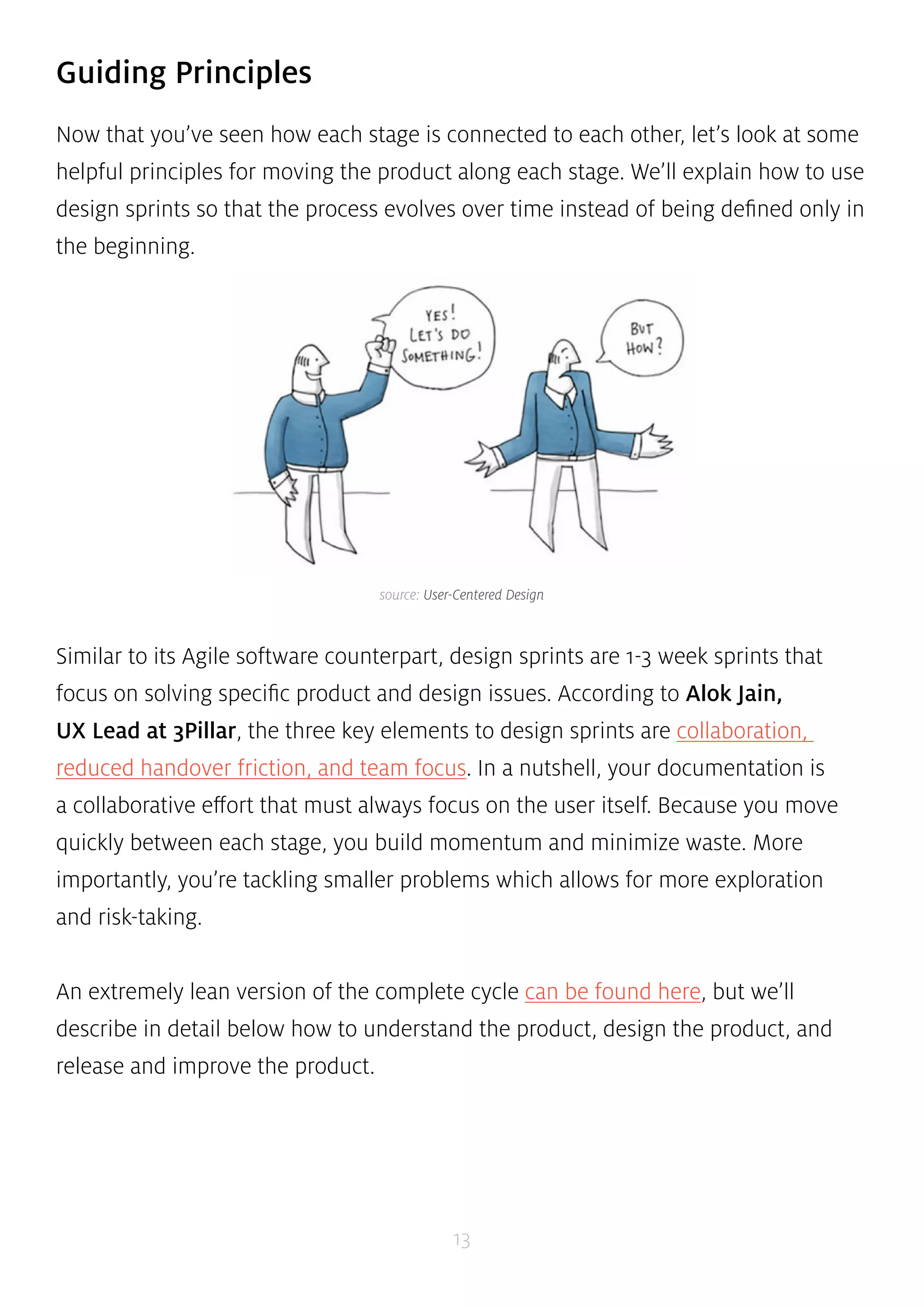
source: User-Centered Design 
13 
Guiding Principles 
Now that you’ve seen how each stage is connected to each other, let’s look at some 
helpful principles for moving the product along each stage. We’ll explain how to use 
design sprints so that the process evolves over time instead of being defined only in 
the beginning. 
Similar to its Agile software counterpart, design sprints are 1-3 week sprints that 
focus on solving specific product and design issues. According to Alok Jain, 
UX Lead at 3Pillar, the three key elements to design sprints are collaboration, 
reduced handover friction, and team focus. In a nutshell, your documentation is 
a collaborative effort that must always focus on the user itself. Because you move 
quickly between each stage, you build momentum and minimize waste. More 
importantly, you’re tackling smaller problems which allows for more exploration 
and risk-taking. 
An extremely lean version of the complete cycle can be found here, but we’ll 
describe in detail below how to understand the product, design the product, and 
release and improve the product.
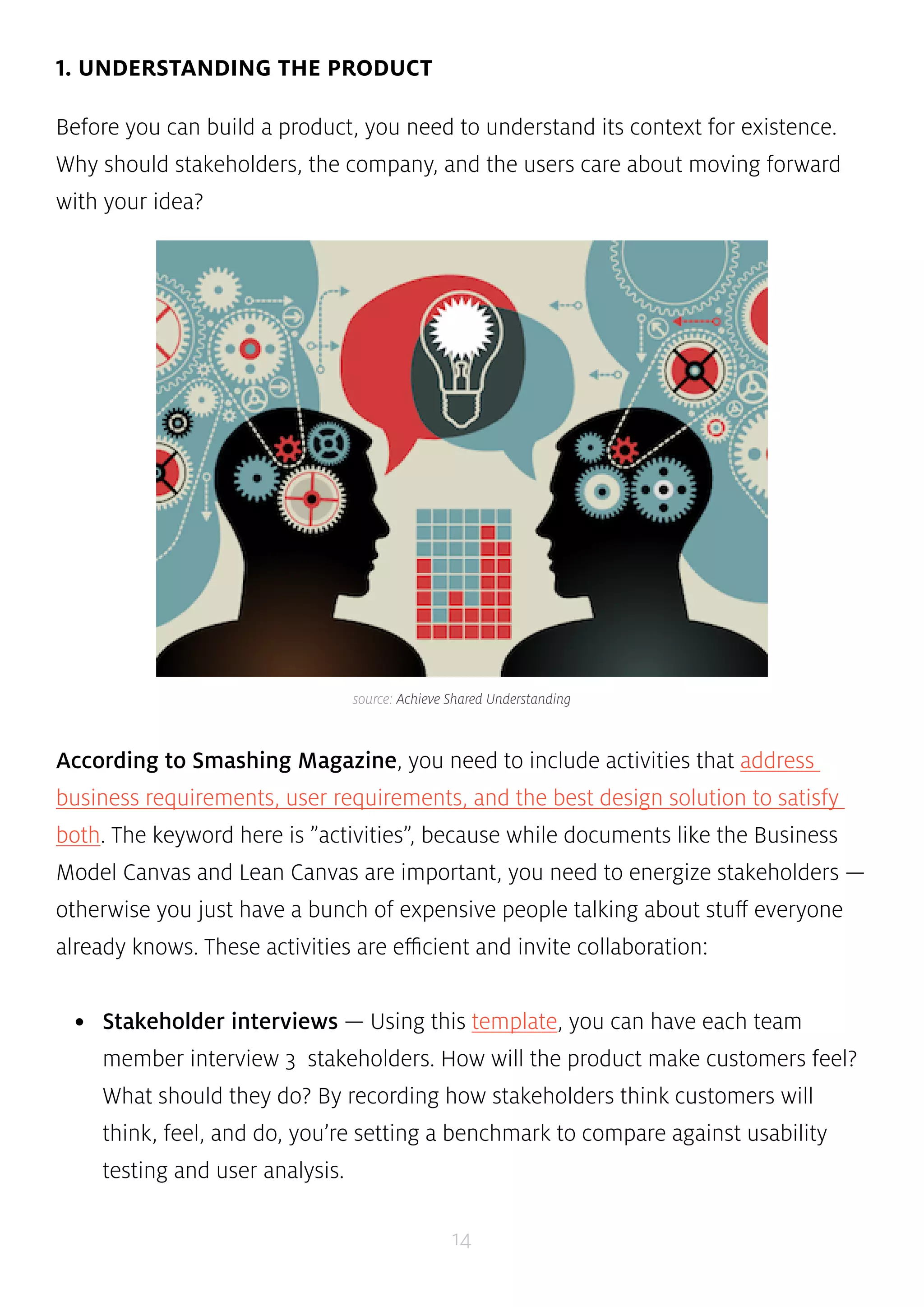
source: Achieve Shared Understanding 
14 
1. UNDERSTANDING THE PRODUCT 
Before you can build a product, you need to understand its context for existence. 
Why should stakeholders, the company, and the users care about moving forward 
with your idea? 
According to Smashing Magazine, you need to include activities that address 
business requirements, user requirements, and the best design solution to satisfy 
both. The keyword here is ”activities”, because while documents like the Business 
Model Canvas and Lean Canvas are important, you need to energize stakeholders — 
otherwise you just have a bunch of expensive people talking about stuff everyone 
already knows. These activities are efficient and invite collaboration: 
• Stakeholder interviews — Using this template, you can have each team 
member interview 3 stakeholders. How will the product make customers feel? 
What should they do? By recording how stakeholders think customers will 
think, feel, and do, you’re setting a benchmark to compare against usability 
testing and user analysis.
• Requirements workshops — Get stakeholders together, discuss the project 
plan, and start discussing how concepts feed into product and technical 
requirements. You can start with a blank Business Model Canvas or Lean 
Canvas and complete it with the team. 
• Crazy 8s — Grab some markers and get everyone to sketch 8 product or 
feature ideas in 5 minutes. Have everyone score each idea, and you’ll start to 
see trends and preferences. This was actually Step 2 in the redesign process 
for Google Ventures. For additional ideas, check out this list of brainstorming 
activities. 
Once you’ve laid out the groundwork, talk and test with tons of users so you have 
real field data for research and analysis. Marcin Treder, CEO of UXPin, dove deep 
into customer development and usability testing after identifying the problem and 
scope. Back when UXPin was just a paper prototyping tool, Marcin documented 
(on paper and video) over 50 user interviews and in-person usability tests with 
UX superstars like Brandon Schauer, Luke Wroblewski, Indi Young and others. The 
product team then used these insights to create personas, write dozens of user 
stories, and eventually, outline the product requirements. 
At Amazon, an alternative ”working backwards” approach is used in which the first 
step is drafting an internal press release for the finished product. This approach 
helps to work backwards from the customer, rather than trying to bolt customers to 
an idea. By iterating the press release until it sounds appealing, the product team 
gets an immediate reality check as well as a quick benchmark document for later 
design and development. 
15 
TWEET 
THIS QUOTE 
”If your kickoff isn’t collaborative, you just have a bunch of expensive people talking 
about obvious things.”
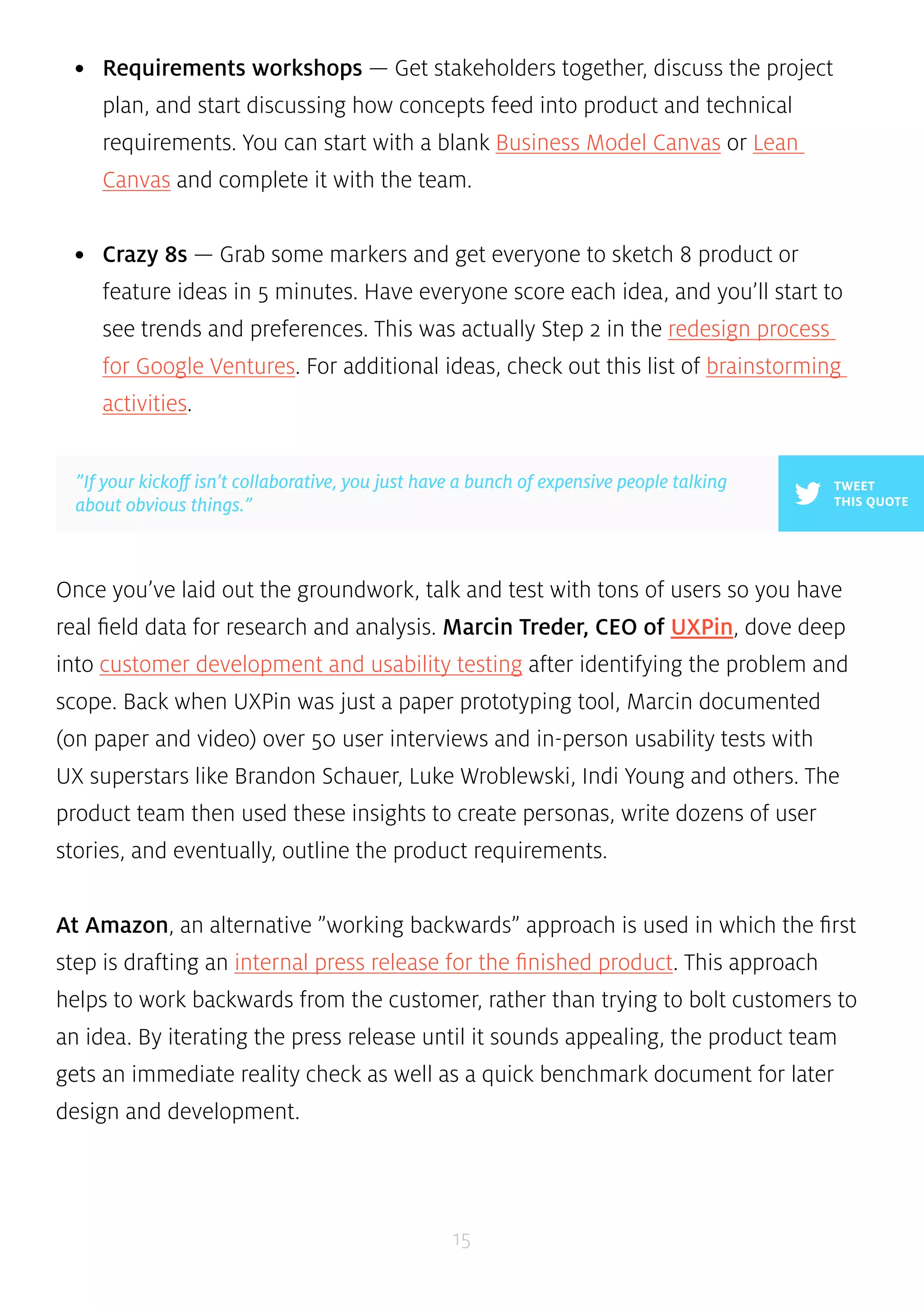
source: UXPin 
16 
2. DESIGNING THE PRODUCT 
As discussed in our Guide to Minimum Viable Products, once you have a sense 
of the product purpose, your main goal is to build a prototype. Whether your 
team likes to draw on napkins, create high or low fidelity wireframes, you should 
ultimately end up with something functional. What’s unique about this stage is that 
for most of the deliverables, the documentation is the design. 
According to Cennydd Bowles, Design Manager at Twitter, the product team 
should research two iterations ahead, design one iteration ahead, and review the 
previous iteration. If you’re trying to stay Agile, he advises diving straight into low-fidelity 
prototypes as a way of prioritizing ”interactions over processes”. If you want 
to get a bit more detailed but still want to stay somewhat lightweight, you can start 
with concept maps or sketches, then iterate to low-fidelity wireframes, and finally 
create a high-fidelity prototype. Regardless of your method, make sure you test with 
stakeholders and users. 
If budget and timing allow for it, you can also create experience maps to highlight 
where the product meets or fails user needs and task models to provide insight 
into activities users perform to reach their goals. While these aren’t part of the
design, they are complementary since you also need to see where your product fits 
into mind and market. Interestingly enough, Yelp takes their design stage a step 
further by creating a style guide that includes common lines of code, allowing the 
documentation to literally be built into the product. 
At UXPin, our process is to hold a group sketch session with sharpies on gridded paper, 
then cull that down to a few wireframes, and then add detail until we have a high 
fidelity mockup. If user testing is involved, we will build the mockup into a high-fidelity 
prototype. For large feature releases, we conduct extensive user testing so the ratio is 
about 70/30 in favor of prototypes. 
3. BUILDING AND LAUNCHING THE PRODUCT 
As you start to do the heavy technical lifting, it’s important to create documentation 
that helps you see the overall vision. Specific requirements may change as you 
refine the product, but your documentation should help you understand priorities 
as your product goes into the wild. 
17 
TWEET 
THIS QUOTE 
”Research two iterations ahead, design one iteration ahead, review the 
previous iteration.” 
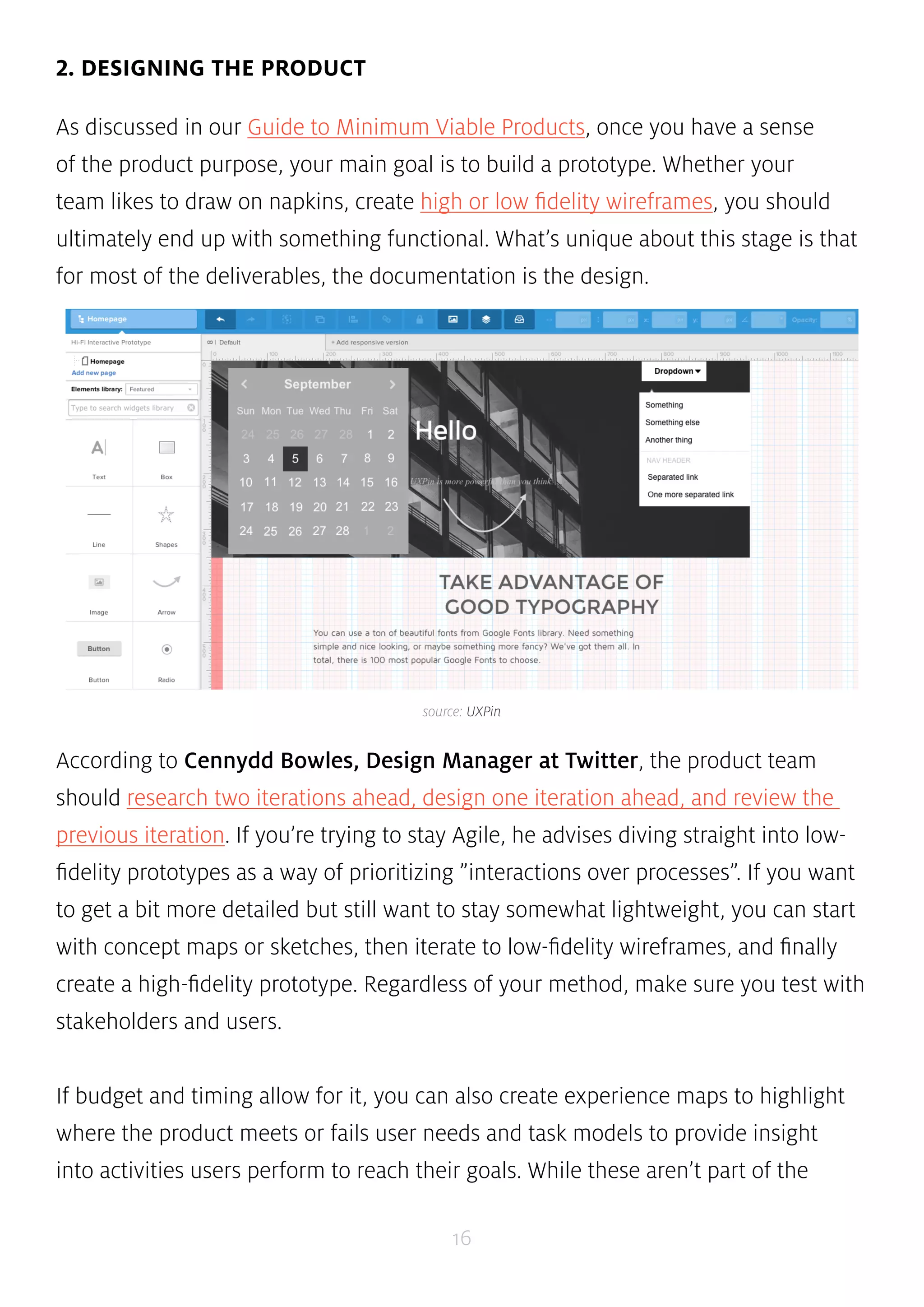
source: The MVP Campaign
Kristofer Layon, UX Manager at RedStamp, believes that you can visualize 
product requirements and technical specification documents as a roadmap. The 
product road map shows user stories and helps prioritize the features you’ll build 
to satisfy them. Sometimes, specific dates may be added into the roadmap so that 
it also works as a timeline. The elegance of the roadmap is that helps you prioritize 
what you’re building, making it complementary to the ”how” defined by your 
product requirements and technical specs. When deciding features, you can use the 
Kano Model to evaluate them in 3 categories: 
• Basic Attributes — These are absolutely required just for the product to work. 
For example, a laptop’s basic attribute is the keyboard or screen. 
• Performance Attributes — These can be compared between different 
products as a KPI. For example, a laptop is judged on CPU speed and hard drive 
space since people tend to prefer fast computers that can store lots of data. 
• Delightful Attributes — These are subjective depending on customer 
preferences. For example, the Macbook Air is extremely thin and smooth to the 
touch. The right customer would find it a great selling point while others are 
unimpressed. 
By scoring features on a 1-5 scale based on this model, you can then plot them out 
on a prioritization matrix to help you start envisioning what your product roadmap 
will look like. At Apple, the ”Rules of the Road” and ”Apple New Product Process” 
serve as the product roadmap by defining responsibilities, stages of creation, and 
significant milestones from inception to launch. In fact, the Rules of the Road is 
taken so seriously that losing it can result in immediate termination (it’s even stated 
in the document). 
18
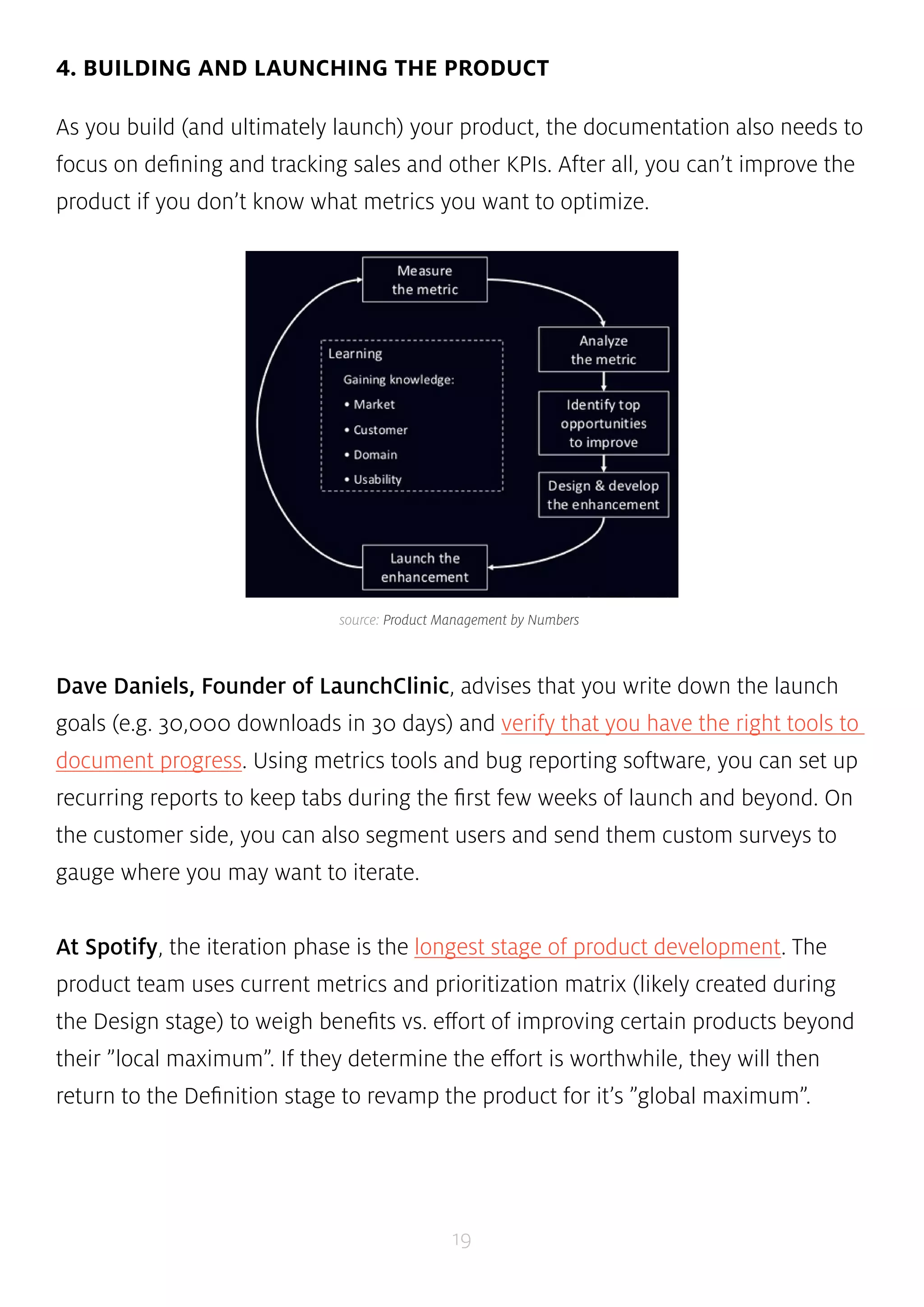
4. BUILDING AND LAUNCHING THE PRODUCT 
As you build (and ultimately launch) your product, the documentation also needs to 
focus on defining and tracking sales and other KPIs. After all, you can’t improve the 
product if you don’t know what metrics you want to optimize. 
source: Product Management by Numbers 
Dave Daniels, Founder of LaunchClinic, advises that you write down the launch 
goals (e.g. 30,000 downloads in 30 days) and verify that you have the right tools to 
document progress. Using metrics tools and bug reporting software, you can set up 
recurring reports to keep tabs during the first few weeks of launch and beyond. On 
the customer side, you can also segment users and send them custom surveys to 
gauge where you may want to iterate. 
At Spotify, the iteration phase is the longest stage of product development. The 
product team uses current metrics and prioritization matrix (likely created during 
the Design stage) to weigh benefits vs. effort of improving certain products beyond 
their ”local maximum”. If they determine the effort is worthwhile, they will then 
return to the Definition stage to revamp the product for it’s ”global maximum”. 
19
Objective Processes In a Subjective Environment 
When it comes to product design documentation, there is no single magic bullet. 
Almost all companies that use our product employ bits and pieces of the tactics 
we’ve described above. While product development and UX design are highly 
subjective spaces, your processes and documentation don’t need to be. After all, 
the end goal of a product is revenue, and there’s nothing subjective about that. 
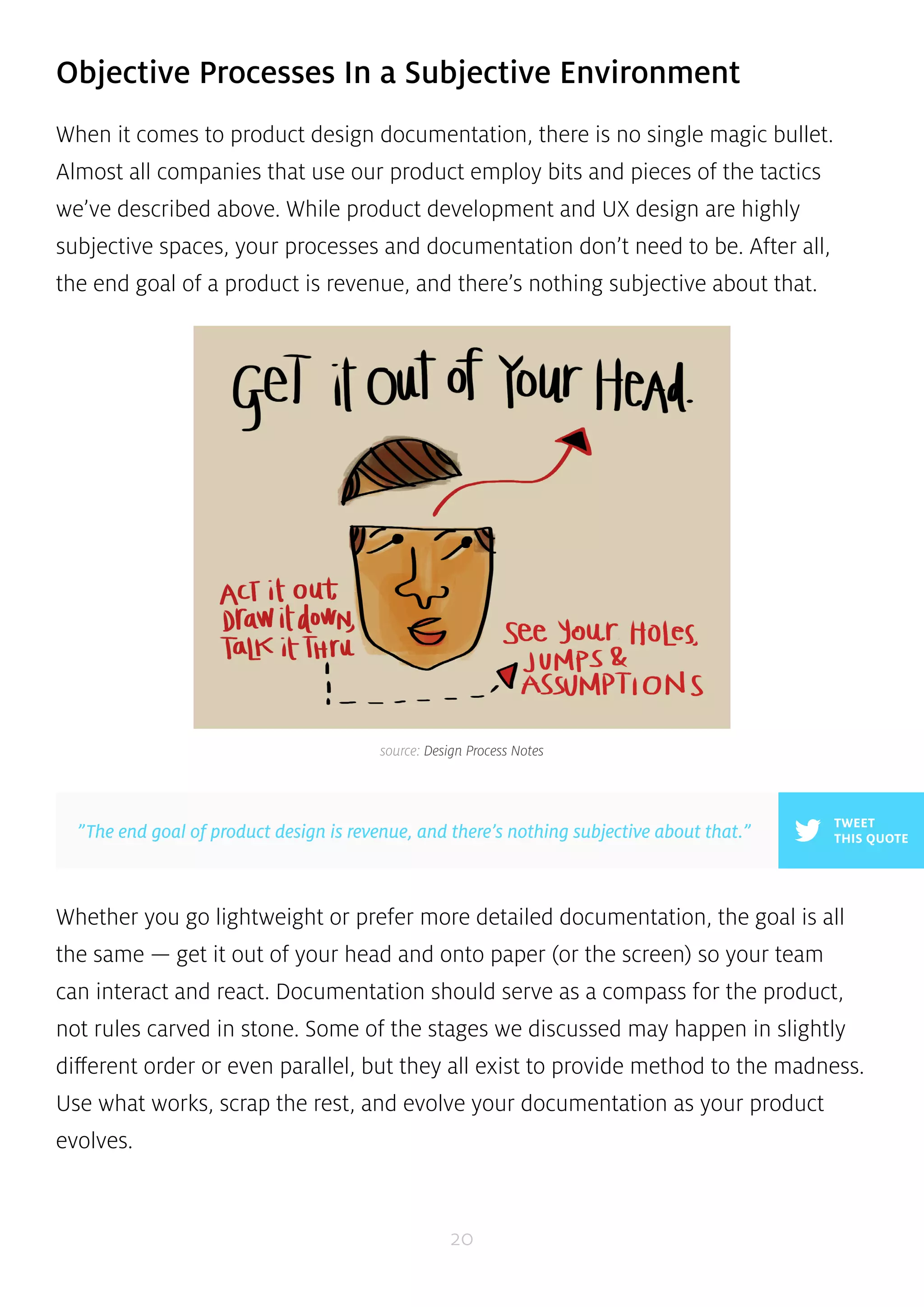
source: Design Process Notes 
Whether you go lightweight or prefer more detailed documentation, the goal is all 
the same — get it out of your head and onto paper (or the screen) so your team 
can interact and react. Documentation should serve as a compass for the product, 
not rules carved in stone. Some of the stages we discussed may happen in slightly 
different order or even parallel, but they all exist to provide method to the madness. 
Use what works, scrap the rest, and evolve your documentation as your product 
evolves. 
20 
TWEET 
”The end goal of product design is revenue, and there’s nothing subjective about that.” THIS QUOTE
CHAPTER THREE 
Defining a Product Before 
Diving Into Design 
An Overview Of Product Definition Process & Documentation in Product Design 
21
The Product Definition phase sets the stage for the success of your product. Without 
properly completing this phase, your team might as well be working in the dark. 
The worst enemy in product development, after all, is ambiguity and untested 
assumptions. 
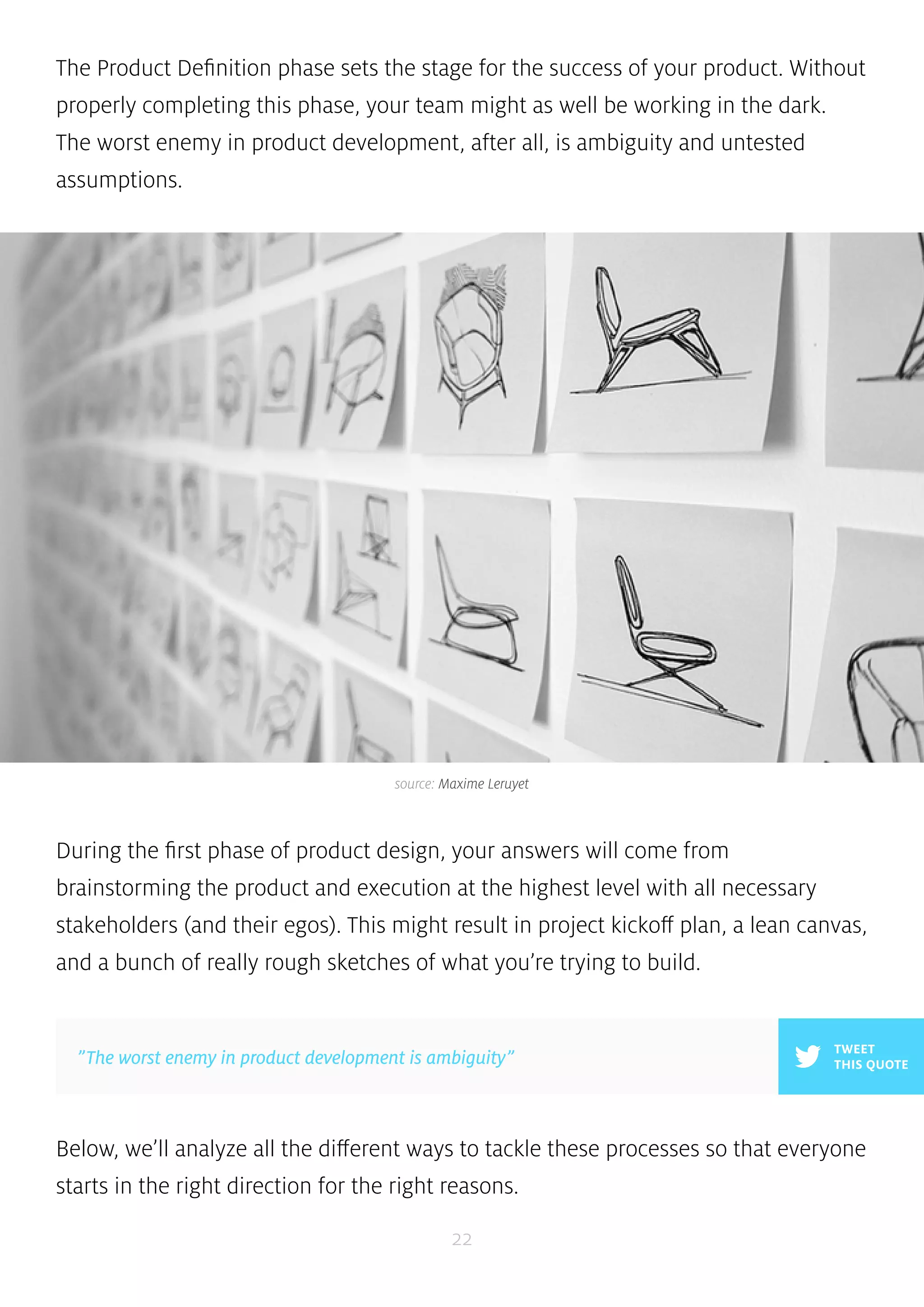
source: Maxime Leruyet 
During the first phase of product design, your answers will come from 
brainstorming the product and execution at the highest level with all necessary 
stakeholders (and their egos). This might result in project kickoff plan, a lean canvas, 
and a bunch of really rough sketches of what you’re trying to build. 
Below, we’ll analyze all the different ways to tackle these processes so that everyone 
starts in the right direction for the right reasons. 
22 
TWEET 
”The worst enemy in product development is ambiguity” THIS QUOTE
Why Product Definition Matters 
One definition of a product is ”anything that can be offered to a market to satisfy 
a want or need”. If you’ve worked on products before, you’ve probably heard this 
before. But no matter how simple that objective might seem, products are all quite 
complex — they are, after all, created for people — and many products don’t get 
this quite right. 
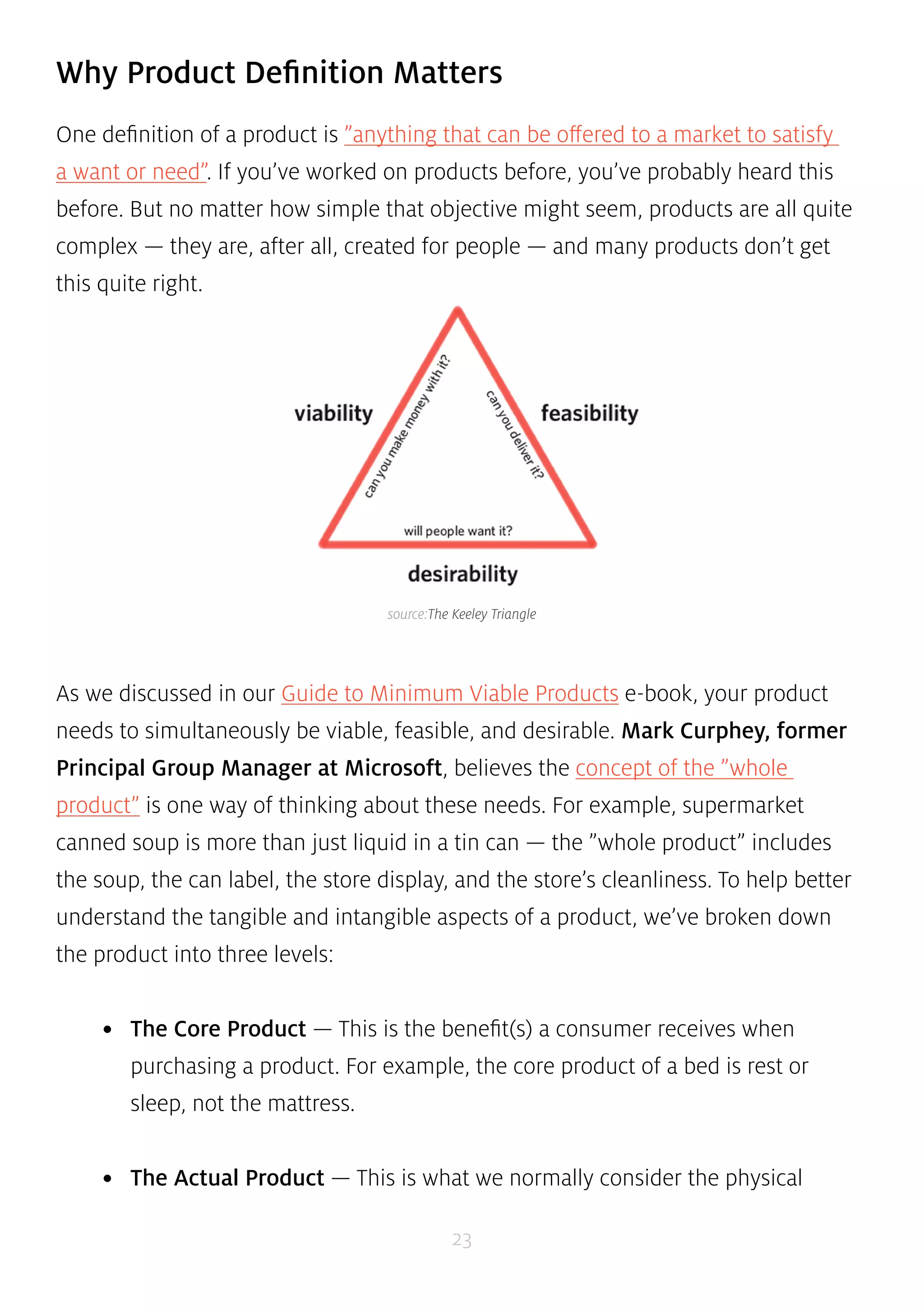
source:The Keeley Triangle 
As we discussed in our Guide to Minimum Viable Products e-book, your product 
needs to simultaneously be viable, feasible, and desirable. Mark Curphey, former 
Principal Group Manager at Microsoft, believes the concept of the ”whole 
product” is one way of thinking about these needs. For example, supermarket 
canned soup is more than just liquid in a tin can — the ”whole product” includes 
the soup, the can label, the store display, and the store’s cleanliness. To help better 
understand the tangible and intangible aspects of a product, we’ve broken down 
the product into three levels: 
• The Core Product — This is the benefit(s) a consumer receives when 
purchasing a product. For example, the core product of a bed is rest or 
sleep, not the mattress. 
• The Actual Product — This is what we normally consider the physical 
23
product. It’s goal is to deliver on the benefits embodied by the core product. 
Actual products may have as many as five characteristics such as quality 
level, features, styling, brand, and packaging. 
• Augmented Product — This represents additional services and benefits 
associated with the actual product, for which consumers may pay a 
premium. The augmented product lets you tailor the core or actual product 
to individual consumers. For example, IBM’s success was largely due to its 
sophisticated software and after-sale services (not the actual product of 
computers). 
Because products are so multidimensional, a structured product definition process 
is required so that you can consider the emotional, physical, and supplemental parts 
of the product. The lean canvas and project kickoff look at why and how consumers 
might buy your product while rough sketching helps you bring those ideas to life. 
24 
The Kickoff Meeting 
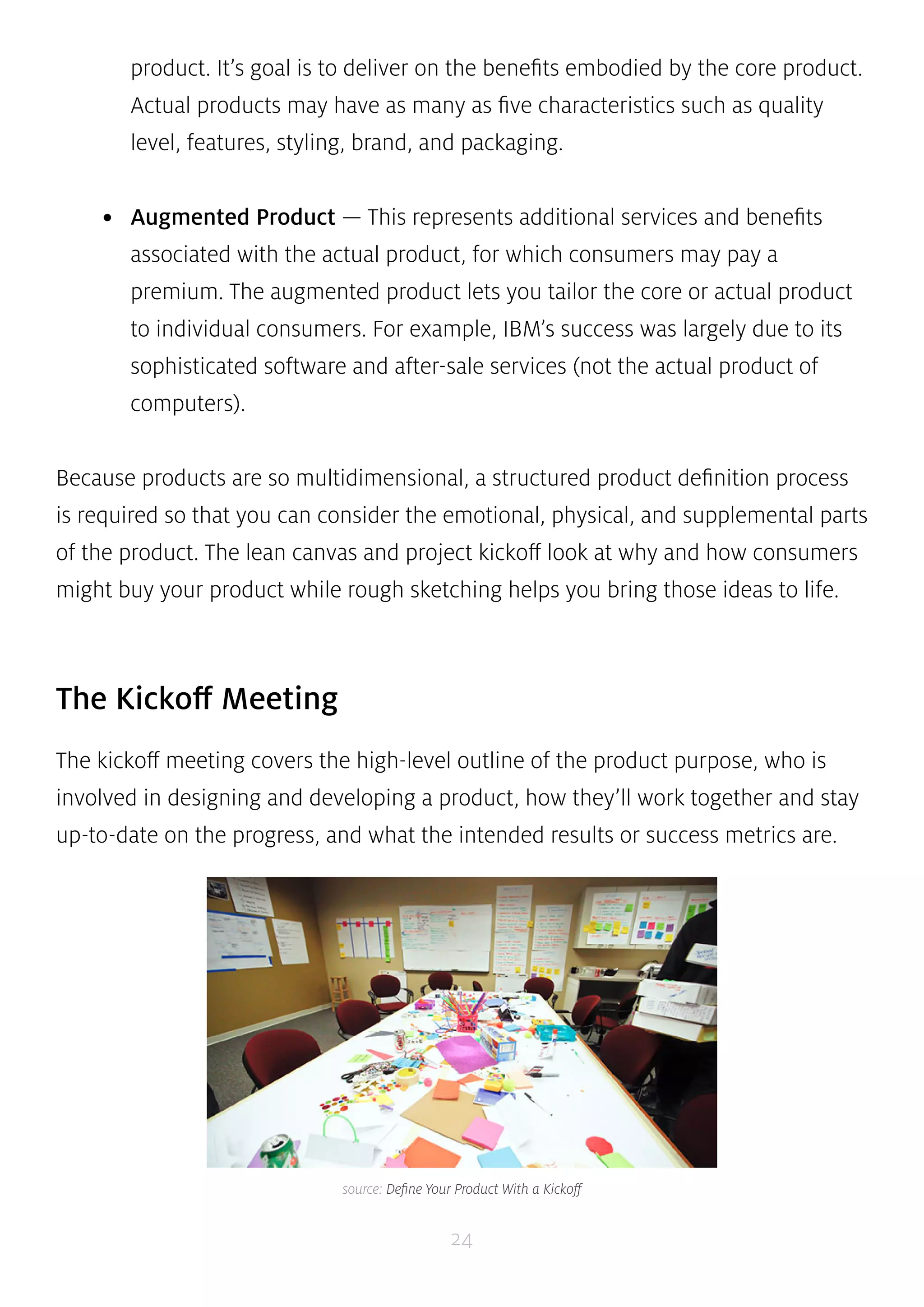
The kickoff meeting covers the high-level outline of the product purpose, who is 
involved in designing and developing a product, how they’ll work together and stay 
up-to-date on the progress, and what the intended results or success metrics are. 
source: Define Your Product With a Kickoff
The process is becoming shorter and shorter as teams become more nimble and 
projects more lean, and the documentation can be presented in a Powerpoint, 
document, wiki, or project management software. We’ll cover how to prepare and 
conduct a kickoff as well as some overall guiding principles. 
25 
1. PREPARING FOR THE KICKOFF 
The project kickoff is the equivalent of a grand opening, bringing all the key 
players together in one moment to share information and a common purpose. You 
should take advantage of this one-time chance to energize the group, set proper 
expectations, and set guidelines to complete the project on time and within budget. 
Mike Sisco, CEO of MDE Enterprises, provides a comprehensive plan for kickoff 
success. By taking the right steps to prepare, he ran a successful kickoff even 
though attendees included 12 team members from four company departments in 
seven separate physical locations. He recommends including these steps in your 
preparation: 
• Develop the project goals and deliverables — Defining these elements will 
help you decide resourcing and planning for the product. Why do stakeholders 
care, and why are you building this product at this particular time? 
• Identify team members and responsibilities — Resources vary depending on 
the product’s size and complexity. Make sure you consider what’s needed from 
design, marketing, development, support, and operations teams. 
• Develop a rough product plan — Clarify the risks and opportunities. This 
helps validate whether you have the right resources and helps determine the 
appropriate timelines for tasks and milestones.
• Define key success factors — Why is the product valuable to the company, 
and how will you know you’ve succeeded? Define your specific success criteria 
and validate these with stakeholders. 
When speaking with stakeholders prior to the kickoff, it helps to break the ice and 
then dive straight into the hard questions. What is the one thing that must be done 
right to make the product worthwhile? What would exceed your wildest dreams? 
Assure them that certain questions are ”off the record” so you can understand their 
specific hopes and fears for the product. These stakeholder interviews also help to 
accumulate a list of high level functional requirements. 
”When speaking with stakeholders, break the ice and then ask the hard questions.” THIS QUOTE 
For a detailed kickoff plan that covers everything from technical assumptions to 
desired emotional states, you can check out this Pre-Kickoff Template. 
26 
2. DOING THE KICKOFF 
TWEET 
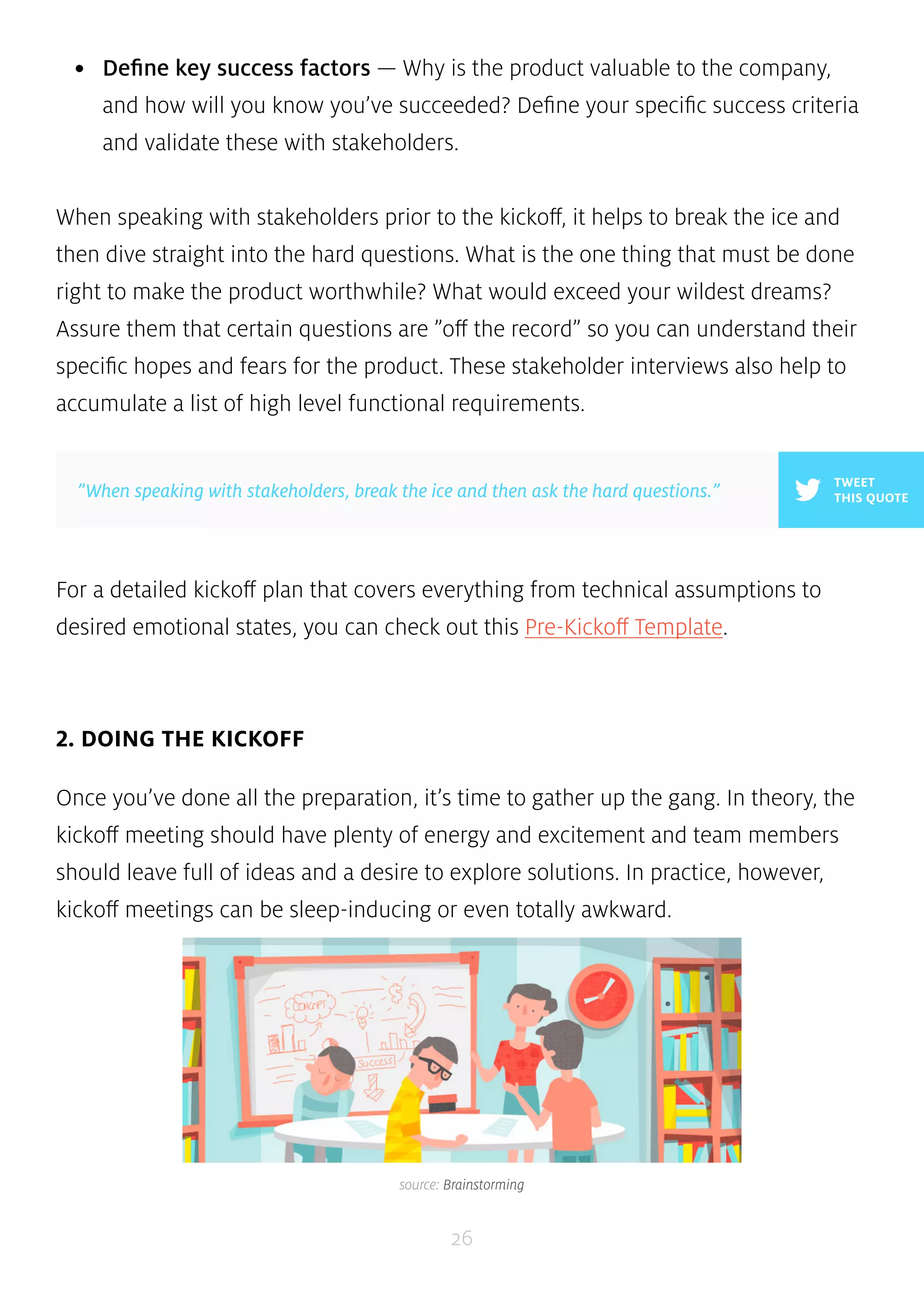
Once you’ve done all the preparation, it’s time to gather up the gang. In theory, the 
kickoff meeting should have plenty of energy and excitement and team members 
should leave full of ideas and a desire to explore solutions. In practice, however, 
kickoff meetings can be sleep-inducing or even totally awkward. 
source: Brainstorming
Whether you’re a startup or an enterprise, the key to a great kickoff meeting is 
involving people rather than only reviewing your pre-kickoff documents. Kevin 
Hoffman, a design consultant at Rosenfeld Media, believes in taking a design 
studio approach to fostering creativity. A classic approach to ideation in industrial 
design and architecture, this technique is all about building relationships with co-workers 
and can be executed with groups between 10 to 60 in under a few hours. 
Here’s some useful activities for the group to get started: 
• Priority and feasibility plot — Plot your discussed features on a chart based 
”In theory, kickoffs should be energizing. In practice, they can be boring 
or downright awkward.” 
27 
on feasibility vs. business value. 
• Card sorting — Write your discussed features and functionality on index cards 
(ideally, less than 20) and then have each person sort the deck with highest 
priority on top and lowest ton bottom. 
• 20-second gut test — Collect screenshots of web-pages or product images 
and show them in a presentation to the group. Each member will rank each 
image with a score between 1-5. This tells you everyone’s aesthetic preferences. 
• Fishbowl conversations — When discussing the pre-kickoff documents 
or doing group activities, arrange your seating in a circular fashion (like 
a fishbowl), giving everyone in the group face-to-face contact and the 
opportunity to contribute. 
TWEET 
THIS QUOTE 
Of course, there’s no denying that an agenda and/or kickoff document are 
necessary to keep the activities on track. You can either use this question-driven 
kickoff document, or more lightweight options like Mozilla’s Kickoff Wiki and Pivotal 
Labs’ Product Definition Exercise.
”Don’t be afraid to make kickoffs weird. People might be thrilled to break 
from tradition.” 
28 
3. GUIDING PRINCIPLES 
Whether you’re planning for kickoff or holding the meeting, following a set of 
principles will prevent you from going off track. Kevin Hoffman again provides a 
helpful framework which are applicable whether your kickoff is in-person or remote: 
• Base your meeting agenda off the research — Ideas and challenges that are 
come up during research or stakeholder interviews should be front-and-center 
in your agenda. 
• Be as inclusive as possible with your kickoff process — It’s better to include 
too many people up front rather than realize you forgot a stakeholder close to 
launch. 
• Build activities around ”risk-free” exploration — Your kickoff process should 
explore the full potential for what is possible, so leave egos at the door. 
• Introduce fun and creativity — Don’t be afraid to make it weird. Besides, 
team members may be thrilled to break from a more traditional format. 
TWEET 
THIS QUOTE 
At UXPin, we involve everyone in the company in new feature kickoffs. Once a quarter, we 
conduct a company-wide strategy meeting in which employees and investors are allowed 
to suggest product or design ideas. These tasks are recorded in Asana and visited on a 
weekly basis by our product team to prioritize the best ideas (as well as add new ones). 
We prevent ”design by committee” since anyone can contribute, but the product team 
has the final say.
Lean & Business Model Canvas 
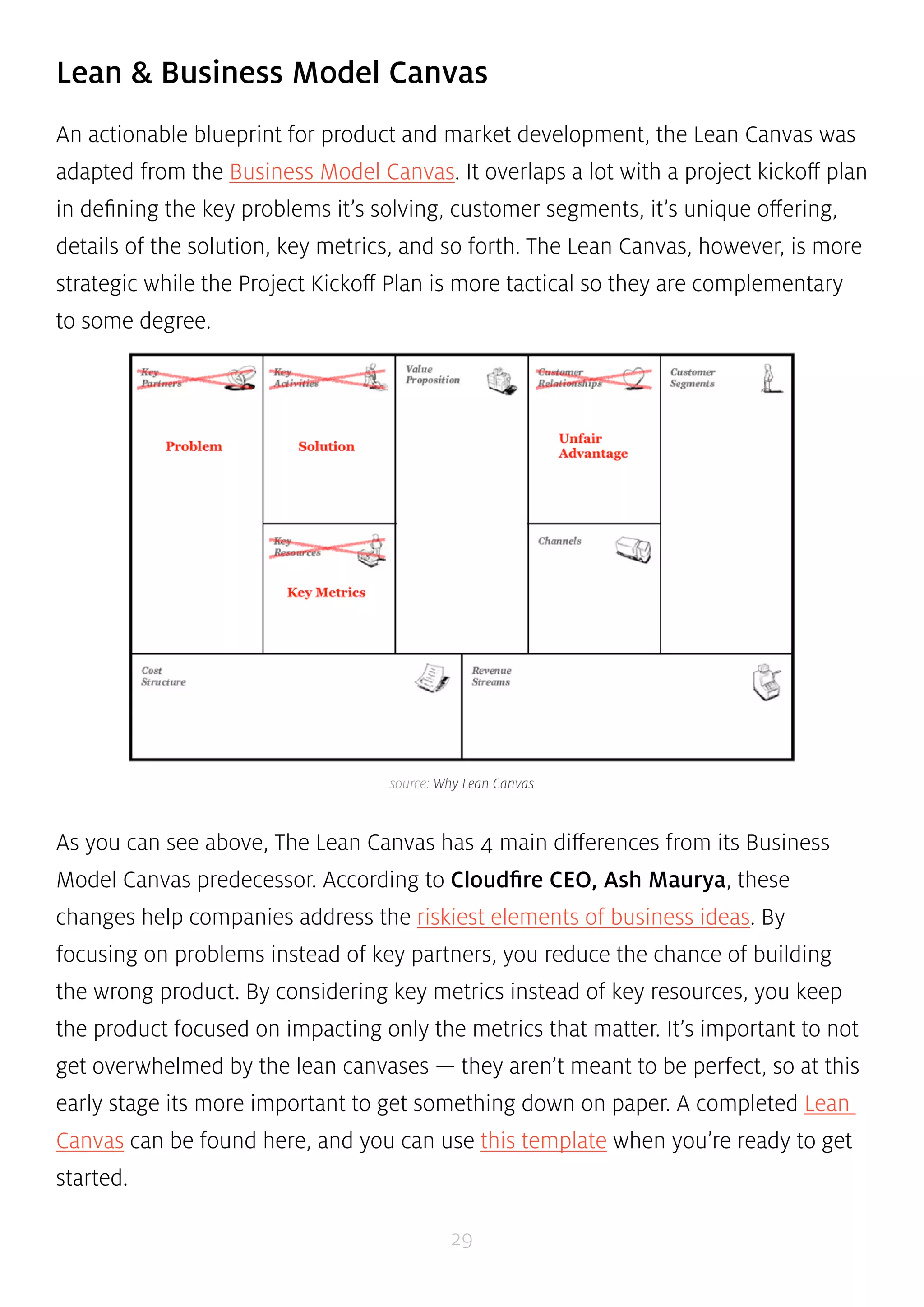
An actionable blueprint for product and market development, the Lean Canvas was 
adapted from the Business Model Canvas. It overlaps a lot with a project kickoff plan 
in defining the key problems it’s solving, customer segments, it’s unique offering, 
details of the solution, key metrics, and so forth. The Lean Canvas, however, is more 
strategic while the Project Kickoff Plan is more tactical so they are complementary 
to some degree. 
source: Why Lean Canvas 
As you can see above, The Lean Canvas has 4 main differences from its Business 
Model Canvas predecessor. According to Cloudfire CEO, Ash Maurya, these 
changes help companies address the riskiest elements of business ideas. By 
focusing on problems instead of key partners, you reduce the chance of building 
the wrong product. By considering key metrics instead of key resources, you keep 
the product focused on impacting only the metrics that matter. It’s important to not 
get overwhelmed by the lean canvases — they aren’t meant to be perfect, so at this 
early stage its more important to get something down on paper. A completed Lean 
Canvas can be found here, and you can use this template when you’re ready to get 
started. 
29
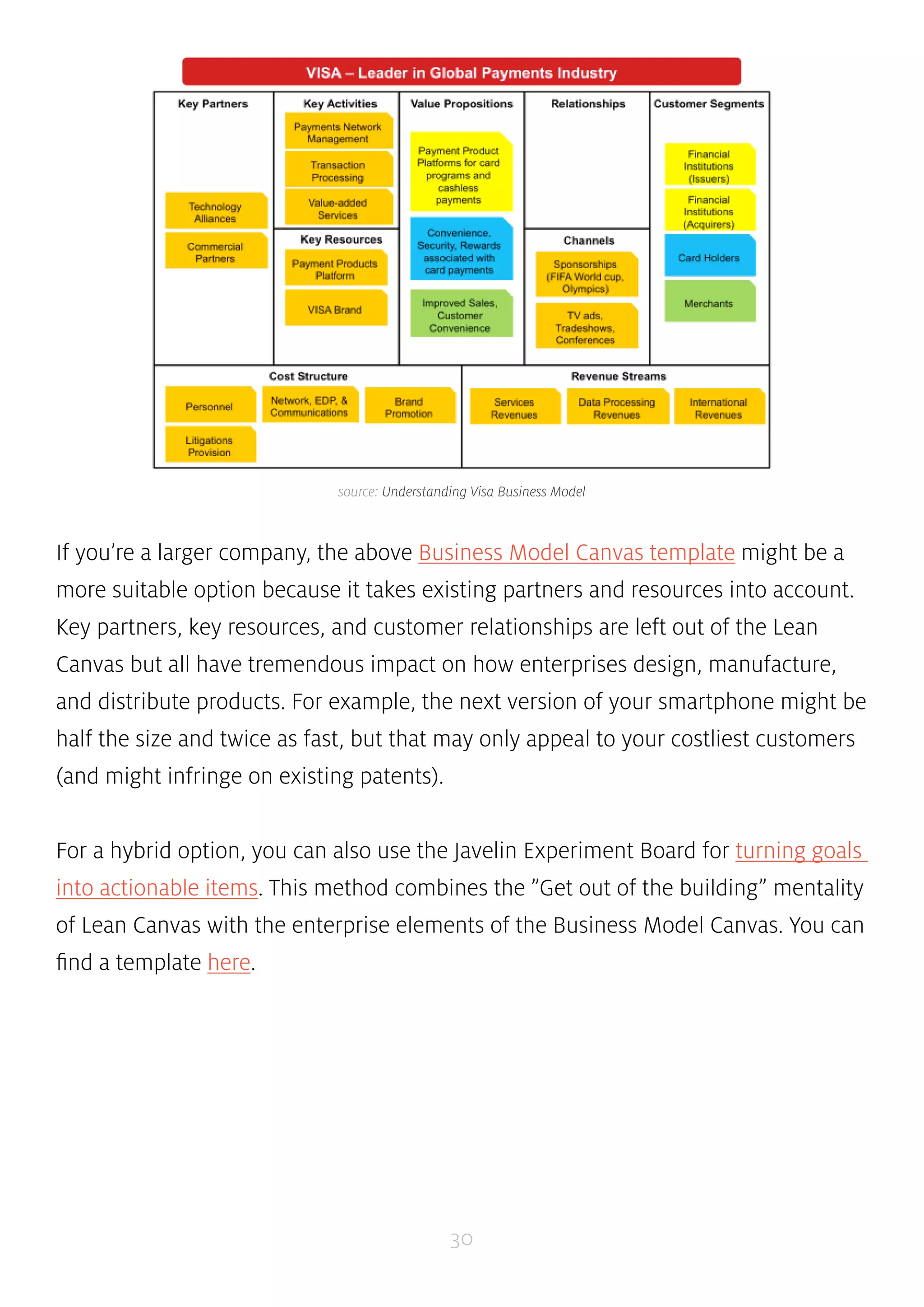
source: Understanding Visa Business Model 
If you’re a larger company, the above Business Model Canvas template might be a 
more suitable option because it takes existing partners and resources into account. 
Key partners, key resources, and customer relationships are left out of the Lean 
Canvas but all have tremendous impact on how enterprises design, manufacture, 
and distribute products. For example, the next version of your smartphone might be 
half the size and twice as fast, but that may only appeal to your costliest customers 
(and might infringe on existing patents). 
For a hybrid option, you can also use the Javelin Experiment Board for turning goals 
into actionable items. This method combines the ”Get out of the building” mentality 
of Lean Canvas with the enterprise elements of the Business Model Canvas. You can 
find a template here. 
30
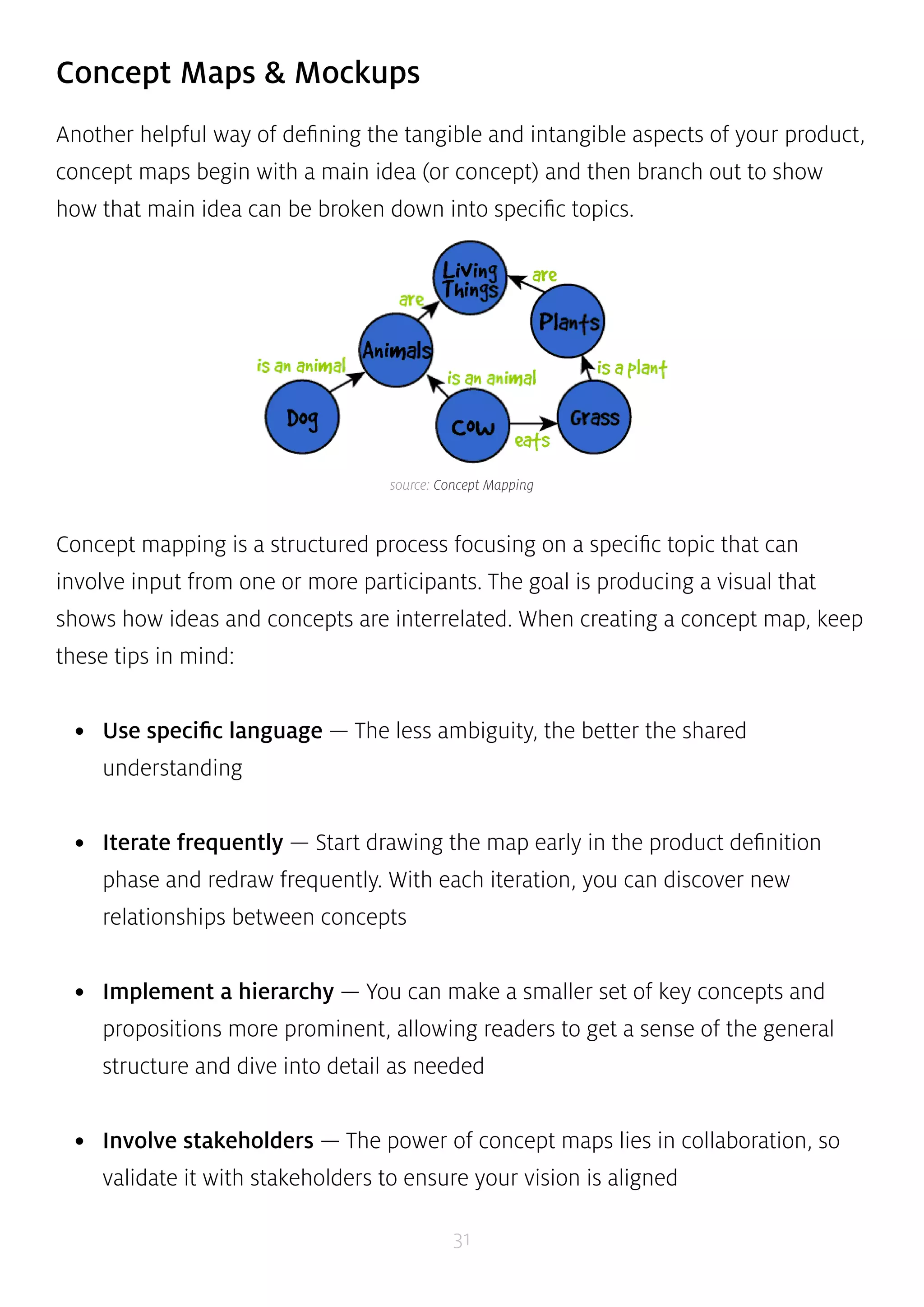
source: Concept Mapping 
31 
Concept Maps & Mockups 
Another helpful way of defining the tangible and intangible aspects of your product, 
concept maps begin with a main idea (or concept) and then branch out to show 
how that main idea can be broken down into specific topics. 
Concept mapping is a structured process focusing on a specific topic that can 
involve input from one or more participants. The goal is producing a visual that 
shows how ideas and concepts are interrelated. When creating a concept map, keep 
these tips in mind: 
• Use specific language — The less ambiguity, the better the shared 
understanding 
• Iterate frequently — Start drawing the map early in the product definition 
phase and redraw frequently. With each iteration, you can discover new 
relationships between concepts 
• Implement a hierarchy — You can make a smaller set of key concepts and 
propositions more prominent, allowing readers to get a sense of the general 
structure and dive into detail as needed 
• Involve stakeholders — The power of concept maps lies in collaboration, so 
validate it with stakeholders to ensure your vision is aligned
Hugh Dubberly, CEO of Dubberly Design Office, believes that concept maps 
help foster understanding by showing both the forest and trees in a single view. 
When working on a rehauling of Sun Microsystems’ Java landing page, he found 
this method instrumental to understanding the purpose and structure of its over 
110,000 pages. He quickly experienced benefits such as a deeper understanding 
of technical infrastructures, more quality feedback, and additional trust from 
stakeholders. 
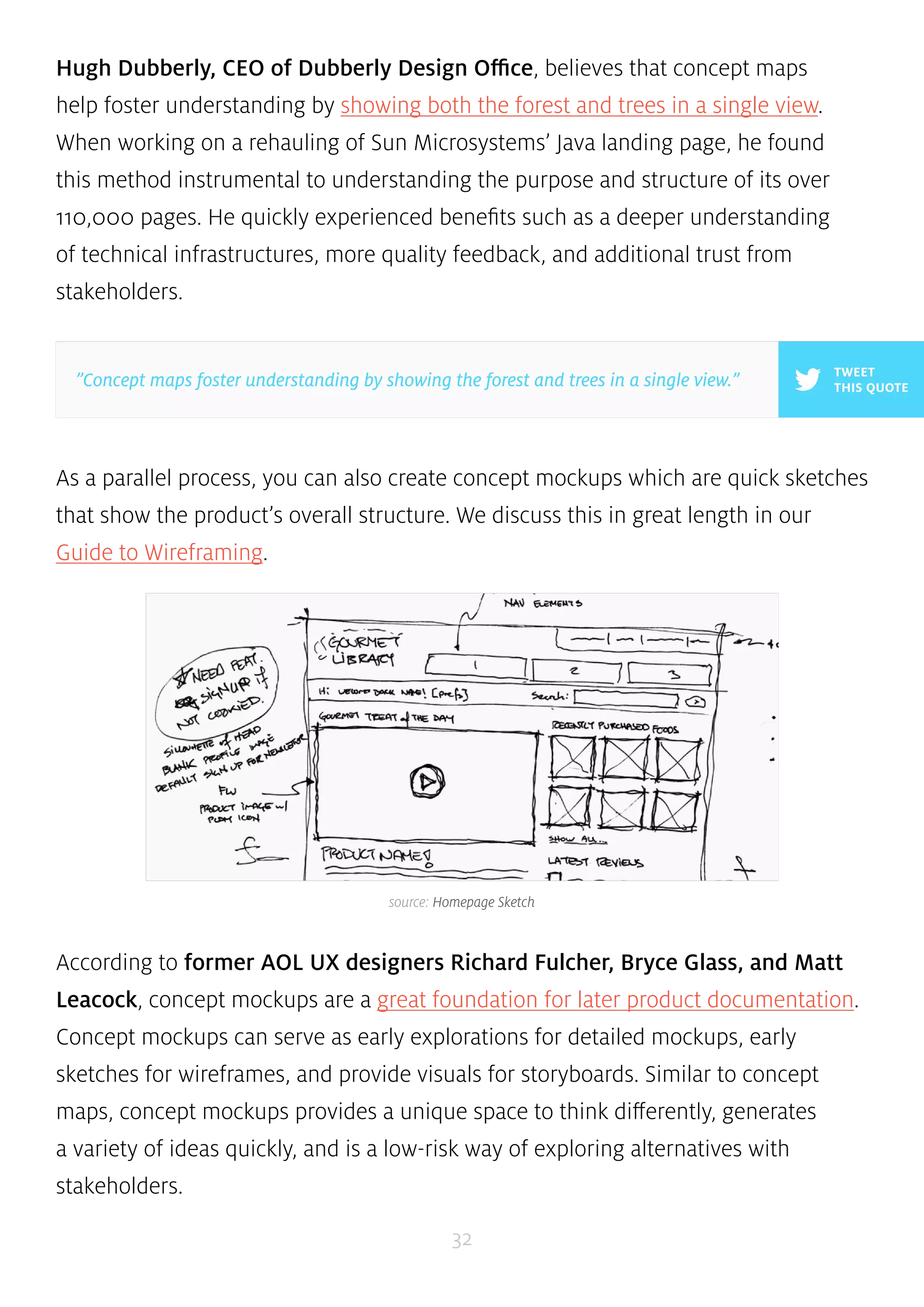
As a parallel process, you can also create concept mockups which are quick sketches 
that show the product’s overall structure. We discuss this in great length in our 
Guide to Wireframing. 
According to former AOL UX designers Richard Fulcher, Bryce Glass, and Matt 
Leacock, concept mockups are a great foundation for later product documentation. 
Concept mockups can serve as early explorations for detailed mockups, early 
sketches for wireframes, and provide visuals for storyboards. Similar to concept 
maps, concept mockups provides a unique space to think differently, generates 
a variety of ideas quickly, and is a low-risk way of exploring alternatives with 
stakeholders. 
32 
TWEET 
”Concept maps foster understanding by showing the forest and trees in a single view.” THIS QUOTE 
source: Homepage Sketch
Sean Hodge, Editor at Tuts+, goes into great detail on the benefits of sketching 
for product design. For him, sketching out a concept map or mockup is the quickest 
way of experimenting with different product ideas — and the larger the project, 
the more ideas will need explaining and the more valuable sketching will be. To see 
how this can be done for a complex product on the market, you can check out this 
conceptual sketch of Apple’s recently released iWatch. 
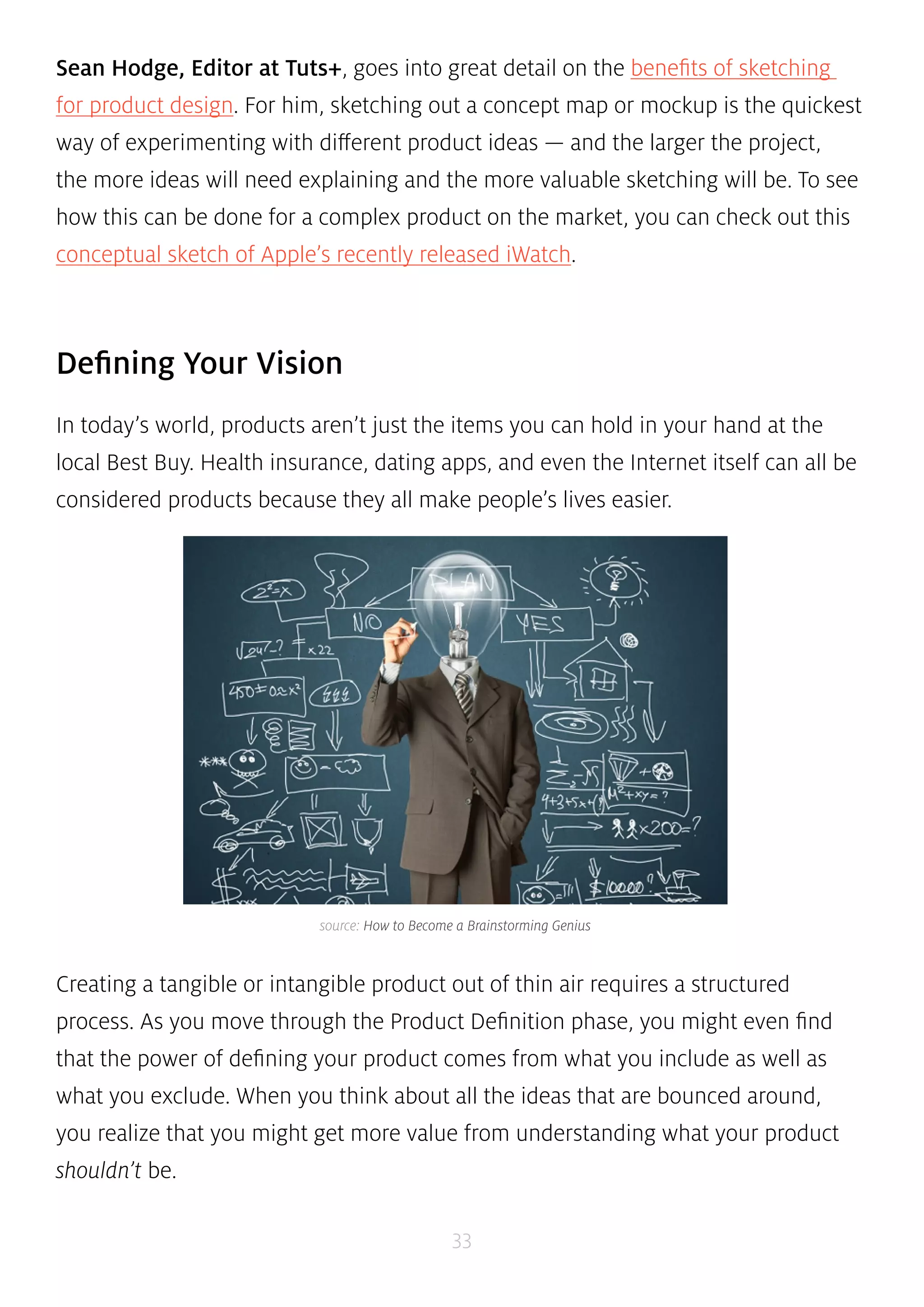
source: How to Become a Brainstorming Genius 
33 
Defining Your Vision 
In today’s world, products aren’t just the items you can hold in your hand at the 
local Best Buy. Health insurance, dating apps, and even the Internet itself can all be 
considered products because they all make people’s lives easier. 
Creating a tangible or intangible product out of thin air requires a structured 
process. As you move through the Product Definition phase, you might even find 
that the power of defining your product comes from what you include as well as 
what you exclude. When you think about all the ideas that are bounced around, 
you realize that you might get more value from understanding what your product 
shouldn’t be.
Do your ideas line up with the direction of the company? Have you considered 
”second-best” options which might achieve 90% of the impact but with less time 
and money? Kickoff meetings, business canvases, and concept sketching can all 
help answer these questions. This process of elimination can help you from being 
blindsided later due to over-ambition or poor judgment early on, especially as you 
start gauging how the market and customers might react to your product idea. 
34 
TWEET 
”In today’s world, products aren’t just what you can play with at the local Best Buy.” THIS QUOTE
CHAPTER FOUR 
Researching Products Before 
Diving Into Design 
An Overview Of The Design Process & Documentation At the Research Stage 
35
The process of defining and researching a product are intertwined since you can’t 
really define a product unless you know the context in which it exists. Once you’ve 
defined the product idea, product research — which naturally includes user and 
market research — provides the other half of the foundation for great design. 
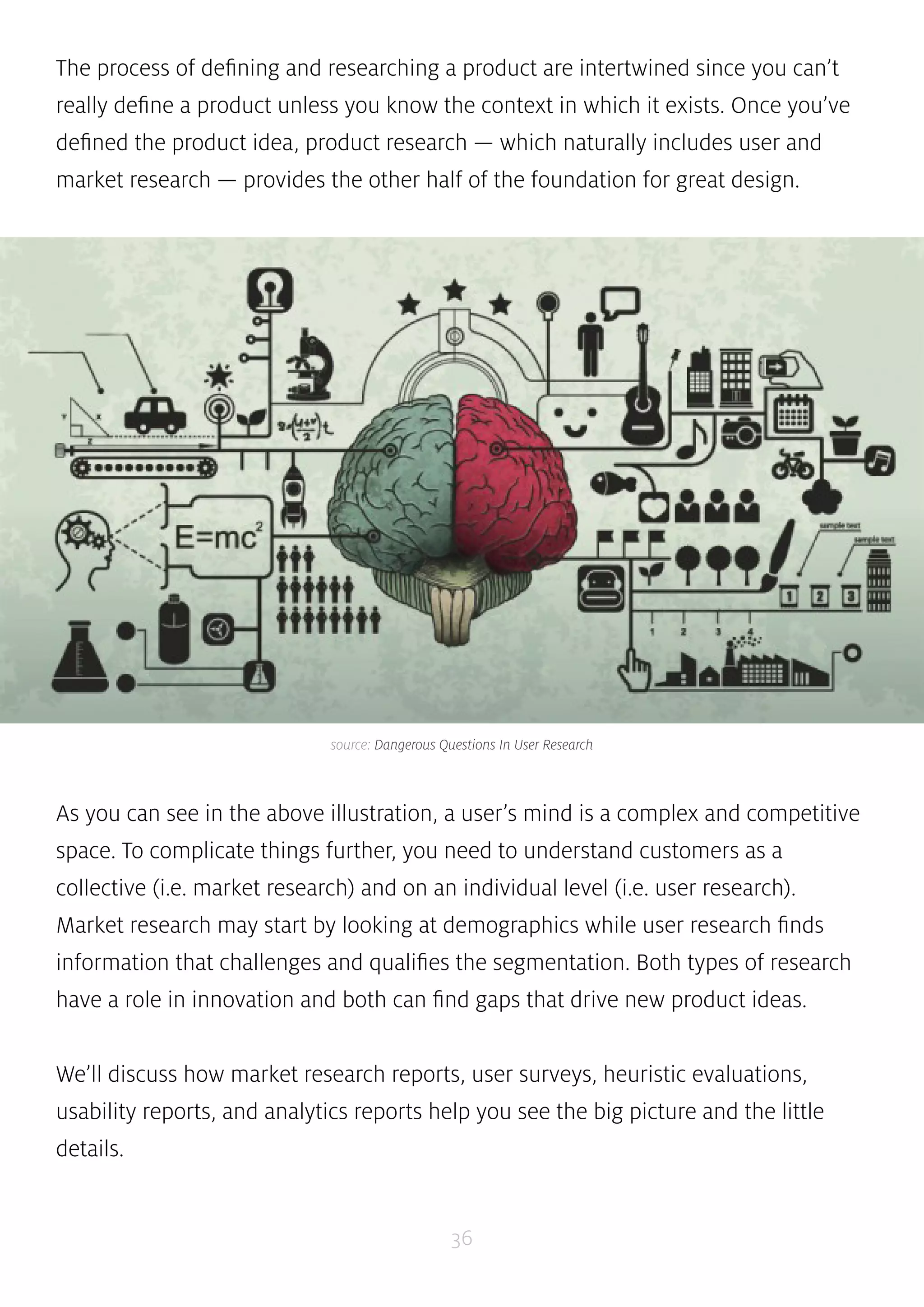
source: Dangerous Questions In User Research 
As you can see in the above illustration, a user’s mind is a complex and competitive 
space. To complicate things further, you need to understand customers as a 
collective (i.e. market research) and on an individual level (i.e. user research). 
Market research may start by looking at demographics while user research finds 
information that challenges and qualifies the segmentation. Both types of research 
have a role in innovation and both can find gaps that drive new product ideas. 
We’ll discuss how market research reports, user surveys, heuristic evaluations, 
usability reports, and analytics reports help you see the big picture and the little 
details. 
36
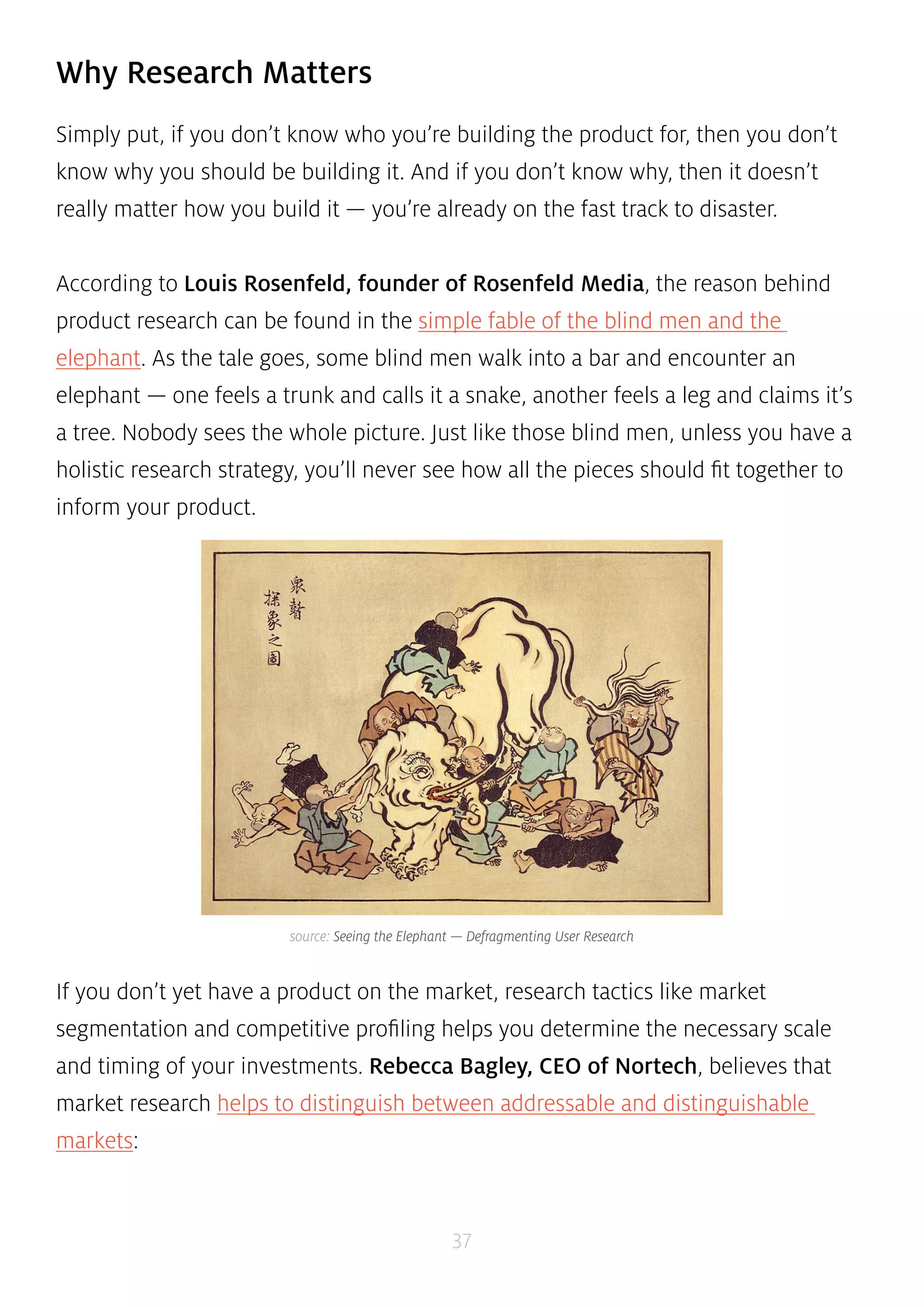
source: Seeing the Elephant — Defragmenting User Research 
37 
Why Research Matters 
Simply put, if you don’t know who you’re building the product for, then you don’t 
know why you should be building it. And if you don’t know why, then it doesn’t 
really matter how you build it — you’re already on the fast track to disaster. 
According to Louis Rosenfeld, founder of Rosenfeld Media, the reason behind 
product research can be found in the simple fable of the blind men and the 
elephant. As the tale goes, some blind men walk into a bar and encounter an 
elephant — one feels a trunk and calls it a snake, another feels a leg and claims it’s 
a tree. Nobody sees the whole picture. Just like those blind men, unless you have a 
holistic research strategy, you’ll never see how all the pieces should fit together to 
inform your product. 
If you don’t yet have a product on the market, research tactics like market 
segmentation and competitive profiling helps you determine the necessary scale 
and timing of your investments. Rebecca Bagley, CEO of Nortech, believes that 
market research helps to distinguish between addressable and distinguishable 
markets:
• Total addressable market (TAM) — The total revenue opportunity for your 
product. Think of this as your product’s planet. 
• Serviceable available market (SAM) — The portion of the addressable 
market in which you can realistically compete. Think of this as your product 
neighborhood. 
Knowing your available market is already half the battle since, at that point, 
you’ll have a clearer picture of how to segment customers as well as other 
”neighborhood” competitors. 
According to Apala Chavan, Chief Innovator at Human Factors International, 
user research is better at providing direction on designing solutions because it 
looks at how a person uses a product — not data on what they might buy. For 
instance, market research identifies that a market exists in Europe for smartphones. 
But what’s profitable and what’s desirable may be two very different things. User 
research can then validate that assumption by documenting how 10 people use 
smartphones versus how they use your smartphone. 
Market Segmentation Report 
A market segmentation report is a document examining potential customers based 
on their specific and shared needs and characteristics. Generally speaking, they’re 
segmented by geography, demographic, behaviors, psychology, benefits or some 
combination of the above. 
38 
TWEET 
THIS QUOTE 
”If you don’t know who you’re building for, then you don’t know why. Without ‘why’, 
‘how’ doesn’t matter.”
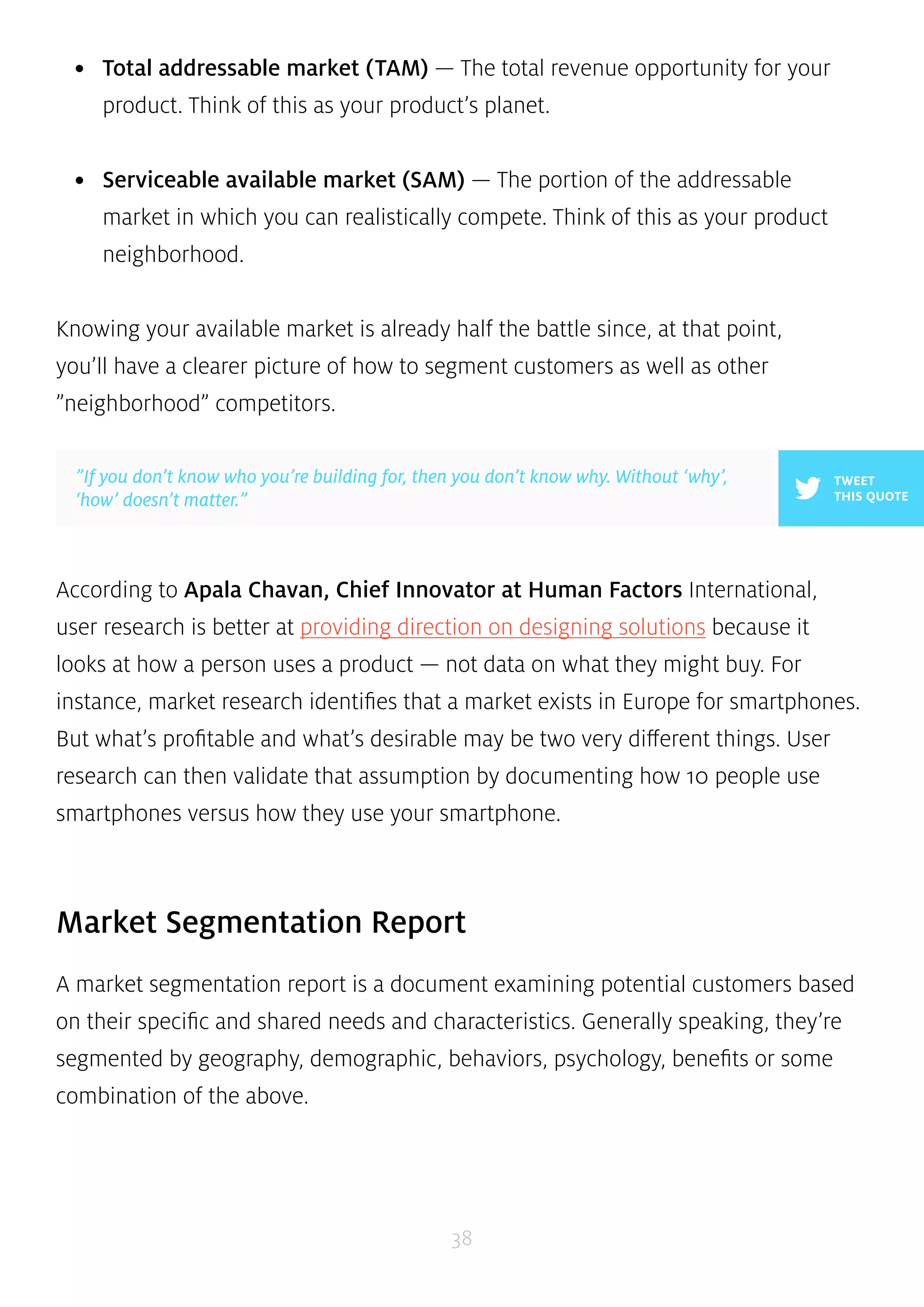
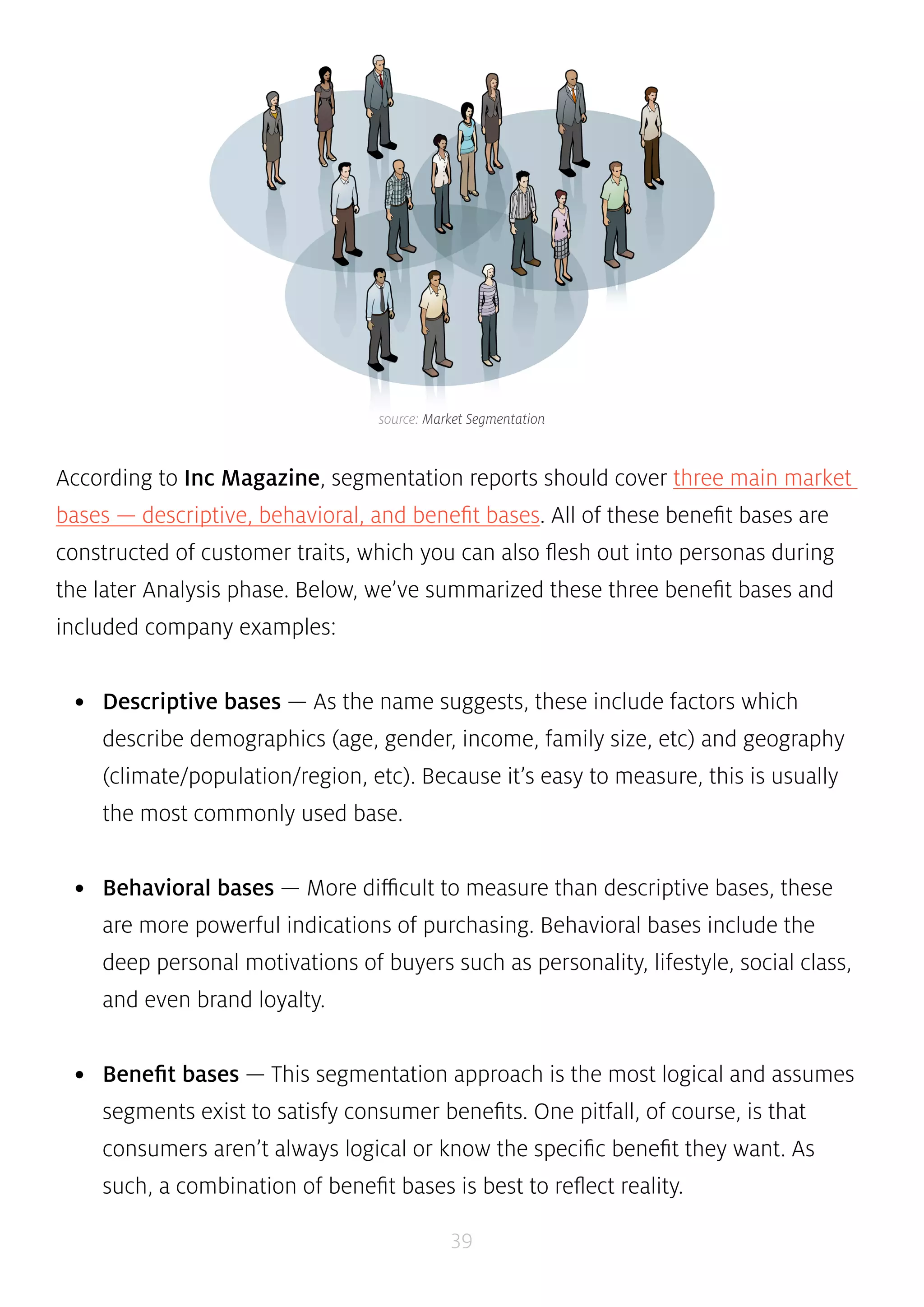
source: Market Segmentation 
According to Inc Magazine, segmentation reports should cover three main market 
bases — descriptive, behavioral, and benefit bases. All of these benefit bases are 
constructed of customer traits, which you can also flesh out into personas during 
the later Analysis phase. Below, we’ve summarized these three benefit bases and 
included company examples: 
• Descriptive bases — As the name suggests, these include factors which 
describe demographics (age, gender, income, family size, etc) and geography 
(climate/population/region, etc). Because it’s easy to measure, this is usually 
the most commonly used base. 
• Behavioral bases — More difficult to measure than descriptive bases, these 
are more powerful indications of purchasing. Behavioral bases include the 
deep personal motivations of buyers such as personality, lifestyle, social class, 
and even brand loyalty. 
• Benefit bases — This segmentation approach is the most logical and assumes 
segments exist to satisfy consumer benefits. One pitfall, of course, is that 
consumers aren’t always logical or know the specific benefit they want. As 
such, a combination of benefit bases is best to reflect reality. 
39
Bert Markgraf, President of North46 Technologies, describes how different 
prominent companies focus on different segment bases. McDonald’s segments by 
descriptive base and targets children with Happy Meals, while creating its popular 
breakfast menu for working adults. Patagonia, on the other hand, segments 
by behavioral base by creating products emphasizing quality and responsible 
production — values that matter to its progressive outdoor enthusiasts. 
Victor Yocco and Jes Koepfler, both Usability Researchers at Intuitive Company, 
market research and segmentation reports should be used to inform user research. 
However, since strict segmentation can let you miss out on potentially profitable 
secondary customers (eg: adults who love cereal), the tactic should be combined 
with user research so you can see beyond what’s on paper. 
40 
Survey Results 
Steve Jobs once said that ”It isn’t the consumers’ job to know what they want”. 
While that’s true since you don’t want a committee of customers designing the 
product, survey results are still helpful as a baseline measurement. They certainly 
aren’t mandatory for product success, but any insight into the customer mind is 
better than guessing. 
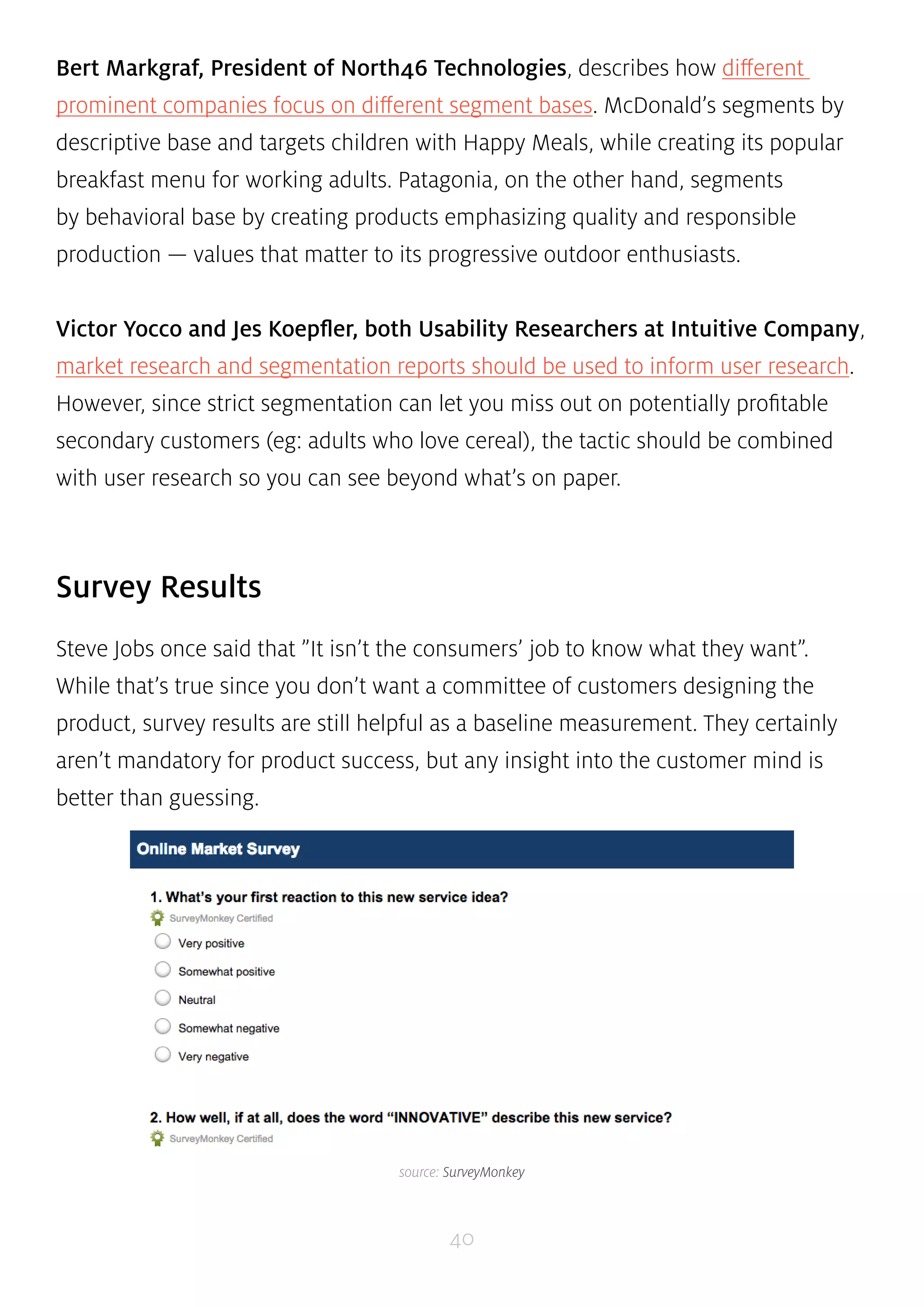
source: SurveyMonkey
According to David Masters, Editor at Tuts+, online surveys are a low-cost tactic 
that lets you see data patterns quickly. Focus groups and interviews can provide in-depth 
research, but they’re costly (find the potential customers, prepare questions, 
pay people to interview, etc). If you’re short on resources, online surveys are a 
leaner yet scalable way of gathering vast information — especially if you don’t have 
a working prototype yet. If you decide on this simple route, here’s a few tips: 
• Be crystal clear on your goals — Who are you talking to, and what do you 
want to know? Shorter is better, so make sure you only ask questions you need 
answered. A 3-minute survey will give you cleaner data than a 20-minute one. 
• Put ideas to paper — Draft every question you need answered. Once you have 
a list of 10 to 15, phrase them in different ways that all focus on the issue at 
hand. 
• Edit ruthlessly — Group your original list into common themes and then 
choose one out of each theme. Ideally, you want 5 questions. If you have more 
than 8, start culling. 
• Craft your questions — Closed questions have a limited choice of answers. 
These may be binary (yes/no) or multiple choice. Open-ended questions let 
you discover things you never thought of and let you learn the language of 
customers. Regardless of your choice, the simpler and shorter your questions, 
the better your responses. 
• Order your questions — Order matters. The most important questions go first. 
If you need to follow up, ask questions last (if you ask them first, people will 
ignore you because they don’t know you). 
Jonathan Kochis, Partner at Treble Apps, used survey results to help define the 
features of a consumer-facing mobile project for 3M Canada. If budget permits, he 
41
advises investing in a research firm to refine your questions and find the perfect set 
of participants. If you’re on a budget, following the above advice with Fluid Surveys 
or SurveyMonkey can still get you good results. Regardless of your method, he 
advises being highly selective with open-ended questions since they create friction 
for respondents and can be difficult to interpret. 
TWEET 
THIS QUOTE 
”Surveys aren’t mandatory for product success, but any consumer insight is better 
than guessing.” 
Constant Contact provides a comprehensive list of survey questions mapped to 
answer choices. To get started, you can then use this sample survey template from 
SurveyMonkey. 
42 
Heuristic Evaluations 
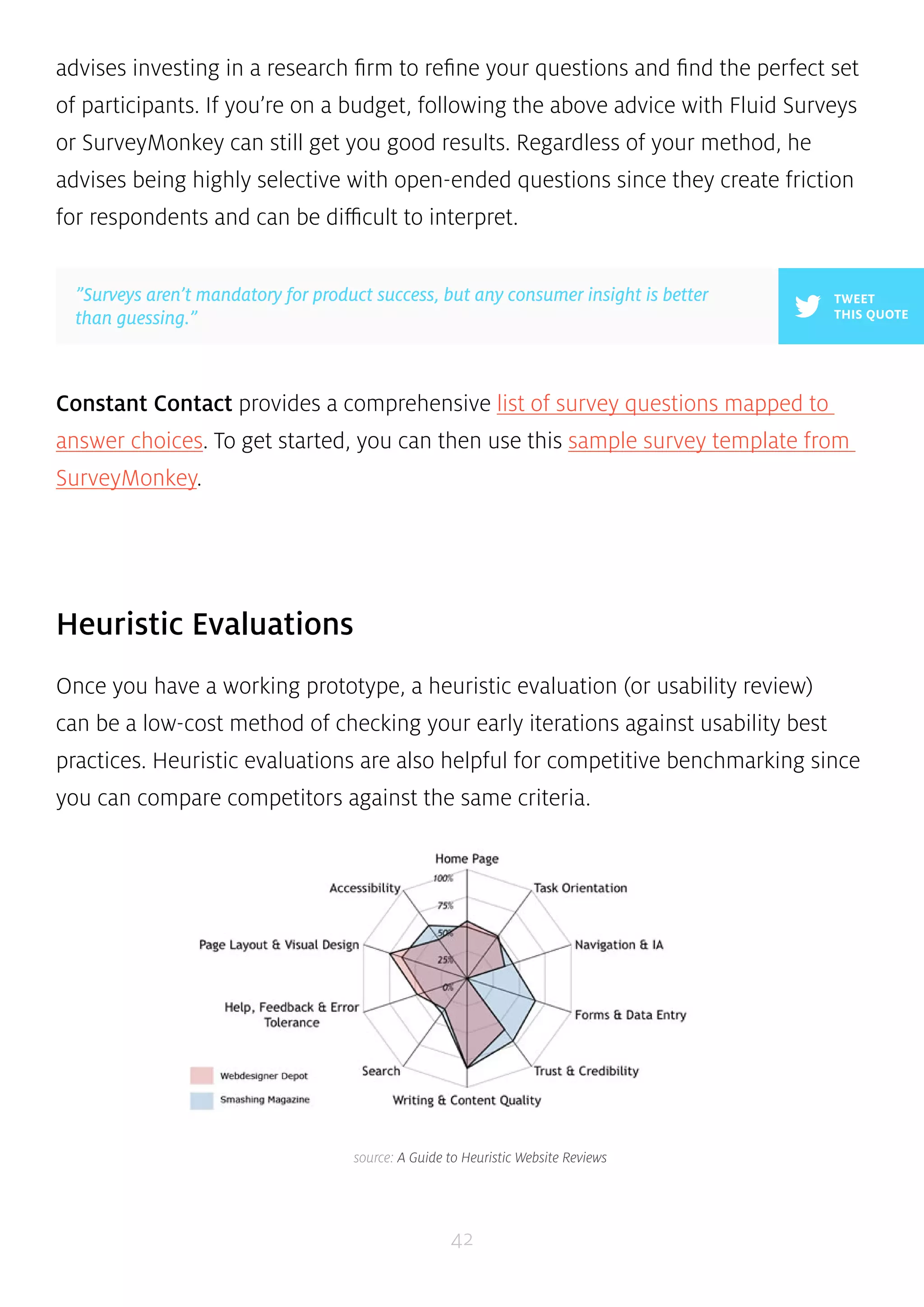
Once you have a working prototype, a heuristic evaluation (or usability review) 
can be a low-cost method of checking your early iterations against usability best 
practices. Heuristic evaluations are also helpful for competitive benchmarking since 
you can compare competitors against the same criteria. 
source: A Guide to Heuristic Website Reviews
According to Neil Turner, founder of UX For The Masses, heuristic reviews can 
be carried out by non-UX folks provided they follow a set of guidelines. While 
they’re cheap and usually only require a day or two, they don’t actually tell you the 
usability of a system (since you’re not testing with real users) and may suffer from 
inconsistency and subjectivity (since they’re carried out by different people). That 
being said, they are a still a great reality check since you’ll be able to catch glaring 
UX violations. We’ve summarized a scenario-based approach: 
• Define your usability review scenarios — Define common and important 
user tasks. Who uses the product, and is this the first time? What task are they 
trying to complete, and what is their goal? For example, when evaluating a 
laptop, you would look at scenarios like sending email and watching movies. 
• Walk through each scenario — Now that each scenario is defined, you need 
to walk through the steps to achieving user goals. Can they see how to do it? 
And how will they know if their action was correct? Walk through each scenario 
until you think the user achieved their goal or gave up. 
• Complete a heuristic review scorecard — Use a template such as this 
45-point checklist. It’s best to have 3-5 people do this. Remember that a high 
score doesn’t mean your product is actually usable, only that it should be 
usable. 
Oracle uses a streamlined 10-point list of heuristics gauging everything from 
application complexity to frequency and helpfulness of error messages. Usability 
issues are categorized as either ”low”, ”medium”, or ”high” severity with supporting 
notes. The team then isolates the top 10 most important issues for immediate fixing. 
If you’re curious about what a full heuristic report may look like, check out this full 
heuristic evaluation of Apple iTunes. 
43
source: Seeing the Elephant: Defragmenting User Research, List Apart 
44 
User Research Report 
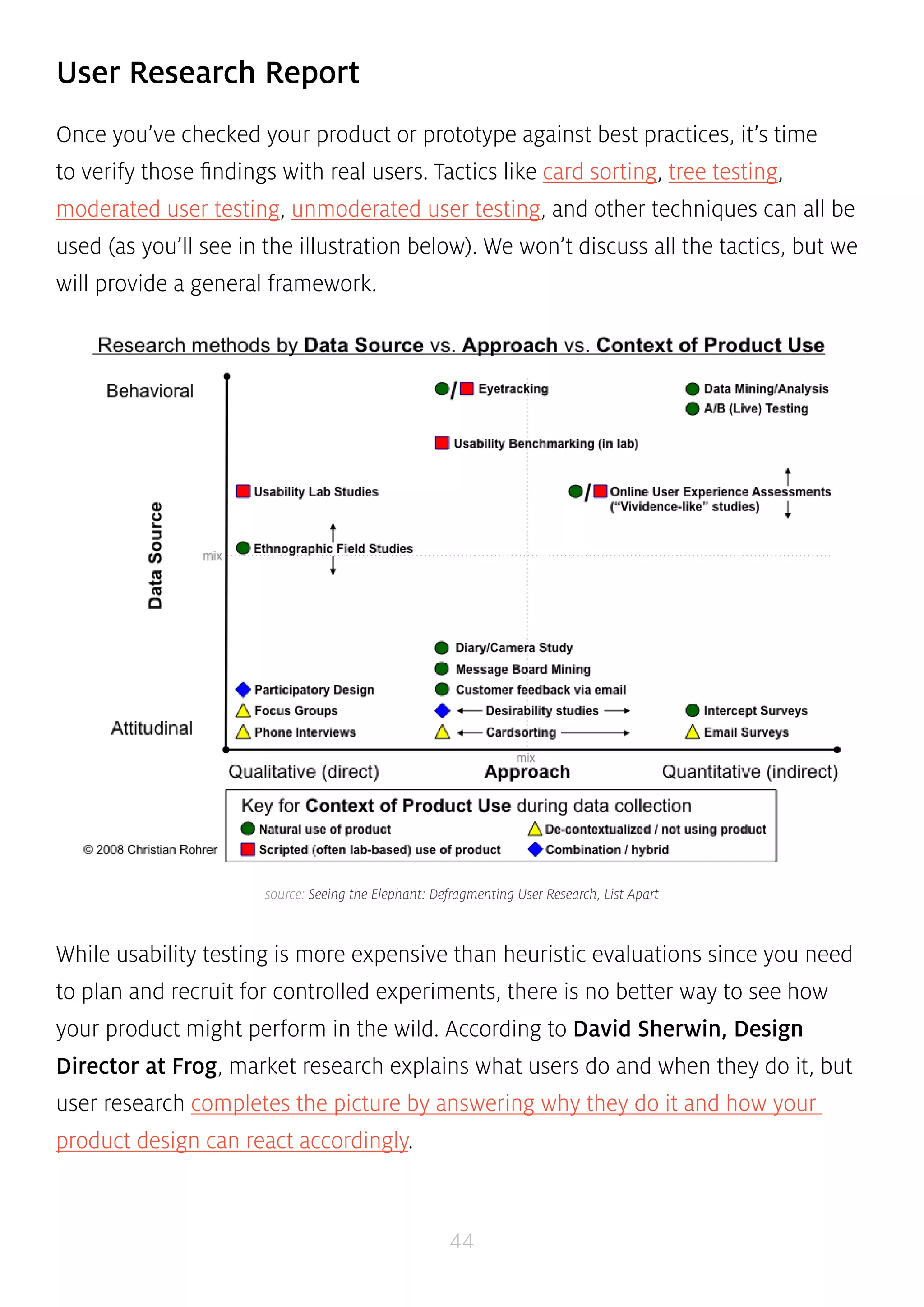
Once you’ve checked your product or prototype against best practices, it’s time 
to verify those findings with real users. Tactics like card sorting, tree testing, 
moderated user testing, unmoderated user testing, and other techniques can all be 
used (as you’ll see in the illustration below). We won’t discuss all the tactics, but we 
will provide a general framework. 
While usability testing is more expensive than heuristic evaluations since you need 
to plan and recruit for controlled experiments, there is no better way to see how 
your product might perform in the wild. According to David Sherwin, Design 
Director at Frog, market research explains what users do and when they do it, but 
user research completes the picture by answering why they do it and how your 
product design can react accordingly.
45 
He advises a 5-stage framework: 
• Objectives — Create framing questions like ”Who would share video clips?”, 
and ”Why would they share these clips?”. Prioritize the most important 
questions, and then translate them into focused objectives like ”Determine 
how frequent TV viewers in China decide what shows to record to watch later”. 
• Hypotheses — Using your framing questions spend up to 8 minutes 
individually sketching answers. You may generate attitudinal hypotheses 
(TV watchers on social networks like to know their friends’ favorite shows), 
behavioral hypotheses (TV watchers only share clips from shows they watch 
frequently), or feature-related hypotheses (TV watchers will share clips if 
they’re popular with others). 
• Methods — Sort all your hypotheses based on themes (attitude/behavior/ 
feature) and then assign testing tactics. For example, observational and 
contextual interviews are great for building a foundation of knowledge. Diary 
studies, card sorting, paper prototyping, and other collaborative activities help 
explore design ideas. 
• Conduct — Recruit around 8 users for 3 testing sessions each (1 hour length). 
Develop an interview guide and then document all the notes, photos, and 
videos as you test. Constantly ask yourself if you’re discovering what you need 
to learn in order to achieve your objectives. If not, switch tactics. 
• Synthesize — The why behind the data is more important than the what. 
Is there a pattern that suggests you need new designs? Did what you learn 
change how you should frame your research objective? And do you need to 
change the design activities that you’ve planned?
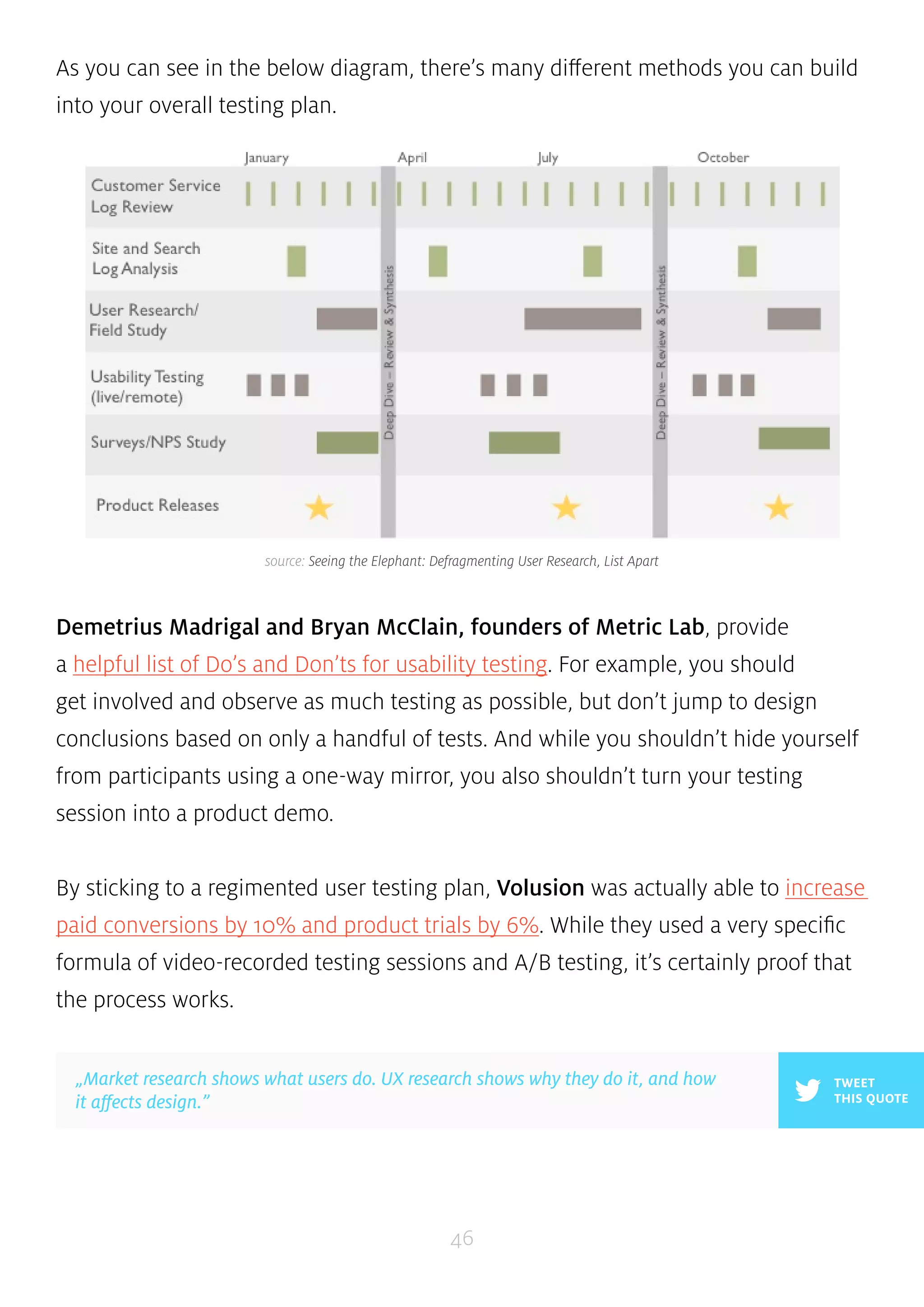
As you can see in the below diagram, there’s many different methods you can build 
into your overall testing plan. 
source: Seeing the Elephant: Defragmenting User Research, List Apart 
Demetrius Madrigal and Bryan McClain, founders of Metric Lab, provide 
a helpful list of Do’s and Don’ts for usability testing. For example, you should 
get involved and observe as much testing as possible, but don’t jump to design 
conclusions based on only a handful of tests. And while you shouldn’t hide yourself 
from participants using a one-way mirror, you also shouldn’t turn your testing 
session into a product demo. 
By sticking to a regimented user testing plan, Volusion was actually able to increase 
paid conversions by 10% and product trials by 6%. While they used a very specific 
formula of video-recorded testing sessions and A/B testing, it’s certainly proof that 
the process works. 
46 
TWEET 
THIS QUOTE 
„Market research shows what users do. UX research shows why they do it, and how 
it affects design.”
If you’re looking for a leaner user research approach, you can follow this user 
testing framework (which you can learn in 10 minutes) and then document your 
plan in a simple format that resonates with stakeholders. 
At UXPin, we’re big fans of guerilla testing (as discussed on p.39 of the UX Design for 
Startups e-book). When testing new features, we enlist the help of User Testing to record 
on video the reactions of designers, UX professionals, and product managers. On the 
research side, we conduct in-depth interviews with product managers and UX folks 
from companies like Uber, Google, Etsy, and Apple to understand their pain points, their 
needs, and how UXPin fits in. 
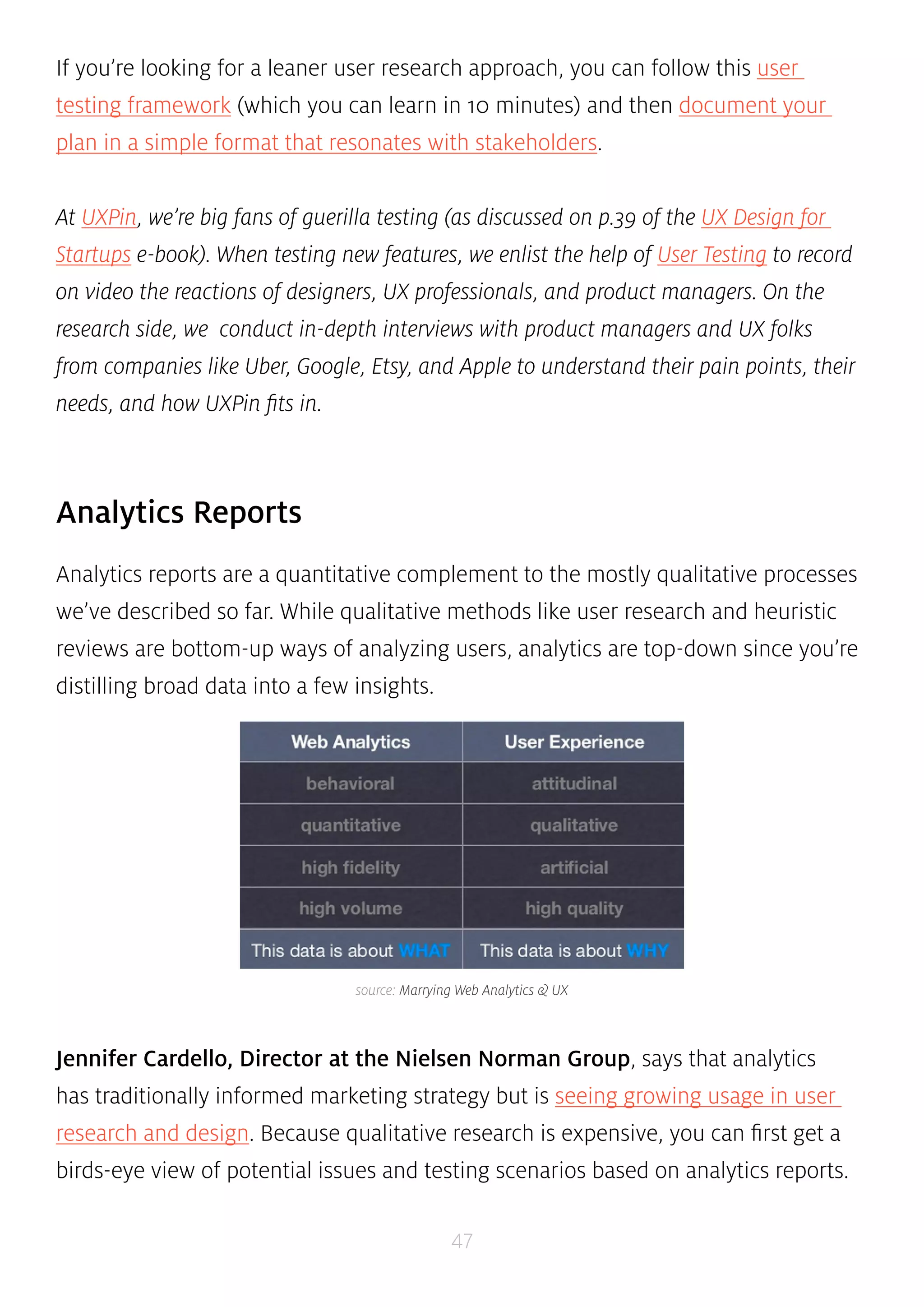
source: Marrying Web Analytics & UX 
47 
Analytics Reports 
Analytics reports are a quantitative complement to the mostly qualitative processes 
we’ve described so far. While qualitative methods like user research and heuristic 
reviews are bottom-up ways of analyzing users, analytics are top-down since you’re 
distilling broad data into a few insights. 
Jennifer Cardello, Director at the Nielsen Norman Group, says that analytics 
has traditionally informed marketing strategy but is seeing growing usage in user 
research and design. Because qualitative research is expensive, you can first get a 
birds-eye view of potential issues and testing scenarios based on analytics reports.
For user research, analytics serves 3 crucial roles for identifying new tests and 
validating existing tests: 
• Indicating issues — Weekly metrics reports can identify issues in web-based 
products. For example, you may find out that conversions suddenly dropped 
following a site redesign. 
• Investigating issues —If any issues are flagged, you can investigate further. 
Is the decrease in conversions coming from a specific device? If so, you could 
design a device-specific A/B user test to check possible solutions. 
• Verifying qualitative research — Analytics can also pinpoint trouble spots 
that arise during user testing. For example, study participants don’t know 
where to find information because a word on the site is confusing. Using a tool 
like Google Analytics, you can then check the keyword traffic for that term. If 
there’s a high volume, you’ve just verified that the problem is worth solving. 
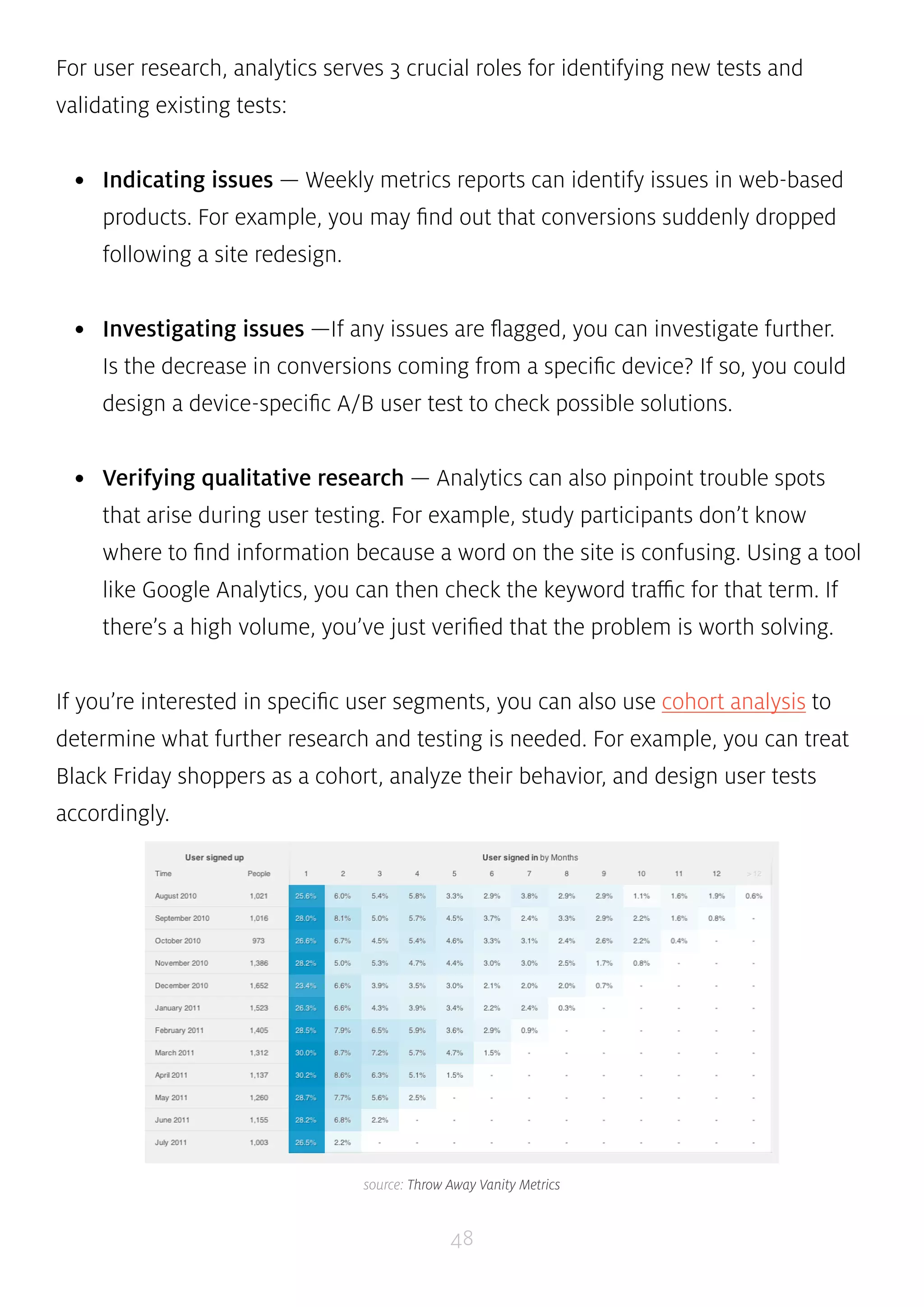
If you’re interested in specific user segments, you can also use cohort analysis to 
determine what further research and testing is needed. For example, you can treat 
Black Friday shoppers as a cohort, analyze their behavior, and design user tests 
accordingly. 
source: Throw Away Vanity Metrics 
48
If you don’t have a working product, analytics are still useful for doing market 
research. According to Inc Magazine, keyword and backlinking analysis are both 
effective yet lean methods. Using a tool like Google Adwords, you can check for 
search volumes and deduce consumer interest as well as competition. Backlink 
analysis will also tell you whether competitors are promoting similar products or 
services. 
TWEET 
”Analytics is about the ‘what’. User research is about the ‘why’.” THIS QUOTE 
At UXPin, we analyze customer and cohort data. Using KISSMetrics, we’re able to see the 
usage of certain app features and how it affects conversion rates. We can then create 
feature variations for user testing, capture results, and continue the feedback loop. We 
also segment that data by cohort so we can see what features resonate most with what 
users. 
49 
Research, Test, Validate 
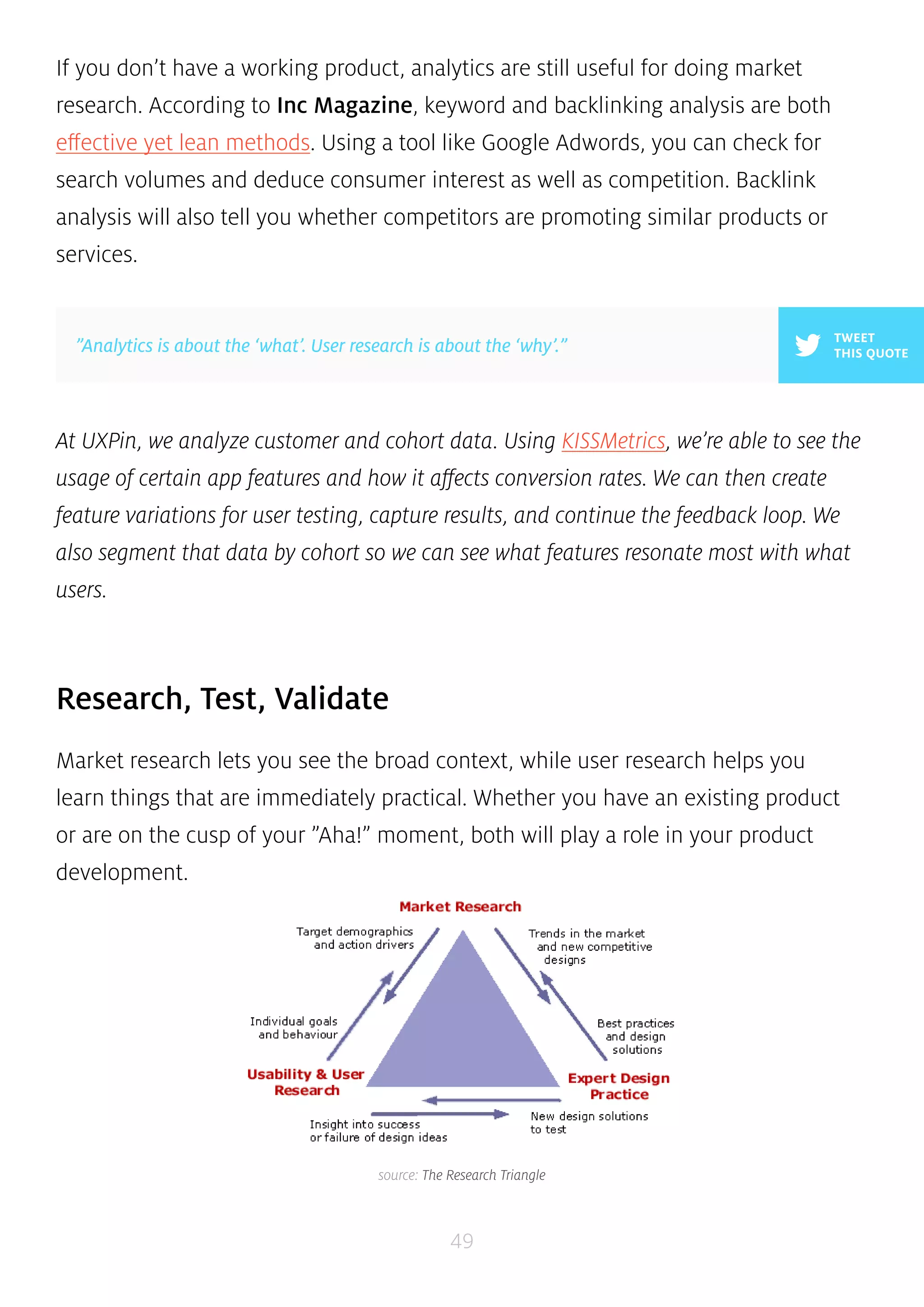
Market research lets you see the broad context, while user research helps you 
learn things that are immediately practical. Whether you have an existing product 
or are on the cusp of your ”Aha!” moment, both will play a role in your product 
development. 
source: The Research Triangle
When you combine market research with user research, you have a way to listen to 
the market as well as individual users. With that knowledge you mind, you can go 
forward and design solutions and test if they actually work. Your raw research will 
be especially helpful as it starts to take shape and form during the Analysis phase. 
50
CHAPTER FIVE 
Analyzing Users Before 
Diving Into Design 
An Overview Of User Analysis Process & Documentation in Product Design 
51
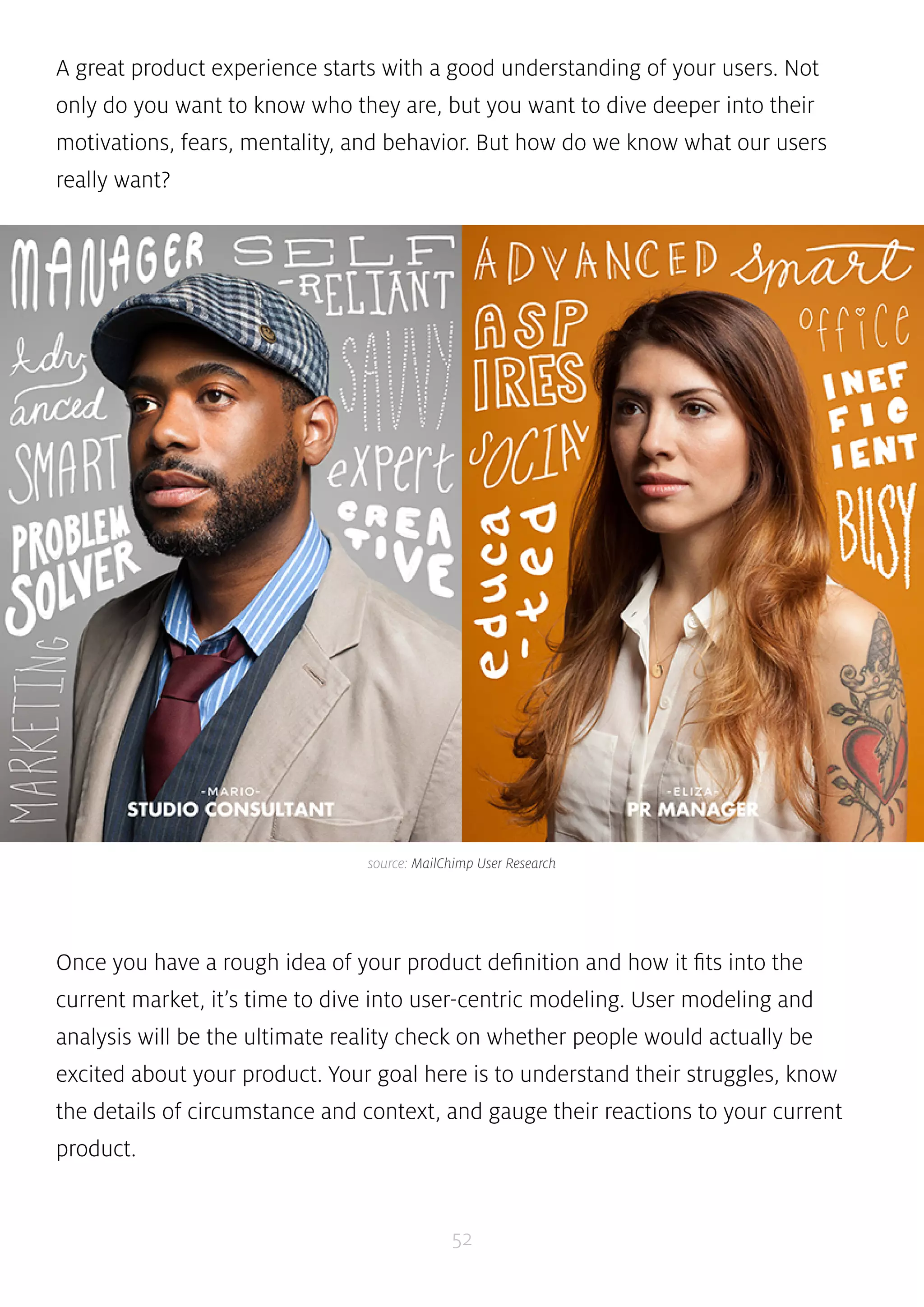
A great product experience starts with a good understanding of your users. Not 
only do you want to know who they are, but you want to dive deeper into their 
motivations, fears, mentality, and behavior. But how do we know what our users 
really want? 
source: MailChimp User Research 
Once you have a rough idea of your product definition and how it fits into the 
current market, it’s time to dive into user-centric modeling. User modeling and 
analysis will be the ultimate reality check on whether people would actually be 
excited about your product. Your goal here is to understand their struggles, know 
the details of circumstance and context, and gauge their reactions to your current 
product. 
52
In this piece, we’ll look at the user personas & scenarios, experience maps, 
requirements documents, and user matrices you’ll create to make your product 
respond effectively to customer problems. Ultimately, this will help you iterate to 
solve problems you might never have even considered. 
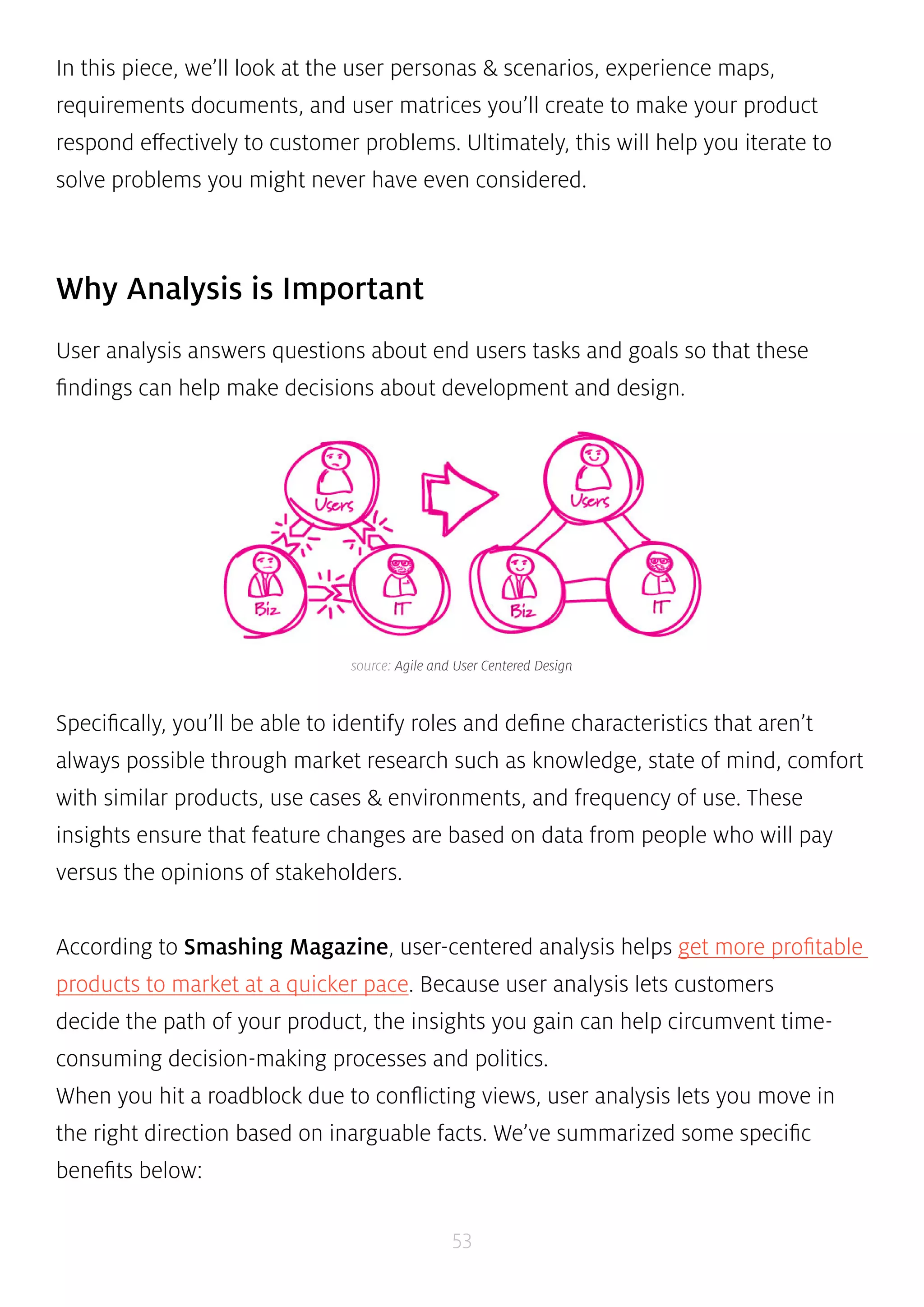
source: Agile and User Centered Design 
53 
Why Analysis is Important 
User analysis answers questions about end users tasks and goals so that these 
findings can help make decisions about development and design. 
Specifically, you’ll be able to identify roles and define characteristics that aren’t 
always possible through market research such as knowledge, state of mind, comfort 
with similar products, use cases & environments, and frequency of use. These 
insights ensure that feature changes are based on data from people who will pay 
versus the opinions of stakeholders. 
According to Smashing Magazine, user-centered analysis helps get more profitable 
products to market at a quicker pace. Because user analysis lets customers 
decide the path of your product, the insights you gain can help circumvent time-consuming 
decision-making processes and politics. 
When you hit a roadblock due to conflicting views, user analysis lets you move in 
the right direction based on inarguable facts. We’ve summarized some specific 
benefits below:
• Better products — Processes that involve end users as well as understand 
business objectives will always result in products that work better for their 
intended purpose. 
• Cheaper to fix problems — User analysis helps you match up your product 
against reality to make changes while it’s still mostly just on paper. A wireframe 
or prototype is magnitudes cheaper than a technical fix to a live product. 
• Ease of use is a common requirement — Customers often use the terms 
”usability” and ”user experience” when describing qualities they seek in 
products. Therefore, user analysis drives your product to have better selling 
points. 
54 
Personas 
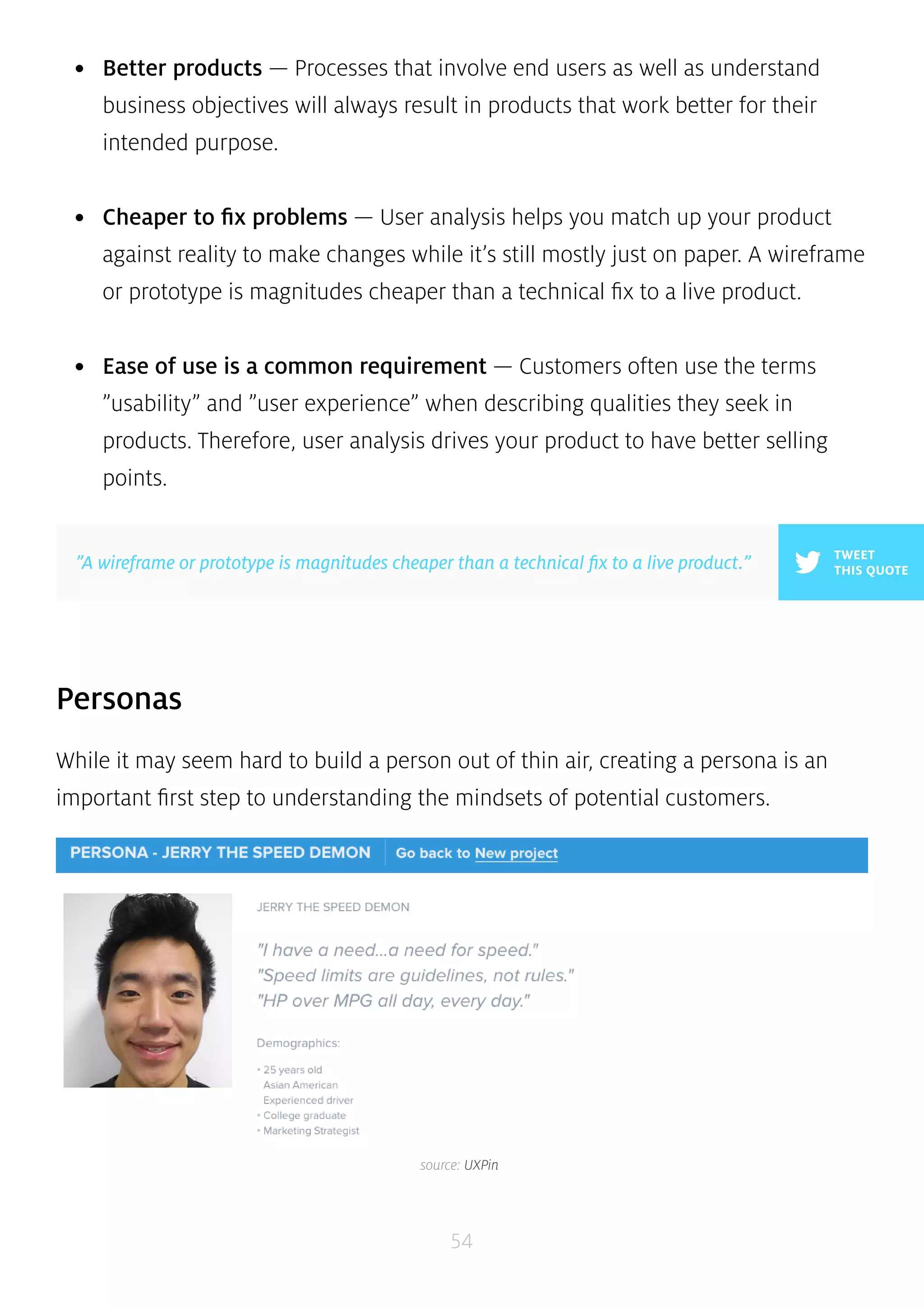
While it may seem hard to build a person out of thin air, creating a persona is an 
important first step to understanding the mindsets of potential customers. 
TWEET 
”A wireframe or prototype is magnitudes cheaper than a technical fix to a live product.” THIS QUOTE 
source: UXPin
Personas help to focus product decisions by adding a layer of real-world 
consideration to the conversation. They act almost like another person in the room 
when making vital product decisions. However, personas shouldn’t represent all 
audiences or address all needs of your product but should instead focus on the 
major needs of the most important user groups. As we described in our Guide to 
Minimum Viable Products, trying to please everyone with your product is one of the 
quickest ways to fail. 
According to Kevan Lee, Content Crafter at Buffer, personas let you internalize 
potential customers so you can actually relate to them as human beings. He 
recommends three to five personas since this number is large enough to cover the 
majority of customers yet small enough to be specific. Below, we’ve summarized 
the information you’ll want to capture: 
• Give the persona a name — You can choose whatever name you like, but 
make it real so the person feels real. The name can also be labeled by segment, 
for example ”Sally the Skeptic”. 
• Identify the job, role, and company — Surveys can be very helpful for 
capturing this data. For example, Buffer’s survey showed a large percentage of 
users are small business owners. They then used this information to create a 
specific ”SMB” persona. 
• Include vivid information — While age, gender, and device usage are 
important, you also want to describe psychology. What are their fears and 
aspirations? You can use metrics tools for demographics and educated guesses 
for psychographics. 
55 
TWEET 
”When making vital product decisions, personas act as another person in the room” THIS QUOTE
Alan Klement, former Product Designer at Interactive Pioneers, believes that 
basic personas sometimes lack the causalities that lead to consumer purchases. For 
him, interviews and a focus on psychology are required to flesh out personas into 
”characters” that can be analyzed with regards to their anxieties, motivations, and 
touchpoints during the buying process. 
As you start building out your personas, you can keep them better rooted in reality 
by conducting segmented interviews. You’ll be able to inject tons of real-world data 
into your personas by interviewing existing customers, prospects, and referrals. To 
keep it simple, you can use a persona template or a more integrated solution like 
UXPin which allows you to attach personas to prototypes. 
56 
User Stories & Job Stories 
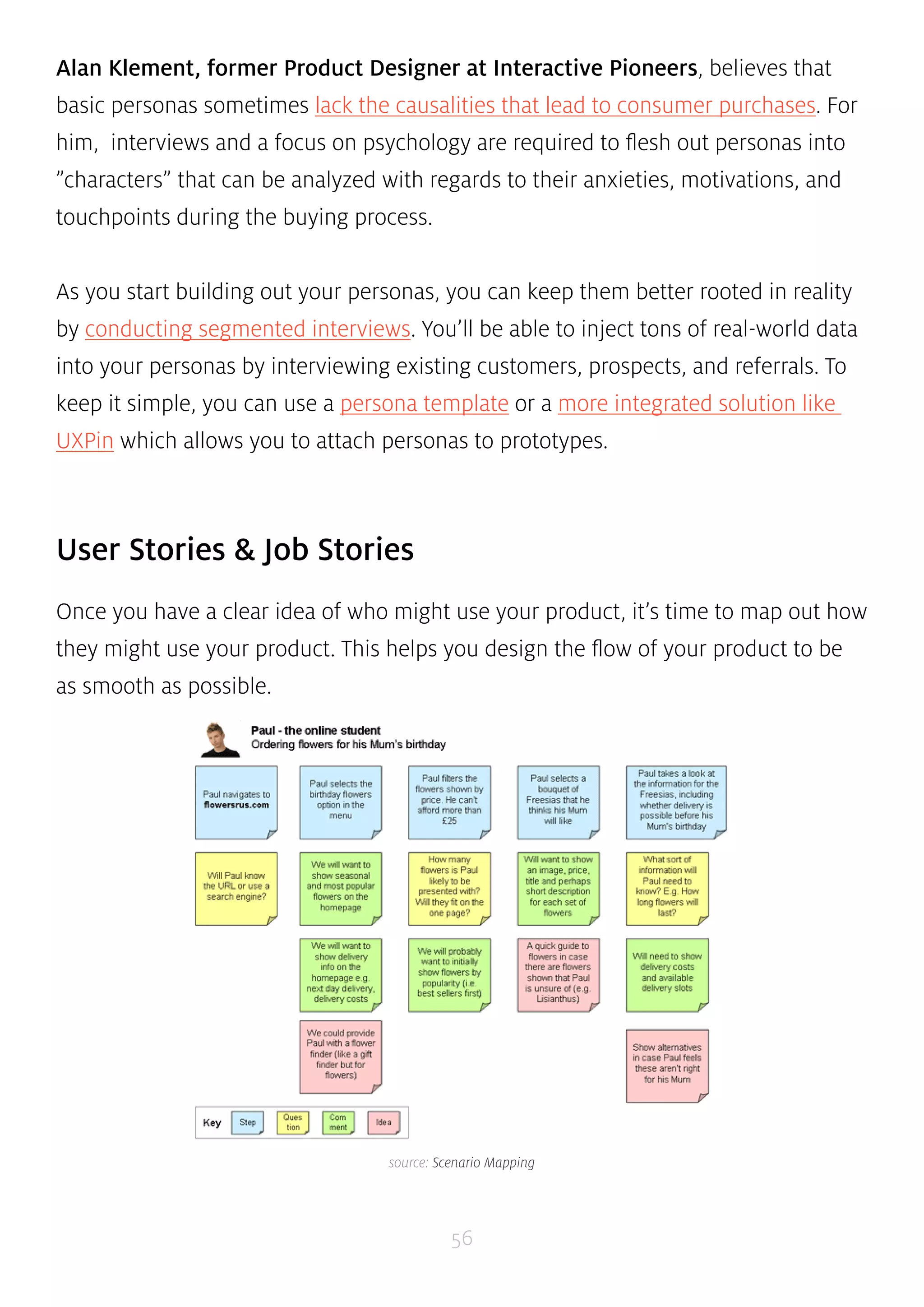
Once you have a clear idea of who might use your product, it’s time to map out how 
they might use your product. This helps you design the flow of your product to be 
as smooth as possible. 
source: Scenario Mapping
Bill Wake, Agile coach & Senior Consultant at Industrial Logic, created a simple 
guideline to follow when developing user stories. Known by its acronym ”INVEST”, 
the methodology helps guarantee that user stories provide business value while 
being deliverable in a single iteration. We’ve elaborated each of the points below: 
• Independent — The user story should be self-contained so it doesn’t depend 
57 
on other stories 
• Negotiable — Avoid too much detail so user stories are flexible and can be 
altered 
• Valuable — User stories must deliver value to the end-user 
• Estimable — You should be able to estimate the resources needed for a user 
story 
• Scalable — Keep the user stories lightweight so they can be tasked and 
prioritized with a certain level of certainty 
• Testable — Explain the acceptance criteria so the team knows when a story is 
complete 
Author of ”Digital Project Management” Kristofer Layon explains that hitting 
the right level of specificity is the key to satisfying the INVEST criteria. He believes 
that a good user story must clarify the specific type of customer, describe the task 
with comparable detail, and clarify on the context in which work must be done. For 
example, a good user story would therefore be ”As a Power User Pete, I need to be 
able to register for Program Q in office and mobile contexts so I can get back to my 
job quickly.” On the other hand, a poor user story would be ”Customers need to use 
a jQuery-enhanced web form for online registration, and the form must be in the 
top nav and homepage.” The second example is overly specific and obsesses over
technical detail rather than thinking about how users can accomplish goals. 
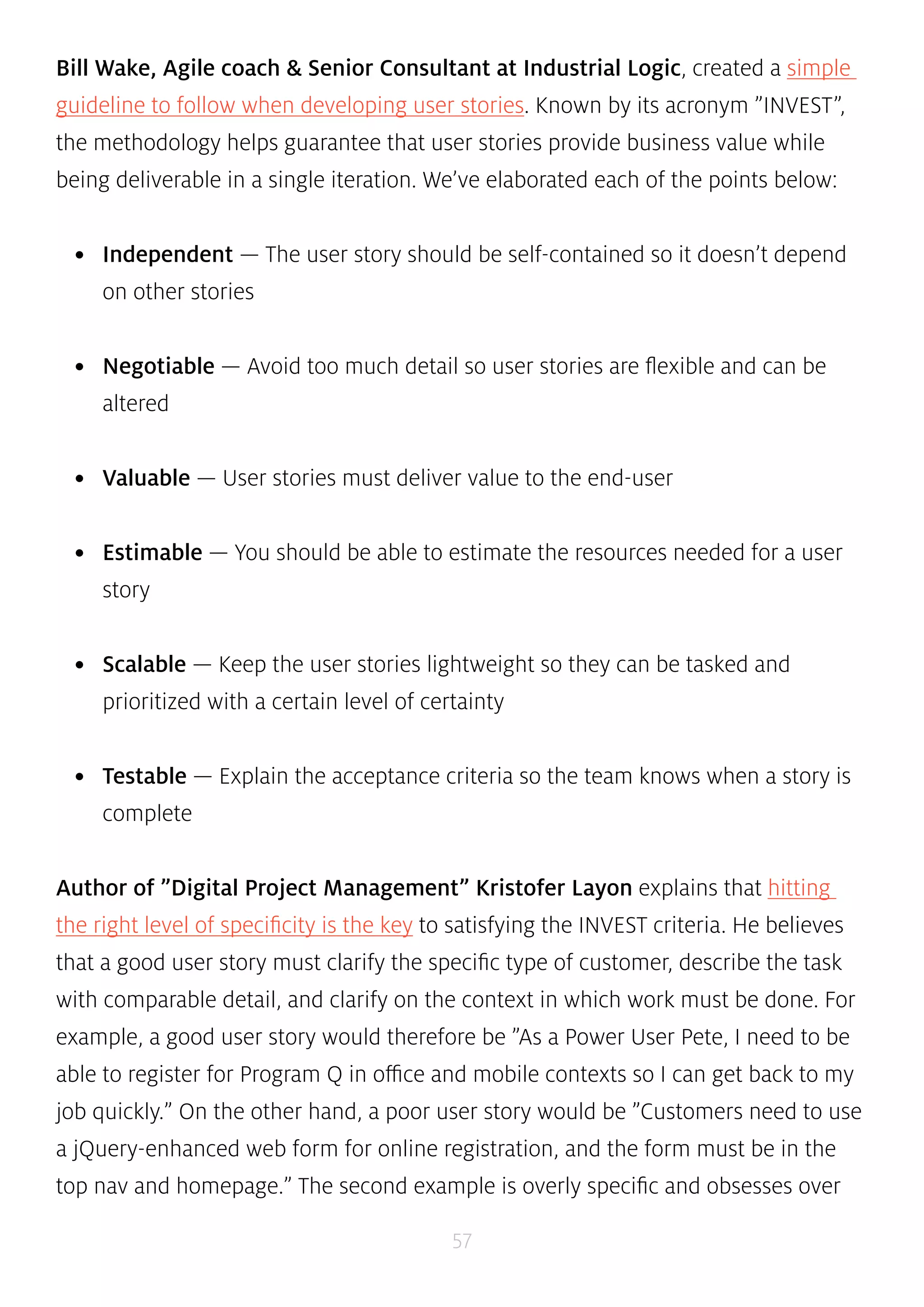
source: Replacing the User Story With A Job Story 
Originally developed by Intercom, you can take the concept of user stories a step 
further and treat them as job stories. Instead of the ”As a _____, I want to _____ so 
that _____” framework, the above job story helps remove some of the ambiguity 
of a persona by focusing on causality instead. Job stories can be more actionable 
since they focus on motivation rather than implementation. Adapting our previous 
example, a job story could then be ”When travelling, I want to register for Program 
Q on my laptop and cell phone so I am as efficient as possible.” 
58 
Defining Your Vision 
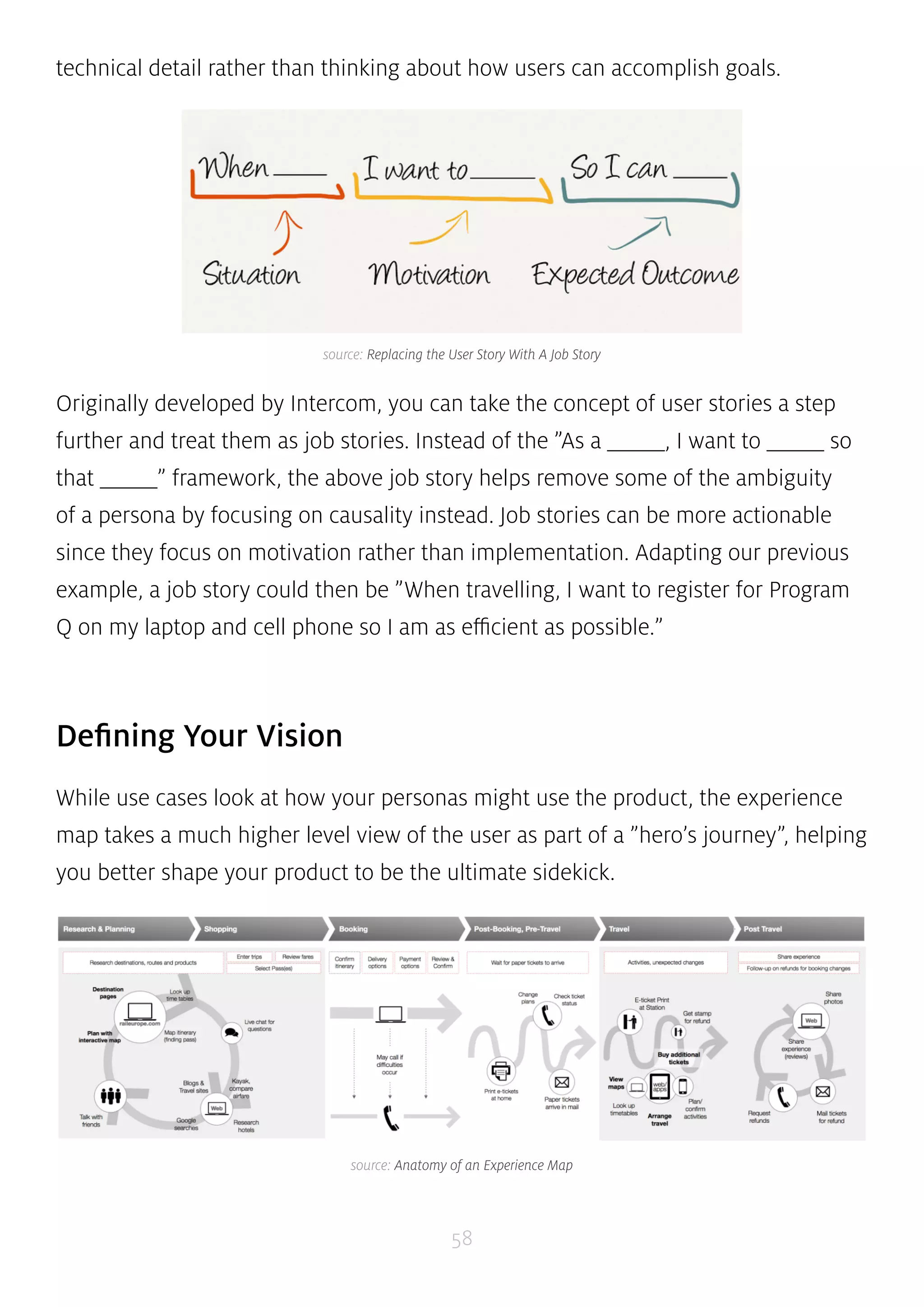
While use cases look at how your personas might use the product, the experience 
map takes a much higher level view of the user as part of a ”hero’s journey”, helping 
you better shape your product to be the ultimate sidekick. 
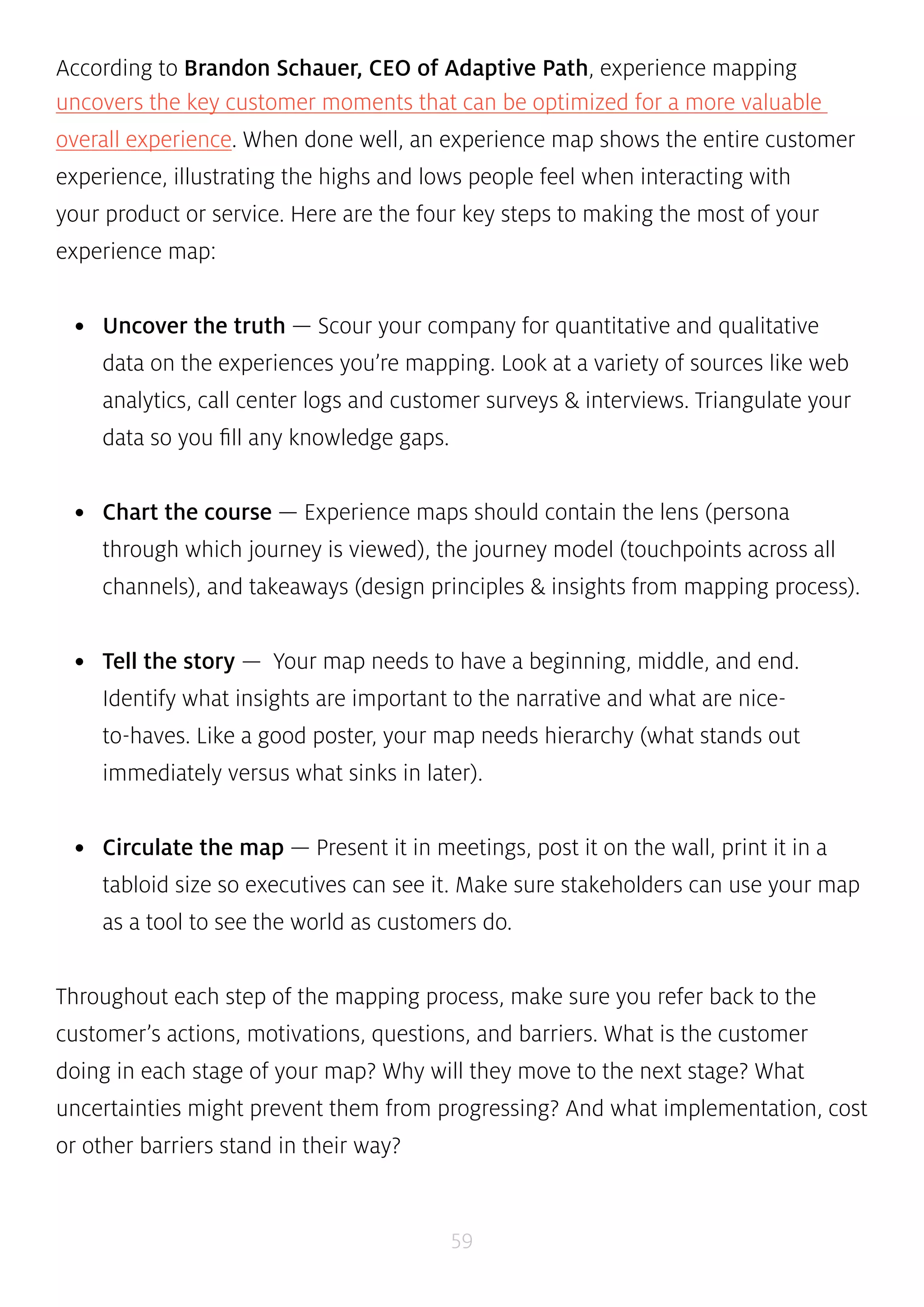
source: Anatomy of an Experience Map
According to Brandon Schauer, CEO of Adaptive Path, experience mapping 
uncovers the key customer moments that can be optimized for a more valuable 
overall experience. When done well, an experience map shows the entire customer 
experience, illustrating the highs and lows people feel when interacting with 
your product or service. Here are the four key steps to making the most of your 
experience map: 
• Uncover the truth — Scour your company for quantitative and qualitative 
data on the experiences you’re mapping. Look at a variety of sources like web 
analytics, call center logs and customer surveys & interviews. Triangulate your 
data so you fill any knowledge gaps. 
• Chart the course — Experience maps should contain the lens (persona 
through which journey is viewed), the journey model (touchpoints across all 
channels), and takeaways (design principles & insights from mapping process). 
• Tell the story — Your map needs to have a beginning, middle, and end. 
Identify what insights are important to the narrative and what are nice-to- 
haves. Like a good poster, your map needs hierarchy (what stands out 
immediately versus what sinks in later). 
• Circulate the map — Present it in meetings, post it on the wall, print it in a 
tabloid size so executives can see it. Make sure stakeholders can use your map 
as a tool to see the world as customers do. 
Throughout each step of the mapping process, make sure you refer back to the 
customer’s actions, motivations, questions, and barriers. What is the customer 
doing in each stage of your map? Why will they move to the next stage? What 
uncertainties might prevent them from progressing? And what implementation, cost 
or other barriers stand in their way? 
59
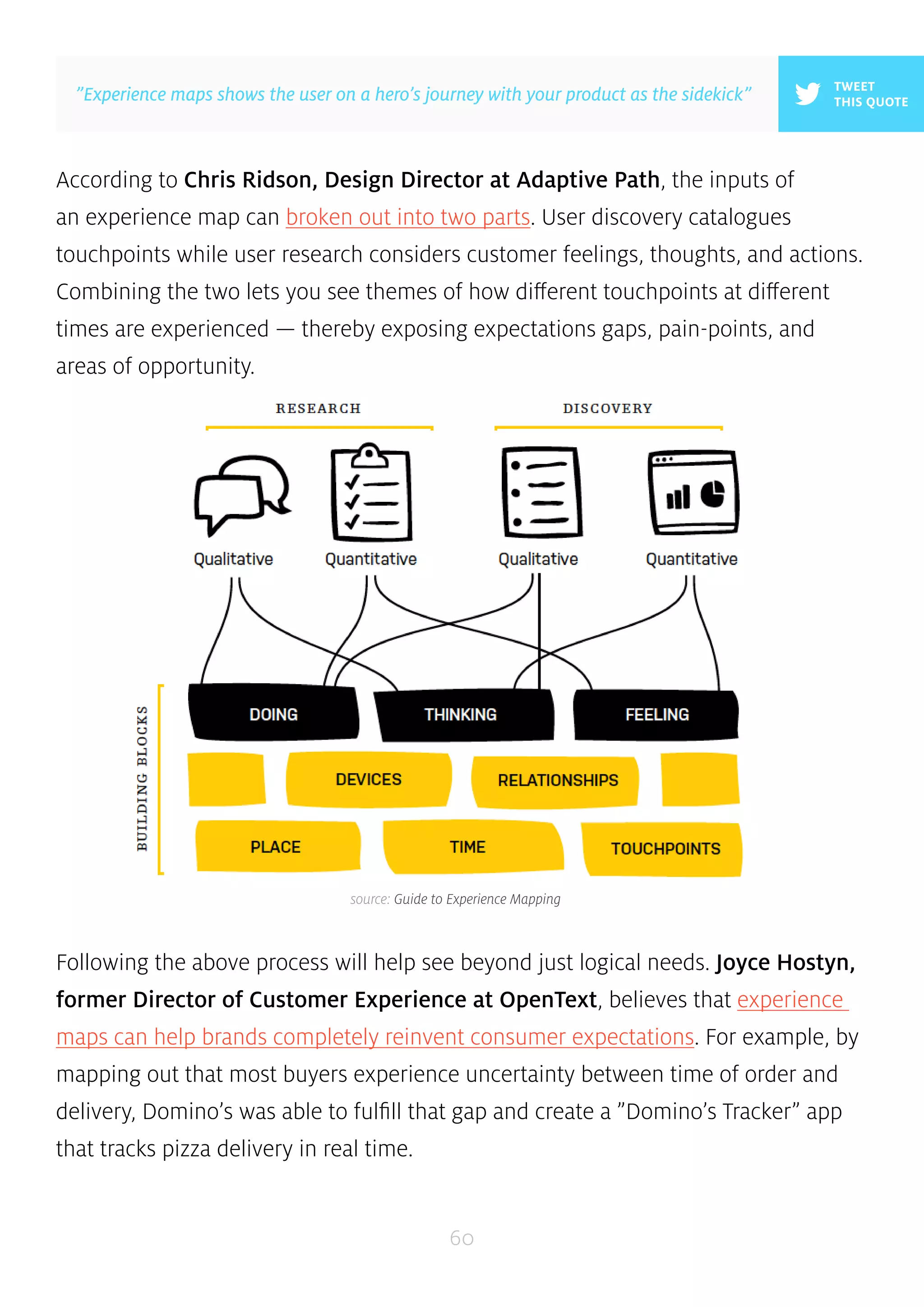
According to Chris Ridson, Design Director at Adaptive Path, the inputs of 
an experience map can broken out into two parts. User discovery catalogues 
touchpoints while user research considers customer feelings, thoughts, and actions. 
Combining the two lets you see themes of how different touchpoints at different 
times are experienced — thereby exposing expectations gaps, pain-points, and 
areas of opportunity. 
Following the above process will help see beyond just logical needs. Joyce Hostyn, 
former Director of Customer Experience at OpenText, believes that experience 
maps can help brands completely reinvent consumer expectations. For example, by 
mapping out that most buyers experience uncertainty between time of order and 
delivery, Domino’s was able to fulfill that gap and create a ”Domino’s Tracker” app 
that tracks pizza delivery in real time. 
60 
TWEET 
”Experience maps shows the user on a hero’s journey with your product as the sidekick” THIS QUOTE 
source: Guide to Experience Mapping
While experience mapping can be highly subjective and differ based on the 
company, you can use this helpful template as a starting point. 
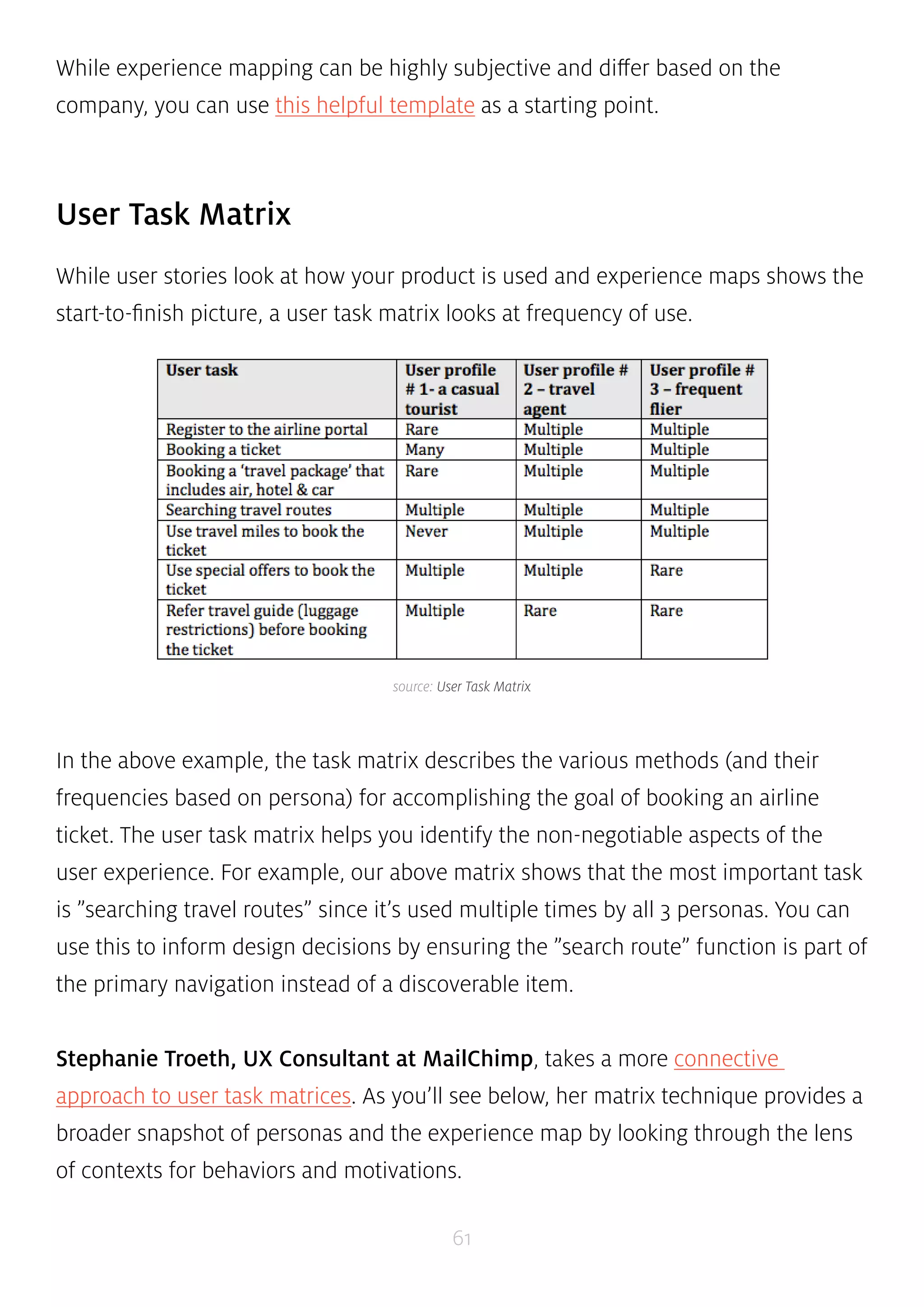
source: User Task Matrix 
61 
User Task Matrix 
While user stories look at how your product is used and experience maps shows the 
start-to-finish picture, a user task matrix looks at frequency of use. 
In the above example, the task matrix describes the various methods (and their 
frequencies based on persona) for accomplishing the goal of booking an airline 
ticket. The user task matrix helps you identify the non-negotiable aspects of the 
user experience. For example, our above matrix shows that the most important task 
is ”searching travel routes” since it’s used multiple times by all 3 personas. You can 
use this to inform design decisions by ensuring the ”search route” function is part of 
the primary navigation instead of a discoverable item. 
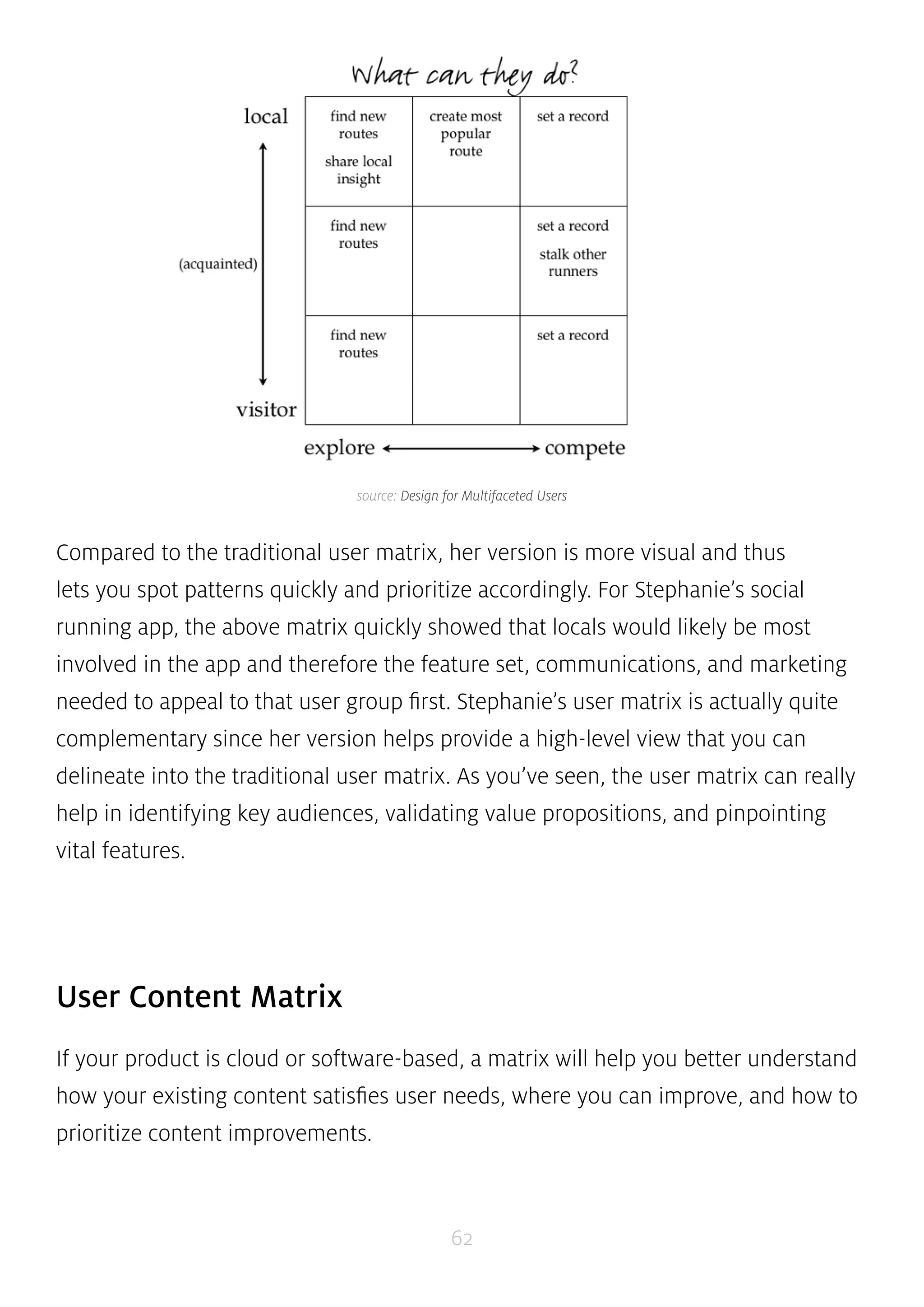
Stephanie Troeth, UX Consultant at MailChimp, takes a more connective 
approach to user task matrices. As you’ll see below, her matrix technique provides a 
broader snapshot of personas and the experience map by looking through the lens 
of contexts for behaviors and motivations.
source: Design for Multifaceted Users 
Compared to the traditional user matrix, her version is more visual and thus 
lets you spot patterns quickly and prioritize accordingly. For Stephanie’s social 
running app, the above matrix quickly showed that locals would likely be most 
involved in the app and therefore the feature set, communications, and marketing 
needed to appeal to that user group first. Stephanie’s user matrix is actually quite 
complementary since her version helps provide a high-level view that you can 
delineate into the traditional user matrix. As you’ve seen, the user matrix can really 
help in identifying key audiences, validating value propositions, and pinpointing 
vital features. 
62 
User Content Matrix 
If your product is cloud or software-based, a matrix will help you better understand 
how your existing content satisfies user needs, where you can improve, and how to 
prioritize content improvements.
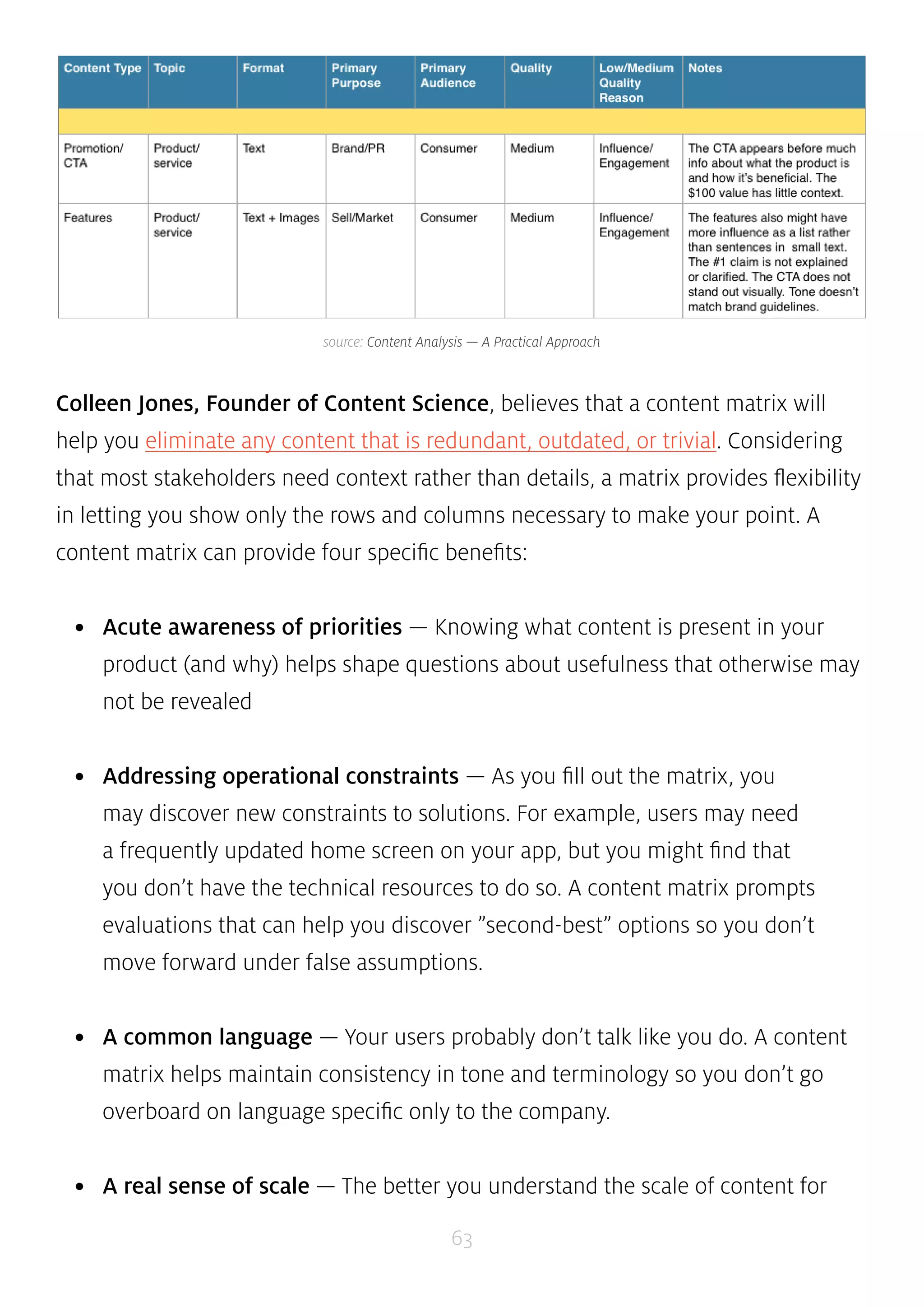
source: Content Analysis — A Practical Approach 
Colleen Jones, Founder of Content Science, believes that a content matrix will 
help you eliminate any content that is redundant, outdated, or trivial. Considering 
that most stakeholders need context rather than details, a matrix provides flexibility 
in letting you show only the rows and columns necessary to make your point. A 
content matrix can provide four specific benefits: 
• Acute awareness of priorities — Knowing what content is present in your 
product (and why) helps shape questions about usefulness that otherwise may 
not be revealed 
• Addressing operational constraints — As you fill out the matrix, you 
may discover new constraints to solutions. For example, users may need 
a frequently updated home screen on your app, but you might find that 
you don’t have the technical resources to do so. A content matrix prompts 
evaluations that can help you discover ”second-best” options so you don’t 
move forward under false assumptions. 
• A common language — Your users probably don’t talk like you do. A content 
matrix helps maintain consistency in tone and terminology so you don’t go 
overboard on language specific only to the company. 
• A real sense of scale — The better you understand the scale of content for 
63
your product, the better you can design the product. A matrix let’s you see if 
you need to think about 100 or 1000 pages worth of content, and therefore 
create the right number of design variations. 
Prioritized Requirements Spreadsheet 
At this point, you will have done enough user analysis to have an idea of important 
features. After all, like we described in the Guide to Minimum Viable Products, your 
product requirements should be derived from user requirements. 
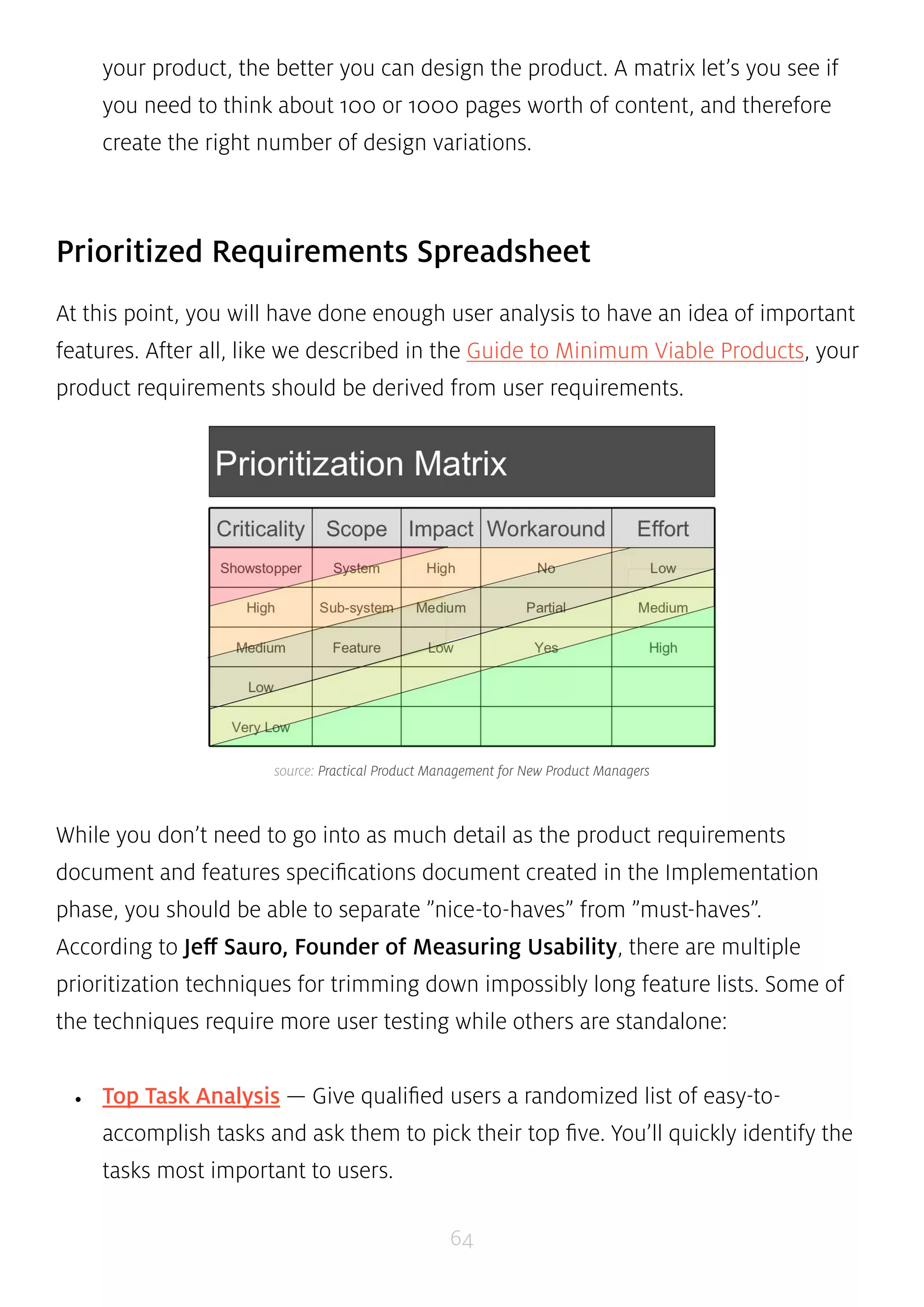
source: Practical Product Management for New Product Managers 
While you don’t need to go into as much detail as the product requirements 
document and features specifications document created in the Implementation 
phase, you should be able to separate ”nice-to-haves” from ”must-haves”. 
According to Jeff Sauro, Founder of Measuring Usability, there are multiple 
prioritization techniques for trimming down impossibly long feature lists. Some of 
the techniques require more user testing while others are standalone: 
• Top Task Analysis — Give qualified users a randomized list of easy-to-accomplish 
tasks and ask them to pick their top five. You’ll quickly identify the 
64 
tasks most important to users.
• Gap Analysis — Give some customers your first iteration of prioritized features 
and ask them to rate them in order of importance and satisfaction. Next, use 
the formula: Importance + (Importance - Satisfaction) to reveal opportunity for 
improvement. 
• Kano Modeling — Ask some users to rate how much they like features when 
they are included in the product and how much they miss them if they’re 
removed. This satisfaction gap shows ”must-have” versus ”nice-to-have” 
features. 
• Quality Function Deployment — Start with a prioritized list of tasks or 
features (from top-tasks analysis) and combine this with a list of functions 
(from the company). A QFD ranks the features that best meets user needs. 
• Pareto Analysis — Known as the 80/20 rule, this method can quickly isolate 
”must-have” features from ”nice-to-haves”. Sort your features from highest to 
lowest (e.g. most votes in a top-task, most revenue, etc), add up the total, then 
compute the percentage for each item. The features that score highest are your 
most important. 
• Cause & Effect Diagrams — Since UX issues can be complex, this analysis 
can expose multiple causes for each problem, letting you troubleshoot as 
effectively as possible. Create a set of cause-and-effect diagrams by asking 
”why?” to uncover the root causes rather than the symptoms. 
• Failure Mode Effect Analysis — This helps you understand the negative 
effects of certain actions. It can highlight cases in which you can improve 
the product more by fixing what’s broken than by adding features. An FMEA 
generates a Risk Priority Number based on commonality, severity, and difficulty 
of problems. 
65
If you’re looking for a leaner approach, Ian McAllister, General Manager at 
Amazon, believes a theme-based approach is an effective yet lightweight approach. 
He creates a list of themes for each product (e.g. user acquisition, user retention, 
etc.), assigns projects to each theme, and then prioritizes projects based on cost 
versus benefits. It’s fairly straightforward, so you would only need a ”forced 
ranking” spreadsheet to get started. 
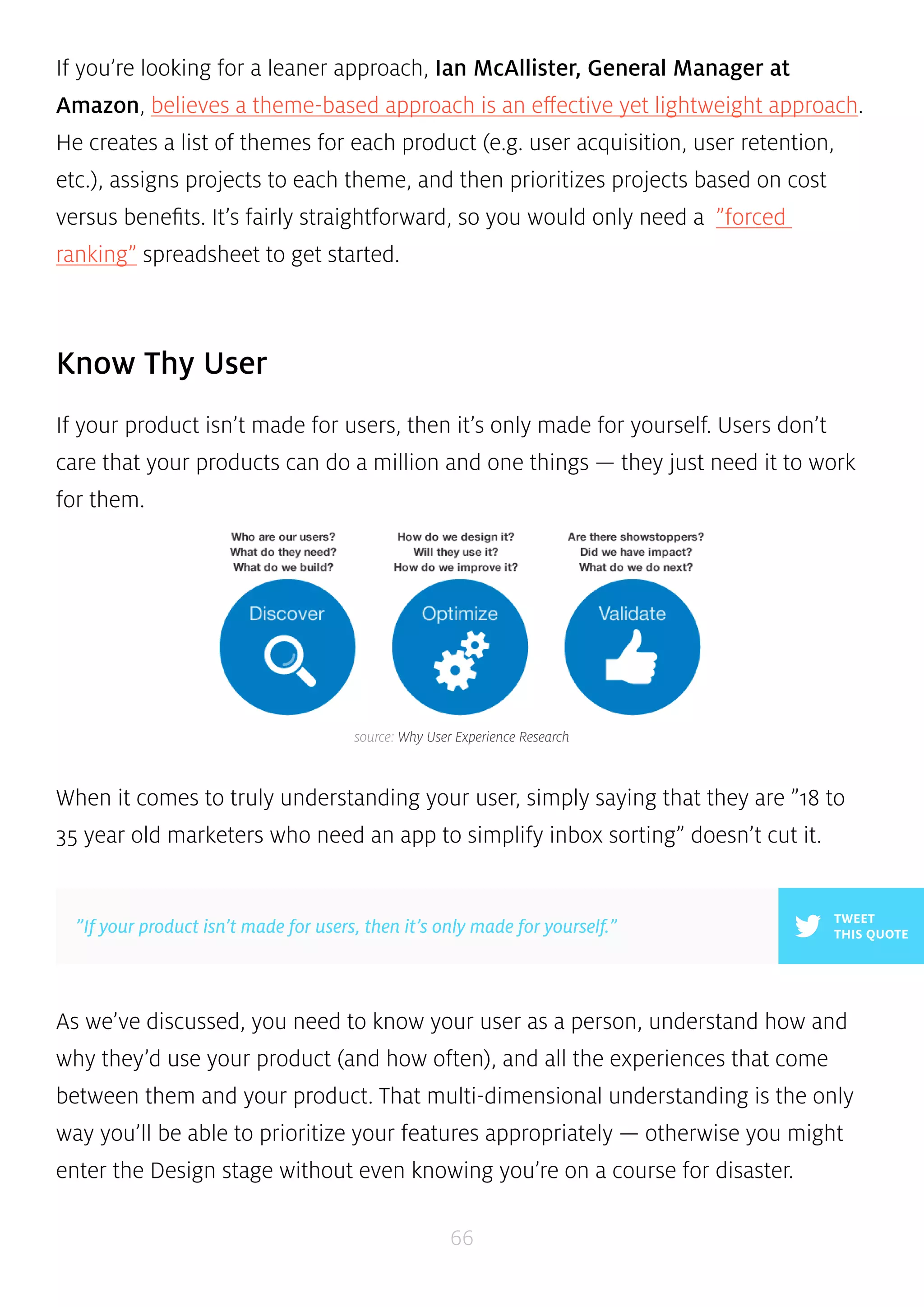
source: Why User Experience Research 
”If your product isn’t made for users, then it’s only made for yourself.” THIS QUOTE 
66 
Know Thy User 
If your product isn’t made for users, then it’s only made for yourself. Users don’t 
care that your products can do a million and one things — they just need it to work 
for them. 
When it comes to truly understanding your user, simply saying that they are ”18 to 
35 year old marketers who need an app to simplify inbox sorting” doesn’t cut it. 
TWEET 
As we’ve discussed, you need to know your user as a person, understand how and 
why they’d use your product (and how often), and all the experiences that come 
between them and your product. That multi-dimensional understanding is the only 
way you’ll be able to prioritize your features appropriately — otherwise you might 
enter the Design stage without even knowing you’re on a course for disaster.
CHAPTER SIX 
Product Design Process & 
Documentation Essentials 
An Overview Of The Design Process & Documents in Product Design 
67
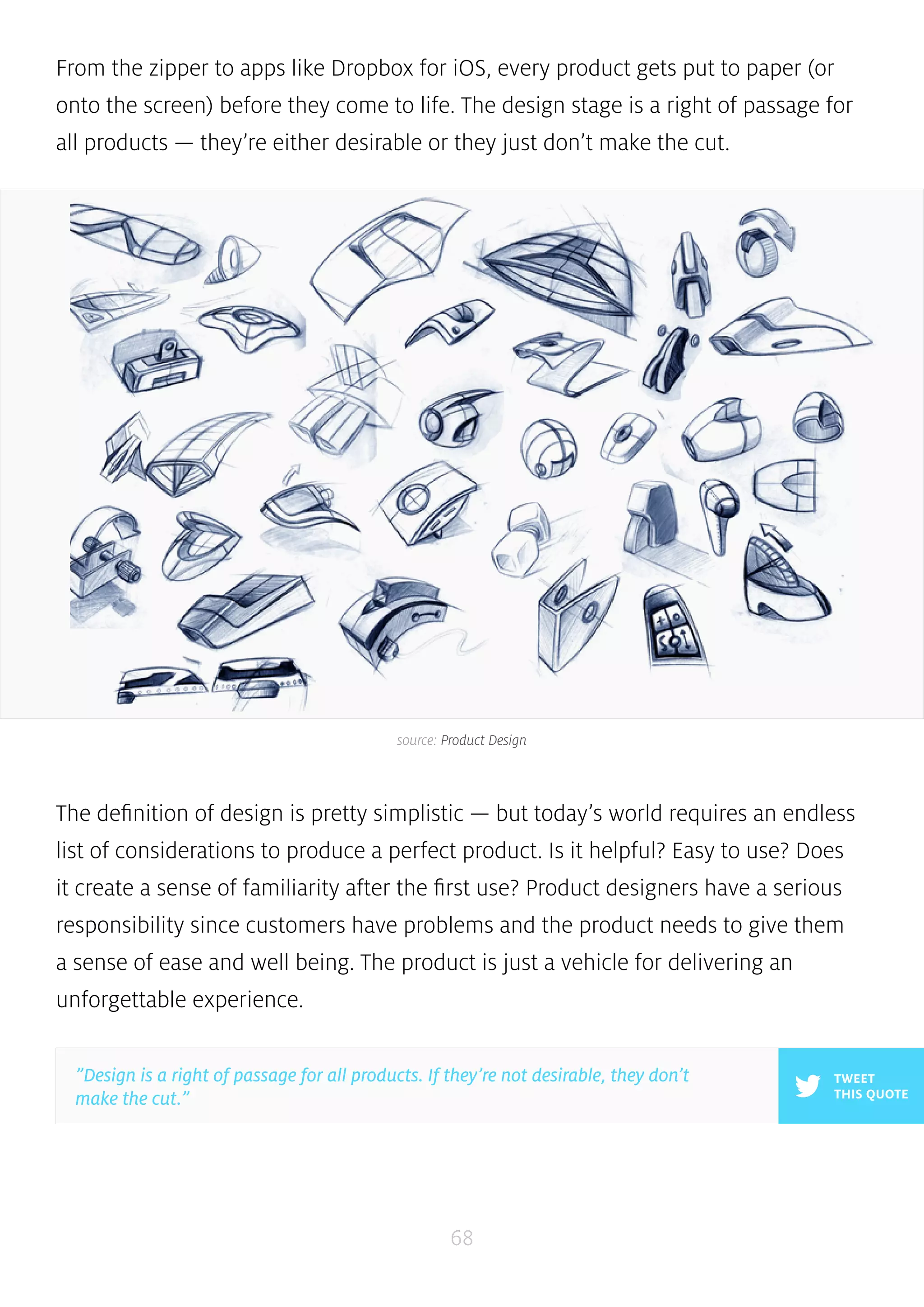
From the zipper to apps like Dropbox for iOS, every product gets put to paper (or 
onto the screen) before they come to life. The design stage is a right of passage for 
all products — they’re either desirable or they just don’t make the cut. 
source: Product Design 
The definition of design is pretty simplistic — but today’s world requires an endless 
list of considerations to produce a perfect product. Is it helpful? Easy to use? Does 
it create a sense of familiarity after the first use? Product designers have a serious 
responsibility since customers have problems and the product needs to give them 
a sense of ease and well being. The product is just a vehicle for delivering an 
unforgettable experience. 
68 
TWEET 
THIS QUOTE 
”Design is a right of passage for all products. If they’re not desirable, they don’t 
make the cut.”
While it might feel like the process is littered with crumpled paper and even a 
broken screen or two, you can rest assured knowing there is a method to the 
madness. We’ll explain the different forms of documentation you can use as your 
idea grows into a design that’s informed by user research. Read on to learn about 
conceptual sketching and wireframing, low and high fidelity prototypes, and the 
intricacies of design specification. 
Iterated Sketching & Wireframing 
Sketches are likely the most prevalent documentation you’ll create during the 
design phase. Usually, the general workflow is sketch mockups followed by usability 
testing (whether it’s internal or involving carefully picked testers) followed by plenty 
of iteration. 
Regardless of the tool you use to create your sketches, it’s important to keep user 
personas in mind. As you create your sketches, remember to reference the personas 
you created during the Analysis phase to keep users at the top of your mind. Below, 
we’ll look at both rough sketching and wireframing. 
69
source: The Guide to Wireframing by UXPin 
70 
1. ROUGH SKETCHING 
You can create rough sketches with anything that makes pigment on a surface. 
Pens, pencils, markers, crayons, Paper App, and even the classic Microsoft Paint all 
work. 
Laura Busche, design writer at Smashing Magazine, specifies that sketching 
by hand has distinct benefits for extending memory, aiding concentration, and 
improving flexibility. Drawing by hand is also the fastest way to visualize a concept 
so it should always serve as your backup method. 
Product design firm ZURB relies heavily on paper sketching to present the function 
and flow of products. They prefer using sharpies because it limits the amount of 
detail and focuses the sketch on just the broad points. For them, paper sketching is 
all about communicating a process or interaction — not getting feedback on body 
copy or iconography. 
While paper sketching is fast, focused, and flexible, it’s ultimately not very scalable 
or interactive since you can’t use any templates and there’s no way to link sketches 
together.
source: A Practical Look At Using Wireframes 
”Wireframing is about structure and flow, not prettiness.” THIS QUOTE 
71 
2. WIREFRAMING 
Digital wireframing software abounds, but there’s really only a few serious apps 
worth checking out such as UXPin, Balsamiq, Axure, and Proto.io. If you’re going 
the paper route, you could also just make your rough sketch a wireframe by 
dividing up sections of the page and adding grid lines and boxes where appropriate. 
Wireframing should act as the backbone of the product. For tips and exercises, 
check out the Guide to Wireframing. 
TWEET 
According to Paul Boag, CEO of UX consulting firm HeadScape, wireframing 
saves time and money with benefits like the ability to test early and getting over 
the fear of change. Once you have a low fidelity wireframe in hand, you can 
immediately test it with internal or external users. This way, you get feedback on 
what features users like, the naming of labels, and figuring out if you have the right 
visual hierarchy. And since you didn’t spend considerable effort, it’s no big deal 
to change up your design. To see how some big name companies like Apple and 
Twitter started with simple low-fidelity wireframes, you can check out this gallery of 
18 real company wireframes.
Anthony Tseng, Editor-in-Chief of UX Movement, thinks you can also go high 
fidelity if the goal is better reflecting the actual form and function to persuade 
stakeholders. While they may take more time and are less ideal for quick feedback, 
high fidelity wireframes are clear representations of the interface and therefore 
leave no questions to stakeholders and users about what’s a form field or button. 
source: Wireframes vs. Prototypes vs. Mockups 
72 
Detailed Mockups 
Depending on your process, detailed mockups can either be the highest fidelity 
wireframes or the next iteration of concept mockups. 
Some companies will skip wireframing altogether and create a lower fidelity 
concept mockup before increasing fidelity to a detailed mockup. Other companies 
may follower a more evolutionary path which uses wireframes as the skeletons 
for mockups. While you might hear the terms ”wireframing” and ”mockups” used 
interchangeably, they really are two different types of documents. The wireframes 
lay out the structure and then texture and fidelity is injected to turn it into a mockup 
which acts as a model of the app or website.
According to UXPin CEO Marcin Treder, a detailed mockup is oftentimes a design 
draft or can be the actual visual design. Almost photorealistic, a well-created 
detailed mockup encourages people to actually review the visual side of the project. 
Wireframes might contain shapes, lines, and possibly some detail (if it’s high 
fidelity), but a detailed mockup always shows specific fonts, color choices, and the 
overall final appearance. 
Nick Pettit, designer at Treehouse, reiterates that detailed mockups are helpful 
as a means of design communication but shouldn’t be treated as a ”tossover” to 
development. He explains that the process of spending hours on a detailed mockup 
as a spec sheet for developers is no longer relevant given the rise of responsive 
design and Agile methodologies. Furthermore, lower fidelity wireframes can be 
friendlier for iterating since they require less effort while prototyping can be an 
easier way to bridge the functional gap. 
73 
Prototypes 
If wireframes are about structure, then prototypes are about experience. Wireframes 
or mockups can be linked together using an app like Invision or UXPin to create a 
clickable prototype. 
source: Design Better Faster With Rapid Prototyping
As you can see above, there are multiple dimensions for fidelity and workflow. 
Josh Porter, former Director of UX at HubSpot, believes in a leaner workflow 
where you jump straight from sketching to prototyping (and skipping wireframing 
altogether). For him, sketches require less time but can answer the same functional 
questions like ”What objects go on the page, and what can we do to them?” while 
more effort can be dedicated to building out a prototype. This doesn’t mean that 
wireframes and mockups are dead — instead, it just means that more time can be 
reallocated from developing static assets towards interactive assets. 
The real strength of prototyping is its ability to get teams to think less about 
deliverables and more about practicality. As discussed in the Guide to Minimum 
Viable Products, some successful companies even released prototypes as their first 
product. In this section, we’ll discuss both low and high fidelity prototypes and their 
different use cases. 
74 
1. LOW FIDELITY PROTOTYPES 
When people talk about rapid prototyping and Lean UX, they’re usually referring 
to low fidelity prototypes. Low fidelity prototypes are great for avoiding tunnel 
vision by focusing on the refinement of interaction rather than the details of visual 
or technical implementation. They can be created using online apps (Balsamiq, 
Invision, or UXPin to name a few) or coded in HTML the old fashioned way. 
source: Low Fidelity Mobile Prototype
Notable entrepreneur Andrew Chen believes that low-fidelity prototyping is 
one of the best ways to incorporate customer-driven design. Because you want 
your product to be the right one (regardless of iterations), low fidelity prototypes 
created in an online app may be uglier but can help you iterate quicker versus a 
coded or high fidelity prototype. He’s described 4 particular benefits, which we’ve 
summarized below: 
• Better and more honest feedback — People may focus on the visuals of a 
picture-perfect prototype rather than the value proposition. They may also feel 
hesitant to build on your idea since it is beyond their capability to duplicate. 
• Great for A/B testing — A/B testing thrives off variety at the UI layer where 
small changes can be tried and optimized. Therefore, 10-20 rough variations in 
UI can provide more insights than 2-3 pixel-perfect ones. 
• Cheaper to make mistakes — Pivoting with a low-fidelity prototype is easier 
since less resources are involved and the team isn’t as defensive to change. 
• Focuses on flow instead of pages — One of the most important decisions 
isn’t what a page looks like, but what happens before and after. Low fidelity 
prototypes let you draw and link up lots of small pages, play with interaction, 
and do other things that feel natural when the environment is more 
sandbox-like. 
If you’re going low fidelity, a good rule of thumb is to focus on 20% of the 
functionality that will be used 80% of the time. 
75 
TWEET 
”Low fidelity prototypes are uglier, but help you iterate much faster.” THIS QUOTE
source: UXPin 
76 
2. HIGH FIDELITY PROTOTYPES 
High fidelity prototypes are more suitable when you are in the later stages of design 
and thinking about things like branding, look and feel, and other details. The high 
fidelity prototype lets you get as close as possible to the real product but still at 
lower cost. Just like low fidelity prototypes, you can also use online apps or HTML 
coding to create a high fidelity version. 
According to Marty Cagan, Partner at the Silicon Valley Product Group, high 
fidelity prototypes can encourage a deeper level of collaboration between product 
managers, designers, and engineers to uncover what’s needed for a feasible 
product. Higher fidelity prototypes offers benefits such as: 
• An early representation of the full product — Marketing, sales, and business 
development can all come to a useful understanding of the product early 
enough so that they can prepare accurately 
• Reduced development time — Validating a high-fidelity prototype with users 
may significantly reduce development since the product is more polished and 
you may have resolved many of the questions early that otherwise complicate 
development
• Better idea of scope — High fidelity prototypes provide more detailed 
information for accurate engineering cost estimates early in the process (when 
they’re most useful). This is especially helpful if your product introduces new 
technology. 
TWEET 
”Hi fidelity prototypes let you get the closest to the real product but at less cost.” THIS QUOTE 
Regardless of the fidelity, Smashing Magazine author Lyndon Cerjeo suggests 
that prototypes should be built piece by piece rather than in a single iteration. As 
mentioned by Andrew Chen, an effective approach is to start prototyping broadly 
and widely and then diving deep into selected areas of the solution with higher 
fidelity. For example, the first iteration of a website prototype would build out the 
key landing pages while further iterations could be higher fidelity and drill down 
into specific website sections (such as the steps you’d take to download something). 
77 
Design Specifications 
While prototypes show interaction and aesthetics, design specifications describe the 
processes and artistic assets needed to make all that work. 
source: Design Specifications
Design specifications consist mostly of user flow & task flow diagrams which outline 
the functionality and asset & style requirements which explain the creative and 
technical details of the visual identity. 
source: Breaking the UX Status Quo 
78 
1. USER FLOW DIAGRAM 
User flows, or journeys, map the entire realm of circumstances and decisions 
that influences how someone achieves their goal. This is highly comprehensive 
and includes the moment the idea forms in the user’s head until when the goal is 
achieved. 
A user flow diagram maps out broad goals such as planning travel, or like the above 
diagram, hiring an employee. For example, two people seeking to purchase a CD 
online may experience completely different journeys. One might enter Amazon. 
com via the address bar, search for an album with intent to buy, and add to basket 
while another might search on Google, click the first result, browse reviews online, 
compare CDs, and dive deeper into detail before entering the buying funnel. 
Therefore, your user flow diagram could become quite complex. 
According to Wireframes Magazine, the above Speech Bubble User Flow is an 
effective method of focusing on the thoughts and needs of real people as you
create the product interaction. As projects build momentum, it can be easy to get 
lost in the technicalities of the product. The Speech Bubble User Flow ensures that 
you don’t lose sight of the personas you developed in the Analysis stage. 
source: Task Flowchart 
79 
2. TASK FLOW DIAGRAM 
If user flows are holistic in strategy, then task flows are microscopic in execution. 
Task flows describe specific and repeatable series of actions such as setting the 
alarm time on an alarm clock app. 
As you can see in the above example, task flowcharts are less visually sexy than user 
flows since they describe almost algorithmic processes. But they are essential to 
helping you streamline the steps that must be taken to accomplish everything your 
product promises. 
TWEET 
THIS QUOTE 
”Think outside the product. You’ll see how people could solve problems rather than 
just the status quo.”
Larry Marine, founder of the Intuitive Design Group, believes that task flow 
analysis is a key UX step that many people skip. Unlike use case analysis which 
looks at how people interact with systems, task flow analysis looks at the details of 
how people accomplish specific tasks. It’s a subtle, but important distinction. For 
example, Larry went to a brick-and-mortar shop to watch the steps people took 
in completing the task of buying flowers before applying those learnings towards 
modifying the task flow of an online florist site. By thinking about tasks rather than 
use cases, he was able to think outside the product and see how people could solve 
a problem rather than how they currently solve it. 
80 
3. ASSETS & STYLE REQUIREMENTS 
A product style guide is often used to outline the aesthetic and technical 
specifications of the look and feel. Product style guides will include everything from 
brand rules describing what emotional states to achieve to technical specifications 
like specific pixels, file formats, and overall size/dimensions of design assets. The 
guidelines may be brief and loose to promote creativity like Mozilla’s ”brand toolkit”, 
or precise and exhaustive like Apple’s ”Human Interface Guidelines”. 
source: Firefox Identity
Brad Haynes, Product Designer at Salesforce, built the Salesforce style guide 
around the product rather than a concept. Faced with repetitive questions from 
his team, Brad was able to create uniformity in Salesforce’s look and feel by 
reimagining it as a mobile app. The core of the new product style guide contained 
the following elements: 
• Principles — Guidelines related to hierarchy, alignment, and simplicity were 
clearly laid out to explain the reasoning behind the product design 
• Colors — A small snapshot of the color palette was shown to give just enough 
information without overwhelming the design team 
• Typography — The design was kept simple by constraining to only one font 
81 
and listing specific font weights 
• Iconography — The full system and library of icons (along with technical 
details like pixels) were provided 
At Yelp, the style guide is taken a step further as a living document that benefits 
designers as well as developers. Their style guide even includes snippets of code to 
help reduce technical debt. As a result, the collaboration between their design and 
development team actually helped reduce the time needed to create new features 
since the teams could work off of reusable lines of code and updated design pattern 
libraries. 
For additional best practices, you can check out these product style guides from 
Google, MailChimp, and Salesforce.
source: Rapid Prototyping 
”The goal of wireframing and prototying is delivering great product concepts, 
not deliverables.” 
82 
Define, Design and Refine 
As we’ve shown, the design phase consists of multiple stages and tactics that all 
help to turn your idea into an experience. Whether you go low fidelity or high 
fidelity, the ultimate goal of sketching, wireframing, and prototyping is delivering 
great product concepts — not deliverables. 
TWEET 
THIS QUOTE 
If you’ve sketched something on scrap paper that looks like an actionable solution, 
there’s no value in recreating it in a wireframe for the sake of prettiness. And while 
the design specifications might feel like more paperwork, an extra ounce of sweat in 
the design phase can save a gallon of blood during development — you just need to 
be strategic about why you’re documenting. Don’t make deliverables for the sake of 
it since you have much better things to do, especially as you near the next phase of 
Implementation.
CHAPTER SEVEN 
Product Implementation 
Process & Documentation 
Essentials 
An Overview Of The Process & Documents For Implementing Product Designs 
83
While the bulk of documentation is produced in the earlier stages, the 
implementation stage is perhaps the most crucial phase of collaboration. 
source: Georgia Tech 
We focused on concepting during the research, analysis, and design phases. Now, 
we get to do the heavy lifting. Developers, designers, and product owners will all 
work together to transform prototypes and lines of code into a living product. 
We’ll discuss helpful documentation you can use to stay on track as the product is 
built, internally tested, and beta tested before its grand unveiling. 
84 
Build It 
Once you get to the ”Build It” phase, the previous research and prototyping should 
give your team a high-level understanding of your product. Essentially, you should 
be able to ask any 5 team members about the overall purpose, features, release 
criteria, and timeline for the product and they should give you the same answer. 
The PRD (Product Requirements Document) and FRD (Functionality Requirements 
Document) are useful working documents to keep design and development aligned. 
In today’s Lean and Agile world, these documents may be trimmed down so we will 
focus on just the core elements.
1. PRODUCT REQUIREMENTS DOCUMENT 
The PRD is the heart of your product and serves as a living document for any 
designer, developer, or stakeholder to understand the status and purpose of the 
product. 
source: Product Management 
As illustrated above, failure to document requirements can lead to wildly different 
assumptions. Because there’s been debate around the danger of excessive design 
thinking as well as its vital role in product leadership, the PRD helps balance the 
design team’s focus on usability and aesthetics against engineering’s functional 
concerns. Getting signoff from all teams on the PRD helps you avoid disaster. 
For a detailed PRD, you can reference this expansive PRD template. For a more 
lightweight option, check out how to write a simple PRD. The product curation 
company Product Hunt shows that a PRD doesn’t need to be 100 pages long — just 
define the problems the product will solve with a general description of features 
(and plenty of mockups from previous stages). The technical details should be saved 
for the FSD. 
85
source: Product Hunt’s PRD 
According to Ben Horowitz and David Weiden, both notable venture capitalists, 
the PRD is the most important document a product manager maintains and 
should be the product Bible for marketing, design, and engineering. Good product 
managers not only keep PRDs up-to-date on a daily or weekly basis, but they view 
the entire PRD process as ongoing — the document is never truly complete, it 
simply evolves as the team iterates. 
Marty Cagan, Partner at the Silicon Valley Product Group, explains the four core 
sections of a PRD — defining purpose, describing features, setting release criteria, 
sketching rough timing — which we’ve adapted for our purposes below. According 
to Cagan, the PRD’s goal is to explain the ”What”, not the ”How”. In each section, 
remember to be clear on the problem being solved versus the solution otherwise 
86 
TWEET 
THIS QUOTE 
”Don’t piss off your team by making your product requirements document a recipe rather 
than guideline.”
you may lead the team to make incorrect assumptions. The engineers, designers, 
and UX folks are the ones designing solutions for the product — don’t piss them off 
by making the PRD a recipe rather than a guideline. Now let’s take a look at how to 
approach each section of the PRD. 
I. PRODUCT REQUIREMENTS DOCUMENT 
Make sure you discuss the user problems (not solutions) that must be addressed, 
the target demographic (companies, customers, users) and various use cases for 
each demographic. While this has probably been discussed to death and even 
defined during the Product Definition phase, it’s important to reiterate them in 
writing during the build phase otherwise it might get lost in the development 
shuffle. What separates a top 1% product manager from a top 10% product manager 
is understanding that the team craves purpose and context when feature tradeoffs 
are inevitably required, so forget the marketing jargon and only talk about ”Why?”, 
”Who cares?”, and ”So What?”. 
source: Product Hunt’s PRD 
87
II. DESCRIBE THE PRODUCT FEATURES 
The features section is the body of the PRD. 
Features must be described with regards to the interaction design and user 
experience to give engineering the most flexibility. More importantly, you must 
map features to product objectives (known as requirements traceability) so that the 
business impact can be clearly understood if someone cuts a certain feature during 
development. Ranking these features will also help you prioritize in case there’s 
scheduling shifts or you discover some features should be replaced as you progress 
in development. To learn more about some of today’s most successful companies 
prioritize features, check out the Guide to Minimum Viable Products. 
source: Product Hunt’s PRD 
88 
III. OUTLINE THE RELEASE CRITERIA 
How will you know the product is ready to release for beta testing? While this 
section can be the most technical of the PRD, we still are just describing goals — 
not a means to achieve them. You’ll want to outline criteria in these five areas:
• Functionality — Is there a baseline percentage of the original features that 
must be retained? What are the absolute mandatory functions? 
• Usability — Is the program aesthetically striking and intuitive to users? What is 
the acceptable time to complete tasks for each use case? 
• Reliability — What’s the maximum acceptable failure rate? Are these failures 
predictable? Can the system recover from these failures? 
• Performance — How fast must it be? What is the maximum response time, 
throughput, and memory consumption? 
• Supportability — Is it testable, serviceable, installable, and configurable? 
It’s important to start the discussion around release criteria as early as possible, 
iterate, and formalize them as you approach the build stage. These should be 
reviewed and agreed by stakeholders during the early stages of development. 
Otherwise, if you wait, you might just set the bar at wherever the product currently 
stands. 
IV. STATE THE CONSTRAINTS & ESTABLISH A SCHEDULE 
Excruciating over exact timing is dangerous since it can hold you accountable 
to features that might change depending on the market. Instead, a rough window 
provides flexibility while helping to better avoid feature creep since it sets 
stakeholder expectations. In addition, writing down any workflow constraints 
(for example, budgeting or resources) can also provide a more accurate picture of 
the factors affecting timing. With both the constraints and rough date in writing, you 
have a more informed way to work backwards from the end date and assign realistic 
sprint lengths to each feature. 
89
2. FUNCTIONAL SPECIFICATIONS DOCUMENT 
If the PRD is the heart of your product, then the FSD is your product’s brain — it 
details how everything works together in greater detail. 
Unlike the PRD, which is completed by the product manager, the FSD can also be 
completed by business analysts or technical leads. Regardless of who completes 
the document, it’s still important to understand its implications. The FSD picks up 
where the PRD left off by architecting the systems and specifications to achieve the 
features. 
According to TechRepublic, design philosophies should be kept out of the FSD 
so that the document stays as relevant as possible to its technical audience. 
While smaller companies may combine the FSD and PRD into one document, the 
two should be treated separately. Former head of product development for the 
Coldfusion project at Adobe, Jason Delmore provides a fleshed-out FSD template 
including information on what does and doesn’t belong in an FSD. You can also 
check out former Microsoft Excel product manager Joel Spolsky’s complete FSD for 
his startup Fog Creek Software. 
90 
TWEET 
THIS QUOTE 
”The product requirements document is your product’s heart. The functional spec 
document is its brain.” 
source: Cold Fusion Insider
Since a technical lead will usually take ownership of the FSD, we’ll only look at 
what’s relevant from a product management point of view. In a nutshell, the FSD 
is what’s given to developers so they know what to build, what’s given to testers 
so they know what to test, and what’s given to stakeholders so they know exactly 
what’s being created. While your PRD might say something like ”The app should 
include a product list”, the FSD would say ”The system will register a product 
using the following fields: Name (30 characters), Details (1000 characters), Price 
(currency), Category (pick list).” 
In the old world of waterfall development, an FSD could easily approach 100+ 
pages. In an Agile environment, the FSD is kept as concise as possible due to the 
fast pace of sprints. Regardless of length, the FSD should convey a high degree of 
detail regarding any externally visible behavior of the product such as: 
91 
• Exact text of error messages 
• Supported web browsers, operating systems, screen sizes 
• Size and allowable contents of data input fields 
In Agile companies, a brief FSD can also be accompanied by using JIRA to track 
development against the specs of the FSD. As you can see below, custom JIRA 
dashboards make it easy to see who is doing what technical task. 
source: Atlassian JIRA
The technical direction of an FSD can also be embodied in a project Wiki. Project 
Fedora, an open-source operating system created by Linux maker Redhat, 
provides an excellent example of collaboration on functionality requirements. 
Although a Wiki is ideal for editing and version control (no need to tell people to 
delete outdated specifications documents), it can just as easily turn into a mess of 
tangled links. As such, either the technical lead or the product manager should help 
moderate the Wiki. 
source: Core vs. External Functionality in Fedora 
Once you’ve chosen a method to outline the technical requirements, you can use 
any variety of spreadsheet program (MS Project is great if you’re getting detailed) to 
outline timing. Unlike the PRD which included rough timing, you now have a much 
better idea of sprint lengths and delivery dates since the technical work is clearer. 
The ranking of features done in the PRD can also be included to keep scope in 
check. 
source: Creating an Agile Project Schedule in MS Project 
92
Whether you choose lightweight or page-heavy methods, documenting your 
product development improves transparency and can help prevent last-minute 
stakeholder changes. 
source: Benefits of Eating Your Own Dog Food 
93 
Eat Your Own Dogfood 
Once you’ve iterated your product to the point where its usable, testing it with your 
team is a great low-cost (or no-cost) reality check. 
Since the cost of defects increases the longer they stay in the codebase, this 
feedback loop — known as dogfooding, alpha testing, or user acceptance testing — 
might even get you some net gains. The importance of dogfooding might best be 
understood by what happens when you don’t do it. For example, part of Facebook 
Home’s failure was that its product team used mostly iPhones while the product 
was based on Android. As a result, the team left out important widgets, docks, and 
app folders needed by Android users. 
At UXPin, we eat our own dogfood. We use JIRA to keep track of bugs and a highly 
organized Google Docs spreadsheet for each team member to create a ”user diary” 
of good experiences, annoyances, and times to complete certain tasks. We also use 
UXPin to prototype new iterations of UXPin (a very meta process).
Compared to earlier phases, the main difference is that dogfooding may not be 
done in as controlled a setting. Bug tracking software, user diaries, and alpha test 
surveys are all great for capturing feedback in this looser environment. 
source: JIRA in a Nutshell 
94 
1. BUG TRACKING SOFTWARE 
Most of the data you’ll get during dogfooding will likely be bug reports. While we’ve 
talked about the project tracking capability of JIRA, it truly shines at allowing for 
easy visibility and collaboration when documenting and squashing bugs. 
2. USER DIARY 
User diaries are great at capturing organic information as someone uses the product 
freely. Using Google Docs, you can create a simple template and then include open-ended 
prompts such as: 
• Where were you when using the product? 
• What tasks did you hope to achieve? How long did it take you?
• Describe something the product did to make your life easier. 
• Include a screenshot of something that frustrated you. 
source: What Testing Won’t Tell You 
source: Survey Monkey 
95 
3. ALPHA TEST SURVEY 
Using a free site like Survey Monkey, you can create a survey to gauge how team 
members feel about the usability and functionality of certain features and the 
product as a whole. This sample survey captures both qualitative and quantitative 
information. 
According to Luke Freiler, CEO of beta testing company Centercode, the goal 
of an alpha test is to find bugs, crashes, and missing features so tailor your survey 
questions accordingly. The qualitative and quantitative data from an alpha test will 
also set the benchmarks for the product and emulate testing done with ~80% of 
real users. 
Now that you’ve fed the dogfood to your own team, it’s time to try it with real users 
in a beta test.
Feed Your Dogfood to Others 
Unlike an alpha test which is designed to improve product quality, a beta test is 
designed to incorporate customer feedback into the product. As we described in our 
Guide to Minimum Viable Products, logging and then acting on customer feedback 
is one of the lowest-cost ways to prevent feature bloat. Since some bugs may still 
be discovered since alpha testing won’t cover all edge cases, JIRA can still come 
in handy for documentation. Similarly, the surveys you ran during internal testing 
can also be adapted for real users. Below, we’ll look at how other tactics like beta 
selection criteria, qualification surveys, and user forums can supplement your beta 
test. 
96 
1. BETA SELECTION CRITERIA 
Before finding applicants, it’s important to prioritize the must-have qualifications, 
the nice-to-have qualifications, and subjective qualifications for testers. This will 
help you form a ”scorecard” which you can use to filter applicants after they 
complete your qualification survey. Centercode has a simple selection checklist in 
their Beta Recruitment Kit to get you started. 
source: Beta Recruitment Kit
source: SurveyMonkey 
97 
2. BETA QUALIFICATION SURVEY 
Whether your beta test is public or private, you will want a send a survey 
to potential testers to ensure they fit the user profiles outlined in your PRD. 
Centercode’s Beta Recruitment Kit also contains a quick qualification worksheet 
survey which you can then translate into a live survey on Survey Monkey. You can 
also reference this live example from McAfee or the sample below. 
3. BETA TESTING FORUMS 
Using a forum not only fosters earlyvangelism by building a community, it allows 
your team to actually respond to beta testers. Beta testers are volunteering their 
time because they believe in the product, so it’s important to make them feel 
appreciated. Furthermore, a forum will serve as a large-scale user diary of sorts for 
you to track the experiences of all beta testers. 
source: Opera Forums - Beta Testing
Use What Works and Scrap the Rest 
Building your product is an ongoing process and the last thing you probably want to 
do is throw more paperwork into your sprints. 
source: Feature Flow 
But a certain level of documentation is necessary to keep some order in all the 
chaos. User requirements coming from product management need to be translated. 
Dependencies among different technical entities have to be understood. And 
internal and external testing feedback must be captured to justify expensive-but-necessary 
changes. In between all this, you’ll need to answer stakeholder questions 
like ”How is everyone staying on the same page?” and ”How will we realize our 
goals in the set time limit?” 
The templates and tactics we’ve listed all serve as helpful reference points as you 
prepare for the ultimate product test — your launch date. 
98
CHAPTER EIGHT 
Product Launch Process & 
Documentation Essentials 
An Overview Of The Process & Documents For Launching New Product Designs 
99
Launching a great product can be like sending a rocket into outer space. It requires 
tons of research, hard work, passion, and plenty of worrying. Finally you launch, 
and as you watch it disappearing through the clouds, it finally hits you that it’s 
completely out of your hands. 
source: 4 Keys to Successful New Product Launches 
Now, larger questions loom on the horizon: When do I prepare marketing materials? 
How do we best train our sales reps? How can we support customers? 
For some successful companies, product launches seem lightweight and effortless. 
For those less fortunate, they can be poorly timed, maddening, and just barely 
take off. Whether you’re part of a large launch team or a solo entrepreneur, a 
documented launch process can save you time, sanity, and even your product. 
We’ll explain how smart documentation can help you meet launch goals and 
empower your customer-facing teams and end users. 
100 
TWEET 
THIS QUOTE 
”Launching a product is like sending a rocket into outer space: tons of hard work, 
passion, and worry.”
Create a Product Launch Plan 
According to Julie Hall and Joan Schneider, both Partners at Schneider Public 
Relations, a lack of communication and planning can be linked to the top reasons 
products fail. Specific reasons included poor timing, lack of planning for post-launch, 
and confusing product messaging. Luckily, a carefully created product 
launch plan can help address all of these issues by aligning departments with both 
strategy and execution. For a lean launch plan with helpful pointers, check out 
Demand Metric’s product launch plan. For more detail, Growth Technical Marketing 
has a launch plan that walks you through every step. 
source: Product Launch Plan Template 
Serial entrepreneur and Forbes author, Matt Clark reiterates that every 
successful product launch starts with a launch plan and calendar. To stay realistic, 
Clark recommends that your product plan can work backwards from the launch date 
to detail every step along the way. This detailed document can also be interpreted 
as a Go-To-Market strategy, which is the overall battle plan for your product. 
101
source: Go to Market Strategy Planning Template 
According to Michael J. Skok, serial entrepreneur & Startup Secrets instructor 
at Harvard University, it’s important that your Go-To-Market strategy thinks about 
all marketing channels with a focus on customer segmentation. Identify all buyer 
personas and understand who will play (Actors) what part in what stage (Scene) 
of the sales cycle. Therefore, your product launch document should explain your 
launch goals, identify the most valuable segments, and lay out a plan of execution. 
102 
1. DEFINE YOUR LAUNCH GOALS 
For any new product launch, the goals must be clear and have a deadline. Dave 
Daniels, founder of product consulting firm Launch Clinic, recommends that setting 
the simplest goals produces the best results. According to Dave, you need the 
clearest picture of success since your goals frame the purpose of your product. Let’s 
take a look at how to apply this minimalistic approach: 
• Sales Goals — These are probably the easiest to define since you already have 
sales expectations. Example: We will sell 8,250 units within 90 days of launch.
• Prospect Goals — Defining the number of prospects is especially helpful if you 
have a long sales cycle. Example: We will find 9,000 prospects within the 90 
days of launch. 
• Product Awareness Goals — This measures how much people care about your 
product. Example: We expect 12000 site visits and 15 news sites to pick up our 
press release within 90 days of launch. 
• Customer Upsell Goals — Companies with existing products can use this to 
gauge relevance of new products to existing customers. Example: 15 customers 
will upgrade within first 90 days of launch. 
• Product Defect Goals — Communicate clearly with development and QA so 
customer satisfaction (and therefore revenue) isn’t damaged. Example: Address 
high-priority bugs in 24 hours during first 90 days of launch. 
While sales and QA goals are clear-cut, marketing goals can be more qualitative. 
Make sure you work closely with marketing to define prospects so the sales team 
gets better quality leads. 
2. DEFINE YOUR MINIMUM VIABLE SEGMENT 
To best achieve your launch goals, focus your launch messaging on the MVS 
(minimum viable segment) who have the same problems you seek to solve. The 
”minimum” refers to a niche small enough for you to completely dominate while 
the ”viable” denotes that they want a product you can deliver. 
103 
TWEET 
”The simplest goals produce the best results.” THIS QUOTE
source: Minimum Viable Segment 
At UXPin, our MVS is comprised of UX professionals who want to convert from paper 
sketching to HTML prototypes. Since UX and design professionals spend a lot of time 
online, we launched our app in December 2011 exclusively on TechCrunch. Our product 
took off and we even received investment offers a few hours after the article went live. 
As you can see above, the right MVS will give your new product the best chance at 
being adopted by the right people. Usually, members of the MVS are tightly knit and 
communicate via community forums or online groups. Therefore, this also sets up 
your product for a viral loop due to the ease of referral. 
Once you’ve found your MVS, you need to figure out the right messaging. According 
to KISSMetrics, it’s important to attach your launch messaging to a bigger story. 
For example, Google doesn’t just release updates — it’s changing the way the world 
finds information. Don’t just release features, make sure you communicate how 
you’re changing the customer’s life. It’s no use, after all, to plan marketing tactics 
when people don’t even care about you. 
104
Payment device startup, Coin, is the poster child for targeting an MVS with the 
right messaging to achieve rapid growth. Matt Wolfrom, VP of Communications 
at ShareThis, explains that Coin was able to go lean on marketing because they 
achieved superior product/market fit. They developed crisp messaging to go after a 
segment ignored by big payment processors — millennials tired of carrying multiple 
credit cards — and targeted them online where they spend the most time. 
source: Dissecting Coin’s massively successful product launch 
The results? Their device’s November 2013 debut on crowdfunding site Kickstarter 
earned $50,000 in 47 minutes. Within a month, they earned 10,000 Facebook 
mentions and 6.8M Youtube views. And, to top it off, they also landed on the first 
page of Google for the keyword ”coin.” 
The tactics don’t need to be complex or expensive if your strategy is highly focused. 
Apply the same elegant thinking towards your overall Go-To-Market strategy and 
you’ll trim more fat while selling more products to people who will spread the word. 
For more information on how early-stage products should focus on the MVS, check 
out the Guide to Minimum Viable Products. 
105 
TWEET 
”Don’t just release features, explain how you can change the customer’s life.” THIS QUOTE
source: Product Launch Checklist 
106 
3. CREATE A LAUNCH CHECKLIST 
Make sure your product launch plan includes a section naming the DRI — directly 
responsible individual. Demand Metric has a user-friendly launch checklist that also 
automatically populates a Gantt chart to keep everyone on track. 
According to Chris Guillebeau, New York Times bestselling author of ”The 
$100 Startup”, a checklist helps make sure nothing slips through the cracks. As 
you approach launch, he advises signing up for all marketing and sales email 
notifications and buying the product multiple times to ensure smoothness. We’ve 
adapted his checklist below as a set of guidelines rather than an exhaustive list: 
• Big Picture — Has our sales team implemented incentives and rewards for 
early buyers? Has marketing ensured launch messaging is consistent across all 
channels? 
• Next Steps — Has QA tested every step of the order process for edge cases? 
Has marketing ensured all custom ads and graphics are ready for channel 
partners?
• Launch Day — Has marketing scheduled a strong launch message to all our 
lists? Has the product team checked that FAQs on the website reflect the latest 
build? 
Janine Popick, Founder of VerticalResponse, ensures her company’s launch 
checklist covers all department responsibilities down to the day. One of the most 
important checks, she advises, is making sure you launch on the right day. If you 
want to play it safe, you could do a soft launch near the end of the week and not 
announce until Monday (allowing yourself the weekend to resolve issues). If you 
want to make a big splash, consider going live with everything on a Monday or 
Tuesday. Once you finish your product checklist, you’ll have clearer visibility to 
keeping your Go-To-Market strategy on track. 
Create content to empower customers and sales teams 
Product launch communications should be a two-way street — you need to inform 
your customers just as much as your internal teams. Pragmatic Marketing found 
that customers are increasingly self-sufficient as 95% of buyers purchased from 
companies who provided ample content, yet customers could only find relevant 
content 42% of the time. 
source: How to Create Loyalty 
107
Brendan Cournoyer, Director of Marketing at BrainShark, recommends creating 
content for product launches serves the dual purpose of informing customers and 
sales teams. Launch content can be a great selling tool since reps learn about what 
appeals to customers and can repurpose the material for lead nurturing. Below, 
we’ll show how a launch FAQs, demo videos, and case studies help fulfill this dual 
purpose. 
”Product launches are a two-way street. Don’t forget to listen to customers.” THIS QUOTE 
source: FAQ Web Layouts With Effective UX 
108 
1. LAUNCH FAQS 
TWEET 
Compared to the traditional method of heavy manuals, a launch FAQ portal can be a 
much more scalable and user-friendly solution. 
According to Marshall Kirkpatrick, CEO of LittleBird and a TechCrunch writer, 
a launch FAQ should be one of your top priorities as you approach the big day. 
You can create the content from top issues found during beta testing and update 
the content based on customer feedback loops. To assist with promotions, you can 
also create a subsection specifically for bloggers and media to answer questions
such as ”What’s the big picture?”, ”How are we different?”, and ”What’s the business 
model?”. The Hulu portal example above is an excellent method to structure 
different questions for different audiences. 
source: 10 Best Explainer Videos Ever 
109 
2. DEMO VIDEOS 
If a picture is worth a thousand words, then a video is worth a million. Demo videos 
are inherently multi-purpose since they easily inform the press, potential customers, 
and sales reps alike. 
Neil Patel, cofounder of KISSMetrics, emphasizes that the most important part of 
a demo video is the script rather than video quality. Just like the FAQ portal, you can 
base your script on beta feedback to answer recurring frustrations and objections. 
Neil has provided a guideline for creating the script, which we’ve adapted below: 
• Explain the problem — Carefully articulate your customer pain points. 
• Create a transition — Use beta tester and customer feedback to describe 
specific problems before explaining why you created your product
• Show off your benefits — Show the goods and explain how they soothe 
110 
customer pain. 
• Include a call to action — Tell the viewer to sign up or buy your product so 
they don’t need to make any intellectual jumps 
• Answer any last objections— If any influencers or notable companies have 
shown interest in your product, use their testimony to ease worries 
For tone and length, keep it lighthearted and under 2 minutes. Analysis of other 
explainer videos from companies like DropBox can be found in the more in-depth 
Guide to Minimum Viable Products. 
3. CASE STUDIES 
There are few things more compelling for a potential customer than seeing 
someone reputable already using your product. Case studies are complex and 
requires trusted beta testers, but can catapult your launch to a whole new level. 
source: Sales Cloud Featuring Rossignol
According to Pardot, today’s consumer finds about three pieces of content for 
every piece published by marketing or sales. As you can see above, Salesforce 
actually launched its Sales Cloud product by focusing on how Rossignol was already 
using it to better connect customers to their products in social channels. When 
creating your case study, make sure you feature someone relatable to customers, 
tell your story from start to finish, and include real numbers instead of buzzwords. 
Regardless of the medium, well-crafted content for your launch can persuade 
inbound customers and gives your sales team a powerful closing tool. 
Pack a punch with your product launch 
When it comes to product launches, your goal is to capture the uphill momentum of 
adoption from innovators, early adopters, and the early majority. 
111 
TWEET 
THIS QUOTE 
”Case studies are complex and require trusted testers but can launch your product 
to a whole new level.” 
source: New Product Diffusion Curve
The tricky part is that you really only have one shot. Fail to create momentum, and 
your ”next big thing” will join the pile of great products nobody cares about. Smart 
documentation lays out your launch roadmap and keeps customers interested and 
informed. Plan wisely, launch carefully, and then prepare to iterate tirelessly — that’s 
what will keep your product at the top of mind and market. 
112 
TWEET 
THIS QUOTE 
”Without momentum, your next big thing will join the pile of great products 
nobody cares about.”
CHAPTER NINE 
Product Iteration Process & 
Documentation Essentials 
An Overview Of The Process & Documents For Iterating On Product Designs 
113
Aside from launching the product, the single most important process a product 
team uses to ensure success is measuring, learning, and tweaking the product. 
source: Build Measure Learn 
Once your working product hits the market, its life becomes a sequence of 
iterations based on getting the right answers to the right questions. Do customers 
like my product? What could I add to make them happier to pay more? Are we even 
on track for long-term profitability? 
Qualitative and quantitative data will become the fuel powering your product team 
as they seek perfection through tweaking. For the most helpful documentation, 
you’ll need to look at customer satisfaction, suggested feature ideas,bug reports 
as well as analyze performance metrics for the full sales funnel (everything from 
acquisition to lifetime value).. These two types of feedback loops combined will give 
you the most accurate picture of how well (or poorly) your new feature, sub-system 
or overall product is doing. 
114
In this piece, we’ll show you how to segment customers for better feedback loops, 
how to track the right success metrics, and how to prioritize features for the 
smartest iterations. 
Design a customer feedback loop 
While you’ve beta tested during the Implementation phase, your product is now in 
the wild for real testing. User insights brings purpose to the product, so make sure 
you categorize feedback depending on the stage of the sales cycle to get the fullest 
understanding. 
source: The Feedback Loop 
According to consulting firm Conversion XL, most company claims of being 
customer-centric don’t match reality. The solution to bridge that gap into actionable 
insights is to create segmented feedback loops. The theory behind the feedback 
loop is that gathering feedback will help you improve the product, thereby reducing 
future feedback. We’ll explain a few tactics for capturing and documenting feedback 
from non-customers, leads, and customers. 
115
source: Generate Customer Feedback Loops at Scale 
116 
1. NON-CUSTOMERS 
If you’re launching an online product, you don’t want to miss out on visitor 
feedback. The tricky part is that you don’t have information about them (e.g. email 
address or phone number) so you’ll need to get the info on the spot. Survey tools 
or live touch are great tactics because they guide visitors to the right resources and 
help you learn what needs improvement. If you’re looking for a more engaging 
method, remember that it’s never a wrong time to test and that in-person testing 
with your target demographic can provide the highest quality feedback. 
Email marketing software company Vero triggers an on-site survey after 30 
seconds of idleness. If you click on the first option, you’ll then be prompted with the 
below callout to learn more. 
This self-serve setup helps visitors with information and gives Vero data to iterate 
their product and messaging. For example, the second and third choice informs the 
product team on whether pricing needs to be lowered and what features to add. 
Most on-site survey tools also can export data in various formats so this can be 
easily documented and analyzed at scale to inform product and marketing teams. 
2. LEADS 
Building a feedback loop for your opt-in leads is all about mastering the art of follow 
up. You have their information, now you just need their thoughts.
As an example, Noah Kagan’s AppSumo released a new online product ”How 
To Make a $1000 A Month Business” which did well during beta testing but only 
resulted in 30 sales out of an initial email campaign of 30,000. 
source: First Dollar Survey 
In response, AppSumo sent the above survey with four simple questions to people 
who had opened the email, clicked through, but never bought. The company then 
sorted all the data from those who answered ”Yes”, analyzed the reasons, and 
redesigned the landing page to answer the most pressing objections. The new 
landing page iteration ended up earning much higher sales and conversions. 
117 
3. CUSTOMERS 
For companies with physical products, most of your feedback will be from 
customers. Surveys and support ticket tools are more lightweight tactics. More 
complex options could include conducting exploratory interviews and adding 
in-app feedback that prompts customers differently depending on their actions. 
While these solutions might be more expensive, they let you proactively hear and 
see what customers are doing versus relying on them to initiate responses. 
If you’re going lightweight, Jason Fried, Founder of Basecamp, recommends 
that the language you choose for surveys needs to be modest and to-the-point.
The below survey that Audi sent Jason a few days after purchasing is the perfect 
reminder to be realistic with the responses. Looking at a dealer’s inventory isn’t an 
experience that’s likely ever going to register as ”Truly Exceptional”, so the copy 
could be revised accordingly. The tactic, however, is sound. 
source: When Numbers and Words Don’t Add Up 
Sherif Mansour, Senior Product Manager at Atlassian, emphasizes that customer 
feedback loops must be frictionless. For a lightweight tactic like support tickets, this 
means automatically populating data where possible and requiring minimal fields. 
To test this, he implemented the below ”Got Feedback?” button into a version of 
Confluence. Upon clicking the button, users were prompted with a simple form that 
only required the Subject be filled out. The result? After release, he received over 
900+ feedback submissions, the most at the time for Atlassian. If you’re developing 
a software product, you can integrate bug tracking into JIRA so that customer tickets 
are sent from your software straight to customer support. From there, the bugs can 
be prioritized accordingly and handled by development, completing your feedback 
loop. 
source: Building Effective Customer Feedback Loops 
118
Focus on the right metrics for the right insights 
As discussed in the Guide to Minimum Viable Products, metrics and customer 
feedback act as checks and balances for validating assumptions. The dynamic 
between the two can be quite complex — while you don’t want to follow a linear 
path of just fixing what’s broken and adding what customers request, you also don’t 
want to miss out on ”earning without learning” by looking only at the bottom line. 
It’s not always as simple as ”if I change feature X, then metric Y will improve”, so it’s 
important to follow a process informed by data rather than obsessed with it. 
source: You’re Going to Be Brilliant 
Below, we’ll explain how setting and measuring your success metrics, prioritizing 
iterations based on ROI, and striving for your local product maximum can all help 
prevent you from wasting time and money on the wrong tweaks. 
1. DETERMINE YOUR CUSTOMER AND BUSINESS SUCCESS METRICS 
When thinking about product metrics, it can be tempting to turn to numbers 
related to bugs resolved, total site visits, or uptick in brand mentions following 
launch. These are, after all, easily measured and useful to a certain extent. But they 
shouldn’t be the main measure of success — success needs to be viewed from a 
much more actionable perspective. 
Aaron Severs, former Senior Product Manager at Constant Contact, believes 
that all companies, regardless of industry, need to focus on success metrics 
comprised of customer satisfaction and business sustainability. As you’ll see 
119
summarized below, customer success metrics tell you if users get value out of your 
product while business success metrics look at your own business outcomes. 
120 
Some customer success metrics include: 
• Activation percentage — How many customers completed a key action during 
the conversion process? This would include account, email, and blog signups. 
• Retention percentage — Are enough customers coming back to get value 
from your product? This is based on your assumption of how often a satisfied 
customer uses your product. 
• Net promoter score — Tying back to customer feedback, the NPS is a 
universal method of quantifying customer satisfaction. A score of at least 50 is 
a good sign of delighting early adopters. 
Some business success metrics include: 
• Customer Acquisition Cost — What does it cost to secure a paying customer? 
• % Conversion to Paying Customers — Is your current price enticing 
customers? 
• Lifetime Value — How much will a customer pay over time? 
Ryan Hoover, Founder of Product Hunt, describes that his success metrics 
shortlist consists of revenue, retention, engagement, virality, and operating 
efficiency. Revenue is measured by lifetime value. Retention is calculated by 
dividing monthly active users by daily active users. Engagement equates to actions 
divided by pageviews while virality equals the K-factor. Finally, he also verifies 
product quality by measuring operational efficiency (support emails per week).
source: The Perfect Metric 
Customer and business success metrics are especially relevant to the highly 
saturated mobile app market. According to Mashable, there is no one-size-fits-all 
perfect KPI but there are a set of metrics to paint the picture of reality. In addition 
to the previously mentioned metrics, Mashable also lists measuring app launch and 
load time as an indication of customer success since long load times lead to poor 
retention. To quantitatively measure customer satisfaction, you could use in-app 
messaging to push surveys that gauge feedback on a scale of 1 to 10. Then, you can 
aggregate the data to calculate the NPS. 
Regardless of your business, the goal is to build a dashboard that reflects both 
customer and business success metrics. For example, this comprehensive KPI 
spreadsheet for SaaS companies looks at everything from activation percentage to 
lifetime value. Once you have the right metrics, you can start iterating intelligently. 
2. PRIORITIZE ITERATIONS BASED ON ROI 
With a dashboard in place, you can start testing the business effects of your 
iterations. For example, you may have added a social login button to your app based 
on customer feedback requesting better accessibility. After a few weeks, however, 
you see no improvement in time spent in the app or user retention — a signal 
121
that perhaps it’s a more complex problem requiring more than just one iteration. 
Therefore, the beauty of setting and tracking metrics is to better validate your 
reaction to customer feedback. 
source: Product Management by Numbers 
But just racking up a product ”To-Do” list, isn’t enough. According to Dan Olsen, 
former Group Product Manager at Intuit, you need to prioritize your iterations 
based on metrics you want to drive versus required resources. Decide what features 
to change by weighing out current user satisfaction, required resources, and the 
potential benefits. Then you can plot your features in a prioritization matrix below. 
source: Value Complexity 
At Pandora, the product team acquired more than 70 million active monthly users 
with just 40 engineers by sticking to a strict process of generating, culling, and 
122
prioritizing feature ideas. Team members would generate 60 to 80 ideas and then 
defend each idea by explaining the specific success metrics and time required. 
Scope was then expressed in dollar amounts. Features requiring one engineer one 
month to complete were worth $5 and increased based on monthly time. The team 
was then given a budget of roughly $150, which usually resulted in only the most 
crucial 20 features being built every 90 days. 
Once you’ve prioritized your iterations, you can track them with a cumulative flow 
diagram. By using a cumulative flow spreadsheet to track features that were being 
developed, tested, and released, Siemens Health Services actually reduced their 
median iteration cycle by 21%. 
3. GET TO THE LOCAL MAXIMUM BUT KEEP A HIGHER PEAK IN SIGHT 
The end goal of data-driven iteration is to get your product to a state of diminishing 
returns. At this point, the product is already great and the cost versus benefits of 
new features becomes less and less attractive. 
source: How Spotify Builds Product 
According to Henrik Kniberg, Agile coach at Spotify, this is the point at which 
the product team will need to determine if they’re satisfied or if a higher peak of 
123
quality is in sight. If the product prioritization matrix justifies going after a higher 
peak, then the team returns to the Product Definition Stage. For example, Spotify’s 
website was iterated for 4 years before returning to the Definition stage for a 
complete revamping in summer of 2012. Afterwards, the website reflected the 
Spotify vision in a dramatically more effective way. 
Rian van der Merwe, former Senior Product Manager at eBay, explains the key 
to getting to this higher peak is understanding the difference between variation and 
iteration. When you can’t move any ideas forward, you’ve hit the local maximum 
and it’s time to switch gears from iteration to variation. Go back to the drawing 
board and consider all possible ideas again. If the local maximum is the best house 
in the neighborhood, then the global maximum is the best neighborhood on the 
planet. 
The product circle of life never ends 
The goal of listening to customers and measuring your success (or failures) is so 
that your product can one day achieve its global maximum — a state of bliss in 
which your customers are thrilled and there’s no improvements possible. 
source: Business on a Shoestring 
124
The process of getting there, however, can be long and full of bumps. That’s why 
iteration is the heart of product development — it evolves your product based on 
the latest market signals. So while iteration can feel like an eternity, it’s still the 
shortest path to success. Keep going, and when you’re ready to replicate your 
successes, don’t be afraid to start back at square one. 
125
www.uxpin.com 
126

Uxpin guide to_uxdesign_process_and_documentation

  • 1.
  • 2.
    designed by DominikPacholczyk 2
  • 3.
    INDEX 3 1....INTRODUCTION 2....OVERVIEW How They All Relate Guiding Principles Objective Processes In a Subjective Environment 3....PRODUCT DEFINITION Why Product Definition Matters The Kickoff Meeting Lean & Business Model Canvas Concept Maps & Mockups Defining Your Vision 4....RESEARCH Why Research Matters Market Segmentation Report Survey Results Heuristic Evaluations User Research Report Analytics Reports Research, Test, Validate 5....ANALYSIS Why Analysis is Important Personas User Stories & Job Stories Defining Your Vision User Task Matrix User Content Matrix
  • 4.
    Prioritized Requirements Spreadsheet Know Thy User 4 6....DESIGN Iterated Sketching & Wireframing Detailed Mockups Prototypes Design Specifications Define, Design and Refine 7....IMPLEMENTATION Build It Eat Your Own Dogfood Feed Your Dogfood to Others Use What Works and Scrap the Rest 8....LIVE PRODUCT Create a Product Launch Plan Create content to empower customers and sales teams Pack a punch with your product launch 9....MEASURE & ITERATE Design a customer feedback loop Focus on the right metrics for the right insights The product circle of life never ends 10. ABOUT UXPIN
  • 5.
    CHAPTER ONE Introduction A quick note from the authors 5
  • 6.
    UX Design Documentationis easily misunderstood as paperwork for the sake of deliverables. Whether you choose a Lean UX process with light documentation or a more detailed approach, you need to make sure that the documentation moves the design forward instead of just being a paper trail. Documentation is much more than a pile of papers for occasional browsing. It is product narration, a formalized vision, and a compass for when things become unpredictable. Smart documentation brings people together and gives form to ideas. Documentation should inspire, not dictate. In this book, we’ll share a wide breadth of expert commentary, theories, practices, and real-life examples of successful documentation. To name a few, we’ve included advice from product and design experts like Jeff Gothelf, Josh Porter, Brandon Schauer, Ian McAllister, Kristofer Layons, Ash Maurya, Marty Cagan, Neil Patel, Ryan Hoover, Jason Fried, Andrew Chen, and more. We’ll discuss basic concepts like how all documentation can be planned for each of the 7 phases of product design. For more experienced readers, we’ve included how to incorporate group activities into kickoff, how to create realistic personas and detailed experience maps, and even how to use case studies and videos to launch products. Our hope is that it helps you see documentation in a new strategic light. When you think about it, design documentation helps keep today’s successful companies on track with new designs and product releases. We’ll look at how highly successful companies like Apple, MailChimp, Hubspot, Salesforce, AirBnB, Mozilla, ZURB, Google, Amazon, AppSumo, and Atlassian, among others, used different documentation tactics that all suited their own unique needs. We’ve also included our own preferences and processes, and outlined how UXPin helps build documentation into the design. 6
  • 7.
    We’d love yourthoughts on what we’ve written. And feel free to include anyone else in the discussion by sharing this e-book. 7 For the love of structure, Chris Bank (co-written by Jerry Cao) Chris Bank is the growth lead @UXPin. He also led growth @Lettuce (acquired by Intuit),@MyFit (acquired by Naviance), and his own startup @Epostmarks (USPS strategic partner), and launched @Kaggle in the B2B tech vertical. In his downtime, he rock climbs, motorcycles, designs apps, travels, and reads. Visit my website and Follow me on Twitter. Jerry Cao is a content strategist at UXPin where he gets to put his overly active imagination to paper every day. In a past life, he developed content strategies for clients at Brafton and worked in traditional advertising at DDB San Francisco. In his spare time he enjoys playing electric guitar, watching foreign horror films, and expanding his knowledge of random facts. Follow me on Twitter.
  • 8.
    CHAPTER TWO AnOverview of UX Design Process & Documentation A Summary Of The Documents & Deliverables At Every Product Design Stage 8
  • 9.
    Documentation is instrumentalfor concepting, designing, creating and measuring the performance of products. But it shouldn’t be done just for the sake of maintenance. After all, there’s nothing about a thick stack of paperwork which resembles the experience of your real product. source: Deliverables Relationships As Lean UX advocate Jeff Gothelf describes in a piece for Smashing Magazine, thick deliverables created simply for future reference regarding the user experience become obsolete almost as soon as they’re created. In today’s Lean and Agile world, the experience should be the focus — not deliverables. Whether you choose lightweight or more detailed processes, the key is that your documentation should help move the design forward (rather than being just a lagging indicator). 9 TWEET ”There’s nothing about a thick stack of papers that resembles your product’s UX” THIS QUOTE
  • 10.
    The following isan overview of product design and development documentation, individual elements, and the respective phases to which they belong. Product development and documentation can vary depending on the company (for example, Spotify, as discussed in our Guide to Minimum Viable Products) but many of the deliverables below are common within most organizations in some form. We’ve chosen the methods that we think work best, so feel free to pick only what works. 10 How They All Relate When it comes to product design documentation, theory and practice are two very different things. We all know basic tenets of user-centered design. We recognize different research methods, the prototyping stage, as well as the process of documenting techniques in our rich methodological environments. The question you probably often ask yourself, though, is ”How does it all work in practice?” source: The Design Process
  • 11.
    Simply put, it’sall about making documentation complementary rather than supplementary to the design process. Before we go into detail, it might help to take a quick birds eye view of documentation during product design and development. Below, we’ve given a practical explanation of how every step of design documentation ties together: 1. During the initial phase of product definition, you’re brainstorming the product and how to execute on the project at the highest level with all necessary stakeholders. This might result in project kickoff plan, a lean canvas, and a bunch of really early concept maps and mockups of what you’re looking to build. 2. Moving into research, your team refines assumptions and fills in the blanks. This stage varies based on complexity of the product, timing, resources, level of existing knowledge, and many other factors. In general, however, it’s good to build out competitive and market analyses and conduct customer surveys. If you have an existing product, reviewing analytics, heuristics, content, product context, and user tests are also quite helpful. 3. In analysis, the product marketing data collected so far provides the foundation for personas, experience maps, and requirements documents such as prioritized feature spreadsheets and user-task matrices. At this point, the product definition, product priorities, and product plan has been defined and are ready for more formal design deliverables. Sketches and diagrams are also likely constantly being generated throughout this time. 4. From this output, scenarios, concept maps, and mockups may be created, leading into the design phase. Common documentation includes sketches, 11 TWEET ”Documentation should complement, not supplement, the design process.” THIS QUOTE
  • 12.
    wireframes, prototypes, task-flowdiagrams, and design specifications. For example, competitive analysis and personas created during research and analysis feed into the mockups, concept maps, and scenarios. In turn, these pieces influence intermediate and advanced deliverables such as wireframes, storyboards, and detailed mockups. Some companies treat the Research, Analysis, and Design phase as one large process, as you can see in this overview graphic. 5. During implementation, code and design assets are assembled to create a product that follows the product design specifications. 6. Upon launch of the live product, feedback data such as support tickets, bug reports, and other analytics continue to drive product refinement through subsequent iterations, and upgrades. With the offering in production mode, data should be continually generated and monitored in the form of analytics and reports to ensure continued success. 7. Continual, data-driven product improvement is achieved through measuring and iterating the offering in production, using performance dashboards and analytics. 12
  • 13.
    source: User-Centered Design 13 Guiding Principles Now that you’ve seen how each stage is connected to each other, let’s look at some helpful principles for moving the product along each stage. We’ll explain how to use design sprints so that the process evolves over time instead of being defined only in the beginning. Similar to its Agile software counterpart, design sprints are 1-3 week sprints that focus on solving specific product and design issues. According to Alok Jain, UX Lead at 3Pillar, the three key elements to design sprints are collaboration, reduced handover friction, and team focus. In a nutshell, your documentation is a collaborative effort that must always focus on the user itself. Because you move quickly between each stage, you build momentum and minimize waste. More importantly, you’re tackling smaller problems which allows for more exploration and risk-taking. An extremely lean version of the complete cycle can be found here, but we’ll describe in detail below how to understand the product, design the product, and release and improve the product.
  • 14.
    source: Achieve SharedUnderstanding 14 1. UNDERSTANDING THE PRODUCT Before you can build a product, you need to understand its context for existence. Why should stakeholders, the company, and the users care about moving forward with your idea? According to Smashing Magazine, you need to include activities that address business requirements, user requirements, and the best design solution to satisfy both. The keyword here is ”activities”, because while documents like the Business Model Canvas and Lean Canvas are important, you need to energize stakeholders — otherwise you just have a bunch of expensive people talking about stuff everyone already knows. These activities are efficient and invite collaboration: • Stakeholder interviews — Using this template, you can have each team member interview 3 stakeholders. How will the product make customers feel? What should they do? By recording how stakeholders think customers will think, feel, and do, you’re setting a benchmark to compare against usability testing and user analysis.
  • 15.
    • Requirements workshops— Get stakeholders together, discuss the project plan, and start discussing how concepts feed into product and technical requirements. You can start with a blank Business Model Canvas or Lean Canvas and complete it with the team. • Crazy 8s — Grab some markers and get everyone to sketch 8 product or feature ideas in 5 minutes. Have everyone score each idea, and you’ll start to see trends and preferences. This was actually Step 2 in the redesign process for Google Ventures. For additional ideas, check out this list of brainstorming activities. Once you’ve laid out the groundwork, talk and test with tons of users so you have real field data for research and analysis. Marcin Treder, CEO of UXPin, dove deep into customer development and usability testing after identifying the problem and scope. Back when UXPin was just a paper prototyping tool, Marcin documented (on paper and video) over 50 user interviews and in-person usability tests with UX superstars like Brandon Schauer, Luke Wroblewski, Indi Young and others. The product team then used these insights to create personas, write dozens of user stories, and eventually, outline the product requirements. At Amazon, an alternative ”working backwards” approach is used in which the first step is drafting an internal press release for the finished product. This approach helps to work backwards from the customer, rather than trying to bolt customers to an idea. By iterating the press release until it sounds appealing, the product team gets an immediate reality check as well as a quick benchmark document for later design and development. 15 TWEET THIS QUOTE ”If your kickoff isn’t collaborative, you just have a bunch of expensive people talking about obvious things.”
  • 16.
    source: UXPin 16 2. DESIGNING THE PRODUCT As discussed in our Guide to Minimum Viable Products, once you have a sense of the product purpose, your main goal is to build a prototype. Whether your team likes to draw on napkins, create high or low fidelity wireframes, you should ultimately end up with something functional. What’s unique about this stage is that for most of the deliverables, the documentation is the design. According to Cennydd Bowles, Design Manager at Twitter, the product team should research two iterations ahead, design one iteration ahead, and review the previous iteration. If you’re trying to stay Agile, he advises diving straight into low-fidelity prototypes as a way of prioritizing ”interactions over processes”. If you want to get a bit more detailed but still want to stay somewhat lightweight, you can start with concept maps or sketches, then iterate to low-fidelity wireframes, and finally create a high-fidelity prototype. Regardless of your method, make sure you test with stakeholders and users. If budget and timing allow for it, you can also create experience maps to highlight where the product meets or fails user needs and task models to provide insight into activities users perform to reach their goals. While these aren’t part of the
  • 17.
    design, they arecomplementary since you also need to see where your product fits into mind and market. Interestingly enough, Yelp takes their design stage a step further by creating a style guide that includes common lines of code, allowing the documentation to literally be built into the product. At UXPin, our process is to hold a group sketch session with sharpies on gridded paper, then cull that down to a few wireframes, and then add detail until we have a high fidelity mockup. If user testing is involved, we will build the mockup into a high-fidelity prototype. For large feature releases, we conduct extensive user testing so the ratio is about 70/30 in favor of prototypes. 3. BUILDING AND LAUNCHING THE PRODUCT As you start to do the heavy technical lifting, it’s important to create documentation that helps you see the overall vision. Specific requirements may change as you refine the product, but your documentation should help you understand priorities as your product goes into the wild. 17 TWEET THIS QUOTE ”Research two iterations ahead, design one iteration ahead, review the previous iteration.” source: The MVP Campaign
  • 18.
    Kristofer Layon, UXManager at RedStamp, believes that you can visualize product requirements and technical specification documents as a roadmap. The product road map shows user stories and helps prioritize the features you’ll build to satisfy them. Sometimes, specific dates may be added into the roadmap so that it also works as a timeline. The elegance of the roadmap is that helps you prioritize what you’re building, making it complementary to the ”how” defined by your product requirements and technical specs. When deciding features, you can use the Kano Model to evaluate them in 3 categories: • Basic Attributes — These are absolutely required just for the product to work. For example, a laptop’s basic attribute is the keyboard or screen. • Performance Attributes — These can be compared between different products as a KPI. For example, a laptop is judged on CPU speed and hard drive space since people tend to prefer fast computers that can store lots of data. • Delightful Attributes — These are subjective depending on customer preferences. For example, the Macbook Air is extremely thin and smooth to the touch. The right customer would find it a great selling point while others are unimpressed. By scoring features on a 1-5 scale based on this model, you can then plot them out on a prioritization matrix to help you start envisioning what your product roadmap will look like. At Apple, the ”Rules of the Road” and ”Apple New Product Process” serve as the product roadmap by defining responsibilities, stages of creation, and significant milestones from inception to launch. In fact, the Rules of the Road is taken so seriously that losing it can result in immediate termination (it’s even stated in the document). 18
  • 19.
    4. BUILDING ANDLAUNCHING THE PRODUCT As you build (and ultimately launch) your product, the documentation also needs to focus on defining and tracking sales and other KPIs. After all, you can’t improve the product if you don’t know what metrics you want to optimize. source: Product Management by Numbers Dave Daniels, Founder of LaunchClinic, advises that you write down the launch goals (e.g. 30,000 downloads in 30 days) and verify that you have the right tools to document progress. Using metrics tools and bug reporting software, you can set up recurring reports to keep tabs during the first few weeks of launch and beyond. On the customer side, you can also segment users and send them custom surveys to gauge where you may want to iterate. At Spotify, the iteration phase is the longest stage of product development. The product team uses current metrics and prioritization matrix (likely created during the Design stage) to weigh benefits vs. effort of improving certain products beyond their ”local maximum”. If they determine the effort is worthwhile, they will then return to the Definition stage to revamp the product for it’s ”global maximum”. 19
  • 20.
    Objective Processes Ina Subjective Environment When it comes to product design documentation, there is no single magic bullet. Almost all companies that use our product employ bits and pieces of the tactics we’ve described above. While product development and UX design are highly subjective spaces, your processes and documentation don’t need to be. After all, the end goal of a product is revenue, and there’s nothing subjective about that. source: Design Process Notes Whether you go lightweight or prefer more detailed documentation, the goal is all the same — get it out of your head and onto paper (or the screen) so your team can interact and react. Documentation should serve as a compass for the product, not rules carved in stone. Some of the stages we discussed may happen in slightly different order or even parallel, but they all exist to provide method to the madness. Use what works, scrap the rest, and evolve your documentation as your product evolves. 20 TWEET ”The end goal of product design is revenue, and there’s nothing subjective about that.” THIS QUOTE
  • 21.
    CHAPTER THREE Defininga Product Before Diving Into Design An Overview Of Product Definition Process & Documentation in Product Design 21
  • 22.
    The Product Definitionphase sets the stage for the success of your product. Without properly completing this phase, your team might as well be working in the dark. The worst enemy in product development, after all, is ambiguity and untested assumptions. source: Maxime Leruyet During the first phase of product design, your answers will come from brainstorming the product and execution at the highest level with all necessary stakeholders (and their egos). This might result in project kickoff plan, a lean canvas, and a bunch of really rough sketches of what you’re trying to build. Below, we’ll analyze all the different ways to tackle these processes so that everyone starts in the right direction for the right reasons. 22 TWEET ”The worst enemy in product development is ambiguity” THIS QUOTE
  • 23.
    Why Product DefinitionMatters One definition of a product is ”anything that can be offered to a market to satisfy a want or need”. If you’ve worked on products before, you’ve probably heard this before. But no matter how simple that objective might seem, products are all quite complex — they are, after all, created for people — and many products don’t get this quite right. source:The Keeley Triangle As we discussed in our Guide to Minimum Viable Products e-book, your product needs to simultaneously be viable, feasible, and desirable. Mark Curphey, former Principal Group Manager at Microsoft, believes the concept of the ”whole product” is one way of thinking about these needs. For example, supermarket canned soup is more than just liquid in a tin can — the ”whole product” includes the soup, the can label, the store display, and the store’s cleanliness. To help better understand the tangible and intangible aspects of a product, we’ve broken down the product into three levels: • The Core Product — This is the benefit(s) a consumer receives when purchasing a product. For example, the core product of a bed is rest or sleep, not the mattress. • The Actual Product — This is what we normally consider the physical 23
  • 24.
    product. It’s goalis to deliver on the benefits embodied by the core product. Actual products may have as many as five characteristics such as quality level, features, styling, brand, and packaging. • Augmented Product — This represents additional services and benefits associated with the actual product, for which consumers may pay a premium. The augmented product lets you tailor the core or actual product to individual consumers. For example, IBM’s success was largely due to its sophisticated software and after-sale services (not the actual product of computers). Because products are so multidimensional, a structured product definition process is required so that you can consider the emotional, physical, and supplemental parts of the product. The lean canvas and project kickoff look at why and how consumers might buy your product while rough sketching helps you bring those ideas to life. 24 The Kickoff Meeting The kickoff meeting covers the high-level outline of the product purpose, who is involved in designing and developing a product, how they’ll work together and stay up-to-date on the progress, and what the intended results or success metrics are. source: Define Your Product With a Kickoff
  • 25.
    The process isbecoming shorter and shorter as teams become more nimble and projects more lean, and the documentation can be presented in a Powerpoint, document, wiki, or project management software. We’ll cover how to prepare and conduct a kickoff as well as some overall guiding principles. 25 1. PREPARING FOR THE KICKOFF The project kickoff is the equivalent of a grand opening, bringing all the key players together in one moment to share information and a common purpose. You should take advantage of this one-time chance to energize the group, set proper expectations, and set guidelines to complete the project on time and within budget. Mike Sisco, CEO of MDE Enterprises, provides a comprehensive plan for kickoff success. By taking the right steps to prepare, he ran a successful kickoff even though attendees included 12 team members from four company departments in seven separate physical locations. He recommends including these steps in your preparation: • Develop the project goals and deliverables — Defining these elements will help you decide resourcing and planning for the product. Why do stakeholders care, and why are you building this product at this particular time? • Identify team members and responsibilities — Resources vary depending on the product’s size and complexity. Make sure you consider what’s needed from design, marketing, development, support, and operations teams. • Develop a rough product plan — Clarify the risks and opportunities. This helps validate whether you have the right resources and helps determine the appropriate timelines for tasks and milestones.
  • 26.
    • Define keysuccess factors — Why is the product valuable to the company, and how will you know you’ve succeeded? Define your specific success criteria and validate these with stakeholders. When speaking with stakeholders prior to the kickoff, it helps to break the ice and then dive straight into the hard questions. What is the one thing that must be done right to make the product worthwhile? What would exceed your wildest dreams? Assure them that certain questions are ”off the record” so you can understand their specific hopes and fears for the product. These stakeholder interviews also help to accumulate a list of high level functional requirements. ”When speaking with stakeholders, break the ice and then ask the hard questions.” THIS QUOTE For a detailed kickoff plan that covers everything from technical assumptions to desired emotional states, you can check out this Pre-Kickoff Template. 26 2. DOING THE KICKOFF TWEET Once you’ve done all the preparation, it’s time to gather up the gang. In theory, the kickoff meeting should have plenty of energy and excitement and team members should leave full of ideas and a desire to explore solutions. In practice, however, kickoff meetings can be sleep-inducing or even totally awkward. source: Brainstorming
  • 27.
    Whether you’re astartup or an enterprise, the key to a great kickoff meeting is involving people rather than only reviewing your pre-kickoff documents. Kevin Hoffman, a design consultant at Rosenfeld Media, believes in taking a design studio approach to fostering creativity. A classic approach to ideation in industrial design and architecture, this technique is all about building relationships with co-workers and can be executed with groups between 10 to 60 in under a few hours. Here’s some useful activities for the group to get started: • Priority and feasibility plot — Plot your discussed features on a chart based ”In theory, kickoffs should be energizing. In practice, they can be boring or downright awkward.” 27 on feasibility vs. business value. • Card sorting — Write your discussed features and functionality on index cards (ideally, less than 20) and then have each person sort the deck with highest priority on top and lowest ton bottom. • 20-second gut test — Collect screenshots of web-pages or product images and show them in a presentation to the group. Each member will rank each image with a score between 1-5. This tells you everyone’s aesthetic preferences. • Fishbowl conversations — When discussing the pre-kickoff documents or doing group activities, arrange your seating in a circular fashion (like a fishbowl), giving everyone in the group face-to-face contact and the opportunity to contribute. TWEET THIS QUOTE Of course, there’s no denying that an agenda and/or kickoff document are necessary to keep the activities on track. You can either use this question-driven kickoff document, or more lightweight options like Mozilla’s Kickoff Wiki and Pivotal Labs’ Product Definition Exercise.
  • 28.
    ”Don’t be afraidto make kickoffs weird. People might be thrilled to break from tradition.” 28 3. GUIDING PRINCIPLES Whether you’re planning for kickoff or holding the meeting, following a set of principles will prevent you from going off track. Kevin Hoffman again provides a helpful framework which are applicable whether your kickoff is in-person or remote: • Base your meeting agenda off the research — Ideas and challenges that are come up during research or stakeholder interviews should be front-and-center in your agenda. • Be as inclusive as possible with your kickoff process — It’s better to include too many people up front rather than realize you forgot a stakeholder close to launch. • Build activities around ”risk-free” exploration — Your kickoff process should explore the full potential for what is possible, so leave egos at the door. • Introduce fun and creativity — Don’t be afraid to make it weird. Besides, team members may be thrilled to break from a more traditional format. TWEET THIS QUOTE At UXPin, we involve everyone in the company in new feature kickoffs. Once a quarter, we conduct a company-wide strategy meeting in which employees and investors are allowed to suggest product or design ideas. These tasks are recorded in Asana and visited on a weekly basis by our product team to prioritize the best ideas (as well as add new ones). We prevent ”design by committee” since anyone can contribute, but the product team has the final say.
  • 29.
    Lean & BusinessModel Canvas An actionable blueprint for product and market development, the Lean Canvas was adapted from the Business Model Canvas. It overlaps a lot with a project kickoff plan in defining the key problems it’s solving, customer segments, it’s unique offering, details of the solution, key metrics, and so forth. The Lean Canvas, however, is more strategic while the Project Kickoff Plan is more tactical so they are complementary to some degree. source: Why Lean Canvas As you can see above, The Lean Canvas has 4 main differences from its Business Model Canvas predecessor. According to Cloudfire CEO, Ash Maurya, these changes help companies address the riskiest elements of business ideas. By focusing on problems instead of key partners, you reduce the chance of building the wrong product. By considering key metrics instead of key resources, you keep the product focused on impacting only the metrics that matter. It’s important to not get overwhelmed by the lean canvases — they aren’t meant to be perfect, so at this early stage its more important to get something down on paper. A completed Lean Canvas can be found here, and you can use this template when you’re ready to get started. 29
  • 30.
    source: Understanding VisaBusiness Model If you’re a larger company, the above Business Model Canvas template might be a more suitable option because it takes existing partners and resources into account. Key partners, key resources, and customer relationships are left out of the Lean Canvas but all have tremendous impact on how enterprises design, manufacture, and distribute products. For example, the next version of your smartphone might be half the size and twice as fast, but that may only appeal to your costliest customers (and might infringe on existing patents). For a hybrid option, you can also use the Javelin Experiment Board for turning goals into actionable items. This method combines the ”Get out of the building” mentality of Lean Canvas with the enterprise elements of the Business Model Canvas. You can find a template here. 30
  • 31.
    source: Concept Mapping 31 Concept Maps & Mockups Another helpful way of defining the tangible and intangible aspects of your product, concept maps begin with a main idea (or concept) and then branch out to show how that main idea can be broken down into specific topics. Concept mapping is a structured process focusing on a specific topic that can involve input from one or more participants. The goal is producing a visual that shows how ideas and concepts are interrelated. When creating a concept map, keep these tips in mind: • Use specific language — The less ambiguity, the better the shared understanding • Iterate frequently — Start drawing the map early in the product definition phase and redraw frequently. With each iteration, you can discover new relationships between concepts • Implement a hierarchy — You can make a smaller set of key concepts and propositions more prominent, allowing readers to get a sense of the general structure and dive into detail as needed • Involve stakeholders — The power of concept maps lies in collaboration, so validate it with stakeholders to ensure your vision is aligned
  • 32.
    Hugh Dubberly, CEOof Dubberly Design Office, believes that concept maps help foster understanding by showing both the forest and trees in a single view. When working on a rehauling of Sun Microsystems’ Java landing page, he found this method instrumental to understanding the purpose and structure of its over 110,000 pages. He quickly experienced benefits such as a deeper understanding of technical infrastructures, more quality feedback, and additional trust from stakeholders. As a parallel process, you can also create concept mockups which are quick sketches that show the product’s overall structure. We discuss this in great length in our Guide to Wireframing. According to former AOL UX designers Richard Fulcher, Bryce Glass, and Matt Leacock, concept mockups are a great foundation for later product documentation. Concept mockups can serve as early explorations for detailed mockups, early sketches for wireframes, and provide visuals for storyboards. Similar to concept maps, concept mockups provides a unique space to think differently, generates a variety of ideas quickly, and is a low-risk way of exploring alternatives with stakeholders. 32 TWEET ”Concept maps foster understanding by showing the forest and trees in a single view.” THIS QUOTE source: Homepage Sketch
  • 33.
    Sean Hodge, Editorat Tuts+, goes into great detail on the benefits of sketching for product design. For him, sketching out a concept map or mockup is the quickest way of experimenting with different product ideas — and the larger the project, the more ideas will need explaining and the more valuable sketching will be. To see how this can be done for a complex product on the market, you can check out this conceptual sketch of Apple’s recently released iWatch. source: How to Become a Brainstorming Genius 33 Defining Your Vision In today’s world, products aren’t just the items you can hold in your hand at the local Best Buy. Health insurance, dating apps, and even the Internet itself can all be considered products because they all make people’s lives easier. Creating a tangible or intangible product out of thin air requires a structured process. As you move through the Product Definition phase, you might even find that the power of defining your product comes from what you include as well as what you exclude. When you think about all the ideas that are bounced around, you realize that you might get more value from understanding what your product shouldn’t be.
  • 34.
    Do your ideasline up with the direction of the company? Have you considered ”second-best” options which might achieve 90% of the impact but with less time and money? Kickoff meetings, business canvases, and concept sketching can all help answer these questions. This process of elimination can help you from being blindsided later due to over-ambition or poor judgment early on, especially as you start gauging how the market and customers might react to your product idea. 34 TWEET ”In today’s world, products aren’t just what you can play with at the local Best Buy.” THIS QUOTE
  • 35.
    CHAPTER FOUR ResearchingProducts Before Diving Into Design An Overview Of The Design Process & Documentation At the Research Stage 35
  • 36.
    The process ofdefining and researching a product are intertwined since you can’t really define a product unless you know the context in which it exists. Once you’ve defined the product idea, product research — which naturally includes user and market research — provides the other half of the foundation for great design. source: Dangerous Questions In User Research As you can see in the above illustration, a user’s mind is a complex and competitive space. To complicate things further, you need to understand customers as a collective (i.e. market research) and on an individual level (i.e. user research). Market research may start by looking at demographics while user research finds information that challenges and qualifies the segmentation. Both types of research have a role in innovation and both can find gaps that drive new product ideas. We’ll discuss how market research reports, user surveys, heuristic evaluations, usability reports, and analytics reports help you see the big picture and the little details. 36
  • 37.
    source: Seeing theElephant — Defragmenting User Research 37 Why Research Matters Simply put, if you don’t know who you’re building the product for, then you don’t know why you should be building it. And if you don’t know why, then it doesn’t really matter how you build it — you’re already on the fast track to disaster. According to Louis Rosenfeld, founder of Rosenfeld Media, the reason behind product research can be found in the simple fable of the blind men and the elephant. As the tale goes, some blind men walk into a bar and encounter an elephant — one feels a trunk and calls it a snake, another feels a leg and claims it’s a tree. Nobody sees the whole picture. Just like those blind men, unless you have a holistic research strategy, you’ll never see how all the pieces should fit together to inform your product. If you don’t yet have a product on the market, research tactics like market segmentation and competitive profiling helps you determine the necessary scale and timing of your investments. Rebecca Bagley, CEO of Nortech, believes that market research helps to distinguish between addressable and distinguishable markets:
  • 38.
    • Total addressablemarket (TAM) — The total revenue opportunity for your product. Think of this as your product’s planet. • Serviceable available market (SAM) — The portion of the addressable market in which you can realistically compete. Think of this as your product neighborhood. Knowing your available market is already half the battle since, at that point, you’ll have a clearer picture of how to segment customers as well as other ”neighborhood” competitors. According to Apala Chavan, Chief Innovator at Human Factors International, user research is better at providing direction on designing solutions because it looks at how a person uses a product — not data on what they might buy. For instance, market research identifies that a market exists in Europe for smartphones. But what’s profitable and what’s desirable may be two very different things. User research can then validate that assumption by documenting how 10 people use smartphones versus how they use your smartphone. Market Segmentation Report A market segmentation report is a document examining potential customers based on their specific and shared needs and characteristics. Generally speaking, they’re segmented by geography, demographic, behaviors, psychology, benefits or some combination of the above. 38 TWEET THIS QUOTE ”If you don’t know who you’re building for, then you don’t know why. Without ‘why’, ‘how’ doesn’t matter.”
  • 39.
    source: Market Segmentation According to Inc Magazine, segmentation reports should cover three main market bases — descriptive, behavioral, and benefit bases. All of these benefit bases are constructed of customer traits, which you can also flesh out into personas during the later Analysis phase. Below, we’ve summarized these three benefit bases and included company examples: • Descriptive bases — As the name suggests, these include factors which describe demographics (age, gender, income, family size, etc) and geography (climate/population/region, etc). Because it’s easy to measure, this is usually the most commonly used base. • Behavioral bases — More difficult to measure than descriptive bases, these are more powerful indications of purchasing. Behavioral bases include the deep personal motivations of buyers such as personality, lifestyle, social class, and even brand loyalty. • Benefit bases — This segmentation approach is the most logical and assumes segments exist to satisfy consumer benefits. One pitfall, of course, is that consumers aren’t always logical or know the specific benefit they want. As such, a combination of benefit bases is best to reflect reality. 39
  • 40.
    Bert Markgraf, Presidentof North46 Technologies, describes how different prominent companies focus on different segment bases. McDonald’s segments by descriptive base and targets children with Happy Meals, while creating its popular breakfast menu for working adults. Patagonia, on the other hand, segments by behavioral base by creating products emphasizing quality and responsible production — values that matter to its progressive outdoor enthusiasts. Victor Yocco and Jes Koepfler, both Usability Researchers at Intuitive Company, market research and segmentation reports should be used to inform user research. However, since strict segmentation can let you miss out on potentially profitable secondary customers (eg: adults who love cereal), the tactic should be combined with user research so you can see beyond what’s on paper. 40 Survey Results Steve Jobs once said that ”It isn’t the consumers’ job to know what they want”. While that’s true since you don’t want a committee of customers designing the product, survey results are still helpful as a baseline measurement. They certainly aren’t mandatory for product success, but any insight into the customer mind is better than guessing. source: SurveyMonkey
  • 41.
    According to DavidMasters, Editor at Tuts+, online surveys are a low-cost tactic that lets you see data patterns quickly. Focus groups and interviews can provide in-depth research, but they’re costly (find the potential customers, prepare questions, pay people to interview, etc). If you’re short on resources, online surveys are a leaner yet scalable way of gathering vast information — especially if you don’t have a working prototype yet. If you decide on this simple route, here’s a few tips: • Be crystal clear on your goals — Who are you talking to, and what do you want to know? Shorter is better, so make sure you only ask questions you need answered. A 3-minute survey will give you cleaner data than a 20-minute one. • Put ideas to paper — Draft every question you need answered. Once you have a list of 10 to 15, phrase them in different ways that all focus on the issue at hand. • Edit ruthlessly — Group your original list into common themes and then choose one out of each theme. Ideally, you want 5 questions. If you have more than 8, start culling. • Craft your questions — Closed questions have a limited choice of answers. These may be binary (yes/no) or multiple choice. Open-ended questions let you discover things you never thought of and let you learn the language of customers. Regardless of your choice, the simpler and shorter your questions, the better your responses. • Order your questions — Order matters. The most important questions go first. If you need to follow up, ask questions last (if you ask them first, people will ignore you because they don’t know you). Jonathan Kochis, Partner at Treble Apps, used survey results to help define the features of a consumer-facing mobile project for 3M Canada. If budget permits, he 41
  • 42.
    advises investing ina research firm to refine your questions and find the perfect set of participants. If you’re on a budget, following the above advice with Fluid Surveys or SurveyMonkey can still get you good results. Regardless of your method, he advises being highly selective with open-ended questions since they create friction for respondents and can be difficult to interpret. TWEET THIS QUOTE ”Surveys aren’t mandatory for product success, but any consumer insight is better than guessing.” Constant Contact provides a comprehensive list of survey questions mapped to answer choices. To get started, you can then use this sample survey template from SurveyMonkey. 42 Heuristic Evaluations Once you have a working prototype, a heuristic evaluation (or usability review) can be a low-cost method of checking your early iterations against usability best practices. Heuristic evaluations are also helpful for competitive benchmarking since you can compare competitors against the same criteria. source: A Guide to Heuristic Website Reviews
  • 43.
    According to NeilTurner, founder of UX For The Masses, heuristic reviews can be carried out by non-UX folks provided they follow a set of guidelines. While they’re cheap and usually only require a day or two, they don’t actually tell you the usability of a system (since you’re not testing with real users) and may suffer from inconsistency and subjectivity (since they’re carried out by different people). That being said, they are a still a great reality check since you’ll be able to catch glaring UX violations. We’ve summarized a scenario-based approach: • Define your usability review scenarios — Define common and important user tasks. Who uses the product, and is this the first time? What task are they trying to complete, and what is their goal? For example, when evaluating a laptop, you would look at scenarios like sending email and watching movies. • Walk through each scenario — Now that each scenario is defined, you need to walk through the steps to achieving user goals. Can they see how to do it? And how will they know if their action was correct? Walk through each scenario until you think the user achieved their goal or gave up. • Complete a heuristic review scorecard — Use a template such as this 45-point checklist. It’s best to have 3-5 people do this. Remember that a high score doesn’t mean your product is actually usable, only that it should be usable. Oracle uses a streamlined 10-point list of heuristics gauging everything from application complexity to frequency and helpfulness of error messages. Usability issues are categorized as either ”low”, ”medium”, or ”high” severity with supporting notes. The team then isolates the top 10 most important issues for immediate fixing. If you’re curious about what a full heuristic report may look like, check out this full heuristic evaluation of Apple iTunes. 43
  • 44.
    source: Seeing theElephant: Defragmenting User Research, List Apart 44 User Research Report Once you’ve checked your product or prototype against best practices, it’s time to verify those findings with real users. Tactics like card sorting, tree testing, moderated user testing, unmoderated user testing, and other techniques can all be used (as you’ll see in the illustration below). We won’t discuss all the tactics, but we will provide a general framework. While usability testing is more expensive than heuristic evaluations since you need to plan and recruit for controlled experiments, there is no better way to see how your product might perform in the wild. According to David Sherwin, Design Director at Frog, market research explains what users do and when they do it, but user research completes the picture by answering why they do it and how your product design can react accordingly.
  • 45.
    45 He advisesa 5-stage framework: • Objectives — Create framing questions like ”Who would share video clips?”, and ”Why would they share these clips?”. Prioritize the most important questions, and then translate them into focused objectives like ”Determine how frequent TV viewers in China decide what shows to record to watch later”. • Hypotheses — Using your framing questions spend up to 8 minutes individually sketching answers. You may generate attitudinal hypotheses (TV watchers on social networks like to know their friends’ favorite shows), behavioral hypotheses (TV watchers only share clips from shows they watch frequently), or feature-related hypotheses (TV watchers will share clips if they’re popular with others). • Methods — Sort all your hypotheses based on themes (attitude/behavior/ feature) and then assign testing tactics. For example, observational and contextual interviews are great for building a foundation of knowledge. Diary studies, card sorting, paper prototyping, and other collaborative activities help explore design ideas. • Conduct — Recruit around 8 users for 3 testing sessions each (1 hour length). Develop an interview guide and then document all the notes, photos, and videos as you test. Constantly ask yourself if you’re discovering what you need to learn in order to achieve your objectives. If not, switch tactics. • Synthesize — The why behind the data is more important than the what. Is there a pattern that suggests you need new designs? Did what you learn change how you should frame your research objective? And do you need to change the design activities that you’ve planned?
  • 46.
    As you cansee in the below diagram, there’s many different methods you can build into your overall testing plan. source: Seeing the Elephant: Defragmenting User Research, List Apart Demetrius Madrigal and Bryan McClain, founders of Metric Lab, provide a helpful list of Do’s and Don’ts for usability testing. For example, you should get involved and observe as much testing as possible, but don’t jump to design conclusions based on only a handful of tests. And while you shouldn’t hide yourself from participants using a one-way mirror, you also shouldn’t turn your testing session into a product demo. By sticking to a regimented user testing plan, Volusion was actually able to increase paid conversions by 10% and product trials by 6%. While they used a very specific formula of video-recorded testing sessions and A/B testing, it’s certainly proof that the process works. 46 TWEET THIS QUOTE „Market research shows what users do. UX research shows why they do it, and how it affects design.”
  • 47.
    If you’re lookingfor a leaner user research approach, you can follow this user testing framework (which you can learn in 10 minutes) and then document your plan in a simple format that resonates with stakeholders. At UXPin, we’re big fans of guerilla testing (as discussed on p.39 of the UX Design for Startups e-book). When testing new features, we enlist the help of User Testing to record on video the reactions of designers, UX professionals, and product managers. On the research side, we conduct in-depth interviews with product managers and UX folks from companies like Uber, Google, Etsy, and Apple to understand their pain points, their needs, and how UXPin fits in. source: Marrying Web Analytics & UX 47 Analytics Reports Analytics reports are a quantitative complement to the mostly qualitative processes we’ve described so far. While qualitative methods like user research and heuristic reviews are bottom-up ways of analyzing users, analytics are top-down since you’re distilling broad data into a few insights. Jennifer Cardello, Director at the Nielsen Norman Group, says that analytics has traditionally informed marketing strategy but is seeing growing usage in user research and design. Because qualitative research is expensive, you can first get a birds-eye view of potential issues and testing scenarios based on analytics reports.
  • 48.
    For user research,analytics serves 3 crucial roles for identifying new tests and validating existing tests: • Indicating issues — Weekly metrics reports can identify issues in web-based products. For example, you may find out that conversions suddenly dropped following a site redesign. • Investigating issues —If any issues are flagged, you can investigate further. Is the decrease in conversions coming from a specific device? If so, you could design a device-specific A/B user test to check possible solutions. • Verifying qualitative research — Analytics can also pinpoint trouble spots that arise during user testing. For example, study participants don’t know where to find information because a word on the site is confusing. Using a tool like Google Analytics, you can then check the keyword traffic for that term. If there’s a high volume, you’ve just verified that the problem is worth solving. If you’re interested in specific user segments, you can also use cohort analysis to determine what further research and testing is needed. For example, you can treat Black Friday shoppers as a cohort, analyze their behavior, and design user tests accordingly. source: Throw Away Vanity Metrics 48
  • 49.
    If you don’thave a working product, analytics are still useful for doing market research. According to Inc Magazine, keyword and backlinking analysis are both effective yet lean methods. Using a tool like Google Adwords, you can check for search volumes and deduce consumer interest as well as competition. Backlink analysis will also tell you whether competitors are promoting similar products or services. TWEET ”Analytics is about the ‘what’. User research is about the ‘why’.” THIS QUOTE At UXPin, we analyze customer and cohort data. Using KISSMetrics, we’re able to see the usage of certain app features and how it affects conversion rates. We can then create feature variations for user testing, capture results, and continue the feedback loop. We also segment that data by cohort so we can see what features resonate most with what users. 49 Research, Test, Validate Market research lets you see the broad context, while user research helps you learn things that are immediately practical. Whether you have an existing product or are on the cusp of your ”Aha!” moment, both will play a role in your product development. source: The Research Triangle
  • 50.
    When you combinemarket research with user research, you have a way to listen to the market as well as individual users. With that knowledge you mind, you can go forward and design solutions and test if they actually work. Your raw research will be especially helpful as it starts to take shape and form during the Analysis phase. 50
  • 51.
    CHAPTER FIVE AnalyzingUsers Before Diving Into Design An Overview Of User Analysis Process & Documentation in Product Design 51
  • 52.
    A great productexperience starts with a good understanding of your users. Not only do you want to know who they are, but you want to dive deeper into their motivations, fears, mentality, and behavior. But how do we know what our users really want? source: MailChimp User Research Once you have a rough idea of your product definition and how it fits into the current market, it’s time to dive into user-centric modeling. User modeling and analysis will be the ultimate reality check on whether people would actually be excited about your product. Your goal here is to understand their struggles, know the details of circumstance and context, and gauge their reactions to your current product. 52
  • 53.
    In this piece,we’ll look at the user personas & scenarios, experience maps, requirements documents, and user matrices you’ll create to make your product respond effectively to customer problems. Ultimately, this will help you iterate to solve problems you might never have even considered. source: Agile and User Centered Design 53 Why Analysis is Important User analysis answers questions about end users tasks and goals so that these findings can help make decisions about development and design. Specifically, you’ll be able to identify roles and define characteristics that aren’t always possible through market research such as knowledge, state of mind, comfort with similar products, use cases & environments, and frequency of use. These insights ensure that feature changes are based on data from people who will pay versus the opinions of stakeholders. According to Smashing Magazine, user-centered analysis helps get more profitable products to market at a quicker pace. Because user analysis lets customers decide the path of your product, the insights you gain can help circumvent time-consuming decision-making processes and politics. When you hit a roadblock due to conflicting views, user analysis lets you move in the right direction based on inarguable facts. We’ve summarized some specific benefits below:
  • 54.
    • Better products— Processes that involve end users as well as understand business objectives will always result in products that work better for their intended purpose. • Cheaper to fix problems — User analysis helps you match up your product against reality to make changes while it’s still mostly just on paper. A wireframe or prototype is magnitudes cheaper than a technical fix to a live product. • Ease of use is a common requirement — Customers often use the terms ”usability” and ”user experience” when describing qualities they seek in products. Therefore, user analysis drives your product to have better selling points. 54 Personas While it may seem hard to build a person out of thin air, creating a persona is an important first step to understanding the mindsets of potential customers. TWEET ”A wireframe or prototype is magnitudes cheaper than a technical fix to a live product.” THIS QUOTE source: UXPin
  • 55.
    Personas help tofocus product decisions by adding a layer of real-world consideration to the conversation. They act almost like another person in the room when making vital product decisions. However, personas shouldn’t represent all audiences or address all needs of your product but should instead focus on the major needs of the most important user groups. As we described in our Guide to Minimum Viable Products, trying to please everyone with your product is one of the quickest ways to fail. According to Kevan Lee, Content Crafter at Buffer, personas let you internalize potential customers so you can actually relate to them as human beings. He recommends three to five personas since this number is large enough to cover the majority of customers yet small enough to be specific. Below, we’ve summarized the information you’ll want to capture: • Give the persona a name — You can choose whatever name you like, but make it real so the person feels real. The name can also be labeled by segment, for example ”Sally the Skeptic”. • Identify the job, role, and company — Surveys can be very helpful for capturing this data. For example, Buffer’s survey showed a large percentage of users are small business owners. They then used this information to create a specific ”SMB” persona. • Include vivid information — While age, gender, and device usage are important, you also want to describe psychology. What are their fears and aspirations? You can use metrics tools for demographics and educated guesses for psychographics. 55 TWEET ”When making vital product decisions, personas act as another person in the room” THIS QUOTE
  • 56.
    Alan Klement, formerProduct Designer at Interactive Pioneers, believes that basic personas sometimes lack the causalities that lead to consumer purchases. For him, interviews and a focus on psychology are required to flesh out personas into ”characters” that can be analyzed with regards to their anxieties, motivations, and touchpoints during the buying process. As you start building out your personas, you can keep them better rooted in reality by conducting segmented interviews. You’ll be able to inject tons of real-world data into your personas by interviewing existing customers, prospects, and referrals. To keep it simple, you can use a persona template or a more integrated solution like UXPin which allows you to attach personas to prototypes. 56 User Stories & Job Stories Once you have a clear idea of who might use your product, it’s time to map out how they might use your product. This helps you design the flow of your product to be as smooth as possible. source: Scenario Mapping
  • 57.
    Bill Wake, Agilecoach & Senior Consultant at Industrial Logic, created a simple guideline to follow when developing user stories. Known by its acronym ”INVEST”, the methodology helps guarantee that user stories provide business value while being deliverable in a single iteration. We’ve elaborated each of the points below: • Independent — The user story should be self-contained so it doesn’t depend 57 on other stories • Negotiable — Avoid too much detail so user stories are flexible and can be altered • Valuable — User stories must deliver value to the end-user • Estimable — You should be able to estimate the resources needed for a user story • Scalable — Keep the user stories lightweight so they can be tasked and prioritized with a certain level of certainty • Testable — Explain the acceptance criteria so the team knows when a story is complete Author of ”Digital Project Management” Kristofer Layon explains that hitting the right level of specificity is the key to satisfying the INVEST criteria. He believes that a good user story must clarify the specific type of customer, describe the task with comparable detail, and clarify on the context in which work must be done. For example, a good user story would therefore be ”As a Power User Pete, I need to be able to register for Program Q in office and mobile contexts so I can get back to my job quickly.” On the other hand, a poor user story would be ”Customers need to use a jQuery-enhanced web form for online registration, and the form must be in the top nav and homepage.” The second example is overly specific and obsesses over
  • 58.
    technical detail ratherthan thinking about how users can accomplish goals. source: Replacing the User Story With A Job Story Originally developed by Intercom, you can take the concept of user stories a step further and treat them as job stories. Instead of the ”As a _____, I want to _____ so that _____” framework, the above job story helps remove some of the ambiguity of a persona by focusing on causality instead. Job stories can be more actionable since they focus on motivation rather than implementation. Adapting our previous example, a job story could then be ”When travelling, I want to register for Program Q on my laptop and cell phone so I am as efficient as possible.” 58 Defining Your Vision While use cases look at how your personas might use the product, the experience map takes a much higher level view of the user as part of a ”hero’s journey”, helping you better shape your product to be the ultimate sidekick. source: Anatomy of an Experience Map
  • 59.
    According to BrandonSchauer, CEO of Adaptive Path, experience mapping uncovers the key customer moments that can be optimized for a more valuable overall experience. When done well, an experience map shows the entire customer experience, illustrating the highs and lows people feel when interacting with your product or service. Here are the four key steps to making the most of your experience map: • Uncover the truth — Scour your company for quantitative and qualitative data on the experiences you’re mapping. Look at a variety of sources like web analytics, call center logs and customer surveys & interviews. Triangulate your data so you fill any knowledge gaps. • Chart the course — Experience maps should contain the lens (persona through which journey is viewed), the journey model (touchpoints across all channels), and takeaways (design principles & insights from mapping process). • Tell the story — Your map needs to have a beginning, middle, and end. Identify what insights are important to the narrative and what are nice-to- haves. Like a good poster, your map needs hierarchy (what stands out immediately versus what sinks in later). • Circulate the map — Present it in meetings, post it on the wall, print it in a tabloid size so executives can see it. Make sure stakeholders can use your map as a tool to see the world as customers do. Throughout each step of the mapping process, make sure you refer back to the customer’s actions, motivations, questions, and barriers. What is the customer doing in each stage of your map? Why will they move to the next stage? What uncertainties might prevent them from progressing? And what implementation, cost or other barriers stand in their way? 59
  • 60.
    According to ChrisRidson, Design Director at Adaptive Path, the inputs of an experience map can broken out into two parts. User discovery catalogues touchpoints while user research considers customer feelings, thoughts, and actions. Combining the two lets you see themes of how different touchpoints at different times are experienced — thereby exposing expectations gaps, pain-points, and areas of opportunity. Following the above process will help see beyond just logical needs. Joyce Hostyn, former Director of Customer Experience at OpenText, believes that experience maps can help brands completely reinvent consumer expectations. For example, by mapping out that most buyers experience uncertainty between time of order and delivery, Domino’s was able to fulfill that gap and create a ”Domino’s Tracker” app that tracks pizza delivery in real time. 60 TWEET ”Experience maps shows the user on a hero’s journey with your product as the sidekick” THIS QUOTE source: Guide to Experience Mapping
  • 61.
    While experience mappingcan be highly subjective and differ based on the company, you can use this helpful template as a starting point. source: User Task Matrix 61 User Task Matrix While user stories look at how your product is used and experience maps shows the start-to-finish picture, a user task matrix looks at frequency of use. In the above example, the task matrix describes the various methods (and their frequencies based on persona) for accomplishing the goal of booking an airline ticket. The user task matrix helps you identify the non-negotiable aspects of the user experience. For example, our above matrix shows that the most important task is ”searching travel routes” since it’s used multiple times by all 3 personas. You can use this to inform design decisions by ensuring the ”search route” function is part of the primary navigation instead of a discoverable item. Stephanie Troeth, UX Consultant at MailChimp, takes a more connective approach to user task matrices. As you’ll see below, her matrix technique provides a broader snapshot of personas and the experience map by looking through the lens of contexts for behaviors and motivations.
  • 62.
    source: Design forMultifaceted Users Compared to the traditional user matrix, her version is more visual and thus lets you spot patterns quickly and prioritize accordingly. For Stephanie’s social running app, the above matrix quickly showed that locals would likely be most involved in the app and therefore the feature set, communications, and marketing needed to appeal to that user group first. Stephanie’s user matrix is actually quite complementary since her version helps provide a high-level view that you can delineate into the traditional user matrix. As you’ve seen, the user matrix can really help in identifying key audiences, validating value propositions, and pinpointing vital features. 62 User Content Matrix If your product is cloud or software-based, a matrix will help you better understand how your existing content satisfies user needs, where you can improve, and how to prioritize content improvements.
  • 63.
    source: Content Analysis— A Practical Approach Colleen Jones, Founder of Content Science, believes that a content matrix will help you eliminate any content that is redundant, outdated, or trivial. Considering that most stakeholders need context rather than details, a matrix provides flexibility in letting you show only the rows and columns necessary to make your point. A content matrix can provide four specific benefits: • Acute awareness of priorities — Knowing what content is present in your product (and why) helps shape questions about usefulness that otherwise may not be revealed • Addressing operational constraints — As you fill out the matrix, you may discover new constraints to solutions. For example, users may need a frequently updated home screen on your app, but you might find that you don’t have the technical resources to do so. A content matrix prompts evaluations that can help you discover ”second-best” options so you don’t move forward under false assumptions. • A common language — Your users probably don’t talk like you do. A content matrix helps maintain consistency in tone and terminology so you don’t go overboard on language specific only to the company. • A real sense of scale — The better you understand the scale of content for 63
  • 64.
    your product, thebetter you can design the product. A matrix let’s you see if you need to think about 100 or 1000 pages worth of content, and therefore create the right number of design variations. Prioritized Requirements Spreadsheet At this point, you will have done enough user analysis to have an idea of important features. After all, like we described in the Guide to Minimum Viable Products, your product requirements should be derived from user requirements. source: Practical Product Management for New Product Managers While you don’t need to go into as much detail as the product requirements document and features specifications document created in the Implementation phase, you should be able to separate ”nice-to-haves” from ”must-haves”. According to Jeff Sauro, Founder of Measuring Usability, there are multiple prioritization techniques for trimming down impossibly long feature lists. Some of the techniques require more user testing while others are standalone: • Top Task Analysis — Give qualified users a randomized list of easy-to-accomplish tasks and ask them to pick their top five. You’ll quickly identify the 64 tasks most important to users.
  • 65.
    • Gap Analysis— Give some customers your first iteration of prioritized features and ask them to rate them in order of importance and satisfaction. Next, use the formula: Importance + (Importance - Satisfaction) to reveal opportunity for improvement. • Kano Modeling — Ask some users to rate how much they like features when they are included in the product and how much they miss them if they’re removed. This satisfaction gap shows ”must-have” versus ”nice-to-have” features. • Quality Function Deployment — Start with a prioritized list of tasks or features (from top-tasks analysis) and combine this with a list of functions (from the company). A QFD ranks the features that best meets user needs. • Pareto Analysis — Known as the 80/20 rule, this method can quickly isolate ”must-have” features from ”nice-to-haves”. Sort your features from highest to lowest (e.g. most votes in a top-task, most revenue, etc), add up the total, then compute the percentage for each item. The features that score highest are your most important. • Cause & Effect Diagrams — Since UX issues can be complex, this analysis can expose multiple causes for each problem, letting you troubleshoot as effectively as possible. Create a set of cause-and-effect diagrams by asking ”why?” to uncover the root causes rather than the symptoms. • Failure Mode Effect Analysis — This helps you understand the negative effects of certain actions. It can highlight cases in which you can improve the product more by fixing what’s broken than by adding features. An FMEA generates a Risk Priority Number based on commonality, severity, and difficulty of problems. 65
  • 66.
    If you’re lookingfor a leaner approach, Ian McAllister, General Manager at Amazon, believes a theme-based approach is an effective yet lightweight approach. He creates a list of themes for each product (e.g. user acquisition, user retention, etc.), assigns projects to each theme, and then prioritizes projects based on cost versus benefits. It’s fairly straightforward, so you would only need a ”forced ranking” spreadsheet to get started. source: Why User Experience Research ”If your product isn’t made for users, then it’s only made for yourself.” THIS QUOTE 66 Know Thy User If your product isn’t made for users, then it’s only made for yourself. Users don’t care that your products can do a million and one things — they just need it to work for them. When it comes to truly understanding your user, simply saying that they are ”18 to 35 year old marketers who need an app to simplify inbox sorting” doesn’t cut it. TWEET As we’ve discussed, you need to know your user as a person, understand how and why they’d use your product (and how often), and all the experiences that come between them and your product. That multi-dimensional understanding is the only way you’ll be able to prioritize your features appropriately — otherwise you might enter the Design stage without even knowing you’re on a course for disaster.
  • 67.
    CHAPTER SIX ProductDesign Process & Documentation Essentials An Overview Of The Design Process & Documents in Product Design 67
  • 68.
    From the zipperto apps like Dropbox for iOS, every product gets put to paper (or onto the screen) before they come to life. The design stage is a right of passage for all products — they’re either desirable or they just don’t make the cut. source: Product Design The definition of design is pretty simplistic — but today’s world requires an endless list of considerations to produce a perfect product. Is it helpful? Easy to use? Does it create a sense of familiarity after the first use? Product designers have a serious responsibility since customers have problems and the product needs to give them a sense of ease and well being. The product is just a vehicle for delivering an unforgettable experience. 68 TWEET THIS QUOTE ”Design is a right of passage for all products. If they’re not desirable, they don’t make the cut.”
  • 69.
    While it mightfeel like the process is littered with crumpled paper and even a broken screen or two, you can rest assured knowing there is a method to the madness. We’ll explain the different forms of documentation you can use as your idea grows into a design that’s informed by user research. Read on to learn about conceptual sketching and wireframing, low and high fidelity prototypes, and the intricacies of design specification. Iterated Sketching & Wireframing Sketches are likely the most prevalent documentation you’ll create during the design phase. Usually, the general workflow is sketch mockups followed by usability testing (whether it’s internal or involving carefully picked testers) followed by plenty of iteration. Regardless of the tool you use to create your sketches, it’s important to keep user personas in mind. As you create your sketches, remember to reference the personas you created during the Analysis phase to keep users at the top of your mind. Below, we’ll look at both rough sketching and wireframing. 69
  • 70.
    source: The Guideto Wireframing by UXPin 70 1. ROUGH SKETCHING You can create rough sketches with anything that makes pigment on a surface. Pens, pencils, markers, crayons, Paper App, and even the classic Microsoft Paint all work. Laura Busche, design writer at Smashing Magazine, specifies that sketching by hand has distinct benefits for extending memory, aiding concentration, and improving flexibility. Drawing by hand is also the fastest way to visualize a concept so it should always serve as your backup method. Product design firm ZURB relies heavily on paper sketching to present the function and flow of products. They prefer using sharpies because it limits the amount of detail and focuses the sketch on just the broad points. For them, paper sketching is all about communicating a process or interaction — not getting feedback on body copy or iconography. While paper sketching is fast, focused, and flexible, it’s ultimately not very scalable or interactive since you can’t use any templates and there’s no way to link sketches together.
  • 71.
    source: A PracticalLook At Using Wireframes ”Wireframing is about structure and flow, not prettiness.” THIS QUOTE 71 2. WIREFRAMING Digital wireframing software abounds, but there’s really only a few serious apps worth checking out such as UXPin, Balsamiq, Axure, and Proto.io. If you’re going the paper route, you could also just make your rough sketch a wireframe by dividing up sections of the page and adding grid lines and boxes where appropriate. Wireframing should act as the backbone of the product. For tips and exercises, check out the Guide to Wireframing. TWEET According to Paul Boag, CEO of UX consulting firm HeadScape, wireframing saves time and money with benefits like the ability to test early and getting over the fear of change. Once you have a low fidelity wireframe in hand, you can immediately test it with internal or external users. This way, you get feedback on what features users like, the naming of labels, and figuring out if you have the right visual hierarchy. And since you didn’t spend considerable effort, it’s no big deal to change up your design. To see how some big name companies like Apple and Twitter started with simple low-fidelity wireframes, you can check out this gallery of 18 real company wireframes.
  • 72.
    Anthony Tseng, Editor-in-Chiefof UX Movement, thinks you can also go high fidelity if the goal is better reflecting the actual form and function to persuade stakeholders. While they may take more time and are less ideal for quick feedback, high fidelity wireframes are clear representations of the interface and therefore leave no questions to stakeholders and users about what’s a form field or button. source: Wireframes vs. Prototypes vs. Mockups 72 Detailed Mockups Depending on your process, detailed mockups can either be the highest fidelity wireframes or the next iteration of concept mockups. Some companies will skip wireframing altogether and create a lower fidelity concept mockup before increasing fidelity to a detailed mockup. Other companies may follower a more evolutionary path which uses wireframes as the skeletons for mockups. While you might hear the terms ”wireframing” and ”mockups” used interchangeably, they really are two different types of documents. The wireframes lay out the structure and then texture and fidelity is injected to turn it into a mockup which acts as a model of the app or website.
  • 73.
    According to UXPinCEO Marcin Treder, a detailed mockup is oftentimes a design draft or can be the actual visual design. Almost photorealistic, a well-created detailed mockup encourages people to actually review the visual side of the project. Wireframes might contain shapes, lines, and possibly some detail (if it’s high fidelity), but a detailed mockup always shows specific fonts, color choices, and the overall final appearance. Nick Pettit, designer at Treehouse, reiterates that detailed mockups are helpful as a means of design communication but shouldn’t be treated as a ”tossover” to development. He explains that the process of spending hours on a detailed mockup as a spec sheet for developers is no longer relevant given the rise of responsive design and Agile methodologies. Furthermore, lower fidelity wireframes can be friendlier for iterating since they require less effort while prototyping can be an easier way to bridge the functional gap. 73 Prototypes If wireframes are about structure, then prototypes are about experience. Wireframes or mockups can be linked together using an app like Invision or UXPin to create a clickable prototype. source: Design Better Faster With Rapid Prototyping
  • 74.
    As you cansee above, there are multiple dimensions for fidelity and workflow. Josh Porter, former Director of UX at HubSpot, believes in a leaner workflow where you jump straight from sketching to prototyping (and skipping wireframing altogether). For him, sketches require less time but can answer the same functional questions like ”What objects go on the page, and what can we do to them?” while more effort can be dedicated to building out a prototype. This doesn’t mean that wireframes and mockups are dead — instead, it just means that more time can be reallocated from developing static assets towards interactive assets. The real strength of prototyping is its ability to get teams to think less about deliverables and more about practicality. As discussed in the Guide to Minimum Viable Products, some successful companies even released prototypes as their first product. In this section, we’ll discuss both low and high fidelity prototypes and their different use cases. 74 1. LOW FIDELITY PROTOTYPES When people talk about rapid prototyping and Lean UX, they’re usually referring to low fidelity prototypes. Low fidelity prototypes are great for avoiding tunnel vision by focusing on the refinement of interaction rather than the details of visual or technical implementation. They can be created using online apps (Balsamiq, Invision, or UXPin to name a few) or coded in HTML the old fashioned way. source: Low Fidelity Mobile Prototype
  • 75.
    Notable entrepreneur AndrewChen believes that low-fidelity prototyping is one of the best ways to incorporate customer-driven design. Because you want your product to be the right one (regardless of iterations), low fidelity prototypes created in an online app may be uglier but can help you iterate quicker versus a coded or high fidelity prototype. He’s described 4 particular benefits, which we’ve summarized below: • Better and more honest feedback — People may focus on the visuals of a picture-perfect prototype rather than the value proposition. They may also feel hesitant to build on your idea since it is beyond their capability to duplicate. • Great for A/B testing — A/B testing thrives off variety at the UI layer where small changes can be tried and optimized. Therefore, 10-20 rough variations in UI can provide more insights than 2-3 pixel-perfect ones. • Cheaper to make mistakes — Pivoting with a low-fidelity prototype is easier since less resources are involved and the team isn’t as defensive to change. • Focuses on flow instead of pages — One of the most important decisions isn’t what a page looks like, but what happens before and after. Low fidelity prototypes let you draw and link up lots of small pages, play with interaction, and do other things that feel natural when the environment is more sandbox-like. If you’re going low fidelity, a good rule of thumb is to focus on 20% of the functionality that will be used 80% of the time. 75 TWEET ”Low fidelity prototypes are uglier, but help you iterate much faster.” THIS QUOTE
  • 76.
    source: UXPin 76 2. HIGH FIDELITY PROTOTYPES High fidelity prototypes are more suitable when you are in the later stages of design and thinking about things like branding, look and feel, and other details. The high fidelity prototype lets you get as close as possible to the real product but still at lower cost. Just like low fidelity prototypes, you can also use online apps or HTML coding to create a high fidelity version. According to Marty Cagan, Partner at the Silicon Valley Product Group, high fidelity prototypes can encourage a deeper level of collaboration between product managers, designers, and engineers to uncover what’s needed for a feasible product. Higher fidelity prototypes offers benefits such as: • An early representation of the full product — Marketing, sales, and business development can all come to a useful understanding of the product early enough so that they can prepare accurately • Reduced development time — Validating a high-fidelity prototype with users may significantly reduce development since the product is more polished and you may have resolved many of the questions early that otherwise complicate development
  • 77.
    • Better ideaof scope — High fidelity prototypes provide more detailed information for accurate engineering cost estimates early in the process (when they’re most useful). This is especially helpful if your product introduces new technology. TWEET ”Hi fidelity prototypes let you get the closest to the real product but at less cost.” THIS QUOTE Regardless of the fidelity, Smashing Magazine author Lyndon Cerjeo suggests that prototypes should be built piece by piece rather than in a single iteration. As mentioned by Andrew Chen, an effective approach is to start prototyping broadly and widely and then diving deep into selected areas of the solution with higher fidelity. For example, the first iteration of a website prototype would build out the key landing pages while further iterations could be higher fidelity and drill down into specific website sections (such as the steps you’d take to download something). 77 Design Specifications While prototypes show interaction and aesthetics, design specifications describe the processes and artistic assets needed to make all that work. source: Design Specifications
  • 78.
    Design specifications consistmostly of user flow & task flow diagrams which outline the functionality and asset & style requirements which explain the creative and technical details of the visual identity. source: Breaking the UX Status Quo 78 1. USER FLOW DIAGRAM User flows, or journeys, map the entire realm of circumstances and decisions that influences how someone achieves their goal. This is highly comprehensive and includes the moment the idea forms in the user’s head until when the goal is achieved. A user flow diagram maps out broad goals such as planning travel, or like the above diagram, hiring an employee. For example, two people seeking to purchase a CD online may experience completely different journeys. One might enter Amazon. com via the address bar, search for an album with intent to buy, and add to basket while another might search on Google, click the first result, browse reviews online, compare CDs, and dive deeper into detail before entering the buying funnel. Therefore, your user flow diagram could become quite complex. According to Wireframes Magazine, the above Speech Bubble User Flow is an effective method of focusing on the thoughts and needs of real people as you
  • 79.
    create the productinteraction. As projects build momentum, it can be easy to get lost in the technicalities of the product. The Speech Bubble User Flow ensures that you don’t lose sight of the personas you developed in the Analysis stage. source: Task Flowchart 79 2. TASK FLOW DIAGRAM If user flows are holistic in strategy, then task flows are microscopic in execution. Task flows describe specific and repeatable series of actions such as setting the alarm time on an alarm clock app. As you can see in the above example, task flowcharts are less visually sexy than user flows since they describe almost algorithmic processes. But they are essential to helping you streamline the steps that must be taken to accomplish everything your product promises. TWEET THIS QUOTE ”Think outside the product. You’ll see how people could solve problems rather than just the status quo.”
  • 80.
    Larry Marine, founderof the Intuitive Design Group, believes that task flow analysis is a key UX step that many people skip. Unlike use case analysis which looks at how people interact with systems, task flow analysis looks at the details of how people accomplish specific tasks. It’s a subtle, but important distinction. For example, Larry went to a brick-and-mortar shop to watch the steps people took in completing the task of buying flowers before applying those learnings towards modifying the task flow of an online florist site. By thinking about tasks rather than use cases, he was able to think outside the product and see how people could solve a problem rather than how they currently solve it. 80 3. ASSETS & STYLE REQUIREMENTS A product style guide is often used to outline the aesthetic and technical specifications of the look and feel. Product style guides will include everything from brand rules describing what emotional states to achieve to technical specifications like specific pixels, file formats, and overall size/dimensions of design assets. The guidelines may be brief and loose to promote creativity like Mozilla’s ”brand toolkit”, or precise and exhaustive like Apple’s ”Human Interface Guidelines”. source: Firefox Identity
  • 81.
    Brad Haynes, ProductDesigner at Salesforce, built the Salesforce style guide around the product rather than a concept. Faced with repetitive questions from his team, Brad was able to create uniformity in Salesforce’s look and feel by reimagining it as a mobile app. The core of the new product style guide contained the following elements: • Principles — Guidelines related to hierarchy, alignment, and simplicity were clearly laid out to explain the reasoning behind the product design • Colors — A small snapshot of the color palette was shown to give just enough information without overwhelming the design team • Typography — The design was kept simple by constraining to only one font 81 and listing specific font weights • Iconography — The full system and library of icons (along with technical details like pixels) were provided At Yelp, the style guide is taken a step further as a living document that benefits designers as well as developers. Their style guide even includes snippets of code to help reduce technical debt. As a result, the collaboration between their design and development team actually helped reduce the time needed to create new features since the teams could work off of reusable lines of code and updated design pattern libraries. For additional best practices, you can check out these product style guides from Google, MailChimp, and Salesforce.
  • 82.
    source: Rapid Prototyping ”The goal of wireframing and prototying is delivering great product concepts, not deliverables.” 82 Define, Design and Refine As we’ve shown, the design phase consists of multiple stages and tactics that all help to turn your idea into an experience. Whether you go low fidelity or high fidelity, the ultimate goal of sketching, wireframing, and prototyping is delivering great product concepts — not deliverables. TWEET THIS QUOTE If you’ve sketched something on scrap paper that looks like an actionable solution, there’s no value in recreating it in a wireframe for the sake of prettiness. And while the design specifications might feel like more paperwork, an extra ounce of sweat in the design phase can save a gallon of blood during development — you just need to be strategic about why you’re documenting. Don’t make deliverables for the sake of it since you have much better things to do, especially as you near the next phase of Implementation.
  • 83.
    CHAPTER SEVEN ProductImplementation Process & Documentation Essentials An Overview Of The Process & Documents For Implementing Product Designs 83
  • 84.
    While the bulkof documentation is produced in the earlier stages, the implementation stage is perhaps the most crucial phase of collaboration. source: Georgia Tech We focused on concepting during the research, analysis, and design phases. Now, we get to do the heavy lifting. Developers, designers, and product owners will all work together to transform prototypes and lines of code into a living product. We’ll discuss helpful documentation you can use to stay on track as the product is built, internally tested, and beta tested before its grand unveiling. 84 Build It Once you get to the ”Build It” phase, the previous research and prototyping should give your team a high-level understanding of your product. Essentially, you should be able to ask any 5 team members about the overall purpose, features, release criteria, and timeline for the product and they should give you the same answer. The PRD (Product Requirements Document) and FRD (Functionality Requirements Document) are useful working documents to keep design and development aligned. In today’s Lean and Agile world, these documents may be trimmed down so we will focus on just the core elements.
  • 85.
    1. PRODUCT REQUIREMENTSDOCUMENT The PRD is the heart of your product and serves as a living document for any designer, developer, or stakeholder to understand the status and purpose of the product. source: Product Management As illustrated above, failure to document requirements can lead to wildly different assumptions. Because there’s been debate around the danger of excessive design thinking as well as its vital role in product leadership, the PRD helps balance the design team’s focus on usability and aesthetics against engineering’s functional concerns. Getting signoff from all teams on the PRD helps you avoid disaster. For a detailed PRD, you can reference this expansive PRD template. For a more lightweight option, check out how to write a simple PRD. The product curation company Product Hunt shows that a PRD doesn’t need to be 100 pages long — just define the problems the product will solve with a general description of features (and plenty of mockups from previous stages). The technical details should be saved for the FSD. 85
  • 86.
    source: Product Hunt’sPRD According to Ben Horowitz and David Weiden, both notable venture capitalists, the PRD is the most important document a product manager maintains and should be the product Bible for marketing, design, and engineering. Good product managers not only keep PRDs up-to-date on a daily or weekly basis, but they view the entire PRD process as ongoing — the document is never truly complete, it simply evolves as the team iterates. Marty Cagan, Partner at the Silicon Valley Product Group, explains the four core sections of a PRD — defining purpose, describing features, setting release criteria, sketching rough timing — which we’ve adapted for our purposes below. According to Cagan, the PRD’s goal is to explain the ”What”, not the ”How”. In each section, remember to be clear on the problem being solved versus the solution otherwise 86 TWEET THIS QUOTE ”Don’t piss off your team by making your product requirements document a recipe rather than guideline.”
  • 87.
    you may leadthe team to make incorrect assumptions. The engineers, designers, and UX folks are the ones designing solutions for the product — don’t piss them off by making the PRD a recipe rather than a guideline. Now let’s take a look at how to approach each section of the PRD. I. PRODUCT REQUIREMENTS DOCUMENT Make sure you discuss the user problems (not solutions) that must be addressed, the target demographic (companies, customers, users) and various use cases for each demographic. While this has probably been discussed to death and even defined during the Product Definition phase, it’s important to reiterate them in writing during the build phase otherwise it might get lost in the development shuffle. What separates a top 1% product manager from a top 10% product manager is understanding that the team craves purpose and context when feature tradeoffs are inevitably required, so forget the marketing jargon and only talk about ”Why?”, ”Who cares?”, and ”So What?”. source: Product Hunt’s PRD 87
  • 88.
    II. DESCRIBE THEPRODUCT FEATURES The features section is the body of the PRD. Features must be described with regards to the interaction design and user experience to give engineering the most flexibility. More importantly, you must map features to product objectives (known as requirements traceability) so that the business impact can be clearly understood if someone cuts a certain feature during development. Ranking these features will also help you prioritize in case there’s scheduling shifts or you discover some features should be replaced as you progress in development. To learn more about some of today’s most successful companies prioritize features, check out the Guide to Minimum Viable Products. source: Product Hunt’s PRD 88 III. OUTLINE THE RELEASE CRITERIA How will you know the product is ready to release for beta testing? While this section can be the most technical of the PRD, we still are just describing goals — not a means to achieve them. You’ll want to outline criteria in these five areas:
  • 89.
    • Functionality —Is there a baseline percentage of the original features that must be retained? What are the absolute mandatory functions? • Usability — Is the program aesthetically striking and intuitive to users? What is the acceptable time to complete tasks for each use case? • Reliability — What’s the maximum acceptable failure rate? Are these failures predictable? Can the system recover from these failures? • Performance — How fast must it be? What is the maximum response time, throughput, and memory consumption? • Supportability — Is it testable, serviceable, installable, and configurable? It’s important to start the discussion around release criteria as early as possible, iterate, and formalize them as you approach the build stage. These should be reviewed and agreed by stakeholders during the early stages of development. Otherwise, if you wait, you might just set the bar at wherever the product currently stands. IV. STATE THE CONSTRAINTS & ESTABLISH A SCHEDULE Excruciating over exact timing is dangerous since it can hold you accountable to features that might change depending on the market. Instead, a rough window provides flexibility while helping to better avoid feature creep since it sets stakeholder expectations. In addition, writing down any workflow constraints (for example, budgeting or resources) can also provide a more accurate picture of the factors affecting timing. With both the constraints and rough date in writing, you have a more informed way to work backwards from the end date and assign realistic sprint lengths to each feature. 89
  • 90.
    2. FUNCTIONAL SPECIFICATIONSDOCUMENT If the PRD is the heart of your product, then the FSD is your product’s brain — it details how everything works together in greater detail. Unlike the PRD, which is completed by the product manager, the FSD can also be completed by business analysts or technical leads. Regardless of who completes the document, it’s still important to understand its implications. The FSD picks up where the PRD left off by architecting the systems and specifications to achieve the features. According to TechRepublic, design philosophies should be kept out of the FSD so that the document stays as relevant as possible to its technical audience. While smaller companies may combine the FSD and PRD into one document, the two should be treated separately. Former head of product development for the Coldfusion project at Adobe, Jason Delmore provides a fleshed-out FSD template including information on what does and doesn’t belong in an FSD. You can also check out former Microsoft Excel product manager Joel Spolsky’s complete FSD for his startup Fog Creek Software. 90 TWEET THIS QUOTE ”The product requirements document is your product’s heart. The functional spec document is its brain.” source: Cold Fusion Insider
  • 91.
    Since a technicallead will usually take ownership of the FSD, we’ll only look at what’s relevant from a product management point of view. In a nutshell, the FSD is what’s given to developers so they know what to build, what’s given to testers so they know what to test, and what’s given to stakeholders so they know exactly what’s being created. While your PRD might say something like ”The app should include a product list”, the FSD would say ”The system will register a product using the following fields: Name (30 characters), Details (1000 characters), Price (currency), Category (pick list).” In the old world of waterfall development, an FSD could easily approach 100+ pages. In an Agile environment, the FSD is kept as concise as possible due to the fast pace of sprints. Regardless of length, the FSD should convey a high degree of detail regarding any externally visible behavior of the product such as: 91 • Exact text of error messages • Supported web browsers, operating systems, screen sizes • Size and allowable contents of data input fields In Agile companies, a brief FSD can also be accompanied by using JIRA to track development against the specs of the FSD. As you can see below, custom JIRA dashboards make it easy to see who is doing what technical task. source: Atlassian JIRA
  • 92.
    The technical directionof an FSD can also be embodied in a project Wiki. Project Fedora, an open-source operating system created by Linux maker Redhat, provides an excellent example of collaboration on functionality requirements. Although a Wiki is ideal for editing and version control (no need to tell people to delete outdated specifications documents), it can just as easily turn into a mess of tangled links. As such, either the technical lead or the product manager should help moderate the Wiki. source: Core vs. External Functionality in Fedora Once you’ve chosen a method to outline the technical requirements, you can use any variety of spreadsheet program (MS Project is great if you’re getting detailed) to outline timing. Unlike the PRD which included rough timing, you now have a much better idea of sprint lengths and delivery dates since the technical work is clearer. The ranking of features done in the PRD can also be included to keep scope in check. source: Creating an Agile Project Schedule in MS Project 92
  • 93.
    Whether you chooselightweight or page-heavy methods, documenting your product development improves transparency and can help prevent last-minute stakeholder changes. source: Benefits of Eating Your Own Dog Food 93 Eat Your Own Dogfood Once you’ve iterated your product to the point where its usable, testing it with your team is a great low-cost (or no-cost) reality check. Since the cost of defects increases the longer they stay in the codebase, this feedback loop — known as dogfooding, alpha testing, or user acceptance testing — might even get you some net gains. The importance of dogfooding might best be understood by what happens when you don’t do it. For example, part of Facebook Home’s failure was that its product team used mostly iPhones while the product was based on Android. As a result, the team left out important widgets, docks, and app folders needed by Android users. At UXPin, we eat our own dogfood. We use JIRA to keep track of bugs and a highly organized Google Docs spreadsheet for each team member to create a ”user diary” of good experiences, annoyances, and times to complete certain tasks. We also use UXPin to prototype new iterations of UXPin (a very meta process).
  • 94.
    Compared to earlierphases, the main difference is that dogfooding may not be done in as controlled a setting. Bug tracking software, user diaries, and alpha test surveys are all great for capturing feedback in this looser environment. source: JIRA in a Nutshell 94 1. BUG TRACKING SOFTWARE Most of the data you’ll get during dogfooding will likely be bug reports. While we’ve talked about the project tracking capability of JIRA, it truly shines at allowing for easy visibility and collaboration when documenting and squashing bugs. 2. USER DIARY User diaries are great at capturing organic information as someone uses the product freely. Using Google Docs, you can create a simple template and then include open-ended prompts such as: • Where were you when using the product? • What tasks did you hope to achieve? How long did it take you?
  • 95.
    • Describe somethingthe product did to make your life easier. • Include a screenshot of something that frustrated you. source: What Testing Won’t Tell You source: Survey Monkey 95 3. ALPHA TEST SURVEY Using a free site like Survey Monkey, you can create a survey to gauge how team members feel about the usability and functionality of certain features and the product as a whole. This sample survey captures both qualitative and quantitative information. According to Luke Freiler, CEO of beta testing company Centercode, the goal of an alpha test is to find bugs, crashes, and missing features so tailor your survey questions accordingly. The qualitative and quantitative data from an alpha test will also set the benchmarks for the product and emulate testing done with ~80% of real users. Now that you’ve fed the dogfood to your own team, it’s time to try it with real users in a beta test.
  • 96.
    Feed Your Dogfoodto Others Unlike an alpha test which is designed to improve product quality, a beta test is designed to incorporate customer feedback into the product. As we described in our Guide to Minimum Viable Products, logging and then acting on customer feedback is one of the lowest-cost ways to prevent feature bloat. Since some bugs may still be discovered since alpha testing won’t cover all edge cases, JIRA can still come in handy for documentation. Similarly, the surveys you ran during internal testing can also be adapted for real users. Below, we’ll look at how other tactics like beta selection criteria, qualification surveys, and user forums can supplement your beta test. 96 1. BETA SELECTION CRITERIA Before finding applicants, it’s important to prioritize the must-have qualifications, the nice-to-have qualifications, and subjective qualifications for testers. This will help you form a ”scorecard” which you can use to filter applicants after they complete your qualification survey. Centercode has a simple selection checklist in their Beta Recruitment Kit to get you started. source: Beta Recruitment Kit
  • 97.
    source: SurveyMonkey 97 2. BETA QUALIFICATION SURVEY Whether your beta test is public or private, you will want a send a survey to potential testers to ensure they fit the user profiles outlined in your PRD. Centercode’s Beta Recruitment Kit also contains a quick qualification worksheet survey which you can then translate into a live survey on Survey Monkey. You can also reference this live example from McAfee or the sample below. 3. BETA TESTING FORUMS Using a forum not only fosters earlyvangelism by building a community, it allows your team to actually respond to beta testers. Beta testers are volunteering their time because they believe in the product, so it’s important to make them feel appreciated. Furthermore, a forum will serve as a large-scale user diary of sorts for you to track the experiences of all beta testers. source: Opera Forums - Beta Testing
  • 98.
    Use What Worksand Scrap the Rest Building your product is an ongoing process and the last thing you probably want to do is throw more paperwork into your sprints. source: Feature Flow But a certain level of documentation is necessary to keep some order in all the chaos. User requirements coming from product management need to be translated. Dependencies among different technical entities have to be understood. And internal and external testing feedback must be captured to justify expensive-but-necessary changes. In between all this, you’ll need to answer stakeholder questions like ”How is everyone staying on the same page?” and ”How will we realize our goals in the set time limit?” The templates and tactics we’ve listed all serve as helpful reference points as you prepare for the ultimate product test — your launch date. 98
  • 99.
    CHAPTER EIGHT ProductLaunch Process & Documentation Essentials An Overview Of The Process & Documents For Launching New Product Designs 99
  • 100.
    Launching a greatproduct can be like sending a rocket into outer space. It requires tons of research, hard work, passion, and plenty of worrying. Finally you launch, and as you watch it disappearing through the clouds, it finally hits you that it’s completely out of your hands. source: 4 Keys to Successful New Product Launches Now, larger questions loom on the horizon: When do I prepare marketing materials? How do we best train our sales reps? How can we support customers? For some successful companies, product launches seem lightweight and effortless. For those less fortunate, they can be poorly timed, maddening, and just barely take off. Whether you’re part of a large launch team or a solo entrepreneur, a documented launch process can save you time, sanity, and even your product. We’ll explain how smart documentation can help you meet launch goals and empower your customer-facing teams and end users. 100 TWEET THIS QUOTE ”Launching a product is like sending a rocket into outer space: tons of hard work, passion, and worry.”
  • 101.
    Create a ProductLaunch Plan According to Julie Hall and Joan Schneider, both Partners at Schneider Public Relations, a lack of communication and planning can be linked to the top reasons products fail. Specific reasons included poor timing, lack of planning for post-launch, and confusing product messaging. Luckily, a carefully created product launch plan can help address all of these issues by aligning departments with both strategy and execution. For a lean launch plan with helpful pointers, check out Demand Metric’s product launch plan. For more detail, Growth Technical Marketing has a launch plan that walks you through every step. source: Product Launch Plan Template Serial entrepreneur and Forbes author, Matt Clark reiterates that every successful product launch starts with a launch plan and calendar. To stay realistic, Clark recommends that your product plan can work backwards from the launch date to detail every step along the way. This detailed document can also be interpreted as a Go-To-Market strategy, which is the overall battle plan for your product. 101
  • 102.
    source: Go toMarket Strategy Planning Template According to Michael J. Skok, serial entrepreneur & Startup Secrets instructor at Harvard University, it’s important that your Go-To-Market strategy thinks about all marketing channels with a focus on customer segmentation. Identify all buyer personas and understand who will play (Actors) what part in what stage (Scene) of the sales cycle. Therefore, your product launch document should explain your launch goals, identify the most valuable segments, and lay out a plan of execution. 102 1. DEFINE YOUR LAUNCH GOALS For any new product launch, the goals must be clear and have a deadline. Dave Daniels, founder of product consulting firm Launch Clinic, recommends that setting the simplest goals produces the best results. According to Dave, you need the clearest picture of success since your goals frame the purpose of your product. Let’s take a look at how to apply this minimalistic approach: • Sales Goals — These are probably the easiest to define since you already have sales expectations. Example: We will sell 8,250 units within 90 days of launch.
  • 103.
    • Prospect Goals— Defining the number of prospects is especially helpful if you have a long sales cycle. Example: We will find 9,000 prospects within the 90 days of launch. • Product Awareness Goals — This measures how much people care about your product. Example: We expect 12000 site visits and 15 news sites to pick up our press release within 90 days of launch. • Customer Upsell Goals — Companies with existing products can use this to gauge relevance of new products to existing customers. Example: 15 customers will upgrade within first 90 days of launch. • Product Defect Goals — Communicate clearly with development and QA so customer satisfaction (and therefore revenue) isn’t damaged. Example: Address high-priority bugs in 24 hours during first 90 days of launch. While sales and QA goals are clear-cut, marketing goals can be more qualitative. Make sure you work closely with marketing to define prospects so the sales team gets better quality leads. 2. DEFINE YOUR MINIMUM VIABLE SEGMENT To best achieve your launch goals, focus your launch messaging on the MVS (minimum viable segment) who have the same problems you seek to solve. The ”minimum” refers to a niche small enough for you to completely dominate while the ”viable” denotes that they want a product you can deliver. 103 TWEET ”The simplest goals produce the best results.” THIS QUOTE
  • 104.
    source: Minimum ViableSegment At UXPin, our MVS is comprised of UX professionals who want to convert from paper sketching to HTML prototypes. Since UX and design professionals spend a lot of time online, we launched our app in December 2011 exclusively on TechCrunch. Our product took off and we even received investment offers a few hours after the article went live. As you can see above, the right MVS will give your new product the best chance at being adopted by the right people. Usually, members of the MVS are tightly knit and communicate via community forums or online groups. Therefore, this also sets up your product for a viral loop due to the ease of referral. Once you’ve found your MVS, you need to figure out the right messaging. According to KISSMetrics, it’s important to attach your launch messaging to a bigger story. For example, Google doesn’t just release updates — it’s changing the way the world finds information. Don’t just release features, make sure you communicate how you’re changing the customer’s life. It’s no use, after all, to plan marketing tactics when people don’t even care about you. 104
  • 105.
    Payment device startup,Coin, is the poster child for targeting an MVS with the right messaging to achieve rapid growth. Matt Wolfrom, VP of Communications at ShareThis, explains that Coin was able to go lean on marketing because they achieved superior product/market fit. They developed crisp messaging to go after a segment ignored by big payment processors — millennials tired of carrying multiple credit cards — and targeted them online where they spend the most time. source: Dissecting Coin’s massively successful product launch The results? Their device’s November 2013 debut on crowdfunding site Kickstarter earned $50,000 in 47 minutes. Within a month, they earned 10,000 Facebook mentions and 6.8M Youtube views. And, to top it off, they also landed on the first page of Google for the keyword ”coin.” The tactics don’t need to be complex or expensive if your strategy is highly focused. Apply the same elegant thinking towards your overall Go-To-Market strategy and you’ll trim more fat while selling more products to people who will spread the word. For more information on how early-stage products should focus on the MVS, check out the Guide to Minimum Viable Products. 105 TWEET ”Don’t just release features, explain how you can change the customer’s life.” THIS QUOTE
  • 106.
    source: Product LaunchChecklist 106 3. CREATE A LAUNCH CHECKLIST Make sure your product launch plan includes a section naming the DRI — directly responsible individual. Demand Metric has a user-friendly launch checklist that also automatically populates a Gantt chart to keep everyone on track. According to Chris Guillebeau, New York Times bestselling author of ”The $100 Startup”, a checklist helps make sure nothing slips through the cracks. As you approach launch, he advises signing up for all marketing and sales email notifications and buying the product multiple times to ensure smoothness. We’ve adapted his checklist below as a set of guidelines rather than an exhaustive list: • Big Picture — Has our sales team implemented incentives and rewards for early buyers? Has marketing ensured launch messaging is consistent across all channels? • Next Steps — Has QA tested every step of the order process for edge cases? Has marketing ensured all custom ads and graphics are ready for channel partners?
  • 107.
    • Launch Day— Has marketing scheduled a strong launch message to all our lists? Has the product team checked that FAQs on the website reflect the latest build? Janine Popick, Founder of VerticalResponse, ensures her company’s launch checklist covers all department responsibilities down to the day. One of the most important checks, she advises, is making sure you launch on the right day. If you want to play it safe, you could do a soft launch near the end of the week and not announce until Monday (allowing yourself the weekend to resolve issues). If you want to make a big splash, consider going live with everything on a Monday or Tuesday. Once you finish your product checklist, you’ll have clearer visibility to keeping your Go-To-Market strategy on track. Create content to empower customers and sales teams Product launch communications should be a two-way street — you need to inform your customers just as much as your internal teams. Pragmatic Marketing found that customers are increasingly self-sufficient as 95% of buyers purchased from companies who provided ample content, yet customers could only find relevant content 42% of the time. source: How to Create Loyalty 107
  • 108.
    Brendan Cournoyer, Directorof Marketing at BrainShark, recommends creating content for product launches serves the dual purpose of informing customers and sales teams. Launch content can be a great selling tool since reps learn about what appeals to customers and can repurpose the material for lead nurturing. Below, we’ll show how a launch FAQs, demo videos, and case studies help fulfill this dual purpose. ”Product launches are a two-way street. Don’t forget to listen to customers.” THIS QUOTE source: FAQ Web Layouts With Effective UX 108 1. LAUNCH FAQS TWEET Compared to the traditional method of heavy manuals, a launch FAQ portal can be a much more scalable and user-friendly solution. According to Marshall Kirkpatrick, CEO of LittleBird and a TechCrunch writer, a launch FAQ should be one of your top priorities as you approach the big day. You can create the content from top issues found during beta testing and update the content based on customer feedback loops. To assist with promotions, you can also create a subsection specifically for bloggers and media to answer questions
  • 109.
    such as ”What’sthe big picture?”, ”How are we different?”, and ”What’s the business model?”. The Hulu portal example above is an excellent method to structure different questions for different audiences. source: 10 Best Explainer Videos Ever 109 2. DEMO VIDEOS If a picture is worth a thousand words, then a video is worth a million. Demo videos are inherently multi-purpose since they easily inform the press, potential customers, and sales reps alike. Neil Patel, cofounder of KISSMetrics, emphasizes that the most important part of a demo video is the script rather than video quality. Just like the FAQ portal, you can base your script on beta feedback to answer recurring frustrations and objections. Neil has provided a guideline for creating the script, which we’ve adapted below: • Explain the problem — Carefully articulate your customer pain points. • Create a transition — Use beta tester and customer feedback to describe specific problems before explaining why you created your product
  • 110.
    • Show offyour benefits — Show the goods and explain how they soothe 110 customer pain. • Include a call to action — Tell the viewer to sign up or buy your product so they don’t need to make any intellectual jumps • Answer any last objections— If any influencers or notable companies have shown interest in your product, use their testimony to ease worries For tone and length, keep it lighthearted and under 2 minutes. Analysis of other explainer videos from companies like DropBox can be found in the more in-depth Guide to Minimum Viable Products. 3. CASE STUDIES There are few things more compelling for a potential customer than seeing someone reputable already using your product. Case studies are complex and requires trusted beta testers, but can catapult your launch to a whole new level. source: Sales Cloud Featuring Rossignol
  • 111.
    According to Pardot,today’s consumer finds about three pieces of content for every piece published by marketing or sales. As you can see above, Salesforce actually launched its Sales Cloud product by focusing on how Rossignol was already using it to better connect customers to their products in social channels. When creating your case study, make sure you feature someone relatable to customers, tell your story from start to finish, and include real numbers instead of buzzwords. Regardless of the medium, well-crafted content for your launch can persuade inbound customers and gives your sales team a powerful closing tool. Pack a punch with your product launch When it comes to product launches, your goal is to capture the uphill momentum of adoption from innovators, early adopters, and the early majority. 111 TWEET THIS QUOTE ”Case studies are complex and require trusted testers but can launch your product to a whole new level.” source: New Product Diffusion Curve
  • 112.
    The tricky partis that you really only have one shot. Fail to create momentum, and your ”next big thing” will join the pile of great products nobody cares about. Smart documentation lays out your launch roadmap and keeps customers interested and informed. Plan wisely, launch carefully, and then prepare to iterate tirelessly — that’s what will keep your product at the top of mind and market. 112 TWEET THIS QUOTE ”Without momentum, your next big thing will join the pile of great products nobody cares about.”
  • 113.
    CHAPTER NINE ProductIteration Process & Documentation Essentials An Overview Of The Process & Documents For Iterating On Product Designs 113
  • 114.
    Aside from launchingthe product, the single most important process a product team uses to ensure success is measuring, learning, and tweaking the product. source: Build Measure Learn Once your working product hits the market, its life becomes a sequence of iterations based on getting the right answers to the right questions. Do customers like my product? What could I add to make them happier to pay more? Are we even on track for long-term profitability? Qualitative and quantitative data will become the fuel powering your product team as they seek perfection through tweaking. For the most helpful documentation, you’ll need to look at customer satisfaction, suggested feature ideas,bug reports as well as analyze performance metrics for the full sales funnel (everything from acquisition to lifetime value).. These two types of feedback loops combined will give you the most accurate picture of how well (or poorly) your new feature, sub-system or overall product is doing. 114
  • 115.
    In this piece,we’ll show you how to segment customers for better feedback loops, how to track the right success metrics, and how to prioritize features for the smartest iterations. Design a customer feedback loop While you’ve beta tested during the Implementation phase, your product is now in the wild for real testing. User insights brings purpose to the product, so make sure you categorize feedback depending on the stage of the sales cycle to get the fullest understanding. source: The Feedback Loop According to consulting firm Conversion XL, most company claims of being customer-centric don’t match reality. The solution to bridge that gap into actionable insights is to create segmented feedback loops. The theory behind the feedback loop is that gathering feedback will help you improve the product, thereby reducing future feedback. We’ll explain a few tactics for capturing and documenting feedback from non-customers, leads, and customers. 115
  • 116.
    source: Generate CustomerFeedback Loops at Scale 116 1. NON-CUSTOMERS If you’re launching an online product, you don’t want to miss out on visitor feedback. The tricky part is that you don’t have information about them (e.g. email address or phone number) so you’ll need to get the info on the spot. Survey tools or live touch are great tactics because they guide visitors to the right resources and help you learn what needs improvement. If you’re looking for a more engaging method, remember that it’s never a wrong time to test and that in-person testing with your target demographic can provide the highest quality feedback. Email marketing software company Vero triggers an on-site survey after 30 seconds of idleness. If you click on the first option, you’ll then be prompted with the below callout to learn more. This self-serve setup helps visitors with information and gives Vero data to iterate their product and messaging. For example, the second and third choice informs the product team on whether pricing needs to be lowered and what features to add. Most on-site survey tools also can export data in various formats so this can be easily documented and analyzed at scale to inform product and marketing teams. 2. LEADS Building a feedback loop for your opt-in leads is all about mastering the art of follow up. You have their information, now you just need their thoughts.
  • 117.
    As an example,Noah Kagan’s AppSumo released a new online product ”How To Make a $1000 A Month Business” which did well during beta testing but only resulted in 30 sales out of an initial email campaign of 30,000. source: First Dollar Survey In response, AppSumo sent the above survey with four simple questions to people who had opened the email, clicked through, but never bought. The company then sorted all the data from those who answered ”Yes”, analyzed the reasons, and redesigned the landing page to answer the most pressing objections. The new landing page iteration ended up earning much higher sales and conversions. 117 3. CUSTOMERS For companies with physical products, most of your feedback will be from customers. Surveys and support ticket tools are more lightweight tactics. More complex options could include conducting exploratory interviews and adding in-app feedback that prompts customers differently depending on their actions. While these solutions might be more expensive, they let you proactively hear and see what customers are doing versus relying on them to initiate responses. If you’re going lightweight, Jason Fried, Founder of Basecamp, recommends that the language you choose for surveys needs to be modest and to-the-point.
  • 118.
    The below surveythat Audi sent Jason a few days after purchasing is the perfect reminder to be realistic with the responses. Looking at a dealer’s inventory isn’t an experience that’s likely ever going to register as ”Truly Exceptional”, so the copy could be revised accordingly. The tactic, however, is sound. source: When Numbers and Words Don’t Add Up Sherif Mansour, Senior Product Manager at Atlassian, emphasizes that customer feedback loops must be frictionless. For a lightweight tactic like support tickets, this means automatically populating data where possible and requiring minimal fields. To test this, he implemented the below ”Got Feedback?” button into a version of Confluence. Upon clicking the button, users were prompted with a simple form that only required the Subject be filled out. The result? After release, he received over 900+ feedback submissions, the most at the time for Atlassian. If you’re developing a software product, you can integrate bug tracking into JIRA so that customer tickets are sent from your software straight to customer support. From there, the bugs can be prioritized accordingly and handled by development, completing your feedback loop. source: Building Effective Customer Feedback Loops 118
  • 119.
    Focus on theright metrics for the right insights As discussed in the Guide to Minimum Viable Products, metrics and customer feedback act as checks and balances for validating assumptions. The dynamic between the two can be quite complex — while you don’t want to follow a linear path of just fixing what’s broken and adding what customers request, you also don’t want to miss out on ”earning without learning” by looking only at the bottom line. It’s not always as simple as ”if I change feature X, then metric Y will improve”, so it’s important to follow a process informed by data rather than obsessed with it. source: You’re Going to Be Brilliant Below, we’ll explain how setting and measuring your success metrics, prioritizing iterations based on ROI, and striving for your local product maximum can all help prevent you from wasting time and money on the wrong tweaks. 1. DETERMINE YOUR CUSTOMER AND BUSINESS SUCCESS METRICS When thinking about product metrics, it can be tempting to turn to numbers related to bugs resolved, total site visits, or uptick in brand mentions following launch. These are, after all, easily measured and useful to a certain extent. But they shouldn’t be the main measure of success — success needs to be viewed from a much more actionable perspective. Aaron Severs, former Senior Product Manager at Constant Contact, believes that all companies, regardless of industry, need to focus on success metrics comprised of customer satisfaction and business sustainability. As you’ll see 119
  • 120.
    summarized below, customersuccess metrics tell you if users get value out of your product while business success metrics look at your own business outcomes. 120 Some customer success metrics include: • Activation percentage — How many customers completed a key action during the conversion process? This would include account, email, and blog signups. • Retention percentage — Are enough customers coming back to get value from your product? This is based on your assumption of how often a satisfied customer uses your product. • Net promoter score — Tying back to customer feedback, the NPS is a universal method of quantifying customer satisfaction. A score of at least 50 is a good sign of delighting early adopters. Some business success metrics include: • Customer Acquisition Cost — What does it cost to secure a paying customer? • % Conversion to Paying Customers — Is your current price enticing customers? • Lifetime Value — How much will a customer pay over time? Ryan Hoover, Founder of Product Hunt, describes that his success metrics shortlist consists of revenue, retention, engagement, virality, and operating efficiency. Revenue is measured by lifetime value. Retention is calculated by dividing monthly active users by daily active users. Engagement equates to actions divided by pageviews while virality equals the K-factor. Finally, he also verifies product quality by measuring operational efficiency (support emails per week).
  • 121.
    source: The PerfectMetric Customer and business success metrics are especially relevant to the highly saturated mobile app market. According to Mashable, there is no one-size-fits-all perfect KPI but there are a set of metrics to paint the picture of reality. In addition to the previously mentioned metrics, Mashable also lists measuring app launch and load time as an indication of customer success since long load times lead to poor retention. To quantitatively measure customer satisfaction, you could use in-app messaging to push surveys that gauge feedback on a scale of 1 to 10. Then, you can aggregate the data to calculate the NPS. Regardless of your business, the goal is to build a dashboard that reflects both customer and business success metrics. For example, this comprehensive KPI spreadsheet for SaaS companies looks at everything from activation percentage to lifetime value. Once you have the right metrics, you can start iterating intelligently. 2. PRIORITIZE ITERATIONS BASED ON ROI With a dashboard in place, you can start testing the business effects of your iterations. For example, you may have added a social login button to your app based on customer feedback requesting better accessibility. After a few weeks, however, you see no improvement in time spent in the app or user retention — a signal 121
  • 122.
    that perhaps it’sa more complex problem requiring more than just one iteration. Therefore, the beauty of setting and tracking metrics is to better validate your reaction to customer feedback. source: Product Management by Numbers But just racking up a product ”To-Do” list, isn’t enough. According to Dan Olsen, former Group Product Manager at Intuit, you need to prioritize your iterations based on metrics you want to drive versus required resources. Decide what features to change by weighing out current user satisfaction, required resources, and the potential benefits. Then you can plot your features in a prioritization matrix below. source: Value Complexity At Pandora, the product team acquired more than 70 million active monthly users with just 40 engineers by sticking to a strict process of generating, culling, and 122
  • 123.
    prioritizing feature ideas.Team members would generate 60 to 80 ideas and then defend each idea by explaining the specific success metrics and time required. Scope was then expressed in dollar amounts. Features requiring one engineer one month to complete were worth $5 and increased based on monthly time. The team was then given a budget of roughly $150, which usually resulted in only the most crucial 20 features being built every 90 days. Once you’ve prioritized your iterations, you can track them with a cumulative flow diagram. By using a cumulative flow spreadsheet to track features that were being developed, tested, and released, Siemens Health Services actually reduced their median iteration cycle by 21%. 3. GET TO THE LOCAL MAXIMUM BUT KEEP A HIGHER PEAK IN SIGHT The end goal of data-driven iteration is to get your product to a state of diminishing returns. At this point, the product is already great and the cost versus benefits of new features becomes less and less attractive. source: How Spotify Builds Product According to Henrik Kniberg, Agile coach at Spotify, this is the point at which the product team will need to determine if they’re satisfied or if a higher peak of 123
  • 124.
    quality is insight. If the product prioritization matrix justifies going after a higher peak, then the team returns to the Product Definition Stage. For example, Spotify’s website was iterated for 4 years before returning to the Definition stage for a complete revamping in summer of 2012. Afterwards, the website reflected the Spotify vision in a dramatically more effective way. Rian van der Merwe, former Senior Product Manager at eBay, explains the key to getting to this higher peak is understanding the difference between variation and iteration. When you can’t move any ideas forward, you’ve hit the local maximum and it’s time to switch gears from iteration to variation. Go back to the drawing board and consider all possible ideas again. If the local maximum is the best house in the neighborhood, then the global maximum is the best neighborhood on the planet. The product circle of life never ends The goal of listening to customers and measuring your success (or failures) is so that your product can one day achieve its global maximum — a state of bliss in which your customers are thrilled and there’s no improvements possible. source: Business on a Shoestring 124
  • 125.
    The process ofgetting there, however, can be long and full of bumps. That’s why iteration is the heart of product development — it evolves your product based on the latest market signals. So while iteration can feel like an eternity, it’s still the shortest path to success. Keep going, and when you’re ready to replicate your successes, don’t be afraid to start back at square one. 125
  • 126.