








Apple Identity Guidelines 
For Channel AΣliates and Apple-Certified Individuals
2 
Apple Identity Guidelines for Channel AΣliates and Apple-Certified Individuals 
November 2009 
The Apple identity is a seal of approval and a promise of quality. When you are authorized or certified in your area of business or expertise, you also represent Apple. By following these guidelines, you reap the benefits of the Apple identity and contribute to its strength. 
Apple Requirements 
The Apple channel signatures and graphics described in these guidelines are for use only by current Apple channel affiliates who have signed the Apple Reseller Agreement and by individuals with a current Apple certification. Apple channel aΣliates and Apple-certified individuals must follow these guidelines when publicizing their relationship with Apple 
in communications. 
Apple reserves the right to withdraw permission to use an Apple channel signature at any time if the use of the signature is inconsistent with these guidelines or is otherwise deemed inappropriate by Apple. Apple channel signatures cannot be used in connection with any communications that do not meet the criteria outlined in the Apple Reseller Agreement or Apple Certification Agreement. 
Apple channel aΣliates and Apple-certified individuals must comply with these 
guidelines, notwithstanding anything to the contrary in the “Guidelines for Using 
Apple Trademarks and Copyrights” at www.apple.com/legal/trademark.
Apple Identity Guidelines for Channel AΣliates and Apple-Certified Individuals November 2009 3 
Contents 
Apple Channel Signatures 
5 Apple Channel Signatures 
6 Choosing a Configuration 
7 Signature Color 
8 Minimum Clear Space and Minimum Size 
9 Artwork 
10 Typography 
11 Avoid Signature Mistakes 
12 Displaying Multiple Apple Authorizations 
13 Avoid Mistakes When Displaying Multiple Apple Authorizations 
14 Frequently Asked Questions 
Using Apple Assets 
16 Using Apple Assets 
17 Avoid Photography Mistakes 
Websites 
19 Websites 
20 Keep Your Website Current 
21 Avoid Website Mistakes 
Advertising and Promotions 
23 Advertising and Promotions 
24 Printed Materials 
25 Avoid Advertising Mistakes 
26 Specialty Advertising 
Store Interior 
29 Apple Store Identity 
30 In-Store Displays 
31 Apple-Provided POS Materials 
Store Exterior 
33 Exterior Signs 
34 Determining Apple Channel Signature Size 
36 Determining Apple Channel Signature Layout Position 
37 Illuminated Signs 
38 Window Cling 
Additional Items 
40 Vehicles 
41 Merchandise Items 
42 Shirts 
43 Stationery 
Apple-Certified Individuals 
45 Apple-Certified Individuals 
Trademarks and Credit Lines 
47 Using Apple Trademarks and Credit Lines 
48 For More Information
Apple Identity Guidelines for Channel AΣliates and Apple-Certified Individuals November 2009 4 
Apple Channel Signatures
Apple Identity Guidelines for Channel AΣliates and Apple-Certified Individuals November 2009 5 
A signature is the combination of the Apple logo with a logotype (a name like “Authorized Reseller” set in specially designed type). Apple channel signatures 
communicate your relationship to Apple. Always use the correct signature based 
on your contractual relationship with Apple. 
Channel aΣliates and certified individuals should never allow the Apple logo to stand alone in their communications. 
The appropriate channel signature can be applied to advertisements, websites, store signs, stationery, and other communications as long as the relationship to Apple is not obscured or distorted. The Apple channel signature must always be smaller than your business or store identity and placed in a layout position that is secondary to that identity. Guidelines for sizing the signature are located in the Store Exterior section on pages 34–35. Never use an Apple channel signature in place of your business or store identity. 
Using one signatureUse only one Apple signature on each page or surface of a communication. If you have multiple authorizations from Apple, select the signature that is most clearly related to the communication’s content. For example, an Apple Authorized Reseller may also be an Apple Authorized Education Reseller and an Apple Authorized Training Center. If the communication is targeted to the education market, use only the Authorized Education Reseller signature. If the communication features training capabilities, use only the Authorized Training Center signature. 
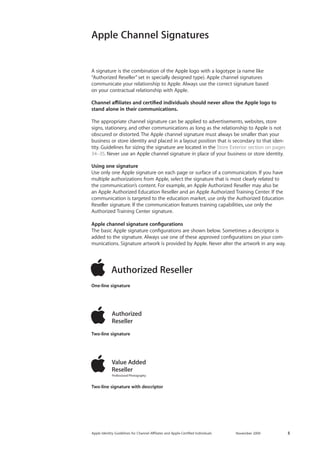
Apple channel signature configurations 
The basic Apple signature configurations are shown below. Sometimes a descriptor is added to the signature. Always use one of these approved configurations on your communications. Signature artwork is provided by Apple. Never alter the artwork in any way. 
One-line signature 
Two-line signature 
Two-line signature with descriptor 
Apple Channel Signatures
Apple Identity Guidelines for Channel AΣliates and Apple-Certified Individuals November 2009 6 
STARTING AT$PRICEVisit our store. Find a location near you. tomorrowtech.comUp to 1.8 GHzIntel Core Duo ProcessorMacBook AirMummy Nibhuismod Ut laoreet dolore magna aliquam erat dolore euUt wisi enim ad minimVeniam Quisstrud exerci Tationulla mcorper suscipit lobortis nisl ut aliquip ex ea commodoConsequat Duis Autem vel eum iriure dolor in hendrerit in vulputate velit esse molestie consequatvtation mcorper suscipit Vel Illum Dolore EuFeugiat nulla facilisis at Vero Eros et Accumsan et Iusto Odio dignissim quiBlandit Praesent Luptatum zzril delenit augue duis dolore te feugait nulla facilisi. Lorem ipsum dolor Adipiscing Elit Sed Diam nonummy nibh euismod tincidunt ut laoreet dolore magna aliquam erat volutpatdo exerci tation 
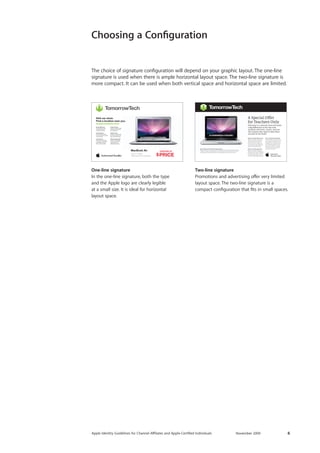
One-line signature 
In the one-line signature, both the type 
and the Apple logo are clearly legible 
at a small size. It is ideal for horizontal 
layout space. 
Two-line signature 
Promotions and advertising offer very limited layout space. The two-line signature is a 
compact configuration that fits in small spaces. 
The choice of signature configuration will depend on your graphic layout. The one-line signature is used when there is ample horizontal layout space. The two-line signature is more compact. It can be used when both vertical space and horizontal space are limited. 
Choosing a Configuration
Apple Identity Guidelines for Channel AΣliates and Apple-Certified Individuals November 2009 7 
Signature Color 
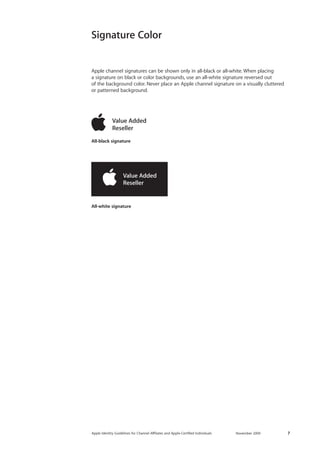
Apple channel signatures can be shown only in all-black or all-white. When placing 
a signature on black or color backgrounds, use an all-white signature reversed out 
of the background color. Never place an Apple channel signature on a visually cluttered or patterned background. 
All-white signature 
All-black signature
Apple Identity Guidelines for Channel AΣliates and Apple-Certified Individuals November 2009 8 
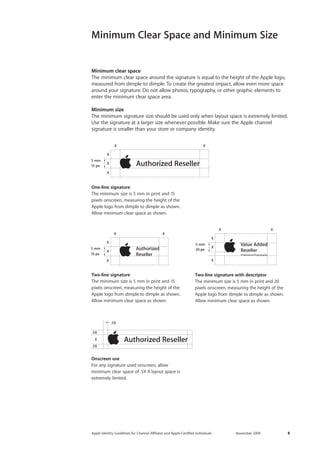
Minimum clear space 
The minimum clear space around the signature is equal to the height of the Apple logo, measured from dimple to dimple. To create the greatest impact, allow even more space around your signature. Do not allow photos, typography, or other graphic elements to enter the minimum clear space area. 
Minimum size 
The minimum signature size should be used only when layout space is extremely limited. Use the signature at a larger size whenever possible. Make sure the Apple channel 
signature is smaller than your store or company identity. 
Minimum Clear Space and Minimum Size 
15 px20 px15 px5 mm15 px5 mm5 mm5 mm 
One-line signature 
The minimum size is 5 mm in print and 15 pixels onscreen, measuring the height of the Apple logo from dimple to dimple as shown. Allow minimum clear space as shown. 
15 px20 px15 px5 mm15 px5 mm5 mm5 mm 
Two-line signature 
The minimum size is 5 mm in print and 15 pixels onscreen, measuring the height of the Apple logo from dimple to dimple as shown. Allow minimum clear space as shown. 
Onscreen use 
For any signature used onscreen, allow minimum clear space of .5X if layout space is extremely limited. 
15 px20 px15 px5 mm15 px5 mm5 mm5 mm 
Two-line signature with descriptor 
The minimum size is 5 mm in print and 20 pixels onscreen, measuring the height of the Apple logo from dimple to dimple as shown. Allow minimum clear space as shown. 
.5X.5X.5XX
Apple Identity Guidelines for Channel AΣliates and Apple-Certified Individuals November 2009 9 
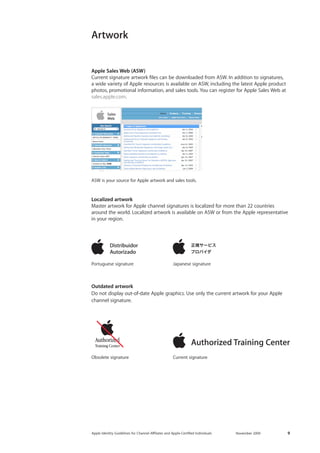
Apple Sales Web (ASW) 
Current signature artwork files can be downloaded from ASW. In addition to signatures, 
a wide variety of Apple resources is available on ASW, including the latest Apple product photos, promotional information, and sales tools. You can register for Apple Sales Web at sales.apple.com. 
Artwork 
Obsolete signature 
Portuguese signature 
ASW is your source for Apple artwork and sales tools. 
Japanese signature 
Current signature 
Outdated artwork 
Do not display out-of-date Apple graphics. Use only the current artwork for your Apple 
channel signature. 
Localized artwork 
Master artwork for Apple channel signatures is localized for more than 22 countries around the world. Localized artwork is available on ASW or from the Apple representative in your region.
Apple Identity Guidelines for Channel AΣliates and Apple-Certified Individuals November 2009 10 
Typography 
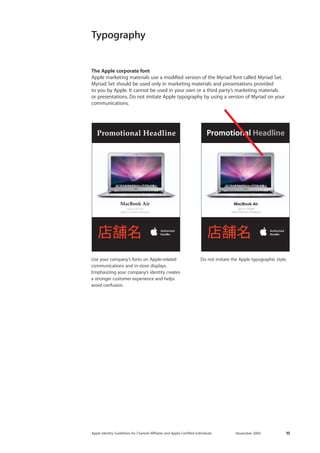
The Apple corporate font 
Apple marketing materials use a modified version of the Myriad font called Myriad Set. Myriad Set should be used only in marketing materials and presentations provided 
to you by Apple. It cannot be used in your own or a third party’s marketing materials 
or presentations. Do not imitate Apple typography by using a version of Myriad on your communications. 
Use your company’s fonts on Apple-related 
communications and in-store displays. Emphasizing your company’s identity creates 
a stronger customer experience and helps avoid confusion. 
Do not imitate the Apple typographic style. 
Up to 1.8 GHzIntel Core Duo ProcessorMacBook AirPromotional HeadlinePromotional HeadlineUp to 1.8 GHzIntel Core Duo ProcessorMacBook Air
Apple Identity Guidelines for Channel AΣliates and Apple-Certified Individuals November 2009 11 
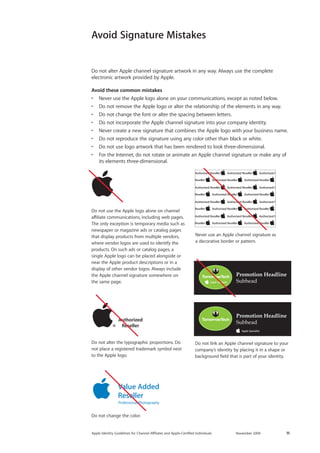
Do not use the Apple logo alone on channel affiliate communications, including web pages. The only exception is temporary media such as newspaper or magazine ads or catalog pages that display products from multiple vendors, where vendor logos are used to identify the products. On such ads or catalog pages, a single Apple logo can be placed alongside or near the Apple product descriptions or in a display of other vendor logos. Always include the Apple channel signature somewhere on the same page. 
Do not alter the typographic proportions. Do not place a registered trademark symbol next to the Apple logo. 
Never use an Apple channel signature as a decorative border or pattern. 
Do not change the color. 
Promotion HeadlineSubheadPromotion HeadlineSubhead 
Do not link an Apple channel signature to your company’s identity by placing it in a shape or background field that is part of your identity. 
Avoid Signature Mistakes 
Do not alter Apple channel signature artwork in any way. Always use the complete 
electronic artwork provided by Apple. 
Avoid these common mistakes 
• Never use the Apple logo alone on your communications, except as noted below. 
• Do not remove the Apple logo or alter the relationship of the elements in any way. 
• Do not change the font or alter the spacing between letters. 
• Do not incorporate the Apple channel signature into your company identity. 
• Never create a new signature that combines the Apple logo with your business name. 
• Do not reproduce the signature using any color other than black or white. 
• Do not use logo artwork that has been rendered to look three-dimensional. 
• For the Internet, do not rotate or animate an Apple channel signature or make any of its elements three-dimensional.
Apple Identity Guidelines for Channel AΣliates and Apple-Certified Individuals November 2009 12 
Displaying Multiple Apple Authorizations 
If you have multiple authorizations from Apple, select the signature that is most clearly related to a communication’s content. For instance, an Apple Authorized Reseller may also be an Apple Authorized Education Reseller and an Apple Authorized Training Center. If the communication is targeted to the education market, use only the Apple Authorized Education Reseller signature. If the communication features training capabilities, use only the Apple Authorized Training Center signature. 
When multiple Apple products are featured, do not accompany each product with a 
signature. Use only one Apple channel signature on the layout. If the communication 
features products from more than one company, place the Apple channel signature near one of the Apple products on the layout. 
Multiple channel signatures can appear on your About Us web page, placed near corresponding descriptions of your company’s capabilities (see Websites on page 19). 
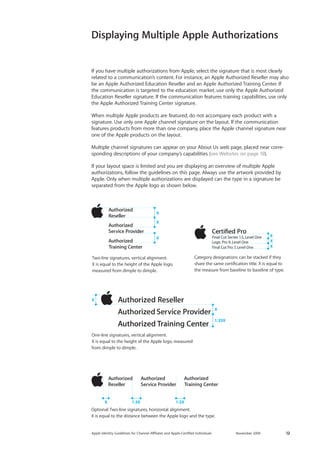
If your layout space is limited and you are displaying an overview of multiple Apple authorizations, follow the guidelines on this page. Always use the artwork provided by Apple. Only when multiple authorizations are displayed can the type in a signature be 
separated from the Apple logo as shown below. 
Two-line signatures, vertical alignment. X is equal to the height of the Apple logo, measured from dimple to dimple. XXXOne-line signatures, vertical alignment. X is equal to the height of the Apple logo, measured from dimple to dimple. X1.25X X Optional: Two-line signatures, horizontal alignment. X is equal to the distance between the Apple logo and the type. X1.5X1.5XCategory designations can be stacked if they share the same certification title. X is equal to the measure from baseline to baseline of type. XXX
Apple Identity Guidelines for Channel AΣliates and Apple-Certified Individuals November 2009 13 
Avoid Mistakes When Displaying Multiple Apple Authorizations 
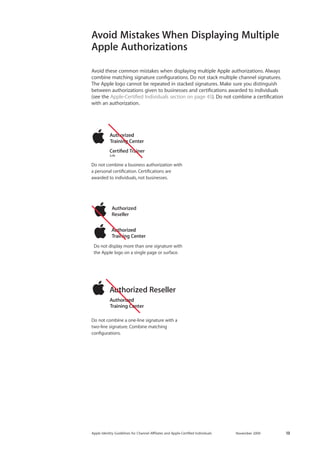
Avoid these common mistakes when displaying multiple Apple authorizations. Always combine matching signature configurations. Do not stack multiple channel signatures. 
The Apple logo cannot be repeated in stacked signatures. Make sure you distinguish between authorizations given to businesses and certifications awarded to individuals 
(see the Apple-Certified Individuals section on page 45). Do not combine a certification with an authorization. 
Do not display more than one signature with the Apple logo on a single page or surface. Do not combine a business authorization with a personal certification. Certifications are awarded to individuals, not businesses. Do not combine a one-line signature with a two-line signature. Combine matching configurations.
Apple Identity Guidelines for Channel AΣliates and Apple-Certified Individuals November 2009 14 
Frequently Asked Questions 
I have older Apple graphics in my store. Can I still use them? 
Do not display outdated graphics. You are required by Apple to comply with the most up-to-date graphic standards shown in these guidelines. In addition, using older graphics may suggest to customers that you offer outdated products. It is a well-known retail 
phenomenon that refreshing a store’s graphics increases sales. 
Apple no longer uses a “glass” logo or the Garamond font. And surprisingly, though the rainbow-striped Apple logo has been obsolete for over 15 years, it is still displayed in some Apple channel stores around the world. If you want to hang onto that rainbow- striped logo, keep it in your private office where it cannot be seen by customers. 
If you have questions, contact your Apple representative. 
How can I find out more about Apple Sales Web? 
The Apple channel affiliate sales portal, Apple Sales Web (ASW), provides advertising materials, data sheets, FAQs, product part numbers, pricing information, presentations, product videos, product photography, and more on demand, 24 hours a day. Your Apple representative can provide more information about ASW. 
• To register for access, visit https://asw.apple.com and click the “Register here” link. If you need help with access, please visit the Apple Sales Web contact page at 
http://asw.apple.com/contactus.html. 
• Use the search function in ASW to find specific items. For example, searching for 
“signature,” “artwork,” or “corporate identity” will take you to information on using the Apple identity for resellers.
Apple Identity Guidelines for Channel AΣliates and Apple-Certified Individuals November 2009 15 
Using Apple Assets
Apple Identity Guidelines for Channel AΣliates and Apple-Certified Individuals November 2009 16 
Using Apple Assets 
Apple product photography 
Every aspect of Apple product photography, from framing and composition to lighting and camera angle, is carefully controlled by Apple. Use only current product photos 
designated for use by Apple resellers and available on ASW. Do not use Apple’s lifestyle 
or other promotional imagery. Never download or copy an image from Apple’s website at www.apple.com. 
Apple provides resellers with a wide variety of high-quality product photos. It is most effective to use the photo assets provided by Apple. Resellers can shoot their own Apple product photography only when a distinctive photographic style is an essential part of the reseller’s brand identity. 
Make sure you use Apple product photos at a resolution appropriate to the output size. 
Avoid these common mistakes 
• Do not place an Apple product image on a busy, colorful, textured, or patterned 
background. Apple product photos can be placed only on a white, off-white, light gray, or black background or on a promotional background provided as part of the image. 
• Do not alter Apple product photos or add type, violators, or other graphics. 
• Do not animate or enhance Apple product photos. 
• Use only the screenshots provided by Apple; do not alter them or create your 
own screens. 
Marketing messages 
You can use Apple marketing messages that are provided as part of sales tools or photos on ASW. If an Apple-produced marketing message is part of the Apple asset, do not alter it in any way. 
You can develop your own marketing messages that are specific to your business. Use the tone and style of your identity; do not imitate the Apple tone or copy style. 
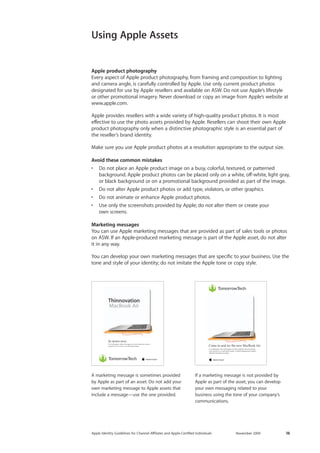
A marketing message is sometimes provided by Apple as part of an asset. Do not add your own marketing message to Apple assets that include a message—use the one provided. 
Come in and try the new MacBook AirUt el ullaorpero dolor alit augiam in henis nullamet velocot esequat iurer sis etum in ut adit utpat autpat. Ut dittod elesequamet, sequis dolorerci blaoreros at autpat. Ut el ullaorpero dolor alit augiam iurer sis etum in ut adit utpat autpat. dolorerci blaoreros at autpat. Lor ipisim voluptatie ming enim iusto eumsan henisit utsxky. In stores now. Ut el ullaorpero dolor alit augiam in henis nullamet velocot esequat iurer sis etum in ut adit utpat autpat. ThinnovationMacBook Air 
If a marketing message is not provided by Apple as part of the asset, you can develop your own messaging related to your 
business using the tone of your company’s communications. 
Come in and try the new MacBook AirUt el ullaorpero dolor alit augiam in henis nullamet velocot esequat iurer sis etum in ut adit utpat autpat. Ut dittod elesequamet, sequis dolorerci blaoreros at autpat. Ut el ullaorpero dolor alit augiam in henis nullamet velocot esequat iurer sis etum in ut adit utpat autpat. Ut dittod elesequamet, sequis dolorerci blaoreros at autpat. Lor sed te velisl et, quisit augue feugait ipisim voluptatie ming enim iusto del iuscing euguero consequi eumsan henisit utsxky. In stores now. Ut el ullaorpero dolor alit augiam in henis nullamet velocot esequat iurer sis etum in ut adit utpat autpat. ThinnovationMacBook Air
Apple Identity Guidelines for Channel AΣliates and Apple-Certified Individuals November 2009 17 
Image resolution 
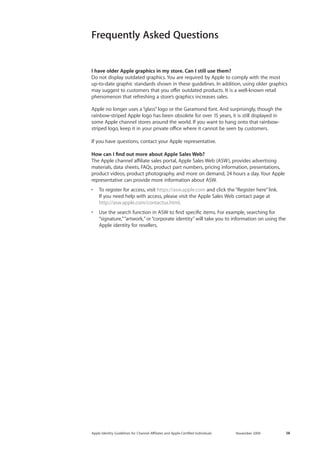
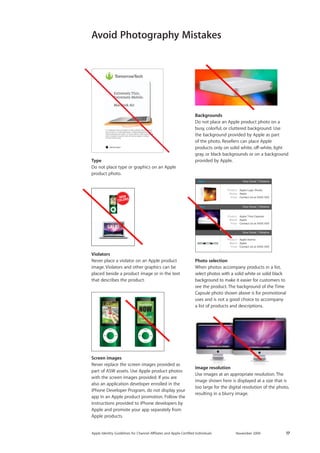
Use images at an appropriate resolution. The image shown here is displayed at a size that is too large for the digital resolution of the photo, resulting in a blurry image. 
New View Detail RelativeNew View Detail Relative View Detail RelativeProductBrandPriceApple Logic StudioAppleContact Us at XXXX XXXProductBrandPriceApple Time CapsuleAppleContact Us at XXXX XXXProductBrandPriceApple XserveAppleContact Us at XXXX XXX 
Violators 
Never place a violator on an Apple product image. Violators and other graphics can be placed beside a product image or in the text that describes the product. 
Photo selection 
When photos accompany products in a list, select photos with a solid white or solid black background to make it easier for customers to see the product. The background of the Time Capsule photo shown above is for promotional uses and is not a good choice to accompany 
a list of products and descriptions. 
New View Detail RelativeNew View Detail Relative View Detail RelativeProductBrandPriceApple Logic StudioAppleContact Us at XXXX XXXProductBrandPriceApple Time CapsuleAppleContact Us at XXXX XXXProductBrandPriceApple XserveAppleContact Us at XXXX XXX 
Backgrounds 
Do not place an Apple product photo on a busy, colorful, or cluttered background. Use 
the background provided by Apple as part 
of the photo. Resellers can place Apple 
products only on solid white, off-white, light gray, or black backgrounds or on a background provided by Apple. 
Come in and try the new MacBook AirUt el ullaorpero dolor alit augiam in henis nullamet velocot esequat iurer sis etum in ut adit utpat autpat. Ut dittod elesequamet, sequis dolorerci blaoreros at autpat. Ut el ullaorpero dolor alit augiam in henis nullamet velocot esequat iurer sis etum in ut adit utpat autpat. Ut dittod elesequamet, sequis dolorerci blaoreros at autpat. Lor sed te velisl et, quisit augue feugait ipisim voluptatie ming enim iusto del iuscing euguero consequi eumsan henisit utsxky. In stores now. Ut el ullaorpero dolor alit augiam in henis nullamet velocot esequat iurer sis etum in ut adit utpat autpat. ThinnovationMacBook Air 
Avoid Photography Mistakes 
Type 
Do not place type or graphics on an Apple product photo. 
Screen images 
Never replace the screen images provided as part of ASW assets. Use Apple product photos with the screen images provided. If you are also an application developer enrolled in the iPhone Developer Program, do not display your app in an Apple product promotion. Follow the instructions provided to iPhone developers by Apple and promote your app separately from Apple products. 
:oZbeZ[e^NOWZmK>L>EE>KG:F>
Apple Identity Guidelines for Channel AΣliates and Apple-Certified Individuals November 2009 18 
Websites
Apple Identity Guidelines for Channel AΣliates and Apple-Certified Individuals November 2009 19 
Your website should have its own look and feel and should not copy the Apple website 
at www.apple.com. Approved product information and marketing tools for resellers 
are provided on ASW. 
Do not use imagery or other graphic elements obtained from www.apple.com. Proprietary images and graphics used on Apple’s website include but are not limited to Cascading Style Sheets, “buy now” buttons, background images, lifestyle photography, product icons and imagery, and navigational elements, particularly those with design effects that are strongly associated with Apple’s online presence and constitute Apple’s intellectual property. Do not transfer or imitate images or effects on www.apple.com. 
Do not use Apple’s proprietary font, Myriad Set, on your website (see Typography on page 10). 
Promoting your affiliation with AppleOn each page of your website that features Apple products or services, one Apple 
channel signature must be clearly associated with the Apple offering and must be smaller than your company identity. The signature must conform to the color, size, clear space, and other graphic standards in these guidelines. 
Here are points to watch for when using your Apple channel signature on the web: 
• Do not place the signature on a visually cluttered or patterned background. 
• Do not make the signature transparent. 
• Do not rotate or animate the signature. 
• Maintain appropriate clear space around the signature (see the guidelines on page 8). 
• Do not use an Apple logo alone. Always use your Apple channel signature. 
Use only one Apple channel signature on each page that features an Apple product or service. 
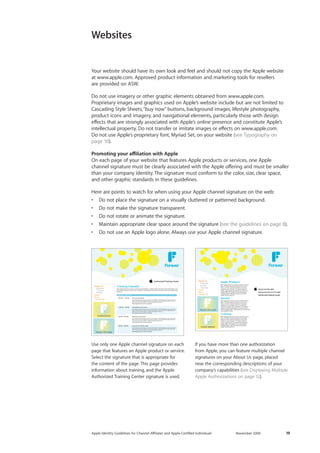
Select the signature that is appropriate for the content of the page. This page provides information about training, and the Apple Authorized Training Center signature is used. 
If you have more than one authorization 
from Apple, you can feature multiple channel 
signatures on your About Us page, placed 
near the corresponding descriptions of your company’s capabilities (see Displaying Multiple Apple Authorizations on page 12). 
About Us Products Service TrainingNewsStoreContact UsForever Gift CardsForever SpecialsApple ProductsRud magna faccumm olorero cortiscilit iustrud dolor in ullaore dolutat alit alisl ercip exerat dolor sum dio coreetum dolorem ing el eum aciduip er ad erciliquat. Te magnisl utpat la coreet, quipissectet nonsectem enisit lore feu feugue delit, sed endiam ea conummodiate modipit dignim velismod eugue ming etuer eugait illa aut praessisi. ServiceRud magna faccumm olorero cortiscilit iustrud dolor in ullaore dolutat alit alisl ercip exerat dolor sum dio coreetum dolorem ing el eum aciduip er ad erciliquat. Duip el ea conullut iuscilit wis eugait illa aut praessisi.Te magnisl utpat la coreet, quipissectet nonsectem enisit lore feu feugue delit, sed endiam ea conum etuer sum dolobor ip erat. TrainingRud magna faccumm olorero cortiscilit iustrud dolor in ullaore dolutat alit alisl ercip exerat dolor sum dio coreetum dolorem ing el eum aciduip er ad erciliquat. Te magnisl utpat la coreet, quipissectet nonsectem enisit lore feu feugue delit, sed endiam ea conummodiate modipit dignim velismod eugue ming etuer eugait illa aut praessisi. Forever 
Websites 
About Us Products Training ServiceNewsStoreContact UsForever Gift CardsForeverTraining CalendarRud magna faccumm olorero cortiscilit iustrud dolor in ullaore dolutat alit alisl ercip exerat dolor sum dio coreetum dolorem ing el eum aciduip er ad erciliquat. Duip el ea conullut iuscilit wis eugait illa aut praessisi. Intro to Lorem IpsumRud magna faccumm olorero cortiscilit iustrud dolor in ullaore dolutat alit alisl ercip exerat dolor sum dio coreetum dolorem ing el eum aciduip er ad erciliquat Rud magna faccumm olorero cortiscilit iustrud dolor in ullaore dolutat alit alisl ercipRud magna faccumm olorero cortiscilit. 9:00 AM – 11:00 AMIntermediate Lorem IpsumRud magna faccumm olorero cortiscilit iustrud dolor in ullaore dolutat alit alisl ercip exerat dolor sum dio coreetum dolorem ing el eum aciduip er ad erciliquat Rud magna faccumm olorero cortiscilit iustrud dolor in ullaore dolutat alit alisl ercipRud magna faccumm olorero cortiscilit. 11:00 AM – 1:00 PMLorem Ipsum Support GroupRud magna faccumm olorero cortiscilit iustrud dolor in ullaore dolutat alit alisl ercip exerat dolor sum dio coreetum dolorem ing el eum aciduip er ad erciliquat Rud magna faccumm olorero cortiscilit iustrud dolor in ullaore dolutat alit alisl ercipRud magna faccumm olorero cortiscilit. 4:00 PM – 6:00 PMAdvanced Lorem IpsumRud magna faccumm olorero cortiscilit iustrud dolor in ullaore dolutat alit alisl ercip exerat dolor sum dio coreetum dolorem ing el eum aciduip er ad erciliquat Rud magna faccumm olorero cortiscilit iustrud dolor in ullaore dolutat alit alisl ercipRud magna faccumm olorero cortiscilit. 2:00 PM – 4:00 PMForever ServiceMONDAY JULY 28
Apple Identity Guidelines for Channel AΣliates and Apple-Certified Individuals November 2009 20 
Your customers rely on you to provide them with the most current information 
about Apple products and services. The pages on your website that are dedicated to Apple products and solutions must be continually updated with the latest information from Apple. 
On your website, use only current product photos and screenshots provided on ASW and designated for use by Apple resellers. New or revised Apple product photos should be added to the product section of your site as soon as possible after a product launch when they become available on ASW. 
End-of-life (EOL) products can be displayed on your website only until product inventory has been depleted. EOL products must be removed from the site as soon as possible 
after the EOL notice is sent out or when inventory is depleted. 
When a product is announced but is not immediately available, pricing and availability information should be clearly displayed. Make sure you update your site as soon as the product becomes available. 
Keep Your Website Current 
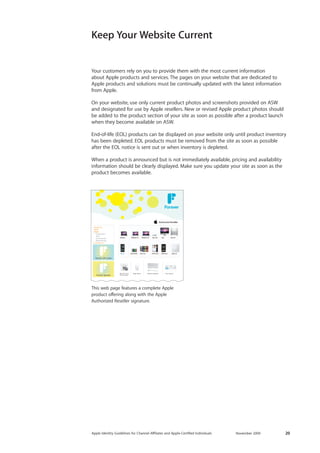
This web page features a complete Apple 
product offering along with the Apple Authorized Reseller signature. 
About UsNewsStore Computers iPod Accessories NetworkingContact UsMac OS X 10.6Snow LeopardMagic MouseWireless KeyboardTime CapsuleForeverForever Gift CardsForever Specials
Apple Identity Guidelines for Channel AΣliates and Apple-Certified Individuals November 2009 21 
CameraDuip eugiatet, sed dolupta tionsed magniam ea feugiam adigna feuis dionsequatie coreet volenibh eraesse commodio odolor il irit ex eum dolendrero consequ atinismod tatum dio dipit. Learn More >> PrinterDuip eugiatet, sed dolupta tionsed magniam ea feugiam adigna feuis dionsequatie coreet volenibh eraesse commodio odolor il irit ex eum dolendrero consequ atinismod tatum dio dipit. Learn More >> Magic MouseDuip eugiatet, sed dolupta tionsed magniam ea feugiam adigna feuis dionsequatie coreet volenibh eraesse commodio odolor il irit ex eum dolendrero consequ atinismod tatum dio dipit. Learn More >> iPod dockDuip eugiatet, sed dolupta tionsed magniam ea feugiam adigna feuis dionsequatie coreet volenibh eraesse commodio odolor il irit ex eum dolendrero consequ atinismod tatum dio dipit. Learn More >> CameraDuip eugiatet, sed dolupta tionsed magniam ea feugiam adigna feuis dionsequatie coreet volenibh eraesse commodio odolor il irit ex eum dolendrero consequ atinismod tatum dio dipit. Learn More >> PrinterDuip eugiatet, sed dolupta tionsed magniam ea feugiam adigna feuis dionsequatie coreet volenibh eraesse commodio odolor il irit ex eum dolendrero consequ atinismod tatum dio dipit. Learn More >> Magic MouseDuip eugiatet, sed dolupta tionsed magniam ea feugiam adigna feuis dionsequatie coreet volenibh eraesse commodio odolor il irit ex eum dolendrero consequ atinismod tatum dio dipit. Learn More >> iPod dockDuip eugiatet, sed dolupta tionsed magniam ea feugiam adigna feuis dionsequatie coreet volenibh eraesse commodio odolor il irit ex eum dolendrero consequ atinismod tatum dio dipit. Learn More >> CameraDuip eugiatet, sed dolupta tionsed magniam ea feugiam adigna feuis dionsequatie coreet volenibh eraesse commodio odolor il irit ex eum dolendrero consequ atinismod tatum dio dipit. Learn More >> PrinterDuip eugiatet, sed dolupta tionsed magniam ea feugiam adigna feuis dionsequatie coreet volenibh eraesse commodio odolor il irit ex eum dolendrero consequ atinismod tatum dio dipit. Learn More >> Magic MouseDuip eugiatet, sed dolupta tionsed magniam ea feugiam adigna feuis dionsequatie coreet volenibh eraesse commodio odolor il irit ex eum dolendrero consequ atinismod tatum dio dipit. Learn More >> iPod dockDuip eugiatet, sed dolupta tionsed magniam ea feugiam adigna feuis dionsequatie coreet volenibh eraesse commodio odolor il irit ex eum dolendrero consequ atinismod tatum dio dipit. Learn More >> CameraDuip eugiatet, sed dolupta tionsed magniam ea feugiam adigna feuis dionsequatie coreet volenibh eraesse commodio odolor il irit ex eum dolendrero consequ atinismod tatum dio dipit. Learn More >> PrinterDuip eugiatet, sed dolupta tionsed magniam ea feugiam adigna feuis dionsequatie coreet volenibh eraesse commodio odolor il irit ex eum dolendrero consequ atinismod tatum dio dipit. Learn More >> Magic MouseDuip eugiatet, sed dolupta tionsed magniam ea feugiam adigna feuis dionsequatie coreet volenibh eraesse commodio odolor il irit ex eum dolendrero consequ atinismod tatum dio dipit. Learn More >> iPod dockDuip eugiatet, sed dolupta tionsed magniam ea feugiam adigna feuis dionsequatie coreet volenibh eraesse commodio odolor il irit ex eum dolendrero consequ atinismod tatum dio dipit. Learn More >> Store NameLoginiPod iPod nano | More infoiPod shuffle | More infoiPod Video | More infoiPod nano | More infoiPod shuffle | More infoMore Great DealsiPod Video | More infoiPod nano | More infoiPod shuffle | More infoiPod Video | More infoiPod nano | More infoiPod shuffle | More infoTue veliqui scilit volenissi. Lit, sectem iurerit dit alit, qui bla feuguer illut lam del ex euguer alit, si et, con ut venisi. Gueraessi. An henis ea faccums andreet, consectem quipit prat. Igna consed doluptat. Ut velisisi. Onsequi scidunt laorem Tue veliqui scilit volenissi. Lit, sectem iurerit dit alit, qui bla feuguer illut lam del ex euguer alit, si et, con ut venisi. Gueraessi. An henis ea faccums. Andreet, consectem quipit prat. Igna. Consed doluptat. Ut velisisi.Onsequi scidunt laorem Tue veliqui scilit volenissi. Lit, sectem iurerit dit alit, qui bla feuguer. 
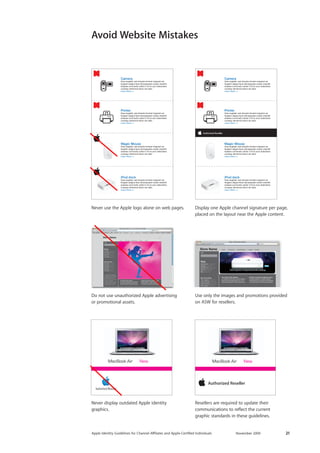
Never use the Apple logo alone on web pages. 
Display one Apple channel signature per page, placed on the layout near the Apple content. 
Use only the images and promotions provided on ASW for resellers. 
Do not use unauthorized Apple advertising 
or promotional assets. 
Never display outdated Apple identity 
graphics. 
Resellers are required to update their 
communications to reflect the current 
graphic standards in these guidelines. 
Avoid Website MistakesStore NameLoginMac MacBook Air | More infoMacBook | More infoMacBook Pro | More infoMac Pro | More infoiMac | More infoMore Great DealsTIme Capsule | More infoAirport Extreme | More infoAirport Express | More infoiPod Classic | More infoiPod nano | More infoiPod shuffle | More infoTue veliqui scilit volenissi. Lit, sectem iurerit dit alit, qui bla feuguer illut lam del ex euguer alit, si et, con ut venisi. Gueraessi. An henis ea faccums andreet, consectem quipit prat. Igna consed doluptat. Ut velisisi. Onsequi scidunt laorem Tue veliqui scilit volenissi. Lit, sectem iurerit dit alit, qui bla feuguer illut lam del ex euguer alit, si et, con ut venisi. Gueraessi. An henis ea faccums. Andreet, consectem quipit prat. Igna. Consed doluptat. Ut velisisi.Onsequi scidunt laorem Tue veliqui scilit volenissi. Lit, sectem iurerit dit alit, qui bla feuguer. Home Producten Aanbiedingen Locatie Contact
Apple Identity Guidelines for Channel AΣliates and Apple-Certified Individuals November 2009 22 
Advertising and Promotions
Apple Identity Guidelines for Channel AΣliates and Apple-Certified Individuals November 2009 23 
To achieve their marketing goals cost effectively, resellers should use their advertising 
resources for conventional print and online advertising. Layouts and additional informa-tion 
for print ads, banner ads, and email promotions are provided in the Apple product 
asset kits and other materials available on ASW. 
Follow these guidelines for advertising: 
• Don’t market the marketing. Do not produce advertising before the product is 
available. Do not engage in nonconventional or stunt advertising to draw attention 
to a product launch. 
• Use your advertising budget to secure premium positioning in desirable environ-ments. 
Positioning priorities are the outside back cover for single-page creative and 
the inside front cover for two-page-spread creative. 
• For print ads, focus your budget on a few large ads rather than many small ones. 
Full pages or two-page spreads are preferable to half, quarter, or smaller page units. 
• For print and newspaper placements, focus on environments that are contextually 
relevant to the product and audience: technology, sports, men’s and women’s lifestyle, 
design, fashion, music, film. Select quality titles. Avoid environments that include 
gratuitous sex, gossip, and controversial topics such as weapons, drugs, politics, 
gambling, and sexuality. 
• Use the marketing messages provided in the product asset kits on ASW. Do not 
change the intent or the tone of the Apple-provided product messaging. 
• Do not alter the product image assets provided on ASW. Never replace the screen-shots 
provided as part of the assets. 
• If you are an iPhone app developer, do not combine your app promotions with Apple 
product advertising. Follow the instructions that are provided to iPhone developers 
by Apple. 
• Comply with the trademark and credit line requirements in the Using Apple 
Trademarks and Credit Lines section on page 47. 
Using an Apple channel signature on advertisements 
On communications that promote or advertise Apple products or services, the Apple 
channel signature must be smaller than the reseller identity and placed in a secondary 
position. Never use an Apple channel signature in place of your company or store identity. 
An Apple channel signature must appear with any content that relates to Apple offerings. 
Use only one signature on a page or surface of a communication. 
When multiple Apple products are shown, do not accompany each product with an 
Apple channel signature. Do not use the Apple logo alone to indicate that products 
are from Apple. Instead, show your channel affiliation by displaying an Apple channel 
signature near the list or grouping of Apple products. 
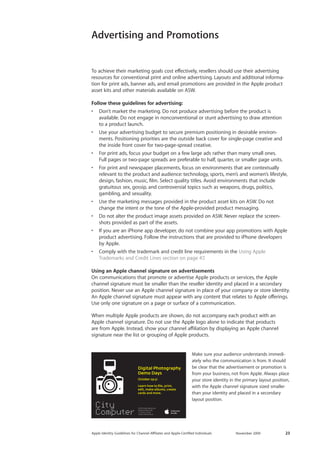
Make sure your audience understands immedi-ately 
who the communication is from. It should 
be clear that the advertisement or promotion is 
from your business, not from Apple. Always place 
your store identity in the primary layout position, 
with the Apple channel signature sized smaller 
than your identity and placed in a secondary 
layout position. 
Advertising and Promotions
Apple Identity Guidelines for Channel AΣliates and Apple-Certified Individuals November 2009 24 
Always check printed communications during the production process to ensure print quality and consistency throughout. Never use Apple assets on very low-resolution 
printed materials in which the details of product photos cannot be seen. Make sure the Apple channel signature is sized so that the Apple logo and type are clean and legible 
at the resolution used for the printed piece. 
Color 
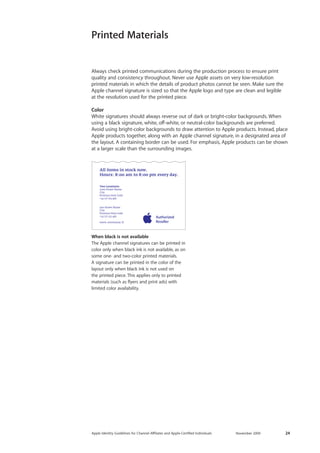
White signatures should always reverse out of dark or bright-color backgrounds. When using a black signature, white, off-white, or neutral-color backgrounds are preferred. Avoid using bright-color backgrounds to draw attention to Apple products. Instead, place Apple products together, along with an Apple channel signature, in a designated area of the layout. A containing border can be used. For emphasis, Apple products can be shown at a larger scale than the surrounding images. 
Printed Materials 
When black is not available 
The Apple channel signatures can be printed in color only when black ink is not available, as on some one- and two-color printed materials. 
A signature can be printed in the color of the layout only when black ink is not used on the printed piece. This applies only to printed materials (such as flyers and print ads) with 
limited color availability.
Apple Identity Guidelines for Channel AΣliates and Apple-Certified Individuals November 2009 25 
Avoid Advertising Mistakes 
TommorowTech.comMacBook AirMac ProMac at TomorrowTechBestDeals@TomorrowTech.com MacworldMacworld Cut Studio$PRICEMac ProiMac$PRICE$PRICE$PRICE$PRICEMac ProiMacMac PRICE$PRICEMac ProiMac$PRICE$PRICE$PRICE$PRICEMac ProiMacMac PRICE$at TomorrowTechBestDeals@TomorrowTech.comMacBook AirBestDeals@TommorowTech.comMacBook AirMac ProMac ProOnly at TomorrowTechBestDeals@TomorrowTech.com MacworldMacworld Final Cut StudioFinal Cut Studio 
Tradeshow Catalog 
Correct 
The signature is reversed to white out of a dark background and placed near the Apple product offering. Only one signature is used. 
Incorrect 
Do not place the signature in an enclosing shape. Do not use more than one signature on a page. 
Magazine Advertisement 
Correct 
The Authorized Training Center signature 
promotes this reseller’s training capabilities. 
Incorrect 
Do not use more than one signature on a 
page or surface. If you have more than one authorization from Apple, select the 
signature that best fits the content of the 
communication. 
Print Advertisement 
Correct 
A single signature at the lower edge of the page serves as an endorsement of the entire ad. 
Incorrect 
Do not use more than one signature on a 
page or surface. Multiple signatures should not appear next to Apple products.
Apple Identity Guidelines for Channel AΣliates and Apple-Certified Individuals November 2009 26 
Specialty Advertising 
To achieve their marketing goals cost effectively, resellers should use their advertising resources for conventional print and online advertising. Follow the instructions for print ads, banner ads, and email promotions provided in the Apple product asset kits and other materials on ASW. If other forms of advertising are commissioned, follow these guidelines and contact your Apple representative for information and approval. 
If you are an Apple-approved iPhone app developer, do not advertise your app along with Apple products. Follow the instructions Apple provides for iPhone developers and keep app promotions separate from Apple product advertising. 
Radio advertising 
Produce a prerecorded radio spot using the messaging provided in the Apple product asset kits on ASW. The messages can be adapted for spoken dialogue, but do not change the intent of the Apple-provided messaging. Make sure the tone is straightforward, 
simple, and friendly. Your reseller store name must be a prominent part of the radio spot. It must be clear that the ad is from the reseller, not Apple. 
If you direct live disc jockeys (DJs) to follow talking points based on Apple-provided 
messaging, they can be encouraged to add personal anecdotes related to their use of 
the Apple product. 
Radio broadcasts spoken in a language other than English must say Apple trademark names in English. Do not translate Apple trademark names. Refer to the Apple Trademark List at www.apple.com/legal/trademark/appletmlist.html for the correct trademark names. 
Broadcast advertising 
Product photo assets provided on ASW can be used in broadcast advertising. Apple 
product images can be used to help illustrate the range of products offered by a reseller. It must be clear that the ad is from the reseller, not Apple. 
You must submit a rough cut of your ad to Apple for approval before it is broadcast. 
Always show the most current version of the Apple product. Use straightforward 
camera techniques such as a carefully controlled slow pan or zoom when shooting motion footage of a still Apple product photo. If your production budget allows for high- quality motion graphics editing, the product image can move in front of the camera in 
a straightforward manner—for example, a simple left-to-right rotation. 
Never alter in any way the Apple image assets on ASW. Do not animate, twirl, or tilt the product image or use extreme motion techniques. Never indicate that the product can function in a way that is not accurate—it must be shown to function as it would in real life. For example, do not depict an Apple product flying through the air or floating in water. Never show an Apple product on a busy, colorful, or confusing background. Do not replace the screen that is provided as part of the image asset. Do not distort or change the color of the image asset. 
Select a simple motion technique that is within your production budget. Presenting a simple, high-quality image is more effective than trying to achieve complex imagery that 
exceeds your budget. 
Do not use video or lifestyle imagery from Apple’s website at www.apple.com. 
Apple credit lines must be included with other legal copy in the broadcast ad. See Using Apple Trademarks and Credit Lines on page 47.
Apple Identity Guidelines for Channel AΣliates and Apple-Certified Individuals November 2009 27 
Specialty Advertising 
(continued) 
Displaying an Apple channel signature in broadcast ads 
Do not display your Apple channel signature in broadcast ads unless the ad features 
Apple products exclusively. Your company or store identity must be prominently featured. The Apple channel signature can accompany the company or store identity and must be smaller than and clearly subordinate to that identity. Do not apply motion or color techniques to the Apple channel signature except for a simple fade in or fade out. Follow the graphic standards in the Apple Channel Signatures section on pages 5–14. 
Video and motion graphics on the web 
Follow the broadcast advertising guidelines for showing Apple photo assets in video on the web. You can provide a link to Apple’s website at www.apple.com to send viewers to Apple-produced tutorials and video promotions. 
Other specialty advertising 
Apple does not support reseller specialty advertising such as large outdoor billboards 
or guerrilla marketing (the use of unconventional attention-getting devices). The assets provided on ASW are not designed for use in specialty advertising and are not suitable 
for the formats required. For example, images in outdoor large-format ads require a resolution of at least 300 dpi at 20 by 30 inches (51 by 76 cm). The image assets on ASW are not provided at this resolution.
Apple Identity Guidelines for Channel AΣliates and Apple-Certified Individuals November 2009 28 
Store Interior
Apple Identity Guidelines for Channel AΣliates and Apple-Certified Individuals November 2009 29 
Apple Store Identity 
Apple trademarks and trade dress include the terms and fixtures developed by Apple 
for use in the Apple Store. This intellectual property, owned by Apple, contributes to the proprietary look and feel of an Apple Store. 
Building a business identity that cannot be confused with Apple’s identity will strengthen your business by helping your customers associate their in-store experience with your unique business offer. 
To avoid customer confusion, Apple trademarks and trade dress cannot be used on 
channel affiliate signage or in channel affiliate stores. Examples include the following: 
• Channel affiliate store names and company names cannot contain the names Apple, Mac, iPod, Pod, or any other Apple trademarks (unless expressly authorized under separate license). 
• The Apple logo cannot be used alone in channel affiliate stores or channel affiliate communications. It can be used only as part of a channel signature as described in these guidelines. 
• Channel affiliate locations may not use Apple-branded icons, terms associated with Apple-branded icons, or trade names developed for use exclusively by Apple Retail Store locations, including the following: 
– Apple in conjunction with Camp (Apple Camp) 
– Apple in conjunction with Genius (Apple Genius) 
– Genius Bar 
– Mac in conjunction with Genius (Mac Genius) 
– One to One 
– Personal Shopping 
– ProCare 
• Channel affiliate stores may not use proprietary fixtures developed for use exclusively in the Apple Retail Store, Apple Premium Reseller stores, or other licensed Apple Retail Sales programs. Examples include: 
– Stainless steel wall panels inside or outside the store 
– Maple wood rectangular Parsons tables 
– Maple wood cantilever shelving 
– Maple wood consultation bars or Genius-like bars 
– Backlit horizontal translucent graphic panels 
– Staircases in glass or transparent material 
Do not imitate the proprietary look and feel of an Apple Retail Store. Channel affiliate store design must brand the channel affiliate store experience so it is clear to customers that they are not in an Apple Retail Store. 
Apple-authorized channel affiliates may not use Apple-branded icons, trade names, or product photography in conjunction with materials used in Apple Retail Store construction without displaying an Apple channel signature, to clearly identify the store as that of an independent channel affiliate.
Apple Identity Guidelines for Channel AΣliates and Apple-Certified Individuals November 2009 30 
In-Store Displays 
You must have permission from Apple to promote your affiliation with Apple on in-store 
displays. Contact your Apple representative with your proposal for in-store use of an 
Apple channel signature. Include photos and floor plans. 
Apple channel signatures must be used with Apple-exclusive product displays. If products 
from other companies are included, you cannot use an Apple channel signature on the 
display. 
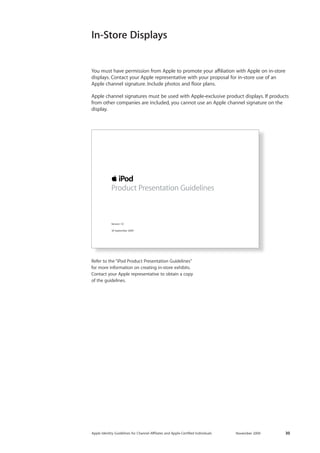
Refer to the “iPod Product Presentation Guidelines” 
for more information on creating in-store exhibits. 
Contact your Apple representative to obtain a copy 
of the guidelines. 
Version 1.0 
18 September 2009 
Product Presentation Guidelines
Apple Identity Guidelines for Channel AΣliates and Apple-Certified Individuals November 2009 31 
Apple provides channel affiliates with a variety of point-of-sale (POS) materials. These items may include banners, posters, brochures, and promotional merchandise. Always use the materials as provided; do not alter them in any way. Do not reuse design or text 
elements from these materials in your communications. Do not copy the layout of 
Apple communications when designing your own communications. Never use images 
or marketing layouts from Apple’s public website at www.apple.com. 
You can display an Apple logo alone only if it has been provided by Apple as part of an Apple-produced POS display. Do not add a channel signature to a POS item that already includes an Apple logo. There can be only one Apple logo on a communication. 
Never place an Apple logo on your own communications. Instead use your Apple channel signature. 
In some regions, Apple provides custom display fixtures. These fixtures are reserved 
for the display of specific Apple products. Products from another company cannot be 
displayed in Apple-provided custom fixtures. The only exception is third-party accessories that are directly related to the Apple product on display. 
Apple-Provided POS Materials 
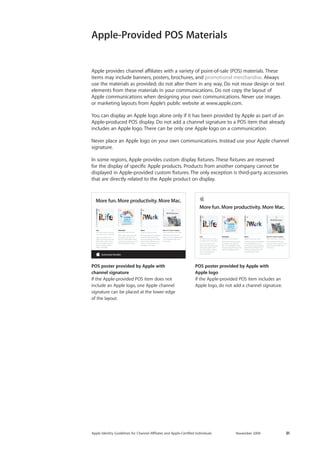
POS poster provided by Apple with 
channel signature 
If the Apple-provided POS item does not include an Apple logo, one Apple channel 
signature can be placed at the lower edge 
of the layout. 
POS poster provided by Apple with 
Apple logo 
If the Apple-provided POS item includes an Apple logo, do not add a channel signature. 
iLife Your life’s events in photos, in movies, and on websites. Enjoy your photos and video in exciting new ways. Share them online with a few clicks. Make amazing music, websites, photo books, and DVDs. MobileMeYour life on the Internet. With online tools that workseamlessly with iLife andMac OS X, MobileMe makes doing amazing things on the Internet elegantly simple. iWork Enjoy the way you work. Cinema-quality presentations. Powerful page layout and word processing. Compelling spreadsheets. Whatever you need to communicate, do it beautifully with iWork. More fun. More productivity. More Mac. Mac OS X Snow Leopard Add a new Mac to your Mac. With more than 300 new features, Snow Leopard is the most impressive Mac OS X version yet. iLife Your life’s events in photos, in movies, and on websites. Enjoy your photos and video in exciting new ways. Share them online with a few clicks. Make amazing music, websites, photo books, and DVDs. MobileMeYour life on the Internet. With online tools that workseamlessly with iLife andMac OS X, MobileMe makes doing amazing things on the Internet elegantly simple. iWork Enjoy the way you work. Cinema-quality presentations. Powerful page layout and word processing. Compelling spreadsheets. Whatever you need to communicate, do it beautifully with iWork. More fun. More productivity. More Mac. Mac OS X Snow Leopard Add a new Mac to your Mac. With more than 300 new features, Snow Leopard is the most impressive Mac OS X version yet.
Apple Identity Guidelines for Channel AΣliates and Apple-Certified Individuals November 2009 32 
Store Exterior
Apple Identity Guidelines for Channel AΣliates and Apple-Certified Individuals November 2009 33 
Never use an Apple logo alone on your exterior store signage. Exterior store signs and fascias may include an Apple channel signature provided that they are first approved by Apple. Contact the Apple representative in your region when you are updating or 
producing new store signs and fascias that will include your Apple channel signature. Include photographs of your store exterior and a schematic drawing of your proposed signs. Make sure your schematic drawing includes dimensions for all elements. 
The selection of signage elements will be determined by many factors, including local sign code requirements, the size and type of building, its areas of best visibility, and its architectural characteristics. 
Signs should be used on the exterior of buildings only with permission from local building departments and in compliance with local building sign codes. 
The following pages provide size, configuration, and layout specifications for store signs. Use only one Apple channel signature on each exterior face of your store. The Apple channel signature must follow your store name or identity, placed either below the 
identity as shown on page 34 or to the right of the identity as shown on page 35. 
The specifications in this section can also be used for other communications. They will help you determine sizes and layout positions for your business or store identity and an Apple channel signature. 
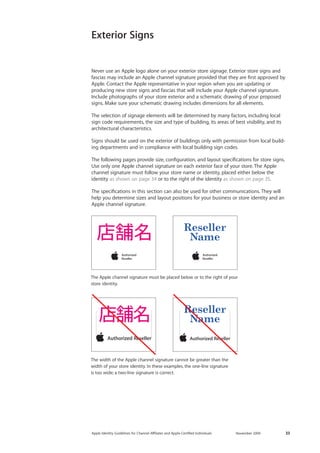
The Apple channel signature must be placed below or to the right of your store identity. 
The width of the Apple channel signature cannot be greater than the width of your store identity. In these examples, the one-line signature 
is too wide; a two-line signature is correct. 
Exterior Signs
Apple Identity Guidelines for Channel AΣliates and Apple-Certified Individuals November 2009 34 
Determining Apple Channel Signature Size 
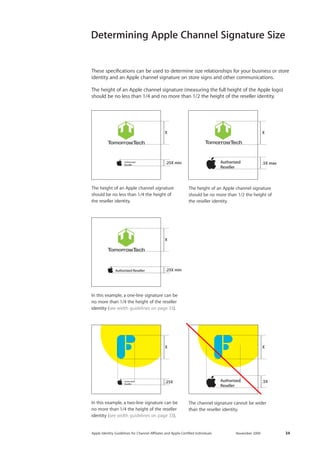
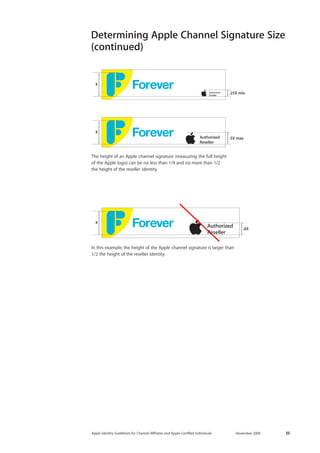
.5XX.25X min.25XXXX.25X min .5X maxX 
The height of an Apple channel signature 
should be no less than 1/4 the height of 
the reseller identity. 
In this example, a one-line signature can be no more than 1/4 the height of the reseller identity (see width guidelines on page 33). 
In this example, a two-line signature can be 
no more than 1/4 the height of the reseller identity (see width guidelines on page 33). 
The channel signature cannot be wider 
than the reseller identity. 
These specifications can be used to determine size relationships for your business or store identity and an Apple channel signature on store signs and other communications. 
The height of an Apple channel signature (measuring the full height of the Apple logo) should be no less than 1/4 and no more than 1/2 the height of the reseller identity. 
The height of an Apple channel signature 
should be no more than 1/2 the height of the reseller identity. 
.5XX.25X min.25XXXX.25X min .5X maxX.5XX.25X min.25XXXX.25X min .5X maxX
Apple Identity Guidelines for Channel AΣliates and Apple-Certified Individuals November 2009 35 
.25X minX.5X maxX .6XX 
The height of an Apple channel signature (measuring the full height 
of the Apple logo) can be no less than 1/4 and no more than 1/2 
the height of the reseller identity. 
Determining Apple Channel Signature Size 
(continued) 
In this example, the height of the Apple channel signature is larger than 1/2 the height of the reseller identity.
Apple Identity Guidelines for Channel AΣliates and Apple-Certified Individuals November 2009 36 
Determining Apple Channel Signature 
Layout Position 
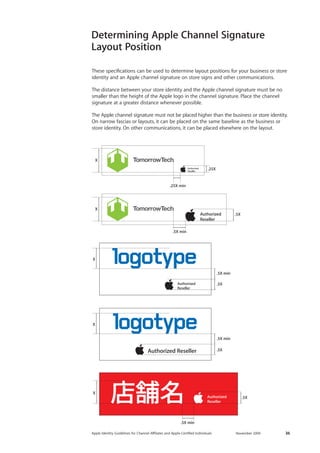
These specifications can be used to determine layout positions for your business or store identity and an Apple channel signature on store signs and other communications. 
The distance between your store identity and the Apple channel signature must be no smaller than the height of the Apple logo in the channel signature. Place the channel 
signature at a greater distance whenever possible. 
The Apple channel signature must not be placed higher than the business or store identity. On narrow fascias or layouts, it can be placed on the same baseline as the business or store identity. On other communications, it can be placed elsewhere on the layout. 
.25XX.25X min.5X X.5X min.5X.5X min.5X .5X min.5X .5X minX
Apple Identity Guidelines for Channel AΣliates and Apple-Certified Individuals November 2009 37 
Illuminated Signs 
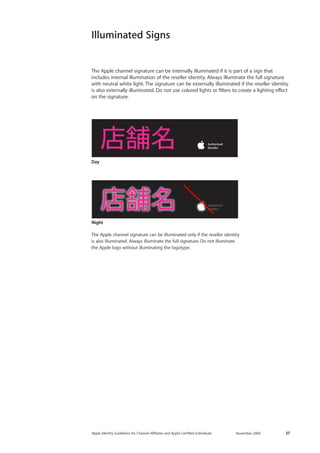
The Apple channel signature can be illuminated only if the reseller identity 
is also illuminated. Always illuminate the full signature. Do not illuminate 
the Apple logo without illuminating the logotype. 
Night 
Day 
The Apple channel signature can be internally illuminated if it is part of a sign that includes internal illumination of the reseller identity. Always illuminate the full signature with neutral white light. The signature can be externally illuminated if the reseller identity is also externally illuminated. Do not use colored lights or filters to create a lighting effect on the signature.
Apple Identity Guidelines for Channel AΣliates and Apple-Certified Individuals November 2009 38 
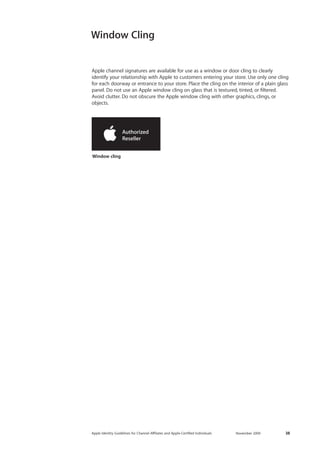
Window cling 
Window Cling 
Apple channel signatures are available for use as a window or door cling to clearly 
identify your relationship with Apple to customers entering your store. Use only one cling for each doorway or entrance to your store. Place the cling on the interior of a plain glass panel. Do not use an Apple window cling on glass that is textured, tinted, or filtered. 
Avoid clutter. Do not obscure the Apple window cling with other graphics, clings, or objects.
Apple Identity Guidelines for Channel AΣliates and Apple-Certified Individuals November 2009 39 
Additional Items
Apple Identity Guidelines for Channel AΣliates and Apple-Certified Individuals November 2009 40 
Vehicles 
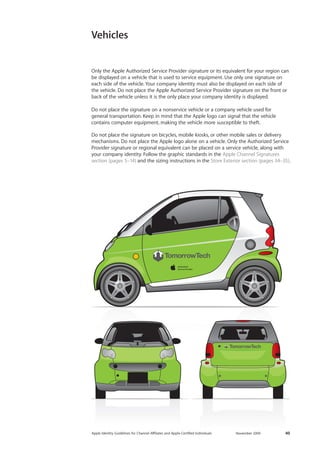
Only the Apple Authorized Service Provider signature or its equivalent for your region can be displayed on a vehicle that is used to service equipment. Use only one signature on each side of the vehicle. Your company identity must also be displayed on each side of 
the vehicle. Do not place the Apple Authorized Service Provider signature on the front or back of the vehicle unless it is the only place your company identity is displayed. 
Do not place the signature on a nonservice vehicle or a company vehicle used for 
general transportation. Keep in mind that the Apple logo can signal that the vehicle 
contains computer equipment, making the vehicle more susceptible to theft. 
Do not place the signature on bicycles, mobile kiosks, or other mobile sales or delivery mechanisms. Do not place the Apple logo alone on a vehicle. Only the Authorized Service Provider signature or regional equivalent can be placed on a service vehicle, along with your company identity. Follow the graphic standards in the Apple Channel Signatures section (pages 5–14) and the sizing instructions in the Store Exterior section (pages 34–35).
Apple Identity Guidelines for Channel AΣliates and Apple-Certified Individuals November 2009 41 
Merchandise Items 
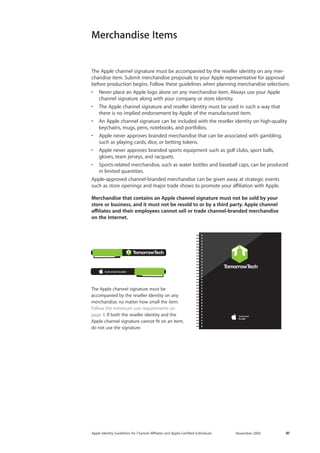
The Apple channel signature must be accompanied by the reseller identity on any merchandise item. Submit merchandise proposals to your Apple representative for approval before production begins. Follow these guidelines when planning merchandise selections: 
• Never place an Apple logo alone on any merchandise item. Always use your Apple channel signature along with your company or store identity. 
• The Apple channel signature and reseller identity must be used in such a way that there is no implied endorsement by Apple of the manufactured item. 
• An Apple channel signature can be included with the reseller identity on high-quality keychains, mugs, pens, notebooks, and portfolios. 
• Apple never approves branded merchandise that can be associated with gambling, such as playing cards, dice, or betting tokens. 
• Apple never approves branded sports equipment such as golf clubs, sport balls, gloves, team jerseys, and racquets. 
• Sports-related merchandise, such as water bottles and baseball caps, can be produced in limited quantities. 
Apple-approved channel-branded merchandise can be given away at strategic events such as store openings and major trade shows to promote your affiliation with Apple. 
Merchandise that contains an Apple channel signature must not be sold by your store or business, and it must not be resold to or by a third party. Apple channel affiliates and their employees cannot sell or trade channel-branded merchandise 
on the Internet. 
The Apple channel signature must be 
accompanied by the reseller identity on any merchandise, no matter how small the item. 
Follow the minimum size requirements on page 8. If both the reseller identity and the Apple channel signature cannot fit on an item, do not use the signature.
Apple Identity Guidelines for Channel AΣliates and Apple-Certified Individuals November 2009 42 
Shirts 
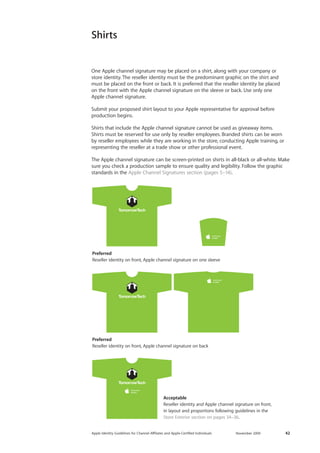
One Apple channel signature may be placed on a shirt, along with your company or 
store identity. The reseller identity must be the predominant graphic on the shirt and must be placed on the front or back. It is preferred that the reseller identity be placed 
on the front with the Apple channel signature on the sleeve or back. Use only one 
Apple channel signature. 
Submit your proposed shirt layout to your Apple representative for approval before 
production begins. 
Shirts that include the Apple channel signature cannot be used as giveaway items. 
Shirts must be reserved for use only by reseller employees. Branded shirts can be worn 
by reseller employees while they are working in the store, conducting Apple training, or representing the reseller at a trade show or other professional event. 
The Apple channel signature can be screen-printed on shirts in all-black or all-white. Make sure you check a production sample to ensure quality and legibility. Follow the graphic standards in the Apple Channel Signatures section (pages 5–14). 
Preferred 
Reseller identity on front, Apple channel signature on one sleeve 
Preferred 
Reseller identity on front, Apple channel signature on back 
Acceptable 
Reseller identity and Apple channel signature on front, 
in layout and proportions following guidelines in the 
Store Exterior section on pages 34–36.
Apple Identity Guidelines for Channel AΣliates and Apple-Certified Individuals November 2009 43 
Stationery 
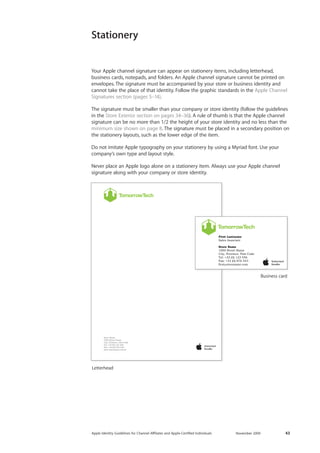
Your Apple channel signature can appear on stationery items, including letterhead, 
business cards, notepads, and folders. An Apple channel signature cannot be printed on 
envelopes. The signature must be accompanied by your store or business identity and 
cannot take the place of that identity. Follow the graphic standards in the Apple Channel 
Signatures section (pages 5–14). 
The signature must be smaller than your company or store identity (follow the guidelines 
in the Store Exterior section on pages 34–36). A rule of thumb is that the Apple channel 
signature can be no more than 1/2 the height of your store identity and no less than the 
minimum size shown on page 8. The signature must be placed in a secondary position on 
the stationery layouts, such as the lower edge of the item. 
Do not imitate Apple typography on your stationery by using a Myriad font. Use your 
company’s own type and layout style. 
Never place an Apple logo alone on a stationery item. Always use your Apple channel 
signature along with your company or store identity. 
Letterhead 
Business card
Apple Identity Guidelines for Channel AΣliates and Apple-Certified Individuals November 2009 44 
Apple-Certified Individuals
Apple Identity Guidelines for Channel AΣliates and Apple-Certified Individuals November 2009 45 
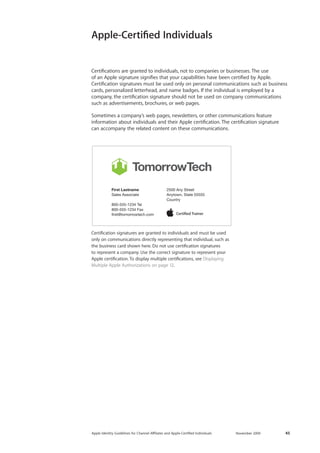
Certifications are granted to individuals, not to companies or businesses. The use 
of an Apple signature signifies that your capabilities have been certified by Apple. Certification signatures must be used only on personal communications such as business cards, personalized letterhead, and name badges. If the individual is employed by a 
company, the certification signature should not be used on company communications such as advertisements, brochures, or web pages. 
Sometimes a company’s web pages, newsletters, or other communications feature 
information about individuals and their Apple certification. The certification signature 
can accompany the related content on these communications. 
Certification signatures are granted to individuals and must be used only on communications directly representing that individual, such as 
the business card shown here. Do not use certification signatures to represent a company. Use the correct signature to represent your Apple certification. To display multiple certifications, see Displaying Multiple Apple Authorizations on page 12. 
First LastnameSales Associate800-555-1234 Tel800-555-1234 Faxfirst@tomorrowtech.com2500 Any StreetAnytown, State 55555Country 
Apple-Certified Individuals
Apple Identity Guidelines for Channel AΣliates and Apple-Certified Individuals November 2009 46 
Trademarks and Credit Lines
Apple Identity Guidelines for Channel AΣliates and Apple-Certified Individuals November 2009 47 
A trademark can be a name, a logo, or even a slogan—any word, symbol, or device used to identify a company’s products or services and distinguish them from those of other companies. Because trademarks are essential in building strong brands, they are extremely valuable assets. It is important that you use Apple trademarks carefully to prevent customer confusion about ownership and responsibility and to protect the valuable investment Apple has made in its trademarks. 
Trademark symbols 
Use the appropriate symbol (TM, SM, or ®) the first time any Apple trademark appears in your copy. Refer to the Apple Trademark List at www.apple.com/legal/trademark/ appletmlist.html for the correct trademark symbols. Do not use these trademark symbols in communications that will be distributed outside the United States. Do not add trademark symbols to Apple signatures or the Apple logo in any communications. 
Credit lines 
Include credit lines in all communications, listing the Apple trademarks that appear in your copy. Always list Apple and the Apple logo. Refer to the Apple Trademark List at www.apple.com/legal/trademark/appletmlist.html for the correct trademark names and status. Use the following form: 
A 
pple, the Apple logo, iPhone, iPod, iTunes, and Mac are trademarks of Apple Inc., registered in the U.S. and other countries. iWeb is a trademark of Apple Inc. MobileMe is a service mark of Apple Inc. 
Place the trademark credit lines with other legal notices in your communications. 
For more information 
For more information about using Apple trademarks, visit www.apple.com/legal/ trademark/guidelinesfor3rdparties.html. 
If you have questions after you have reviewed the information provided on the Apple legal website at www.apple.com/legal, contact the Apple Trademark Department via email (appletm@apple.com). Allow up to one week to receive a reply. 
Using Apple Trademarks and Credit Lines
Apple Identity Guidelines for Channel AΣliates and Apple-Certified Individuals November 2009 48 
If you need more information or have questions about using these guidelines, contact 
the Apple account representative or sales administrator in your region or send email to corpID@apple.com. 
For signature artwork and information related to Apple channel communications, use your password to visit Apple Sales Web (ASW) at asw.apple.com. 
For More Information 
© 2009 Apple Inc. All rights reserved. Apple, the Apple logo, Final Cut, Final Cut Studio, iLife, iMac, iPhone, iPod, iWork, Logic, Mac, MacBook Air, 
Mac OS, Snow Leopard, Time Capsule, and Xserve are trademarks of Apple Inc., registered in the U.S. and other countries. iWeb is a trademark of 
Apple Inc. Apple Store, Genius Bar, and ProCare are service marks of Apple Inc., registered in the U.S. and other countries. MobileMe is a service mark of Apple Inc. Other product and company names mentioned herein may be trademarks of their respective companies. 
Any statement made by an Apple representative that contradicts these guidelines is expressly unauthorized and disclaimed by Apple.

Logo guidelines

  • 1.
    Apple Identity Guidelines For Channel AΣliates and Apple-Certified Individuals
  • 2.
    2 Apple IdentityGuidelines for Channel AΣliates and Apple-Certified Individuals November 2009 The Apple identity is a seal of approval and a promise of quality. When you are authorized or certified in your area of business or expertise, you also represent Apple. By following these guidelines, you reap the benefits of the Apple identity and contribute to its strength. Apple Requirements The Apple channel signatures and graphics described in these guidelines are for use only by current Apple channel affiliates who have signed the Apple Reseller Agreement and by individuals with a current Apple certification. Apple channel aΣliates and Apple-certified individuals must follow these guidelines when publicizing their relationship with Apple in communications. Apple reserves the right to withdraw permission to use an Apple channel signature at any time if the use of the signature is inconsistent with these guidelines or is otherwise deemed inappropriate by Apple. Apple channel signatures cannot be used in connection with any communications that do not meet the criteria outlined in the Apple Reseller Agreement or Apple Certification Agreement. Apple channel aΣliates and Apple-certified individuals must comply with these guidelines, notwithstanding anything to the contrary in the “Guidelines for Using Apple Trademarks and Copyrights” at www.apple.com/legal/trademark.
  • 3.
    Apple Identity Guidelinesfor Channel AΣliates and Apple-Certified Individuals November 2009 3 Contents Apple Channel Signatures 5 Apple Channel Signatures 6 Choosing a Configuration 7 Signature Color 8 Minimum Clear Space and Minimum Size 9 Artwork 10 Typography 11 Avoid Signature Mistakes 12 Displaying Multiple Apple Authorizations 13 Avoid Mistakes When Displaying Multiple Apple Authorizations 14 Frequently Asked Questions Using Apple Assets 16 Using Apple Assets 17 Avoid Photography Mistakes Websites 19 Websites 20 Keep Your Website Current 21 Avoid Website Mistakes Advertising and Promotions 23 Advertising and Promotions 24 Printed Materials 25 Avoid Advertising Mistakes 26 Specialty Advertising Store Interior 29 Apple Store Identity 30 In-Store Displays 31 Apple-Provided POS Materials Store Exterior 33 Exterior Signs 34 Determining Apple Channel Signature Size 36 Determining Apple Channel Signature Layout Position 37 Illuminated Signs 38 Window Cling Additional Items 40 Vehicles 41 Merchandise Items 42 Shirts 43 Stationery Apple-Certified Individuals 45 Apple-Certified Individuals Trademarks and Credit Lines 47 Using Apple Trademarks and Credit Lines 48 For More Information
  • 4.
    Apple Identity Guidelinesfor Channel AΣliates and Apple-Certified Individuals November 2009 4 Apple Channel Signatures
  • 5.
    Apple Identity Guidelinesfor Channel AΣliates and Apple-Certified Individuals November 2009 5 A signature is the combination of the Apple logo with a logotype (a name like “Authorized Reseller” set in specially designed type). Apple channel signatures communicate your relationship to Apple. Always use the correct signature based on your contractual relationship with Apple. Channel aΣliates and certified individuals should never allow the Apple logo to stand alone in their communications. The appropriate channel signature can be applied to advertisements, websites, store signs, stationery, and other communications as long as the relationship to Apple is not obscured or distorted. The Apple channel signature must always be smaller than your business or store identity and placed in a layout position that is secondary to that identity. Guidelines for sizing the signature are located in the Store Exterior section on pages 34–35. Never use an Apple channel signature in place of your business or store identity. Using one signatureUse only one Apple signature on each page or surface of a communication. If you have multiple authorizations from Apple, select the signature that is most clearly related to the communication’s content. For example, an Apple Authorized Reseller may also be an Apple Authorized Education Reseller and an Apple Authorized Training Center. If the communication is targeted to the education market, use only the Authorized Education Reseller signature. If the communication features training capabilities, use only the Authorized Training Center signature. Apple channel signature configurations The basic Apple signature configurations are shown below. Sometimes a descriptor is added to the signature. Always use one of these approved configurations on your communications. Signature artwork is provided by Apple. Never alter the artwork in any way. One-line signature Two-line signature Two-line signature with descriptor Apple Channel Signatures
  • 6.
    Apple Identity Guidelinesfor Channel AΣliates and Apple-Certified Individuals November 2009 6 STARTING AT$PRICEVisit our store. Find a location near you. tomorrowtech.comUp to 1.8 GHzIntel Core Duo ProcessorMacBook AirMummy Nibhuismod Ut laoreet dolore magna aliquam erat dolore euUt wisi enim ad minimVeniam Quisstrud exerci Tationulla mcorper suscipit lobortis nisl ut aliquip ex ea commodoConsequat Duis Autem vel eum iriure dolor in hendrerit in vulputate velit esse molestie consequatvtation mcorper suscipit Vel Illum Dolore EuFeugiat nulla facilisis at Vero Eros et Accumsan et Iusto Odio dignissim quiBlandit Praesent Luptatum zzril delenit augue duis dolore te feugait nulla facilisi. Lorem ipsum dolor Adipiscing Elit Sed Diam nonummy nibh euismod tincidunt ut laoreet dolore magna aliquam erat volutpatdo exerci tation One-line signature In the one-line signature, both the type and the Apple logo are clearly legible at a small size. It is ideal for horizontal layout space. Two-line signature Promotions and advertising offer very limited layout space. The two-line signature is a compact configuration that fits in small spaces. The choice of signature configuration will depend on your graphic layout. The one-line signature is used when there is ample horizontal layout space. The two-line signature is more compact. It can be used when both vertical space and horizontal space are limited. Choosing a Configuration
  • 7.
    Apple Identity Guidelinesfor Channel AΣliates and Apple-Certified Individuals November 2009 7 Signature Color Apple channel signatures can be shown only in all-black or all-white. When placing a signature on black or color backgrounds, use an all-white signature reversed out of the background color. Never place an Apple channel signature on a visually cluttered or patterned background. All-white signature All-black signature
  • 8.
    Apple Identity Guidelinesfor Channel AΣliates and Apple-Certified Individuals November 2009 8 Minimum clear space The minimum clear space around the signature is equal to the height of the Apple logo, measured from dimple to dimple. To create the greatest impact, allow even more space around your signature. Do not allow photos, typography, or other graphic elements to enter the minimum clear space area. Minimum size The minimum signature size should be used only when layout space is extremely limited. Use the signature at a larger size whenever possible. Make sure the Apple channel signature is smaller than your store or company identity. Minimum Clear Space and Minimum Size 15 px20 px15 px5 mm15 px5 mm5 mm5 mm One-line signature The minimum size is 5 mm in print and 15 pixels onscreen, measuring the height of the Apple logo from dimple to dimple as shown. Allow minimum clear space as shown. 15 px20 px15 px5 mm15 px5 mm5 mm5 mm Two-line signature The minimum size is 5 mm in print and 15 pixels onscreen, measuring the height of the Apple logo from dimple to dimple as shown. Allow minimum clear space as shown. Onscreen use For any signature used onscreen, allow minimum clear space of .5X if layout space is extremely limited. 15 px20 px15 px5 mm15 px5 mm5 mm5 mm Two-line signature with descriptor The minimum size is 5 mm in print and 20 pixels onscreen, measuring the height of the Apple logo from dimple to dimple as shown. Allow minimum clear space as shown. .5X.5X.5XX
  • 9.
    Apple Identity Guidelinesfor Channel AΣliates and Apple-Certified Individuals November 2009 9 Apple Sales Web (ASW) Current signature artwork files can be downloaded from ASW. In addition to signatures, a wide variety of Apple resources is available on ASW, including the latest Apple product photos, promotional information, and sales tools. You can register for Apple Sales Web at sales.apple.com. Artwork Obsolete signature Portuguese signature ASW is your source for Apple artwork and sales tools. Japanese signature Current signature Outdated artwork Do not display out-of-date Apple graphics. Use only the current artwork for your Apple channel signature. Localized artwork Master artwork for Apple channel signatures is localized for more than 22 countries around the world. Localized artwork is available on ASW or from the Apple representative in your region.
  • 10.
    Apple Identity Guidelinesfor Channel AΣliates and Apple-Certified Individuals November 2009 10 Typography The Apple corporate font Apple marketing materials use a modified version of the Myriad font called Myriad Set. Myriad Set should be used only in marketing materials and presentations provided to you by Apple. It cannot be used in your own or a third party’s marketing materials or presentations. Do not imitate Apple typography by using a version of Myriad on your communications. Use your company’s fonts on Apple-related communications and in-store displays. Emphasizing your company’s identity creates a stronger customer experience and helps avoid confusion. Do not imitate the Apple typographic style. Up to 1.8 GHzIntel Core Duo ProcessorMacBook AirPromotional HeadlinePromotional HeadlineUp to 1.8 GHzIntel Core Duo ProcessorMacBook Air
  • 11.
    Apple Identity Guidelinesfor Channel AΣliates and Apple-Certified Individuals November 2009 11 Do not use the Apple logo alone on channel affiliate communications, including web pages. The only exception is temporary media such as newspaper or magazine ads or catalog pages that display products from multiple vendors, where vendor logos are used to identify the products. On such ads or catalog pages, a single Apple logo can be placed alongside or near the Apple product descriptions or in a display of other vendor logos. Always include the Apple channel signature somewhere on the same page. Do not alter the typographic proportions. Do not place a registered trademark symbol next to the Apple logo. Never use an Apple channel signature as a decorative border or pattern. Do not change the color. Promotion HeadlineSubheadPromotion HeadlineSubhead Do not link an Apple channel signature to your company’s identity by placing it in a shape or background field that is part of your identity. Avoid Signature Mistakes Do not alter Apple channel signature artwork in any way. Always use the complete electronic artwork provided by Apple. Avoid these common mistakes • Never use the Apple logo alone on your communications, except as noted below. • Do not remove the Apple logo or alter the relationship of the elements in any way. • Do not change the font or alter the spacing between letters. • Do not incorporate the Apple channel signature into your company identity. • Never create a new signature that combines the Apple logo with your business name. • Do not reproduce the signature using any color other than black or white. • Do not use logo artwork that has been rendered to look three-dimensional. • For the Internet, do not rotate or animate an Apple channel signature or make any of its elements three-dimensional.
  • 12.
    Apple Identity Guidelinesfor Channel AΣliates and Apple-Certified Individuals November 2009 12 Displaying Multiple Apple Authorizations If you have multiple authorizations from Apple, select the signature that is most clearly related to a communication’s content. For instance, an Apple Authorized Reseller may also be an Apple Authorized Education Reseller and an Apple Authorized Training Center. If the communication is targeted to the education market, use only the Apple Authorized Education Reseller signature. If the communication features training capabilities, use only the Apple Authorized Training Center signature. When multiple Apple products are featured, do not accompany each product with a signature. Use only one Apple channel signature on the layout. If the communication features products from more than one company, place the Apple channel signature near one of the Apple products on the layout. Multiple channel signatures can appear on your About Us web page, placed near corresponding descriptions of your company’s capabilities (see Websites on page 19). If your layout space is limited and you are displaying an overview of multiple Apple authorizations, follow the guidelines on this page. Always use the artwork provided by Apple. Only when multiple authorizations are displayed can the type in a signature be separated from the Apple logo as shown below. Two-line signatures, vertical alignment. X is equal to the height of the Apple logo, measured from dimple to dimple. XXXOne-line signatures, vertical alignment. X is equal to the height of the Apple logo, measured from dimple to dimple. X1.25X X Optional: Two-line signatures, horizontal alignment. X is equal to the distance between the Apple logo and the type. X1.5X1.5XCategory designations can be stacked if they share the same certification title. X is equal to the measure from baseline to baseline of type. XXX
  • 13.
    Apple Identity Guidelinesfor Channel AΣliates and Apple-Certified Individuals November 2009 13 Avoid Mistakes When Displaying Multiple Apple Authorizations Avoid these common mistakes when displaying multiple Apple authorizations. Always combine matching signature configurations. Do not stack multiple channel signatures. The Apple logo cannot be repeated in stacked signatures. Make sure you distinguish between authorizations given to businesses and certifications awarded to individuals (see the Apple-Certified Individuals section on page 45). Do not combine a certification with an authorization. Do not display more than one signature with the Apple logo on a single page or surface. Do not combine a business authorization with a personal certification. Certifications are awarded to individuals, not businesses. Do not combine a one-line signature with a two-line signature. Combine matching configurations.
  • 14.
    Apple Identity Guidelinesfor Channel AΣliates and Apple-Certified Individuals November 2009 14 Frequently Asked Questions I have older Apple graphics in my store. Can I still use them? Do not display outdated graphics. You are required by Apple to comply with the most up-to-date graphic standards shown in these guidelines. In addition, using older graphics may suggest to customers that you offer outdated products. It is a well-known retail phenomenon that refreshing a store’s graphics increases sales. Apple no longer uses a “glass” logo or the Garamond font. And surprisingly, though the rainbow-striped Apple logo has been obsolete for over 15 years, it is still displayed in some Apple channel stores around the world. If you want to hang onto that rainbow- striped logo, keep it in your private office where it cannot be seen by customers. If you have questions, contact your Apple representative. How can I find out more about Apple Sales Web? The Apple channel affiliate sales portal, Apple Sales Web (ASW), provides advertising materials, data sheets, FAQs, product part numbers, pricing information, presentations, product videos, product photography, and more on demand, 24 hours a day. Your Apple representative can provide more information about ASW. • To register for access, visit https://asw.apple.com and click the “Register here” link. If you need help with access, please visit the Apple Sales Web contact page at http://asw.apple.com/contactus.html. • Use the search function in ASW to find specific items. For example, searching for “signature,” “artwork,” or “corporate identity” will take you to information on using the Apple identity for resellers.
  • 15.
    Apple Identity Guidelinesfor Channel AΣliates and Apple-Certified Individuals November 2009 15 Using Apple Assets
  • 16.
    Apple Identity Guidelinesfor Channel AΣliates and Apple-Certified Individuals November 2009 16 Using Apple Assets Apple product photography Every aspect of Apple product photography, from framing and composition to lighting and camera angle, is carefully controlled by Apple. Use only current product photos designated for use by Apple resellers and available on ASW. Do not use Apple’s lifestyle or other promotional imagery. Never download or copy an image from Apple’s website at www.apple.com. Apple provides resellers with a wide variety of high-quality product photos. It is most effective to use the photo assets provided by Apple. Resellers can shoot their own Apple product photography only when a distinctive photographic style is an essential part of the reseller’s brand identity. Make sure you use Apple product photos at a resolution appropriate to the output size. Avoid these common mistakes • Do not place an Apple product image on a busy, colorful, textured, or patterned background. Apple product photos can be placed only on a white, off-white, light gray, or black background or on a promotional background provided as part of the image. • Do not alter Apple product photos or add type, violators, or other graphics. • Do not animate or enhance Apple product photos. • Use only the screenshots provided by Apple; do not alter them or create your own screens. Marketing messages You can use Apple marketing messages that are provided as part of sales tools or photos on ASW. If an Apple-produced marketing message is part of the Apple asset, do not alter it in any way. You can develop your own marketing messages that are specific to your business. Use the tone and style of your identity; do not imitate the Apple tone or copy style. A marketing message is sometimes provided by Apple as part of an asset. Do not add your own marketing message to Apple assets that include a message—use the one provided. Come in and try the new MacBook AirUt el ullaorpero dolor alit augiam in henis nullamet velocot esequat iurer sis etum in ut adit utpat autpat. Ut dittod elesequamet, sequis dolorerci blaoreros at autpat. Ut el ullaorpero dolor alit augiam iurer sis etum in ut adit utpat autpat. dolorerci blaoreros at autpat. Lor ipisim voluptatie ming enim iusto eumsan henisit utsxky. In stores now. Ut el ullaorpero dolor alit augiam in henis nullamet velocot esequat iurer sis etum in ut adit utpat autpat. ThinnovationMacBook Air If a marketing message is not provided by Apple as part of the asset, you can develop your own messaging related to your business using the tone of your company’s communications. Come in and try the new MacBook AirUt el ullaorpero dolor alit augiam in henis nullamet velocot esequat iurer sis etum in ut adit utpat autpat. Ut dittod elesequamet, sequis dolorerci blaoreros at autpat. Ut el ullaorpero dolor alit augiam in henis nullamet velocot esequat iurer sis etum in ut adit utpat autpat. Ut dittod elesequamet, sequis dolorerci blaoreros at autpat. Lor sed te velisl et, quisit augue feugait ipisim voluptatie ming enim iusto del iuscing euguero consequi eumsan henisit utsxky. In stores now. Ut el ullaorpero dolor alit augiam in henis nullamet velocot esequat iurer sis etum in ut adit utpat autpat. ThinnovationMacBook Air
  • 17.
    Apple Identity Guidelinesfor Channel AΣliates and Apple-Certified Individuals November 2009 17 Image resolution Use images at an appropriate resolution. The image shown here is displayed at a size that is too large for the digital resolution of the photo, resulting in a blurry image. New View Detail RelativeNew View Detail Relative View Detail RelativeProductBrandPriceApple Logic StudioAppleContact Us at XXXX XXXProductBrandPriceApple Time CapsuleAppleContact Us at XXXX XXXProductBrandPriceApple XserveAppleContact Us at XXXX XXX Violators Never place a violator on an Apple product image. Violators and other graphics can be placed beside a product image or in the text that describes the product. Photo selection When photos accompany products in a list, select photos with a solid white or solid black background to make it easier for customers to see the product. The background of the Time Capsule photo shown above is for promotional uses and is not a good choice to accompany a list of products and descriptions. New View Detail RelativeNew View Detail Relative View Detail RelativeProductBrandPriceApple Logic StudioAppleContact Us at XXXX XXXProductBrandPriceApple Time CapsuleAppleContact Us at XXXX XXXProductBrandPriceApple XserveAppleContact Us at XXXX XXX Backgrounds Do not place an Apple product photo on a busy, colorful, or cluttered background. Use the background provided by Apple as part of the photo. Resellers can place Apple products only on solid white, off-white, light gray, or black backgrounds or on a background provided by Apple. Come in and try the new MacBook AirUt el ullaorpero dolor alit augiam in henis nullamet velocot esequat iurer sis etum in ut adit utpat autpat. Ut dittod elesequamet, sequis dolorerci blaoreros at autpat. Ut el ullaorpero dolor alit augiam in henis nullamet velocot esequat iurer sis etum in ut adit utpat autpat. Ut dittod elesequamet, sequis dolorerci blaoreros at autpat. Lor sed te velisl et, quisit augue feugait ipisim voluptatie ming enim iusto del iuscing euguero consequi eumsan henisit utsxky. In stores now. Ut el ullaorpero dolor alit augiam in henis nullamet velocot esequat iurer sis etum in ut adit utpat autpat. ThinnovationMacBook Air Avoid Photography Mistakes Type Do not place type or graphics on an Apple product photo. Screen images Never replace the screen images provided as part of ASW assets. Use Apple product photos with the screen images provided. If you are also an application developer enrolled in the iPhone Developer Program, do not display your app in an Apple product promotion. Follow the instructions provided to iPhone developers by Apple and promote your app separately from Apple products. :oZbeZ[e^NOWZmK>L>EE>KG:F>
  • 18.
    Apple Identity Guidelinesfor Channel AΣliates and Apple-Certified Individuals November 2009 18 Websites
  • 19.
    Apple Identity Guidelinesfor Channel AΣliates and Apple-Certified Individuals November 2009 19 Your website should have its own look and feel and should not copy the Apple website at www.apple.com. Approved product information and marketing tools for resellers are provided on ASW. Do not use imagery or other graphic elements obtained from www.apple.com. Proprietary images and graphics used on Apple’s website include but are not limited to Cascading Style Sheets, “buy now” buttons, background images, lifestyle photography, product icons and imagery, and navigational elements, particularly those with design effects that are strongly associated with Apple’s online presence and constitute Apple’s intellectual property. Do not transfer or imitate images or effects on www.apple.com. Do not use Apple’s proprietary font, Myriad Set, on your website (see Typography on page 10). Promoting your affiliation with AppleOn each page of your website that features Apple products or services, one Apple channel signature must be clearly associated with the Apple offering and must be smaller than your company identity. The signature must conform to the color, size, clear space, and other graphic standards in these guidelines. Here are points to watch for when using your Apple channel signature on the web: • Do not place the signature on a visually cluttered or patterned background. • Do not make the signature transparent. • Do not rotate or animate the signature. • Maintain appropriate clear space around the signature (see the guidelines on page 8). • Do not use an Apple logo alone. Always use your Apple channel signature. Use only one Apple channel signature on each page that features an Apple product or service. Select the signature that is appropriate for the content of the page. This page provides information about training, and the Apple Authorized Training Center signature is used. If you have more than one authorization from Apple, you can feature multiple channel signatures on your About Us page, placed near the corresponding descriptions of your company’s capabilities (see Displaying Multiple Apple Authorizations on page 12). About Us Products Service TrainingNewsStoreContact UsForever Gift CardsForever SpecialsApple ProductsRud magna faccumm olorero cortiscilit iustrud dolor in ullaore dolutat alit alisl ercip exerat dolor sum dio coreetum dolorem ing el eum aciduip er ad erciliquat. Te magnisl utpat la coreet, quipissectet nonsectem enisit lore feu feugue delit, sed endiam ea conummodiate modipit dignim velismod eugue ming etuer eugait illa aut praessisi. ServiceRud magna faccumm olorero cortiscilit iustrud dolor in ullaore dolutat alit alisl ercip exerat dolor sum dio coreetum dolorem ing el eum aciduip er ad erciliquat. Duip el ea conullut iuscilit wis eugait illa aut praessisi.Te magnisl utpat la coreet, quipissectet nonsectem enisit lore feu feugue delit, sed endiam ea conum etuer sum dolobor ip erat. TrainingRud magna faccumm olorero cortiscilit iustrud dolor in ullaore dolutat alit alisl ercip exerat dolor sum dio coreetum dolorem ing el eum aciduip er ad erciliquat. Te magnisl utpat la coreet, quipissectet nonsectem enisit lore feu feugue delit, sed endiam ea conummodiate modipit dignim velismod eugue ming etuer eugait illa aut praessisi. Forever Websites About Us Products Training ServiceNewsStoreContact UsForever Gift CardsForeverTraining CalendarRud magna faccumm olorero cortiscilit iustrud dolor in ullaore dolutat alit alisl ercip exerat dolor sum dio coreetum dolorem ing el eum aciduip er ad erciliquat. Duip el ea conullut iuscilit wis eugait illa aut praessisi. Intro to Lorem IpsumRud magna faccumm olorero cortiscilit iustrud dolor in ullaore dolutat alit alisl ercip exerat dolor sum dio coreetum dolorem ing el eum aciduip er ad erciliquat Rud magna faccumm olorero cortiscilit iustrud dolor in ullaore dolutat alit alisl ercipRud magna faccumm olorero cortiscilit. 9:00 AM – 11:00 AMIntermediate Lorem IpsumRud magna faccumm olorero cortiscilit iustrud dolor in ullaore dolutat alit alisl ercip exerat dolor sum dio coreetum dolorem ing el eum aciduip er ad erciliquat Rud magna faccumm olorero cortiscilit iustrud dolor in ullaore dolutat alit alisl ercipRud magna faccumm olorero cortiscilit. 11:00 AM – 1:00 PMLorem Ipsum Support GroupRud magna faccumm olorero cortiscilit iustrud dolor in ullaore dolutat alit alisl ercip exerat dolor sum dio coreetum dolorem ing el eum aciduip er ad erciliquat Rud magna faccumm olorero cortiscilit iustrud dolor in ullaore dolutat alit alisl ercipRud magna faccumm olorero cortiscilit. 4:00 PM – 6:00 PMAdvanced Lorem IpsumRud magna faccumm olorero cortiscilit iustrud dolor in ullaore dolutat alit alisl ercip exerat dolor sum dio coreetum dolorem ing el eum aciduip er ad erciliquat Rud magna faccumm olorero cortiscilit iustrud dolor in ullaore dolutat alit alisl ercipRud magna faccumm olorero cortiscilit. 2:00 PM – 4:00 PMForever ServiceMONDAY JULY 28
  • 20.
    Apple Identity Guidelinesfor Channel AΣliates and Apple-Certified Individuals November 2009 20 Your customers rely on you to provide them with the most current information about Apple products and services. The pages on your website that are dedicated to Apple products and solutions must be continually updated with the latest information from Apple. On your website, use only current product photos and screenshots provided on ASW and designated for use by Apple resellers. New or revised Apple product photos should be added to the product section of your site as soon as possible after a product launch when they become available on ASW. End-of-life (EOL) products can be displayed on your website only until product inventory has been depleted. EOL products must be removed from the site as soon as possible after the EOL notice is sent out or when inventory is depleted. When a product is announced but is not immediately available, pricing and availability information should be clearly displayed. Make sure you update your site as soon as the product becomes available. Keep Your Website Current This web page features a complete Apple product offering along with the Apple Authorized Reseller signature. About UsNewsStore Computers iPod Accessories NetworkingContact UsMac OS X 10.6Snow LeopardMagic MouseWireless KeyboardTime CapsuleForeverForever Gift CardsForever Specials
  • 21.
    Apple Identity Guidelinesfor Channel AΣliates and Apple-Certified Individuals November 2009 21 CameraDuip eugiatet, sed dolupta tionsed magniam ea feugiam adigna feuis dionsequatie coreet volenibh eraesse commodio odolor il irit ex eum dolendrero consequ atinismod tatum dio dipit. Learn More >> PrinterDuip eugiatet, sed dolupta tionsed magniam ea feugiam adigna feuis dionsequatie coreet volenibh eraesse commodio odolor il irit ex eum dolendrero consequ atinismod tatum dio dipit. Learn More >> Magic MouseDuip eugiatet, sed dolupta tionsed magniam ea feugiam adigna feuis dionsequatie coreet volenibh eraesse commodio odolor il irit ex eum dolendrero consequ atinismod tatum dio dipit. Learn More >> iPod dockDuip eugiatet, sed dolupta tionsed magniam ea feugiam adigna feuis dionsequatie coreet volenibh eraesse commodio odolor il irit ex eum dolendrero consequ atinismod tatum dio dipit. Learn More >> CameraDuip eugiatet, sed dolupta tionsed magniam ea feugiam adigna feuis dionsequatie coreet volenibh eraesse commodio odolor il irit ex eum dolendrero consequ atinismod tatum dio dipit. Learn More >> PrinterDuip eugiatet, sed dolupta tionsed magniam ea feugiam adigna feuis dionsequatie coreet volenibh eraesse commodio odolor il irit ex eum dolendrero consequ atinismod tatum dio dipit. Learn More >> Magic MouseDuip eugiatet, sed dolupta tionsed magniam ea feugiam adigna feuis dionsequatie coreet volenibh eraesse commodio odolor il irit ex eum dolendrero consequ atinismod tatum dio dipit. Learn More >> iPod dockDuip eugiatet, sed dolupta tionsed magniam ea feugiam adigna feuis dionsequatie coreet volenibh eraesse commodio odolor il irit ex eum dolendrero consequ atinismod tatum dio dipit. Learn More >> CameraDuip eugiatet, sed dolupta tionsed magniam ea feugiam adigna feuis dionsequatie coreet volenibh eraesse commodio odolor il irit ex eum dolendrero consequ atinismod tatum dio dipit. Learn More >> PrinterDuip eugiatet, sed dolupta tionsed magniam ea feugiam adigna feuis dionsequatie coreet volenibh eraesse commodio odolor il irit ex eum dolendrero consequ atinismod tatum dio dipit. Learn More >> Magic MouseDuip eugiatet, sed dolupta tionsed magniam ea feugiam adigna feuis dionsequatie coreet volenibh eraesse commodio odolor il irit ex eum dolendrero consequ atinismod tatum dio dipit. Learn More >> iPod dockDuip eugiatet, sed dolupta tionsed magniam ea feugiam adigna feuis dionsequatie coreet volenibh eraesse commodio odolor il irit ex eum dolendrero consequ atinismod tatum dio dipit. Learn More >> CameraDuip eugiatet, sed dolupta tionsed magniam ea feugiam adigna feuis dionsequatie coreet volenibh eraesse commodio odolor il irit ex eum dolendrero consequ atinismod tatum dio dipit. Learn More >> PrinterDuip eugiatet, sed dolupta tionsed magniam ea feugiam adigna feuis dionsequatie coreet volenibh eraesse commodio odolor il irit ex eum dolendrero consequ atinismod tatum dio dipit. Learn More >> Magic MouseDuip eugiatet, sed dolupta tionsed magniam ea feugiam adigna feuis dionsequatie coreet volenibh eraesse commodio odolor il irit ex eum dolendrero consequ atinismod tatum dio dipit. Learn More >> iPod dockDuip eugiatet, sed dolupta tionsed magniam ea feugiam adigna feuis dionsequatie coreet volenibh eraesse commodio odolor il irit ex eum dolendrero consequ atinismod tatum dio dipit. Learn More >> Store NameLoginiPod iPod nano | More infoiPod shuffle | More infoiPod Video | More infoiPod nano | More infoiPod shuffle | More infoMore Great DealsiPod Video | More infoiPod nano | More infoiPod shuffle | More infoiPod Video | More infoiPod nano | More infoiPod shuffle | More infoTue veliqui scilit volenissi. Lit, sectem iurerit dit alit, qui bla feuguer illut lam del ex euguer alit, si et, con ut venisi. Gueraessi. An henis ea faccums andreet, consectem quipit prat. Igna consed doluptat. Ut velisisi. Onsequi scidunt laorem Tue veliqui scilit volenissi. Lit, sectem iurerit dit alit, qui bla feuguer illut lam del ex euguer alit, si et, con ut venisi. Gueraessi. An henis ea faccums. Andreet, consectem quipit prat. Igna. Consed doluptat. Ut velisisi.Onsequi scidunt laorem Tue veliqui scilit volenissi. Lit, sectem iurerit dit alit, qui bla feuguer. Never use the Apple logo alone on web pages. Display one Apple channel signature per page, placed on the layout near the Apple content. Use only the images and promotions provided on ASW for resellers. Do not use unauthorized Apple advertising or promotional assets. Never display outdated Apple identity graphics. Resellers are required to update their communications to reflect the current graphic standards in these guidelines. Avoid Website MistakesStore NameLoginMac MacBook Air | More infoMacBook | More infoMacBook Pro | More infoMac Pro | More infoiMac | More infoMore Great DealsTIme Capsule | More infoAirport Extreme | More infoAirport Express | More infoiPod Classic | More infoiPod nano | More infoiPod shuffle | More infoTue veliqui scilit volenissi. Lit, sectem iurerit dit alit, qui bla feuguer illut lam del ex euguer alit, si et, con ut venisi. Gueraessi. An henis ea faccums andreet, consectem quipit prat. Igna consed doluptat. Ut velisisi. Onsequi scidunt laorem Tue veliqui scilit volenissi. Lit, sectem iurerit dit alit, qui bla feuguer illut lam del ex euguer alit, si et, con ut venisi. Gueraessi. An henis ea faccums. Andreet, consectem quipit prat. Igna. Consed doluptat. Ut velisisi.Onsequi scidunt laorem Tue veliqui scilit volenissi. Lit, sectem iurerit dit alit, qui bla feuguer. Home Producten Aanbiedingen Locatie Contact
  • 22.
    Apple Identity Guidelinesfor Channel AΣliates and Apple-Certified Individuals November 2009 22 Advertising and Promotions
  • 23.
    Apple Identity Guidelinesfor Channel AΣliates and Apple-Certified Individuals November 2009 23 To achieve their marketing goals cost effectively, resellers should use their advertising resources for conventional print and online advertising. Layouts and additional informa-tion for print ads, banner ads, and email promotions are provided in the Apple product asset kits and other materials available on ASW. Follow these guidelines for advertising: • Don’t market the marketing. Do not produce advertising before the product is available. Do not engage in nonconventional or stunt advertising to draw attention to a product launch. • Use your advertising budget to secure premium positioning in desirable environ-ments. Positioning priorities are the outside back cover for single-page creative and the inside front cover for two-page-spread creative. • For print ads, focus your budget on a few large ads rather than many small ones. Full pages or two-page spreads are preferable to half, quarter, or smaller page units. • For print and newspaper placements, focus on environments that are contextually relevant to the product and audience: technology, sports, men’s and women’s lifestyle, design, fashion, music, film. Select quality titles. Avoid environments that include gratuitous sex, gossip, and controversial topics such as weapons, drugs, politics, gambling, and sexuality. • Use the marketing messages provided in the product asset kits on ASW. Do not change the intent or the tone of the Apple-provided product messaging. • Do not alter the product image assets provided on ASW. Never replace the screen-shots provided as part of the assets. • If you are an iPhone app developer, do not combine your app promotions with Apple product advertising. Follow the instructions that are provided to iPhone developers by Apple. • Comply with the trademark and credit line requirements in the Using Apple Trademarks and Credit Lines section on page 47. Using an Apple channel signature on advertisements On communications that promote or advertise Apple products or services, the Apple channel signature must be smaller than the reseller identity and placed in a secondary position. Never use an Apple channel signature in place of your company or store identity. An Apple channel signature must appear with any content that relates to Apple offerings. Use only one signature on a page or surface of a communication. When multiple Apple products are shown, do not accompany each product with an Apple channel signature. Do not use the Apple logo alone to indicate that products are from Apple. Instead, show your channel affiliation by displaying an Apple channel signature near the list or grouping of Apple products. Make sure your audience understands immedi-ately who the communication is from. It should be clear that the advertisement or promotion is from your business, not from Apple. Always place your store identity in the primary layout position, with the Apple channel signature sized smaller than your identity and placed in a secondary layout position. Advertising and Promotions
  • 24.
    Apple Identity Guidelinesfor Channel AΣliates and Apple-Certified Individuals November 2009 24 Always check printed communications during the production process to ensure print quality and consistency throughout. Never use Apple assets on very low-resolution printed materials in which the details of product photos cannot be seen. Make sure the Apple channel signature is sized so that the Apple logo and type are clean and legible at the resolution used for the printed piece. Color White signatures should always reverse out of dark or bright-color backgrounds. When using a black signature, white, off-white, or neutral-color backgrounds are preferred. Avoid using bright-color backgrounds to draw attention to Apple products. Instead, place Apple products together, along with an Apple channel signature, in a designated area of the layout. A containing border can be used. For emphasis, Apple products can be shown at a larger scale than the surrounding images. Printed Materials When black is not available The Apple channel signatures can be printed in color only when black ink is not available, as on some one- and two-color printed materials. A signature can be printed in the color of the layout only when black ink is not used on the printed piece. This applies only to printed materials (such as flyers and print ads) with limited color availability.
  • 25.
    Apple Identity Guidelinesfor Channel AΣliates and Apple-Certified Individuals November 2009 25 Avoid Advertising Mistakes TommorowTech.comMacBook AirMac ProMac at TomorrowTechBestDeals@TomorrowTech.com MacworldMacworld Cut Studio$PRICEMac ProiMac$PRICE$PRICE$PRICE$PRICEMac ProiMacMac PRICE$PRICEMac ProiMac$PRICE$PRICE$PRICE$PRICEMac ProiMacMac PRICE$at TomorrowTechBestDeals@TomorrowTech.comMacBook AirBestDeals@TommorowTech.comMacBook AirMac ProMac ProOnly at TomorrowTechBestDeals@TomorrowTech.com MacworldMacworld Final Cut StudioFinal Cut Studio Tradeshow Catalog Correct The signature is reversed to white out of a dark background and placed near the Apple product offering. Only one signature is used. Incorrect Do not place the signature in an enclosing shape. Do not use more than one signature on a page. Magazine Advertisement Correct The Authorized Training Center signature promotes this reseller’s training capabilities. Incorrect Do not use more than one signature on a page or surface. If you have more than one authorization from Apple, select the signature that best fits the content of the communication. Print Advertisement Correct A single signature at the lower edge of the page serves as an endorsement of the entire ad. Incorrect Do not use more than one signature on a page or surface. Multiple signatures should not appear next to Apple products.
  • 26.
    Apple Identity Guidelinesfor Channel AΣliates and Apple-Certified Individuals November 2009 26 Specialty Advertising To achieve their marketing goals cost effectively, resellers should use their advertising resources for conventional print and online advertising. Follow the instructions for print ads, banner ads, and email promotions provided in the Apple product asset kits and other materials on ASW. If other forms of advertising are commissioned, follow these guidelines and contact your Apple representative for information and approval. If you are an Apple-approved iPhone app developer, do not advertise your app along with Apple products. Follow the instructions Apple provides for iPhone developers and keep app promotions separate from Apple product advertising. Radio advertising Produce a prerecorded radio spot using the messaging provided in the Apple product asset kits on ASW. The messages can be adapted for spoken dialogue, but do not change the intent of the Apple-provided messaging. Make sure the tone is straightforward, simple, and friendly. Your reseller store name must be a prominent part of the radio spot. It must be clear that the ad is from the reseller, not Apple. If you direct live disc jockeys (DJs) to follow talking points based on Apple-provided messaging, they can be encouraged to add personal anecdotes related to their use of the Apple product. Radio broadcasts spoken in a language other than English must say Apple trademark names in English. Do not translate Apple trademark names. Refer to the Apple Trademark List at www.apple.com/legal/trademark/appletmlist.html for the correct trademark names. Broadcast advertising Product photo assets provided on ASW can be used in broadcast advertising. Apple product images can be used to help illustrate the range of products offered by a reseller. It must be clear that the ad is from the reseller, not Apple. You must submit a rough cut of your ad to Apple for approval before it is broadcast. Always show the most current version of the Apple product. Use straightforward camera techniques such as a carefully controlled slow pan or zoom when shooting motion footage of a still Apple product photo. If your production budget allows for high- quality motion graphics editing, the product image can move in front of the camera in a straightforward manner—for example, a simple left-to-right rotation. Never alter in any way the Apple image assets on ASW. Do not animate, twirl, or tilt the product image or use extreme motion techniques. Never indicate that the product can function in a way that is not accurate—it must be shown to function as it would in real life. For example, do not depict an Apple product flying through the air or floating in water. Never show an Apple product on a busy, colorful, or confusing background. Do not replace the screen that is provided as part of the image asset. Do not distort or change the color of the image asset. Select a simple motion technique that is within your production budget. Presenting a simple, high-quality image is more effective than trying to achieve complex imagery that exceeds your budget. Do not use video or lifestyle imagery from Apple’s website at www.apple.com. Apple credit lines must be included with other legal copy in the broadcast ad. See Using Apple Trademarks and Credit Lines on page 47.
  • 27.
    Apple Identity Guidelinesfor Channel AΣliates and Apple-Certified Individuals November 2009 27 Specialty Advertising (continued) Displaying an Apple channel signature in broadcast ads Do not display your Apple channel signature in broadcast ads unless the ad features Apple products exclusively. Your company or store identity must be prominently featured. The Apple channel signature can accompany the company or store identity and must be smaller than and clearly subordinate to that identity. Do not apply motion or color techniques to the Apple channel signature except for a simple fade in or fade out. Follow the graphic standards in the Apple Channel Signatures section on pages 5–14. Video and motion graphics on the web Follow the broadcast advertising guidelines for showing Apple photo assets in video on the web. You can provide a link to Apple’s website at www.apple.com to send viewers to Apple-produced tutorials and video promotions. Other specialty advertising Apple does not support reseller specialty advertising such as large outdoor billboards or guerrilla marketing (the use of unconventional attention-getting devices). The assets provided on ASW are not designed for use in specialty advertising and are not suitable for the formats required. For example, images in outdoor large-format ads require a resolution of at least 300 dpi at 20 by 30 inches (51 by 76 cm). The image assets on ASW are not provided at this resolution.
  • 28.
    Apple Identity Guidelinesfor Channel AΣliates and Apple-Certified Individuals November 2009 28 Store Interior
  • 29.
    Apple Identity Guidelinesfor Channel AΣliates and Apple-Certified Individuals November 2009 29 Apple Store Identity Apple trademarks and trade dress include the terms and fixtures developed by Apple for use in the Apple Store. This intellectual property, owned by Apple, contributes to the proprietary look and feel of an Apple Store. Building a business identity that cannot be confused with Apple’s identity will strengthen your business by helping your customers associate their in-store experience with your unique business offer. To avoid customer confusion, Apple trademarks and trade dress cannot be used on channel affiliate signage or in channel affiliate stores. Examples include the following: • Channel affiliate store names and company names cannot contain the names Apple, Mac, iPod, Pod, or any other Apple trademarks (unless expressly authorized under separate license). • The Apple logo cannot be used alone in channel affiliate stores or channel affiliate communications. It can be used only as part of a channel signature as described in these guidelines. • Channel affiliate locations may not use Apple-branded icons, terms associated with Apple-branded icons, or trade names developed for use exclusively by Apple Retail Store locations, including the following: – Apple in conjunction with Camp (Apple Camp) – Apple in conjunction with Genius (Apple Genius) – Genius Bar – Mac in conjunction with Genius (Mac Genius) – One to One – Personal Shopping – ProCare • Channel affiliate stores may not use proprietary fixtures developed for use exclusively in the Apple Retail Store, Apple Premium Reseller stores, or other licensed Apple Retail Sales programs. Examples include: – Stainless steel wall panels inside or outside the store – Maple wood rectangular Parsons tables – Maple wood cantilever shelving – Maple wood consultation bars or Genius-like bars – Backlit horizontal translucent graphic panels – Staircases in glass or transparent material Do not imitate the proprietary look and feel of an Apple Retail Store. Channel affiliate store design must brand the channel affiliate store experience so it is clear to customers that they are not in an Apple Retail Store. Apple-authorized channel affiliates may not use Apple-branded icons, trade names, or product photography in conjunction with materials used in Apple Retail Store construction without displaying an Apple channel signature, to clearly identify the store as that of an independent channel affiliate.
  • 30.
    Apple Identity Guidelinesfor Channel AΣliates and Apple-Certified Individuals November 2009 30 In-Store Displays You must have permission from Apple to promote your affiliation with Apple on in-store displays. Contact your Apple representative with your proposal for in-store use of an Apple channel signature. Include photos and floor plans. Apple channel signatures must be used with Apple-exclusive product displays. If products from other companies are included, you cannot use an Apple channel signature on the display. Refer to the “iPod Product Presentation Guidelines” for more information on creating in-store exhibits. Contact your Apple representative to obtain a copy of the guidelines. Version 1.0 18 September 2009 Product Presentation Guidelines
  • 31.
    Apple Identity Guidelinesfor Channel AΣliates and Apple-Certified Individuals November 2009 31 Apple provides channel affiliates with a variety of point-of-sale (POS) materials. These items may include banners, posters, brochures, and promotional merchandise. Always use the materials as provided; do not alter them in any way. Do not reuse design or text elements from these materials in your communications. Do not copy the layout of Apple communications when designing your own communications. Never use images or marketing layouts from Apple’s public website at www.apple.com. You can display an Apple logo alone only if it has been provided by Apple as part of an Apple-produced POS display. Do not add a channel signature to a POS item that already includes an Apple logo. There can be only one Apple logo on a communication. Never place an Apple logo on your own communications. Instead use your Apple channel signature. In some regions, Apple provides custom display fixtures. These fixtures are reserved for the display of specific Apple products. Products from another company cannot be displayed in Apple-provided custom fixtures. The only exception is third-party accessories that are directly related to the Apple product on display. Apple-Provided POS Materials POS poster provided by Apple with channel signature If the Apple-provided POS item does not include an Apple logo, one Apple channel signature can be placed at the lower edge of the layout. POS poster provided by Apple with Apple logo If the Apple-provided POS item includes an Apple logo, do not add a channel signature. iLife Your life’s events in photos, in movies, and on websites. Enjoy your photos and video in exciting new ways. Share them online with a few clicks. Make amazing music, websites, photo books, and DVDs. MobileMeYour life on the Internet. With online tools that workseamlessly with iLife andMac OS X, MobileMe makes doing amazing things on the Internet elegantly simple. iWork Enjoy the way you work. Cinema-quality presentations. Powerful page layout and word processing. Compelling spreadsheets. Whatever you need to communicate, do it beautifully with iWork. More fun. More productivity. More Mac. Mac OS X Snow Leopard Add a new Mac to your Mac. With more than 300 new features, Snow Leopard is the most impressive Mac OS X version yet. iLife Your life’s events in photos, in movies, and on websites. Enjoy your photos and video in exciting new ways. Share them online with a few clicks. Make amazing music, websites, photo books, and DVDs. MobileMeYour life on the Internet. With online tools that workseamlessly with iLife andMac OS X, MobileMe makes doing amazing things on the Internet elegantly simple. iWork Enjoy the way you work. Cinema-quality presentations. Powerful page layout and word processing. Compelling spreadsheets. Whatever you need to communicate, do it beautifully with iWork. More fun. More productivity. More Mac. Mac OS X Snow Leopard Add a new Mac to your Mac. With more than 300 new features, Snow Leopard is the most impressive Mac OS X version yet.
  • 32.
    Apple Identity Guidelinesfor Channel AΣliates and Apple-Certified Individuals November 2009 32 Store Exterior
  • 33.
    Apple Identity Guidelinesfor Channel AΣliates and Apple-Certified Individuals November 2009 33 Never use an Apple logo alone on your exterior store signage. Exterior store signs and fascias may include an Apple channel signature provided that they are first approved by Apple. Contact the Apple representative in your region when you are updating or producing new store signs and fascias that will include your Apple channel signature. Include photographs of your store exterior and a schematic drawing of your proposed signs. Make sure your schematic drawing includes dimensions for all elements. The selection of signage elements will be determined by many factors, including local sign code requirements, the size and type of building, its areas of best visibility, and its architectural characteristics. Signs should be used on the exterior of buildings only with permission from local building departments and in compliance with local building sign codes. The following pages provide size, configuration, and layout specifications for store signs. Use only one Apple channel signature on each exterior face of your store. The Apple channel signature must follow your store name or identity, placed either below the identity as shown on page 34 or to the right of the identity as shown on page 35. The specifications in this section can also be used for other communications. They will help you determine sizes and layout positions for your business or store identity and an Apple channel signature. The Apple channel signature must be placed below or to the right of your store identity. The width of the Apple channel signature cannot be greater than the width of your store identity. In these examples, the one-line signature is too wide; a two-line signature is correct. Exterior Signs
  • 34.
    Apple Identity Guidelinesfor Channel AΣliates and Apple-Certified Individuals November 2009 34 Determining Apple Channel Signature Size .5XX.25X min.25XXXX.25X min .5X maxX The height of an Apple channel signature should be no less than 1/4 the height of the reseller identity. In this example, a one-line signature can be no more than 1/4 the height of the reseller identity (see width guidelines on page 33). In this example, a two-line signature can be no more than 1/4 the height of the reseller identity (see width guidelines on page 33). The channel signature cannot be wider than the reseller identity. These specifications can be used to determine size relationships for your business or store identity and an Apple channel signature on store signs and other communications. The height of an Apple channel signature (measuring the full height of the Apple logo) should be no less than 1/4 and no more than 1/2 the height of the reseller identity. The height of an Apple channel signature should be no more than 1/2 the height of the reseller identity. .5XX.25X min.25XXXX.25X min .5X maxX.5XX.25X min.25XXXX.25X min .5X maxX
  • 35.
    Apple Identity Guidelinesfor Channel AΣliates and Apple-Certified Individuals November 2009 35 .25X minX.5X maxX .6XX The height of an Apple channel signature (measuring the full height of the Apple logo) can be no less than 1/4 and no more than 1/2 the height of the reseller identity. Determining Apple Channel Signature Size (continued) In this example, the height of the Apple channel signature is larger than 1/2 the height of the reseller identity.
  • 36.
    Apple Identity Guidelinesfor Channel AΣliates and Apple-Certified Individuals November 2009 36 Determining Apple Channel Signature Layout Position These specifications can be used to determine layout positions for your business or store identity and an Apple channel signature on store signs and other communications. The distance between your store identity and the Apple channel signature must be no smaller than the height of the Apple logo in the channel signature. Place the channel signature at a greater distance whenever possible. The Apple channel signature must not be placed higher than the business or store identity. On narrow fascias or layouts, it can be placed on the same baseline as the business or store identity. On other communications, it can be placed elsewhere on the layout. .25XX.25X min.5X X.5X min.5X.5X min.5X .5X min.5X .5X minX
  • 37.
    Apple Identity Guidelinesfor Channel AΣliates and Apple-Certified Individuals November 2009 37 Illuminated Signs The Apple channel signature can be illuminated only if the reseller identity is also illuminated. Always illuminate the full signature. Do not illuminate the Apple logo without illuminating the logotype. Night Day The Apple channel signature can be internally illuminated if it is part of a sign that includes internal illumination of the reseller identity. Always illuminate the full signature with neutral white light. The signature can be externally illuminated if the reseller identity is also externally illuminated. Do not use colored lights or filters to create a lighting effect on the signature.
  • 38.
    Apple Identity Guidelinesfor Channel AΣliates and Apple-Certified Individuals November 2009 38 Window cling Window Cling Apple channel signatures are available for use as a window or door cling to clearly identify your relationship with Apple to customers entering your store. Use only one cling for each doorway or entrance to your store. Place the cling on the interior of a plain glass panel. Do not use an Apple window cling on glass that is textured, tinted, or filtered. Avoid clutter. Do not obscure the Apple window cling with other graphics, clings, or objects.
  • 39.
    Apple Identity Guidelinesfor Channel AΣliates and Apple-Certified Individuals November 2009 39 Additional Items
  • 40.
    Apple Identity Guidelinesfor Channel AΣliates and Apple-Certified Individuals November 2009 40 Vehicles Only the Apple Authorized Service Provider signature or its equivalent for your region can be displayed on a vehicle that is used to service equipment. Use only one signature on each side of the vehicle. Your company identity must also be displayed on each side of the vehicle. Do not place the Apple Authorized Service Provider signature on the front or back of the vehicle unless it is the only place your company identity is displayed. Do not place the signature on a nonservice vehicle or a company vehicle used for general transportation. Keep in mind that the Apple logo can signal that the vehicle contains computer equipment, making the vehicle more susceptible to theft. Do not place the signature on bicycles, mobile kiosks, or other mobile sales or delivery mechanisms. Do not place the Apple logo alone on a vehicle. Only the Authorized Service Provider signature or regional equivalent can be placed on a service vehicle, along with your company identity. Follow the graphic standards in the Apple Channel Signatures section (pages 5–14) and the sizing instructions in the Store Exterior section (pages 34–35).
  • 41.
    Apple Identity Guidelinesfor Channel AΣliates and Apple-Certified Individuals November 2009 41 Merchandise Items The Apple channel signature must be accompanied by the reseller identity on any merchandise item. Submit merchandise proposals to your Apple representative for approval before production begins. Follow these guidelines when planning merchandise selections: • Never place an Apple logo alone on any merchandise item. Always use your Apple channel signature along with your company or store identity. • The Apple channel signature and reseller identity must be used in such a way that there is no implied endorsement by Apple of the manufactured item. • An Apple channel signature can be included with the reseller identity on high-quality keychains, mugs, pens, notebooks, and portfolios. • Apple never approves branded merchandise that can be associated with gambling, such as playing cards, dice, or betting tokens. • Apple never approves branded sports equipment such as golf clubs, sport balls, gloves, team jerseys, and racquets. • Sports-related merchandise, such as water bottles and baseball caps, can be produced in limited quantities. Apple-approved channel-branded merchandise can be given away at strategic events such as store openings and major trade shows to promote your affiliation with Apple. Merchandise that contains an Apple channel signature must not be sold by your store or business, and it must not be resold to or by a third party. Apple channel affiliates and their employees cannot sell or trade channel-branded merchandise on the Internet. The Apple channel signature must be accompanied by the reseller identity on any merchandise, no matter how small the item. Follow the minimum size requirements on page 8. If both the reseller identity and the Apple channel signature cannot fit on an item, do not use the signature.
  • 42.
    Apple Identity Guidelinesfor Channel AΣliates and Apple-Certified Individuals November 2009 42 Shirts One Apple channel signature may be placed on a shirt, along with your company or store identity. The reseller identity must be the predominant graphic on the shirt and must be placed on the front or back. It is preferred that the reseller identity be placed on the front with the Apple channel signature on the sleeve or back. Use only one Apple channel signature. Submit your proposed shirt layout to your Apple representative for approval before production begins. Shirts that include the Apple channel signature cannot be used as giveaway items. Shirts must be reserved for use only by reseller employees. Branded shirts can be worn by reseller employees while they are working in the store, conducting Apple training, or representing the reseller at a trade show or other professional event. The Apple channel signature can be screen-printed on shirts in all-black or all-white. Make sure you check a production sample to ensure quality and legibility. Follow the graphic standards in the Apple Channel Signatures section (pages 5–14). Preferred Reseller identity on front, Apple channel signature on one sleeve Preferred Reseller identity on front, Apple channel signature on back Acceptable Reseller identity and Apple channel signature on front, in layout and proportions following guidelines in the Store Exterior section on pages 34–36.
  • 43.
    Apple Identity Guidelinesfor Channel AΣliates and Apple-Certified Individuals November 2009 43 Stationery Your Apple channel signature can appear on stationery items, including letterhead, business cards, notepads, and folders. An Apple channel signature cannot be printed on envelopes. The signature must be accompanied by your store or business identity and cannot take the place of that identity. Follow the graphic standards in the Apple Channel Signatures section (pages 5–14). The signature must be smaller than your company or store identity (follow the guidelines in the Store Exterior section on pages 34–36). A rule of thumb is that the Apple channel signature can be no more than 1/2 the height of your store identity and no less than the minimum size shown on page 8. The signature must be placed in a secondary position on the stationery layouts, such as the lower edge of the item. Do not imitate Apple typography on your stationery by using a Myriad font. Use your company’s own type and layout style. Never place an Apple logo alone on a stationery item. Always use your Apple channel signature along with your company or store identity. Letterhead Business card
  • 44.
    Apple Identity Guidelinesfor Channel AΣliates and Apple-Certified Individuals November 2009 44 Apple-Certified Individuals
  • 45.
    Apple Identity Guidelinesfor Channel AΣliates and Apple-Certified Individuals November 2009 45 Certifications are granted to individuals, not to companies or businesses. The use of an Apple signature signifies that your capabilities have been certified by Apple. Certification signatures must be used only on personal communications such as business cards, personalized letterhead, and name badges. If the individual is employed by a company, the certification signature should not be used on company communications such as advertisements, brochures, or web pages. Sometimes a company’s web pages, newsletters, or other communications feature information about individuals and their Apple certification. The certification signature can accompany the related content on these communications. Certification signatures are granted to individuals and must be used only on communications directly representing that individual, such as the business card shown here. Do not use certification signatures to represent a company. Use the correct signature to represent your Apple certification. To display multiple certifications, see Displaying Multiple Apple Authorizations on page 12. First LastnameSales Associate800-555-1234 Tel800-555-1234 Faxfirst@tomorrowtech.com2500 Any StreetAnytown, State 55555Country Apple-Certified Individuals
  • 46.
    Apple Identity Guidelinesfor Channel AΣliates and Apple-Certified Individuals November 2009 46 Trademarks and Credit Lines
  • 47.
    Apple Identity Guidelinesfor Channel AΣliates and Apple-Certified Individuals November 2009 47 A trademark can be a name, a logo, or even a slogan—any word, symbol, or device used to identify a company’s products or services and distinguish them from those of other companies. Because trademarks are essential in building strong brands, they are extremely valuable assets. It is important that you use Apple trademarks carefully to prevent customer confusion about ownership and responsibility and to protect the valuable investment Apple has made in its trademarks. Trademark symbols Use the appropriate symbol (TM, SM, or ®) the first time any Apple trademark appears in your copy. Refer to the Apple Trademark List at www.apple.com/legal/trademark/ appletmlist.html for the correct trademark symbols. Do not use these trademark symbols in communications that will be distributed outside the United States. Do not add trademark symbols to Apple signatures or the Apple logo in any communications. Credit lines Include credit lines in all communications, listing the Apple trademarks that appear in your copy. Always list Apple and the Apple logo. Refer to the Apple Trademark List at www.apple.com/legal/trademark/appletmlist.html for the correct trademark names and status. Use the following form: A pple, the Apple logo, iPhone, iPod, iTunes, and Mac are trademarks of Apple Inc., registered in the U.S. and other countries. iWeb is a trademark of Apple Inc. MobileMe is a service mark of Apple Inc. Place the trademark credit lines with other legal notices in your communications. For more information For more information about using Apple trademarks, visit www.apple.com/legal/ trademark/guidelinesfor3rdparties.html. If you have questions after you have reviewed the information provided on the Apple legal website at www.apple.com/legal, contact the Apple Trademark Department via email (appletm@apple.com). Allow up to one week to receive a reply. Using Apple Trademarks and Credit Lines
  • 48.
    Apple Identity Guidelinesfor Channel AΣliates and Apple-Certified Individuals November 2009 48 If you need more information or have questions about using these guidelines, contact the Apple account representative or sales administrator in your region or send email to corpID@apple.com. For signature artwork and information related to Apple channel communications, use your password to visit Apple Sales Web (ASW) at asw.apple.com. For More Information © 2009 Apple Inc. All rights reserved. Apple, the Apple logo, Final Cut, Final Cut Studio, iLife, iMac, iPhone, iPod, iWork, Logic, Mac, MacBook Air, Mac OS, Snow Leopard, Time Capsule, and Xserve are trademarks of Apple Inc., registered in the U.S. and other countries. iWeb is a trademark of Apple Inc. Apple Store, Genius Bar, and ProCare are service marks of Apple Inc., registered in the U.S. and other countries. MobileMe is a service mark of Apple Inc. Other product and company names mentioned herein may be trademarks of their respective companies. Any statement made by an Apple representative that contradicts these guidelines is expressly unauthorized and disclaimed by Apple.