ANIMATION PRINCIPLES
Vu Phuong Hoang
2015/08
The 12 principles of animation
 From the famous book
 By Frank Thomas &
Ollie Johnston
 Published in 1981
 “Bible of animation”
The 12 principles of animation
1. Squash and stretch
2. Anticipation
3. Staging
4. Straight ahead action and
Pose to pose
5. Follow through and
Overlapping action
6. Slow in and Slow out
7. Arc
8. Secondary action
9. Timing
10. Exaggeration
11. Solid drawing
12. Appeal
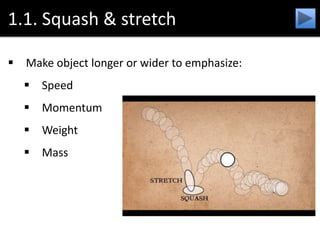
1.1. Squash & stretch
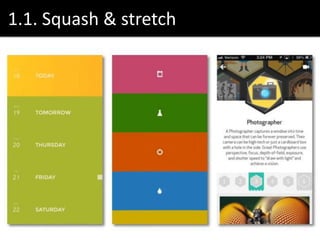
 Make object longer or wider to emphasize:
 Speed
 Momentum
 Weight
 Mass
1.1. Squash & stretch
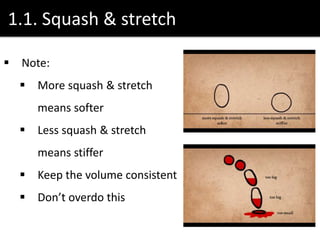
 Note:
 More squash & stretch
means softer
 Less squash & stretch
means stiffer
 Keep the volume consistent
 Don’t overdo this
1.1. Squash & stretch
1.2. Anticipation
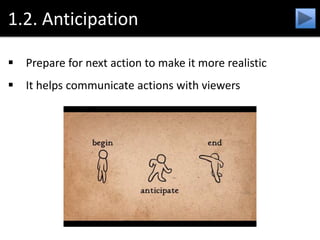
 Prepare for next action to make it more realistic
 It helps communicate actions with viewers
1.2. Anticipation
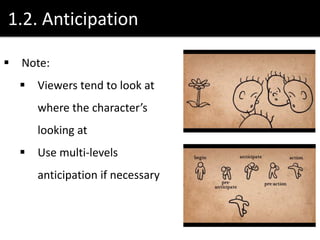
 Note:
 Viewers tend to look at
where the character’s
looking at
 Use multi-levels
anticipation if necessary
1.2. Anticipation
1.3. Staging
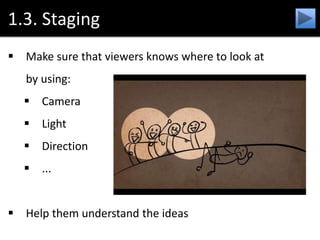
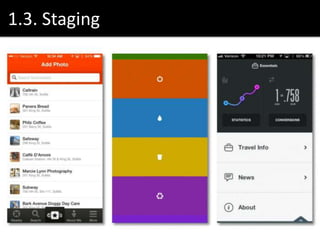
 Make sure that viewers knows where to look at
by using:
 Camera
 Light
 Direction
 ...
 Help them understand the ideas
1.3. Staging
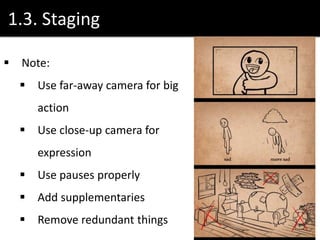
 Note:
 Use far-away camera for big
action
 Use close-up camera for
expression
 Use pauses properly
 Add supplementaries
 Remove redundant things
1.3. Staging
1.4. Straight ahead action, pose to pose
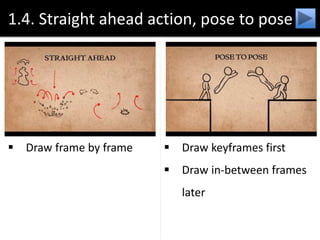
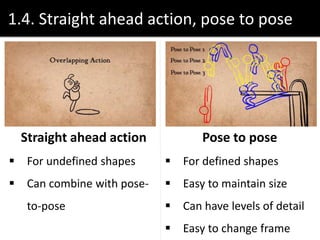
 Draw frame by frame  Draw keyframes first
 Draw in-between frames

later
1.4. Straight ahead action, pose to pose
Straight ahead action
 For undefined shapes
 Can combine with pose-
to-pose
Pose to pose
 For defined shapes
 Easy to maintain size
 Can have levels of detail
 Easy to change frame
1.4. Straight ahead action, pose to pose
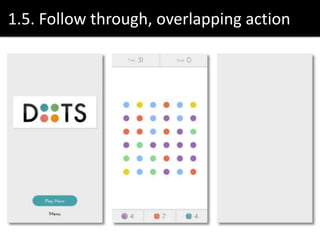
1.5. Follow through, overlapping action
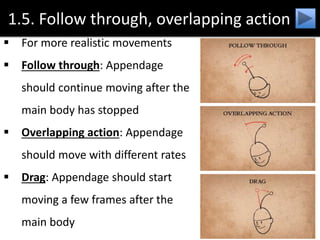
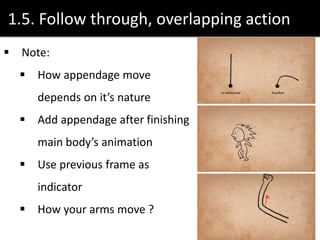
 For more realistic movements
 Follow through: Appendage
should continue moving after the
main body has stopped
 Overlapping action: Appendage
should move with different rates
 Drag: Appendage should start
moving a few frames after the
main body
1.5. Follow through, overlapping action
 Note:
 How appendage move
depends on it’s nature
 Add appendage after finishing
main body’s animation
 Use previous frame as
indicator
 How your arms move ?
1.5. Follow through, overlapping action
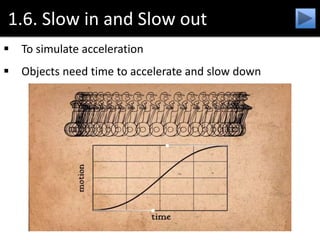
1.6. Slow in and Slow out
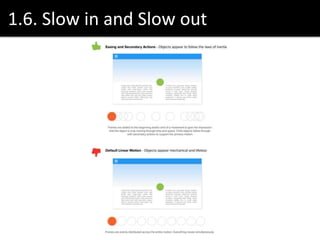
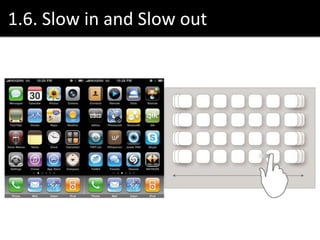
 To simulate acceleration
 Objects need time to accelerate and slow down
1.6. Slow in and Slow out
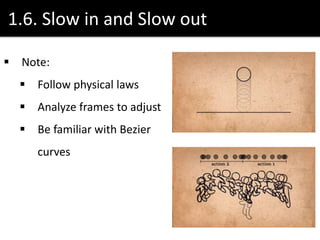
 Note:
 Follow physical laws
 Analyze frames to adjust
 Be familiar with Bezier
curves
1.6. Slow in and Slow out
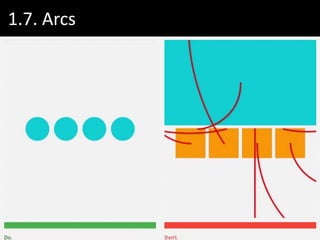
1.7. Arcs
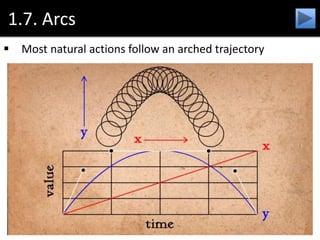
 Most natural actions follow an arched trajectory
1.7. Arcs
 Note:
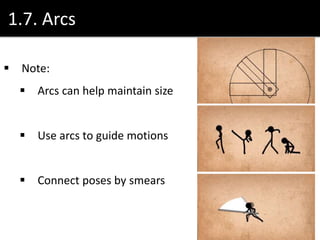
 Arcs can help maintain size
 Use arcs to guide motions
 Connect poses by smears
1.7. Arcs
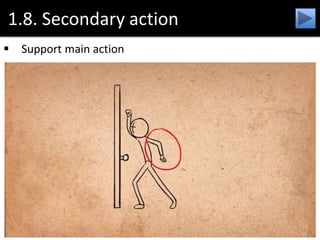
1.8. Secondary action
 Support main action
1.8. Secondary action
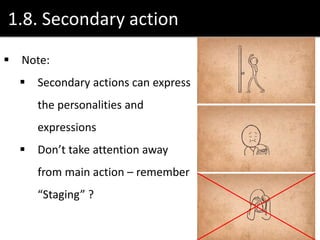
 Note:
 Secondary actions can express
the personalities and
expressions
 Don’t take attention away
from main action – remember
“Staging” ?
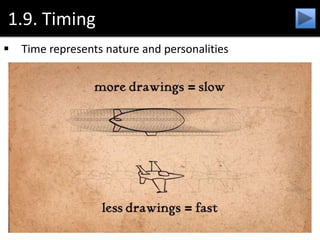
1.9. Timing
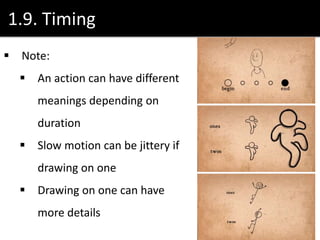
 Time represents nature and personalities
1.9. Timing
 Note:
 An action can have different
meanings depending on
duration
 Slow motion can be jittery if
drawing on one
 Drawing on one can have
more details
1.10. Exxageration
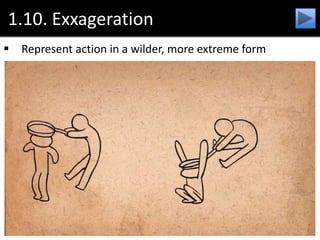
 Represent action in a wilder, more extreme form
1.10. Exxageration
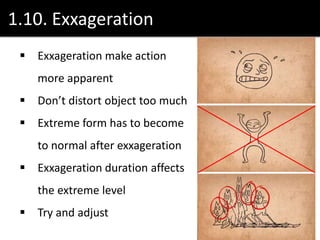
 Exxageration make action
more apparent
 Don’t distort object too much
 Extreme form has to become
to normal after exxageration
 Exxageration duration affects
the extreme level
 Try and adjust
1.10. Exxageration
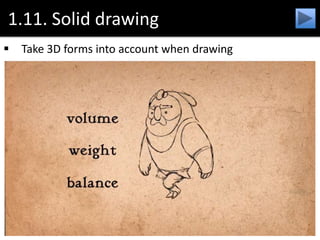
1.11. Solid drawing
 Take 3D forms into account when drawing
1.11. Solid drawing
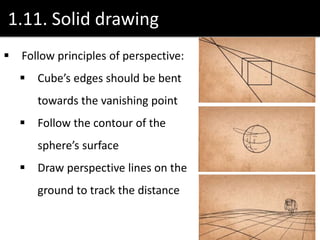
 Follow principles of perspective:
 Cube’s edges should be bent
towards the vanishing point
 Follow the contour of the
sphere’s surface
 Draw perspective lines on the
ground to track the distance
1.11. Solid drawing
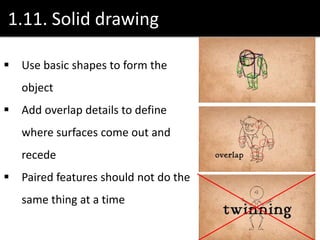
 Use basic shapes to form the
object
 Add overlap details to define
where surfaces come out and
recede
 Paired features should not do the
same thing at a time
1.12. Appeal
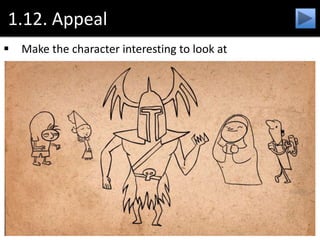
 Make the character interesting to look at
1.12. Appeal
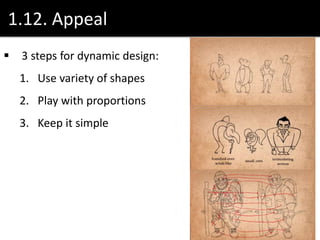
 3 steps for dynamic design:
1. Use variety of shapes
2. Play with proportions
3. Keep it simple
The 12 principles of animation
SUMMARY
References
1. Wikipedia
2. Digital tutors (3D animation)
3. The illusion of life – Tumblr (GIF)
4. The art of UI animations (Slide)
5. HowDesign.com (Motion examples)
6. University of Washington (Comparison)
7. CSS Animation
8. Smashing Magazine
9. Google’s material design
Any questions?

[UX Series] 6 - Animation principles

  • 1.
  • 2.
    The 12 principlesof animation  From the famous book  By Frank Thomas & Ollie Johnston  Published in 1981  “Bible of animation”
  • 3.
    The 12 principlesof animation 1. Squash and stretch 2. Anticipation 3. Staging 4. Straight ahead action and Pose to pose 5. Follow through and Overlapping action 6. Slow in and Slow out 7. Arc 8. Secondary action 9. Timing 10. Exaggeration 11. Solid drawing 12. Appeal
  • 4.
    1.1. Squash &stretch  Make object longer or wider to emphasize:  Speed  Momentum  Weight  Mass
  • 5.
    1.1. Squash &stretch  Note:  More squash & stretch means softer  Less squash & stretch means stiffer  Keep the volume consistent  Don’t overdo this
  • 6.
  • 7.
    1.2. Anticipation  Preparefor next action to make it more realistic  It helps communicate actions with viewers
  • 8.
    1.2. Anticipation  Note: Viewers tend to look at where the character’s looking at  Use multi-levels anticipation if necessary
  • 9.
  • 10.
    1.3. Staging  Makesure that viewers knows where to look at by using:  Camera  Light  Direction  ...  Help them understand the ideas
  • 11.
    1.3. Staging  Note: Use far-away camera for big action  Use close-up camera for expression  Use pauses properly  Add supplementaries  Remove redundant things
  • 12.
  • 13.
    1.4. Straight aheadaction, pose to pose  Draw frame by frame  Draw keyframes first  Draw in-between frames later
  • 14.
    1.4. Straight aheadaction, pose to pose Straight ahead action  For undefined shapes  Can combine with pose- to-pose Pose to pose  For defined shapes  Easy to maintain size  Can have levels of detail  Easy to change frame
  • 15.
    1.4. Straight aheadaction, pose to pose
  • 16.
    1.4. Straight aheadaction, pose to pose
  • 17.
    1.5. Follow through,overlapping action  For more realistic movements  Follow through: Appendage should continue moving after the main body has stopped  Overlapping action: Appendage should move with different rates  Drag: Appendage should start moving a few frames after the main body
  • 18.
    1.5. Follow through,overlapping action  Note:  How appendage move depends on it’s nature  Add appendage after finishing main body’s animation  Use previous frame as indicator  How your arms move ?
  • 19.
    1.5. Follow through,overlapping action
  • 21.
    1.6. Slow inand Slow out  To simulate acceleration  Objects need time to accelerate and slow down
  • 22.
    1.6. Slow inand Slow out  Note:  Follow physical laws  Analyze frames to adjust  Be familiar with Bezier curves
  • 23.
    1.6. Slow inand Slow out
  • 24.
    1.6. Slow inand Slow out
  • 25.
    1.7. Arcs  Mostnatural actions follow an arched trajectory
  • 26.
    1.7. Arcs  Note: Arcs can help maintain size  Use arcs to guide motions  Connect poses by smears
  • 27.
  • 28.
    1.8. Secondary action Support main action
  • 29.
    1.8. Secondary action Note:  Secondary actions can express the personalities and expressions  Don’t take attention away from main action – remember “Staging” ?
  • 31.
    1.9. Timing  Timerepresents nature and personalities
  • 32.
    1.9. Timing  Note: An action can have different meanings depending on duration  Slow motion can be jittery if drawing on one  Drawing on one can have more details
  • 34.
    1.10. Exxageration  Representaction in a wilder, more extreme form
  • 35.
    1.10. Exxageration  Exxagerationmake action more apparent  Don’t distort object too much  Extreme form has to become to normal after exxageration  Exxageration duration affects the extreme level  Try and adjust
  • 36.
  • 38.
    1.11. Solid drawing Take 3D forms into account when drawing
  • 39.
    1.11. Solid drawing Follow principles of perspective:  Cube’s edges should be bent towards the vanishing point  Follow the contour of the sphere’s surface  Draw perspective lines on the ground to track the distance
  • 40.
    1.11. Solid drawing Use basic shapes to form the object  Add overlap details to define where surfaces come out and recede  Paired features should not do the same thing at a time
  • 41.
    1.12. Appeal  Makethe character interesting to look at
  • 42.
    1.12. Appeal  3steps for dynamic design: 1. Use variety of shapes 2. Play with proportions 3. Keep it simple
  • 43.
    The 12 principlesof animation SUMMARY
  • 44.
    References 1. Wikipedia 2. Digitaltutors (3D animation) 3. The illusion of life – Tumblr (GIF) 4. The art of UI animations (Slide) 5. HowDesign.com (Motion examples) 6. University of Washington (Comparison) 7. CSS Animation 8. Smashing Magazine 9. Google’s material design
  • 45.

Editor's Notes

  • #7 Nike makers
  • #13 Yelp – Shop, restaurants locator National Geographic – Travel, natural science magazine Show them how iPod changes app
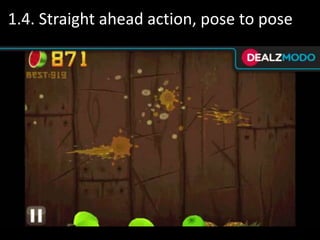
  • #16 Fruit Ninja – Straight ahead action
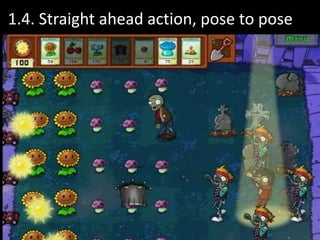
  • #17 Plants vs Zombies – Pose to pose
  • #18 Bodies in motion don’t move all at once
  • #20 DOTS – matching game
  • #21 Music player concept
  • #24 Hamburger menu transition example
  • #28 Google’s Material Design guidelines
  • #31 Food app concept: boiling animation has the moving lid
  • #34 Flight booking app concept
  • #37 Modal windows concept
  • #38 Holoterial advertisements