Using vault for your NodeJS Secrets
Taswar Bhatti – Solutions Architect
Gemalto
Secrets
•
About me
• Taswar Bhatti (Microsoft MVP)
• @taswarbhatti
• http://taswar.zeytinsoft.com
• Gemalto (System Architect)
So what are secrets?
• Secrets grants you AuthN or AuthZ to a system
• Examples
• Username & Passwords
• Database credentials
• API Token
• TLS Certs
Secret Sprawl
• Secrets ends up in
• Source Code
• Version Control Systems (Github, Gitlab, Bitbucket etc)
• Configuration Management (Chef, Puppet, Ansible etc)
Issues
• How do we know who has access to those secrets
• When was the last time they accessed it?
• What if we want to change/rotate the secrets
Desire secrets
• Encryption in rest and transit
• Only decrypted in memory
• Access control
• Rotation & Revocation
Secret Management - Vault
• Centralized Secret Management
• Encrypted at rest and transit
• Lease and Renewal
• ACL
• Audit Trail
• Multiple Client Auth Method (Ldap,Github, approle)
• Dynamic Secrets
• Encryption as a Service
Dynamic Secrets
• Allows one to lease a secret for a period of time e.g 2 hrs
• Generates on demand and unique for each user/consumption
• Audit trail
Secure Secrets
• AES 256 with GCM encryption
• TLS 1.2 for clients
• No HSM is required
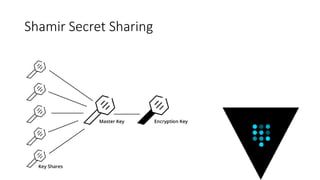
Unsealing the Vault
• Vault requires encryption keys to encrypt data
• Shamir Secret Key Sharing
• Master key is split into multiple keys
Shamir Secret Sharing
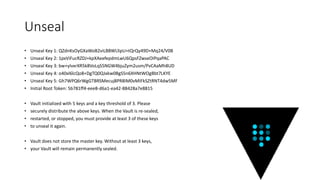
Unseal
• Unseal Key 1: QZdnKsOyGXaWoB2viLBBWLlIpU+tQrQy49D+Mq24/V0B
• Unseal Key 2: 1pxViFucRZDJ+kpXAeefepdmLwU6QpsFZwseOIPqaPAC
• Unseal Key 3: bw+yIvxrXR5k8VoLqS5NGW4bjuZym2usm/PvCAaMh8UD
• Unseal Key 4: o40xl6lcQo8+DgTQ0QJxkw0BgS5n6XHNtWOgBbt7LKYE
• Unseal Key 5: Gh7WPQ6rWgGTBRSMecuj8PR8IM0vMIFkSZtRNT4dw5MF
• Initial Root Token: 5b781ff4-eee8-d6a1-ea42-88428a7e8815
• Vault initialized with 5 keys and a key threshold of 3. Please
• securely distribute the above keys. When the Vault is re-sealed,
• restarted, or stopped, you must provide at least 3 of these keys
• to unseal it again.
• Vault does not store the master key. Without at least 3 keys,
• your Vault will remain permanently sealed.
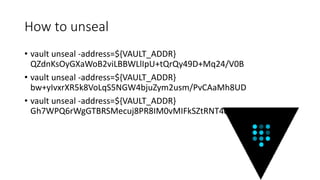
How to unseal
• vault unseal -address=${VAULT_ADDR}
QZdnKsOyGXaWoB2viLBBWLlIpU+tQrQy49D+Mq24/V0B
• vault unseal -address=${VAULT_ADDR}
bw+yIvxrXR5k8VoLqS5NGW4bjuZym2usm/PvCAaMh8UD
• vault unseal -address=${VAULT_ADDR}
Gh7WPQ6rWgGTBRSMecuj8PR8IM0vMIFkSZtRNT4dw5MF
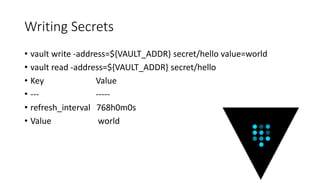
Writing Secrets
• vault write -address=${VAULT_ADDR} secret/hello value=world
• vault read -address=${VAULT_ADDR} secret/hello
• Key Value
• --- -----
• refresh_interval 768h0m0s
• Value world
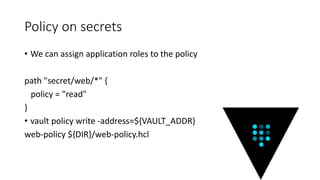
Policy on secrets
• We can assign application roles to the policy
path "secret/web/*" {
policy = "read"
}
• vault policy write -address=${VAULT_ADDR}
web-policy ${DIR}/web-policy.hcl
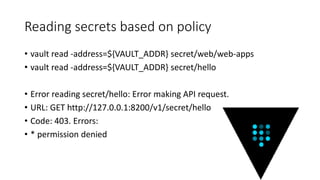
Reading secrets based on policy
• vault read -address=${VAULT_ADDR} secret/web/web-apps
• vault read -address=${VAULT_ADDR} secret/hello
• Error reading secret/hello: Error making API request.
• URL: GET http://127.0.0.1:8200/v1/secret/hello
• Code: 403. Errors:
• * permission denied
Demo Using Vault
Demo Docker Environment VAR
• Issues with env variables
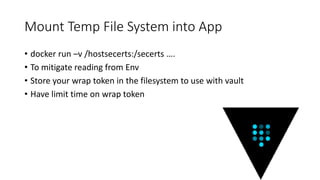
Mount Temp File System into App
• docker run –v /hostsecerts:/secerts ….
• To mitigate reading from Env
• Store your wrap token in the filesystem to use with vault
• Have limit time on wrap token
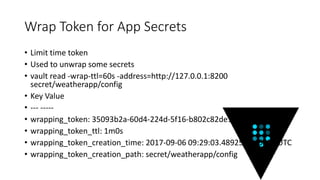
Wrap Token for App Secrets
• Limit time token
• Used to unwrap some secrets
• vault read -wrap-ttl=60s -address=http://127.0.0.1:8200
secret/weatherapp/config
• Key Value
• --- -----
• wrapping_token: 35093b2a-60d4-224d-5f16-b802c82de1e7
• wrapping_token_ttl: 1m0s
• wrapping_token_creation_time: 2017-09-06 09:29:03.4892595 +0000 UTC
• wrapping_token_creation_path: secret/weatherapp/config
App Roles
• Allows machines or apps to authenticate with Vault
• Using a role_id and secret_id as credentials
• Assign polices to the app
• Once logged in you get back a token to get secrets
Demo App Using Node
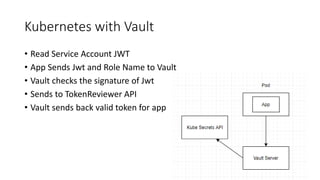
Kubernetes with Vault
• Read Service Account JWT
• App Sends Jwt and Role Name to Vault
• Vault checks the signature of Jwt
• Sends to TokenReviewer API
• Vault sends back valid token for app
Thankyou
• Contact me (taswar.bhatti@gemalto.com)
• @taswarbhatti

Using Vault for your Nodejs Secrets

  • 1.
    Using vault foryour NodeJS Secrets Taswar Bhatti – Solutions Architect Gemalto
  • 2.
  • 3.
    About me • TaswarBhatti (Microsoft MVP) • @taswarbhatti • http://taswar.zeytinsoft.com • Gemalto (System Architect)
  • 4.
    So what aresecrets? • Secrets grants you AuthN or AuthZ to a system • Examples • Username & Passwords • Database credentials • API Token • TLS Certs
  • 5.
    Secret Sprawl • Secretsends up in • Source Code • Version Control Systems (Github, Gitlab, Bitbucket etc) • Configuration Management (Chef, Puppet, Ansible etc)
  • 6.
    Issues • How dowe know who has access to those secrets • When was the last time they accessed it? • What if we want to change/rotate the secrets
  • 7.
    Desire secrets • Encryptionin rest and transit • Only decrypted in memory • Access control • Rotation & Revocation
  • 8.
    Secret Management -Vault • Centralized Secret Management • Encrypted at rest and transit • Lease and Renewal • ACL • Audit Trail • Multiple Client Auth Method (Ldap,Github, approle) • Dynamic Secrets • Encryption as a Service
  • 9.
    Dynamic Secrets • Allowsone to lease a secret for a period of time e.g 2 hrs • Generates on demand and unique for each user/consumption • Audit trail
  • 10.
    Secure Secrets • AES256 with GCM encryption • TLS 1.2 for clients • No HSM is required
  • 11.
    Unsealing the Vault •Vault requires encryption keys to encrypt data • Shamir Secret Key Sharing • Master key is split into multiple keys
  • 12.
  • 13.
    Unseal • Unseal Key1: QZdnKsOyGXaWoB2viLBBWLlIpU+tQrQy49D+Mq24/V0B • Unseal Key 2: 1pxViFucRZDJ+kpXAeefepdmLwU6QpsFZwseOIPqaPAC • Unseal Key 3: bw+yIvxrXR5k8VoLqS5NGW4bjuZym2usm/PvCAaMh8UD • Unseal Key 4: o40xl6lcQo8+DgTQ0QJxkw0BgS5n6XHNtWOgBbt7LKYE • Unseal Key 5: Gh7WPQ6rWgGTBRSMecuj8PR8IM0vMIFkSZtRNT4dw5MF • Initial Root Token: 5b781ff4-eee8-d6a1-ea42-88428a7e8815 • Vault initialized with 5 keys and a key threshold of 3. Please • securely distribute the above keys. When the Vault is re-sealed, • restarted, or stopped, you must provide at least 3 of these keys • to unseal it again. • Vault does not store the master key. Without at least 3 keys, • your Vault will remain permanently sealed.
  • 14.
    How to unseal •vault unseal -address=${VAULT_ADDR} QZdnKsOyGXaWoB2viLBBWLlIpU+tQrQy49D+Mq24/V0B • vault unseal -address=${VAULT_ADDR} bw+yIvxrXR5k8VoLqS5NGW4bjuZym2usm/PvCAaMh8UD • vault unseal -address=${VAULT_ADDR} Gh7WPQ6rWgGTBRSMecuj8PR8IM0vMIFkSZtRNT4dw5MF
  • 15.
    Writing Secrets • vaultwrite -address=${VAULT_ADDR} secret/hello value=world • vault read -address=${VAULT_ADDR} secret/hello • Key Value • --- ----- • refresh_interval 768h0m0s • Value world
  • 16.
    Policy on secrets •We can assign application roles to the policy path "secret/web/*" { policy = "read" } • vault policy write -address=${VAULT_ADDR} web-policy ${DIR}/web-policy.hcl
  • 17.
    Reading secrets basedon policy • vault read -address=${VAULT_ADDR} secret/web/web-apps • vault read -address=${VAULT_ADDR} secret/hello • Error reading secret/hello: Error making API request. • URL: GET http://127.0.0.1:8200/v1/secret/hello • Code: 403. Errors: • * permission denied
  • 18.
  • 19.
    Demo Docker EnvironmentVAR • Issues with env variables
  • 20.
    Mount Temp FileSystem into App • docker run –v /hostsecerts:/secerts …. • To mitigate reading from Env • Store your wrap token in the filesystem to use with vault • Have limit time on wrap token
  • 21.
    Wrap Token forApp Secrets • Limit time token • Used to unwrap some secrets • vault read -wrap-ttl=60s -address=http://127.0.0.1:8200 secret/weatherapp/config • Key Value • --- ----- • wrapping_token: 35093b2a-60d4-224d-5f16-b802c82de1e7 • wrapping_token_ttl: 1m0s • wrapping_token_creation_time: 2017-09-06 09:29:03.4892595 +0000 UTC • wrapping_token_creation_path: secret/weatherapp/config
  • 22.
    App Roles • Allowsmachines or apps to authenticate with Vault • Using a role_id and secret_id as credentials • Assign polices to the app • Once logged in you get back a token to get secrets
  • 23.
  • 24.
    Kubernetes with Vault •Read Service Account JWT • App Sends Jwt and Role Name to Vault • Vault checks the signature of Jwt • Sends to TokenReviewer API • Vault sends back valid token for app
  • 25.
    Thankyou • Contact me(taswar.bhatti@gemalto.com) • @taswarbhatti