Introduction to
Bot Framework
Taswar Bhatti
@taswarbhatti
http://taswar.zeytinsoft.com
What is a Bot?
• In this context Microsoft Bot Framework, bots are computer
assistants or think of it as just a web api (ASP.NET Web App)
• Bots appear in your favorite messaging app including Facebook
Messenger and Skype
• You use bots for booking flights, hotels, ordering takeaway and much,
much more
• Purchase Request Api to build commerce enabled bot
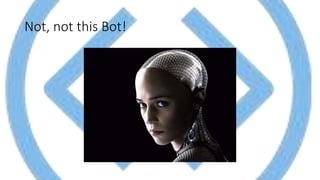
Not, not this Bot!
Bot Framework Overview
• The Microsoft Bot Framework consists of:
• Bot Builder SDK(.NET, Node.js, REST Api)
• Bot Framework Emulator for Windows, Linux and Mac
• Bot Connector
• Developer Portal (http://dev.botframework.com)
• Bot Directory
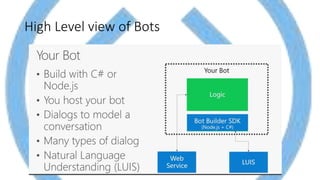
High Level view of Bots
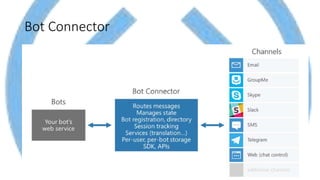
Bot Connector
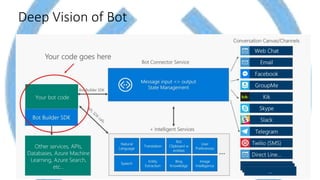
Deep Vision of Bot
An Echo Bot Code
• [BotAuthentication]
• public class MessagesController : ApiController{
• public async Task<HttpResponseMessage> Post([FromBody]Activity activity) {
• if (activity.Type == ActivityTypes.Message) {
• ConnectorClient connector = new ConnectorClient(new Uri(activity.ServiceUrl));
• // return our reply to the user
• Activity reply = activity.CreateReply($"Echo {activity.Text}");
• await connector.Conversations.ReplyToActivityAsync(reply);
• } else {
• HandleSystemMessage(activity);
• }
• var response = Request.CreateResponse(HttpStatusCode.OK);
• return response;
• }
• }
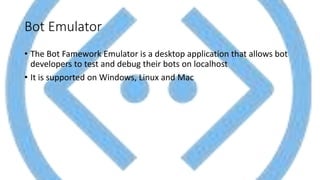
Bot Emulator
• The Bot Famework Emulator is a desktop application that allows bot
developers to test and debug their bots on localhost
• It is supported on Windows, Linux and Mac
Bot Emulator Screenshot
Demo Bot Framework
Bot Builder Dialog and Sessions
• Bot builder uses dialogs to manage a bot conversation between a
user
• Session Objects are passed to the dialog handlers
• Session Objects are the primary mechnics between bots and users
Types of Dialogs
• Prompts – Text, Confirm, Number, Time, Choice, etc
• Waterfall dialogs – collection and use sequence of steps
• User Data – Store data of user, conversation (private data) Payload
max is 32k
• Intent Dialog – listen to keywords or phrases using NLP (e.g LUIS)
• Attachments and Cards – For Rich Objects (media or images)
Demo Search Image and Card
• Using cognitive vision api
Guideline for bots
• Don’t send a bot to do a webpages’s job
• Bots are just apps
• Don’t abuse Natural Language Processing
• Sometimes buttons do everything you need
• Its all a matter of User Experience
Resources
• Microsoft Bot Framework Resources (http://aka.ms/botresources)
• LUIS (https://www.luis.ai)
• Azure Trail (https://azure.Microsoft.com/services/bot-services)
• Books (Building Bots with Microsoft Bot Framework PACKT)
• Books (Programming the Microsoft Bot Framework MSPress)
• An introduction to Microsoft Bot Framework
Questions
• Questions?????

An introduction to Microsoft Bot Framework

  • 1.
    Introduction to Bot Framework TaswarBhatti @taswarbhatti http://taswar.zeytinsoft.com
  • 2.
    What is aBot? • In this context Microsoft Bot Framework, bots are computer assistants or think of it as just a web api (ASP.NET Web App) • Bots appear in your favorite messaging app including Facebook Messenger and Skype • You use bots for booking flights, hotels, ordering takeaway and much, much more • Purchase Request Api to build commerce enabled bot
  • 3.
  • 4.
    Bot Framework Overview •The Microsoft Bot Framework consists of: • Bot Builder SDK(.NET, Node.js, REST Api) • Bot Framework Emulator for Windows, Linux and Mac • Bot Connector • Developer Portal (http://dev.botframework.com) • Bot Directory
  • 5.
  • 6.
  • 7.
  • 8.
    An Echo BotCode • [BotAuthentication] • public class MessagesController : ApiController{ • public async Task<HttpResponseMessage> Post([FromBody]Activity activity) { • if (activity.Type == ActivityTypes.Message) { • ConnectorClient connector = new ConnectorClient(new Uri(activity.ServiceUrl)); • // return our reply to the user • Activity reply = activity.CreateReply($"Echo {activity.Text}"); • await connector.Conversations.ReplyToActivityAsync(reply); • } else { • HandleSystemMessage(activity); • } • var response = Request.CreateResponse(HttpStatusCode.OK); • return response; • } • }
  • 9.
    Bot Emulator • TheBot Famework Emulator is a desktop application that allows bot developers to test and debug their bots on localhost • It is supported on Windows, Linux and Mac
  • 10.
  • 11.
  • 12.
    Bot Builder Dialogand Sessions • Bot builder uses dialogs to manage a bot conversation between a user • Session Objects are passed to the dialog handlers • Session Objects are the primary mechnics between bots and users
  • 13.
    Types of Dialogs •Prompts – Text, Confirm, Number, Time, Choice, etc • Waterfall dialogs – collection and use sequence of steps • User Data – Store data of user, conversation (private data) Payload max is 32k • Intent Dialog – listen to keywords or phrases using NLP (e.g LUIS) • Attachments and Cards – For Rich Objects (media or images)
  • 14.
    Demo Search Imageand Card • Using cognitive vision api
  • 15.
    Guideline for bots •Don’t send a bot to do a webpages’s job • Bots are just apps • Don’t abuse Natural Language Processing • Sometimes buttons do everything you need • Its all a matter of User Experience
  • 16.
    Resources • Microsoft BotFramework Resources (http://aka.ms/botresources) • LUIS (https://www.luis.ai) • Azure Trail (https://azure.Microsoft.com/services/bot-services) • Books (Building Bots with Microsoft Bot Framework PACKT) • Books (Programming the Microsoft Bot Framework MSPress) • An introduction to Microsoft Bot Framework
  • 17.