
The Cloud Specialists
Using the KVM hypervisor in
CloudStack
Dag Sonstebo
Cloud Architect / Senior Consultant
dag.sonstebo@shapeblue.com
Twitter: @dagsonstebo
C l i c k t o e d i t
The Cloud Specialists
ShapeBlue.com @ShapeBlue
A b o u t M e
• Cloud Architect @ ShapeBlue
• Background:
• Cloud and virtualization architect with 18
years experience from the service provider,
financial and manufacturing industries.
• Specialise in:
• Cloud infrastructure architecture and
engineering.
• Virtualisation - VMware vSphere, Citrix
XenServer, KVM, Hyper-V.
• Automation
• Involved with CloudStack since version 2.1.
The Cloud Specialists
A b o u t S h a p e B l u e
“ShapeBlue are expert builders of public &
private clouds. They are the leading global
Apache CloudStack integrator & consultancy”
…and we’re hiring!
C l i c k t o e d i t
The Cloud Specialists
ShapeBlue.com @ShapeBlue
P e o p l e we ’ v e wo r k e d wi t h
C l i c k t o e d i t
The Cloud Specialists
ShapeBlue.com @ShapeBlue
Background
C l i c k t o e d i t
The Cloud Specialists
ShapeBlue.com @ShapeBlue
K V M b a c k g r o u n d
• KVM = Kernel-based Virtual Machine.
• Type 2 hypervisor – provides virtualisation support on top of
a running Linux OS instance.
• Included in the Linux kernel since version 2.6.20 (2007).
• KVM is Free Software released under the GPL.
• Supported in CloudStack since early cloud.com days
(version 2.0).
C l i c k t o e d i t
The Cloud Specialists
ShapeBlue.com @ShapeBlue
K V M b a c k g r o u n d
• Hardware:
• 32 / 64 bit with CPU virtualization support
(Intel-VTX / AMD-V).
• Kernel modules
• kvm
• kvm_intel
• kvm_amd
• Para-virtualisation through the Virtio API.
• KVM and Qemu:
• KVM abstracts access to the CPU and memory.
• QEMU emulates the hardware resources (disks, graphics, USB, etc).
C l i c k t o e d i t
The Cloud Specialists
ShapeBlue.com @ShapeBlue
K V M a n d C l o u d S t a c k
• Pros:
• Flexible - not proprietary.
• Fast.
• Lightweight.
• No SPOF – no poolmasters or VirtualCentre like components.
• Cons:
• No workload balancing (yet…).
• No network throttling.
• No VM snapshot support.
• No native clustered file system.
• Root volume migration requires VM to be shut down.
C l i c k t o e d i t
The Cloud Specialists
ShapeBlue.com @ShapeBlue
Installation and configuration
C l i c k t o e d i t
The Cloud Specialists
ShapeBlue.com @ShapeBlue
B a s e i n s t a l l a t i o n
• Host OS:
• CentOS / RHEL 6.x
• Ubuntu 12.04 / 14.04
• 4GB memory / 64-bit X86.
• Components (CloudStack 4.7):
• NTP + DNS
• Libvirt 1.2.0 or higher
• Qemu / KVM: 2.0 or higher
• Installing the CloudStack agent installs KVM and libvirt:
• yum install cloudstack-agent
• apt-get install cloudstack-agent
C l i c k t o e d i t
The Cloud Specialists
ShapeBlue.com @ShapeBlue
C o n f i g u r a t i o n
• /etc/libvirt/libvirtd.conf:
listen_tls = 0
listen_tcp = 1
tcp_port = "16509”
auth_tcp = "none”
mdns_adv = 0
• /etc/sysconfig/libvirtd:
LIBVIRTD_ARGS="--listen”
libvirtd_opts="-d -l”
• Security policies:
• CentOS: Selinux: permissive
• Ubuntu: Apparmor
• Firewall ports:
• TCP/22 (SSH)
• TCP/1798 (KVM)
• TCP/16509 (Libvirt)
• TCP/5900-6100 (VNC)
• TCP/49152-49216 (Libvirt migration)
C l i c k t o e d i t
The Cloud Specialists
ShapeBlue.com @ShapeBlue
Networking and storage
C l i c k t o e d i t
The Cloud Specialists
ShapeBlue.com @ShapeBlue
K V M n e t wo r k i n g
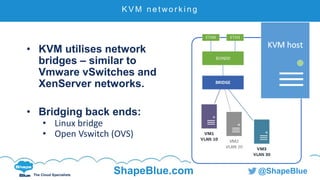
• KVM utilises network
bridges – similar to
Vmware vSwitches and
XenServer networks.
• Bridging back ends:
• Linux bridge
• Open Vswitch (OVS)
C l i c k t o e d i t
The Cloud Specialists
ShapeBlue.com @ShapeBlue
B r i d g e b a c k e n d s – L i n u x b r i d g e
• Linux bridge
• In Linux kernel since version 2.2.
• Fast, reliable and mature.
• Provides L2 requirements for CloudStack.
• Lacks automation options.
C l i c k t o e d i t
The Cloud Specialists
ShapeBlue.com @ShapeBlue
B r i d g e b a c k e n d s – O p e n V s wi t c h
• Open vSwitch
• Written for multi-host virtualisation environments with
dynamic end points, higher level of abstraction and
potential for hardware offloading.
• Network state kept in a network state database (OVSDB).
• Allows for better automation.
• SDN options (GRE tunnelling).
• External controllers: OpenDaylight, Nicira, VMware NSX.
• Default bridge backend in XenServer 6.0 and later
versions.
• Some issues with VLAN configuration and stability.
C l i c k t o e d i t
The Cloud Specialists
ShapeBlue.com @ShapeBlue
N e t wo r k i n g e x a m p l e
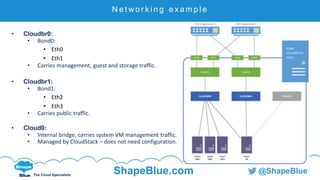
• Cloudbr0:
• Bond0:
• Eth0
• Eth1
• Carries management, guest and storage traffic.
• Cloudbr1:
• Bond1:
• Eth2
• Eth3
• Carries public traffic.
• Cloud0:
• Internal bridge, carries system VM management traffic.
• Managed by CloudStack – does not need configuration.
C l i c k t o e d i t
The Cloud Specialists
ShapeBlue.com @ShapeBlue
L i n u x b r i d g e c o n f i g u r a t i o n ( C e n t O S )
ifcfg-eth0:
DEVICE=eth0
TYPE=Ethernet
USERCTL=no
MASTER=bond0
SLAVE=yes
BOOTPROTO=none
NM_CONTROLLED=no
ONBOOT=yes
ifcfg-bond0:
DEVICE=bond0
ONBOOT=yes
BONDING_OPTS='mode=1
miimon=100'
BRIDGE=cloudbr0
NM_CONTROLLED=no
Ifcfg-cloudbr0:
DEVICE=cloudbr0
ONBOOT=yes
TYPE=Bridge
IPADDR=192.168.100.20
NETMASK=255.255.255.0
GATEWAY=192.168.100.1
NM_CONTROLLED=no
DELAY=0
C l i c k t o e d i t
The Cloud Specialists
ShapeBlue.com @ShapeBlue
L i n u x b r i d g e c o n f i g u r a t i o n ( C e n t O S )
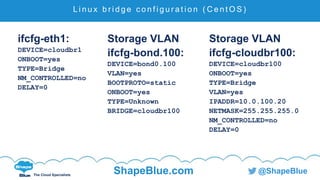
ifcfg-eth1:
DEVICE=cloudbr1
ONBOOT=yes
TYPE=Bridge
NM_CONTROLLED=no
DELAY=0
Storage VLAN
ifcfg-bond.100:
DEVICE=bond0.100
VLAN=yes
BOOTPROTO=static
ONBOOT=yes
TYPE=Unknown
BRIDGE=cloudbr100
Storage VLAN
ifcfg-cloudbr100:
DEVICE=cloudbr100
ONBOOT=yes
TYPE=Bridge
VLAN=yes
IPADDR=10.0.100.20
NETMASK=255.255.255.0
NM_CONTROLLED=no
DELAY=0
C l i c k t o e d i t
The Cloud Specialists
ShapeBlue.com @ShapeBlue
L i n u x b r i d g e c o n f i g u r a t i o n ( C e n t O S )
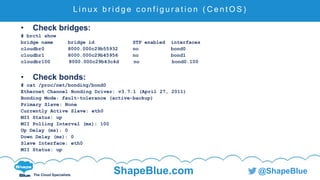
• Check bridges:
# brctl show
bridge name bridge id STP enabled interfaces
cloudbr0 8000.000c29b55932 no bond0
cloudbr1 8000.000c29b45956 no bond1
cloudbr100 8000.000c29b43c4d no bond0.100
• Check bonds:
# cat /proc/net/bonding/bond0
Ethernet Channel Bonding Driver: v3.7.1 (April 27, 2011)
Bonding Mode: fault-tolerance (active-backup)
Primary Slave: None
Currently Active Slave: eth0
MII Status: up
MII Polling Interval (ms): 100
Up Delay (ms): 0
Down Delay (ms): 0
Slave Interface: eth0
MII Status: up
C l i c k t o e d i t
The Cloud Specialists
ShapeBlue.com @ShapeBlue
O V S c o n f i g u r a t i o n ( C e n t O S )
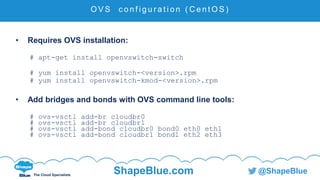
• Requires OVS installation:
# apt-get install openvswitch-switch
# yum install openvswitch-<version>.rpm
# yum install openvswitch-kmod-<version>.rpm
• Add bridges and bonds with OVS command line tools:
# ovs-vsctl add-br cloudbr0
# ovs-vsctl add-br cloudbr1
# ovs-vsctl add-bond cloudbr0 bond0 eth0 eth1
# ovs-vsctl add-bond cloudbr1 bond1 eth2 eth3
C l i c k t o e d i t
The Cloud Specialists
ShapeBlue.com @ShapeBlue
O V S c o n f i g u r a t i o n ( C e n t O S )
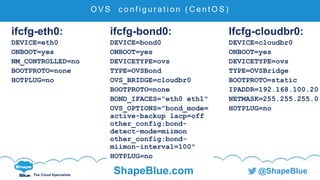
ifcfg-eth0:
DEVICE=eth0
ONBOOT=yes
NM_CONTROLLED=no
BOOTPROTO=none
HOTPLUG=no
ifcfg-bond0:
DEVICE=bond0
ONBOOT=yes
DEVICETYPE=ovs
TYPE=OVSBond
OVS_BRIDGE=cloudbr0
BOOTPROTO=none
BOND_IFACES="eth0 eth1"
OVS_OPTIONS="bond_mode=
active-backup lacp=off
other_config:bond-
detect-mode=miimon
other_config:bond-
miimon-interval=100"
HOTPLUG=no
Ifcfg-cloudbr0:
DEVICE=cloudbr0
ONBOOT=yes
DEVICETYPE=ovs
TYPE=OVSBridge
BOOTPROTO=static
IPADDR=192.168.100.20
NETMASK=255.255.255.0
HOTPLUG=no
C l i c k t o e d i t
The Cloud Specialists
ShapeBlue.com @ShapeBlue
O V S c o n f i g u r a t i o n ( C e n t O S )
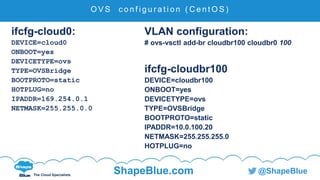
ifcfg-cloud0:
DEVICE=cloud0
ONBOOT=yes
DEVICETYPE=ovs
TYPE=OVSBridge
BOOTPROTO=static
HOTPLUG=no
IPADDR=169.254.0.1
NETMASK=255.255.0.0
VLAN configuration:
# ovs-vsctl add-br cloudbr100 cloudbr0 100
ifcfg-cloudbr100
DEVICE=cloudbr100
ONBOOT=yes
DEVICETYPE=ovs
TYPE=OVSBridge
BOOTPROTO=static
IPADDR=10.0.100.20
NETMASK=255.255.255.0
HOTPLUG=no
C l i c k t o e d i t
The Cloud Specialists
ShapeBlue.com @ShapeBlue
O V S c o n f i g u r a t i o n ( C e n t O S )
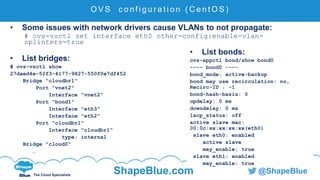
• Some issues with network drivers cause VLANs to not propagate:
# ovs-vsctl set interface eth0 other-config:enable-vlan-
splinters=true
• List bridges:
# ovs-vsctl show
27daed4e-52f3-4177-9827-550f0e7df452
Bridge "cloudbr1"
Port "vnet2"
Interface "vnet2"
Port "bond1"
Interface "eth3"
Interface "eth2"
Port "cloudbr1"
Interface "cloudbr1"
type: internal
Bridge "cloud0"
…
• List bonds:
ovs-appctl bond/show bond0
---- bond0 ----
bond_mode: active-backup
bond may use recirculation: no,
Recirc-ID : -1
bond-hash-basis: 0
updelay: 0 ms
downdelay: 0 ms
lacp_status: off
active slave mac:
00:0c:xx:xx:xx:xx(eth0)
slave eth0: enabled
active slave
may_enable: true
slave eth1: enabled
may_enable: true
C l i c k t o e d i t
The Cloud Specialists
ShapeBlue.com @ShapeBlue
O V S c o n f i g u r a t i o n ( C e n t O S )
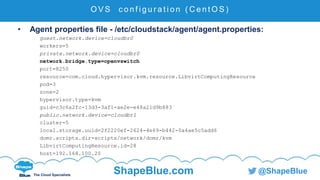
• Agent properties file - /etc/cloudstack/agent/agent.properties:
guest.network.device=cloudbr0
workers=5
private.network.device=cloudbr0
network.bridge.type=openvswitch
port=8250
resource=com.cloud.hypervisor.kvm.resource.LibvirtComputingResource
pod=3
zone=2
hypervisor.type=kvm
guid=c3c6a2fc-13d3-3af1-ae2e-e48a21d9b883
public.network.device=cloudbr1
cluster=5
local.storage.uuid=2f2220ef-2624-4e69-b442-0a4ae5c5add6
domr.scripts.dir=scripts/network/domr/kvm
LibvirtComputingResource.id=28
host=192.168.100.20
C l i c k t o e d i t
The Cloud Specialists
ShapeBlue.com @ShapeBlue
S t o r a g e
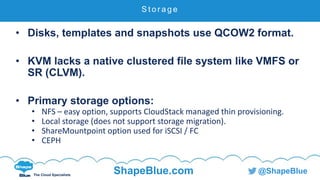
• Disks, templates and snapshots use QCOW2 format.
• KVM lacks a native clustered file system like VMFS or
SR (CLVM).
• Primary storage options:
• NFS – easy option, supports CloudStack managed thin provisioning.
• Local storage (does not support storage migration).
• ShareMountpoint option used for iSCSI / FC
• CEPH
C l i c k t o e d i t
The Cloud Specialists
ShapeBlue.com @ShapeBlue
S t o r a g e – s h a r e d m o u n t p o i n t
• Used to access pre-defined block storage.
• Must be:
• Running a clustered file system.
• Preconfigured on each host.
• Same on each host – e.g. /mnt/primary
• Clustered file system options:
• OCFS2 (Oracle)
• GFS2 (RedHat)
• CLVM (not officially supported in CloudStack)
C l i c k t o e d i t
The Cloud Specialists
ShapeBlue.com @ShapeBlue
Management and troubleshooting
C l i c k t o e d i t
The Cloud Specialists
ShapeBlue.com @ShapeBlue
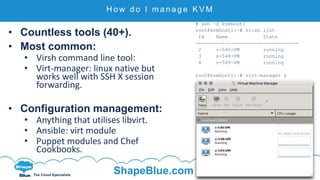
H o w d o I m a n a g e K V M
• Countless tools (40+).
• Most common:
• Virsh command line tool:
• Virt-manager: linux native but
works well with SSH X session
forwarding.
• Configuration management:
• Anything that utilises libvirt.
• Ansible: virt module
• Puppet modules and Chef
Cookbooks.
# ssh –X kvmhost1
root@kvmhost1:~# virsh list
Id Name State
-----------------------------------
2 r-540-VM running
3 s-548-VM running
4 v-509-VM running
root@kvmhost1:~# virt-manager &
C l i c k t o e d i t
The Cloud Specialists
ShapeBlue.com @ShapeBlue
Tr o u b l e s h o o t i n g
• Check KVM is running:
# lsmod | grep kvm
kvm_intel 151552 9
kvm 479232 1 kvm_intel
• Log file: /var/log/cloudstack/agent/agent.log
• Increase logging verbosity:
# sed -i 's/INFO/DEBUG/g' /etc/cloudstack/agent/log4j-cloud.xml
• KVM uses link local networking, hence connect to system VMs using:
# ssh -i /root/.ssh/id_rsa.cloud -p 3922 root@<linklocalIP>
C l i c k t o e d i t
The Cloud Specialists
ShapeBlue.com @ShapeBlue
W h a t ’s n e x t
• HA and DRS is being developed for KVM.
• https://cwiki.apache.org/confluence/display/CLOU
DSTACK/KVM+HA+with+IPMI+Fencing
C l i c k t o e d i t
The Cloud Specialists
ShapeBlue.com @ShapeBlue
M o r e i n f o r m a t i o n
• Background:
• http://www.linux-kvm.org
• http://wiki.qemu.org/KVM
• https://libvirt.org/
• Installation:
• http://docs.cloudstack.apache.org/projects/cloudstack-
installation/en/4.7/qig.html#kvm-setup-and-installation
• Management tools:
• http://www.linux-kvm.org/page/Management_Tools
C l i c k t o e d i t
The Cloud Specialists
ShapeBlue.com @ShapeBlue
M o r e i n f o r m a t i o n
• Networking:
• http://openvswitch.org
• http://openvswitch.org/support/dist-docs/WHY-OVS.md.txt
• Storage:
• CEPH: http://docs.ceph.com/docs/hammer/rbd/rbd-cloudstack/
• OCFS2: https://oss.oracle.com/projects/ocfs2/
• GFS2: https://access.redhat.com/documentation/en-
US/Red_Hat_Enterprise_Linux/6/html-
single/Global_File_System_2/index.html
C l i c k t o e d i t
The Cloud Specialists
ShapeBlue.com @ShapeBlue
M o r e i n f o r m a t i o n
• Slide deck: http://www.slideshare.net/shapeblue
• Blog: http://shapeblue.com/blog
http://dsonstebo.wordpress.com
• Email: dag.sonstebo@shapeblue.com
• Twitter: @dagsonstebo
• Web: http://shapeblue.com
The Cloud Specialists
Using the KVM hypervisor in
CloudStack
Dag Sonstebo
Cloud Architect / Senior Consultant
dag.sonstebo@shapeblue.com
Twitter: @dagsonstebo