CloudStack + KVM: Your
Local Cloud Lab
Slide 1 of 16
CloudStack European User Group 2025 – Vienna, Austria
Diapositiva 3 de 30
xopsconference.com
Slide 2 of 16
Diapositiva 3 de 30
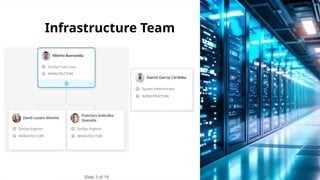
Infrastructure Team
Slide 3 of 16
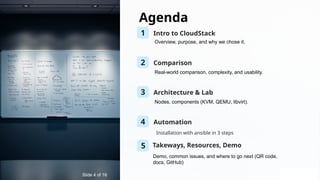
Agenda
1 Intro to CloudStack
2 Comparison
3 Architecture & Lab
4 Automation
Installation with ansible in 3 steps
Slide 4 of 16
Overview, purpose, and why we chose it.
Real-world comparison, complexity, and usability.
Nodes, components (KVM, QEMU, libvirt).
5 Takeways, Resources, Demo
Demo, common issues, and where to go next (QR code,
docs, GitHub)
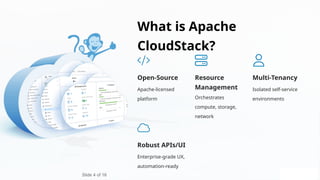
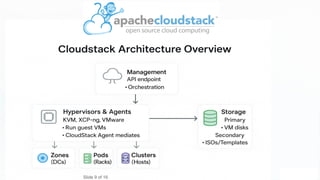
What is Apache
CloudStack?
Open-Source
Apache-licensed
platform
Resource
Management
Orchestrates
compute, storage,
network
Multi-Tenancy
Isolated self-service
environments
Robust APIs/UI
Enterprise-grade UX,
automation-ready
Slide 5 of 16
Slide 4 of 16
✅ Why We Chose CloudStack
🕒 Fast MVP Delivery: Enabled rapid setup of a working cloud.
🧠 Lower Learning Curve: Simpler than OpenStack — fewer
moving parts, easier onboarding.
🧰 Production-Ready: Built-in UI, APIs, and multi-tenancy without
extra tooling.
🧩 Flexible & Practical: Supports KVM, XCP-ng, VMware — easy
to replicate.
💸 Cost-Effective: Open-source, no licensing fees, full enterprise
features.
Slide 6 of 16
Our Rationale Behind Choosing CloudStack
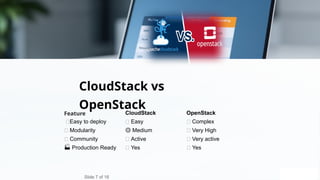
CloudStack vs
OpenStack
Slide 7 of 16
Feature CloudStack OpenStack
🚀Easy to deploy ✅ Easy ❌ Complex
🔧 Modularity 🟡 Medium 🔴 Very High
👥 Community ✅ Active ✅ Very active
🏭 Production Ready ✅ Yes ✅ Yes
🚀 Advantages of Your Own Local Cloud Lab
deployed with ansible
🧪Test IaC
Try Ansible, Terraform, or Packer locally in a safe, reproducible
environment.
🧱Develop Cloud Apps
Build and test microservices just like in the cloud — with full stack
flexibility.
🔁Reproducible CI/CD
Validate complete automation cycles with no vendor lock-in.
🎓Training Ground
Upskill yourself or your team without cloud bills or time limits.
Spin up multiple identical setups in 15–20 minutes — ideal for testing,
staging, or teaching.
⚡ Fast, Scalable Environments
Slide 8 of 16
Slide 9 of 16
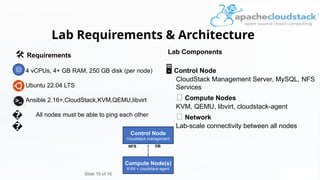
Lab Requirements & Architecture
Slide 10 of 16
️
🛠️Requirements
4 vCPUs, 4+ GB RAM, 250 GB disk (per node)
Ubuntu 22.04 LTS
Ansible 2.16+,CloudStack,KVM,QEMU,libvirt
All nodes must be able to ping each other
Lab Components
️
🖥️Control Node
CloudStack Management Server, MySQL, NFS
Services
🧬 Compute Nodes
KVM, QEMU, libvirt, cloudstack-agent
🌐 Network
Lab-scale connectivity between all nodes
Control Node
Cloudstack management
Compute Node(s)
KVM + cloudstack-agent
DB
NFS
�
�
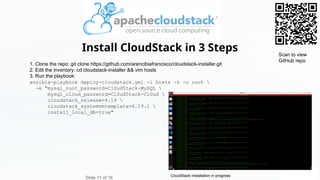
1. Clone the repo: git clone https://github.com/arencibiafrancisco/cloudstack-installer.git
2. Edit the inventory: cd cloudstack-installer && vim hosts
3. Run the playbook:
ansible-playbook deploy-cloudstack.yml -i hosts -k -u root 
-e "mysql_root_password=Cl0ud5tack-MySQL 
mysql_cloud_password=Cl0ud5tack-Cl0ud 
cloudstack_release=4.19 
cloudstack_systemvmtemplate=4.19.1 
install_local_db=true"
Install CloudStack in 3 Steps
Slide 11 of 16
Scan to view
GitHub repo
CloudStack installation in progress
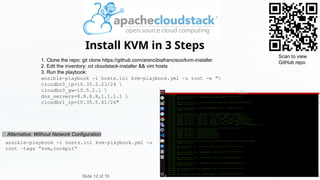
1. Clone the repo: git clone https://github.com/arencibiafrancisco/kvm-installer
2. Edit the inventory: cd cloudstack-installer && vim hosts
3. Run the playbook:
ansible-playbook -i hosts.ini kvm-playbook.yml -u root -e "
cloudbr0_ip=10.35.2.23/24 
cloudbr0_gw=10.5.2.1 
dns_servers=8.8.8.8,1.1.1.1 
cloudbr1_ip=10.35.5.61/24"
Install KVM in 3 Steps
Slide 12 of 16
Scan to view
GitHub repo
ansible-playbook -i hosts.ini kvm-playbook.yml -u
root –tags “kvm,cockpit”
🧪 Alternative: Without Network Configuration
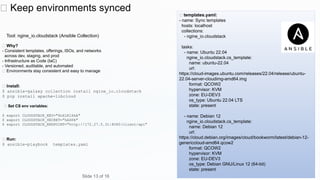
🔄 Keep environments synced
Tool: ngine_io.cloudstack (Ansible Collection)
✅ Why?
- Consistent templates, offerings, ISOs, and networks
across dev, staging, and prod
- Infrastructure as Code (IaC)
- Versioned, auditable, and automated
✅ Environments stay consistent and easy to manage
🧪 Install:
$ ansible-galaxy collection install ngine_io.cloudstack
$ pip install apache-libcloud
🧪 Set CS env variables:
$ export CLOUDSTACK_KEY="6nXiKlXkA"
$ export CLOUDSTACK_SECRET="hASPA"
$ export CLOUDSTACK_ENDPOINT="http://172.27.5.31:8080/client/api"
🧪 Run:
$ ansible-playbook templates.yaml
🧪 templates.yaml:
- name: Sync templates
hosts: localhost
collections:
- ngine_io.cloudstack
tasks:
- name: Ubuntu 22.04
ngine_io.cloudstack.cs_template:
name: ubuntu-22.04
url:
https://cloud-images.ubuntu.com/releases/22.04/release/ubuntu-
22.04-server-cloudimg-amd64.img
format: QCOW2
hypervisor: KVM
zone: EU-DEV3
os_type: Ubuntu 22.04 LTS
state: present
- name: Debian 12
ngine_io.cloudstack.cs_template:
name: Debian 12
url:
https://cloud.debian.org/images/cloud/bookworm/latest/debian-12-
genericcloud-amd64.qcow2
format: QCOW2
hypervisor: KVM
zone: EU-DEV3
os_type: Debian GNU/Linux 12 (64-bit)
state: present
Slide 13 of 16
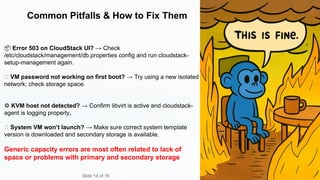
Common Pitfalls & How to Fix Them
📦 Error 503 on CloudStack UI? → Check
/etc/cloudstack/management/db.properties config and run cloudstack-
setup-management again.
🔑 VM password not working on first boot? → Try using a new isolated
network; check storage space.
⚙️KVM host not detected? → Confirm libvirt is active and cloudstack-
agent is logging properly.
🧱 System VM won’t launch? → Make sure correct system template
version is downloaded and secondary storage is available.
Generic capacity errors are most often related to lack of
space or problems with primary and secondary storage
Slide 14 of 16
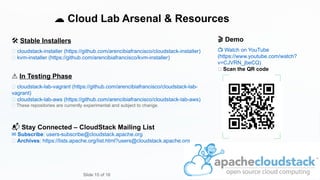
☁️Cloud Lab Arsenal & Resources
️
🛠️Stable Installers
🔗 cloudstack-installer (https://github.com/arencibiafrancisco/cloudstack-installer)
🔗 kvm-installer (https://github.com/arencibiafrancisco/kvm-installer)
⚠️In Testing Phase
🧪 cloudstack-lab-vagrant (https://github.com/arencibiafrancisco/cloudstack-lab-
vagrant)
🧪 cloudstack-lab-aws (https://github.com/arencibiafrancisco/cloudstack-lab-aws)
🧩 These repositories are currently experimental and subject to change.
📬 Stay Connected – CloudStack Mailing List
✉️Subscribe: users-subscribe@cloudstack.apache.org
📂 Archives: https://lists.apache.org/list.html?users@cloudstack.apache.org
🎬 Demo
📺 Watch on YouTube
(https://www.youtube.com/watch?
v=CJVRN_jbeCQ)
📱 Scan the QR code
Slide 15 of 16
Slide 16 of 16

CloudStack + KVM: Your Local Cloud Lab

  • 1.
    CloudStack + KVM:Your Local Cloud Lab Slide 1 of 16 CloudStack European User Group 2025 – Vienna, Austria
  • 2.
    Diapositiva 3 de30 xopsconference.com Slide 2 of 16
  • 3.
    Diapositiva 3 de30 Infrastructure Team Slide 3 of 16
  • 4.
    Agenda 1 Intro toCloudStack 2 Comparison 3 Architecture & Lab 4 Automation Installation with ansible in 3 steps Slide 4 of 16 Overview, purpose, and why we chose it. Real-world comparison, complexity, and usability. Nodes, components (KVM, QEMU, libvirt). 5 Takeways, Resources, Demo Demo, common issues, and where to go next (QR code, docs, GitHub)
  • 5.
    What is Apache CloudStack? Open-Source Apache-licensed platform Resource Management Orchestrates compute,storage, network Multi-Tenancy Isolated self-service environments Robust APIs/UI Enterprise-grade UX, automation-ready Slide 5 of 16 Slide 4 of 16
  • 6.
    ✅ Why WeChose CloudStack 🕒 Fast MVP Delivery: Enabled rapid setup of a working cloud. 🧠 Lower Learning Curve: Simpler than OpenStack — fewer moving parts, easier onboarding. 🧰 Production-Ready: Built-in UI, APIs, and multi-tenancy without extra tooling. 🧩 Flexible & Practical: Supports KVM, XCP-ng, VMware — easy to replicate. 💸 Cost-Effective: Open-source, no licensing fees, full enterprise features. Slide 6 of 16 Our Rationale Behind Choosing CloudStack
  • 7.
    CloudStack vs OpenStack Slide 7of 16 Feature CloudStack OpenStack 🚀Easy to deploy ✅ Easy ❌ Complex 🔧 Modularity 🟡 Medium 🔴 Very High 👥 Community ✅ Active ✅ Very active 🏭 Production Ready ✅ Yes ✅ Yes
  • 8.
    🚀 Advantages ofYour Own Local Cloud Lab deployed with ansible 🧪Test IaC Try Ansible, Terraform, or Packer locally in a safe, reproducible environment. 🧱Develop Cloud Apps Build and test microservices just like in the cloud — with full stack flexibility. 🔁Reproducible CI/CD Validate complete automation cycles with no vendor lock-in. 🎓Training Ground Upskill yourself or your team without cloud bills or time limits. Spin up multiple identical setups in 15–20 minutes — ideal for testing, staging, or teaching. ⚡ Fast, Scalable Environments Slide 8 of 16
  • 9.
  • 10.
    Lab Requirements &Architecture Slide 10 of 16 ️ 🛠️Requirements 4 vCPUs, 4+ GB RAM, 250 GB disk (per node) Ubuntu 22.04 LTS Ansible 2.16+,CloudStack,KVM,QEMU,libvirt All nodes must be able to ping each other Lab Components ️ 🖥️Control Node CloudStack Management Server, MySQL, NFS Services 🧬 Compute Nodes KVM, QEMU, libvirt, cloudstack-agent 🌐 Network Lab-scale connectivity between all nodes Control Node Cloudstack management Compute Node(s) KVM + cloudstack-agent DB NFS � �
  • 11.
    1. Clone therepo: git clone https://github.com/arencibiafrancisco/cloudstack-installer.git 2. Edit the inventory: cd cloudstack-installer && vim hosts 3. Run the playbook: ansible-playbook deploy-cloudstack.yml -i hosts -k -u root -e "mysql_root_password=Cl0ud5tack-MySQL mysql_cloud_password=Cl0ud5tack-Cl0ud cloudstack_release=4.19 cloudstack_systemvmtemplate=4.19.1 install_local_db=true" Install CloudStack in 3 Steps Slide 11 of 16 Scan to view GitHub repo CloudStack installation in progress
  • 12.
    1. Clone therepo: git clone https://github.com/arencibiafrancisco/kvm-installer 2. Edit the inventory: cd cloudstack-installer && vim hosts 3. Run the playbook: ansible-playbook -i hosts.ini kvm-playbook.yml -u root -e " cloudbr0_ip=10.35.2.23/24 cloudbr0_gw=10.5.2.1 dns_servers=8.8.8.8,1.1.1.1 cloudbr1_ip=10.35.5.61/24" Install KVM in 3 Steps Slide 12 of 16 Scan to view GitHub repo ansible-playbook -i hosts.ini kvm-playbook.yml -u root –tags “kvm,cockpit” 🧪 Alternative: Without Network Configuration
  • 13.
    🔄 Keep environmentssynced Tool: ngine_io.cloudstack (Ansible Collection) ✅ Why? - Consistent templates, offerings, ISOs, and networks across dev, staging, and prod - Infrastructure as Code (IaC) - Versioned, auditable, and automated ✅ Environments stay consistent and easy to manage 🧪 Install: $ ansible-galaxy collection install ngine_io.cloudstack $ pip install apache-libcloud 🧪 Set CS env variables: $ export CLOUDSTACK_KEY="6nXiKlXkA" $ export CLOUDSTACK_SECRET="hASPA" $ export CLOUDSTACK_ENDPOINT="http://172.27.5.31:8080/client/api" 🧪 Run: $ ansible-playbook templates.yaml 🧪 templates.yaml: - name: Sync templates hosts: localhost collections: - ngine_io.cloudstack tasks: - name: Ubuntu 22.04 ngine_io.cloudstack.cs_template: name: ubuntu-22.04 url: https://cloud-images.ubuntu.com/releases/22.04/release/ubuntu- 22.04-server-cloudimg-amd64.img format: QCOW2 hypervisor: KVM zone: EU-DEV3 os_type: Ubuntu 22.04 LTS state: present - name: Debian 12 ngine_io.cloudstack.cs_template: name: Debian 12 url: https://cloud.debian.org/images/cloud/bookworm/latest/debian-12- genericcloud-amd64.qcow2 format: QCOW2 hypervisor: KVM zone: EU-DEV3 os_type: Debian GNU/Linux 12 (64-bit) state: present Slide 13 of 16
  • 14.
    Common Pitfalls &How to Fix Them 📦 Error 503 on CloudStack UI? → Check /etc/cloudstack/management/db.properties config and run cloudstack- setup-management again. 🔑 VM password not working on first boot? → Try using a new isolated network; check storage space. ⚙️KVM host not detected? → Confirm libvirt is active and cloudstack- agent is logging properly. 🧱 System VM won’t launch? → Make sure correct system template version is downloaded and secondary storage is available. Generic capacity errors are most often related to lack of space or problems with primary and secondary storage Slide 14 of 16
  • 15.
    ☁️Cloud Lab Arsenal& Resources ️ 🛠️Stable Installers 🔗 cloudstack-installer (https://github.com/arencibiafrancisco/cloudstack-installer) 🔗 kvm-installer (https://github.com/arencibiafrancisco/kvm-installer) ⚠️In Testing Phase 🧪 cloudstack-lab-vagrant (https://github.com/arencibiafrancisco/cloudstack-lab- vagrant) 🧪 cloudstack-lab-aws (https://github.com/arencibiafrancisco/cloudstack-lab-aws) 🧩 These repositories are currently experimental and subject to change. 📬 Stay Connected – CloudStack Mailing List ✉️Subscribe: users-subscribe@cloudstack.apache.org 📂 Archives: https://lists.apache.org/list.html?users@cloudstack.apache.org 🎬 Demo 📺 Watch on YouTube (https://www.youtube.com/watch? v=CJVRN_jbeCQ) 📱 Scan the QR code Slide 15 of 16
  • 16.