


Google Yahoo Ask
Bing Excite MSN Live
      Search Engines
       Search         HotBot
    ChaCha Effective Searching
  Tips and Tricks for Dogpile
  Google Yahoo Ask
 Bing Excite Google
About this Tutorial
Students:
This tutorial will:
   • Teach you specific strategies for using search engines
   • Teach you how to cut out unnecessary searching
   It should take you about 20 minutes to complete.


Faculty:
This tutorial was made using Microsoft PowerPoint 2007.
This tutorial will help students
  • Search effectively
  • Find more relevant results
  • Find more credible results


                      This tutorial meets the following ACRL standards:
                                            1.1d
                                            1.4a
                                            2.2d
What to watch for…


 Notes –
  These are to let you know
  there is important information
  you need to know about what
  is being covered.
A search engine is an online tool that checks
                           web pages for the search terms you enter
                           into it. When it comes to search
                           engines, there are many choices.


There are a few different tips and tricks that
will help get the desired results in all of
them. This includes knowing the benefits of
using certain search options and commands.
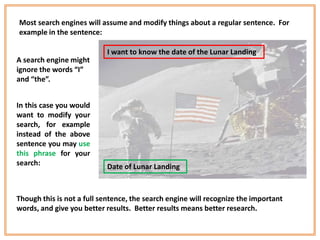
Most search engines will assume and modify things about a regular sentence. For
example in the sentence:

                           I want to know the date of the Lunar Landing
A search engine might
ignore the words “I”
and “the”.


In this case you would
want to modify your
search, for example
instead of the above
sentence you may use
this phrase for your
search:                    Date of Lunar Landing


Though this is not a full sentence, the search engine will recognize the important
words, and give you better results. Better results means better research.
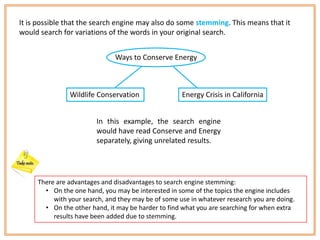
It is possible that the search engine may also do some stemming. This means that it
would search for variations of the words in your original search.


                              Ways to Conserve Energy


               Wildlife Conservation                 Energy Crisis in California


                        In this example, the search engine
                        would have read Conserve and Energy
                        separately, giving unrelated results.


     There are advantages and disadvantages to search engine stemming:
       • On the one hand, you may be interested in some of the topics the engine includes
          with your search, and they may be of some use in whatever research you are doing.
       • On the other hand, it may be harder to find what you are searching for when extra
          results have been added due to stemming.
If you want to avoid stemming, and unwanted results, there are
a couple of tricks to use.
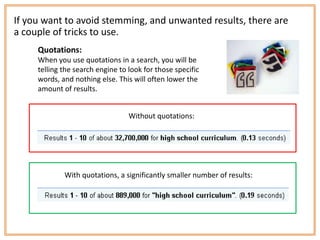
     Quotations:
     When you use quotations in a search, you will be
     telling the search engine to look for those specific
     words, and nothing else. This will often lower the
     amount of results.


                                  Without quotations:


             With quotations, a significantly smaller number of results:
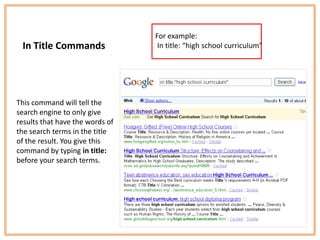
For example:
 In Title Commands                In title: “high school curriculum”


                                       :


This command will tell the
search engine to only give
results that have the words of
the search terms in the title
of the result. You give this
command by typing in title:
before your search terms.
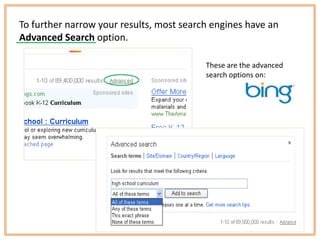
To further narrow your results, most search engines have an
Advanced Search option.

                                          These are the advanced
                                          search options on:
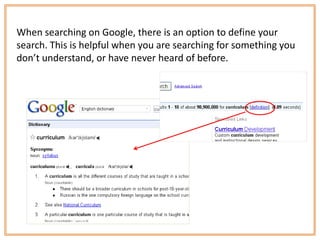
When searching on Google, there is an option to define your
search. This is helpful when you are searching for something you
don’t understand, or have never heard of before.
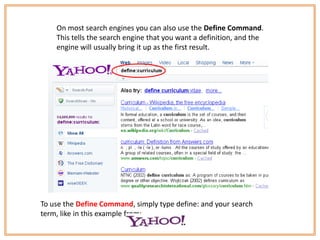
On most search engines you can also use the Define Command.
    This tells the search engine that you want a definition, and the
    engine will usually bring it up as the first result.


To use the Define Command, simply type define: and your search
term, like in this example from:
We’ve covered just a few of the tricks that can make a search
results more effective. Many search engines also offer things
like images, videos, maps, and more. It can be helpful to use
a variety of search engines, and search on them often to
understand the benefits each one has to offer.


       Now you can turn your searching into finding!

Search Engines

  • 1.
    Google Yahoo Ask BingExcite MSN Live Search Engines Search HotBot ChaCha Effective Searching Tips and Tricks for Dogpile Google Yahoo Ask Bing Excite Google
  • 2.
    About this Tutorial Students: Thistutorial will: • Teach you specific strategies for using search engines • Teach you how to cut out unnecessary searching It should take you about 20 minutes to complete. Faculty: This tutorial was made using Microsoft PowerPoint 2007. This tutorial will help students • Search effectively • Find more relevant results • Find more credible results This tutorial meets the following ACRL standards: 1.1d 1.4a 2.2d
  • 3.
    What to watchfor… Notes – These are to let you know there is important information you need to know about what is being covered.
  • 4.
    A search engineis an online tool that checks web pages for the search terms you enter into it. When it comes to search engines, there are many choices. There are a few different tips and tricks that will help get the desired results in all of them. This includes knowing the benefits of using certain search options and commands.
  • 5.
    Most search engineswill assume and modify things about a regular sentence. For example in the sentence: I want to know the date of the Lunar Landing A search engine might ignore the words “I” and “the”. In this case you would want to modify your search, for example instead of the above sentence you may use this phrase for your search: Date of Lunar Landing Though this is not a full sentence, the search engine will recognize the important words, and give you better results. Better results means better research.
  • 6.
    It is possiblethat the search engine may also do some stemming. This means that it would search for variations of the words in your original search. Ways to Conserve Energy Wildlife Conservation Energy Crisis in California In this example, the search engine would have read Conserve and Energy separately, giving unrelated results. There are advantages and disadvantages to search engine stemming: • On the one hand, you may be interested in some of the topics the engine includes with your search, and they may be of some use in whatever research you are doing. • On the other hand, it may be harder to find what you are searching for when extra results have been added due to stemming.
  • 7.
    If you wantto avoid stemming, and unwanted results, there are a couple of tricks to use. Quotations: When you use quotations in a search, you will be telling the search engine to look for those specific words, and nothing else. This will often lower the amount of results. Without quotations: With quotations, a significantly smaller number of results:
  • 8.
    For example: InTitle Commands In title: “high school curriculum” : This command will tell the search engine to only give results that have the words of the search terms in the title of the result. You give this command by typing in title: before your search terms.
  • 9.
    To further narrowyour results, most search engines have an Advanced Search option. These are the advanced search options on:
  • 10.
    When searching onGoogle, there is an option to define your search. This is helpful when you are searching for something you don’t understand, or have never heard of before.
  • 11.
    On most searchengines you can also use the Define Command. This tells the search engine that you want a definition, and the engine will usually bring it up as the first result. To use the Define Command, simply type define: and your search term, like in this example from:
  • 12.
    We’ve covered justa few of the tricks that can make a search results more effective. Many search engines also offer things like images, videos, maps, and more. It can be helpful to use a variety of search engines, and search on them often to understand the benefits each one has to offer. Now you can turn your searching into finding!