Quazi Zayed Bin Hasan
ID :- 162-15-7695
Section :- C
Student of CSE Department , DIU
Why use the Internet
*Search for a question
#Research a topic
*Current research
#Variety of sources, a click away
What other non-online resources?
#Encyclopedia, book, dictionary,
Atlas,World Almanac
Search Engines
#Collects copies of web pages from various
host servers
*Assembled into a data base
#Displayed according to relevancy and
rank
*Search engines use a program to search
and retrieve web sites; spiders/crawl the
web thru links
#Algorithm to determine rank; company
‘trade secret’
*Google, Ask Jeeves, AOL Search, AltaVista,
MSN Search
Internet Guides
*EBSCO host, librariesIndex or
directory of websites
*Classified by subject categories
*Organized by humans and not
computer programs/algorithms
*Yahoo, Librarian’s Internet Index
EBSCO host,libraries
Four Search Strategies
Keyword Searching
Boolean
Question
Advanced
Keyword Searching
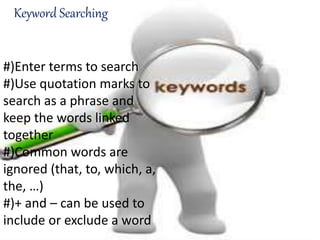
#)Enter terms to search
#)Use quotation marks to
search as a phrase and
keep the words linked
together
#)Common words are
ignored (that, to, which, a,
the, …)
#)+ and – can be used to
include or exclude a word
Susmita Karmakar
ID :- 162-15-7721
Section :- C
Student of CSE Department ,
DIU
Boolean Searching - AND
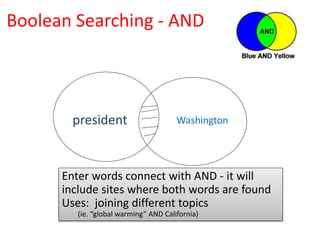
president Washington
Enter words connect with AND - it will
include sites where both words are found
Uses: joining different topics
(ie. “global warming” AND California)
Boolean Searching - OR
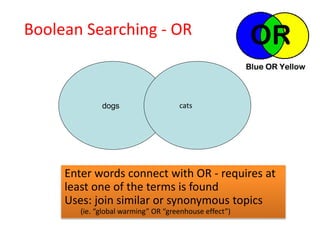
dogs cats
Enter words connect with OR - requires at
least one of the terms is found
Uses: join similar or synonymous topics
(ie. “global warming” OR “greenhouse effect”)
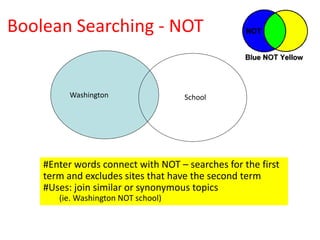
Boolean Searching - NOT
Washington School
#Enter words connect with NOT – searches for the first
term and excludes sites that have the second term
#Uses: join similar or synonymous topics
(ie. Washington NOT school)
Boolean – (Nesting) and Near
*In a string of searching, terms placed in
parentheses are searched first
*Parentheses must be used to group items if
there is another Boolean operator being
used
*NEAR may be used to require words to be
found within 16 words of each other in the
pages returned
Question Searching
• A question may be entered
in the search field of a
search engine.
• Ask Jeeves is a search
engine that encourages the
use of question searching
Advanced SearchingAdvanced Searching
#Advanced search features are
offered on many engines by going
to an “Advanced Search” page and
making selections
#This is effective in narrowing
search returns to a specific topic
or phrase
Google Advanced Search
Md. Sad Adnan
ID :- 162-15-7814
Section :- C
Student of CSE Department
DIU
Google Search Tolls
 Google also provides easy-to-use search tools. For
example:
 "Weather Chicago" yields the current weather in
Chicago
 "25 kilometers in miles" converts kilometers to miles
 "Define screen magnification" yields definitions for
screen magnification
 "Seafood restaurants 33716" yields restaurants that
serve seafood in or near that zip code
Keep It Simple
*Keep your search simple and web-
friendly. Start by entering one or two
words, and gradually adding relevant or
important words, if you’re unsatisfied
with the results. Less is more for a search
engine; meaning the less words you
query for, the more results the search
engine provides as output.
*For example:
*Query: [who is the president of america]
*Better query: [president of america]
#[word]
*Using the ‘#’ before a word
enables you to search for
hashtags in Google+, Twitter,
and more social networks.
*For example: [#privacy]
@[Social ID]
*You can search for social
accounts associated with a
person’s name by putting the
‘@’ sign before his/her name.
*Forexample: @[SadAdnanBa
ngladeshi]
 Search For Numbers In A Range
 You can tell Google to search within a range
of numbers, such as dates, prices, and
measurements. Using two periods (dots)
between two numbers makes Google search
within that number range and skip other
results.
 Using two periods after a number indicates a
lower minimum (number..) while putting it
before the number indicates a higher
maximum (..number). Type your search query
in the format of
[firstNumber..secondNumber otherWords] to
search between a specified lower and upper
bounds.
 For example:
 [android phone $300..$500]
 [television 20..50 inches]
Search Using File Types
*You can tell Google to search for a specified type of
file for your query. Usingfiletype operators before a
type of file tells Google to search only for specified
file types and skip other files. Type your search
query in the format of [filetype:type otherWords] to
search for a specific file type.
*For example: [filetype:pdf free photoshop books]
*:.pdf , :.docs , :.pptx , :.mp4 etc .
#You have learnt all the useful search
techniques to make better searches on the
web and have learnt all the tips and tricks to
get better and efficient search results. Now
you can save a lot more of your time and
resources.
Effective Internet Searching

Effective Internet Searching

  • 4.
    Quazi Zayed BinHasan ID :- 162-15-7695 Section :- C Student of CSE Department , DIU
  • 5.
    Why use theInternet *Search for a question #Research a topic *Current research #Variety of sources, a click away What other non-online resources? #Encyclopedia, book, dictionary, Atlas,World Almanac
  • 6.
    Search Engines #Collects copiesof web pages from various host servers *Assembled into a data base #Displayed according to relevancy and rank *Search engines use a program to search and retrieve web sites; spiders/crawl the web thru links #Algorithm to determine rank; company ‘trade secret’ *Google, Ask Jeeves, AOL Search, AltaVista, MSN Search
  • 7.
    Internet Guides *EBSCO host,librariesIndex or directory of websites *Classified by subject categories *Organized by humans and not computer programs/algorithms *Yahoo, Librarian’s Internet Index EBSCO host,libraries
  • 8.
    Four Search Strategies KeywordSearching Boolean Question Advanced
  • 9.
    Keyword Searching #)Enter termsto search #)Use quotation marks to search as a phrase and keep the words linked together #)Common words are ignored (that, to, which, a, the, …) #)+ and – can be used to include or exclude a word
  • 10.
    Susmita Karmakar ID :-162-15-7721 Section :- C Student of CSE Department , DIU
  • 11.
    Boolean Searching -AND president Washington Enter words connect with AND - it will include sites where both words are found Uses: joining different topics (ie. “global warming” AND California)
  • 12.
    Boolean Searching -OR dogs cats Enter words connect with OR - requires at least one of the terms is found Uses: join similar or synonymous topics (ie. “global warming” OR “greenhouse effect”)
  • 13.
    Boolean Searching -NOT Washington School #Enter words connect with NOT – searches for the first term and excludes sites that have the second term #Uses: join similar or synonymous topics (ie. Washington NOT school)
  • 14.
    Boolean – (Nesting)and Near *In a string of searching, terms placed in parentheses are searched first *Parentheses must be used to group items if there is another Boolean operator being used *NEAR may be used to require words to be found within 16 words of each other in the pages returned
  • 15.
    Question Searching • Aquestion may be entered in the search field of a search engine. • Ask Jeeves is a search engine that encourages the use of question searching
  • 16.
    Advanced SearchingAdvanced Searching #Advancedsearch features are offered on many engines by going to an “Advanced Search” page and making selections #This is effective in narrowing search returns to a specific topic or phrase Google Advanced Search
  • 17.
    Md. Sad Adnan ID:- 162-15-7814 Section :- C Student of CSE Department DIU
  • 18.
    Google Search Tolls Google also provides easy-to-use search tools. For example:  "Weather Chicago" yields the current weather in Chicago  "25 kilometers in miles" converts kilometers to miles  "Define screen magnification" yields definitions for screen magnification  "Seafood restaurants 33716" yields restaurants that serve seafood in or near that zip code
  • 19.
    Keep It Simple *Keepyour search simple and web- friendly. Start by entering one or two words, and gradually adding relevant or important words, if you’re unsatisfied with the results. Less is more for a search engine; meaning the less words you query for, the more results the search engine provides as output. *For example: *Query: [who is the president of america] *Better query: [president of america]
  • 20.
    #[word] *Using the ‘#’before a word enables you to search for hashtags in Google+, Twitter, and more social networks. *For example: [#privacy] @[Social ID] *You can search for social accounts associated with a person’s name by putting the ‘@’ sign before his/her name. *Forexample: @[SadAdnanBa ngladeshi]
  • 21.
     Search ForNumbers In A Range  You can tell Google to search within a range of numbers, such as dates, prices, and measurements. Using two periods (dots) between two numbers makes Google search within that number range and skip other results.  Using two periods after a number indicates a lower minimum (number..) while putting it before the number indicates a higher maximum (..number). Type your search query in the format of [firstNumber..secondNumber otherWords] to search between a specified lower and upper bounds.  For example:  [android phone $300..$500]  [television 20..50 inches]
  • 22.
    Search Using FileTypes *You can tell Google to search for a specified type of file for your query. Usingfiletype operators before a type of file tells Google to search only for specified file types and skip other files. Type your search query in the format of [filetype:type otherWords] to search for a specific file type. *For example: [filetype:pdf free photoshop books] *:.pdf , :.docs , :.pptx , :.mp4 etc .
  • 23.
    #You have learntall the useful search techniques to make better searches on the web and have learnt all the tips and tricks to get better and efficient search results. Now you can save a lot more of your time and resources.