Using Internet Technology for LearningFiona MacCool, CLEONet Project Managerwww.cleonet.caPresentation forClinic New Caseworkers Brainstorming SessionLaw Society of Upper CanadaFriday November 27, 2009
What I plan to cover…Strategic QuestionsOnline coursesWebinarsCollaborative web publishingSocial NetworkingQ & A
Visioning	Start by thinking of the three main things any online project can do:Provide information - What information/knowledge do we want to provide and how can we best provide it? (in-person &/or online)Gather information - What information could our organization(s) get from “learners”, from each other, that would help in our work?Work together online - For what purpose? With whom? What will NOT translate well online?
Strategic Questions to AskWhat learning goals are we trying to accomplish?
How could working online help achieve these goals?
Who will be involved in the work of developing and maintaining the learning materials and how can this be shared?
What are the unique characteristics of the intended audience? (technical, work-flow, learning styles)
What resources are already out there that we can link to or work with? (hint …CLEONet)
What would “success” look like for this project?Considerations in Choosing a ToolWill learning environments or tools be centralized or distributed?Will this be a resource that people access during specific work hours or on their own flexible schedules?Are you hoping to develop the kind of learning materials that can be “self-directed” or is facilitation/instruction required?How important is a one-on-one experience or personalized access to mentors/instructors or other learners?Is it important to be able to create new modules, courses or webinars on an ongoing basis? Will this need to be done by  “non-technical” people?How much reliance should there be on collaborative, ongoing content creation?How can mentorship and social networking connect us as a system of learners?
Example 1: Online Courses    Self-directed – Usually involves a series of facilitated modules and can end in a certificate of completion. Instructor(s) may offer “office hours” at various times and peers may help one another as well. Although there may be integrated live chat technology, generally the learning is asynchronous (not “live”) and can be accessed over an extended period of time to registered subscribers.
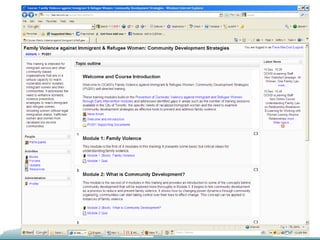
Specific Examples     Settlement.org - Family Violence against Immigrant & Refugee Women: Community Development Strategies – Using Moodle, this training is intended for immigrant service and other community-based organizations that are in a unique capacity to reach vulnerable and/or isolated immigrant women and their communities. It addresses the need to enhance domestic violence prevention strategies to reach immigrant and refugee women, including women without legal immigration status, trafficked women and women from racialized low-income communities. There are 4 modules, quizzes, a discussion forum and an evaluation survey.
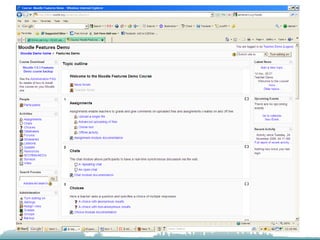
More about MoodleWhat is Moodle? (taken from Moodle.org)	Moodle is an Open Source Course Management System (CMS), also known as a Learning Management System (LMS) or a Virtual Learning Environment (VLE). It has become very popular among educators around the world as a tool for creating online dynamic web sites for their students. To work, it needs to be installed on a web server somewhere, either on one of your own computers or one at a web hosting company.       Many institutions use it as their platform to conduct fully online courses, while some use it simply to augment face-to-face courses (known as blended learning).It allows for a range of activity modules (such as Forums, Wikis, Databases and so on) to build richly collaborative communities of learning around their subject matter. Others prefer to use Moodle as a way to deliver content to students and assess learning using assignments or quizzes.Visit the Demonstration site (Teacher - username teacher, password demo)
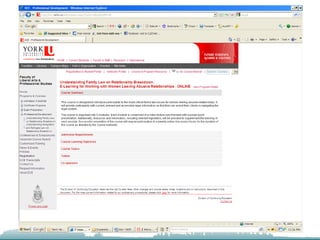
Other Online Course Examples      Springtide Resources & York University - E-Learning for Working with Women Leaving Abusive RelationshipsThis series of courses is designed to introduce participants to the most critical family, immigration and refugee law issues for women leaving abusive relationships. They will provide participants with current, relevant and accessible legal information so that they can assist their clients in navigating the legal system. This professional development package will be invaluable to those who provide services to women who may disclose abuse.        FORMAT: Each module is comprised of a video lecture with accompanying power-point presentation. Additionally, resources and information, including relevant legislation, will be provided to supplement the learning of each module. Successful completion of the course will require participation in a weekly online discussion forum for the duration of the course as directed by the course instructor. For more information see: http://springtideresources.net/events/news_show.cfm?id=78 
Example 2: Webinars  “Live” events that use the Internet to place people in a meeting together using the web, live chat, streamed video, desktop sharing and in some cases the telephone. Can be tied to an in-person live event such as a conference. Webinars can also be recorded and archived and made available as Podcasts or DVDs.
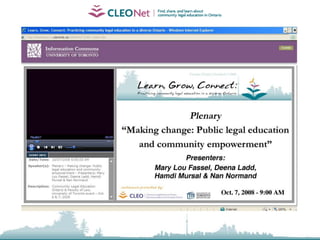
Webcasting    In October 2008 CLEO partnered with the Centre for the Legal Profession, University of Toronto Faculty of Law to host the Learn, Grow, Connect Conference. Participants shared information, learned from experts, and took steps towards building a practice of community legal education. A number of sessions were recorded as webcasts.http://www.cleonet.ca/conference/
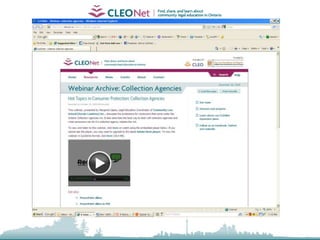
CLEONet Legal Information Webinars    CLEONet is partnering with community organizations to deliver workshops about legal issues online. They are delivered through a telephone conference call integrated with a web meeting that lets participants hear the presentation, look at Power Point slides, browse web sites together, and ask questions using live chat. We also record these webinars so that they can be accessed on CLEONet on an ongoing basis. See: www.cleonet.ca/legal_education_webinars
What you need to participateAs a presenterA presentation that you have developed that you would like to adapt to a webinarPresentation slides (Power Point) that can be inserted into web meeting so that participants can have visualsAn audience to invite A willingness to test, experiment and learn as you goAs a participantA phone (toll free number is provided) An Internet-connected computer with a sound card and speakers and/or headphonesAn e-mail account to receive invitations and log in instructions
Webinar FeaturesSharing Power Point slidesLive ChatIntegrated Telephone conference callLetting users “see” your desktopGranting control of your desktopGreat tool for online meetings/training or interactive Q&A Low-cost tool for producing video-based information in other languages Can be produced as a Podcasts, Uploaded to YouTube, or embedded in social networking sitesSome webinar tools feature video conferencing via webcams and computer microphones. Others allow for VoIP integration (Skype)
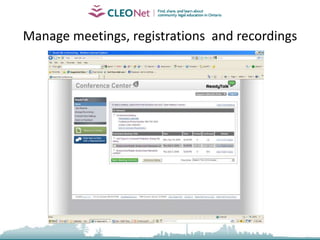
Manage meetings, registrations  and recordings
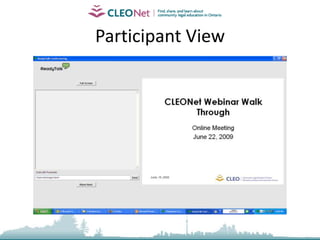
Participant View
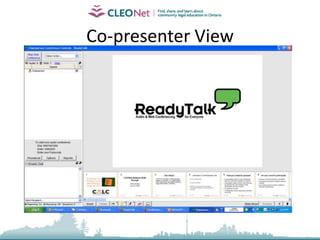
Co-presenter View
Best Practices to ConsiderGear material toward the intended audience Length – Our attention span online and on a conference call is shorter than for in-person eventVisuals – Audiences need to follow along as they listenWhat supports will people need to join in?Online facilitation can be challenging – Like hosting a dinner party in the darkRemember to pause – Try to draw out the audience with questionsHave a co-presenter help you take questions from users, provide you with the feedback for follow-upProvide opportunities for evaluation afterward
Example 3: Collaborative Web Publishing   Use of content management system (CMS) tools such as blogs or Wikis to allow people to collaboratively publish and maintain a web site of information that is subject to continuous change. This would be worth considering if we were to create a learning web site for the clinic system.
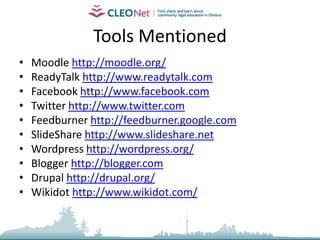
Content Management Systems    A content management system (CMS) is a system used to manage the content of a Web site. Content management systems are deployed primarily for interactive use by a potentially large number of contributors. For example, the software for the website Wikipedia is based on a wiki, which is a particular type of content management system. The OPICCO site uses Drupal. ISAC uses Wordpress for the Social Assistance Review site. The SAGE site uses Sharepoint.
Specific Examples: Blogs        Blog is short for weblog. A weblog is a journal (or newsletter) that is frequently updated. A number of terrific free blog tools are available and can be used to produce an entire web site that is easy to use and update. Blogs can also be entirely password-protected allowing them to be used for online learning in closed environments. They also integrate well with RSS and Web 2.0 “Widgets”.An example of a social justice web site that uses a WordPress CMS is 25-in-5: Network for Poverty Reduction a multi-sectoral network comprised of more than 100 provincial and Toronto-based organizations and individuals working on eliminating poverty at:   http://25in5.ca. A research blog with a focus on public legal education is CLEONet Expansion http://consult.cleonet.ca - created to support CLEO’s research into the development of a centralized legal information web site for Ontario. This blog is created using Wordpress.The Provincial Learning Community on Knowledge Management and Transfer (KMT) has created a project web site using Drupal to help them develop ways to identify, share, and encourage the creation of knowledge within and among community legal clinics, Legal Aid Ontario (LAO) and other collaborators. http://kmt.agentic.ca/
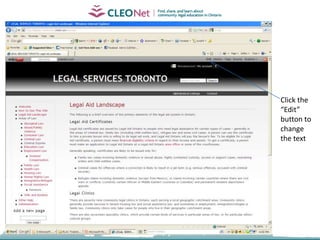
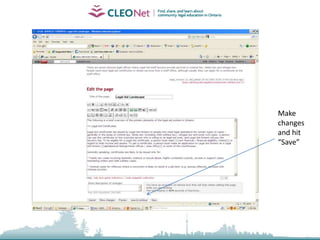
Specific Examples: WikisWhat is Legal Services Toronto? This Wiki is a referral guide to the various types of legal services in Toronto, designed for the use of service providers. It was created by the Toronto Legal Clinics Management Group to enhance the quality and efficiency of client services, and to increase collaboration and co-ordination between various kinds of legal services. Our purpose is to provide an integrated database of information about a comprehensive range of public and private legal services, covering the spectrum from full representation through to summary advice and self-help materials. It is organized with the idea that while each service provider represents a different entry point to the legal aid system, the Wiki gives us all access to a common source of up-to-date information to use in serving our clients and promoting social justice. http://legalservicestoronto.wikidot.com/
Click the “Edit” button to change the text
Make changes and hit “Save”
Example 4: Social Media    Social Media is people using tools (like blogs & video) and sites (like Facebook & Twitter) to share content and have conversations online. How can the clinic system use social media tools to create simple peer-to-peer and org-to-org opportunities to share relevant research, news, PLE, CD initiatives etc?
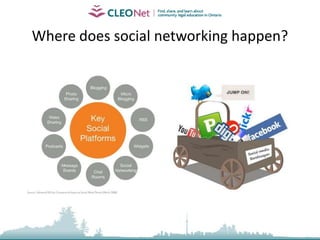
Where does social networking happen?
Why should clinics work with Social Media?Because the statistics on its usage are staggering and growing  Because it is cheap and easy (even for non-techies) Because it is designed to be transparent and user-centered and it encourages dialogue and actionBecause it allows information to move so quickly Because it gives us other places to be heard but also new places to listen
Getting Started with Social MediaJoin and participate in existing social networks (Twitter, Facebook, LinkedIn) – It’s more than just a way to waste time… 8>)Experiment with free tools that help you manage all of this new information (Tweetdeck, Twitter lists, iGoogle Homepage) Figure out what content you have to contribute and find a tool/way to get it online easily (Start a blog, set up your web site so you can publish more easily or just use Twitter/Facebook) Promote your message/information on social networking sites and allow users to share your content through their networks Create campaigns and integrate your messages across traditional outreach and social media
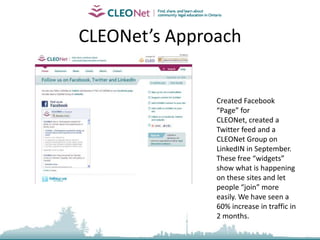
CLEONet’s ApproachCreated Facebook “Page” for CLEONet, created a Twitter feed and a CLEONet Group on LinkedIN in September. These free “widgets” show what is happening on these sites and let people “join” more easily. We have seen a 60% increase in traffic in 2 months.
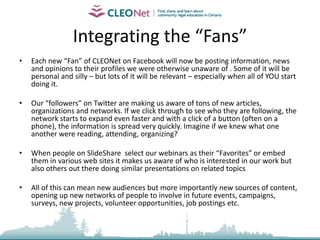
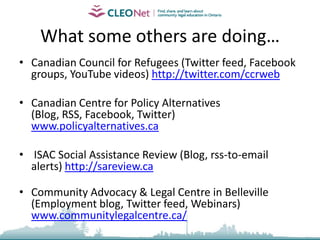
Integrating the Tools“AddThis” makes it easy for CLEONet visitors to add our content to their pagesWe have RSS feeds across our site that allow people to add our new content to their web sites, their iGoogle Home page or get an e-mail of the latest CLEONet postingsWhen we schedule a webinar we promote it on Facebook and Twitter and we post the PowerPoint slides to SlideShare to help spread the word When we have a new piece of content – we add it to CLEONet and then post it to Facebook. The Facebook CLEONet Group automatically updates the CLEONet Twitter Feed and (through RSS) our page on LinkedIn – 3 Networks from  1 posting - Less work for us! A Consultation blog I created for CLEONet is automatically updated in my LinkedIn profile (www.consult.cleonet.ca) and features the CLEONet RSS Feed and the CLEONet Twitter feed

Using Internet Technology for Learning

  • 1.
    Using Internet Technologyfor LearningFiona MacCool, CLEONet Project Managerwww.cleonet.caPresentation forClinic New Caseworkers Brainstorming SessionLaw Society of Upper CanadaFriday November 27, 2009
  • 2.
    What I planto cover…Strategic QuestionsOnline coursesWebinarsCollaborative web publishingSocial NetworkingQ & A
  • 3.
    Visioning Start by thinkingof the three main things any online project can do:Provide information - What information/knowledge do we want to provide and how can we best provide it? (in-person &/or online)Gather information - What information could our organization(s) get from “learners”, from each other, that would help in our work?Work together online - For what purpose? With whom? What will NOT translate well online?
  • 4.
    Strategic Questions toAskWhat learning goals are we trying to accomplish?
  • 5.
    How could workingonline help achieve these goals?
  • 6.
    Who will beinvolved in the work of developing and maintaining the learning materials and how can this be shared?
  • 7.
    What are theunique characteristics of the intended audience? (technical, work-flow, learning styles)
  • 8.
    What resources arealready out there that we can link to or work with? (hint …CLEONet)
  • 9.
    What would “success”look like for this project?Considerations in Choosing a ToolWill learning environments or tools be centralized or distributed?Will this be a resource that people access during specific work hours or on their own flexible schedules?Are you hoping to develop the kind of learning materials that can be “self-directed” or is facilitation/instruction required?How important is a one-on-one experience or personalized access to mentors/instructors or other learners?Is it important to be able to create new modules, courses or webinars on an ongoing basis? Will this need to be done by “non-technical” people?How much reliance should there be on collaborative, ongoing content creation?How can mentorship and social networking connect us as a system of learners?
  • 10.
    Example 1: OnlineCourses Self-directed – Usually involves a series of facilitated modules and can end in a certificate of completion. Instructor(s) may offer “office hours” at various times and peers may help one another as well. Although there may be integrated live chat technology, generally the learning is asynchronous (not “live”) and can be accessed over an extended period of time to registered subscribers.
  • 11.
    Specific Examples Settlement.org - Family Violence against Immigrant & Refugee Women: Community Development Strategies – Using Moodle, this training is intended for immigrant service and other community-based organizations that are in a unique capacity to reach vulnerable and/or isolated immigrant women and their communities. It addresses the need to enhance domestic violence prevention strategies to reach immigrant and refugee women, including women without legal immigration status, trafficked women and women from racialized low-income communities. There are 4 modules, quizzes, a discussion forum and an evaluation survey.
  • 13.
    More about MoodleWhatis Moodle? (taken from Moodle.org) Moodle is an Open Source Course Management System (CMS), also known as a Learning Management System (LMS) or a Virtual Learning Environment (VLE). It has become very popular among educators around the world as a tool for creating online dynamic web sites for their students. To work, it needs to be installed on a web server somewhere, either on one of your own computers or one at a web hosting company. Many institutions use it as their platform to conduct fully online courses, while some use it simply to augment face-to-face courses (known as blended learning).It allows for a range of activity modules (such as Forums, Wikis, Databases and so on) to build richly collaborative communities of learning around their subject matter. Others prefer to use Moodle as a way to deliver content to students and assess learning using assignments or quizzes.Visit the Demonstration site (Teacher - username teacher, password demo)
  • 15.
    Other Online CourseExamples Springtide Resources & York University - E-Learning for Working with Women Leaving Abusive RelationshipsThis series of courses is designed to introduce participants to the most critical family, immigration and refugee law issues for women leaving abusive relationships. They will provide participants with current, relevant and accessible legal information so that they can assist their clients in navigating the legal system. This professional development package will be invaluable to those who provide services to women who may disclose abuse.  FORMAT: Each module is comprised of a video lecture with accompanying power-point presentation. Additionally, resources and information, including relevant legislation, will be provided to supplement the learning of each module. Successful completion of the course will require participation in a weekly online discussion forum for the duration of the course as directed by the course instructor. For more information see: http://springtideresources.net/events/news_show.cfm?id=78 
  • 17.
    Example 2: Webinars “Live” events that use the Internet to place people in a meeting together using the web, live chat, streamed video, desktop sharing and in some cases the telephone. Can be tied to an in-person live event such as a conference. Webinars can also be recorded and archived and made available as Podcasts or DVDs.
  • 18.
    Webcasting In October 2008 CLEO partnered with the Centre for the Legal Profession, University of Toronto Faculty of Law to host the Learn, Grow, Connect Conference. Participants shared information, learned from experts, and took steps towards building a practice of community legal education. A number of sessions were recorded as webcasts.http://www.cleonet.ca/conference/
  • 20.
    CLEONet Legal InformationWebinars CLEONet is partnering with community organizations to deliver workshops about legal issues online. They are delivered through a telephone conference call integrated with a web meeting that lets participants hear the presentation, look at Power Point slides, browse web sites together, and ask questions using live chat. We also record these webinars so that they can be accessed on CLEONet on an ongoing basis. See: www.cleonet.ca/legal_education_webinars
  • 21.
    What you needto participateAs a presenterA presentation that you have developed that you would like to adapt to a webinarPresentation slides (Power Point) that can be inserted into web meeting so that participants can have visualsAn audience to invite A willingness to test, experiment and learn as you goAs a participantA phone (toll free number is provided) An Internet-connected computer with a sound card and speakers and/or headphonesAn e-mail account to receive invitations and log in instructions
  • 22.
    Webinar FeaturesSharing PowerPoint slidesLive ChatIntegrated Telephone conference callLetting users “see” your desktopGranting control of your desktopGreat tool for online meetings/training or interactive Q&A Low-cost tool for producing video-based information in other languages Can be produced as a Podcasts, Uploaded to YouTube, or embedded in social networking sitesSome webinar tools feature video conferencing via webcams and computer microphones. Others allow for VoIP integration (Skype)
  • 23.
  • 24.
  • 25.
  • 27.
    Best Practices toConsiderGear material toward the intended audience Length – Our attention span online and on a conference call is shorter than for in-person eventVisuals – Audiences need to follow along as they listenWhat supports will people need to join in?Online facilitation can be challenging – Like hosting a dinner party in the darkRemember to pause – Try to draw out the audience with questionsHave a co-presenter help you take questions from users, provide you with the feedback for follow-upProvide opportunities for evaluation afterward
  • 28.
    Example 3: CollaborativeWeb Publishing Use of content management system (CMS) tools such as blogs or Wikis to allow people to collaboratively publish and maintain a web site of information that is subject to continuous change. This would be worth considering if we were to create a learning web site for the clinic system.
  • 29.
    Content Management Systems A content management system (CMS) is a system used to manage the content of a Web site. Content management systems are deployed primarily for interactive use by a potentially large number of contributors. For example, the software for the website Wikipedia is based on a wiki, which is a particular type of content management system. The OPICCO site uses Drupal. ISAC uses Wordpress for the Social Assistance Review site. The SAGE site uses Sharepoint.
  • 30.
    Specific Examples: Blogs Blog is short for weblog. A weblog is a journal (or newsletter) that is frequently updated. A number of terrific free blog tools are available and can be used to produce an entire web site that is easy to use and update. Blogs can also be entirely password-protected allowing them to be used for online learning in closed environments. They also integrate well with RSS and Web 2.0 “Widgets”.An example of a social justice web site that uses a WordPress CMS is 25-in-5: Network for Poverty Reduction a multi-sectoral network comprised of more than 100 provincial and Toronto-based organizations and individuals working on eliminating poverty at: http://25in5.ca. A research blog with a focus on public legal education is CLEONet Expansion http://consult.cleonet.ca - created to support CLEO’s research into the development of a centralized legal information web site for Ontario. This blog is created using Wordpress.The Provincial Learning Community on Knowledge Management and Transfer (KMT) has created a project web site using Drupal to help them develop ways to identify, share, and encourage the creation of knowledge within and among community legal clinics, Legal Aid Ontario (LAO) and other collaborators. http://kmt.agentic.ca/
  • 31.
    Specific Examples: WikisWhatis Legal Services Toronto? This Wiki is a referral guide to the various types of legal services in Toronto, designed for the use of service providers. It was created by the Toronto Legal Clinics Management Group to enhance the quality and efficiency of client services, and to increase collaboration and co-ordination between various kinds of legal services. Our purpose is to provide an integrated database of information about a comprehensive range of public and private legal services, covering the spectrum from full representation through to summary advice and self-help materials. It is organized with the idea that while each service provider represents a different entry point to the legal aid system, the Wiki gives us all access to a common source of up-to-date information to use in serving our clients and promoting social justice. http://legalservicestoronto.wikidot.com/
  • 32.
    Click the “Edit”button to change the text
  • 33.
    Make changes andhit “Save”
  • 34.
    Example 4: SocialMedia Social Media is people using tools (like blogs & video) and sites (like Facebook & Twitter) to share content and have conversations online. How can the clinic system use social media tools to create simple peer-to-peer and org-to-org opportunities to share relevant research, news, PLE, CD initiatives etc?
  • 35.
    Where does socialnetworking happen?
  • 36.
    Why should clinicswork with Social Media?Because the statistics on its usage are staggering and growing Because it is cheap and easy (even for non-techies) Because it is designed to be transparent and user-centered and it encourages dialogue and actionBecause it allows information to move so quickly Because it gives us other places to be heard but also new places to listen
  • 37.
    Getting Started withSocial MediaJoin and participate in existing social networks (Twitter, Facebook, LinkedIn) – It’s more than just a way to waste time… 8>)Experiment with free tools that help you manage all of this new information (Tweetdeck, Twitter lists, iGoogle Homepage) Figure out what content you have to contribute and find a tool/way to get it online easily (Start a blog, set up your web site so you can publish more easily or just use Twitter/Facebook) Promote your message/information on social networking sites and allow users to share your content through their networks Create campaigns and integrate your messages across traditional outreach and social media
  • 38.
    CLEONet’s ApproachCreated Facebook“Page” for CLEONet, created a Twitter feed and a CLEONet Group on LinkedIN in September. These free “widgets” show what is happening on these sites and let people “join” more easily. We have seen a 60% increase in traffic in 2 months.
  • 39.
    Integrating the Tools“AddThis”makes it easy for CLEONet visitors to add our content to their pagesWe have RSS feeds across our site that allow people to add our new content to their web sites, their iGoogle Home page or get an e-mail of the latest CLEONet postingsWhen we schedule a webinar we promote it on Facebook and Twitter and we post the PowerPoint slides to SlideShare to help spread the word When we have a new piece of content – we add it to CLEONet and then post it to Facebook. The Facebook CLEONet Group automatically updates the CLEONet Twitter Feed and (through RSS) our page on LinkedIn – 3 Networks from 1 posting - Less work for us! A Consultation blog I created for CLEONet is automatically updated in my LinkedIn profile (www.consult.cleonet.ca) and features the CLEONet RSS Feed and the CLEONet Twitter feed