User-centered iPhone app
design

Suzanne Ginsburg
Principal, Ginsburg Design
September 10, 2009
People are doing cool things with
their iPhones

Three storiesโ€ฆ.
The gallery salesperson
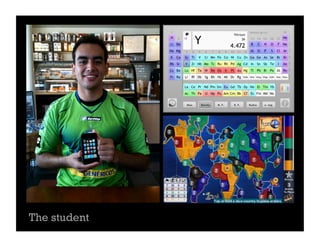
The student
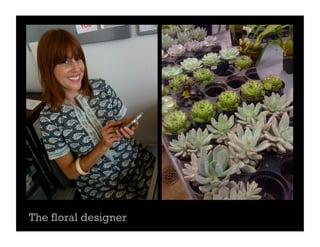
The floral designer
People     their iPhones but some
things could be betterโ€ฆ
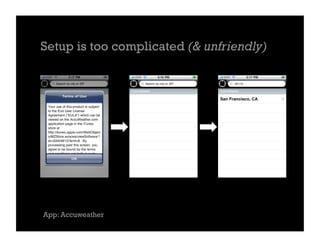
Setup is too complicated (& unfriendly)


App: Accuweather
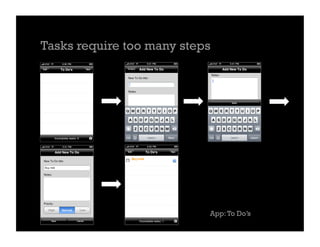
Tasks require too many steps


                           App: To Doโ€™s
Inconsistent and/or Unable to Synch
with Desktop or Web version


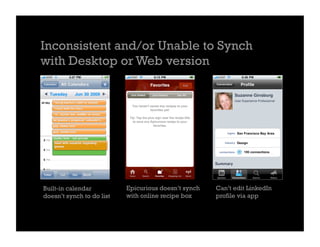
Built-in calendar          Epicurious doesnโ€™t synch   Canโ€™t edit LinkedIn
doesnโ€™t synch to do list   with online recipe box     profile via app
Other common themes

Tasks require too much typing
App doesnโ€™t remember where user left off
No content for given location
What can you do?
#1: Conduct upfront user research
Upfront user research will help you better understand
your usersโ€™ needs.

Research will help you make informed design
decisions; you may also uncover fascinating app
opportunities.

Methods to consider:
Shadowing, Field Interviews, Diary Studies
#2: Brainstorm & sketch like mad
Explore a wide variety of design directions early
on.

Read Appleโ€™s Human Interface Guidelines for the
iPhone, but try to see beyond the basic
frameworks.

Learn whatโ€™s possible with the iPhone technology
and consider ways it can benefit the user
experience.
#3: Refine & Test Promising Directions
Usability testing your concepts will help uncover
issues related to setup, flows, terminology & more.

Alternative approaches:
- Paper prototypes
- Screenshot based prototype on the iPhone
- Interactive prototype on the iPhone
Thank you & good luck!

Suzanne Ginsburg
@suzanneginsburg


Also thanks to Michelle Reamy for her user
research work in NY:
michelle@michellereamy.com

iPhone App Design: A user-centered approach

  • 1.
    User-centered iPhone app design SuzanneGinsburg Principal, Ginsburg Design September 10, 2009
  • 2.
    People are doingcool things with their iPhones Three storiesโ€ฆ.
  • 3.
  • 4.
  • 5.
  • 6.
    People their iPhones but some things could be betterโ€ฆ
  • 7.
    Setup is toocomplicated (& unfriendly) App: Accuweather
  • 8.
    Tasks require toomany steps App: To Doโ€™s
  • 9.
    Inconsistent and/or Unableto Synch with Desktop or Web version Built-in calendar Epicurious doesnโ€™t synch Canโ€™t edit LinkedIn doesnโ€™t synch to do list with online recipe box profile via app
  • 10.
    Other common themes Tasksrequire too much typing App doesnโ€™t remember where user left off No content for given location
  • 11.
  • 12.
    #1: Conduct upfrontuser research Upfront user research will help you better understand your usersโ€™ needs. Research will help you make informed design decisions; you may also uncover fascinating app opportunities. Methods to consider: Shadowing, Field Interviews, Diary Studies
  • 13.
    #2: Brainstorm &sketch like mad Explore a wide variety of design directions early on. Read Appleโ€™s Human Interface Guidelines for the iPhone, but try to see beyond the basic frameworks. Learn whatโ€™s possible with the iPhone technology and consider ways it can benefit the user experience.
  • 14.
    #3: Refine &Test Promising Directions Usability testing your concepts will help uncover issues related to setup, flows, terminology & more. Alternative approaches: - Paper prototypes - Screenshot based prototype on the iPhone - Interactive prototype on the iPhone
  • 15.
    Thank you &good luck! Suzanne Ginsburg @suzanneginsburg Also thanks to Michelle Reamy for her user research work in NY: michelle@michellereamy.com

Editor's Notes

  • #3ย These stories are based on user research conducted in the fall of 2009 by Ginsburg Design and Reamy Research & Design. Diary studies were combined with field interviews with 12 participants in New York and The Bay Area.
  • #4ย This participant used to have a laptop (iMac) and a mobile phone. When her laptop broke she was torn between replacing the laptop and getting an iPhone. In the end she decided to get an iPhone since she has access to a desktop computer at work. In these photos, you can see a variety of ways that she uses the iPhone at workโ€”to take pictures of framed photos to send to clients and to check if paintings are level. Other apps she likes to use at work include converter and translation apps.
  • #5ย This participant is a sophmore majoring in Chemistry. While heโ€™s very busy with school, he also holds two part-time jobs: one at a hotel, another as a private gymnastics instructor. From the minute he wakes up, he uses his iPhoneโ€”itโ€™s his alarm clock! Sometimes heโ€™ll lay in bed for a little while as he checks email, the weather, his calendar. On the way to school, heโ€™ll use other apps for checking the various bus and trains schedule. At school, he uses a variety of apps, e.g., the periodic table (above), graphing calculators, and a whiteboard app for collaboration.
  • #6ย This participant mostly uses the built-in apps on the iPhoneโ€”the calendar, email, photos, camera. When she goes to the flower market, sheโ€™ll use the Notes application to run through the list of flowers she needs to buy. She often takes photos of plants and flowers to send to clients. Even though the quality isnโ€™t the best, itโ€™s โ€œgood enoughโ€ as a communication tool. Sheโ€™ll use her SLR or hire a professional photographer if she needs something of higher quality.
  • #8ย Participants often cited issues with setting up and/or registering for iPhone apps. For example, this Accuweather app takes 3 steps before you even see any weather. Having the โ€œTerms of Useโ€ upfront is far from welcoming for first time users. Two participants said they really wanted to use this app, but gave up since it was too complicated to get started. They ultimately deleted the app from their phones.
  • #9ย Participants also cited simple tasks taking much longer than they expected. For example, adding a to do item for the app above takes 5 steps. In contrast, the built-in Notes app takes just one step.
  • #10ย Participants expected apps to behave a certain way based on their experiences with a desktop or web application. This is not to say that iPhone apps should work exactly like their desktop or web counterparts, but itโ€™s problematic when the differences create additional work or dead ends for users. For example, the built-in calendar doesnโ€™t synch to do items on the phone, thus the participant (first image) added the items as all day events.