iPhone App
from concept to product
Tips & Tools to get the job done


               Joey Simhon (@joeysim)
              CTO and Co-Founder DoAT
Hello World

Growing Internet babies since 2000
Growing real ones since 2008
Passionate about engineering and the culture around it
Owned and managed a few businesses
Built and architected a few products
Bottom line - I must be a Persistent fella
I got a confession to make
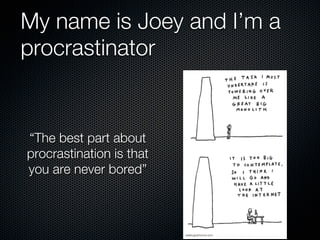
My name is Joey and I’m a
procrastinator


“The best part about
procrastination is that
you are never bored”
Procrastination = Tools

 I call it productive procrastination (an oxymoron)
 I love finding new tools that solve real problems (which
 I don’t necessarily have)
 I’ll do my best to share the right tools to achieve what
 you want, quickly and without re-inventing the wheel
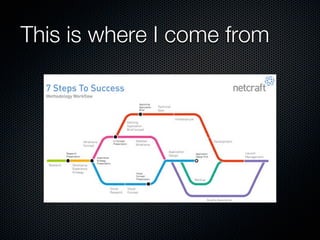
This is where I come from
This is what we’ll discuss


 Concept > Design > Develop > Beta > Release
Concept
The Erasable Marker

    When you start with your first concept, try and envision
    the core UI element of the product you’re try to build
    Jot down how it looks & behaves.
    Verify technical implementation boundaries (and be
    sure to break some :) )

    DoAT - Swiping between live apps


Concept
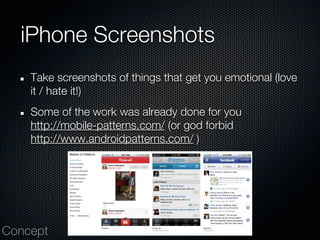
iPhone Screenshots
    Take screenshots of things that get you emotional (love
    it / hate it!)
    Some of the work was already done for you
    http://mobile-patterns.com/ (or god forbid
    http://www.androidpatterns.com/ )


Concept
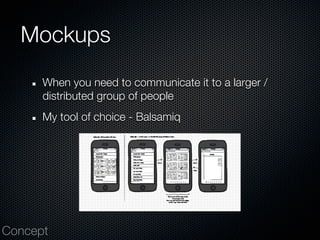
Mockups
      When you need to communicate it to a larger /
      distributed group of people
      My tool of choice - Balsamiq


Concept
Design
Photoshop

    I’ll settle for paint / gimp / Paint.net for that matter
    PSD to use - http://www.teehanlax.com/blog/
    iphone-4-gui-psd-retina-display/
    Design for x2 (Retina)
    Ziv Meltzer wrote a post ‘bout it
    http://blog.zivmeltzer.com/post/3628811523/tips-the-
    design-process-for-ios-apps


Design
Your Hand
    Reviewing a design on large screens is a NO GO.
    Do it on your PHONE.
    Easy solution - Send by email and save image to album
    Tool - Liveview (for Mac)
    http://zambetti.com/projects/liveview/


Design
Don’t forget to RTFM


    Apple’s UI Guidelines is something you’d want to know
    by heart when designing
    http://developer.apple.com/library/ios/#documentation/
    UserExperience/Conceptual/MobileHIG/Introduction/
    Introduction.html


Design
Develop
API and Server Logic
    Design your API early
    Use static responses while you do
    Try and keep as much logic on server’s end - easier
    maintenance and cross platform future
    If you work in a distributed manner - document your
    API, you’ll move faster
    We created Gondor for this
    (coming to Apache’s near you soon. NGINXs too)

Develop
Create multiple targets
    Will allow you to have your team install several versions
    Will allow you to stage new server APIs as well
    Will reduce the clutter and keep your logs / analytics
    coherent
    Create separate DefaultProperties.plist for each target
    Do yourself a favor and use git
    (Didn’t know wherelse to put it so...)


Develop
No such thing as alpha

    Not always accurate (managed to prove it once... sorta)
    But you will definitely find yourself with “legacy” POC
    code running in production
    Try and draw the line between experiments and THE
    product
    Don’t refactor before you’ve hit the ceiling but when
    you have to - do it like mad


Develop
Incorporate URL Schemes
    This is the link of the app era
    Allows you be to be accessed in context?
    Be sure to communicate it externally so others can use
    it.
    Some examples -
    instagram://camera - launches their camera
    lastfm://artist/Cher/similar - Cher similar artist radio
    lastfm://globaltags/rock - Plays rock global tag radio
    More examples - http://handleopenurl.com/scheme
Develop
Push notification

    Make sure to at least enable basic
    (default behavior is launching the app on swipe / View
    button)
    Urbanairship is a good starting point
    http://urbanairship.com
    Deep links are an important addition, you can respond
    to launches from push messages


Develop
Metrics Driven Approach

      Try and collect as many events and params as
      possible cause you never know what question
      comes up about user’s behavior
      Tools - Flurry, Localytics, Google Analytics, Home
      brew. Most will do event name + KV params
      We use Flurry - has some disadvantages
      The matrix is
      update time | events support | user segmentation |
      reporting
Develop
Understand iOS Simulator

    There’s an inherent problem with it - it’s too darn fast
    and has too much juice
    Sometimes has weird issues
    You don’t hold it in your hand
    Good for coverage testing with different SDKs (e.g.
    autoplay video on iOS 4.3.x)


Develop
Beta
Provisioning Beta Versions
       You’ll start with IPAs sent by email
       Supporting this is hell (“Yes, drag it to your iTunes, oh
       you don’t have it.... blah blah blah”)
       You can try using BetaBuilder
       http://www.hanchorllc.com/betabuilder-for-ios/
       TestFlight is our weapon of choice
       http://testflightapp.com
       There’s also HockeyKit (open source too)
       http://hockeykit.net/
Beta
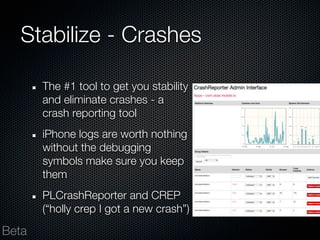
Stabilize - Crashes

       The #1 tool to get you stability
       and eliminate crashes - a
       crash reporting tool
       iPhone logs are worth nothing
       without the debugging
       symbols make sure you keep
       them
       PLCrashReporter and CREP
       (“holly crep I got a new crash”)

Beta
Stabilize #2 - Memory


       Static code analysis - 80/20 rule applies here
       XCode Instrumentation tools - memory is the thing
       you’d worry ‘bout most of the time


Beta
App Store
Text is all you got

    Think about what you want to write
    Competition texts is sometimes a good starting point
    Autocomplete is one you’ll surface
    Search results is the other
    They are scored differently


Release
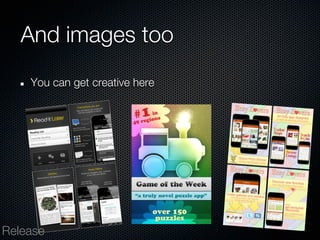
And images too
    You can get creative here


Release
Take your time

    Submit when you ready
    Reject binary if things get messy
    App approval took ~7 days
    App updates took 1-5 days
    Tool - http://148apps.biz/app-store-metrics/


Release
Monitor

    iTunesConnect only keeps 14 days of past reports
    And will only tell you how many downloads/updates
    A combination of AppAnnie (free) and appFigures (paid)
    will do the job
    You can also setup a geckoboard if you want this info
    and analytics shown together


Release
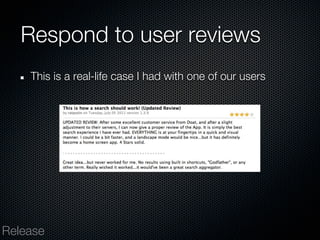
Respond to user reviews
    This is a real-life case I had with one of our users


Release
Last bits
    You can ask for an “expedited review” if you have a
    good reason - we got an app approved within the day
    before TC Disrupt
    Use it wisely and rarely
    CoreData and version updates - be careful here (and
    any other local data)
    WebViews can sometimes allow you to release
    products faster


Release
Thank You.


       Joey Simhon (@joeysim)
      CTO and Co-Founder DoAT

iPhone App from concept to product

  • 1.
    iPhone App from conceptto product Tips & Tools to get the job done Joey Simhon (@joeysim) CTO and Co-Founder DoAT
  • 2.
    Hello World Growing Internetbabies since 2000 Growing real ones since 2008 Passionate about engineering and the culture around it Owned and managed a few businesses Built and architected a few products Bottom line - I must be a Persistent fella
  • 3.
    I got aconfession to make
  • 4.
    My name isJoey and I’m a procrastinator “The best part about procrastination is that you are never bored”
  • 5.
    Procrastination = Tools I call it productive procrastination (an oxymoron) I love finding new tools that solve real problems (which I don’t necessarily have) I’ll do my best to share the right tools to achieve what you want, quickly and without re-inventing the wheel
  • 6.
    This is whereI come from
  • 7.
    This is whatwe’ll discuss Concept > Design > Develop > Beta > Release
  • 8.
  • 9.
    The Erasable Marker When you start with your first concept, try and envision the core UI element of the product you’re try to build Jot down how it looks & behaves. Verify technical implementation boundaries (and be sure to break some :) ) DoAT - Swiping between live apps Concept
  • 10.
    iPhone Screenshots Take screenshots of things that get you emotional (love it / hate it!) Some of the work was already done for you http://mobile-patterns.com/ (or god forbid http://www.androidpatterns.com/ ) Concept
  • 11.
    Mockups When you need to communicate it to a larger / distributed group of people My tool of choice - Balsamiq Concept
  • 12.
  • 13.
    Photoshop I’ll settle for paint / gimp / Paint.net for that matter PSD to use - http://www.teehanlax.com/blog/ iphone-4-gui-psd-retina-display/ Design for x2 (Retina) Ziv Meltzer wrote a post ‘bout it http://blog.zivmeltzer.com/post/3628811523/tips-the- design-process-for-ios-apps Design
  • 14.
    Your Hand Reviewing a design on large screens is a NO GO. Do it on your PHONE. Easy solution - Send by email and save image to album Tool - Liveview (for Mac) http://zambetti.com/projects/liveview/ Design
  • 15.
    Don’t forget toRTFM Apple’s UI Guidelines is something you’d want to know by heart when designing http://developer.apple.com/library/ios/#documentation/ UserExperience/Conceptual/MobileHIG/Introduction/ Introduction.html Design
  • 16.
  • 17.
    API and ServerLogic Design your API early Use static responses while you do Try and keep as much logic on server’s end - easier maintenance and cross platform future If you work in a distributed manner - document your API, you’ll move faster We created Gondor for this (coming to Apache’s near you soon. NGINXs too) Develop
  • 18.
    Create multiple targets Will allow you to have your team install several versions Will allow you to stage new server APIs as well Will reduce the clutter and keep your logs / analytics coherent Create separate DefaultProperties.plist for each target Do yourself a favor and use git (Didn’t know wherelse to put it so...) Develop
  • 19.
    No such thingas alpha Not always accurate (managed to prove it once... sorta) But you will definitely find yourself with “legacy” POC code running in production Try and draw the line between experiments and THE product Don’t refactor before you’ve hit the ceiling but when you have to - do it like mad Develop
  • 20.
    Incorporate URL Schemes This is the link of the app era Allows you be to be accessed in context? Be sure to communicate it externally so others can use it. Some examples - instagram://camera - launches their camera lastfm://artist/Cher/similar - Cher similar artist radio lastfm://globaltags/rock - Plays rock global tag radio More examples - http://handleopenurl.com/scheme Develop
  • 21.
    Push notification Make sure to at least enable basic (default behavior is launching the app on swipe / View button) Urbanairship is a good starting point http://urbanairship.com Deep links are an important addition, you can respond to launches from push messages Develop
  • 22.
    Metrics Driven Approach Try and collect as many events and params as possible cause you never know what question comes up about user’s behavior Tools - Flurry, Localytics, Google Analytics, Home brew. Most will do event name + KV params We use Flurry - has some disadvantages The matrix is update time | events support | user segmentation | reporting Develop
  • 23.
    Understand iOS Simulator There’s an inherent problem with it - it’s too darn fast and has too much juice Sometimes has weird issues You don’t hold it in your hand Good for coverage testing with different SDKs (e.g. autoplay video on iOS 4.3.x) Develop
  • 24.
  • 25.
    Provisioning Beta Versions You’ll start with IPAs sent by email Supporting this is hell (“Yes, drag it to your iTunes, oh you don’t have it.... blah blah blah”) You can try using BetaBuilder http://www.hanchorllc.com/betabuilder-for-ios/ TestFlight is our weapon of choice http://testflightapp.com There’s also HockeyKit (open source too) http://hockeykit.net/ Beta
  • 26.
    Stabilize - Crashes The #1 tool to get you stability and eliminate crashes - a crash reporting tool iPhone logs are worth nothing without the debugging symbols make sure you keep them PLCrashReporter and CREP (“holly crep I got a new crash”) Beta
  • 27.
    Stabilize #2 -Memory Static code analysis - 80/20 rule applies here XCode Instrumentation tools - memory is the thing you’d worry ‘bout most of the time Beta
  • 28.
  • 29.
    Text is allyou got Think about what you want to write Competition texts is sometimes a good starting point Autocomplete is one you’ll surface Search results is the other They are scored differently Release
  • 30.
    And images too You can get creative here Release
  • 31.
    Take your time Submit when you ready Reject binary if things get messy App approval took ~7 days App updates took 1-5 days Tool - http://148apps.biz/app-store-metrics/ Release
  • 32.
    Monitor iTunesConnect only keeps 14 days of past reports And will only tell you how many downloads/updates A combination of AppAnnie (free) and appFigures (paid) will do the job You can also setup a geckoboard if you want this info and analytics shown together Release
  • 33.
    Respond to userreviews This is a real-life case I had with one of our users Release
  • 34.
    Last bits You can ask for an “expedited review” if you have a good reason - we got an app approved within the day before TC Disrupt Use it wisely and rarely CoreData and version updates - be careful here (and any other local data) WebViews can sometimes allow you to release products faster Release
  • 35.
    Thank You. Joey Simhon (@joeysim) CTO and Co-Founder DoAT