


Improving Discoverability
Suzanne Ginsburg, HOW Interactive 10.30.2012


                                               Photo by Sandy Honig
What is Discoverability?


HOW Interactive   Copyright © Suzanne Ginsburg   2
What is Discoverability?

    In the software world—desktop, web, mobile, tablet—
    discoverability typically refers to the ease at which users may
    find a feature to complete a specific task they have in mind.

    But it may also refer to the ability to simply get started with a
    new application, or the ability to discover features unknown
    to the user, e.g., those that may improve performance.


HOW Interactive             Copyright © Suzanne Ginsburg                3
Why is Discoverability important?


HOW Interactive   Copyright © Suzanne Ginsburg   4
Why is Discoverability important?
    Makes users happy

    Minimizes help documentation

    Lowers customer care costs

    Good discoverability = Good design


HOW Interactive          Copyright © Suzanne Ginsburg   5
Why has Discoverability become
increasingly important today?


HOW Interactive   Copyright © Suzanne Ginsburg   6
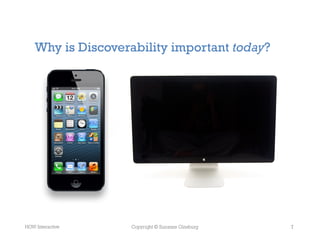
Why is Discoverability important today?


HOW Interactive     Copyright © Suzanne Ginsburg   7
What can you do to improve
Discoverability?


HOW Interactive   Copyright © Suzanne Ginsburg   8
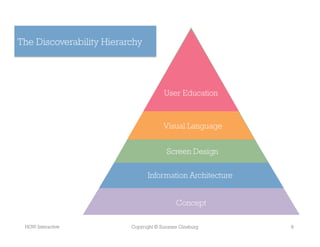
The Discoverability Hierarchy


                                       User Education


                                       Visual Language


                                        Screen Design

                                InformationSS	
  
                                            Architecture


                                            Concept

 HOW Interactive          Copyright © Suzanne Ginsburg     9
Discoverability Tips
    1.  Leverage Mental Models (Concept)

    2.  Provide Contextual Focus (Information Architecture)

    3.  Include Sneak Peeks (Screen Design)

    4.  Show Just-in-Time Content & Tools (Screen Design)

    5.  Exploit Physical Characteristics (Visual Language)

    6.  Spell it Out (User Education)


HOW Interactive            Copyright © Suzanne Ginsburg       10
Tip #1. Leverage Mental Models
(Concept)


HOW Interactive   Copyright © Suzanne Ginsburg   11
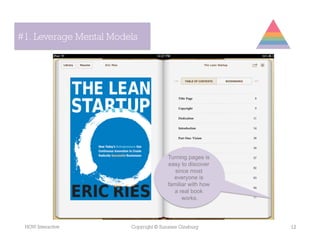
#1. Leverage Mental Models


                                       Turning pages is
                                       easy to discover
                                          since most
                                         everyone is
                                       familiar with how
                                         a real book
                                             works.


 HOW Interactive        Copyright © Suzanne Ginsburg       12
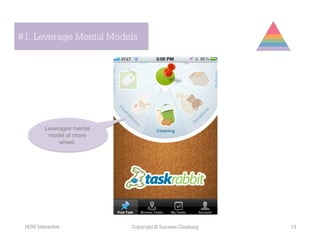
#1. Leverage Mental Models


         Leverages mental
          model of chore
              wheel.


 HOW Interactive            Copyright © Suzanne Ginsburg   13
#1. Leverage Mental Models


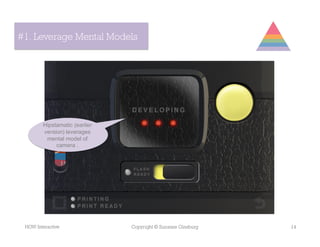
        Hipstamatic (earlier
        version) leverages
         mental model of
             camera .


 HOW Interactive               Copyright © Suzanne Ginsburg   14
#1. Strong Conceptual Foundation


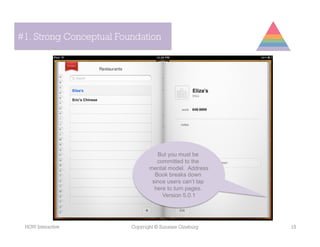
                                   But you must be
                                   committed to the
                                mental model. Address
                                  Book breaks down
                                 since users can’t tap
                                  here to turn pages.
                                     Version 5.0.1


 HOW Interactive         Copyright © Suzanne Ginsburg    15
Tip #2. Provide Contextual Focus
(Information Architecture)


HOW Interactive   Copyright © Suzanne Ginsburg   16
#2. Provide Contextual Focus


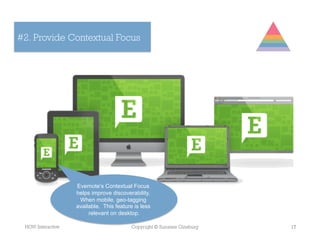
                   Evernote’s Contextual Focus
                   helps improve discoverability.
                    When mobile, geo-tagging
                   available. This feature is less
                        relevant on desktop.

 HOW Interactive                          Copyright © Suzanne Ginsburg   17
#2. Provide Contextual Focus


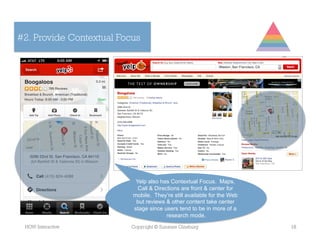
                           Yelp also has Contextual Focus. Maps,
                            Call & Directions are front & center for
                          mobile. They’re still available for the Web
                           but reviews & other content take center
                          stage since users tend to be in more of a
                                        research mode.
 HOW Interactive         Copyright © Suzanne Ginsburg                   18
#2. Provide Contextual Focus


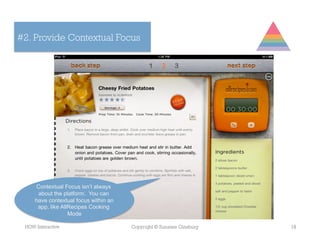
     Contextual Focus isn’t always
      about the platform. You can
     have contextual focus within an
      app, like AllRecipes Cooking
                   Mode

 HOW Interactive                       Copyright © Suzanne Ginsburg   19
Tip #3. Include Sneak Peeks
(Screen Design)


HOW Interactive   Copyright © Suzanne Ginsburg   20
#3. Include Sneak Peeks


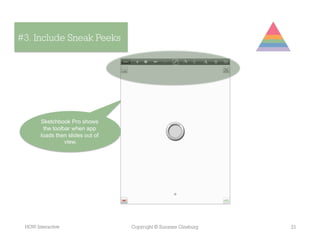
       Sketchbook Pro shows
        the toolbar when app
       loads then slides out of
                 view.


 HOW Interactive                  Copyright © Suzanne Ginsburg   21
#3. Include Sneak Peeks


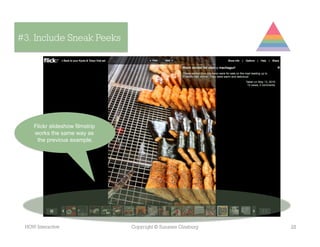
    Flickr slideshow filmstrip
    works the same way as
     the previous example.


 HOW Interactive                 Copyright © Suzanne Ginsburg   22
Tip #4. Show Just-in-Time Content
(Screen Design)


HOW Interactive   Copyright © Suzanne Ginsburg   23
#4. Just-in-Time Content


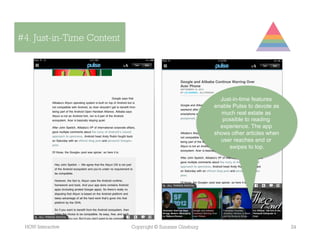
                                                            Just-in-time features
                                                          enable Pulse to devote as
                                                            much real estate as
                                                             possible to reading
                                                            experience. The app
                                                          shows other articles when
                                                            user reaches end or
                                                                swipes to top.


 HOW Interactive           Copyright © Suzanne Ginsburg                               24
#4. Just-in-Time Content


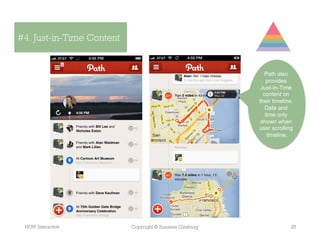
                                                             Path also
                                                             provides
                                                           Just-In-Time
                                                            content on
                                                          their timeline.
                                                             Date and
                                                             time only
                                                           shown when
                                                          user scrolling
                                                              timeline.


 HOW Interactive           Copyright © Suzanne Ginsburg                 25
Tip #5. Exploit Physical Characteristics
(Visual Language)


HOW Interactive   Copyright © Suzanne Ginsburg   26
#5. Exploit Physical Characteristics


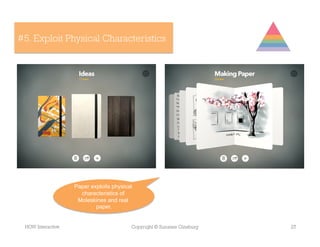
                   Paper exploits physical
                     characteristics of
                    Moleskines and real
                           paper.


 HOW Interactive                         Copyright © Suzanne Ginsburg   27
#5. Exploit Physical Characteristics
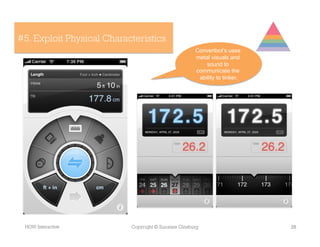
                                                     Convertbot’s uses
                                                     metal visuals and
                                                         sound to
                                                     communicate the
                                                      ability to tinker.


 HOW Interactive           Copyright © Suzanne Ginsburg                    28
Tip #6. Spell It Out
(User Education)


HOW Interactive    Copyright © Suzanne Ginsburg   29
#6. Provide User Education


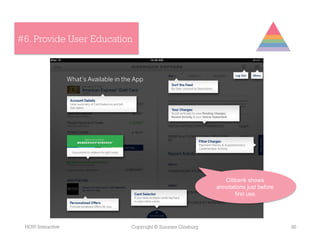
                                                           Citibank shows
                                                        annotations just before
                                                               first use.


 HOW Interactive         Copyright © Suzanne Ginsburg                             30
#6. Provide User Education


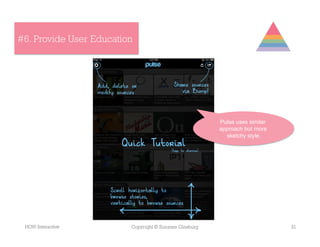
                                                        Pulse uses similar
                                                        approach but more
                                                          sketchy style.


 HOW Interactive         Copyright © Suzanne Ginsburg                        31
#6. Provide User Education


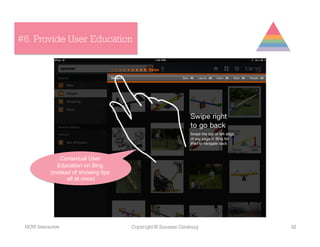
                Contextual User
               Education on Bing
            (instead of showing tips
                   all at once)


 HOW Interactive                       Copyright © Suzanne Ginsburg   32
#6. Provide User Education


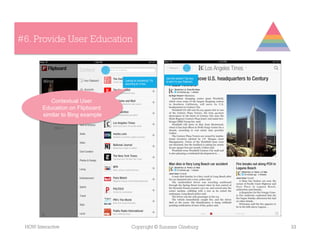
           Contextual User
        Education on Flipboard
        similar to Bing example


 HOW Interactive                  Copyright © Suzanne Ginsburg   33
#6. Provide User Education


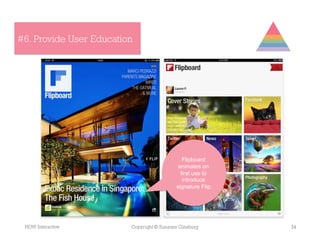
                                              Flipboard
                                            animates on
                                             first use to
                                              introduce
                                           signature Flip.


 HOW Interactive         Copyright © Suzanne Ginsburg        34
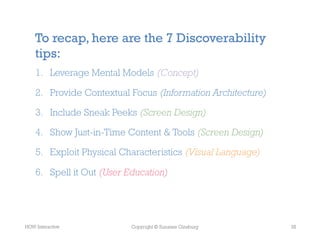
To recap, here are the 7 Discoverability
    tips:
    1.  Leverage Mental Models (Concept)

    2.  Provide Contextual Focus (Information Architecture)

    3.  Include Sneak Peeks (Screen Design)

    4.  Show Just-in-Time Content & Tools (Screen Design)

    5.  Exploit Physical Characteristics (Visual Language)

    6.  Spell it Out (User Education)


HOW Interactive            Copyright © Suzanne Ginsburg       35
Thanks!


     suzanne@ginsburg-design.com
     @suzanneginsburg


HOW Interactive         Copyright © Suzanne Ginsburg   36

Improving Discoverability

  • 1.
    Improving Discoverability Suzanne Ginsburg,HOW Interactive 10.30.2012 Photo by Sandy Honig
  • 2.
    What is Discoverability? HOWInteractive Copyright © Suzanne Ginsburg 2
  • 3.
    What is Discoverability? In the software world—desktop, web, mobile, tablet— discoverability typically refers to the ease at which users may find a feature to complete a specific task they have in mind. But it may also refer to the ability to simply get started with a new application, or the ability to discover features unknown to the user, e.g., those that may improve performance. HOW Interactive Copyright © Suzanne Ginsburg 3
  • 4.
    Why is Discoverabilityimportant? HOW Interactive Copyright © Suzanne Ginsburg 4
  • 5.
    Why is Discoverabilityimportant? Makes users happy Minimizes help documentation Lowers customer care costs Good discoverability = Good design HOW Interactive Copyright © Suzanne Ginsburg 5
  • 6.
    Why has Discoverabilitybecome increasingly important today? HOW Interactive Copyright © Suzanne Ginsburg 6
  • 7.
    Why is Discoverabilityimportant today? HOW Interactive Copyright © Suzanne Ginsburg 7
  • 8.
    What can youdo to improve Discoverability? HOW Interactive Copyright © Suzanne Ginsburg 8
  • 9.
    The Discoverability Hierarchy User Education Visual Language Screen Design InformationSS   Architecture Concept HOW Interactive Copyright © Suzanne Ginsburg 9
  • 10.
    Discoverability Tips 1.  Leverage Mental Models (Concept) 2.  Provide Contextual Focus (Information Architecture) 3.  Include Sneak Peeks (Screen Design) 4.  Show Just-in-Time Content & Tools (Screen Design) 5.  Exploit Physical Characteristics (Visual Language) 6.  Spell it Out (User Education) HOW Interactive Copyright © Suzanne Ginsburg 10
  • 11.
    Tip #1. LeverageMental Models (Concept) HOW Interactive Copyright © Suzanne Ginsburg 11
  • 12.
    #1. Leverage MentalModels Turning pages is easy to discover since most everyone is familiar with how a real book works. HOW Interactive Copyright © Suzanne Ginsburg 12
  • 13.
    #1. Leverage MentalModels Leverages mental model of chore wheel. HOW Interactive Copyright © Suzanne Ginsburg 13
  • 14.
    #1. Leverage MentalModels Hipstamatic (earlier version) leverages mental model of camera . HOW Interactive Copyright © Suzanne Ginsburg 14
  • 15.
    #1. Strong ConceptualFoundation But you must be committed to the mental model. Address Book breaks down since users can’t tap here to turn pages. Version 5.0.1 HOW Interactive Copyright © Suzanne Ginsburg 15
  • 16.
    Tip #2. ProvideContextual Focus (Information Architecture) HOW Interactive Copyright © Suzanne Ginsburg 16
  • 17.
    #2. Provide ContextualFocus Evernote’s Contextual Focus helps improve discoverability. When mobile, geo-tagging available. This feature is less relevant on desktop. HOW Interactive Copyright © Suzanne Ginsburg 17
  • 18.
    #2. Provide ContextualFocus Yelp also has Contextual Focus. Maps, Call & Directions are front & center for mobile. They’re still available for the Web but reviews & other content take center stage since users tend to be in more of a research mode. HOW Interactive Copyright © Suzanne Ginsburg 18
  • 19.
    #2. Provide ContextualFocus Contextual Focus isn’t always about the platform. You can have contextual focus within an app, like AllRecipes Cooking Mode HOW Interactive Copyright © Suzanne Ginsburg 19
  • 20.
    Tip #3. IncludeSneak Peeks (Screen Design) HOW Interactive Copyright © Suzanne Ginsburg 20
  • 21.
    #3. Include SneakPeeks Sketchbook Pro shows the toolbar when app loads then slides out of view. HOW Interactive Copyright © Suzanne Ginsburg 21
  • 22.
    #3. Include SneakPeeks Flickr slideshow filmstrip works the same way as the previous example. HOW Interactive Copyright © Suzanne Ginsburg 22
  • 23.
    Tip #4. ShowJust-in-Time Content (Screen Design) HOW Interactive Copyright © Suzanne Ginsburg 23
  • 24.
    #4. Just-in-Time Content Just-in-time features enable Pulse to devote as much real estate as possible to reading experience. The app shows other articles when user reaches end or swipes to top. HOW Interactive Copyright © Suzanne Ginsburg 24
  • 25.
    #4. Just-in-Time Content Path also provides Just-In-Time content on their timeline. Date and time only shown when user scrolling timeline. HOW Interactive Copyright © Suzanne Ginsburg 25
  • 26.
    Tip #5. ExploitPhysical Characteristics (Visual Language) HOW Interactive Copyright © Suzanne Ginsburg 26
  • 27.
    #5. Exploit PhysicalCharacteristics Paper exploits physical characteristics of Moleskines and real paper. HOW Interactive Copyright © Suzanne Ginsburg 27
  • 28.
    #5. Exploit PhysicalCharacteristics Convertbot’s uses metal visuals and sound to communicate the ability to tinker. HOW Interactive Copyright © Suzanne Ginsburg 28
  • 29.
    Tip #6. SpellIt Out (User Education) HOW Interactive Copyright © Suzanne Ginsburg 29
  • 30.
    #6. Provide UserEducation Citibank shows annotations just before first use. HOW Interactive Copyright © Suzanne Ginsburg 30
  • 31.
    #6. Provide UserEducation Pulse uses similar approach but more sketchy style. HOW Interactive Copyright © Suzanne Ginsburg 31
  • 32.
    #6. Provide UserEducation Contextual User Education on Bing (instead of showing tips all at once) HOW Interactive Copyright © Suzanne Ginsburg 32
  • 33.
    #6. Provide UserEducation Contextual User Education on Flipboard similar to Bing example HOW Interactive Copyright © Suzanne Ginsburg 33
  • 34.
    #6. Provide UserEducation Flipboard animates on first use to introduce signature Flip. HOW Interactive Copyright © Suzanne Ginsburg 34
  • 35.
    To recap, hereare the 7 Discoverability tips: 1.  Leverage Mental Models (Concept) 2.  Provide Contextual Focus (Information Architecture) 3.  Include Sneak Peeks (Screen Design) 4.  Show Just-in-Time Content & Tools (Screen Design) 5.  Exploit Physical Characteristics (Visual Language) 6.  Spell it Out (User Education) HOW Interactive Copyright © Suzanne Ginsburg 35
  • 36.
    Thanks! suzanne@ginsburg-design.com @suzanneginsburg HOW Interactive Copyright © Suzanne Ginsburg 36