

Upgrading Team Foundation
                         Server
                                            Overview

Steve Lange
Sr. Developer Technology Specialist | Denver, CO
stevenl@microsoft.com | slange.me
Topics
•   Types of Upgrades
•   Upgrade Process
•   Considerations
•   Recommendations
Upgrading Team Foundation Server

TYPES OF UPGRADES
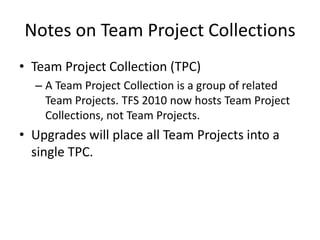
Notes on Team Project Collections
• Team Project Collection (TPC)
  – A Team Project Collection is a group of related
    Team Projects. TFS 2010 now hosts Team Project
    Collections, not Team Projects.
• Upgrades will place all Team Projects into a
  single TPC.
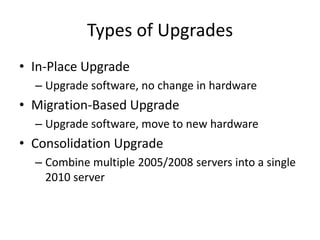
Types of Upgrades
• In-Place Upgrade
  – Upgrade software, no change in hardware
• Migration-Based Upgrade
  – Upgrade software, move to new hardware
• Consolidation Upgrade
  – Combine multiple 2005/2008 servers into a single
    2010 server
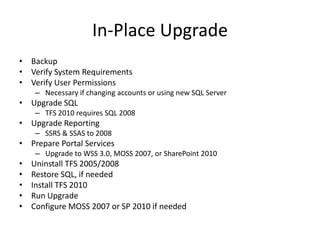
In-Place Upgrade
• Backup
• Verify System Requirements
• Verify User Permissions
     – Necessary if changing accounts or using new SQL Server
• Upgrade SQL
     – TFS 2010 requires SQL 2008
• Upgrade Reporting
     – SSRS & SSAS to 2008
• Prepare Portal Services
     – Upgrade to WSS 3.0, MOSS 2007, or SharePoint 2010
•   Uninstall TFS 2005/2008
•   Restore SQL, if needed
•   Install TFS 2010
•   Run Upgrade
•   Configure MOSS 2007 or SP 2010 if needed
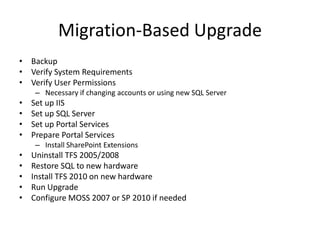
Migration-Based Upgrade
• Backup
• Verify System Requirements
• Verify User Permissions
     – Necessary if changing accounts or using new SQL Server
•   Set up IIS
•   Set up SQL Server
•   Set up Portal Services
•   Prepare Portal Services
     – Install SharePoint Extensions
•   Uninstall TFS 2005/2008
•   Restore SQL to new hardware
•   Install TFS 2010 on new hardware
•   Run Upgrade
•   Configure MOSS 2007 or SP 2010 if needed
Consolidation Upgrade
• Upgrade each individual server (in-place or
  migration-based)
  – Upgrade first server to destination TFS 2010
    server
• Move each Team Project Collection to
  destination TFS 2010 server
  – Each “old” TFS server will be represented by a TPC
    on the “new” TFS server
Upgrading Team Foundation Server

UPGRADE PROCESS
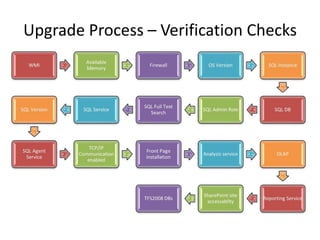
Upgrade Process – Verification Checks
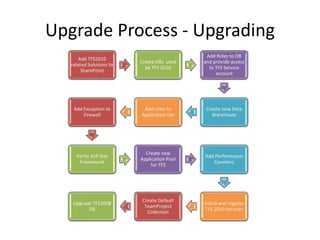
Upgrade Process - Upgrading
Upgrading Team Foundation Server

CONSIDERATIONS
Considerations
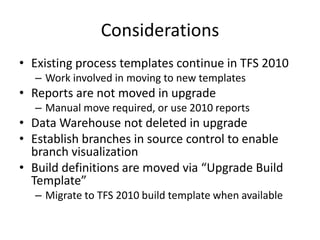
• Existing process templates continue in TFS 2010
  – Work involved in moving to new templates
• Reports are not moved in upgrade
  – Manual move required, or use 2010 reports
• Data Warehouse not deleted in upgrade
• Establish branches in source control to enable
  branch visualization
• Build definitions are moved via “Upgrade Build
  Template”
  – Migrate to TFS 2010 build template when available
Recommendations
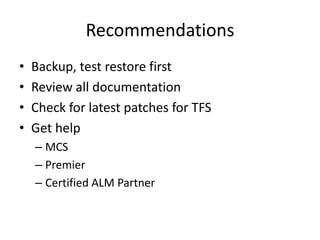
•   Backup, test restore first
•   Review all documentation
•   Check for latest patches for TFS
•   Get help
    – MCS
    – Premier
    – Certified ALM Partner
Questions?
Resources
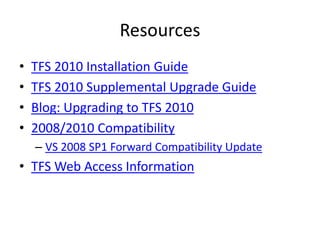
•   TFS 2010 Installation Guide
•   TFS 2010 Supplemental Upgrade Guide
•   Blog: Upgrading to TFS 2010
•   2008/2010 Compatibility
    – VS 2008 SP1 Forward Compatibility Update
• TFS Web Access Information
Steve Lange
Sr. Developer Technology Specialist | Denver, CO
      stevenl@microsoft.com | slange.me
Upgrading to TFS 2010

Upgrading to TFS 2010

  • 1.
    Upgrading Team Foundation Server Overview Steve Lange Sr. Developer Technology Specialist | Denver, CO stevenl@microsoft.com | slange.me
  • 2.
    Topics • Types of Upgrades • Upgrade Process • Considerations • Recommendations
  • 3.
    Upgrading Team FoundationServer TYPES OF UPGRADES
  • 4.
    Notes on TeamProject Collections • Team Project Collection (TPC) – A Team Project Collection is a group of related Team Projects. TFS 2010 now hosts Team Project Collections, not Team Projects. • Upgrades will place all Team Projects into a single TPC.
  • 5.
    Types of Upgrades •In-Place Upgrade – Upgrade software, no change in hardware • Migration-Based Upgrade – Upgrade software, move to new hardware • Consolidation Upgrade – Combine multiple 2005/2008 servers into a single 2010 server
  • 6.
    In-Place Upgrade • Backup •Verify System Requirements • Verify User Permissions – Necessary if changing accounts or using new SQL Server • Upgrade SQL – TFS 2010 requires SQL 2008 • Upgrade Reporting – SSRS & SSAS to 2008 • Prepare Portal Services – Upgrade to WSS 3.0, MOSS 2007, or SharePoint 2010 • Uninstall TFS 2005/2008 • Restore SQL, if needed • Install TFS 2010 • Run Upgrade • Configure MOSS 2007 or SP 2010 if needed
  • 7.
    Migration-Based Upgrade • Backup •Verify System Requirements • Verify User Permissions – Necessary if changing accounts or using new SQL Server • Set up IIS • Set up SQL Server • Set up Portal Services • Prepare Portal Services – Install SharePoint Extensions • Uninstall TFS 2005/2008 • Restore SQL to new hardware • Install TFS 2010 on new hardware • Run Upgrade • Configure MOSS 2007 or SP 2010 if needed
  • 8.
    Consolidation Upgrade • Upgradeeach individual server (in-place or migration-based) – Upgrade first server to destination TFS 2010 server • Move each Team Project Collection to destination TFS 2010 server – Each “old” TFS server will be represented by a TPC on the “new” TFS server
  • 9.
    Upgrading Team FoundationServer UPGRADE PROCESS
  • 10.
    Upgrade Process –Verification Checks
  • 11.
  • 12.
    Upgrading Team FoundationServer CONSIDERATIONS
  • 13.
    Considerations • Existing processtemplates continue in TFS 2010 – Work involved in moving to new templates • Reports are not moved in upgrade – Manual move required, or use 2010 reports • Data Warehouse not deleted in upgrade • Establish branches in source control to enable branch visualization • Build definitions are moved via “Upgrade Build Template” – Migrate to TFS 2010 build template when available
  • 14.
    Recommendations • Backup, test restore first • Review all documentation • Check for latest patches for TFS • Get help – MCS – Premier – Certified ALM Partner
  • 15.
  • 16.
    Resources • TFS 2010 Installation Guide • TFS 2010 Supplemental Upgrade Guide • Blog: Upgrading to TFS 2010 • 2008/2010 Compatibility – VS 2008 SP1 Forward Compatibility Update • TFS Web Access Information
  • 17.
    Steve Lange Sr. DeveloperTechnology Specialist | Denver, CO stevenl@microsoft.com | slange.me