





Implementing Office Online Server
#SPSOslo
Thorbjørn Værp – Point Taken
October 22nd, 2016
Thanks to our sponsors
Platinum
Gold
Silver
SharePint
• Thorbjørn Værp
• Principal Consultant |
• Kristiansand Norway
• @vaerpn | tv@pointtaken.no
• http://sharepoint13.org
#SPSWarsaw
About me
About me
Kristiansand - Norway
About me
100 km. North from Kristiansand
You!
#SPSWarsaw
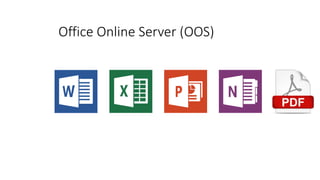
Office Online Server (OOS)
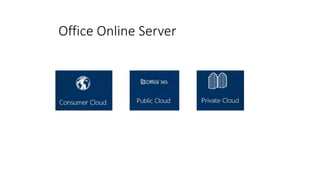
Office Online Server
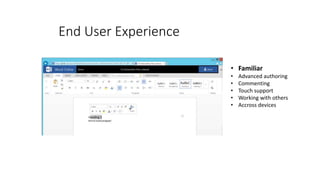
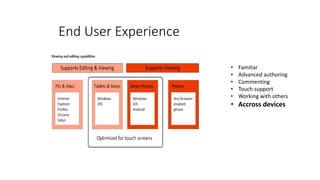
• Familiar
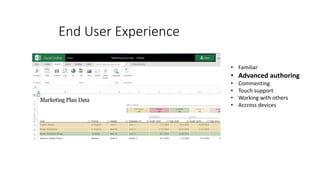
• Advanced authoring
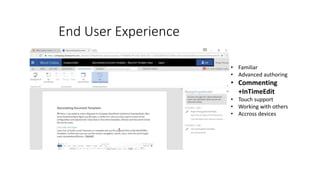
• Commenting
• Touch support
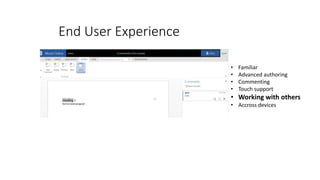
• Working with others
• Accross devices
End User Experience
• Familiar
• Advanced authoring
• Commenting
• Touch support
• Working with others
• Accross devices
End User Experience
• Familiar
• Advanced authoring
• Commenting
+InTimeEdit
• Touch support
• Working with others
• Accross devices
End User Experience
• Familiar
• Advanced authoring
• Commenting
• Touch support
• Working with others
• Accross devices
End User Experience
• Familiar
• Advanced authoring
• Commenting
• Touch support
• Working with others
• Accross devices
End User Experience
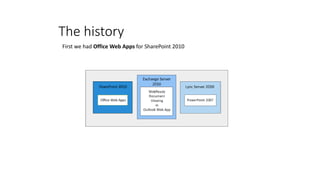
The history
First we had Office Web Apps for SharePoint 2010
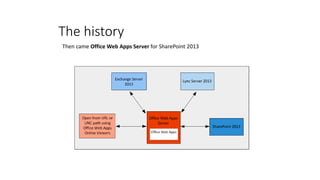
The history
Then came Office Web Apps Server for SharePoint 2013
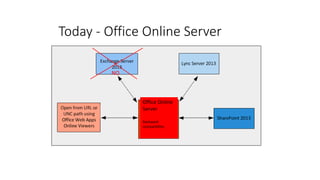
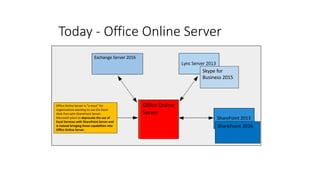
Today - Office Online Server
Office Online
Server
Backward
compatibility
NO
Today - Office Online Server
Office Online
Server
Office Online Server is "a must" for
organizations wanting to use the Excel
Web Part with SharePoint Server.
Microsoft plans to deprecate the use of
Excel Services with SharePoint Server and
is instead bringing those capabilities into
Office Online Server.
SharePoint 2016
Skype for
Business 2015
Exchange Server 2016
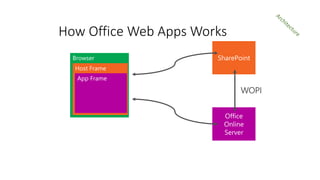
Host Frame
App Frame
How Office Web Apps Works
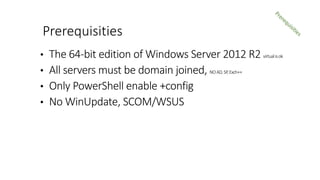
• The 64-bit edition of Windows Server 2012 R2 virtualisok
• All servers must be domain joined, NOAD,SP,Exch++
• Only PowerShell enable +config
• No WinUpdate, SCOM/WSUS
Prerequisities
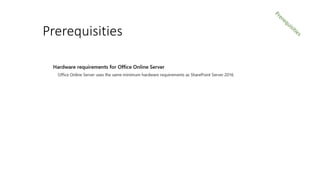
Prerequisities
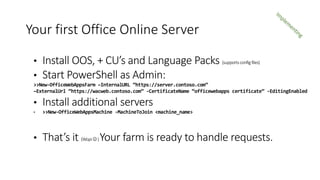
• Install OOS, + CU’s and Language Packs (supportsconfigfiles)
• Start PowerShell as Admin:
>>New-OfficeWebAppsFarm –InternalURL “https://server.contoso.com”
–ExternalUrl “https://wacweb.contoso.com” -CertificateName “officewebapps certificate” -EditingEnabled
• Install additional servers
• >>New-OfficeWebAppsMachine -MachineToJoin <machine_name>
• That’s it (Wopi)Your farm is ready to handle requests.
Your first Office Online Server
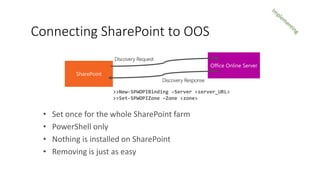
>>New-SPWOPIBinding –Server <server_URL>
>>Set-SPWOPIZone –Zone <zone>
• Set once for the whole SharePoint farm
• PowerShell only
• Nothing is installed on SharePoint
• Removing is just as easy
Connecting SharePoint to OOS
• Demo: Deploy Office Online Server
Demo
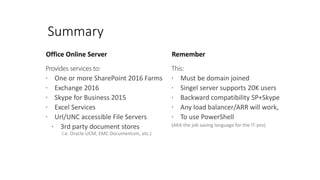
Office Online Server
Provides services to:
 One or more SharePoint 2016 Farms
 Exchange 2016
 Skype for Business 2015
 Excel Services
 Url/UNC accessible File Servers
 3rd party document stores
I.e. Oracle UCM, EMC Documentum, etc.)
Remember
This:
 Must be domain joined
 Singel server supports 20K users
 Backward compatibility SP+Skype
 Any load balancer/ARR will work,
 To use PowerShell
(AKA the job saving language for the IT-pro)
Summary
• Office Web Apps on TechNet library:
KLICK ME
• Windows PowerShell for SharePoint Command Builder:
KLICK ME
• SharePoint Server 2016 on TechNet:
KLICK ME
• Blogs and Forums: (msdnorsharepoint13.net)
Online Resources
...and visit our sponsors who made this day possible!
Please rate this session...

Implementing Office Online Server

  • 1.
    Implementing Office OnlineServer #SPSOslo Thorbjørn Værp – Point Taken October 22nd, 2016
  • 2.
    Thanks to oursponsors Platinum Gold Silver SharePint
  • 3.
    • Thorbjørn Værp •Principal Consultant | • Kristiansand Norway • @vaerpn | tv@pointtaken.no • http://sharepoint13.org #SPSWarsaw About me
  • 4.
  • 5.
    About me 100 km.North from Kristiansand
  • 6.
  • 7.
  • 8.
  • 9.
    • Familiar • Advancedauthoring • Commenting • Touch support • Working with others • Accross devices End User Experience
  • 10.
    • Familiar • Advancedauthoring • Commenting • Touch support • Working with others • Accross devices End User Experience
  • 11.
    • Familiar • Advancedauthoring • Commenting +InTimeEdit • Touch support • Working with others • Accross devices End User Experience
  • 12.
    • Familiar • Advancedauthoring • Commenting • Touch support • Working with others • Accross devices End User Experience
  • 13.
    • Familiar • Advancedauthoring • Commenting • Touch support • Working with others • Accross devices End User Experience
  • 14.
    The history First wehad Office Web Apps for SharePoint 2010
  • 15.
    The history Then cameOffice Web Apps Server for SharePoint 2013
  • 16.
    Today - OfficeOnline Server Office Online Server Backward compatibility NO
  • 17.
    Today - OfficeOnline Server Office Online Server Office Online Server is "a must" for organizations wanting to use the Excel Web Part with SharePoint Server. Microsoft plans to deprecate the use of Excel Services with SharePoint Server and is instead bringing those capabilities into Office Online Server. SharePoint 2016 Skype for Business 2015 Exchange Server 2016
  • 18.
    Host Frame App Frame HowOffice Web Apps Works
  • 19.
    • The 64-bitedition of Windows Server 2012 R2 virtualisok • All servers must be domain joined, NOAD,SP,Exch++ • Only PowerShell enable +config • No WinUpdate, SCOM/WSUS Prerequisities
  • 20.
  • 21.
    • Install OOS,+ CU’s and Language Packs (supportsconfigfiles) • Start PowerShell as Admin: >>New-OfficeWebAppsFarm –InternalURL “https://server.contoso.com” –ExternalUrl “https://wacweb.contoso.com” -CertificateName “officewebapps certificate” -EditingEnabled • Install additional servers • >>New-OfficeWebAppsMachine -MachineToJoin <machine_name> • That’s it (Wopi)Your farm is ready to handle requests. Your first Office Online Server
  • 22.
    >>New-SPWOPIBinding –Server <server_URL> >>Set-SPWOPIZone–Zone <zone> • Set once for the whole SharePoint farm • PowerShell only • Nothing is installed on SharePoint • Removing is just as easy Connecting SharePoint to OOS
  • 23.
    • Demo: DeployOffice Online Server Demo
  • 24.
    Office Online Server Providesservices to:  One or more SharePoint 2016 Farms  Exchange 2016  Skype for Business 2015  Excel Services  Url/UNC accessible File Servers  3rd party document stores I.e. Oracle UCM, EMC Documentum, etc.) Remember This:  Must be domain joined  Singel server supports 20K users  Backward compatibility SP+Skype  Any load balancer/ARR will work,  To use PowerShell (AKA the job saving language for the IT-pro) Summary
  • 25.
    • Office WebApps on TechNet library: KLICK ME • Windows PowerShell for SharePoint Command Builder: KLICK ME • SharePoint Server 2016 on TechNet: KLICK ME • Blogs and Forums: (msdnorsharepoint13.net) Online Resources
  • 27.
    ...and visit oursponsors who made this day possible! Please rate this session...