WHAT TO EXPECT WITH
EXCHANGE 2016
Jaap Wessealius
Exchange Server MVP
Jaap Wesselius
Consultant, Author, Speaker
Exchange MVP
jaap@wesselius.info
@jaapwess
www.jaapwesselius.com
INTRODUCTION
HISTORY LESSONS
FOR
EXCHANGE ADMINS
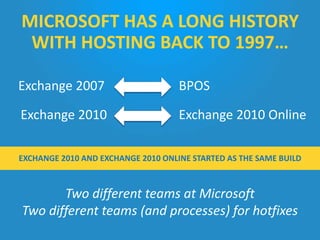
Two different teams at Microsoft
Two different teams (and processes) for hotfixes
Exchange 2007 BPOS
Exchange 2010 Exchange 2010 Online
MICROSOFT HAS A LONG HISTORY
WITH HOSTING BACK TO 1997…
EXCHANGE 2010 AND EXCHANGE 2010 ONLINE STARTED AS THE SAME BUILD
EXCHANGE 2013
SERVICE MODEL CHANGE
Every 3 months
a Cumulative Update (CU)
Besides hotfixes,
CU also brings new features
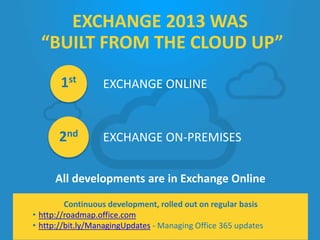
All developments are in Exchange Online
EXCHANGE 2013 WAS
“BUILT FROM THE CLOUD UP”
EXCHANGE ONLINE
EXCHANGE ON-PREMISES
1st
2nd
Continuous development, rolled out on regular basis
• http://roadmap.office.com
• http://bit.ly/ManagingUpdates - Managing Office 365 updates
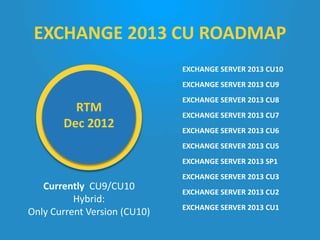
RTM
Dec 2012
EXCHANGE SERVER 2013 CU10
EXCHANGE SERVER 2013 CU9
EXCHANGE SERVER 2013 CU8
EXCHANGE SERVER 2013 CU7
EXCHANGE SERVER 2013 CU6
EXCHANGE SERVER 2013 CU5
EXCHANGE SERVER 2013 SP1
EXCHANGE SERVER 2013 CU3
EXCHANGE SERVER 2013 CU2
EXCHANGE SERVER 2013 CU1
Currently CU9/CU10
Hybrid:
Only Current Version (CU10)
RTM
Dec 2012
EXCHANGE 2013 CU ROADMAP
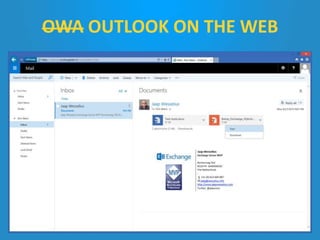
OWA OUTLOOK ON THE WEB
 Preferred Architecture
• Multi-Role servers (CAS/MBX on one box)
• Database Availability Group with multiple copies
• Including one lagged copy
• Hardware load balancer
• File Share Witness in 3rd datacenter (or Azure)
• JBOD storage
• Exchange Native Data Protection
• http://bit.ly/ExchangePA
EXCHANGE HISTORY
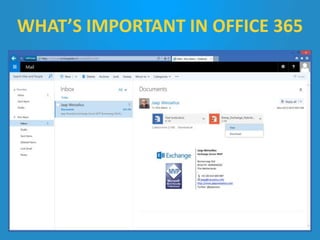
WHAT’S IMPORTANT IN OFFICE 365
 To be honest… Look at Exchange Online
 But without the Microsoft datacenter specific
features…
– Delve… Clutter… Groups…
 Et voila
SO, WHAT’S NEW
IN EXCHANGE 2016
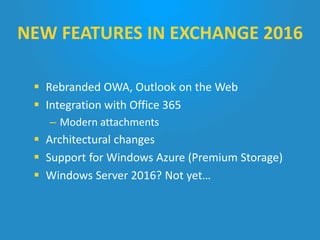
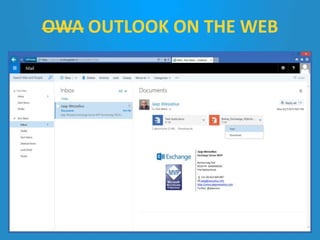
 Rebranded OWA, Outlook on the Web
 Integration with Office 365
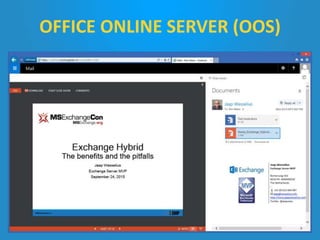
– Modern attachments
 Architectural changes
 Support for Windows Azure (Premium Storage)
 Windows Server 2016? Not yet…
NEW FEATURES IN EXCHANGE 2016
OWA OUTLOOK ON THE WEB
OFFICE ONLINE SERVER (OOS)
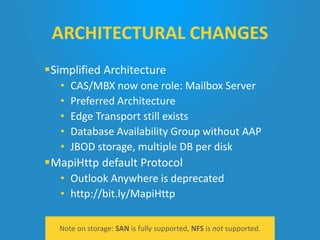
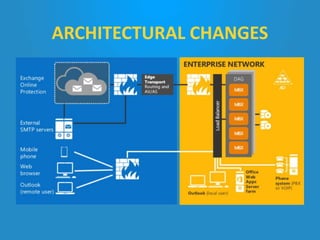
Simplified Architecture
• CAS/MBX now one role: Mailbox Server
• Preferred Architecture
• Edge Transport still exists
• Database Availability Group without AAP
• JBOD storage, multiple DB per disk
MapiHttp default Protocol
• Outlook Anywhere is deprecated
• http://bit.ly/MapiHttp
Note on storage: SAN is fully supported, NFS is not supported.
ARCHITECTURAL CHANGES
 Auto expanding Archive
 Coexistence with Exchange 2013
 Resilient File System (ReFS)
• Supported for Exchange 2013
• Recommended for Exchange 2016
 Check Michel’s blog: http://bit.ly/ExReFS
ARCHITECTURAL CHANGES
 Operating System:
• Windows 2012
and Windows 2012 R2
 Active Directory:
• Windows 2008 FFL & DFL
 Coexistence:
• Exchange 2010 SP3 RU11
or higher
• Exchange 2013 CU10 or
higher
SUPPORT AND PREREQUISITES
 Clients:
• Outlook 2010 SP2
or higher
• Outlook for Mac 2011
or higher
• MAPI/CDO no longer
supported!!
 Use the Requirements Calculator
• Latest version supports 2013 and 2016
• http://bit.ly/ExCalculator
 Use Exchange 2013 Jetstress
• Replace ESE DLLs with Exchange 2016 version
 Use Layer 7 (hardware) load balancer
• http://bit.ly/LB2016
 Use Michel de Rooij’s install script:
http://bit.ly/UnAttended
BEST PRACTICES
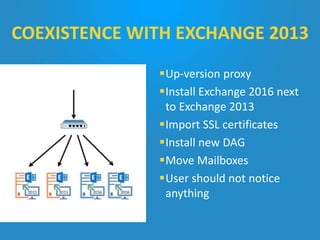
Up-version proxy
Install Exchange 2016 next
to Exchange 2013
Import SSL certificates
Install new DAG
Move Mailboxes
User should not notice
anything
COEXISTENCE WITH EXCHANGE 2013
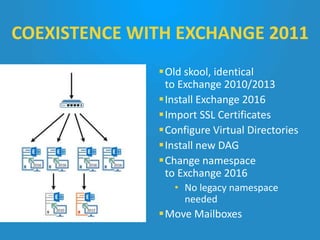
Old skool, identical
to Exchange 2010/2013
Install Exchange 2016
Import SSL Certificates
Configure Virtual Directories
Install new DAG
Change namespace
to Exchange 2016
• No legacy namespace
needed
Move Mailboxes
COEXISTENCE WITH EXCHANGE 2011
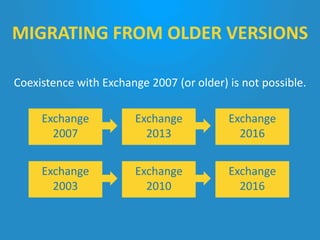
Coexistence with Exchange 2007 (or older) is not possible.
MIGRATING FROM OLDER VERSIONS
Exchange
2007
Exchange
2013
Exchange
2016
Exchange
2003
Exchange
2010
Exchange
2016
 Exchange 2016 is a minor upgrade (15.0  15.1)
 Will there be a new major version?
 Well, it depends…
 Customer demand is very important
 Next version will be 15.2
 No more SP, long live CU!
CRYSTAL BALL
 Exchange 2016 originates from the cloud
 New features like OotW, Modern Attachments or
unlimited Archive already available in O365
 Simplified Architecture comes from Preferred
Architecture
 Microsoft knows how to deploy Exchange
 Exchange 2013/2016 is easy
 Exchange 2010/2013 should be known
 Unknown future, but cloud will be more important
than ever
SUMMARY

What to expect with Microsoft Exchange 2016?

  • 1.
    WHAT TO EXPECTWITH EXCHANGE 2016 Jaap Wessealius Exchange Server MVP
  • 2.
    Jaap Wesselius Consultant, Author,Speaker Exchange MVP jaap@wesselius.info @jaapwess www.jaapwesselius.com INTRODUCTION
  • 3.
  • 4.
    Two different teamsat Microsoft Two different teams (and processes) for hotfixes Exchange 2007 BPOS Exchange 2010 Exchange 2010 Online MICROSOFT HAS A LONG HISTORY WITH HOSTING BACK TO 1997… EXCHANGE 2010 AND EXCHANGE 2010 ONLINE STARTED AS THE SAME BUILD
  • 5.
    EXCHANGE 2013 SERVICE MODELCHANGE Every 3 months a Cumulative Update (CU) Besides hotfixes, CU also brings new features
  • 6.
    All developments arein Exchange Online EXCHANGE 2013 WAS “BUILT FROM THE CLOUD UP” EXCHANGE ONLINE EXCHANGE ON-PREMISES 1st 2nd Continuous development, rolled out on regular basis • http://roadmap.office.com • http://bit.ly/ManagingUpdates - Managing Office 365 updates
  • 7.
    RTM Dec 2012 EXCHANGE SERVER2013 CU10 EXCHANGE SERVER 2013 CU9 EXCHANGE SERVER 2013 CU8 EXCHANGE SERVER 2013 CU7 EXCHANGE SERVER 2013 CU6 EXCHANGE SERVER 2013 CU5 EXCHANGE SERVER 2013 SP1 EXCHANGE SERVER 2013 CU3 EXCHANGE SERVER 2013 CU2 EXCHANGE SERVER 2013 CU1 Currently CU9/CU10 Hybrid: Only Current Version (CU10) RTM Dec 2012 EXCHANGE 2013 CU ROADMAP
  • 8.
  • 9.
     Preferred Architecture •Multi-Role servers (CAS/MBX on one box) • Database Availability Group with multiple copies • Including one lagged copy • Hardware load balancer • File Share Witness in 3rd datacenter (or Azure) • JBOD storage • Exchange Native Data Protection • http://bit.ly/ExchangePA EXCHANGE HISTORY
  • 10.
  • 11.
     To behonest… Look at Exchange Online  But without the Microsoft datacenter specific features… – Delve… Clutter… Groups…  Et voila SO, WHAT’S NEW IN EXCHANGE 2016
  • 12.
     Rebranded OWA,Outlook on the Web  Integration with Office 365 – Modern attachments  Architectural changes  Support for Windows Azure (Premium Storage)  Windows Server 2016? Not yet… NEW FEATURES IN EXCHANGE 2016
  • 13.
  • 14.
  • 15.
    Simplified Architecture • CAS/MBXnow one role: Mailbox Server • Preferred Architecture • Edge Transport still exists • Database Availability Group without AAP • JBOD storage, multiple DB per disk MapiHttp default Protocol • Outlook Anywhere is deprecated • http://bit.ly/MapiHttp Note on storage: SAN is fully supported, NFS is not supported. ARCHITECTURAL CHANGES
  • 16.
  • 17.
     Auto expandingArchive  Coexistence with Exchange 2013  Resilient File System (ReFS) • Supported for Exchange 2013 • Recommended for Exchange 2016  Check Michel’s blog: http://bit.ly/ExReFS ARCHITECTURAL CHANGES
  • 18.
     Operating System: •Windows 2012 and Windows 2012 R2  Active Directory: • Windows 2008 FFL & DFL  Coexistence: • Exchange 2010 SP3 RU11 or higher • Exchange 2013 CU10 or higher SUPPORT AND PREREQUISITES  Clients: • Outlook 2010 SP2 or higher • Outlook for Mac 2011 or higher • MAPI/CDO no longer supported!!
  • 19.
     Use theRequirements Calculator • Latest version supports 2013 and 2016 • http://bit.ly/ExCalculator  Use Exchange 2013 Jetstress • Replace ESE DLLs with Exchange 2016 version  Use Layer 7 (hardware) load balancer • http://bit.ly/LB2016  Use Michel de Rooij’s install script: http://bit.ly/UnAttended BEST PRACTICES
  • 20.
    Up-version proxy Install Exchange2016 next to Exchange 2013 Import SSL certificates Install new DAG Move Mailboxes User should not notice anything COEXISTENCE WITH EXCHANGE 2013
  • 21.
    Old skool, identical toExchange 2010/2013 Install Exchange 2016 Import SSL Certificates Configure Virtual Directories Install new DAG Change namespace to Exchange 2016 • No legacy namespace needed Move Mailboxes COEXISTENCE WITH EXCHANGE 2011
  • 22.
    Coexistence with Exchange2007 (or older) is not possible. MIGRATING FROM OLDER VERSIONS Exchange 2007 Exchange 2013 Exchange 2016 Exchange 2003 Exchange 2010 Exchange 2016
  • 23.
     Exchange 2016is a minor upgrade (15.0  15.1)  Will there be a new major version?  Well, it depends…  Customer demand is very important  Next version will be 15.2  No more SP, long live CU! CRYSTAL BALL
  • 24.
     Exchange 2016originates from the cloud  New features like OotW, Modern Attachments or unlimited Archive already available in O365  Simplified Architecture comes from Preferred Architecture  Microsoft knows how to deploy Exchange  Exchange 2013/2016 is easy  Exchange 2010/2013 should be known  Unknown future, but cloud will be more important than ever SUMMARY