@demandgen Copyright © 2015 | DemandGen® International, Inc.
Unlock the Power in Your
Marketo Programs
@demandgen Copyright © 2015 | DemandGen® International, Inc.
Welcome!
Your hosts for today’s session:
David Lewis
CEO
DemandGen
david.lewis@demandgen.com
Nova Kopitar
Sr. Solutions Architect
DemandGen
nova.kopitar@demandgen.com
@demandgen Copyright © 2015 | DemandGen® International, Inc.
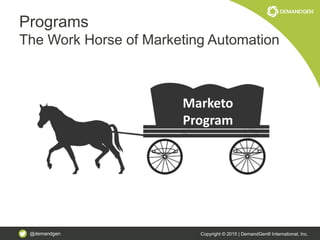
Programs
The Work Horse of Marketing Automation
Marketo
Program
@demandgen Copyright © 2015 | DemandGen® International, Inc.
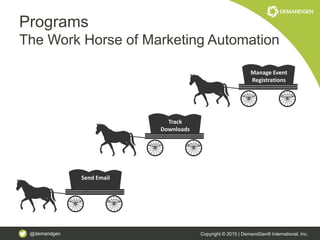
Programs
The Work Horse of Marketing Automation
Manage Event
Registrations
Track
Downloads
Send Email
@demandgen Copyright © 2015 | DemandGen® International, Inc.
More than a way to get from
Point A to Point B
@demandgen Copyright © 2015 | DemandGen® International, Inc.
Agenda
• How to leverage tokens and templates to support content creation
and design templates
• How to effectively use channels, tags and tracking campaigns to
deliver accurate program conversion and opportunity impact
reporting
• How to integrate marketing programs with global operational
programs for streamlined system setup and improved system
performance
• A phase-by-phase approach to applying best practices to your
current program setup
@demandgen Copyright © 2015 | DemandGen® International, Inc.
TOKENS & TEMPLATES
Unlock the Power in Your Marketo Programs
@demandgen Copyright © 2015 | DemandGen® International, Inc.
Tokens
More than Just a Way to Say Hello {{lead.First
Name}}
• Improve program engagement and
conversion
• Increase development efficiency
• More manageable program and system
maintenance
@demandgen Copyright © 2015 | DemandGen® International, Inc.
Tokens
Level One
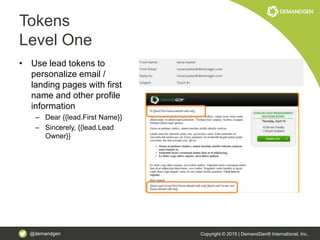
• Use lead tokens to
personalize email /
landing pages with first
name and other profile
information
– Dear {{lead.First Name}}
– Sincerely, {{lead.Lead
Owner}}
@demandgen Copyright © 2015 | DemandGen® International, Inc.
Tokens
Level Up
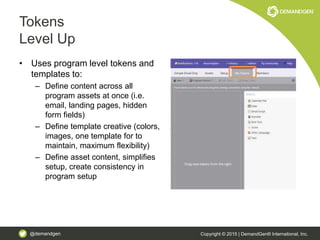
• Uses program level tokens and
templates to:
– Define content across all
program assets at once (i.e.
email, landing pages, hidden
form fields)
– Define template creative (colors,
images, one template for to
maintain, maximum flexibility)
– Define asset content, simplifies
setup, create consistency in
program setup
@demandgen Copyright © 2015 | DemandGen® International, Inc.
Example
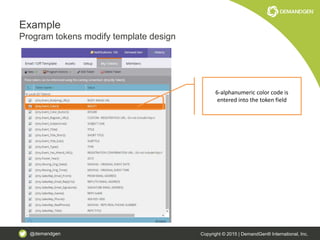
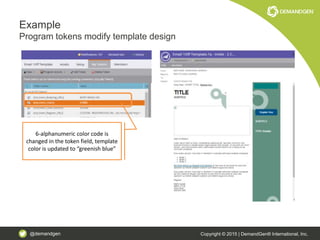
Program tokens modify template design
6-alphanumeric color code is
entered into the token field
@demandgen Copyright © 2015 | DemandGen® International, Inc.
Example
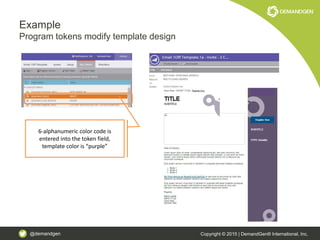
Program tokens modify template design
6-alphanumeric color code is
entered into the token field,
template color is “purple”
@demandgen Copyright © 2015 | DemandGen® International, Inc.
Example
Program tokens modify template design
6-alphanumeric color code is
changed in the token field, template
color is updated to “greenish blue”
@demandgen Copyright © 2015 | DemandGen® International, Inc.
Example
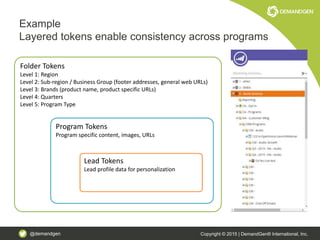
Layered tokens enable consistency across programs
Folder Tokens
Level 1: Region
Level 2: Sub-region / Business Group (footer addresses, general web URLs)
Level 3: Brands (product name, product specific URLs)
Level 4: Quarters
Level 5: Program Type
Program Tokens
Program specific content, images, URLs
Lead Tokens
Lead profile data for personalization
@demandgen Copyright © 2015 | DemandGen® International, Inc.
Example
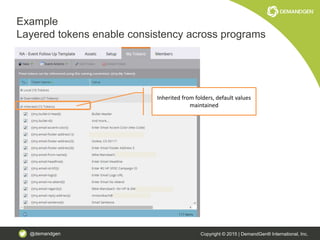
Layered tokens enable consistency across programs
Inherited from folders, default values
maintained
@demandgen Copyright © 2015 | DemandGen® International, Inc.
Example
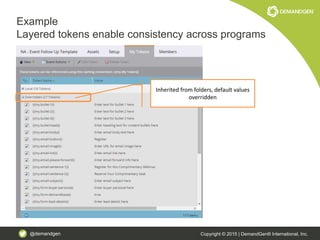
Layered tokens enable consistency across programs
Inherited from folders, default values
overridden
@demandgen Copyright © 2015 | DemandGen® International, Inc.
Example
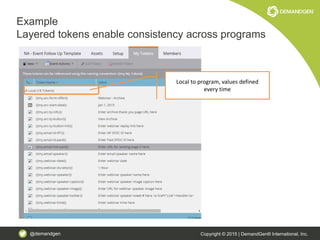
Layered tokens enable consistency across programs
Local to program, values defined
every time
@demandgen Copyright © 2015 | DemandGen® International, Inc.
Example
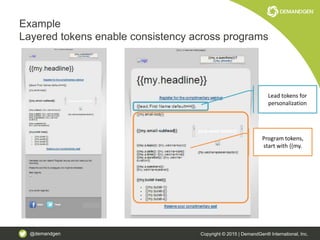
Layered tokens enable consistency across programs
Program tokens,
start with {{my.
Lead tokens for
personalization
@demandgen Copyright © 2015 | DemandGen® International, Inc.
Example
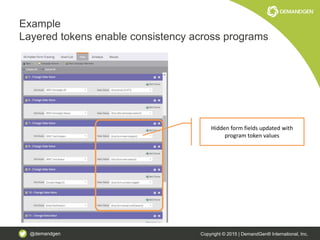
Layered tokens enable consistency across programs
Hidden form fields updated with
program token values
@demandgen Copyright © 2015 | DemandGen® International, Inc.
CHANNELS & TRACKING
CAMPAIGNS
Unlock the Power in Your Marketo Programs
@demandgen Copyright © 2015 | DemandGen® International, Inc.
Channels & Tracking Campaigns
The Keys to Insightful Reporting
• Track leads beyond standard, tactical measures
• Gain more insightful data to drive improved
decision making
– How many leads scored up to an MQL
– How many program members converted to
opportunities
@demandgen Copyright © 2015 | DemandGen® International, Inc.
Channels & Tracking Campaigns
Level One
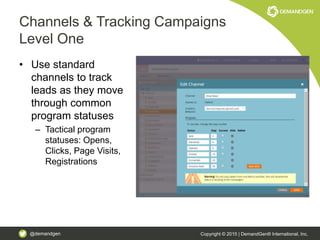
• Use standard
channels to track
leads as they move
through common
program statuses
– Tactical program
statuses: Opens,
Clicks, Page Visits,
Registrations
@demandgen Copyright © 2015 | DemandGen® International, Inc.
Channels & Tracking Campaigns
Level Up
• Leverage program channels and tracking
campaigns to:
– Track more strategic statuses (i.e. Lead
Conversion, Opportunities, MQLs)
– Enable reporting to measure program impact
on the lead lifecycle
@demandgen Copyright © 2015 | DemandGen® International, Inc.
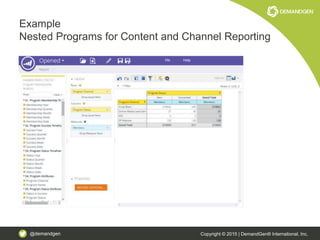
Example
Nested Programs for Content and Channel Reporting
@demandgen Copyright © 2015 | DemandGen® International, Inc.
Example
Nested Programs for Content and Channel Reporting
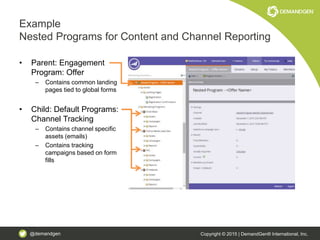
• Parent: Engagement
Program: Offer
– Contains common landing
pages tied to global forms
• Child: Default Programs:
Channel Tracking
– Contains channel specific
assets (emails)
– Contains tracking
campaigns based on form
fills
@demandgen Copyright © 2015 | DemandGen® International, Inc.
Example
Nested Programs for Content and Channel
Reporting
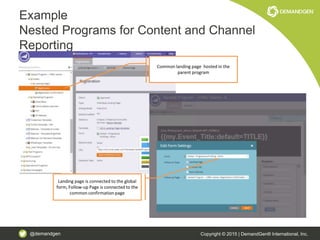
Common landing page hosted in the
parent program
Landing page is connected to the global
form, Follow-up Page is connected to the
common confirmation page
@demandgen Copyright © 2015 | DemandGen® International, Inc.
Example
Nested Programs for Content and Channel
Reporting
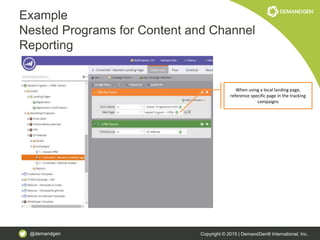
When using a local landing page,
reference specific page in the tracking
campaigns
@demandgen Copyright © 2015 | DemandGen® International, Inc.
Example
Nested Programs for Content and Channel Reporting
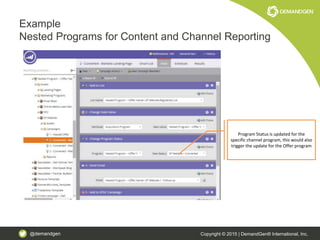
Program Status is updated for the
specific channel program, this would also
trigger the update for the Offer program
@demandgen Copyright © 2015 | DemandGen® International, Inc.
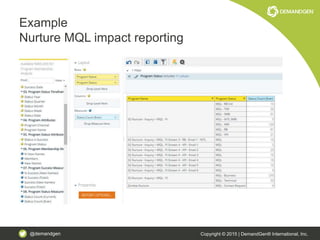
Example
Nurture MQL impact reporting
@demandgen Copyright © 2015 | DemandGen® International, Inc.
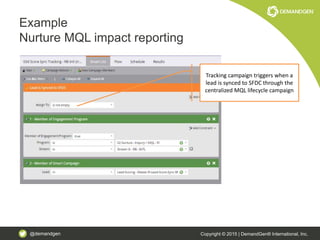
Example
Nurture MQL impact reporting
Tracking campaign triggers when a
lead is synced to SFDC through the
centralized MQL lifecycle campaign
@demandgen Copyright © 2015 | DemandGen® International, Inc.
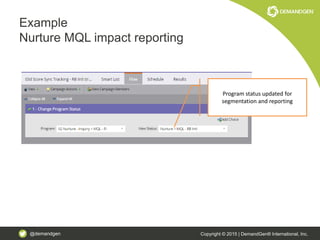
Example
Nurture MQL impact reporting
Program status updated for
segmentation and reporting
@demandgen Copyright © 2015 | DemandGen® International, Inc.
GLOBAL INTEGRATION
Unlock the Power in Your Marketo Programs
@demandgen Copyright © 2015 | DemandGen® International, Inc.
Global Integration
Streamline system setup and maintenance
• Centralize operational programs for
consistency
• Minimize number of unique assets that will
need to be maintained
• Ensure order of operations is followed
@demandgen Copyright © 2015 | DemandGen® International, Inc.
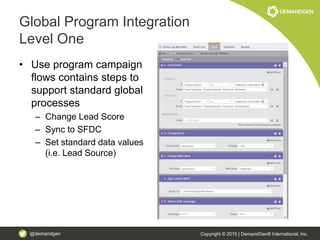
Global Program Integration
Level One
• Use program campaign
flows contains steps to
support standard global
processes
– Change Lead Score
– Sync to SFDC
– Set standard data values
(i.e. Lead Source)
@demandgen Copyright © 2015 | DemandGen® International, Inc.
Global Program Integration
Level Up
• Use programs to support centralized
global processes
– Lead Scoring
– Lead Lifecycle / Lead Routing
– Data Normalization
– Global Forms
@demandgen Copyright © 2015 | DemandGen® International, Inc.
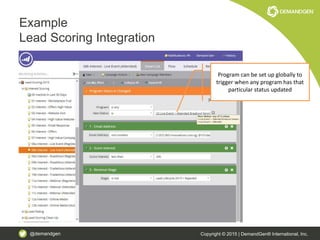
Example
Lead Scoring Integration
Program can be set up globally to
trigger when any program has that
particular status updated
@demandgen Copyright © 2015 | DemandGen® International, Inc.
Example
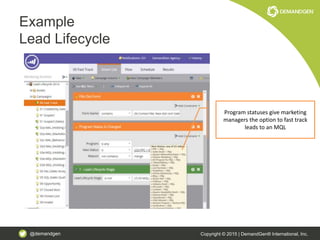
Lead Lifecycle
Program statuses give marketing
managers the option to fast track
leads to an MQL
@demandgen Copyright © 2015 | DemandGen® International, Inc.
Example
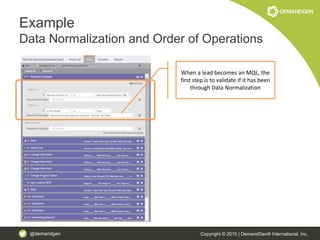
Data Normalization and Order of Operations
When a lead becomes an MQL, the
first step is to validate if it has been
through Data Normalization
@demandgen Copyright © 2015 | DemandGen® International, Inc.
Example
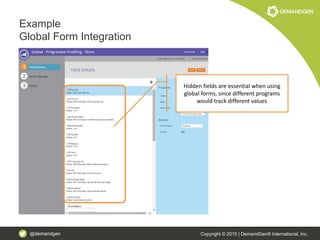
Global Form Integration
Hidden fields are essential when using
global forms, since different programs
would track different values
@demandgen Copyright © 2015 | DemandGen® International, Inc.
Example
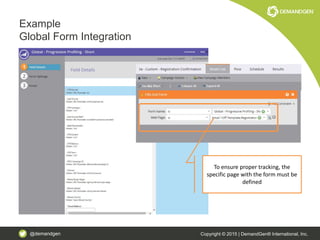
Global Form Integration
To ensure proper tracking, the
specific page with the form must be
defined
@demandgen Copyright © 2015 | DemandGen® International, Inc.
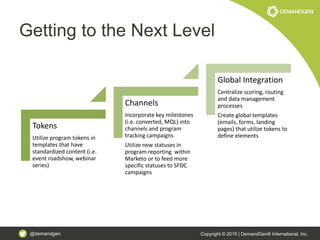
Getting to the Next Level
Tokens
Utilize program tokens in
templates that have
standardized content (i.e.
event roadshow, webinar
series)
Channels
Incorporate key milestones
(i.e. converted, MQL) into
channels and program
tracking campaigns
Utilize new statuses in
program reporting within
Marketo or to feed more
specific statuses to SFDC
campaigns
Global Integration
Centralize scoring, routing
and data management
processes
Create global templates
(emails, forms, landing
pages) that utilize tokens to
define elements
@demandgen Copyright © 2015 | DemandGen® International, Inc.
A
Q &
Thank You!
David Lewis
CEO
david.lewis@demandgen.com
Nova Kopitar
Sr. Solutions Architect
nova.kopitar@demandgen.com
@demandgen Copyright © 2015 | DemandGen® International, Inc.
APPENDIX
@demandgen Copyright © 2015 | DemandGen® International, Inc.
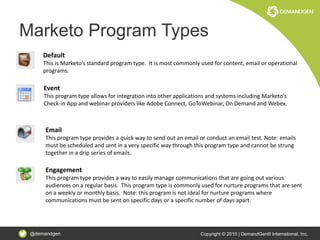
Marketo Program Types
Default
This is Marketo’s standard program type. It is most commonly used for content, email or operational
programs.
Event
This program type allows for integration into other applications and systems including Marketo’s
Check-in App and webinar providers like Adobe Connect, GoToWebinar, On Demand and Webex.
Email
This program type provides a quick way to send out an email or conduct an email test. Note: emails
must be scheduled and sent in a very specific way through this program type and cannot be strung
together in a drip series of emails.
Engagement
This program type provides a way to easily manage communications that are going out various
audiences on a regular basis. This program type is commonly used for nurture programs that are sent
on a weekly or monthly basis. Note: this program is not ideal for nurture programs where
communications must be sent on specific days or a specific number of days apart.
@demandgen Copyright © 2015 | DemandGen® International, Inc.
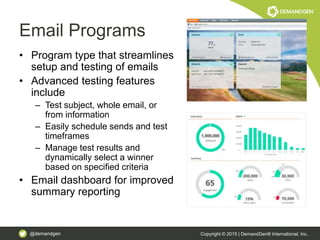
Email Programs
• Program type that streamlines
setup and testing of emails
• Advanced testing features
include
– Test subject, whole email, or
from information
– Easily schedule sends and test
timeframes
– Manage test results and
dynamically select a winner
based on specified criteria
• Email dashboard for improved
summary reporting
@demandgen Copyright © 2015 | DemandGen® International, Inc.
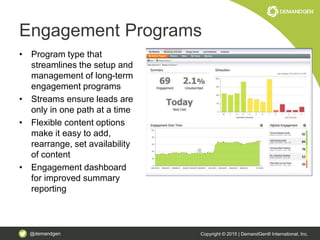
Engagement Programs
• Program type that
streamlines the setup and
management of long-term
engagement programs
• Streams ensure leads are
only in one path at a time
• Flexible content options
make it easy to add,
rearrange, set availability
of content
• Engagement dashboard
for improved summary
reporting
@demandgen Copyright © 2015 | DemandGen® International, Inc.
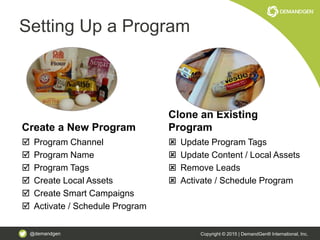
Setting Up a Program
Create a New Program
 Program Channel
 Program Name
 Program Tags
 Create Local Assets
 Create Smart Campaigns
 Activate / Schedule Program
Clone an Existing
Program
 Update Program Tags
 Update Content / Local Assets
 Remove Leads
 Activate / Schedule Program
@demandgen Copyright © 2015 | DemandGen® International, Inc.
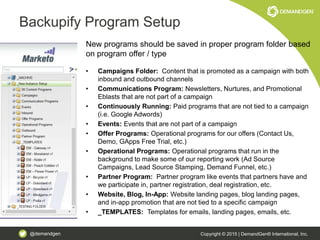
Backupify Program Setup
New programs should be saved in proper program folder based
on program offer / type
• Campaigns Folder: Content that is promoted as a campaign with both
inbound and outbound channels
• Communications Program: Newsletters, Nurtures, and Promotional
Eblasts that are not part of a campaign
• Continuously Running: Paid programs that are not tied to a campaign
(i.e. Google Adwords)
• Events: Events that are not part of a campaign
• Offer Programs: Operational programs for our offers (Contact Us,
Demo, GApps Free Trial, etc.)
• Operational Programs: Operational programs that run in the
background to make some of our reporting work (Ad Source
Campaigns, Lead Source Stamping, Demand Funnel, etc.)
• Partner Program: Partner program like events that partners have and
we participate in, partner registration, deal registration, etc.
• Website, Blog, In-App: Website landing pages, blog landing pages,
and in-app promotion that are not tied to a specific campaign
• _TEMPLATES: Templates for emails, landing pages, emails, etc.
@demandgen Copyright © 2015 | DemandGen® International, Inc.
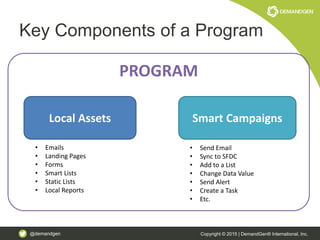
Key Components of a Program
Local Assets Smart Campaigns
PROGRAM
• Emails
• Landing Pages
• Forms
• Smart Lists
• Static Lists
• Local Reports
• Send Email
• Sync to SFDC
• Add to a List
• Change Data Value
• Send Alert
• Create a Task
• Etc.
@demandgen Copyright © 2015 | DemandGen® International, Inc.
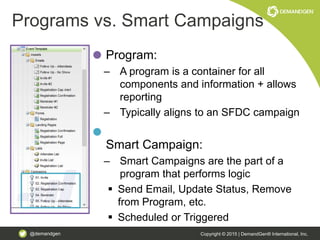
Program:
– A program is a container for all
components and information + allows
reporting
– Typically aligns to an SFDC campaign
Smart Campaign:
– Smart Campaigns are the part of a
program that performs logic
 Send Email, Update Status, Remove
from Program, etc.
 Scheduled or Triggered
Programs vs. Smart Campaigns
@demandgen Copyright © 2015 | DemandGen® International, Inc.
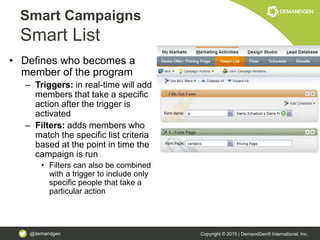
• Defines who becomes a
member of the program
– Triggers: in real-time will add
members that take a specific
action after the trigger is
activated
– Filters: adds members who
match the specific list criteria
based at the point in time the
campaign is run
• Filters can also be combined
with a trigger to include only
specific people that take a
particular action
Smart Campaigns
Smart List
@demandgen Copyright © 2015 | DemandGen® International, Inc.
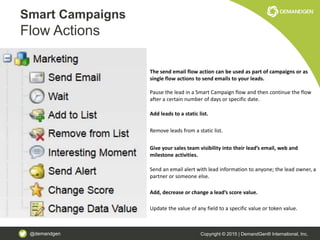
Smart Campaigns
Flow Actions
The send email flow action can be used as part of campaigns or as
single flow actions to send emails to your leads.
Pause the lead in a Smart Campaign flow and then continue the flow
after a certain number of days or specific date.
Add leads to a static list.
Remove leads from a static list.
Give your sales team visibility into their lead’s email, web and
milestone activities.
Send an email alert with lead information to anyone; the lead owner, a
partner or someone else.
Add, decrease or change a lead’s score value.
Update the value of any field to a specific value or token value.
@demandgen Copyright © 2015 | DemandGen® International, Inc.
Smart Campaigns
Flow Actions
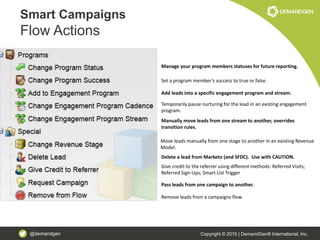
Manage your program members statuses for future reporting.
Set a program member’s success to true or false.
Add leads into a specific engagement program and stream.
Temporarily pause nurturing for the lead in an existing engagement
program.
Delete a lead from Marketo (and SFDC). Use with CAUTION.
Give credit to the referrer using different methods: Referred Visits;
Referred Sign-Ups; Smart List Trigger
Pass leads from one campaign to another.
Remove leads from a campaigns flow.
Move leads manually from one stage to another in an existing Revenue
Model.
Manually move leads from one stream to another, overrides
transition rules.
@demandgen Copyright © 2015 | DemandGen® International, Inc.
Smart Campaigns
Flow Actions
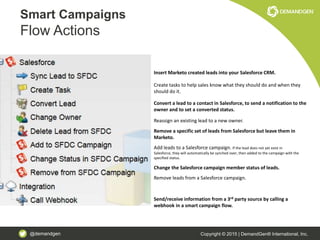
Insert Marketo created leads into your Salesforce CRM.
Create tasks to help sales know what they should do and when they
should do it.
Convert a lead to a contact in Salesforce, to send a notification to the
owner and to set a converted status.
Reassign an existing lead to a new owner.
Remove a specific set of leads from Salesforce but leave them in
Marketo.
Add leads to a Salesforce campaign. If the lead does not yet exist in
Salesforce, they will automatically be synched over, then added to the campaign with the
specified status.
Change the Salesforce campaign member status of leads.
Remove leads from a Salesforce campaign.
Send/receive information from a 3rd party source by calling a
webhook in a smart campaign flow.
@demandgen Copyright © 2015 | DemandGen® International, Inc.
Smart Campaigns
Schedule
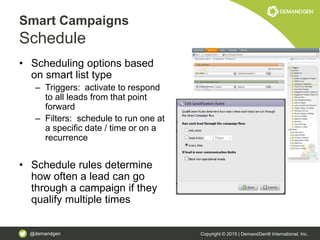
• Scheduling options based
on smart list type
– Triggers: activate to respond
to all leads from that point
forward
– Filters: schedule to run one at
a specific date / time or on a
recurrence
• Schedule rules determine
how often a lead can go
through a campaign if they
qualify multiple times

Unlock the Power in Your Marketo Programs

  • 1.
    @demandgen Copyright ©2015 | DemandGen® International, Inc. Unlock the Power in Your Marketo Programs
  • 2.
    @demandgen Copyright ©2015 | DemandGen® International, Inc. Welcome! Your hosts for today’s session: David Lewis CEO DemandGen david.lewis@demandgen.com Nova Kopitar Sr. Solutions Architect DemandGen nova.kopitar@demandgen.com
  • 3.
    @demandgen Copyright ©2015 | DemandGen® International, Inc. Programs The Work Horse of Marketing Automation Marketo Program
  • 4.
    @demandgen Copyright ©2015 | DemandGen® International, Inc. Programs The Work Horse of Marketing Automation Manage Event Registrations Track Downloads Send Email
  • 5.
    @demandgen Copyright ©2015 | DemandGen® International, Inc. More than a way to get from Point A to Point B
  • 6.
    @demandgen Copyright ©2015 | DemandGen® International, Inc. Agenda • How to leverage tokens and templates to support content creation and design templates • How to effectively use channels, tags and tracking campaigns to deliver accurate program conversion and opportunity impact reporting • How to integrate marketing programs with global operational programs for streamlined system setup and improved system performance • A phase-by-phase approach to applying best practices to your current program setup
  • 7.
    @demandgen Copyright ©2015 | DemandGen® International, Inc. TOKENS & TEMPLATES Unlock the Power in Your Marketo Programs
  • 8.
    @demandgen Copyright ©2015 | DemandGen® International, Inc. Tokens More than Just a Way to Say Hello {{lead.First Name}} • Improve program engagement and conversion • Increase development efficiency • More manageable program and system maintenance
  • 9.
    @demandgen Copyright ©2015 | DemandGen® International, Inc. Tokens Level One • Use lead tokens to personalize email / landing pages with first name and other profile information – Dear {{lead.First Name}} – Sincerely, {{lead.Lead Owner}}
  • 10.
    @demandgen Copyright ©2015 | DemandGen® International, Inc. Tokens Level Up • Uses program level tokens and templates to: – Define content across all program assets at once (i.e. email, landing pages, hidden form fields) – Define template creative (colors, images, one template for to maintain, maximum flexibility) – Define asset content, simplifies setup, create consistency in program setup
  • 11.
    @demandgen Copyright ©2015 | DemandGen® International, Inc. Example Program tokens modify template design 6-alphanumeric color code is entered into the token field
  • 12.
    @demandgen Copyright ©2015 | DemandGen® International, Inc. Example Program tokens modify template design 6-alphanumeric color code is entered into the token field, template color is “purple”
  • 13.
    @demandgen Copyright ©2015 | DemandGen® International, Inc. Example Program tokens modify template design 6-alphanumeric color code is changed in the token field, template color is updated to “greenish blue”
  • 14.
    @demandgen Copyright ©2015 | DemandGen® International, Inc. Example Layered tokens enable consistency across programs Folder Tokens Level 1: Region Level 2: Sub-region / Business Group (footer addresses, general web URLs) Level 3: Brands (product name, product specific URLs) Level 4: Quarters Level 5: Program Type Program Tokens Program specific content, images, URLs Lead Tokens Lead profile data for personalization
  • 15.
    @demandgen Copyright ©2015 | DemandGen® International, Inc. Example Layered tokens enable consistency across programs Inherited from folders, default values maintained
  • 16.
    @demandgen Copyright ©2015 | DemandGen® International, Inc. Example Layered tokens enable consistency across programs Inherited from folders, default values overridden
  • 17.
    @demandgen Copyright ©2015 | DemandGen® International, Inc. Example Layered tokens enable consistency across programs Local to program, values defined every time
  • 18.
    @demandgen Copyright ©2015 | DemandGen® International, Inc. Example Layered tokens enable consistency across programs Program tokens, start with {{my. Lead tokens for personalization
  • 19.
    @demandgen Copyright ©2015 | DemandGen® International, Inc. Example Layered tokens enable consistency across programs Hidden form fields updated with program token values
  • 20.
    @demandgen Copyright ©2015 | DemandGen® International, Inc. CHANNELS & TRACKING CAMPAIGNS Unlock the Power in Your Marketo Programs
  • 21.
    @demandgen Copyright ©2015 | DemandGen® International, Inc. Channels & Tracking Campaigns The Keys to Insightful Reporting • Track leads beyond standard, tactical measures • Gain more insightful data to drive improved decision making – How many leads scored up to an MQL – How many program members converted to opportunities
  • 22.
    @demandgen Copyright ©2015 | DemandGen® International, Inc. Channels & Tracking Campaigns Level One • Use standard channels to track leads as they move through common program statuses – Tactical program statuses: Opens, Clicks, Page Visits, Registrations
  • 23.
    @demandgen Copyright ©2015 | DemandGen® International, Inc. Channels & Tracking Campaigns Level Up • Leverage program channels and tracking campaigns to: – Track more strategic statuses (i.e. Lead Conversion, Opportunities, MQLs) – Enable reporting to measure program impact on the lead lifecycle
  • 24.
    @demandgen Copyright ©2015 | DemandGen® International, Inc. Example Nested Programs for Content and Channel Reporting
  • 25.
    @demandgen Copyright ©2015 | DemandGen® International, Inc. Example Nested Programs for Content and Channel Reporting • Parent: Engagement Program: Offer – Contains common landing pages tied to global forms • Child: Default Programs: Channel Tracking – Contains channel specific assets (emails) – Contains tracking campaigns based on form fills
  • 26.
    @demandgen Copyright ©2015 | DemandGen® International, Inc. Example Nested Programs for Content and Channel Reporting Common landing page hosted in the parent program Landing page is connected to the global form, Follow-up Page is connected to the common confirmation page
  • 27.
    @demandgen Copyright ©2015 | DemandGen® International, Inc. Example Nested Programs for Content and Channel Reporting When using a local landing page, reference specific page in the tracking campaigns
  • 28.
    @demandgen Copyright ©2015 | DemandGen® International, Inc. Example Nested Programs for Content and Channel Reporting Program Status is updated for the specific channel program, this would also trigger the update for the Offer program
  • 29.
    @demandgen Copyright ©2015 | DemandGen® International, Inc. Example Nurture MQL impact reporting
  • 30.
    @demandgen Copyright ©2015 | DemandGen® International, Inc. Example Nurture MQL impact reporting Tracking campaign triggers when a lead is synced to SFDC through the centralized MQL lifecycle campaign
  • 31.
    @demandgen Copyright ©2015 | DemandGen® International, Inc. Example Nurture MQL impact reporting Program status updated for segmentation and reporting
  • 32.
    @demandgen Copyright ©2015 | DemandGen® International, Inc. GLOBAL INTEGRATION Unlock the Power in Your Marketo Programs
  • 33.
    @demandgen Copyright ©2015 | DemandGen® International, Inc. Global Integration Streamline system setup and maintenance • Centralize operational programs for consistency • Minimize number of unique assets that will need to be maintained • Ensure order of operations is followed
  • 34.
    @demandgen Copyright ©2015 | DemandGen® International, Inc. Global Program Integration Level One • Use program campaign flows contains steps to support standard global processes – Change Lead Score – Sync to SFDC – Set standard data values (i.e. Lead Source)
  • 35.
    @demandgen Copyright ©2015 | DemandGen® International, Inc. Global Program Integration Level Up • Use programs to support centralized global processes – Lead Scoring – Lead Lifecycle / Lead Routing – Data Normalization – Global Forms
  • 36.
    @demandgen Copyright ©2015 | DemandGen® International, Inc. Example Lead Scoring Integration Program can be set up globally to trigger when any program has that particular status updated
  • 37.
    @demandgen Copyright ©2015 | DemandGen® International, Inc. Example Lead Lifecycle Program statuses give marketing managers the option to fast track leads to an MQL
  • 38.
    @demandgen Copyright ©2015 | DemandGen® International, Inc. Example Data Normalization and Order of Operations When a lead becomes an MQL, the first step is to validate if it has been through Data Normalization
  • 39.
    @demandgen Copyright ©2015 | DemandGen® International, Inc. Example Global Form Integration Hidden fields are essential when using global forms, since different programs would track different values
  • 40.
    @demandgen Copyright ©2015 | DemandGen® International, Inc. Example Global Form Integration To ensure proper tracking, the specific page with the form must be defined
  • 41.
    @demandgen Copyright ©2015 | DemandGen® International, Inc. Getting to the Next Level Tokens Utilize program tokens in templates that have standardized content (i.e. event roadshow, webinar series) Channels Incorporate key milestones (i.e. converted, MQL) into channels and program tracking campaigns Utilize new statuses in program reporting within Marketo or to feed more specific statuses to SFDC campaigns Global Integration Centralize scoring, routing and data management processes Create global templates (emails, forms, landing pages) that utilize tokens to define elements
  • 42.
    @demandgen Copyright ©2015 | DemandGen® International, Inc. A Q & Thank You! David Lewis CEO david.lewis@demandgen.com Nova Kopitar Sr. Solutions Architect nova.kopitar@demandgen.com
  • 43.
    @demandgen Copyright ©2015 | DemandGen® International, Inc. APPENDIX
  • 44.
    @demandgen Copyright ©2015 | DemandGen® International, Inc. Marketo Program Types Default This is Marketo’s standard program type. It is most commonly used for content, email or operational programs. Event This program type allows for integration into other applications and systems including Marketo’s Check-in App and webinar providers like Adobe Connect, GoToWebinar, On Demand and Webex. Email This program type provides a quick way to send out an email or conduct an email test. Note: emails must be scheduled and sent in a very specific way through this program type and cannot be strung together in a drip series of emails. Engagement This program type provides a way to easily manage communications that are going out various audiences on a regular basis. This program type is commonly used for nurture programs that are sent on a weekly or monthly basis. Note: this program is not ideal for nurture programs where communications must be sent on specific days or a specific number of days apart.
  • 45.
    @demandgen Copyright ©2015 | DemandGen® International, Inc. Email Programs • Program type that streamlines setup and testing of emails • Advanced testing features include – Test subject, whole email, or from information – Easily schedule sends and test timeframes – Manage test results and dynamically select a winner based on specified criteria • Email dashboard for improved summary reporting
  • 46.
    @demandgen Copyright ©2015 | DemandGen® International, Inc. Engagement Programs • Program type that streamlines the setup and management of long-term engagement programs • Streams ensure leads are only in one path at a time • Flexible content options make it easy to add, rearrange, set availability of content • Engagement dashboard for improved summary reporting
  • 47.
    @demandgen Copyright ©2015 | DemandGen® International, Inc. Setting Up a Program Create a New Program  Program Channel  Program Name  Program Tags  Create Local Assets  Create Smart Campaigns  Activate / Schedule Program Clone an Existing Program  Update Program Tags  Update Content / Local Assets  Remove Leads  Activate / Schedule Program
  • 48.
    @demandgen Copyright ©2015 | DemandGen® International, Inc. Backupify Program Setup New programs should be saved in proper program folder based on program offer / type • Campaigns Folder: Content that is promoted as a campaign with both inbound and outbound channels • Communications Program: Newsletters, Nurtures, and Promotional Eblasts that are not part of a campaign • Continuously Running: Paid programs that are not tied to a campaign (i.e. Google Adwords) • Events: Events that are not part of a campaign • Offer Programs: Operational programs for our offers (Contact Us, Demo, GApps Free Trial, etc.) • Operational Programs: Operational programs that run in the background to make some of our reporting work (Ad Source Campaigns, Lead Source Stamping, Demand Funnel, etc.) • Partner Program: Partner program like events that partners have and we participate in, partner registration, deal registration, etc. • Website, Blog, In-App: Website landing pages, blog landing pages, and in-app promotion that are not tied to a specific campaign • _TEMPLATES: Templates for emails, landing pages, emails, etc.
  • 49.
    @demandgen Copyright ©2015 | DemandGen® International, Inc. Key Components of a Program Local Assets Smart Campaigns PROGRAM • Emails • Landing Pages • Forms • Smart Lists • Static Lists • Local Reports • Send Email • Sync to SFDC • Add to a List • Change Data Value • Send Alert • Create a Task • Etc.
  • 50.
    @demandgen Copyright ©2015 | DemandGen® International, Inc. Program: – A program is a container for all components and information + allows reporting – Typically aligns to an SFDC campaign Smart Campaign: – Smart Campaigns are the part of a program that performs logic  Send Email, Update Status, Remove from Program, etc.  Scheduled or Triggered Programs vs. Smart Campaigns
  • 51.
    @demandgen Copyright ©2015 | DemandGen® International, Inc. • Defines who becomes a member of the program – Triggers: in real-time will add members that take a specific action after the trigger is activated – Filters: adds members who match the specific list criteria based at the point in time the campaign is run • Filters can also be combined with a trigger to include only specific people that take a particular action Smart Campaigns Smart List
  • 52.
    @demandgen Copyright ©2015 | DemandGen® International, Inc. Smart Campaigns Flow Actions The send email flow action can be used as part of campaigns or as single flow actions to send emails to your leads. Pause the lead in a Smart Campaign flow and then continue the flow after a certain number of days or specific date. Add leads to a static list. Remove leads from a static list. Give your sales team visibility into their lead’s email, web and milestone activities. Send an email alert with lead information to anyone; the lead owner, a partner or someone else. Add, decrease or change a lead’s score value. Update the value of any field to a specific value or token value.
  • 53.
    @demandgen Copyright ©2015 | DemandGen® International, Inc. Smart Campaigns Flow Actions Manage your program members statuses for future reporting. Set a program member’s success to true or false. Add leads into a specific engagement program and stream. Temporarily pause nurturing for the lead in an existing engagement program. Delete a lead from Marketo (and SFDC). Use with CAUTION. Give credit to the referrer using different methods: Referred Visits; Referred Sign-Ups; Smart List Trigger Pass leads from one campaign to another. Remove leads from a campaigns flow. Move leads manually from one stage to another in an existing Revenue Model. Manually move leads from one stream to another, overrides transition rules.
  • 54.
    @demandgen Copyright ©2015 | DemandGen® International, Inc. Smart Campaigns Flow Actions Insert Marketo created leads into your Salesforce CRM. Create tasks to help sales know what they should do and when they should do it. Convert a lead to a contact in Salesforce, to send a notification to the owner and to set a converted status. Reassign an existing lead to a new owner. Remove a specific set of leads from Salesforce but leave them in Marketo. Add leads to a Salesforce campaign. If the lead does not yet exist in Salesforce, they will automatically be synched over, then added to the campaign with the specified status. Change the Salesforce campaign member status of leads. Remove leads from a Salesforce campaign. Send/receive information from a 3rd party source by calling a webhook in a smart campaign flow.
  • 55.
    @demandgen Copyright ©2015 | DemandGen® International, Inc. Smart Campaigns Schedule • Scheduling options based on smart list type – Triggers: activate to respond to all leads from that point forward – Filters: schedule to run one at a specific date / time or on a recurrence • Schedule rules determine how often a lead can go through a campaign if they qualify multiple times